Category: Tutorials

  • Change Dictionary Items

    Change Dictionary Items

    Changing dictionary items in Python refers to modifying the values associated with specific keys within a dictionary. This can involve updating the value of an existing key, adding a new key-value pair, or removing a key-value pair from the dictionary.

    Dictionaries are mutable, meaning their contents can be modified after they are created.

    Modifying Dictionary Values

    Modifying values in a Python dictionary refers to changing the value associated with an existing key. To achieve this, you can directly assign a new value to that key.

    Example

    In the following example, we are defining a dictionary named “person” with keys ‘name’, ‘age’, and ‘city’ and their corresponding values. Then, we modify the value associated with the key ‘age’ to 26 −

    Open Compiler

    # Initial dictionary
    person ={'name':'Alice','age':25,'city':'New York'}# Modifying the value associated with the key 'age'
    person['age']=26print(person)

    It will produce the following output −

    {'name': 'Alice', 'age': 26, 'city': 'New York'}
    

    Learn Python in-depth with real-world projects through our Python certification course. Enroll and become a certified expert to boost your career.

    Updating Multiple Dictionary Values

    If you need to update multiple values in a dictionary at once, you can use the update() method. This method is used to update a dictionary with elements from another dictionary or an iterable of key-value pairs.

    The update() method adds the key-value pairs from the provided dictionary or iterable to the original dictionary, overwriting any existing keys with the new values if they already exist in the original dictionary.

    Example

    In the example below, we are using the update() method to modify the values associated with the keys ‘age’ and ‘city’ in the ‘persons’ dictionary −

    Open Compiler

    # Initial dictionary
    person ={'name':'Alice','age':25,'city':'New York'}# Updating multiple values
    person.update({'age':26,'city':'Los Angeles'})print(person)

    We get the output as shown below −

    {'name': 'Alice', 'age': 26, 'city': 'Los Angeles'}
    

    Conditional Dictionary Modification

    Conditional modification in a Python dictionary refers to changing the value associated with a key only if a certain condition is met.

    You can use an if statement to check whether a certain condition is true before modifying the value associated with a key.

    Example

    In this example, we conditionally modify the value associated with the key ‘age’ to ’26’ if the current value is ’25’ in the ‘persons’ dictionary −

    Open Compiler

    # Initial dictionary
    person ={'name':'Alice','age':25,'city':'New York'}# Conditionally modifying the value associated with 'age'if person['age']==25:
       person['age']=26print(person)

    The output obtained is as shown below −

    {'name': 'Alice', 'age': 26, 'city': 'New York'}
    

    Modify Dictionary by Adding New Key-Value Pairs

    Adding new key-value pairs to a Python dictionary refers to inserting a new key along with its corresponding value into the dictionary.

    This process allows you to dynamically expand the data stored in the dictionary by including additional information as needed.

    Example: Using Assignment Operator

    You can add a new key-value pair to a dictionary by directly assigning a value to a new key as shown below. In the example below, the key ‘city’ with the value ‘New York’ is added to the ‘person’ dictionary −

    Open Compiler

    # Initial dictionary
    person ={'name':'Alice','age':25}# Adding a new key-value pair 'city': 'New York'
    person['city']='New York'print(person)

    The result produced is as follows −

    {'name': 'Alice', 'age': 25, 'city': 'New York'}
    

    Example: Using the setdefault() Method

    You can use the setdefault() method to add a new key-value pair to a dictionary if the key does not already exist.

    In this example, the setdefault() method adds the new key ‘city’ with the value ‘New York’ to the ‘person’ dictionary only if the key ‘city’ does not already exist −

    Open Compiler

    # Initial dictionary
    person ={'name':'Alice','age':25}# Adding a new key-value pair 'city': 'New York'
    person.setdefault('city','New York')print(person)

    Following is the output of the above code −

    {'name': 'Alice', 'age': 25, 'city': 'New York'}
    

    Modify Dictionary by Removing Key-Value Pairs

    Removing key-value pairs from a Python dictionary refers to deleting specific keys along with their corresponding values from the dictionary.

    This process allows you to selectively remove data from the dictionary based on the keys you want to eliminate.

    Example: Using the del Statement

    You can use the del statement to remove a specific key-value pair from a dictionary. In this example, the del statement removes the key ‘age’ along with its associated value from the ‘person’ dictionary −

    Open Compiler

    # Initial dictionary
    person ={'name':'Alice','age':25,'city':'New York'}# Removing the key-value pair associated with the key 'age'del person['age']print(person)

    Output of the above code is as shown below −

    {'name': 'Alice', 'city': 'New York'}
    

    Example: Using the pop() Method

    You can also use the pop() method to remove a specific key-value pair from a dictionary and return the value associated with the removed key.

    In here, the pop() method removes the key ‘age’ along with its associated value from the ‘person’ dictionary −

    Open Compiler

    # Initial dictionary
    person ={'name':'Alice','age':25,'city':'New York'}# Removing the key-value pair associated with the key 'age'
    removed_age = person.pop('age')print(person)print("Removed age:", removed_age)

    It will produce the following output −

    {'name': 'Alice', 'city': 'New York'}
    Removed age: 25
    

    Example: Using the popitem() Method

    You can use the popitem() method as well to remove the last key-value pair from a dictionary and return it as a tuple.

    Now, the popitem() method removes the last key-value pair from the ‘person’ dictionary and returns it as a tuple −

    Open Compiler

    # Initial dictionary
    person ={'name':'Alice','age':25,'city':'New York'}# Removing the last key-value pair 
    removed_item = person.popitem()print(person)print("Removed item:", removed_item)

    We get the output as shown below −

    {'name': 'Alice', 'age': 25}
    Removed item: ('city', 'New York')
  • Access Dictionary Items

    Access Dictionary Items

    Accessing dictionary items in Python involves retrieving the values associated with specific keys within a dictionary data structure. Dictionaries are composed of key-value pairs, where each key is unique and maps to a corresponding value. Accessing dictionary items allows you to retrieve these values by providing the respective keys.

    There are various ways to access dictionary items in Python. They include −

    • Using square brackets []
    • The get() method
    • Iterating through the dictionary using loops
    • Or specific methods like keys(), values(), and items()

    We will discuss each method in detail to understand how to access and retrieve data from dictionaries.

    Access Dictionary Items Using Square Brackets []

    In Python, the square brackets [] are used for creating lists, accessing elements from a list or other iterable objects (like strings, tuples, or dictionaries), and for list comprehension.

    We can access dictionary items using square brackets by providing the key inside the brackets. This retrieves the value associated with the specified key.

    Example 1

    In the following example, we are defining a dictionary named “capitals” where each key represents a state and its corresponding value represents the capital city.

    Then, we access and retrieve the capital cities of Gujarat and Karnataka using their respective keys ‘Gujarat’ and ‘Karnataka’ from the dictionary −

    Open Compiler

    capitals ={"Maharashtra":"Mumbai","Gujarat":"Gandhinagar","Telangana":"Hyderabad","Karnataka":"Bengaluru"}print("Capital of Gujarat is : ", capitals['Gujarat'])print("Capital of Karnataka is : ", capitals['Karnataka'])

    It will produce the following output −

    Capital of Gujarat is: Gandhinagar
    Capital of Karnataka is: Bengaluru
    

    Example 2

    Python raises a KeyError if the key given inside the square brackets is not present in the dictionary object −

    Open Compiler

    capitals ={"Maharashtra":"Mumbai","Gujarat":"Gandhinagar","Telangana":"Hyderabad","Karnataka":"Bengaluru"}print("Captial of Haryana is : ", capitals['Haryana'])

    Following is the error obtained −

       print ("Captial of Haryana is : ", capitals['Haryana'])
    
                                      ~~~~~~~~^^^^^^^^^^^
    KeyError: 'Haryana'

    Learn Python in-depth with real-world projects through our Python certification course. Enroll and become a certified expert to boost your career.

    Access Dictionary Items Using get() Method

    The get() method in Python’s dict class is used to retrieve the value associated with a specified key. If the key is not found in the dictionary, it returns a default value (usually None) instead of raising a KeyError.

    We can access dictionary items using the get() method by specifying the key as an argument. If the key exists in the dictionary, the method returns the associated value; otherwise, it returns a default value, which is often None unless specified otherwise.

    Syntax

    Following is the syntax of the get() method in Python −

    Val =dict.get("key")

    where, key is an immutable object used as key in the dictionary object.

    Example 1

    In the example below, we are defining a dictionary named “capitals” where each key-value pair maps a state to its capital city. Then, we use the get() method to retrieve the capital cities of “Gujarat” and “Karnataka” −

    Open Compiler

    capitals ={"Maharashtra":"Mumbai","Gujarat":"Gandhinagar","Telangana":"Hyderabad","Karnataka":"Bengaluru"}print("Capital of Gujarat is: ", capitals.get('Gujarat'))print("Capital of Karnataka is: ", capitals.get('Karnataka'))

    We get the output as shown below −

    Capital of Gujarat is: Gandhinagar
    Capital of Karnataka is: Bengaluru
    

    Example 2

    Unlike the “[]” operator, the get() method doesn’t raise error if the key is not found; it return None −

    Open Compiler

    capitals ={"Maharashtra":"Mumbai","Gujarat":"Gandhinagar","Telangana":"Hyderabad","Karnataka":"Bengaluru"}print("Capital of Haryana is : ", capitals.get('Haryana'))

    It will produce the following output −

    Capital of Haryana is : None
    

    Example 3

    The get() method accepts an optional string argument. If it is given, and if the key is not found, this string becomes the return value −

    Open Compiler

    capitals ={"Maharashtra":"Mumbai","Gujarat":"Gandhinagar","Telangana":"Hyderabad","Karnataka":"Bengaluru"}print("Capital of Haryana is : ", capitals.get('Haryana','Not found'))

    After executing the above code, we get the following output −

    Capital of Haryana is: Not found
    

    Access Dictionary Keys

    In a dictionary, keys are the unique identifiers associated with each value. They act as labels or indices that allow you to access and retrieve the corresponding value. Keys are immutable, meaning they cannot be changed once they are assigned. They must be of an immutable data type, such as strings, numbers, or tuples.

    We can access dictionary keys in Python using the keys() method, which returns a view object containing all the keys in the dictionary.

    Example

    In this example, we are retrieving all the keys from the dictionary “student_info” using the keys() method −

    Open Compiler

    # Creating a dictionary with keys and values
    student_info ={"name":"Alice","age":21,"major":"Computer Science"}# Accessing all keys using the keys() method
    all_keys = student_info.keys()print("Keys:", all_keys)

    Following is the output of the above code −

    Keys: dict_keys(['name', 'age', 'major'])
    

    Access Dictionary Values

    In a dictionary, values are the data associated with each unique key. They represent the actual information stored in the dictionary and can be of any data type, such as strings, integers, lists, other dictionaries, and more. Each key in a dictionary maps to a specific value, forming a key-value pair.

    We can access dictionary values in Python using −

    • Square Brackets ([]) − By providing the key inside the brackets.
    • The get() Method − By calling the method with the key as an argument, optionally providing a default value.
    • The values() Method − which returns a view object containing all the values in the dictionary

    Example 1

    In this example, we are directly accessing associated with the key “name” and “age” using the sqaure brackets −

    Open Compiler

    # Creating a dictionary with student information
    student_info ={"name":"Alice","age":21,"major":"Computer Science"}# Accessing dictionary values using square brackets
    name = student_info["name"]
    age = student_info["age"]print("Name:", name)print("Age:", age)

    Output of the above code is as follows −

    Name: Alice
    Age: 21
    

    Example 2

    In here, we use the get() method to retrieve the value associated with the key “major” and provide a default value of “2023” for the key “graduation_year” −

    Open Compiler

    # Creating a dictionary with student information
    student_info ={"name":"Alice","age":21,"major":"Computer Science"}# Accessing dictionary values using the get() method
    major = student_info.get("major")# Default value provided if key is not found
    grad_year = student_info.get("graduation_year","2023")print("Major:", major)print("Graduation Year:", grad_year)

    We get the result as follows −

    Major: Computer Science
    Graduation Year: 2023
    

    Example 3

    Now, we are retrieving all the values from the dictionary “student_info” using the values() method −

    Open Compiler

    # Creating a dictionary with keys and values
    student_info ={"name":"Alice","age":21,"major":"Computer Science"}# Accessing all values using the values() method
    all_values = student_info.values()print("Values:", all_values)

    The result obtained is as shown below −

    Values: dict_values(['Alice', 21, 'Computer Science'])
    

    Access Dictionary Items Using the items() Function

    The items() function in Python is used to return a view object that displays a list of a dictionary’s key-value tuple pairs.

    This view object can be used to iterate over the dictionary’s keys and values simultaneously, making it easy to access both the keys and the values in a single loop.

    Example

    In the following example, we are using the items() function to retrieve all the key-value pairs from the dictionary “student_info” −

    Open Compiler

    # Creating a dictionary with student information
    student_info ={"name":"Alice","age":21,"major":"Computer Science"}# Using the items() method to get key-value pairs
    all_items = student_info.items()print("Items:", all_items)# Iterating through the key-value pairsprint("Iterating through key-value pairs:")for key, value in all_items:print(f"{key}: {value}")

    Following is the output of the above code −

    Items: dict_items([('name', 'Alice'), ('age', 21), ('major', 'Computer Science')])
    Iterating through key-value pairs:
    name: Alice
    age: 21
    major: Computer Science
  • Dictionaries

    Dictionaries in Python

    In Python, a dictionary is a built-in data type that stores data in key-value pairs. It is an unordered, mutable, and indexed collection. Each key in a dictionary is unique and maps to a value. Dictionaries are often used to store data that is related, such as information associated with a specific entity or object, where you can quickly retrieve a value based on its key.

    Python’s dictionary is an example of a mapping type. A mapping object ‘maps’ the value of one object to another. To establish mapping between a key and a value, the colon (:) symbol is put between the two.

    Each key-value pair is separated by a comma and enclosed within curly braces {}. The key and value within each pair are separated by a colon (:), forming the structure key:value.

    Given below are some examples of Python dictionary objects −

    capitals ={"Maharashtra":"Mumbai","Gujarat":"Gandhinagar","Telangana":"Hyderabad","Karnataka":"Bengaluru"}
    numbers ={10:"Ten",20:"Twenty",30:"Thirty",40:"Forty"}
    marks ={"Savita":67,"Imtiaz":88,"Laxman":91,"David":49}

    Key Features of Dictionaries

    Following are the key features of dictionaries −

    • Unordered − The elements in a dictionary do not have a specific order. Python dictionaries before version 3.7 did not maintain insertion order. Starting from Python 3.7, dictionaries maintain insertion order as a language feature.
    • Mutable − You can change, add, or remove items after the dictionary has been created.
    • Indexed − Although dictionaries do not have numeric indexes, they use keys as indexes to access the associated values.
    • Unique Keys − Each key in a dictionary must be unique. If you try to assign a value to an existing key, the old value will be replaced by the new value.
    • Heterogeneous − Keys and values in a dictionary can be of any data type.

    Example 1

    Only a number, string or tuple can be used as key. All of them are immutable. You can use an object of any type as the value. Hence following definitions of dictionary are also valid −

    Open Compiler

    d1 ={"Fruit":["Mango","Banana"],"Flower":["Rose","Lotus"]}
    d2 ={('India, USA'):'Countries',('New Delhi','New York'):'Capitals'}print(d1)print(d2)

    It will produce the following output −

    {'Fruit': ['Mango', 'Banana'], 'Flower': ['Rose', 'Lotus']}
    {'India, USA': 'Countries', ('New Delhi', 'New York'): 'Capitals'}
    

    Example 2

    Python doesn’t accept mutable objects such as list as key, and raises TypeError.

    Open Compiler

    d1 ={["Mango","Banana"]:"Fruit","Flower":["Rose","Lotus"]}print(d1)

    It will raise a TypeError −

    Traceback (most recent call last):
       File "C:\Users\Sairam\PycharmProjects\pythonProject\main.py", line 8, in <module>
    d1 = {["Mango","Banana"]:"Fruit", "Flower":["Rose", "Lotus"]}
    
     ^^^^^^^^^^^^^^^^^^^^^^^^^^^^^^^^^^^^^^^^^^^^^^^^^^^^^^^^
    TypeError: unhashable type: 'list'

    Example 3

    You can assign a value to more than one keys in a dictionary, but a key cannot appear more than once in a dictionary.

    Open Compiler

    d1 ={“Banana”:”Fruit”,”Rose”:”Flower”,”Lotus”:”Flower”,”Mango”:”Fruit”} d2 ={“Fruit”:”Banana”,”Flower”:”Rose”,”Fruit”:”Mango”,”Flower”:”Lotus”}print(d1)print(d2)

    It will produce the following output −

    {'Banana': 'Fruit', 'Rose': 'Flower', 'Lotus': 'Flower', 'Mango': 'Fruit'}
    {'Fruit': 'Mango', 'Flower': 'Lotus'}
    

    Learn Python in-depth with real-world projects through our Python certification course. Enroll and become a certified expert to boost your career.

    Creating a Dictionary

    You can create a dictionary in Python by placing a comma-separated sequence of key-value pairs within curly braces {}, with a colon : separating each key and its associated value. Alternatively, you can use the dict() function.

    Example

    The following example demonstrates how to create a dictionary called “student_info” using both curly braces and the dict() function −

    Open Compiler

    # Creating a dictionary using curly braces
    sports_player ={"Name":"Sachin Tendulkar","Age":48,"Sport":"Cricket"}print("Dictionary using curly braces:", sports_player)# Creating a dictionary using the dict() function
    student_info =dict(name="Alice", age=21, major="Computer Science")print("Dictionary using dict():",student_info)

    The result produced is as shown below −

    Dictionary using curly braces: {'Name': 'Sachin Tendulkar', 'Age': 48, 'Sport': 'Cricket'}
    Dictionary using dict(): {'name': 'Alice', 'age': 21, 'major': 'Computer Science'}
    

    Accessing Dictionary Items

    You can access the value associated with a specific key using square brackets [] or the get() method −

    Open Compiler

    student_info ={"name":"Alice","age":21,"major":"Computer Science"}# Accessing values using square brackets
    name = student_info["name"]print("Name:",name)# Accessing values using the get() method
    age = student_info.get("age")print("Age:",age)

    The result obtained is as follows −

    Name: Alice
    Age: 21
    

    Modifying Dictionary Items

    You can modify the value associated with a specific key or add a new key-value pair −

    Open Compiler

    student_info ={"name":"Alice","age":21,"major":"Computer Science"}# Modifying an existing key-value pair
    student_info["age"]=22# Adding a new key-value pair
    student_info["graduation_year"]=2023print("The modified dictionary is:",student_info)

    Output of the above code is as follows −

    The modified dictionary is: {'name': 'Alice', 'age': 22, 'major': 'Computer Science', 'graduation_year': 2023}
    

    Removing Dictionary Items

    You can remove items using the del statement, the pop() method, or the popitem() method −

    Open Compiler

    student_info ={"name":"Alice","age":22,"major":"Computer Science","graduation_year":2023}# Removing an item using the del statementdel student_info["major"]# Removing an item using the pop() method
    graduation_year = student_info.pop("graduation_year")print(student_info)

    Following is the output of the above code −

    {'name': 'Alice', 'age': 22}
    

    Iterating Through a Dictionary

    You can iterate through the keys, values, or key-value pairs in a dictionary using loops −

    Open Compiler

    student_info ={"name":"Alice","age":22,"major":"Computer Science","graduation_year":2023}# Iterating through keysfor key in student_info:print("Keys:",key, student_info[key])# Iterating through valuesfor value in student_info.values():print("Values:",value)# Iterating through key-value pairsfor key, value in student_info.items():print("Key:Value:",key, value)

    After executing the above code, we get the following output −

    Keys: name Alice
    Keys: age 22
    Keys: major Computer Science
    Keys: graduation_year 2023
    Values: Alice
    Values: 22
    Values: Computer Science
    Values: 2023
    Key:Value: name Alice
    Key:Value: age 22
    Key:Value: major Computer Science
    Key:Value: graduation_year 2023
    

    Properties of Dictionary Keys

    Dictionary values have no restrictions. They can be any arbitrary Python object, either standard objects or user-defined objects. However, same is not true for the keys.

    There are two important points to remember about dictionary keys −

    • More than one entry per key not allowed. Which means no duplicate key is allowed. When duplicate keys encountered during assignment, the last assignment wins. For example −
    • Keys must be immutable. Which means you can use strings, numbers or tuples as dictionary keys but something like [‘key’] is not allowed. Following is a simple example −

    Python Dictionary Operators

    In Python, following operators are defined to be used with dictionary operands. In the example, the following dictionary objects are used.

    d1 ={'a':2,'b':4,'c':30}
    d2 ={'a1':20,'b1':40,'c1':60}
    OperatorDescriptionExample
    dict[key]Extract/assign the value mapped with keyprint (d1[‘b’]) retrieves 4d1[‘b’] = ‘Z’ assigns new value to key ‘b’
    dict1|dict2Union of two dictionary objects, returning new objectd3=d1|d2 ; print (d3){‘a’: 2, ‘b’: 4, ‘c’: 30, ‘a1’: 20, ‘b1’: 40, ‘c1’: 60}
    dict1|=dict2Augmented dictionary union operatord1|=d2; print (d1){‘a’: 2, ‘b’: 4, ‘c’: 30, ‘a1’: 20, ‘b1’: 40, ‘c1’: 60}

    Python Dictionary Methods

    Python includes following dictionary methods −

    Sr.No.Methods with Description
    1dict.clear()Removes all elements of dictionary dict
    2dict.copy()Returns a shallow copy of dictionary dict
    3dict.fromkeys()Create a new dictionary with keys from seq and values set to value.
    4dict.get(key, default=None)For key key, returns value or default if key not in dictionary
    5dict.has_key(key)Returns true if key in dictionary dictfalse otherwise
    6dict.items()Returns a list of dict‘s (key, value) tuple pairs
    7dict.keys()Returns list of dictionary dict’s keys
    8dict.setdefault(key, default=None)Similar to get(), but will set dict[key]=default if key is not already in dict
    9dict.update(dict2)Adds dictionary dict2‘s key-values pairs to dict
    10dict.values()Returns list of dictionary dict‘s values

    Built-in Functions with Dictionaries

    Following are the built-in functions we can use with Dictionaries −

    Sr.No.Function with Description
    1cmp(dict1, dict2)Compares elements of both dict.
    2len(dict)Gives the total length of the dictionary. This would be equal to the number of items in the dictionary.
    3str(dict)Produces a printable string representation of a dictionary
    4type(variable)Returns the type of the passed variable. If passed variable is dictionary, then it would return a dictionary type.
  •  Set Exercises

    Python Set Exercise 1

    Python program to find common elements in two lists with the help of set operations −

    Open Compiler

    l1=[1,2,3,4,5]
    l2=[4,5,6,7,8]
    s1=set(l1)
    s2=set(l2)
    commons = s1&s2 # or s1.intersection(s2)
    commonlist =list(commons)print(commonlist)

    It will produce the following output −

    [4, 5]
    

    Python Set Exercise 2

    Python program to check if a set is a subset of another −

    Open Compiler

    s1={1,2,3,4,5}
    s2={4,5}if s2.issubset(s1):print("s2 is a subset of s1")else:print("s2 is not a subset of s1")

    It will produce the following output −

    s2 is a subset of s1
    

    Learn Python in-depth with real-world projects through our Python certification course. Enroll and become a certified expert to boost your career.

    Python Set Exercise 3

    Python program to obtain a list of unique elements in a list −

    Open Compiler

    T1 =(1,9,1,6,3,4,5,1,1,2,5,6,7,8,9,2)
    s1 =set(T1)print(s1)

    It will produce the following output −

    {1, 2, 3, 4, 5, 6, 7, 8, 9}
  •  Set Exercises

    Python Set Exercise 1

    Python program to find common elements in two lists with the help of set operations −

    Open Compiler

    l1=[1,2,3,4,5]
    l2=[4,5,6,7,8]
    s1=set(l1)
    s2=set(l2)
    commons = s1&s2 # or s1.intersection(s2)
    commonlist =list(commons)print(commonlist)

    It will produce the following output −

    [4, 5]
    

    Python Set Exercise 2

    Python program to check if a set is a subset of another −

    Open Compiler

    s1={1,2,3,4,5}
    s2={4,5}if s2.issubset(s1):print("s2 is a subset of s1")else:print("s2 is not a subset of s1")

    It will produce the following output −

    s2 is a subset of s1
    

    Learn Python in-depth with real-world projects through our Python certification course. Enroll and become a certified expert to boost your career.

    Python Set Exercise 3

    Python program to obtain a list of unique elements in a list −

    Open Compiler

    T1 =(1,9,1,6,3,4,5,1,1,2,5,6,7,8,9,2)
    s1 =set(T1)print(s1)

    It will produce the following output −

    {1, 2, 3, 4, 5, 6, 7, 8, 9}
  • Set Methods

    Sets in Python are unordered collections of unique elements, often used for membership testing and eliminating duplicates. Set objects support various mathematical operations like union, intersection, difference, and symmetric difference. The set class includes several built-in methods that allow you to add, update, and delete elements efficiently, as well as to perform various set operations such as union, intersection, difference, and symmetric difference on elements.

    Understanding Set Methods

    The set methods provide convenient ways to manipulate sets, allowing users to add or remove elements, perform set operations, and check for membership and relationships between sets. You can view all available methods for sets, using the Python dir() function to list all properties and functions related to the set class. Additionally, the help() function provides detailed documentation for each method.

    Python Set Methods

    Below are the built-in methods for sets in Python, categorized based on their functionality. Let’s explore and understand the basic functionality of each method.

    Learn Python in-depth with real-world projects through our Python certification course. Enroll and become a certified expert to boost your career.

    Adding and Removing Elements

    The following are the methods specifically designed for adding and removing item/items into a set −

    Sr.No.Methods with Description
    1set.add()Add an element to a set.
    2set.clear()Remove all elements from a set.
    3set.copy()Return a shallow copy of a set.
    4set.discard()Remove an element from a set if it is a member.
    5set.pop()Remove and return an arbitrary set element.
    6set.remove()Remove an element from a set; it must be a member.

    Set Operations

    These methods perform set operations such as union, intersection, difference, and symmetric difference −

    Sr.No.Methods with Description
    1set.update()Update a set with the union of itself and others.
    2set.difference_update()Remove all elements of another set from this set.
    3set.intersection()Returns the intersection of two sets as a new set.
    4set.intersection_update()Updates a set with the intersection of itself and another.
    5set.isdisjoint()Returns True if two sets have a null intersection.
    6set.issubset()Returns True if another set contains this set.
    7set.issuperset()Returns True if this set contains another set.
    8set.symmetric_difference()Returns the symmetric difference of two sets as a new set.
    9set.symmetric_difference_update()Update a set with the symmetric difference of itself and another.
    10set.union()Returns the union of sets as a new set.
    11set.difference()Returns the difference of two or more sets as a new set.
  • Set Operators

    Set Operators in Python

    The set operators in Python are special symbols and functions that allow you to perform various operations on sets, such as union, intersection, difference, and symmetric difference. These operators provide a way to combine, compare, and modify sets.

    Python implements them with following set operators −

    Python Set Union Operator (|)

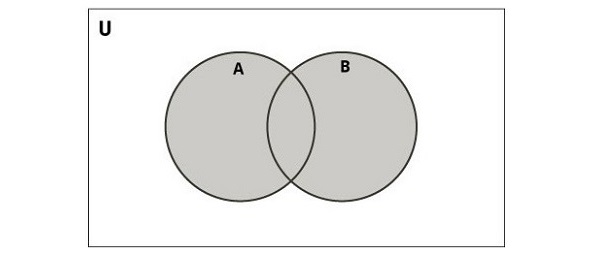
    The union of two sets is a set containing all distinct elements that are in A or in B or both. For example,

    {1,2}∪{2,3}={1,2,3}
    

    The following diagram illustrates the union of two sets.

    Union Of Two Sets

    In Python, you can perform the union operation using the union() function or the | operator. This operation combines the elements of two sets while eliminating duplicates, resulting in a new set containing all unique elements from both sets −

    Example

    The following example uses the “|” operator and union() function, and returns the union of two sets −

    Open Compiler

    set1 ={1,2,3}
    set2 ={3,4,5}
    set3 ={6,8,9}
    set4 ={9,45,73}
    union_set1 = set1.union(set2)
    union_set2 = set3 | set4
    print('The union of set1 and set2 is', union_set1)print('The union of set3 and set4 is', union_set2)

    After executing the above code, we get the following output −

    The union of set1 and set2 is {1, 2, 3, 4, 5}
    The union of set3 and set4 is {73, 6, 8, 9, 45}
    

    Learn Python in-depth with real-world projects through our Python certification course. Enroll and become a certified expert to boost your career.

    Python Set Intersection Operator (&)

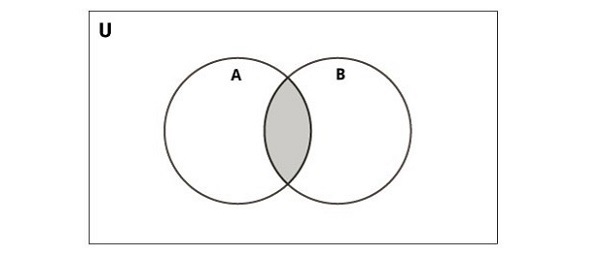
    The intersection of two sets AA and BB, denoted by A∩B, consists of all elements that are common to both in A and B. For example,

    {1,2}∩{2,3}={2}
    

    The following diagram illustrates intersection of two sets.

    Intersection Operator

    Python provides the intersection() function or the & operator to perform this operation. The resulting set contains only the elements present in both sets −

    Example

    Following example uses & operator and intersection() function, and returns intersection of two sets −

    Open Compiler

    set1 ={1,2,3}
    set2 ={3,4,5}
    set3 ={6,8,9}
    set4 ={9,8,73}
    intersection_set1 = set1.intersection(set2)  
    intersection_set2 = set3  & set4
    print('The intersection of set1 and set2 is', intersection_set1)print('The intersection of set3 and set4 is', intersection_set2)

    It will produce the following output −

    The intersection of set1 and set2 is {3}
    The intersection of set3 and set4 is {8, 9}
    

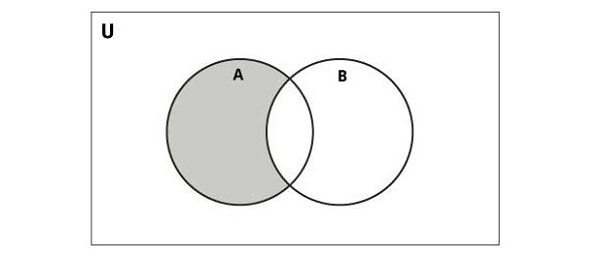
    Python Set Difference Operator (-)

    The difference (subtraction) between two sets consists of elements present in the first set but not in the second set. It is defined as follows. The set A−B consists of elements that are in A but not in B. For example,

    If A={1,2,3} and B={3,5}, then A−B={1,2}
    

    The following diagram illustrates difference of two sets −

    difference_operator

    Python provides the difference() function or the  operator to perform this operation. The resulting set contains elements unique to the first set −

    Example

    The following example uses the “-” operator and the difference() function, and returns difference of two sets −

    Open Compiler

    set1 ={1,2,3}
    set2 ={3,4,5}
    set3 ={6,8,9}
    set4 ={9,8,73}
    difference_set1 = set1.difference(set2)
    difference_set2 = set3 - set4
    print('The difference between set1 and set2 is', difference_set1)print('The difference between set3 and set4 is', difference_set2)

    We get the output as shown below −

    The difference between set1 and set2 is {1, 2}
    The difference between set3 and set4 is {6}
    

    Note that “s1-s2” is not the same as “s2-s1”.

    Python Set Symmetric Difference Operator

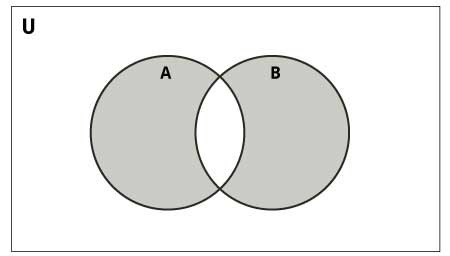
    The symmetric difference of two sets consists of elements that are present in either set but not in both sets. The symmetric difference of A and B is denoted by “A Δ B” and is defined by −

    A Δ B = (A − B) ⋃ (B − A)
    

    If A = {1, 2, 3, 4, 5, 6, 7, 8} and B = {1, 3, 5, 6, 7, 8, 9}, then A Δ B = {2, 4, 9}.

    The following diagram illustrates the symmetric difference between two sets −

    Symmetric Difference

    Python provides the symmetric_difference() function or the ^ operator to perform this operation. The resulting set contains elements that are unique to each set.

    Example

    The following example uses the “^” operator and the symmetric_difference() function, and returns symbolic difference of two sets −

    Open Compiler

    set1 ={1,2,3}
    set2 ={3,4,5}
    set3 ={6,8,9}
    set4 ={9,8,73}
    symmetric_difference_set1 = set1.symmetric_difference(set2)  
    symmetric_difference_set2 = set3 ^ set4
    print('The symmetric difference of set1 and set2 is', symmetric_difference_set1)print('The symmetric difference of set3 and set4 is', symmetric_difference_set2)

    The result produced is as follows −

    The symmetric difference of set1 and set2 is {1, 2, 4, 5}
    The symmetric difference of set3 and set4 is {73, 6}
    

    Python Subset Testing Operation

    You can check whether one set is a subset of another using the issubset() function or the <= operator. A set A is considered a subset of another set B if all elements of A are also present in B −

    Example

    The following example uses the “<=” operator and the issubset() function, and returns subset testing of two sets −

    Open Compiler

    set1 ={1,2}
    set2 ={1,2,3,4}
    set3 ={64,47,245,48}
    set4 ={64,47,3}
    is_subset1 = set1.issubset(set2)  
    is_subset2 = set3 <= set4
    print('set1 is a subset of set2:', is_subset1)print('set3 is a subset of set4:', is_subset2)

    The result produced is as follows −

    set1 is a subset of set2: True
    set3 is a subset of set4: False
  • Copy Sets

    Python Copy Sets

    Copying sets in Python refers to creating a new set that contains the same elements as an existing set. Unlike simple variable assignment, which creates a reference to the original set, copying ensures that changes made to the copied set do not affect the original set, and vice versa.

    There are different methods for copying a set in Python, including using the copy() method, the set() function or set comprehension.

    Copy Sets Using the copy() Method

    The copy() method in set class is used to create a shallow copy of a set object.

    A shallow copy means that the method creates a new collection object, but does not create copies of the objects contained within the original collection. Instead, it copies the references to these objects.

    Therefore, if the original collection contains mutable objects (like lists, dictionaries, or other sets), modifications to these objects will be reflected in both the original and the copied collections.

    Syntax

    Following is the syntax of the copy() method −

    set.copy()

    Return Value

    The copy() method returns a new set which is a shallow copy of existing set.

    Example

    In the following example, we are creating a copy of the set “lang1” and storing it in “lang2”, then retrieving both sets and their memory addresses using id().

    After adding an element to “lang1”, we retrieve both sets and their memory addresses again to show that “lang1” and “lang2” are independent copies −

    Open Compiler

    lang1 ={"C","C++","Java","Python"}print("lang1: ", lang1,"id(lang1): ",id(lang1))
    lang2 = lang1.copy()print("lang2: ", lang2,"id(lang2): ",id(lang2))
    lang1.add("PHP")print("After updating lang1")print("lang1: ", lang1,"id(lang1): ",id(lang1))print("lang2: ", lang2,"id(lang2): ",id(lang2))

    Output

    This will produce the following output −

    lang1: {'Python', 'Java', 'C', 'C++'} id(lang1): 2451578196864
    lang2: {'Python', 'Java', 'C', 'C++'} id(lang2): 2451578197312
    After updating lang1
    lang1: {'Python', 'C', 'C++', 'PHP', 'Java'} id(lang1): 2451578196864
    lang2: {'Python', 'Java', 'C', 'C++'} id(lang2): 2451578197312
    

    Learn Python in-depth with real-world projects through our Python certification course. Enroll and become a certified expert to boost your career.

    Copy Sets Using the set() Function

    The Python set() function is used to create a new set object. It takes an iterable as an argument and convert it into a set, removing any duplicate elements in the process. If no argument is provided, it creates an empty set.

    We can copy set using the set() function by passing the original set as an argument to the set() constructor. This creates a new set that contains all the elements of the original set, ensuring that any modifications to the new set do not affect the original set.

    Example

    In this example, we are creating a copy of “original_set” using the set() function and storing it in “copied_set” −

    Open Compiler

    # Original set
    original_set ={1,2,3,4}# Copying the set using the set() function
    copied_set =set(original_set)print("copied set:", copied_set)# Demonstrating that the sets are independent
    copied_set.add(5)print("copied set:",copied_set)print("original set:",original_set)

    Output

    Following is the output of the above code −

    copied set: {1, 2, 3, 4}
    copied set: {1, 2, 3, 4, 5}
    original set: {1, 2, 3, 4}
    

    Copy Sets Using Set Comprehension

    Set comprehension is a concise way to create sets in Python. It is used to generate a new set by iterating over an iterable and optionally applying conditions to filter elements. The syntax is similar to list comprehension but with curly braces {} instead of square brackets [] −

    {expression for item in iterable if condition}

    We can copy sets using set comprehension by iterating over the elements of the original set and directly creating a new set with those elements.

    Example

    In the example below, we create an original set named “original_set”, then copy it using set comprehension into “copied_set” −

    Open Compiler

    # Original set
    original_set ={1,2,3,4,5}# Copying the set using set comprehension
    copied_set ={x for x in original_set}print("Copied set:", copied_set)

    Output

    Output of the above code is as shown below −

    Copied set: {1, 2, 3, 4, 5}
  • Join Sets

    In Python, a set is an ordered collection of items. The items may be of different types. However, an item in the set must be an immutable object. It means, we can only include numbers, string and tuples in a set and not lists. Python’s set class has different provisions to join set objects.

    Join Sets in Python

    Joining sets in Python refers to merging two or more sets as a single set. When you join sets, you merge the elements of multiple sets while ensuring that duplicate elements are removed, as sets do not allow duplicate elements.

    This can be achieved using various methods, such as union, update, set comprehension, set concatenation, copying, and iterative addition.

    Join Python Sets Using “|” Operator

    The “|” symbol (pipe) is defined as the union operator. It performs the A∪B operation and returns a set of items in A, B or both. Set doesn’t allow duplicate items.

    Example

    In the following example, we are performing a union operation on sets “s1” and “s2” using the “|” operator, creating a new set “s3” containing elements from both sets without duplicates −

    Open Compiler

    s1={1,2,3,4,5}
    s2={4,5,6,7,8}
    s3 = s1|s2
    print(s3)

    It will produce the following output −

    {1, 2, 3, 4, 5, 6, 7, 8}
    

    Learn Python in-depth with real-world projects through our Python certification course. Enroll and become a certified expert to boost your career.

    Join Python Sets Using union() Method

    The set class has union() method that performs the same operation as | operator. It returns a set object that holds all items in both sets, discarding duplicates.

    Example

    In this example, we are invoking the union() method on set “s1”, passing set “s2” as an argument, which returns a new set “s3” containing elements from both sets without duplicates −

    Open Compiler

    s1={1,2,3,4,5}
    s2={4,5,6,7,8}
    s3 = s1.union(s2)print(s3)

    Following is the output obtained −

    {1, 2, 3, 4, 5, 6, 7, 8}
    

    Join Python Sets Using update() Method

    The update() method also joins the two sets, as the union() method. However it doen’t return a new set object. Instead, the elements of second set are added in first, duplicates not allowed.

    Example

    In the example below, we are updating set “s1” with the elements of set “s2” using the update() method, modifying “s1” to contain elements from both sets without duplicates −

    Open Compiler

    s1={1,2,3,4,5}
    s2={4,5,6,7,8}
    s1.update(s2)print(s1)

    The result obtained is as shown below −

    {1, 2, 3, 4, 5, 6, 7, 8}
    

    Join Python Sets Using Unpacking Operator

    In Python, the “*” symbol is used as unpacking operator. The unpacking operator internally assign each element in a collection to a separate variable.

    We can join Python sets using the unpacking operator (*) by unpacking the elements of multiple sets into a new set.

    Example

    In the following example, we are creating a new set “s3” by unpacking the elements of sets “s1” and “s2” using the * operator within a set literal −

    Open Compiler

    s1={1,2,3,4,5}
    s2={4,5,6,7,8}
    s3 ={*s1,*s2}print(s3)

    The output produced is as follows −

    {1, 2, 3, 4, 5, 6, 7, 8}
    

    Join Python Sets Using Set Comprehension

    Set comprehension in Python is a concise way to create sets using an iterable, similar to list comprehension but resulting in a set instead of a list. It allows you to generate sets by applying an expression to each item in an iterable while optionally filtering the items based on a condition.

    We can join python sets using set comprehension by iterating over multiple sets and adding their elements to a new set.

    Example

    In this example, we are creating a new set “joined_set” using a set comprehension. By iterating over a list containing “set1” and “set2”, and then iterating over each element “x” within each set “s”, we merge all elements from both sets into “joined_set” −

    Open Compiler

    set1 ={1,2,3}
    set2 ={3,4,5}
    
    joined_set ={x for s in[set1, set2]for x in s}print(joined_set)

    Output of the above code is as shown below −

    {1, 2, 3, 4, 5}
    

    Join Python Sets Using Iterative Addition

    Iterative addition in the context of sets refers to iteratively adding elements from one set to another set using a loop or iteration construct. This allows you to merge the elements of multiple sets into a single set, ensuring that duplicate elements are not included.

    We can join python sets using iterative addition by iterating over the elements of each set and adding them to a new set.

    Example

    In the example below, we first initialize an empty set. Then, we iterate over each element in “set1” and “set2” separately, adding each element into a new set named “joined_set” using the add() method −

    Open Compiler

    set1 ={1,2,3}
    set2 ={3,4,5}# Initializing an empty set to hold the merged elements
    joined_set =set()# Iterating over set1 and adding its elements to the joined setfor element in set1:
       joined_set.add(element)# Iterating over set2 and adding its elements to the joined setfor element in set2:
       joined_set.add(element)print(joined_set)

    After executing the above code, we get the following output −

    {1, 2, 3, 4, 5}
  • Loop Sets

    Loop Through Set Items

    Looping through set items in Python refers to iterating over each element in a set. We can later perform required operations on each item. These operation includes list printing elements, conditional operations, filtering elements etc.

    Unlike lists and tuples, sets are unordered collections, so the elements will be accessed in an arbitrary order. You can use a for loop to iterate through the items in a set.

    Loop Through Set Items with For Loop

    A for loop in Python is used to iterate over a sequence (like a list, tuple, dictionary, string, or range) or any other iterable object. It allows you to execute a block of code repeatedly for each item in the sequence.

    In a for loop, you can access each item in a sequence using a variable, allowing you to perform operations or logic based on that item’s value. We can loop through set items using for loop by iterating over each item in the set.

    Syntax

    Following is the basic syntax to loop through items in a set using a for loop in Python −

    for item inset:# Code block to execute

    Example

    In the following example, we are using a for loop to iterate through each element in the set “my_set” and retrieving each element −

    Open Compiler

    # Defining a set with multiple elements
    my_set ={25,12,10,-21,10,100}# Loop through each item in the set for item in my_set:# Performing operations on each elementprint("Item:", item)

    Output

    Following is the output of the above code −

    Item: 100
    Item: 25
    Item: 10
    Item: -21
    Item: 12
    

    Learn Python in-depth with real-world projects through our Python certification course. Enroll and become a certified expert to boost your career.

    Loop Through Set Items with While Loop

    A while loop in Python is used to repeatedly execute a block of code as long as a specified condition evaluates to “True”.

    We can loop through set items using a while loop by converting the set to an iterator and then iterating over each element until the iterator reaches end of the set.

    An iterator is an object that allows you to traverse through all the elements of a collection (such as a list, tuple, set, or dictionary) one element at a time.

    Example

    In the below example, we are iterating through a set using an iterator and a while loop. The “try” block retrieves and prints each item, while the “except StopIteration” block breaks the loop when there are no more items to fetch −

    Open Compiler

    # Defining a set with multiple elements
    my_set ={1,2,3,4,5}# Converting the set to an iterator
    set_iterator =iter(my_set)# Looping through each item in the set using a while loopwhileTrue:try:# Getting the next item from the iterator
    
      item =next(set_iterator)# Performing operations on each elementprint("Item:", item)except StopIteration:# If StopIteration is raised, break from the loopbreak</code></pre>

    Output

    Output of the above code is as follows −

    Item: 1
    Item: 2
    Item: 3
    Item: 4
    Item: 5
    

    Iterate using Set Comprehension

    A set comprehension in Python is a concise way to create sets by iterating over an iterable and optionally applying a condition. It is used to generate sets using a syntax similar to list comprehensions but results in a set, ensuring all elements are unique and unordered.

    We can iterate using set comprehension by defining a set comprehension expression within curly braces {} and specifying the iteration and condition logic within the expression. Following is the syntax −

    result_set ={expression for item in iterable if condition}

    Where,

    • expression − It is an expression to evaluate for each item in the iterable.
    • item − It is a variable representing each element in the iterable.
    • iterable − It is a collection to iterate over (e.g., list, tuple, set).
    • condition − It is optional condition to filter elements included in the resulting set.

    Example

    In this example, we are using a set comprehension to generate a set containing squares of even numbers from the original list "numbers" −

    Open Compiler

    # Original list
    numbers =[1,2,3,4,5]# Set comprehension to create a set of squares of even numbers
    squares_of_evens ={x**2for x in numbers if x %2==0}# Print the resulting setprint(squares_of_evens)

    Output

    We get the output as shown below −

    {16, 4}
    

    Iterate through a Set Using the enumerate() Function

    The enumerate() function in Python is used to iterate over an iterable object while also providing the index of each element.

    We can iterate through a set using the enumerate() function by converting the set into a list and then applying enumerate() to iterate over the elements along with their index positions. Following is the syntax −

    for index, item inenumerate(list(my_set)):# Your code here

    Example

    In the following example, we are first converting a set into a list. Then, we iterate through the list using a for loop with enumerate() function, retrieving each item along with its index −

    Open Compiler

    # Converting the set into a list
    my_set ={1,2,3,4,5}
    set_list =list(my_set)# Iterating through the list for index, item inenumerate(set_list):print("Index:", index,"Item:", item)

    Output

    The output produced is as shown below −

    Index: 0 Item: 1
    Index: 1 Item: 2
    Index: 2 Item: 3
    Index: 3 Item: 4
    Index: 4 Item: 5
    

    Loop Through Set Items with add() Method

    The add() method in Python is used to add a single element to a set. If the element is already present in the set, the set remains unchanged.

    We cannot directly loop through set items using the add() method because add() is used specifically to add individual elements to a set, not to iterate over existing elements.

    To loop through set items, we use methods like a for loop or set comprehension.

    Example

    In this example, we loop through a sequence of numbers and add each number to the set using the add() method. The loop iterates over existing elements, while add() method adds new elements to the set −

    Open Compiler

    # Creating an empty set
    my_set =set()# Looping through a sequence and adding elements to the setfor i inrange(5):
       my_set.add(i)print(my_set)

    It will produce the following output −

    {0, 1, 2, 3, 4}