Category: 4. Statistics Examples

https://cdn3d.iconscout.com/3d/premium/thumb/statistics-3d-icon-download-in-png-blend-fbx-gltf-file-formats–analytics-logo-pie-chart-bar-education-pack-school-icons-4816913.png

  • Logistic Regression

    The Logistic Regression is a regression model in which the response variable (dependent variable) has categorical values such as True/False or 0/1. It actually measures the probability of a binary response as the value of response variable based on the mathematical equation relating it with the predictor variables.

    The general mathematical equation for logistic regression is −

    y = 1/(1+e^-(a+b1x1+b2x2+b3x3+...))
    

    Following is the description of the parameters used −

    • y is the response variable.
    • x is the predictor variable.
    • a and b are the coefficients which are numeric constants.

    The function used to create the regression model is the glm() function.

    Syntax

    The basic syntax for glm() function in logistic regression is −

    glm(formula,data,family)
    

    Following is the description of the parameters used −

    • formula is the symbol presenting the relationship between the variables.
    • data is the data set giving the values of these variables.
    • family is R object to specify the details of the model. It’s value is binomial for logistic regression.

    Example

    The in-built data set “mtcars” describes different models of a car with their various engine specifications. In “mtcars” data set, the transmission mode (automatic or manual) is described by the column am which is a binary value (0 or 1). We can create a logistic regression model between the columns “am” and 3 other columns – hp, wt and cyl.

    # Select some columns form mtcars.
    input <- mtcars[,c("am","cyl","hp","wt")]
    
    print(head(input))

    When we execute the above code, it produces the following result −

                      am   cyl  hp    wt
    Mazda RX4          1   6    110   2.620
    Mazda RX4 Wag      1   6    110   2.875
    Datsun 710         1   4     93   2.320
    Hornet 4 Drive     0   6    110   3.215
    Hornet Sportabout  0   8    175   3.440
    Valiant            0   6    105   3.460
    

    Create Regression Model

    We use the glm() function to create the regression model and get its summary for analysis.

    input <- mtcars[,c("am","cyl","hp","wt")]
    
    am.data = glm(formula = am ~ cyl + hp + wt, data = input, family = binomial)
    
    print(summary(am.data))

    When we execute the above code, it produces the following result −

    Call:
    glm(formula = am ~ cyl + hp + wt, family = binomial, data = input)
    
    Deviance Residuals: 
    
     Min        1Q      Median        3Q       Max  
    -2.17272 -0.14907 -0.01464 0.14116 1.27641 Coefficients:
            Estimate Std. Error z value Pr(&gt;|z|)  
    (Intercept) 19.70288 8.11637 2.428 0.0152 * cyl 0.48760 1.07162 0.455 0.6491 hp 0.03259 0.01886 1.728 0.0840 . wt -9.14947 4.15332 -2.203 0.0276 * --- Signif. codes: 0 ‘***’ 0.001 ‘**’ 0.01 ‘*’ 0.05 ‘.’ 0.1 ‘ ’ 1 (Dispersion parameter for binomial family taken to be 1)
    Null deviance: 43.2297  on 31  degrees of freedom
    Residual deviance: 9.8415 on 28 degrees of freedom AIC: 17.841 Number of Fisher Scoring iterations: 8

    Conclusion

    In the summary as the p-value in the last column is more than 0.05 for the variables “cyl” and “hp”, we consider them to be insignificant in contributing to the value of the variable “am”. Only weight (wt) impacts the “am” value in this regression model.
  • Multiple Regression

    Multiple regression is an extension of linear regression into relationship between more than two variables. In simple linear relation we have one predictor and one response variable, but in multiple regression we have more than one predictor variable and one response variable.

    The general mathematical equation for multiple regression is −

    y = a + b1x1 + b2x2 +...bnxn
    

    Following is the description of the parameters used −

    • y is the response variable.
    • a, b1, b2…bn are the coefficients.
    • x1, x2, …xn are the predictor variables.

    We create the regression model using the lm() function in R. The model determines the value of the coefficients using the input data. Next we can predict the value of the response variable for a given set of predictor variables using these coefficients.

    lm() Function

    This function creates the relationship model between the predictor and the response variable.

    Syntax

    The basic syntax for lm() function in multiple regression is −

    lm(y ~ x1+x2+x3...,data)
    

    Following is the description of the parameters used −

    • formula is a symbol presenting the relation between the response variable and predictor variables.
    • data is the vector on which the formula will be applied.

    Example

    Input Data

    Consider the data set “mtcars” available in the R environment. It gives a comparison between different car models in terms of mileage per gallon (mpg), cylinder displacement(“disp”), horse power(“hp”), weight of the car(“wt”) and some more parameters.

    The goal of the model is to establish the relationship between “mpg” as a response variable with “disp”,”hp” and “wt” as predictor variables. We create a subset of these variables from the mtcars data set for this purpose.

    input <- mtcars[,c("mpg","disp","hp","wt")]
    print(head(input))

    When we execute the above code, it produces the following result −

                       mpg   disp   hp    wt
    Mazda RX4          21.0  160    110   2.620
    Mazda RX4 Wag      21.0  160    110   2.875
    Datsun 710         22.8  108     93   2.320
    Hornet 4 Drive     21.4  258    110   3.215
    Hornet Sportabout  18.7  360    175   3.440
    Valiant            18.1  225    105   3.460
    

    Create Relationship Model & get the Coefficients

    input <- mtcars[,c("mpg","disp","hp","wt")]
    
    # Create the relationship model.
    model <- lm(mpg~disp+hp+wt, data = input)
    
    # Show the model.
    print(model)
    
    # Get the Intercept and coefficients as vector elements.
    cat("# # # # The Coefficient Values # # # ","\n")
    
    a <- coef(model)[1]
    print(a)
    
    Xdisp <- coef(model)[2]
    Xhp <- coef(model)[3]
    Xwt <- coef(model)[4]
    
    print(Xdisp)
    print(Xhp)
    print(Xwt)

    When we execute the above code, it produces the following result −

    Call:
    lm(formula = mpg ~ disp + hp + wt, data = input)
    
    Coefficients:
    (Intercept)         disp           hp           wt  
      37.105505      -0.000937        -0.031157    -3.800891  
    
    # # # # The Coefficient Values # # # 
    (Intercept) 
       37.10551 
    
         disp 
    -0.0009370091
         hp 
    -0.03115655
       wt 
    -3.800891

    Create Equation for Regression Model

    Based on the above intercept and coefficient values, we create the mathematical equation.

    Y = a+Xdisp.x1+Xhp.x2+Xwt.x3
    or
    Y = 37.15+(-0.000937)*x1+(-0.0311)*x2+(-3.8008)*x3
    

    Apply Equation for predicting New Values

    We can use the regression equation created above to predict the mileage when a new set of values for displacement, horse power and weight is provided.

    For a car with disp = 221, hp = 102 and wt = 2.91 the predicted mileage is −

    Y = 37.15+(-0.000937)*221+(-0.0311)*102+(-3.8008)*2.91 = 22.7104
    
  • Linear Regression

    Regression analysis is a very widely used statistical tool to establish a relationship model between two variables. One of these variable is called predictor variable whose value is gathered through experiments. The other variable is called response variable whose value is derived from the predictor variable.

    In Linear Regression these two variables are related through an equation, where exponent (power) of both these variables is 1. Mathematically a linear relationship represents a straight line when plotted as a graph. A non-linear relationship where the exponent of any variable is not equal to 1 creates a curve.

    The general mathematical equation for a linear regression is −

    y = ax + b
    

    Following is the description of the parameters used −

    • y is the response variable.
    • x is the predictor variable.
    • a and b are constants which are called the coefficients.

    Steps to Establish a Regression

    A simple example of regression is predicting weight of a person when his height is known. To do this we need to have the relationship between height and weight of a person.

    The steps to create the relationship is −

    • Carry out the experiment of gathering a sample of observed values of height and corresponding weight.
    • Create a relationship model using the lm() functions in R.
    • Find the coefficients from the model created and create the mathematical equation using these
    • Get a summary of the relationship model to know the average error in prediction. Also called residuals.
    • To predict the weight of new persons, use the predict() function in R.

    Input Data

    Below is the sample data representing the observations −

    # Values of height
    151, 174, 138, 186, 128, 136, 179, 163, 152, 131
    
    # Values of weight.
    63, 81, 56, 91, 47, 57, 76, 72, 62, 48
    

    lm() Function

    This function creates the relationship model between the predictor and the response variable.

    Syntax

    The basic syntax for lm() function in linear regression is −

    lm(formula,data)
    

    Following is the description of the parameters used −

    • formula is a symbol presenting the relation between x and y.
    • data is the vector on which the formula will be applied.

    Create Relationship Model & get the Coefficients

    x <- c(151, 174, 138, 186, 128, 136, 179, 163, 152, 131)
    y <- c(63, 81, 56, 91, 47, 57, 76, 72, 62, 48)
    
    # Apply the lm() function.
    relation <- lm(y~x)
    
    print(relation)

    When we execute the above code, it produces the following result −

    Call:
    lm(formula = y ~ x)
    
    Coefficients:
    (Intercept)            x  
       -38.4551          0.6746 
    

    Get the Summary of the Relationship

    x <- c(151, 174, 138, 186, 128, 136, 179, 163, 152, 131)
    y <- c(63, 81, 56, 91, 47, 57, 76, 72, 62, 48)
    
    # Apply the lm() function.
    relation <- lm(y~x)
    
    print(summary(relation))

    When we execute the above code, it produces the following result −

    Call:
    lm(formula = y ~ x)
    
    Residuals:
    
    Min      1Q     Median      3Q     Max 
    -6.3002 -1.6629 0.0412 1.8944 3.9775 Coefficients:
             Estimate Std. Error t value Pr(&gt;|t|)    
    (Intercept) -38.45509 8.04901 -4.778 0.00139 ** x 0.67461 0.05191 12.997 1.16e-06 *** --- Signif. codes: 0 ‘***’ 0.001 ‘**’ 0.01 ‘*’ 0.05 ‘.’ 0.1 ‘ ’ 1 Residual standard error: 3.253 on 8 degrees of freedom Multiple R-squared: 0.9548, Adjusted R-squared: 0.9491 F-statistic: 168.9 on 1 and 8 DF, p-value: 1.164e-06

    Explore our latest online courses and learn new skills at your own pace. Enroll and become a certified expert to boost your career.

    predict() Function

    Syntax

    The basic syntax for predict() in linear regression is −

    predict(object, newdata)
    

    Following is the description of the parameters used −

    • object is the formula which is already created using the lm() function.
    • newdata is the vector containing the new value for predictor variable.

    Predict the weight of new persons

    # The predictor vector.
    x <- c(151, 174, 138, 186, 128, 136, 179, 163, 152, 131)
    
    # The resposne vector.
    y <- c(63, 81, 56, 91, 47, 57, 76, 72, 62, 48)
    
    # Apply the lm() function.
    relation <- lm(y~x)
    
    # Find weight of a person with height 170.
    a <- data.frame(x = 170)
    result <-  predict(relation,a)
    print(result)

    When we execute the above code, it produces the following result −

           1 
    76.22869 
    

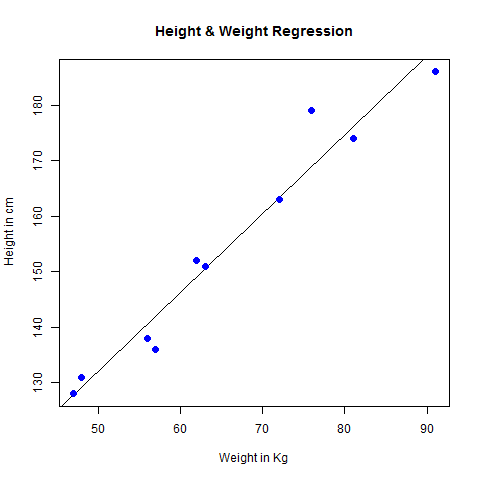
    Visualize the Regression Graphically

    # Create the predictor and response variable.
    x <- c(151, 174, 138, 186, 128, 136, 179, 163, 152, 131)
    y <- c(63, 81, 56, 91, 47, 57, 76, 72, 62, 48)
    relation <- lm(y~x)
    
    # Give the chart file a name.
    png(file = "linearregression.png")
    
    # Plot the chart.
    plot(y,x,col = "blue",main = "Height & Weight Regression",
    abline(lm(x~y)),cex = 1.3,pch = 16,xlab = "Weight in Kg",ylab = "Height in cm")
    
    # Save the file.
    dev.off()

    When we execute the above code, it produces the following result −

    Linear regression in R
  • Mean, Median and Mode

    Statistical analysis in R is performed by using many in-built functions. Most of these functions are part of the R base package. These functions take R vector as an input along with the arguments and give the result.

    The functions we are discussing in this chapter are mean, median and mode.

    Mean

    It is calculated by taking the sum of the values and dividing with the number of values in a data series.

    The function mean() is used to calculate this in R.

    Syntax

    The basic syntax for calculating mean in R is −

    mean(x, trim = 0, na.rm = FALSE, ...)
    

    Following is the description of the parameters used −

    • x is the input vector.
    • trim is used to drop some observations from both end of the sorted vector.
    • na.rm is used to remove the missing values from the input vector.

    Example

    # Create a vector. 
    x <- c(12,7,3,4.2,18,2,54,-21,8,-5)
    
    # Find Mean.
    result.mean <- mean(x)
    print(result.mean)

    When we execute the above code, it produces the following result −

    [1] 8.22
    

    Applying Trim Option

    When trim parameter is supplied, the values in the vector get sorted and then the required numbers of observations are dropped from calculating the mean.

    When trim = 0.3, 3 values from each end will be dropped from the calculations to find mean.

    In this case the sorted vector is (−21, −5, 2, 3, 4.2, 7, 8, 12, 18, 54) and the values removed from the vector for calculating mean are (−21,−5,2) from left and (12,18,54) from right.

    # Create a vector.
    x <- c(12,7,3,4.2,18,2,54,-21,8,-5)
    
    # Find Mean.
    result.mean <-  mean(x,trim = 0.3)
    print(result.mean)

    When we execute the above code, it produces the following result −

    [1] 5.55
    

    Explore our latest online courses and learn new skills at your own pace. Enroll and become a certified expert to boost your career.

    Applying NA Option

    If there are missing values, then the mean function returns NA.

    To drop the missing values from the calculation use na.rm = TRUE. which means remove the NA values.

    # Create a vector. 
    x <- c(12,7,3,4.2,18,2,54,-21,8,-5,NA)
    
    # Find mean.
    result.mean <-  mean(x)
    print(result.mean)
    
    # Find mean dropping NA values.
    result.mean <-  mean(x,na.rm = TRUE)
    print(result.mean)

    When we execute the above code, it produces the following result −

    [1] NA
    [1] 8.22
    

    Median

    The middle most value in a data series is called the median. The median() function is used in R to calculate this value.

    Syntax

    The basic syntax for calculating median in R is −

    median(x, na.rm = FALSE)
    

    Following is the description of the parameters used −

    • x is the input vector.
    • na.rm is used to remove the missing values from the input vector.

    Example

    # Create the vector.
    x <- c(12,7,3,4.2,18,2,54,-21,8,-5)
    
    # Find the median.
    median.result <- median(x)
    print(median.result)

    When we execute the above code, it produces the following result −

    [1] 5.6
    

    Mode

    The mode is the value that has highest number of occurrences in a set of data. Unike mean and median, mode can have both numeric and character data.

    R does not have a standard in-built function to calculate mode. So we create a user function to calculate mode of a data set in R. This function takes the vector as input and gives the mode value as output.

    Example

    # Create the function.
    getmode <- function(v) {
       uniqv <- unique(v)
       uniqv[which.max(tabulate(match(v, uniqv)))]
    }
    
    # Create the vector with numbers.
    v <- c(2,1,2,3,1,2,3,4,1,5,5,3,2,3)
    
    # Calculate the mode using the user function.
    result <- getmode(v)
    print(result)
    
    # Create the vector with characters.
    charv <- c("o","it","the","it","it")
    
    # Calculate the mode using the user function.
    result <- getmode(charv)
    print(result)

    When we execute the above code, it produces the following result −

    [1] 2
    [1] "it"