Category: 3. MongoDB

https://cdn3d.iconscout.com/3d/free/thumb/free-mongo-db-3d-icon-download-in-png-blend-fbx-gltf-file-formats–mongodb-database-document-oriented-nosql-coding-lang-pack-logos-icons-7577996.png

  • MongoDB Remove

    In MongoDB, you can delete records or documents by using the remove() method. The first parameter of the remove() method is a query object which specifies the document to delete.

    Example

    Remove the record of employee whose address is Ghaziabad.

    Create a js file named “remove.js”, having the following code:

    var http = require('http');  
    
    var MongoClient = require('mongodb').MongoClient;  
    
    var url = "mongodb://localhost:27017/ MongoDatabase";  
    
    MongoClient.connect(url, function(err, db) {  
    
    if (err) throw err;  
    
    var myquery = { address: 'Ghaziabad' };  
    
    db.collection("employees").remove(myquery, function(err, obj) {  
    
    if (err) throw err;  
    
    console.log(obj.result.n + " record(s) deleted");  
    
    db.close();  
    
    });  
    
    }); 

      Open the command terminal and run the following command:

      Node remove.js  
      Node.js Remove 1

      Verification

      You can check that the record having address “Ghaziabad” is deleted and only following records are available now:

      Node.js Remove 2
    1. MongoDB Sorting

      In MongoDB, the sort() method is used for sorting the results in ascending or descending order. The sort() method uses a parameter to define the object sorting order.

      Value used for sorting in ascending order:  
      
      { name: 1 }  
      
      Value used for sorting in descending order:  
      
      { name: -1 } 

        Sort in Ascending Order

        Example

        Sort the records in ascending order by the name.

        Create a js file named “sortasc.js”, having the following code:

        var http = require('http');  
        
        var MongoClient = require('mongodb').MongoClient;  
        
        var url = "mongodb://localhost:27017/ MongoDatabase";  
        
        MongoClient.connect(url, function(err, db) {  
        
        if (err) throw err;  
        
        var mysort = { name: 1 };  
        
        db.collection("employees").find().sort(mysort).toArray(function(err, result) {  
        
        if (err) throw err;  
        
        console.log(result);  
        
        db.close();  
        
        });  
        
        });

        Open the command terminal and run the following command:

        Node sortasc.js  
        Node.js Sorting 1

        Sort in Descending Order

        Example

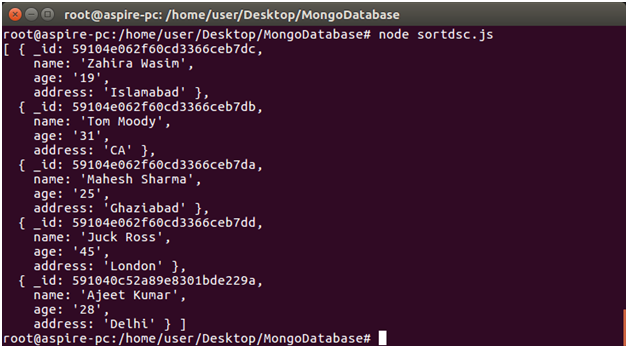
        Sort the records in descending order according to name:

        Create a js file named “sortdsc.js”, having the following code:

        var http = require('http');  
        
        var MongoClient = require('mongodb').MongoClient;  
        
        var url = "mongodb://localhost:27017/ MongoDatabase";  
        
        MongoClient.connect(url, function(err, db) {  
        
        if (err) throw err;  
        
        var mysort = { name: -1 };  
        
        db.collection("employees").find().sort(mysort).toArray(function(err, result) {  
        
        if (err) throw err;  
        
        console.log(result);  
        
        db.close();  
        
        });  
        
        });  

          Open the command terminal and run the following command:

          Node sortdsc.js  
          Node.js Sorting 2
        1. MongoDB Filter Query

          The find() method is also used to filter the result on a specific parameter. You can filter the result by using a query object.

          Example

          Filter the records to retrieve the specific employee whose address is “Delhi”.

          Create a js file named “query1.js”, having the following code:

          var http = require('http');  
          
          var MongoClient = require('mongodb').MongoClient;  
          
          var url = "mongodb://localhost:27017/MongoDatabase";  
          
          MongoClient.connect(url, function(err, db) {  
          
          if (err) throw err;  
          
          var query = { address: "Delhi" };  
          
          db.collection("employees").find(query).toArray(function(err, result) {  
          
          if (err) throw err;  
          
          console.log(result);  
          
          db.close();  
          
          });  
          
          });  

            Open the command terminal and run the following command:

            Node query1.js  
            Node.js Filter query 1

            Node.js MongoDB Filter With Regular Expression

            You can also use regular expression to find exactly what you want to search. Regular expressions can be used only to query strings.

            Example

            Retrieve the record from the collection where address start with letter “L”.

            Create a js file named “query2”, having the following code:

            var http = require('http');  
            
            var MongoClient = require('mongodb').MongoClient;  
            
            var url = "mongodb://localhost:27017/MongoDatabase";  
            
            MongoClient.connect(url, function(err, db) {  
            
            if (err) throw err;  
            
            var query = { address: /^L/ };  
            
            db.collection("employees").find(query).toArray(function(err, result) {  
            
            if (err) throw err;  
            
            console.log(result);  
            
            db.close();  
            
            });  
            
            });

            Open the command terminal and run the following command:

            Node query2.js  
            Node.js Filter query 2
          1. MongoDB Select Record

            The findOne() method is used to select a single data from a collection in MongoDB. This method returns the first record of the collection.

            Example

            (Select Single Record)

            Select the first record from the ?employees? collection.

            Create a js file named “select.js”, having the following code:

            var http = require('http');  
            
            var MongoClient = require('mongodb').MongoClient;  
            
            var url = "mongodb://localhost:27017/MongoDatabase";  
            
            MongoClient.connect(url, function(err, db) {  
            
              if (err) throw err;  
            
              db.collection("employees").findOne({}, function(err, result) {  
            
                if (err) throw err;  
            
                console.log(result.name);  
            
                db.close();  
            
              });  
            
            });  

              Open the command terminal and run the following command:

              Node select.js  
              Node.js Select record 1

              Select Multiple Records

              The find() method is used to select all the records from collection in MongoDB.

              Example

              Select all the records from “employees” collection.

              Create a js file named “selectall.js”, having the following code:

              var MongoClient = require('mongodb').MongoClient;  
              
              var url = "mongodb://localhost:27017/MongoDatabase";  
              
              MongoClient.connect(url, function(err, db) {  
              
                if (err) throw err;  
              
                db.collection("employees").find({}).toArray(function(err, result) {  
              
                  if (err) throw err;  
              
                  console.log(result);  
              
                  db.close();  
              
                });  
              
              });  

                Open the command terminal and run the following command:

                Node selectall.js  
                Node.js Select record 2
              1. MongoDB Insert Record

                The insertOne method is used to insert record in MongoDB’s collection. The first argument of the insertOne method is an object which contains the name and value of each field in the record you want to insert.

                Example

                (Insert Single record)

                Insert a record in “employees” collection.

                Create a js file named “insert.js”, having the following code:

                var MongoClient = require('mongodb').MongoClient;  
                
                var url = "mongodb://localhost:27017/ MongoDatabase";  
                
                MongoClient.connect(url, function(err, db) {  
                
                if (err) throw err;  
                
                var myobj = { name: "Ajeet Kumar", age: "28", address: "Delhi" };  
                
                db.collection("employees").insertOne(myobj, function(err, res) {  
                
                if (err) throw err;  
                
                console.log("1 record inserted");  
                
                db.close();  
                
                });  
                
                }); 

                  Open the command terminal and run the following command:

                  Node insert.js  
                  Node.js Insert record 1

                  Now a record is inserted in the collection.

                  Insert Multiple Records

                  You can insert multiple records in a collection by using insert() method. The insert() method uses array of objects which contain the data you want to insert.

                  Example

                  Insert multiple records in the collection named “employees”.

                  Create a js file name insertall.js, having the following code:

                  var MongoClient = require('mongodb').MongoClient;  
                  
                  var url = "mongodb://localhost:27017/ MongoDatabase";  
                  
                  MongoClient.connect(url, function(err, db) {  
                  
                  if (err) throw err;  
                  
                  var myobj = [     
                  
                  { name: "Mahesh Sharma", age: "25", address: "Ghaziabad"},  
                  
                  { name: "Tom Moody", age: "31", address: "CA"},  
                  
                  { name: "Zahira Wasim", age: "19", address: "Islamabad"},  
                  
                  { name: "Juck Ross", age: "45", address: "London"}  
                  
                  ];  
                  
                  db.collection("customers").insert(myobj, function(err, res) {  
                  
                  if (err) throw err;  
                  
                  console.log("Number of records inserted: " + res.insertedCount);  
                  
                  db.close();  
                  
                  });  
                  
                  });  

                    Open the command terminal and run the following command:

                    Node insertall.js  
                    Node.js Insert record 2
                  1. MongoDB Create Collection

                    MongoDB is a NoSQL database so data is stored in collection instead of table. createCollection method is used to create a collection in MongoDB.

                    Example

                    Create a collection named “employees”.

                    Create a js file named “employees.js”, having the following data:

                    var MongoClient = require('mongodb').MongoClient;  
                    
                    var url = "mongodb://localhost:27017/ MongoDatabase";  
                    
                    MongoClient.connect(url, function(err, db) {  
                    
                    if (err) throw err;  
                    
                    db.createCollection("employees", function(err, res) {  
                    
                    if (err) throw err;  
                    
                    console.log("Collection is created!");  
                    
                    db.close();  
                    
                    });  
                    
                    }); 

                      Open the command terminal and run the following command:

                      Node employees.js  
                      Node.js Create collection 1
                    1. MongoDB Create Database

                      To create a database in MongoDB, First create a MongoClient object and specify a connection URL with the correct ip address and the name of the database which you want to create.

                      Note: MongoDB will automatically create the database if it does not exist, and make a connection to it.

                      Example

                      Create a folder named “MongoDatabase” as a database. Suppose you create it on Desktop. Create a js file named “createdatabase.js” within that folder and having the following code:

                      var MongoClient = require('mongodb').MongoClient;  
                      
                      var url = "mongodb://localhost:27017/MongoDatabase";  
                      
                      MongoClient.connect(url, function(err, db) {  
                      
                      if (err) throw err;  
                      
                      console.log("Database created!");  
                      
                      db.close();  
                      
                      });  

                        Now open the command terminal and set the path where MongoDatabase exists. Now execute the following command:

                        Node createdatabase.js  
                        Node.js Create database 1
                      1. Create Connection with MongoDB

                        MongoDb is a NoSQL database. It can be used with Node.js as a database to insert and retrieve data.

                        Download MongoDB

                        Open the Linux Command Terminal and execute the following command:

                        apt-get install mongodb  

                        It will download the latest MongoDB according to your system requirement.

                        Node.js Create connection 1

                        Install MongoDB

                        After the complete download, use the following command to install MogoDB.

                        npm install mongodb --save   

                        Use the following command to start MongoDb services:

                        service mongodb start  
                        Node.js Create connection 2