Category: 2. My SQL

https://cdn3d.iconscout.com/3d/free/thumb/free-mysql-3d-icon-download-in-png-blend-fbx-gltf-file-formats–database-relational-sql-coding-lang-pack-logos-icons-7578013.png?f=webp

  • Node.js MySQL Drop Table

    The DROP TABLE command is used to delete or drop a table.

    Let’s drop a table named employee2.

    Create a js file named “delete” in DBexample folder and put the following data into it:

    var mysql = require('mysql');  
    
    var con = mysql.createConnection({  
    
    host: "localhost",  
    
    user: "root",  
    
    password: "12345",  
    
    database: "javatpoint"  
    
    });  
    
    con.connect(function(err) {  
    
    if (err) throw err;  
    
    var sql = "DROP TABLE employee2";  
    
    con.query(sql, function (err, result) {  
    
    if (err) throw err;  
    
    console.log("Table deleted");  
    
    });  
    
    });  

      Now open command terminal and run the following command:

      Node drop.js  
      Node.js drop table 1

      Verify that the table employee2 is no more in the database.

      Node.js drop table 2
    1. Node.js MySQL SELECT Unique Record

      (WHERE Clause)

      Retrieve a unique data from the table “employees”.

      Create a js file named selectwhere.js having the following data in DBexample folder.

      var mysql = require('mysql');  
      
      var con = mysql.createConnection({  
      
      host: "localhost",  
      
      user: "root",  
      
      password: "12345",  
      
      database: "javatpoint"  
      
      });  
      
      con.connect(function(err) {  
      
      if (err) throw err;  
      
      con.query("SELECT * FROM employees WHERE id = '1'", function (err, result) {  
      
      if (err) throw err;  
      
      console.log(result);  
      
      });  
      
      }); 

        Now open command terminal and run the following command:

        Node selectwhere.js  
        Node.js unique record 1

        Node.js MySQL Select Wildcard

        Retrieve a unique data by using wildcard from the table “employees”.

        Create a js file named selectwildcard.js having the following data in DBexample folder.

        var mysql = require('mysql');  
        
        var con = mysql.createConnection({  
        
        host: "localhost",  
        
        user: "root",  
        
        password: "12345",  
        
        database: "javatpoint"  
        
        });  
        
        con.connect(function(err) {  
        
        if (err) throw err;  
        
        con.query("SELECT * FROM employees WHERE city LIKE 'A%'", function (err, result) {  
        
        if (err) throw err;  
        
        console.log(result);  
        
        });  
        
        });  

          Now open command terminal and run the following command:

          Node selectwildcard.js  

          It will retrieve the record where city start with A.

          Node.js unique record 2
        1. Node.js MySQL Select Records

          Example

          Retrieve all data from the table “employees”.

          Create a js file named select.js having the following data in DBexample folder.

          var mysql = require('mysql');  
          
          var con = mysql.createConnection({  
          
          host: "localhost",  
          
          user: "root",  
          
          password: "12345",  
          
          database: "javatpoint"  
          
          });  
          
          con.connect(function(err) {  
          
          if (err) throw err;  
          
          con.query("SELECT * FROM employees", function (err, result) {  
          
          if (err) throw err;  
          
          console.log(result);  
          
          });  
          
          }); 

            Now open command terminal and run the following command:

            Node select.js  
            Node.js select record 1

            You can also use the statement:

            SELECT * FROM employees;  
            Node.js select record 2
          1. Node.js MySQL Delete Records

            The DELETE FROM command is used to delete records from the table.

            Example

            Delete employee from the table employees where city is Delhi.

            Create a js file named “delete” in DBexample folder and put the following data into it:

            var mysql = require('mysql');  
            
            var con = mysql.createConnection({  
            
            host: "localhost",  
            
            user: "root",  
            
            password: "12345",  
            
            database: "javatpoint"  
            
            });  
            
            con.connect(function(err) {  
            
            if (err) throw err;  
            
            var sql = "DELETE FROM employees WHERE city = 'Delhi'";  
            
            con.query(sql, function (err, result) {  
            
            if (err) throw err;  
            
            console.log("Number of records deleted: " + result.affectedRows);  
            
            });  
            
            });  

              Now open command terminal and run the following command:

              Node delete.js  
              Node.js delete record 1

              You can verify the deleted record by using SELECT statement:

              Node.js delete record 2
            1. Node.js MySQL Update Records

              The UPDATE command is used to update records in the table.

              Example

              Update city in “employees” table where id is 1.

              Create a js file named “update” in DBexample folder and put the following data into it:

              var mysql = require('mysql');  
              
              var con = mysql.createConnection({  
              
              host: "localhost",  
              
              user: "root",  
              
              password: "12345",  
              
              database: "javatpoint"  
              
              });  
              
              con.connect(function(err) {  
              
              if (err) throw err;  
              
              var sql = "UPDATE employees SET city = 'Delhi' WHERE city = 'Allahabad'";  
              
              con.query(sql, function (err, result) {  
              
              if (err) throw err;  
              
              console.log(result.affectedRows + " record(s) updated");  
              
              });  
              
              });  

                Now open command terminal and run the following command:

                Node update.js  

                It will change the city of the id 1 is to Delhi which is prior Allahabad.

                Node.js update record 1

                You can check the updated record in the new table:

                Node.js update record 2

                In the old table city of “Ajeet Kumar” is Allahabad.

                Node.js update record 3
              1. Node.js MySQL Insert Records

                INSERT INTO statement is used to insert records in MySQL.

                Example

                Insert Single Record:

                Insert records in “employees” table.

                Create a js file named “insert” in DBexample folder and put the following data into it:

                var mysql = require('mysql');  
                
                var con = mysql.createConnection({  
                
                host: "localhost",  
                
                user: "root",  
                
                password: "12345",  
                
                database: "javatpoint"  
                
                });  
                
                con.connect(function(err) {  
                
                if (err) throw err;  
                
                console.log("Connected!");  
                
                var sql = "INSERT INTO employees (id, name, age, city) VALUES ('1', 'Ajeet Kumar', '27', 'Allahabad')";  
                
                con.query(sql, function (err, result) {  
                
                if (err) throw err;  
                
                console.log("1 record inserted");  
                
                });var mysql = require('mysql');  
                
                var con = mysql.createConnection({  
                
                host: "localhost",  
                
                user: "root",  
                
                password: "12345",  
                
                database: "javatpoint"  
                
                });  
                
                con.connect(function(err) {  
                
                if (err) throw err;  
                
                console.log("Connected!");  
                
                var sql = "INSERT INTO employees (id, name, age, city) VALUES ('1', 'Ajeet Kumar', '27', 'Allahabad')";  
                
                con.query(sql, function (err, result) {  
                
                if (err) throw err;  
                
                console.log("1 record inserted");  
                
                }); 

                  Now open command terminal and run the following command:

                  Node insert.js  
                  Node.js insert record 1

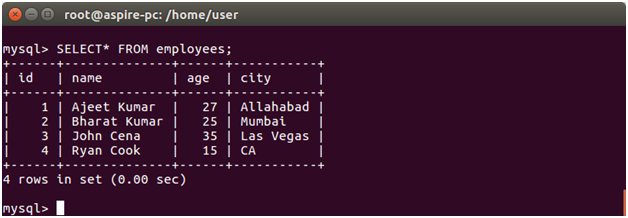
                  Check the inserted record by using SELECT query:

                  SELECT * FROM employees;

                  Node.js insert record 2

                  Insert Multiple Records

                  Create a js file named “insertall” in DBexample folder and put the following data into it:

                  1. var mysql = require(‘mysql’);  
                  2. var con = mysql.createConnection({  
                  3. host: “localhost”,  
                  4. user: “root”,  
                  5. password: “12345”,  
                  6. database: “javatpoint”  
                  7. });  
                  8. con.connect(function(err) {  
                  9. if (err) throw err;  
                  10. console.log(“Connected!”);  
                  11. var sql = “INSERT INTO employees (id, name, age, city) VALUES ?”;  
                  12. var values = [  
                  13. [‘2’, ‘Bharat Kumar’, ’25’, ‘Mumbai’],  
                  14. [‘3’, ‘John Cena’, ’35’, ?Las Vegas’],  
                  15. [‘4’, ‘Ryan Cook’, ’15’, ?CA’]  
                  16. ];  
                  17. con.query(sql, [values], function (err, result) {  
                  18. if (err) throw err;  
                  19. console.log(“Number of records inserted: ” + result.affectedRows);  
                  20. });  
                  21. });  

                  Now open command terminal and run the following command:

                  1. Node insertall.js  

                  Output:

                  Node.js insert record 3

                  Check the inserted record by using SELECT query:

                  SELECT * FROM employees;

                  Node.js insert record 4

                  The Result Object

                  When executing the insert() method, a result object is returned.The result object contains information about the insertion.

                  It is looked like this:

                  Node.js insert record 5
                1. Node.js MySQL Create Table

                  CREATE TABLE command is used to create a table in MySQL. You must make it sure that you define the name of the database when you create the connection.

                  Example

                  For creating a table named “employees”.

                  Create a js file named employees.js having the following data in DBexample folder.

                  var mysql = require('mysql');  
                  
                  var con = mysql.createConnection({  
                  
                  host: "localhost",  
                  
                  user: "root",  
                  
                  password: "12345",  
                  
                  database: "javatpoint"  
                  
                  });  
                  
                  con.connect(function(err) {  
                  
                  if (err) throw err;  
                  
                  console.log("Connected!");  
                  
                  var sql = "CREATE TABLE employees (id INT, name VARCHAR(255), age INT(3), city VARCHAR(255))";  
                  
                  con.query(sql, function (err, result) {  
                  
                  if (err) throw err;  
                  
                  console.log("Table created");  
                  
                  });  
                  
                  });  

                    Now open command terminal and run the following command:

                    Node employees.js  
                    Node.js create table 1

                    Verification

                    To verify if the table is created or not, use the SHOW TABLES command.

                    Node.js create table 2

                    You can also check the structure of the table using DESC command:

                    Node.js create table 3

                    Create Table Having a Primary Key

                    Create Primary Key in New Table:

                    Let’s create a new table named “employee2” having id as primary key.

                    Create a js file named employee2.js having the following data in DBexample folder.

                    var mysql = require('mysql');  
                    
                    var con = mysql.createConnection({  
                    
                    host: "localhost",  
                    
                    user: "root",  
                    
                    password: "12345",  
                    
                    database: "javatpoint"  
                    
                    });  
                    
                    con.connect(function(err) {  
                    
                    if (err) throw err;  
                    
                    console.log("Connected!");  
                    
                    var sql = "CREATE TABLE employee2 (id INT PRIMARY KEY, name VARCHAR(255), age INT(3), city VARCHAR(255))";  
                    
                    con.query(sql, function (err, result) {  
                    
                    if (err) throw err;  
                    
                    console.log("Table created");  
                    
                    });  
                    
                    });

                    Now open command terminal and run the following command:

                    Node employee2.js  
                    Node.js create table 4

                    Verification

                    To verify if the table is created or not, use the SHOW TABLES command.

                    Node.js create table 5

                    You can also check the structure of the table using DESC command to see that id is a primary key :

                    Node.js create table 6

                    Add columns in existing Table:

                    ALTER TABLE statement is used to add a column in an existing table. Take the already created table “employee2” and use a new column salary.

                    Replace the data of the “employee2” table with the following data:

                    var mysql = require('mysql');  
                    
                    var con = mysql.createConnection({  
                    
                    host: "localhost",  
                    
                    user: "root",  
                    
                    password: "12345",  
                    
                    database: "javatpoint"  
                    
                    });  
                    
                    con.connect(function(err) {  
                    
                    if (err) throw err;  
                    
                    console.log("Connected!");  
                    
                    var sql = "ALTER TABLE employee2 ADD COLUMN salary INT(10)";  
                    
                    con.query(sql, function (err, result) {  
                    
                    if (err) throw err;  
                    
                    console.log("Table altered");  
                    
                    });  
                    
                    });  

                      Now open command terminal and run the following command:

                      Node employee2.js  
                      Node.js create table 7

                      Verification

                      Node.js create table 8
                    1. Node.js MySQL Create Database

                      CREATE DATABASE statement is used to create a database in MySQL.

                      Example

                      For creating a database named “javatpoint”.

                      Create a js file named javatpoint.js having the following data in DBexample folder.

                      var mysql = require('mysql');  
                      
                      var con = mysql.createConnection({  
                      
                      host: "localhost",  
                      
                      user: "root",  
                      
                      password: "12345"  
                      
                      });  
                      
                      con.connect(function(err) {  
                      
                      if (err) throw err;  
                      
                      console.log("Connected!");  
                      
                      con.query("CREATE DATABASE javatpoint", function (err, result) {  
                      
                      if (err) throw err;  
                      
                      console.log("Database created");  
                      
                      });  
                      
                      });  

                        Now open command terminal and run the following command:

                        Node javatpoint.js  
                        Node.js create database 1

                        You can see the database is created.

                        Verification

                        To verify if the database is created or not, use the SHOW DATABASES command. Before this, go to initial path by using mysql-p command.

                        Node.js create database 2
                      1. Node.Js Create Connection with MySQL

                        We can use Node.js in database applications. Here we use MySQL as a database with Node.js.

                        Install MySQL on your computer.

                        You can download it from here https://www.mysql.com/downloads/.

                        Once the MySQL is installed and running, you can access it by using Node.js.

                        Install MySQL Driver

                        You have to install MySQL driver to access a MySQL database with Node.js. Download MySQl module from npm.

                        To download and install the “mysql” module, open the Command Terminal and execute the following:

                        npm install mysql  

                        Create Connection

                        Create a folder named “DBexample”. In that folder create a js file named “connection.js” having the following code:

                        var mysql = require('mysql');  
                        
                        var con = mysql.createConnection({  
                        
                          host: "localhost",  
                        
                          user: "root",  
                        
                          password: "12345"  
                        
                        });  
                        
                        con.connect(function(err) {  
                        
                          if (err) throw err;  
                        
                          console.log("Connected!");  
                        
                        });  

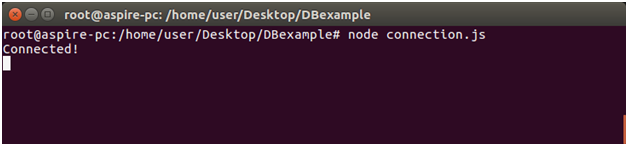
                          Now open the command terminal and use the following command:

                          Node connection.js

                          Create connection with mysql 2