Category: Learn TypeScript

  • Type Annotations

    Type Annotations

    In TypeScript,type annotations offer a way to define (or annotate) the data types of variables, class members, function parameters and return values.

    TypeScript is a statically typed programming language that optionally supports the dynamic typing. Because of this support any JavaScript file (.js) can be directly renamed as a TypeScript file (.ts). As we know JavaScript is a dynamically typed programming language and TypeScript is the superset of the JavaScript. TypeScript supports all the functionalities of JavaScript plus some additional features.

    TypeScript provides the way how to annotate the datatype. By the term “type annotations” means assigning the datatypes.

    Variable Type Annotations

    TypeScript supports static typing of variables. We can annotate the types of variables while declaring them. Also TypeScript optionally support the dynamic typing as JavaScript.

    For example, when we define a variable that holds a number, we can define it as follows –

    var x =10;

    The above declaration is absolutely permissible in TypeScript as it supports the dynamic typing.

    We can annotate the datatype of the variable x as follows

    var x:number=10;

    To do a type annotation, you can use colon (:) sign after the variable name followed by datatype of the variable.

    var varName: datatype
    

    Followings are the different examples to annotate a variable with different datatypes.

    let name:string;let age:number;let isEnrolled:boolean;

    In the example above, we added string as type of variable name. Similarly, age and isEnrolled are annotated with number and boolean type.

    Example

    Let’s try the following example. In this example, we have declared two variables, pName, and pAge. We have annotated pName as string and pAge as number.

    let pName:string;let pAge:number;
    pName ="John Doe";
    pAge =35;console.log(Name of the person is ${pName} and his age is ${pAge});

    On compiling, TypeScript compiler will produce the following JavaScript code

    let pName;let pAge;
    pName ="John Doe";
    pAge =35;
    console.log(Name of the person is ${pName} and his age is ${pAge});

    The output of the above JavaScript code is as follows

    Name of the person is John Doe and his age is 35
    

    Function Type Annotations

    You can add the type to a function in TypeScript. A function’s type has two parts the function parameters and the return type of the function.

    Function Parameter Type Annotation

    We can annotate the datatypes of the parameters in the function definition.

    functiondisplayDetails(id:number, name:string){console.log("ID:", id);console.log("Name", name);}displayDetails(123,"John");

    On compiling, it will produce the following JavaScript code

    functiondisplayDetails(id, name){
    
    console.log("ID:", id);
    console.log("Name:", name);}displayDetails(123,"John");</code></pre>

    The result of the above example code is as follows

    ID: 123
    Name: John
    

    Function Return Type Annotation

    You can add the datatype of the function return. It will be the datatype of the value returned by the function.

    functionadd(x:number, y:number):number{return x + y;}

    If you are not writing a return type then, the default return type of any function will be undefined.

    If a function is not returning any value then, you should use void as function return type instead of leaving it off.

    For example, instead of writing the following

    functiongreet(name:string){console.log(Hello Mr. ${name}. Welcome to Tutorials Point.);}

    Write the function using void as return type as follows

    functiongreet(name:string):void{console.log(Hello Mr. ${name}. Welcome to Tutorials Point.);}

    Example

    In the example below, we annotate the function parameters and its return type. The function add take two parameters - x and, y of number type and also a value of number type. The returned value is the sum of the passed arguments to the function.

    functionadd(x:number, y:number):number{return x + y;}console.log(add(2,3))

    On compiling, it will produce the following JavaScript code

    functionadd(x, y){return x + y;}
    console.log(add(2,3));

    The output of the above code is as follows −

    5
    

    Object Properties Type Annotations

    You can use the type annotation to add the types to the properties of an object.

    Let's define an object using interface as follows −

    interfacePerson{
       name:string;
       age:number;}const person: Person ={
       name:"John Doe",
       age:35,}

    In the above example, we added types string and number to the properties name and age respectively.

    You can assign only string value to the name property and similarly only number value to the age property. Suppose if you try to add a string to age, it will throw an error.

    Type 'string' is not assignable to type 'number'.

    Example

    Let's take a complete example. In this example, we define an interface named Person with two properties name and age. The name property is annotated as string and age is as number. We create an object named person using the interface Person. Then finally, we display the object properties in the console.

    interfacePerson{
       name:string;
       age:number;}const person: Person ={
       name:"John Doe",
       age:35,}console.log(The person's name is ${person.name} and person's age is ${person.age});

    On compiling, it will produce the following JavaScript code −

    const person ={
    
    name:"John Doe",
    age:35,};
    console.log(The person's name is ${person.name} and person's age is ${person.age});

    The output of the above example code if as follows −

    The person's name is John Doe and person's age is 35
    

    The type annotations of variables, function parameters and return types, etc. are recommended in TypeScript. But also TypeScript supports dynamic typing as in JavaScript. As you already know that TypeScript supports all ECMAScript features.

  • Types

    The Type System represents the different types of values supported by the language. The Type System checks the validity of the supplied values, before they are stored or manipulated by the program. This ensures that the code behaves as expected. The Type System further allows for richer code hinting and automated documentation too.

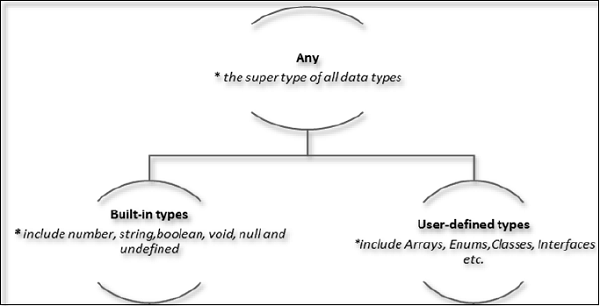
    TypeScript provides data types as a part of its optional Type System. The data type classification is as given below −

    Data Types

    The Any type

    The any data type is the super type of all types in TypeScript. It denotes a dynamic type. Using the any type is equivalent to opting out of type checking for a variable.

    Built-in types

    The following table illustrates all the built-in types in TypeScript −

    Data typeKeywordDescription
    NumbernumberDouble precision 64-bit floating point values. It can be used to represent both, integers and fractions.
    StringstringRepresents a sequence of Unicode characters
    BooleanbooleanRepresents logical values, true and false
    VoidvoidUsed on function return types to represent non-returning functions
    NullnullRepresents an intentional absence of an object value.
    UndefinedundefinedDenotes value given to all uninitialized variables
    SymbolsymbolA unique and immutable primitive introduced in ES2015.
    ObjectobjectRepresents instances of user-defined classes, arrays, functions, etc.
    NeverneverRepresents values that never occur.

    There is no integer type in TypeScript and JavaScript.

    Now, lets understand each built-in data type in detail.

    Number

    In TypeScript, the number data type can store the integer, floating point, binary, decimal, hexadecimal, etc. numbers. However, all integers are represented as floating points in TypeScript.

    Example

    In the code below, the age and marks both variables are of number type. The age variable contains the integer value and the marks variable contains the floating point value.

    // Integer numberlet age:number=30;// Float numberlet marks:number=30.5;

    String

    The string data type is used to store the text value.

    You can define a string using three ways:

    • Using the single quote
    • Using the double quotes
    • Using the backticks

    The backticks are used to create multiline or template strings.

    Example

    In the code below, the first_name string is created using the single quote, and the last_name string is created using the double quotes. The full_name string is created using the backticks, which uses the template literals to create a string.

    let first_name:string='John';let last_name:string="Doe";let full_name:string=${first_name} ${last_name};

    Boolean

    In TypeScript, Boolean data type allows you to represent logical entities. It stores the either true or false value. The boolean variables are mainly used with conditional statements like if-else or switch to execute a flow based on some logical value.

    Example

    In the code below, the isReady is a variable of boolean type, which contains the true value.

    let isReady:boolean=true;

    Symbol

    The symbol is a primitive data type, which is mostly used to create unique values. It allows developers to create unique object keys that wont collide with any other keys.

    Example

    Here, we have used the Symbol() constructor which returns the new unique key. We have used the UNIQUE_KEY as a key of the obj object.

    // Define a symbolconstUNIQUE_KEY=Symbol();// Use the symbol as a property key in an objectlet obj ={[UNIQUE_KEY]:"SecretValue"};

    Null

    The null type in TypeScript represents the intentional absence of any object value. It is one of the primitive types and is typically used to indicate that a variable intentionally points to no object.

    Example

    In the code below, the empty variable contains the null value.

    let empty:null=null;

    Undefined

    The undefined data type represents the absence of value. When a variable is declared but is not initialized, it contains the undefined value.

    Example

    In the code below, the undef variable contains the undefined value.

    let undef:undefined;

    Null and undefined Are they the same?

    The null and the undefined datatypes are often a source of confusion. The null and undefined cannot be used to reference the data type of a variable. They can only be assigned as values to a variable.

    However, null and undefined are not the same. A variable initialized with undefined means that the variable has no value or object assigned to it while null means that the variable has been set to an object whose value is undefined.

    Object

    The object is a non-primitive data type, which can contain any value that is not a number, string, boolean, symbol, null, or undefined. You can create an object using either object literal or Object() constructor.

    Example

    In the code below, we have created the object using the object literal. The type of the person variable is an object. We have added the key-value pair between the curly braces (object literal).

    let person: object ={name:"Bob"};

    Void

    The void type is used in the return type of functions that do not return a value. It signifies that there is no type at all.

    Example

    Here, we have used the void data type with function to not return any value from the function.

    functionlog():void{console.log("log");}

    User-defined Types

    User-defined types include Enumerations (enums), classes, interfaces, arrays, and tuple. These are discussed in detail in the later chapters.

    Array

    The array data type is a collection of the same elements. It stores the elements, which you can access or update using the array index that starts from 0.

    The array of any data type can be defined as data_type[] or Array<data_type>, where <data_type> can be any primitive or non-primitive data type.

    Example

    In the code below, we have defined the array of numbers which contains only 3 elements. The index of 1 is 0, the index of 2 is 1, and the index of 3 is 2.

    let numbers:number[]=[1,2,3];

    Tuple

    Tuple types allow you to express an array with a fixed number of elements whose types are known, but need not be the same. This adds a level of safety when dealing with arrays that need to have a specific structure.

    Example

    In the code below, the tuple variable can have an array of length 2 as a value. The first element of the tuple is of string type, and the second element of the tuple is of number type.

    let tuple:[string,number]=["hello",10];console.log(tuple);// Output: ["hello", 10]

    Enum

    An enumeration is a collection of related values that can be numeric or string values. enum makes it easy to handle sets of related constants in a more readable way.

    Example

    In the code below, the Color enum contains the different colors. We can access the color using the enum name which is Color followed by a dot and color name value.

    enum Color {Red, Green, Blue}let c: Color = Color.Green;console.log(c);// Output: 1

  • Operators

    What is an Operator?

    An operator defines some function that will be performed on the data. The data on which operators work are called operands. Consider the following expression −

    7 &plus; 5 = 12

    Here, the values 7, 5, and 12 are operands, while &plus; and = are operators.

    The major operators in TypeScript can be classified as −

    • Arithmetic operators
    • Logical operators
    • Relational operators
    • Bitwise operators
    • Assignment operators
    • Ternary/conditional operator
    • String operator
    • Type Operator

    Arithmetic Operators

    Assume the values in variables a and b are 10 and 5 respectively.

    Show Examples

    OperatorDescriptionExample
    &plus; (Addition)returns the sum of the operandsa &plus; b is 15
    – (Subtraction)returns the difference of the valuesa – b is 5
    &ast; (Multiplication)returns the product of the valuesa &ast; b is 50
    / (Division)performs division operation and returns the quotienta / b is 2
    % (Modulus)performs division operation and returns the remaindera % b is 0
    &plus;&plus; (Increment)Increments the value of the variable by onea&plus;&plus; is 11
    — (Decrement)Decrements the value of the variable by onea– is 9

    Relational Operators

    Relational Operators test or define the kind of relationship between two entities. Relational operators return a Boolean value, i.e., true/ false.

    Assume the value of A is 10 and B is 20.

    Show Examples

    OperatorDescriptionExample
    >Greater than(A > B) is False
    <Lesser than(A < B) is True
    >=Greater than or equal to(A >= B) is False
    <=Lesser than or equal to(A <= B) is True
    ==Equality(A == B) is false
    !=Not equal(A != B) is True

    Logical Operators

    Logical Operators are used to combine two or more conditions. Logical operators too return a Boolean value. Assume the value of variable A is 10 and B is 20.

    Show Examples

    OperatorDescriptionExample
    && (And)The operator returns true only if all the expressions specified return true(A > 10 && B > 10) is False
    || (OR)The operator returns true if at least one of the expressions specified return true(A > 10 || B >10) is True
    ! (NOT)The operator returns the inverse of the expressions result. For E.g.: !(>5) returns false!(A >10 ) is True

    Bitwise Operators

    Assume variable A = 2 and B = 3

    Show Examples

    OperatorDescriptionExample
    & (Bitwise AND)It performs a Boolean AND operation on each bit of its integer arguments.(A & B) is 2
    | (BitWise OR)It performs a Boolean OR operation on each bit of its integer arguments.(A | B) is 3
    ^ (Bitwise XOR)It performs a Boolean exclusive OR operation on each bit of its integer arguments. Exclusive OR means that either operand one is true or operand two is true, but not both.(A ^ B) is 1
    ~ (Bitwise Not)It is a unary operator and operates by reversing all the bits in the operand.(~B) is -4
    << (Left Shift)It moves all the bits in its first operand to the left by the number of places specified in the second operand. New bits are filled with zeros. Shifting a value left by one position is equivalent to multiplying it by 2, shifting two positions is equivalent to multiplying by 4, and so on.(A << 1) is 4
    >> (Right Shift)Binary Right Shift Operator. The left operands value is moved right by the number of bits specified by the right operand.(A >> 1) is 1
    >>> (Right shift with Zero)This operator is just like the >> operator, except that the bits shifted in on the left are always zero.(A >>> 1) is 1

    Assignment Operators

    Show Examples

    OperatorDescriptionExample
    = (Simple Assignment)Assigns values from the right side operand to the left side operandC = A &plus; B will assign the value of A &plus; B into C
    &plus;= (Add and Assignment)It adds the right operand to the left operand and assigns the result to the left operand.C &plus;= A is equivalent to C = C &plus; A
    -= (Subtract and Assignment)It subtracts the right operand from the left operand and assigns the result to the left operand.C -= A is equivalent to C = C – A
    &ast;= (Multiply and Assignment)It multiplies the right operand with the left operand and assigns the result to the left operand.C &ast;= A is equivalent to C = C &ast; A
    /= (Divide and Assignment)It divides the left operand with the right operand and assigns the result to the left operand.

    Note − Same logic applies to Bitwise operators, so they will become <<=, >>=, >>=, &=, |= and ^=.

    Miscellaneous Operators

    The negation operator (-)

    Changes the sign of a value. Lets take an example.

    var x:number=4var y =-x;console.log("value of x: ",x);//outputs 4 console.log("value of y: ",y);//outputs -4

    On compiling, it will generate following JavaScript code.

    //Generated by typescript 1.8.10var x =4;var y =-x;console.log("value of x: ", x);//outputs 4console.log("value of y: ", y);//outputs -4

    It will produce the following output −

    value of x:  4 
    value of y:  -4
    

    String Operators: Concatenation operator (&plus;)

    The &plus; operator when applied to strings appends the second string to the first. The following example helps us to understand this concept.

    var msg:string="hello"+"world"console.log(msg)

    On compiling, it will generate following JavaScript code.

    //Generated by typescript 1.8.10var msg ="hello"+"world";console.log(msg);

    It will produce the following output −

    helloworld
    

    The concatenation operation doesnt add a space between strings. Multiple strings can be concatenated in a single statement.

    Conditional Operator (?)

    This operator is used to represent a conditional expression. The conditional operator is also sometimes referred to as the ternary operator. The syntax is as given below −

    Test ? expr1 : expr2
    
    • Test − refers to the conditional expression
    • expr1 − value returned if the condition is true
    • expr2 − value returned if the condition is false

    Lets take a look at the following code −

    var num:number=-2var result = num >0?"positive":"non-positive"console.log(result)

    Line 2 checks whether the value in the variable num is greater than zero. If num is set to a value greater than zero, it returns the string positive else the string non-positive is returned.

    On compiling, it will generate following JavaScript code.

    //Generated by typescript 1.8.10var num =-2;var result = num >0?"positive":"non-positive";console.log(result);

    The above code snippet will produce the following output −

    non-positive
    

    Type Operators

    typeof operator

    It is a unary operator. This operator returns the data type of the operand. Take a look at the following example −

    var num =12console.log(typeof num);//output: number

    On compiling, it will generate following JavaScript code.

    //Generated by typescript 1.8.10var num =12;console.log(typeof num);//output: number

    It will produce the following output −

    number
    

    instanceof

    This operator can be used to test if an object is of a specified type or not. The use of instanceof operator is discussed in the chapter classes.

  • let & const

    TypeScript has the same rules as JavaScript to declare variables. Initially, only the ‘var’ keyword was used to declare the variable, but in the ES6 version of JavaScript ‘let’ and ‘const’ keywords are introduced to declare a variable. So, you can also use them in TypeScript.

    In this lesson, you will learn to declare a variable using the ‘let’ and ‘const’ keywords and how those variables are different from the variables declared using the ‘var’ keyword.

    Declaring a variable using the let keyword

    When we declare the variable using the ‘let’ keyword in TypeScript, the scoping rule and hoisting rule remain the same as in JavaScript.

    Syntax

    The syntax to declare a variable using the ‘let’ keyword in TypeScript is as follows

    let var_name: var_type = value;
    • In the above syntax, ‘let’ is a keyword.
    • ‘var_name’ is a valid identifier for a variable name.
    • ‘var_type’ is a type of the variable.
    • ‘value’ is a value to store in the variable.

    Example

    In the code below, we have defined the ‘car_name’ variable of string type which contains the Brezza value. The ‘car_price’ variable contains the 1000000 number value.

    // Define a variable in TypeScriptlet car_name:string="Brezza";let car_price:number=1000000;console.log(car_name);console.log(car_price);

    On compiling, it will generate the following JavaScript code.

    // Define a variable in TypeScriptlet car_name ="Brezza";let car_price =1000000;
    console.log(car_name);
    console.log(car_price);

    Output

    The output of the above example code is as follows

    Brezza
    1000000
    

    Variable Scope

    The variables declared using the ‘let’ keyword have the block scope. It means you can’t access the variable outside the block unlike the variable declared using the ‘var’ keyword.

    Let’s learn it via the example below.

    In the code below, the ‘bool’ variable contains a true value so the code of the ‘if’ statement will always execute. In the ‘if’ block, we have declared the ‘result’ variable which can be accessed inside the ‘if’ block only. If you try to access it outside the ‘if’ block, the TypeScript compiler will throw an error.

    let bool:boolean=true;if(bool){let result:number=10;console.log(result);// It can have accessed only in this block}// console.log(result); Can't access variable outside of the block.

    Let variables cannot be re-declared

    You can’t re-declare the variables that are declared using the ‘let’ keyword.

    Let’s look at the example below.

    In the code below, you can observe that if we try to re-declare the same variable, the TypeScript compiler throws an error.

    let animal:string="cat";// let animal: string = "dog"; // Error: Cannot redeclare block-scoped variable 'animal'console.log(animal);// Output: cat

    On compiling, it will generate the following JavaScript code.

    let animal ="cat";// let animal: string = "dog"; // Error: Cannot redeclare block-scoped variable 'animal'
    console.log(animal);// Output: cat

    The output of the above example code is as follows

    cat
    

    Variables with the same name in different blocks

    The variables declared using the ‘let’ keyword have a block scope. So, variables with the same name but if they are in different blocks, are considered as different variables.

    Let’s look at the examples below.

    In the code below, we have declared the ‘num’ variable in ‘if’ and ‘else’ both blocks and initialized them with different values.

    let bool:boolean=false;// If the boolean is true, the variable num will be 1, otherwise it will be 2if(bool){let num:number=1;console.log(num);}else{let num:number=2;console.log(num);}

    On compiling, it will generrate the following JavaScript code.

    let bool =false;// If the boolean is true, the variable num will be 1, otherwise it will be 2if(bool){let num =1;
    
    console.log(num);}else{let num =2;
    console.log(num);}</code></pre>

    The output of the above example code is as follows

    2
    

    Declaring a variable using a 'const' keyword

    The 'const' keyword has the same syntax as 'var' and 'let' to declare variables. It is used to declare the constant variables. Furthermore, you need to initialize the 'const' variables while defining them, and you can't change them later.

    Syntax

    The syntax to declare a variable using the 'const' keyword in TypeScript is as follows

    const var_name: var_type = value;

    In the above syntax, 'const' is a keyword.

    Example

    In the code below, we have defined the 'lang' and 'PI' variables using the 'const' keywords, which contain the 'TypeScript' and '3.14' values, respectively.

    // Define a constant variable in TypeScriptconst lang:string='TypeScript';constPI:number=3.14;console.log(Language: ${lang});console.log(Value of PI: ${PI});

    On compiling, it will generate the following JavaScript code.

    // Define a constant variable in TypeScriptconst lang ='TypeScript';constPI=3.14;
    console.log(Language: ${lang});
    console.log(Value of PI: ${PI});

    The output of the above example code is as follows

    Language: TypeScript
    Value of PI: 3.14
    

    The variables are declared using the 'const' keyword has the same rule for scoping and re-declaration as the variable declared using the 'let' keyword.

    In the code below, you can observe that if you try to re-declare the 'const' variable in the same scope or try to change its value after declaring it, it throws an error.

    if(true){constPI:number=3.14;console.log(PI);// const PI: number = 3.14; Error: Cannot redeclare block-scoped variable 'PI'.// PI = 3.15; Error: Cannot assign to 'PI' because it is a constant.}

    On compiling, it will generate the following JavaScript code.

    if(true){constPI=3.14;
    
    console.log(PI);// const PI: number = 3.14; Error: Cannot redeclare block-scoped variable 'PI'.// PI = 3.15; Error: Cannot assign to 'PI' because it is a constant.}</code></pre>

    The output of the above example code is as follows

    3.14 
    

    You learned to use the 'let' and 'const' statements to declare variables. It is always a good idea to declare a variable using the 'let' keyword due to its block scoping features, which avoids the overriding of values of variables declared in the different scopes.

  • Variables

    A variable, by definition, is a named space in the memory that stores values. In other words, it acts as a container for values in a program. TypeScript variables must follow the JavaScript naming rules −

    • Variable names can contain alphabets and numeric digits.
    • They cannot contain spaces and special characters, except the underscore (_) and the dollar (&dollar;) sign.
    • Variable names cannot begin with a digit.

    A variable must be declared before it is used. Use the var keyword to declare variables.

    Variable Declaration in TypeScript

    The type syntax for declaring a variable in TypeScript is to include a colon (:) after the variable name, followed by its type. Just as in JavaScript, we use the var keyword to declare a variable.

    When you declare a variable, you have four options −

    • Declare its type and value in one statement.
    Declare Type
    • Declare its type but no value. In this case, the variable will be set to undefined.
    Undefined
    • Declare its value but no type. The variable type will be set to the data type of the assigned value.
    Any
    • Declare neither value not type. In this case, the data type of the variable will be any and will be initialized to undefined.
    Any and Undefined

    The following table illustrates the valid syntax for variable declaration as discussed above −

    S.No.Variable Declaration Syntax & Description
    1.var name:string = maryThe variable stores a value of type string
    2.var name:string;The variable is a string variable. The variables value is set to undefined by default
    3.var name = maryThe variables type is inferred from the data type of the value. Here, the variable is of the type string
    4.var name;The variables data type is any. Its value is set to undefined by default.

    Example: Variables in TypeScript

    var name:string="John";var score1:number=50;var score2:number=42.50var sum = score1 + score2 
    console.log("name"+name)console.log("first score: "+score1)console.log("second score: "+score2)console.log("sum of the scores: "+sum)

    On compiling, it will generate following JavaScript code.

    //Generated by typescript 1.8.10var name ="John";var score1 =50;var score2 =42.50;var sum = score1 + score2;console.log("name"+ name);console.log("first score: "+ score1);console.log("second score : "+ score2);console.log("sum of the scores: "+ sum);

    The output of the above program is given below −

    name:John 
    first score:50 
    second score:42.50 
    sum of the scores:92.50
    

    The TypeScript compiler will generate errors, if we attempt to assign a value to a variable that is not of the same type. Hence, TypeScript follows Strong Typing. The Strong typing syntax ensures that the types specified on either side of the assignment operator (=) are the same. This is why the following code will result in a compilation error −

    var num:number="hello"// will result in a compilation error

    Type Assertion in TypeScript

    TypeScript allows changing a variable from one type to another. TypeScript refers to this process as Type Assertion. The syntax is to put the target type between < > symbols and place it in front of the variable or expression. The following example explains this concept −

    Example

    var str ='1'var str2:number=<number><any> str   //str is now of type number console.log(typeof(str2))

    If you hover the mouse pointer over the type assertion statement in Visual Studio Code, it displays the change in the variables data type. Basically it allows the assertion from type S to T succeed if either S is a subtype of T or T is a subtype of S.

    The reason why it’s not called “type casting” is that casting generally implies some sort of runtime support while, type assertions are purely a compile time construct and a way for you to provide hints to the compiler on how you want your code to be analyzed.

    On compiling, it will generate following JavaScript code.

    "use strict";var str ='1';var str2 = str;//str is now of type number console.log(typeof(str2));

    It will produce the following output −

    string
    

    Inferred Typing in TypeScript

    Given the fact that, Typescript is strongly typed, this feature is optional. TypeScript also encourages dynamic typing of variables. This means that, TypeScript encourages declaring a variable without a type. In such cases, the compiler will determine the type of the variable on the basis of the value assigned to it. TypeScript will find the first usage of the variable within the code, determine the type to which it has been initially set and then assume the same type for this variable in the rest of your code block.

    The same is explained in the following code snippet −

    Example: Inferred Typing

    var num =2;// data type inferred as  number console.log("value of num "+num); 
    num ="12";console.log(num);

    In the above code snippet −

    • The code declares a variable and sets its value to 2. Note that the variable declaration doesnt specify the data type. Hence, the program uses inferred typing to determine the data type of the variable, i.e., it assigns the type of the first value that the variable is set to. In this case, num is set to the type number.
    • When the code tries to set the variables value to string. The compiler throws an error as the variables type is already set to number.

    It will produce the following output −

    error TS2011: Cannot convert 'string' to 'number'.
    

    TypeScript Variable Scope

    The scope of a variable specifies where the variable is defined. The availability of a variable within a program is determined by its scope. TypeScript variables can be of the following scopes −

    • Global Scope − Global variables are declared outside the programming constructs. These variables can be accessed from anywhere within your code.
    • Class Scope − These variables are also called fields. Fields or class variables are declared within the class but outside the methods. These variables can be accessed using the object of the class. Fields can also be static. Static fields can be accessed using the class name.
    • Local Scope − Local variables, as the name suggests, are declared within the constructs like methods, loops etc. Local variables are accessible only within the construct where they are declared.

    The following example illustrates variable scopes in TypeScript.

    Example: Variable Scope

    var global_num =12//global variable classNumbers{ 
       num_val =13;//class variable static sval =10;//static field storeNum():void{var local_num =14;//local variable }}console.log("Global num: "+global_num)console.log(Numbers.sval)//static variable  var obj =newNumbers();console.log("Global num: "+obj.num_val)

    On transpiling, the following JavaScript code is generated −

    var global_num =12;//global variable var Numbers =(function(){functionNumbers(){this.num_val =13;//class variable }
       Numbers.prototype.storeNum=function(){var local_num =14;//local variable };
       Numbers.sval =10;//static field return Numbers;}());console.log("Global num: "+ global_num);console.log(Numbers.sval);//static variable  var obj =newNumbers();console.log("Global num: "+ obj.num_val);

    It will produce the following output −

    Global num: 12
    10
    Global num: 13
    

    If you try accessing the local variable outside the method, it results in a compilation error.

    error TS2095: Could not find symbol 'local_num'.
    
  • Features

    TypeScript is a superset of JavaScript. So, it contains all the features that JavaScript has. However, it also contains some advanced features that JavaScript doesn’t have like static typing, interface, etc.

    Let’s discuss some of the important features of TypeScript.

    Type Annotation

    In TypeScript, type annotation allows you to declare the type of variable, function parameters, and return value. The static typing feature of TypeScript allows you to catch type-related errors while writing the code instead of at the compile time. This way developers can write more reliable code.

    Example

    In the code below, we have defined the variable ‘a’ of the number data type. The printNumber() function takes the ‘num’ parameter of the ‘number’ type.

    The function prints the parameter value.

    // Type annotation in TypeScriptvar a:number=10;functionprintNumber(num:number){console.log(num);}printNumber(a);

    On compiling, it will generate the following JavaScript code.

    // Type annotation in TypeScriptvar a =10;functionprintNumber(num){
    
    console.log(num);}printNumber(a);</code></pre>

    Output

    The above example code will produce the following output

    10
    

    Interfaces

    Interfaces are similar to the abstract classes in other programming languages like Java. It allows developers to define the structure of the object but doesn't provide the implementation. This way developers can adhere to the same structure of the object for similar kinds of objects.

    Example

    In the example below, we have defined the 'Iperson' interface that contains the 'firstName', and 'lastName' properties and getFullName() method. The interface declares the properties and methods only, defining the structure of the object.

    For the 'obj' object, we have used the 'IPerson' interface as a type. After that, we initialized the properties of an object and implemented the getFullName() method which returns the string value.

    // Interfaces in TypeScriptinterfaceIPerson{
      firstName:string;
      lastName:string;getFullName():string;}// Define an object that implements the interfacelet obj: IPerson ={
      firstName:"John",
      lastName:"Doe",getFullName():string{returnthis.firstName +" "+this.lastName;}};console.log(obj.getFullName());

    On compiling, it will generate the following JavaScript code.

    // Define an object that implements the interfacelet obj ={
       firstName:"John",
       lastName:"Doe",getFullName(){returnthis.firstName +" "+this.lastName;}};
    console.log(obj.getFullName());

    Output

    The output of the above example code is as follows

    John Doe
    

    Classes

    Classes are a blueprint of the objects. Classes can contain properties, and methods which can be accessed using an instance of classes. You can use class constructor() to initialize the properties of the class while creating the instance of the class. Furthermore, you can also have static members inside the classes which can be accessed through the class name and without using an instance of the class.

    Example

    In the code below, we have created the Greeter class, which contains the 'greeting' property. The constructor() method takes the 'message' parameter and initializes the 'greeting' property values with it.

    The greet() method returns the string value, representing the greeting message. After that, we have created the instance of the Greeter class and called the greet() method using it.

    // Basic example of classclassGreeter{
      greeting:string;// Constructor methodconstructor(message:string){this.greeting = message;}// Class Methodgreet(){return"Hello, "+this.greeting;}}// Create an instance of the classlet greeter =newGreeter("world");console.log(greeter.greet());// Hello, world

    On compiling, it will generate the following JavaScript code.

    // Basic example of classclassGreeter{// Constructor methodconstructor(message){this.greeting = message;}// Class Methodgreet(){return"Hello, "+this.greeting;}}// Create an instance of the classlet greeter =newGreeter("world");
    console.log(greeter.greet());// Hello, world

    Output

    The output of the above example code is as follows

    Hello, world
    

    Inheritance

    TypeScript supports all features of the object-oriented programming language like polymorphism, abstraction, encapsulation, inheritance etc. However, we have covered inheritance only in this lesson.

    Inheritance allows you to reuse the properties and methods of other classes.

    Example

    In the code below, the 'Person' class is a base class. It contains the 'name' property, which we initialize in the constructor() method. The display() method prints the name in the console.

    The Employee class inherits the properties of the Parent class using the 'extends' keyword. It contains the 'empCode' property and show() method. It also contains all properties and methods of the Person class.

    Next, we created the instance of the Employee class and accessed the method of the Person class using it.

    // Base classclassPerson{
      name:string;constructor(name:string){this.name = name;}display():void{console.log(this.name);}}// Derived classclass Employee extendsPerson{
      empCode:number;constructor(name:string, code:number){super(name);this.empCode = code;}show():void{console.log(this.empCode);}}let emp: Employee =newEmployee("John",123);
    emp.display();// John
    emp.show();// 123

    On compiling, it will produce the following JavaScript code.

    // Base classclassPerson{constructor(name){this.name = name;}display(){
    
        console.log(this.name);}}// Derived classclassEmployeeextendsPerson{constructor(name, code){super(name);this.empCode = code;}show(){
        console.log(this.empCode);}}let emp =newEmployee("John",123);
    emp.display();// John emp.show();// 123

    Output

    The output of the above example code is as follows

    John
    123
    

    Enums

    Enums are used to define the named constants in TypeScript. It allows you to give names to the constant values, which makes code more reliable and readable.

    Example

    In the code below, we have used the 'enum' keyword to define the enum. In our case, the integer value represents the directions, but we have given names to the directions for better readability.

    After that, you can use the constant name to access the value of the Directions.

    // Enums in TypeScriptenum Direction {
      Up =1,
      Down,
      Left,
      Right
    }console.log(Direction.Up);// 1console.log(Direction.Down);// 2console.log(Direction.Left);// 3console.log(Direction.Right);// 4

    On compiling, it will produce the following JavaScript code-

    var Direction;(function(Direction){
    
    Direction&#91;Direction&#91;"Up"]=1]="Up";
    Direction&#91;Direction&#91;"Down"]=2]="Down";
    Direction&#91;Direction&#91;"Left"]=3]="Left";
    Direction&#91;Direction&#91;"Right"]=4]="Right";})(Direction ||(Direction ={}));
    console.log(Direction.Up);// 1 console.log(Direction.Down);// 2 console.log(Direction.Left);// 3 console.log(Direction.Right);// 4

    Output

    The output of the above example code is as follows

    1
    2
    3
    4
    

    Generics

    Generic types allow you to create reusable components, function codes, or classes that can work with different types, rather than working with the specific types. This way developers can use the same function or classes with multiple types.

    Example

    In the code below, printArray() is a generic function that has a type parameter . It takes the array of Type 'T' as a parameter. The function uses the for loop to print array elements.

    Next, we have called the function by passing the number and string array. You can observe that the function takes an array of any type as a parameter. This way, developers can use the same code with different types.

    // Generics in TypeScriptfunctionprintArray(arr:T[]):void{for(let i =0;i([1,2,3]);// Array of numbersprintArray(["a","b","c"]);// Array of strings

    On compiling, it will produce the following JavaScript code.

    // Generics in TypeScriptfunctionprintArray(arr){for(let i =0; i 
    Output
    The output of the above example code is as follows 
    123
    a
    b
    c
    
    Union Types
    The union types allow you to declare the multiple types for variables. Sometimes, developers are required to define a single variable that supports number, string,null, etc. types. In thiscase, they can use union types.
    Example
    In the code below, the 'unionType' has string and number type. It can store both types of values but if you try to store the value of any other type like Boolean, the TypeScript compiler will throw an error.// Union types in TypeScriptvar unionType: string | number;
    unionType ="Hello World";// Assigning a string value
    console.log("String value: "+ unionType);
    
    unionType =500;// Assigning a number value
    console.log("Number value: "+ unionType);// unionType = true; // Error: Type 'boolean' is not assignable to type 'string | number'
    
    On compiling, it will generate the following JavaScript code.// Union types in TypeScriptvar unionType;
    unionType ="Hello World";// Assigning a string value
    console.log("String value: "+ unionType);
    unionType =500;// Assigning a number value
    console.log("Number value: "+ unionType);// unionType = true; // Error: Type 'boolean' is not assignable to type 'string | number'
    
    Output
    The output of the above exmaple code is as follows 
    String value: Hello World
    Number value:500
    
    Type Guards
    Type guards allow you to get the type of variables. After that, you can perform multiple operations based on the type of the particular variables. This also ensures the type-safety.
    Example
    In the code below, we have defined the variable 'a'of type number and string.
    After that, we used the 'typeof' operator with the if-else statement to get the type of the variable 'a'. Based on the type of the 'a', we print the string value in the console.let a: number | string =10;// Type Guardif(typeof a ==='number'){
      console.log('a is a number');}else{
      console.log('a is a string');}
    
    On compiling, it will generate the following JavaScript code.let a =10;// Type Guardif(typeof a ==='number'){
    
    console.log('a is a number');}else{
    console.log('a is a string');}
    Output The output of the above example code is as follows − a is a number We have covered the most important features of TypeScript inthis lesson. TypeScript also contains features like optional chaining, decorators, modules, type interfaces, etc. which we will explore through this TypeScript course.

  • TypeScript vs. JavaScript

    TypeScript and JavaScript are the most popular programming languages widely used in web development. If you are a web developer, you must have heard about them.

    Do you know the difference between JavaScript and TypeScript, or have you ever been confused about choosing between them? If yes, we have covered the difference between them, which one you should choose between them, and how to migrate from JavaScript to TypeScript.

    JavaScript

    Initially, in 1994, JavaScript was developed for the Netscape browser to add interactivity to web pages. After that, in 1997, the first standardized version of JavaScript was launched.

    In the starting phase, JavaScript was used to add interactivity to the web pages. For example, to add a click event, form submission event, etc. So, it was used with HTML and CSS and became a fundamental scripting language for them.

    Nowadays, JavaScript is also used for backend development. For example, NodeJS is used to create the backend of the web applications.

    In simple terms, JavaScript is a cross-platform programming language, which can be used to develop the frontend and backend of the application.

    Features of JavaScript

    Here are some basic features of JavaScript.

    • Dynamic Typing − JavaScript variables dont have fixed types. So, it provides the flexibility in assigning the values to the variables.
    • First-Class Functions − In JavaScript, functions can be expressions. So, it can be assigned to a variable, passed as arguments, and returned from other functions.
    • Prototypal Inheritance − JavaScript supports prototype-based inheritance, which can be achieved by modifying the object prototypes. However, it also supports class-based inheritance.
    • Asynchronous Programming − JavaScript supports asynchronous programming with callbacks, promises, and async/await.
    • Cross-platform support − JavaScript is supported by all modern web browsers and other platforms. It is also used to develop the front end and backend of web applications. So, it is a platform-independent programming language.

    Example

    In the code below, the add() function takes two numbers as an argument. In the function body, we sum the values of the parameters a and b and use the return keyword to return the summation of both parameters.

    // JavaScript example: Adding two numbersfunctionadd(a, b){return a + b;}console.log(add(5,10));// Output: 15

    The output of the above example code is as follows –

    15
    

    TypeScript

    TypeScript is very similar to JavaScript, and it has almost the same syntax as JavaScript. In 2012, Microsoft created TypeScript as an open-source project to solve the issues faced by developers while using JavaScript. So, TypeScript contains all the features that JavaScript has and contains some extra features to solve additional issues of typing.

    TypeScript has static typing which is more useful in large projects in which multiple developers are working together. Whenever you compile the TypeScript code, it compiles the code in JavaScript, and then you can use NodeJS to run the compiled TypeScript code.

    Features of TypeScript

    Here are some features of TypeScript, which are not available in JavaScript.

    • Static Typing − TypeScript allows you to specify types for each variable, function parameter, and return value. This feature helps in catching errors at compile time.
    • Interfaces − TypeScript is an object-oriented programming language, and it contains the interfaces to define the structure of objects that help in improving code readability and maintainability.
    • Classes and Inheritance − TypeScript supports classes and classical inheritance, making it easier to create complex structures.
    • Compatibility − TypeScript is compatible with all versions of JavaScript.
    • JavaScript Features − TypeScript is a superset of JavaScript. So, you can use all JavaScript features, methods, libraries, etc. in TypeScript.

    Example

    In the code below, we have defined the number type for the function parameters, which was not there in the JavaScript code. However, both code produces the same output.

    // TypeScript example: Adding two numbersfunctionadd(a:number, b:number):number{return a + b;}console.log(add(5,10));// Output: 15

    On compiling, it will generate the following JavaScript code.

    // TypeScript example: Adding two numbersfunctionadd(a, b){return a + b;}
    console.log(add(5,10));// Output: 15

    The output of the above example code is as follows –

    15
    

    Key Differences Between JavaScript and TypeScript

    The main difference between TypeScript and JavaScript is typing, as JavaScript has dynamic typing and TypeScript has static typing. However, we have covered some more differences between them in the table below.

    FeatureJavaScriptTypeScript
    TypingDynamic typingStatic typing
    CompilationInterpreted by browsers/Node.jsCompiled into JavaScript
    Error DetectionRuntime errorsCompile-time errors
    Tooling SupportBasicAdvanced (autocompletion, refactoring, etc.)
    Prototypal InheritanceUses prototypesSupports classes and classical inheritance
    Use CasesSmall to medium projects, quick prototypingLarge projects, complex applications
    Code MaintainabilityCan be harder in large codebasesEasier due to static typing and interfaces
    InterfacesNot natively supportedSupported, and improved code structure
    Type InferenceNot availableAvailable, reduces the need for explicit types
    Access ModifiersNot supportedSupports private, public, and protected modifiers
    Asynchronous ProgrammingCallbacks, Promises, async/awaitSame as JavaScript, with type safety

    When to Use JavaScript?

    JavaScript can be used in various situations, and here are some of them.

    • Smaller Projects − If you want to create smaller projects like static company or personal portfolio, you may use JavaScript.
    • Quick Prototyping − If you want to create a quick prototype of the application, you can use JavaScript instead of TypeScript. However, you can migrate JavaScript to TypeScript later.
    • Learning Curve − JavaScript is easier for beginners to pick up due to its simpler syntax and lack of strict typing requirements.

    When to Use TypeScript?

    TypeScript is well-suited for various situations:

    • Large Projects − When you are creating large or real-time projects, you should use TypeScript. In large projects, multiple developers work together. So, TypeScript makes it easier for them to know variable type, return type of function values, etc.
    • Code Maintainability − Makes maintaining and refactoring code easier with static typing and interfaces.
    • Error Detection − Allows for catching errors at compile-time rather than runtime, leading to more reliable code.
    • Compatibility − If you are already working with JavaScript libraries, TypeScript can be gradually introduced, providing a smooth transition.

    Both JavaScript and TypeScript are the most popular programming languages but can be used in various situations. JavaScript is beginner-friendly and can be used for prototyping applications. While TypeScript can be used for large real-time projects.

  • Basic Syntax

    Syntax defines a set of rules for writing programs. Every language specification defines its own syntax. A TypeScript program is composed of −

    • Modules
    • Functions
    • Variables
    • Statements and Expressions
    • Comments

    Your First TypeScript Code

    Let us start with the traditional Hello World example −

    var message:string="Hello World"console.log(message)

    On compiling, it will generate following JavaScript code.

    var message ="Hello World";console.log(message);
    • Line 1 declares a variable by the name message. Variables are a mechanism to store values in a program.
    • Line 2 prints the variables value to the prompt. Here, console refers to the terminal window. The function log () is used to display text on the screen.

    Compile and Execute a TypeScript Program

    Let us see how to compile and execute a TypeScript program using Visual Studio Code. Follow the steps given below −

    Step 1 − Save the file with .ts extension. We shall save the file as Test.ts. The code editor marks errors in the code, if any, while you save it.

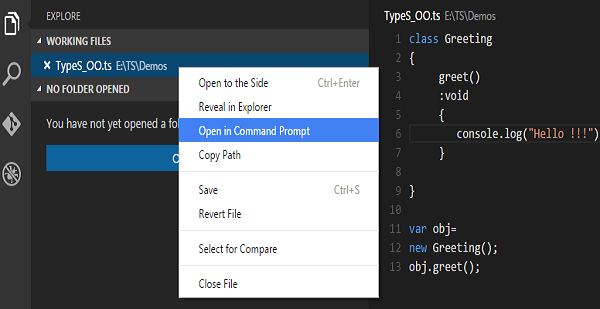
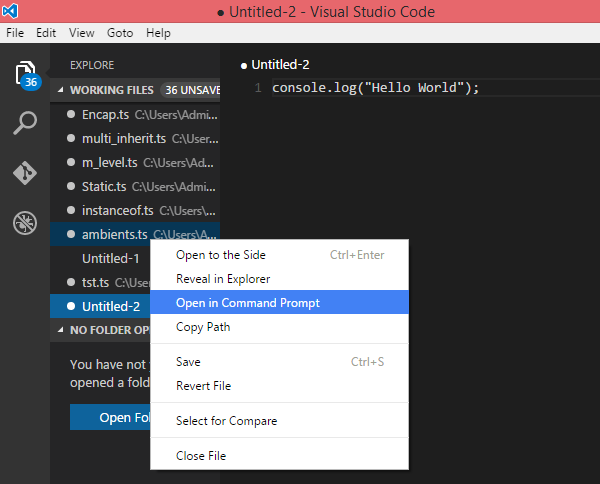
    Step 2 − Right-click the TypeScript file under the Working Files option in VS Codes Explore Pane. Select Open in Command Prompt option.

    Compile and Execute

    Step 3 − To compile the file use the following command on the terminal window.

    tsc Test.ts
    

    Step 4 − The file is compiled to Test.js. To run the program written, type the following in the terminal.

    node Test.js
    

    Compiler Flags

    Compiler flags enable you to change the behavior of the compiler during compilation. Each compiler flag exposes a setting that allows you to change how the compiler behaves.

    The following table lists some common flags associated with the TSC compiler. A typical command-line usage uses some or all switches.

    S.No.Compiler flag & Description
    1.–helpDisplays the help manual
    2.–moduleLoad external modules
    3.–targetSet the target ECMA version
    4.–declarationGenerates an additional .d.ts file
    5.–removeCommentsRemoves all comments from the output file
    6.–outCompile multiple files into a single output file
    7.–sourcemapGenerate a sourcemap (.map) files
    8.–module noImplicitAnyDisallows the compiler from inferring the any type
    9.–watchWatch for file changes and recompile them on the fly

    Note − Multiple files can be compiled at once.

    tsc file1.ts, file2.ts, file3.ts
    

    Identifiers in TypeScript

    Identifiers are names given to elements in a program like variables, functions etc. The rules for identifiers are −

    • Identifiers can include both, characters and digits. However, the identifier cannot begin with a digit.
    • Identifiers cannot include special symbols except for underscore (_) or a dollar sign (&dollar;).
    • Identifiers cannot be keywords.
    • They must be unique.
    • Identifiers are case-sensitive.
    • Identifiers cannot contain spaces.

    The following tables lists a few examples of valid and invalid identifiers −

    Valid identifiersInvalid identifiers
    firstNameVar
    first_namefirst name
    num1first-name
    &dollar;result1number

    TypeScript Keywords

    Keywords have a special meaning in the context of a language. The following table lists some keywords in TypeScript.

    breakasanyswitch
    caseifthrowelse
    varnumberstringget
    moduletypeinstanceoftypeof
    publicprivateenumexport
    finallyforwhilevoid
    nullsuperthisnew
    inreturntruefalse
    anyextendsstaticlet
    packageimplementsinterfacefunction
    newtryyieldconst
    continuedocatch

    Whitespace and Line Breaks

    TypeScript ignores spaces, tabs, and newlines that appear in programs. You can use spaces, tabs, and newlines freely in your program and you are free to format and indent your programs in a neat and consistent way that makes the code easy to read and understand.

    TypeScript is Case-sensitive

    TypeScript is case-sensitive. This means that TypeScript differentiates between uppercase and lowercase characters.

    Semicolons are optional

    Each line of instruction is called a statement. Semicolons are optional in TypeScript.

    Example

    console.log("hello world")console.log("We are learning TypeScript")

    A single line can contain multiple statements. However, these statements must be separated by a semicolon.

    Comments in TypeScript

    Comments are a way to improve the readability of a program. Comments can be used to include additional information about a program like author of the code, hints about a function/ construct etc. Comments are ignored by the compiler.

    TypeScript supports the following types of comments −

    • Single-line comments ( // ) − Any text between a // and the end of a line is treated as a comment
    • Multi-line comments (/* */) − These comments may span multiple lines.

    Example

    //this is single line comment /* This is a  
       Multi-line comment 
    */

    TypeScript and Object Orientation

    TypeScript is Object-Oriented JavaScript. Object Orientation is a software development paradigm that follows real-world modelling. Object Orientation considers a program as a collection of objects that communicate with each other via mechanism called methods. TypeScript supports these object oriented components too.

    • Object − An object is a real time representation of any entity. According to Grady Brooch, every object must have three features −
      • State − described by the attributes of an object
      • Behavior − describes how the object will act
      • Identity − a unique value that distinguishes an object from a set of similar such objects.
    • Class − A class in terms of OOP is a blueprint for creating objects. A class encapsulates data for the object.
    • Method − Methods facilitate communication between objects.

    Example: TypeScript and Object Orientation

    classGreeting{greet():void{console.log("Hello World!!!")}}var obj =newGreeting(); 
    obj.greet();

    The above example defines a class Greeting. The class has a method greet (). The method prints the string Hello World on the terminal. The new keyword creates an object of the class (obj). The object invokes the method greet ().

    On compiling, it will generate following JavaScript code.

    var Greeting =(function(){functionGreeting(){}
       Greeting.prototype.greet=function(){console.log("Hello World!!!");};return Greeting;}());var obj =newGreeting();
    obj.greet()

    The output of the above program is given below −

    Hello World!!!
    
  • Environment Setup

    We already have set up TypeScript programming online, so that you can execute all the available examples online at the same time when you are doing your theory work. This gives you confidence in what you are reading and to check the result with different options. Feel free to modify any example and execute it online.

    var message:string="Hello World"console.log(message)

    On compiling, it will generate following JavaScript code.

    var message ="Hello World";console.log(message);

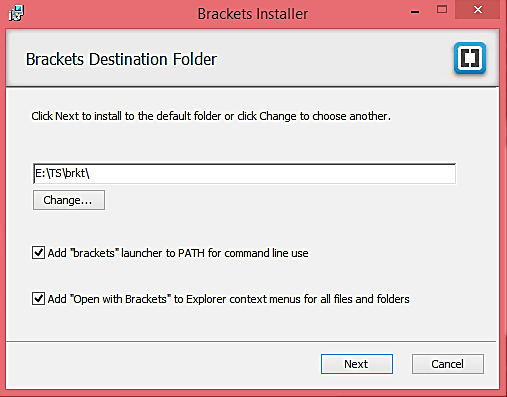
    In this chapter, we will discuss how to install TypeScript on Windows platform. We will also explain how to install the Brackets IDE.

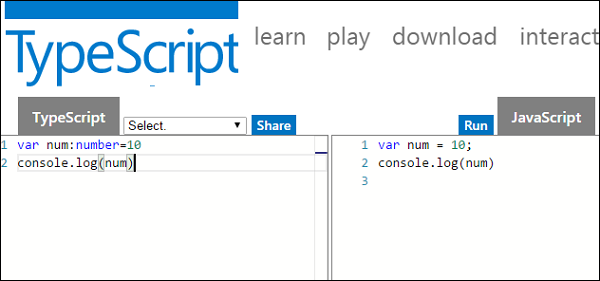
    You may test your scripts online by using The TypeScript at www.typescriptlang.org/Playground. The online editor shows the corresponding JavaScript emitted by the compiler.

    TypeScript Online Test

    You may try the following example using Playground.

    var num:number=12console.log(num)

    On compiling , it will generate following JavaScript code.

    var num =12;console.log(num);

    The output of the above program is given below −

    12
    

    Local Environment Setup

    Typescript is an Open Source technology. It can run on any browser, any host, and any OS. You will need the following tools to write and test a Typescript program −

    A Text Editor

    The text editor helps you to write your source code. Examples of a few editors include Windows Notepad, Notepad&plus;&plus;, Emacs, vim or vi, etc. Editors used may vary with Operating Systems.

    The source files are typically named with the extension .ts

    The TypeScript Compiler

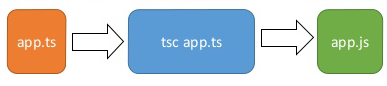
    The TypeScript compiler is itself a .ts file compiled down to JavaScript (.js) file. The TSC (TypeScript Compiler) is a source-to-source compiler (transcompiler / transpiler).

    TypeScript Compiler

    The TSC generates a JavaScript version of the .ts file passed to it. In other words, the TSC produces an equivalent JavaScript source code from the Typescript file given as an input to it. This process is termed as transpilation.

    However, the compiler rejects any raw JavaScript file passed to it. The compiler deals with only .ts or .d.ts files.

    This TypeScript tutorial is based on the latest typescript 5.5.2 version.

    Installing Node.js

    Node.js is an open source, cross-platform runtime environment for server-side JavaScript. Node.js is required to run JavaScript without a browser support. It uses Google V8 JavaScript engine to execute code. You may download Node.js source code or a pre-built installer for your platform. Node is available here − https://nodejs.org/en/download

    Installation on Windows

    Follow the steps given below to install Node.js in Windows environment.

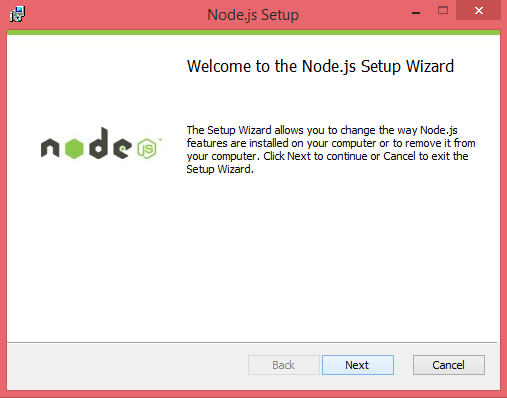
    Step 1 − Download and run the .msi installer for Node.

    Download and Run Installer

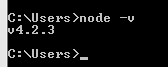
    Step 2 − To verify if the installation was successful, enter the command node v in the terminal window.

    Verify Installation

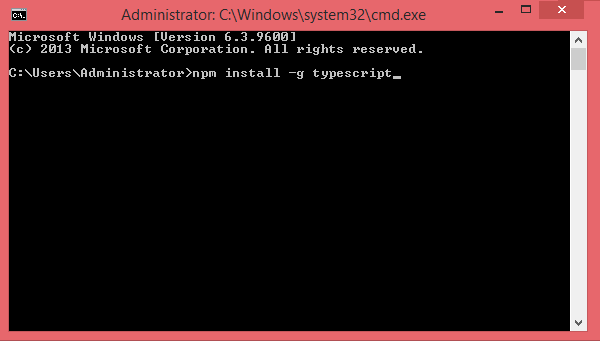
    Step 3 − Type the following command in the terminal window to install TypeScript.

    npm install -g typescript
    
    Install TypeScript

    Installation on Mac OS X

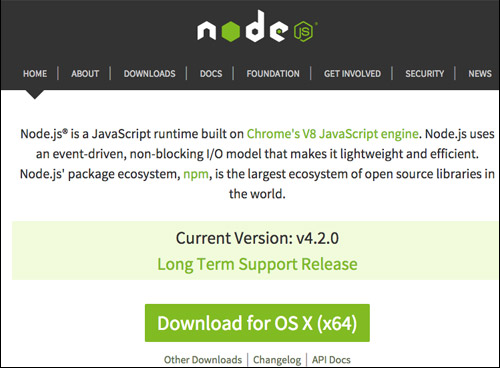
    To install node.js on Mac OS X, you can download a pre-compiled binary package which makes a nice and easy installation. Head over to http://nodejs.org/ and click the install button to download the latest package.

    Download Latest Package

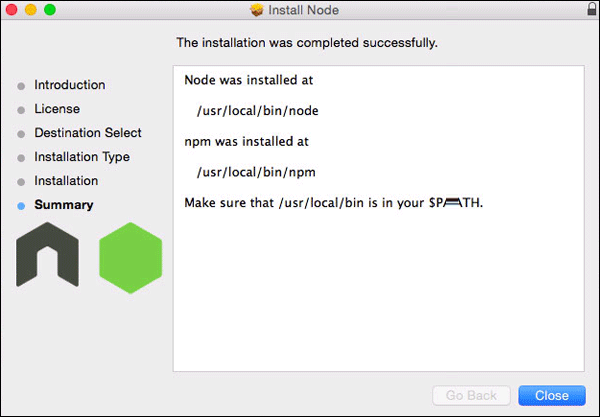
    Install the package from the .dmg by following the install wizard which will install both node and npm. npm is Node Package Manager which facilitates installation of additional packages for node.js.

    Install Node

    Installation on Linux

    You need to install a number of dependencies before you can install Node.js and NPM.

    • Ruby and GCC. Youll need Ruby 1.8.6 or newer and GCC 4.2 or newer.
    • Homebrew. Homebrew is a package manager originally designed for Mac, but its been ported to Linux as Linuxbrew. You can learn more about Homebrew at http://brew.sh/ and Linuxbrew at http://brew.sh/linuxbrew

    Once these dependencies are installed, you may install Node.js by using the following command on the terminal −

    brew install node.
    

    IDE Support

    Typescript can be built on a plethora of development environments like Visual Studio, Sublime Text 2, WebStorm/PHPStorm, Eclipse, Brackets, etc. Visual Studio Code and Brackets IDEs are discussed here. The development environment used here is Visual Studio Code (Windows platform).

    Visual Studio Code

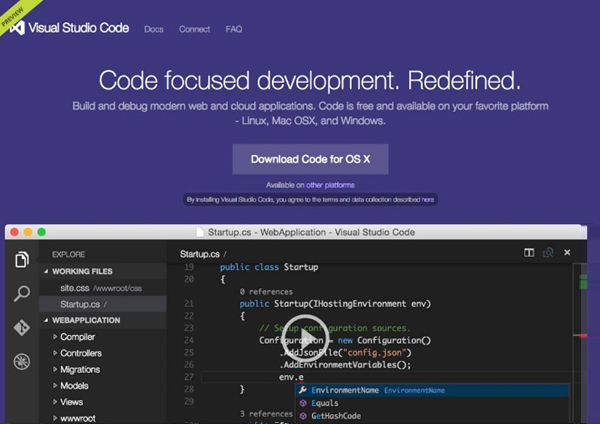
    This is an open source IDE from Visual Studio. It is available for Mac OS X, Linux and Windows platforms. VScode is available at − https://code.visualstudio.com/

    Installation on Windows

    Step 1 − Download Visual Studio Code for Windows.

    Download Visual Studio Code

    Step 2 − Double-click on VSCodeSetup.exe Launch Setup Process to launch the setup process. This will only take a minute.
    Setup Wizard

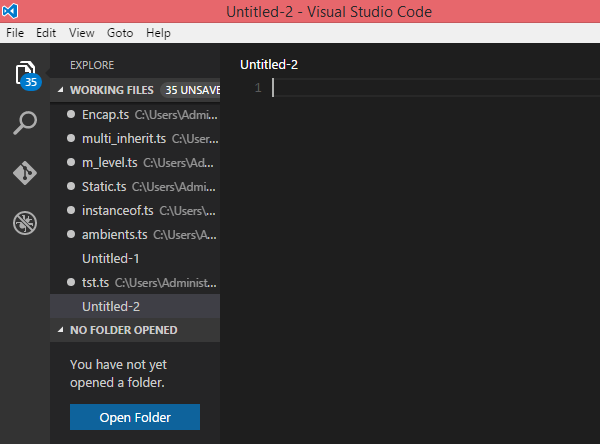
    Step 3 − A screenshot of the IDE is given below.

    IDE

    Step 4 − You may directly traverse to the files path by right clicking on the file → open in command prompt. Similarly, the Reveal in Explorer option shows the file in the File Explorer.

    Traverse Files Path

    Installation on Mac OS X

    Visual Studio Codes Mac OS X specific installation guide can be found at

    https://code.visualstudio.com/Docs/editor/setup

    Installation on Linux

    Linux specific installation guide for Visual Studio Code can be found at

    https://code.visualstudio.com/Docs/editor/setup

    Brackets

    Brackets is a free open-source editor for web development, created by Adobe Systems. It is available for Linux, Windows and Mac OS X. Brackets is available at http://brackets.io/

    Brackets

    TypeScript Extensions for Brackets

    Brackets supports extensions for adding extra functionality via the Extension Manager. The following steps explain installing TypeScript extensions using the same.

    • Post installation, click on the extension manager icon Extension Manager on the right-hand side of the editor. Enter typescript in the search box.
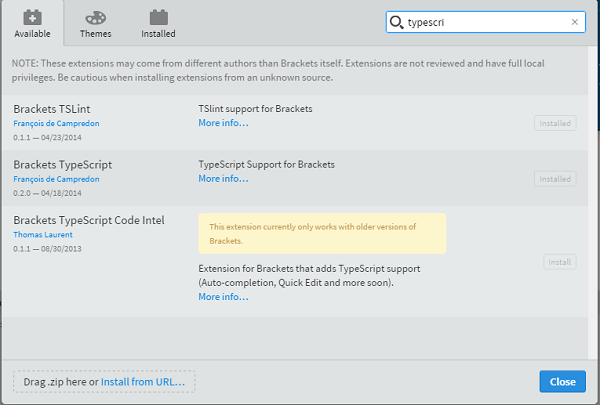
    • Install the Brackets TSLint and Brackets TypeScript plugins.
    TypeScript Extensions

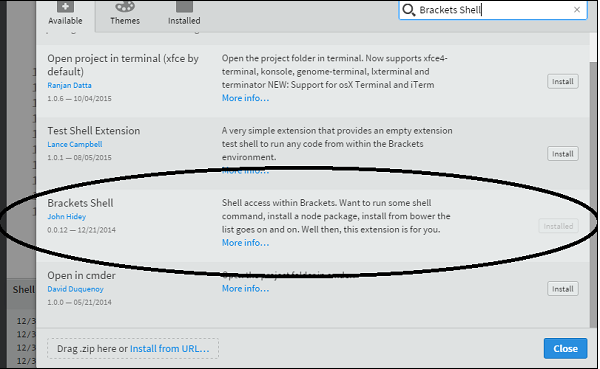
    You can run DOS prompt / shell within Brackets itself by adding one more extension Brackets Shell.

    Brackets Shell

    Upon installation, you will find an icon of shell on the right-hand side of the editor Shell. Once you click on the icon, you will see the shell window as shown below −
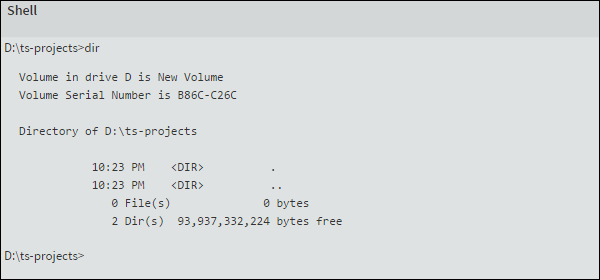
    Shell Window

    Note − Typescript is also available as a plugin for Visual Studio 2012 and 2013 environments (https://www.typescriptlang.org/#Download).VS 2015 and above includes Typescript plugin by default.

    Now, you are all set!!!

  • Overview

    JavaScript was introduced as a language for the client side. The development of Node.js has marked JavaScript as an emerging server-side technology too. However, as JavaScript code grows, it tends to get messier, making it difficult to maintain and reuse the code. Moreover, its failure to embrace the features of Object Orientation, strong type checking and compile-time error checks prevents JavaScript from succeeding at the enterprise level as a full-fledged server-side technology. TypeScript was presented to bridge this gap.

    What is TypeScript?

    By definition, TypeScript is JavaScript for application-scale development.

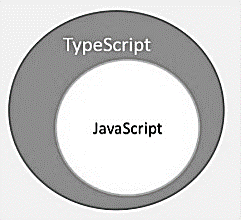
    TypeScript is a strongly typed, object oriented, compiled language. It was designed by Anders Hejlsberg (designer of C#) at Microsoft. TypeScript is both a language and a set of tools. TypeScript is a typed superset of JavaScript compiled to JavaScript. In other words, TypeScript is JavaScript plus some additional features.

    TypeScript Figure

    Features of TypeScript

    TypeScript is just JavaScript. TypeScript starts with JavaScript and ends with JavaScript. Typescript adopts the basic building blocks of your program from JavaScript. Hence, you only need to know JavaScript to use TypeScript. All TypeScript code is converted into its JavaScript equivalent for the purpose of execution.

    TypeScript supports other JS libraries. Compiled TypeScript can be consumed from any JavaScript code. TypeScript-generated JavaScript can reuse all of the existing JavaScript frameworks, tools, and libraries.

    JavaScript is TypeScript. This means that any valid .js file can be renamed to .ts and compiled with other TypeScript files.

    TypeScript is portable. TypeScript is portable across browsers, devices, and operating systems. It can run on any environment that JavaScript runs on. Unlike its counterparts, TypeScript doesnt need a dedicated VM or a specific runtime environment to execute.

    TypeScript and ECMAScript

    The ECMAScript specification is a standardized specification of a scripting language. There are six editions of ECMA-262 published. Version 6 of the standard is codenamed “Harmony”. TypeScript is aligned with the ECMAScript6 specification.

    TypeScript and ECMAScript

    TypeScript adopts its basic language features from the ECMAScript5 specification, i.e., the official specification for JavaScript. TypeScript language features like Modules and class-based orientation are in line with the EcmaScript 6 specification. Additionally, TypeScript also embraces features like generics and type annotations that arent a part of the EcmaScript6 specification.

    Why Use TypeScript?

    TypeScript is superior to its other counterparts like CoffeeScript and Dart programming languages in a way that TypeScript is extended JavaScript. In contrast, languages like Dart, CoffeeScript are new languages in themselves and require language-specific execution environment.

    The benefits of TypeScript include −

    • Compilation − JavaScript is an interpreted language. Hence, it needs to be run to test that it is valid. It means you write all the codes just to find no output, in case there is an error. Hence, you have to spend hours trying to find bugs in the code. The TypeScript transpiler provides the error-checking feature. TypeScript will compile the code and generate compilation errors, if it finds some sort of syntax errors. This helps to highlight errors before the script is run.
    • Strong Static Typing − JavaScript is not strongly typed. TypeScript comes with an optional static typing and type inference system through the TLS (TypeScript Language Service). The type of a variable, declared with no type, may be inferred by the TLS based on its value.
    • TypeScript supports type definitions for existing JavaScript libraries. TypeScript Definition file (with .d.ts extension) provides definition for external JavaScript libraries. Hence, TypeScript code can contain these libraries.
    • TypeScript supports Object Oriented Programming concepts like classes, interfaces, inheritance, etc.

    Components of TypeScript

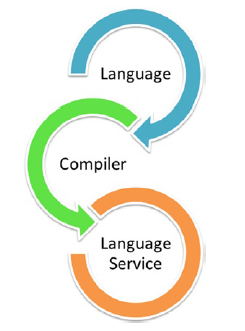
    At its heart, TypeScript has the following three components −

    • Language − It comprises of the syntax, keywords, and type annotations.
    • The TypeScript Compiler − The TypeScript compiler (tsc) converts the instructions written in TypeScript to its JavaScript equivalent.
    • The TypeScript Language Service − The “Language Service” exposes an additional layer around the core compiler pipeline that are editor-like applications. The language service supports the common set of a typical editor operations like statement completions, signature help, code formatting and outlining, colorization, etc.
    TypeScript Components

    Declaration Files

    When a TypeScript script gets compiled, there is an option to generate a declaration file (with the extension .d.ts) that functions as an interface to the components in the compiled JavaScript. The concept of declaration files is analogous to the concept of header files found in C/C++. The declaration files (files with .d.ts extension) provide intellisense for types, function calls, and variable support for JavaScript libraries like jQuery, MooTools, etc.