Category: 13. Advanced

https://cdn3d.iconscout.com/3d/premium/thumb/3d-software-settings-icon-download-in-png-blend-fbx-gltf-file-formats–setting-configuration-preferences-printing-pack-science-technology-icons-8549424.png?f=webp

  • Filtered unserialize()

    In PHP, the built-in function unserialize() is available from PHP version 4 onwards. With PHP 7, a provision to pass a list of allowed classes has been added. This allows the untrusted source to be filtered out. The unserialze() function unserializes the data from only the trusted classes.

    In PHP, serialization means generation of a storable representation of a value. This is useful for storing or passing PHP values around without losing their type and structure. The built-in serialize() function is used for this purpose.

    serialize(mixed $value): string

    The unserialze() function gives a PHP value from the serialized representation. From PHP 7 onwards, the unserialize() function follows the format below −

    unserialize(string $data, array $options = [ ]): mixed

    The $data parameter is the serialized string which you want to unserialize.

    The $options parameter has been newly introduced. It is an associative array of following keys −

    Sr.NoName & Description
    1allowed_classesan array of class names which should be accepted,orfalse to accept no classes,ortrue to accept all classes.Omitting this option is the same as defining it as true
    2max_depthThe maximum depth of structures permitted during unserialization.

    Example

    Take a look at the following example −

    Open Compiler

    <?php
       class MyClass { 
    
      var int $x;
      function __construct(int $x) {
         $this-&gt;x = $x;
      }
    } class NewClass {
      var int $y;
      function __construct(int $y) {
         $this-&gt;y = $y;
      }
    } $obj1 = new MyClass(10); $obj2 = new NewClass(20); $sob1 = serialize($obj1); $sob2 = serialize($obj2); // default behaviour that accepts all classes // second argument can be ommited. // if allowed_classes is passed as false, unserialize converts all objects into __PHP_Incomplete_Class object $usob1 = unserialize($sob1 , ["allowed_classes" => true]); // converts all objects into __PHP_Incomplete_Class object except those of MyClass and NewClass $usob2 = unserialize($sob2 , ["allowed_classes" => ["MyClass", "NewClass"]]); echo $usob1->x . PHP_EOL; echo $usob2->y . PHP_EOL; ?>

    It will produce the following output −

    10
    20
    
  • Closure::call()

    In PHP, a closure is an anonymous function that has access to the variables in the scope in which it was created, even after that scope has closed. You need to specify use keyword in it.

    Closures are objects that encapsulate the function code and the scope in which they were created. With PHP 7, a new closure::call() method was introduced to bind an object scope to a closure and invoke it.

    Methods in the Closure Class

    The Closure class has the following methods including the call() method −

    finalclassClosure{/* Methods */private__construct()publicstaticbind(Closure$closure,?object$newThis,object|string|null$newScope="static"):?ClosurepublicbindTo(?object$newThis,object|string|null$newScope="static"):?Closurepubliccall(object$newThis,mixed...$args):mixedpublicstaticfromCallable(callable$callback):Closure}

    The call() method is a static method of Closure class. It has been introduced as a shortcut the bind() or bindTo() methods.

    The bind() method Duplicates a closure with a specific bound object and class scope while the bindTo() method duplicates the closure with a new bound object and class scope.

    The call() method has the following signature −

    publicClosure::call(object$newThis,mixed...$args):mixed

    The call() method temporarily binds the closure to newThis, and calls it with any given parameters.

    With version prior to PHP 7, the bindTo() method can be used as follows −

    Open Compiler

    <?php
       class A {
    
      private $x = 1;
    } // Define a closure Pre PHP 7 code $getValue = function() {
      return $this-&gt;x;
    }; // Bind a clousure $value = $getValue->bindTo(new A, 'A'); print($value()); ?>

    The program binds the $getValue which is a closure object, to the object of A class and prints the value of its private variable $x – it is 1.

    With PHP 7, the binding is achieved by call() method as shown below −

    Open Compiler

    <?php
       class A {
    
      private $x = 1;
    } // PHP 7+ code, Define $value = function() {
      return $this-&gt;x;
    }; print($value->call(new A)); ?>
  • Swapping Variables

    PHP doesn’t provide any built-in function with which you can swap or interchange values of two variables. However, there are a few techniques which you can use to perform the swap.

    One of the most straightforward approaches is to use a third variable as a temporary place holder to facilitate swapping. Using the arithmetic operators in a specific order also is very effective. You can also use the binary XOR operator for swapping purpose. In this chapter, we shall implement these swapping techniques in PHP

    Temporary Variable

    This is logically the most obvious and the simplest approach. To swap values of “a” and “b”, use a third variable “c”. Assign the value of “a” to “c”, overwrite “a” with existing value of “b” and then set “b” to the earlier value of “a” that was stored in “c”.

    Example

    Take a look at the following example −

    Open Compiler

    <?php
       $a = 10;
       $b = 20;
       echo "Before swapping - \$a = $a, \$b = $b". PHP_EOL;
       $c = $a; 
       $a = $b;
       $b = $c;
       echo "After swapping - \$a = $a, \$b = $b". PHP_EOL;
    ?>

    It will produce the following output −

    Before swapping - $a = 10, $b = 20
    After swapping - $a = 20, $b = 10
    

    Using addition (+) Operator

    This solution takes the advantage of the fact that subtracting a number from the sum of two numbers gives back the second number. In other words, “sum(a+b) – a” is equal to “b” and vice versa.

    Example

    Let us take advantage of this property to swap “a” and “b” −

    Open Compiler

    <?php
       $a = 10;
       $b = 20;
       echo "Before swapping - \$a = $a, \$b = $b". PHP_EOL;
       $a = $a + $b;
       $b = $a - $b;
       $a = $a - $b;
       echo "After swapping - \$a = $a, \$b = $b". PHP_EOL;
    ?>

    It will produce the following output −

    Before swapping - $a = 10, $b = 20
    After swapping - $a = 20, $b = 10
    

    You can also use the other arithmetic operators – subtraction (-), multiplication (*) and division (/) in a similar manner to perform swapping.

    Explore our latest online courses and learn new skills at your own pace. Enroll and become a certified expert to boost your career.

    Using list() Function

    The list() function in PHP unpacks the array in separate variables. This helps in our objective of performing swap between two variables. To do that, build an array of “a” and “b”, and then unpack it to “b” and “a” variables to obtain “a” and “b” with interchanged values.

    Example

    Take a look at the following example −

    Open Compiler

    <?php
       $a = 10;
       $b = 20;
       echo "Before swapping - \$a = $a, \$b = $b". PHP_EOL;
       $arr = [$a, $b];
       list($b, $a) = $arr;
       echo "After swapping - \$a = $a, \$b = $b". PHP_EOL;
    ?>

    It will produce the following output −

    Before swapping - $a = 10, $b = 20
    After swapping - $a = 20, $b = 10
    

    Bitwise XOR

    The bitwise XOR (^) operator can also be used to swap the value of two variables “x” and “y”. It returns 1 when one of two bits at same position in both operands is 1, otherwise returns 0.

    Example

    Take a look at the following example −

    Open Compiler

    <?php
       $a = 10;
       $b = 20;
       echo "Before swapping - \$a = $a, \$b = $b". PHP_EOL;
       $a = $a ^ $b;
       $b = $a ^ $b;
       $a = $a ^ $b;
       echo "After swapping - \$a = $a, \$b = $b". PHP_EOL;
    ?>

    It will produce the following output −

    Before swapping - $a = 10, $b = 20
    After swapping - $a = 20, $b = 10
    
  • HTTP Authentication

    In PHP, the header() function is used to send an “Authentication Required” message to the client browser causing it to pop up a Username/Password input window. In fact header() allows you to send any raw HTTP header.

    header(string$header,bool$replace=true,int$response_code=0):void

    The string parameter is passed to the header() function. For example

    header("HTTP/1.1 404 Not Found");

    It is used to figure out the HTTP status code to send.

    You can also use header() function to redirect the browser to another URL.

    Once the user has filled in a username and a password, the URL containing the PHP script will be called again with the predefined variables PHP_AUTH_USER, PHP_AUTH_PW, and AUTH_TYPE set to the user name, password and authentication type respectively. These predefined variables are found in the $_SERVER array. Only “Basic” and “Digest” authentication methods are supported.

    <?php
    
       /* Redirect browser */
       header("Location: http://www.example.com/"); 
    
       /* Make sure that code below does not get executed when we redirect. */
       exit;
       
    ?>

    The optional replace parameter indicates whether the header should replace a previous similar header, or add a second header of the same type, and response_code parameter forces the HTTP response code to the specified value.

    To be able to force he client authentication, you need a .htaccess file in document root folder. Open a new text file, put the following text in it, and save it with .htaccess as its name.

    CGIPassAuth On
    

    Example

    An example script fragment which would force client authentication on a page is as follows −

    <?php
       if (!isset($_SERVER['PHP_AUTH_USER'])) {
    
      header('WWW-Authenticate: Basic realm="My Realm"');
      header('HTTP/1.0 401 Unauthorized');
      echo 'User hits Cancel button';7
      exit;
    } else {
      echo "&lt;p&gt;Hello {$_SERVER&#91;'PHP_AUTH_USER']}.&lt;/p&gt;";
      echo "&lt;p&gt;You entered {$_SERVER&#91;'PHP_AUTH_PW']} as your password.&lt;/p&gt;";
    } ?>

    Output

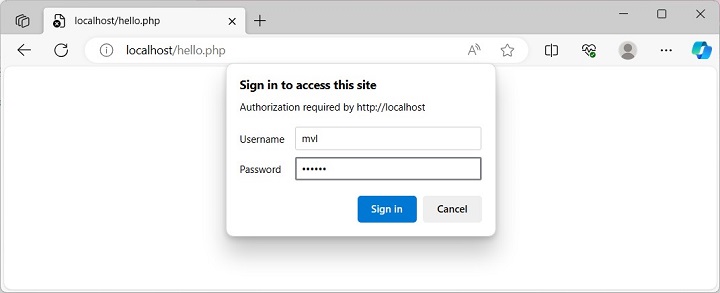
    When you visit the script in a browser, it pops up a dialog box as shown −

    PHP HTTP Authentication 1

    Once you click on the sign in button, there may be a backend script to authenticate the login credentials. Once authenticated, two server variables will be created with the keys PHP_AUTH_USER and PHP_AUTH_PW, which can be verified with the output of phpinfo() function.

    PHP HTTP Authentication 2
  • System Calls

    PHP’s library of built-in function includes a category of functions that deal with invoking operating system utilities and external programs from within the PHP code. In this chapter, we shall discuss the PHP functions used to perform system calls.

    The system() Function

    The system() function is similar to the system() function in C that it executes the given command and outputs the result.

    system(string$command,int&$result_code=null):string|false

    The system() call tries to automatically flush the web server’s output buffer after each line of output if PHP is running as a server module. It returns the last line of the command output on success, and false on failure.

    Example

    The following PHP snippet invokes DIR command of Windows OS and displays the list of files in the current directory.

    <?php
       echo '<pre>';
    
       // Outputs all the result of DOS command "dir", and returns
       // the last output line into $last_line. Stores the return value
       // of the shell command in $retval.
       $last_line = system('dir/w', $retval);
    
       // Printing additional info
       echo '
       </pre>
       <hr />Last line of the output: ' . $last_line . '
       <hr />Return value: ' . $retval;
    ?>

    It will produce the following output −

    Volume in drive C has no label.
    Volume Serial Number is 7EE4-E492
    
    Directory of C:\xampp\htdocs
    [.]                 [..]                applications.html   bitnami.css
    [dashboard]         employee.csv        favicon.ico         hello.csv
    hello.html          hello.php           homepage.php        [img]
    index.php           [Langi]             menu.php            myform.php
    myname.php          new.png             new.txt             test.php
    test.zip            [TPcodes]           uploadfile.php      [webalizer]
    welcome.png         [xampp]             
    
                 18 File(s)          123,694 bytes
                 8 Dir(s)            168,514,232,320 bytes free
    Last line of the output: 8 Dir(s) 168,514,232,320 bytes free Return value: 0

    The shell_exec() Function

    The shell_exec() function is identical to PHP’s backtick operator. It executes the given command via shell and return the complete output as a string

    shell_exec(string$command):string|false|null

    The function returns a string containing the output from the executed command, false if the pipe cannot be established or null if an error occurs or the command produces no output.

    Example

    In the following code, we use shell_exec() function to obtain a list of files with “.php” as the extension in the current directory −

    <?php
       $output = shell_exec('dir *.php');
       echo "<pre>$output</pre>";
    ?>

    It will produce the following output −

    Volume in drive C has no label.
    Volume Serial Number is 7EE4-E492
    
    Directory of C:\xampp\htdocs
    
    10/26/2023  08:27 PM                73 hello.php
    10/12/2023  10:40 AM                61 homepage.php
    07/16/2015  09:02 PM               260 index.php
    10/12/2023  10:39 AM                49 menu.php
    09/25/2023  01:43 PM               338 myform.php
    10/12/2023  10:49 AM                51 myname.php
    10/26/2023  02:00 PM               369 test.php
    09/25/2023  01:42 PM               555 uploadfile.php
    
               8 File(s)          1,756 bytes
               0 Dir(s)           168,517,771,264 bytes free

    Explore our latest online courses and learn new skills at your own pace. Enroll and become a certified expert to boost your career.

    The exec() Function

    The exec() function executes the given command as a string argument.

    exec(string$command,array&$output=null,int&$result_code=null):string|false

    The $output parameter, if specified, is an array that will be filled with every line of output from the command.

    Example

    In this case, we use exec() function to call whoami command from inside the program. The whoami command returns the username.

    <?php
    
       // outputs the username that owns the running php/httpd process
       // (on a system with the "whoami" executable in the path)
       $output=null;
       $retval=null;
       exec('whoami', $output, $retval);
       echo "Returned with status $retval and output:\n";
       var_dump($output);
       
    ?>

    It will produce the following output −

    Returned with status 0 and output: array(1) 
    { [0]=> string(13) "gnvbgl3\mlath" }
    

    The passthru() Function

    The passthru() function executes an external program and display raw output. Though the passthru() function is similar to the exec() or system() function in that it executes a command, it should be used in their place when the output from the OS command is binary data which needs to be passed directly back to the browser.

    Example

    A PHP program that uses passthu() function to display the contents of system PATH environment variable

    passthru(string $command, int &$result_code = null): ?false
    <?php
       passthru ('PATH');
    ?>

    It will produce the following output −

    PATH=C:\Python311\Scripts\;C:\Python311\;C:\WINDOWS\system32;C:\WINDOWS;
    C:\WINDOWS\System32\Wbem;C:\WINDOWS\System32\WindowsPowerShell\v1.0\;
    C:\WINDOWS\System32\OpenSSH\;C:\xampp\php;C:\Users\mlath\AppData\Local
    \Microsoft\WindowsApps;C:\VSCode\Microsoft VS Code\bin
    

    Backtick Operator

    PHP supports one execution operator: backticks (“). (they are not single-quotes!) PHP will attempt to execute the contents of the backticks as a shell command; the output will be returned. Use of the backtick operator is identical to shell_exec().

    Example

    Take a look at the following example −

    <?php
       $output = dir *.php;
       echo "<pre>$output</pre>";
    ?>

    It will produce the following output −

    Volume in drive C has no label.
    Volume Serial Number is 7EE4-E492
    
    Directory of C:\xampp\htdocs
    
    10/26/2023  08:42 PM                61 hello.php
    10/12/2023  10:40 AM                61 homepage.php
    07/16/2015  09:02 PM               260 index.php
    10/12/2023  10:39 AM                49 menu.php
    09/25/2023  01:43 PM               338 myform.php
    10/12/2023  10:49 AM                51 myname.php
    10/26/2023  02:00 PM               369 test.php
    09/25/2023  01:42 PM               555 uploadfile.php
    
               8 File(s)          1,744 bytes
               0 Dir(s)           168,471,289,856 bytes free

    The backtick operator is disabled when shell_exec() is disabled.
  • PHP is_null() Function

    PHP defines NULL as one of its special data types. It indicates that a certain variable has not been assigned a value any specific data type. It is a built-in constant in PHP and is used to indicate the intentional absence of any object or value. A variable can be explicitly assigned NULL or its value been set to null by using the unset() function.

    The is_null() Function

    PHP provides a Boolean function is_null() to check if a variable is indeed of NULL type.

    is_null(mixed$value):bool

    Example 1

    If any variable is explicitly assigned NULL, obviously the is_null() function returns true.

    Open Compiler

    <?php
       $x = NULL;
       echo "Variable \$x is null? ";
       var_dump(is_null($x));
    ?>

    It will produce the following output −

    Variable $x is null? bool(true)
    

    Example 2

    If a variable with a certain value is unset, then too the is_null() function returns true, but with a warning

    Open Compiler

    <?php
       $x = "Hello";
       unset($x);
       echo "Variable \$x is null?\n";
       var_dump(is_null($x));
    ?>

    It will produce the following output −

    Variable $x is null?
    bool(true)
    
    PHP Warning:  Undefined variable $x in /home/cg/root/89262/main.php on line 5
    

    Example 3

    Similarly, if you just declare a variable, without assigning any value to it, the is_null() function returns true with a warning −

    Open Compiler

    <?php
       $y;
       echo "Variable \$y is null?\n";
       var_dump(is_null($y));
    ?>

    It will produce the following output −

    Variable $y is null?
    bool(true)
    Warning: Undefined variable $y in hello.php on line 9
    

    Example 4

    You can also use the equality operator (==) to check if a variable is NULL.

    Open Compiler

    <?php
       $x = NULL;
       if ($x === NULL) {
    
      echo '$x is NULL';
    } else {
      echo '$x is not NULL';
    } ?>

    It will produce the following output −

    $x is NULL
    

    Example 5

    A null string “” is not considered equal to NULL. Hence, the is_null() function as well as the “==” operator return false. Take a look at the following example −

    Open Compiler

    <?php
       $y = "";
       if ($y === NULL) {
    
      echo '$y is NULL';
    } else {
      echo '$y is not NULL';
    } echo "$y is null?\n"; var_dump(is_null($y)); ?>

    It will produce the following output −

    $y is not NULL is null?
    bool(false)
    

    Two other functions in PHP that are relevant to is_null() function are the isset() function and the empty() function.

    The isset() Function

    The isset() function determines if a variable is declared and is different than NULL.

    isset(mixed$var,mixed...$vars):bool

    Example

    A variable that is assigned NULL is considered as unset.

    Open Compiler

    <?php
       $x = NULL;
       echo '$x is set? ';
       var_dump(isset($x));
    ?>

    It will produce the following output −

    $x is set? bool(false)
    

    Note that a null character (“\0”) is not equivalent to the PHP null constant.

    Explore our latest online courses and learn new skills at your own pace. Enroll and become a certified expert to boost your career.

    The empty() Function

    The empty() function checks if a variable is considered to be empty. A variable is considered empty if it does not exist or if its value is NULL. empty() does not generate a warning if the variable does not exist.

    Example 1

    Take a look at the following example −

    Open Compiler

    <?php
       $x = NULL;
       echo '$x is empty? ';
       var_dump(empty($x));
       $y;
       echo '$y is empty? ';
       var_dump(empty($y));
    ?>

    It will produce the following output −

    $x is empty? bool(true)
    $y is empty? bool(true)
    

    Example 2

    The empty() function returns true if a variable is set to “0”, NULL, or is not set at all.

    Open Compiler

    <?php
       $var = 0;
       if (empty($var)) {
    
      echo '$var is either 0, empty, or not set at all';
    } ?>

    It will produce the following output −

    $var is either 0, empty, or not set at all
    
  • Encryption

    Early versions of PHP included mcrypt extension, that provided encryption/decryption capabilities. Due to lack of maintenance, the mycrypt extension has been deprecated and removed from PHP 7.2 version onwards. PHP now includes OpenSSL library that has an extensive functionality to support encryption and decryption features.

    OpenSSL supports various encryption algorithms such as AES (Advanced Encryption Standard). All the supported algorithms can be obtained by invoking openssl_get_cipher_methods() function.

    The two important functions in OpenSSL extension are −

    • openssl_encrypt() − Encrypts data
    • openssl_decrypt() − Decrypts data

    The openssl_encrypt() Function

    This function encrypts the given data with given method and key, and returns a raw or base64 encoded string −

    openssl_encrypt(string$data,string$cipher_algo,string$passphrase,int$options=0,string$iv="",string&$tag=null,string$aad="",int$tag_length=16):string|false

    The function has the following parameters −

    Sr.NoParameter & Description
    1dataThe plaintext message data to be encrypted.
    2cipher_algoThe cipher method.
    3passphraseThe passphrase. If the passphrase is shorter than expected, padded with NULL characters; if the passphrase is longer than expected, it is truncated.
    4optionsoptions is a bitwise disjunction of the flags OPENSSL_RAW_DATA and OPENSSL_ZERO_PADDING.
    5ivA non-NULL Initialization Vector.
    6tagThe authentication tag passed by reference when using AEAD cipher mode (GCM or CCM).
    7aadAdditional authenticated data.
    8tag_lengthThe length of the authentication tag. Its value can be between 4 and 16 for GCM mode.

    The function returns the encrypted string on success or false on failure.

    The openssl_decrypt() Function

    This function takes a raw or base64 encoded string and decrypts it using a given method and key.

    openssl_decrypt(string$data,string$cipher_algo,string$passphrase,int$options=0,string$iv="",?string$tag=null,string$aad=""):string|false

    The openssl_decrypt() function uses the same parameters as the openssl_encrypt function.

    This function returns the decrypted string on success or false on failure.

    Example

    Take a look at the following example −

    Open Compiler

    <?php
       function sslencrypt($source, $algo, $key, $opt, $iv) {
    
      $encstring = openssl_encrypt($source, $algo, $key, $opt, $iv);
      return $encstring;
    } function ssldecrypt($encstring, $algo, $key, $opt, $iv) {
      $decrstring = openssl_decrypt($encstring, $algo, $key, $opt, $iv);
      return $decrstring;
    } // string to be encrypted $source = "PHP: Hypertext Preprocessor"; // Display the original string echo "Before encryption: " . $source . "\n"; $algo = "BF-CBC"; $opt=0; $ivlength = openssl_cipher_iv_length($algo); $iv = random_bytes($ivlength); $key = "abcABC123!@#"; // Encryption process $encstring = sslencrypt($source, $algo, $key, $opt, $iv); // Display the encrypted string echo "Encrypted String: " . $encstring . "\n"; // Decryption process $decrstring = ssldecrypt($encstring, $algo, $key, $opt, $iv); // Display the decrypted string echo "Decrypted String: " . $decrstring; ?>

    It will produce the following output −

    Before encryption: PHP: Hypertext Preprocessor
    Encrypted String: 
    Decrypted String:
    
  • Hashing

    The term “hashing” represents a technique of encrypting data (specially a text) to obtain a fixed-length value. PHP library includes a number of functions that can perform hashing on data by applying different hashing algorithms such as md5, SHA2, HMAC etc. The encrypted value obtained is called as the hash of the original key.

    Processing of hashing is a one-way process, in the sense, it is not possible to reverse the hash so as to obtain the original key.

    Applications of Hashing

    The hashing technique is effectively used for the following purposes −

    Password Authentication

    We often register for various online applications such as gmail, Facebook etc. You are required to fill up a form wherein you create a password for an online account. The server hashes your password and the hashed value is stored in the database. At the time of logging in, the password submitted is hashed and compared with the one in the database. This protects your password from being stolen.

    Data Integrity

    One of the important uses of hashing is to verify if the data has not been tampered with. When a file is downloaded from the internet, you are shown its hash value, which you can compare with the downloaded to make sure that the file has not been corrupted.

    The Process of Hashing

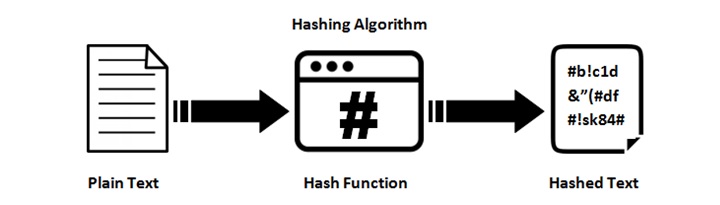
    The process of hashing can be represented by the following figure −

    PHP Hashing

    Explore our latest online courses and learn new skills at your own pace. Enroll and become a certified expert to boost your career.

    Hashing Algorithms in PHP

    PHP supports a number of hashing algorithms −

    • MD5 − MD5 is a 128-bit hash function that is widely used in software to verify the integrity of transferred files. The 128-bit hash value is typically represented as a 32-digit hexadecimal number. For example, the word “frog” always generates the hash “8b1a9953c4611296a827abf8c47804d7”
    • SHA − SHA stands for Secure Hash Algorithm. It’s a family of standards developed by the National Institute of Standards and Technology (NIST). SHA is a modified version of MD5 and is used for hashing data and certificates. SHA-1 and SHA-2 are two different versions of that algorithm. SHA-1 is a 160-bit hash. SHA-2 is actually a “family” of hashes and comes in a variety of lengths, the most popular being 256-bit.
    • HMAC − HMAC (Hash-Based Message Authentication Code) is a cryptographic authentication technique that uses a hash function and a secret key.
    • HKDF − HKDF is a simple Key Derivation Function (KDF) based on the HMAC message authentication code.
    • PBKDF2 − PBKDF2 (Password-Based Key Derivation Function 2) is a hashing algorithm that creates cryptographic keys from passwords.

    Hash Functions in PHP

    The PHP library includes several hash functions −

    The hash_algos Function

    This function returns a numerically indexed array containing the list of supported hashing algorithms.

    hash_algos():array

    The hash_file Function

    The function returns a string containing the calculated message digest as lowercase hexits.

    hash_file(string$algo,string$filename,bool$binary=false,array$options=[]):string|false

    The algo parameter is the type of selected hashing algorithm (i.e. “md5”, “sha256”, “haval160,4”, etc.). The filename is the URL describing location of file to be hashed; supports fopen wrappers.

    Example

    Take a look at the following example −

    Open Compiler

    <?php
       /* Create a file to calculate hash of */
       $fp=fopen("Hello.txt", "w");
       $bytes = fputs($fp, "The quick brown fox jumped over the lazy dog.");
       fclose($fp);
       echo hash_file('md5', "Hello.txt");
    ?>

    It will produce the following output −

    5c6ffbdd40d9556b73a21e63c3e0e904
    

    The hash() Function

    The hash() function generates a hash value (message digest) −

    hash(string$algo,string$data,bool$binary=false,array$options=[]):string

    The algo parameter is the type of selected hashing algorithm (i.e. “md5”, “sha256”, “haval160,4”, etc..). The data parameter is the message to be hashed. If the binary parameter is “true“, it outputs raw binary data; “false” outputs lowercase hexits.

    Example

    The function returns a string containing the calculated message digest as lowercase hexits.

    Open Compiler

    <?php
       echo "Using SHA256 algorithm:" . hash('sha256', 'The quick brown fox jumped over the lazy dog.'). PHP_EOL;
       echo "Using MD5 algorithm:",hash('md5', 'The quick brown fox jumped over the lazy dog.'), PHP_EOL;
       echo "Using SHA1 algorithm:" . hash('sha1', 'The quick brown fox jumped over the lazy dog.');
    ?>

    It will produce the following output −

    Using SHA256 algorithm:68b1282b91de2c054c36629cb8dd447f12f096d3e3c587978dc2248444633483
    Using MD5 algorithm:5c6ffbdd40d9556b73a21e63c3e0e904
    Using SHA1 algorithm:c0854fb9fb03c41cce3802cb0d220529e6eef94e
    
  • Special Types

    PHP’s two data types – resource and NULL – are classified as special types. An object of resource type refers to external resources like database connection, file streams etc. On the other hand, a NULL data type is a variable without any data assigned to it. In this chapter, we shall learn more about these types.

    Resource Type

    A PHP program often needs to interact with an external environment such as a database, or a disk file etc. These are treated as resources in PHP. Resource is a special data type that refers to any such external resource. PHP uses relevant functions to create these resources. For example, fopen() function opens a disk file and its reference is stored in a resource variable.

    PHP’s Zend engine uses reference counting system. Hence, a resource with zero reference count is destroyed automatically by garbage collector and the memory used by resource data type need not be freed manually.

    Different built-in PHP functions return respective resource variables. Subsequently, PHP uses them for interacting with the corresponding external environment. For example, the fopen() function returns a file resource, which acts as a file handle and the read/write operations on the file are facilitated by this resource variable.

    The following table summarizes different functions that return resource variables −

    Resource TypeBuilt-in functionsDefinition
    ProducedSold
    bzip2bzopen()bzclose()Bzip2 file
    curlcurl_init()curl_close()Curl session
    ftpftp_connect(),ftp_close()FTP stream
    mssql linkmssql_connect()mssql_close()Link to Microsoft SQL Server database
    mysql linkmysql_connect()mysql_close()Link to MySQL database
    mysql resultmysql_db_query(),mysql_free_result()MySQL result
    oci8 connectionoci_connect()oci_close()Connection to Oracle Database
    ODBC linkodbc_connect()odbc_close()Link to ODBC database
    pdf documentpdf_new()pdf_close()PDF document
    streamopendir()closedir()Dir handle
    streamfopen(), tmpfile()fclose()File handle
    socketsocket_create()Socket_close()Socket handle
    xmlxml_parser_create()xml_parser_free()XML parser
    zlibgzopen()gzclose()gz-compressed file
    zlib.deflatedeflate_init()None()incremental deflate context
    zlib.inflateinflate_init()None()incremental inflate context

    PHP has get_resource_type() function that returns resource type of a variable.

    get_resource_type(resource$handle):string

    where $handle is the resource variable whose type is to be obtained. This function returns a string corresponding to resource type.

    There is also get_resource_id() function an integer identifier for the given resource.

    get_resource_id(resource$resource):int

    Example

    This function provides a type-safe way for generating the integer identifier for a given resource.

    <?php
       $fp = fopen("hello.php", "r");
       $resource = get_resource_type($fp);
       $id = get_resource_id($fp);
       echo "The resource type is : $resource The resource ID is : $id";
    ?>

    It will produce the following output −

    The resource type is : stream The resource ID is : 5
    

    NULL type

    In PHP, a variable with no value is said to be of null data type. Such a variable has a value defined as NULL. A variable can be explicitly assigned NULL or its value been set to null by using unset() function.

    $var=NULL;

    It is possible to cast variable of other type to null, although casting null to other type has been deprecated from PHP 7.2. In earlier versions, casting was done using (unset)$var syntax

    Example

    The following example shows how to assign NULL to a variable

    Open Compiler

    <?php
       $var=NULL;
       var_dump($var);
    ?>

    It will produce the following output −

    NULL
    

    Example

    The following example performs null variable to other primary variables −

    Open Compiler

    <?php
       $var = NULL;
       var_dump( (int)   $var);
       var_dump((float)$var);
       var_dump((bool)  $var) ;
       var_dump( (boolean) $var);
    ?>

    It will produce the following output −

    int(0)
    float(0)
    bool(false)
    bool(false)
    
  • Exceptions

    Prior to version 7, PHP parser used to report errors in response to various conditions. Each error used to be of a certain predefined type. PHP7 has changed the mechanism of error reporting. Instead of traditional error reporting, most errors are now reported by throwing error exceptions.

    The exception handling mechanism in PHP is similar to many other languages, and is implemented with the try, catch, throw and finally keywords.

    The Throwable Interface

    Exceptions in PHP implements the Throwable interface. The Throwable interface acts as the base for any object that can be thrown via throw statement, including Error and Exception objects.

    A user defined class cannot implement Throwable interface directly. Instead, to declare a user defined exception class, it must extend the Exception class.

    PHP code with potential exceptions is surrounded in a try block. An exception object is thrown if it is found, to facilitate the catching of potential exceptions. Each try must have at least one corresponding catch or finally block. Moreover, there may be more than one catch/finally blocks corresponding to a try block.

    try{// throw errors in the try-block // if an error occurs we can throw an exceptionthrownewException('this is an error.');}catch(Exception$e){// catch the throws in the catch-block // do something with the exception object, eg.  // display its messageecho'Error message: '.$e->getMessage();}

    If an exception is thrown and there is no catch block, the exception will “bubble up” until it finds a matching catch block. If the call stack is unwound all the way to the global scope without encountering a matching catch block, a global exception handler will be called (if it is set) otherwise the program will terminate with a fatal error.

    set_exception_handler

    This function sets the default exception handler if an exception is not caught within a try/catch block. After the callback is executed, the program execution will stop.

    set_exception_handler(?callable$callback):?callable

    The $callback parameter is the name of the function to be called when an uncaught exception occurs. This function must be defined before calling set_exception_handler(). This handler function needs to accept one parameter, which will be the exception object that was thrown.

    The function returns the name of the previously defined exception handler, or NULL on error. If no previous handler was defined, NULL is also returned.

    Example

    Take a look at the following example −

    Open Compiler

    <?php
       function handler($ex) {
    
      echo "Uncaught exception is : " , $ex-&gt;getMessage(), "\n";
    } set_exception_handler('handler'); throw new Exception('Not Found Exception'); echo "not included Executed\n"; ?>

    It will produce the following output −

    Uncaught exception is : Not Found Exception
    

    Explore our latest online courses and learn new skills at your own pace. Enroll and become a certified expert to boost your career.

    SPL Exceptions

    Standard PHP library contains predefined exceptions −

    Sr.NoPredefined Exceptions
    1LogicExceptionException that represents error in the program logic.
    2BadFunctionCallExceptionException thrown if a callback refers to an undefined function or if some arguments are missing.
    3BadMethodCallExceptionException thrown if a callback refers to an undefined method or if some arguments are missing.
    4DomainExceptionException thrown if a value does not adhere to a defined valid data domain.
    5InvalidArgumentExceptionException thrown if an argument is not of the expected type.
    6LengthExceptionException thrown if a length is invalid.
    7OutOfRangeExceptionException thrown when an illegal index was requested.
    8RuntimeExceptionException thrown if an error which can only be found on runtime occurs.
    9OutOfBoundsExceptionException thrown if a value is not a valid key.
    10OverflowExceptionException thrown when adding an element to a full container.
    11RangeExceptionException thrown to indicate range errors during program execution. An arithmetic error other than under/overflow.
    12UnderflowExceptionException thrown when performing an invalid operation on an empty container, such as removing an element.
    13UnexpectedValueExceptionException thrown if a value does not match with a set of values.

    User-defined Exception

    You can define a custom exception class that extends the base Exception class. Following script defines a custom exception class called myException. This type of exception is thrown if value of $num is less than 0 or greater than 100.

    Example

    The getMessage() method of Exception class returns the error message and getLine() method returns line of code in which exception appears.

    Open Compiler

    <?php
       class myException extends Exception {
    
      function message() {
         return "error : ". $this-&gt;getMessage(). "in line no". $this-&gt;getLine();
      }
    } $num=125; try {
      if ($num&gt;100 || $num&lt;0)
      throw new myException("$num is invalid number");
      else
      echo "$num is a valid number";
    } catch (myException $m) {
      echo $m-&gt;message();
    } ?>

    Run the above code with $num=125 and $num=90 to get an error message and a message of valid number −

    error : 125 is invalid number in line no 10