Category: 08. Object Oriented

https://cdn3d.iconscout.com/3d/premium/thumb/spiral-object-10293243-8431858.png?f=webp

  • Anonymous Classes

    The release of version 7.0 is an important milestone in the evolution of PHP language, when a lot of new features were introduced. The feature of Anonymous class was also made available in PHP version 7.0.

    As the term “anonymous” suggests, it is a class without a (programmer declared) name. The usual practice is to define a class with a certain identifier, so that it can be used repeatedly. The anonymous class, on the other hand is for one-time use only.

    $obj=newclass(){/* class body */};

    Apart from this class not having a name, it is similar to a normal named class, in the sense it can contain properties and methods. Its functionality is no different from that of an object of a named class.

    An anonymous class might be used over a named class especially when the class does not need to be documented, and when the class is used only once during execution. Anonymous classes are useful when simple, one-off objects need to be created.

    Example

    In the following code, an anonymous class is instantiated and stored in $obj object. The class includes definitions of addition() and division() methods, which are called with the $obj object.

    Open Compiler

    <?php
       $obj = new class(10) {
    
      private int $x;
      function __construct($x) {
         $this-&gt;x = $x;
      }
      public function addition($x) {
         return $this-&gt;x+$x;
      }
      public function division($x) {
         return $this-&gt;x/$x;
      }
    }; echo "Addition: " . $obj->addition(20) . PHP_EOL; echo "Division: " . $obj->division(20) . PHP_EOL; ?>

    It will produce the following output −

    Addition: 30
    Division: 0.5
    

    Anonymous Class as a Child Class

    An anonymous class can do everything that a normal class can. It can extends another class, implement an interface or even use a trait.

    Example

    In the example below, the anonymous class is a child class, extending a parent already available.

    Open Compiler

    <?php
       class myclass {
    
      public function hello() {
         echo "Hello World!" . PHP_EOL;
      }
    } $obj = new class("Neena") extends myclass {
      private string $nm;
      function __construct($x) {
         $this-&gt;nm = $x;
      }
      public function greeting() {
         parent::hello();
         echo "Welcome " . $this-&gt;nm . PHP_EOL;
      }
    }; $obj->greeting(); ?>

    It will produce the following output −

    Hello World!
    Welcome Neena
    

    Example

    Although the anonymous class doesn’t have any user defined name, PHP does assign it an internal name, which can be obtained with the built-in get_class() function as follows −

    Open Compiler

    <?php
       $obj = new class() {
    
      function greeting() {
         echo "Hello World" . PHP_EOL;
      }
    }; $obj->greeting(); echo "Name of class: " . get_class($obj); ?>

    It will produce the following output −

    Hello World
    Name of class: class@anonymousC:\xampp\htdocs\hello.php:2$0
    

    PHP parser assigns the internal name randomly.

  • Cloning Objects

    A PHP statement such as “$obj1 = $obj2” merely creates another reference to the same object in memory. Hence, changes in attribute reflect both in original and duplicate object. The clone keyword in PHP creates a shallow copy of an object.

    $obj2=$obj1

    Changes in the original object do not reflect in the shallow copy.

    Example

    Take a look at the following example −

    Open Compiler

    <?php
       class foo {
    
      var $var1 = 'Hello';
    } $x = new foo(); $y = $x; # reference copy echo $x->var1 . " " . $y->var1 . PHP_EOL; $x->var1 = "Hello World"; echo $x->var1 . " " . $y->var1 . PHP_EOL; ?>

    It will produce the following output −

    Hello Hello
    Hello World Hello World
    

    In the first case, $y is just a reference copy of $x. Hence, any change in var1 property reflects in both.

    However, if we declare $y as a clone of $x, then any change in the original object is not reflected in its shallow copy.

    Example

    Take a look at the following example −

    Open Compiler

    <?php
       class foo {
    
      var $var1 = 'Hello World';
    } $x = new foo(); # shallow copy $y = clone $x; echo $x->var1 . " " . $y->var1 . PHP_EOL; $x->var1 = "Hello PHP"; echo $x->var1 . " " . $y->var1 . PHP_EOL; ?>

    It will produce the following output −

    Hello World Hello World
    Hello PHP Hello World
    

    Explore our latest online courses and learn new skills at your own pace. Enroll and become a certified expert to boost your career.

    Example

    In the following code, myclass has one of attributes as object of address class. An object of myclass is duplicated by assignment. Any change in the value of its embedded address object is reflected in both the objects, but change in the name property is not effected in the cloned object.

    Open Compiler

    <?php
       class address {
    
      var $city="Nanded";
      var $pin="431601";
      function setaddr($arg1, $arg2) {
         $this-&gt;city=$arg1;
         $this-&gt;pin=$arg2;
      }
    } class myclass {
      var $name="Raja";
      var $obj;
      function setname($arg) {
         $this-&gt;name=$arg;
      }
    } $obj1=new myclass(); $obj1->obj=new address(); echo "original object\n"; print_r($obj1); echo "\n"; $obj2=$obj1; # reference copy $obj1->setname("Ravi"); $obj1->obj->setaddr("Mumbai", "400001"); echo "after change: Original object\n"; print_r($obj1); echo "\nCopied object\n"; print_r($obj2); ?>

    It will produce the following output −

    original object
    myclass Object
    (
       [name] => Raja
       [obj] => address Object
       (
    
      &#91;city] =&gt; Nanded
      &#91;pin] =&gt; 431601
    ) ) after change: Original object myclass Object ( [name] => Ravi [obj] => address Object (
      &#91;city] =&gt; Mumbai
      &#91;pin] =&gt; 400001
    ) ) Copied object myclass Object ( [name] => Ravi [obj] => address Object (
      &#91;city] =&gt; Mumbai
      &#91;pin] =&gt; 400001
    ) )

    Using the “clone” Keyword

    In a shallow copy, any properties of the original object that are references to other variables will remain references. The clone keyword does not copy the contained objects of the copied objects.

    We now create a clone of myclass object, so that $obj2 is the clone of $obj1. We change the name property of $obj1 from Raja to Ravi, and also modify the embedded address object. The property change will not reflect in its clone, but the referred address object will be changed.

    Example

    Take a look at the following example −

    Open Compiler

    <?php
       class address {
    
      var $city="Nanded";
      var $pin="431601";
      function setaddr($arg1, $arg2) {
         $this-&gt;city=$arg1;
         $this-&gt;pin=$arg2;
      }
    } class myclass {
      var $name="Raja";
      var $obj;
      function setname($arg) {
         $this-&gt;name=$arg;
      }
    } $obj1=new myclass(); $obj1->obj=new address(); echo "original object\n"; print_r($obj1); echo "\n"; $obj2=clone $obj1; # clone copy $obj1->setname("Ravi"); $obj1->obj->setaddr("Mumbai", "400001"); echo "after change: Original object\n"; print_r($obj1); echo "\nCopied object\n"; print_r($obj2); ?>

    It will produce the following output −

    original object
    myclass Object
    (
       [name] => Raja
       [obj] => address Object
       (
    
      &#91;city] =&gt; Nanded
      &#91;pin] =&gt; 431601
    ) ) after change: Original object myclass Object ( [name] => Ravi [obj] => address Object (
      &#91;city] =&gt; Mumbai
      &#91;pin] =&gt; 400001
    ) ) Copied object myclass Object ( [name] => Raja [obj] => address Object (
      &#91;city] =&gt; Mumbai
      &#91;pin] =&gt; 400001
    ) )

    Using __clone() Method

    The clone keyword creates a shallow copy of the object. When an object is cloned, PHP will perform a shallow copy of all of the object’s properties. Any properties that are references to other variables will remain references. Hence, any changes done to the original object will also appear in the cloned object.

    If you wish to prevent the copied object to update automatically, we need to create a deep copy of the object with the __clone() method. It is one of the magic methods in PHP.

    Once the cloning is complete, if a __clone() method is defined, then the newly created object’s __clone() method will be called, to allow any necessary properties that need to be changed.

    Example

    In the above example, we have an object of myclass, one of its attributes $obj holding the reference to an object of address class. To achieve a deep copy, we override the __clone() magic method in myclass.

    Open Compiler

    <?php
       class address {
    
      var $city="Nanded";
      var $pin="431601";
      function setaddr($arg1, $arg2) {
         $this-&gt;city=$arg1;
         $this-&gt;pin=$arg2;
      }
    } class myclass {
      var $name="Raja";
      var $obj;
      function setname($arg) {
         $this-&gt;name=$arg;
      }
      public function __clone() {
         $this-&gt;obj = clone $this-&gt;obj ;
      }
    } $obj1=new myclass(); $obj1->obj=new address(); echo "original object\n"; print_r($obj1); echo "\n"; $obj2=clone $obj1; # cloned deep copy $obj1->setname("Ravi"); $obj1->obj->setaddr("Mumbai", "400001"); echo "after change: Original object\n"; print_r($obj1); echo "\nCloned object\n"; print_r($obj2); ?>

    You will now see that the changes in the original object (we change the address attributes) won’t reflect in the cloned object, as the following output shows −

    original object
    myclass Object
    (
       [name] => Raja
       [obj] => address Object
       (
    
      &#91;city] =&gt; Nanded
      &#91;pin] =&gt; 431601
    ) ) after change: Original object myclass Object ( [name] => Ravi [obj] => address Object (
      &#91;city] =&gt; Mumbai
      &#91;pin] =&gt; 400001
    ) ) Cloned object myclass Object ( [name] => Raja [obj] => address Object (
      &#91;city] =&gt; Nanded
      &#91;pin] =&gt; 431601
    ) )
  • Overloading

    In C++ or Java, the term means a class can a class method of same name more than once but with different arguments and/or return type. In PHP, the term overloading has a different interpretation. It is a feature with which properties and methods can be created dynamically. PHP’s magic methods (method names starting with double underscore) are used to set up dynamic properties and methods.

    The magic methods used for the purpose of overloading are invoked when interacting with properties or methods that have not been declared or are not visible in the current scope.

    Property Overloading

    The examples of PHP’s magic methods are __construct(), __destruct(), __tostring(), etc. PHP uses the following magic methods for overloading properties.

    public__set(string$name,mixed$value):voidpublic__get(string$name):mixedpublic__isset(string$name):boolpublic__unset(string$name):void

    Here,

    • __set() is run for writing data to inaccessible properties that are protected or private or non-existing.
    • __get() reads data from inaccessible properties.
    • __isset() calls isset() or empty() on inaccessible properties.
    • __unset() is invoked when unset() is called on inaccessible properties.

    The $name argument used above is the name of the property to be set or retrieved. The $value argument of __set() method specifies the value to be assigned to the property.

    The __isset() method checks if a certain property has been set or not. The __unset() method removes the property.

    Property overloading works only in object context. In any static context, these magic methods will not be triggered. Hence they should not be declared static.

    Example

    In the following code, a dynamic property named myprop, which is not declared in the class, is set and retrieved.

    Open Compiler

    <?php
       class myclass {
    
      public function __set($name, $value) {
         echo "setting $name property to $value \n";
         $this-&gt;$name = $value;
      }
      public function __get($name) {
         echo "value of $name property is ";
         return $this-&gt;$name;
      }
    } $obj = new myclass(); # This calls __set() method $obj->myproperty="Hello World!"; # This call __get() method echo "Retrieving myproperty: " . $obj->myproperty . PHP_EOL; ?>

    It will produce the following output −

    setting myproperty property to Hello World! 
    Retrieving myproperty: Hello World!
    

    The __set() and __get() magical methods also set and retrieve a property which is declared as private. Add the following statement inside myclass (before the function definitions)

    private$myproperty;

    You can check if the property, define __isset() method in myclass −

    publicfunction__isset($name){returnisset($this->$name);}

    Check if the property is set with this statement −

    var_dump(isset($obj->myproperty));

    Which in this case returns true.

    To unset the dynamically created property with the __unset() method defined in myclass −

    publicfunction__unset($name){unset($this->$name);}

    The following code would return false −

    var_dump(isset($obj->myproperty));

    Method Overloading

    Two magic methods used to set methods dynamically are __call() and __callStatic().

    public__call(string$name,array$arguments):mixedpublicstatic__callStatic(string$name,array$arguments):mixed

    The __call() is triggered when invoking inaccessible (not defined or private) methods in an object context. On the other hand, the __callStatic() is triggered when invoking inaccessible methods in a static context.

    Example

    The following example demonstrates method overloading in PHP

    Open Compiler

    <?php
       class myclass {
    
      public function __call($name, $args) {
         // Value of $name is case sensitive.
         echo "Calling object method $name with " . implode(" ", $args). "\n";
      }
      public static function __callStatic($name, $args) {
         echo "Calling static method $name with " . implode(" ", $args). "\n";
      }
    } $obj = new myclass(); # This invokes __call() magic method $obj->mymethod("Hello World!"); # This invokes __callStatic() method myclass::mymethod("Hello World!"); ?>

    It will produce the following output −

    Calling object method mymethod with Hello World!
    Calling static method mymethod with Hello World!
    

    Note that the use of “->” operator implies that the method is an instance method, and “::” operator means that the method is a static method.

  • The “Final” Keyword

    The “final” keyword in PHP is used in the definition of a class, a method inside a class, as well as with the definition of a constant property of a class.

    A Class with “final” Keyword

    Let’s see how to create a class with the “final” keyword −

    finalclassmyclass{/*class members*/}

    The “final” keyword in class definition prevents such a class from being extended. In other words, you cannot use a final class as a parent. If you try, PHP parser throws an error

    Open Compiler

    <?php
       final class myclass {
       
    
      /* class body */
    } class newclass extends myclass {
      /* class body */ 
    } ?>

    When you run this code, it will show an error −

    PHP Fatal error:  Class newclass may not inherit from final class (myclass)
    

    Method with “final” Keyword

    Here is how you can create a method with the “final” keyword −

    classmyclass{finalfunctionmyfunction(){/* function body */}}

    Prefixing a method definition with the final keyword prevents it from being overridden in a child class. A class with final method can be extended, but the child class cannot override it.

    Example

    Take a look at the following example −

    Open Compiler

    <?php
       class myclass {
    
      final public function hello() {
         echo "Hello World!";
      }
    } class newclass extends myclass {
      public function hello() {
         echo "Hello PHP!";
      }
    } ?>

    When you run this code, it will show an error −

    PHP Fatal error:  Cannot override final method myclass::hello() in hello.php
    

    Explore our latest online courses and learn new skills at your own pace. Enroll and become a certified expert to boost your career.

    Constant with “final” Keyword

    You can also declare a constant in a class with the final keyword, starting from PHP 8.1.0 onwards.

    finalpublicconstNAME="My Class";

    If you try to override a final constant from parent class in a child class, an error is encountered.

    Open Compiler

    <?php
       class myclass {
    
      final public const NAME = "My Class";
      final public function hello() {
         echo "Hello World!";
      }
    } class newclass extends myclass {
      public const NAME = "New Class";
    } ?>

    When you run this code, it will show an error −

    Fatal error: newclass::NAME cannot override final constant myclass::NAME
    

    Example

    The following PHP script contains a parent class ellipse with a PI constant and area() method both declared as final. They are inherited by the circle class. The area() function calculates the area of circle.

    Open Compiler

    <?php
       class ellipse {
    
      final public const PI=22/7;
      private float $a, $b;
      public function __construct($x, $y) {
         $this-&gt;a = $x;
         $this-&gt;b = $y;
      }
      final public function area() : float {
         return self::PI*$this-&gt;a*$this-&gt;b;
      }
    } class circle extends ellipse {
      public function __construct(float $x) {
         parent::__construct($x, $x);
      }
    } $c1 = new circle(5); echo "Area: " . $c1->area() . PHP_EOL; ?>

    It will produce the following output −

    Area: 78.571428571429
    

    Note that the instance variables or properties of a class cannot be declared as final.

  • Encapsulation

    PHP implements encapsulation, one of the important principles of OOP with access control keywords: public, private and protected.

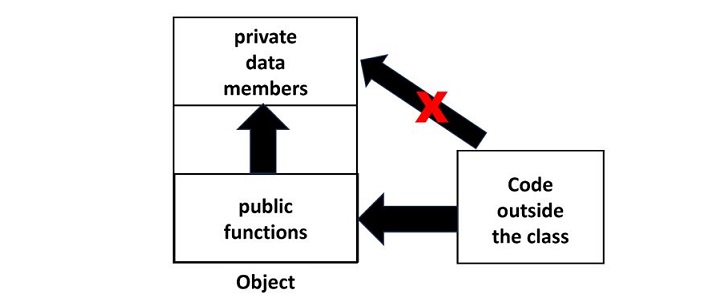
    Encapsulation refers to the mechanism of keeping the data members or properties of an object away from the reach of the environment outside the class, allowing controlled access only through the methods or functions available in the class.

    The following diagram illustrates the principle of encapsulation in object-oriented programming methodology.

    PHP Encapsulation 1

    PHP’s keywords list contains the following keywords that determine the accessibility of properties and methods of an object, which is an instance of a class in PHP −

    • Public − Class members are accessible from anywhere, even from outside the scope of the class, but only with the object reference.
    • Private − Class members can be accessed within the class itself. It prevents members from outside class access even with the reference of the class instance.
    • Protected − Members can be accessed within the class and its child class only, nowhere else.

    These three keywords “public, private and protected” are often called access modifiers. They are also referred as visibility modes, as they decide upto what extent a certain class member is available.

    Public Members

    In PHP, the class members (both member variables as well as member functions) are public by default.

    Example

    In the following program, the member variables title and price of the object are freely accessible outside the class because they are public by default, if not otherwise specified.

    Open Compiler

    <?php
       class Person {
       
    
      /* Member variables */
      var $name;
      var $age;
      /*Constructor*/
      function __construct(string $param1="Ravi", int $param2=28) {
         $this-&gt;name = $param1;
         $this-&gt;age = $param2;
      }
      function getName() {
         echo "Name: $this-&gt;name" . PHP_EOL;;
      }
      function getAge() {
         echo "Age: $this-&gt;age" . PHP_EOL;;
      }
    } $b1 = new Person(); $b1->getName(); $b1->getAge(); echo "Name : $b1->name Age: $b1->age" . PHP_EOL; ?>

    It will produce the following output −

    Name: Ravi
    Age: 28
    Name : Ravi Age: 28
    

    Note that the properties all the class members are public by default, you can explicitly declare them as public if desired. As a result, the instance methods getName() and getAge() can be called from outside the class.

    Since properties name and age are also public, hence they can also be accessed outside the class, something which is not desired as per the principle of encapsulation.

    Private Members

    As mentioned above, the principle of encapsulation requires that the member variables should not be accessible directly. Only the methods should have the access to the data members. Hence, we need to make the member variables private and methods public.

    Example

    Let us change the declaration of name and age properties to private and run the following PHP script −

    Open Compiler

    <?php
       class Person {
       
    
      /* Member variables */
      private $name;
      private $age;
      /*Constructor*/
      function __construct(string $param1="Ravi", int $param2=28) {
         $this-&gt;name = $param1;
         $this-&gt;age = $param2;
      }
      public function getName() {
         echo "Name: $this-&gt;name" . PHP_EOL;;
      }
      public function getAge(){
         echo "Age: $this-&gt;age" . PHP_EOL;;
      }
    } $b1 = new Person(); $b1->getName(); $b1->getAge(); echo "Name : $b1->name Age: $b1->age" . PHP_EOL; ?>

    It will produce the following output −

    Name: Ravi
    Age: 28
    PHP Fatal error:  Uncaught Error: Cannot access private property Person::$name in person.php:27
    

    The error message tells the reason that a private property cannot be accessed from a public scope.

    Explore our latest online courses and learn new skills at your own pace. Enroll and become a certified expert to boost your career.

    Protected Members

    The effect of specifying protected access to a class member is effective in case of class inheritance. We know that public members are accessible from anywhere outside the class, and private members are denied access from anywhere outside the class.

    The protected keyword grants access to an object of the same class and an object of its inherited class, denying it to any other environment.

    Example

    Let us inherit the person class and define a student class. We shall change the name property from private to protected. The student class has a new public method getDetails() that prints the values of name and age properties.

    Person class

    <?php
    class Person {
    
       /* Member variables */
       protected $name;
       private $age;
    
       /*Constructor*/
       function __construct(string $param1="Ravi", int $param2=28) {
    
      $this-&gt;name = $param1;
      $this-&gt;age = $param2;
    } public function getName(){
      echo "Name: $this-&gt;name" . PHP_EOL;;
    } public function getAge() {
      echo "Age: $this-&gt;age" . PHP_EOL;;
    } }

    Student class

    classstudentextendsPerson{publicfunctiongetDetails(){echo"My Name: $this->name".PHP_EOL;echo"My age: $this->age".PHP_EOL;}}$s1=newstudent();$s1->getDetails();?>

    It will produce the following output −

    My Name: Ravi
    PHP Warning:  Undefined property: student::$age in person.php on line 28
    My age:
    

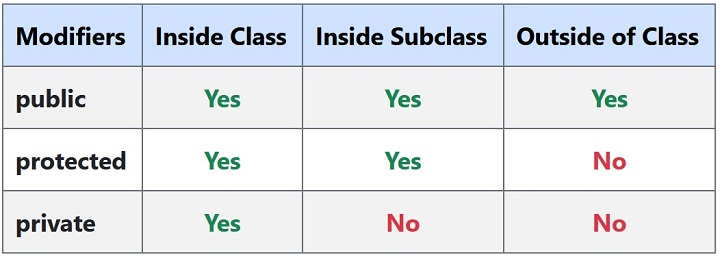
    The following table illustrates the rules of accessibility of class members in PHP −

    PHP Encapsulation 2
  • Object Iteration

    foreach loop may be employed to iterate through all the publicly visible members of an object of a PHP class. This feature has been available in versions of PHP 5 onwards. You can of course access the list of private properties inside an instance method. PHP also defines Iterator interface which can be used for the purpose.

    Using foreach Loop

    In the example below, the public properties of the class are listed with the use of foreach loop.

    Example

    Open Compiler

    <?php
       class myclass {
    
      private $var;
      protected $var1;
      public $x, $y, $z;
      public function __construct() {
         $this-&gt;var="Hello World";
         $this-&gt;var1=array(1,2,3);
         $this-&gt;x=100;
         $this-&gt;y=200;
         $this-&gt;z=300;
      }
    } $obj = new myclass(); foreach($obj as $key => $value) {
      print "$key =&gt; $value\n";
    } ?>

    It will produce the following output −

    x => 100
    y => 200
    z => 300
    

    Note that only the public members are accessible outside the class. If the class includes a method, all the members (public, private or protected) can be traversed with a foreach loop from inside it.

    Let us add an iterate method in the above myclass.

    publicfunctioniterate(){foreach($thisas$k=>$v){if(is_array($v)){var_dump($v);echoPHP_EOL;}else{echo"$k : $v".PHP_EOL;}}}

    Call this instance method to get the list of all the members.

    It will produce the following output −

    var : Hello World
    array(3) {
       [0]=>
       int(1)
       [1]=>
       int(2)
       [2]=>
       int(3)
    }
    x : 100
    y : 200
    z : 300
    

    Using Iterator Interface

    PHP provides Iterator interface for external iterators or objects that can be iterated themselves internally. It defines following abstract methods which need to be implemented in the user defined class.

    interfaceIteratorextendsTraversable{/* Methods */publiccurrent():mixedpublickey():mixedpublicnext():voidpublicrewind():voidpublicvalid():bool}
    • The rewind() method rewinds the Iterator to the first element. This is the first method called when starting a foreach loop. It will not be executed after foreach loops.
    • The current() method returns the current element.
    • The key() method returns the key of the current element on each iteration of foreach loop.
    • The next() method is called after each iteration of foreach loop and moves forward to next element.
    • The valid() method checks if current position is valid.

    Example

    The following example demonstrates object iteration by implementing Iterator interface

    Open Compiler

    <?php
       class myclass implements Iterator {
    
      private $arr = array('a','b','c');
      public function rewind():void {
         echo "rewinding\n";
         reset($this-&gt;arr);
      }
      public function current() {
         $var = current($this-&gt;arr);
         echo "current: $var\n";
         return $var;
      }
      public function key() {
         $var = key($this-&gt;arr);
         echo "key: $var\n";
         return $var;
      }
      public function next() : void {
         $var = next($this-&gt;arr);
         echo "next: $var\n";
         # return $var;
      }
      public function valid() : bool {
         $key = key($this-&gt;arr);
         $var = ($key !== NULL &amp;&amp; $key !== FALSE);
         echo "valid: $var\n";
         return $var;
      }
    } $obj = new myclass(); foreach ($obj as $k => $v) {
      print "$k: $v\n";
    } ?>

    It will produce the following output −

    rewinding
    valid: 1
    current: a
    key: 0
    0: a
    next: b
    valid: 1
    current: b
    key: 1
    1: b
    next: c
    valid: 1
    current: c
    key: 2
    2: c
    next:
    
  • Namespaces

    We often organize the files in different folders. Usually a folder contains files related to a certain objective, or application or category. A folder can’t contain two files with the same name, though different folders may have a file of the same name so that the path of each file is different.

    The idea of namespaces in PHP is somewhat similar. In PHP, namespaces allow classes or functions or constants of same name be used in different contexts without any conflict, thereby encapsulating these items.

    A PHP namespace is logical grouping of classes/functions etc., depending on their relevance. Just as a file with same name can exist in two different folders, a class of a certain name can be defined in two namespaces. Further, as we specify the complete path of a file to gain access, we need to specify full name of class along with namespace.

    As your application size becomes bigger, involving many class and function definitions, giving give a unique name to each class/function may become tedious and not exactly elegant. Using namespaces lets you organize such code blocks in a neat manner. For example, if we need to declare a calculate() function to calculate area as well as tax, instead of defining them as something like calculate_area() and calculate_tax(), we can create two namespaces area and tax and use calculate() inside them.

    Advantages of Namespace

    Here are some of the advantages of using namespaces in PHP −

    • Namsepaces help in avoiding name collisions between classes/functions/constants defined by someone with third-party classes/functions/constants.
    • Namespaces provide the ability to alias (or shorten) Extra_Long_Names, thereby improving the readability of source code.
    • PHP Namespaces provide a way in which to group related classes, interfaces, functions and constants. Namespace names are case – insensitive.

    Defining a Namespace

    PHP’s namespace keyword is used to define a new namespace.

    namespacemyspace;

    A “.php” file containing a namespace must declare the namespace at the top of the file before any other (except the declare directive). Declaration of class, function and constants inside a namespace affects its access.

    A PHP script may contain other code apart from the definition of a namespace. To load the namespace defined in the same code, PHP has the “use” keyword.

    usemyspace;

    Example

    In the following “hello.php” script, we define a hello() function inside myspace namespace, and call it after loading the namespace in the current script.

    Open Compiler

    <?php
       namespace myspace;
       function hello() {
    
      echo "Hello World";
    } use myspace; myspace\hello(); ?>

    It will produce the following output −

    Hello World
    

    Note that you must qualify the hello() function with its full name that includes the namespace – myspace\hello().

    Explore our latest online courses and learn new skills at your own pace. Enroll and become a certified expert to boost your career.

    Include Namespace

    You may have one script consisting of a declaration of a namespace, and the other script in which the namespace is loaded with include statement.

    a.php

    <?php
       namespace myspace {
    
      function hello() {
         echo "Hello World in myspace";
      }
    } ?>

    b.php

    <?php
       include 'a.php';
       myspace\hello();
    ?>

    It will produce the following output −

    Hello World in myspace
    

    There may be a case where the current script (“b.php” as above) also has a function of the same name as in the included file. The fully qualified function that prepends the namespace, helps the parser to resolve the name conflict.

    Example

    Take a look at the following example −

    <?php
       include 'a.php';
       function hello() {
    
      echo "Hello World from current namespace";
    } hello(); myspace\hello(); ?>

    It will produce the following output −

    Hello World from current namespace
    Hello World in myspace
    

    Example

    As mentioned above, the namespace declaration must be at the top, immediately after the opening <?php tag. Otherwise the parser throws a fatal error.

    Open Compiler

    <?php
       echo "hello"
       namespace myspace;
       function hello() {
    
      echo "Hello World";
    } use myspace; myspace\hello(); ?>

    It will produce the following output −

    PHP Parse error:  syntax error, unexpected token "namespace", 
    expecting "," or ";" in /home/cg/root/67771/main.php on line 4
    

    The above error message makes it clear that only the “declare statement” is allowed to appear before the namespace declaration.

    Open Compiler

    <?php
       declare (strict_types=1);
       namespace myspace;
       function hello() {
    
      echo "Hello World";
    } use myspace; myspace\hello(); ?>

    Relative Namespace

    The objects such as functions, classes and constants may be accessed in the current namespace by referring the with relative namespace paths.

    In the following example, “b.php” contains a namespace space1\myspace with a hello() function and a TEMP constant. The same objects are also defined in namespace space1, present in “a.php”.

    Obviously, when “b.php” is included in “a.php”, “myspace” is a subspace of “space1”. Hence, hello() from “myspace” is called by prefixing its relative namespace (also the TEMP constant)

    b.php

    <?php
       namespace space1\myspace;
       const TEMP = 10;
       function hello() {
    
      echo "Hello from current namespace:" . __NAMESPACE__ . ;
    } ?>

    a.php

    <?php
       namespace space1;
       include 'b.php';
       function hello() {
    
      echo "Hello from current namespace:" . __NAMESPACE__ . ;
    } const TEMP = 100; hello(); // current namespace myspace\hello(); // sub namespace echo "TEMP : " . TEMP . " in " . __NAMESPACE__ . ; echo "TEMP : " . myspace\TEMP . " \\in space1\\myspace\n"; ?>

    It will produce the following output −

    Hello from current namespace:space1
    Hello from current namespace:space1\myspace
    TEMP : 100 in space1
    TEMP : 10 in space1\myspace
    

    Absolute Namespace

    You can also access the functions/constants from any namespace by prefixing the absolute namespace path. For example, hello() in “b.php” is “\space\myspace\hello()”.

    a.php

    <?php
       namespace space1;
       include 'b.php';
       function hello() {
    
      echo "Hello from current namespace:" . __NAMESPACE__ . ;
    } const TEMP = 100; \space1\hello(); //current namespace \space1\myspace\hello(); //sub namespace echo "TEMP: " . \space1\TEMP . " in " . __NAMESPACE__ . ; echo "TEMP: " . \space1\myspace\TEMP . " in space1\\myspace\n"; ?>

    The __NAMESPACE__ is a predefined constant in PHP that returns the name of current namespace.

    Namespace Rules

    Any conflict in the names of function/classes/constants appearing between different namespaces is resolved by following these rules −

    • A namespace identifier without namespace separator symbol (/) means it is referring to current namespace. This is an unqualified name.
    • If it contains separator symbol as in myspace\space1, it resolves to a subnamespace space1 under myspace. Such type of naming is relative namespace.
    • Name of fully qualified namespace starts with the “\” character. For example, “\myspace” or “\myspace\space1”.
    • Fully qualified names resolve to absolute namespace. For example \myspace\space1 resolves to myspace\space1 namespace
    • If the name occurs in the global namespace, the “namespace\” prefix is removed. For example, “namespace\space1” resolves to space1.
    • However, if it occurs inside another namespace, it is treated differently. For example, if namespace\space1 is inside myspace, it is equivalent to “myspace\space1”.
    • First segment of the name in qualified name is translated according to the current class/namespace import table.
    • If no import rule applies, the current namespace is prepended to the name.
    • class-like names are translated according to the class/namespace import table, function names according to the function import table and constants according to the constant import table.
    • For unqualified names, if no import rule applies and the name refers to a function or constant and the code is outside the global namespace, the name is resolved at runtime. First it looks for a function from the current namespace, then it tries to find and call the global function.
  • Static Properties

    The “static” keyword in PHP is used to define static properties and static methods in a PHP class. It may be noted that the static keyword is also used to define static variable, and static anonymous functions. Read this chapter to learn about the static properties in a PHP class.

    In a class definition, a variable declared with a static qualifier becomes its static property. The static keyword may appear before or after the access modifier.

    staticprivate$var1;publicstatic$var2;

    If you want to use type hints, the type must not be before the static keyword.

    staticprivatestring$var1;publicstaticfloat$var2;

    The value of the static property in a class is not accessible by its object (with the -> operator). Doing so will result in a notice stating Accessing static property myclass::$var1 as non static. Instead, the static properties are accessed using the Scope Resolution Operator represented by the “::” symbol.

    Example

    Take a look at the following example −

    Open Compiler

    <?php
       class myclass {
    
      static string $var1 = "My Class";
      function __construct() {
         echo "New object declared" . PHP_EOL;
      }
    } $obj = new myclass; echo "accessing static property with scope resolution operator: " . myclass::$var1 . PHP_EOL; echo "accessing static property with -> operator: ". $obj->var1 . PHP_EOL; ?>

    It will produce the following output −

    New object declared
    accessing static property with scope resolution operator: My Class
    PHP Notice:  Accessing static property myclass::$var1 as non static in hello.php on line 14
    

    The “self” Keyword

    To access the static property from inside a method, refer to the current class with the self keyword. In the following example, the class has an integer static property, which is incremented every time a new object is declared.

    Open Compiler

    <?php
       class myclass {
       
    
      /* Member variables */
      static int $var1 = 0;
      function __construct(){
         self::$var1++;
         echo "object number ". self::$var1 . PHP_EOL;
      }
    } for ($i=1; $i<=3; $i++) {
      $obj = new myclass;
    } ?>

    It will produce the following output −

    object number 1
    object number 2
    object number 3
    

    Explore our latest online courses and learn new skills at your own pace. Enroll and become a certified expert to boost your career.

    The “parent” Keyword

    The static property of a base class can be used inside a function of the inherited class by referring to the base by parent keyword. You need to use the “parent::static_property” syntax.

    Example

    Take look at the following example −

    Open Compiler

    <?php
       class myclass {
       
    
      /* Member variables */
      static int $var1 = 0;
      function __construct() {
         self::$var1++;
         echo "object number ". self::$var1 . PHP_EOL;
      }
    } class newclass extends myclass{
      function getstatic() {
         echo "Static property in parent class: " . parent::$var1 . PHP_EOL;
      }
    } $obj = new newclass; $obj->getstatic(); ?>

    It will produce the following output −

    object number 1
    Static property in parent class: 1
    
  • Static Methods

    The “static” keyword in PHP is used to define static properties and static methods in a PHP class. It may be noted that the static keyword is also used to define static variable, and static anonymous functions. This chapter discusses static methods in a PHP class.

    In a class definition, a function declared with a static qualifier becomes its static method.

    classmyclass{publicstaticfunctionmyStaticMethod(){// ...}

    You don’t need to create the instance of the class to call its static method. The static method is called by the class name though the scope resolution operator. The syntax of a static method call is −

    myclass::myStaticMethod();

    As the static methods are callable without creating an instance of the class, the pseudo-variable $this is not available inside static methods. A static method is allowed to be called by an object, although calling an instance method as a static method raises error.

    Example

    Take a look at the following example −

    Open Compiler

    <?php
       class myclass {
       
    
      /* Member variables */
      static int $var1 = 0;
      public static function mystaticmethod() {
         echo "This is a static method".  PHP_EOL;
      }
      public function myinstancemethod() {
         echo "This is an instance method".  PHP_EOL;
      }
    } myclass::mystaticmethod(); $obj = new myclass; $obj->myinstancemethod(); $obj->mystaticmethod(); myclass::myinstancemethod(); ?>

    It will produce the following output −

    This is a static method
    This is an instance method
    This is a static method
    PHP Fatal error:  Uncaught Error: Non-static method 
    myclass::myinstancemethod() cannot be called statically
    

    The “self” Keyword in Static Method

    If you need to call a static method from inside an instance method defined in the same class, you have to use self keyword referring to the name of the class, followed by the scope resolution operator (such as self::mystaticmethod)

    Open Compiler

    <?php
       class myclass {
       
    
      /* Member variables */
      static int $var1 = 0;
      public static function mystaticmethod() {
         echo "This is a static method".  PHP_EOL;
      }
      public function myinstancemethod() {
         echo "This is an instance method".  PHP_EOL;  
         echo "calling static method from instance method" . PHP_EOL;
         self::mystaticmethod();
      }
    } $obj = new myclass; $obj->myinstancemethod(); ?>

    It will produce the following output −

    This is an instance method
    calling static method from instance method
    This is a static method
    

    Explore our latest online courses and learn new skills at your own pace. Enroll and become a certified expert to boost your career.

    Using the “parent” Keyword

    In case of inheritance, a static method defined in a base class may be called by an object of derived class, or from inside an instance method of the derived class, by referring it with the “parent” keyword.

    Example

    Take a look at the following example −

    Open Compiler

    <?php
       class myclass {
       
    
      /* Member variables */
      static int $var1 = 0;
      public static function mystaticmethod() {
         echo "This is a static method".  PHP_EOL;
      }
      public function myinstancemethod() {
         echo "This is an instance method".  PHP_EOL;
         echo "calling static method from instance method" . PHP_EOL;
         self::mystaticmethod();
      }
    } class mynewclass extends myclass {
      public function myfunction() {
         echo "This an instance method of the derived class" . PHP_EOL;
         echo "Calling static method of the parent class" . PHP_EOL;
         parent::mystaticmethod();
      }
    } $obj = new mynewclass; mynewclass::mystaticmethod(); $obj->myfunction(); ?>

    It will produce the following output −

    This is a static method
    This an instance method of the derived class
    Calling static method of the parent class
    This is a static method
    

    Static Method Inside Another Class

    It is entirely possible to call the static method from one class in another. You have to qualify its name with its class name followed by the scope resolution operator.

    Example

    Take a look at the following example −

    Open Compiler

    <?php
       class myclass {
       
    
      /* Member variables */
      static int $var1 = 0;
      public static function mystaticmethod() {
         echo "This is a static method".  PHP_EOL;
      }
    } #this is not a derived class class mynewclass {
      public function myfunction() {
         echo "This an instance method" . PHP_EOL;
         echo "Calling static method of the another class" . PHP_EOL;
         myclass::mystaticmethod();
      }
    } $obj = new mynewclass; $obj->myfunction(); ?>

    It will produce the following output −

    This an instance method
    Calling static method of another class
    This is a static method
    

    Since $this pseudo-variable is not available for a static method, the instance variables of an object cannot be accessed inside a static method. It can process only the static properties of the class.

    Example

    Take a look at the following example −

    Open Compiler

    <?php
       class myclass {
       
    
      /* Member variables */
      static int $var1 = 0;
      function __construct() {
         self::$var1++;
         echo "object number ". self::$var1 . PHP_EOL;      
      }
      public static function mystaticmethod() {
         echo "Number of objects available: " . self::$var1 . PHP_EOL;
      }
    } for ($i=1; $i<=3; $i++) {
      $obj = new myclass;
    } myclass::mystaticmethod(); ?>

    It will produce the following output −

    object number 1
    object number 2
    object number 3
    Number of objects available: 3
    
  • Traits

    In PHP, a class can inherit only from one parent class, multiple inheritance is not defined in PHP. Traits in PHP have been introduced to overcome this limitation. You can define one or more method in a trait, which can be reused freely in various independent classes.

    Syntax

    The “trait” keyword is used as per the following syntax −

    traitmytrait{functionmethod1(){/*function body*/}functionmethod2(){/*function body*/}}

    To be able to call the methods in a trait, it needs to made available to another class with use keyword.

    Example

    A Trait is similar to a class, but only intended to group functionality in a fine-grained and consistent way. It is not possible to instantiate a Trait on its own.

    Open Compiler

    <?php
       trait mytrait {
    
      public function hello() {
         echo "Hello World from " . __TRAIT__ . "";
      }
    } class myclass {
      use mytrait;
    } $obj = new myclass(); $obj->hello(); ?>

    It will produce the following output −

    Hello World from mytrait
    

    Explore our latest online courses and learn new skills at your own pace. Enroll and become a certified expert to boost your career.

    Example

    A trait can be used in more than one classes. The following example has a mytrait with avg() function int it. It is used inside a marks class. The percent() method internally calls the avg() function from the trait.

    Take a look at the following example −

    Open Compiler

    <?php
       trait mytrait {
    
      function avg($x, $y) {
         return ($x+$y)/2;
      }
    } class marks {
      use mytrait;
      private int $m1, $m2;
      function __construct($x, $y) {
         $this-&gt;m1 = $x;
         $this-&gt;m2 = $y;
      }
      function percent():float {
         return $this-&gt;avg($this-&gt;m1, $this-&gt;m2);
      }
    } $obj = new marks(50, 60); echo "percentage: " . $obj->percent(); ?>

    It will produce the following output −

    percentage: 55
    

    Using Multiple Traits

    A class can use more than one traits. Here we have two traits with one function each performing addition and multiplication of two numbers. Both are used inside a third class.

    Open Compiler

    <?php
       trait addition {
    
      function add($x, $y) {
         return $x+$y;
      }
    } trait multiplication {
      function multiply($x, $y) {
         return $x*$y;
      }
    } class numbers {
      use addition, multiplication;
      private int $m1, $m2;
      function __construct($x, $y) {
         $this-&gt;m1 = $x;
         $this-&gt;m2 = $y;
      }
      function calculate():array {
         $arr = &#91;$this-&gt;add($this-&gt;m1, $this-&gt;m2), $this-&gt;multiply($this-&gt;m1, $this-&gt;m2)];
         return $arr;
      }
    } $obj = new numbers(50, 60); $res = $obj->calculate(); echo "Addition: " . $res[0] . PHP_EOL; echo "Multiplication: " . $res[1] . PHP_EOL; ?>

    It will produce the following output −

    Addition: 110
    Multiplication: 3000
    

    Overriding Trait Function

    When a class uses a certain trait, its function are available to it just as a child class inherits the parent methods. The trait function may also be overridden.

    Open Compiler

    <?php
       trait mytrait {
    
      public function sayHello() {
         echo 'Hello World!';
      }
    } class myclass {
      use mytrait;
      public function sayHello() {
         echo 'Hello PHP!';
      }
    } $o = new myclass(); $o->sayHello(); ?>

    It will produce the following output −

    Hello PHP!
    

    The “insteadof” Keyword

    Sometimes, more two traits might have same name of the function. Hence, using them in a class creates ambiguous situation. PHP provides insteadof keyword to tell the parser function from which trait you intend to use.

    Open Compiler

    <?php
       trait mytrait {
    
      public function sayHello() {
         echo 'Hello World!';
      }
    } trait newtrait {
      public function sayHello() {
         echo 'Hello PHP!';
      }
    } class myclass {
      use mytrait, newtrait{
         newtrait::sayHello insteadof mytrait;
      }
    } $o = new myclass(); $o->sayHello(); ?>

    It will produce the following output −

    Hello PHP!
    

    Aliasing a Trait Function

    If you want to be able to call functions from both traits even if they have function with same name, a workaround is to specify an alias name to one of them.

    Example

    In the following example, we will call sayHello() from mytrait as hello() −

    Open Compiler

    <?php
       trait mytrait {
    
      public function sayHello() {
         echo 'Hello World!' . PHP_EOL;
      }
    } trait newtrait {
      public function sayHello() {
         echo 'Hello PHP!' . PHP_EOL;
      }
    } class myclass {
      use mytrait, newtrait{
         mytrait::sayHello as hello;
         newtrait::sayHello insteadof mytrait;
      }
    } $o = new myclass(); $o->hello(); $o->sayHello(); ?>

    It will produce the following output −

    Hello World!
    Hello PHP!