Category: 06. Superglobals

https://cdn3d.iconscout.com/3d/premium/thumb/earth-3d-icon-download-in-png-blend-fbx-gltf-file-formats–world-logo-globe-global-space-pack-science-technology-icons-6308176.png

  •  $_SESSION

    One of the superglobal variables in PHP, $_SESSION is an associative array of session variables available in the current script. $HTTP_SESSION_VARS also contains the same information, but it is not a superglobal, and it has now been deprecated.

    What is a Session?

    A Session is an alternative way to make data accessible across the pages of an entire website. It is the time duration between the time a user establishes a connection with a server and the time the connection is terminated. During this interval, the user may navigate to different pages. Many times, it is desired that some data is persistently available across the pages. This is facilitated by session variables.

    A session creates a file in a temporary directory on the server where the registered session variables and their values are stored. This data will be available to all the pages on the site during that visit.

    The server assigns a unique SESSIONID to each session. Since HTTP is a stateless protocol, data in session variables is automatically deleted when the session is terminated.

    The session_start() Function

    In order to enable access to session data, the session_start() function must be invoked. session_start() creates a session or resumes the current one based on a session identifier passed via a GET or POST request, or passed via a cookie.

    session_start(array$options=[]):bool

    This function returns true if a session was successfully started, else it returns false.

    Explore our latest online courses and learn new skills at your own pace. Enroll and become a certified expert to boost your career.

    Handling Session Variables

    To create a new session variable, add a key-value pair in the $_SESSION array −

    $_SESSION["var"]=value;

    To read back the value of a session variable, you can use echo/print statements, or var_dump() or print_r() functions.

    echo$_SESSION["var"];

    To obtain the list of all the session variables in the current session, you can use a foreach loop to traverse the $_SESSION −

    foreach($_SESSIONas$key=>$val)echo$key."=>".$val;

    To manually clear all the session data, there is session_destroy() function. A specific session variable may also be released by calling the unset() function.

    unset($_SESSION["var"]);

    List of Session Functions

    In PHP, there are many built-in functions for managing the session data.

    Session FunctionsDescription
    session_abortDiscard session array changes and finish session
    session_cache_expireReturn current cache expire
    session_cache_limiterGet and/or set the current cache limiter
    session_commitAlias of session_write_close
    session_create_idCreate new session id
    session_decodeDecodes session data from a session encoded string
    session_destroyDestroys all data registered to a session
    session_encodeEncodes the current session data as a session encoded string
    session_gcPerform session data garbage collection
    session_get_cookie_paramsGet the session cookie parameters
    session_idGet and/or set the current session id
    session_is_registeredFind out whether a global variable is registered in a session
    session_module_nameGet and/or set the current session module
    session_nameGet and/or set the current session name
    session_regenerate_idUpdate the current session id with a newly generated one
    session_register_shutdownSession shutdown function
    session_registerRegister one or more global variables with the current session
    session_resetRe-initialize session array with original values
    session_save_pathGet and/or set the current session save path
    session_set_cookie_paramsSet the session cookie parameters
    session_set_save_handlerSets user-level session storage functions
    session_startStart new or resume existing session
    session_statusReturns the current session status
    session_unregisterUnregister a global variable from the current session
    session_unsetFree all session variables
    session_write_closeWrite session data and end session

    Example

    The following PHP script renders an HTML form. The form data is used to create three session variables. A hyperlink takes the browser to another page, which reads back the session variables.

    Save this code as “test.php” in the document root folder, and open it in a client browser. Enter the data and press the Submit button.

    <html><body><form action="<?php echo $_SERVER['PHP_SELF'];?>" method="post"><h3>User's ID: <input type="text" name="ID"/></h3><h3>Your Name: <input type="text" name="name"/></h3><h3>Enter Age: <input type="text" name="age"/></h3><input type="submit" value="Submit"/></form><?php
    
      session_start();
      if ($_SERVER&#91;"REQUEST_METHOD"] == "POST") {
         $_SESSION&#91;'UserID'] = $_POST&#91;'ID'];
         $_SESSION&#91;'Name'] = $_POST&#91;'name'];
         $_SESSION&#91;'age'] = $_POST&#91;'age'];
      }
      echo "Following Session Variables Created: \n";
      foreach ($_SESSION as $key=&gt;$val)
      echo "&lt;h3&gt;" . $key . "=&gt;" . $val . "&lt;/h3&gt;";
      echo "&lt;br/&gt;" . '&lt;a href="hello.php"&gt;Click Here&lt;/a&gt;';
    ?></body></html>

    When you click the “Submit” button, it will show a list of all the session variables created −
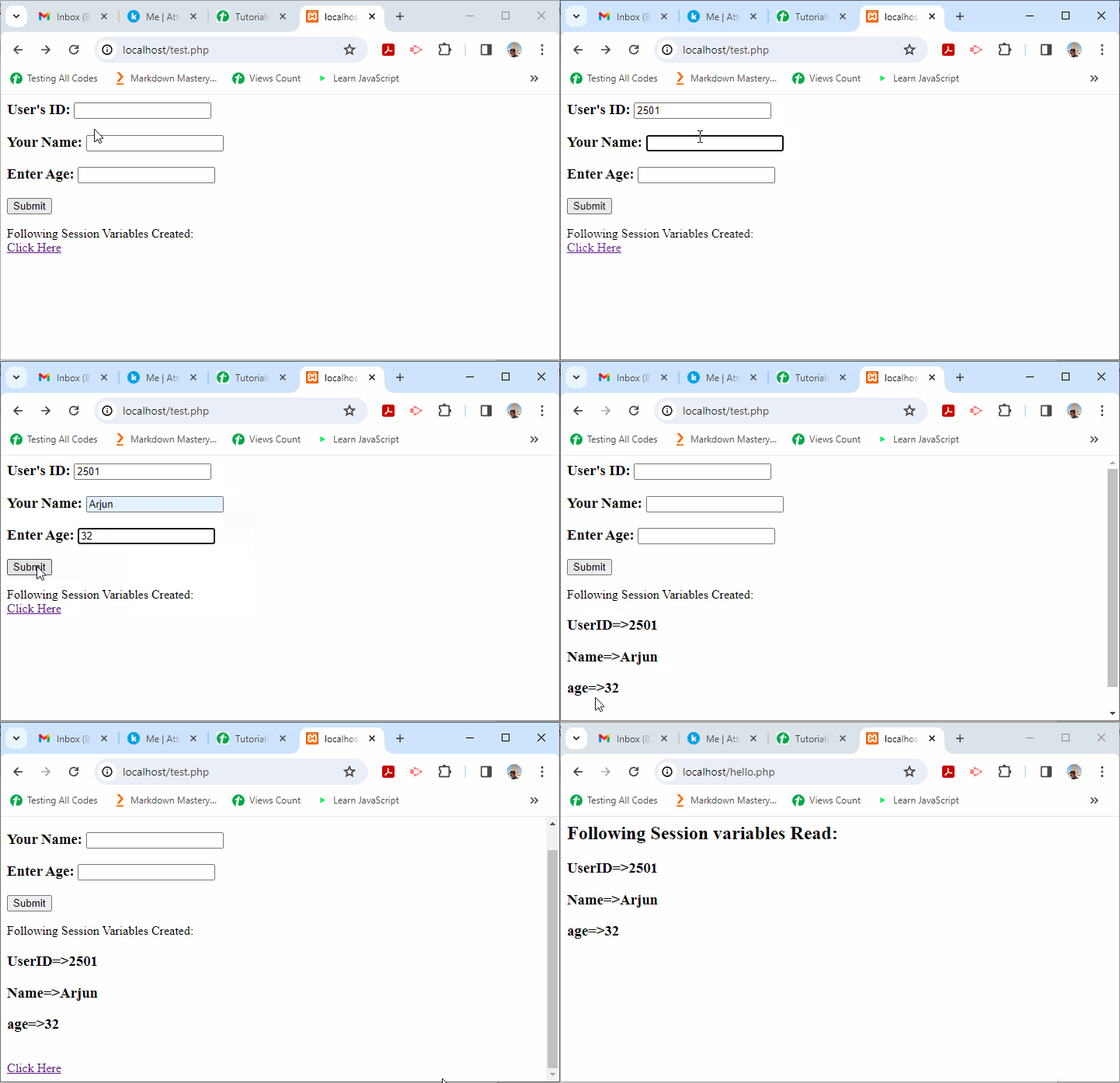
    PHP $ SESSION 1

    Next, have the following script in the “hello.php” file and save it.

    <?php
    session_start();
       echo "<h2>Following Session variables Read:</h2>";
       foreach ($_SESSION as $key=>$val)
       echo "<h3>" . $key . "=>" . $val . "</h3>";
    ?>

    Now, follow the link on the “test.php” page to navigate to “hello.php”. It will show the session variables that are read −
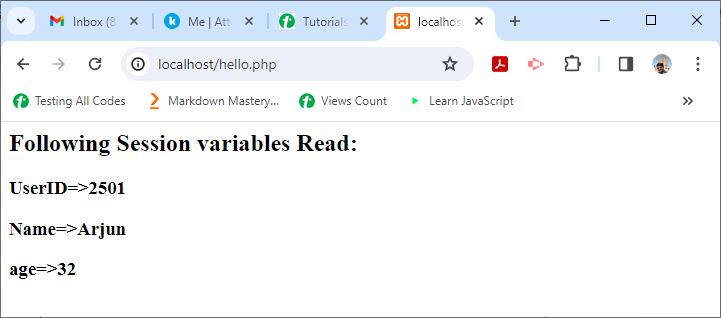
    PHP $ SESSION 2
  •  $_COOKIE

    The PThe PHP superglobal $_COOKIE stores the variables passed to the current PHP script along with the HTTP request in the form of cookies. $HTTP_COOKIE_VARS also contains the same information, but it is not a superglobal, and it has now been deprecated.

    What is a Cookie?

    Cookies are text files stored by a server on the client computer and they are kept for tracking purpose. PHP transparently supports HTTP cookies. Cookies are usually set in an HTTP header. JavaScript can also sets a cookie directly on a browser.

    The server script sends a set of cookies to the browser. It stores this information on the local machine for future use. Next time, when the browser sends any request to the web server, it sends those cookies information to the server and the server uses that information to identify the user.

    The setcookie() Function

    PHP provides the setcookie function to create a cookie object to be sent to the client along with the HTTP response.

    setcookie(name, value, expire, path, domain, security);

    Parameters

    • Name − Name of the cookie stored.
    • Value − This sets the value of the named variable.
    • Expiry − This specifes a future time in seconds since 00:00:00 GMT on 1st Jan 1970.
    • Path − Directories for which the cookie is valid.
    • Domain − Specifies the domain name in very large domains.
    • Security − 1 for HTTPS. Default 0 for regular HTTP.

    Explore our latest online courses and learn new skills at your own pace. Enroll and become a certified expert to boost your career.

    How to Set Cookies

    Take a look at the following example. This script sets a cookie named username if it is not already set.

    Example

    <?php
       if (isset($_COOKIE['username'])) {
    
      echo "&lt;h2&gt;Cookie username already set: " . $_COOKIE['username'] . "&lt;/h2&gt;";
    } else {
      setcookie("username", "Mohan Kumar");
      echo "&lt;h2&gt;Cookie username is now set.&lt;/h2&gt;";
    } ?>

    Run this script from the document root of the Apache server. You should see this message as the output −

    Cookie username is now set
    

    If this script is re-executed, the cookie is now already set.

    Cookie username already set: Mohan Kumar
    

    Example

    To retrieve cookies on subsequent visit of client −

    <?php
       $arr=$_COOKIE;
       foreach ($arr as $key=>$val);
       echo "<h2>$key => $val </h2>";
    ?>

    The browser will display the following output −

    Username => Mohan Kumar
    

    How to Remove Cookies

    To delete a cookie, set the cookie with a date that has already expired, so that the browser triggers the cookie removal mechanism.

    <?php
       setcookie("username", "", time() - 3600);
       echo "<h2>Cookie username is now removed</h2>";
    ?>

    The browser will now show the following output −

    Cookie username is now removed
    

    Setting Cookies Using the Array Notation

    You may also set the array cookies by using the array notation in the cookie name.

    setcookie("user[three]","Guest");setcookie("user[two]","user");setcookie("user[one]","admin");

    If the cookie name contains dots (.), then PHP replaces them with underscores (_).HP superglobal $_COOKIE stores the variables passed to the current PHP script along with the HTTP request in the form of cookies. $HTTP_COOKIE_VARS also contains the same information, but it is not a superglobal, and it has now been deprecated.

    What is a Cookie?

    Cookies are text files stored by a server on the client computer and they are kept for tracking purpose. PHP transparently supports HTTP cookies. Cookies are usually set in an HTTP header. JavaScript can also sets a cookie directly on a browser.

    The server script sends a set of cookies to the browser. It stores this information on the local machine for future use. Next time, when the browser sends any request to the web server, it sends those cookies information to the server and the server uses that information to identify the user.

    The setcookie() Function

    PHP provides the setcookie function to create a cookie object to be sent to the client along with the HTTP response.

    setcookie(name, value, expire, path, domain, security);

    Parameters

    • Name − Name of the cookie stored.
    • Value − This sets the value of the named variable.
    • Expiry − This specifes a future time in seconds since 00:00:00 GMT on 1st Jan 1970.
    • Path − Directories for which the cookie is valid.
    • Domain − Specifies the domain name in very large domains.
    • Security − 1 for HTTPS. Default 0 for regular HTTP.

    Explore our latest online courses and learn new skills at your own pace. Enroll and become a certified expert to boost your career.

    How to Set Cookies

    Take a look at the following example. This script sets a cookie named username if it is not already set.

    Example

    <?php
       if (isset($_COOKIE['username'])) {
    
      echo "&lt;h2&gt;Cookie username already set: " . $_COOKIE&#91;'username'] . "&lt;/h2&gt;";
    } else {
      setcookie("username", "Mohan Kumar");
      echo "&lt;h2&gt;Cookie username is now set.&lt;/h2&gt;";
    } ?>

    Run this script from the document root of the Apache server. You should see this message as the output −

    Cookie username is now set
    

    If this script is re-executed, the cookie is now already set.

    Cookie username already set: Mohan Kumar
    

    Example

    To retrieve cookies on subsequent visit of client −

    <?php
       $arr=$_COOKIE;
       foreach ($arr as $key=>$val);
       echo "<h2>$key => $val </h2>";
    ?>

    The browser will display the following output −

    Username => Mohan Kumar
    

    How to Remove Cookies

    To delete a cookie, set the cookie with a date that has already expired, so that the browser triggers the cookie removal mechanism.

    <?php
       setcookie("username", "", time() - 3600);
       echo "<h2>Cookie username is now removed</h2>";
    ?>

    The browser will now show the following output −

    Cookie username is now removed
    

    Setting Cookies Using the Array Notation

    You may also set the array cookies by using the array notation in the cookie name.

    setcookie("user[three]","Guest");setcookie("user[two]","user");setcookie("user[one]","admin");

    If the cookie name contains dots (.), then PHP replaces them with underscores (_).

  • $_ENV

    $_ENV is a superglobal variable in PHP. It is an associative array that stores all the environment variables available in the current script. $HTTP_ENV_VARS also contains the same information, but it is not a superglobal, and it has now been deprecated.

    The environment variables are imported into the global namespace. Most of these variables are provided by the shell under which the PHP parser is running. Hence, the list of environment variables may be different on different platforms.

    This array ($_ENV) also includes CGI variables in case PHP is running as a server module or a CGI processor.

    We can use the foreach loop to display all the environment variables available −

    <?php
       foreach ($_ENV as $k=>$v)
       echo $k . " => " . $v . "<br>";
    ?>

    On a Windows OS and with XAMPP server, you may get the list of environment variables as follows −

    VariableValue
    ALLUSERSPROFILEC:\ProgramData
    APPDATAC:\Users\user\AppData\Roaming
    CommonProgramFilesC:\Program Files\Common Files
    CommonProgramFiles(x86)C:\Program Files (x86)\Common Files
    CommonProgramW6432C:\Program Files\Common Files
    COMPUTERNAMEGNVBGL3
    ComSpecC:\WINDOWS\system32\cmd.exe
    DriverDataC:\Windows\System32\Drivers\DriverData
    HOMEDRIVEC −
    HOMEPATH\Users\user
    LOCALAPPDATAC:\Users\user\AppData\Local
    LOGONSERVER\\GNVBGL3
    MOZ_PLUGIN_PATHC:\Program Files (x86)\ Foxit Software\ Foxit PDF Reader\plugins\
    NUMBER_OF_PROCESSORS8
    OneDriveC:\Users\user\OneDrive
    OneDriveConsumerC:\Users\user\OneDrive
    OSWindows_NT
    PathC:\Python311\Scripts\;C:\Python311\;C:\WINDOWS\system32;C:\WINDOWS;C:\WINDOWS\System32\Wbem;C:\WINDOWS\System32\WindowsPowerShell\ v1.0\;C:\WINDOWS\System32\OpenSSH\;C:\xampp\php;C:\Users\user\AppData\Local\Microsoft\ WindowsApps;C:\VSCode\Microsoft VS Code\bin
    PATHEXT.COM;.EXE;.BAT;.CMD;.VBS;.VBE;.JS;.JSE; .WSF;.WSH;.MSC;.PY;.PYW
    PROCESSOR_ARCHITECTUREAMD64
    PROCESSOR_IDENTIFIERIntel64 Family 6 Model 140 Stepping 1, GenuineIntel
    PROCESSOR_LEVEL6
    PROCESSOR_REVISION8c01
    ProgramDataC:\ProgramData
    ProgramFilesC:\Program Files
    ProgramFiles(x86)C:\Program Files (x86)
    ProgramW6432C:\Program Files
    PSModulePathC:\Program Files\WindowsPowerShell\Modules;C:\WINDOWS\system32\WindowsPowerShell\v1.0\ Modules
    PUBLICC:\Users\Public
    SystemDriveC −
    SystemRootC:\WINDOWS
    TEMPC:\Users\user\AppData\Local\Temp
    TMPC:\Users\user\AppData\Local\Temp
    USERDOMAINGNVBGL3
    USERDOMAIN_ROAMINGPROFILEGNVBGL3
    USERNAMEuser
    USERPROFILEC:\Users\user
    windirC:\WINDOWS
    ZES_ENABLE_SYSMAN1
    __COMPAT_LAYERRunAsAdmin Installer
    AP_PARENT_PID10608

    You can access the value of individual environment variable too. This code fetches the PATH environment variable −

    <?php
       echo "Path: " . $_ENV['Path'];
    ?>

    It will produce the following output −

    Path:
    C:\Python311\Scripts\;C:\Python311\;C:\WINDOWS\system32;
    C:\WINDOWS;C:\WINDOWS\System32\Wbem;
    C:\WINDOWS\System32\WindowsPowerShell\v1.0\;
    C:\WINDOWS\System32\OpenSSH\;C:\xampp\php;
    C:\Users\mlath\AppData\Local\Microsoft\WindowsApps;
    C:\VSCode\Microsoft VS Code\bin
    

    Note − The $_ENV array may yield empty result, depending on “php.ini” setting “variables_order”. You may have to edit the “php.ini” file and set variables_order=”EGPCS” instead of variables_order=”GPCS” value.

    The getenv() Function

    The PHP library provides the getenv() function to retrieve the list of all the environment variables or the value of a specific environment variable.

    The following script displays the values of all the available environment variables −

    <?php
       $arr=getenv();
       foreach ($arr as $key=>$val)
       echo "$key=>$val";
    ?>

    To obtain the value of a specific variable, use its name as the argument for the getenv() function −

    <?php
       echo "Path: " . getenv("PATH");
    ?>

    The putenv() Function

    PHP also provides the putenv() function to create a new environment variable. The environment variable will only exist for the duration of the current request.

    Changing the value of certain environment variables should be avoided. By default, users will only be able to set the environment variables that begin with “PHP_” (e.g. PHP_FOO=BAR).

    The “safe_mode_protected_env_vars” directive in “php.ini” contains a comma-delimited list of environment variables that the end user won’t be able to change using putenv().

    Open Compiler

    <?php
       putenv("PHP_TEMPUSER=GUEST");
       echo "Temp user: " . getenv("PHP_TEMPUSER");
    ?>

    The browser will display the following output −

    Temp user: GUEST
    
  •  $_FILES

    $_FILES is one of the ‘superglobal’, or automatic global, variables in PHP. It is available in all scopes throughout a script. The variable $_FILES is an associative array containing items uploaded via HTTP POST method.

    A file is uploaded when a HTML form contains an input element with a file type, its enctype attribute set to multipart/form-data, and the method attribute set to HTTP POST method.

    $HTTP_POST_FILES also contains the same information, but it is not a superglobal, and it has now been deprecated.

    The following HTML script contains a form with input element of file type −

    <input type="file" name="file">

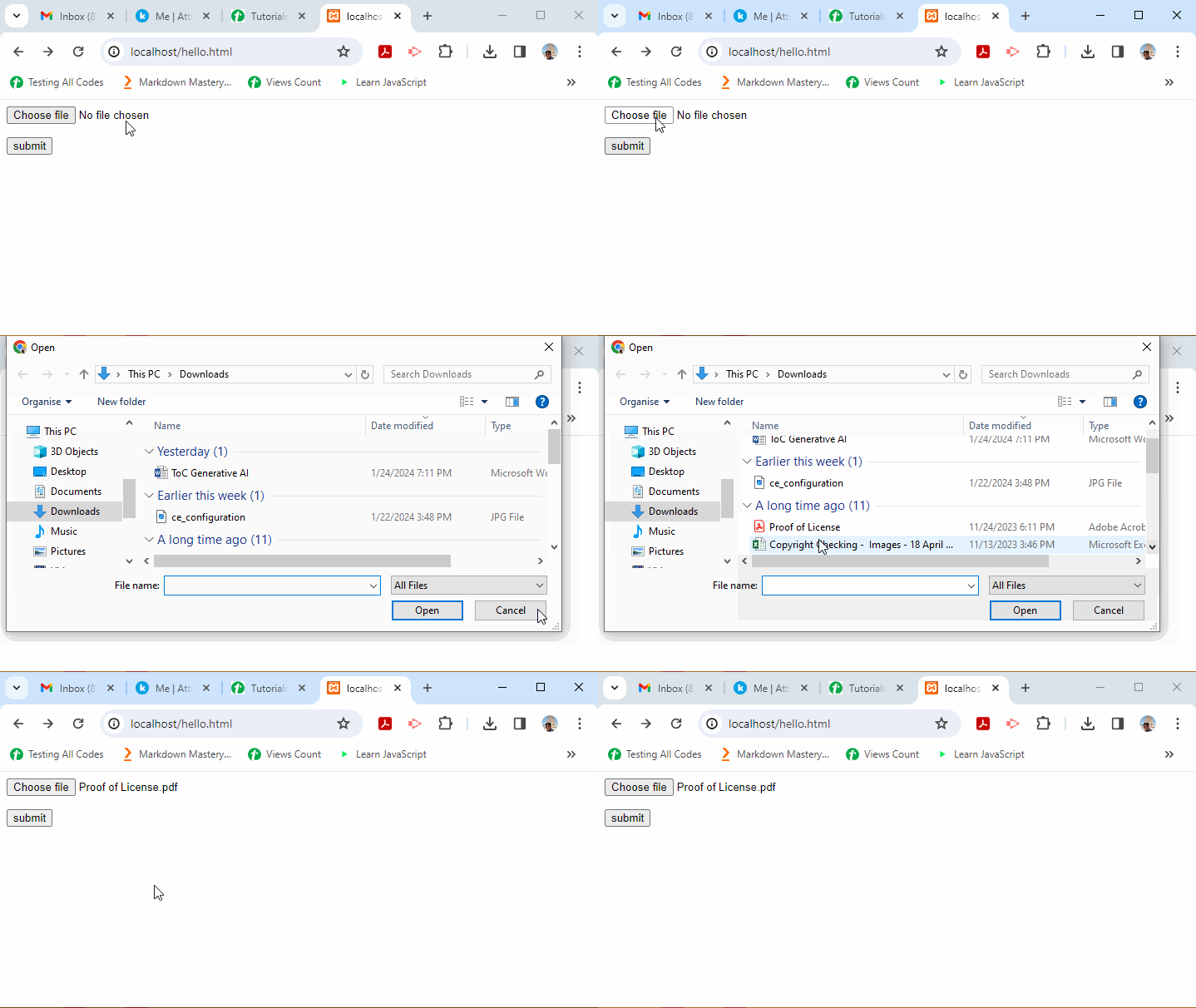
    This “input type” renders a button captioned as file. When clicked, a file dialogbox pops up. You can choose a file to be uploaded.

    The PHP script on the server can access the file data in $_FILES variable.

    The $_FILES array contains the following properties −

    • $_FILES[‘file’][‘name’] − The original name of the file that the user has chosen to be uploaded.
    • $_FILES[‘file’][‘type’] − The mime type of the file. An example would be “image/gif”. This mime type is however not checked on the PHP side.
    • $_FILES[‘file’][‘size’] − The size, in bytes, of the uploaded file.
    • $_FILES[‘file’][‘tmp_name’] − The temporary filename of the file in which the uploaded file was stored on the server.
    • $_FILES[‘file’][‘full_path’] − The full path as submitted by the browser. Available as of PHP 8.1.0.
    • $_FILES[‘file’][‘error’] − The error code associated with this file upload.

    The error codes are enumerated as below −

    Error CodesDescription
    UPLOAD_ERR_OK (Value=0)There is no error, the file uploaded with success.
    UPLOAD_ERR_INI_SIZE (Value=1)The uploaded file exceeds the upload_max_filesize directive in php.ini.
    UPLOAD_ERR_FORM_SIZE (Value=2)The uploaded file exceeds the MAX_FILE_SIZE.
    UPLOAD_ERR_PARTIAL (Value=3)The uploaded file was only partially uploaded.
    UPLOAD_ERR_NO_FILE (Value=4)No file was uploaded.
    UPLOAD_ERR_NO_TMP_DIR (Value=6)Missing a temporary folder.
    UPLOAD_ERR_CANT_WRITE (Value=7)Failed to write file to disk.
    UPLOAD_ERR_EXTENSION (Value=8)A PHP extension stopped the file upload.

    Example

    The following “test.html” contains a HTML form whose enctype is set to multiform/form-data. It also has an input file element which presents a button on the form for the user to select file to be uploaded. Save this file in the document root folder of your Apache server.

    <html><body><form action="hello.php" method="POST" enctype="multipart/form-data"><p><input type="file" name="file"></p><p><input type ="submit" value="submit"></p></form></body></html>

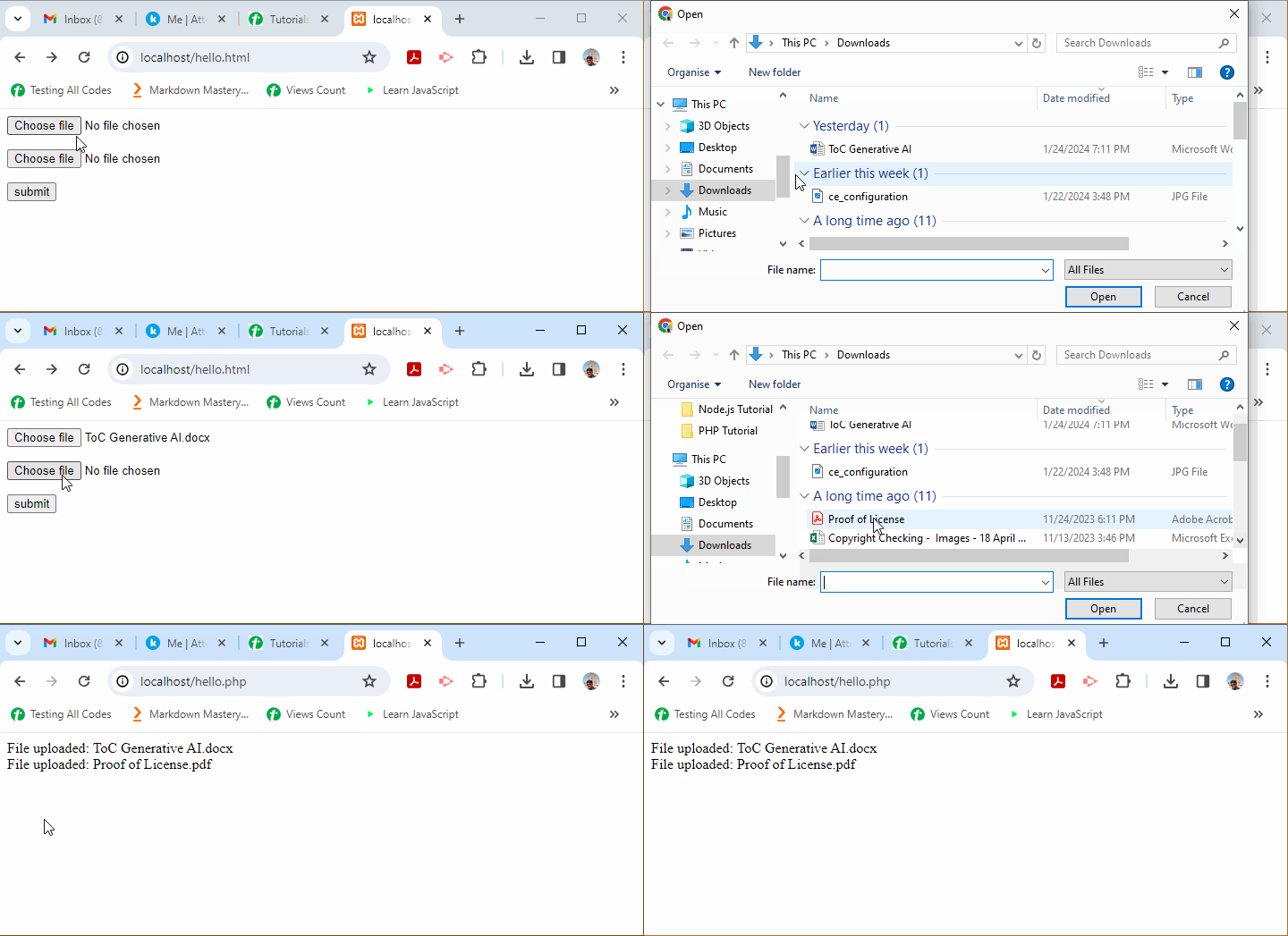
    The above HTML renders a button named “Choose File” in the browser window. To open a file dialog box, click the “Choose File” button. As the name of selected file appears, click the submit button.

    PHP $ Files 1

    Example

    The server-side PHP script (upload.php) in the document root folder reads the variables $_FILES array as follows −

    <?php
       echo "Filename: " . $_FILES['file']['name']."<br>";
       echo "Type : " . $_FILES['file']['type'] ."<br>";
       echo "Size : " . $_FILES['file']['size'] ."<br>";
       echo "Temp name: " . $_FILES['file']['tmp_name'] ."<br>";
       echo "Error : " . $_FILES['file']['error'] . "<br>";
    ?>

    It will produce the following output −

    Filename: abc.txt
    Type : text/plain
    Size : 556762
    Temp name: C:\xampp\tmp\phpD833.tmp
    Error : 0
    

    Explore our latest online courses and learn new skills at your own pace. Enroll and become a certified expert to boost your career.

    Example

    In PHP, you can upload multiple files using the HTML array feature −

    <html><body><form action="hello.php" method="POST" enctype="multipart/form-data"><input type="file" name="files[]"/><input type="file" name="files[]"/><input type ="submit" value="submit"/></form></body></html>

    Now, change the PHP script (hello.php) to −

    <?php
       foreach ($_FILES["files"]["name"] as $key => $val) {       
    
      echo "File uploaded: $val &lt;br&gt;";
    } ?>

    The browser will show multiple “Choose File” buttons. After you upload the selected files by clicking the “Submit” button, the browser will show the names of files in response to the URL http://localhost/hello.html as shown below −

    PHP $ Files 2
  • $_GET

    $_GET is one of the superglobals in PHP. It is an associative array of variables passed to the current script via the query string appended to the URL of HTTP request. Note that the array is populated by all requests with a query string in addition to GET requests.

    $HTTP_GET_VARS contains the same initial information, but that has now been deprecated.

    By default, the client browser sends a request for the URL on the server by using the HTTP GET method. A query string attached to the URL may contain key value pairs concatenated by the “&” symbol. The $_GET associative array stores these key value pairs.

    Save the following script in the document folder of Apache server. If you are using XAMPP server on Windows, place the script as “hello.php” in the “c:/xampp/htdocs” folder.

    <?php
       echo "<h3>First Name: " . $_REQUEST['first_name'] . "<br />" . 
       "Last Name: " . $_REQUEST['last_name'] . "</h3>";
    ?>

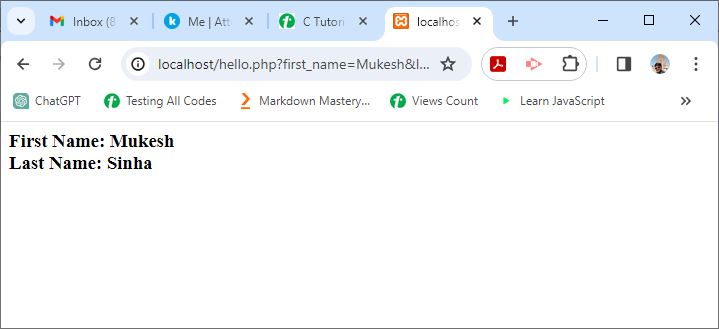
    Start the XAMPP server, and enter “http://localhost/hello.php?first_name=Mukesh&last_name=Sinha” as the URL in a browser window. You should get the following output −

    PHP $ GET 1

    The $_GET array is also populated when a HTML form data is submitted to a URL with GET action.

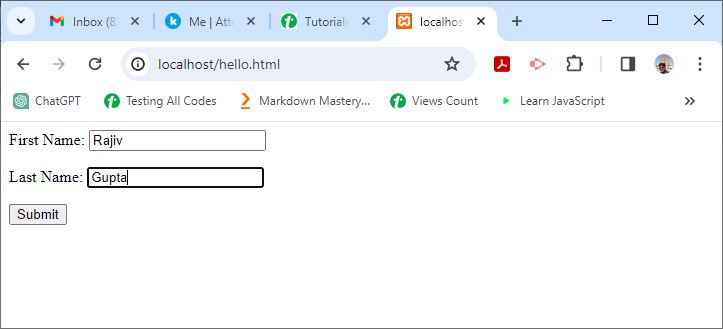
    Under the document root, save the following script as “hello.html” −

    <html><body><form action="hello.php" method="get"><p>First Name: <input type="text" name="first_name"/></p><p>Last Name: <input type="text" name="last_name" /></p><input type="submit" value="Submit" /></form></body></html>

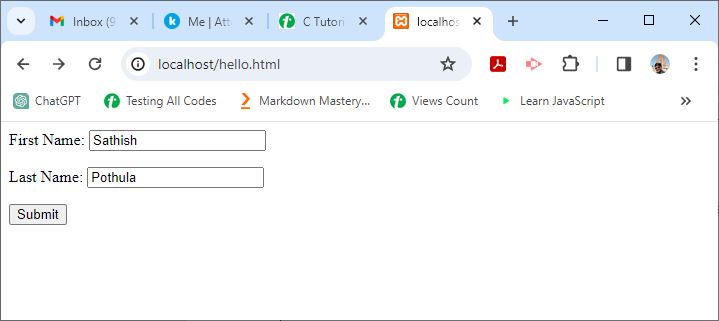
    In your browser, enter the URL “http://localhost/hello.html” −

    PHP $ GET 2

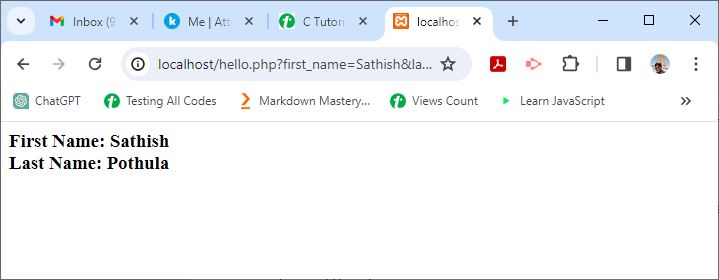
    You should get a similar output in the browser window −

    PHP $ GET 3

    In the following example, htmlspecialchars() is used to convert characters in HTML entities −

    CharacterReplacement
    & (ampersand)&amp;
    ” (double quote)&quot;
    ‘ (single quote)&#039; or &apos;
    < (less than)&lt;
    > (greater than)&gt;

    Assuming that the URL in the browser is “http://localhost/hello.php?name=Suraj&age=20” −

    <?php
       echo  "Name: " . htmlspecialchars($_GET["name"]) . "";
       echo  "Age: " . htmlspecialchars($_GET["age"]) . "<br/>";
    ?>

    It will produce the following output −

    Name: Suraj
    Age: 20
    
  •  $_POST

    $_POST is one of the predefined or superglobal variables in PHP. It is an associative array of key-value pairs passed to a URL by the HTTP POST method that uses URLEncoded or multipart/form-data content-type in the request.

    • $HTTP_POST_VARS also contains the same information as $_POST, but is not a superglobal, and now been deprecated.
    • The easiest way to send data to a server with POST request is specifying the method attribute of HTML form as POST.

    Assuming that the URL in the browser is “http://localhost/hello.php”, method=POST is set in a HTML form “hello.html” as below −

    <html><body><form action="hello.php" method="post"><p>First Name: <input type="text" name="first_name"/></p><p>Last Name: <input type="text" name="last_name" /></p><input type="submit" value="Submit" /></form></body></html>

    The “hello.php” script (in the document root folder) for this exercise is as follows:

    <?php
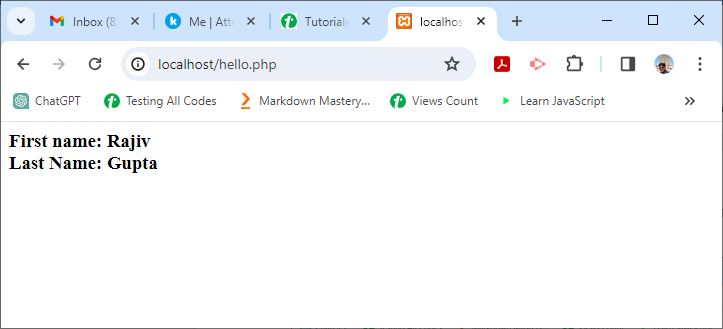
       echo "<h3>First name: " . $_POST['first_name'] . "<br /> " . 
       "Last Name: " . $_POST['last_name'] . "</h3>";
    ?>

    Now, open http://localhost/hello.html in your browser. You should get the following output on the screen −

    PHP $ POST 1

    As you press the Submit button, the data will be submitted to “hello.php” with the POST method.

    PHP $ POST 2

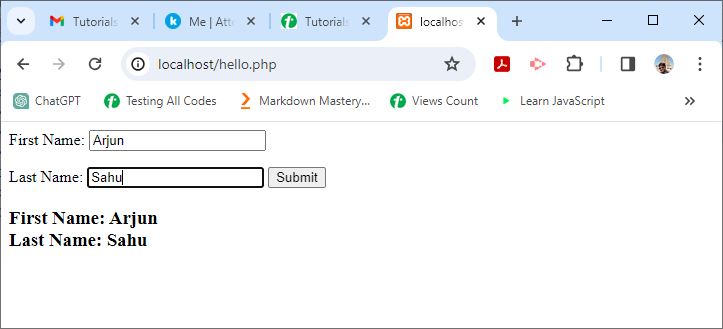
    You can also mix the HTML form with PHP code in hello.php, and post the form data to itself using the “PHP_SELF” variable −

    <html><body><form action="<?php echo $_SERVER['PHP_SELF'];?>" method="post"><p>First Name: <input type="text" name="first_name"/></p><br /><p>Last Name: <input type="text" name="last_name" /></p><input type="submit" value="Submit" /></form><?php
    
      echo "&lt;h3&gt;First Name: " . $_POST&#91;'first_name'] . "&lt;br /&gt; " . 
      "Last Name: " . $_POST&#91;'last_name'] . "&lt;/h3&gt;";
    ?></body></html>

    It will produce the following output −

    PHP $ POST 3
  • $_REQUEST

    In PHP, $_REQUEST is a superglobal variable. It is an associative array which is a collection of contents of $_GET, $_POST and $_COOKIE variables.

    • The settings in your “php.ini” file decides the composition of this variable.
    • One of the directives in “php.ini” is request_order, which decides the order in which PHP registers GET, POST and COOKIE variables.
    • The presence and order of variables listed in this array is defined according to the PHP variables_order.
    • If a PHP script is run from the command line, the argc and argv variables are not included in the $_REQUST array because their values are taken from the $_SERVER array, which in turn is populated by the web server.

    $_REQUEST with GET Method

    Save the following script in the document folder of the Apache server. If you are using XAMPP server on Windows, place the script as “hello.php” in the “c:/xampp/htdocs” folder.

    <html><body><?php
    
      echo "&lt;h3&gt;First Name: " . $_REQUEST&#91;'first_name'] . "&lt;br /&gt;" 
      . "Last Name: " . $_REQUEST&#91;'last_name'] . "&lt;/h3&gt;";
    ?></body></html>

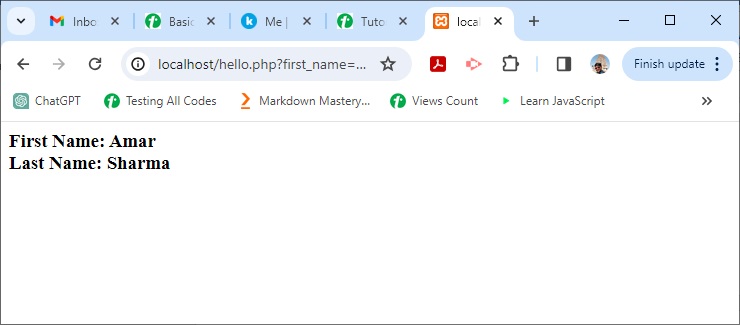
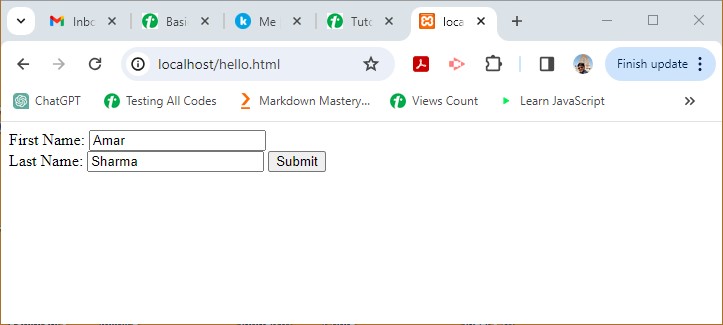
    Start the XAMPP server and enter http://localhost/hello.php?first_name=Amar&last_name=Sharma as the URL in a browser window.

    You should get the output as −

    PHP $ Request 1

    $_REQUEST with POST Method

    Under the document root, save the following script as “hello.html”.

    <html><body><form action="hello.php" method="post">
    
      First Name: &lt;input type="text" name="first_name" /&gt;&lt;br /&gt;
      Last Name: &lt;input type="text" name="last_name" /&gt;&lt;input type="submit" value="Submit" /&gt;&lt;/form&gt;&lt;/body&gt;&lt;/html&gt;</code></pre>

    In your browser, enter the URL "http://localhost/hello.html". You should get the similar output in the browser window.

    PHP $ Request 2

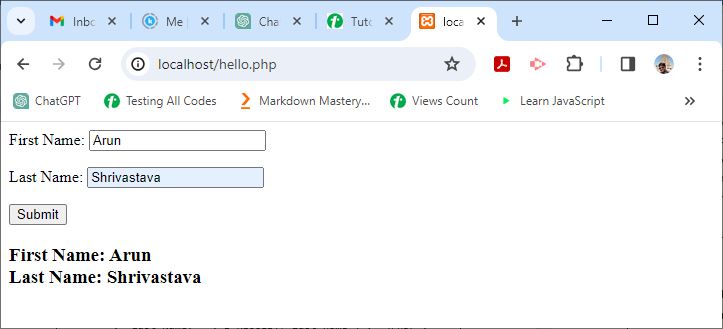
    You may also embed the PHP code inside the HTML script and POST the form to itself with the PHP_SELF variable −

    <html><body><form action="<?php echo $_SERVER['PHP_SELF'];?>" method="post"><p>First Name: <input type="text" name="first_name" /></p><p>Last Name: <input type="text" name="last_name" /></p><input type="submit" value="Submit" /></form><?php
    
      if ($_SERVER&#91;"REQUEST_METHOD"] == "POST")
      echo "&lt;h3&gt;First Name: " . $_REQUEST&#91;'first_name'] . "&lt;br /&gt;" 
      . "Last Name: " . $_REQUEST&#91;'last_name'] . "&lt;/h3&gt;";
    ?></body></html>

    It will produce the following output −

    PHP $ Request 3
  •  $_SERVER

    $_SERVER is a superglobal in PHP. It holds information regarding HTTP headers, path and script location, etc.

    • $_SERVER is an associative array and it holds all the server and execution environment related information.
    • Most of the entries in this associative array are populated by the web server. The entries may change from one web server to other, as servers may omit some, or provide others.
    • For a PHP script running on the command line, most of these entries will not be available or have any meaning.
    • PHP will also create additional elements with values from request headers. These entries will be named “HTTP_” followed by the header name, capitalized and with underscores instead of hyphens.
    • For example, the “Accept-Language” header would be available as $_SERVER[‘HTTP_ACCEPT_LANGUAGE’].
    • PHP versions prior to 5.4.0 had $HTTP_SERVER_VARS which contained the same information but it has now been removed.

    The following table lists some of the important server variables of the $_SERVER array followed by the description of their values.

    Sr.NoServer Variables & Description
    1PHP_SELFStores filename of currently executing script.
    2SERVER_ADDRThis property of array returns the IP address of the server under which the current script is executing.
    3SERVER_NAMEName of server host under which the current script is executing. In case of a server running locally, localhost is returned.
    4QUERY_STRINGA query string is the string of key value pairs separated by the “&” symbol and appended to the URL after the “?” symbol.For example, http://localhost/testscript?name=xyz&age=20 URL returns trailing query string
    5REQUEST_METHODHTTP request method used for accessing a URL, such as POST, GET, POST, PUT or DELETE.In the above query string example, a URL attached to query string with the “?” symbol requests the page with GET method
    6DOCUMENT_ROOTReturns the name of the directory on the server that is configured as the document root.On XAMPP apache server, it returns htdocs as the name of document root c:/xampp/htdocs
    7REMOTE_ADDRIP address of the machine from where the user is viewing the current page.
    8SERVER_PORTPort number on which the web server is listening to the incoming request. Default is 80

    Example

    The following script invoked from document root of XAMPP server lists all the server variables −

    Open Compiler

    <?php
       foreach ($_SERVER as $k=>$v)
       echo $k . "=>" . $v . "\n";
    ?>

    It will produce the following output −

    MIBDIRS=>C:/xampp/php/extras/mibs
    MYSQL_HOME=>\xampp\mysql\bin
    OPENSSL_CONF=>C:/xampp/apache/bin/openssl.cnf
    PHP_PEAR_SYSCONF_DIR=>\xampp\php
    PHPRC=>\xampp\php
    TMP=>\xampp\tmp
    HTTP_HOST=>localhost
    HTTP_CONNECTION=>keep-alive
    HTTP_SEC_CH_UA=>"Chromium";v="116", "Not)
    A;Brand";v="24", "Google Chrome";v="116"
    HTTP_SEC_CH_UA_MOBILE=>?0
    HTTP_SEC_CH_UA_PLATFORM=>"Windows"
    HTTP_DNT=>1
    HTTP_UPGRADE_INSECURE_REQUESTS=>1
    HTTP_USER_AGENT=>Mozilla/5.0 (Windows NT 10.0; Win64; x64)
     AppleWebKit/537.36 (KHTML, like Gecko) Chrome/116.0.0.0 Safari/537.36
    HTTP_ACCEPT=>text/html,application/xhtml+xml,application/xml;
    q=0.9,image/avif,image/webp,image/apng,*/*;
    q=0.8,application/signed-exchange;v=b3;q=0.7
    HTTP_SEC_FETCH_SITE=>none
    HTTP_SEC_FETCH_MODE=>navigate
    HTTP_SEC_FETCH_USER=>?1
    HTTP_SEC_FETCH_DEST=>document
    HTTP_ACCEPT_ENCODING=>gzip, deflate, br
    HTTP_ACCEPT_LANGUAGE=>en-US,en;q=0.9,mr;q=0.8
    PATH=>C:\Python311\Scripts\;
    C:\Python311\;C:\WINDOWS\system32;
    C:\WINDOWS;C:\WINDOWS\System32\Wbem;
    C:\WINDOWS\System32\WindowsPowerShell\v1.0\;
    C:\WINDOWS\System32\OpenSSH\;C:\xampp\php;
    C:\Users\user\AppData\Local\Microsoft\WindowsApps;
    C:\VSCode\Microsoft VS Code\bin
    SystemRoot=>C:\WINDOWS
    COMSPEC=>C:\WINDOWS\system32\cmd.exe
    PATHEXT=>.COM;.EXE;.BAT;.CMD;.VBS;.VBE;.JS;.JSE;.WSF;.WSH;.MSC;.PY;.PYW
    WINDIR=>C:\WINDOWS
    SERVER_SIGNATURE=>
    Apache/2.4.56 (Win64) OpenSSL/1.1.1t PHP/8.0.28 Server at localhost Port 80
    
    SERVER_SOFTWARE=>Apache/2.4.56 (Win64) OpenSSL/1.1.1t PHP/8.0.28
    SERVER_NAME=>localhost
    SERVER_ADDR=>::1
    SERVER_PORT=>80
    REMOTE_ADDR=>::1
    DOCUMENT_ROOT=>C:/xampp/htdocs
    REQUEST_SCHEME=>http
    CONTEXT_PREFIX=>
    CONTEXT_DOCUMENT_ROOT=>C:/xampp/htdocs
    SERVER_ADMIN=>postmaster@localhost
    SCRIPT_FILENAME=>C:/xampp/htdocs/hello.php
    REMOTE_PORT=>54148
    GATEWAY_INTERFACE=>CGI/1.1
    SERVER_PROTOCOL=>HTTP/1.1
    REQUEST_METHOD=>GET
    QUERY_STRING=>
    REQUEST_URI=>/hello.php
    SCRIPT_NAME=>/hello.php
    PHP_SELF=>/hello.php
    REQUEST_TIME_FLOAT=>1694802456.9816
    REQUEST_TIME=>1694802456
    
  • $GLOBALS

    $GLOBALS is one of the “superglobal” or “automatic global” variables in PHP. It is available in all scopes throughout a script. There is no need to do “global $variable;” to access it within functions or methods.

    $GLOBALS is an associative array of references to all globally defined variables. The names of variables form keys and their contents are the values of an associative array.

    Example

    This example shows $GLOBALS array containing the name and contents of global variables −

    Open Compiler

    <?php
       $var1="Hello";
       $var2=100;
       $var3=array(1,2,3);
    
       echo $GLOBALS["var1"] . "\n";
       echo $GLOBALS["var2"] . "\n";
       echo implode($GLOBALS["var3"]) . "\n";
    ?>

    It will produce the following output −

    Hello
    100
    123
    

    Example

    In the following example, $var1 is defined in the global namespace as well as a local variable inside the function. The global variable is extracted from the $GLOBALS array.

    Open Compiler

    <?php
       function myfunction() {
    
      $var1="Hello PHP";
      echo "var1 in global namespace: " . $GLOBALS&#91;'var1']. "\n";
      echo "var1 as local variable: ". $var1;
    } $var1="Hello World"; myfunction(); ?>

    It will produce the following output −

    var1 in global namespace: Hello World
    var1 as local variable: Hello PHP
    

    Explore our latest online courses and learn new skills at your own pace. Enroll and become a certified expert to boost your career.

    Example

    Prior to PHP version 8.1.0, global variables could be modified by a copy of $GLOBALS array.

    Open Compiler

    <?php
       $a = 1;
       $globals = $GLOBALS; 
       $globals['a'] = 2;
       var_dump($a);
    ?>

    It will produce the following output −

    int(1)
    

    Here, $globals is a copy of the $GLOBALS superglobal. Changing an element in the copy, with its key as “a” to 2, actually changes the value of $a.

    It will produce the following output −

    int(2)
    

    Example

    As of PHP 8.1.0, $GLOBALS is a read-only copy of the global symbol table. That is, global variables cannot be modified via their copy. The same operation as above won’t change $a to 2.

    Open Compiler

    <?php
       $a = 1;
       $globals = $GLOBALS; 
       $globals['a'] = 2;
       var_dump($a);
    ?>

    It will produce the following output −

    int(1)
    
  • Superglobals

    The PHP parser populates the current script with a number of predefined variables in its global namespace. The predefined variables are known as “PHP superglobals“.

    • Any user defined variable declared outside of any function, method, or class also is a global variable. However, to access it, you need to use the global keyword.
    • In contrast, superglobals are always available anywhere in the PHP script, without mentioning them with the global keyword.

    Most of the superglobals in PHP are associative arrays, and the web server populates them. Hence, if a script is run in the command-line environment, some of the superglobals may be empty.

    The list of superglobal variables in PHP includes the following −

    • $GLOBALS
    • $_SERVER
    • $_GET
    • $_POST
    • $_FILES
    • $_COOKIE
    • $_SESSION
    • $_REQUEST
    • $_ENV

    In this chapter, we will have a brief introduction to these superglobal variables in PHP. In the subsequent chapters, we will discuss these superglobal variables in detail.

    $GLOBALS

    It is an associative array of references to all globally defined variables. Names of variables form keys and their contents are values of associative array.

    $_SERVER

    All the server and execution environment related information is available in this associative array.

    PHP versions prior to 5.4.0 contained $HTTP_SERVER_VARS contained the same information but has now been removed.

    Explore our latest online courses and learn new skills at your own pace. Enroll and become a certified expert to boost your career.

    $_GET

    It is an associative array of variables passed to the current script via query string appended to URL of HTTP request. Note that the array is populated by all requests with a query string in addition to GET requests.

    A query string is a list of all variables and their values in the form var=val and concatenated by the “&” symbol.

    The query string itself is appended to the name of PHP script after the “?” symbol. For example, http://localhost/hello.php?first_name=Amar&last_name=Sharma.

    $_POST

    It is an associative array of key-value pairs passed to a URL by HTTP POST method that uses URLEncoded or multipart/form-data content-type in request.

    $HTTP_POST_VARS also contains the same information as $_POST, but is not a superglobal, and now been deprecated. The easiest way to send data to a server with POST request is specifying the method attribute of HTML form as POST.

    $_FILES

    The variable $_FILES is an associative array containing items uploaded via HTTP POST method. A file is uploaded when a HTML form contains an input element with file type, its enctype attribute set to multipart/form-data, and the method attribute set to HTTP POST method.

    $_COOKIE

    Cookies are text files stored by a server on the client computer and they are kept of use tracking purpose.

    The superglobal $_COOKIE stores variables passed to the current PHP script along with the HTTP request in the form of cookies.

    $_SESSION

    An HTTP session is the time duration between the time a user establishes connection with a server and the time the connection is terminated. During this interval, some data is persistently available across pages in the form of session variables.

    The $_SESSION superglobal is an associative array of session variables available to the current script.

    $_REQUEST

    $_REQUEST is an associative array which is a collection of contents of $_GET, $_POST and $_COOKIE variables.

    The order of these variables is decided by the values of requests_order and varables_order settings in the “php.ini” file.

    $_ENV

    $_ENV is an associative array that stores all the environment variables available to the current script. This array also includes CGI variables in case PHP is running as a server module or CGI processor.