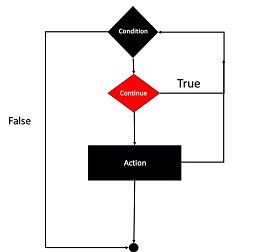
Like the break statement, continue is another “loop control statement” in PHP. Unlike the break statement, the continue statement skips the current iteration and continues execution at the condition evaluation and then the beginning of the next iteration.
The continue statement can be used inside any type of looping constructs, i.e., for, foreach, while or do-while loops. Like break, the continue keyword is also normally used conditionally.
while(expr){if(condition){continue;}}
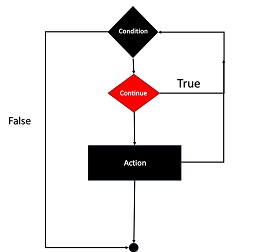
The following flowchart explains how the continue statement works −
Example
Given below is a simple example showing the use of continue. The for loop is expected to complete ten iterations. However, the continue statement skips the iteration whenever the counter id is divisible by 2.
Open Compiler
<?php
   for ($x=1; $x<=10; $x++){
  if ($x%2==0){
     continue;
  }
  echo "x = $x \n";   }
?>
It will produce the following output −
x = 1
x = 3
x = 5
x = 7
x = 9
Example
The continue statement accepts an optional numeric argument which tells it how many levels of enclosing loops it should skip to the end of. The default is 1.
Open Compiler
<?php
for ($i=1; $i<=3; $i++){
for ($j=1; $j<=3; $j++){
for ($k=1; $k<=3; $k++){
if ($k>1){
continue 2;
}
print "i: $i j:$j k: $k\n";
}
}
The continue statement in the inner for loop skips the iterations 2 and 3 and directly jumps to the middle loop. Hence, the output shows “k” as 1 for all the values of “i” and “k” variables.
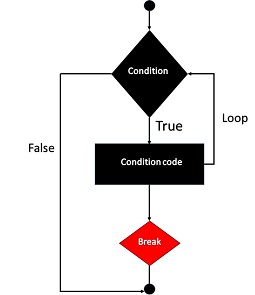
The break statement along with the continue statement in PHP are known as “loop control statements”. Any type of loop (for, while or do-while) in PHP is designed to run for a certain number of iterations, as per the test condition used. The break statement inside the looping block takes the program flow outside the block, abandoning the rest of iterations that may be remaining.
The break statement is normally used conditionally. Otherwise, the loop will terminate without completing the first iteration itself.
The syntax of break statement is as follows −
while(expr){if(condition){break;}}
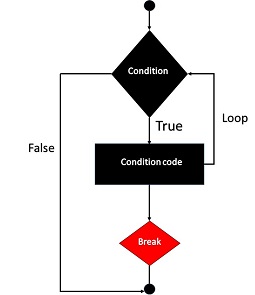
The following flowchart explains how the break statement works −
Example
The following PHP code is a simple example of using break in a loop. The while loop is expected to perform ten iterations. However, a break statement inside the loop terminates it when the counter exceeds 3.
Open Compiler
<?php
$i = 1;
while ($i<=10){
echo "Iteration No. $i \n";
if ($i>=3){
break;
}
$i++;
}
?>
It will produce the following output −
Iteration No. 1
Iteration No. 2
Iteration No. 3
An optional numeric argument can be given in front of break keyword. It is especially useful in nested looping constructs. It tells how many nested enclosing structures are to be broken out of. The default value is 1, only the immediate enclosing structure is broken out of.
Example
The following example has three nested loops: a for loop inside which there is a while loop which in turn contains a do-while loop.
The innermost loop executes the break. The number “2” in front of it takes the control out of the current scope into the for loop instead of the immediate while loop.
Open Compiler
<?php
for ($x=1; $x<=3; $x++){
$y=1;
while ($y<=3){
$z=1;
do {
echo "x:$x y:$y z:$z \n";
if ($z==2){
break 2;
}
$z++;
}
while ($z<=3);
$z=1;
$y++;
}
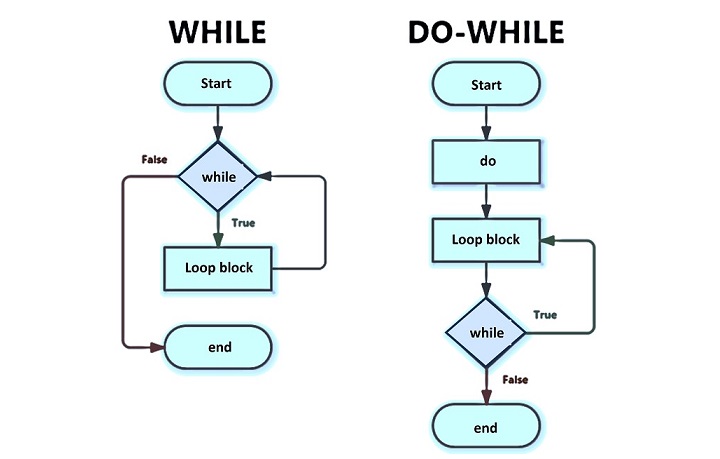
The “do…while” loop is another looping construct available in PHP. This type of loop is similar to the while loop, except that the test condition is checked at the end of each iteration rather than at the beginning of a new iteration.
The while loop verifies the truth condition before entering the loop, whereas in “do…while” loop, the truth condition is verified before re entering the loop. As a result, the “do…while” loop is guaranteed to have at least one iteration irrespective of the truth condition.
The following figure shows the difference in “while” loop and “do…while” loop by using a comparative flowchart representation of the two.
The syntax for constituting a “do…while” loop is similar to its counterpart in C language.
do{
   statements;}while(expression);
Example
Here is a simple example of “do…while” loop that prints iteration numbers 1 to 5.
Hence, it can be said that the “do…while” and “while” loops behave similarly. However, the difference will be evident when the initial value of the counter variable (in this case $i) is set to any value more than the one used in the test expression in the parenthesis in front of the while keyword.
Explore our latest online courses and learn new skills at your own pace. Enroll and become a certified expert to boost your career.
Example
In the following code, both the loops – while and “do…while” – are used. The counter variable for the while loop is $i and for “do…while” loop, it is $j. Both are initialized to 10 (any value greater than 5).
Open Compiler
<?php
   echo "while Loop \n";
   $i=10;
   while ($i<=5){
  echo "Iteration No: $i \n";
  $i++;   }

   echo "do-while Loop \n";
   $j=10;
   do{
  echo "Iteration No: $j \n";
  $j++;   }
   while ($j<=5);
?>
It will produce the following output −
while Loop
do - while Loop
Iteration No: 10
The result shows that the while loop doesn’t perform any iterations as the condition is false at the beginning itself ($i is initialized to 10, which is greater than the test condition $i<=5). On the other hand, the “do…while” loop does undergo the first iteration even though the counter variable $j is initialized to a value greater than the test condition.
We can thus infer that the “do…while” loop guarantees at least one iteration because the test condition is verified at the end of looping block. The while loop may not do any iteration as the test condition is verified before entering the looping block.
Another syntactical difference is that the while statement in “do…while” terminates with semicolon. In case of while loop, the parenthesis is followed by a curly bracketed looping block.
Apart from these, there are no differences. One can use both these types of loops interchangeably.
Decrementing a “do…while” Loop
To design a “do…while” with decrementing count, initialize the counter variable to a higher value, use decrement operator (–) inside the loop to reduce the value of the counter on each iteration, and set the test condition in the while parenthesis to run the loop till the counter is greater than the desired last value.
Example
In the example below, the counter decrements from 5 to 1.
In PHP, a string can be treated as an indexed array of characters. We can extract and display one character at a time from end to beginning by running a decrementing “do…while” loop as follows −
$j--;
echo "Character at index $j : $string[$j] \n";
}
while ($j>=1);
?>
It will produce the following output −
Character at index 13 : t
Character at index 12 : n
Character at index 11 : i
Character at index 10 : o
Character at index 9 : P
Character at index 8 : s
Character at index 7 : l
Character at index 6 : a
Character at index 5 : i
Character at index 4 : r
Character at index 3 : o
Character at index 2 : t
Character at index 1 : u
Character at index 0 : T
Nested “do…while” Loops
Like the for loop or while loop, you can also write nested “do…while” loops. In the following example, the upper “do…while” loop counts the iteration with $i, the inner “do…while” loop increments $j and each time prints the product of $i*j, thereby printing the tables from 1 to 10.
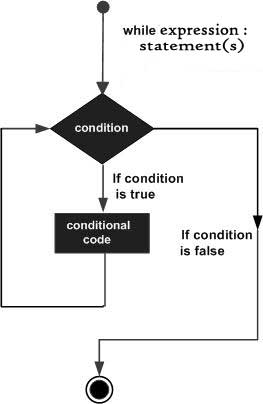
The easiest way to create a loop in a PHP script is with the while construct. The syntax of while loop in PHP is similar to that in C language. The loop body block will be repeatedly executed as long as the Boolean expression in the while statement is true.
The following flowchart helps in understanding how the while loop in PHP works −
The value of the expression is checked each time at the beginning of the loop. If the while expression evaluates to false from the very beginning, the loop won’t even be run once. Even if the expression becomes false during the execution of the block, the execution will not stop until the end of the iteration.
The syntax of while loop can be expressed as follows −
while(expr){
   statements
}
Example
The following code shows a simple example of how the while loop works in PHP. The variable $x is initialized to 1 before the loop begins. The loop body is asked to execute as long as it is less than or equal to 10. The echo statement in the loop body prints the current iteration number, and increments the value of x, so that the condition will turn false eventually.
Note that the test condition is checked at the beginning of each iteration. Even if the condition turns false inside the loop, the execution will not stop until the end of the iteration.
Example
In the following example, “x” is incremented by 3 in each iteration. On the third iteration, “x” becomes 9. Since the test condition is still true, the next round takes place in which “x” becomes 12. As the condition turns false, the loop stops.
Explore our latest online courses and learn new skills at your own pace. Enroll and become a certified expert to boost your career.
Example
It is not always necessary to have the looping variable incrementing. If the initial value of the loop variable is greater than the value at which the loop is supposed to end, then it must be decremented.
An indexed array in PHP is a collection of elements, each of which is identified by an incrementing index starting from 0.
You can traverse an array by constituting a while loop by repeatedly accessing the element at the xth index till “x” reaches the length of the array. Here, “x” is a counter variable, incremented with each iteration. We also need a count() function that returns the size of the array.
echo "Number at index $x is $numbers[$x] \n";
$x++;
}
?>
It will produce the following output −
Number at index 0 is 10
Number at index 1 is 20
Number at index 2 is 30
Number at index 3 is 40
Number at index 4 is 50
Nested “while” Loops
You may include a while loop inside another while loop. Both the outer and inner while loops are controlled by two separate variables, incremented after each iteration.
Note that “j” which is the counter variable for the inner while loop is re-initialized to 1 after it takes all the values so that for the next value of “i”, “j” again starts from 1.
Traversing the Characters in a String
In PHP, a string can be considered as an indexed collection of characters. Hence, a while loop with a counter variable going from “0” to the length of string can be used to fetch one character at a time.
Example
The following example counts number of vowels in a given string. We use strlen() to obtain the length and str_contains() to check if the character is one of the vowels.
Open Compiler
<?php
$line = "PHP is a popular general-purpose scripting language that is especially suited to web development.";
$vowels="aeiou";
$size = strlen($line);
$i=0;
$count=0;
while ($i<$size){
if (str_contains($vowels, $line[$i])) {
$count++;
}
$i++;
}
echo "Number of vowels = $count";
?>
It will produce the following output −
Number of vowels = 32
Using the “endwhile” Statement
PHP also lets you use an alternative syntax for the while loop. Instead of clubbing more than one statement in curly brackets, the loop body is marked with a “:” (colon) symbol after the condition and the endwhile statement at the end.
The foreach construct in PHP is specially meant for iterating over arrays. If you try to use it on a variable with a different data type, PHP raises an error.
The foreach loop in PHP can be used with indexed array as well as associative array. There are two types of usage syntaxes available −
foreach(arrayas$value){
   statements
}
The above method is useful when you want to iterate an indexed array. The syntax below is more suitable for associative arrays.
foreach(arrayas$key=>$value){
   statements
}
However, both these approaches work well with indexed array, because the index of an item in the array also acts as the key.
Using “foreach” Loop with an Indexed Array
The first type of syntax above shows a parenthesis in front of the foreach keyword. The name of the array to be traversed is then followed by the “as” keyword and then a variable.
When the fist iteration starts, the first element in the array is assigned to the variable. After the looping block is over, the variable takes the value of the next element and repeats the statements in the loop body till the elements in the array are exhausted.
PHP provides a very useful function in array_search() which returns the key of a given value. Since the index itself is the key in an indexed array, the array_search() for each $val returns the zero based index of each value. The following code demonstrates how it works −
$index = array_search($val, $arr);
echo "Element at index $index is $val \n";
}
?>
It will produce the following output −
Element at index 0 is 10
Element at index 1 is 20
Element at index 2 is 30
Element at index 3 is 40
Element at index 4 is 50
Example
The second variation of foreach syntax unpacks each element in the array into two variables: one for the key and one for value.
Since the index itself acts as the key in case of an indexed array, the $k variable successively takes the incrementing index of each element in the array.
Iterating an Associative Array using “foreach” Loop
An associative array is a collection of key-value pairs. To iterate through an associative array, the second variation of foreach syntax is suitable. Each element in the array is unpacked in two variables each taking up the value of key and its value.
Example
Here is an example in which an array of states and their respective capitals is traversed using the foreach loop.
Capital of Maharashtra is Mumbai
Capital of Telangana is Hyderabad
Capital of UP is Lucknow
Capital of Tamilnadu is Chennai
However, you can still use the first version of foreach statement, where only the value from each key-value pair in the array is stored in the variable. We then obtain the key corresponding to the value using the array_search() function that we had used before.
$cap = array_search($pair, $capitals);
echo "Capital of $cap is $capitals[$cap] \n";
}
?>
Explore our latest online courses and learn new skills at your own pace. Enroll and become a certified expert to boost your career.
Iterating a 2D Array using “foreach” Loop
It is possible to declare a multi-dimensional array in PHP, wherein each element in an array is another array itself. Note that both the outer array as well as the sub-arry may be an indexed array or an associative array.
In the example below, we have a two-dimensional array, which can be called as an array or arrays. We need nested loops to traverse the nested array structure as follows −
A program by default follows a sequential execution of statements. If the program flow is directed towards any of earlier statements in the program, it constitutes a loop. The for statement in PHP is a convenient tool to constitute a loop in a PHP script. In this chapter, we will discuss PHP’s for statement.
Flowchart of “for” Loop
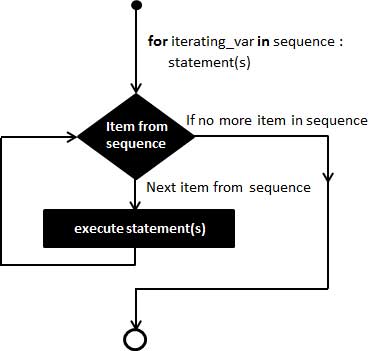
The following flowchart explains how a for loop works −
The for statement is used when you know how many times you want to execute a statement or a block of statements.
Syntax of “for” Loop
The syntax of for statement in PHP is similar to the for statement in C language.
for(expr1; expr2; expr3){
   code to be executed;}
The for keyword is followed by a parenthesis containing three expressions separated by a semicolon. Each of them may be empty or may contain multiple expressions separated by commas. The parenthesis is followed by one or more statements put inside curly brackets. It forms the body of the loop.
The first expression in the parenthesis is executed only at the start of the loop. It generally acts as the initializer used to set the start value for the counter of the number of loop iterations.
In the beginning of each iteration, expr2 is evaluated. If it evaluates to true, the loop continues and the statements in the body block are executed. If it evaluates to false, the execution of the loop ends. Generally, the expr2 specifies the final value of the counter.
The expr3 is executed at the end of each iteration. In most cases, this expression increments the counter variable.
Explore our latest online courses and learn new skills at your own pace. Enroll and become a certified expert to boost your career.
Example
The most general example of a for loop is as follows −
Note that all the three expressions in the parenthesis are optional. A for statement with only two semicolons constitutes an infinite loop.
for(;;){
   Loop body
}
To stop the infinite iteration, you need to use a break statement inside the body of the loop.
A decrementing “for” loop
You can also form a decrementing for loop. To have a for loop that goes from 10 to 1, initialize the looping variable with 10, the expression in the middle that is evaluated at the beginning of each iteration checks whether it is greater than 1. The last expression to be executed at the end of each iteration should decrement it by 1.
You can also use the “:” (colon) symbol to start the looping block and put endfor statement at the end of the block.
Open Compiler
<?php
   for ($i=1; $i<=10; $i++):
  echo "Iteration No: $i \n";   endfor;
?>
Iterating an indexed array using “for” loop
Each element in the array is identified by an incrementing index starting with “0”. If an array of 5 elements is present, its lower bound is 0 and is upper bound is 4 (size of array -1).
To obtain the number of elements in an array, there is a count() function. Hence, we can iterate over an indexed array by using the following for statement −
An associative array in PHP is a collection of key-value pairs. An arrow symbol (=>) is used to show the association between the key and its value. We use the array_keys() function to obtain array of keys.
The following for loop prints the capital of each state from an associative array $capitals defined in the code −
Loops in PHP are used to execute the same block of code a specified number of times. PHP supports following four loop types.
for − Loops through a block of code a specified number of times.
foreach − Loops through a block of code for each element in an array.
while − Loops through a block of code if and as long as a specified condition is true.
do-while − Loops through a block of code once, and then repeats the loop as long as a special condition is true.
In addition, we will also explain how the continue and break statements are used in PHP to control the execution of loops.
PHP for Loop
The for statement is used when you know how many times you want to execute a statement or a block of statements.
Syntax
for(initialization; condition; increment){
   code to be executed;}
The initializer is used to set the start value for the counter of the number of loop iterations. A variable may be declared here for this purpose and it is traditional to name it $i.
Example
The following example makes five iterations and changes the assigned value of two variables on each pass of the loop −
Open Compiler
<?php
   $a = 0;
   $b = 0;

   for( $i = 0; $i<5; $i++ ) {
  $a += 10;
  $b += 5;   }

   echo ("At the end of the loop a = $a and b = $b" );
?>
It will produce the following output −
At the end of the loop a = 50 and b = 25
PHP foreach Loop
The foreach statement is used to loop through arrays. For each pass the value of the current array element is assigned to $value and the array pointer is moved by one and in the next pass next element will be processed.
Syntax
foreach(arrayas value){
   code to be executed;}
Example
Try out following example to list out the values of an array.
Value is 1
Value is 2
Value is 3
Value is 4
Value is 5
Explore our latest online courses and learn new skills at your own pace. Enroll and become a certified expert to boost your career.
PHP while Loop
The while statement will execute a block of code if and as long as a test expression is true.
If the test expression is true then the code block will be executed. After the code has executed the test expression will again be evaluated and the loop will continue until the test expression is found to be false.
Syntax
while(condition){
   code to be executed;}
Example
This example decrements a variable value on each iteration of the loop and the counter increments until it reaches 10 when the evaluation is false and the loop ends.
Open Compiler
<?php
   $i = 0;
   $num = 50;

   while($i < 10) {
  $num--;
  $i++;   }

   echo ("Loop stopped at i = $i and num = $num" );
?>
It will produce the following output −
Loop stopped at i = 10 and num = 40
PHP do-while Loop
The do-while statement will execute a block of code at least once – it then will repeat the loop as long as a condition is true.
Syntax
do{
   code to be executed;}while(condition);
Example
The following example will increment the value of i at least once, and it will continue incrementing the variable i as long as it has a value of less than 10 −
Open Compiler
<?php
   $i = 0;
   $num = 0;

   do {
  $i++;   }

   while( $i < 10 );
   echo ("Loop stopped at i = $i" );
?>
It will produce the following output −
Loop stopped at i = 10
PHP break Statement
The PHP break keyword is used to terminate the execution of a loop prematurely.
The break statement is situated inside the statement block. It gives you full control and whenever you want to exit from the loop you can come out. After coming out of a loop immediate statement to the loop will be executed.
Example
In the following example condition test becomes true when the counter value reaches 3 and loop terminates.
Open Compiler
<?php
   $i = 0;

   while( $i < 10) {
  $i++;
  if( $i == 3 )break;   }
   echo ("Loop stopped at i = $i" );
?>
It will produce the following output −
Loop stopped at i = 3
PHP continue Statement
The PHP continue keyword is used to halt the current iteration of a loop but it does not terminate the loop.
Just like the break statement the continue statement is situated inside the statement block containing the code that the loop executes, preceded by a conditional test. For the pass encountering continue statement, rest of the loop code is skipped and next pass starts.
Example
In the following example loop prints the value of array but for which condition becomes true it just skip the code and next value is printed.
The switch statement in PHP can be treated as an alternative to a series of if…else statements on the same expression. Suppose you need to compare an expression or a variable with many different values and execute a different piece of code depending on which value it equals to. In such a case, you would use multiple if…elseif…else constructs.
However, such a construct can make the code quite messy and difficult to follow. To simplify such codes, you can use the switch case construct in PHP that offers a more compact alternative to avoid long blocks of if..elseif..else codes.
The following PHP script uses if elseif statements −
The switch statement is followed by an expression, which is successively compared with value in each case clause. If it is found that the expression matches with any of the cases, the corresponding block of statements is executed.
The switch statement executes the statements inside the curly brackets line by line.
If and when a case statement is found whose expression evaluates to a value that matches the value of the switch expression, PHP starts to execute the statements until the end of the switch block, or the first time it encounters a break statement.
If you don’t write a break statement at the end of a case’s statement list, PHP will go on executing the statements of the following case.
Example
Try to run the above code by removing the breaks. If the value of x is 0, you’ll find that the output includes “x equals 1” as well as “x equals 2” lines.
Open Compiler
<?php
   $x=0;
   switch ($x) {
  case 0:
     echo "x equals 0 \n";
  case 1:
     echo "x equals 1 \n";
  case 2:
     echo "x equals 2";   }
?>
It will produce the following output −
x equals 0
x equals 1
x equals 2
Thus, it is important make sure to end each case block with a break statement.
The Default Case in Switch
A special case is the default case. This case matches anything that wasn’t matched by the other cases. Using default is optional, but if used, it must be the last case inside the curly brackets.
You can club more than one cases to simulate multiple logical expressions combined with the or operator.
Open Compiler
<?php
   $x=10;
   switch ($x) {
  case 0:
  case 1:
  case 2:
     echo "x between 0 and 2 \n";
  break;
  default:
     echo "x is less than 0 or greater than 2";   }
?>
The values to be compared against are given in the case clause. The value can be a number, a string, or even a function. However you cannot use comparison operators (<, > == or !=) as a value in the case clause.
You can choose to use semicolon instead of colon in the case clause. If no matching case found, and there is no default branch either, then no code will be executed, just as if no if statement was true.
Explore our latest online courses and learn new skills at your own pace. Enroll and become a certified expert to boost your career.
The switch-endswitch Statement
PHP allows the usage of alternative syntax by delimiting the switch construct with switch-endswitch statements. The following version of switch case is acceptable.
Open Compiler
<?php
   $x=0;
   switch ($x) :
  case 0:
     echo "x equals 0";
  break;
  case 1:
     echo "x equals 1 \n";
  break;
  case 2:
     echo "x equals 2 \n";
  break;
  default:
     echo "None of the above";   endswitch
?>
Using the Break Statement in Switch…Case
Obviously, you needn’t write a break to terminate the default case, it being the last case in the switch construct.
The ability to implement conditional logic is the fundamental requirement of any programming language (PHP included). PHP has three keywords (also called as language constructs) – if, elseif and else – are used to take decision based on the different conditions.
The if keyword is the basic construct for the conditional execution of code fragments. More often than not, the if keyword is used in conjunction with else keyword, although it is not always mandatory.
If you want to execute some code if a condition is true and another code if the sme condition is false, then use the “if….else” statement.
Syntax
The usage and syntax of the if statement in PHP is similar to that of the C language. Here is the syntax of if statement in PHP −
if(expression)
   code to be executed if expression is true;else
   code to be executed if expression is false;
The if statement is always followed by a Boolean expression.
PHP will execute the statement following the Boolean expression if it evaluates to true.
If the Boolean expression evaluates to false, the statement is ignored.
If the algorithm needs to execute another statement when the expression is false, it is written after the else keyword.
Example
Here is a simple PHP code that demonstrates the usage of if else statements. There are two variables $a and $b. The code identifies which one of them is bigger.
Open Compiler
<?php
$a=10;
$b=20;
if ($a > $b)
echo "a is bigger than b";
else
echo "a is not bigger than b";
?>
When the above code is run, it displays the following output −
a is not bigger than b
Interchange the values of “a” and “b” and run again. Now, you will get the following output −
a is bigger than b
Explore our latest online courses and learn new skills at your own pace. Enroll and become a certified expert to boost your career.
Example
The following example will output “Have a nice weekend!” if the current day is Friday, else it will output “Have a nice day!” −
Open Compiler
<?php
   $d = date("D");

   if ($d == "Fri")
  echo "Have a nice weekend!";    else
  echo "Have a nice day!"; ?>
It will produce the following output −
Have a nice weekend!
Using endif in PHP
PHP code is usually intermixed with HTML script. We can insert HTML code in the if part as well as the else part in PHP code. PHP offers an alternative syntax for if and else statements. Change the opening brace to a colon (:) and the closing brace to endif; so that a HTML block can be added to the if and else part.
Open Compiler
<?php
   $d = date("D");

   if ($d == "Fri"): ?><h2>Have a nice weekend!</h2><?php else: ?><h2>Have a nice day!</h2><?php endif ?>
Make sure that the above script is in the document root of PHP server. Visit the URL http://localhost/hello.php. Following output should be displayed in the browser, if the current day is not a Friday −
Have a nice day!
Using elseif in PHP
If you want to execute some code if one of the several conditions are true, then use the elseif statement. The elseif language construct in PHP is a combination of if and else.
Similar to else, it specifies an alternative statement to be executed in case the original if expression evaluates to false.
However, unlike else, it will execute that alternative expression only if the elseif conditional expression evaluates to true.
if(expr1)
   code to be executed if expr1 is true;elseif(expr2)
   code to be executed if expr2 is true;else
   code to be executed if expr2 is false;
Example
Let us modify the above code to display a different message on Sunday, Friday and other days.
Open Compiler
<?php
$d = date("D");
if ($d == "Fri")
echo "<h3>Have a nice weekend!</h3>";
elseif ($d == "Sun")
echo "<h3>Have a nice Sunday!</h3>";
else
echo "<h3>Have a nice day!</h3>";
?>
On a Sunday, the browser shall display the following output −
Have a nice Sunday!
Example
Here is another example to show the use of if–elselif–else statements −
Open Compiler
<?php
$x=13;
if ($x%2==0) {
if ($x%3==0)
echo "<h3>$x is divisible by 2 and 3</h3>";
else
echo "<h3>$x is divisible by 2 but not divisible by 3</h3>";
}
elseif ($x%3==0)
echo "<h3>$x is divisible by 3 but not divisible by 2</h3>";
else
echo "<h3>$x is not divisible by 3 and not divisible by 2</h3>";
?>
The above code also uses nestedif statements.
For the values of x as 13, 12 and 10, the output will be as follows −
13 is not divisible by 3 and not divisible by 2
12 is divisible by 2 and 3
10 is divisible by 2 but not divisible by 3
A computer program by default follows a simple input-process-output path sequentially. This sequential flow can be altered with the decision control statements offered by all the computer programming languages including PHP.
Decision Making in a Computer Program
Decision-making is the anticipation of conditions occurring during the execution of a program and specified actions taken according to the conditions.
You can use conditional statements in your code to make your decisions. The ability to implement conditional logic is one of the fundamental requirements of a programming language.
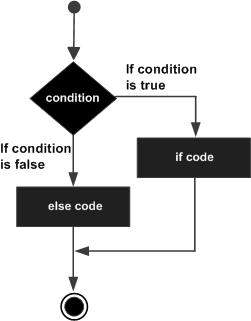
A Typical Decision Making Structure
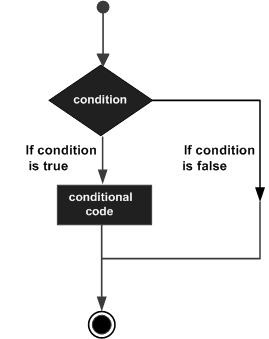
Following is the general form of a typical decision making structure found in most of the programming languages −
Explore our latest online courses and learn new skills at your own pace. Enroll and become a certified expert to boost your career.
Decision Making Statements in PHP
PHP supports the following three decision making statements −
if…else statement − Use this statement if you want to execute a set of code when a condition is true and another if the condition is not true.
elseif statement − Use this statement with the if…else statement to execute a set of code if one of the several conditions is true
switch statement − If you want to select one of many blocks of code to be executed, use the Switch statement. The switch statement is used to avoid long blocks of if..elseif..else code.
Almost all the programming languages (including PHP) define the if-else statements. It allows for conditional execution of code fragments. The syntax for using the if-else statement in PHP is similar to that of C −
if(expr)
   statement1
else
   statement2
The expression here is a Boolean expression, evaluating to true or false
Any expression involving Boolean operators such as <, >, <=, >=, !=, etc. is a Boolean expression.
If the expression results in true, the subsequent statement – it may be a simple or a compound statement i.e., a group of statements included in pair of braces – will be executed.
If the expression is false, the subsequent statement is ignored, and the program flow continues from next statement onwards.
The use of else statement is optional. If the program logic requires another statement or a set of statements to be executed in case the expression (after the if keyword) evaluates to false.
The elseif statement is a combination of if and else. It allows you to check multiple expressions for TRUE and execute a block of code as soon as one of the conditions evaluates to TRUE. Just like the else statement, the elseif statement is optional.
The switch statement is similar to a series of if statements on the same expression. We shall learn about these statements in detail in the subsequent chapters of this tutorial.