Category: 16. Preprocessors

https://cdn3d.iconscout.com/3d/premium/thumb/process-3d-icon-png-download-9236381.png?f=webp

  • Custom Header Files

    Header files in C are files with a .h extension that contain definitions of functions, macros, constants, and data types. C provides standard header files with built-in functions and definitions. Similarly, we can also create our own custom header files.

    In this chapter, we will learn how to create and include custom header files in C programs. We will cover the following topics one after the other −

    • Custom Header File in C
    • Creating a Custom Header File
    • Understanding Include Guards
    • Alternative: #pragma once
    • Contents of a Custom Header File
    • Best Practices for Custom Headers

    Custom Header File in C

    custom header file is a file that we can create by making a new file with a .h extension and adding function declarations, macros, constants, or structure definitions. By including this header file, we can reuse the code or functions defined in it.

    Header files separate declarations from definitions and always have the .h extension. We include them in C source files using the #include directive. For example −

    #include "myheader.h"

    Here, myheader.h is a custom header file.

    Creating a Custom Header File

    To create a custom header file in C, we write all the function declarations, macros, and constants that we want to reuse in a separate file with the .h extension. Then, we include this header file in our program using the #include directive.

    Now, let’s go through the steps to create a custom header file.

    Step 1: Create the Header File

    Create a file named myheader.h and add the declarations of the functions you want to reuse.

    Here’s an example of myheader.h file −

    // myheader.h#ifndef MYHEADER_H#define MYHEADER_Hintadd(int a,int b);intsubtract(int a,int b);intmultiply(int a,int b);#endif

    Here, #ifndef#define, and #endif are header guards. They make sure the file is not included more than once in a program. In this file, we only write function declarations, not the actual code.

    Step 2: Create the Source File

    Now, create a file named myheader.c to write the actual code (definitions) for the functions declared in the myheader.h header file.

    Here’s an example of the myheader.c file −

    // myheader.c#include "myheader.h"intadd(int a,int b){return a + b;}intsubtract(int a,int b){return a - b;}intmultiply(int a,int b){return a * b;}

    In the above program, we include the “myheader.h” file using #include directive. By including this file, the compiler knows that the functions we are defining match the declarations in the myheader.h header file.

    Step 3: Use the Header File in the Main Program

    Finally, create the main program file main.c and include the custom header file to use the functions we declared in myheader.h and defined in myheader.c.

    Here’s an example of our main.c program, where we include the custom header file (myheader.h) and call the add()subtract(), and multiply() functions just like we call the built-in functions.

    // main.c#include <stdio.h>#include "myheader.h"intmain(){int a =10, b =5;printf("Addition: %d\n",add(a, b));printf("Subtraction: %d\n",subtract(a, b));printf("Multiplication: %d\n",multiply(a, b));return0;}

    Step 4: Compile the Program

    Finally, compile both main.c and myheader.c together so the function definitions are linked with their declarations −

    gcc main.c myheader.c -o program
    

    Then, run the program using the following command −

    ./program
    

    The program will run successfully and display the following output −

    Addition: 15
    Subtraction: 5
    Multiplication: 50
    

    Understanding Include Guards

    An important point to note about custom headers is the use of include guards. If the same header file is included multiple times in a program, the compiler may throw errors like redefinition of functions or variables. To prevent this, we wrap the header code inside preprocessor directives called #ifndef#define, and #endif, which ensure the compiler includes the file only once.

    Here’s the general structure of a header guard −

    #ifndef FILENAME_H#define FILENAME_H// declarations#endif

    Here’s an example with a custom header file −

    #ifndef MYHEADER_H#define MYHEADER_Hintadd(int a,int b);intsubtract(int a,int b);#endif

    Alternative: #pragma once

    Instead of using include guards, we can also write #pragma once at the top of the header file. For Example 

    #pragma onceintadd(int a,int b);intsubtract(int a,int b);

    It works just like include guards and makes sure the compiler includes the header file only once. Just keep in mind that it is compiler-specific, although most modern compilers support it.

    Contents of a Custom Header File

    In a custom header file, we can include different kinds of reusable code, such as –

    Function Declarations − Declare functions to use them in multiple programs without rewriting.

    intadd(int a,int b);intsubtract(int a,int b);

    Macros − Define constants or small code snippets that the compiler replaces wherever needed.

    #define MAX 100#define MIN 0

    Constants − Store values that do not change, such as mathematical or fixed program values.

    constfloat PI =3.14159;constint DAYS_IN_WEEK =7;

    Structure − Group related data together into a single unit.

    structStudent{char name[50];int age;};

    Unions − Store different types in the same memory location to save memory.

    union Data {int i;float f;char str[20];};

    Enumerations − Define named sets of integer constants.

    enumColor{ RED, GREEN, BLUE };

    Avoid putting full function definitions in the header file except for inline functions, because including them in multiple files can cause errors.

    Best Practices for Custom Headers

    Here are some important points we should take care of while creating custom header files in C −

    • Always use include guards or #pragma once to avoid multiple inclusion errors.
    • Keep declarations in .h files and the actual code (definitions) in .c files.
    • Give meaningful names to your headers so it’s easy to know what they contain.
    • Don’t put too much code in headers. Only write declarations there, unless you are using inline functions.
    • Group related functions together in a single header. For example, all math functions can go in mathutils.h.
    • Add comments to your headers to explain what each part does.

    Conclusion

    In this chapter, we learned how to create our own header files in C. Using custom headers helps organize code, improve readability, and make programs easier to manage. They also enable code to be reused across multiple programs, which reduces repetition, saves development time.
  • Header Files in C

    The #include preprocessor directive is used to make the definitions of functions, constants and macros etc. from one file, usually called as a header file, available for use in another C code. A header file has “.h” extension from which you can include the forward declarations of one or more predefined functions, constants, macros etc. The provision of header files in C facilitates a modular design of the program.

    System Header Files

    The C compiler software is bundled with many pre-compiled header files. These are called system header files. A well-known example is “stdio.h” a header file included in almost every C program.

    Each of the system header files contains a number of utility functions. These functions are often called library functions. For example, printf() and scanf() functions, needed for performing IO operations, are the library functions available in the “stdio.h” header file.

    The preprocessor statements that load one or more header files are always in the beginning of the C code. We start our journey to learn C programming with a basic “Hello World” program that starts with including the “stdio.h” file −

    #include <stdio.h>intmain(){/* my first program in C */printf("Hello, World! \n");return0;}

    The C preprocessing directive #include basically is a request to the compiler to load the contents of a specific header file, so that they can be used in the program.

    A usual practice in C or C++ programs is that we keep all the constants, macros, system wide global variables, and function prototypes in the header files and include that header file wherever it is required.

    Syntax to Include Header Files in C

    A header file is loaded with the #include directive. Its usage follows either of the following two methods −

    #include <filename.h>

    The name of the header file put inside angular brackets if it is available in system/default directory.

    #include "filename.h"   

    The name of the header file put inside double quotation marks for user defined or non-standard header files available in same directory as source file

    The #include directive works by directing the C preprocessor to scan the specified file as input before continuing with the rest of the current source file. The output from the preprocessor contains the output already generated, followed by the output resulting from the included file, followed by the output that comes from the text after the #include directive.

    Standard Header Files in C

    A typical C compiler is bundled with a number of pre-compiled header files. Each header file contains the set of predefined standard library functions. The “#include” preprocessing directive is used to include the header files with “.h” extension in the program.

    Here is the table that displays some of the header files in C language −

    Header FilesDescriptionFunctions/macros/variables
    stdio.hInput/Output functionsscanf(), printf(), fopen(), FILE
    stdlib.hGeneral utility functionsatoi(), atof(), malloc()
    math.hMathematics functionssin(), cos(), pow(), sqrt()
    string.hString functionsstrcpy(), strlen(), strcat()
    ctype.hCharacter handling functionsisalpha(), isupper(), ispunct()
    time.hDate and time functionsasctime(), gmtime(), mktime()
    float.hLimits of float typesFLT_ROUNDS, FLT_RADIX,
    limits.hSize of basic typesCHAR_BIT, CHAR_MIN, CHAR_MAX
    wctype.hFunctions to determine the type contained in wide character data.iswalpha(), iswctype(),iswupper()

    Example

    A few of the library functions from some header files are used in the code below −

    #include <stdio.h>#include <stdlib.h>#include <string.h>#include <math.h>intmain(){char s1[20]="53875";char s2[10]="Hello";char s3[10]="World";int res;
       res =pow(8,4);printf("Using math.h, The value is : %d\n", res);longint a =atol(s1);printf("Using stdlib.h, the string to long int: %d\n", a);strcpy(s2, s3);printf("Using string.h, the strings s2 and s3: %s\t%s\n", s2, s3);return0;}

    Output

    When you run this code, it will produce the following output −

    Using math.h, The value is: 4096
    Using stdlib.h, the string to long int: 53875
    Using string.h, the strings s2 and s3: World	World
    

    User-defined Header Files

    We can add one or more user-defined functions (apart from the main() function) in the C program. However, if the code consists of a large number of function definitions, putting them in a single source code file with “.c” extension becomes difficult to handle and maintain. Hence, functions/macros/variables of similar nature are clubbed together in header files, and included as we include the standard header files, and call the functions defined in them.

    The user-defined header files are usually placed in the same directory in which the C source code is present.

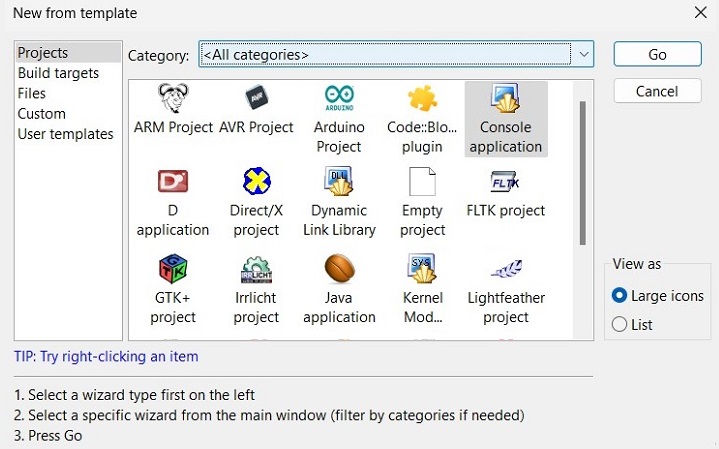
    The procedure to create and use a header file with CodeBlocks IDE has been described below. Start CodeBlocks IDE and create a new Console Application −

    Header Files

    Choose a suitable name to the project. Add a new empty file in the folder, and save the following code as “myheader.h” −

    #ifndef MYHEADER_H#define MYHEADER_HvoidsayHello();intadd(int a,int b);doublearea(double radius);intlength(char*x);#endif

    If a header file happens to be included twice, the compiler will process its contents twice and it will result in an error. The standard way to prevent this is to enclose the entire real contents of the file in a conditional definition with #ifndef directive, known as a header guard.

    The header guard checks whether the header file has been defined or not. If it’s not defined, it means the file is being included for the first time, and the code inside the guard will be processed.

    The header file contains the forward declarations or the prototypes of the functions to be included. The actual definition of these functions is provided in a “.c” file with the same name as the header file.

    Creating a Header File

    Save the following code in “myheader.c” file −

    #include <stdio.h>#include <string.h>#include <math.h>#define PI 3.142voidsayHello(){printf("Hello World\n");}intadd(int a,int b){int result;
       result = a+b;return result;}doublearea(double radius){double areaofcircle = PI*pow(radius,2);return areaofcircle;}intlength(char*x){returnstrlen(x);}

    Using the Header File

    We can now include the “myheader.h” file in the program and call any of the above functions. Save the following code as “main.c” in the project folder.

    #include <stdio.h>#include "myheader.h"intmain(){int p =10, q =20;double x =5.25;sayHello();printf("sum of %d and %d is %d\n", p, q,add(p,q));printf("Radius: %lf Area: %lf", x,area(x));return0;}

    Build the project and run “main.c”, either from the run menu of CodeBlocks IDE or from the command-line to get the following result −

    Hello World
    sum of 10 and 20 is 30
    Radius: 5.250000 Area: 86.601375
    

    Computed Includes

    Sometimes it is necessary to select one of the several different header files to be included into your program. For instance, they might specify configuration parameters to be used on different sorts of operating systems. You could do this with a series of conditionals as follows −

    #if SYSTEM_1# include "system_1.h"#elif SYSTEM_2# include "system_2.h"#elif SYSTEM_3...#endif

    But as it grows, it becomes tedious, instead the preprocessor offers the ability to use a macro for the header name. This is called a computed include. Instead of writing a header name as the direct argument of #include, you simply put a macro name there −

    #define SYSTEM_H "system_1.h"...#include SYSTEM_H

    SYSTEM_H will be expanded, and the preprocessor will look for system_1.h as if the #include had been written that way originally. SYSTEM_H could be defined by your Makefile with a -D option.

  • Preprocessor Operators in C

    Preprocessor operators are special symbol(s) that are used in the context of the #define directive. These operators are also called preprocessor-specific operators.

    In C, a set of preprocessor operators have been defined, each with an important operation attached with it. In this chapter, we will explain the different types of preprocessor operators used in C.

    The following preprocessor operators are implemented by most of the modern C compilers −

    OperatorAction
    Continuation operator (/)Used to continue a macro that is too long for a single line.
    Stringizing operator (#)Causes the corresponding actual argument to be enclosed in double quotation marks
    Token-pasting operator (##)Allows tokens used as actual arguments to be concatenated to form other tokens
    defined operatorSimplifies the writing of compound expressions in certain macro directives

    Let us now discuss in detail about each of these preprocessor operators.

    Continuation Operator (/)

    This operator is used where the macro is quite complex, and spreads over multiple lines. In case of a complex logic inside macro expansion, youll need to break the line and write code that spreads over more than one lines. In such cases macro continuation operator is very helpful.

    Example 1: Preprocessor Continuation Operator (/)

    In the example below, we are writing a part of the macro in the next line, so we are making use of macro continuation preprocessor operator (\).

    #include <stdio.h>#define  message() { \
       printf("TutorialsPoint Library contains\n"); \
       printf("High quality Programming Tutorials"); \
    }intmain(){message();return0;}

    Output

    When you run this code, it will produce the following output −

    TutorialsPoint Library contains
    High quality Programming Tutorials
    

    Example 2: Preprocessor Continuation Operator (/)

    In the following example, the macro definition involves evaluation of a switch case statement, hence it spreads over multiple lines, requiring the macro continuation character.

    #include <stdio.h>#define SHAPE(x) switch(x) { \  case1:printf("1. CIRCLE\n");break; \  
       case2:printf("2. RECTANGLE\n");break; \  
       case3:printf("3. SQUARE\n");break; \  
       default:printf("default. LINE\n"); \  
    }intmain(){SHAPE(1);SHAPE(2);SHAPE(3);SHAPE(0);return0;}

    Output

    When you run this code, it will produce the following output −

    1. CIRCLE
    2. RECTANGLE
    3. SQUARE
    default. LINE
    

    Stringizing Operator (#)

    Sometimes you may want to convert a macro argument into a string constant. The number-sign or “stringizing” operator (#) converts macro parameters to string literals without expanding the parameter definition. This operator may be used only in a macro having a specified argument or parameter list.

    Example 1: Stringizing Operator

    Take a look at the following example −

    #include <stdio.h>#define stringize(x) printf(#x "\n")intmain(){stringize(Welcome To TutorialsPoint);stringize("The Largest Tutorials Library");stringize("Having video and Text Tutorials on Programming Languages");}

    Output

    When you run this code, it will produce the following output −

    Welcome To TutorialsPoint
    "The Largest Tutorials Library"
    "Having video and Text Tutorials on Programming Languages"
    

    Example 2: Stringizing Operator

    The following code shows how you can use the stringize operator to convert some text into string without using any quotes.

    #include <stdio.h>#define STR_PRINT(x) #xmain(){printf(STR_PRINT(This is a string without double quotes));}

    Output

    Run the code and check its output −

    This is a string without double quotes
    

    Token Pasting Operator (##)

    The double-number-sign or token-pasting operator (##), which is sometimes called the merging or combining operator. It is often useful to merge two tokens into one while expanding macros.

    When a macro is expanded, the two tokens on either side of each “##” operator are combined into a single token, which then replaces the “##” and the two original tokens in the macro expansion.

    Example 1: Token Pasting Operator (##)

    Take a look at the following example −

    #include <stdio.h>#define PASTE(arg1,arg2) arg1##arg2main(){int value_1 =1000;printf("value_1 = %d\n",PASTE(value_,1));}

    Output

    When you run this code, it will produce the following output −

    value_1 = 1000
    

    Example 2: Token Pasting Operator (##)

    In the example below, we pass two arguments to the macro.

    #include <stdio.h>#define TOKENS(X, Y) X##Yintmain(){printf("value1: %d\n",TOKENS(12,20));printf("value2: %d\n",TOKENS(12,20)+10);return0;}

    Output

    When you run this code, it will produce the following output −

    value1: 1220
    value2: 1230
    

    The defined Operator

    The defined preprocessor operator can only be used as a part of #if and #elif directives. The syntax of defined operator is as follows −

    #if defined(macro1)   // code#elif defined(macro2)   // code#endif  

    It is used in constant expressions to determine if an identifier is defined. If the specified identifier is defined, the value is true (non-zero). If the symbol is not defined, the value is false (zero).

    Example 1: defined Operator

    In this example, the defined operator is used to check if the DEBUG macro is defined. If it is, the program prints “DEBUG mode is on.” Otherwise, it prints “DEBUG mode is off.”

    #include <stdio.h>#define DEBUG 1intmain(){#if defined(DEBUG)printf("DEBUG mode is on.\n");#elseprintf("DEBUG mode is off.\n");#endifreturn0;}

    Output

    Run the code and check its output −

    DEBUG mode is on.
    

    Example 2: defined Operator

    The following code checks if the square macro has been already defined, and if so, expands it with the given value of “x” as 5.

    #include <stdio.h>#define square(x) ((x) * (x))intmain(){#if defined squareprintf("The square of the given number is: %d",square(5));#endifreturn0;}

    Output

    When you run this code, it will produce the following output −

    The square of the given number is: 25
    
  • Working of Preprocessor

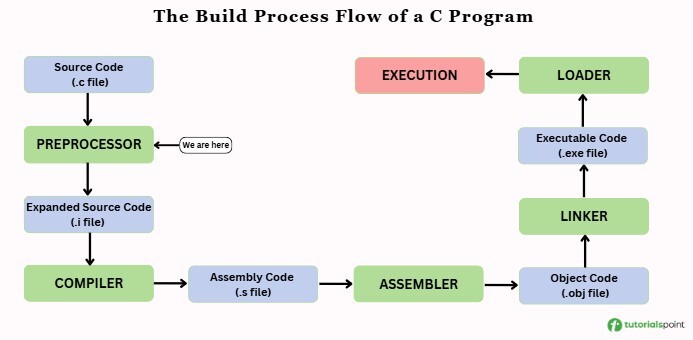
    When we write a C program, it goes through multiple steps before becoming an executable file. The very first step is preprocessing, which is handled by the C Preprocessor. It prepares the source code for compilation by processing all instructions that start with the symbol, called preprocessor directives.

    Here is the overall build process of a C program, showing where the preprocessor comes in −

    build flow of c program

    In this chapter, we’ll see what the preprocessor does, how it works, and why it is important in a C program.

    What is a preprocessor?

    The preprocessor is a program that executes at the very first stage of compilation. It looks for preprocessor directives and performs tasks like including header files, defining constants, or selectively compiling parts of the code. It returns the modified source code with the ‘.i’ extension, which then goes to the assembler.

    For example −

    #include <stdio.h>#define PI 3.14

    Here, #include and #define are preprocessor directives. #include uses standard functions, and #define creates a constant value for the program.

    Main Functions of Preprocessor

    The preprocessor works purely with text and does not understand C language syntax, variables, functions, or data types. It performs text manipulation based on preprocessor directives. Its main functions are −

    • It removes all comments (// or /* */).
    • It expands macros wherever they are used by replacing them with their definitions.
    • It includes files based on standard header files or custom files.
    • It selects only the required parts of the code for compilation.
    • It adjusts line numbers, handles control and special instructions, throws errors, or gives special compiler instructions.

    Working of Preprocessor in C

    Let’s see the steps below to understand how internally our preprocessor works before the compilation process.

    Step 1: Reading the File

    The preprocessor opens your .c source file and reads it as plain text. It breaks the program into tokens, which are the smallest units like keywords, symbols, and numbers.

    For example −

    intmain(){return0;}

    The tokens for this program will be: int, main(){return, 0;}. These tokens are used in the next steps to identify preprocessor instructions.

    Step 2: Looking for Preprocessor Instructions

    The preprocessor scans the program line by line to identify preprocessor directives. These lines always start with #, such as #include#define, and #ifdef. At this step, it only marks these lines for further processing and does not act on them yet.

    For example −

    #include <stdio.h>   // Preprocessor instruction#define MAX 100      // Preprocessor instructionint x = MAX;// Normal C code

    Here, only the lines starting with # are recognized as preprocessor instructions. The rest of the code is ignored at this step.

    Step 3: Removing Comments

    Before processing any directives, the preprocessor removes all comments from the code. This includes both single-line (//) and multi-line (/* */) comments.

    For example –

    // This is a single line commentint a =10;/* This is a block comment */

    After preprocessing, it becomes –

    int a =10;

    Step 4: File Inclusion

    Now the preprocessor processes the #include directives that were identified earlier. It opens the specified file and copies its entire content into the program.

    For example, consider a main.c program and a myheader.h header file –

    main.c

    #include "myheader.h"intmain(){return0;}

    myheader.h

    #define PI 3.14intcalculate();

    After preprocessing, it will look like this −

    #define PI 3.14intcalculate();intmain(){return0;}

    The #include line is replaced by the actual content of the header file.

    Step 5: Macro Definition and Expansion

    Macros are text replacements defined by the preprocessor. They can be object-like or function-like, and they are replaced wherever they appear in the code. Let’s see an example below −

    Object-like Macros

    #define MAX 100#define MIN 1int array[MAX];int value = MIN +5;

    After preprocessing, the code becomes −

    int array[100];int value =1+5;

    Here, the preprocessor repalces MAX with 100 and MIN with 1.

    Function like Macros

    #define SQUARE(x) ((x) * (x))double result =SQUARE(5);

    After preprocessing, it becomes −

    double result =((5)*(5));

    The processor works like a small inline function and repalces the function-like macro call with the actual expression. Here, SQUARE(5) is replaced with ((5) * (5)).

    Step 6: Conditional Compilation

    The preprocessor can also include or skip certain parts of the program depending on the conditions provided using directives like #if#ifdef, and #ifndef.

    For example −

    #define DEBUG#ifdef DEBUGprintf("Debug mode\n");#elseprintf("Release mode\n");#endif

    If DEBUG is defined, the program will print Debug mode and if it is not defined, the program will print Release mode.

    Step 7: Line Control and Special Directives

    The preprocessor also handles special directives that control the compiler or show custom messages. For example#line can set custom line numbers in error messages, #error stops compilation and displays a message, and #pragma sends instructions to the compiler. These directives gives us more control over compilation and error reporting.

    For example −

    #error This program requires C99

    Here, #error stops the compilation and shows a message that displays the program requires the C99 standard.

    Step 8: Producing Modified Source Code

    After processing all directives, expanding macros, including files, handling conditional compilation, and removing comments, the preprocessor generates the modified source code. This code is what the compiler actually works with.

    For example, if main.c contains −

    #include <stdio.h>#define MAX 5intmain(){int arr[MAX];printf("Array size is %d\n", MAX);return0;}

    It will produce the main.i file. Normally, we don’t see the preprocessed file, but we can generate it using GCC like this −

    gcc -E main.c -o main.i
    

    Here, the -E option stops compilation after preprocessing and creates the main.i file −

    #include <stdio.h>intmain(){int arr[5];printf("Array size is %d\n",5);return0;}

    In this file, the macro MAX is replaced with 5, the content of <stdio.h> is included, and comments are removed.

    Final Example: Working of Preprocessor

    Let’s take a complete program example that uses different preprocessor directives and see how the preprocessor transforms the code for the next step of compilation process.

    Original Code (main.c) −

    #include <stdio.h>#define PI 3.14#define AREA(r) (PI * (r) * (r))#define DEBUGintmain(){#ifdef DEBUGprintf("Debugging Mode\n");#endifdouble result =AREA(5);printf("Area = %f\n", result);return0;}

    Preprocessed Code (main.i) −

    #include <stdio.h>intmain(){printf("Debugging Mode\n");double result =(3.14*(5)*(5));printf("Area = %f\n", result);return0;}

    In the above program the preprocessor performs the following task before generating the file with .i extension.

    • It replaced the macro PI with 3.14.
    • It expanded the macro AREA(5) into (3.14 * (5) * (5)).
    • It included the printf(“Debugging Mode\n“); line because DEBUG was defined.
    • It processed the #include <stdio.h> directive by inserting the contents of the standard I/O header file.

    In this chapter, we learned about the preprocessor, which is the first stage of the build process and prepares the source code for compilation. It takes the source file, processes all directives, macros, and comments, and generates an assembly file that is then passed to the assembler and linker, continuing through the build process to produce the final executable.

  • Macros in C

    Macros in C are the names given to specific constant values or code statements which are replaced with their value/code before the compilation processor. C Macros are defined using the #define preprocessor directive.

    Macros are useful for code reusability, defining constant values, defining inline functions, and conditional compilations.

    The following are the different types of C macros that we are going to cover in this tutorial –

    • Object-like Macros
    • Function-like Macros
    • Chained Macros
    • Variadic Macros
    • Predefined Macros

    Object-like Macros

    A macro that defines a constant is an object-like macro.

    Syntax

    It is done with the following syntax −

    #define name value

    Example of Object-like Macros

    In the following example, we are defining an object-like macro −

    #include <stdio.h>// Defining macros#define PI 3.14#define MAX 10intmain(){// Printing the valuesprintf("Value of PI = %d\n", PI);printf("Value of MAX = %d\n", MAX);return0;}

    Function-like Macro

    To define a function-like macro, you use the same “#define” directive, but you put a pair of parentheses immediately after the macro name, with one or more arguments. Such a macro is expanded only when its name appears with a pair of parentheses after it.

    When the preprocessor expands such a macro, it incorporates the specified arguments in the replacement text. The function-like macros are often called Macros with parameters (or arguments).

    Syntax

    A function-like macro is defined as follows −

    #define macro_name([parameter_list]) replacement_text

    Example of Function-like Macros

    An example of function-like macro is given below −

    #include <stdio.h>#define square(x) ((x) * (x))intmain(){int x =5;printf("x: %d \tSquare of x: %d", x,square(x));return0;}

    Output

    When you run this code, it will produce the following output −

    x: 5 	Square of x: 25
    

    Rules for Defining Function-like Macros

    Some rules of defining a function also apply to macros −

    • A macro can be defined without arguments
    • A macro can be defined with a fixed number of arguments
    • A macro can be defined with a variable number of arguments

    For example, when you use such a macro, the comma-separated argument list must contain as many arguments as there are parameters in the macro definition.

    Function-like Macros without Arguments

    A function-like macro may also be defined without arguments.

    Example 1

    The following example shows how you can use a macro without arguments −

    #include <stdio.h>#define MESSAGE() printf("Hello World");intmain(){int x =5;MESSAGE();return0;}

    Output

    Run the code and check its output −

    Hello World
    

    Some standard libraries also provide macro definitions in it. For example, the getchar() macro when expanded, implements the getc() function as follows −

    #define getchar() getc(stdin)

    Similarly, the putchar() macro encapsulates the putc() function −

    #define putchar(x) putc(x, stdout)

    Example 2

    The following program defines a macro named as LOOP(x) and runs a for loop for the number of times as its argument −

    #include <stdio.h>#define LOOP(x) {\
       for (int i = 1; i <= x; i++)\
       printf("Iteration no: %d\n", i);\
    }intmain(){int x =3;LOOP(x);}

    Output

    When you run this code, it will produce the following output −

    Iteration no: 1
    Iteration no: 2
    Iteration no: 3
    

    Chained Macros

    When we have a macro nested inside another macro, they are called Chained Macros.

    Example of Chained Macros

    The following example shows how you can use chained macros −

    #include <stdio.h>#define PI 3.142#define CIRCUMFERENCE(x) (2*PI*x)intmain(){int x =5;printf("Circumference of a circle with radius %d is %f", x,CIRCUMFERENCE(x));return0;}

    Output

    When you run this code, it will produce the following output −

    Circumference of a circle with radius 5 is 31.420000
    

    Variadic Macros

    You can also define a macro with variable number of arguments or variadic macros. A macro with variable-length argument is a feature that enables a macro to accept any number of arguments. You can pass positional as well as keyword arguments to a macro.

    When a variadic macro is defined, the ellipsis () is given as an argument to capture variable number of arguments. To use variadic macros, the ellipsis may be specified as the final formal argument in a macro definition. This sequence of tokens replaces the identifier __VA_ARGS__ in the macro body wherever it appears.

    The __VA_ARGS__ is replaced by all of the arguments that match the ellipsis, including commas between them. Note that the variadic macros can be used only in the C99 compatible C compilers and above.

    Example of Variadic Macros

    Take a look at the following example −

    #include <stdio.h>#define MAX_ARGS 5		// Define maximum number of allowed arguments#define ARGS(x, ...) do {\
       printf("%d\n", ##__VA_ARGS__); \
    } while (0)intmain(){ARGS(1,2,3);// 3 argumentsARGS(1,2,3,4,5,6);// 6 arguments return0;}

    Output

    Run the code and check its output −

    2
    2
    

    Predefined Macros

    ANSI C defines a number of macros. Although each one is available for use in programming, the predefined macros should not be directly modified.

    MacroDescription
    __DATE__The current date as a character literal in “MMM DD YYYY” format.
    __TIME__The current time as a character literal in “HH:MM:SS” format.
    __FILE__This contains the current filename as a string literal.
    __LINE__This contains the current line number as a decimal constant.
    __STDC__Defined as 1 when the compiler complies with the ANSI standard.

    Example

    The following example demonstrates how you can use the predefined macros in a C program −

    #include <stdio.h>intmain(){printf("File :%s\n",__FILE__);printf("Date :%s\n",__DATE__);printf("Time :%s\n",__TIME__);printf("Line :%d\n",__LINE__);printf("ANSI :%d\n", __STDC__ );}

    Output

    When you run this code, it will produce the following output −

    File: main.c
    Date: Mar 6 2024
    Time: 20:12:19
    Line: 8
    ANSI: 1
    
  • pragma Directive in C

    What is #pragma Directive in C?

    The preprocessor directive #pragma is used to provide additional information to the compiler in C/C++ language. This is used by the compiler to provide some special features.

    Note that pragmas are compiler dependent. Not all the pragma directives are supported by all the compilers.

    Syntax

    Here is the syntax of using a #pragma directive in C/C++ language −

    #pragma token_name

    Types of Pragma Directives in C

    The table of some of #pragma directives in C/C++ language is given as follows,

    DirectiveDescription
    #pragma startupBefore the execution of main(), the function specified in pragma is needed to run.
    #pragma exitBefore the end of program, the function specified in pragma is needed to run.
    #pragma warnUsed to hide the warning messages.
    #pragma GCC dependencyChecks the dates of current and other file. If other file is recent, it shows a warning message.
    #pragma GCC system_headerIt treats the code of current file as if it came from system header.
    #pragma GCC poisonUsed to block an identifier from the program.
    #pragma onceCompiler loads the header file only once.

    #pragma startup and exit

    These pragma directives are executed before and after the main() function. Not all the compilers support these directives.

    Example

    The following code demonstrates how you can use the pragma startup and exit directives −

    #include <stdio.h>intdisplay();#pragma startup display#pragma exit displayintmain(){printf("\nI am in main function");return0;}intdisplay(){printf("\nI am in display function");return0;}

    Output

    When you run this code, it will produce the following output −

    I am in main function
    

    #pragma warn

    The #pragma warn directive is used to hide or display the warning messages which are displayed during compilation.

    The warn pragma is used as per the following syntax −

    #pragma warn +xxx (To show the warning) #pragma warn -xxx (To hide the warning) #pragma warn .xxx (To toggle between hide and show)

    The three character codes to be used are rvl (return value), par (parameter used or not), and rch (if the code is unreachable).

    If any character code is prefixed by “+”, it indicates to show the warning; prefixed by “” means indication to the compiler to hide warnings, and prefix by dot (.) is an instruction to the compiler to toggle between hide and display warnings.

    Example

    The following example shows how you can use the warn pragma in a C program −

    #include <stdio.h>#pragma warn -rvl          /* return value */#pragma warn +par	   /* parameter never used */#pragma warn rch	   /* unreachable code */intsquare(int x){printf("Hello World");}intmain(){square(10);return0;}

    Output

    When you run this code, it will produce the following output −

    Hello World
    

    #pragma GCC poison

    The GCC compiler removes an identifier completely from the program. If we want to block an identifier, then we can use the #pragma GCC poison directive. Its syntax is as follows −

    #pragma GCC poison identifier

    Example

    In this example, we will use the GCC poison pragma to block the printf() function −

    #include <stdio.h>#pragma GCC poison printfintmain(){int a =10;if(a ==10){printf("Hello World");}elseprintf("TutorialsPoint");return0;}

    Output

    When you try to compile this code, it will show the following error −

    error: attempt to use poisoned "printf"
    

    #pragma GCC dependency

    This pragma allows you to check the relative dates of the current file and another file. If the other file is more recent than the current file, a warning is issued.

    Example

    Take a look at the following example −

    #include <stdio.h>#pragma GCC dependency "depends.c"intmain(){printf("Hello, World!");return0;}

    Output

    The above source code is depending on depends.c. If its compilation timestamp is more recent, then the following warning is issued −

    warning: current file is older than depends.c
    

    #pragma GCC system_header

    As a convention, system header files are placed angular brackets in front of the #include directive, whereas the non-system header files are in quotation marks. If you want the compiler to treat the latter as the system header, use this pragma.

    Syntax

    #pragma GCC system_header

    library.h

    We define a “library.h” header file in the current directory.

    #ifndef LIBRARY_H#define LIBRARY_H#pragma GCC system_headervoidmyFunction();#endif

    Example

    To ask the compiler to treat “library.h” as a system header, use the #pragma GCC system_header.

    #include <stdio.h>#include "library.h"intmain(){myFunction();// Using a function from the library.hprintf("Hello, World!\n");return0;}

    #pragma once

    The #pragma once directive causes the header file to be included only once, even if the programmer includes it multiple times.

    Save the “myheader.h” file as −

    myheader.h

    #pragma oncevoidmyFunction();

    Example

    In another code (main.c), call myFunction() as follows −

    #include <stdio.h>#include "myheader.h"intmain(){myFunction();printf("Hello, World!\n");return0;}

    Print Page

  • Preprocessors

    The C Preprocessor is not a part of the compiler, but is a separate step in the compilation process. In simple terms, a C Preprocessor is just a text substitution tool and it instructs the compiler to do the required pre-processing before the actual compilation. We’ll refer to the C Preprocessor as CPP.

    In C programming, preprocessing is the first step in the compilation of a C code. It occurs before the tokenization step. One of the important functions of a preprocessor is to include the header files that contain the library functions used in the program. The preprocessor in C also defines the constants and expands the macros.

    The preprocessor statements in C are called directives. A preprocessor section of the program always appears at the top of the C code. Each preprocessor statement starts with the hash (#) symbol.

    Preprocessor Directives in C

    The following table lists down all the important preprocessor directives −

    DirectiveDescription
    # defineSubstitutes a preprocessor macro.
    #includeInserts a particular header from another file.
    #undefUndefines a preprocessor macro.
    #ifdefReturns true if this macro is defined.
    #ifndefReturns true if this macro is not defined.
    #ifTests if a compile time condition is true.
    #elseThe alternative for #if.
    #elif#else and #if in one statement.
    #endifEnds preprocessor conditional.
    #errorPrints error message on stderr.
    #pragmaIssues special commands to the compiler, using a standardized method.

    Preprocessors Examples

    Analyze the following examples to understand various directives.

    This #define directive tells the CPP to replace the instances of MAX_ARRAY_LENGTH with 20. Use #define for constants to increase readability.

    #define MAX_ARRAY_LENGTH 20

    The following directives tell the CPP to get “stdio.h” from the System Libraries and add the text to the current source file. The next line tells CPP to get “myheader.h” from the local directory and add the content to the current source file.

    #include <stdio.h>#include "myheader.h"

    Now, take a look at the following #define and #undef directives. They tell the CPP to undefine existing FILE_SIZE and define it as 42.

    #undef  FILE_SIZE#define FILE_SIZE 42

    The following directive tells the CPP to define MESSAGE only if MESSAGE isn’t already defined.

    #ifndef MESSAGE#define MESSAGE "You wish!"#endif

    The following directive tells the CPP to process the statements enclosed if DEBUG is defined.

    #ifdef DEBUG/* Your debugging statements here */#endif

    This is useful if you pass the -DDEBUG flag to the gcc compiler at the time of compilation. This will define DEBUG, so you can turn debugging ON and OFF on the fly during compilation.

    Predefined Macros in C

    ANSI C defines a number of macros. Although each one is available for use in programming, the predefined macros should not be directly modified.

    MacroDescription
    __DATE__The current date as a character literal in “MMM DD YYYY” format.
    __TIME__The current time as a character literal in “HH:MM:SS” format.
    __FILE__This contains the current filename as a string literal.
    __LINE__This contains the current line number as a decimal constant.
    __STDC__Defined as 1 when the compiler complies with the ANSI standard.

    Example

    Let’s try the following example −

    #include <stdio.h>intmain(){printf("File: %s\n",__FILE__);printf("Date: %s\n",__DATE__);printf("Time: %s\n",__TIME__);printf("Line: %d\n",__LINE__);printf("ANSI: %d\n", __STDC__ );}

    Output

    When you run this code, it will produce the following output −

    File: main.c
    Date: Mar 6 2024
    Time: 13:32:30
    Line: 8
    ANSI: 1
    

    Preprocessor Operators

    The C preprocessor offers the following operators to help create macros −

    Example: The Macro Continuation (\) Operator in C

    A macro is normally confined to a single line. The macro continuation operator (\) is used to continue a macro that is too long for a single line. Take a look at the following example −

    #include <stdio.h>#define message_for(a, b)  \
       printf(#a " and " #b ": We love you!\n")intmain(){message_for(Ram, Raju);}

    Output

    When you run this code, it will produce the following output −

    Ram and Raju: We love you!
    

    Example: The Stringize (#) Operator in C

    The stringize operator (#), also called number-sign operator, when used within a macro definition, converts a macro parameter into a string constant.

    The stringize operator may be used only in a macro having a specified argument or parameter list. For example −

    #include <stdio.h>#define  message_for(a, b)  \
       printf(#a " and " #b ": We love you!\n")intmain(){message_for(Carole, Debra);return0;}

    Output

    Run the code and check its output −

    Carole and Debra: We love you!
    

    Example: The Token Pasting (##) Operator in C

    The token-pasting operator (##) within a macro definition combines two arguments. It permits two separate tokens in the macro definition to be joined into a single token. For example −

    #include <stdio.h>#define tokenpaster(n) printf ("token" #n " = %d", token##n)intmain(){int token34 =40;tokenpaster(34);return0;}

    Output

    When you run this code, it will produce the following output −

    token34 = 40
    

    Example: The defined() Operator in C

    The preprocessor defined operator is used in constant expressions to determine if an identifier is defined using #define. If the specified identifier is defined, the value is true (non-zero). If the symbol is not defined, the value is false (zero).

    The following example shows how you can use the defined operator in a C program −

    #include <stdio.h>#if !defined (MESSAGE)#define MESSAGE "You wish!"#endifintmain(){printf("Here is the message: %s\n", MESSAGE);return0;}

    Output

    Run the code and check its output −

    Here is the message: You wish!
    

    Parameterized Macros in C

    One of the powerful functions of the CPP is the ability to simulate functions using parameterized macros. For example, we might have some code to square a number as follows −

    intsquare(int x){return x * x;}

    We can rewrite above the code using a macro as follows −

    #define square(x) ((x) * (x))

    Macros with arguments must be defined using the #define directive before they can be used. The argument list is enclosed in parentheses and must immediately follow the macro name. Spaces are not allowed between the macro name and open parenthesis.

    Example

    The following example demonstrates how you can use parameterized macros in C −

    #include <stdio.h>#define MAX(x,y) ((x) > (y) ? (x) : (y))intmain(){printf("Max between 20 and 10 is %d\n",MAX(10,20));return0;}

    Output

    When you run this code, it will produce the following output −

    Max between 20 and 10 is 20