In C, getc(), getchar(), getch(), and getche() are functions used to read a character from input and return it as an integer.
Where, the getc() and getChar() are declared in <stdio.h> and getch() and getche() are declared in <conio.h>. Let’s discuss each function in-details.
getc() Function in C
In C, the getc() function is used to read a character from a specific file or stream. It returns the next character (as an unsigned char cast to int) from the given file stream, or EOF if the end of file or an error occurs.
Below is the declaration −
intgetc(FILE *stream);
This function accepts a single parameter a pointer to a FILE object that specifies an input stream.
Example of getc() – Read a Character from a File
In this example we use the getc() function to display each character from file −
#include <stdio.h>intmain(){
   FILE *file =fopen("example.txt","r");if(file ==NULL){printf("Unable to open file.\n");return1;}char ch;printf("Contents of the file:\n");while((ch =getc(file))!=EOF){// Display each characterputchar(ch);}fclose(file);return0;}
Read character one by one from a file until EOF. Following is the output −
Contents of the file:
Line 1: Hello tutorialspoint!
Line 2: Welcome to C programming.
getchar() Function in C
In C, the getchar() function reads the next character from the standard input (stdin) and returns it as an unsigned char cast to an int. It is mainly used for simple input tasks, such as reading characters one by one.
Below is the declaration −
intgetchar(void);
If the end-of-file (EOF) is reached or if an error occurs, getchar returns EOF. The EOF is typically defined as -1 in the standard library.
Example of getchar() – Read a Character from Standard Input
In this example, we use a getchar function to read a entered character from standard input −
#include <stdio.h>intmain(){char ch;printf("Enter a character: ");// Reads from keyboard
   ch =getchar();printf("You entered: %c\n", ch);return0;}
Following is the output −
Enter a character: t
You entered: t
getch() Function in C
In C, the getch() is a non-standard function which comes under the <conio.h> header file and used by Turbo C compiler.
It is also used to read the single character from the keyboard. But it does not use any buffer. So the entered character is immediately returned without waiting for the enter key.
getch() is not part of the C standard library or ISO C, nor is it defined by POSIX.
Below is the declaration −
intgetch(void);
Return the character read from the keyboard as an int.
Example of getch() – Read a Character without echo
In this following example, we use the getch function to display the hidden entered character immediately −
#include <stdio.h>#include <conio.h>intmain(){char ch;printf("Press any key (hidden): ");// Reads immediately without displaying
   ch =getch();printf("\nYou pressed: %c\n", ch);return0;}
Following is the output −
Press any key (hidden):
You pressed: a
getche() Function in C
In C, the getche() is also a non-standard function which comes under the <conio.h> header file.
This function reads a single character from the keyboard and displays immediately on the output screen without waiting for enter key. Like getch().
Below is the declaration:
intgetche(void);
Since the return type is int, the character is returned as an unsigned char cast to int.
On error, it may return EOF (though in practice, DOS-based <conio.h> rarely uses EOF).
Example of getche() – Read a Character with Echo
In this following example, we use the getche function to display the entered character immediately.
#include <stdio.h>#include <conio.h>intmain(){char ch;printf("Press any key (visible): ");// Reads immediately and displays it
   ch =getche();printf("\nYou pressed: %c\n", ch);return0;}
Following is the output −
Press any key (visible): a
You pressed: a
Why We Use getc(), getchar(), getch(), and getche() in C
Following are the reasons to use these functions −
To Read Character as Input
getc() − Reads a character from a specific file or input stream. For example, if you are reading from a file, getc() allows you to process it character by character.
getchar() − Reads a character from the keyboard (standard input). It is commonly used when you want to take simple input from the user.
getch() / getche() − Reads a character immediately from the keyboard, without waiting for the Enter key. This is useful in interactive programs like menus, games, or password fields.
To Control Input Behaviour
getchar() / getc() − Buffered input, these functions wait until the user presses Enter. The input is stored in a buffer before the program reads it.
getch() − Unbuffered input, do not wait for Enter. They read the character immediately as soon as it is pressed. The character is not displayed on the screen (hidden input).
getche() − Unbuffered input, do not wait for Enter. They read the character immediately as soon as it is pressed. The character is displayed on the screen as soon as it is typed.
To Handle both Input and End Conditions
All return an int so they can give either a valid character (as unsigned char) or EOF for error/end of file.
Comparison Table
The below table lists the primary differences between the getc(), getchar(), getch() and getche() in C
Function
Header File
Purpose
Input Source
Buffering
Return Type
getc()
<stdio.h>
Reads a character from a given file.
File stream
Buffered
int
getchar()
<stdio.h>
Reads a character from standard input.
Standard input
Buffered
int
getch()
<conio.h>
Reads a single character from keyboard.
Keybord
Unbuffered
char
getche()
<conio.h>
Reads a single character from keyboard.
Keybord
Unbuffered
char
Conclusion
In C, functions such as getc(), getchar(), getch(), and getche() help in reading characters from files or the keyboard. getc() works with files, getchar() accepts keyboard input, and getch() and getche() read keys immediately without waiting for Enter. They all return an integer, allowing them to properly handle both characters and the unusual EOF value.
In the C programming language, output functions perform the essential task of displaying or storing information in a well-formatted manner. The Standard Library <stdio.h> provides functions that allow programmers to control how data is presented. Among these, the three most commonly used functions are −
printf() − Displays formatted output on the standard output (console).
sprintf() − Stores formatted output in a string buffer (memory).
fprintf() − Writes formatted output to a file stream.
Although these functions share a common structure and formatting style, each serves a distinct purpose depending on the output target or destination. First, we will look at the common format specifiers used in these functions, and then we will discuss each function in detail with examples.
Following are the common format specifiers −
%d or %i: Integer
%f: Floating-point number
%c: Character
%s: String
%x or %X: Hexadecimal
%o: Octal
%%: Literal percent sign
printf() – Printing to the Console
In C, printf is the most commonly used function to display information on the standard output device (usually the terminal or console). It is used for debugging, user interaction, and displaying program results.
The syntax of the printf() function is as follows −
intprintf(constchar*format,...);
Here, format is a string that contains text and format specifiers, which are placeholders for the values to be printed. The ellipsis (...) indicates that the function can take a variable number of arguments corresponding to the format specifiers.
Example of using printf()
In this C example, we demonstrate the working of the printf() function −
Name: Aman Kumar
Age: 25 years
Height: 5.8 feet
Grade: A
sprintf() – Storing in a String Buffer
In C, sprintf() function is used to format and store a series of characters in a string buffer. It is similar to printf(), but instead of printing to the console, it writes the formatted output to a character array (string).
The syntax of the sprintf() function is as follows −
intsprintf(char*str,constchar*format,...);
Here, str is a pointer to the character array where the formatted string will be stored, format is a string containing text and format specifiers, and the ellipsis (...) indicates that the function can take a variable number of arguments corresponding to the format specifiers.
Example of using sprintf()
In this C example, we demonstrate the working of the sprintf() function −
name, age, height, grade);// Print the formatted string stored in bufferprintf("%s", buffer);return0;}</code></pre>
Following is the output of the code −
Name: Aman Kumar
Age: 25 years
Height: 5.8 feet
Grade: A
fprintf() - Writing to a File
In C, fprintf() function is used to format and write a series of characters to a file stream. It is similar to printf(), but instead of printing to the console, it writes the formatted output to a file.
The syntax of the fprintf() function is as follows −
intfprintf(FILE *stream,constchar*format,...);
Here, stream is a pointer to a FILE object that identifies the file where the formatted output will be written, format is a string containing text and format specifiers, and the ellipsis (...) indicates that the function can take a variable number of arguments corresponding to the format specifiers.
Example of using fprintf()
In this C example, we demonstrate the working of the fprintf() function −
This code will create a file named output.txt with the following content.
Name: Aman Kumar
Age: 25 years
Height: 5.8 feet
Grade: A
Conclusion
In this article, we have discussed the formatted output functions in C programming language. These functions are essential for displaying and storing information in a structured manner. By using format specifiers, we can control how different data types are represented in the output. The printf(), sprintf(), and fprintf() functions provide flexibility in directing output to various destinations, such as the console, memory buffers, or files. Understanding these functions is crucial for effective C programming and data presentation.
File operations in C refer to the various tasks that can be performed on files stored in a computer’s storage, such as creating, reading, writing, and closing them. These process let C program work with data that stays around after the program is done running, which is different from ordinary input/output, which only works with the console.
File Operations in C
Following are the file operations −
Opening/Creating a file
Writing to a file
Reading from a file
Closing a file
Let’s briefly discuss the file operations mentioned above. We have already covered these methods in detail in the File I/O chapter. Since there are additional file operations, we will cover all of them in detail in this chapter.
Opening/Creating a File
File opening is the first step, whether it is to open an existing file or create a new one to perform operations on it. In C, the fopen() function is used to create a new file or open an existing file.
Letâs see how we can open or create a file. The syntax is given below −
FILE *fopen(constchar*filename,constchar*mode);
Here, filename is the name of the file to be opened, and mode defines the file’s opening mode.
Here, filename is the name of the file to be opened, and mode defines the file’s opening mode.
Writing to a File
Writing to a file means the process of sending data from your programâs memory to a file stored on a persistent storage device, such as a hard drive, SSD, or USB drive.
The following library functions are provided to write data in a file opened in writeable mode −
fputc() − Writes a single character to a file.
fputs() − Writes a string to a file.
fprintf() − Writes a formatted string (data) to a file.
Below are the syntax to write in a file −
// Write a single character to a fileintfputc(int c, FILE *fp);// Write a string to a fileintfputs(constchar*s, FILE *fp);// Writes a formatted string (data) to a file.intfprintf(FILE *stream,constchar*format [, argument,...])
Reading from a File
When you read from a file in C, you get data from a file on a storage device and load it into your program’s memory so you can work with it.
The following library functions are provided to read data from a file that is opened in read mode −
fgetc(): Reads a single character from a file.
fgets(): Reads a string from a file.
fscanf(): Reads a formatted string from a file.
Below are the syntax to reading from a file −
// Reads a single character from a fileintfgetc(FILE * fp);// Reads a string from a file.intfgets(buffer,sizeof(buffer), FILE *fp);// Reads a formatted string from a file.intfscanf(FILE *stream,constchar*format,...)
Closing a File
Closing a file requires using the fclose() function after performing operations on it.
Below is the syntax to close a opened file −
intfclose(FILE *fp);
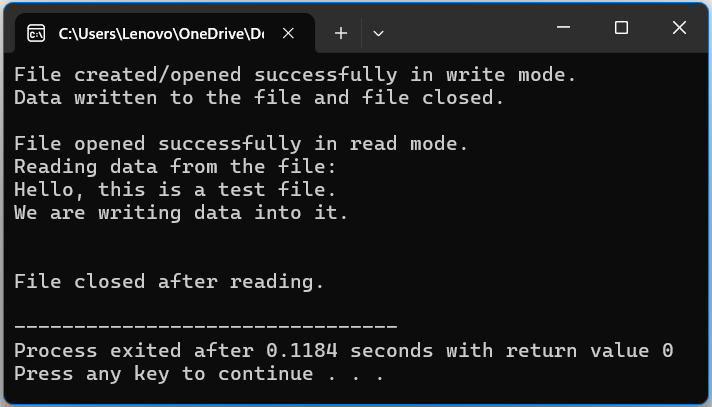
Example: File Operations in C
In this C example, we will demonstrate each file operation that we discussed above −
#include <stdio.h>intmain(){

   FILE * file;char data[100];// Creating/Opening a file in write mode
   file =fopen("example.txt","w");if(file ==NULL){printf("Error! Could not open file.\n");return1;}printf("File created/opened successfully in write mode.\n");// Writing to the filefprintf(file,"Hello, this is a test file.\n");fprintf(file,"We are writing data into it.\n");// Closing after writing    fclose(file);printf("Data written to the file and file closed.\n\n");// Opening the file again in read mode
   file =fopen("example.txt","r");if(file ==NULL){printf("Error! Could not open file for reading.\n");return1;}printf("File opened successfully in read mode.\n");// Reading from the fileprintf("Reading data from the file:\n");while(fgets(data,sizeof(data), file)!=NULL){printf("%s", data);}// Closing the filefclose(file);printf("\n\nFile closed after reading.\n");return0;}
Following is the output
Additional File Operations
There are also additional file operations that can be performed on a file, such as removing, rewinding, renaming, and handling errors.
Removing a File
Removing a file means deleting a specified file from storage. For example, if you have completed all tasks and operations on a file and want to delete it from storage, you can use the remove() function to delete the file.
Below is the syntax to remove/delete a file in C
intremove(FILE *fp);
Example: Removing a File
In the following, example we demonstrate how to remove a file
#include <stdio.h>intmain(){// Create a file to remove
   FILE *file =fopen("remove_example.txt","w");if(file ==NULL){printf("Error creating file.\n");return1;}fprintf(file,"This file will be removed.\n");fclose(file);// Remove the fileif(remove("remove_example.txt")==0){printf("File removed successfully.\n");}else{perror("Error removing file");}return0;}
Following is the output −
File removed successfully.
Rename a File
Rename means change the name of an existing file.
Below is the syntax to rename an existing file −
rename("existing file name","new file name");
Example: Rename a File
In this following c program, we demonstrate how we can rename the file −
#include <stdio.h>intmain(){char oldName[]="example.txt";char newName[]="renamed_example.txt";// Renaming the fileif(rename(oldName, newName)==0){printf("File renamed successfully from '%s' to '%s'.\n", oldName, newName);}else{perror("Error renaming file");}return0;}
Following is the output −
File renamed successfully from 'example.txt' to 'renamed_example.txt'.
Rewind a File
Rewind a file means moves the file pointer back to the beginning of the file. It is useful when you want to re-read the file form the start.
Below is the syntax to rewind a file −
intrewind(FILE *fp);
Example: Rewind a File
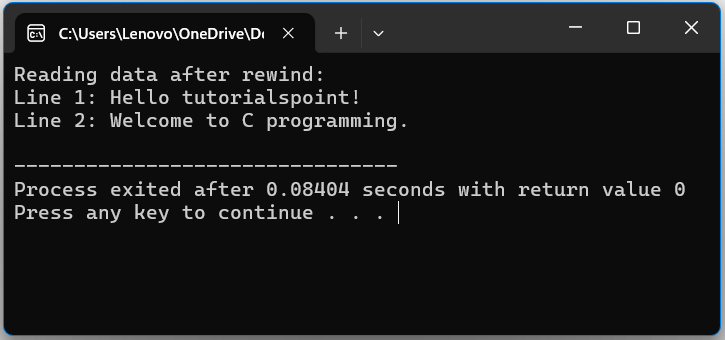
In this example, we demonstrate how to rewind the a pointer in file.
#include <stdio.h>intmain(){
   FILE *file;char data[100];// Open file in write mode and add some data
   file =fopen("example.txt","w+");if(file ==NULL){printf("Error! Could not open file.\n");return1;}// Writing data to the filefprintf(file,"Line 1: Hello tutorialspoint!\n");fprintf(file,"Line 2: Welcome to C programming.\n");// Move file pointer to beginningrewind(file);printf("Reading data after rewind:\n");while(fgets(data,sizeof(data), file)!=NULL){printf("%s", data);}// Close the filefclose(file);return0;}
Following is the output −
Error Handling of a File
Error handling helps in identifying file-related errors.
Example
In the following c program, we demonstrate the working of error handling of file −
#include <stdio.h>intmain(){

   FILE *file;char data[100];// Creating/Opening a file in write mode
   file =fopen("example.txt","w");if(file ==NULL){printf("Error! Could not open file.\n");return1;}return0;}
Following is the output, if we trying running the code online −
Error! Could not open file.
Conclusion
File operations in C enable program to create, read, write, rename, rewind, and delete files on a regular basis. These procedures allow data to remain after program execution, while good error handling provides safe and dependable file management.
Reading input from the user and showing it on the console (output) are the common tasks every C program needs. C language provides libraries (header files) that contain various functions for input and output. In this tutorial, we will learn different types of formatted and unformatted input and output functions.
The Standard Files in C
The C language treats all the devices as files. So, devices such as the “display” are addressed in the same way as “files”.
The following three files are automatically opened when a program executes to provide access to the keyboard and screen.
Standard File
File
Device
Standard input
stdin
Keyboard
Standard output
stdout
Screen
Standard error
stderr
Your screen
To access a file, C uses a predefined FILE struct type to refer to the file for reading and writing purpose. Read this chapter to understand how to read values from the screen and how to print the result on the screen.
Types of Input and Output Functions
We have the following categories of IO function in C −
Unformatted character IO functions: getchar() and putchar()
Unformatted string IO functions: gets() and puts()
Formatted IO functions: scanf() and printf()
The unformatted I/O functions read and write data as a stream of bytes without any format, whereas formatted I/O functions use predefined formats like “%d”, “%c” or “%s” to read and write data from a stream.
Unformatted Character Input & Output Functions: getchar() and putchar()
These two functions accept a single character as input from the keyboard, and display a single character on the output terminal, respectively.
The getchar() function it reads a single key stroke without the Enter key.
intgetchar(void)
There are no parameters required. The function returns an integer corresponding to the ASCII value of the character key input by the user.
Example 1
The following program reads a single key into a char variable −
#include <stdio.h>intmain(){char ch;printf("Enter a character: ");
   ch =getchar();puts("You entered: ");putchar(ch);return0;}
Output
Run the code and check its output −
Enter a character: W
You entered:
W
Example 2
The following program shows how you can read a series of characters till the user presses the Enter key −
#include <stdio.h>intmain(){char ch;char word[10];int i =0;printf("Enter characters. End with pressing enter: ");while(1){
Enter characters. End with pressing enter: Hello
You entered the word: Hello
You can also use the unformatted putchar() function to print a single character. The C library function "int putchar(int char)" writes a character (an unsigned char) specified by the argument char to stdout.
intputchar(int c)
A single parameter to this function is the character to be written. You can also pass its ASCII equivalent integer. This function returns the character written as an unsigned char cast to an int or EOF on error.
Example 3
The following example shows how you can use the putchar() function −
The char *gets(char *str) function reads a line from stdin into the buffer pointed to by str until either a terminating newline or EOF (End of File) is encountered.
char*gets(char*str)
This function has a single argument. It is the pointer to an array of chars where the C string is stored. The function returns "str" on success and NULL on error or when EOF occurs while no characters have been read.
Example
Take a look at the following example −
#include <stdio.h>intmain(){char name[20];printf("Enter your name: ");gets(name);printf("You entered the name: %s", name);return0;}
Output
Enter your name: Ravikant Soni
You entered the name: Ravikant Soni
scanf("%s") reads characters until it encounters a whitespace (space, tab, newline, etc.) or EOF. So, if you try to input a string with multiple words (separated by a whitespace), then it accepts characters before the first whitespace as the input to string.
fgets() Function
In newer versions of C, gets() has been deprecated as it is potentially a dangerous function because it doesnt perform bound checks and may result in buffer overflow.
fgets() can be used to accept input from any input stream such as stdin (keyboard) or FILE (file stream).
Example 1
The following program shows how you can use fgets() to accept multi-word input from the user −
#include <stdio.h>intmain(){char name[20];printf("Enter a name: \n");fgets(name,sizeof(name),stdin);printf("You entered: \n");printf("%s", name);return0;}
Output
Run the code and check its output −
Enter a name:
Rakesh Sharma
You entered:
Rakesh Sharma
The function "int puts (const char *str)" writes the string 's' and a trailing newline to stdout.
intputs(constchar*str)
The str parameter is the C string to be written. If successful, it returns a non-negative value. On error, the function returns EOF.
We can use the printf() function with %s specifier to print a string. We can also use the puts() function (deprecated in C11 and C17 versions) or the fputs() function as an alternative.
Example 2
The following example shows the difference between puts() and fputs() −
With puts():
Rakesh Sharma
With fputs():
Rakesh Sharma
Formatted Input & Output Functions: scanf() and printf()
The scanf() function reads the input from the standard input stream stdin and scans that input according to the format provided −
intscanf(constchar*format,...)
The printf() function writes the output to the standard output stream stdout and produces the output according to the format provided.
intprintf(constchar*format,...)
The format can be a simple constant string, but you can specify %s, %d, %c, %f, etc., to print or read strings, integers, characters or floats respectively. There are many other formatting options available which can be used based on the specific requirements.
Format Specifiers in C
The CPU performs IO operations with input and output devices in a streaming manner. The data read from a standard input device (keyboard) through the standard input stream is called stdin. Similarly, the data sent to the standard output (computer display screen) through the standard output device is called stdout.
The computer receives data from the stream in a text form, however you may want to parse it in variables of different data types such as int, float or a string. Similarly, the data stored in int, float or char variables has to be sent to the output stream in a text format. The format specifier symbols are used exactly for this purpose.
ANSI C defines a number of format specifiers. The following table lists the different specifiers and their purpose.
Format Specifier
Type
%c
Character
%d
Signed integer
%e or %E
Scientific notation of floats
%f
Float values
%g or %G
Similar as %e or %E
%hi
Signed integer (short)
%hu
Unsigned Integer (short)
%i
Unsigned integer
%l or %ld or %li
Long
%lf
Double
%Lf
Long double
%lu
Unsigned int or unsigned long
%lli or %lld
Long long
%llu
Unsigned long long
%o
Octal representation
%p
Pointer
%s
String
%u
Unsigned int
%x or %X
Hexadecimal representation
A minus sign () signifies left alignment. A number after "%" specifies the minimum field width. If a string is less than the width, it will be filled with spaces. A period (.) is used to separate field width and precision.
Example
The following example demonstrates the importance of format specifiers −
#include <stdio.h>intmain(){char str[100];printf("Enter a value: ");gets(str);printf("\nYou entered: ");puts(str);return0;}
Output
When the above code is compiled and executed, it waits for you to input some text. When you enter a text and press the Enter button, the program proceeds and reads the input and displays it as follows −
Enter a value: seven 7
You entered: seven 7
Here, it should be noted that the scanf() function expects the input in the same format as you provided "%s" and "%d", which means you have to provide valid inputs like "a string followed by an integer". If you provide two consecutive strings "string string" or two consecutive integers "integer integer", then it will be assumed as an incorrect set of input.
Secondly, while reading a string, the scanf() function stops reading as soon as it encounters a "space", so the string "This is Test" is actually a set of three strings for the scanf() function.
File handling in C is the process of handling file operations such as creating, opening, writing data, reading data, renaming, and deleting using the C language functions. With the help of these functions, we can perform file operations to store and retrieve the data in/from the file in our program.
Need of File Handling in C
If we perform input and output operations using the C program, the data exists as long as the program is running, when the program is terminated, we cannot use that data again. File handling is required to work with files stored in the external memory i.e., to store and access the information to/from the computer’s external memory. You can keep the data permanently using file handling.
Types of Files
A file represents a sequence of bytes. There are two types of files: text files and binary files −
Text file − A text file contains data in the form of ASCII characters and is generally used to store a stream of characters. Each line in a text file ends with a new line character (“\n”), and generally has a “.txt” extension.
Binary file − A binary file contains data in raw bits (0 and 1). Different application programs have different ways to represent bits and bytes and use different file formats. The image files (.png, .jpg), the executable files (.exe, .com), etc. are the examples of binary files.
FILE Pointer (File*)
While working with file handling, you need a file pointer to store the reference of the FILE structure returned by the fopen() function. The file pointer is required for all file-handling operations.
The fopen() function returns a pointer of the FILE type. FILE is a predefined struct type in stdio.h and contains attributes such as the file descriptor, size, and position, etc.
typedefstruct{int fd;/* File descriptor */unsignedchar*buf;/* Buffer */size_t size;/* Size of the file */size_t pos;/* Current position in the file */} FILE;
Declaring a File Pointer (FILE*)
Below is the syntax to declare a file pointer −
FILE* file_pointer;
Opening (Creating) a File
A file must be opened to perform any operation. The fopen() function is used to create a new file or open an existing file. You need to specify the mode in which you want to open. There are various file opening modes explained below, any one of them can be used during creating/opening a file.
The fopen() function returns a FILE pointer which will be used for other operations such as reading, writing, and closing the files.
Syntax
Below is the syntax to open a file −
FILE *fopen(constchar*filename,constchar*mode);
Here, filename is the name of the file to be opened, and mode defines the file’s opening mode.
File Opening Modes
The file access modes by default open the file in the text or ASCII mode. If you are going to handle binary files, then you will use the following access modes instead of the above-mentioned ones:
There are various modes in which a file can be opened. The following are the different file opening modes −
Mode
Description
r
Opens an existing text file for reading purposes.
w
Opens a text file for writing. If it does not exist, then a new file is created. Here your program will start writing content from the beginning of the file.
a
Opens a text file for writing in appending mode. If it does not exist, then a new file is created. Here your program will start appending content in the existing file content.
r+
Opens a text file for both reading and writing.
Opens a text file for both reading and writing. It first truncates the file to zero length if it exists, otherwise creates a file if it does not exist.
a+
Opens a text file for both reading and writing. It creates the file if it does not exist. The reading will start from the beginning but writing can only be appended.
Example of Creating a File
In the following example, we are creating a new file. The file mode to create a new file will be “w” (write-mode).
#include <stdio.h>intmain(){
  FILE * file;// Creating a file
  file =fopen("file1.txt","w");// Checking whether file is // created or notif(file ==NULL){printf("Error in creating file");return1;}printf("File created.");return0;}
Output
File created.
Example of Opening a File
In the following example, we are opening an existing file. The file mode to open an existing file will be “r” (read-only). You may also use other file opening mode options explained above.
Note: There must be a file to be opened.
#include <stdio.h>intmain(){
  FILE * file;// Opening a file
  file =fopen("file1.txt","r");// Checking whether file is // opened or not if(file ==NULL){printf("Error in opening file");return1;}printf("File opened.");return0;}
Output
File opened.
Closing a File
Each file must be closed after performing operations on it. The fclose() function closes an opened file.
Syntax
Below is the syntax of fclose() function −
intfclose(FILE *fp);
The fclose() function returns zero on success, or EOF if there is an error in closing the file.
The fclose() function actually flushes any data still pending in the buffer to the file, closes the file, and releases any memory used for the file. The EOF is a constant defined in the header file stdio.h.
Example of Closing a File
In the following example, we are closing an opened file −
#include <stdio.h>intmain(){
  FILE * file;// Opening a file
  file =fopen("file1.txt","w");// Checking whether file is // opened or not if(file ==NULL){printf("Error in opening file");return1;}printf("File opened.");// Closing the filefclose(file);printf("\nFile closed.");return0;}
Output
File opened.
File closed.
Writing to a Text File
The following library functions are provided to write data in a file opened in writeable mode −
fputc() : Writes a single character to a file.
fputs(): Writes a string to a file.
fprintf(): Writes a formatted string (data) to a file.
Writing Single Character to a File
The fputc() function is an unformatted function that writes a single character value of the argument “c” to the output stream referenced by “fp“.
intfputc(int c, FILE *fp);
Example
In the following code, one character from a given char array is written into a file opened in the “w” mode:
#include <stdio.h>intmain(){
FILE *fp;char* string ="C Programming tutorial from TutorialsPoint";int i;char ch;
fp =fopen("file1.txt","w");for(i =0; i <strlen(string); i++){
After executing the program, "file1.txt" will be created in the current folder and the string is written to it.
Writing String to a File
The fputs() function writes the string "s" to the output stream referenced by "fp". It returns a non-negative value on success, else EOF is returned in case of any error.
intfputs(constchar*s, FILE *fp);
Example
The following program writes strings from the given two-dimensional char array to a file −
#include <stdio.h>intmain(){
FILE *fp;char*sub[]={"C Programming Tutorial\n","C++ Tutorial\n","Python Tutorial\n","Java Tutorial\n"};
fp =fopen("file2.txt","w");for(int i =0; i <4; i++){fputs(sub[i], fp);}fclose(fp);return0;}
Output
When the program is run, a file named "file2.txt" is created in the current folder and save the following lines −
C Programming Tutorial
C++ Tutorial
Python Tutorial
Java Tutorial
Writing Formatted String to a File
The fprintf() function sends a formatted stream of data to the disk file represented by the FILE pointer.
In the following program, we have an array of struct type called "employee". The structure has a string, an integer, and a float element. Using the fprintf() function, the data is written to a file.
#include <stdio.h>structemployee{int age;float percent;char*name;};intmain(){
FILE *fp;structemployee emp[]={{25,65.5,"Ravi"},{21,75.5,"Roshan"},{24,60.5,"Reena"}};char*string;
fp =fopen("file3.txt","w");for(int i =0; i <3; i++){fprintf(fp,"%d %f %s\n", emp[i].age, emp[i].percent, emp[i].name);}fclose(fp);return0;}
Output
When the above program is executed, a text file is created with the name "file3.txt" that stores the employee data from the struct array.
Reading from a Text File
The following library functions are provided to read data from a file that is opened in read mode −
fgetc(): Reads a single character from a file.
fgets(): Reads a string from a file.
fscanf(): Reads a formatted string from a file.
Reading Single Character from a File
The fgetc() function reads a character from the input file referenced by "fp". The return value is the character read, or in case of any error, it returns EOF.
intfgetc(FILE * fp);
Example
The following example reads the given file in a character by character manner till it reaches the end of file.
The fgets() function reads up to "n 1" characters from the input stream referenced by "fp". It copies the read string into the buffer "buf", appending a null character to terminate the string.
Example
This following program reads each line in the given file till the end of the file is detected −
# include <stdio.h>intmain(){
FILE *fp;char*string;
fp =fopen("file2.txt","r");while(!feof(fp)){fgets(string,256, fp);printf("%s", string);}fclose(fp);}
Output
Run the code and check its output −
C Programming Tutorial
C++ Tutorial
Python Tutorial
Java Tutorial
Reading Formatted String from a File
The fscanf() function in C programming language is used to read formatted input from a file.
intfscanf(FILE *stream,constchar*format,...)
Example
In the following program, we use the fscanf() function to read the formatted data in different types of variables. Usual format specifiers are used to indicate the field types (%d, %f, %s, etc.)
#include <stdio.h>intmain(){
FILE *fp;char*s;int i, a;float p;
fp =fopen("file3.txt","r");if(fp ==NULL){puts("Cannot open file");return0;}while(fscanf(fp,"%d %f %s",&a,&p, s)!=EOF)printf("Name: %s Age: %d Percent: %f\n", s, a, p);fclose(fp);return0;}
Output
When the above program is executed, it opens the text file "file3.txt" and prints its contents on the screen. After running the code, you will get an output like this −
The read/write operations are done in a binary form in the case of a binary file. You need to include the character "b" in the access mode ("wb" for writing a binary file, "rb" for reading a binary file).
There are two functions that can be used for binary input and output: the fread() function and the fwrite() function. Both of these functions should be used to read or write blocks of memories, usually arrays or structures.
Writing to Binary File
The fwrite() function writes a specified chunk of bytes from a buffer to a file opened in binary write mode. Here is the prototype to use this function:
fwrite(*buffer, size, no, FILE);
Example
In the following program, an array of a struct type called "employee" has been declared. We use the fwrite() function to write one block of byte, equivalent to the size of one employee data, in a file that is opened in "wb" mode.
#include <stdio.h>structemployee{int age;float percent;char name[10];};intmain(){
FILE *fp;structemployee e[]={{25,65.5,"Ravi"},{21,75.5,"Roshan"},{24,60.5,"Reena"}};char*string;
fp =fopen("file4.dat","wb");for(int i =0; i <3; i++){fwrite(&e[i],sizeof(structemployee),1, fp);}fclose(fp);return0;}
Output
When the above program is run, the given file will be created in the current folder. It will not show the actual data, because the file is in binary mode.
Reading from Binary File
The fread() function reads a specified chunk of bytes from a file opened in binary read mode to a buffer of the specified size. Here is the prototype to use this function:
fread(*buffer, size, no, FILE);
Example
In the following program, an array of a struct type called "employee" has been declared. We use the fread() function to read one block of byte, equivalent to the size of one employee data, in a file that is opened in "rb" mode.
When the above program is executed, it opens the file "file4.dat" and prints its contents on the screen. After running the code, you will get an output like this −
#include <stdio.h>intmain(){// old and new file nameschar* file_name1 ="file1.txt";char* file_name2 ="file2.txt";// Renaming old file name to new oneif(rename(file_name1, file_name2)==0){printf("File renamed successfully.\n");}else{perror("There is an error.");}return0;}
Output
If there is a file (file1.txt) available, the following will be the output −