Category: 13. User-Defined Data Types

https://cdn3d.iconscout.com/3d/premium/thumb/data-collection-3d-icon-png-download-4522770.png

  • Dot (.) Operator

    Dot (.) Operator in C

    The dot (.) operator in C language is also known as “direction selection member“. It is used to select members of structure and union. The dot (.) operator is a binary operator that requires two operands (structure or union name and member name) and it has the highest operator precedence.

    The dot (.) operator is useful when you want to access and manipulate the members (variables) of structure and union.

    Using Dot (.) Operator

    The dot (.) operator selects the members of the structure and union using the structure and union variable name. Here is the syntax of using the dot (.) operator to access members of a structure or union −

    var.member;

    Here, var is a variable of a certain struct or a union type, and member is one of the elements defined while creating the structure or union.

    Example

    A new derived data type is defined with struct keyword using the following syntax −

    structnewtype{
       type elem1;
       type elem2;
       type elem3;......};

    You can then declare a variable of this derived data type as −

    structnewtype var;

    To access a certain member,

    var.elem1;

    Dot Operator with Structure (struct)

    As discussed above, the dot (.) operator is used to access and manipulate the members of a structure.

    Example

    Let us declare a struct type named book and a struct variable. The following example shows how you can use the dot operator (.) to access the members in the book structure.

    Take a look at the example −

    #include <stdio.h>structbook{char title[10];double price;int pages;};intmain(){structbook b1 ={"Learn C",675.50,325};printf("Title: %s\n", b1.title);printf("Price: %lf\n", b1.price);printf("No of Pages: %d\n", b1.pages);printf("size of book struct: %d",sizeof(structbook));return0;}

    Output

    When you run this code, it will produce the following output −

    Title: Learn C
    Price: 675.500000
    No of Pages: 325
    size of book struct: 32
    

    Dot Operator with Union

    The union keyword in C also lets you define a derived data type, very much similar to the struct keyword. However, unlike a struct variable, a variable of union type, only one of its members can contain a value at any given time.

    The dot (.) operator is also used to access and manipulate the members of a union.

    Example

    You can also use the dot operator to access union member elements, as shown in this example −

    #include <stdio.h>union Data {int i;float f;char str[20];};intmain(){union Data data;        
    
       data.i =10;
       data.f =220.5;strcpy( data.str,"C Programming");printf("data.i : %d\n", data.i);printf("data.f : %f\n", data.f);printf("data.str : %s\n", data.str);return0;}

    Output

    When the above code is compiled and executed, it produces the following result −

    data.i : 1917853763
    data.f : 4122360580327794860452759994368.000000
    data.str : C Programming
    

    Dot Operator with Nested Structure

    Nested structures are defined when one of the elements of a struct type is itself a composite representation of one or more types.

    The dot operator can also be used to access the members of nested structures (and union types also). It can be done in the same way as done for the normal structure.

    Suppose we have a nested structure as follows −

    structstruct1{
       var1;
       var2;structstruct2{
    
      var3;
      var4;} s2;} s1;</code></pre>

    In this case, the members of s1 are accessed as previously (as s1.var1 and s1.var2), and the members of inner struct are accessed as −

    s1.s2.var3;

    Example

    In this example, we have an employee data type with one of its elements being the date of birth (dob). We shall declare the dob struct with three int types "d", "m" and "y" inside the employee structure and its variable d1 is one of the elements of the outer type.

    #include <stdio.h>structemployee{char name[10];float salary;structdob{int d, m, y;} d1;};intmain(){structemployee e1 ={"Kiran",25000,{12,5,1990}};printf("Name: %s\n", e1.name);printf("Salary: %f\n", e1.salary);printf("Date of Birth: %d-%d-%d\n", e1.d1.d, e1.d1.m, e1.d1.y);return0;}

    Output

    Run the code and check its output −

    Name: Kiran
    Salary: 25000.000000
    Date of Birth: 12-5-1990

    

    Accessing the Members Using the Arrow Operator

    C also has another method to access the members of a struct variable. It can be done with the arrow operator (->) with the help of a pointer to the struct variable.

    A new derived data type is defined with struct keyword as following syntax −

    structnewtype{
       type elem1;
       type elem2;
       type elem3;......};

    You can then declare a variable of this derived data type, and its pointer as −

    structnewtype var;structnewtype*ptr=&var;

    To access a certain member through the pointer, use the syntax

    ptr->elem1;

    Example

    Take a look at the following example −

    #include <stdio.h>structbook{char title[10];double price;int pages;};intmain(){structbook b1 ={"Learn C",675.50,325};structbook*strptr;
       strptr =&b1;printf("Title: %s\n", strptr->title);printf("Price: %lf\n", strptr->price);printf("No of Pages: %d\n", strptr->pages);return0;}

    Output

    When you run this code, it will produce the following output −

    Title: Learn C
    Price: 675.500000
    No of Pages: 325
    

    Points to Note

    It may be noted that −

    • The dot operator (.) is used to access the struct elements via the struct variable.
    • To access the elements via its pointer, we must use the indirection operator (->).

    Accessing the Elements of a Nested Inner Structure

    In case of a nested structure,

    structstruct1{
       var1;
       var2;structstruct2{
    
      var3;
      var4;} s2;} s1;structstruct1*ptr=&amp;s1;</code></pre>

    To access the elements of the inner structure of a nested structure, we use the following syntax −

    ptr -> s2.var3;

    Example

    Take a look at the following example −

    #include <stdio.h>structemployee{char name[10];float salary;structdob{int d, m, y;} d1;};intmain(){structemployee e1 ={"Kiran",25000,{12,5,1990}};structemployee*ptr =&e1;printf("Name: %s\n", ptr->name);printf("Salary: %f\n", ptr->salary);printf("Date of Birth: %d-%d-%d\n", ptr->d1.d, ptr->d1.m, ptr->d1.y);return0;}

    Output

    Run the code and check its output −

    Name: Kiran
    Salary: 25000.000000
    Date of Birth: 12-5-1990

    
  • Self-referential Structures

    What are Self-referential Structures?

    A self-referential structure is a struct data type in C, where one or more of its elements are pointer to variables of its own type. Self-referential user-defined types are of immense use in C programming. They are extensively used to build complex and dynamic data structures such as linked lists and trees.

    In C programming, an array is allocated the required memory at compile-time and the array size cannot be modified during the runtime. Self-referential structures let you emulate the arrays by handling the size dynamically.

    Self-referential Structure

    File management systems in Operating Systems are built upon dynamically constructed tree structures, which are manipulated by self-referential structures. Self-referential structures are also employed in many complex algorithms.

    Defining a Self-referential Structure

    A general syntax of defining a self-referential structure is as follows −

    strut typename{
       type var1;
       type var2;......structtypename*var3;}

    Let us understand how a self-referential structure is used, with the help of the following example. We define a struct type called mystruct. It has an integer element “a” and “b” is the pointer to mystruct type itself.

    We declare three variables of mystruct type −

    structmystruct x ={10,NULL}, y ={20,NULL}, z ={30,NULL};

    Next, we declare three “mystruct” pointers and assign the references xy and z to them.

    structmystruct* p1,*p2,*p3;
    
    p1 =&x;
    p2 =&y;
    p3 =&z;

    The variables “x”, “y” and “z” are unrelated as they will be located at random locations, unlike the array where all its elements are in adjacent locations.

    Elements Adjacent Locations

    Examples of Self-referential Structure

    Example 1

    To explicitly establish a link between the three variable, we can store the address of “y” in “x” and the address of “z” in “y”. Let us implement this in the following program −

    #include <stdio.h>structmystruct{int a;structmystruct*b;};intmain(){structmystruct x ={10,NULL}, y ={20,NULL}, z ={30,NULL};structmystruct* p1,*p2,*p3;
    
       p1 =&x;
       p2 =&y;
       p3 =&z;
    
       x.b = p2;
       y.b = p3;printf("Address of x: %d a: %d Address of next: %d\n", p1, x.a, x.b);printf("Address of y: %d a: %d Address of next: %d\n", p2, y.a, y.b);printf("Address of z: %d a: %d Address of next: %d\n", p3, z.a, z.b);return0;}

    Output

    Run the code and check its output −

    Address of x: 659042000 a: 10 Address of next: 659042016
    Address of y: 659042016 a: 20 Address of next: 659042032
    Address of z: 659042032 a: 30 Address of next: 0
    

    Example 2

    Let us refine the above program further. Instead of declaring variables and then storing their address in pointers, we shall use the malloc() function to dynamically allocate memory whose address is stored in pointer variables. We then establish links between the three nodes as shown below −

    #include <stdio.h>#include <stdlib.h>structmystruct{int a;structmystruct*b;};intmain(){structmystruct*p1,*p2,*p3;
       
       p1 =(structmystruct*)malloc(sizeof(structmystruct));
       p2 =(structmystruct*)malloc(sizeof(structmystruct));
       p3 =(structmystruct*)malloc(sizeof(structmystruct));
       
       p1 -> a =10; p1->b=NULL;
       p2 -> a =20; p2->b=NULL;
       p3 -> a =30; p3->b=NULL;
       
       p1 -> b = p2; 
       p2 -> b = p3;printf("Add of x: %d a: %d add of next: %d\n", p1, p1->a, p1->b);printf("add of y: %d a: %d add of next: %d\n", p2, p2->a, p2->b);printf("add of z: %d a: %d add of next: %d\n", p3, p3->a, p3->b);return0;}

    Output

    Run the code and check its output −

    Add of x: 10032160 a: 10 add of next: 10032192
    add of y: 10032192 a: 20 add of next: 10032224
    add of z: 10032224 a: 30 add of next: 0
    

    Example 3

    We can reach the next element in the link from its address stored in the earlier element, as “p1 b” points to the address of “p2”. We can use a while loop to display the linked list, as shown in this example −

    #include <stdio.h>#include <stdlib.h>structmystruct{int a;structmystruct*b;};intmain(){structmystruct*p1,*p2,*p3;
    
       p1=(structmystruct*)malloc(sizeof(structmystruct));
       p2=(structmystruct*)malloc(sizeof(structmystruct));
       p3=(structmystruct*)malloc(sizeof(structmystruct));
    
       p1 -> a =10; p1 -> b =NULL;
       p2 -> a =20; p2 -> b =NULL;
       p3 -> a =30; p3 -> b =NULL;
    
       p1 -> b = p2; 
       p2 -> b = p3;while(p1 !=NULL){printf("Add of current: %d a: %d add of next: %d\n", p1, p1->a, p1->b);
    
      p1 = p1 -&gt; b;}return0;}</code></pre>

    Output

    Run the code and check its output −

    Add of current: 10032160 a: 10 add of next: 10032192
    Add of current: 10032192 a: 20 add of next: 10032224
    Add of current: 10032224 a: 30 add of next: 0
    

    Creating a Linked List with Self-referential Structure

    In the above examples, the dynamically constructed list has three discrete elements linked with pointers. We can use a for loop to set up required number of elements by allocating memory dynamically, and store the address of next element in the previous node.

    Example

    The following example shows how you can create a linked list using a self-referential structure −

    #include <stdio.h>#include <stdlib.h>structmystruct{int a;structmystruct*b;};intmain(){structmystruct*p1,*p2,*start;int i;
    
       p1 =(structmystruct*)malloc(sizeof(structmystruct));
       p1 -> a =10; p1 -> b =NULL;
    
       start = p1;for(i =1; i <=5; i++){
    
      p2 =(structmystruct*)malloc(sizeof(structmystruct));
      p2 -&gt; a = i*2;
      p2 -&gt; b =NULL;
      p1 -&gt; b = p2;
      p1 = p2;}
    p1 = start;while(p1 !=NULL){printf("Add of current: %d a: %d add of next: %d\n", p1, p1 -> a, p1 -> b);
      p1 = p1 -&gt; b;}return0;}</code></pre>

    Output

    Run the code and check its output −

    Add of current: 11408416 a: 10 add of next: 11408448
    Add of current: 11408448 a: 2 add of next: 11408480
    Add of current: 11408480 a: 4 add of next: 11408512
    Add of current: 11408512 a: 6 add of next: 11408544
    Add of current: 11408544 a: 8 add of next: 11408576
    Add of current: 11408576 a: 10 add of next: 0
    

    Creating a Doubly Linked List with Self-referential Structure

    A linked list is traversed from beginning till it reaches NULL. You can also construct a doubly linked list, where the structure has two pointers, each referring to the address of previous and next element.

    Doubly linked list

    The struct definition for this purpose should be as below −

    structnode{int data;int key;structnode*next;structnode*prev;};

    Creating a Tree with Self-referential Structure

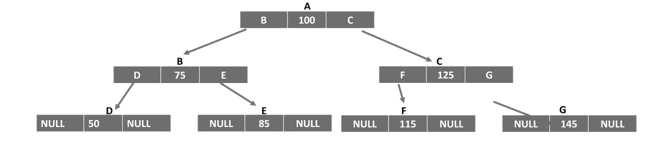
    Self-referential structures are also used to construct non-linear data structures such as trees. A binary search tree is logically represented by the following figure −

    Tree

    The struct definition for the implementing a tree is as follows −

    structnode{int data;structnode*leftChild;structnode*rightChild;};

    To learn these complex data structure in detail, you can visit the DSA tutorial − Data Structures Algorithms

  • Array of Structures

    In C programming, the struct keyword is used to define a derived data type. Once defined, you can declare an array of struct variables, just like an array of intfloat or char types is declared. An array of structures has a number of use-cases such as in storing records similar to a database table where you have each row with different data types.

    Usually, a struct type is defined at the beginning of the code so that its type can be used inside any of the functions. You can declare an array of structures and later on fill data in it or you can initialize it at the time of declaration itself.

    Initializing a Struct Array

    Let us define a struct type called book as follows −

    structbook{char title[10];double price;int pages;};

    During the program, you can declare an array and initialize it by giving the values of each element inside curly brackets. Each element in the struct array is a struct value itself. Hence, we have the nested curly brackets as shown below −

    structbook b[3]={{"Learn C",650.50,325},{"C Pointers",175,225},{"C Pearls",250,250}};

    How does the compiler allocate memory for this array? Since we have an array of three elements, of struct whose size is 32 bytes, the array occupies “32 x 3” bytes. Each block of 32 bytes will accommodate a “title”, “price” and “pages” element.

    LEARNC675.50325
    CPOINTERS175225
    CPEARLS250250

    Declaring a Struct Array

    You can also declare an empty struct array. Afterwards, you can either read the data in it with scanf() statements or assign value to each element as shown below −

    structbook b[3];strcpy(b[0].title,"Learn C");
    b[0].price =650.50;
    b[0].pages=325;strcpy(b[1].title,"C Pointers");
    b[1].price =175;
    b[1].pages=225;strcpy(b[2].title,"C Pearls");
    b[2].price =250;250
    b[2].pages=325;

    Reading a Struct Array

    We can also accept data from the user to fill the array.

    Example 1

    In the following code, a for loop is used to accept inputs for the “title”, “price” and “pages” elements of each struct element of the array.

    #include <stdio.h>structbook{char title[10];double price;int pages;};intmain(){structbook b[3];strcpy(b[0].title,"Learn C");
       b[0].price =650.50;
       b[0].pages =325;strcpy(b[1].title,"C Pointers");
       b[1].price =175;
       b[1].pages =225;strcpy(b[2].title,"C Pearls");
       b[2].price =250;
       b[2].pages =325;printf("\nList of Books:\n");for(int i =0; i <3; i++){printf("Title: %s \tPrice: %7.2lf \tPages: %d\n", b[i].title, b[i].price, b[i].pages);}return0;}

    Output

    When you run this code, it will produce the following output −

    List of Books:
    Title: Learn C    Price: 650.50 Pages: 325
    Title: C Pointers Price: 175.00 Pages: 225
    Title: C Pearls   Price: 250.00 Pages: 325
    

    Example 2

    In this example, a struct type called student is defined. Its elements are “name”; marks in physics, chemistry and maths; and the “percentage”.

    An array of three struct student types is declared and the first four elements are populated by user input, with a for loop. Inside the loop itself, the “percent” element of each subscript is computed.

    Finally, an array of students with their names, marks and percentage is printed to show the marklist.

    #include <stdio.h>structstudent{char name[10];int physics, chemistry, maths;double percent;};intmain(){structstudent s[3];strcpy(s[0].name,"Ravi");
       s[0].physics =50;
       s[0].chemistry =60;
       s[0].maths =70;strcpy(s[1].name,"Kiran");
       s[1].physics =55;
       s[1].chemistry =66;
       s[1].maths =77;strcpy(s[2].name,"Anil");
       s[2].physics =45;
       s[2].chemistry =55;
       s[2].maths =65;for(int i =0; i <3; i++){
    
      s&#91;i].percent =(double)(s&#91;i].physics + s&#91;i].maths + s&#91;i].chemistry)/3;}printf("\nName\tPhysics\tChemistry\t\Maths\tPercent\n");for(int i =0; i &lt;3; i++){printf("%s \t\t%d \t\t%d \t\t%d \t\t%5.2lf\n", s&#91;i].name, s&#91;i].physics, s&#91;i].chemistry, s&#91;i].maths, s&#91;i].percent);}return0;}</code></pre>

    Output

    When you run this code, it will produce the following output −

    Name  Physics Chemistry Maths Percent
    Ravi  50      60        70    60.00
    Kiran 55      66        77    66.00
    Anil  45      55        65    55.00
    

    Sorting a Struct Array

    Let us take another example of struct array. Here, we will have the array of "book" struct type sorted in ascending order of the price by implementing bubble sort technique.

    Note: The elements of one struct variable can be directly assigned to another struct variable by using the assignment operator.

    Example

    Take a look at the example −

    #include <stdio.h>structbook{char title[15];double price;int pages;};intmain(){structbook b[3]={{"Learn C",650.50,325},{"C Pointers",175,225},{"C Pearls",250,250}};int i, j;structbook temp;for(i =0; i <2; i++){for(j = i; j <3; j++){if(b[i].price > b[j].price){
    
            temp = b&#91;i];
            b&#91;i]= b&#91;j];
            b&#91;j]= temp;}}}printf("\nList of Books in Ascending Order of Price:\n");for(i =0; i &lt;3; i++){printf("Title: %s \tPrice: %7.2lf \tPages: %d\n", b&#91;i].title, b&#91;i].price, b&#91;i].pages);}return0;}</code></pre>

    Output

    When you run this code, it will produce the following output −

    List of Books in Ascending Order of Price:
    Title: C Pointers Price: 175.00 Pages: 225
    Title: C Pearls   Price: 250.00 Pages: 250
    Title: Learn C    Price: 650.50 Pages: 325
    

    Declaring a Pointer to a Struct Array

    We can also declare a pointer to a struct array. C uses the indirection operator () to access the internal elements of struct variables.

    Example

    The following example shows how you can declare a pointer to a struct array −

    #include <stdio.h>structbook{char title[15];double price;int pages;};intmain(){structbook b[3]={{"Learn C",650.50,325},{"C Pointers",175,225},{"C Pearls",250,250}};structbook*ptr = b;for(int i =0; i <3; i++){printf("Title: %s \tPrice: %7.2lf \tPages: %d\n", ptr -> title, ptr -> price, ptr -> pages);
    
      ptr++;}return0;}</code></pre>

    Output

    When you run this code, it will produce the following output −

    Title: Learn C    Price: 650.50 Pages: 325
    Title: C Pointers Price: 175.00 Pages: 225
    Title: C Pearls   Price: 250.00 Pages: 250
    
  • Structures and Functions

    In C programming, struct is a derived data type. Just as we can pass arguments of primary data types, a variable of struct data type can also be passed to a function. You can also pass structures using call by value and call by reference methods. A function in C may also return a struct data type.

    Read this chapter to understand the following concepts −

    • How to pass elements of struct type
    • How to pass a struct variable
    • How to return struct from a function
    • How to return a struct pointer

    Let’s start with the first one and learn how to pass elements of struct type.

    How to Pass Struct Elements

    A derived type is a combination of one or more elements of any of the primary types as well as another derived type. It is possible to pass elements to a function, either by value or by reference.

    Example

    In the following example, we have a derived type called “rectangle” with two elements. We have a struct variable “r” with the elements “r.len” and “l.brd” and they are passed to a function. The area() function then computes the area of the rectangle.

    #include <stdio.h>structrectangle{float len, brd;};intarea(float,float);intmain(){structrectangle r;
       r.len =10.50; r.brd =20.5;area(r.len, r.brd);return0;}intarea(float a,float b){double area =(double)(a*b);printf("Length: %f \nBreadth: %f \nArea: %lf\n", a, b, area);return0;}

    Output

    When you run this code, it will produce the following output −

    Length: 10.500000 
    Breadth: 20.500000 
    Area: 215.250000
    

    How to Pass a Struct Variable

    Let us modify the above example to pass the struct variable itself (instead of its elements) to the area() function. The rectangle struct type also has an additional element called “area”.

    Example

    Inside the function, the elements of the struct variable are accessed though the dot operator (.) and the area is calculated.

    #include <stdio.h>structrectangle{float len, brd;double area;};intarea(structrectangle);intmain(){structrectangle r;
       r.len =10.50; r.brd =20.5;area(r);return0;}intarea(structrectangle r){
    
       r.area =(double)(r.len*r.brd);printf("Length: %f \nBreadth: %f \nArea: %lf\n", r.len, r.brd, r.area);return0;}

    Output

    Run the code and check its output −

    Length: 10.500000 
    Breadth: 20.500000 
    Area: 215.250000
    

    How to Return Struct from a Function

    We know that a function in C can return a value of any type. In this example, the area() function is defined to return a struct variable.

    Example

    Inside the main() fuction, the inputs for the length and the breadth are passed to the area() function. Inside the area() function, the area is computed and a struct variable is populated and returned to the main() function, where its elements are displayed.

    #include <stdio.h>structrectangle{float len, brd;double area;};structrectanglearea(float x,float y);intmain(){structrectangle r;float x, y;
    
       x =10.5; y =20.5;
       r =area(x, y);printf("Length: %f \n Breadth: %f \n Area: %lf\n", r.len, r.brd, r.area);return0;}structrectanglearea(float x,float y){double area =(double)(x*y);structrectangle r ={x, y, area};return r;}

    Output

    When you run this code, it will produce the following output −

    Length: 10.500000  
    Breadth: 20.500000 
    Area: 215.250000
    

    How to Pass a Struct by Reference

    In C language, a function may be defined to have its arguments passed by value or reference. A reference is the pointer to an existing variable.

    Example

    In this example, a struct variable of “rectangle” type is declared in main() and its address is passed to a user-defined function called area().

    When the area() function is called, it can use the elements of the variable with the indirection operator (). It computes the result and assigns it to the area element “r area”.

    #include <stdio.h>structrectangle{float len, brd;double area;};intarea(structrectangle*);intmain(){structrectangle r;
       r.len =10.50; r.brd =20.5;area(&r);return0;}intarea(structrectangle*r){
    
       r -> area =(double)(r -> len * r -> brd);printf("Length: %f \nBreadth: %f \nArea: %lf\n", r -> len, r -> brd, r -> area);return0;}

    Output

    Run the code and check its output −

    Length: 10.500000 
    Breadth: 20.500000 
    Area: 215.250000
    

    How to Return a Struct Pointer

    Let us rewrite the above code to define the area() function and return a pointer to a struct of rectangle data type.

    Example

    The area() function has two call-by-value arguments. The main() function reads the length and breadth from the user and passes them to the area() function, which populates a struct variable and passes its reference back to the main() function.

    #include <stdio.h>structrectangle{float len, brd;double area;};structrectangle*area(float x,float y);intmain(){structrectangle*r;float x, y;
       
       x =10.5; y =20.5;
       r =area(x, y);printf("Length: %f \n Breadth: %f \n Area: %lf\n", r->len, r->brd, r->area);return0;}structrectangle*area(float x,float y){double area =(double)(x*y);staticstructrectangle r;
       r.len = x; r.brd = y; r.area = area;return&r;}

    Output

    When you run this code, it will produce the following output −

    Length: 10.500000 
    Breadth: 20.500000 
    Area: 215.250000
    
  • Structures

    Structures in C

    structure in C is a derived or user-defined data type. We use the keyword struct to define a custom data type that groups together the elements of different types. The difference between an array and a structure is that an array is a homogenous collection of similar types, whereas a structure can have elements of different types stored adjacently and identified by a name.

    We are often required to work with values of different data types having certain relationships among them. For example, a book is described by its title (string), author (string), price (double), number of pages (integer), etc. Instead of using four different variables, these values can be stored in a single struct variable.

    Declare (Create) a Structure

    You can create (declare) a structure by using the “struct” keyword followed by the structure_tag (structure name) and declare all of the members of the structure inside the curly braces along with their data types.

    To define a structure, you must use the struct statement. The struct statement defines a new data type, with more than one member.

    Syntax of Structure Declaration

    The format (syntax) to declare a structure is as follows −

    struct[structure tag]{
       member definition;
       member definition;...
       member definition;}[one or more structure variables];

    The structure tag is optional and each member definition is a normal variable definition, such as “int i;” or “float f;” or any other valid variable definition.

    At the end of the structure’s definition, before the final semicolon, you can specify one or more structure variables but it is optional.

    Example

    In the following example we are declaring a structure for Book to store the details of a Book −

    structbook{char  title[50];char  author[50];double price;int   pages;} book1;

    Here, we declared the structure variable book1 at the end of the structure definition. However, you can do it separately in a different statement.

    Structure Variable Declaration

    To access and manipulate the members of the structure, you need to declare its variable first. To declare a structure variable, write the structure name along with the “struct” keyword followed by the name of the structure variable. This structure variable will be used to access and manipulate the structure members.

    Example

    The following statement demonstrates how to declare (create) a structure variable  

    structbook book1;

    Usually, a structure is declared before the first function is defined in the program, after the include statements. That way, the derived type can be used for declaring its variable inside any function.

    Structure Initialization

    The initialization of a struct variable is done by placing the value of each element inside curly brackets.

    Example

    The following statement demonstrates the initialization of structure  

    structbook book1 ={"Learn C","Dennis Ritchie",675.50,325};

    Accessing the Structure Members

    To access the members of a structure, first, you need to declare a structure variable and then use the dot (.) operator along with the structure variable.

    Example 1

    The four elements of the struct variable book1 are accessed with the dot (.) operator. Hence, “book1.title” refers to the title element, “book1.author” is the author name, “book1.price” is the price, “book1.pages” is the fourth element (number of pages).

    Take a look at the following example −

    #include <stdio.h>structbook{char title[10];char author[20];double price;int pages;};intmain(){structbook book1 ={"Learn C","Dennis Ritchie",675.50,325};printf("Title:  %s \n", book1.title);printf("Author: %s \n", book1.author);printf("Price:  %lf\n", book1.price);printf("Pages:  %d \n", book1.pages);printf("Size of book struct: %d",sizeof(structbook));return0;}

    Output

    Run the code and check its output −

    Title:  Learn C 
    Author: Dennis Ritchie 
    Price:  675.500000
    Pages:  325 
    Size of book struct: 48
    

    Example 2

    In the above program, we will make a small modification. Here, we will put the type definition and the variable declaration together, like this −

    structbook{char title[10];char author[20];double price;int pages;} book1;

    Note that if you a declare a struct variable in this way, then you cannot initialize it with curly brackets. Instead, the elements need to be assigned individually.

    #include <stdio.h>#include <string.h>structbook{char title[10];char author[20];double price;int pages;} book1;intmain(){strcpy(book1.title,"Learn C");strcpy(book1.author,"Dennis Ritchie");
       book1.price =675.50;
       book1.pages =325;printf("Title: %s \n", book1.title);printf("Author: %s \n", book1.author);printf("Price: %lf \n", book1.price);printf("Pages: %d \n", book1.pages);return0;}

    Output

    When you execute this code, it will produce the following output −

    Title: Learn C 
    Author: Dennis Ritchie 
    Price: 675.500000 
    Pages: 325
    

    Copying Structures

    The assignment (=) operator can be used to copy a structure directly. You can also use the assignment operator (=) to assign the value of the member of one structure to another.

    Let’s have two struct book variables, book1 and book2. The variable book1 is initialized with declaration, and we wish to assign the same values of its elements to that of book2.

    We can assign individual elements as follows −

    structbook book1 ={"Learn C","Dennis Ritchie",675.50,325}, book2;strcpy(book2.title, book1.title);strcpy(book2.author, book1.author);
       book2.price = book1.price;
       book2.pages = book1.pages;

    Note the use of strcpy() function to assign the value to a string variable instead of using the “= operator”.

    Example

    You can also assign book1 to book2 so that all the elements of book1 are respectively assigned to the elements of book2. Take a look at the following program code −

    #include <stdio.h>#include <string.h>structbook{char title[10];char author[20];double price;int pages;};intmain(){structbook book1 ={"Learn C","Dennis Ritchie",675.50,325}, book2;
       book2 = book1;printf("Title: %s \n", book2.title);printf("Author: %s \n", book2.author);printf("Price: %lf \n", book1.price);printf("Pages: %d \n", book1.pages);printf("Size of book struct: %d",sizeof(structbook));return0;}

    Output

    Run the code and check its output −

    Title: Learn C 
    Author: Dennis Ritchie 
    Price: 675.500000 
    Pages: 325 
    Size of book struct: 48
    

    Structures as Function Arguments

    You can pass a structure as a function argument in the same way as you pass any other variable or pointer.

    Example

    Take a look at the following program code. It demonstrates how you can pass a structure as a function argument −

    #include <stdio.h>#include <string.h>structBooks{char title[50];char author[50];char subject[100];int  book_id;};/* function declaration */voidprintBook(structBooks book);intmain(){structBooks Book1;/* Declare Book1 of type Book */structBooks Book2;/* Declare Book2 of type Book *//* book 1 specification */strcpy(Book1.title,"C Programming");strcpy(Book1.author,"Nuha Ali");strcpy(Book1.subject,"C Programming Tutorial");
       Book1.book_id =6495407;/* book 2 specification */strcpy(Book2.title,"Telecom Billing");strcpy(Book2.author,"Zara Ali");strcpy(Book2.subject,"Telecom Billing Tutorial");
       Book2.book_id =6495700;/* print Book1 info */printBook(Book1);/* Print Book2 info */printBook(Book2);return0;}voidprintBook(structBooks book){printf("Book title : %s\n", book.title);printf("Book author : %s\n", book.author);printf("Book subject : %s\n", book.subject);printf("Book book_id : %d\n", book.book_id);}

    Output

    When the above code is compiled and executed, it produces the following result −

    Book title : C Programming
    Book author : Nuha Ali
    Book subject : C Programming Tutorial
    Book book_id : 6495407
    Book title : Telecom Billing
    Book author : Zara Ali
    Book subject : Telecom Billing Tutorial
    Book book_id : 6495700
    

    Pointers to Structures

    You can define pointers to structures in the same way as you define pointers to any other variable.

    Declaration of Pointer to a Structure

    You can declare a pointer to a structure (or structure pointer) as follows −

    structBooks*struct_pointer;

    Initialization of Pointer to a Structure

    You can store the address of a structure variable in the above pointer variable struct_pointer. To find the address of a structure variable, place the ‘&’ operator before the structure’s name as follows −

    struct_pointer =& book1;

    Let’s store the address of a struct variable in a struct pointer variable.

    structbook{char title[10];char author[20];double price;int pages;};structbook book1 ={"Learn C","Dennis Ritchie",675.50,325},structbook*strptr;

    Accessing Members Using Pointer to a Structure

    To access the members of a structure using a pointer to that structure, you must use the operator as follows −

    struct_pointer->title;

    C defines the symbol to be used with struct pointer as the indirection operator (also called struct dereference operator). It helps to access the elements of the struct variable to which the pointer reference to.

    Example

    In this example, strptr is a pointer to struct book book1 variable. Hence, strrptrtitle returns the title, just like book1.title does.

    #include <stdio.h>#include <string.h>structbook{char title[10];char author[20];double price;int pages;};intmain(){structbook book1 ={"Learn C","Dennis Ritchie",675.50,325};structbook*strptr;
       strptr =&book1;printf("Title: %s \n", strptr -> title);printf("Author: %s \n", strptr -> author);printf("Price: %lf \n", strptr -> price);printf("Pages: %d \n", strptr -> pages);return0;}

    Output

    When you run this code, it will produce the following output −

    Title: Learn C 
    Author: Dennis Ritchie 
    Price: 675.500000 
    Pages: 325
    

    Note: The dot (.) operator is used to access the struct elements via the struct variable. To access the elements via its pointer, we must use the indirection (->) operator.

    A struct variable is like a normal variable of primary type, in the sense that you can have an array of struct, you can pass the struct variable to a function, as well as return a struct from a function.

    You may have noted that you need to prefix “struct type” to the name of the variable or pointer at the time of declaration. This can be avoided by creating a shorthand notation with the help of typedef keyword, which we will explain in a subsequent chapter.

    Structures are used in different applications such as databases, file management applications, and for handling complex data structures such as tree and linked lists.

    Bit Fields

    Bit Fields allow the packing of data in a structure. This is especially useful when memory or data storage is at a premium. Typical examples include −

    • Packing several objects into a machine word, for example, 1-bit flags can be compacted.
    • Reading external file formats − non-standard file formats could be read in, for example, 9-bit integers.

    Declaration

    C allows us to do this in a structure definition by putting :bit length after the variable. For example −

    structpacked_struct{unsignedint f1:1;unsignedint f2:1;unsignedint f3:1;unsignedint f4:1;unsignedint type:4;unsignedint my_int:9;} pack;

    Here, the packed_struct contains 6 members: Four 1 bit flags f1..f3, a 4-bit type and a 9-bit my_int.

    C automatically packs the above bit fields as compactly as possible, provided that the maximum length of the field is less than or equal to the integer word length of the computer. If this is not the case, then some compilers may allow memory overlap for the fields while others would store the next field in the next word.