Category: 12. Pointers

https://cdn3d.iconscout.com/3d/premium/thumb/cursor-3d-icon-png-download-12657247.png

  • Dereference Pointer

    Dereference Pointer in C

    The dereference operator is used to access and manipulate the value stored in the variable pointed by the pointer. The dereference or indirection operator (*) acts as a unary operator, and it needs a pointer variable as its operand.

    Syntax

    Below is the syntax to dereference a pointer −

    *pointer_variable;

    With the help of the above syntax (dereference pointer), you can get and update the value of any variable that is pointing by the pointer.

    How to Dereference a Pointer?

    To dereference a pointer, you need to follow the below-given steps:

    • Create a variable and declare a pointer variable.
    • Initialize the pointer by assigning the address of the variable.
    • Now, you can dereference the pointer to get or update the value of the variable.

    Example

    In this example, we are demonstrating these three steps to deference a pointer −

    #include <stdio.h>intmain(){// Create a variable and pointer variableint x =10;int*ptr;// Initialize the pointer by assigning// the address of the variable
      ptr =&x;// Dereference the pointerprintf("Value of x = %d\n",*ptr);return0;}

    Output

    Run the code and check its output −

    Value of x = 10
    

    What is Dereferencing?

    The term “dereferencing” refers to accessing the value that is stored in the memory address referred by the pointer. The dereference operator (also called indirection operator) fetches the value of the target variable.

    Example

    In the above example, if we print “*b“, you get the value of “a“, i.e., 10. Similarly, printing “*y” displays 10.5.

    #include <stdio.h>intmain(){int a =10;int*b =&a;float x =10.5;float*y =&x;printf("Address of 'a': %d Value of 'a': %d\n", b,*b);printf("Address of 'x': %d Value of 'x': %f\n", y,*y);return0;}

    Output

    Run the code and check its output −

    Address of 'a': 6422028 Value of 'a': 10
    Address of 'x': 6422024 Value of 'x': 10.500000
    

    Manipulating Value by Dereferencing Pointer

    The dereference operator also helps in indirectly manipulating the value of a variable referred to by a pointer.

    Example

    In this example, we change the value of “a” and “x” with the help of the dereference pointer −

    #include <stdio.h>intmain(){int a =10;int*b =&a;float x =10.5;float*y =&x;*b =100;*y =100.50;printf("Address of 'a': %d Value of 'a': %d\n", b,*b);printf("Address of 'x': %d Value of 'x': %f\n", y,*y);return0;}

    Output

    Run the code and check its output −

    Address of 'a': 6422028 Value of 'a': 100
    Address of 'x': 6422024 Value of 'x': 100.500000
    

    Dereferencing a Double Pointer

    Just as you store the address of a normal variable in its pointer, you can have a pointer that stores the address of another pointer as well. A pointer having address of another pointer is known as double pointer or pointer-to-pointer.

    Let us declare a pointer to integer type and store the address of an integer variable in it.

    int a =10;int*b =&a;

    The dereference operator fetches the value via the pointer −

    printf("a: %d \n Pointer to 'a' is 'b': %d \n Value at 'b': %d", a, b,*b);

    The value of integer variable, its address, and the value obtained by the dereference pointer will be printed as −

    a:10 
    Pointer to 'a' is 'b':6422036 
    Value at 'b':10

    Let us now declare a pointer that can store the address of “b”, which itself is a pointer to the integer type written as “int *”. Let’s assume that the compiler also allocates it the address 3000. Hence, “c” is a pointer to a pointer to int and should be declared as “int **“.

    int**c =&b;printf("b: %d \n Pointer to 'b' is 'c': %d \n Value at 'b': %d\n", b, c,*c);

    You get the value of b (which is the address of a), the value of c (which is the address of b), and the dereferenced value from c (which is the address of a)

    b:6422036 
    Pointer to 'b' is 'c':6422024 
    Value at 'b':6422036

    Since “c” is a double pointer here, the first asterisk in its declaration points to “b” and the second asterisk in turn points to “a“. We can use the double reference pointer to obtain the value of “a” from “c“.

    printf("Value of 'a' from 'c': %d",**c);

    This should display the value of a as 10.

    Example

    Try out the complete code given below −

    #include <stdio.h>intmain(){int a =10;int*b =&a;printf("a: %d \n Address: %d \n Value at 'a': %d\n\n", a, b,*b);int**c =&b;printf("b: %d \n Pointer to 'b' is 'c': %d \n Value at 'b': %d\n", b, c,*c);printf("Value of 'a' from 'c': %d",**c);return0;}

    Output

    When you run this code, it will produce the following output −

    a: 10 
    Address: 6422036 
    Value at a: 10
    
    b: 6422036 
    Pointer to 'b' is 'c': 6422024 
    Value at 'b': 6422036
    Value of 'a' from 'c': 10
    

    Dereferencing a Structure Pointer

    The keyword “struct” is used to create a derived data type that consists of one or more elements of different types. Like a normal variable, you can declare a structure pointer and store its address.

    structbook{char title[10];double price;int pages;};structbook b1 ={"Learn C",650.50,325};structbook*ptr =&b1;

    In C, the indirection operator represented by the arrow symbol () is used to obtain the values of the elements of the struct variable referred to by the struct pointer.

    Example

    ptr -> title” returns the value of the title element, the same value returned by “b1.title“. “ptr -> price” is equivalent to “b1.price”, etc.

    #include <stdio.h>structbook{char title[10];double price;int pages;};intmain(){structbook b1 ={"Learn C",650.50,325};structbook*ptr =&b1;printf("With -> Operator: \n");printf("Title: %s \nPrice: %7.2lf \nNumber of Pages: %d\n\n", ptr->title, ptr->price, ptr->pages);printf("With . Operator:\n");printf("Title: %s \nPrice: %7.2lf \nNumber of Pages: %d\n", b1.title, b1.price, b1.pages);return0;}

    Output

    When you run this code, it will produce the following output −

    With -> Operator: 
    Title: Learn C 
    Price:  650.50 
    Number of Pages: 325
    
    With . Operator:
    Title: Learn C 
    Price:  650.50 
    Number of Pages: 325
    

    Dereferencing a Nested Structure Pointer

    Even though C uses the arrow operator () to access the elements of a structure variable, the elements of any internal struct cannot be accessed with it.

    Only the elements of the outer struct are accessible with the operator. For subsequent inner struct elements, we need to use the dot (.) operator.

    Example

    The following example shows how you can dereference a nested struct pointer −

    #include <stdio.h>#include <string.h>structemployee{char name[10];float salary;structdob{int d, m, y;} d1;};intmain(){structemployee e1 ={"Arjun",45000,{12,5,1990}};structemployee*ptr =&e1;printf("Name: %s\n", ptr->name);printf("Salary: %f\n", ptr->salary);printf("Date of Birth: %d-%d-%d\n", ptr->d1.d, ptr->d1.m, ptr->d1.y);return0;}

    Output

    When you run this code, it will produce the following output −

    Name: Arjun
    Salary: 45000.000000
    Date of Birth: 12-5-1990
    
  • Applications of Pointers

    One of the most important features of C is that it provides low-level memory access with the concept of pointers. A pointer is a variable that stores the address of another variable in the memory.

    The provision of pointers has many applications such as passing arrays and struct type to a function and dynamic memory allocation, etc. In this chapter, we will explain some important applications of pointers in C.

    To Access Array Elements

    Array elements can also be accessed through the pointer. You need to declare and initialize a pointer to an array and using it you can access each element by incrementing the pointer variable by 1.

    The pointer to an array is the address of its 0th element. When the array pointer is incremented by 1, it points to the next element in the array.

    Example

    The following example demonstrates how you can traverse an array with the help of its pointer.

    #include <stdio.h>intmain(){int arr[]={1,2,3,4,5};int*ptr = arr;for(int i =0; i <=4; i++){printf("arr[%d]: %d\n", i,*ptr);
    
      ptr++;}return0;}</code></pre>

    Output

    Run the code and check its output −

    arr[0]: 1
    arr[1]: 2
    arr[2]: 3
    arr[3]: 4
    arr[4]: 5
    

    For Allocating Memory Dynamically

    One of the most important applications of C pointers is to declare memory for the variables dynamically. There are various situations, where static memory allocation cannot solve the problem, such as dealing with large size of arrays, structures having n numbers of students and employees, etc.

    Thus, whenever you need to allocate memory dynamically, pointers play an important role in it. C language provides some of the functions to allocate and release the memory dynamically. The functions are:

    1. malloc() function
      Allocates an array of num elements each of which size in bytes will be size.
    2. calloc() function
      Allocates an array of num bytes and leaves them uninitialized.
    3. realloc() function
      Reallocates memory extending it up to newsize.

    1. The malloc() Function

    This function is defined in the "stdlib.h" header file. It allocates a block memory of the required size and returns a void pointer.

    void*malloc(size)

    The size parameter refers to the block of memory in bytes. To allocate the memory required for a specified data type, you need to use the typecasting operator. For example, the following snippet allocates the memory required to store an int type.

    int*ptr;
    ptr =(int*)malloc(sizeof(int));

    Here we need to define a pointer to character without defining how much memory is required and later, based on requirement, we can allocate memory.

    Example

    In this example, we use the malloc() function to allocate the required memory to store a string (instead of declaring a char array of a fixed size) −

    #include <stdio.h>#include <stdlib.h>#include <string.h>intmain(){char*name;
       name =(char*)malloc(strlen("TutorialsPoint"));strcpy(name,"TutorialsPoint");if(name ==NULL){fprintf(stderr,"Error - unable to allocate required memory\n");}else{printf("Name = %s\n", name );}}

    Output

    When the above code is compiled and executed, it produces the following output −

    Name = TutorialsPoint
    

    2. The calloc() Function

    The C library function "calloc" (stands for contiguous allocation) allocates the requested memory and returns a pointer to it.

    void*calloc(n, size);

    Where "n" is the number of elements to be allocated and "size" is the byte size of each element.

    The following snippet allocates the memory required to store 10 integer types.

    int*ptr;
    ptr =(int*)calloc(25,sizeof(int));

    3. The realloc() Function

    The realloc() function in C is used to dynamically change the memory allocation of a previously allocated memory. You can increase or decrease the size of an allocated memory block by calling the realloc() function.

    void*realloc(*ptr, size);

    The first parameter "ptr" is the pointer to a memory block previously allocated with malloc, calloc or realloc to be reallocated.

    Dynamic memory allocation technique is extensively used in complex linear and non−linear data structures such as linked lists and trees, which are employed in operating system software.

    For Passing Arguments as Reference

    When a function is called by reference, the address of the actual argument variables passed, instead of their values.

    Passing a pointer to a function has two advantages −

    First, it overcomes the limitation of pass by value. Changes to the value inside the called function are done directly at the address stored in the pointer. Hence, we can manipulate the variables in one scope from another.

    Second, it also overcomes the limitation of a function in that it can return only one expression. By passing pointers, the effect of processing a function takes place directly at the address. Secondly, more than one value can be returned if we return the pointer of an array or struct variable.

    Example

    The following function receives the reference of two variables whose values are to be swapped.

    /* function definition to swap the values */intswap(int*x,int*y){int z;
       z =*x;/* save the value at address x */*x =*y;/* put y into x */*y = z;/* put z into y */return0;}

    Example

    The main() function has two variables "a" and "b", their addresses are passed as arguments to the swap() function.

    #include <stdio.h>intswap(int*x,int*y);intmain(){/* local variable definition */int a =10;int b =20;printf("Before swap, value of a : %d\n", a);printf("Before swap, value of b : %d\n", b);/* calling a function to swap the values */swap(&a,&b);printf("After swap, value of a: %d\n", a);printf("After swap, value of b: %d\n", b);return0;}

    Output

    When executed, it will produce the following output −

    Before swap, value of a: 10
    Before swap, value of b: 20
    After swap, value of a: 20
    After swap, value of b: 10
    

    In this program, we have been able to swap the values of two variables out of the scope of a function to which they have been passed, and we could overcome the limitation of the functions ability to pas only one expression.

    For Passing an Array to Function

    Let us use these characteristics for passing the array by reference. In the main() function, we declare an array and pass its address to the max() function.

    The max() function traverses the array using the pointer and returns the largest number in the array, back to the main() function.

    Example

    Take a look at the following example −

    #include <stdio.h>intmax(int*arr,int length);intmain(){int arr[]={10,34,21,78,5};int length =sizeof(arr)/sizeof(int);int maxnum =max(arr, length);printf("max: %d", maxnum);}intmax(int*arr,int length){int max =*arr;for(int i =0; i < length; i++){printf("arr[%d]: %d\n", i,(*arr));if((*arr)>max)
    
         max =(*arr);
      arr++;}return max;}</code></pre>

    Output

    Run the code and check its output −

    arr[0]: 10
    arr[1]: 34
    arr[2]: 21
    arr[3]: 78
    arr[4]: 5
    max: 78
    

    The max() function receives the address of the array from the main() function in the pointer "arr". Each time, when it is incremented, it points to the next element in the original array.

    For Returning Multiple Values from a Function

    In C language, the functions can have only one return statement to return one value at a time. With the help of C pointers, you can return multiple values from a function by passing arguments as references.

    Example

    The following example demonstrates how you can return multiple values with the help of C pointers.

    #include <stdio.h>// Creating a function to find// addition and subtraction// of two numbersvoidfunAddSub(int a,int b,int* add,int* sub){*add = a + b;*sub = a - b;}intmain(){int num1 =10;int num2 =3;// Variables to store resultsint res1, res2;// Calling function to get add and sub// by passing the address of res1 and res2funAddSub(num1, num2,&res1,&res2);// Printing the resultprintf("Addition is %d and subtraction is %d", res1, res2);return0;}

    Output

    Addition is 13 and subtraction is 7
    
  • Initialization of Pointer Arrays

    A pointer is a variable that stores the address of another variable. The name of the pointer variable must be prefixed by the “*” symbol. Just as in the case of a normal variable, we can also declare an “array of pointers”, where each subscript of the array holds the address of an array type.

    How to Initialize Array of Pointers in C?

    A pointer variable can be initialized at the time of declaration, by assigning it the address of an existing variable. The following snippet shows how you can initialize a pointer −

    int x =10;int*y =&x;

    By default, all the variables including the pointer variables belong to the “auto storage class”. It means that a pointer variable will store an unpredictable, garbage, random memory address, which can lead to undefined behavior and potential risks to a program, such as segmentation fault errors. Hence, it should be initialized to NULL if we dont have a specific value to store at the time of declaration.

    int*ptr =NULL;

    A “pointer array” stores the address in each element. The type of the array must match with the type of the target variable.

    Initialize Array of Pointers Using static Keyword

    You can also use the static keyword to initialize an array of pointers to store “0” in each subscript.

    Example

    #include <stdio.h>intmain(){staticint*ptr[5];for(int i =0; i <5; i++){printf("ptr[%d] = %d\n", i, ptr[i]);}return0;}

    Output

    Run the code and check its output −

    ptr[0]= 0
    ptr[1]= 0
    ptr[2]= 0
    ptr[3]= 0
    ptr[4]= 0
    

    Initialize Array of Integer Pointers

    Here, we declare an array of integer pointers and store the addresses of three integer variables.

    Example

    #include <stdio.h>intmain(){int a =10, b =20, c =30;int*ptr[3]={&a,&b,&c};for(int i =0; i <3; i++){printf("ptr[%d]: address: %d value: %d\n", i, ptr[i],*ptr[i]);}return0;}

    Output

    Run the code and check its output −

    ptr[0]: address: 6422040 value: 10
    ptr[1]: address: 6422036 value: 20
    ptr[2]: address: 6422032 value: 30
    

    Initialize Array of Pointer by Direct Addresses

    We can store the address of each element of a normal array in the corresponding element of a pointer array.

    Example

    #include <stdio.h>intmain(){int arr[]={10,20,30};int*ptr[3]={&arr[0],&arr[1],&arr[2]};for(int i =0; i <3; i++){printf("ptr[%d]: address: %d value: %d\n", i, ptr[i],*ptr[i]);}return0;}

    Output

    Run the code and check its output −

    ptr[0]: address: 6422032 value: 10
    ptr[1]: address: 6422036 value: 20
    ptr[2]: address: 6422040 value: 30
    

    Traversing an Array with its Base Address

    When we obtain the base address of an array (in this case “&arr[0]”), we can obtain the addresses of its subsequent elements, knowing that the pointer increments by the size of the data type.

    Hence, just with the base address (the name of the array is the same of the address of the 0th element), we can traverse an array.

    Example 1

    Take a look at the following example −

    #include <stdio.h>intmain(){int arr[]={10,20,30};int*ptr=arr;for(int i =0; i <3; i++){printf("ptr[%d]: address: %d value: %d\n", i,ptr+i,*(ptr+i));}return0;}

    Output

    Run the code and check its output −

    ptr[0]: address: 6422020 value: 10
    ptr[1]: address: 6422024 value: 20
    ptr[2]: address: 6422028 value: 30
    

    Example 2: Traversing a 2D Array using a Pointer Array

    In this example, we have a 2D array. The address of the 0th element of each row is stored in a pointer array. When traversing, the address stored in each element of the pointer array, that points to the 0th element of the corresponding row, each incremented to fetch the values in each row.

    #include <stdio.h>intmain(){// 2d arrayint arr[3][4]={{1,2,3,4},{5,6,7,8},};int ROWS =2, COLS =4;int i, j;// pointerint(*ptr)[4]= arr;// print the element of the array via pointer ptrfor(i =0; i < ROWS; i++){for(j =0; j < COLS; j++){printf("%d ",*(ptr[i]+j));}printf("\n");}return0;}

    Output

    When you run this code, it will produce the following output −

    1 2 3 4 
    5 6 7 8
    

    Example 3

    We dont really need a pointer array here, as we can use the name of this 2D array as its base pointer, and increment it row and column-wise to fetch the elements in the given 2D array −

    #include <stdio.h>intmain(){// 2d arrayint arr[3][4]={{1,2,3,4},{5,6,7,8},};int ROWS =2, COLS =4;int i, j;// pointerint*ptr = arr;// print the element of the array via pointer ptrfor(i =0; i < ROWS; i++){for(j =0; j < COLS; j++){printf("%d  ",*(ptr + i * COLS + j));}printf("\n");}return0;}

    Output

    The output resembles that of the previous code −

    1  2  3  4  
    5  6  7  8
    

    Initialize Array of Character Pointers (String)

    In C programming, a string is an array of char data type. Since the name of an array also represents the address of its 0th element, a string can be declared as −

    char arr[]="Hello";

    Using the pointer notation, a string is assigned to a char pointer as −

    char*arr ="Hello";

    We can then declare an array of char pointers to store multiple strings as follows −

    char*arr[3]={"string1","string2","string3",...};

    Example

    The following example has an array of char pointers that is used to store the names of computer languages −

    #include <stdio.h>intmain(){char*langs [10]={"PYTHON","JAVASCRIPT","PHP","NODE JS","HTML","KOTLIN","C++","REACT JS","RUST","VBSCRIPT"};for(int i =0; i <10; i++)printf("%s\n", langs[i]);return0;}

    Output

    When you run this code, it will produce the following output −

    PYTHON
    JAVASCRIPT
    PHP
    NODE JS
    HTML
    KOTLIN
    C++
    REACT JS
    RUST
    VBSCRIPT
    

    In this program, “langs” is a pointer to an array of 10 strings. Therefore, if “langs[0]” points to the address 5000, then “langs + 1” will point to the address 5004 which stores the pointer to the second string.

    Hence, we can also use the following variation of the loop to print the array of strings −

    for(int i =0; i <10; i++){printf("%s\n",*(langs + i));}

    Initialization of Dynamic Array of Pointers

    You can use the malloc() function to declare and initialize an array of pointers in a dynamic way.

    Example

    Take a look at the following example −

    #include <stdio.h>intmain(){int*arr =(int*)malloc(sizeof(int)*5);for(int i =0; i <5; i++){
    
      arr&#91;i]= i;}for(int x =0; x &lt;5; x++){printf("%d %d\n", x, arr&#91;x]);}return0;}</code></pre>

    Output

    When you run this code, it will produce the following output −

    0 0
    1 1
    2 2
    3 3
    4 4
    

    You can even ask for user input and assign the values to the elements in the pointer of arrays −

    for(i =0; i <5; i++){scanf("%d",&x);
       arr[i]= x;}

  • Pointers

    What is a Pointer in C?

    C pointer is the derived data type that is used to store the address of another variable and can also be used to access and manipulate the variable’s data stored at that location. The pointers are considered as derived data types.

    With pointers, you can access and modify the data located in the memory, pass the data efficiently between the functions, and create dynamic data structures like linked lists, trees, and graphs.

    Pointer Declaration

    To declare a pointer, use the dereferencing operator (*) followed by the data type.

    Syntax

    The general form of a pointer variable declaration is −

    type *var-name;

    Here, type is the pointer’s base type; it must be a valid C data type and var-name is the name of the pointer variable. The asterisk * used to declare a pointer is the same asterisk used for multiplication. However, in this statement the asterisk is being used to designate a variable as a pointer.

    Example of Valid Pointer Variable Declarations

    Take a look at some of the valid pointer declarations −

    int*ip;/* pointer to an integer */double*dp;/* pointer to a double */float*fp;/* pointer to a float */char*ch     /* pointer to a character */

    The actual data type of the value of all pointers, whether integer, float, character, or otherwise, is the same, a long hexadecimal number that represents a memory address. The only difference between pointers of different data types is the data type of the variable or constant that the pointer points to.

    Pointer Initialization

    After declaring a pointer variable, you need to initialize it with the address of another variable using the address of (&) operator. This process is known as referencing a pointer.

    Syntax

    The following is the syntax to initialize a pointer variable

    pointer_variable =&variable;

    Example

    Here is an example of pointer initialization

    int x =10;int*ptr =&x;

    Here, x is an integer variable, ptr is an integer pointer. The pointer ptr is being initialized with x.

    Referencing and Dereferencing Pointers

    A pointer references a location in memory. Obtaining the value stored at that location is known as dereferencing the pointer.

    In C, it is important to understand the purpose of the following two operators in the context of pointer mechanism −

    • The & Operator − It is also known as the “Address-of operator”. It is used for Referencing which means taking the address of an existing variable (using &) to set a pointer variable.
    • The * Operator − It is also known as the “dereference operator”. Dereferencing a pointer is carried out using the * operator to get the value from the memory address that is pointed by the pointer.

    Pointers are used to pass parameters by reference. This is useful if a programmer wants a function’s modifications to a parameter to be visible to the function’s caller. This is also useful for returning multiple values from a function.

    Access and Manipulate Values using Pointer

    The value of the variable which is pointed by a pointer can be accessed and manipulated by using the pointer variable. You need to use the asterisk (*) sign with the pointer variable to access and manipulate the variable’s value.

    Example

    In the below example, we are taking an integer variable with its initial value and changing it with the new value.

    #include <stdio.h>intmain(){int x =10;// Pointer declaration and initializationint* ptr =& x;// Printing the current valueprintf("Value of x = %d\n",* ptr);// Changing the value* ptr =20;// Printing the updated valueprintf("Value of x = %d\n",* ptr);return0;}

    Output

    Value of x = 10
    Value of x = 20
    

    How to Use Pointers?

    To use the pointers in C language, you need to declare a pointer variable, then initialize it with the address of another variable, and then you can use it by dereferencing to get and change the value of the variables pointed by the pointer.

    You can use pointers with any type of variable such as integer, float, string, etc. You can also use pointers with derived data types such as array, structure, union, etc.

    Example

    In the below example, we are using pointers for getting values of different types of variables.

    #include <stdio.h>intmain(){int x =10;float y =1.3f;char z ='p';// Pointer declaration and initializationint* ptr_x =& x;float* ptr_y =& y;char* ptr_z =& z;// Printing the valuesprintf("Value of x = %d\n",* ptr_x);printf("Value of y = %f\n",* ptr_y);printf("Value of z = %c\n",* ptr_z);return0;}

    Output

    Value of x = 10
    Value of y = 1.300000
    Value of z = p
    

    Size of a Pointer Variable

    The memory (or, size) occupied by a pointer variable does not depend on the type of the variable it is pointing to. The size of a pointer depends on the system architecture.

    Example

    In the below example, we are printing the size of different types of pointers:

    #include <stdio.h>intmain(){int x =10;float y =1.3f;char z ='p';// Pointer declaration and initializationint* ptr_x =& x;float* ptr_y =& y;char* ptr_z =& z;// Printing the size of pointer variablesprintf("Size of integer pointer : %lu\n",sizeof(ptr_x));printf("Size of float pointer : %lu\n",sizeof(ptr_y));printf("Size of char pointer : %lu\n",sizeof(ptr_z));return0;}

    Output

    Size of integer pointer : 8
    Size of float pointer : 8
    Size of char pointer : 8
    

    Examples of C Pointers

    Practice the following examples to learn the concept of pointers

    Example 1: Using Pointers in C

    The following example shows how you can use the & and * operators to carry out pointer-related opeartions in C −

    #include <stdio.h>intmain(){int  var =20;/* actual variable declaration */int*ip;/* pointer variable declaration */
    
       ip =&var;/* store address of var in pointer variable*/printf("Address of var variable: %p\n",&var);/* address stored in pointer variable */printf("Address stored in ip variable: %p\n", ip);/* access the value using the pointer */printf("Value of *ip variable: %d\n",*ip );return0;}

    Output

    Execute the code and check its output −

    Address of var variable: 0x7ffea76fc63c
    Address stored in ip variable: 0x7ffea76fc63c
    Value of *ip variable: 20
    

    Example: Print Value and Address of an Integer

    We will declare an int variable and display its value and address −

    #include <stdio.h>intmain(){int var =100;printf("Variable: %d \t Address: %p", var,&var);return0;}

    Output

    Run the code and check its output −

    Variable: 100   Address: 0x7ffc62a7b844
    

    Example: Integer Pointer

    In this example, the address of var is stored in the intptr variable with & operator

    #include <stdio.h>intmain(){int var =100;int*intptr =&var;printf("Variable: %d \nAddress of Variable: %p \n\n", var,&var);printf("intptr: %p \nAddress of intptr: %p \n\n", intptr,&intptr);return0;}

    Output

    Run the code and check its output −

    Variable: 100 
    Address of Variable: 0x7ffdcc25860c 
    
    intptr: 0x7ffdcc25860c 
    Address of intptr: 0x7ffdcc258610 
    

    Example 5

    Now let’s take an example of a float variable and find its address −

    #include <stdio.h>intmain(){float var1 =10.55;printf("var1: %f \n", var1);printf("Address of var1: %d",&var1);}

    Output

    Run the code and check its output −

    var1: 10.550000 
    Address of var1: 1512452612
    

    We can see that the address of this variable (any type of variable for that matter) is an integer. So, if we try to store it in a pointer variable of “float” type, see what happens −

    float var1 =10.55;int*intptr =&var1;

    The compiler doesnt accept this, and reports the following error −

    initialization of 'int *' from incompatible pointer type 
    'float *'[-Wincompatible-pointer-types]

    Note: The type of a variable and the type of its pointer must be same.

    In C, variables have specific data types that define their size and how they store values. Declaring a pointer with a matching type (e.g., float *) enforces “type compatibility” between the pointer and the data it points to.

    Different data types occupy different amounts of memory space in C. For example, an “int” typically takes 4 bytes, while a “float” might take 4 or 8 bytes depending on the system. Adding or subtracting integers from pointers moves them in memory based on the size of the data they point to.

    Example: Float Pointer

    In this example, we declare a variable “floatptr” of “float *” type.

    #include <stdio.h>intmain(){float var1 =10.55;float*floatptr =&var1;printf("var1: %f \nAddress of var1: %p \n\n",var1,&var1);printf("floatptr: %p \nAddress of floatptr: %p \n\n", floatptr,&floatptr);printf("var1: %f \nValue at floatptr: %f", var1,*floatptr);return0;}

    Output

    var1: 10.550000 
    Address of var1: 0x7ffc6daeb46c 
    
    floatptr: 0x7ffc6daeb46c 
    Address of floatptr: 0x7ffc6daeb470 
    

    Pointer to Pointer

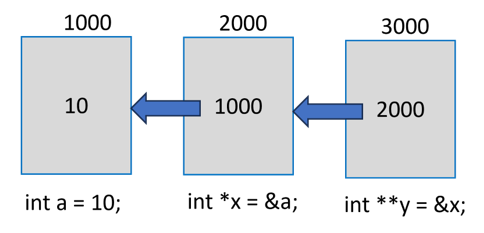
    We may have a pointer variable that stores the address of another pointer itself.

    Pointer Variable

    In the above figure, “a” is a normal “int” variable, whose pointer is “x”. In turn, the variable stores the address of “x”.

    Note that “y” is declared as “int **” to indicate that it is a pointer to another pointer variable. Obviously, “y” will return the address of “x” and “*y” is the value in “x” (which is the address of “a”).

    To obtain the value of “a” from “y”, we need to use the expression “**y”. Usually, “y” will be called as the pointer to a pointer.

    Example

    Take a look at the following example −

    #include <stdio.h>intmain(){int var =10;int*intptr =&var;int**ptrptr =&intptr;printf("var: %d \nAddress of var: %d \n\n",var,&var);printf("inttptr: %d \nAddress of inttptr: %d \n\n", intptr,&intptr);printf("var: %d \nValue at intptr: %d \n\n", var,*intptr);printf("ptrptr: %d \nAddress of ptrtptr: %d \n\n", ptrptr,&ptrptr);printf("intptr: %d \nValue at ptrptr: %d \n\n", intptr,*ptrptr);printf("var: %d \n*intptr: %d \n**ptrptr: %d", var,*intptr,**ptrptr);return0;}

    Output

    Run the code and check its output −

    var: 10 
    Address of var: 951734452 
    
    inttptr: 951734452 
    Address of inttptr: 951734456 
    
    var: 10 
    Value at intptr: 10 
    
    ptrptr: 951734456 
    Address of ptrtptr: 951734464 
    intptr: 951734452 
    Value at ptrptr: 951734452 
    
    var: 10 
    *intptr: 10 
    **ptrptr: 10
    

    You can have a pointer to an array as well as a derived type defined with struct. Pointers have important applications. They are used while calling a function by passing the reference. Pointers also help in overcoming the limitation of a functions ability to return only a single value. With pointers, you can get the effect of returning multiple values or arrays.

    NULL Pointers

    It is always a good practice to assign a NULL value to a pointer variable in case you do not have an exact address to be assigned. This is done at the time of variable declaration. A pointer that is assigned NULL is called a null pointer.

    The NULL pointer is a constant with a value of “0” defined in several standard libraries.

    Example

    Consider the following program −

    #include <stdio.h>intmain(){int*ptr =NULL;printf("The value of ptr is : %x\n", ptr);return0;}

    Output

    When the above code is compiled and executed, it produces the following result −

    The value of ptr is 0
    

    In most operating systems, programs are not permitted to access memory at address “0” because that memory is reserved by the operating system.

    The memory address “0” has a special significance; it signals that the pointer is not intended to point to an accessible memory location. But by convention, if a pointer contains the null (zero) value, it is assumed to point to nothing.

    To check for a null pointer, you can use an if statement as follows −

    if(ptr)/* succeeds if p is not null */if(!ptr)/* succeeds if p is null */

    Address of the Variables

    As you know, every variable is a memory location and every memory location has its address defined which can be accessed using the ampersand (&) operator, which denotes an address in memory.

    Example

    Consider the following example, which prints the address of the variables defined −

    #include <stdio.h>intmain(){int  var1;char var2[10];printf("Address of var1 variable: %x\n",&var1);printf("Address of var2 variable: %x\n",&var2);return0;}

    Output

    When the above code is compiled and executed, it will print the address of the variables −

    Address of var1 variable: 61e11508
    Address of var2 variable: 61e1150e
    

    Pointers in Detail

    Pointers have many but easy concepts and they are very important to C programming. The following important pointer concepts should be clear to any C programmer −

    Sr.NoConcept & Description
    1Pointer arithmeticThere are four arithmetic operators that can be used in pointers: ++, –, +, –
    2Array of pointersYou can define arrays to hold a number of pointers.
    3Pointer to pointerC allows you to have pointer on a pointer and so on.
    4Passing pointers to functions in CPassing an argument by reference or by address enable the passed argument to be changed in the calling function by the called function.
    5Return pointer from functions in CC allows a function to return a pointer to the local variable, static variable, and dynamically allocated memory as well.