Category: 12. Pointers

https://cdn3d.iconscout.com/3d/premium/thumb/cursor-3d-icon-png-download-12657247.png

  • Pointers and Multidimensional Arrays

    In C language, an array is a collection of values of similar type stored in continuous memory locations. Each element in an array (one-dimensional or multi-dimensional) is identified by one or more unique integer indices.

    A pointer, on the other hand, stores the address of a variable. The address of the 0th element in an array is the pointer of the array. You can use the “dereference operator” to access the value that a pointer refers to.

    You can declare a one-dimensional, two-dimensional or multi-dimensional array in C. The term “dimension” refers to the number of indices required to identify an element in a collection.

    Pointers and One-dimensional Arrays

    In a one-dimensional array, each element is identified by a single integer:

    int a[5]={1,2,3,4,5};

    Here, the number “1” is at the 0th index, “2” at index 1, and so on.

    A variable that stores the address of 0th element is its pointer −

    int*x =&a[0];

    Simply, the name of the array too points to the address of the 0th element. So, you can also use this expression −

    int*x = a;

    Example

    Since the value of the pointer increments by the size of the data type, “x++” moves the pointer to the next element in the array.

    #include <stdio.h>intmain(){int arr[]={1,2,3,4,5};int length =sizeof(arr)/sizeof(arr[0]);int i =0;int*ptr = arr;while(i < length){printf("arr[%d]: %d \n", i,*(ptr + i));
    
      i++;}return0;}</code></pre>

    Output

    When you run this code, it will produce the following output −

    arr[0]: 1
    arr[1]: 2
    arr[2]: 3
    arr[3]: 4
    arr[4]: 5
    

    Pointers and Two-dimensional Arrays

    If a one-dimensional array is like a list of elements, a two-dimensional array is like a table or a matrix.

    The elements in a 2D array can be considered to be logically arranged in rows and columns. Hence, the location of any element is decided by two indices, its row number and column number. Both row and column indexes start from "0".

    int arr[2][2];

    Such an array is represented as −

    Col0Col1Col2
    Row0arr[0][0]arr[0][1]arr[0][2]
    Row1arr[1][0]arr[1][1]arr[1][2]
    Row2arr[2][0]arr[2][1]arr[2][2]

    It may be noted that the tabular arrangement is only a logical representation. The compiler allocates a block of continuous bytes. In C, the array allocation is done in a row-major manner, which means the elements are read into the array in a row−wise manner.

    Here, we declare a 2D array with three rows and four columns (the number in the first square bracket always refers to the number of rows) as −

    int arr[3][4]={{1,2,3,4},{5,6,7,8},{9,10,11,12}};

    The compiler will allocate the memory for the above 2D array in a row−wise order. Assuming that the first element of the array is at the address 1000 and the size of type "int" is 4 bytes, the elements of the array will get the following allocated memory locations −

    Row 0Row 1Row 2
    Value123456789101112
    Address100010041008101210161020102410281032103610401044

    We will assign the address of the first element of the array num to the pointer ptr using the address of & operator.

    int*ptr =&arr[0][0];

    Example 1

    If the pointer is incremented by 1, it moves to the next address. All the 12 elements in the "34" array can be accessed in a loop as follows −

    #include <stdio.h>intmain(){int arr[3][4]={{1,2,3,4},{5,6,7,8},{9,10,11,12},};// pointer ptr pointing at array numint*ptr =&arr[0][0];int i, j, k =0;// print the elements of the array num via pointer ptrfor(i =0; i <3; i++){for(j =0; j <4; j++){printf("%d   ",*(ptr + k));
    
         k++;}printf("\n");}return0;}</code></pre>

    Output

    When you run this code, it will produce the following output −

    1   2   3   4   
    5   6   7   8   
    9   10   11   12
    

    In general, the address of any element of the array by with the use the following formula −

    add of element at ith row and jth col = baseAddress +[(i * no_of_cols + j)*sizeof(array_type)]

    In our 34 array,

    add of arr[2][4]=1000+(2*4+2)*4=1044

    You can refer to the above figure and it confirms that the address of "arr[3][4]" is 1044.

    Example 2

    Use the dereference pointer to fetch the value at the address. Let us use this formula to traverse the array with the help of its pointer −

    #include <stdio.h>intmain(){// 2d arrayint arr[3][4]={{1,2,3,4},{5,6,7,8},{9,10,11,12}};int ROWS =3, COLS =4;int i, j;// pointerint*ptr =&arr[0][0];// print the element of the array via pointer ptrfor(i =0; i < ROWS; i++){for(j =0; j < COLS; j++){printf("%4d ",*(ptr +(i * COLS + j)));}printf("\n");}return0;}

    Output

    When you run this code, it will produce the following output −

       1    2    3    4
       5    6    7    8
       9   10   11   12
    

    Pointers and Three-dimensional Arrays

    A three-dimensional array is an array of two-dimensional arrays. Such an array is declared with three subscripts −

    int arr [x][y][j];

    This array can be considered as "x" number of layers of tables, each table having "x" rows and "y" number of columns.

    An example of a 3D array is −

    int arr[3][3][3]={{{11,12,13},{14,15,16},{17,18,19}},{{21,22,23},{24,25,26},{27,28,29}},{{31,32,33},{34,35,36},{37,38,39}},};

    A pointer to the 3D array can be declared as −

    int* ptr =&arr[0][0][0];

    Knowing that, the name of the array itself is the address of 0th element, we can write the pointer of a 3D array as −

    int* ptr = arr;

    Each layer of "x" rows and "y" columns occupies −

    x * y *sizeof(data_type)

    Number of bytes. Assuming that the memory allocated to the 3D array "arr" as declared above starts from the address 1000, the second layer (with "i = 1") starts at 1000 + (3 3) 4 = 1036 byte position.

    ptr = Base address of 3D array arr 
    

    If JMAX is the number of rows and KMAX is the number of columns, then the address of the element at the 0th row and the 0th column of the 1st slice is −

    arr[1][0][0]= ptr +(1* JMAX * KMAX)

    The formula to obtain the value of an element at the jth row and kth column of the ith slice can be given as −

    arr[i][j][k]=*(ptr +(i * JMAX*KMAX)+(j*KMAX + k))

    Example: Printing a 3D Array using Pointer Dereferencing

    Let us use this formula to print the 3D array with the help of the pointer dereferencing −

    #include <stdio.h>intmain(){int i, j, k;int arr[3][3][3]={{{11,12,13},{14,15,16},{17,18,19}},{{21,22,23},{24,25,26},{27,28,29}},{{31,32,33},{34,35,36},{37,38,39}},};int JMAX =3, KMAX =3;int*ptr = arr;// &arr[0][0][0];for(i =0; i <3; i++){for(j =0; j <3; j++){for(k =0; k <3; k++){printf("%d ",*(ptr+(i*JMAX*KMAX)+(j*KMAX+k)));}printf("\n");}printf("\n");}return0;}

    Output

    When you run this code, it will produce the following output −

    11 12 13 
    14 15 16 
    17 18 19 
    
    21 22 23 
    24 25 26 
    27 28 29 
    
    31 32 33 
    34 35 36 
    37 38 39
    

    In general, accessing an array with a pointer is quite similar to accessing an array with subscript representation. The main difference between the two is that the subscripted declaration of an array allocates the memory statically, whereas we can use pointers for dynamic memory allocation.

    To pass a multi-dimensional array to a function, you need to use pointers instead of subscripts. However, using a subscripted array is more convenient than using pointers, which can be difficult for new learners.

  • Array of Pointers

    What is an Array of Pointers?

    Just like an integer array holds a collection of integer variables, an array of pointers would hold variables of pointer type. It means each variable in an array of pointers is a pointer that points to another address.

    The name of an array can be used as a pointer because it holds the address to the first element of the array. If we store the address of an array in another pointer, then it is possible to manipulate the array using pointer arithmetic.

    Create an Array of Pointers

    To create an array of pointers in C language, you need to declare an array of pointers in the same way as a pointer declaration. Use the data type then an asterisk sign followed by an identifier (array of pointers variable name) with a subscript ([]) containing the size of the array.

    In an array of pointers, each element contains the pointer to a specific type.

    Example of Creating an Array of Pointers

    The following example demonstrates how you can create and use an array of pointers. Here, we are declaring three integer variables and to access and use them, we are creating an array of pointers. With the help of an array of pointers, we are printing the values of the variables.

    #include <stdio.h>intmain(){// Declaring integersint var1 =1;int var2 =2;int var3 =3;// Declaring an array of pointers to integersint*ptr[3];// Initializing each element of// array of pointers with the addresses of// integer variables
      ptr[0]=&var1;
      ptr[1]=&var2;
      ptr[2]=&var3;// Accessing valuesfor(int i =0; i <3; i++){printf("Value at ptr[%d] = %d\n", i,*ptr[i]);}return0;}

    Output

    When the above code is compiled and executed, it produces the following result −

    Value of var[0] = 10
    Value of var[1] = 100
    Value of var[2] = 200
    

    There may be a situation when we want to maintain an array that can store pointers to an “int” or “char” or any other data type available.

    An Array of Pointers to Integers

    Here is the declaration of an array of pointers to an integer −

    int*ptr[MAX];

    It declares ptr as an array of MAX integer pointers. Thus, each element in ptr holds a pointer to an int value.

    Example

    The following example uses three integers, which are stored in an array of pointers, as follows −

    #include <stdio.h>constint MAX =3;intmain(){int var[]={10,100,200};int i,*ptr[MAX];for(i =0; i < MAX; i++){
    
      ptr&#91;i]=&amp;var&#91;i];/* assign the address of integer. */}for(i =0; i &lt; MAX; i++){printf("Value of var&#91;%d] = %d\n", i,*ptr&#91;i]);}return0;}</code></pre>

    Output

    When the above code is compiled and executed, it produces the following result −

    Value of var[0] = 10
    Value of var[1] = 100
    Value of var[2] = 200
    

    An Array of Pointers to Characters

    You can also use an array of pointers to character to store a list of strings as follows −

    #include <stdio.h>constint MAX =4;intmain(){char*names[]={"Zara Ali","Hina Ali","Nuha Ali","Sara Ali"};int i =0;for(i =0; i < MAX; i++){printf("Value of names[%d] = %s\n", i, names[i]);}return0;}

    Output

    When the above code is compiled and executed, it produces the following result −

    Value of names[0] = Zara Ali
    Value of names[1] = Hina Ali
    Value of names[2] = Nuha Ali
    Value of names[3] = Sara Ali
    

    An Array of Pointers to Structures

    When you have a list of structures and want to manage it using a pointer. You can declare an array of structures to access and manipulate the list of structures.

    Example

    The below example demonstrates the use of an array of pointers to structures.

    #include <stdio.h>#include <stdlib.h>#include <string.h>// Declaring a structuretypedefstruct{char title[50];float price;} Book;constint MAX =3;intmain(){
      Book *book[MAX];// Initialize each book (pointer)for(int i =0; i < MAX; i++){
    
    book&#91;i]=malloc(sizeof(Book));snprintf(book&#91;i]-&gt;title,50,"Book %d", i +1);
    book&#91;i]-&gt;price =100+ i;}// Print details of each bookfor(int i =0; i &lt; MAX; i++){printf("Title: %s, Price: %.2f\n", book&#91;i]-&gt;title, book&#91;i]-&gt;price);}// Free allocated memoryfor(int i =0; i &lt; MAX; i++){free(book&#91;i]);}return0;}</code></pre>

    Output

    When the above code is compiled and executed, it produces the following result −

    Title: Book 1, Price: 100.00
    Title: Book 2, Price: 101.00
    Title: Book 3, Price: 102.00
    
  • Pointer to an Array

    An array name is a constant pointer to the first element of the array. Therefore, in this declaration,

    int balance[5];

    balance is a pointer to &balance[0], which is the address of the first element of the array.

    Example

    In this code, we have a pointer ptr that points to the address of the first element of an integer array called balance.

    #include <stdio.h>intmain(){int*ptr;int balance[5]={1,2,3,4,5};
    
       ptr = balance;printf("Pointer 'ptr' points to the address: %d", ptr);printf("\nAddress of the first element: %d", balance);printf("\nAddress of the first element: %d",&balance[0]);return0;}

    Output

    In all the three cases, you get the same output −

    Pointer 'ptr' points to the address: 647772240
    Address of the first element: 647772240
    Address of the first element: 647772240
    

    If you fetch the value stored at the address that ptr points to, that is *ptr, then it will return 1.

    Array Names as Constant Pointers

    It is legal to use array names as constant pointers and vice versa. Therefore, *(balance + 4) is a legitimate way of accessing the data at balance[4].

    Once you store the address of the first element in “ptr“, you can access the array elements using *ptr*(ptr + 1)*(ptr + 2), and so on.

    Example

    The following example demonstrates all the concepts discussed above −

    #include <stdio.h>intmain(){/* an array with 5 elements */double balance[5]={1000.0,2.0,3.4,17.0,50.0};double*ptr;int i;
    
       ptr = balance;/* output each array element's value */printf("Array values using pointer: \n");for(i =0; i <5; i++){printf("*(ptr + %d): %f\n",  i,*(ptr + i));}printf("\nArray values using balance as address:\n");for(i =0; i <5; i++){printf("*(balance + %d): %f\n",  i,*(balance + i));}return0;}

    Output

    When you run this code, it will produce the following output −

    Array values using pointer:
    *(ptr + 0): 1000.000000
    *(ptr + 1): 2.000000
    *(ptr + 2): 3.400000
    *(ptr + 3): 17.000000
    *(ptr + 4): 50.000000
    
    Array values using balance as address:
    *(balance + 0): 1000.000000
    *(balance + 1): 2.000000
    *(balance + 2): 3.400000
    *(balance + 3): 17.000000
    *(balance + 4): 50.000000
    

    In the above example, ptr is a pointer that can store the address of a variable of double type. Once we have the address in ptr*ptr will give us the value available at the address stored in ptr.

  • Pointer vs Array in C

    Arrays and Pointers are two important language constructs in C, associated with each other in many ways. In many cases, the tasks that you perform with a pointer can also be performed with the help of an array.

    However, there are certain conceptual differences between arrays and pointers. Read this chapter to understand their differences and comparative advantages and disadvantages.

    Arrays in C

    In a C program, an array is an indexed collection of elements of similar type, stored in adjacent memory locations.

    To declare an array, we use the following syntax −

    data_type arr_name [size];

    The size should be a non-negative integer. For example −

    int arr[5];

    The array can be initialized along with the declaration, with the elements given as a comma-separated list inside the curly brackets. Mentioning its size is optional.

    int arr[]={1,2,3,4,5};

    Each element in an array is characterized by a unique integral index, starting from “0”. In C language, the lower bound of an array is always “0” and the upper bound is “size 1”.

    Example of an Array

    The following example shows how you can traverse an array with indexed subscripts −

    #include <stdio.h>intmain(){/* an array with 5 elements */int arr[5]={10,20,30,40,50};int i;/* output each array element's value */printf("Array values with subscripts: \n");for(i =0; i <5; i++){printf("arr[%d]: %d\n", i, arr[i]);}return0;}

    Output

    When you run this code, it will produce the following output −

    Array values with subscripts:
    arr[0]: 10
    arr[1]: 20
    arr[2]: 30
    arr[3]: 40
    arr[4]: 50
    

    Pointers in C

    C allows you to access the memory location of a variable that has been randomly allocated by the compiler. The address−of operator (&) returns the address of the variable.

    A variable that stores the address of another variable is called a pointer. The type of the pointer must be the same as the one whose address it stores.

    To differentiate from the target variable type, the name of the pointer is prefixed with an asterisk (*). If we have an int variable, its pointer is declared as “int *”.

    int x =5;int*y =&a;

    Note: In case of an array, the address of its 0th element is assigned to the pointer.

    int arr[]={1,2,3,4,5};int*ptr =&arr[0];

    In fact, the name of the array itself resolves to the address of the 0th element.

    Pointer vs Array

    Hence, we can as well write −

    int*ptr = arr;

    Since the elements of an array are placed in adjacent memory locations and the address of each subscript increments by 4 (in case of an int array), we can use this feature to traverse the array elements with the help of pointer as well.

    Example of a Pointer

    The following example shows how you can traverse an array with a pointer −

    #include <stdio.h>intmain(){/* an array with 5 elements */int arr[5]={10,20,30,40,50};int*x = arr;int i;/* output each array element's value */printf("Array values with pointer: \n");for(i =0; i <5; i++){printf("arr[%d]: %d\n", i,*(x+i));}return0;}

    Output

    Run the code and check its output −

    Array values with pointer
    arr[0]: 10
    arr[1]: 20
    arr[2]: 30
    arr[3]: 40
    arr[4]: 50
    

    Difference between Arrays and Pointers in C

    The following table highlights the important differences between arrays and pointers −

    ArrayPointer
    It stores the elements of a homogeneous data type in adjacent memory locations.It stores the address of a variable, or an array
    An array is defined as a collection of similar datatypes.A pointer is a variable that stores address of another variable.
    The number of variables that can be stored is decided by the size of the array.A pointer can store the address of only a single variable.
    The initialization of arrays can be done while defining them.Pointers cannot be initialized while defining them.
    The nature of arrays is static.The nature of pointers is dynamic.
    Arrays cannot be resized according to the user’s requirements.Pointers can be resized at any point in time.
    The allocation of an array is done at compile time.The allocation of the pointer is done at run time.
  • Pointers and Arrays

    In C programming, the concepts of arrays and pointers have a very important role. There is also a close association between the two. In this chapter, we will explain in detail the relationship between arrays and pointers in C programming.

    Arrays in C

    An array in C is a homogenous collection of elements of a single data type stored in a continuous block of memory. The size of an array is an integer inside square brackets, put in front of the name of the array.

    Declaring an Array

    To declare an array, the following syntax is used −

    data_type arr_name[size];

    Each element in the array is identified by a unique incrementing index, starting from “0”. An array can be declared and initialized in different ways.

    You can declare an array and then initialize it later in the code, as and when required. For example −

    int arr[5];...... 
    a[0]=1;
    a[1]=2;......

    You can also declare and initialize an array at the same time. The values to be stored are put as a comma separated list inside curly brackets.

    int a[5]={1,2,3,4,5};

    Note: When an array is initialized at the time of declaration, mentioning its size is optional, as the compiler automatically computes the size. Hence, the following statement is also valid −

    int a[]={1,2,3,4,5};

    Example: Lower Bound and Upper Bound of an Array

    All the elements in an array have a positional index, starting from “0”. The lower bound of the array is always “0”, whereas the upper bound is “size − 1”. We can use this property to traverse, assign, or read inputs into the array subscripts with a loop.

    Take a look at this following example −

    #include <stdio.h>intmain(){int a[5], i;for(i =0; i <=4; i++){scanf("%d",&a[i]);}for(i =0; i <=4; i++){printf("a[%d] = %d\n",i,  a[i]);}return0;}

    Output

    Run the code and check its output −

    a[0] = 712952649
    a[1] = 32765
    a[2] = 100
    a[3] = 0
    a[4] = 4096
    

    Pointers in C

    A pointer is a variable that stores the address of another variable. In C, the symbol (&) is used as the address-of operator. The value returned by this operator is assigned to a pointer.

    To declare a variable as a pointer, you need to put an asterisk (*) before the name. Also, the type of pointer variable must be the same as the type of the variable whose address it stores.

    In this code snippet, “b” is an integer pointer that stores the address of an integer variable “a” −

    int a =5;int*b =&a;

    In case of an array, you can assign the address of its 0th element to the pointer.

    int arr[]={1,2,3,4,5};int*b =&arr[0];

    In C, the name of the array itself resolves to the address of its 0th element. It means, in the above case, we can use “arr” as equivalent to “&[0]”:

    int*b = arr;

    Example: Increment Operator with Pointer

    Unlike a normal numeric variable (where the increment operator “++” increments its value by 1), the increment operator used with a pointer increases its value by the sizeof its data type.

    Hence, an int pointer, when incremented, increases by 4.

    #include <stdio.h>intmain(){int a =5;int*b =&a;printf("Address of a: %d\n", b);
       b++;printf("After increment, Address of a: %d\n", b);return0;}

    Output

    Run the code and check its output −

    Address of a: 6422036
    After increment, Address of a: 6422040
    

    The Dereference Operator in C

    In C, the “*” symbol is used as the dereference operator. It returns the value stored at the address to which the pointer points.

    Hence, the following statement returns “5”, which is the value stored in the variable “a”, the variable that “b” points to.

    int a =5;int*b =&a;printf("value of a: %d\n",*b);

    Note: In case of a char pointer, it will increment by 1; in case of a double pointer, it will increment by 8; and in case of a struct type, it increments by the sizeof value of that struct type.

    Example: Traversing an Array Using a Pointer

    We can use this property of the pointer to traverse the array element with the help of a pointer.

    #include <stdio.h>intmain(){int arr[5]={1,2,3,4,5};int*b = arr;printf("Address of a[0]: %d value at a[0] : %d\n",b,*b);
    
    b++;printf("Address of a[1]: %d value at a[1] : %d\n", b,*b); b++;printf("Address of a[2]: %d value at a[2] : %d\n", b,*b); b++;printf("Address of a[3]: %d value at a[3] : %d\n", b,*b);
    b++;printf("Address of a[4]: %d value at a[4] : %d\n", b,*b);return0;}

    Output

    Run the code and check its output −

    address of a[0]: 6422016 value at a[0] : 1
    address of a[1]: 6422020 value at a[1] : 2
    address of a[2]: 6422024 value at a[2] : 3
    address of a[3]: 6422028 value at a[3] : 4
    address of a[4]: 6422032 value at a[4] : 5
    

    Points to Note

    It may be noted that −

    • “&arr[0]” is equivalent to “b” and “arr[0]” to “*b”.
    • Similarly, “&arr[1]” is equivalent to “b + 1” and “arr[1]” is equivalent to “*(b + 1)”.
    • Also, “&arr[2]” is equivalent to “b + 2” and “arr[2]” is equivalent to “*(b+2)”.
    • In general, “&arr[i]” is equivalent to “b + I” and “arr[i]” is equivalent to “*(b+i)”.

    Example: Traversing an Array using the Dereference Operator

    We can use this property and use a loop to traverse the array with the dereference operator.

    #include <stdio.h>intmain(){int arr[5]={1,2,3,4,5};int*b = arr;int i;for(i =0; i <=4; i++){printf("a[%d] = %d\n",i,*(b+i));}return0;}

    Output

    Run the code and check its output −

    a[0] = 1
    a[1] = 2
    a[2] = 3
    a[3] = 4
    a[4] = 5
    

    You can also increment the pointer in every iteration and obtain the same result −

    for(i =0; i <=4; i++){printf("a[%d] = %d\n", i,*b);
       b++;}

    The concept of arrays and pointers in C has a close relationship. You can use pointers to enhance the efficiency of a program, as pointers deal directly with the memory addresses. Pointers can also be used to handle multi−dimensional arrays.

  • Pointer Arithmetics

    A pointer variable in C stores the address of another variable. The address is always an integer. So, can we perform arithmetic operations such as addition and subtraction on the pointers? In this chapter, we will explain which arithmetic operators use pointers in C as operands, and which operations are not defined to be performed with pointers.

    C pointers arithmetic operations are different from the general arithmetic operations. The following are some of the important pointer arithmetic operations in C:

    • Increment and Decrement of a Pointer
    • Addition and Subtraction of Integer to Pointer
    • Subtraction of Pointers
    • Comparison of Pointers

    Let us discuss all these pointer arithmetic operations in detail with the help of examples.

    Increment and Decrement of a Pointer

    We know that “++” and “–” are used as the increment and decrement operators in C. They are unary operators, used in prefix or postfix manner with numeric variable operands, and they increment or decrement the value of the variable by one.

    Assume that an integer variable “x” is created at address 1000 in the memory, with 10 as its value. Then, “x++” makes the value of “x” as 11.

    int x =10;// created at address 1000
    
    x++;// x becomes 11

    What happens if we declare “y” as pointer to “x” and increment “y” by 1 (with “y++”)? Assume that the address of “y” itself is 2000.

    int x =10;// created at address 1000// "y" is created at address 2000 // it holds 1000 (address of "x")int*y =&x ;
    
    y++;// y becomes 1004

    Since the variable “y” stores 1000 (the address of “x”), we expect it to become 1001 because of the “++” operator, but it increments by 4, which is the size of “int” variable.

    The is why because, if the address of “x” is 1000, then it occupies 4 bytes: 1000, 1001, 1002 and 1003. Hence, the next integer can be put only in 1004 and not before it. Hence “y” (the pointer to “x”) becomes 1004 when incremented.

    Example of Incrementing a Pointer

    The following example shows how you can increment a pointer −

    #include <stdio.h>intmain(){int x =10;int*y =&x;printf("Value of y before increment: %d\n", y);
    
       y++;printf("Value of y after increment: %d", y);}

    Output

    Run the code and check its output −

    Value of y before increment: 6422036
    Value of y after increment: 6422040
    

    You can see that the value has increased by 4. Similarly, the “–” operator decrements the value by the size of the data type.

    Example of Decrementing a Pointer

    Let us change the types of “x” and “y” to “double” and “float” and see the effect of decrement operator.

    #include <stdio.h>intmain(){double x =10;double*y =&x;printf("value of y before decrement: %ld\n", y);
       
       y--;printf("value of y after decrement: %ld", y);}

    Output

    Value of y before decrement: 6422032
    Value of y after decrement: 6422024
    

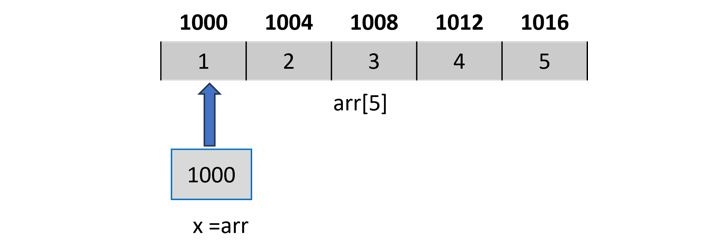
    When an array is declared, the elements are stored in adjacent memory locations. In case of “int” array, each array subscript is placed apart by 4 bytes, as the following figure shows −

    Memory Locations

    Hence, if a variable stores the address of 0th element of the array, then the “increment” takes it to the 1st element.

    Example of Traversing an Array by Incrementing Pointer

    The following example shows how you can traverse an array by incrementing a pointer successively −

    #include <stdio.h>intmain(){int a[]={10,20,30,40,50,60,70,80,90,100};int len =sizeof(a)/sizeof(int);int*x = a;int i =0;for(i =0; i < len; i++){printf("Address of subscript %d = %d Value = %d\n", i, x,*x);
    
      x++;}return0;}</code></pre>

    Output

    Run the code and check its output −

    Address of subscript 0 = 6421984 Value = 10
    Address of subscript 1 = 6421988 Value = 20
    Address of subscript 2 = 6421992 Value = 30
    Address of subscript 3 = 6421996 Value = 40
    Address of subscript 4 = 6422000 Value = 50
    Address of subscript 5 = 6422004 Value = 60
    Address of subscript 6 = 6422008 Value = 70
    Address of subscript 7 = 6422012 Value = 80
    Address of subscript 8 = 6422016 Value = 90
    Address of subscript 9 = 6422020 Value = 100
    

    Addition and Subtraction of Integer to Pointer

    An integer value can be added and subtracted to a pointer. When an integer is added to a pointer, the pointer points to the next memory address. Similarly, when an integer is subtracted from a pointer, the pointer points to the previous memory location.

    Addition and subtraction of an integer to a pointer does not add and subtract that value to the pointer, multiplication with the size of the data type is added or subtracted to the pointer.

    For example, there is an integer pointer variable ptr and it is pointing to an address 123400, if you add 1 to the ptr (ptr+1), it will point to the address 123404 (size of an integer is 4).

    Let's evaluate it,

    ptr = 123400 
    ptr = ptr + 1
    ptr = ptr + sizeof(int)*1
    ptr = 123400 + 4
    ptr = 123404
    

    Example of Adding Value to a Pointer

    In the following example, we are declaring an array and pointer to an array. Initializing the pointer with the first element of the array and then adding an integer value (2) to the pointer to get the third element of the array.

    #include <stdio.h>intmain(){int int_arr[]={12,23,45,67,89};int*ptrArr = int_arr;printf("Value at ptrArr: %d\n",*ptrArr);// Adding 2 in ptrArr
      ptrArr = ptrArr +2;printf("Value at ptrArr after adding 2: %d\n",*ptrArr);return0;}

    Output

    Value at ptrArr: 12
    Value at ptrArr after adding 2: 45
    

    Example of Subtracting Value to a Pointer

    In the following example, we are declaring an array and pointer to an array. Initializing the pointer with the last element of the array and then subtracting an integer value (2) from the pointer to get the third element of the array.

    #include <stdio.h>intmain(){int int_arr[]={12,23,45,67,89};int*ptrArr =&int_arr[4];// points to last elementprintf("Value at ptrArr: %d\n",*ptrArr);// Subtracting 2 in ptrArr
      ptrArr = ptrArr -2;printf("Value at ptrArr after adding 2: %d\n",*ptrArr);return0;}

    Output

    Value at ptrArr: 89
    Value at ptrArr after adding 2: 45
    

    Subtraction of Pointers

    We are familiar with the "+" and "−" operators when they are used with regular numeric operands. However, when you use these operators with pointers, they behave in a little different way.

    Since pointers are fairly large integers (especially in modern 64-bit systems), addition of two pointers is meaningless. When we add a 1 to a pointer, it points to the next location where an integer may be stored. Obviously, when we add a pointer (itself a large integer), the location it points may not be in the memory layout.

    However, subtraction of two pointers is realistic. It returns the number of data types that can fit in the two pointers.

    Example of Subtracting Two Pointers

    Let us take the array in the previous example and perform the subtraction of pointers of a[0] and a[9]

    #include <stdio.h>intmain(){int a[]={10,20,30,40,50,60,70,80,90,100};int*x =&a[0];// zeroth elementint*y =&a[9];// last elementprintf("Add of a[0]: %ld add of a[9]: %ld\n", x, y);printf("Subtraction of two pointers: %ld", y-x);}

    Output

    Run the code and check its output −

    Add of a[0]: 140729162482768 add of a[9]: 140729162482804
    Subtraction of two pointers: 9
    

    It can be seen that the numerical difference between the two integers is 36; it suggests that the subtraction is 9, because it can accommodate 9 integers between the two pointers.

    Comparison of Pointers

    Pointers may be compared by using relational operators such as "==", "<", and ">". If "p1" and "p2" point to variables that are related to each other (such as elements of the same array), then "p1" and "p2" can be meaningfully compared.

    Example of Comparing Pointers

    In the following example, we are declaring two pointers and initializing them with the first and last elements of the array respectively. We will keep incrementing the first variable pointer as long as the address to which it points is either less than or equal to the address of the last element of the array, which is "&var[MAX 1]" (i.e., the second pointer).

    #include <stdio.h>constint MAX =3;intmain(){int var[]={10,100,200};int i,*ptr1,*ptr2;// Initializing pointers
      ptr1 = var;
      ptr2 =&var[MAX -1];while(ptr1 <= ptr2){printf("Address of var[%d] = %p\n", i, ptr1);printf("Value of var[%d] = %d\n", i,*ptr1);/* point to the previous location */
    
    ptr1++;
    i++;}return0;}</code></pre>

    Output

    Run the code and check its output −

    Address of var[0] = 0x7ffe7101498c
    Value of var[0] = 10
    Address of var[1] = 0x7ffe71014990
    Value of var[1] = 100
    Address of var[2] = 0x7ffe71014994
    Value of var[2] = 200
    
  • Dangling Pointers

    Dangling Pointers in C

    Dangling pointers in C is used to describe the behavior of a pointer when its target (the variable it is pointing to) has been deallocated or is no longer accessible. In other words, a dangling pointer in C is a pointer that doesn’t point to a valid variable of the appropriate type.

    Why Do We Get Dangling Pointers in C?

    Working with a dangling pointer can lead to unpredicted behavior in a C program and sometimes it may result in the program crashing. The situation of dangling pointers can occur due to the following reasons −

    • De-allocation of memory
    • Accessing an out-of-bounds memory location
    • When a variable goes out of scope

    Let’s analyze each of these three situations with the help of examples.

    De-allocation of Memory

    A pointer holds the address of a variable. If the target variable is deallocated or freed, then its pointer becomes a dangling pointer. Trying to access a pointer whose target variable has been deallocated results in garbage situations.

    Let us use malloc() to create an integer variable and store its address in an integer pointer.

    int*x =(int*)malloc(sizeof(int));*x =100;

    Here, the pointer is referring to a valid location in the memory. Let us release the memory pointed by “x” using the free() function.

    free(x);

    Now, “x” stores an address that is no longer valid. Hence, if we try to dereference it, the compiler shows a certain garbage value.

    Example

    The following example shows how we end up getting dangling pointers in a C program −

    #include <stdio.h>intmain(){int*x =(int*)malloc(sizeof(int));*x =100;printf("x: %d\n",*x);free(x);printf("x: %d\n",*x);}

    Output

    Run the code and check its output −

    x: 100
    x: 11665744
    

    Accessing an Out-of-Bounds Memory Location

    We know that a function can return a pointer. If it returns a pointer to any local variable inside the function, it results in a dangling pointer in the outer scope, as the location it points to is no longer valid.

    Example

    Take a look at the following code −

    #include <stdio.h>int*function();intmain(){int*x =function();printf("x: %d",*x);return0;}int*function(){int a =100;return&a;}

    Output

    When compiled, the following warning is displayed at the “return &a” statement in the function −

    warning: function returns address of local variable [-Wreturn-local-addr]
    

    If you run the program despite the warning, you get the following error −

    Segmentation fault (core dumped)
    

    When you get this error, it means that the program is trying to access a memory location that is out of bounds.

    When a Variable Goes Out of Scope

    The same reason applies when a variable declared in an inner block is accessed outside it. In the following example, we have a variable inside a block and its address is stored in a pointer variable.

    However, outside the block, the pointer becomes a dangling pointer as its target is out of bounds.

    Example

    The following program shows how we get a dangling pointer when its base variable goes out of scope −

    #include <stdio.h>intmain(){int*ptr;{int a =10;
    
      ptr =&amp;a;}// 'a' is now out of scope// ptr is a dangling pointer nowprintf("%d", ptr);return0;}</code></pre>

    Output

    It will display a garbage value −

    6422036
    

    How to Fix Dangling Pointers?

    C doesnt have the feature of automatic garbage collection, so we need to carefully manage the dynamically allocated memory.

    To fix the issue of dangling pointers or to avoid them altogether, you need to apply proper memory management and try to avoid situations where you may end up getting dangling pointers.

    Here are some general guidelines that you can follow to avoid dangling pointers −

    • Always ensure that pointers are set to NULL after the memory is deallocated. It will clearly signify that the pointer is no longer pointing to a valid memory location.
    • Avoid accessing a variable or a memory location that has gone out of scope.
    • Do not return pointers to local variables because such local variables will go out of scope when the function returns.

    By following these guidelines, you can reduce the chances of getting dangling pointers in your code.

  • Constant Pointers & Pointer to Constant in C

    In C, a pointer is a variable that stores the memory address of another variable, and the const keyword is used to define a variable or pointer whose value cannot be changed once initialized. When we combine pointers with const keyword, we can control two things −

    • Whether the address stored in the pointer can change.
    • Whether the value stored at that address can change.

    In this chapter, we will look at the three main variations of constant pointers −

    • Constant Pointer
    • Pointer to Constant
    • Constant Pointer to Constant

    Constant Pointer

    constant pointer means the pointer itself is constant. Once it is initialized to point to a memory location, it cannot point to a different location, but the value stored at that location can still be changed.

    Following is the syntax of a constant pointer −

    data_type *const pointer_name =&variable;

    In this syntax, data_type is the type of data the pointer points to, *const makes the pointer itself constant, pointer_name is the pointer’s name, and &variable assigns it the memory address of a variable.

    Example of Constant Pointer

    In this example, we declare a constant pointer ptr and initialize it with the address of variable x. Then, we change the value of x using ptr and we print its value.

    #include <stdio.h>intmain(){int x =10;int y =20;int*const ptr =&x;// constant pointer to intprintf("Value of x: %d\n",*ptr);*ptr =15;// can change the value at addressprintf("Modified value of x: %d\n",*ptr);// ptr = &y;  // changing pointer address is not allowedreturn0;}

    Shown below is the output of the above program, which shows that the pointer remains fixed to x, but the value of x can be updated.

    Value of x: 10
    Modified value of x: 15
    

    Example of a Constant Pointer Error

    Here’s an example where we declare a constant pointer ptr and initialize it with the address of variable x. Then, we try to make it point to the address of variable y. This will give an error because a constant pointer cannot point to another memory location once it has been initialized.

    #include <stdio.h>intmain(){int x =10;int y =20;int*const ptr =&x;// constant pointer to intprintf("Value of x: %d\n",*ptr);// Attempting to change the pointer to point to y
    
    ptr =&amp;y;// cannot change the address of a constant pointerreturn0;}</code></pre>

    You can see the error below, indicating that we cannot change the address of a constant pointer.

    error: assignment of read-only variable 'ptr'
    

    Pointer to Constant

    pointer to constant means the value it points to cannot be changed, but the pointer itself can point to different memory addresses (or variables).

    Following is the syntax for pointer to constant −

    const data_type *pointer_name =&variable;
    data_type const*pointer =&variable;

    In this syntax, const data_type or data_type const means the pointer points to a constant value, pointer_name is the name of the pointer, and &variable assigns it the address of a variable.

    Example of Pointer to Constant

    In this example, we declare a pointer ptr that points to a constant value and assign it the address of variable a. Then, we make the pointer point to a different address of variable b and print its value.

    #include <stdio.h>intmain(){int a =5;int b =30;constint*ptr =&a;// pointer to constant intprintf("Value of a: %d\n",*ptr);// *ptr = 10; //we cannot modify value through pointer
    
    
    ptr =&amp;b;// canging pointer addressprintf("Now pointing to b: %d\n",*ptr);return0;}</code></pre>

    Following is the output of the above program, showing the same pointer pointing to different variables.

    Value of a: 5
    Now pointing to b: 30
    

    Example of a Pointer to Constant Error

    Here's an example where we declare a pointer to constant ptr and initialize it with the address of variable a. Then, we try to change the value of a through the pointer. This will give an error because a pointer to constant does not allow modifying the value it points to.

    #include <stdio.h>intmain(){int a =5;constint*ptr =&a;// pointer to constant intprintf("Value of a: %d\n",*ptr);// we cnnot modify value through pointer to constant*ptr =10;return0;}

    Below you can see the output, which shows an error indicating that we cannot modify the value through a pointer to constant.

    error: assignment of read-only location '*ptr'
    

    Constant Pointer to Constant

    constant pointer to a constant is a pointer that cannot change its memory address, and the value stored at that memory address also cannot be changed. Both actions are restricted, so we can only read the value, nothing else.

    Following is the syntax for a constant pointer to a constant −

    const data_type *const pointer_name =&variable;

    In this syntax −

    • const data_type indicates that the value at the memory location cannot be changed through the pointer.
    • *const pointer_name means the pointer itself cannot point to any other memory address after initialization.
    • &variable assigns the pointer to the memory address of the variable.

    Example of Constant Pointer to Constant

    In this example, we declare a constant pointer to constant ptr and assign it the memory address of variable a. We then print the value of a using the pointer.

    #include <stdio.h>intmain(){int a =10;constint*const ptr =&a;// constant pointer to constantprintf("Value of a: %d\n",*ptr);// *ptr = 15;  // we cannot modify value// ptr = &b;   // we annot change pointer locationreturn0;}

    Following is the output of the above program −

    Value of a: 10
    

    Example of Constant Pointer to Constant Error

    In this example, we declare a constant pointer to constant ptr and initialize it with a variable a. Then, we try to modify the value through the pointer and also try to make the pointer point to another variable. Both operations are not allowed and will result in a compiler error.

    #include <stdio.h>intmain(){int a =10;int b =20;constint*const ptr =&a;// constant pointer to constantprintf("Value of a: %d\n",*ptr);// *ptr = 15;  // we cnnot modify value// ptr = &b;   // we cannot change pointer addressreturn0;}

    Below you can see the output showing the errors −

    Value of a: 10
    

    Difference between Constant Pointer Types

    The following table shows the differences between a constant pointer, a pointer to constant, and a constant pointer to constant.

    VariationDefinitionCan Change Address?Can Change Value?Example Syntax
    Constant PointerA pointer whose address is fixed, but the value at that address can be modified.NoYesint*const p =&x;
    Pointer to ConstantA pointer that can point to different addresses, but cannot modify the value at the pointed location.YesNoconstint*p =&x;
    Constant Pointer to ConstantA pointer whose address is fixed, and the value at that address cannot be modified.NoNoconstint*const p =&x;

    Conclusion

    In this chapter, we covered constant pointers and pointers to constant in C. Constant pointers fix the address but allow changing the value, pointers to constant allow changing the address but not the value, and constant pointers to constant restrict both.

  • void Pointer

    void Pointer in C

    void pointer in C is a type of pointer that is not associated with any data type. A void pointer can hold an address of any type and can be typecasted to any type. They are also called general-purpose or generic pointers.

    In C programming, the function malloc() and calloc() return “void *” or generic pointers.

    Declaring void Pointer

    This is the syntax you would use to declare a void pointer −

    void*ptr;

    Example of void Pointer

    The following example shows how you can use a void pointer in a C program −

    #include <stdio.h>intmain(){int a =10;char b ='x';// void pointer holds address of int avoid*ptr =&a;printf("Address of 'a': %d",&a);printf("\nVoid pointer points to: %d", ptr);// it now points to char b
       ptr =&b;printf("\nAddress of 'b': %d",&b);printf("\nVoid pointer points to: %d", ptr);}

    Output

    Run the code and check its output −

    Address of 'a': 853377452
    Void pointer points to: 853377452
    Address of 'b': 853377451
    Void pointer points to: 853377451
    

    An Array of void Pointers

    We can declare an array of void pointers and store pointers to different data types.

    A void pointer is a pointer that can hold the memory address of any data type in C. Hence, an array of void pointers is an array that can store memory addresses, but these addresses can point to variables of different data types.

    You can also store pointers to any user-defined data types such as arrays and structures in a void pointer.

    Example

    In this example program, we have declared an array of void pointers and stored in it the pointers to variables of different types (int, float, and char *) in each of its subscripts.

    #include <stdio.h>intmain(){void*arr[3];int a =100;float b =20.5;char*c ="Hello";
    
       arr[0]=&a;
       arr[1]=&b;
       arr[2]=&c;printf("Integer: %d\n",*((int*)arr[0]));printf("Float: %f\n",*((float*)arr[1]));printf("String: %s\n",*((char**)arr[2]));return0;}

    Output

    When you run this code, it will produce the following output −

    Integer: 100
    Float: 20.500000
    String: Hello
    

    Application of void Pointers

    Some of the common applications of void pointers are listed below −

    • The malloc() function is available as a library function in the header file stdlib.h. It dynamically allocates a block of memory during the runtime of a program. Normal declaration of variables causes the memory to be allocated at the compile time.void*malloc(size_t size);
    • Void pointers are used to implement generic functions. The dynamic allocation functions malloc() and calloc() return “void *” type and this feature allows these functions to be used to allocate memory of any data type.
    • The most common application of void pointers is in the implementation of data structures such as linked lists, trees, and queues, i.e., dynamic data structures.

    Limitations of void Pointer

    The void pointer has the following limitations −

    • Pointer arithmetic is not possible with void pointer due to its concrete size.
    • It can’t be used as dereferenced.
    • A void pointer cannot work with increment or decrement operators because it doesn’t have a specific type.
  • NULL Pointer

    NULL Pointer in C

    NULL pointer in C is a pointer that doesn’t point to any of the memory locations. The NULL constant is defined in the header files stdio.h, stddef.h as well as stdlib.h.

    A pointer is initialized to NULL to avoid the unpredicted behavior of a program or to prevent segmentation fault errors.

    Declare and Initialize a NULL Pointer

    This is how you would declare and initialize a NULL pointer −

    type *ptr =NULL;

    Or, you can use this syntax too −

    type *ptr =0;

    Example of a NULL Pointer

    The following example demonstrates how to declare and initialize a NULL pointer −

    #include <stdio.h> intmain(){int*p=NULL;//initialize the pointer as null.printf("The value of pointer is %u",p);return0;}

    Output

    When you run this code, it will produce the following output −

    The value of pointer is 0.
    

    Applications of NULL Pointer

    Following are some of the applications of a NULL pointer −

    • To initialize a pointer variable when that pointer variable isn’t assigned any valid memory address yet.
    • To pass a null pointer to a function argument when we don’t want to pass any valid memory address.
    • To check for a null pointer before accessing any pointer variable so that we can perform error handling in pointer-related code. For example, dereference a pointer variable only if it’s not NULL.

    A NULL pointer is always used to detect the endpoint of trees, linked lists, and other dynamic data structures.

    Check Whether a Pointer is NULL

    It is always recommended to check whether a pointer is NULL before dereferencing it to fetch the value of its target variable.

    Example

    Take a look at the following example −

    #include <stdio.h> intmain(){int*ptr =NULL;// null pointerif(ptr ==NULL){printf("Pointer is a NULL pointer");}else{printf("Value stored in the address referred by the pointer: %d",*ptr);}return0;}

    Output

    When you run this code, it will produce the following output −

    Pointer is a NULL pointer
    

    Check Memory Allocation Using NULL Pointer

    The malloc() and calloc() functions are used to dynamically allocate a block of memory. On success, these functions return the pointer to the allocated block; whereas on failure, they return NULL.

    Example

    The following example shows how you can use the NULL pointer to check whether memory allocation was successful or not −

    #include <stdio.h>#include <stdlib.h>intmain(){int* ptr =(int*)malloc(sizeof(int));if(ptr ==NULL){printf("Memory Allocation Failed");exit(0);}else{printf("Memory Allocated successfully");}return0;}

    Output

    Run the code and check its output −

    Memory Allocated successfully
    

    NULL File Pointer

    Checking if the FILE pointer returned by the fopen() function is NULL is always a recommended approach to avoid runtime errors in file-related processing.

    Example

    The following example shows how you can use the NULL file pointer to ensure that a file is accessible or not −

    #include <stdio.h>#include <string.h>intmain(){
    
       FILE *fp;char*s;int i, a;float p;
    
       fp =fopen("file3.txt","r");if(fp ==NULL){puts("Cannot open file");return0;}while(fscanf(fp,"%d %f %s",&a,&p, s)!=EOF)printf("Name: %s Age: %d Percent: %f\n", s, a, p);fclose(fp);return0;}

    You should always initialize a pointer variable to NULL when the target variable hasn’t been assigned any valid memory address yet.