Category: 12. Pointers

https://cdn3d.iconscout.com/3d/premium/thumb/cursor-3d-icon-png-download-12657247.png

  • Restrict Keyword

    In C, the restrict keyword is a type qualifier that was introduced with the C99 standard. It is used to notify the compiler that a pointer is the only reference or access point to the memory it points to.

    We can use the restrict keyword to allow the compiler to make optimizations in code because it knows that no other pointer will point to the same block of memory.

    Note: The restrict keyword tells the compiler to restrict a particular memory block such that it can’t be accessed by other pointers.

    Declaring a Pointer with Restrict Keyword

    Following is the syntax for declaring a pointer with the restrict keyword −

    type* restrict name;

    Let’s see what this syntax means −

    • type − The data type of the pointer (e.g., int, char, float).
    • restrict − The keyword that marks the pointer as restricted.
    • name − The name of the pointer variable.

    Let’s now move on and use a simple example to understand how the restrict keyword works.

    Example: Using the restrict Keyword in a C Program

    Here is a simple program to understand how the ‘restrict’ keyword works. Here, we are just updating the values of two variables, x and y.

    #include <stdio.h>// Function with restrict pointersvoidupdate(int*restrict x,int*restrict y){*x =*x +10;*y =*y +20;}intmain(){int a =5, b =10;update(&a,&b);printf("a = %d, b = %d\n", a, b);return0;}

    Following is the output after updating the value of the x and y −

    a = 15, b = 30
    

    Why Use the Restrict Keyword?

    You must be wondering why we need to use the “restrict” keyword when you can get the same outputs even without using it. We mentioned earlier that it helps the compiler to optimize the code. One would realize the actual benefits of using the “restrict” keyword in real-world applications where the codes can stretch up to thousands of lines.

    Here we have listed down some of the noticeable advantages of using the “restrict” keyword in a C program −

    • Makes the code run faster by realigning the memory operations, which makes it a useful feature in applications where we need quick real-time response.
    • Improves code clarity by indicating that one pointer will not point to the same memory as another, essentially making the code easier to understand and maintain.
    • Especially useful in performance-critical applications such as scientific computing, numerical analysis, and graphics programming.

    In addition, using the “restrict” keyword in highly effective when working with large data sets, since it optimizes the code execution to a great extent.

    Example 1: Updating Two Variables without restrict Keyword

    Let’s use the above program again and try to understand what happens when we don’t use the “restrict” keyword. Will it have any significant impact on the way the program runs?

    #include <stdio.h>// Function with restrict pointersvoidupdate(int*x,int*y){*x =*x +10;*y =*y +20;}intmain(){int a =5, b =10;update(&a,&b);printf("a = %d, b = %d\n", a, b);return0;}

    Notice that, whether you use the restrict keyword or not, the program will generate the same output. However, the compiler’s behavior changes depending on whether we use the restrict keyword or not. Let’s see how.

    • Without “restrict” − The compiler must assume that x and y might point to the same memory location. If you call update(&a, &b), then both pointers refer to the same variable. In this case, the operations could overlap, and the compiler cannot safely re-order or optimize the instructions.
    • With “restrict” − You are assuring the compiler that x and y will never point to the same memory location, which in turn helps the compiler apply optimizations like reordering updates or parallel execution.

    If you still pass the same variable for both x and y while using restrict, the program may behave unexpectedly or produce garbage values.

    Example 2: Adding the Elements of Two Arrays

    In this C program, we will be adding two array elements and store the result in a third array. Here, observe how we are using the restrict keyword in the add function −

    #include <stdio.h>// Function with restrict pointersvoidadd(int*restrict a,int*restrict b,int*restrict r,int n){for(int i =0; i < n; i++)
    
        r&#91;i]= a&#91;i]+ b&#91;i];}intmain(){int a&#91;]={1,2,3,4,5};int b&#91;]={5,6,7,8,10};int r&#91;5];add(a, b, r,5);for(int i =0; i &lt;5; i++)printf("%d ", r&#91;i]);return0;}</code></pre>

    In this program, the restrict keyword tells the compiler the arrays don’t overlap, allowing faster optimization. On executing the above code, we get the following output −

    6 8 10 12 15
    

    Conclusion

    The restrict keyword in C is a powerful feature that helps the compiler generate faster and more efficient code. It makes sure that a pointer is the only reference to its memory block, allowing safe optimizations such as reordering, vectorization, and parallel execution.

  • Near, Far, and Huge Pointers

    Concepts like near pointersfar pointers, and huge pointers were used in the C programming language to handle segmented memory models. However, these concepts are no longer relevant in modern computing environments with improved CPU architecture.

    The idea of near, far, and huge pointers was implemented in 16-bit Intel architectures, in the days of the MS DOS operating system.

    Near Pointer

    The “near” keyword in C is used to declare a pointer that can only access memory within the current data segment. A near pointer on a 16-bit machine is a pointer that can store only 16-bit addresses.

    near pointer can only access data of a small size of about 64 kb in a given period, which is its main disadvantage. The size of a near pointer is 2 bytes.

    Syntax of Near Pointer

    <data type> near <pointer definition><data type> near <function definition>

    The following statement declares a near pointer for the variable “ptr” −

    char near *ptr;

    Example of Near Pointer

    Take a look at the following example −

    #include <stdio.h>intmain(){// declaring a near pointerint near *ptr;// size of the near pointerprintf("Size of Near Pointer: %d bytes",sizeof(ptr));return0;}

    Output

    It will produce the following output −

    Size of Near Pointer: 2 bytes
    

    Far Pointer

    far pointer is a 32-bit pointer that can access information that is outside the computer memory in a given segment. To use this pointer, one must allocate the “sector register” to store data addresses in the segment and also another sector register must be stored within the most recent sector.

    far pointer stores both the offset and segment addresses to which the pointer is differencing. When the pointer is incremented or decremented, only the offset part is changing. The size of the far pointer is 4 bytes.

    Syntax of Far Pointer

    <data type> far <pointer definition><data type> far <function definition>

    The following statements declares a far pointer for the variable “ptr” −

    char far *s;

    Example of Far Pointer

    Take a look at the following example −

    #include <stdio.h>intmain(){int number=50;int far *p;
    
       p =&number;printf("Size of far pointer: %d bytes",sizeof(number));return0;}

    Output

    It will produce the following output −

    Size of far pointer: 4 bytes
    

    Huge Pointer

    huge pointer has the same size of 32-bit as that of a far pointer. A huge pointer can also access bits that are located outside the sector.

    A far pointer is fixed and hence that part of the sector in which they are located cannot be modified in any way; however huge pointers can be modified.

    In a huge pointer, both the offset and segment address is changed. That is why we can jump from one segment to another using a huge pointer. As they compare the absolute addresses, you can perform the relational operation on it. The size of a huge pointer is 4 bytes.

    Syntax of Huge Pointer

    Below is the syntax to declare a huge pointer −

    data_type huge* pointer_name;

    Example of Huge Pointer

    Take a look at the following example −

    #include <stdio.h>intmain(){int huge* ptr;printf("Size of the Huge Pointer: %d bytes",sizeof(ptr));return0;}

    Output

    It will produce the following output −

    Size of Huge Pointer: 4 bytes
    

    Pointers to Remember

    Remember the following points while working with near, far, and huge pointers −

    • A near pointer can only store till the first 64kB addresses, while a far pointer can store the address of any memory location in the RAM. A huge pointer can move between multiple memory segments.
    • A near pointer can only store addresses in a single register. On the other hand, a far pointer uses two registers to store segment and offset addresses. The size of a near pointer is 2 bytes, while the size of far and huge pointers is 4 bytes.
    • Two far pointer values can point to the same location, while in the case of huge pointers, it is not possible.

    The near, far, and huge pointers were used to manage memory access based on segment registers in segmented memory architectures. Modern systems use flat memory models where memory is addressed as a single contiguous space. Modern C compilers provide better memory management techniques that don’t rely on segmentation concepts.

  • Pointers to Structures

    If you have defined a derived data type using the keyword struct, then you can declare a variable of this type. Hence, you can also declare a pointer variable to store its address. A pointer to struct is thus a variable that refers to a struct variable.

    Syntax: Defining and Declaring a Structure

    This is how you will define a new derived data type using the “struct” keyword −

    structtype{
       type var1;
       type var2;
       type var3;......};

    You can then declare a variable of this derived data type as following −

    structtype var;

    You can then declare a pointer variable and store the address of var. To declare a variable as a pointer, it must be prefixed by “*“; and to obtain the address of a variable, we use the “&” operator.

    structtype*ptr =&var;

    Accessing the Elements of a Structure

    To access the elements of a structure with pointer, we use a special operator called the indirection operator () .

    Here, we define a user-defined struct type called book. We declare a book variable and a pointer.

    structbook{char title[10];double price;int pages;};structbook b1 ={"Learn C",675.50,325},structbook*strptr;

    To store the address, use the & operator.

    strptr =&b1;

    Using the Indirection Operator

    In C programming, we use the indirection operator (“”) with struct pointers. It is also called the “struct dereference operator”. It helps to access the elements of a struct variable to which the pointer references to.

    To access an individual element in a struct, the indirection operator is used as follows −

    strptr -> title;
    strptr -> price;
    strptr -> pages;

    The struct pointer uses the indirection operator or the dereference operator to fetch the values of the struct elements of a struct variable. The dot operator (“.“) is used to fetch the values with reference to the struct variable. Hence,

    b1.title is the same as strpr -> title
    b1.price is the same as strptr -> price
    b1.pages is the same as strptr -> pages
    

    Example: Pointers to Structures

    The following program shows the usage of pointers to structures. In this example, “strptr” is a pointer to the variable “struct book b1”. Hence, “strrptr title” returns the title, similar to “b1.title” does.

    #include <stdio.h>#include <string.h>structbook{char title[10];double price;int pages;};intmain(){structbook b1 ={"Learn C",675.50,325};structbook*strptr;
       strptr =&b1;printf("Title: %s\n", strptr -> title);printf("Price: %lf\n", strptr -> price);printf("No of Pages: %d\n", strptr -> pages);return0;}

    Output

    Title: Learn C
    Price: 675.500000
    No of Pages: 325
    

    Points to Note

    • The dot operator (.) is used to access the struct elements via the struct variable.
    • To access the elements via its pointer, we must use the indirection operator ().

    Example

    Let’s consider another example to understand how pointers to structures actually work. Here, we will use the keyword struct to define a new derived data type called person and then we will declare a variable of its type and a pointer.

    The user is asked to input the name, age and weight of the person. The values are stored in the structure elements by accessing them with the indirection operator.

    #include <stdio.h>#include <string.h>structperson{char*name;int age;float weight;};intmain(){structperson*personPtr, person1;strcpy(person1.name,"Meena");
       person1.age =40;
       person1.weight =60;
    
       personPtr =&person1;printf("Displaying the Data: \n");printf("Name: %s\n", personPtr -> name);printf("Age: %d\n", personPtr -> age);printf("Weight: %f", personPtr -> weight);return0;}

    Output

    When you runt this program, it will produce the following output −

    Displaying the Data: 
    Name: Meena
    Age: 40
    weight: 60.000000
    

    C allows you to declare an “array of struct” as well as an “array of pointers”. Here, each element in the struct pointer array is a reference to a struct variable.

    A struct variable is like a normal variable of primary type, in the sense that you can have an array of struct, you can pass the struct variable to a function, as well as return a struct from a function.

    Note: You need to prefix “struct type” to the name of the variable or pointer at the time of declaration. However, you can avoid it by creating a shorthand notation using the typedef keyword.

    Why Do We Need Pointers to Structures?

    Pointers to structures are very important because you can use them to create complex and dynamic data structures such as linked lists, trees, graphs, etc. Such data structures use self-referential structs, where we define a struct type having one of its elements as a pointer to the same type.

    An example of a self-referential structure with a pointer to an element of its own type is defined as follows −

    structmystruct{int a;structmystruct*b;};

    We shall learn about self-referential structures in the next chapter.

  • Array of Function Pointers

    In C, a function pointer stores the address of a function. An array of function pointers is a collection of these pointers that can hold multiple function addresses in an array and we can call any function using its array index. In this chapter, we will learn about −

    • Function Pointers in C
    • Array of Function Pointers

    Function Pointer in C

    function pointer is a pointer that stores the address of a function. Instead of using the function’s name, we can use the pointer to call the function directly.

    Syntax of Function Pointer

    Following is the syntax to declare a function pointer −

    return_type(*pointer_name)(parameter_list);

    Here, return_type is the type of value the function returns, pointer_name is the name of the pointer, and (parameter_list) shows the types of values the function takes as input.

    Example of Function Pointers

    Here’s a example of a function pointer. We create an add function that takes two int arguments and returns an int. We store its address in func_ptr and call it with 3 and 5 as arguments using func_ptr(3, 5).

    #include <stdio.h>intadd(int a,int b){return a + b;}intmain(){int(*func_ptr)(int,int)= add;// store address of addprintf("Result: %d\n",func_ptr(3,5));// call add using pointerreturn0;}

    The output of this program is shown below −

    Result: 8
    

    Array of Function Pointers

    An array of function pointers is an array where each element is a function pointer, and each pointer stores the address of a different function. Using this array, we can call any function by using the array index.

    Syntax of Array of Function Pointers

    Following is the syntax to declare an array of function pointers −

    return_type(*array_name[size])(parameter_list);

    Here, return_type is the type that all functions in the array return. array_name is the name of the array of function pointers. size is the number of function pointers in the array, and (parameter_list) is the type of arguments that all functions in the array must take.

    Note that all functions in the same array must have the same return type and parameters.

    Example: Array of Funciton pointers

    In this example, we define three functions and create an array funcArr to hold their addresses. We assign the add function to funcArr[0], the sub function to funcArr[1], and the mult function to funcArr[2]. We can then call any function using its index, for example, funcArr[1]() calls the sub function.

    #include <stdio.h>//first functionvoidadd(){printf("Add function\n");}//second functionvoidsub(){printf("Subtract function\n");}//third functionvoidmult(){printf("Multiply function\n");}intmain(){void(*funcArr[3])();// array of 3 function pointers
    
    
    funcArr[0]= add;
    funcArr[1]= sub;
    funcArr[2]= mult;
    funcArr[0]();// calls add
    funcArr[1]();// calls sub
    funcArr[2]();// calls multreturn0;}</pre>

    Below is the output of each function, where each function prints its name.

    Add function
    Subtract function
    Multiply function
    

    Example: Array of Function Pointers with Parameters

    In this example, we use an array of function pointers where each function takes two integers as parameters. Here's how we did it −

    • We create three functions addsub, and mult, each taking two integers as input and returning an integer.
    • We declare an array funcArr of function pointers to hold their addresses.
    • Each index of the array points to one function: funcArr[0] points to addfuncArr[1] points to sub, and funcArr[2] points to mult.
    • Then, we call each function through the array by passing two integers as arguments. For example, funcArr[0](10, 5) calls the add function with inputs 10 and 5.
    #include <stdio.h>intadd(int a,int b){return a + b;}intsub(int a,int b){return a - b;}intmult(int a,int b){return a * b;}intmain(){// array of 3 function pointers taking (int, int) and returning intint(*funcArr[3])(int,int)={ add, sub, mult };printf("Add: %d\n", funcArr[0](10,5));// calls addprintf("Subtract: %d\n", funcArr[1](10,5));// calls subprintf("Multiply: %d\n", funcArr[2](10,5));// calls multreturn0;}

    The output below shows the results of addition, subtraction, and multiplication for the given inputs −

    Add: 15
    Subtract: 5
    Multiply: 50
    

    Conclusion

    In this chapter, we learned about function pointers and arrays of function pointers. A function pointer stores the address of a function, while an array of function pointers keeps multiple function pointers in one place, and we can call a function using array[index](arguments).

  • Function Pointers

    What is Function Pointer in C?

    A pointer in C is a variable that stores the address of another variable. Similarly, a variable that stores the address of a function is called a function pointer or a pointer to a function. Function pointers can be useful when you want to call a function dynamically. The mechanism of callback functions in C is dependent on the function pointers.

    Function Pointers point to code like normal pointers. In functions pointers, the function’s name can be used to get function’s address. A function can also be passed as an argument and can be returned from a function.

    Declaring a Function Pointer

    You should have a function whose function pointer you are going to declare. To declare a function pointer in C, write a declarative statement with the return type, pointer name, and parameter types of the function it points to.

    Declaration Syntax

    The following is the syntax to declare a function pointer:

    function_return_type(*Pointer_name)(function argument list)

    Example

    Here is a simple hello() function in C −

    voidhello(){printf("Hello World");}

    We declare a pointer to this function as follows −

    void(*ptr)()=&hello;

    We can now call the function with the help of this function pointer “(*ptr)();“.

    Function Pointer Example

    The following example demonstrates how you can declare and use a function pointer to call a function.

    #include <stdio.h>// Defining a functionvoidhello(){printf("Hello World");}// The main codeintmain(){// Declaring a function pointervoid(*ptr)()=&hello;// Calling function using the// function poiter(*ptr)();return0;}

    Output

    When you run this code, it will produce the following output −

    Hello World
    

    Note: Unlike normal pointers which are data pointers, a function pointer points to code. We can use the name of the function as its address (as in case of an array). Hence, the pointer to the function hello() can also be declared as follows −

    void(*ptr)()= hello;

    Function Pointer with Arguments

    A function pointer can also be declared for the function having arguments. During the declaration of the function, you need to provide the specific data types as the parameters list.

    Understanding Function Pointer with Arguments

    Suppose we have a function called addition() with two arguments −

    intaddition(int a,int b){return a + b;}

    To declare a function pointer for the above function, we use two arguments −

    int(*ptr)(int,int)= addition;

    We can then call the function through its pointer, by passing the required arguments −

    int z =(*ptr)(x, y);

    Try the complete code as below −

    Example of Function Pointer with Arguments

    Here is the complete code. It shows how you can call a function through its pointer −

    #include <stdio.h>intaddition(int a,int b){return a + b;}intmain(){int(*ptr)(int,int)= addition;int x =10, y =20;int z =(*ptr)(x, y);printf("Addition of x: %d and y: %d = %d", x, y, z);return0;}

    Output

    When you run this code, it will produce the following output −

    Addition of x: 10 and y: 20 = 30
    

    Pointer to Function with Pointer Arguments

    We can also declare a function pointer when the host function itself as pointer arguments. Let us look at this example −

    Understanding Pointer to Function with Pointer Arguments

    We have a swap() function that interchanges the values of “x” and “y” with the help of their pointers −

    voidswap(int*a,int*b){int c;
       c =*a;*a =*b;*b = c;}

    By following the syntax of declaring a function pointer, it can be declared as follows −

    void(*ptr)(int*,int*)= swap;

    To swap the values of “x” and “y”, pass their pointers to the above function pointer −

    (*ptr)(&x,&y);

    Example of Pointer to Function with Pointer Arguments

    Here is the full code of this example −

    #include <stdio.h>voidswap(int*a,int*b){int c;
       c =*a;*a =*b;*b = c;}intmain(){void(*ptr)(int*,int*)= swap;int x =10, y =20;printf("Values of x: %d and y: %d before swap\n", x, y);(*ptr)(&x,&y);printf("Values of x: %d and y: %d after swap", x, y);return0;}

    Output

    Values of x: 10 and y: 20 before swap
    Values of x: 20 and y: 10 after swap
    

    Array of Function Pointers

    You can also declare an array of function pointers as per the following syntax:

    type(*ptr[])(args)={fun1, fun2,...};

    Example of Array of Function Pointers

    We can use the property of dynamically calling the function through the pointers instead of if-else or switch-case statements. Take a look at the following example −

    #include <stdio.h>floatadd(int a,int b){return a + b;}floatsubtract(int a,int b){return a - b;}floatmultiply(int a,int b){return a * b;}floatdivide(int a,int b){return a / b;}intmain(){float(*ptr[])(int,int)={add, subtract, multiply, divide};int a =15, b =10;// 1 for addition, 2 for subtraction // 3 for multiplication, 4 for divisionint op =3;if(op >5)return0;printf("Result: %.2f",(*ptr[op-1])(a, b));return0;}

    Output

    Run the code and check its output −

    Result: 150.00
    

    Change the value of op variable to 1, 2 or 4 to get the results of other functions.

  • Return a Pointer from a Function

    In C programming, a function can be defined to have more than one argument, but it can return only one expression to the calling function.

    A function can return a single value that may be any type of variable, either of a primary type (such as int, float, char, etc.), a pointer to a variable of primary or user−defined type, or a pointer to any variables.

    Read this chapter to learn the different ways in which a function in a C program returns a pointer.

    Return a Static Array from a Function in C

    If a function has a local variable or a local array, then returning a pointer of the local variable is not acceptable because it points to a variable that no longer exists. Note that a local variable ceases to exist as soon as the scope of the function is over.

    Example 1

    The following example shows how you can use a static array inside the called function (arrfunction) and return its pointer back to the main() function.

    #include <stdio.h>#include <math.h>float*arrfunction(int);intmain(){int x =100, i;float*arr =arrfunction(x);printf("Square of %d: %f\n", x,*arr);printf("Cube of %d: %f\n", x, arr[1]);printf("Square root of %d: %f\n", x, arr[2]);return0;}float*arrfunction(int x){staticfloat arr[3];
       arr[0]=pow(x,2);
       arr[1]=pow(x,3);
       arr[2]=pow(x,0.5);return arr;}

    Output

    When you run this code, it will produce the following output −

    Square of 100: 10000.000000
    Cube of 100: 1000000.000000
    Square root of 100: 10.000000
    

    Example 2

    Now consider the following function which will generate 10 random numbers. They are stored in a static array and return their pointer to the main() function. The array is then traversed in the main() function as follows −

    #include <stdio.h>#include <time.h>#include <stdlib.h>/* function to generate and return random numbers */int*getRandom(){staticint  r[10];srand((unsigned)time(NULL));/* set the seed */for(int i =0; i <10;++i){
    
      r&#91;i]=rand();}return r;}intmain(){int*p;/* a pointer to an int */
    p =getRandom();for(int i =0; i <10; i++){printf("*(p + %d): %d\n", i,*(p + i));}return0;}

    Output

    Run the code and check its output −

    *(p + 0): 776161014
    *(p + 1): 80783871
    *(p + 2): 135562290
    *(p + 3): 697080154
    *(p + 4): 2064569097
    *(p + 5): 1933176747
    *(p + 6): 653917193
    *(p + 7): 2142653666
    *(p + 8): 1257588074
    *(p + 9): 1257936184
    

    Return a String from a Function in C

    Using the same approach, you can pass and return a string to a function. A string in C is an array of char type. In the following example, we pass a string with a pointer, manipulate it inside the function, and return it to the main() function.

    Example

    Inside the called function, we use the malloc() function to allocate the memory. The passed string is concatenated with the local string before returning.

    #include <stdio.h>#include <string.h>#include <stdlib.h>char*hellomsg(char*);intmain(){char*name ="TutorialsPoint";char*arr =hellomsg(name);printf("%s\n", arr);return0;}char*hellomsg(char*x){char*arr =(char*)malloc(50*sizeof(char));strcpy(arr,"Hello ");strcat(arr, x);return arr;}

    Output

    Run the code and check its output −

    Hello TutorialsPoint
    

    Return a Struct Pointer from a Function in C

    The following example shows how you can return the pointer to a variable of struct type.

    Here, the area() function has two call−by−value arguments. The main() function reads the length and breadth from the user and passes them to the area() function, which populates a struct variable and passes its reference (pointer) back to the main() function.

    Example

    Take a look at the program −

    #include <stdio.h>#include <string.h>structrectangle{float len, brd;double area;};structrectangle*area(float x,float y);intmain(){structrectangle*r;float x, y;
       x =10.5, y =20.5;
       r =area(x, y);printf("Length: %f \nBreadth: %f \nArea: %lf\n", r->len, r->brd, r->area);return0;}structrectangle*area(float x,float y){double area =(double)(x*y);staticstructrectangle r;
       r.len = x; r.brd = y; r.area = area;return&r;}

    Output

    When you run this code, it will produce the following output −

    Length: 10.500000 
    Breadth: 20.500000 
    Area: 215.250000
    

  • Passing Pointers to Functions

    A pointer In C is a variable that stores the address of another variable. It acts as a reference to the original variable. A pointer can be passed to a function, just like any other argument is passed.

    A function in C can be called in two ways −

    • Call by Value
    • Call by Reference

    To call a function by reference, you need to define it to receive the pointer to a variable in the calling function. Here is the syntax that you would use to call a function by reference −

    type function_name(type *var1, type *var2,...)

    When a function is called by reference, the pointers of the actual argument variables are passed, instead of their values.

    Advantages of Passing Pointers to Functions

    Passing a pointer to a function has two advantages −

    • It overcomes the limitation of pass by value. Changes to the value inside the called function are done directly at the address stored in the pointer. Hence, we can manipulate the variables in one scope from another.
    • It also overcomes the limitation of a function that it can return only one expression. By passing pointers, the effect of processing of a function takes place directly at the address. Secondly, more than one values can be returned if we return a pointer of an array or struct variable.

    In this chapter, we shall see how to −

    • Pass pointers to int variables
    • Pass pointers to array
    • Pass pointer to structure

    Example of Passing Pointers to Functions

    Let us define a function add() that receives the references of two variables. When such a function is called, we pass the address of the actual argument. Let us call the add() function by reference from inside the main() function.

    #include <stdio.h>/* function declaration */intadd(int*,int*);intmain(){int a =10, b =20;int c =add(&a,&b);printf("Addition: %d", c);}intadd(int*x,int*y){int z =*x +*y;return z;}

    Output

    Addition: 30
    

    Swap Values by Passing Pointers

    One of the most cited applications of passing a pointer to a function is how we can swap the values of two variables.

    The following function receives the reference of two variables whose values are to be swapped −

    /* function definition to swap the values */intswap(int*x,int*y){int z;
       z =*x;/* save the value at address x */*x =*y;/* put y into x */*y = z;/* put z into y */return0;}

    Example

    The main() function has two variables a and b; their addresses are passed as arguments to the swap() function.

    #include <stdio.h>intswap(int*x,int*y){int z;
       z =*x;*x =*y;*y = z;}intmain(){/* local variable definition */int a =10;int b =20;printf("Before swap, value of a: %d\n", a);printf("Before swap, value of b: %d\n", b);/* calling a function to swap the values */swap(&a,&b);printf("After swap, value of a: %d\n", a);printf("After swap, value of b: %d\n", b);return0;}

    Output

    When you execute this code, it will produce the following output −

    Before swap, value of a: 10
    Before swap, value of b: 20
    After swap, value of a: 20
    After swap, value of b: 10
    

    Passing an Array Pointer to a Function

    In C programming, the name of an array acts the address of the first element of the array; in other words, it becomes a pointer to the array.

    Example

    In this example, we declare an uninitialized array in main() and pass its pointer to a function along with an integer.

    Inside the function, the array is filled with the square, cube and square root of the passed integer. The function returns the pointer of this array, using which the values are accessed and printed in the main() function.

    #include <stdio.h>#include <math.h>intarrfunction(int,float*);intmain(){int x =100;float arr[3];arrfunction(x, arr);printf("Square of %d: %f\n", x, arr[0]);printf("Cube of %d: %f\n", x, arr[1]);printf("Square root of %d: %f\n", x, arr[2]);return0;}intarrfunction(int x,float*arr){
       arr[0]=pow(x,2);
       arr[1]=pow(x,3);
       arr[2]=pow(x,0.5);}

    Output

    When you run this code, it will produce the following output −

    Square of 100: 10000.000000
    cube of 100: 1000000.000000
    Square root of 100: 10.000000
    

    Passing String Pointers to a Function

    Let us have a look at another example, where we will pass string pointers to a function.

    Example

    In this program, two strings are passed to the compare() function. A string in C is an array of char data type. We use the strlen() function to find the length of the string.

    #include <stdio.h>intcompare(char*,char*);intmain(){char str1[]="BAT";char str2[]="BALL";int ret =compare(str1, str2);return0;}intcompare(char*x,char*y){int val;if(strlen(x)>strlen(y)){printf("Length of Str1 is greater than or equal to the length of Str2");}else{printf("Length of Str1 is less than the length of Str2");}}

    Output

    When you run this code, it will produce the following output −

    Length of Str1 is less than the length of Str2
    

    Passing Struct Pointer to a Function

    In C programming, a structure is a heterogenous data type containing elements of different data types. Let’s see how we can pass a struct pointer to a function.

    Example

    In this example, a struct variable rectangle is declared in main() and its address is passed to a user-defined function called area(). When called, the area() function is able to use the elements of the variable with the indirection operator “”. It computes the result and assigns it to the area element rarea.

    #include <stdio.h>#include <string.h>structrectangle{float len, brd;double area;};intarea(structrectangle*);intmain(){structrectangle s;printf("Input length and breadth of a rectangle");scanf("%f %f",&s.len,&s.brd);area(&s);return0;}intarea(structrectangle*r){
    
       r->area =(double)(r->len*r->brd);printf("Length: %f \n Breadth: %f \n Area: %lf\n", r->len, r->brd, r->area);return0;}

    Output

    Run the code and check its output −

    Input length and breadth of a rectangle
    10.5 20.5
    Length: 10.500000 
    Breadth: 20.500000 
    Area: 215.250000
    

    The logical extension of the concept of passing a pointer to a function leads to passing a Union pointer, i.e., the pointer of a multi-dimensional array, passing the pointer of a self-referential structure, etc., all these have important uses in different application areas such as complex data structures, hardware control programming, etc.

  • Character Pointers and Functions

    What is a Character Pointer in C?

    character pointer stores the address of a character type or address of the first character of a character array (string). Character pointers are very useful when you are working to manipulate the strings.

    There is no string data type in C. An array of “char” type is considered as a string. Hence, a pointer of a char type array represents a string. This char pointer can then be passed as an argument to a function for processing the string.

    Declaring a Character Pointer

    A character pointer points to a character or a character array. Thus, to declare a character pointer, use the following syntax:

    char*pointer_name;

    Initializing a Character Pointer

    After declaring a character pointer, you need to initialize it with the address of a character variable. If there is a character array, you can simply initialize the character pointer by providing the name of the character array or the address of the first elements of it.

    Character Pointer of Character

    The following is the syntax to initialize a character pointer of a character type:

    char*pointer_name =&char_variable;

    Character Pointer of Character Array

    The following is the syntax to initialize a character pointer of a character array (string):

    char*pointer_name = char_array;/*or*/char*pointer_name =&char_array[0];

    Character Pointer Example

    In the following example, we have two variables character and character array. We are taking two pointer variables to store the addresses of the character and character array, and then printing the values of the variables using the character pointers.

    #include <stdio.h>intmain(){// Declare two variableschar x ='P';char arr[]="TutorialsPoint";// Declaring character pointerschar*ptr_x =&x;char*ptr_arr = arr;// Printing valuesprintf("Value of x : %c\n",*ptr_x);printf("Value of arr: %s\n", ptr_arr);return0;}

    Output

    Run the code and check its output −

    Value of x : P
    Value of arr: TutorialsPoint
    

    Understanding Character Pointer

    A string is declared as an array as follows −

    char arr[]="Hello";

    The string is a NULL terminated array of characters. The last element in the above array is a NULL character (\0).

    Declare a pointer of char type and assign it the address of the character at the 0th position −

    char*ptr =&arr[0];

    Remember that the name of the array itself is the address of 0th element.

    char*ptr = arr;

    A string may be declared using a pointer instead of an array variable (no square brackets).

    char*ptr ="Hello";

    This causes the string to be stored in the memory, and its address stored in ptr. We can traverse the string by incrementing the ptr.

    while(*ptr !='\0'){printf("%c",*ptr);
       ptr++;}

    Accessing Character Array

    If you print a character array using the %s format specifier, you can do it by using the name of the character pointer. But if you want to access each character of the character array, you have to use an asterisk (*) before the character pointer name and then increment it.

    Example

    Here is the full program code −

    #include <stdio.h>intmain(){char arr[]="Character Pointers and Functions in C";char*ptr = arr;while(*ptr !='\0'){printf("%c",*ptr);
    
      ptr++;}}</code></pre>

    Output

    Run the code and check its output −

    Character Pointers and Functions in C
    

    Example

    Alternatively, pass ptr to printf() with %s format to print the string.

    #include <stdio.h>intmain(){char arr[]="Character Pointers and Functions in C";char*ptr = arr;printf("%s", ptr);}

    Output

    On running this code, you will get the same output −

    Character Pointers and Functions in C
    

    Character Pointer Functions

    The "string.h" header files defines a number of library functions that perform string processing such as finding the length of a string, copying a string and comparing two strings. These functions use char pointer arguments.

    The strlen() Function

    The strlen() function returns the length, i.e. the number of characters in a string. The prototype of strlen() function is as follows −

    intstrlen(char*)

    Example 1

    The following code shows how you can print the length of a string −

    #include <stdio.h>#include <string.h>intmain(){char*ptr ="Hello";printf("Given string: %s \n", ptr);printf("Length of the string: %d",strlen(ptr));return0;}

    When you run this code, it will produce the following output −

    Given string: Hello 
    Length of the string: 5
    

    Example 2

    Effectively, the strlen() function computes the string length as per the user-defined function str_len() as shown below −

    #include <stdio.h>#include <string.h>intstr_len(char*);intmain(){char*ptr ="Welcome to Tutorialspoint";int length =str_len(ptr);printf("Given string: %s \n", ptr);printf("Length of the string: %d", length);return0;}intstr_len(char*ptr){int i =0;while(*ptr !='\0'){
    
      i++;
      ptr++;}return i;}</code></pre>

    When you run this code, it will produce the following output −

    Given string: Welcome to Tutorialspoint 
    Length of the string: 25
    

    The strcpy() Function

    The assignment operator ( = ) is not used to assign a string value to a string variable, i.e., a char pointer. Instead, we need to use the strcpy() function with the following prototype −

    char*strcpy(char* dest,char* source);

    Example 1

    The following example shows how you can use the strcpy() function −

    #include <stdio.h>#include <string.h>intmain(){char*ptr ="How are you doing?";char*ptr1;strcpy(ptr1, ptr);printf("%s", ptr1);return0;}

    The strcpy() function returns the pointer to the destination string ptr1.

    How are you doing?
    

    Example 2

    Internally, the strcpy() function implements the following logic in the user-defined str_cpy() function −

    #include <stdio.h>#include <string.h>voidstr_cpy(char*d,char*s);intmain(){char*ptr ="Using the strcpy() Function";char*ptr1;str_cpy(ptr1, ptr);printf("%s", ptr1);return0;}voidstr_cpy(char*d,char*s){int i;for(i =0; s[i]!='\0'; i++)
    
      d&#91;i]= s&#91;i];
    d[i]='\0';}

    When you runt his code, it will produce the following output −

    Using the strcpy() Function
    

    The function copies each character from the source string to the destination till the NULL character "\0" is reached. After the loop, it adds a "\0" character at the end of the destination array.

    The strcmp() Function

    The usual comparison operators (<, >, <=, >=, ==, and !=) are not allowed to be used for comparing two strings. Instead, we need to use strcmp() function from the "string.h" header file. The prototype of this function is as follows −

    intstrcmp(char*str1,char*str2)

    The strcmp() function has three possible return values −

    • When both strings are found to be identical, it returns "0".
    • When the first not-matching character in str1 has a greater ASCII value than the corresponding character in str2, the function returns a positive integer. It implies that str1 appears after str2 in alphabetical order, as in a dictionary.
    • When the first not-matching character in str1 has a lesser ASCII value than the corresponding character in str2, the function returns a negative integer. It implies that str1 appears before str2 in alphabetical order, as in a dictionary.

    Example 1

    The following example demonstrates how you can use the strcmp() function in a C program −

    #include <stdio.h>#include <string.h>intmain(){char*s1 ="BASK";char*s2 ="BALL";int ret =strcmp(s1, s2);if(ret ==0)printf("Both strings are identical\n");elseif(ret >0)printf("The first string appears after the second string \n");elseprintf("The first string appears before the second string \n");return0;}

    Run the code and check its output −

    The first string appears after the second string
    

    Change s1 to BACK and run the code again. Now, you will get the following output −

    The first string appears before the second string
    

    Example 2

    You can obtain a similar result using the user-defined function str_cmp(), as shown in the following code −

    #include <stdio.h>#include <string.h>intstr_cmp(char*str1,char*str2);intmain(){char*s1 ="The Best C Programming Tutorial Available Online";char*s2 ="The Best C Programming Tutorial Available Online";int ret =str_cmp(s1, s2);if(ret ==0)printf("Both strings are identical\n");elseif(ret >0)printf("The first string appears after the second string\n");elseprintf("The first string appears before the second string\n");return0;}intstr_cmp(char*str1,char*str2){while(*str1 !='\0'&&*str2 !='\0'){if(*str1 !=*str2){return*str1 -*str2;}
    
      str1++;
      str2++;}// If both strings are equal, return 0return0;}</code></pre>

    When you run this code, it will produce the following output −

    Both strings are identical
    

    The str_cmp() function compares the characters at the same index in a string till the characters in either string are exhausted or the characters are equal.

    At the time of detecting unequal characters at the same index, the difference in their ASCII values is returned. It returns "0" when the loop is terminated.

  • Chain of Pointers

    What is Chain of Pointers in C?

    chain of pointers in C is a series of pointers that point to each other. A pointer variable can store the address of another variable which can be of any type, including another pointer, in which case it is called a pointer to pointer.

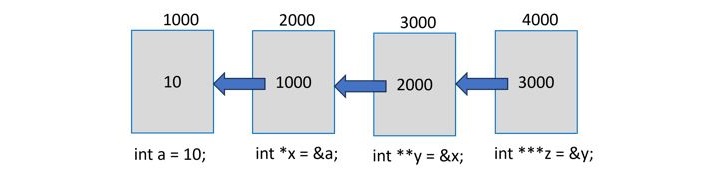
    A chain of pointers is when there are multiple levels of pointers. Theoretically, there is no limit to how many levels the chaining can be done, as shown in the following diagram −

    Chain of Pointers

    Declaration of Chain of Pointers

    This can be represented by the following code −

    int a =10;int*x =&a;int**y =&x;int***z =&y;

    In the above example, “x” is a pointer to an “int” type, as the notation “int *” indicates. To store the address of “x” in “y”, it should be a pointer to a pointer to int, i.e., “int **”.

    Similarly, “z” is a “pointer to a pointer to a pointer” to int, hence the asterisk appears thrice in its declaration, i.e., “int ***”.

    How Does the Dereferencing Work?

    We know that “*x” returns the value at the address stored in “x”, i.e., the value of “a”.

    Going by the same logic, “*y” should return its value (refer to the above diagram) which is 1000, which in turn is the address of “a”. Hence, the double dereferencing of “y” (i.e., “**y”) should give you the value of “a”.

    Further, a triple referencing of “z” as “***z” should give the value of “a”.

    Example

    The following example shows how “double dereferencing” and “triple dereferencing” work −

    #include <stdio.h>intmain(){int a =10;int*x =&a;int**y =&x;int***z =&y;printf("a: %d\n", a);printf("a: %d\n",*x);// dereferencing x;printf("a: %d\n",**y);// double dereferencing y;printf("a: %d\n",***z);// triple dereferencing z;return0;}

    Output

    Notice that all the three cases of dereferencing print the value of “a” −

    a: 10
    a: 10
    a: 10
    a: 10
    

    A Chain of Float Pointers

    We can follow the same logic to create a chain of float pointers and apply dereferencing of multiple levels to obtain the value of a float variable.

    Example

    The following example shows how you can work with a chain of float pointers −

    #include <stdio.h>intmain(){float a =10.25;float*x =&a;float**y =&x;float***z =&y;printf("a: %f\n", a);printf("a: %f\n",*x);printf("a: %f\n",**y);printf("a: %f\n",***z);return0;}

    Output

    Run the code and check its output −

    a: 10.250000
    a: 10.250000
    a: 10.250000
    a: 10.250000
    

    Updating the Original Variable by Dereferencing

    We can also update the value of the original variable by dereferencing. Take a look at the following statement −

    *x =11.25;

    It will change the value of “a” accordingly. Similarly, it can be updated with the pointer at subsequent levels.

    Example

    The following program shows how you can update the original variable using different levels of dereferencing −

    #include <stdio.h>intmain(){float a =10.25;;float*x =&a;float**y =&x;float***z =&y;printf("a: %f\n", a);// update with first pointer*x =11.25;printf("a: %f\n",*x);// update with second pointer**y =12.25;printf("a: %f\n",**y);// update with third pointer***z =13.25;printf("a: %f\n",***z);return0;}

    Output

    Run the code and check its output −

    a:10.250000
    a:11.250000
    a:12.250000
    a:13.250000
    

    A Chain of Character Pointers

    A string is represented as an array of “char” type or a pointer to “char” type −

    char*a ="Hello";

    Hence, we can create a chain of char pointers.

    Note: The only difference is, here the original variable itself is a pointer, so the upper-level pointers have one asterisk more, as compared to the earlier examples.

    Example

    The following example shows how a chain of character pointers works −

    #include <stdio.h>intmain(){char*a ="Hello";char**x =&a;char***y =&x;char****z =&y;printf("a: %s\n", a);printf("a: %s\n",*x);printf("a: %s\n",**y);printf("a: %s\n",***z);return0;}

    Output

    When you run this code, it will produce the following output −

    a: Hello
    a: Hello
    a: Hello
    a: Hello
    

    Chaining of pointers is useful for creating linked lists and other data structures.

  • Pointer to Pointer (Double Pointer)

    What is a Double Pointer in C?

    pointer to pointer which is also known as a double pointer in C is used to store the address of another pointer.

    A variable in C that stores the address of another variable is known as a pointer. A pointer variable can store the address of any type including the primary data types, arrays, struct types, etc. Likewise, a pointer can store the address of another pointer too, in which case it is called “pointer to pointer” (also called “double pointer”).

    A “pointer to a pointer” is a form of multiple indirection or a chain of pointers. Normally, a pointer contains the address of a variable. When we define a “pointer to a pointer”, the first pointer contains the address of the second pointer, which points to the location that contains the actual value as shown below −

    Pointer to Pointer

    Declaration of Pointer to a Pointer

    The declaration of a pointer to pointer (double pointer) is similar to the declaration of a pointer, the only difference is that you need to use an additional asterisk (*) before the pointer variable name.

    Example

    For example, the following declaration declares a “pointer to a pointer” of type int

    int**var;

    When a target value is indirectly pointed to by a “pointer to a pointer”, accessing that value requires that the asterisk operator be applied twice.

    Example of Pointer to Pointer (Double Pointer)

    The following example demonstrates the declaration, initialization, and using pointer to pointer (double pointer) in C:

    #include <stdio.h>intmain(){// An integer variableint a =100;// Pointer to integerint*ptr =&a;// Pointer to pointer (double pointer)int**dptr =&ptr;printf("Value of 'a' is : %d\n", a);printf("Value of 'a' using pointer (ptr) is : %d\n",*ptr);printf("Value of 'a' using double pointer (dptr) is : %d\n",**dptr);return0;}

    Output

    Value of 'a' is : 100
    Value of 'a' using pointer (ptr) is : 100
    Value of 'a' using double pointer (dptr) is : 100
    

    How Does a Normal Pointer Work in C?

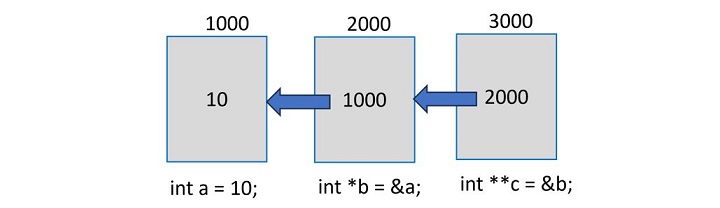
    Assume that an integer variable “a” is located at an arbitrary address 1000. Its pointer variable is “b” and the compiler allocates it the address 2000. The following image presents a visual depiction −

    Normal Pointer

    Let us declare a pointer to int type and store the address of an int variable in it.

    int a =10;int*b =&a;

    The dereference operator fetches the value via the pointer.

    printf("a: %d \nPointer to 'a' is 'b': %d \nValue at 'b': %d", a, b,*b);

    Example

    Here is the complete program that shows how a normal pointer works −

    #include <stdio.h>intmain(){int a =10;int*b =&a;printf("a: %d \nPointer to 'a' is 'b': %d \nValue at 'b': %d", a, b,*b);return0;}

    Output

    It will print the value of int variable, its address, and the value obtained by the dereference pointer −

    a: 10 
    Pointer to 'a' is 'b': 6422036 
    Value at 'b': 10
    

    How Does a Double Pointer Work?

    Let us now declare a pointer that can store the address of “b”, which itself is a pointer to int type written as “int *”.

    Let’s assume that the compiler also allocates it the address 3000.

    Double Pointer

    Hence, “c” is a pointer to a pointer to int, and should be declared as “int **”.

    int**c =&b;printf("b: %d \nPointer to 'b' is 'c': %d \nValue at b: %d\n", b, c,*c);

    You get the value of “b” (which is the address of “a”), the value of “c” (which is the address of “b:), and the dereferenced value from “c” (which is the address of “a”) −

    b:6422036 
    Pointer to b is c:6422024 
    Value at b:6422036

    Here, “c” is a double pointer. The first asterisk in its declaration points to “b” and the second asterisk in turn points to “a”. So, we can use the double reference pointer to obtain the value of “a” from “c”.

    printf("Value of 'a' from 'c': %d",**c);

    This should display the value of ‘a’ as 10.

    Example

    Here is the complete program that shows how a double pointer works −

    #include <stdio.h>intmain(){int a =10;int*b =&a;printf("a: %d \nAddress of 'a': %d \nValue at a: %d\n\n", a, b,*b);int**c =&b;printf("b: %d \nPointer to 'b' is c: %d \nValue at b: %d\n", b, c,*c);printf("Value of 'a' from 'c': %d",**c);return0;}

    Output

    Run the code and check its output −

    a: 10 
    Address of 'a': 1603495332 
    Value at a: 10
    
    b: 1603495332 
    Pointer to 'b' is c: 1603495336 
    Value at b: 1603495332
    Value of 'a' from 'c': 10
    

    A Double Pointer Behaves Just Like a Normal Pointer

    A “pointer to pointer” or a “double pointer” in C behaves just like a normal pointer. So, the size of a double pointer variable is always equal to a normal pointer.

    We can check it by applying the sizeof operator to the pointers “b” and “c” in the above program −

    printf("Size of b - a normal pointer: %d\n",sizeof(b));printf("Size of c - a double pointer: %d\n",sizeof(c));

    This shows the equal size of both the pointers −

    Size of b - a normal pointer:8
    Size of c - a double pointer:8

    Note: The size and address of different pointer variables shown in the above examples may vary, as it depends on factors such as CPU architecture and the operating system. However, they will show consistent results.

    Multilevel Pointers in C (Is a Triple Pointer Possible?)

    Theoretically, there is no limit to how many asterisks can appear in a pointer declaration.

    If you do need to have a pointer to “c” (in the above example), it will be a “pointer to a pointer to a pointer” and may be declared as −

    int***d =&c;

    Mostly, double pointers are used to refer to a two−dimensional array or an array of strings.