Category: 10. Arrays

https://cdn3d.iconscout.com/3d/premium/thumb/cube-array-3d-icon-png-download-9708096.png

  • Dynamic Arrays

    An array in C is normally static in nature. We need to give it a fixed size when it is initialized and we cannot change the size of the array after its declaration. It may sometimes cause errors because we may encounter a scenario where our array does not have enough space left for the required elements or we allotted more than required memory leading to memory wastage. To overcome this issue, we use dynamic arrays in C programming. In this chapter, we will explain in detail how dynamic arrays work in C programming.

    What are Dynamic Arrays?

    A dynamic array is a type of array which allocates memory at runtime, and its size can be changed later on in the program.

    Following are the functions to create a dynamic array in C programming language −

    • malloc() Function
    • calloc() Function
    • realloc() Function

    Read this chapter to learn how to use these functions to creating dynamic arrays.

    Dynamic Array Using malloc() Function

    The malloc function (memory allocation) in C is used to dynamically allocate a single large block of memory of the specified size. It returns a pointer of type void*, which can be typecast to a pointer of any data type. The malloc function in C is defined in the <stdlib.h> header file.

    Following is the syntax of malloc() function −

    ptr =(cast-type*)malloc(byte-size);

    We can use this function to create a dynamic array in C by simply allocating a memory block of the required size and typecasting the returned void pointer to the required type. For example, let’s create a dynamic array of type int with 100 elements.

    ptr =(int*)malloc(100*sizeof(int));

    Example: Creating a Dynamic Array using malloc Function

    #include <stdio.h>#include <stdlib.h>intmain(){int* ptr;int n;printf("Enter size of elements: ");scanf("%d",&n);// Memory allocated dynamically using malloc()
    
    ptr =(int*)malloc(n *sizeof(int));// Checking for memory allocationif(ptr ==NULL){printf("Memory not allocated.\n");}else{printf("Memory successfully allocated using malloc.\n");// Assigning valuesfor(int i =0; i &lt; n;++i){
            ptr&#91;i]= i +1;}// Printing valuesprintf("The elements of the array are: ");for(int j =0; j &lt; n;++j){printf("%d ", ptr&#91;j]);}printf("\n");// Free allocated memoryfree(ptr);}return0;}</code></pre>

    In this C program, we create a dynamic array using the malloc() function −

    In this example, we dynamically allocate memory based on the size entered by the user. After allocation, we assign values to each element of the array and then display them.

    For example, if the user enters 5, the program allocates memory for 5 integers and stores the values 1, 2, 3, 4, 5.

    Enter size of elements:5
    Memory successfully allocated using malloc.
    The elements of the array are: 1, 2, 3, 4, 5,
    

    Dynamic Array Using calloc() Function

    The "calloc" method, commonly known as the "contiguous allocation" method in C, dynamically allocates the requested number of memory blocks of the specified type and initializes each block with a default block of 0.

    The process of creating a dynamic array is similar to the malloc() function. The difference is that calloc() takes two arguments instead of one as compared to malloc(). So in the calloc() function we provide the size of each element and the number of elements required in the dynamic array. Also, each element in the array is initialized to zero.

    Following is the syntax of calloc() function −

    ptr =(cast-type*)calloc(n, element-size);

    In the syntax below, we have created a dynamic array of type float with six elements.

    ptr =(int*)calloc(6,sizeof(float));

    Example: Creating a Dynamic Array using calloc Function

    Let’s see a C program to create a dynamic array using the "calloc()" function −

    #include <stdio.h>#include <stdlib.h>intmain(){int* ptr;int len;// Size of the arrayprintf("Enter size of elements:");scanf("%d",&len);// use calloc
       ptr =(int*)calloc(len,sizeof(int));if(ptr ==NULL){printf("Memory not allocated.\n");}else{printf("Memory successfully allocated using ""calloc.\n");for(int i =0; i < len;++i){
    
         ptr&#91;i]= i +1;}printf("The elements of the array are: ");for(int j =0; j &lt; len;++j){printf("%d, ", ptr&#91;j]);}}return0;}</code></pre>

    In the above example, we dynamically allocate memory using the calloc() function based on the size entered by the user. Unlike malloc()calloc() initializes all the allocated memory blocks to zero before assigning values. After allocation, we store values in each element of the array and then display them.

    If the user enters 7, the program allocates memory for 7 integers and stores the values 1, 2, 3, 4, 5, 6, 7.

    Enter size of elements:7
    Memory successfully allocated using calloc.
    The elements of the array are: 1, 2, 3, 4, 5, 6, 7,
    

    Dynamic Resizing of an Array Using realloc() Function

    The realloc() function, or re-allocation, is used to dynamically change the memory size of a previously allocated block.

    Following is the syntax of realloc() function −

    ptr =realloc(ptr, newSize);

    Example: Resizing an Array using realloc Function

    Let's create a C program example to understand the realloc() function and how we can resize a dynamic array using it −

    #include <stdio.h>#include <stdlib.h>intmain(){int* ptr;int len =5;//  Memory allocates dynamically using calloc()
       ptr =(int*)calloc(len,sizeof(int));if(ptr ==NULL){printf("Memory not allocated.\n");exit(0);}else{printf("Memory successfully allocated using ""calloc.\n");}for(int i =0; i < len;++i){
    
      ptr&#91;i]= i +1;}printf("The elements of the array are: ");for(int j =0; j &lt; len;++j){printf("%d, ", ptr&#91;j]);}printf("\n");
    len =10;int*temp = ptr;// using realloc ptr =realloc(ptr, len *sizeof(int));if(!ptr){printf("Memory Re-allocation failed.");
      ptr = temp;}else{printf("Memory successfully re-allocated using realloc.\n");}// inserting new elementsfor(int i =5; i &lt; len;++i){
      ptr&#91;i]= i +10;}printf("The new elements of the array are: ");for(int j =0; j &lt; len;++j){printf("%d, ", ptr&#91;j]);}return0;}</code></pre>

    In this program, memory is first allocated dynamically for 5 integers using calloc(), where the values 1 to 5 are stored and displayed. After that, the memory block is expanded to hold 10 integers using realloc(), and new values are assigned to the additional elements. Finally, the complete array with both the old and new values is printed.

    Memory successfully allocated using calloc.
    The elements of the array are: 1, 2, 3, 4, 5, 
    Memory successfully re-allocated using realloc.
    The new elements of the array are: 1, 2, 3, 4, 5, 15, 16, 17, 18, 19,
    

    Difference: malloc(), calloc(), and realloc()

    The following table compares and contrasts the features of these three functions: malloc, calloc, and realloc −

    FunctionPurposeInitializationSyntaxReturn Value
    malloc()Allocates a single block of memory of given size.If memory is not initialize (contains garbage value)ptr = (int*)malloc(n * sizeof(int));Returns a pointer to the allocated block, or NULL if allocation fails.
    calloc()Allocates multiple blocks and initialize themAll allocated bytes are set to zeroptr = (int*)calloc(n, sizeof(int));Returns a pointer to the allocated block, or NULL if allocation fails.
    realloc()Resized the size of already allocated blockWhen you increase the size of memory, existing value are remains unchanged. And the newly allocated part is not initialized so it contains garbage value.ptr = (int*)realloc(ptr, new_size);Returns a pointer to the allocated block, or NULL if reallocation fails.

    Conclusion

    Dynamic arrays in C provide flexibility by allowing memory to be allocated and resized at runtime using functions like malloc(), calloc(), and realloc(). Unlike static arrays, they help optimize memory usage and handle scenarios where the required size is not known in advance.
  • Variable Length Arrays

    A variable length array in C is also called a variable-sized or runtime-sized array. It is an array whose length is determined at the runtime rather than at the time of compiling the program. Its size depends on a value generated during the runtime of a program, usually received as an input from the user.

    Usually, the array size is declared beforehand in the program as follows −

    int arr[10];

    The size of an array, once declared, remains fixed during the execution of a program and cannot be changed during its runtime. However, in case of a Variable Length Array (VLA), the compiler allocates the memory with automatic storage duration on the stack. The support for VLAs was added in the C99 standard.

    Creating a Variable Length Array

    The syntax for creating a variable length arrays is as follows −

    voidarr_init(int length){int arr[length];//code using arr;};

    Example

    The following example demonstrates how you can create a variable length array −

    #include <stdio.h>intmain(){int i, j;int size;// variable to hold size of one-dimensional arrayprintf("Enter the size of one-dimensional array: ");scanf("%d",&size);int arr[size];for(i =0; i < size;++i){printf("Enter a number: ");scanf("%d",&j);
    
      arr&#91;i]= j;}for(i =0; i &lt; size;++i)printf("a&#91;%d]: %d\n", i, arr&#91;i]);return0;}</code></pre>

    Output

    When you run this code, it will ask you enter the size of the array. Notice that the length of the array is not fixed at the time of declaration. You define its size at runtime.

    Enter the size of one-dimensional array: 5
    Enter a number: 1
    Enter a number: 5
    Enter a number: 7
    Enter a number: 8
    Enter a number: 7
    
    a[0]: 1
    a[1]: 5
    a[2]: 7
    a[3]: 8
    a[4]: 7
    

    Two-dimensional Variable Length Arrays

    We can also declare and use a two-dimensional variable length array.

    Example 1

    Take a look at the following example −

    #include <stdio.h>intmain(){int i, j, x;int row, col;// number of rows & columns of two D arrayprintf("Enter number of rows & columns of 2-D array:\n");scanf("%d %d",&row,&col);int arr2D[row][col];for(i =0; i < row;++i){for(j =0; j < col;++j){printf("Enter a number: ");scanf("%d",&x);
    
         arr2D&#91;i]&#91;j]= x;}}for(i =0; i &lt; row;++i){printf("\n");for(j =0; j &lt; col;++j)printf("%d\t", arr2D&#91;i]&#91;j]);}return0;}</code></pre>

    Output

    Run the code and check its output −

    Enter number of rows & columns of 2-D array:
    2
    3
    Enter a number: 10
    Enter a number: 20
    Enter a number: 30
    Enter a number: 40
    Enter a number: 50
    Enter a number: 60
    10	20	30	
    40	50	60
    

    Example 2

    The following code declares a variable length one-dimensional array and populates it with incrementing numbers −

    #include <stdio.h>intmain(){int n;printf("Enter the size of the array: \n");scanf("%d",&n);int arr[n];for(int i =0; i < n; i++)
    
      arr&#91;i]= i+1;printf("The array elements are: ");for(int i =0; i &lt; n; i++)printf("%d ", arr&#91;i]);return0;}</code></pre>

    Output

    Run the code and check its output −

    Enter the size of the array: 
    5
    The array elements are: 1 2 3 4 5 ....
    

    Example 3

    The following code fills the variable length array with randomly generated numbers using the functions srand() and rand() from the stdlib.h header file.

    #include <stdio.h>#include <stdlib.h>#include <time.h>voidoneDArray(int length,int a[length]);// function prototypevoidtwoDArray(int row,int col,int a[row][col]);// function prototypeintmain(){int i, j;// counter variableint size;// variable to hold size of one dimensional arrayint row, col;// number of rows & columns of two D arraysrand(time(NULL));printf("Enter the size of one-dimensional array: ");scanf("%d",&size);printf("Enter the number of rows & columns of 2-D array:\n");scanf("%d %d",&row,&col);// declaring arraysint arr[size];// 2-D arrayint arr2D[row][col];// one dimensional arrayfor(i =0; i < size;++i){
    
      arr&#91;i]=rand()%100+1;}// two dimensional arrayfor(i =0; i &lt; row;++i){for(j =0; j &lt; col;++j){
         arr2D&#91;i]&#91;j]=rand()%100+1;}}// printing arraysprintf("One-dimensional array:\n");// oneDArray(size, arr);for(i =0; i &lt; size;++i)printf("a&#91;%d]: %d\n", i, arr&#91;i]);printf("\nTwo-dimensional array:\n");// twoDArray(row1, col1, arr2D);for(i =0; i &lt; row;++i){printf("\n");for(j =0; j &lt; col;++j)printf("%5d", arr2D&#91;i]&#91;j]);}}</code></pre>

    Output

    Run the code and check its output −

    Enter the size of one-dimensional array: 5
    Enter the number of rows & columns of 2-D array:
    4 4
    One-dimensional array:
    a[0]: 95
    a[1]: 93
    a[2]: 4
    a[3]: 52
    a[4]: 68
    
    Two-dimensional array:
       92   19   79   23
       56   21   44   98
    
    8   22   89   54
    93 1 63 38

    Jagged Array

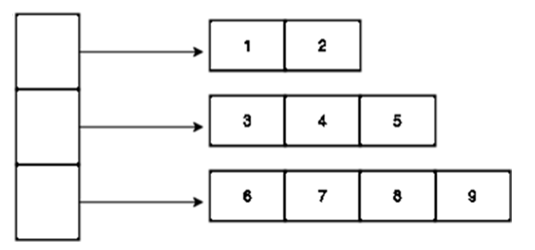
    A jagged array is a collection of two or more arrays of similar data types of variable length. In C, the concept of jagged array is implemented with the help of pointers of arrays.

    A jagged array is represented by the following figure −

    A Jagged Array

    Example

    In this program, we declare three one-dimensional arrays of different sizes and store their pointers in an array of pointers that acts as a jagged array.

    #include <stdio.h>intmain(){int a[]={1,2};int b[]={3,4,5};int c[]={6,7,8,9};int l1 =sizeof(a)/sizeof(int), 
       l2 =sizeof(b)/sizeof(int), 
       l3 =sizeof(c)/sizeof(int);int*arr[]={a,b,c};int size[]={l1, l2, l3};int*ptr;int i, j, k =0;for(i =0; i <3; i++){
    
      ptr = arr&#91;i];for(j =0; j &lt; size&#91;k]; j++){printf("%d\t",*ptr);
         ptr++;}printf("\n");
      k++;
      arr&#91;i]++;}return0;}</code></pre>

    Output

    When you run this code, it will produce the following output −

    1       2
    3       4       5
    6       7       8       9
    

    VLA is a fast and more straightforward option compared to heap allocation. VLAs are supported by most modern C compilers such as GCC, Clang etc. and are used by most compilers.

  • Return array from function

    Functions in C help the programmers to adapt modular program design. A function can be defined to accept one or more than one arguments, it is able to return a single value to the calling environment. However, the function can be defined to return an array of values. In C, a function can be made to return an array by one of following methods −

    • Passing the array as argument and returning the pointer
    • Declaring a static array in a function and returning its pointer
    • Using malloc() function

    Embedding the array inside a struct variable and passing it to a function

    We implement these methods to calculate the square, the cube and the square root of a given number.

    Pass array by reference

    In the following example, we declare an uninitialized array in main() and pass it to a function, along with an integer. Inside the function, the array is filled with the square, cube and square root. The function returns the pointer of this array, using which the values are access and printed in main() function.

    Example

    #include <stdio.h>#include <math.h>intarrfunction(int,float*);intmain(){int x=100;float arr[3];arrfunction(x, arr);printf("Square of %d: %f\n", x, arr[0]);printf("cube of %d: %f\n", x, arr[1]);printf("Square root of %d: %f\n", x, arr[2]);return0;}intarrfunction(int x,float*arr){
       arr[0]=pow(x,2);
       arr[1]=pow(x,3);
       arr[2]=pow(x,0.5);}

    Output

    Square of 100: 10000.000000
    cube of 100: 1000000.000000
    Square root of 100: 10.000000
    

    Return static array

    Instead of passing an empty array from main(), we can declare an array inside the called function itself, fill it with the required values, and return its pointer. However, returning a pointer of a local variable is not acceptable, as it points to a variable that no longer exists. Note that a local variable ceases to exist as soon as the scope of the function is over. Hence, we need to use a static array inside the called function (arrfunction) and return its pointer back to main().

    Example

    #include <stdio.h>#include <math.h>float*arrfunction(int);intmain(){int x=100, i;float*arr =arrfunction(x);printf("Square of %d: %f\n", x,*arr);printf("cube of %d: %f\n", x, arr[1]);printf("Square root of %d: %f\n", x, arr[2]);return0;}float*arrfunction(int x){staticfloat arr[3];
       arr[0]=pow(x,2);
       arr[1]=pow(x,3);
       arr[2]=pow(x,0.5);return arr;}

    Output

    Square of 100: 10000.000000
    cube of 100: 1000000.000000
    Square root of 100: 10.000000
    

    Now, consider the following function which will generate 10 random numbers and return them using an array and call this function as follows −

    Example

    #include <stdio.h>#include <time.h>#include <stdlib.h>/* function to generate and return random numbers */int*getRandom(){staticint  r[10];int i;/* set the seed */srand((unsigned)time(NULL));for( i =0; i <10;++i){
    
      r&#91;i]=rand();printf("r&#91;%d] = %d\n", i, r&#91;i]);}return r;}/* main function to call above defined function */intmain(){/* a pointer to an int */int*p;int i;
    p =getRandom();for( i =0; i <10; i++){printf("*(p + %d) : %d\n", i,*(p + i));}return0;}

    When the above code is compiled together and executed, it produces the following result −

    Output

    r[0] = 2110147662
    r[1] = 1427553496
    r[2] = 1243625529
    r[3] = 857484361
    r[4] = 513293736
    r[5] = 964923407
    r[6] = 36104419
    r[7] = 1248464892
    r[8] = 1838450240
    r[9] = 2096489563
    *(p + 0) : 2110147662
    *(p + 1) : 1427553496
    *(p + 2) : 1243625529
    *(p + 3) : 857484361
    *(p + 4) : 513293736
    *(p + 5) : 964923407
    *(p + 6) : 36104419
    *(p + 7) : 1248464892
    *(p + 8) : 1838450240
    *(p + 9) : 2096489563
    

    Using malloc() function

    The malloc() function is available as a library function in stdlib.h header file. It dynamically allocates a block of memory during the runtime of a program. Normal declaration of variables causes the memory to be allocated at the compile time.

    void*malloc(size_t size);

    The malloc() function returns a generic void pointer. To assign values of a certain data type in the allocated memory, it must be typecast to the required type. For example, to store an int data, it must be typecast to int * as follows −

    int*x =(int*)malloc(sizeof(int);

    Let us allocate a block of memory sufficient to store three float values corresponding to square, cube and square root of a number, and return the float pointer to main(), inside which the computed values are displayed.

    Example

    #include <stdio.h>#include <math.h>#include <stdlib.h>float*arrfunction(int);intmain(){int x=16, i;float*arr =arrfunction(x);printf("Square of %d: %f\n", x, arr[0]);printf("cube of %d: %f\n", x, arr[1]);printf("Square root of %d: %f\n", x, arr[2]);return0;}float*arrfunction(int x){float*arr =(float*)malloc(3*sizeof(float));
       arr[0]=pow(x,2);
       arr[1]=pow(x,3);
       arr[2]=pow(x,0.5);return arr;}

    Output

    Square of 16: 256.000000
    cube of 16: 4096.000000
    Square root of 16: 4.000000
    

    Using array element in struct

    In this method, we will declare a struct, inside which there is an float array as its element. The called function (myfunction) declares a struct variable, populates the array element with square, cube and the square root of the argument received by it, and returns it to the main() function.

    Example

    #include <stdio.h>#include <math.h>structmystruct{float arr[3];};structmystructmyfunction(int x);intmain(){int x =9;structmystruct s =myfunction(x);printf("Square of %d: %f\n", x, s.arr[0]);printf("cube of %d: %f\n", x, s.arr[1]);printf("Square root of %d: %f\n", x, s.arr[2]);return0;}structmystructmyfunction(int x){structmystruct s1;
       s1.arr[0]=pow(x,2);
       s1.arr[1]=pow(x,3);
       s1.arr[2]=pow(x,0.5);return s1;}

    Output

    Square of 9: 81.000000
    cube of 9: 729.000000
    Square root of 9: 3.000000
    

    Return string from function

    Using the same approaches, you can pass and return a string to a function. A string in C is an array of char type. In the following example, we pass the string with a pointer, manipulate it inside the function, and return it back to main().

    Inside the called function, there is a local string. The string passed is concatenated with the local string before returning.

    Example

    #include <stdio.h>#include <string.h>#include <stdlib.h>char*hellomsg(char*);intmain(){char* name ="TutorialsPoint";char*arr =hellomsg(name);printf("%s\n", arr);return0;}char*hellomsg(char*x){char*arr =(char*)malloc(50*sizeof(char));strcpy(arr,"Hello ");strcat(arr, x);return arr;}

    Output

    Hello TutorialsPoint
    
  • Passing Arrays as Function Arguments

    If you want to pass an array to a function, you can use either call by value or call by reference method. In call by value method, the argument to the function should be an initialized array, or an array of fixed size equal to the size of the array to be passed. In call by reference method, the function argument is a pointer to the array.

    Pass array with call by value method

    In the following code, the main() function has an array of integers. A user−defined function average () is called by passing the array to it. The average() function receives the array, and adds its elements using a for loop. It returns a float value representing the average of numbers in the array.

    Example

    #include <stdio.h>floataverage(int arr[5]);intmain(){int arr[]={10,34,21,78,5};float avg =average(arr);printf("average: %f", avg);}floataverage(int arr[5]){int sum=0;int i;for(i=0; i<5; i++){printf("arr[%d]: %d\n", i, arr[i]);
    
      sum+=arr&#91;i];}return(float)sum/5;}</code></pre>

    Output

    arr[0]: 10
    arr[1]: 34
    arr[2]: 21
    arr[3]: 78
    arr[4]: 5
    average: 29.600000
    

    In the following variation, the average() function is defined with two arguments, an uninitialized array without any size specified. The length of the array declared in main() function is obtained by divising the size of the array with the size of int data type.

    Example

    #include <stdio.h>floataverage(int arr[],int length);intmain(){int arr[]={10,34,21,78,5};int length =sizeof(arr)/sizeof(int);float avg =average(arr, length);printf("average: %f", avg);}floataverage(int arr[],int length){int sum=0;int i;for(i=0; i<length; i++){printf("arr[%d]: %d\n", i, arr[i]);
    
      sum+=arr&#91;i];}return(float)sum/length;}</code></pre>

    Output

    arr[0]: 10
    arr[1]: 34
    arr[2]: 21
    arr[3]: 78
    arr[4]: 5
    average: 29.600000
    

    Pass array with call by reference

    To use this approach, we should understand that elements in an array are of similar data type, stored in continuous memory locations, and the array size depends on the data type. Also, the address of the 0th element is the pointer to the array.

    In the following example −

    int a[5]={1,2,3,4,5};

    The size of the array is 20 bytes (4 bytes for each int)

    Int *x = a;

    Here x is the pointer to the array. It points to the 0th element. If the pointer is incremented by 1, it points to the next element.

    Example

    #include <stdio.h>intmain(){int a[]={1,2,3,4,5};int*x = a, i;for(i=0; i<5; i++){printf("%d\n",*x);
    
      x++;}return0;}</code></pre>

    Output

    1
    2
    3
    4
    5
    

    Let us use this characteristics for passing the array by reference. In the main() function, we declare an array and pass its address to the max() function. The max() function traverses the array using the pointer and returns the largest number in the array, back to main() function.

    Example

    #include <stdio.h>intmax(int*arr,int length);intmain(){int arr[]={10,34,21,78,5};int length =sizeof(arr)/sizeof(int);int maxnum =max(arr, length);printf("max: %d", maxnum);}intmax(int*arr,int length){int max=*arr;int i;for(i=0; i<length; i++){printf("arr[%d]: %d\n", i,(*arr));if((*arr)>max)
    
         max =(*arr);
      arr++;}return max;}</code></pre>

    Output

    arr[0]: 10
    arr[1]: 34
    arr[2]: 21
    arr[3]: 78
    arr[4]: 5
    max: 78
    

    The max() function receives the address of the array from main() in the pointer arr. Each time, when it is incremented, it points to the next element in the original array.

    The max() function can also access the array elements as a normal subscripted array as in the following definition −

    intmax(int*arr,int length){int max=*arr;int i;for(i=0; i<length; i++){printf("arr[%d]: %d\n", i, arr[i]);if(arr[i]>max)
    
         max = arr&#91;i];}return max;}</code></pre>

    Pass two−dimensional array to function

    You can also pass the pointer of a two-dimensional array to a function. Inside the function, the two dimensional array is traversed with a nested for loop construct

    Example

    #include <stdio.h>inttwoDarr(int*arr);intmain(){int arr[][3]={10,34,21,78,5,25};twoDarr(*arr);}inttwoDarr(int*arr){int max=*arr;int i, j;for(i=0; i<2; i++){for(j=0; j<3; j++){printf("%d\t", arr[i]);
    
         arr++;}printf("\n");}}</code></pre>

    Output

    10      34      21
    5       25      16
    

    Function to compare string lengths

    In the following program, two strings are passed to compare() functions. In C, as string is an array of char data type. We use strlen() function to find the length of string which is the number of characters in it.

    Example

    #include <stdio.h>#include <string.h>intcompare(char*,char*);intmain(){char  a[]="BAT";char  b[]="BALL";int ret =compare(a, b);return0;}intcompare(char*x,char*y){int val;if(strlen(x)>strlen(y)){printf("length of string a is greater than or equal to length of string b");}else{printf("length of string a is less than length of string b");}}

    Output

    length of string a is less than length of string b
    
  • Multi-dimensional Arrays

    The array is declared with one value of size in square brackets, it is called one dimensional array. In a one dimensional array, each element is identified by its index or subscript. In C, you can declare with more indices to simulate a two, three or multidimensional array.

    Multidimensional Arrays in C

    Multi-dimensional arrays can be termed as nested arrays. In such a case, each element in the outer array is an array itself. Such type of nesting can be upto any level. If each element in the outer array is another one-dimensional array, it forms a two-dimensional array. In turn, the inner array is an array of another set of one dimensional array, it is a three-dimensional array, and so on.

    Declaration of Multidimensional Arrays

    Depending on the nesting level, the multi-dimensional array is declared as follows −

    type name[size1][size2]...[sizeN];

    For example, the following declaration creates a three dimensional integer array −

    int threedim[3][3][3];

    A multidimensional array can have any number of dimensions. In this tutorial, we will learn about the two commonly used types of multidimensional arrays:

    1. Two-dimensional Array
    2. Three-dimensional Array

    Two-dimensional Array in C

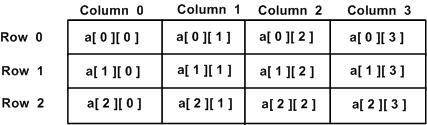
    A two-dimensional array in an array of one-dimensional arrays. Each element of a two-dimensional array is an array itself. It is like a table or a matrix. The elements can be considered to be logically arranged in rows and columns. Hence, the location of any element is characterised by its row number and column number. Both row and column index start from 0.

    two_dimensional_arrays

    Declaration and Initialization of Two-dimensional Array

    The following statement declares and initializes a two-dimensional array −

    int arr[3][5]={1,2,3,4,5,10,20,30,40,50,5,10,15,20,25};

    The arr array has three rows and five columns. In C, a two dimensional array is a row−major array. The first square bracket always represents the dimension size of rows, and the second is the number of columns. Obviously, the array has 3 X 5 = 15 elements. The array is initialized with 15 comma−separated values put inside the curly brackets.

    Elements are read into the array in a row−wise manner, which means the first 5 elements are stored in first row, and so on. Hence, the first dimension is optional in the array declaration.

    int arr[][5]={1,2,3,4,5,10,20,30,40,50,5,10,15,20,25};

    To increase the readability, elements of each row can be optionally put in curly brackets as follows −

    int arr[][5]={{1,2,3,4,5},{10,20,30,40,50},{5,10,15,20,25}};

    The numbers are logically arranged in a tabular manner as follows −

    12345
    1020304050
    510152025

    The cell with row index 1 and column index 2 has 30 in it.

    Example of Printing Elements of Two-dimensional Array

    The program below displays the row and column indices of each element in a 2D array −

    #include <stdio.h>intmain(){/* an array with 5 rows and 2 columns*/int a[5][2]={{0,0},{1,2},{2,4},{3,6},{4,8}};int i, j;/* output each array element's value */for( i =0; i <5; i++){for( j =0; j <2; j++){printf("a[%d][%d] = %d\n", i,j, a[i][j]);}}return0;}

    Output

    a[0][0] = 0
    a[0][1] = 0
    a[1][0] = 1
    a[1][1] = 2
    a[2][0] = 2
    a[2][1] = 4
    a[3][0] = 3
    a[3][1] = 6
    a[4][0] = 4
    a[4][1] = 8
    

    In case of a two or multi-dimensional array, the compiler assigns a memory block of the size which is the product of dimensions multiplied by the size of the data type. In this case, the size is 3 X 5 X 4 = 60 bytes, 4 being the size of int data type.

    Even though all the elements are stored in consecutive memory locations, we can print the elements in row and column format with the use of nested loops.

    Example of Printing Two-dimensional Array as Matrix in Row and Columns

    The following program prints a two-dimensional array in row and columns.

    #include <stdio.h>intmain(){int arr[3][5]={1,2,3,4,5,10,20,30,40,50,5,10,15,20,25};int i, j;for(i=0; i<3; i++){for(j=0; j<5; j++){printf("%4d", arr[i][j]);}printf("\n");}return0;}

    Output

       1   2   3   4   5
      10  20  30  40  50
       5  10  15  20  25
    

    Three-dimensional Array in C

    A three-dimensional array is an array of two-dimensional arrays, where each element is a two-dimensional array. A 3D array needs three subscripts to define depth, row, and column.

    Imagine the students appearing for an exam are seated in five halls, each hall having twenty rows of desks, and each row has 5 tables. Such an arrangement is represented by a three dimensional array such as −

    Students[hall][row][column]

    To locate each student, you need to have three indices, hall number, row and column of his table in the hall.

    Example of Three-dimensional Array

    The following program stores numbers in a 3 X 3 X 3 array −

    #include<stdio.h>intmain(){int i, j, k;int arr[3][3][3]={{{11,12,13},{14,15,16},{17,18,19}},{{21,22,23},{24,25,26},{27,28,29}},{{31,32,33},{34,35,36},{37,38,39}},};printf("Printing 3D Array Elements\n");for(i=0;i<3;i++){for(j=0;j<3;j++){for(k=0;k<3;k++){printf("%4d",arr[i][j][k]);}printf("\n");}printf("\n");}return0;}

    Output

    Printing 3D Array Elements
      11  12  13
      14  15  16
      17  18  19
    
      21  22  23
      24  25  26
      27  28  29
    
      31  32  33
      34  35  36
      37  38  39
    

    Row-wise Sum of Multidimensional Array’s Elements

    You can find the sum of all elements row-wise or column-wise by accessing the elements using indices. In the case of a three-dimensional array, you need to use depth, row, and column indices. And, in the case of a two-dimensional array, you need to use row and column indices. Here, we are using a two-dimensional array.

    Example: Row-wise Sum of Numbers

    In the following program, sum of integer elements in each row of a two-dimensional array is displayed.

    #include <stdio.h>intmain(){int arr[3][5]={{1,2,3,4,5},{10,20,30,40,50},{5,10,15,20,25}};int i, j;int sum;for(i=0; i<3; i++){
    
      sum=0;for(j=0; j&lt;5; j++){
         sum+=arr&#91;i]&#91;j];}printf("Sum of row %d: %d\n", i, sum);}return0;}</code></pre>

    Output

    Sum of row 0: 15
    Sum of row 1: 150
    Sum of row 2: 75
    

    Matrix Multiplication

    Matrix algebra is a branch of mathematics, where a matrix is a 2D array of numbers arranged in rows and columns. Multiplication of two matrices is possible only if the number of columns of the first matrix is equal to the number of rows of the second matrix. The product of two compatible matrices is equal to the dot products between rows of the first matrix and columns of the second matrix.

    If the two matrices are of size a[m][n] and b[p][q], the result of their multiplication is a matrix of the size (the multiplication is possible only if n is equal to p) is c[m][q].

    The product of two matrices, is the sum of the products across some row of matrix A with the corresponding entries down some column of matrix B.

    Example of Multiplication of Two-dimensional Array (Matrix)

    The following program performs the multiplication of two matrices.

    #include<stdio.h>intmain(){int mat1[3][3]={{2,4,1},{2,3,9},{3,1,8}};int mat2[3][3]={{1,2,3},{3,6,1},{2,4,7}};int mat3[3][3], sum=0, i, j, k;for(i=0; i<3; i++){for(j=0; j<3; j++){
    
         sum=0;for(k=0; k&lt;3; k++)
            sum = sum + mat1&#91;i]&#91;k]* mat2&#91;k]&#91;j];
         mat3&#91;i]&#91;j]= sum;}}printf("\nMatrix 1 ...\n");for(i=0; i&lt;3; i++){for(j=0; j&lt;3; j++)printf("%d\t", mat1&#91;i]&#91;j]);printf("\n");}printf("\nMatrix 2 ...\n");for(i=0; i&lt;3; i++){for(j=0; j&lt;3; j++)printf("%d\t", mat2&#91;i]&#91;j]);printf("\n");}printf("\nMultiplication of the two given Matrices: \n");for(i=0; i&lt;3; i++){for(j=0; j&lt;3; j++)printf("%d\t", mat3&#91;i]&#91;j]);printf("\n");}return0;}</code></pre>

    Output

    Matrix 1 ...
    2       4       1
    2       3       9
    3       1       8
    
    Matrix 2 ...
    1       2       3
    3       6       1
    2       4       7
    
    Multiplication of the two given Matrices:
    16      32      17
    29      58      72
    22      44      66
    
  • Properties of Array

    Arrays are a very important data structure in C. Use of array in C program makes it easier to handle large amount of data. Arrays have a number of advantages over singular variables as a result of their number of properties. Most of the important properties of array are a result of its composition − that an array is a collection of values of same data type, and in a continuous block of memory.

    Array properties may change in the different programming languages. In C programming language, the following are the main properties of arrays:

    • Collection of Same Data Type
    • Contiguous Memory Allocation
    • Fixed Size
    • Length Depends on Type
    • Indexing
    • Pointer Relationship
    • Lower and Upper Bounds
    • Multi-dimensional Array
    • Implementation of Complex Data Structures

    Let us discuss each property in detail.

    Collection of Same Data Type

    All elements of an array must be of the same data type. This ensures consistent access and operations on the data.

    If an array is declared as follows −

    int arr[]={50,67.55,"hello",21};

    Compiler issues a warning −

    initialization of 'int' from 'char *' makes integer from pointer without a cast 
    [-Wint-conversion]|

    Contiguous Memory Allocation

    All elements of an array are stored in contiguous memory locations, meaning they occupy a block of memory next to each other. This allows for efficient random access and memory management.

    Contiguous Memory Allocation

    Fixed Size

    The size of an array is fixed at the time of declaration and cannot be changed during the program’s execution. This means you need to know the maximum number of elements you need beforehand. In C, an array cannot have a size defined in terms of a variable.

    //This is accepted

    #define SIZE = 10int arr[SIZE];

    //This is also accepted

    const SIZE =10;int arr[SIZE];

    //This is not accepted

    int SIZE =10;int arr[SIZE];

    //The size must be an integer. This will give error

    float num[10.5]={50,55,67,73,45,21,39,70,49,51};

    Length Depends on Type

    Since an array can store all the elements of same type, the total memory occupied by it depends on the data type.

    Example

    #include<stdio.h>intmain(){int num[10]={50,55,67,73,45,21,39,70,49,51};int size =sizeof(num)/sizeof(int);printf("element at lower bound num[0]: %d \n", num[0]);printf("at upper bound: %d byte \n", num[size-1]);printf("length of int array: %ld \n",sizeof(num));double nm[10]={50,55,67,73,45,21,39,70,49,51};
       size =sizeof(nm)/sizeof(double);printf("element at lower bound nm[0]: %f \n", nm[0]);printf("element at upper bound: %f \n", nm[size-1]);printf("byte length of double array: %ld \n",sizeof(nm));return0;}

    Output

    element at lower bound num[0]: 50 
    at upper bound: 51 byte 
    length of int array: 40 
    element at lower bound nm[0]: 50.000000 
    element at upper bound: 51.000000 
    byte length of double array: 80
    

    Indexing

    Each element in an array has a unique index, starting from 0. You can access individual elements using their index within square brackets. Usually, array is traversed with a for loop running over its length and using the loop variable as the index.

    Example

    #include <stdio.h>intmain(){int a[]={1,2,3,4,5};int i;for(i=0; i<4; i++){printf("a[%d]: %d \n", i, a[i]);}return0;}

    Pointer Relationship

    The name of an array is equivalent to a constant pointer to its first element. This lets you use array names and pointers interchangeably in certain contexts.

    Example

    #include <stdio.h>intmain(){int num[10]={50,55,67,73,45,21,39,70,49,51};printf("num[0]: %d Address of 0th element: %d\n", num[0],&num[0]);printf("Address of array: %d", num);return0;}

    Output

    num[0]: 50 Address of 0th element: 6422000
    Address of array: 6422000
    

    Lower and Upper Bounds

    Each element in an array is identified by an index starting with 0. The lower bound of and array is the index of its first element, which is always 0. The last element in the array size -1 as its index.

    Example

    #include <stdio.h>intmain(){int num[10]={50,55,67,73,45,21,39,70,49,51};int size =sizeof(num)/sizeof(int);printf("element at lower bound num[0]: %d at upper bound: %d Size of array: %d", 
       num[0], num[size-1], size);return0;}

    Output

    element at lower bound num[0]: 50 at upper bound: 51 Size of array: 10
    

    Multi-dimensional Array

    The array is declared with one value of size in square brackets , it is called one dimensional array. In a one dimensional array, each element is identified by its index or subscript. In C, you can declare with more indices to simulate a two, three or multidimensional array.

    Example

    For example, following is the example of a two−dimensional array −

    int a[3][3]={{1,2,3},{11,22,33},{111,222,333}};

    You can think of a one dimensional array as a list, and a two dimensional array as a table or a matrix. Theoretically, there is no limit to the number of dimensions of an array, but in practice, two−dimensional arrays are used in design of spreadsheets, databases etc.

    Implementation of Complex Data Structures

    We can use an array in the construction of a struct data type to implement data structures such as stack, linked list and trees.

    Example

    typedefstructstack{int top;int arr[10];}  Stack;

    Thus, array is an important tool in the armoury of the programmer, as it can be used for different applications. The concept of array in C is implemented by many subsequent programming languages such as C++, C#, Java etc.

  • Arrays in C

    Arrays in C are a kind of data structure that can store a fixed-size sequential collection of elements of the same data type. Arrays are used to store a collection of data, but it is often more useful to think of an array as a collection of variables of the same type.

    What is an Array in C?

    An array in C is a collection of data items of similar data type. One or more values same data type, which may be primary data types (int, float, char), or user-defined types such as struct or pointers can be stored in an array. In C, the type of elements in the array should match with the data type of the array itself.

    The size of the array, also called the length of the array, must be specified in the declaration itself. Once declared, the size of a C array cannot be changed. When an array is declared, the compiler allocates a continuous block of memory required to store the declared number of elements.

    Why Do We Use Arrays in C?

    Arrays are used to store and manipulate the similar type of data.

    Suppose we want to store the marks of 10 students and find the average. We declare 10 different variables to store 10 different values as follows −

    int a =50, b =55, c =67,...;float avg =(float)(a + b + c +...)/10;

    These variables will be scattered in the memory with no relation between them. Importantly, if we want to extend the problem of finding the average of 100 (or more) students, then it becomes impractical to declare so many individual variables.

    Arrays offer a compact and memory-efficient solution. Since the elements in an array are stored in adjacent locations, we can easily access any element in relation to the current element. As each element has an index, it can be directly manipulated.

    Example: Use of an Array in C

    To go back to the problem of storing the marks of 10 students and find the average, the solution with the use of array would be −

    #include <stdio.h>intmain(){int marks[10]={50,55,67,73,45,21,39,70,49,51};int i, sum =0;float avg;for(i =0; i <=9; i++){
    
      sum += marks&#91;i];}
    avg =(float)sum /10;printf("Average: %f", avg);return0;}

    Output

    Run the code and check its output −

    Average: 52.000000
    

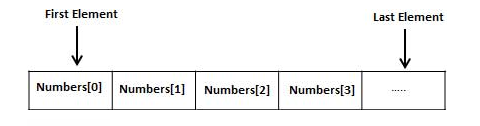
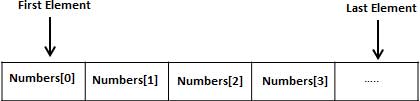
    Array elements are stored in contiguous memory locations. Each element is identified by an index starting with “0”. The lowest address corresponds to the first element and the highest address to the last element.

    Arrays

    Declaration of an Array in C

    To declare an array in C, you need to specify the type of the elements and the number of elements to be stored in it.

    Syntax to Declare an Array

    type arrayName[size];

    The “size” must be an integer constant greater than zero and its “type” can be any valid C data type. There are different ways in which an array is declared in C.

    Example: Declaring an Array in C

    In the following example, we are declaring an array of 5 integers and printing the indexes and values of all array elements −

    #include <stdio.h>intmain(){int arr[5];int i;for(i =0; i <=4; i++){printf("a[%d]: %d\n", i, arr[i]);}return0;}
    Output

    Run the code and check its output −

    a[0]: -133071639
    a[1]: 32767
    a[2]: 100
    a[3]: 0
    a[4]: 4096
    

    Initialization of an Array in C

    At the time of declaring an array, you can initialize it by providing the set of comma-separated values enclosed within the curly braces {}.

    Syntax to Initialize an Array

    data_type array_name [size]={value1, value2, value3,...};

    Example to Initialize an Array

    The following example demonstrates the initialization of an integer array:

    // Initialization of an integer array#include <stdio.h>intmain(){int numbers[5]={10,20,30,40,50};int i;// loop counter// Printing array elementsprintf("The array elements are : ");for(i =0; i 
    Output
    The array elements are :1020304050
    
    Example of Initializing all Array Elements to 0
    To initialize all elements to 0, put it inside curly brackets
    #include <stdio.h>intmain(){int arr[5]={0};int i;for(i =0; i <=4; i++){printf("a[%d]: %d\n", i, arr[i]);}return0;}
    
    Output
    When you run this code, it will produce the following output −
    a[0]:0
    a[1]:0
    a[2]:0
    a[3]:0
    a[4]:0
    
    Example of Partial Initialization of an Array
    If the list of values is less than the size of the array, the rest of the elements are initialized with "0".#include <stdio.h>intmain(){int arr[5]={1,2};int i;for(i =0; i <=4; i++){printf("a[%d]: %d\n", i, arr[i]);}return0;}
    
    Output
    When you run this code, it will produce the following output −
    a[0]:1
    a[1]:2
    a[2]:0
    a[3]:0
    a[4]:0
    
    Example of Partial and Specific Elements Initialization
    If an array is partially initialized, you can specify the element in the square brackets.#include <stdio.h>intmain(){int a[5]={1,2,[4]=4};int i;for(i =0; i <=4; i++){printf("a[%d]: %d\n", i, a[i]);}return0;}
    
    Output
    On execution, it will produce the following output −
    a[0]:1
    a[1]:2
    a[2]:0
    a[3]:0
    a[4]:4
    
    Getting Size of an Array in C
    The compiler allocates a continuous block of memory. The size of the allocated memory depends on the data type of the array.
    Example 1: Size of Integer Array
    If an integer array of 5 elements is declared, the array size in number of bytes would be "sizeof(int) x 5"#include <stdio.h>intmain(){int arr[5]={1,2,3,4,5};printf("Size of array: %ld",sizeof(arr));return0;}
    
    Output
    On execution, you will get the following output −
    Size of array:20
    
    The sizeof operator returns the number of bytes occupied by the variable.
    Example 2: Adjacent Address of Array Elements
    The size of each int is 4 bytes. The compiler allocates adjacent locations to each element.#include <stdio.h>intmain(){int a[]={1,2,3,4,5};int i;for(i =0; i <4; i++){printf("a[%d]: %d \t Address: %d\n", i, a[i],&a[i]);}return0;}
    
    Output
    Run the code and check its output −
    a[0]:1 	 Address:2102703872
    a[1]:2 	 Address:2102703876
    a[2]:3 	 Address:2102703880
    a[3]:4 	 Address:2102703884
    
    In this array, each element is of int type. Hence, the 0th element occupies the first 4 bytes 642016 to 19. The element at the next subscript occupies the next 4 bytes and so on.
    Example 3: Array of Double Type
    If we have the array type of double type, then the element at each subscript occupies 8 bytes
    #include <stdio.h>intmain(){double a[]={1.1,2.2,3.3,4.4,5.5};int i;for(i =0; i <4; i++){printf("a[%d]: %f \t Address: %ld\n", i, a[i],&a[i]);}return0;}
    
    Output
    Run the code and check its output −
    a[0]:1.100000 	 Address:140720746288624
    a[1]:2.200000 	 Address:140720746288632
    a[2]:3.300000 	 Address:140720746288640
    a[3]:4.400000 	 Address:140720746288648
    
    Example 4: Size of Character Array
    The length of a "char" variable is 1 byte. Hence, a char array length will be equal to the array size.#include <stdio.h>intmain(){char a[]="Hello";int i;for(i=0; i<5; i++){printf("a[%d]: %c address: %ld\n", i, a[i],&a[i]);}return0;}
    
    Output
    Run the code and check its output −
    a[0]: H address:6422038
    a[1]: e address:6422039
    a[2]: l address:6422040
    a[3]: l address:6422041
    a[4]: o address:6422042
    
    Accessing Array Elements in C
    Each element in an array is identified by a unique incrementing index, stating with "0". To access the element by its index, this is done by placing the index of the element within square brackets after the name of the array. 
    The elements of an array are accessed by specifying the index(offset) of the desired element within the square brackets after the array name. For example −
    double salary = balance[9];
    
    The above statement will take the 10th element from the array and assign the value to the "salary".
    Example to Access Array Elements in C
    The following example shows how to use all the three above-mentioned concepts viz. declaration, assignment, and accessing arrays.#include <stdio.h>intmain(){int n[5];/* n is an array of 5 integers */int i, j;/* initialize elements of array n to 0 */for(i =0; i <5; i++){
    
      n&#91;i]= i +100;}/* output each array element's value */for(j =0; j &lt;5; j++){printf("n&#91;%d] = %d\n", j, n&#91;j]);}return0;}
    Output On running this code, you will get the following output − n[0]=100 n[1]=101 n[2]=102 n[3]=103 n[4]=104 The index gives random access to the array elements. An array may consist of structvariables, pointers and even other arrays as its elements. More on C Arrays Arrays, being an important concept in C, need a lot more attention. The following important concepts related to arrays should be clear to a C programmer − Sr.No Concept & Description 1 Multi-dimensional arrays C supports multidimensional arrays. The simplest form of an multidimensional array is the two-dimensional array.2 Passing arrays to functions You can pass to the function a pointer to an array by specifying the array's name without an index.3 Return array from a function C allows a function to return an array.4 Pointer to an array You can generate a pointer to the first element of an array by simply specifying the array name, without any index.

    Print Page