Category: 08. Functions

https://cdn3d.iconscout.com/3d/premium/thumb/function-3d-icon-png-download-10634920.png

  • Predefined Identifier __func__

    The predefined identifier __func__ in C programming is a special identifier introduced in the C99 standard. It provides the name of the current function as a string literal, making error tracking and debugging more convenient.

    Debugging and logging frequently require identifying where an issue occurs in the code. To simplify the process, the C99 standard introduced the predefined identifier __func__.

    A Simple Example of Using __func__ in a C Program

    Before we start discussing __func__ in detail, let us write a sample program and predict its output. The following C program to shows a glimpse of how the Predefined Identifier __func__ works −

    #include <stdio.h>intmain(){// %s read the stringprintf("%s",__func__);return0;}

    When you run this code, it will produce the following output −

    main
    

    The predefined identifier “__func__” represents the name of the current function as a string. Inside main(), it expands to “main“, so the program prints the function’s name.

    What is __func__ ?

    __func__ is a predefined identifier which is automatically available inside every function. It expands to a const char[] containing the name of the current function.

    staticconstchar__func__[]="function-name";

    Unlike other predefined macros such as __FILE__ or __LINE__, __func__ is not a macro, but rather a predefined identifier.

    Here is its syntax. It can be used directly inside any function to gets its name as a string.

    __func__

    Example: Basic Usages

    In this example, we use the __func__ identifier to display the function name −

    #include <stdio.h>voidgreet(){printf("Currently in function: %s\n",__func__);}intmain(){printf("Currently in function: %s\n",__func__);greet();return0;}

    Following is the output of the above code −

    Currently in function: main
    Currently in function: greet
    

    Error Logging with __func__

    Error logging is the process of recording information about error, warning, or unusual behavior that occurs while a program is running.

    Rather than terminating execution or displaying a general error message, programs log the details of the error in a file, console, or logging system. This information helps developers in determining what and where the error occurred.

    Example: Error Logging with __func__

    In this example, we use __func__ to log error details on the console −

    #include <stdio.h>#define LOG_ERROR(msg) \
       printf("Error in function %s: %s\n", __func__, msg)voiddisplayData(int x){if(x <0){LOG_ERROR("Negative value not allowed");return;}printf("Processing value: %d\n", x);}intmain(){displayData(10);displayData(-5);return0;}

    Here is its output −

    Processing value: 10
    Error in function displayData: Negative value not allowed
    

    Key Features of __func__

    Given below are some of the key features of __func__ −

    • Automatic Availability − It is built into the language. There is no need to include the header file for it.
    • Function Scope − Available only inside the function in which it appears.
    • String Literal − Represents the function name as a const char[].
    • Debugging Friendly − Often used in logging systems to report the exact function where an error occurs.

    Conclusion

    The predefined identifier __func__, introduced in the C99 standard, provides the name of the current function as a string literal. It is a basic but effective feature that improves debugging, error logging, and program monitoring by allowing developers to quickly identify the code where an error occurred.
  • Recursion

    Recursion is the process by which a function calls itself. C language allows writing of such functions which call itself to solve complicated problems by breaking them down into simple and easy problems. These functions are known as recursive functions.

    What is a Recursive Function in C?

    A recursive function in C is a function that calls itself. A recursive function is used when a certain problem is defined in terms of itself. Although it involves iteration, using iterative approach to solve such problems can be tedious. Recursive approach provides a very concise solution to seemingly complex problems.

    Syntax

    This is how a general recursive function looks like −

    voidrecursive_function(){recursion();// function calls itself}intmain(){recursive_function();}

    While using recursion, programmers need to be careful to define an exit condition from the function, otherwise it will go into an infinite loop.

    Why Recursion is Used in C?

    Recursion is used to perform complex tasks such as tree and graph structure traversals. Popular recursive programming solutions include factorial, binary search, tree traversal, tower of Hanoi, eight queens problem in chess, etc.

    A recursive program becomes concise, it is not easily comprehendible. Even if the size of the code may reduce, it needs more resources of the processor, as it involves multiple IO calls to the function.

    Factorial Using Recursion

    Recursive functions are very useful to solve many mathematical problems such as calculating the factorial of a number, generating Fibonacci series, etc.

    The most popular example of recursion is calculation of factorial. Mathematically, a factorial is defined as −

     
    n!= n X(n-1)!

    It can be seen that we use factorial itself to define factorial. Hence this is a fit case to write a recursive function. Let us expand the above definition for calculating the factorial value of 5.

    5!=5 X 4!5 X 4 X 3!5 X 4 X 3 X 2!5 X 4 X 3 X  2 X 1!5 X 4 X 3 X  2 X 1=120

    While we can perform this calculation using a loop, its recursive function involves successively calling it by decrementing the number till it reaches 1.

    Example: Non-Recursive Factorial Function

    The following program shows how you can use a non-recursive function to calculate the factorial of a number −

    #include <stdio.h>#include <math.h>// function declarationintfactorial(int);intmain(){int a =5;int f =factorial(a);printf("a: %d \n", a);printf("Factorial of a: %d", f);}intfactorial(int x){int i;int f =1;for(i =5; i >=1; i--){
    
      f *= i;}return f;}</code></pre>

    Output

    When you run this code, it will produce the following output −

    a: 5 
    Factorial of a: 120
    

    Example: Recursive Factorial Function

    Let us now write a recursive function for calculating the factorial of a given number.

    The following example calculates the factorial of a given number using a recursive function −

    #include <stdio.h>#include <math.h>/* function declaration */intfactorial(int i){if(i <=1){return1;}return i *factorial(i -1);}intmain(){int a =5;int f =factorial(a);printf("a: %d \n", a);printf("Factorial of a: %d", f);return0;}

    Output

    Run the code and check its output −

    a: 5 
    Factorial of a: 120
    

    When the main() function calls the factorial() function by passing the variable "a", its value is stored in "i". The factorial() function successively calls itself.

    In each call, the value of "i" is multiplied by its earlier value after reducing it by 1, till it reaches 1. As it reaches 1, the product of all the values between the initial value of the argument and 1 is returned to the main() function.

    Binary Search Using Recursion

    Let us have a look at another example to understand how recursion works. The problem at hand is to check whether a given number is present in an array.

    While we can perform a sequential search for a certain number in the list using a for loop and comparing each number, the sequential search is not efficient, especially if the list is too long.

    The binary search algorithm checks if the index "start" is greater than the index "end". Based on the value present at the variable "mid", the function is called again to search for the element.

    We have a list of numbers arranged in ascending order. Then we find the midpoint of the list and restrict the checking to either left or right of the midpoint, depending on whether the desired number is less than or greater than the number at the midpoint.

    Example: Recursive Binary Search

    The following code implements the recursive binary searching technique −

    #include <stdio.h>intbSearch(int array[],int start,int end,int element){if(end >= start){int mid = start +(end - start )/2;if(array[mid]== element)return mid;if(array[mid]> element)returnbSearch(array, start, mid-1, element);returnbSearch(array, mid+1, end, element);}return-1;}intmain(void){int array[]={5,12,23,45,49,67,71,77,82};int n =9;int element =67;int index =bSearch(array,0, n-1, element);if(index ==-1){printf("Element not found in the array ");}else{printf("Element found at index: %d", index);}return0;}

    Output

    Run the code and check its output −

    Element found at index: 5
    

    Fibonacci Series Using Recursion

    In Fibonacci series, a number is the sum of its previous two numbers. To generate Fibonacci series, the ith number is the addition of i−1 and i−2.

    Example

    The following example generates the first 10 numbers in the Fibonacci series for a given number using a recursive function −

    #include <stdio.h>intfibonacci(int i){if(i ==0){return0;}if(i ==1){return1;}returnfibonacci(i-1)+fibonacci(i-2);}intmain(){int i;for(i =0; i <10; i++){printf("%d\t\n",fibonacci(i));}return0;}

    Output

    When the above code is compiled and executed, it produces the following result −

    0	
    1	
    1	
    2	
    3	
    5	
    8	
    13	
    21	
    34
    

    Implementing recursion in a program is difficult for beginners. While any iterative process can be converted in a recursive process, not all cases of recursion can be easily expressed iteratively.

  • Return Statement

    The return statement terminates the execution of a function and returns control to the calling function. Every function should have a return statement as its last statement. While using the returns statement, the return type and returned value (expression) must be the same.

    Syntax of return Statement

    Here is the syntax of the return statement:

    return value_or_expression;

    The following main() function shows return as its last statement −

    intmain(){// function body;return0;}

    The main() function returning 0 indicates the successful completion of the function. To indicate failure of the function, a non−zero expression is returned.

    The void return statement

    A function’s return type can be void. In such a case, return statement is optional. It may be omitted, or return without any expression is used.

    Example

    #include <stdio.h>/* function declaration */voidtest(){return;}intmain(){test();printf("end");return0;}

    Return type mismatch in return statement

    Each function in the program must have a forward declaration of its prototype. By default, each function returns an integer. However, function of other return types without prototype is not accepted.

    Example

    intmain(){test(5);printf("end");return0;}floattest(int a){return1.1;}

    Output

    Error: C:\Users\mlath\test.c|12|error: conflicting types for 'test'
    

    This is because, function without prototype is assumed as of int type, which conflicts with the definition.

    The same error occurs if the return type of a function in the prototype doesn’t match with the type of return expression, an error is reported as below −

    floattest(int);intmain(){test(5);printf("end");return0;}floattest(float a){return1.1;}

    Multiple return values with return statement

    A function can be defined with more than one arguments, but can return only one value. You can however use multiple conditional return statements as shown below −

    Example

    inttest(int);intmain(){test(5);printf("end");return0;}inttest(int a){if(a<3)return1;elsereturn0;}

    Function returning an array

    It is not possible to return an entire array as an argument to a function. However, you can return a pointer to an array by specifying the array’s name without an index.

    Example

    The following program shows how to pass an array to a function that returns an array after performing a certain process.

    #include <stdio.h>int*test(int*);intmain(){int a[]={1,2,3,4};int i;int*b =test(a);for(i=0; i<4; i++){printf("%d\n", b[i]);}return0;}int*test(int*a){int i;for(i=0; i<4; i++){
    
      a&#91;i]=2*a&#91;i];}return a;}</code></pre>

    Output

    2
    4
    6
    8
    

    function can only return a single value using return statement. To return multiple values, we use pointers or structures

    exit() instead of return statement

    Unlike the return statement, the exit() function is also used to terminate the execution of the program without transferring the control back to the calling function. It is used inside a function when the program has finished its execution or when an unrecoverable error occurs. It is a standard way of handling exception errors in C. When exit() is called, the program control does not return to the point where exit() was invoked. Instead, the control is handed back to the operating system.

    The exit() function is library function defined in stdlib.h header file.

    Syntax

    voidexit(int status);

    exit() is typically called from the main() function or any other function to terminate the entire program.

    It is included in the <stdlib.h> header file.

    Since it results in termination of the program, exit() does not return a value directly to the caller function. Instead, it terminates the program and returns a status code. It is an integer that represents the exit status of the program, indicating success or failure.

  • Callback Function

    Callback functions are extremely versatile, particularly in event-driven programming. When a specific event is triggered, a callback function mapped to it is executed in response to these events. This is typically used in GUI applications, an action like a button click can initiate a series of predefined actions.

    Callback Function

    The callback function is basically any executable code that is passed as an argument to other code, that is expected to call back or execute the argument at a given time. We can define it in other words like this: If the reference of a function is passed to another function argument for calling, then it is called a callback function.

    The mechanism of callbacks depends on function pointers. A function pointer is a variable that stores the memory address of a function.

    Here is a simple hello() function in C −

    voidhello(){printf("Hello World.");}

    We declare a pointer to this function as follows −

    void(*ptr)()=&hello;

    We can now call the function with the help of this function pointer, (*ptr)();

    Example of Callback Function in C

    In this example, the hello() function is defined as an argument to myfunction().

    #include <stdio.h>voidhello(){printf("Hello World\n");}voidcallback(void(*ptr)()){printf("Calling a function with its pointer\n");(*ptr)();// calling the callback function}main(){void(*ptr)()= hello;callback(ptr);}

    Output

    Calling a function with its pointer
    Hello World
    

    Callback Function With Arguments

    In the example given below, we have also declared two functions with identical prototypes − square() and root().

    intsquare(int val){return val*val;}introot(int val){returnpow(val,0.5);}

    The callback function is defined to receive an argument as well as a function pointer with an integer argument that matches with the above functions.

    intcallback(int a,int(*ptr)(int)){int ret =(*ptr)(a);return ret;}

    In the main() function, we place a call to the callback by passing an integer and the name of the function (square / root) which becomes the function pointer in callbacks definition.

    Example of Callback Function With Arguments

    The complete code is as follows −

    #include <stdio.h>#include <math.h>intcallback(int a,int(*print_callback)(int));intsquare(int value);introot(int value);intmain(){int x =4;printf("Square of x: %d is %d\n", x,callback(x, square));printf("Square root of x: %d is %d\n", x,callback(x, root));return0;}intcallback(int a,int(*ptr)(int)){int ret =(*ptr)(a);return ret;}intsquare(int val){return val*val;}introot(int val){returnpow(val,0.5);}

    Output

    Square of x: 4 is 16
    Square root of x: 4 is 2
    

    Types of Callbacks in C

    There are two types of callbacks −

    Synchronous Callback

    A callback is synchronous when it is given to another function, which executes it as part of its process. The calling function waits for the callback to complete before proceeding. This is useful when you need immediate results or want to ensure a task is finished before moving on.

    Asynchronous Callback

    In this case, the calling function triggers the callback but doesnt wait for it to finish. Instead, it continues its execution. It results in non-blocking operations. Its commonly used in event-driven programming.

    Generic callback functions help developers write C programs that are versatile and better adaptable.

    In this chapter, we explained how you can use function pointers so that we can enhance the flexibility of our C programs. Additionally, we showed how you can create generic callback functions that are not limited to a specific function pointer type.

  • User-defined Functions

    A function in C is a block of organized, reusable code that is used to perform a single related action. In any C program, there are one or more functions − classified as library functions and user-defined functions.

    There are two types of functions in C −

    • Library functions
    • User-defined functions

    Any C compiler (e.g. GCC compiler, Clang, MSVC compiler, etc.) is distributed with a number precompiled header files (stdio.h, math.h, etc.), each consisting of one or more predefined library functions such as printf(), scanf(), pow(), sqrt(), etc. To be able to use the library function, the corresponding header file must be made available with the #include directive.

    However, if you dont find a suitable library function to serve your purpose, then you can define a customized function for the program. Normally, we find a C program with a main() function. Obviously, the main() function is a user-defined function, as it contains the instructions provided by the user. It can of course call the other library or user-defined functions.

    What is User-Defined Function in C?

    User-defined function is defined by the user to perform specific task to achieve the code reusability and modularity. To create and use the user-defined function, you do not need use any built-in library. These functions can be created either in the same program or in user-defined header file.

    Creating a User-defined Function

    For creating a user-defined function, first you need to understand the purpose of the function, that is, what do you want the function to do?

    To create a user-defined function, you need to know about the following three parts of a function:

    • Function declaration
    • Function definition
    • Function calling

    Declaration of User-defined Function

    In C language, it is necessary to provide the declaration of the prototype of any function. The prototype of a library function is present in the corresponding header file.

    For a user-defined function, its prototype is present in the current program. The definition of a function and its prototype declaration should match.

    Syntax

    If you wish to define a function called add() that performs the addition of two integer arguments and returns the value as an integer, then the function declaration would be as follows −

    intadd(int,int);

    Definition of User-defined Function

    The definition of a function and its prototype declaration should match. The definition consists of a function header that matches the declaration and a function body.

    Syntax

    return_type function_name(arg1, arg2,...){// Function body;return val;}

    Example

    Using this template, you can write the user-defined function add() as follows −

    intadd(int a,int b){int c;
       c = a + b;return c;}

    Note that the order of definition of user-defined functions is not important in a C program. However, its prototype must be declared before calling the function.

    In a program, the main() function is always the entry point, irrespective of whether it is the first function or not. We needn’t provide the prototype declaration of the main() function.

    Calling a User-defined Function

    To call a function, you should use a statement that complies with the declaration of the function prototype. If the function is defined to receive a certain number of arguments, then the same number and type of arguments must be passed to call that function.

    Example

    The following statement calls the add() function that we defined above −

    int result =add(10,20);

    Example of User-Defined Function

    In this example, we are create two user-defined functions add() and sub() to find the addition and subtraction of the given numbers.

    // C program to demonstrate an example of// user-defined function#include <stdio.h>// Function declarationsintadd(int,int);intsub(int,int);// Function definitionsintadd(int a,int b){return(a + b);}intsub(int a,int b){return(a - b);}intmain(){// Declaring two integer variables to// store the numbers// and resultant variables to store the resultint num1 =36, num2 =24;int res_add, res_sub;// Calling the functions
      res_add =add(num1, num2);
      res_sub =sub(num1, num2);// Printing the resultsprintf("Addition is : %d\n", res_add);printf("Subtraction is : %d\n", res_sub);return0;}
    Addition is : 60
    Subtraction is : 12
    

    Formal and Actual Arguments in User-Defined Function

    When a function is defined with arguments, the arguments in the parenthesis in front of the function name are called formal arguments. In the above example, the function is defined with “int a” and “int b” arguments; they are formal arguments.

    When the function is called, the arguments passed to it are called the actual arguments. In the example below, the variables “x” and “y” are the actual arguments.

    int x =10, y =20;int result =add(x, y);

    A user-defined function may be defined to have any type of variables as formal arguments. It includes primary types (int, float, char), array, pointer, or struct/union type variables.

    A function should return a value to the calling environment. By default, the return type of a function is int type. However, it can return any data type − primary type, array, pointer, or a struct as well as a pointer. You can even define a function that returns a void type.

    Example

    If either the number or the type of actual and formal arguments or the return type as in the forward declaration of a function and its definition dont match, then the compiler reports an error.

    Look at the example below −

    #include <stdio.h>floatdivide(int,int);intmain(){int x =15, y =5;float z =divide(x, y);printf("%f", z);return0;}intdivide(int a,int b){int c = a/b;return c;}

    Output

    In the code above, the declaration of the divide() function doesnt match with its definition, hence the compiler shows the following error −

    error: conflicting types for 'divide'
    

    In C, any function can call any other function, any number of times. A function can call itself too. Such a self-calling function is called a recursive function.

    The following program calls the main() function from inside main() itself −

    #include <stdio.h>intmain(){printf("Hello");main();return0;}

    When executed, the program goes into an infinite loop. In practice, recursion has to be used so that the program eventually terminates.

  • Variadic Functions in C

    Variadic Function in C

    A function that can take a variable number of arguments is called a variadic function. One fixed argument is required to define a variadic function.

    The most frequently used library functions in C, i.e., printf() and scanf() are in fact the best-known examples of variadic functions, as we can put a variable number of arguments after the format specifier string.

    printf("format specifier",arg1, arg2, arg3,...);

    Syntax of Variadic Functions

    In C, a variadic function is defined to have at least one fixed argument, and then followed by an ellipsis symbol (…) that enables the compiler to parse the variable number of arguments.

    return_type function_name(type arg1,...);

    You need to include the stdarg.h header file at the top of the code to handle the variable arguments. This header file provides the following macros to work with the arguments received by the ellipsis symbol.

    MethodsDescription
    va_start(va_list ap, arg)Arguments after the last fixed argument are stored in the va_list.
    va_arg(va_list ap, type)Each time, the next argument in the variable list va_list and coverts it to the given type, till it reaches the end of list.
    va_copy(va_list dest, va_list src)This creates a copy of the arguments in va_list
    va_end(va_list ap)This ends the traversal of the variadic function arguments. As the end of va_list is reached, the list object is cleaned up.

    Examples of Variadic Functions in C

    Example: Sum of Numbers Using a Variadic Function

    The following code uses the concept of a variadic function to return the sum of a variable number of numeric arguments passed to such a function. The first argument to the addition() function is the count of the remaining arguments.

    Inside the addition() function, we initialize the va_list variable as follows −

    va_list args;va_start(args, n);

    Since there are “n” number of arguments that follow, fetch the next argument with “va_arg()” macro for “n” number of times and perform cumulative addition −

    for(i =0; i < n; i++){    
       sum +=va_arg(args,int);}

    Finally, clean up the va_list variable −

    va_end(args);

    The function ends by returning the sum of all the arguments.

    The complete code is given below −

    #include <stdio.h>#include <stdarg.h>// Variadic function to add numbersintaddition(int n,...){
    
       va_list args;int i, sum =0;va_start(args, n);for(i =0; i < n; i++){    
    
      sum +=va_arg(args,int);}va_end(args);return sum;}intmain(){printf("Sum = %d ",addition(5,1,2,3,4,5));return0;}</code></pre>

    Output

    Run the code and check its output −

    Sum = 15
    

    You can try providing a different set of numbers as the variadic arguments to the addition() function.

    Example: Finding the Largest Number Using a Variadic Function

    We can extend the concept of variadic function to find the largest number in a given list of variable number of values.

    #include <stdio.h>#include <stdarg.h>// Variadic function to add numbersintlargest(int n,...){
       va_list args;int i, max =0;va_start(args, n);for(i =0; i < n; i++){int x =va_arg(args,int);if(x >= max)
    
            max = x;}va_end(args);return max;}intmain(){printf("Largest number in the list = %d ",largest(5,12,34,21,45,32));return0;}</code></pre>

    Output

    When you run this code, it will produce the following output −

    Largest number in the list = 45
    

    Example: Concatenation of Multiple Strings Using Variadic Function

    In the following code, we pass multiple strings to a variadic function that returns a concatenated string.

    #include <stdio.h>#include <string.h>#include <stdarg.h>char*concat(int n,...){
       va_list args;int i;staticchar string[100],*word;va_start(args, n);strcpy(string,"");for(i =0; i < n; i++){
    
      word=va_arg(args,char*);strcat(string, word);strcat(string," ");}va_end(args);return string;}intmain(){char* string1 =concat(2,"Hello","World");printf("%s\n", string1);char* string2 =concat(3,"How","are","you?");printf("%s\n", string2);return0;}</code></pre>

    Output

    Run the code and check its output −

    Hello World
    How are you?
    
  • Nested Functions

    The term nesting, in programming context refers to enclosing a particular programming element inside another similar element. Just like nested loops, nested structures, etc., a nested function is a term used to describe the use of one or more functions inside another function.

    What is Lexical Scoping?

    In C language, defining a function inside another one is not possible. In short, nested functions are not supported in C. A function may only be declared (not defined) within another function.

    When a function is declared inside another function, it is called lexical scoping. Lexical scoping is not valid in C because the compiler cannot reach the correct memory location of inner function.

    Nested Functions Have Limited Use

    Nested function definitions cannot access local variables of surrounding blocks. They can access only global variables. In C, there are two nested scopes: local and global. So, nested functions have limited use.

    Example: Nested Function

    If you want to create a nested function like the one shown below, then it will generate an error −

    #include <stdio.h>intmain(void){printf("Main Function");intmy_fun(){printf("my_fun function");// Nested Functionintnested(){printf("This is a nested function.");}}nested();}

    Output

    On running this code, you will get an error −

    main.c:(.text+0x3d): undefined reference to `nested'
    collect2: error: ld returned 1 exit status
    

    Trampolines for Nested Functions

    Nested functions are supported as an extension in “GNU C”. GCC implements taking the address of a nested function using a technique called trampolines.

    A trampoline is a piece of code created at runtime when the address of a nested function is taken. It requires the function to be prefixed with the keyword auto in the declaration.

    Example 1

    Take a look at the following example −

    #include <stdio.h>intmain(){autointnested();nested();printf("In Main Function now\n");intnested(){printf("In the nested function now\n");}printf("End of the program");}

    Output

    When you run this code, it will produce the following output −

    In the nested function now
    In Main Function now
    End of the program
    

    Example 2

    In thi program, a function square() is nested inside another function myfunction(). The nested function is declared with the auto keyword.

    #include <stdio.h>#include <math.h>doublemyfunction(double a,double b);intmain(){double x =4, y =5;printf("Addition of squares of %f and %f = %f", x, y,myfunction(x, y));return0;}doublemyfunction(double a,double b){autodoublesquare(double c){returnpow(c,2);}returnsquare(a)+square(b);}

    Output

    Run the code and check its output −

    Addition of squares of 4.000000 and 5.000000 = 41.000000
    

    Nested Functions: Points to Note

    One needs to be aware of the following points while using nested functions −

    • A nested function can access all the identifiers of the containing function that precede its definition.
    • A nested function must not be called before the containing function exits.
    • A nested function cannot use a goto statement to jump to a label in the containing function.
    • Nested function definitions are permitted within functions in any block, mixed with the other declarations and statements in the block.
    • If you try to call a nested function through its address after the containing function exits, it throws an error.
    • A nested function always has no linkage. Declaring one with “extern” or “static” always produces errors.
  • Function Call by Reference in C

    There are two ways in which a function can be called: (a) Call by Value and (b) Call by Reference. In this chapter, we will explain the mechanism of calling a function by reference.

    Let us start this chapter with a brief overview on “pointers” and the “address operator (&)”. It is important that you learn these two concepts in order to fully understand the mechanism of Call by Reference.

    The Address Operator (&) in C

    In C language, a variable is a named memory location. When a variable declared, the compiler allocates a random location in the memory and internally identifies the location with the user-defined name.

    To fetch the address at which the variable has been created, we use the address (&) operator.

    Example

    Take a look at the following example −

    #include <stdio.h>intmain(){int x =10;printf("x: %d Address of x: %d", x,&x);}

    Output

    This will print the value of x and its address −

    x: 10 Address of x: -1990957196
    

    What is a Pointer in C?

    A pointer is a variable that stores the address of another variable. To declare a pointer variable, its name is prefixed with the * symbol. The type of the pointer variable and its host variable must be same.

    The address is assigned with the & operator. The dereference operator (*) is used with the pointer. It fetches the value of a variable whose address is assigned to the pointer.

    Example

    The following example demonstrates how referening and dereferencing work in C −

    #include <stdio.h>intmain(){int x =10;int*y =&x;printf("x: %d Address of x: %d\n", x,&x);printf("Address of y: %d \n",&y);printf("Value at address in y: %d\n",*y);}

    Output

    Run the code and check its output −

    x: 10 Address of x: -1742755108
    Address of y: -1742755104 
    Value at address in y: 10
    

    How Does Call by Reference Work in C?

    When a function is called by reference, the address of the actual argument variables passed, instead of their values.

    Let us define the add() function that receives the references of two variables −

    intadd(int*x,int*y){int z =*x +*y;return z;}

    When such a function is called, we pass the address of the actual argument.

    Example

    Let us call the add() function by reference from inside the main() function −

    #include <stdio.h>/* function declaration */intadd(int*,int*);intmain(){int a =10, b =20;int c =add(&a,&b);printf("Addition: %d", c);}intadd(int*x,int*y){int z =*x +*y;return z;}

    Output

    When you run this code, it will produce the following output −

    Addition: 30
    

    Now let’s understand how this code actually works. The main() function passes the address of a and b to the add() function. The addresses of a and b are assigned to the pointer variables x and y.

    Now focus on the statement “z = *x + *y;” inside the add() function. Remember that x stores the address of a. The dereference operator in *x and *y fetches the values of a and b respectively, hence z is the addition of a and b in the main() function.

    Example: Swap Values with Call by Reference

    Let us understand in more detail how the Call by Reference mechanism works, with the help of the following example that interchanges value of two variables.

    #include <stdio.h>/* Function definition to swap the values *//* It receives the reference of two variables whose values are to be swapped */intswap(int*x,int*y){int z;
    
       z =*x;/* save the value at address x */*x =*y;/* put y into x */*y = z;/* put z into y */return0;}/* The main() function has two variables "a" and "b" *//* Their addresses are passed as arguments to the swap() function. */intmain(){/* local variable definition */int a =10;int b =20;printf("Before swap, value of a: %d\n", a );printf("Before swap, value of b: %d\n", b );/* calling a function to swap the values */swap(&a,&b);printf("After swap, value of a: %d\n", a);printf("After swap, value of b: %d\n", b);return0;}

    Output

    When you run this code, it will produce the following output −

    Before swap, value of a: 10
    Before swap, value of b: 20
    After swap, value of a: 20
    After swap, value of b: 10
    

    Explanation

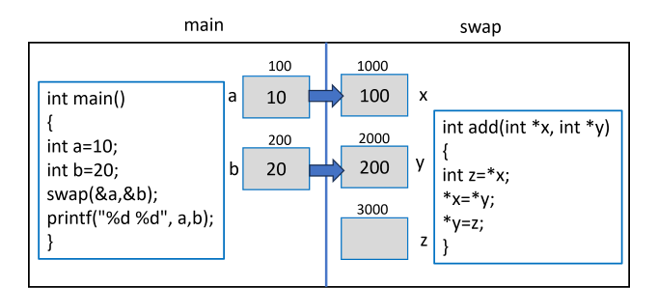
    Assume that the variables a and b in the main() function are allotted locations with the memory address 100 and 200 respectively. As their addresses are passed to x and y (remember that they are pointers), the variables xy and z in the swap() function are created at addresses 1000, 2000 and 3000 respectively.

    Inside the swap in C

    Since “x” and “y” store the address of “a” and “b”, “x” becomes 100 and “y” becomes 200, as the above figure shows.

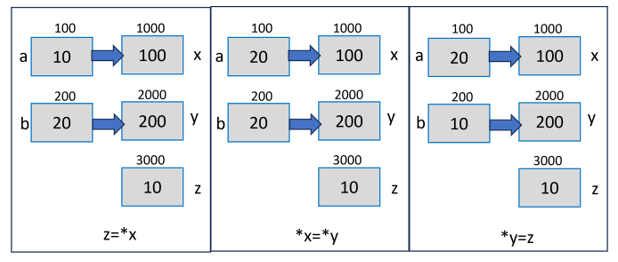
    Inside the swap() function, the first statement “z = *x” causes the value at address in “x” to be stored in “x” (which is 10). Similarly, in the statement “*x = *y;“, the value at the address in “y” (which is 20) is stored in the location whose pointer is “x”.

    Finally, the statement “*y = z;” assigns the “z” to the variable pointed to by “y”, which is “b” in the main() function. The values of “a” and “b” now get swapped.

    The following figure visually demonstrates how it works −

    Understand Visually how this works in C

    Mixing Call by Value and Call by Reference

    You can use a function calling mechanism that is a combination of Call by Value and Call by Reference. It can be termed as “mixed calling mechanism”, where some of the arguments are passed by value and others by reference.

    A function in C can have more than one arguments, but can return only one value. The Call by Reference mechanism is a good solution to overcome this restriction.

    Example

    In this example, the calculate() function receives an integer argument by value, and two pointers where its square and cube are stored.

    #include <stdio.h>#include <math.h>/* function declaration */intcalculate(int,int*,int*);intmain(){int a =10;int b, c;calculate(a,&b,&c);printf("a: %d \nSquare of a: %d \nCube of a: %d", a, b, c);}intcalculate(int x,int*y,int*z){*y  =pow(x,2);*z =pow(x,3);return0;}

    Output

    When you run this code, it will produce the following output −

    a: 10 
    Square of a: 100 
    Cube of a: 1000
    

    The Call by Reference mechanism is widely used when a function needs to perform memory-level manipulations such as controlling the peripheral devices, performing dynamic allocation, etc.

  • Function Call by Value in C

    In C language, a function can be called from any other function, including itself. There are two ways in which a function can be called − (a) Call by Value and (b) Call by Reference. By default, the Call by Value mechanism is employed.

    Formal Arguments and Actual Arguments

    You must know the terminologies to understand how the call by value method works −

    Formal arguments − A function needs certain data to perform its desired process. When a function is defined, it is assumed that the data values will be provided in the form of parameter or argument list inside the parenthesis in front of the function name. These arguments are the variables of a certain data type.

    Actual arguments − When a certain function is to be called, it should be provided with the required number of values of the same type and in the same sequence as used in its definition.

    Take a look at the following snippet −

    type function_name(type var1, type var2,...)

    Here, the argument variables are called the formal arguments. Inside the functions scope, these variables act as its local variables.

    Consider the following function −

    intadd(int x,int y){int z = x + y;return z;}

    The arguments x and y in this function definition are the formal arguments.

    Example: Call by Value in C

    If the add() function is called, as shown in the code below, then the variables inside the parenthesis (a and b) are the actual arguments. They are passed to the function.

    Take a look at the following example −

    #include <stdio.h>intadd(int x,int y){int z = x + y;return z;}intmain(){int a =10, b =20;int c =add(a, b);printf("Addition: %d", c);}

    Output

    When you run this code, it will produce the following output −

    Addition: 30
    

    The Call by Value method implies that the values of the actual arguments are copied in the formal argument variables. Hence, “x” takes the value of “a” and “b” is assigned to “y”. The local variable “z” inside the add() function stores the addition value. In the main() function, the value returned by the add() function is assigned to “c”, which is printed.

    Note that a variable in C language is a named location in the memory. Hence, variables are created in the memory and each variable is assigned a random memory address by the compiler.

    How Does “Call by Value” Work in C?

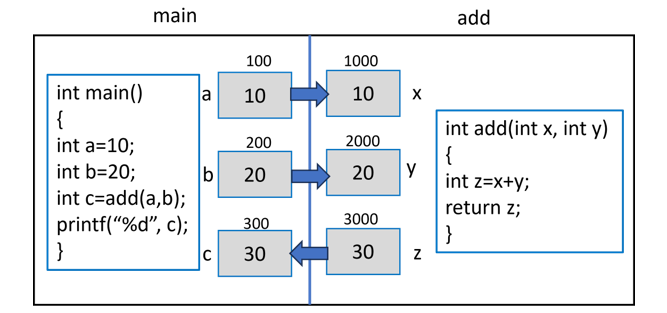
    Let us assume that the variables ab and c in the main() function occupy the memory locations 100, 200 and 300 respectively. When the add() function is called with a and b as actual arguments, their values are stored in x and y respectively.

    Random Memory Address

    The variables xy, and z are the local variables of the add() function. In the memory, they will be assigned some random location. Let’s assume that they are created in memory address 1000, 2000 and 3000, respectively.

    Since the function is called by copying the value of the actual arguments to their corresponding formal argument variables, the locations 1000 and 2000 which are the address of x and y will hold 10 and 20, respectively. The compiler assigns their addition to the third local variable z which is returned.

    As the control comes back to the main() function, the returned data is assigned to c, which is displayed as the output of the program.

    Example

    Call by Value is the default function calling mechanism in C. It eliminates a functions potential side effects, making your software simpler to maintain and easy to understand. It is best suited for a function expected to do a certain computation on the argument received and return the result.

    Here is another example of Call by Value −

    #include <stdio.h>/* function declaration */voidswap(int x,int y);intmain(){/* local variable definition */int a =100;int b =200;printf("Before swap, value of a: %d\n", a);printf("Before swap, value of b: %d\n", b);/* calling a function to swap the values */swap(a, b);printf("After swap, value of a: %d\n", a);printf("After swap, value of b: %d\n", b);return0;}voidswap(int x,int y){int temp;
    
       temp = x;/* save the value of x */
       x = y;/* put y into x */
       y = temp;/* put temp into y */return;}

    Output

    When you run this code, it will produce the following output −

    Before swap, value of a: 100
    Before swap, value of b: 200
    After swap, value of a: 100
    After swap, value of b: 200
    

    It shows that there are no changes in the values, although they had been changed inside the function.

    Since the values are copied in different local variables of another function, any manipulation doesnt have any effect on the actual argument variables in the calling function.

    However, the Call by Value method is less efficient when we need to pass large objects such as an array or a file to another function. Also, in some cases, we may need the actual arguments to be manipulated by another function. In such cases, the Call by Value mechanism is not useful. We have to explore the Call by Reference mechanism for that purpose. Refer the next chapter for a detailed explanation on the Call by Reference mechanism of C.

    The Call by Reference approach involves passing the address of the variable holding the value of the actual argument. You can devise a calling method that is a mix of Call by Value and Call by Reference. In this case, some arguments are passed by value and others by reference.

  • Main Function

    main() Function in C

    The main() function in C is an entry point of any program. The program execution starts with the main() function. It is designed to perform the main processing of the program and clean up any resources that were allocated by the program. In a C code, there may be any number of functions, but it must have a main() function. Irrespective of its place in the code, it is the first function to be executed.

    Syntax

    The following is the syntax of the main() function in C language −

    intmain(){//one or more statements;return0;}

    Syntax Explained

    As a part of its syntax, a function has a name that follows the rules of forming an identifier (starting with an alphabet or underscore and having alphabet, digit or underscore). The name is followed by a parenthesis. Typically, the main() function is defined with no arguments, although it may have argv and argv argument to receive values from the command line.

    Valid/Different Signatures of main() Function

    The signatures (prototype) of a main() function are −

    intmain(){..return0;}

    Or

    intmain(void){..return0;}

    Or

    intmain(int argc,char*argv[]){..return0;}

    Example of main() Function

    The following example demonstrates the main() function:

    #include <stdio.h>intmain(){// Write code from hereprintf("Hello World");return0;}

    Important Points about main() Function

    • A C program must have a main() function.
    • The main is not a C keyword.
      It is classified as a user-defined function because its body is not pre−decided, it depends on the processing logic of the program.
      By convention, int is the return type of main(). The last statement in the function body of main() returns 0, to indicate that the function has been successfully executed. Any non−zero return value indicates failure.
    • Some old C compilers let you define main() function with void return type.
    • However, this is considered to be non−standard and is not recommended.
    • As compared to other functions, the main() function:
      • Can’t be declared as inline.
      • Can’t be declared as static.
      • Can’t have its address taken.
      • Can’t be called from your program.

    How does main() Works in C?

    The program’s execution starts from the main() function as it is an entry point of the program, it starts executing the statements written inside it. Other functions within the source program are defined to perform certain task. The main function can call any of these functions. When main calls another function, it passes execution control to the function, optionally passing the requisite number and type of arguments, so that execution begins at the first statement in the called function. The called function returns control to main when a return statement is executed or when the end of the function is reached. Note that return statement is implicitly present as the last statement when its return type is int.

    A program usually stops executing when it returns from or reaches the end of main, although it can terminate at other points in the program for various reasons. For example, you may want to force the termination of your program when some error condition is detected. To do so, you can use the exit function.

    Use of exit() in main() Function

    The C exit() function is a standard library function used to terminate the calling process. Use exit(0) to indicate no error, and exit(1) to indicate that the program is exiting with because of an error encountered.

    Example

    #include <stdio.h>#include <stdlib.h>intadd(int,int);intmain(){int i;for( i =1; i<=5; i++){if( i ==3){printf(" \n exiting ..");exit(0);}elseprintf(" \n Number is %d", i);}return0;}

    Output

    Number is 1
    Number is 2
    exiting ..
    

    Command-line Arguments with main()

    Typically, the main() function is defined without any arguments. However, you may define main() with arguments to let it accept the values from the command line. In this type of usage, main() function is defined as follows −

    Syntax

    The following is the syntax of main() function with command-line arguments:

    intmain(int argc,char*argv[]){..return0;}

    Argument Definitions

    The argument definitions are as follows −

    argc − The first argument is an integer that contains the count of arguments that follow in argv. The argc parameter is always greater than or equal to 1.

    argv − The second argument is an array of null−terminated strings representing command-line arguments entered by the user of the program. By convention, argv[0] is the command with which the program is invoked. argv[1] is the first command−line argument. The last argument from the command line is argv[argc − 1], and argv[argc] is always NULL.

    Example: Using main() Function with Command-line Arguments

    Consider the following program to understand command−line arguments.

    #include <stdio.h>#include <stdlib.h>intadd(int,int);intmain(int argc,char*argv[]){int x, y, z;if(argc<3){printf("insufficient arguments");}else{
    
      x =atoi(argv&#91;1]);
      y =atoi(argv&#91;2]);
      z = x+y;printf("addition : %d", z);}return0;}</code></pre>

    Just compile and build the program as test.c, dont run from the IDE in which you have edited and compiled. Go to the command prompt and run the program as follows −

    C:\Users\mlath>test 1020
    addition :30

    In this chapter, we learned the importance and syntax of defining a main() function in C. Any C program must have a main() function. As a convention it should return 0 to indicate successful execution. You can also define arguments to a main() function, they can be passed from the command−line.