A form generated or modified at the run time based on the application state or user interaction is called a dynamic form. It makes the forms adaptable to changes in data model. For example, if a user selects a country, the form could dynamically adjust to show additional fields like postal code, state, or country code.
In Angular, Forms are a way of collecting input data from users and it helps them to interact with the application. In this tutorial, we will learn how to create a dynamic forms in Angular.
Need for Dynamic Forms
In Angular, dynamic forms are needed for several reasons which are as follows −
They allow developers to tailor the form fields to the needs of individual users.
Dynamic forms are also needed when input fields are required for data input without prior knowledge. Scenarios like questionnaires where the questions vary based on previous answers.
You can hide, show, or validate certain form controls depending on previous answers or user input.
Last but not least, the use case of dynamic form is that instead of having multiple forms for different cases, we can create a dynamic form to handle various scenarios by adjusting its layout and fields according to the changes in the data model.
Creating Dynamic Form in Angular
The dynamic form in Angular is based on Reactive Forms. To create a dynamic form in Angular, follow the steps given below −
Step 1: Install Angular CLI and create a new Angular project.
Step 2: Import the ReactiveFormsModule and define a data model for form controls inside the Component.
Step 3: Now, write logic for creating dynamic form controls within the same Component.
Step 4: In the end, render the dynamic form in the Template.
Working Example
In this example, we are going to create a Reactive Form. The form will generate a country code field dynamically when user select the country.
Step 1: Create a new Angular project. We have named it dynamic-form.
ng newdynamic-form
Step 2: Open the app.component.ts file. Import the necessary package, define a data model and code to generate form controls.
Form validation is a process used to check whether the user input is in the correct format or not before submission. The validation process can be used to verify the format of email addresses and phone numbers as they have specific formats. Also, you can verify if the given input meets specific constraints like a minimum or maximum length. The form validation can prevent errors by catching invalid input before it is processed or sent to the server.
As we know, Angular has two kinds of forms. The first one is template-driven forms, and the other is reactive forms. The validation is implemented in two different ways. In template-driven forms, directives are used within the template to validate the form. In reactive forms, a model-driven approach is used where validation logic is defined in the component class.
Built-in Angular Validators
The Validator class in Angular provides a set of built-in validator functions that validate the form controls. A list of validator functions is −
SNo.
Validators & Descriptions
1.
minThis validator is used to check whether the control’s value is greater than or equal to the specified number.
2.
maxUnlike min, the max validator checks if the control’s value is less than or equal to a specified number.
3.
requiredWhen required validator is applied, it checks if the input field has a value and marks the form control as invalid if it is empty. This validator is used in mandatory fields of a form to ensure that users provide the necessary information before submitting the form.
4.
requiredTrueIf applied, it checks whether the value is true. Commonly used for checkbox validation.
5.
emailTo make sure the control’s value is a valid email address format, the email validator is used.
6.
minLengthIt validates that the control’s value is at least a specified length.
7.
maxLengthThis validators ensures that the control’s value does not exceed a specified length.
8.
patternIt validates that the control’s value matches a specified regular expression.
9.
nullValidatorIt is a no operation validator that always returns null. Commonly used for validation control.
10.
composeCombines multiple synchronous validators into one validator function. It returns an error map if any of the individual validators fail.
11.
composeAsyncSimilar to compose, but it combines asynchronous validators and returns an observable that emits either null for valid or an error object for invalid.
Validation in Angular Template-Driven Forms
In Angular, Template-Driven Forms are forms where the validation is applied directly in the HTML template using Angular’s built-in directives, like required, minlength, maxlength, and more. This type of form uses ngModel directive for two-way data binding and needs less code than Reactive Forms.
Example
In the below example, we will see how to use the validation in Template-Driven Form.
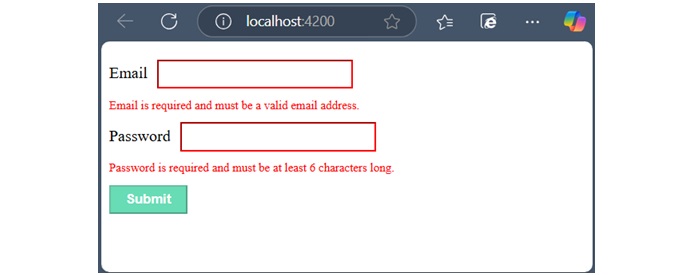
Email is required and must be a valid email address.</div></div><div><label for="password">Password</label><input class="input-box" type="password" id="password" name="password"[(ngModel)]="user.password" required minlength="6" #password="ngModel"><div *ngIf="password.invalid && password.touched"class="error">
Password is required and must be at least 6 characters long.</div></div><button class="btn" type="submit"[disabled]="userForm.invalid">Submit</button></form><router-outlet /></pre>
Step 2: Add the below code inside component class −
Reactive Form is a type of Angular form that manages the form state using an immutable approach. Here, immutable means each change to the form state returns a new version of the state.
Reactive forms are created inside the component class and are also referred to as model-driven forms. Every form control used within these forms has a separate object in the component class, which helps developers access and manage the data received from user input.
Let’s understand how to use Reactive Forms in angular.
Classes of Angular Reactive Forms
Before moving to create Reactive forms, we need to understand the use of following classes −
FormControl: Define the basic functionality of individual form control.
FormGroup: Used to aggregate the values of form control collection.
FormArray: Used to aggregate the values of form control into an array.
ControlValueAccessor: Acts as an interface between Forms API and HTML DOM elements.
Creating Angular Reactive Forms
You can create an Angular reactive form in the four simple steps given below −
Step 1: First, import ReactiveFormsModule, FormGroup, FormControl from the @angular/forms package.
Step 2: Instantiate FormGroup and FormControl inside your component’s TypeScript file (e.g., app.component.ts).
Step 3: Now, open component’s HTML template (e.g., app.component.html) and bind the form using formGroup.
Step 4: At the end, use formControlName to bind each individual input field to the corresponding form control.
Example
Let us create a sample application (reactive-form-app) in Angular to learn the reactive form. Here, we create a simple reactive form to display user-entered text.
Step 1: Open the command prompt and create a new Angular application using the below command −
ng newreactive-form-app
Step 2: As mentioned earlier, import FormGroup, FormControl and ReactiveFormsModule in app.component.ts file.
Step 5: Finally, start your application using the below command −
ng serve
On running the application, the following output will be displayed −
Enter any text in the input field and press submit button. The onClickSubmit() function will be called and user-entered text will be sent as an argument and displayed on the screen.
Flow of Data in Reactive Forms
In the case of reactive forms, the form elements defined within the view are directly associated with the FormControl instance. However, any update from the view to the form model and from the model to the view does not depend on the user interface.
In reactive forms, the data flows in two ways as shown below −
View to Model
Model to View
View-to-Model Flow Diagram
The diagram given below shows the view-to-model data flow. This means how data flows when value of an input field is changed from the view.
Suppose a user types a value or makes a selection through the input element. This input element emits an input event with the latest value. Then, the ControlValueAccessor, which listens for events, immediately relays the new value to the FormControl instance. Next, the FormControl instance generates the new value through the valueChanges observable. In the end, the new value will be received by all subscribers of the valueChanges observable.
Model-to-View flow diagram
The diagram given below shows the model-to-view data flow. This means how data flows from model to view when logic is changed.
First, the user calls the setValue() method, which updates the FormControl value. Then, the instance of FormControl generates the new value through the valueChanges observable. Now, the new value is received by the subscribers of the valueChanges observable. Lastly, the ControlValueAccessor will update the element with the new value.
The template-driven form is a type of Angular form that relies on the template for managing form state and validation. It is created directly in the HTML template using Angular directives.
These forms are simpler to set up and hence, mainly used for creating a simple and less complex form application. Let’s understand how to create and use template driven forms in an Angular application.
Directives used in Template-Driven Form
The following directives of the FormsModule class are used in Template-Driven Form −
NgModel: This directive is used to create two-way data binding between the form control in the template and the corresponding property in the component class. It binds the input field to a model in the component, and the model is updated whenever the input field value changes.
NgForm: It is used to track the form state. It automatically creates a FormGroup for the entire form when applied to the form tag.
NgModelGroup: The ngModelGroup directive is used to group related form controls into a nested form group.
Creating Angular Template-Driven Form
To create an Angular template-driven form, follow the steps given below −
Step 1: First, import FormsModule class of the @angular/forms package.
Step 2: Next, define the properties that will be bound to form controls in the template. These properties will hold the data entered by the user.
Step 3: Now, open the component’s HTML template (e.g., app.component.html) and create the form. Inside the newly created form, use the ngForm directive to bind the entire form and track its state.
Step 4: Finally, use the ngModel directive on each form control to bind it to the corresponding property in the component class. The name attribute is used to identify the control within the form, and the ngModel for two-way data binding.
Example
Let us create a sample application (template-form-app) in Angular to learn the template-driven form. Here, we create a simple template-driven form to display user-entered text.
Step 1: Open the Angular CLI and create a new Angular application using the below command −
ng newtemplate-form-app
Step 2: Add the below code in app.component.html file −
Step 5: Now, start your application using the below command −
ng serve
When the application will start, you will see the below response −
Flow of Data in Template-Driven Forms
In template-driven forms, the data flows in two ways as shown below −
View to Model
Model to View
View-to-Model Flow Diagram
The diagram given below illustrates how data flows when an input field's value is changed from the view in template-driven forms −
Model-to-View Flow Diagram
The diagram given below shows the model-to-view data flow in template-driven forms. This means how data flows from model to view when logic is changed.
Forms are used to collect input data from users and enable users to interact with the application. A general form consists of various input fields such as text boxes, radio buttons, checkboxes, and dropdowns, along with a submit button that triggers the action of sending data to a server or performing some other operation within the application.
In this tutorial, we will learn what are Angular forms, how they work and their use cases.
Forms in Angular
Angular forms are a way to accept user input in an Angular application. They receive input events from users through the template view, validate the input given by the user, create a form model and data model to update, and also, provide a way to track changes. It is important to note that the Angular forms are structured using the HTML form tag.
An Angular application that contains a form, keeps the view in sync with the component model and the component model in sync with the view. When users type or update values through the view, the new values are reflected in the data model. Similarly, if the program logic updates values in the data model, those values are also reflected in the view.
Features and Uses of Angular Forms
Following are the features and uses of Angular Forms −
Angular forms support two-way data binding. It is a type of data binding that allows two-way interaction between component and view.
You can find various built-in validators in Angular forms that help to check whether the user has entered valid data or not before submitting the form.
Angular forms also allow developers to add, remove, and modify form controls dynamically as per the needs of the user interface.
Developers can organize form controls into logical groups using FormGroup. It helps to manage and track the state of different sections of the form.
Angular Form Classes
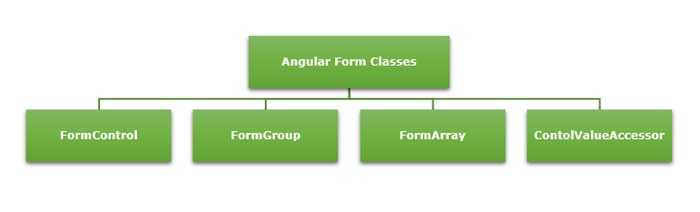
The Angular forms are built on the following four foundation classes −
FormControl: Represents a single form input field. It tracks the value, validation status, and user interactions for the individual input control.
FormGroup: This foundation class represents a collection of FormControl instances or nested FormGroup instances. You can group related form controls together using this class. It’s used to manage the state of a form section (e.g., user details, address information).
FormArray: It is used to handle an array of form controls, such as a list of checkboxes or input fields.
ControlValueAccessor: It connects Angular FormControl instances to built-in DOM elements.
Types of Form in Angular
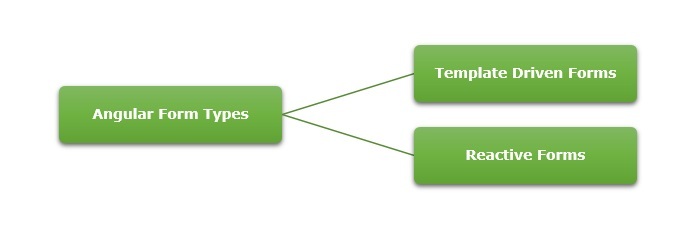
Angular supports two types of forms. They are as follows −
Template-Driven Forms: As the name suggests, the template-driven forms are closely associated with Angular Templates. User input validation and behaviors are defined using directives within the template. For data flow, these forms use two-way data binding. You can build any kind of simple form within your Angular application, such as login forms and contact forms. Remember, if you have very basic form requirements and prefer to manage it solely using the template, then template-driven forms may be a suitable choice.
Reactive Forms: The reactive forms follow a model-driven approach. Compared to template-driven forms, they are more robust, scalable and suitable for complex forms. Instead of a template, these forms are controlled from the Angular Component class. Use this type of form, if forms are a key part of your Angular application.
Difference between Reactive Forms and Template-Driven Forms
The table below shows how Reactive Forms are different from Template-Driven Forms −
Reactive Forms
Template-Driven Forms
They follow a model-driven approach.
They follow a view-driven approach
Forms are created and controlled from the component class.
Forms are created and validations are handled directly in the template.
The flow of data is Synchronous.
Asynchronous data flow.
It is flexible and scalable for complex forms with dynamic behavior.
More suitable for simple and static forms.
In reactive forms, the form control instances are accessed using FormControl and FormGroup.
Form controls are accessed using template reference variables.
Form validations are applied using the built-in validator functions.
Form validations are applied using the built-in directives.
Form Validation
Form validation is a process used to check whether the user input is in the correct format or not before submission. The validation process can be used to verify the format of email addresses and phone numbers as they have specific formats. Also, you can verify if the given input meets specific constraints like a minimum or maximum length. The form validation can prevent errors by catching invalid input before it is processed or sent to the server.
The Validator class in Angular provides a set of built-in validator functions that validate the form controls. A few example of validators are min, max, required, email, pattern and so on.
Dynamic Form?
A form generated or modified at the run time based on the application state or user interaction is called a dynamic form. It makes the forms adaptable to changes in data model. For example, if a user selects a country, the form could dynamically adjust to show additional fields like postal code, state, or country code.
You can learn how to create and use dynamic forms in angular by visiting this link: dynamic form.