Category: 7. Java Encapsulation

https://cdn3d.iconscout.com/3d/premium/thumb/global-energy-3d-icon-download-in-png-blend-fbx-gltf-file-formats–world-logo-power-ecology-and-pack-nature-icons-8778732.png?f=webp

  • Encapsulation in Java

    Encapsulation in Java is a process of wrapping code and data together into a single unit, for example, a capsule which is mixed of several medicines.

    encapsulation in java

    We can create a fully encapsulated class in Java by making all the data members of the class private. Now we can use setter and getter methods to set and get the data in it.

    The Java Bean class is the example of a fully encapsulated class.

    Advantage of Encapsulation in Java

    By providing only a setter or getter method, you can make the class read-only or write-only. In other words, you can skip the getter or setter methods.

    It provides you the control over the data. Suppose you want to set the value of id which should be greater than 100 only, you can write the logic inside the setter method. You can write the logic not to store the negative numbers in the setter methods.

    It is a way to achieve data hiding in Java because other class will not be able to access the data through the private data members.

    The encapsulate class is easy to test. So, it is better for unit testing.

    The standard IDE’s are providing the facility to generate the getters and setters. So, it is easy and fast to create an encapsulated class in Java.

    Simple Example of Encapsulation in Java

    Let’s see the simple example of encapsulation that has only one field with its setter and getter methods.

    File: Student.java

    //A Java class which is a fully encapsulated class.  
    
    //It has a private data member and getter and setter methods.  
    
    package com.javatpoint;  
    
    public class Student{  
    
    //private data member  
    
    private String name;  
    
    //getter method for name  
    
    public String getName(){  
    
    return name;  
    
    }  
    
    //setter method for name  
    
    public void setName(String name){  
    
    this.name=name  
    
    }  
    
    } 

      File: Test.java

      //A Java class to test the encapsulated class.  
      
      package com.javatpoint;  
      
      class Test{  
      
      public static void main(String[] args){  
      
      //creating instance of the encapsulated class  
      
      Student s=new Student();  
      
      //setting value in the name member  
      
      s.setName("vijay");  
      
      //getting value of the name member  
      
      System.out.println(s.getName());  
      
      }  
      
      }
      Compile By: javac -d . Test.java
      Run By: java com.javatpoint.Test
      

      Output:

      vijay
      

      Read-Only class

      //A Java class which has only getter methods.  
      
      public class Student{  
      
      //private data member  
      
      private String college="AKG";  
      
      //getter method for college  
      
      public String getCollege(){  
      
      return college;  
      
      }  
      
      }

      Now, you can’t change the value of the college data member which is “AKG”.

      s.setCollege("KITE");//will render compile time error  

      Write-Only class

      //A Java class which has only setter methods.  
      
      public class Student{  
      
      //private data member  
      
      private String college;  
      
      //getter method for college  
      
      public void setCollege(String college){  
      
      this.college=college;  
      
      }  
      
      }

      Now, you can’t get the value of the college, you can only change the value of college data member.

      System.out.println(s.getCollege());//Compile Time Error, because there is no such method  
      
      System.out.println(s.college);//Compile Time Error, because the college data member is private.   
      
      //So, it can't be accessed from outside the class  

        Another Example of Encapsulation in Java

        Let’s see another example of encapsulation that has only four fields with its setter and getter methods.

        File: Account.java

        //A Account class which is a fully encapsulated class.  
        
        //It has a private data member and getter and setter methods.  
        
        class Account {  
        
        //private data members  
        
        private long acc_no;  
        
        private String name,email;  
        
        private float amount;  
        
        //public getter and setter methods  
        
        public long getAcc_no() {  
        
            return acc_no;  
        
        }  
        
        public void setAcc_no(long acc_no) {  
        
            this.acc_no = acc_no;  
        
        }  
        
        public String getName() {  
        
            return name;  
        
        }  
        
        public void setName(String name) {  
        
            this.name = name;  
        
        }  
        
        public String getEmail() {  
        
            return email;  
        
        }  
        
        public void setEmail(String email) {  
        
            this.email = email;  
        
        }  
        
        public float getAmount() {  
        
            return amount;  
        
        }  
        
        public void setAmount(float amount) {  
        
            this.amount = amount;  
        
        }  


        } 

          File: TestAccount.java

          //A Java class to test the encapsulated class Account.  
          
          public class TestEncapsulation {  
          
          public static void main(String[] args) {  
          
              //creating instance of Account class  
          
              Account acc=new Account();  
          
              //setting values through setter methods  
          
              acc.setAcc_no(7560504000L);  
          
              acc.setName("Sonoo Jaiswal");  
          
              acc.setEmail("[email protected]");  
          
              acc.setAmount(500000f);  
          
              //getting values through getter methods  
          
              System.out.println(acc.getAcc_no()+" "+acc.getName()+" "+acc.getEmail()+" "+acc.getAmount());  
          
          }  
          
          }

          Output:

          7560504000 Sonoo Jaiswal [email protected] 500000.0
          
        1. Access Modifiers in Java

          There are two types of modifiers in Java: access modifiers and non-access modifiers.

          The access modifiers in Java specifies the accessibility or scope of a field, method, constructor, or class. We can change the access level of fields, constructors, methods, and class by applying the access modifier on it.

          There are four types of Java access modifiers:

          1. Private: The access level of a private modifier is only within the class. It cannot be accessed from outside the class.
          2. Default: The access level of a default modifier is only within the package. It cannot be accessed from outside the package. If you do not specify any access level, it will be the default.
          3. Protected: The access level of a protected modifier is within the package and outside the package through child class. If you do not make the child class, it cannot be accessed from outside the package.
          4. Public: The access level of a public modifier is everywhere. It can be accessed from within the class, outside the class, within the package and outside the package.

          There are many non-access modifiers, such as static, abstract, synchronized, native, volatile, transient, etc. Here, we are going to learn the access modifiers only.

          Understanding Java Access Modifiers

          Let’s understand the access modifiers in Java by a simple table.

          Access Modifierwithin classwithin packageoutside package by subclass onlyoutside package
          PrivateYNNN
          DefaultYYNN
          ProtectedYYYN
          PublicYYYY

          1) Private

          The private access modifier is accessible only within the class.

          Simple example of private access modifier

          In this example, we have created two classes A and Simple. A class contains private data member and private method. We are accessing these private members from outside the class, so there is a compile-time error.

          class A{  
          
          private int data=40;  
          
          private void msg(){System.out.println("Hello java");}  
          
          }  


          public class Simple{  
          
           public static void main(String args[]){  
          
             A obj=new A();  
          
             System.out.println(obj.data);//Compile Time Error  
          
             obj.msg();//Compile Time Error  
          
             }  
          
          }

          Role of Private Constructor

          If you make any class constructor private, you cannot create the instance of that class from outside the class. For example:

          class A{  
          
          private A(){}//private constructor  
          
          void msg(){System.out.println("Hello java");}  
          
          }  
          
          public class Simple{  
          
           public static void main(String args[]){  
          
             A obj=new A();//Compile Time Error  
          
           }  
          
          }  

            Note: A class cannot be private or protected except nested class.

            2) Default

            If you don’t use any modifier, it is treated as default by default. The default modifier is accessible only within package. It cannot be accessed from outside the package. It provides more accessibility than private. But, it is more restrictive than protected, and public.

            Example of default access modifier

            In this example, we have created two packages pack and mypack. We are accessing the A class from outside its package, since A class is not public, so it cannot be accessed from outside the package.

            //save by A.java  
            
            package pack;  
            
            class A{  
            
              void msg(){System.out.println("Hello");}  
            
            }  
              //save by B.java  
              
              package mypack;  
              
              import pack.*;  
              
              class B{  
              
                public static void main(String args[]){  
              
                 A obj = new A();//Compile Time Error  
              
                 obj.msg();//Compile Time Error  
              
                }  
              
              }

              In the above example, the scope of class A and its method msg() is default so it cannot be accessed from outside the package.

              3) Protected

              The protected access modifier is accessible within package and outside the package but through inheritance only.

              The protected access modifier can be applied on the data member, method and constructor. It can’t be applied on the class.

              It provides more accessibility than the default modifer.

              Example of protected access modifier

              In this example, we have created the two packages pack and mypack. The A class of pack package is public, so can be accessed from outside the package. But msg method of this package is declared as protected, so it can be accessed from outside the class only through inheritance.

              //save by A.java  
              
              package pack;  
              
              public class A{  
              
              protected void msg(){System.out.println("Hello");}  
              
              }
              //save by B.java  
              
              package mypack;  
              
              import pack.*;  


              class B extends A{  
              
                public static void main(String args[]){  
              
                 B obj = new B();  
              
                 obj.msg();  
              
                }  
              
              }
              Output:Hello
              

              4) Public

              The public access modifier is accessible everywhere. It has the widest scope among all other modifiers.

              Example of public access modifier

              //save by A.java  


              package pack;  
              
              public class A{  
              
              public void msg(){System.out.println("Hello");}  
              
              }
                //save by B.java  


                package mypack;  
                
                import pack.*;  


                class B{  
                
                  public static void main(String args[]){  
                
                   A obj = new A();  
                
                   obj.msg();  
                
                  }  
                
                } 
                  Output:Hello
                  

                  Java Access Modifiers with Method Overriding

                  If you are overriding any method, overridden method (i.e. declared in subclass) must not be more restrictive.

                  class A{  
                  
                  protected void msg(){System.out.println("Hello java");}  
                  
                  }  


                  public class Simple extends A{  
                  
                  void msg(){System.out.println("Hello java");}//C.T.Error  
                  
                   public static void main(String args[]){  
                  
                     Simple obj=new Simple();  
                  
                     obj.msg();  
                  
                     }  
                  
                  }
                1. Java Package

                  java package is a group of similar types of classes, interfaces and sub-packages.

                  Package in java can be categorized in two form, built-in package and user-defined package.

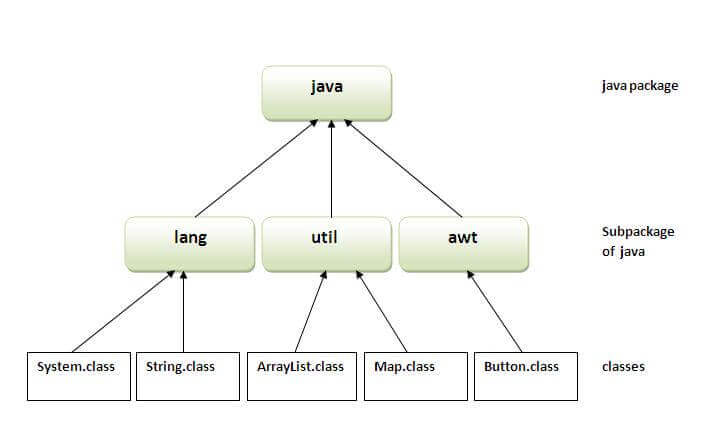
                  There are many built-in packages such as java, lang, awt, javax, swing, net, io, util, sql etc.

                  Here, we will have the detailed learning of creating and using user-defined packages.

                  Advantage of Java Package

                  1) Java package is used to categorize the classes and interfaces so that they can be easily maintained.

                  2) Java package provides access protection.

                  3) Java package removes naming collision.

                  package in java

                  Simple example of java package

                  The package keyword is used to create a package in java.

                  //save as Simple.java  
                  
                  package mypack;  
                  
                  public class Simple{  
                  
                   public static void main(String args[]){  
                  
                      System.out.println("Welcome to package");  
                  
                     }  
                  
                  }

                  How to compile java package

                  If you are not using any IDE, you need to follow the syntax given below:

                  javac -d directory javafilename  

                  For example

                  javac -d . Simple.java  

                  The -d switch specifies the destination where to put the generated class file. You can use any directory name like /home (in case of Linux), d:/abc (in case of windows) etc. If you want to keep the package within the same directory, you can use . (dot).

                  How to run java package program

                  You need to use fully qualified name e.g. mypack.Simple etc to run the class.

                  To Compile: javac -d . Simple.java
                  To Run: java mypack.Simple
                  Output:Welcome to package
                  
                  The -d is a switch that tells the compiler where to put the class file i.e. it represents destination. The . represents the current folder.

                  How to access package from another package?

                  There are three ways to access the package from outside the package.

                  1. import package.*;
                  2. import package.classname;
                  3. fully qualified name.

                  1) Using packagename.*

                  If you use package.* then all the classes and interfaces of this package will be accessible but not subpackages.

                  The import keyword is used to make the classes and interface of another package accessible to the current package.

                  Example of package that import the packagename.*

                  //save by A.java  
                  
                  package pack;  
                  
                  public class A{  
                  
                    public void msg(){System.out.println("Hello");}  
                  
                  } 
                    //save by B.java  
                    
                    package mypack;  
                    
                    import pack.*;  


                    class B{  
                    
                      public static void main(String args[]){  
                    
                       A obj = new A();  
                    
                       obj.msg();  
                    
                      }  
                    
                    }
                    Output:Hello
                    

                    2) Using packagename.classname

                    If you import package.classname then only declared class of this package will be accessible.

                    Example of package by import package.classname

                    //save by A.java  


                    package pack;  
                    
                    public class A{  
                    
                      public void msg(){System.out.println("Hello");}  
                    
                    } 
                      //save by B.java  
                      
                      package mypack;  
                      
                      import pack.A;  


                      class B{  
                      
                        public static void main(String args[]){  
                      
                         A obj = new A();  
                      
                         obj.msg();  
                      
                        }  
                      
                      }
                      Output:Hello
                      

                      3) Using fully qualified name

                      If you use fully qualified name then only declared class of this package will be accessible. Now there is no need to import. But you need to use fully qualified name every time when you are accessing the class or interface.

                      It is generally used when two packages have same class name e.g. java.util and java.sql packages contain Date class.

                      Example of package by import fully qualified name

                      //save by A.java  
                      
                      package pack;  
                      
                      public class A{  
                      
                        public void msg(){System.out.println("Hello");}  
                      
                      } 
                        //save by B.java  
                        
                        package mypack;  
                        
                        class B{  
                        
                          public static void main(String args[]){  
                        
                           pack.A obj = new pack.A();//using fully qualified name  
                        
                           obj.msg();  
                        
                          }  
                        
                        }
                        Output:Hello
                        

                        Note: If you import a package, subpackages will not be imported.

                        If you import a package, all the classes and interface of that package will be imported excluding the classes and interfaces of the subpackages. Hence, you need to import the subpackage as well.

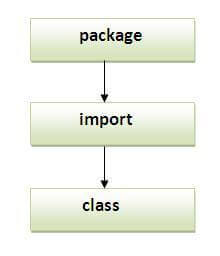
                        Note: Sequence of the program must be package then import then class.

                        sequence of package

                        Subpackage in java

                        Package inside the package is called the subpackage. It should be created to categorize the package further.

                        Let’s take an example, Sun Microsystem has definded a package named java that contains many classes like System, String, Reader, Writer, Socket etc. These classes represent a particular group e.g. Reader and Writer classes are for Input/Output operation, Socket and ServerSocket classes are for networking etc and so on. So, Sun has subcategorized the java package into subpackages such as lang, net, io etc. and put the Input/Output related classes in io package, Server and ServerSocket classes in net packages and so on.

                        The standard of defining package is domain.company.package e.g. com.javatpoint.bean or org.sssit.dao.

                        Example of Subpackage

                        package com.javatpoint.core;  
                        
                        class Simple{  
                        
                          public static void main(String args[]){  
                        
                           System.out.println("Hello subpackage");  
                        
                          }  
                        
                        }
                        To Compile: javac -d . Simple.java
                        To Run: java com.javatpoint.core.Simple
                        Output:Hello subpackage
                        

                        How to send the class file to another directory or drive?

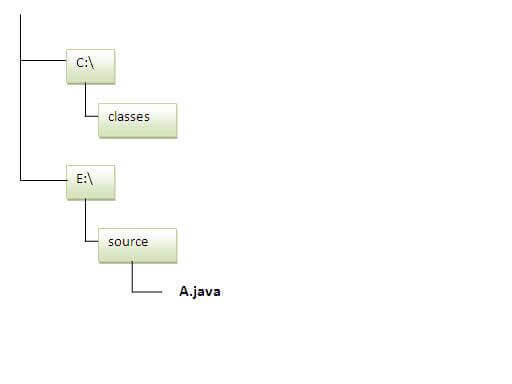
                        There is a scenario, I want to put the class file of A.java source file in classes folder of c: drive. For example:

                        how to put class file in another package
                        //save as Simple.java  
                        
                        package mypack;  
                        
                        public class Simple{  
                        
                         public static void main(String args[]){  
                        
                            System.out.println("Welcome to package");  
                        
                           }  
                        
                        }

                        To Compile:

                        e:\sources> javac -d c:\classes Simple.java

                        To Run:

                        To run this program from e:\source directory, you need to set classpath of the directory where the class file resides.
                        e:\sources> set classpath=c:\classes;.;
                        e:\sources> java mypack.Simple

                        Another way to run this program by -classpath switch of java:

                        The -classpath switch can be used with javac and java tool.

                        To run this program from e:\source directory, you can use -classpath switch of java that tells where to look for class file. For example:

                        e:\sources> java -classpath c:\classes mypack.Simple

                        Output:Welcome to package
                        

                        Ways to load the class files or jar files

                        There are two ways to load the class files temporary and permanent.
                        • Temporary
                          • By setting the classpath in the command prompt
                          • By -classpath switch
                        • Permanent
                          • By setting the classpath in the environment variables
                          • By creating the jar file, that contains all the class files, and copying the jar file in the jre/lib/ext folder.

                        Rule: There can be only one public class in a java source file and it must be saved by the public class name.

                        //save as C.java otherwise Compilte Time Error  


                        class A{}  
                        
                        class B{}  
                        
                        public class C{}

                        How to put two public classes in a package?

                        If you want to put two public classes in a package, have two java source files containing one public class, but keep the package name same. For example:
                        //save as A.java  


                        package javatpoint;  
                        
                        public class A{}
                        //save as B.java  


                        package javatpoint;  
                        
                        public class B{}