Now that we have a fair idea about JavaMail API and its core classes, let us now write a simple programs which will send simple email, email with attachments, email with HTML content and email with inline images.
Basic steps followed in all the above scenarios are as below:
Get the Session object.
Compose a message.
Send the message.
In the following sections we have demonstrated simple examples of:
The JavaMail API consists of some interfaces and classes used to send, read, and delete e-mail messages. Though there are many packages in the JavaMail API, will cover the main two packages that are used in Java Mail API frequently: javax.mail and javax.mail.internet package. These packages contain all the JavaMail core classes. They are:
Class
Description
javax.mail.Session
The key class of the API. A multithreaded object represents the connection factory.
javax.mail.Message
An abstract class that models an e-mail message. Subclasses provide the actual implementations.
javax.mail.Address
An abstract class that models the addresses (from and to addresses) in a message. Subclasses provide the specific implementations.
javax.mail.Authenticator
An abstract class used to protect mail resources on the mail server.
javax.mail.Transport
An abstract class that models a message transport mechanism for sending an e-mail message.
javax.mail.Store
An abstract class that models a message store and its access protocol, for storing and retrieving messages. A Store is divided into Folders.
javax.mail.Folder
An abstract class that represents a folder of mail messages. It can contain subfolders.
javax.mail.internet.MimeMessage
Message is an abstract class, hence must work with a subclass; in most cases, you’ll use a MimeMessage. A MimeMessage is an e-mail message that understands MIME types and headers.
javax.mail.internet.InternetAddress
This class represents an Internet email address using the syntax of RFC822. Typical address syntax is of the form [email protected] or Personal Name <[email protected]>.
Let us study each of these classes in detail and in the subsequent chapters we shall study examples using each of these.
Session Class
The Session class is the primary class of the JavaMail API and it is not subclassed. The Session object acts as the connection factory for the JavaMail API, which handles both configuration setting and authentication.
Session object can be created in the following ways:
By looking up the administered object stored in the JNDI serviceInitialContext ctx = new InitialContext(); Session session = (Session) ctx.lookup(“usersMailSession”);usersMailSession is the JNDI name object used as the administered object for the Session object. usersMailSession can be created and configured with the required parameters as name/value pairs, including information such as the mail server hostname, the user account sending the mail, and the protocols supported by the Session object.
Another method of creating the Session object is based on the programmatic approach in which you can use a java.util.Properties object to override some of the default information, such as the mail server name, username, password, and other information that can be shared across your entire application.
The constructor for Session class is private. Hence the Session class provides two methods (listed below) which get the Session object.
getDefaultInstance(): There are two methods to get the session object by using the getDefaultInstance() method. It returns the default session.public static Session getDefaultInstance(Properties props) public static Session getDefaultInstance(Properties props,Authenticator auth)
getInstance(): There are two methods to get the session object by using the getInstance() method. It returns the new session.public static Session getInstance(Properties props) public static Session getInstance(Properties props,Authenticator auth)
Message Class
With Session object created we now move on to creating a message that will be sent. The message type will be javax.mail.Message.
Message is an abstract class. Hence its subclass javax.mail.internet.MimeMessage class is mostly used.
To create the message, you need to pass session object in MimeMessage class constructor. For example:MimeMessage message=new MimeMessage(session);
Once the message object is created we need to store information in it. Message class implements the javax.mail.Part interface while javax.mail.internet. MimeMessage implements javax.mail.internet.MimePart. You can either use message.setContent() or mimeMessage.setText() to store the content.
Commonly used methods of MimeMessage class areMethodDescriptionpublic void setFrom(Address address)used to set the from header field.public void addRecipients(Message.RecipientType type, String addresses)used to add the given address to the recipient type.public void setSubject(String subject)used to set the subject header field.public void setText(String textmessage)used to set the text as the message content using text/plain MIME type.
Learn Java in-depth with real-world projects through our Java certification course. Enroll and become a certified expert to boost your career.
Address Class
Now that we have a Session and Message (with content stored in it) objects, we need to address the letter by using Address object.
Address is an abstract class. Hence its subclass javax.mail.internet.InternetAddress class is mostly used.
Address can be created by just passing email address:Address address = new InternetAddress(“[email protected]”);
Another way of creating Address is by passing name alogwith the email address:Address address = new InternetAddress(“[email protected]”, Manisha);
You can also set the To, From, CC, BCC fields as below
message.setFrom(address)
message.addRecipient(type, address)
Three predefined address types are objects with one of these values:
Message.RecipientType.TO
Message.RecipientType.CC
Message.RecipientType.BCC
Authenticator Class
The class Authenticator represents an object that knows how to obtain authentication for a network connection. Usually, it will do this by prompting the user for information.
Authenticator is an abstract class. You create a subclass PasswordAuthentication, passing a username and password to its constructor.
You must register the Authenticator with the Session when you create session object.
Following is an example of Authenticator use:
Properties props = new Properties();
//Override props with any customized data
PasswordAuthentication auth = new PasswordAuthentication("manisha", "pswrd")
Session session = Session.getDefaultInstance(props, auth);
Transport Class
Transport class is used as a message transport mechanism. This class normally uses the SMTP protocol to send a message.
It is an abstract class.
You can use the default version of the class by just calling the static send() method:Transport.send(message);
The other way to send message is by getting a specific instance from the session for your protocol, pass along the username and password (blank if unnecessary), send the message, and close the connection:message.saveChanges(); // implicit with send() //Get transport for session Transport transport = session.getTransport(“smtp”); //Connect transport.connect(host, username, password); //repeat if necessary transport.sendMessage(message, message.getAllRecipients()); //Done, close the connection transport.close();
Store Class
An abstract class that models a message store and its access protocol, for storing and retrieving messages. Subclasses provide actual implementations. Store extends the Service class, which provides many common methods for naming stores, connecting to stores, and listening to connection events.
Clients gain access to a Message Store by obtaining a Store object that implements the database access protocol. Most message stores require the user to be authenticated before they allow access. The connect method performs that authentication.
Store store = session.getStore("pop3");
store.connect(host, username, password);
Folder Class
Folder is an abstract class that represents a folder for mail messages. Subclasses implement protocol specific Folders. Folders can contain subfolders as well as messages, thus providing a hierarchical structure.
After connecting to the Store, you can then get a Folder, which must be opened before you can read messages from it.
The getFolder(String name) method for a Folder object returns the named subfolder. Close the both the Store and Folder connection once reading mail is done.
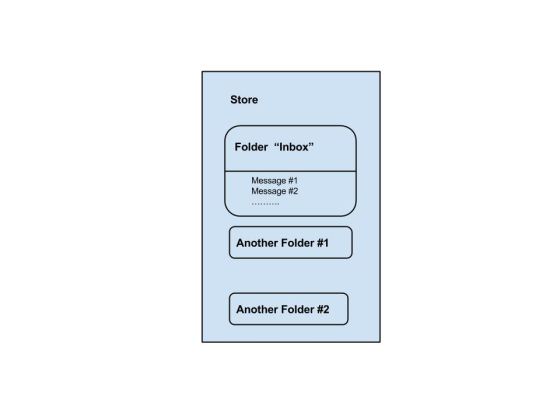
We can see the Store and Folder relation the image below:
As we can see, for each user account, the server has a store which is the storage of user’s messages. The store is divided into folders, and the “inbox” folder is the primarily folder which contains e-mail messages. A folder can contain both messages and sub-folders.
To send an e-mail using your Java Application is simple enough but to start with you should have JavaMail API and Java Activation Framework (JAF) installed on your machine.
You will need the JavaBeans Activation Framework (JAF) extension that provides the javax.activation package only when you’re not using Java SE 6 or newer.
You can download latest version of JavaMail (Version 1.5.0) from Java’s standard website.
You can download latest version of JAF (Version 1.1.1) from Java’s standard website.
Download and unzip these files, in the newly created top level directories you will find a number of jar files for both the applications. You need to add mail.jar and activation.jar files in your CLASSPATH.
SMTP server
To send emails, you must have SMTP server that is responsible to send mails. You can use one of the following techniques to get the SMTP server:
Install and use any SMTP server such as Postfix server (for Ubuntu), Apache James server (Java Apache Mail Enterprise Server)etc. (or)
Use the SMTP server provided by the host provider for eg: free SMTP provide by JangoSMTP site is relay.jangosmtp.net (or)
Use the SMTP Server provided by companies e.g. gmail, yahoo, etc.
The examples in the subsequent chapters, we’ve used the free JangoSMTP server to send email. You can create an account by visiting this site and configure your email adress.
The JavaMail API provides a platform-independent and protocol-independent framework to build mail and messaging applications. The JavaMail API provides a set of abstract classes defining objects that comprise a mail system. It is an optional package (standard extension) for reading, composing, and sending electronic messages.
JavaMail provides elements that are used to construct an interface to a messaging system, including system components and interfaces. While this specification does not define any specific implementation, JavaMail does include several classes that implement RFC822 and MIME Internet messaging standards. These classes are delivered as part of the JavaMail class package.
Following are some of the protocols supported in JavaMail API:
SMTP: Acronym for Simple Mail Transfer Protocol. It provides a mechanism to deliver email.
POP: Acronym for Post Office Protocol. POP is the mechanism most people on the Internet use to get their mail. It defines support for a single mailbox for each user. RFC 1939 defines this protocol.
IMAP: Acronym for Internet Message Access Protocol. It is an advanced protocol for receiving messages. It provides support for multiple mailbox for each user, in addition to, mailbox can be shared by multiple users. It is defined in RFC 2060.
MIME: Acronym for Multipurpose Internet Mail Extensions. . It is not a mail transfer protocol. Instead, it defines the content of what is transferred: the format of the messages, attachments, and so on. There are many different documents that take effect here: RFC 822, RFC 2045, RFC 2046, and RFC 2047. As a user of the JavaMail API, you usually don’t need to worry about these formats. However, these formats do exist and are used by your programs.
NNTP and Others:There are many protocols that are provided by third-party providers. Some of them are Network News Transfer Protocol (NNTP), Secure Multipurpose Internet Mail Extensions (S/MIME) etc.
Details of these will be covered in the subsequent chapters.
Architecture
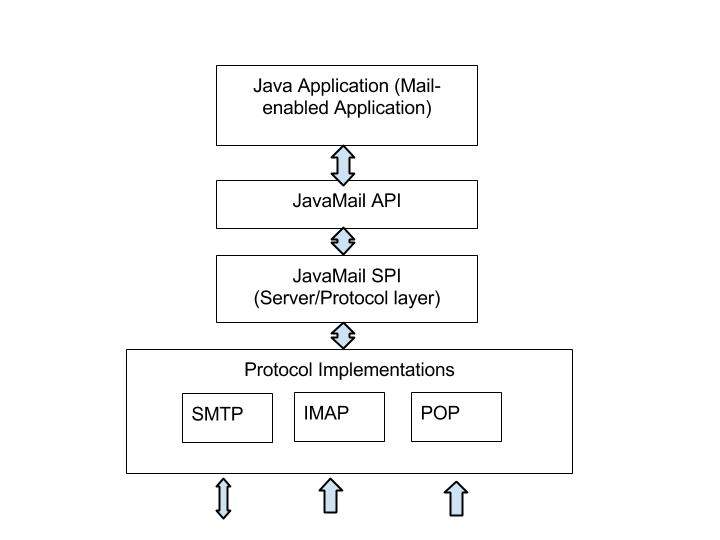
As said above the java application uses JavaMail API to compose, send and receive emails.The following figure illustrates the architecture of JavaMail:
The abstract mechanism of JavaMail API is similar to other J2EE APIs, such as JDBC, JNDI, and JMS. As seen the architecture diagram above, JavaMail API is divided into two main parts:
An application-independent part: An application-programming interface (API) is used by the application components to send and receive mail messages, independent of the underlying provider or protocol used.
A service-dependent part: A service provider interface (SPI) speaks the protocol-specific languages, such as SMTP, POP, IMAP, and Network News Transfer Protocol (NNTP). It is used to plug in a provider of an e-mail service to the J2EE platform.