Category: 20. Java Mail

https://cdn3d.iconscout.com/3d/premium/thumb/mail-3d-icon-download-in-png-blend-fbx-gltf-file-formats–email-message-letter-ui-part-5-pack-user-interface-icons-8208531.png

  • SMTP Servers

    SMTP is an acronym for Simple Mail Transfer Protocol. It is an Internet standard for electronic mail (e-mail) transmission across Internet Protocol (IP) networks. SMTP uses TCP port 25. SMTP connections secured by SSL are known by the shorthand SMTPS, though SMTPS is not a protocol in its own right.

    JavaMail API has package com.sun.mail.smtp which act as SMTP protocol provider to access an SMTP server. Following table lists the classes included in this package:

    ClassDescription
    SMTPMessageThis class is a specialization of the MimeMessage class that allows you to specify various SMTP options and parameters that will be used when this message is sent over SMTP.
    SMTPSSLTransportThis class implements the Transport abstract class using SMTP over SSL for message submission and transport.
    SMTPTransportThis class implements the Transport abstract class using SMTP for message submission and transport.

    The following table lists the exceptions thrown:

    ExceptionDescription
    SMTPAddressFailedExceptionThis exception is thrown when the message cannot be sent.
    SMTPAddressSucceededExceptionThis exception is chained off a SendFailedException when the mail.smtp.reportsuccess property is true.
    SMTPSenderFailedExceptionThis exception is thrown when the message cannot be sent.
    SMTPSendFailedExceptionThis exception is thrown when the message cannot be sent.The exception includes the sender’s address, which the mail server rejected.

    The com.sun.mail.smtp provider use SMTP Authentication optionally. To use SMTP authentication you’ll need to set the mail.smtp.auth property or provide the SMTP Transport with a username and password when connecting to the SMTP server. You can do this using one of the following approaches:

    • Provide an Authenticator object when creating your mail Session and provide the username and password information during the Authenticator callback. mail.smtp.user property can be set to provide a default username for the callback, but the password will still need to be supplied explicitly. This approach allows you to use the static Transport send method to send messages. For example:
    • Call the Transport connect method explicitly with username and password arguments. For example:Transport tr = session.getTransport(“smtp”); tr.connect(smtphost, username, password); msg.saveChanges(); tr.sendMessage(msg, msg.getAllRecipients()); tr.close();

    The SMTP protocol provider supports the following properties, which may be set in the JavaMail Session object. The properties are always set as strings. For example:

     props.put("mail.smtp.port", "587");

    Here the Type column describes how the string is interpreted.

    NameTypeDescription
    mail.smtp.userStringDefault user name for SMTP.
    mail.smtp.hostStringThe SMTP server to connect to.
    mail.smtp.portintThe SMTP server port to connect to, if the connect() method doesn’t explicitly specify one. Defaults to 25.
    mail.smtp.connectiontimeoutintSocket connection timeout value in milliseconds. Default is infinite timeout.
    mail.smtp.timeoutintSocket I/O timeout value in milliseconds. Default is infinite timeout.
    mail.smtp.fromStringEmail address to use for SMTP MAIL command. This sets the envelope return address. Defaults to msg.getFrom() or InternetAddress.getLocalAddress().
    mail.smtp.localhostStringLocal host name used in the SMTP HELO or EHLO command. Defaults to InetAddress.getLocalHost().getHostName(). Should not normally need to be set if your JDK and your name service are configured properly.
    mail.smtp.localaddressStringLocal address (host name) to bind to when creating the SMTP socket. Defaults to the address picked by the Socket class. Should not normally need to be set.
    mail.smtp.localportintLocal port number to bind to when creating the SMTP socket. Defaults to the port number picked by the Socket class.
    mail.smtp.ehlobooleanIf false, do not attempt to sign on with the EHLO command. Defaults to true.
    mail.smtp.authbooleanIf true, attempt to authenticate the user using the AUTH command. Defaults to false.
    mail.smtp.auth.mechanismsStringIf set, lists the authentication mechanisms to consider. Only mechanisms supported by the server and supported by the current implementation will be used. The default is “LOGIN PLAIN DIGEST-MD5 NTLM”, which includes all the authentication mechanisms supported by the current implementation.
    mail.smtp.auth.login.disablebooleanIf true, prevents use of the AUTH LOGIN command. Default is false.
    mail.smtp.auth.plain.disablebooleanIf true, prevents use of the AUTH PLAIN command. Default is false.
    mail.smtp.auth.digest-md5.disablebooleanIf true, prevents use of the AUTH DIGEST-MD5 command. Default is false.
    mail.smtp.auth.ntlm.disablebooleanIf true, prevents use of the AUTH NTLM command. Default is false.
    mail.smtp.auth.ntlm.domainStringThe NTLM authentication domain.
    mail.smtp.auth.ntlm.flagsintNTLM protocol-specific flags.
    mail.smtp.submitterStringThe submitter to use in the AUTH tag in the MAIL FROM command. Typically used by a mail relay to pass along information about the original submitter of the message.
    mail.smtp.dsn.notifyStringThe NOTIFY option to the RCPT command. Either NEVER, or some combination of SUCCESS, FAILURE, and DELAY (separated by commas).
    mail.smtp.dsn.retStringThe RET option to the MAIL command. Either FULL or HDRS.
    mail.smtp.sendpartialbooleanIf set to true, and a message has some valid and some invalid addresses, send the message anyway, reporting the partial failure with a SendFailedException. If set to false (the default), the message is not sent to any of the recipients if there is an invalid recipient address.
    mail.smtp.sasl.enablebooleanIf set to true, attempt to use the javax.security.sasl package to choose an authentication mechanism for login. Defaults to false.
    mail.smtp.sasl.mechanismsStringA space or comma separated list of SASL mechanism names to try to use.
    mail.smtp.sasl.authorizationidStringThe authorization ID to use in the SASL authentication. If not set, the authentication ID (user name) is used.
    mail.smtp.sasl.realmStringThe realm to use with DIGEST-MD5 authentication.
    mail.smtp.quitwaitbooleanIf set to false, the QUIT command is sent and the connection is immediately closed. If set to true (the default), causes the transport to wait for the response to the QUIT command.
    mail.smtp.reportsuccessbooleanIf set to true, causes the transport to include an SMTPAddressSucceededException for each address that is successful.
    mail.smtp.socketFactorySocket FactoryIf set to a class that implements the javax.net.SocketFactory interface, this class will be used to create SMTP sockets.
    mail.smtp.socketFactory.classStringIf set, specifies the name of a class that implements the javax.net.SocketFactory interface. This class will be used to create SMTP sockets.
    mail.smtp.socketFactory.fallbackbooleanIf set to true, failure to create a socket using the specified socket factory class will cause the socket to be created using the java.net.Socket class. Defaults to true.
    mail.smtp.socketFactory.portintSpecifies the port to connect to when using the specified socket factory. If not set, the default port will be used.
    mail.smtp.ssl.enablebooleanIf set to true, use SSL to connect and use the SSL port by default. Defaults to false for the “smtp” protocol and true for the “smtps” protocol.
    mail.smtp.ssl.checkserveridentitybooleanIf set to true, checks the server identity as specified by RFC 2595. Defaults to false.
    mail.smtp.ssl.trustStringIf set, and a socket factory hasn’t been specified, enables use of a MailSSLSocketFactory.
    If set to “*”, all hosts are trusted.
    If set to a whitespace separated list of hosts, those hosts are trusted.
    Otherwise, trust depends on the certificate the server presents.
    mail.smtp.ssl.socketFactorySSL Socket FactoryIf set to a class that extends the javax.net.ssl.SSLSocketFactory class, this class will be used to create SMTP SSL sockets.
    mail.smtp.ssl.socketFactory.classStringIf set, specifies the name of a class that extends the javax.net.ssl.SSLSocketFactory class. This class will be used to create SMTP SSL sockets.
    mail.smtp.ssl.socketFactory.portintSpecifies the port to connect to when using the specified socket factory. If not set, the default port will be used.
    mail.smtp.ssl.protocolsstringSpecifies the SSL protocols that will be enabled for SSL connections. The property value is a whitespace separated list of tokens acceptable to the javax.net.ssl.SSLSocket.setEnabledProtocols method.
    mail.smtp.starttls.enablebooleanIf true, enables the use of the STARTTLS command (if supported by the server) to switch the connection to a TLS-protected connection before issuing any login commands. Defaults to false.
    mail.smtp.starttls.requiredbooleanIf true, requires the use of the STARTTLS command. If the server doesn’t support the STARTTLS command, or the command fails, the connect method will fail. Defaults to false.
    mail.smtp.socks.hoststringSpecifies the host name of a SOCKS5 proxy server that will be used for connections to the mail server.
    mail.smtp.socks.portstringSpecifies the port number for the SOCKS5 proxy server. This should only need to be used if the proxy server is not using the standard port number of 1080.
    mail.smtp.mailextensionStringExtension string to append to the MAIL command.
    mail.smtp.usersetbooleanIf set to true, use the RSET command instead of the NOOP command in the isConnected method. In some cases sendmail will respond slowly after many NOOP commands; use of RSET avoids this sendmail issue. Defaults to false.

    In general, applications should not need to use the classes in this package directly. Instead, they should use the APIs defined by javax.mail package (and subpackages). Say for example applications should never construct instances of SMTPTransport directly. Instead, they should use the Session method getTransport to acquire an appropriate Transport object.
  • Bounced Messages

    A message can be bounced for several reasons. This problem is discussed in depth at rfc1211. Only a server can determine the existence of a particular mailbox or user name. When the server detects an error, it will return a message indicating the reason for the failure to the sender of the original message.

    There are many Internet standards covering Delivery Status Notifications but a large number of servers don’t support these new standards, instead using ad hoc techniques for returning such failure messages. Hence it get very difficult to correlate the bounced message with the original message that caused the problem.

    JavaMail includes support for parsing Delivery Status Notifications. There are a number of techniques and heuristics for dealing with this problem. One of the techniques being Variable Envelope Return Paths. You can set the return path in the enveloper as shown in the example below. This is the address where bounce mails are sent to. You may want to set this to a generic address, different than the From: header, so you can process remote bounces. This done by setting mail.smtp.from property in JavaMail.

    Create Java Class

    Create a java class file SendEmail, the contents of which are as follows:

    import java.util.Properties;
    
    import javax.mail.Message;
    import javax.mail.PasswordAuthentication;
    import javax.mail.Session;
    import javax.mail.Transport;
    import javax.mail.internet.InternetAddress;
    import javax.mail.internet.MimeMessage;
    
    public class SendEmail {
       public static void main(String[] args) throws Exception {
    
      String smtpServer = "smtp.gmail.com";
      int port = 587;
      final String userid = "youraddress";//change accordingly
      final String password = "*****";//change accordingly
      String contentType = "text/html";
      String subject = "test: bounce an email to a different address " +
    			"from the sender";
      String from = "[email protected]";
      String to = "[email protected]";//some invalid address
      String bounceAddr = "[email protected]";//change accordingly
      String body = "Test: get message to bounce to a separate email address";
      Properties props = new Properties();
      props.put("mail.smtp.auth", "true");
      props.put("mail.smtp.starttls.enable", "true");
      props.put("mail.smtp.host", smtpServer);
      props.put("mail.smtp.port", "587");
      props.put("mail.transport.protocol", "smtp");
      props.put("mail.smtp.from", bounceAddr);
      Session mailSession = Session.getInstance(props,
         new javax.mail.Authenticator() {
            protected PasswordAuthentication getPasswordAuthentication() {
               return new PasswordAuthentication(userid, password);
            }
         });
      MimeMessage message = new MimeMessage(mailSession);
      message.addFrom(InternetAddress.parse(from));
      message.setRecipients(Message.RecipientType.TO, to);
      message.setSubject(subject);
      message.setContent(body, contentType);
      Transport transport = mailSession.getTransport();
      try {
         System.out.println("Sending ....");
         transport.connect(smtpServer, port, userid, password);
         transport.sendMessage(message,
            message.getRecipients(Message.RecipientType.TO));
         System.out.println("Sending done ...");
      } catch (Exception e) {
         System.err.println("Error Sending: ");
         e.printStackTrace();
      }
      transport.close();
    }// end function main() }

    Here we can see that the property mail.smtp.from is set different from the from address.

    Compile and Run

    Now that our class is ready, let us compile the above class. I’ve saved the class SendEmail.java to directory : /home/manisha/JavaMailAPIExercise. We would need the jars javax.mail.jar and activation.jar in the classpath. Execute the command below to compile the class (both the jars are placed in /home/manisha/ directory) from command prompt:

    javac -cp /home/manisha/activation.jar:/home/manisha/javax.mail.jar: SendEmail.java

    Now that the class is compiled, execute the below command to run:

    java -cp /home/manisha/activation.jar:/home/manisha/javax.mail.jar: SendEmail

    Learn Java in-depth with real-world projects through our Java certification course. Enroll and become a certified expert to boost your career.

    Verify Output

    You should see the following message on the command console:

    Sending ....
    Sending done ...
  • Quota Management

    A quota in JavaMail is a limited or fixed number or amount of messages in a email store. Each Mail service request counts toward the JavaMail API Calls quota. An email service can apply following quota criterion:

    • Maximum size of outgoing mail messages, including attachments.
    • Maximum size of incoming mail messages, including attachments.
    • Maximum size of message when an administrator is a recipient

    For Quota management JavaMail has following classes:

    ClassDescription
    public class QuotaThis class represents a set of quotas for a given quota root. Each quota root has a set of resources, represented by the Quota.Resource class. Each resource has a name (for example, “STORAGE”), a current usage, and a usage limit. This has only one method setResourceLimit(String name, long limit).
    public static class Quota.ResourceRepresents an individual resource in a quota root.
    public interface QuotaAwareStoreAn interface implemented by Stores that support quotas. The getQuota and setQuota methods support the quota model defined by the IMAP QUOTA extension. GmailSSLStore, GmailStore, IMAPSSLStore, IMAPStore are the known implementing classes of this interface.

    Let us see and example in the following sections which checks for mail storage name, limit and its usage.

    Create Java Class

    Create a java class file QuotaExample, the contents of which are as follows:

    package com.tutorialspoint;
    
    import java.util.Properties;
    
    import javax.mail.Quota;
    import javax.mail.Session;
    import javax.mail.Store;
    
    import com.sun.mail.imap.IMAPStore;
    
    public class QuotaExample 
    {
       public static void main(String[] args) 
       {
    
      try 
      {
         Properties properties = new Properties();
         properties.put("mail.store.protocol", "imaps");
         properties.put("mail.imaps.port", "993");
         properties.put("mail.imaps.starttls.enable", "true");
         Session emailSession = Session.getDefaultInstance(properties);
         // emailSession.setDebug(true);
         // create the IMAP3 store object and connect with the pop server
         Store store = emailSession.getStore("imaps");
         //change the user and password accordingly
         store.connect("imap.gmail.com", "[email protected]", "*****");
         IMAPStore imapStore = (IMAPStore) store;
         System.out.println("imapStore ---" + imapStore);
         //get quota
         Quota[] quotas = imapStore.getQuota("INBOX");
         //Iterate through the Quotas
         for (Quota quota : quotas) {
            System.out.println(String.format("quotaRoot:'%s'",
               quota.quotaRoot));
            //Iterate through the Quota Resource
            for (Quota.Resource resource : quota.resources) {
               System.out.println(String.format(
                  "name:'%s', limit:'%s', usage:'%s'", resource.name,
                  resource.limit, resource.usage));
            }
         }
      } catch (Exception e) 
      {
         e.printStackTrace();
      }
    } }

    Here are connection to the gmail service via IMAP (imap.gmail.com) server, as IMAPStore implements the QuotaAwareStore. Once you get the Store object, fetch the Quota array and iterate through it and print the relevant information.

    Compile and Run

    Now that our class is ready, let us compile the above class. I’ve saved the class QuotaExample.java to directory : /home/manisha/JavaMailAPIExercise. We would need the jars javax.mail.jar and activation.jar in the classpath. Execute the command below to compile the class (both the jars are placed in /home/manisha/ directory) from command prompt:

    javac -cp /home/manisha/activation.jar:/home/manisha/javax.mail.jar: QuotaExample.java

    Now that the class is compiled, execute the below command to run:

    java -cp /home/manisha/activation.jar:/home/manisha/javax.mail.jar: QuotaExample

    Learn Java in-depth with real-world projects through our Java certification course. Enroll and become a certified expert to boost your career.

    Verify Output

    You should see a similar message on the command console:

    imapStore ---imaps://abc%[email protected]
    quotaRoot:''
    name:'STORAGE', limit:'15728640', usage:'513'
  • Gmail SMPT Server

    In all previous chapters we used JangoSMPT server to send emails. In this chapter we will learn about SMPT server provided by Gmail. Gmail (among others) offers use of their public SMTP server free of charge.

    Gmail SMTP server details can be found here. As you can see in the details, we can use either TLS or SSL connection to send email via Gmail SMTP server.

    The procedure to send email using Gmail SMTP server is similar as explained in chapter Sending Emails, except that we would change the host server. As a pre-requisite the sender email address should be an active gmail account. Let us try an example.

    Create Java Class

    Create a Java file SendEmailUsingGMailSMTP, contents of which are as below:

    package com.tutorialspoint;
    
    import java.util.Properties;
    
    import javax.mail.Message;
    import javax.mail.MessagingException;
    import javax.mail.PasswordAuthentication;
    import javax.mail.Session;
    import javax.mail.Transport;
    import javax.mail.internet.InternetAddress;
    import javax.mail.internet.MimeMessage;
    
    public class SendEmailUsingGMailSMTP {
       public static void main(String[] args) {
    
      // Recipient's email ID needs to be mentioned.
      String to = "[email protected]";//change accordingly
      // Sender's email ID needs to be mentioned
      String from = "[email protected]";//change accordingly
      final String username = "abc";//change accordingly
      final String password = "*****";//change accordingly
      // Assuming you are sending email through relay.jangosmtp.net
      String host = "smtp.gmail.com";
      Properties props = new Properties();
      props.put("mail.smtp.auth", "true");
      props.put("mail.smtp.starttls.enable", "true");
      props.put("mail.smtp.host", host);
      props.put("mail.smtp.port", "587");
      // Get the Session object.
      Session session = Session.getInstance(props,
      new javax.mail.Authenticator() {
         protected PasswordAuthentication getPasswordAuthentication() {
            return new PasswordAuthentication(username, password);
         }
      });
      try {
         // Create a default MimeMessage object.
         Message message = new MimeMessage(session);
         // Set From: header field of the header.
         message.setFrom(new InternetAddress(from));
         // Set To: header field of the header.
         message.setRecipients(Message.RecipientType.TO,
         InternetAddress.parse(to));
         // Set Subject: header field
         message.setSubject("Testing Subject");
         // Now set the actual message
         message.setText("Hello, this is sample for to check send "
            + "email using JavaMailAPI ");
         // Send message
         Transport.send(message);
         System.out.println("Sent message successfully....");
      } catch (MessagingException e) {
            throw new RuntimeException(e);
      }
    } }

    Here the host is set as smtp.gmail.com and port is set as 587. Here we have enabled TLS connection.

    Compile and Run

    Now that our class is ready, let us compile the above class. I’ve saved the class SendEmailUsingGMailSMTP.java to directory : /home/manisha/JavaMailAPIExercise. We would need the jars javax.mail.jar and activation.jar in the classpath. Execute the command below to compile the class (both the jars are placed in /home/manisha/ directory) from command prompt:

    javac -cp /home/manisha/activation.jar:/home/manisha/javax.mail.jar: SendEmailUsingGMailSMTP.java

    Now that the class is compiled, execute the below command to run:

    java -cp /home/manisha/activation.jar:/home/manisha/javax.mail.jar: SendEmailUsingGMailSMTP

    Learn Java in-depth with real-world projects through our Java certification course. Enroll and become a certified expert to boost your career.

    Verify Output

    You should see the following message on the command console:

    Sent message successfully....
  • Deleting Emails

    In this chapter we will see how to delete an email using JavaMail API. Deleting messages involves working with the Flags associated with the messages. There are different flags for different states, some system-defined and some user-defined. The predefined flags are defined in the inner class Flags.Flag and are listed below:

    • Flags.Flag.ANSWERED
    • Flags.Flag.DELETED
    • Flags.Flag.DRAFT
    • Flags.Flag.FLAGGED
    • Flags.Flag.RECENT
    • Flags.Flag.SEEN
    • Flags.Flag.USER

    POP protocol supports only deleting of the messages.

    Basic steps followed in the delete program are:

    • Get the Session object with POP and SMPT server details in the properties. We would need POP details to retrieve messages and SMPT details to send messages.
    • Create POP3 store object and connect to the store.
    • Create Folder object and open the appropriate folder in your mailbox in READ_WRITE mode.
    • Retrieves messages from inbox folder.
    • Iterate through the messages and type “Y” or “y” if you want to delete the message by invoking the method setFlag(Flags.Flag.DELETED, true) on the Message object.
    • The messages marked DELETED are not actually deleted, until we call the expunge() method on the Folder object, or close the folder with expunge set to true.
    • Close the store object.

    Create Java Class

    Create a java class file ForwardEmail, the contents of which are as follows:

    package com.tutorialspoint;
    
    import java.io.BufferedReader;
    import java.io.IOException;
    import java.io.InputStreamReader;
    import java.util.Properties;
    
    import javax.mail.Flags;
    import javax.mail.Folder;
    import javax.mail.Message;
    import javax.mail.MessagingException;
    import javax.mail.NoSuchProviderException;
    import javax.mail.Session;
    import javax.mail.Store;
    
    public class DeleteEmail {
    
       public static void delete(String pop3Host, String storeType, String user,
    
      String password) 
    {
      try 
      {
         // get the session object
         Properties properties = new Properties();
         properties.put("mail.store.protocol", "pop3");
         properties.put("mail.pop3s.host", pop3Host);
         properties.put("mail.pop3s.port", "995");
         properties.put("mail.pop3.starttls.enable", "true");
         Session emailSession = Session.getDefaultInstance(properties);
         // emailSession.setDebug(true);
         // create the POP3 store object and connect with the pop server
         Store store = emailSession.getStore("pop3s");
         store.connect(pop3Host, user, password);
         // create the folder object and open it
         Folder emailFolder = store.getFolder("INBOX");
         emailFolder.open(Folder.READ_WRITE);
         BufferedReader reader = new BufferedReader(new InputStreamReader(
            System.in));
         // retrieve the messages from the folder in an array and print it
         Message[] messages = emailFolder.getMessages();
         System.out.println("messages.length---" + messages.length);
         for (int i = 0; i < messages.length; i++) {
            Message message = messages[i];
            System.out.println("---------------------------------");
            System.out.println("Email Number " + (i + 1));
            System.out.println("Subject: " + message.getSubject());
            System.out.println("From: " + message.getFrom()[0]);
            String subject = message.getSubject();
            System.out.print("Do you want to delete this message [y/n] ? ");
            String ans = reader.readLine();
            if ("Y".equals(ans) || "y".equals(ans)) {
           // set the DELETE flag to true
           message.setFlag(Flags.Flag.DELETED, true);
           System.out.println("Marked DELETE for message: " + subject);
            } else if ("n".equals(ans)) {
           break;
            }
         }
         // expunges the folder to remove messages which are marked deleted
         emailFolder.close(true);
         store.close();
      } catch (NoSuchProviderException e) {
         e.printStackTrace();
      } catch (MessagingException e) {
         e.printStackTrace();
      } catch (IOException io) {
         io.printStackTrace();
      }
    } public static void main(String[] args) {
      String host = "pop.gmail.com";// change accordingly
      String mailStoreType = "pop3";
      String username = "[email protected]";// change accordingly
      String password = "*****";// change accordingly
      delete(host, mailStoreType, username, password);
    } }

    You can set the debug on by uncommenting the statement emailSession.setDebug(true);

    Compile and Run

    Now that our class is ready, let us compile the above class. I’ve saved the class DeleteEmail.java to directory : /home/manisha/JavaMailAPIExercise. We would need the jars javax.mail.jar and activation.jar in the classpath. Execute the command below to compile the class (both the jars are placed in /home/manisha/ directory) from command prompt:

    javac -cp /home/manisha/activation.jar:/home/manisha/javax.mail.jar: DeleteEmail.java

    Now that the class is compiled, execute the following command to run:

    java -cp /home/manisha/activation.jar:/home/manisha/javax.mail.jar: DeleteEmail

    Learn Java in-depth with real-world projects through our Java certification course. Enroll and become a certified expert to boost your career.

    Verify Output

    You should see the following message on the command console:

    messages.length---1
    ---------------------------------
    Email Number 1
    Subject: Testing
    From: ABC <[email protected]>
    Do you want to delete this message [y/n] ? y
    Marked DELETE for message: Testing
  • Forwarding Emails

    In this chapter we will see how to forward an email using JavaMail API. Basic steps followed in the program below are:

    • Get the Session object with POP and SMPT server details in the properties. We would need POP details to retrieve messages and SMPT details to send messages.
    • Create POP3 store object and connect to the store.
    • Create Folder object and open the appropriate folder in your mailbox.
    • Retrieve messages.
    • Iterate through the messages and type “Y” or “y” if you want to forward.
    • Get all information (To,From,Subject, Content) of the message.
    • Build the forward message by working with the parts that make up a message. First part would be the text of the message and a second part would be the message to forward. Combine the two into a multipart. Then you add the multipart to a properly addressed message and send it.
    • Close the Transport, folder and store objects respectively.

    Here we have used JangoSMPT server via which emails are sent to our destination email address. The setup is explained in the Environment Setup chapter.

    Create Java Class

    Create a java class file ForwardEmail, the contents of which are as follows:

    package com.tutorialspoint;
    
    import java.io.BufferedReader;
    import java.io.InputStreamReader;
    import java.util.Date;
    import java.util.Properties;
    
    import javax.mail.BodyPart;
    import javax.mail.Folder;
    import javax.mail.Message;
    import javax.mail.Multipart;
    import javax.mail.PasswordAuthentication;
    import javax.mail.Session;
    import javax.mail.Store;
    import javax.mail.Transport;
    import javax.mail.internet.InternetAddress;
    import javax.mail.internet.MimeBodyPart;
    import javax.mail.internet.MimeMessage;
    import javax.mail.internet.MimeMultipart;
    
    public class ForwardEmail {
    
       public static void main(String[] args) {
    
      Properties properties = new Properties();
      properties.put("mail.store.protocol", "pop3");
      properties.put("mail.pop3s.host", "pop.gmail.com");
      properties.put("mail.pop3s.port", "995");
      properties.put("mail.pop3.starttls.enable", "true");
      properties.put("mail.smtp.auth", "true");
      properties.put("mail.smtp.host", "relay.jangosmtp.net");
      properties.put("mail.smtp.port", "25");
      Session session = Session.getDefaultInstance(properties);
      try {
         // session.setDebug(true);
         // Get a Store object and connect to the current host
         Store store = session.getStore("pop3s");
         store.connect("pop.gmail.com", "[email protected]",
            "*****");//change the user and password accordingly
         // Create a Folder object and open the folder
         Folder folder = store.getFolder("inbox");
         folder.open(Folder.READ_ONLY);
         BufferedReader reader = new BufferedReader(new InputStreamReader(
            System.in));
         Message&#91;] messages = folder.getMessages();
         if (messages.length != 0) {
         for (int i = 0, n = messages.length; i &lt; n; i++) {
            Message message = messages&#91;i];
            // Get all the information from the message
            String from = InternetAddress.toString(message.getFrom());
            if (from != null) {
               System.out.println("From: " + from);
            }
            String replyTo = InternetAddress.toString(message
               .getReplyTo());
            if (replyTo != null) {
               System.out.println("Reply-to: " + replyTo);
            }
            String to = InternetAddress.toString(message
               .getRecipients(Message.RecipientType.TO));
            if (to != null) {
               System.out.println("To: " + to);
            }
            String subject = message.getSubject();
            if (subject != null) {
               System.out.println("Subject: " + subject);
            }
            Date sent = message.getSentDate();
            if (sent != null) {
               System.out.println("Sent: " + sent);
            }
            System.out.print("Do you want to reply &#91;y/n] : ");
            String ans = reader.readLine();
            if ("Y".equals(ans) || "y".equals(ans)) {
               Message forward = new MimeMessage(session);
               // Fill in header
               forward.setRecipients(Message.RecipientType.TO,
               InternetAddress.parse(from));
               forward.setSubject("Fwd: " + message.getSubject());
               forward.setFrom(new InternetAddress(to));
               // Create the message part
               MimeBodyPart messageBodyPart = new MimeBodyPart();
               // Create a multipart message
               Multipart multipart = new MimeMultipart();
               // set content
               messageBodyPart.setContent(message, "message/rfc822");
               // Add part to multi part
               multipart.addBodyPart(messageBodyPart);
               // Associate multi-part with message
               forward.setContent(multipart);
               forward.saveChanges();
               // Send the message by authenticating the SMTP server
               // Create a Transport instance and call the sendMessage
               Transport t = session.getTransport("smtp");
               try {
                  //connect to the smpt server using transport instance
    	  //change the user and password accordingly
                  t.connect("abc", "*****");
                  t.sendMessage(forward, forward.getAllRecipients());
               } finally {
                  t.close();
               }
               System.out.println("message forwarded successfully....");
            // close the store and folder objects
            folder.close(false);
            store.close();
            }// end if
         }// end for
    }// end if } catch (Exception e) {
      e.printStackTrace();
    } } }

    You can set the debug on by uncommenting the statement session.setDebug(true);

    Compile and Run

    Now that our class is ready, let us compile the above class. I’ve saved the class ForwardEmail.java to directory : /home/manisha/JavaMailAPIExercise. We would need the jars javax.mail.jar and activation.jar in the classpath. Execute the command below to compile the class (both the jars are placed in /home/manisha/ directory) from command prompt:

    javac -cp /home/manisha/activation.jar:/home/manisha/javax.mail.jar: ForwardEmail.java

    Now that the class is compiled, execute the following command to run:

    java -cp /home/manisha/activation.jar:/home/manisha/javax.mail.jar: ForwardEmail

    Learn Java in-depth with real-world projects through our Java certification course. Enroll and become a certified expert to boost your career.

    Verify Output

    You should see the following message on the command console:

    From: ABC <[email protected]>
    Reply-to: [email protected]
    To: XYZ <[email protected]>
    Subject: Hi today is a nice day
    Sent: Thu Oct 17 15:58:37 IST 2013
    Do you want to reply [y/n] : y
    message forwarded successfully....

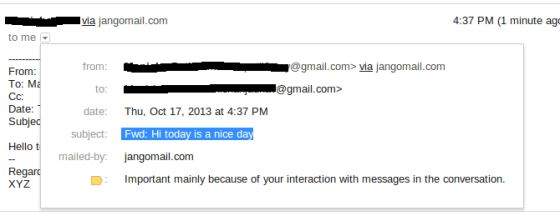
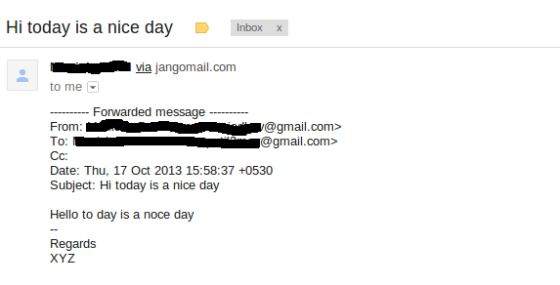
    Check the inbox to which the mail was sent. In our case the forwarded message would look as below:

    JavaMail API Forward Email
    JavaMail API Forward Email
  • Replying Emails

    In this chapter we will see how to reply to an email using JavaMail API. Basic steps followed in the program below are:

    • Get the Session object with POP and SMPT server details in the properties. We would need POP details to retrieve messages and SMPT details to send messages.
    • Create POP3 store object and connect to the store.
    • Create Folder object and open the appropriate folder in your mailbox.
    • Retrieve messages.
    • Iterate through the messages and type “Y” or “y” if you want to reply.
    • Get all information (To,From,Subject, Content) of the message.
    • Build the reply message, using Message.reply() method. This method configures a new Message with the proper recipient and subject. The method takes a boolean parameter indicating whether to reply to only the sender (false) or reply to all (true).
    • Set From,Text and Reply-to in the message and send it through the instance of Transport object.
    • Close the Transport, folder and store objects respectively.

    Here we have used JangoSMPT server via which emails are sent to our destination email address. The setup is explained in the Environment Setup chapter.

    Create Java Class

    Create a java class file ReplyToEmail, the contents of which are as follows:

    package com.tutorialspoint;
    
    import java.io.BufferedReader;
    import java.io.InputStreamReader;
    import java.util.Date;
    import java.util.Properties;
    
    import javax.mail.Folder;
    import javax.mail.Message;
    import javax.mail.Session;
    import javax.mail.Store;
    import javax.mail.Transport;
    import javax.mail.internet.InternetAddress;
    import javax.mail.internet.MimeMessage;
    
    public class ReplyToEmail {
       public static void main(String args[]) 
       {
    
      Date date = null;
      Properties properties = new Properties();
      properties.put("mail.store.protocol", "pop3");
      properties.put("mail.pop3s.host", "pop.gmail.com");
      properties.put("mail.pop3s.port", "995");
      properties.put("mail.pop3.starttls.enable", "true");
      properties.put("mail.smtp.auth", "true");
      properties.put("mail.smtp.starttls.enable", "true");
      properties.put("mail.smtp.host", "relay.jangosmtp.net");
      properties.put("mail.smtp.port", "25");
      Session session = Session.getDefaultInstance(properties);
      // session.setDebug(true);
      try 
      {
         // Get a Store object and connect to the current host
         Store store = session.getStore("pop3s");
         store.connect("pop.gmail.com", "[email protected]",
            "*****");//change the user and password accordingly
         Folder folder = store.getFolder("inbox");
         if (!folder.exists()) {
            System.out.println("inbox not found");
               System.exit(0);
         }
         folder.open(Folder.READ_ONLY);
         BufferedReader reader = new BufferedReader(new InputStreamReader(
            System.in));
         Message&#91;] messages = folder.getMessages();
         if (messages.length != 0) {
            for (int i = 0, n = messages.length; i &lt; n; i++) {
               Message message = messages&#91;i];
               date = message.getSentDate();
               // Get all the information from the message
               String from = InternetAddress.toString(message.getFrom());
               if (from != null) {
                  System.out.println("From: " + from);
               }
               String replyTo = InternetAddress.toString(message
             .getReplyTo());
               if (replyTo != null) {
                  System.out.println("Reply-to: " + replyTo);
               }
               String to = InternetAddress.toString(message
             .getRecipients(Message.RecipientType.TO));
               if (to != null) {
                  System.out.println("To: " + to);
               }
               String subject = message.getSubject();
               if (subject != null) {
                  System.out.println("Subject: " + subject);
               }
               Date sent = message.getSentDate();
               if (sent != null) {
                  System.out.println("Sent: " + sent);
               }
               System.out.print("Do you want to reply &#91;y/n] : ");
               String ans = reader.readLine();
               if ("Y".equals(ans) || "y".equals(ans)) {
                  Message replyMessage = new MimeMessage(session);
                  replyMessage = (MimeMessage) message.reply(false);
                  replyMessage.setFrom(new InternetAddress(to));
                  replyMessage.setText("Thanks");
                  replyMessage.setReplyTo(message.getReplyTo());
                  // Send the message by authenticating the SMTP server
                  // Create a Transport instance and call the sendMessage
                  Transport t = session.getTransport("smtp");
                  try {
       	     //connect to the smpt server using transport instance
    	     //change the user and password accordingly	
                 t.connect("abc", "****");
                 t.sendMessage(replyMessage,
                        replyMessage.getAllRecipients());
                  } finally {
                     t.close();
                  }
                  System.out.println("message replied successfully ....");
                  // close the store and folder objects
                  folder.close(false);
                  store.close();
               } else if ("n".equals(ans)) {
                  break;
               }
            }//end of for loop
         } else {
            System.out.println("There is no msg....");
         }
      } catch (Exception e) {
         e.printStackTrace();
      }
    } }

    You can set the debug on by uncommenting the statement session.setDebug(true);

    Compile and Run

    Now that our class is ready, let us compile the above class. I’ve saved the class ReplyToEmail.java to directory : /home/manisha/JavaMailAPIExercise. We would need the jars javax.mail.jar and activation.jar in the classpath. Execute the command below to compile the class (both the jars are placed in /home/manisha/ directory) from command prompt:

    javac -cp /home/manisha/activation.jar:/home/manisha/javax.mail.jar: ReplyToEmail.java

    Now that the class is compiled, execute the following command to run:

    java -cp /home/manisha/activation.jar:/home/manisha/javax.mail.jar: ReplyToEmail

    Learn Java in-depth with real-world projects through our Java certification course. Enroll and become a certified expert to boost your career.

    Verify Output

    You should see the following message on the command console:

    From: ABC <[email protected]>
    Reply-to: [email protected]
    To: XYZ <[email protected]>
    Subject: Hi today is a nice day
    Sent: Thu Oct 17 15:58:37 IST 2013
    Do you want to reply [y/n] : y
    message replied successfully ....

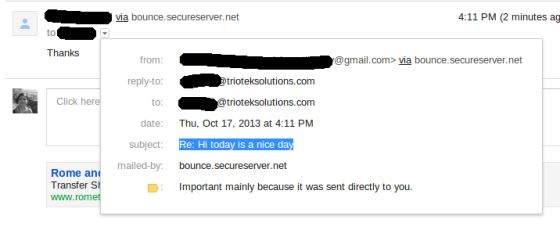
    Check the inbox to which the mail was sent. In our case the message received looks as below:

    JavaMail API Reply Email
  • Authentication

    In the previous chapters Checking Emails and Fetching Emails, we passed authorization credentials (user ad password) along with host, when connecting to store of your mailbox. Instead we can configure the Properties to have the host, and tell the Session about your custom Authenticator instance. This is shown in the example below:

    Create Java Class

    We will modify our CheckingMails.java from the chapter Checking Emails. Its contents are as below:

    package com.tutorialspoint;
    
    import java.util.Properties;
    
    import javax.mail.Authenticator;
    import javax.mail.Folder;
    import javax.mail.Message;
    import javax.mail.MessagingException;
    import javax.mail.NoSuchProviderException;
    import javax.mail.PasswordAuthentication;
    import javax.mail.Session;
    import javax.mail.Store;
    
    public class CheckingMails {
    
       public static void check(String host, String storeType, String user,
    
      String password) 
    {
      try {
      // create properties field
      Properties properties = new Properties();
      properties.put("mail.pop3s.host", host);
      properties.put("mail.pop3s.port", "995");
      properties.put("mail.pop3s.starttls.enable", "true");
      // Setup authentication, get session
      Session emailSession = Session.getInstance(properties,
         new javax.mail.Authenticator() {
            protected PasswordAuthentication getPasswordAuthentication() {
               return new PasswordAuthentication(
                  "[email protected]", "manisha123");
            }
         });
      // emailSession.setDebug(true);
      // create the POP3 store object and connect with the pop server
      Store store = emailSession.getStore("pop3s");
      store.connect();
      // create the folder object and open it
      Folder emailFolder = store.getFolder("INBOX");
      emailFolder.open(Folder.READ_ONLY);
      // retrieve the messages from the folder in an array and print it
      Message&#91;] messages = emailFolder.getMessages();
      System.out.println("messages.length---" + messages.length);
      for (int i = 0, n = messages.length; i &lt; n; i++) {
         Message message = messages&#91;i];
         System.out.println("---------------------------------");
         System.out.println("Email Number " + (i + 1));
         System.out.println("Subject: " + message.getSubject());
         System.out.println("From: " + message.getFrom()&#91;0]);
         System.out.println("Text: " + message.getContent().toString());
      }
      // close the store and folder objects
      emailFolder.close(false);
      store.close();
      } catch (NoSuchProviderException e) {
         e.printStackTrace();
      } catch (MessagingException e) {
         e.printStackTrace();
      } catch (Exception e) {
         e.printStackTrace();
      }
    } public static void main(String[] args) {
      String host = "pop.gmail.com";// change accordingly
      String mailStoreType = "pop3";
      String username = "[email protected]";// change accordingly
      String password = "*****";// change accordingly
      check(host, mailStoreType, username, password);
    } }

    You can set the debug on by uncommenting the statement emailSession.setDebug(true);

    Compile and Run

    Now that our class is ready, let us compile the above class. I’ve saved the class CheckingMails.java to directory : /home/manisha/JavaMailAPIExercise. We would need the jars javax.mail.jar and activation.jar in the classpath. Execute the command below to compile the class (both the jars are placed in /home/manisha/ directory) from command prompt:

    javac -cp /home/manisha/activation.jar:/home/manisha/javax.mail.jar: CheckingMails.java

    Now that the class is compiled, execute the below command to run:

    java -cp /home/manisha/activation.jar:/home/manisha/javax.mail.jar: CheckingMails

    Learn Java in-depth with real-world projects through our Java certification course. Enroll and become a certified expert to boost your career.

    Verify Output

    You can see a similar message as below on the command console:

    messages.length---3
    ---------------------------------
    Email Number 1
    Subject: Today is a nice day
    From: XYZ <[email protected]>
    Text: javax.mail.internet.MimeMultipart@45f676cb
    ---------------------------------
    Email Number 2
    Subject: hiiii....
    From: XYZ <[email protected]>
    Text: javax.mail.internet.MimeMultipart@37f12d4f
    ---------------------------------
    Email Number 3
    Subject: helloo
    From: XYZ <[email protected]>
    Text: javax.mail.internet.MimeMultipart@3ad5ba3a
  • Fetching Emails

    In the previous chapter we learnt how to check emails. Now let us see how to fetch each email and read its content. Let us write a Java class FetchingEmail which will read following types of emails:

    • Simple email
    • Email with attachment
    • Email with inline image

    Basic steps followed in the code are as below:

    • Get the Session object.
    • Create POP3 store object and connect to the store.
    • Create Folder object and open the appropriate folder in your mailbox.
    • Retrieve messages.
    • Close the folder and store objects respectively.

    Create Java Class

    Create a java class file FetchingEmail, contents of which are as below:

    package com.tutorialspoint;
    
    import java.io.BufferedOutputStream;
    import java.io.BufferedReader;
    import java.io.DataOutputStream;
    import java.io.File;
    import java.io.FileOutputStream;
    import java.io.IOException;
    import java.io.InputStream;
    import java.io.InputStreamReader;
    import java.util.Date;
    import java.util.Properties;
    
    import javax.mail.Address;
    import javax.mail.Folder;
    import javax.mail.Message;
    import javax.mail.MessagingException;
    import javax.mail.Multipart;
    import javax.mail.NoSuchProviderException;
    import javax.mail.Part;
    import javax.mail.Session;
    import javax.mail.Store;
    
    public class FetchingEmail {
    
       public static void fetch(String pop3Host, String storeType, String user,
    
      String password) {
      try {
         // create properties field
         Properties properties = new Properties();
         properties.put("mail.store.protocol", "pop3");
         properties.put("mail.pop3.host", pop3Host);
         properties.put("mail.pop3.port", "995");
         properties.put("mail.pop3.starttls.enable", "true");
         Session emailSession = Session.getDefaultInstance(properties);
         // emailSession.setDebug(true);
         // create the POP3 store object and connect with the pop server
         Store store = emailSession.getStore("pop3s");
         store.connect(pop3Host, user, password);
         // create the folder object and open it
         Folder emailFolder = store.getFolder("INBOX");
         emailFolder.open(Folder.READ_ONLY);
         BufferedReader reader = new BufferedReader(new InputStreamReader(
          System.in));
         // retrieve the messages from the folder in an array and print it
         Message&#91;] messages = emailFolder.getMessages();
         System.out.println("messages.length---" + messages.length);
         for (int i = 0; i &lt; messages.length; i++) {
            Message message = messages&#91;i];
            System.out.println("---------------------------------");
            writePart(message);
            String line = reader.readLine();
            if ("YES".equals(line)) {
               message.writeTo(System.out);
            } else if ("QUIT".equals(line)) {
               break;
            }
         }
         // close the store and folder objects
         emailFolder.close(false);
         store.close();
      } catch (NoSuchProviderException e) {
         e.printStackTrace();
      } catch (MessagingException e) {
         e.printStackTrace();
      } catch (IOException e) {
         e.printStackTrace();
      } catch (Exception e) {
         e.printStackTrace();
      }
    } public static void main(String[] args) {
      String host = "pop.gmail.com";// change accordingly
      String mailStoreType = "pop3";
      String username = 
         "[email protected]";// change accordingly
      String password = "*****";// change accordingly
      //Call method fetch
      fetch(host, mailStoreType, username, password);
    } /* * This method checks for content-type * based on which, it processes and * fetches the content of the message */ public static void writePart(Part p) throws Exception {
      if (p instanceof Message)
         //Call methos writeEnvelope
         writeEnvelope((Message) p);
      System.out.println("----------------------------");
      System.out.println("CONTENT-TYPE: " + p.getContentType());
      //check if the content is plain text
      if (p.isMimeType("text/plain")) {
         System.out.println("This is plain text");
         System.out.println("---------------------------");
         System.out.println((String) p.getContent());
      } 
      //check if the content has attachment
      else if (p.isMimeType("multipart/*")) {
         System.out.println("This is a Multipart");
         System.out.println("---------------------------");
         Multipart mp = (Multipart) p.getContent();
         int count = mp.getCount();
         for (int i = 0; i &lt; count; i++)
            writePart(mp.getBodyPart(i));
      } 
      //check if the content is a nested message
      else if (p.isMimeType("message/rfc822")) {
         System.out.println("This is a Nested Message");
         System.out.println("---------------------------");
         writePart((Part) p.getContent());
      } 
      //check if the content is an inline image
      else if (p.isMimeType("image/jpeg")) {
         System.out.println("--------&gt; image/jpeg");
         Object o = p.getContent();
         InputStream x = (InputStream) o;
         // Construct the required byte array
         System.out.println("x.length = " + x.available());
         while ((i = (int) ((InputStream) x).available()) &gt; 0) {
            int result = (int) (((InputStream) x).read(bArray));
            if (result == -1)
         int i = 0;
         byte&#91;] bArray = new byte&#91;x.available()];
            break;
         }
         FileOutputStream f2 = new FileOutputStream("/tmp/image.jpg");
         f2.write(bArray);
      } 
      else if (p.getContentType().contains("image/")) {
         System.out.println("content type" + p.getContentType());
         File f = new File("image" + new Date().getTime() + ".jpg");
         DataOutputStream output = new DataOutputStream(
            new BufferedOutputStream(new FileOutputStream(f)));
            com.sun.mail.util.BASE64DecoderStream test = 
                 (com.sun.mail.util.BASE64DecoderStream) p
                  .getContent();
         byte&#91;] buffer = new byte&#91;1024];
         int bytesRead;
         while ((bytesRead = test.read(buffer)) != -1) {
            output.write(buffer, 0, bytesRead);
         }
      } 
      else {
         Object o = p.getContent();
         if (o instanceof String) {
            System.out.println("This is a string");
            System.out.println("---------------------------");
            System.out.println((String) o);
         } 
         else if (o instanceof InputStream) {
            System.out.println("This is just an input stream");
            System.out.println("---------------------------");
            InputStream is = (InputStream) o;
            is = (InputStream) o;
            int c;
            while ((c = is.read()) != -1)
               System.out.write(c);
         } 
         else {
            System.out.println("This is an unknown type");
            System.out.println("---------------------------");
            System.out.println(o.toString());
         }
      }
    } /* * This method would print FROM,TO and SUBJECT of the message */ public static void writeEnvelope(Message m) throws Exception {
      System.out.println("This is the message envelope");
      System.out.println("---------------------------");
      Address&#91;] a;
      // FROM
      if ((a = m.getFrom()) != null) {
         for (int j = 0; j &lt; a.length; j++)
         System.out.println("FROM: " + a&#91;j].toString());
      }
      // TO
      if ((a = m.getRecipients(Message.RecipientType.TO)) != null) {
         for (int j = 0; j &lt; a.length; j++)
         System.out.println("TO: " + a&#91;j].toString());
      }
      // SUBJECT
      if (m.getSubject() != null)
         System.out.println("SUBJECT: " + m.getSubject());
    } }

    You can set the debug on by uncommenting the statement emailSession.setDebug(true);

    Compile and Run

    Now that our class is ready, let us compile the above class. I’ve saved the class FetchingEmail.java to directory : /home/manisha/JavaMailAPIExercise. We would need the jars javax.mail.jar and activation.jar in the classpath. Execute the command below to compile the class (both the jars are placed in /home/manisha/ directory) from command prompt:

    javac -cp /home/manisha/activation.jar:/home/manisha/javax.mail.jar: FetchingEmail.java

    Now that the class is compiled, execute the below command to run:

    java -cp /home/manisha/activation.jar:/home/manisha/javax.mail.jar: FetchingEmail

    Learn Java in-depth with real-world projects through our Java certification course. Enroll and become a certified expert to boost your career.

    Verify Output

    You should see the following message on the command console:

    messages.length---3
    ---------------------------------
    This is the message envelope
    ---------------------------
    FROM: XYZ <[email protected]>
    TO: ABC <[email protected]>
    SUBJECT: Simple Message
    ----------------------------
    CONTENT-TYPE: multipart/alternative; boundary=047d7b343d6ad3e4ea04e8ec6579
    This is a Multipart
    ---------------------------
    
    ----------------------------
    CONTENT-TYPE: text/plain; charset=ISO-8859-1
    This is plain text
    ---------------------------
    Hi am a simple message string....
    
    -- 
    Regards
    xyz
    
    This is the message envelope
    ---------------------------
    FROM: XYZ <[email protected]>
    TO: ABC <[email protected]>
    SUBJECT: Attachement
    ----------------------------
    CONTENT-TYPE: multipart/mixed; boundary=047d7b343d6a99180904e8ec6751
    This is a Multipart
    ---------------------------
    
    ----------------------------
    CONTENT-TYPE: text/plain; charset=ISO-8859-1
    This is plain text
    ---------------------------
    Hi I've an attachment.Please check
    
    -- 
    Regards
    XYZ
    
    ----------------------------
    CONTENT-TYPE: application/octet-stream; name=sample_attachement
    This is just an input stream
    ---------------------------
    Submit your Tutorials, White Papers and Articles into our Tutorials Directory. This is a tutorials database where we are keeping all the tutorials shared by the internet community for the benefit of others.
    
    
    This is the message envelope
    ---------------------------
    FROM: XYZ <[email protected]>
    TO: ABC <[email protected]>
    SUBJECT: Inline Image
    ----------------------------
    CONTENT-TYPE: multipart/related; boundary=f46d04182582be803504e8ece94b
    This is a Multipart
    ---------------------------
    
    ----------------------------
    CONTENT-TYPE: text/plain; charset=ISO-8859-1
    This is plain text
    ---------------------------
    Hi I've an inline image
    
    
    [image: Inline image 3]
    
    -- 
    Regards
    XYZ
    
    ----------------------------
    CONTENT-TYPE: image/png; name="javamail-mini-logo.png"
    content typeimage/png; name="javamail-mini-logo.png"

    Here you can see there are three emails in our mailbox. First a simple mail with message “Hi am a simple message string….”. The second mail has an attachment. The contents of the attachment are also printed as seen above. The third mail has an inline image.

  • Checking Emails

    There are two aspects to which needs to understood before proceeding with this chapter. They are Check and Fetch.

    • Checking an email in JavaMail is a process where we open the respective folder in the mailbox and get each message. Here we only check the header of each message i.e the From, To, subject. Content is not read.
    • Fetching an email in JavaMail is a process where we open the respective folder in the mailbox and get each message. Alongwith the header we also read the content by recognizing the content-type.

    To check or fetch an email using JavaMail API, we would need POP or IMAP servers. To check and fetch the emails, Folder and Store classes are needed. Here we have used GMAIL’s POP3 server (pop.gmail.com). In this chapter will learn how to check emails using JavaMail API. Fetching shall be covered in the subsequent chapters. To check emails:

    • Get a Session
    • Create pop3 Store object and connect with pop server.
    • Create folder object. Open the appropriate folder in your mailbox.
    • Get your messages.
    • Close the Store and Folder objects.

    Create Java Class

    Create a java class file CheckingMails, the contents of which are as follows:

    package com.tutorialspoint;
    
    import java.util.Properties;
    
    import javax.mail.Folder;
    import javax.mail.Message;
    import javax.mail.MessagingException;
    import javax.mail.NoSuchProviderException;
    import javax.mail.Session;
    import javax.mail.Store;
    
    public class CheckingMails {
    
       public static void check(String host, String storeType, String user,
    
      String password) 
    {
      try {
      //create properties field
      Properties properties = new Properties();
      properties.put("mail.pop3.host", host);
      properties.put("mail.pop3.port", "995");
      properties.put("mail.pop3.starttls.enable", "true");
      Session emailSession = Session.getDefaultInstance(properties);
      //create the POP3 store object and connect with the pop server
      Store store = emailSession.getStore("pop3s");
      store.connect(host, user, password);
      //create the folder object and open it
      Folder emailFolder = store.getFolder("INBOX");
      emailFolder.open(Folder.READ_ONLY);
      // retrieve the messages from the folder in an array and print it
      Message&#91;] messages = emailFolder.getMessages();
      System.out.println("messages.length---" + messages.length);
      for (int i = 0, n = messages.length; i &lt; n; i++) {
         Message message = messages&#91;i];
         System.out.println("---------------------------------");
         System.out.println("Email Number " + (i + 1));
         System.out.println("Subject: " + message.getSubject());
         System.out.println("From: " + message.getFrom()&#91;0]);
         System.out.println("Text: " + message.getContent().toString());
      }
      //close the store and folder objects
      emailFolder.close(false);
      store.close();
      } catch (NoSuchProviderException e) {
         e.printStackTrace();
      } catch (MessagingException e) {
         e.printStackTrace();
      } catch (Exception e) {
         e.printStackTrace();
      }
    } public static void main(String[] args) {
      String host = "pop.gmail.com";// change accordingly
      String mailStoreType = "pop3";
      String username = "[email protected]";// change accordingly
      String password = "*****";// change accordingly
      check(host, mailStoreType, username, password);
    } }

    Compile and Run

    Now that our class is ready, let us compile the above class. I’ve saved the class CheckingMails.java to directory : /home/manisha/JavaMailAPIExercise. We would need the jars javax.mail.jar and activation.jar in the classpath. Execute the command below to compile the class (both the jars are placed in /home/manisha/ directory) from command prompt:

    javac -cp /home/manisha/activation.jar:/home/manisha/javax.mail.jar: CheckingMails.java

    Now that the class is compiled, execute the below command to run:

    java -cp /home/manisha/activation.jar:/home/manisha/javax.mail.jar: CheckingMails

    Learn Java in-depth with real-world projects through our Java certification course. Enroll and become a certified expert to boost your career.

    Verify Output

    You should see the following message on the command console:

    messages.length---4
    ---------------------------------
    Email Number 1
    Subject: Test Mail--Fetch
    From: <[email protected]>
    Text: javax.mail.internet.MimeMultipart@327a5b7f
    ---------------------------------
    Email Number 2
    Subject: testing ----checking simple email
    From: <[email protected]>
    Text: javax.mail.internet.MimeMultipart@7f0d08bc
    ---------------------------------
    Email Number 3
    Subject: Email with attachment
    From: <[email protected]>
    Text: javax.mail.internet.MimeMultipart@30b8afce
    ---------------------------------
    Email Number 4
    Subject: Email with Inline image
    From: <[email protected]>
    Text: javax.mail.internet.MimeMultipart@2d1e165f

    Here we have printed the number of messages in the INBOX which is 4 in this case. We have also printed Subject, From address and Text for each email message.