Category: 04. Java Cryptography

https://encrypted-tbn0.gstatic.com/images?q=tbn:ANd9GcS7L1utHolz1tjPydbH1V6o4cEM2BBHMOex5k-JOhzJ8hlzFWeBfNn12WPFHw_LAAoCVmY

  • Decrypting Data

    You can decrypt the encrypted data using the Cipher class of the javax.crypto package. Follow the steps given below to decrypt given data using Java.

    Step 1: Create a KeyPairGenerator object

    The KeyPairGenerator class provides getInstance() method which accepts a String variable representing the required key-generating algorithm and returns a KeyPairGenerator object that generates keys.

    Create KeyPairGenerator object using the getInstance() method as shown below.

    //Creating KeyPair generator object
    KeyPairGenerator keyPairGen = KeyPairGenerator.getInstance("DSA");
    

    Step 2: Initialize the KeyPairGenerator object

    The KeyPairGenerator class provides a method named initialize() this method is used to initialize the key pair generator. This method accepts an integer value representing the key size.

    Initialize the KeyPairGenerator object created in the previous step using the initialize() method as shown below.

    //Initializing the KeyPairGenerator
    keyPairGen.initialize(2048);
    

    Learn Java in-depth with real-world projects through our Java certification course. Enroll and become a certified expert to boost your career.

    Step 3: Generate the KeyPairGenerator

    You can generate the KeyPair using the generateKeyPair() method of the KeyPairGenerator class. Generate the key pair using this method as shown below.

    //Generate the pair of keys
    KeyPair pair = keyPairGen.generateKeyPair();
    

    Step 4: Get the public key

    You can get the public key from the generated KeyPair object using the getPublic() method as shown below.

    //Getting the public key from the key pair
    PublicKey publicKey = pair.getPublic();
    

    Step 5: Create a Cipher object

    The getInstance() method of Cipher class accepts a String variable representing the required transformation and returns a Cipher object that implements the given transformation.

    Create the Cipher object using the getInstance() method as shown below.

    //Creating a Cipher object
    Cipher cipher = Cipher.getInstance("RSA/ECB/PKCS1Padding");
    

    Step 6: Initialize the Cipher object

    The init() method of the Cipher class accepts two parameters

    • An integer parameter representing the operation mode (encrypt/decrypt)
    • Key object representing the public key

    Initialize the Cypher object using the init() method as shown below.

    //Initializing a Cipher object
    cipher.init(Cipher.ENCRYPT_MODE, publicKey);
    

    Step 7: Add data to the Cipher object

    The update() method of the Cipher class accepts a byte array representing the data to be encrypted and updates the current object with the data given.

    Update the initialized Cipher object by passing the data to the update() method in the form of byte array as shown below.

    //Adding data to the cipher
    byte[] input = "Welcome to Tutorialspoint".getBytes();	  
    cipher.update(input);
    

    Step 8: Encrypt the data

    The doFinal() method of the Cipher class completes the encryption operation. Therefore, finish the encryption using this method as shown below.

    //Encrypting the data
    byte[] cipherText = cipher.doFinal();
    

    Step 9: Initialize the Cipher object for decryption

    To decrypt the cypher encrypted in the previous steps you need to initialize it for decryption.

    Therefore, initialize the cipher object by passing the parameters Cipher.DECRYPT_MODE and PrivateKey object as shown below.

    //Initializing the same cipher for decryption
    cipher.init(Cipher.DECRYPT_MODE, pair.getPrivate());
    

    Step 10: Decrypt the data

    Finally, Decrypt the encrypted text using the doFinal() method as shown below.

    //Decrypting the text
    byte[] decipheredText = cipher.doFinal(cipherText);
    

    Example

    Following Java program accepts text from user, encrypts it using RSA algorithm and, prints the cipher of the given text, decrypts the cipher and prints the decrypted text again.

    import java.security.KeyPair;
    import java.security.KeyPairGenerator;
    import java.security.Signature;
    
    import javax.crypto.Cipher;
    
    public class CipherDecrypt {
       public static void main(String args[]) throws Exception{
    
       //Creating a Signature object
      Signature sign = Signature.getInstance("SHA256withRSA");
      
      //Creating KeyPair generator object
      KeyPairGenerator keyPairGen = KeyPairGenerator.getInstance("RSA");
      
      //Initializing the key pair generator
      keyPairGen.initialize(2048);
      
      //Generate the pair of keys
      KeyPair pair = keyPairGen.generateKeyPair();   
      
      //Getting the public key from the key pair
      PublicKey publicKey = pair.getPublic();  
      //Creating a Cipher object
      Cipher cipher = Cipher.getInstance("RSA/ECB/PKCS1Padding");
      //Initializing a Cipher object
      cipher.init(Cipher.ENCRYPT_MODE, publicKey);
      //Add data to the cipher
      byte[] input = "Welcome to Tutorialspoint".getBytes();	  
      cipher.update(input);
      //encrypting the data
      byte[] cipherText = cipher.doFinal();	 
      System.out.println( new String(cipherText, "UTF8"));
      //Initializing the same cipher for decryption
      cipher.init(Cipher.DECRYPT_MODE, pair.getPrivate());
      
      //Decrypting the text
      byte[] decipheredText = cipher.doFinal(cipherText);
      System.out.println(new String(decipheredText));
    } }

    Output

    The above program generates the following output −

    Encrypted Text:
    ]/[?F3?D?p
    v?w?!?H???^?A??????P?u??FA?
    ?
    ???_?? ???_jMH-??>??OP?'?j?_?n`
    ?_??'????o??_GL??g???g_f?????f|???LT?|?Vz_TDu#??\?<b,,?$C2???Bq?#?lDB??g,^??K?_?v???`}
    ?;LX?a?_5e???#???_?6?/B&B_???^?__Ap^#_?q?IEh????_?,??*??]~_?_?D?
    _y???lp??a?P_U{
    
    Decrypted Text:
    Welcome to Tutorialspoint
    
  • Encrypting Data

    You can encrypt given data using the Cipher class of the javax.crypto package. Follow the steps given below to encrypt given data using Java.

    Step 1: Create a KeyPairGenerator object

    The KeyPairGenerator class provides getInstance() method which accepts a String variable representing the required key-generating algorithm and returns a KeyPairGenerator object that generates keys.

    Create KeyPairGenerator object using the getInstance() method as shown below.

    //Creating KeyPair generator object
    KeyPairGenerator keyPairGen = KeyPairGenerator.getInstance("DSA");
    

    Step 2: Initialize the KeyPairGenerator object

    The KeyPairGenerator class provides a method named initialize() this method is used to initialize the key pair generator. This method accepts an integer value representing the key size.

    Initialize the KeyPairGenerator object created in the previous step using the initialize() method as shown below.

    //Initializing the KeyPairGenerator
    keyPairGen.initialize(2048);
    

    Learn Java in-depth with real-world projects through our Java certification course. Enroll and become a certified expert to boost your career.

    Step 3: Generate the KeyPairGenerator

    You can generate the KeyPair using the generateKeyPair() method of the KeyPairGenerator class. Generate the key pair using this method as shown below.

    //Generate the pair of keys
    KeyPair pair = keyPairGen.generateKeyPair();
    

    Step 4: Get the public key

    You can get the public key from the generated KeyPair object using the getPublic() method as shown below.

    Get the public key using this method as shown below.

    //Getting the public key from the key pair
    PublicKey publicKey = pair.getPublic();
    

    Step 5: Create a Cipher object

    The getInstance() method of Cipher class accepts a String variable representing the required transformation and returns a Cipher object that implements the given transformation.

    Create the Cipher object using the getInstance() method as shown below.

    //Creating a Cipher object
    Cipher cipher = Cipher.getInstance("RSA/ECB/PKCS1Padding");
    

    Step 6: Initialize the Cipher object

    The init() method of the Cipher class accepts two parameters an integer parameter representing the operation mode (encrypt/decrypt) and, a Key object representing the public key.

    Initialize the Cypher object using the init() method as shown below.

    //Initializing a Cipher object
    cipher.init(Cipher.ENCRYPT_MODE, publicKey);
    

    Step 7: Add data to the Cipher object

    The update() method of the Cipher class accepts a byte array representing the data to be encrypted and updates the current object with the data given.

    Update the initialized Cipher object by passing the data to the update() method in the form of byte array as shown below.

    //Adding data to the cipher
    byte[] input = "Welcome to Tutorialspoint".getBytes();	  
    cipher.update(input);
    

    Step 8: Encrypt the data

    The doFinal() method of the Cipher class completes the encryption operation. Therefore, finish the encryption using this method as shown below.

    //Encrypting the data
    byte[] cipherText = cipher.doFinal();
    

    Example

    Following Java program accepts text from user, encrypts it using RSA algorithm and, prints the encrypted format of the given text.

    import java.security.KeyPair;
    import java.security.KeyPairGenerator;
    import java.security.Signature;
    
    import javax.crypto.BadPaddingException;
    import javax.crypto.Cipher;
    
    public class CipherSample {
       public static void main(String args[]) throws Exception{
    
      //Creating a Signature object
      Signature sign = Signature.getInstance("SHA256withRSA");
      
      //Creating KeyPair generator object
      KeyPairGenerator keyPairGen = KeyPairGenerator.getInstance("RSA");
      
      //Initializing the key pair generator
      keyPairGen.initialize(2048);
      
      //Generating the pair of keys
      KeyPair pair = keyPairGen.generateKeyPair();      
      //Creating a Cipher object
      Cipher cipher = Cipher.getInstance("RSA/ECB/PKCS1Padding");
        
      //Initializing a Cipher object
      cipher.init(Cipher.ENCRYPT_MODE, pair.getPublic());
      //Adding data to the cipher
      byte[] input = "Welcome to Tutorialspoint".getBytes();	  
      cipher.update(input);
      //encrypting the data
      byte[] cipherText = cipher.doFinal();	 
      System.out.println(new String(cipherText, "UTF8"));
    } }

    Output

    The above program generates the following output −

    Encrypted Text: 
    "???:]J_?]???;Xl??????*@??u???r??=T&???_?_??.??i?????(?$_f?zD??????ZGH??g???
    g?E:_??bz^??f?~o???t?}??u=uzp\UI????Z??l[?G?3??Y?UAEfKT?f?O??N_?d__?????a_?15%?^?
    'p?_?$,9"{??^??y??_?t???,?W?PCW??~??[?$??????e????f?Y-Zi__??_??w?_?&QT???~?[?K_??_???
    
  • Verifying Signature

    You can create digital signature using Java and verify it following the steps given below.

    Step 1: Create a KeyPairGenerator object

    The KeyPairGenerator class provides getInstance() method which accepts a String variable representing the required key-generating algorithm and returns a KeyPairGenerator object that generates keys.

    Create KeyPairGenerator object using the getInstance() method as shown below.

    //Creating KeyPair generator object
    KeyPairGenerator keyPairGen = KeyPairGenerator.getInstance("DSA");
    

    Step 2: Initialize the KeyPairGenerator object

    The KeyPairGenerator class provides a method named initialize() method. This method is used to initialize the key pair generator. This method accepts an integer value representing the key size.

    Initialize the KeyPairGenerator object created in the previous step using the initialize() method as shown below.

    //Initializing the KeyPairGenerator
    keyPairGen.initialize(2048);
    

    Learn Java in-depth with real-world projects through our Java certification course. Enroll and become a certified expert to boost your career.

    Step 3: Generate the KeyPairGenerator

    You can generate the KeyPair using the generateKeyPair() method. Generate the keypair using this method as shown below.

    //Generate the pair of keys
    KeyPair pair = keyPairGen.generateKeyPair();
    

    Step 4: Get the private key from the pair

    You can get the private key from the generated KeyPair object using the getPrivate() method.

    Get the private key using the getPrivate() method as shown below.

    //Getting the private key from the key pair
    PrivateKey privKey = pair.getPrivate();   
    

    Step 5: Create a signature object

    The getInstance() method of the Signature class accepts a string parameter representing required signature algorithm and returns the respective Signature object.

    Create an object of the Signature class using the getInstance() method.

    //Creating a Signature object
    Signature sign = Signature.getInstance("SHA256withDSA");
    

    Step 6: Initialize the Signature object

    The initSign() method of the Signature class accepts a PrivateKey object and initializes the current Signature object.

    Initialize the Signature object created in the previous step using the initSign() method as shown below.

    //Initialize the signature
    sign.initSign(privKey);
    

    Step 7: Add data to the Signature object

    The update() method of the Signature class accepts a byte array representing the data to be signed or verified and updates the current object with the data given.

    Update the initialized Signature object by passing the data to be signed to the update() method in the form of byte array as shown below.

    byte[] bytes = "Hello how are you".getBytes();      
    
    //Adding data to the signature
    sign.update(bytes);
    

    Step 8: Calculate the Signature

    The sign() method of the Signature class returns the signature bytes of the updated data.

    Calculate the Signature using the sign() method as shown below.

    //Calculating the signature
    byte[] signature = sign.sign();
    

    Step 9: Initialize the signature object for verification

    To verify a Signature object you need to initialize it first using the initVerify() method it method accepts a PublicKey object.

    Therefore, initialize the Signature object for verification using the initVerify() method as shown below.

    //Initializing the signature
    sign.initVerify(pair.getPublic());
    

    Step 10: Update the data to be verified

    Update the initialized (for verification) object with the data the data to be verified using the update method as shown below.

    //Update the data to be verified
    sign.update(bytes);
    

    Step 11: Verify the Signature

    The verify() method of the Signature class accepts another signature object and verifies it with the current one. If a match occurs, it returns true else it returns false.

    Verify the signature using this method as shown below.

    //Verify the signature
    boolean bool = sign.verify(signature);
    

    Example

    Following Java program accepts a message from the user, generates a digital signature for the given message, and verifies it.

    import java.security.KeyPair;
    import java.security.KeyPairGenerator;
    import java.security.PrivateKey;
    import java.security.Signature;
    
    import java.util.Scanner;
    
    public class SignatureVerification {
       public static void main(String args[]) throws Exception{
    
      //Creating KeyPair generator object
      KeyPairGenerator keyPairGen = KeyPairGenerator.getInstance("DSA");
          
      //Initializing the key pair generator
      keyPairGen.initialize(2048);
          
      //Generate the pair of keys
      KeyPair pair = keyPairGen.generateKeyPair();
      
      //Getting the privatekey from the key pair
      PrivateKey privKey = pair.getPrivate();
      //Creating a Signature object
      Signature sign = Signature.getInstance("SHA256withDSA");
      //Initializing the signature
      sign.initSign(privKey);
      byte[] bytes = "Hello how are you".getBytes();
      
      //Adding data to the signature
      sign.update(bytes);
      
      //Calculating the signature
      byte[] signature = sign.sign();      
      
      //Initializing the signature
      sign.initVerify(pair.getPublic());
      sign.update(bytes);
      
      //Verifying the signature
      boolean bool = sign.verify(signature);
      
      if(bool) {
         System.out.println("Signature verified");   
      } else {
         System.out.println("Signature failed");
      }
    } }

    Output

    The above program generates the following output −

    Signature verified
    
  • Creating Signature

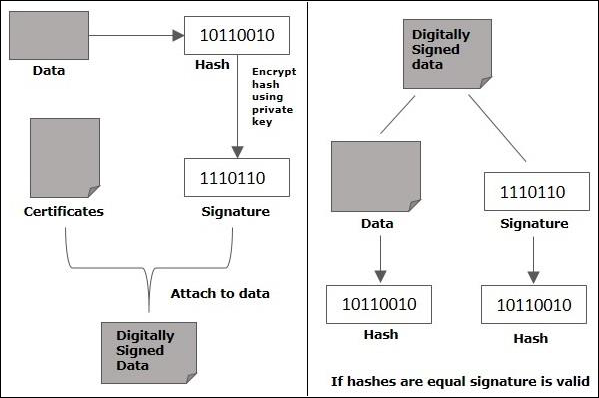
    Digital signatures allow us to verify the author, date and time of signatures, authenticate the message contents. It also includes authentication function for additional capabilities.

    Creating Signature

    Advantages of digital signature

    In this section, we will learn about the different reasons that call for the use of digital signature. There are several reasons to implement digital signatures to communications −

    Authentication

    Digital signatures help to authenticate the sources of messages. For example, if a bank’s branch office sends a message to central office, requesting for change in balance of an account. If the central office could not authenticate that message is sent from an authorized source, acting of such request could be a grave mistake.

    Integrity

    Once the message is signed, any change in the message would invalidate the signature.

    Non-repudiation

    By this property, any entity that has signed some information cannot at a later time deny having signed it.

    Creating the digital signature

    Let us now learn how to create a digital signature. You can create digital signature using Java following the steps given below.

    Step 1: Create a KeyPairGenerator object

    The KeyPairGenerator class provides getInstance() method which accepts a String variable representing the required key-generating algorithm and returns a KeyPairGenerator object that generates keys.

    Create KeyPairGenerator object using the getInstance() method as shown below.

    //Creating KeyPair generator object
    KeyPairGenerator keyPairGen = KeyPairGenerator.getInstance("DSA");
    

    Step 2: Initialize the KeyPairGenerator object

    The KeyPairGenerator class provides a method named initialize() this method is used to initialize the key pair generator. This method accepts an integer value representing the key size.

    Initialize the KeyPairGenerator object created in the previous step using the initialize() method as shown below.

    //Initializing the KeyPairGenerator
    keyPairGen.initialize(2048);
    

    Step 3: Generate the KeyPairGenerator

    You can generate the KeyPair using the generateKeyPair() method. Generate the key pair using the generateKeyPair() method as shown below.

    //Generate the pair of keys
    KeyPair pair = keyPairGen.generateKeyPair();
    

    Step 4: Get the private key from the pair

    You can get the private key from the generated KeyPair object using the getPrivate() method.

    Get the private key using the getPrivate() method as shown below.

    //Getting the private key from the key pair
    PrivateKey privKey = pair.getPrivate();   
    

    Step 5: Create a signature object

    The getInstance() method of the Signature class accepts a string parameter representing required signature algorithm and returns the respective Signature object.

    Create an object of the Signature class using the getInstance() method.

    //Creating a Signature object
    Signature sign = Signature.getInstance("SHA256withDSA");
    

    Step 6: Initialize the Signature object

    The initSign() method of the Signature class accepts a PrivateKey object and initializes the current Signature object.

    Initialize the Signature object created in the previous step using the initSign() method as shown below.

    //Initialize the signature
    sign.initSign(privKey);
    

    Step 7: Add data to the Signature object

    The update() method of the Signature class accepts a byte array representing the data to be signed or verified and updates the current object with the data given.

    Update the initialized Signature object by passing the data to be signed to the update() method in the form of byte array as shown below.

    byte[] bytes = "Hello how are you".getBytes();      
    
    //Adding data to the signature
    sign.update(bytes);
    

    Step 8: Calculate the Signature

    The sign() method of the Signature class returns the signature bytes of the updated data.

    Calculate the Signature using the sign() method as shown below.

    //Calculating the signature
    byte[] signature = sign.sign();
    

    Example

    Following Java program accepts a message from the user and generates a digital signature for the given message.

    import java.security.KeyPair;
    import java.security.KeyPairGenerator;
    import java.security.PrivateKey;
    import java.security.Signature;
    import java.util.Scanner;
    
    public class CreatingDigitalSignature {
       public static void main(String args[]) throws Exception {
    
      //Accepting text from user
      Scanner sc = new Scanner(System.in);
      System.out.println("Enter some text");
      String msg = sc.nextLine();
      
      //Creating KeyPair generator object
      KeyPairGenerator keyPairGen = KeyPairGenerator.getInstance("DSA");
      
      //Initializing the key pair generator
      keyPairGen.initialize(2048);
      
      //Generate the pair of keys
      KeyPair pair = keyPairGen.generateKeyPair();
      
      //Getting the private key from the key pair
      PrivateKey privKey = pair.getPrivate();
      
      //Creating a Signature object
      Signature sign = Signature.getInstance("SHA256withDSA");
      
      //Initialize the signature
      sign.initSign(privKey);
      byte[] bytes = "msg".getBytes();
      
      //Adding data to the signature
      sign.update(bytes);
      
      //Calculating the signature
      byte[] signature = sign.sign();
      
      //Printing the signature
      System.out.println("Digital signature for given text: "+new String(signature, "UTF8"));
    } }

    Output

    The above program generates the following output −

    Enter some text
    Hi how are you
    Digital signature for given text: 0=@gRD???-?.???? /yGL?i??a!?
    
  • KeyPairGenerator

    Java provides the KeyPairGenerator class. This class is used to generate pairs of public and private keys. To generate keys using the KeyPairGenerator class, follow the steps given below.

    Step 1: Create a KeyPairGenerator object

    The KeyPairGenerator class provides getInstance() method which accepts a String variable representing the required key-generating algorithm and returns a KeyPairGenerator object that generates keys.

    Create KeyPairGenerator object using the getInstance() method as shown below.

    //Creating KeyPair generator object
    KeyPairGenerator keyPairGen = KeyPairGenerator.getInstance("DSA");
    

    Step 2: Initialize the KeyPairGenerator object

    The KeyPairGenerator class provides a method named initialize() this method is used to initialize the key pair generator. This method accepts an integer value representing the key size.

    Initialize the KeyPairGenerator object created in the previous step using this method as shown below.

    //Initializing the KeyPairGenerator
    keyPairGen.initialize(2048);
    

    Learn Java in-depth with real-world projects through our Java certification course. Enroll and become a certified expert to boost your career.

    Step 3: Generate the KeyPairGenerator

    You can generate the KeyPair using the generateKeyPair() method of the KeyPairGenerator class. Generate the key pair using this method as shown below.

    //Generate the pair of keys
    KeyPair pair = keyPairGen.generateKeyPair();
    

    Step 4: Get the private key/public key

    You can get the private key from the generated KeyPair object using the getPrivate() method as shown below.

    //Getting the private key from the key pair
    PrivateKey privKey = pair.getPrivate();
    

    You can get the public key from the generated KeyPair object using the getPublic() method as shown below.

    //Getting the public key from the key pair
    PublicKey publicKey = pair.getPublic();
    

    Example

    Following example demonstrates the key generation of the secret key using the KeyPairGenerator class of the javax.crypto package.

    import java.security.KeyPair;
    import java.security.KeyPairGenerator;
    import java.security.PrivateKey;
    import java.security.PublicKey;
    
    public class KeyPairGenertor {
       public static void main(String args[]) throws Exception{
    
      //Creating KeyPair generator object
      KeyPairGenerator keyPairGen = KeyPairGenerator.getInstance("DSA");
      
      //Initializing the KeyPairGenerator
      keyPairGen.initialize(2048);
      
      //Generating the pair of keys
      KeyPair pair = keyPairGen.generateKeyPair();
      
      //Getting the private key from the key pair
      PrivateKey privKey = pair.getPrivate();   
      
      //Getting the public key from the key pair
      PublicKey publicKey = pair.getPublic(); 
      System.out.println("Keys generated");
    } }

    Output

    The above program generates the following output −

    Keys generated
    
  • KeyGenerator

    Java provides KeyGenerator class this class is used to generate secret keys and objects of this class are reusable.

    To generate keys using the KeyGenerator class follow the steps given below.

    Step 1: Create a KeyGenerator object

    The KeyGenerator class provides getInstance() method which accepts a String variable representing the required key-generating algorithm and returns a KeyGenerator object that generates secret keys.

    Create KeyGenerator object using the getInstance() method as shown below.

    //Creating a KeyGenerator object
    KeyGenerator keyGen = KeyGenerator.getInstance("DES");
    

    Step 2: Create SecureRandom object

    The SecureRandom class of the java.Security package provides a strong random number generator which is used to generate random numbers in Java. Instantiate this class as shown below.

    //Creating a SecureRandom object
    SecureRandom secRandom = new SecureRandom();
    

    Learn Java in-depth with real-world projects through our Java certification course. Enroll and become a certified expert to boost your career.

    Step 3: Initialize the KeyGenerator

    The KeyGenerator class provides a method named init() this method accepts the SecureRandom object and initializes the current KeyGenerator.

    Initialize the KeyGenerator object created in the previous step using the init() method.

    //Initializing the KeyGenerator
    keyGen.init(secRandom);
    

    Example

    Following example demonstrates the key generation of the secret key using the KeyGenerator class of the javax.crypto package.

    import javax.crypto.Cipher;
    import javax.crypto.KeyGenerator;
    
    import java.security.Key;
    import java.security.SecureRandom;
    
    public class KeyGeneratorExample {
       public static void main(String args[]) throws Exception{
    
      //Creating a KeyGenerator object
      KeyGenerator keyGen = KeyGenerator.getInstance("DES");
      
      //Creating a SecureRandom object
      SecureRandom secRandom = new SecureRandom();
      
      //Initializing the KeyGenerator
      keyGen.init(secRandom);
      
      //Creating/Generating a key
      Key key = keyGen.generateKey();
      
      System.out.println(key);      
      Cipher cipher = Cipher.getInstance("DES/ECB/PKCS5Padding");      
      cipher.init(cipher.ENCRYPT_MODE, key);      
      String msg = new String("Hi how are you");
      byte[] bytes = cipher.doFinal(msg.getBytes());      
      System.out.println(bytes);      
    } }

    Output

    The above program generates the following output −

    com.sun.crypto.provider.DESKey@18629
    [B@2ac1fdc4
    
  • Retrieving keys

    In this chapter, we will learn how to retrieve a key from the keystore using Java Cryptography.

    To retrieve a key from the keystore, follow the steps given below.

    Step 1: Create a KeyStore object

    The getInstance() method of the KeyStore class of the java.security package accepts a string value representing the type of the keystore and returns a KeyStore object.

    Create an object of the KeyStore class using this method as shown below.

    //Creating the KeyStore object
    KeyStore keyStore = KeyStore.getInstance("JCEKS");
    

    Step 2: Load the KeyStore object

    The load() method of the KeyStore class accepts a FileInputStream object representing the keystore file and a String parameter specifying the password of the KeyStore.

    In general, the KeyStore is stored in the file named cacerts, in the location C:/Program Files/Java/jre1.8.0_101/lib/security/ and its default password is changeit, load it using the load() method as shown below.

    //Loading the KeyStore object
    char[] password = "changeit".toCharArray();
    String path = "C:/Program Files/Java/jre1.8.0_101/lib/security/cacerts";
    java.io.FileInputStream fis = new FileInputStream(path);
    keyStore.load(fis, password);
    

    Learn Java in-depth with real-world projects through our Java certification course. Enroll and become a certified expert to boost your career.

    Step 3: Create the KeyStore.ProtectionParameter object

    Instantiate the KeyStore.ProtectionParameter as shown below.

    //Creating the KeyStore.ProtectionParameter object
    KeyStore.ProtectionParameter protectionParam = new KeyStore.PasswordProtection(password);
    

    Step 4: Create a SecretKey object

    Create the SecretKey (interface) object by instantiating its Sub class SecretKeySpec. While instantiating you need to pass password and algorithm as parameters to its constructor as shown below.

    //Creating SecretKey object
    SecretKey mySecretKey = new SecretKeySpec(new String(keyPassword).getBytes(), "DSA");
    

    Step 5: Create a SecretKeyEntry object

    Create an object of the SecretKeyEntry class by passing the SecretKey object created in the above step as shown below.

    //Creating SecretKeyEntry object
    KeyStore.SecretKeyEntry secretKeyEntry = new KeyStore.SecretKeyEntry(mySecretKey);
    

    Step 6: set an entry to the KeyStore

    The setEntry() method of the KeyStore class accepts a String parameter representing the keystore entry alias, a SecretKeyEntry object, a ProtectionParameter object and, stores the entry under the given alias.

    Set the entry to the keystore using the setEntry() method as shown below.

    //Set the entry to the keystore
    keyStore.setEntry("secretKeyAlias", secretKeyEntry, protectionParam);
    

    Step 7: Create the KeyStore.SecretKeyEntry object

    The getEntry() method of the KeyStore class accepts an alias (String parameter) and, an object of the ProtectionParameter class as parameters and returns a KeyStoreEntry object then you can cast this it into KeyStore.SecretKeyEntry object.

    Create an object of the KeyStore.SecretKeyEntry class by passing the alias for required key and the protection parameter object created in the previous steps, to the getEntry() method as shown below.

    //Creating the KeyStore.SecretKeyEntry object
    KeyStore.SecretKeyEntry secretKeyEnt = (KeyStore.SecretKeyEntry)keyStore.getEntry("secretKeyAlias", protectionParam);
    

    Step 8: Create the key object of the retrieved entry

    The getSecretKey() method of the SecretKeyEntry class returns a SecretKey object. Using this method create a SecretKey object as shown below.

    //Creating SecretKey object
    SecretKey mysecretKey = secretKeyEnt.getSecretKey();      
    System.out.println(mysecretKey);
    

    Example

    Following example shows how to retrieve keys from a key store. Here, we store a key in a keystore, which is in the “cacerts” file (windows 10 operating system), retrieve it, and display some of the properties of it such as the algorithm used to generate the key and, the format of the retrieved key.

    import java.io.FileInputStream;
    import java.security.KeyStore;
    import java.security.KeyStore.ProtectionParameter;
    import java.security.KeyStore.SecretKeyEntry;
    
    import javax.crypto.SecretKey;
    import javax.crypto.spec.SecretKeySpec;
    
    public class RetrievingFromKeyStore{
       public static void main(String args[]) throws Exception{
    
      //Creating the KeyStore object
      KeyStore keyStore = KeyStore.getInstance("JCEKS");
      //Loading the the KeyStore object
      char[] password = "changeit".toCharArray();
      java.io.FileInputStream fis = new FileInputStream(
         "C:/Program Files/Java/jre1.8.0_101/lib/security/cacerts");
      
      keyStore.load(fis, password);
      
      //Creating the KeyStore.ProtectionParameter object
      ProtectionParameter protectionParam = new KeyStore.PasswordProtection(password);
      //Creating SecretKey object
      SecretKey mySecretKey = new SecretKeySpec("myPassword".getBytes(), "DSA");
      
      //Creating SecretKeyEntry object
      SecretKeyEntry secretKeyEntry = new SecretKeyEntry(mySecretKey);
      keyStore.setEntry("secretKeyAlias", secretKeyEntry, protectionParam);
      //Storing the KeyStore object
      java.io.FileOutputStream fos = null;
      fos = new java.io.FileOutputStream("newKeyStoreName");
      keyStore.store(fos, password);
      
      //Creating the KeyStore.SecretKeyEntry object
      SecretKeyEntry secretKeyEnt = (SecretKeyEntry)keyStore.getEntry("secretKeyAlias", protectionParam);
      //Creating SecretKey object
      SecretKey mysecretKey = secretKeyEnt.getSecretKey();      
      System.out.println("Algorithm used to generate key : "+mysecretKey.getAlgorithm());   
      System.out.println("Format used for the key: "+mysecretKey.getFormat());
    } }

    Output

    The above program generates the following output −

    Algorithm used to generate key: DSA
    Format of the key: RAW
    
  • Storing keys

    The Keys and certificates used/generated are stored in a data base called as keystore. By default this database is stored in a file named .keystore.

    You can access the contents of this database using the KeyStore class of the java.security package. This manages three different entries namely, PrivateKeyEntry, SecretKeyEntry, TrustedCertificateEntry.

    • PrivateKeyEntry
    • SecretKeyEntry
    • TrustedCertificateEntry

    Storing a Key in keystore

    In this section, we will learn how to store a key in a keystore. To store a key in the keystore, follow the steps given below.

    Step 1: Create a KeyStore object

    The getInstance() method of the KeyStore class of the java.security package accepts a string value representing the type of the keystore and returns a KeyStore object.

    Create an object of the KeyStore class using the getInstance() method as shown below.

    //Creating the KeyStore object
    KeyStore keyStore = KeyStore.getInstance("JCEKS");
    

    Step 2: Load the KeyStore object

    The load() method of the KeyStore class accepts a FileInputStream object representing the keystore file and a String parameter specifying the password of the KeyStore.

    In general, the KeyStore is stored in the file named cacerts, in the location C:/Program Files/Java/jre1.8.0_101/lib/security/ and its default password is changeit, load it using the load() method as shown below.

    //Loading the KeyStore object
    char[] password = "changeit".toCharArray();
    String path = "C:/Program Files/Java/jre1.8.0_101/lib/security/cacerts";
    java.io.FileInputStream fis = new FileInputStream(path);
    keyStore.load(fis, password);
    

    Step 3: Create the KeyStore.ProtectionParameter object

    Instantiate the KeyStore.ProtectionParameter as shown below.

    //Creating the KeyStore.ProtectionParameter object
    KeyStore.ProtectionParameter protectionParam = new KeyStore.PasswordProtection(password);
    

    Step 4: Create a SecretKey object

    Create the SecretKey (interface) object by instantiating its Sub class SecretKeySpec. While instantiating you need to pass password and algorithm as parameters to its constructor as shown below.

    //Creating SecretKey object
    SecretKey mySecretKey = new SecretKeySpec(new String(keyPassword).getBytes(), "DSA");
    

    Step 5: Create a SecretKeyEntry object

    Create an object of the SecretKeyEntry class by passing the SecretKey object created in the above step as shown below.

    //Creating SecretKeyEntry object
    KeyStore.SecretKeyEntry secretKeyEntry = new KeyStore.SecretKeyEntry(mySecretKey);
    

    Step 6: Set an entry to the KeyStore

    The setEntry() method of the KeyStore class accepts a String parameter representing the keystore entry alias, a SecretKeyEntry object, a ProtectionParameter object and, stores the entry under the given alias.

    Set the entry to the keystore using the setEntry() method as shown below.

    //Set the entry to the keystore
    keyStore.setEntry("secretKeyAlias", secretKeyEntry, protectionParam);
    

    Example

    The following example stores keys into the keystore existing in the “cacerts” file (windows 10 operating system).

    import java.io.FileInputStream;
    import java.security.KeyStore;
    
    import javax.crypto.SecretKey;
    import javax.crypto.spec.SecretKeySpec;
    
    public class StoringIntoKeyStore{
       public static void main(String args[]) throws Exception {
    
      //Creating the KeyStore object
      KeyStore keyStore = KeyStore.getInstance("JCEKS");
      //Loading the KeyStore object
      char[] password = "changeit".toCharArray();
      String path = "C:/Program Files/Java/jre1.8.0_101/lib/security/cacerts";
      java.io.FileInputStream fis = new FileInputStream(path);
      keyStore.load(fis, password);
      
      //Creating the KeyStore.ProtectionParameter object
      KeyStore.ProtectionParameter protectionParam = new KeyStore.PasswordProtection(password);
      //Creating SecretKey object
      SecretKey mySecretKey = new SecretKeySpec("myPassword".getBytes(), "DSA");
      
      //Creating SecretKeyEntry object
      KeyStore.SecretKeyEntry secretKeyEntry = new KeyStore.SecretKeyEntry(mySecretKey);
      keyStore.setEntry("secretKeyAlias", secretKeyEntry, protectionParam);
      //Storing the KeyStore object
      java.io.FileOutputStream fos = null;
      fos = new java.io.FileOutputStream("newKeyStoreName");
      keyStore.store(fos, password);
      System.out.println("data stored");
    } }

    Output

    The above program generates the following output −

    System.out.println("data stored");
    
  • Keys

    A cryptosystem is an implementation of cryptographic techniques and their accompanying infrastructure to provide information security services. A cryptosystem is also referred to as a cipher system.

    The various components of a basic cryptosystem are Plaintext, Encryption Algorithm, Ciphertext, Decryption Algorithm, Encryption Key and, Decryption Key.

    Where,

    • Encryption Key is a value that is known to the sender. The sender inputs the encryption key into the encryption algorithm along with the plaintext in order to compute the cipher text.
    • Decryption Key is a value that is known to the receiver. The decryption key is related to the encryption key, but is not always identical to it. The receiver inputs the decryption key into the decryption algorithm along with the cipher text in order to compute the plaintext.

    Fundamentally there are two types of keys/cryptosystems based on the type of encryption-decryption algorithms.

    Symmetric Key Encryption

    The encryption process where same keys are used for encrypting and decrypting the information is known as Symmetric Key Encryption.

    The study of symmetric cryptosystems is referred to as symmetric cryptography. Symmetric cryptosystems are also sometimes referred to as secret key cryptosystems.

    Following are a few common examples of symmetric key encryption −

    • Digital Encryption Standard (DES)
    • Triple-DES (3DES)
    • IDEA
    • BLOWFISH

    Asymmetric Key Encryption

    The encryption process where different keys are used for encrypting and decrypting the information is known as Asymmetric Key Encryption. Though the keys are different, they are mathematically related and hence, retrieving the plaintext by decrypting cipher text is feasible.

  • Creating a MAC

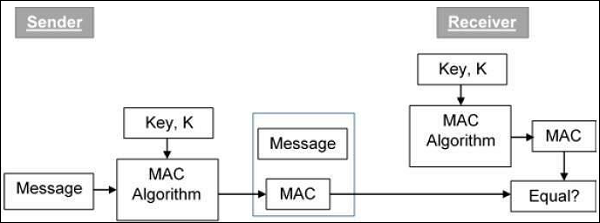
    MAC (Message Authentication Code) algorithm is a symmetric key cryptographic technique to provide message authentication. For establishing MAC process, the sender and receiver share a symmetric key K.

    Essentially, a MAC is an encrypted checksum generated on the underlying message that is sent along with a message to ensure message authentication.

    The process of using MAC for authentication is depicted in the following illustration −

    Creating MAC

    In Java the Mac class of the javax.crypto package provides the functionality of message authentication code. Follow the steps given below to create message authentication code using this class.

    Step 1: Create a KeyGenerator object

    The KeyGenerator class provides getInstance() method which accepts a String variable representing the required key-generating algorithm and returns a KeyGenerator object that generates secret keys.

    Create KeyGenerator object using the getInstance() method as shown below.

    //Creating a KeyGenerator object
    KeyGenerator keyGen = KeyGenerator.getInstance("DES");
    

    Step 2: Create SecureRandom object

    The SecureRandom class of the java.Security package provides a strong random number generator which is used to generate random numbers in Java. Instantiate this class as shown below.

    //Creating a SecureRandom object
    SecureRandom secRandom = new SecureRandom();
    

    Learn Java in-depth with real-world projects through our Java certification course. Enroll and become a certified expert to boost your career.

    Step 3: Initialize the KeyGenerator

    The KeyGenerator class provides a method named init() this method accepts the SecureRandom object and initializes the current KeyGenerator.

    Initialize the KeyGenerator object created in the previous step using this method.

    //Initializing the KeyGenerator
    keyGen.init(secRandom);
    

    Step 4: Generate key

    Generate key using generateKey() method of the KeyGenerator class as shown below.

    //Creating/Generating a key
    Key key = keyGen.generateKey();
    

    Step 5: Initialize the Mac object

    The init() method of the Mac class accepts an Key object and initializes the current Mac object using the given key.

    //Initializing the Mac object
    mac.init(key);
    

    Step 6: Finish the mac operation

    The doFinal() method of the Mac class is used to finish the Mac operation. Pass the required data in the form of byte array to this method and finsh the operation as shown below.

    //Computing the Mac
    String msg = new String("Hi how are you");
    byte[] bytes = msg.getBytes();
    byte[] macResult = mac.doFinal(bytes);
    

    Example

    The following example demonstrates the generation of Message Authentication Code (MAC) using JCA. Here, we take a simple message “Hi how are you” and, generate a Mac for that message.

    import java.security.Key;
    import java.security.SecureRandom;
    
    import javax.crypto.KeyGenerator;
    import javax.crypto.Mac;
    
    public class MacSample {
       public static void main(String args[]) throws Exception{
    
      //Creating a KeyGenerator object
      KeyGenerator keyGen = KeyGenerator.getInstance("DES");
      //Creating a SecureRandom object
      SecureRandom secRandom = new SecureRandom();
      //Initializing the KeyGenerator
      keyGen.init(secRandom);
      //Creating/Generating a key
      Key key = keyGen.generateKey();	 
      //Creating a Mac object
      Mac mac = Mac.getInstance("HmacSHA256");
      //Initializing the Mac object
      mac.init(key);
      //Computing the Mac
      String msg = new String("Hi how are you");
      byte[] bytes = msg.getBytes();      
      byte[] macResult = mac.doFinal(bytes);
      System.out.println("Mac result:");
      System.out.println(new String(macResult));     
    } }

    Output

    The above program will generate the following output −

    Mac result:
    HÖ„^ǃÎ_Utbh…?š_üzØSSÜh_ž_œa0ŽV?