Singleton pattern is one of the simplest design patterns in Java. This type of design pattern comes under creational pattern as this pattern provides one of the best ways to create an object.
This pattern involves a single class which is responsible to create an object while making sure that only single object gets created. This class provides a way to access its only object which can be accessed directly without need to instantiate the object of the class.
Implementation
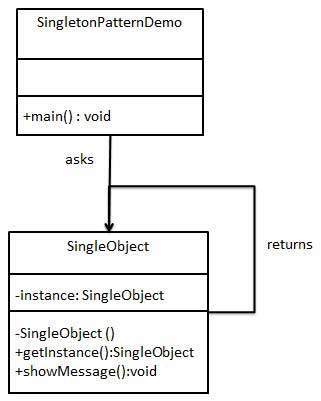
We’re going to create a SingleObject class. SingleObject class have its constructor as private and have a static instance of itself.
SingleObject class provides a static method to get its static instance to outside world. SingletonPatternDemo, our demo class will use SingleObject class to get a SingleObject object.
Step 1
Create a Singleton Class.
SingleObject.java
public class SingleObject {

   //create an object of SingleObject
   private static SingleObject instance = new SingleObject();

   //make the constructor private so that this class cannot be
   //instantiated
   private SingleObject(){}

   //Get the only object available
   public static SingleObject getInstance(){
  return instance;   }

   public void showMessage(){
  System.out.println("Hello World!");   }
}
Explore our latest online courses and learn new skills at your own pace. Enroll and become a certified expert to boost your career.
Step 2
Get the only object from the singleton class.
SingletonPatternDemo.java
public class SingletonPatternDemo {
public static void main(String[] args) {
//illegal construct
//Compile Time Error: The constructor SingleObject() is not visible
//SingleObject object = new SingleObject();
//Get the only object available
SingleObject object = SingleObject.getInstance();
Abstract Factory patterns work around a super-factory which creates other factories. This factory is also called as factory of factories. This type of design pattern comes under creational pattern as this pattern provides one of the best ways to create an object.
In Abstract Factory pattern an interface is responsible for creating a factory of related objects without explicitly specifying their classes. Each generated factory can give the objects as per the Factory pattern.
Implementation
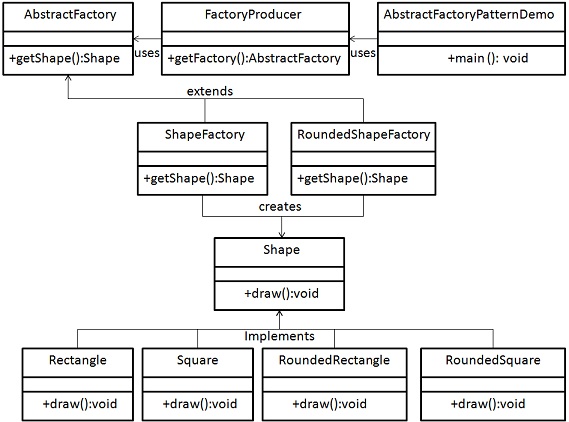
We are going to create a Shape interface and a concrete class implementing it. We create an abstract factory class AbstractFactory as next step. Factory class ShapeFactory is defined, which extends AbstractFactory. A factory creator/generator class FactoryProducer is created.
AbstractFactoryPatternDemo, our demo class uses FactoryProducer to get a AbstractFactory object. It will pass information (CIRCLE / RECTANGLE / SQUARE for Shape) to AbstractFactory to get the type of object it needs.
Step 1
Create an interface for Shapes.
Shape.java
public interface Shape {
   void draw();
}
Explore our latest online courses and learn new skills at your own pace. Enroll and become a certified expert to boost your career.
Step 2
Create concrete classes implementing the same interface.
RoundedRectangle.java
public class RoundedRectangle implements Shape {
@Override
public void draw() {
Factory pattern is one of the most used design patterns in Java. This type of design pattern comes under creational pattern as this pattern provides one of the best ways to create an object.
In Factory pattern, we create object without exposing the creation logic to the client and refer to newly created object using a common interface.
Implementation
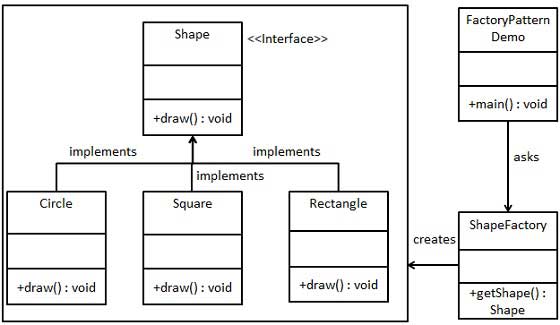
We’re going to create a Shape interface and concrete classes implementing the Shape interface. A factory class ShapeFactory is defined as a next step.
FactoryPatternDemo, our demo class will use ShapeFactory to get a Shape object. It will pass information (CIRCLE / RECTANGLE / SQUARE) to ShapeFactory to get the type of object it needs.
Step 1
Create an interface.
Shape.java
public interface Shape {
   void draw();
}
Explore our latest online courses and learn new skills at your own pace. Enroll and become a certified expert to boost your career.
Step 2
Create concrete classes implementing the same interface.
Rectangle.java
public class Rectangle implements Shape {
@Override
public void draw() {
Design patterns represent the best practices used by experienced object-oriented software developers. Design patterns are solutions to general problems that software developers faced during software development. These solutions were obtained by trial and error by numerous software developers over quite a substantial period of time.
What is Gang of Four (GOF)?
In 1994, four authors Erich Gamma, Richard Helm, Ralph Johnson and John Vlissides published a book titled Design Patterns – Elements of Reusable Object-Oriented Software which initiated the concept of Design Pattern in Software development.
These authors are collectively known as Gang of Four (GOF). According to these authors design patterns are primarily based on the following principles of object orientated design.
Program to an interface not an implementation
Favor object composition over inheritance
Usage of Design Pattern
Design Patterns have two main usages in software development.
Common platform for developers
Design patterns provide a standard terminology and are specific to particular scenario. For example, a singleton design pattern signifies use of single object so all developers familiar with single design pattern will make use of single object and they can tell each other that program is following a singleton pattern.
Best Practices
Design patterns have been evolved over a long period of time and they provide best solutions to certain problems faced during software development. Learning these patterns helps unexperienced developers to learn software design in an easy and faster way.
Explore our latest online courses and learn new skills at your own pace. Enroll and become a certified expert to boost your career.
Types of Design Patterns
As per the design pattern reference book Design Patterns – Elements of Reusable Object-Oriented Software , there are 23 design patterns which can be classified in three categories: Creational, Structural and Behavioral patterns. We’ll also discuss another category of design pattern: J2EE design patterns.
S.N.
Pattern & Description
1
Creational Patterns These design patterns provide a way to create objects while hiding the creation logic, rather than instantiating objects directly using new operator. This gives program more flexibility in deciding which objects need to be created for a given use case.
2
Structural Patterns These design patterns concern class and object composition. Concept of inheritance is used to compose interfaces and define ways to compose objects to obtain new functionalities.
3
Behavioral Patterns These design patterns are specifically concerned with communication between objects.
4
J2EE Patterns These design patterns are specifically concerned with the presentation tier. These patterns are identified by Sun Java Center.