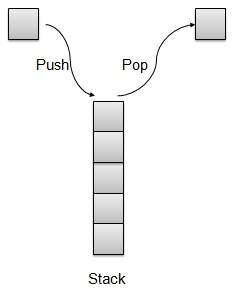
Stack is kind of data structure which allows operations on data only at one end. It allows access to the last inserted data only. Stack is also called LIFO (Last In First Out) data structure and Push and Pop operations are related in such a way that only last item pushed (added to stack) can be popped (removed from the stack).
Stack Representation
We’re going to implement Stack using array in this article.
Learn Java in-depth with real-world projects through our Java certification course. Enroll and become a certified expert to boost your career.
Basic Operations
Following are two primary operations of a stack which are following.
Push − push an element at the top of the stack.
Pop − pop an element from the top of the stack.
There is few more operations supported by stack which are following.
Peek − get the top element of the stack.
isFull − check if stack is full.
isEmpty − check if stack is empty.
Push Operation
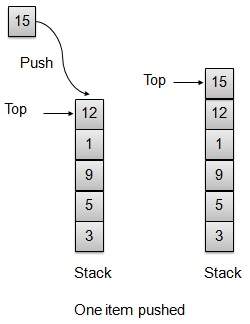
Whenever an element is pushed into stack, stack stores that element at the top of the storage and increments the top index for later use. If storage is full then an error message is usually shown.
// push item on the top of the stack
public void push(int data) {

   if(!isFull()){
  // increment top by 1 and insert data
  intArray[++top] = data;   }else{
  System.out.println("Cannot add data. Stack is full.");   }
}
Pop Operation
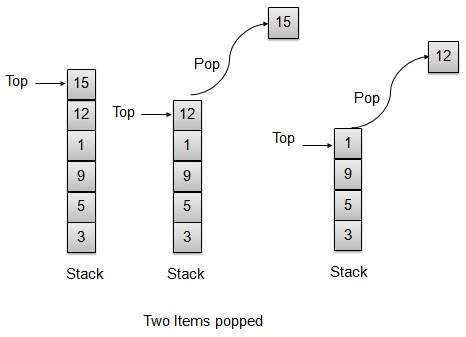
Whenever an element is to be popped from stack, stack retrives the element from the top of the storage and decrements the top index for later use.
// pop item from the top of the stack
public int pop() {
   // retrieve data and decrement the top by 1
   return intArray[top--];
}
Stack Implementation
Stack.java
package com.tutorialspoint.datastructure;

public class Stack {
   private int size;           // size of the stack
   private int[] intArray;     // stack storage
   private int top;            // top of the stack

   // Constructor
   public Stack(int size){
  this.size = size;
  intArray = new int[size];   //initialize array
  top = -1;                   //stack is initially empty   }

   // Operation : Push
   // push item on the top of the stack
   public void push(int data) {

  if(!isFull()){
     // increment top by 1 and insert data
     intArray[++top] = data;
  }else{
     System.out.println("Cannot add data. Stack is full.");
  }         }

   // Operation : Pop
   // pop item from the top of the stack
   public int pop() {
  //retrieve data and decrement the top by 1
  return intArray[top--];           }

   // Operation : Peek
   // view the data at top of the stack
   public int peek() {
  //retrieve data from the top
  return intArray[top];   }

   // Operation : isFull
   // return true if stack is full
   public boolean isFull(){
  return (top == size-1);   }

   // Operation : isEmpty
   // return true if stack is empty
   public boolean isEmpty(){
  return (top == -1);   }
}
Demo Program
StackDemo.java
package com.tutorialspoint.datastructure;

public class StackDemo {
   public static void main (String[] args){

  // make a new stack
  Stack stack = new Stack(10);
  // push items on to the stack
  stack.push(3);
  stack.push(5);
  stack.push(9);
  stack.push(1);
  stack.push(12);
  stack.push(15);
  System.out.println("Element at top of the stack: " + stack.peek());
  System.out.println("Elements: ");
  // print stack data
  while(!stack.isEmpty()){
     int data = stack.pop();
     System.out.println(data);
  }

  System.out.println("Stack full: " + stack.isFull());
  System.out.println("Stack empty: " + stack.isEmpty());   }
}
If we compile and run the above program then it would produce following result −
Element at top of the stack: 15
Elements:
15
12
1
9
5
3
Stack full: false
Stack empty: true
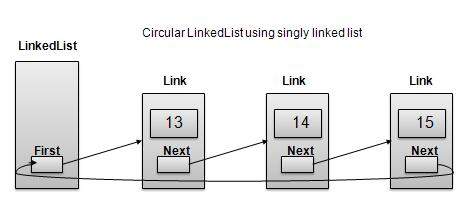
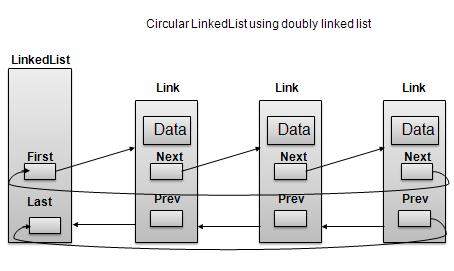
Circular Linked List is a variation of Linked list in which first element points to last element and last element points to first element. Both Singly Linked List and Doubly Linked List can be made into as circular linked list
Singly Linked List as Circular
Learn Java in-depth with real-world projects through our Java certification course. Enroll and become a certified expert to boost your career.
Doubly Linked List as Circular
As per above shown illustrations, following are the important points to be considered.
Last Link’next points to first link of the list in both cases of singly as well as doubly linked list.
First Link’s prev points to the last of the list in case of doubly linked list.
Basic Operations
Following are the important operations supported by a circular list.
insert − insert an element in the start of the list.
delete − insert an element from the start of the list.
display − display the list.
length Operation
Following code demonstrate insertion operation at in a circular linked list based on single linked list.
//insert link at the first location
public void insertFirst(int key, int data){
   //create a link
   Link link = new Link(key,data);
   if (isEmpty()) {
  first  = link;
  first.next = first;   }
   else{
  //point it to old first node
  link.next = first;
  //point first to new first node
  first = link;   }
}
Deletion Operation
Following code demonstrate deletion operation at in a circular linked list based on single linked list.
//delete link at the first location
public Link deleteFirst(){
   //save reference to first link
   Link tempLink = first;
   //if only one link
   if(first.next == null){
  last = null;   }else {
  first.next.prev = null;   }
   first = first.next;
   //return the deleted link
   return tempLink;
}
Display List Operation
Following code demonstrate display list operation in a circular linked list.
public void display(){
   //start from the beginning
   Link current = first;
   //navigate till the end of the list
   System.out.print("[ ");
   if(first != null){
  while(current.next != current){
     //print data
     current.display();
     //move to next item
     current = current.next;
     System.out.print(" ");
  }   }
   System.out.print(" ]");
}
Demo
Link.java
package com.tutorialspoint.list;

public class CircularLinkedList {
   //this link always point to first Link
   private Link first;

   // create an empty linked list
   public CircularLinkedList(){
  first = null;          }

   public boolean isEmpty(){
  return first == null;   }

   public int length(){
  int length = 0;
  //if list is empty
  if(first == null){
     return 0;
  }
  Link current = first.next;
  while(current != first){
     length++;
     current = current.next;
  }
  return length;   }

   //insert link at the first location
   public void insertFirst(int key, int data){
   //create a link
   Link link = new Link(key,data);
  if (isEmpty()) {
     first  = link;
     first.next = first;
  }
  else{
     //point it to old first node
     link.next = first;
     //point first to new first node
     first = link;
  }         }

   //delete first item
   public Link deleteFirst(){
  //save reference to first link
  Link tempLink = first;
  if(first.next == first){
     first = null;
     return tempLink;
  }
  //mark next to first link as first
  first = first.next;
  //return the deleted link
  return tempLink;   }

   public void display(){

  //start from the beginning
  Link current = first;
  //navigate till the end of the list
  System.out.print("[ ");
  if(first != null){
     while(current.next != current){
        //print data
        current.display();
        //move to next item
        current = current.next;
        System.out.print(" ");
     }
  }
  System.out.print(" ]");   }
}
DoublyLinkedListDemo.java
package com.tutorialspoint.list;
public class CircularLinkedListDemo {
public static void main(String args[]){
CircularLinkedList list = new CircularLinkedList();
Doubly Linked List is a variation of Linked list in which navigation is possible in both ways either forward and backward easily as compared to Single Linked List. Following are important terms to understand the concepts of doubly Linked List
Link − Each Link of a linked list can store a data called an element.
Next − Each Link of a linked list contain a link to next link called Next.
Prev − Each Link of a linked list contain a link to previous link called Prev.
LinkedList − A LinkedList contains the connection link to the first Link called First and to the last link called Last.
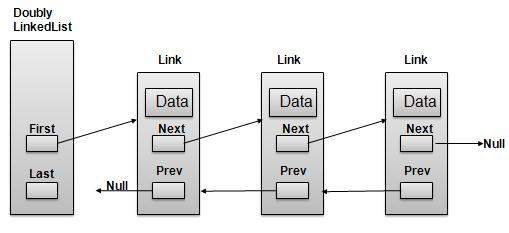
Doubly Linked List Representation
As per above shown illustration, following are the important points to be considered.
Doubly LinkedList contains an link element called first and last.
Each Link carries a data field(s) and a Link Field called next.
Each Link is linked with its next link using its next link.
Each Link is linked with its previous link using its prev link.
Last Link carries a Link as null to mark the end of the list.
Learn Java in-depth with real-world projects through our Java certification course. Enroll and become a certified expert to boost your career.
Basic Operations
Following are the basic operations supported by an list.
Insertion − add an element at the beginning of the list.
Deletion − delete an element at the beginning of the list.
Insert Last − add an element in the end of the list.
Delete Last − delete an element from the end of the list.
Insert After − add an element after an item of the list.
Delete − delete an element from the list using key.
Display forward − displaying complete list in forward manner.
Display backward − displaying complete list in backward manner.
Insertion Operation
Following code demonstrate insertion operation at beginning in a doubly linked list.
//insert link at the first location
public void insertFirst(int key, int data){
   //create a link
   Link link = new Link(key,data);

   if(isEmpty()){
  //make it the last link
  last = link;   }else {
  //update first prev link
  first.prev = link;   }

   //point it to old first link
   link.next = first;
   //point first to new first link
   first = link;
}
Deletion Operation
Following code demonstrate deletion operation at beginning in a doubly linked list.
//delete link at the first location
public Link deleteFirst(){
   //save reference to first link
   Link tempLink = first;
   //if only one link
   if(first.next == null){
  last = null;   }else {
  first.next.prev = null;   }
   first = first.next;
   //return the deleted link
   return tempLink;
}
Insertion at End Operation
Following code demonstrate insertion operation at last position in a doubly linked list.
//insert link at the last location
public void insertLast(int key, int data){
   //create a link
   Link link = new Link(key,data);

   if(isEmpty()){
  //make it the last link
  last = link;   }else {
  //make link a new last link
  last.next = link;
  //mark old last node as prev of new link
  link.prev = last;   }

   //point last to new last node
   last = link;
}
Demo
Link.java
package com.tutorialspoint.list;

public class Link {
   public int key;
   public int data;
   public Link next;
   public Link prev;

   public Link(int key, int data){
  this.key = key;
  this.data = data;   }

   public void display(){
  System.out.print("{"+key+","+data+"}");   }
}
DoublyLinkedList.java
package com.tutorialspoint.list;
public class DoublyLinkedList {
//this link always point to first Link
private Link first;
//this link always point to last Link
private Link last;
// create an empty linked list
public DoublyLinkedList(){
first = null;
last = null;
}
//is list empty
public boolean isEmpty(){
return first == null;
}
//insert link at the first location
public void insertFirst(int key, int data){
//create a link
Link link = new Link(key,data);
if(isEmpty()){
//make it the last link
last = link;
}else {
//update first prev link
first.prev = link;
}
//point it to old first link
link.next = first;
//point first to new first link
first = link;
}
//insert link at the last location
public void insertLast(int key, int data){
//create a link
Link link = new Link(key,data);
if(isEmpty()){
//make it the last link
last = link;
}else {
//make link a new last link
last.next = link;
//mark old last node as prev of new link
link.prev = last;
}
//point last to new last node
last = link;
}
//delete link at the first location
public Link deleteFirst(){
//save reference to first link
Link tempLink = first;
//if only one link
if(first.next == null){
last = null;
}else {
first.next.prev = null;
}
first = first.next;
//return the deleted link
return tempLink;
}
//delete link at the last location
public Link deleteLast(){
//save reference to last link
Link tempLink = last;
//if only one link
if(first.next == null){
first = null;
}else {
last.prev.next = null;
}
last = last.prev;
//return the deleted link
return tempLink;
}
//display the list in from first to last
public void displayForward(){
//start from the beginning
Link current = first;
//navigate till the end of the list
System.out.print("[ ");
while(current != null){
//print data
current.display();
//move to next item
current = current.next;
System.out.print(" ");
}
System.out.print(" ]");
}
//display the list from last to first
public void displayBackward(){
//start from the last
Link current = last;
//navigate till the start of the list
System.out.print("[ ");
while(current != null){
//print data
current.display();
//move to next item
current = current.prev;
System.out.print(" ");
}
System.out.print(" ]");
}
//delete a link with given key
public Link delete(int key){
//start from the first link
Link current = first;
//if list is empty
if(first == null){
return null;
}
//navigate through list
while(current.key != key){
//if it is last node
if(current.next == null){
return null;
}else{
//move to next link
current = current.next;
}
}
//found a match, update the link
if(current == first) {
//change first to point to next link
first = current.next;
}else {
//bypass the current link
current.prev.next = current.next;
}
if(current == last){
//change last to point to prev link
last = current.prev;
}else {
current.next.prev = current.prev;
}
return current;
}
public boolean insertAfter(int key, int newKey, int data){
//start from the first link
Link current = first;
//if list is empty
if(first == null){
return false;
}
//navigate through list
while(current.key != key){
//if it is last node
if(current.next == null){
return false;
}else{
//move to next link
current = current.next;
}
}
package com.tutorialspoint.list;
public class DoublyLinkedListDemo {
public static void main(String args[]){
DoublyLinkedList list = new DoublyLinkedList();
list.insertFirst(1, 10);
list.insertFirst(2, 20);
list.insertFirst(3, 30);
list.insertLast(4, 1);
list.insertLast(5, 40);
list.insertLast(6, 56);
System.out.print("\nList (First to Last): ");
list.displayForward();
System.out.println("");
System.out.print("\nList (Last to first): ");
list.displayBackward();
System.out.print("\nList , after deleting first record: ");
list.deleteFirst();
list.displayForward();
System.out.print("\nList , after deleting last record: ");
list.deleteLast();
list.displayForward();
System.out.print("\nList , insert after key(4) : ");
list.insertAfter(4,7, 13);
list.displayForward();
System.out.print("\nList , after delete key(4) : ");
list.delete(4);
list.displayForward();
}
}
If we compile and run the above program then it would produce following result −
List (First to Last): [ {3,30} {2,20} {1,10} {4,1} {5,40} {6,56}  ]

List (Last to first): [ {6,56} {5,40} {4,1} {1,10} {2,20} {3,30}  ]
List (First to Last) after deleting first record: [ {2,20} {1,10} {4,1} {5,40} {6,56}  ]
List  (First to Last) after deleting last record: [ {2,20} {1,10} {4,1} {5,40}  ]
List  (First to Last) insert after key(4) : [ {2,20} {1,10} {4,1} {7,13} {5,40}  ]
List  (First to Last) after delete key(4) : [ {2,20} {1,10} {7,13} {5,40}  ]
Linked List is a sequence of links which contains items. Each link contains a connection to another link. Linked list the second most used data structure after array. Following are important terms to understand the concepts of Linked List.
Link − Each Link of a linked list can store a data called an element.
Next − Each Link of a linked list contain a link to next link called Next.
LinkedList − A LinkedList contains the connection link to the first Link called First.
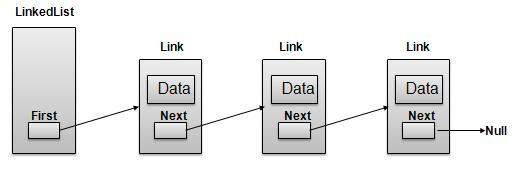
Linked List Representation
As per above shown illustration, following are the important points to be considered.
LinkedList contains an link element called first.
Each Link carries a data field(s) and a Link Field called next.
Each Link is linked with its next link using its next link.
Last Link carries a Link as null to mark the end of the list.
Learn Java in-depth with real-world projects through our Java certification course. Enroll and become a certified expert to boost your career.
Types of Linked List
Following are the various flavours of linked list.
Simple Linked List − Item Navigation is forward only.
Doubly Linked List − Items can be navigated forward and backward way.
Circular Linked List − Last item contains link of the first element as next and and first element has link to last element as prev.
Basic Operations
Following are the basic operations supported by a list.
Insertion − add an element at the beginning of the list.
Deletion − delete an element at the beginning of the list.
Display − displaying complete list.
Search − search an element using given key.
Delete − delete an element using given key.
Insertion Operation
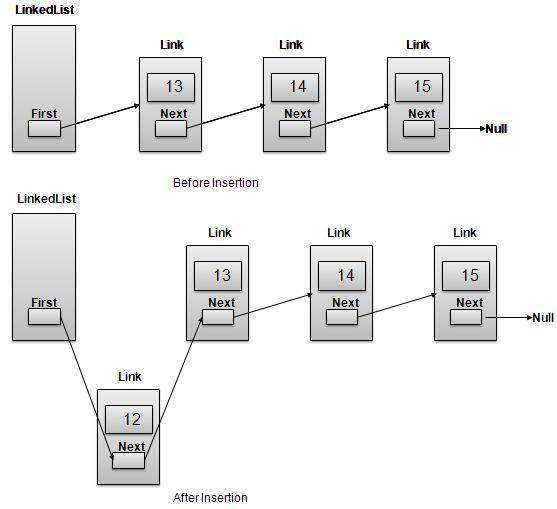
Insertion is a three step process:
Create a new Link with provided data.
Point New Link to old First Link.
Point First Link to this New Link.
//insert link at the first location
public void insertFirst(int key, int data){
   //create a link
   Link link = new Link(key,data);
   //point it to old first node
   link.next = first;
   //point first to new first node
   first = link;
}
Deletion Operation
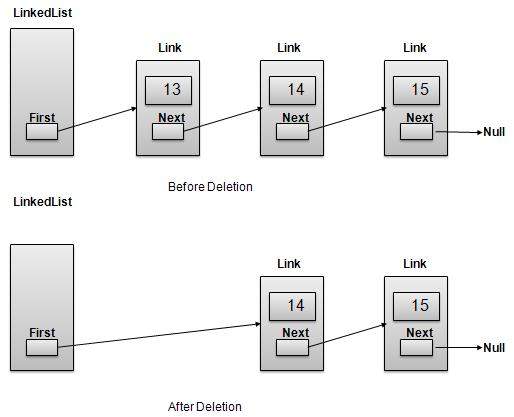
Deletion is a two step process:
Get the Link pointed by First Link as Temp Link.
Point First Link to Temp Link’s Next Link.
//delete first item
public Link deleteFirst(){
   //save reference to first link
   Link tempLink = first;
   //mark next to first link as first
   first = first.next;
   //return the deleted link
   return tempLink;
}
Navigation Operation
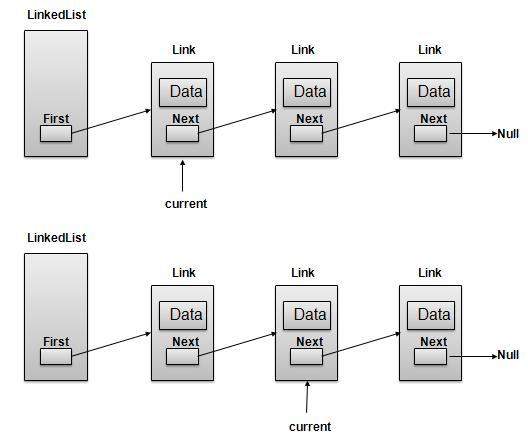
Navigation is a recursive step process and is basis of many operations like search, delete etc.:
Get the Link pointed by First Link as Current Link.
Check if Current Link is not null and display it.
Point Current Link to Next Link of Current Link and move to above step.
Note
//display the list
public void display(){
   //start from the beginning
   Link current = first;
   //navigate till the end of the list
   System.out.print("[ ");
   while(current != null){
  //print data
  current.display();
  //move to next item
  current = current.next;
  System.out.print(" ");   }
   System.out.print(" ]");
}
Advanced Operations
Following are the advanced operations specified for a list.
Sort − sorting a list based on a particular order.
Reverse − reversing a linked list.
Concatenate − concatenate two lists.
Sort Operation
We’ve used bubble sort to sort a list.
public void sort(){
int i, j, k, tempKey, tempData ;
Link current,next;
int size = length();
k = size ;
for ( i = 0 ; i < size - 1 ; i++, k-- ) {
current = first ;
next = first.next ;
for ( j = 1 ; j < k ; j++ ) {
if ( current.data > next.data ) {
tempData = current.data ;
current.data = next.data;
next.data = tempData ;
tempKey = current.key;
current.key = next.key;
next.key = tempKey;
}
current = current.next;
next = next.next;
}
}
}
Reverse Operation
Following code demonstrate reversing a single linked list.
public LinkedList reverse() {
   LinkedList reversedlist = new LinkedList();
   Link nextLink = null;
   reversedlist.insertFirst(first.key, first.data);

   Link currentLink = first;
   // Until no more data in list,
   // insert current link before first and move ahead.
   while(currentLink.next != null){
  nextLink = currentLink.next;
  // Insert at start of new list.
  reversedlist.insertFirst(nextLink.key, nextLink.data);
  //advance to next node
  currentLink = currentLink.next;               }
   return reversedlist;
}
Concatenate Operation
Following code demonstrate reversing a single linked list.
public void concatenate(LinkedList list){
   if(first == null){
  first = list.first;   }
   if(list.first == null){
  return;   }
   Link temp = first;
   while(temp.next !=null) {
  temp = temp.next;   }
   temp.next = list.first;
}
Demo
Link.java
package com.tutorialspoint.list;

public class Link {
   public int key;
   public int data;
   public Link next;

   public Link(int key, int data){
  this.key = key;
  this.data = data;   }

   public void display(){
  System.out.print("{"+key+","+data+"}");   }
}
LinkedList.java
package com.tutorialspoint.list;
public class LinkedList {
//this link always point to first Link
//in the Linked List
private Link first;
// create an empty linked list
public LinkedList(){
first = null;
}
//insert link at the first location
public void insertFirst(int key, int data){
//create a link
Link link = new Link(key,data);
//point it to old first node
link.next = first;
//point first to new first node
first = link;
}
//delete first item
public Link deleteFirst(){
//save reference to first link
Link tempLink = first;
//mark next to first link as first
first = first.next;
//return the deleted link
return tempLink;
}
//display the list
public void display(){
//start from the beginning
Link current = first;
//navigate till the end of the list
System.out.print("[ ");
while(current != null){
//print data
current.display();
//move to next item
current = current.next;
System.out.print(" ");
}
System.out.print(" ]");
}
//find a link with given key
public Link find(int key){
//start from the first link
Link current = first;
//if list is empty
if(first == null){
return null;
}
//navigate through list
while(current.key != key){
//if it is last node
if(current.next == null){
return null;
}else{
//go to next link
current = current.next;
}
}
//if data found, return the current Link
return current;
}
//delete a link with given key
public Link delete(int key){
//start from the first link
Link current = first;
Link previous = null;
//if list is empty
if(first == null){
return null;
}
//navigate through list
while(current.key != key){
//if it is last node
if(current.next == null){
return null;
}else{
//store reference to current link
previous = current;
//move to next link
current = current.next;
}
}
//found a match, update the link
if(current == first) {
//change first to point to next link
first = first.next;
}else {
//bypass the current link
previous.next = current.next;
}
return current;
}
//is list empty
public boolean isEmpty(){
return first == null;
}
public int length(){
int length = 0;
for(Link current = first; current!=null;
current = current.next){
length++;
}
return length;
}
public void sort(){
int i, j, k, tempKey, tempData ;
Link current,next;
int size = length();
k = size ;
for ( i = 0 ; i < size - 1 ; i++, k-- ) {
current = first ;
next = first.next ;
for ( j = 1 ; j < k ; j++ ) {
if ( current.data > next.data ) {
tempData = current.data ;
current.data = next.data;
next.data = tempData ;
tempKey = current.key;
current.key = next.key;
next.key = tempKey;
}
current = current.next;
next = next.next;
}
}
}
public LinkedList reverse() {
LinkedList reversedlist = new LinkedList();
Link nextLink = null;
reversedlist.insertFirst(first.key, first.data);
Link currentLink = first;
// Until no more data in list,
// insert current link before first and move ahead.
while(currentLink.next != null){
nextLink = currentLink.next;
// Insert at start of new list.
reversedlist.insertFirst(nextLink.key, nextLink.data);
//advance to next node
currentLink = currentLink.next;
}
return reversedlist;
}
public void concatenate(LinkedList list){
if(first == null){
first = list.first;
}
if(list.first == null){
return;
}
Link temp = first;
Array is a container which can hold fix number of items and these items should be of same type. Most of the datastructure make use of array to implement their algorithms. Following are important terms to understand the concepts of Array
Element − Each item stored in an array is called an element.
Index − Each location of an element in an array has a numerical index which is used to identify the element.
Array Representation
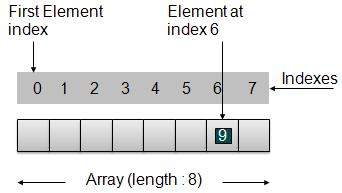
As per above shown illustration, following are the important points to be considered.
Index starts with 0.
Array length is 8 which means it can store 8 elements.
Each element can be accessed via its index. For example, we can fetch element at index 6 as 9.
Learn Java in-depth with real-world projects through our Java certification course. Enroll and become a certified expert to boost your career.
Basic Operations
Following are the basic operations supported by an array.
Insertion − add an element at given index.
Deletion − delete an element at given index.
Search − search an element using given index or by value.
Update − update an element at given index.
In java, when an array is initialized with size, then it assigns defaults values to its elements in following order.
Data Type
Default Value
byte
0
short
0
int
0
long
0L
float
0.0f
double
0.0d
char
‘\u0000’
boolean
false
Object
null
Demo
package com.tutorialspoint.array;

public class ArrayDemo {
   public static void main(String[] args){

  // Declare an array
  int intArray[];
  // Initialize an array of 8 int
  // set aside memory of 8 int
  intArray = new int[8];
  System.out.println("Array before adding data.");
  // Display elements of an array.
  display(intArray);

  // Operation : Insertion
  // Add elements in the array
  for(int i = 0; i< intArray.length; i++)
  {
     // place value of i at index i.
     System.out.println("Adding "+i+" at index "+i);
     intArray[i] = i;
  }
  System.out.println();
  System.out.println("Array after adding data.");
  display(intArray);
  // Operation : Insertion
  // Element at any location can be updated directly
  int index = 5;
  intArray[index] = 10;

  System.out.println("Array after updating element at index " + index);
  display(intArray);
  // Operation : Search using index
  // Search an element using index.
  System.out.println("Data at index " + index + ": "+ intArray[index]);
  // Operation : Search using value
  // Search an element using value.
  int value = 4;
  for(int i = 0; i< intArray.length; i++)
  {
     if(intArray[i] == value ){
        System.out.println(value + " Found at index "+i);
        break;
     }
  }
  System.out.println("Data at index " + index + ": "+ intArray[index]);   }

   private static void display(int[] intArray){
  System.out.print("Array : [");
  for(int i = 0; i< intArray.length; i++)
  {
     // display value of element at index i.
     System.out.print(" "+intArray[i]);
  }
  System.out.println(" ]");
  System.out.println();   }
}
If we compile and run the above program then it would produce following result −
Array before adding data.
Array : [ 0 0 0 0 0 0 0 0 ]

Adding 0 at index 0
Adding 1 at index 1
Adding 2 at index 2
Adding 3 at index 3
Adding 4 at index 4
Adding 5 at index 5
Adding 6 at index 6
Adding 7 at index 7

Array after adding data.
Array : [ 0 1 2 3 4 5 6 7 ]

Array after updating element at index 5
Array : [ 0 1 2 3 4 10 6 7 ]

Data at index 5: 10
4 Found at index: 4
Data Structure is a way to organized data in such a way that it can be used efficiently. Following terms are basic terms of a data structure.
Data Definition
Data Definition defines a particular data with following characteristics.
Atomic − Defition should define a single concept
Traceable − Definition should be be able to be mapped to some data element.
Accurate − Definition should be unambiguous.
Clear and Concise − Definition should be understandable.
Data Object
Data Object represents an object having a data.
Learn Java in-depth with real-world projects through our Java certification course. Enroll and become a certified expert to boost your career.
Data Type
Data type is way to classify various types of data such as integer, string etc. which determines the values that can be used with the corresponding type of data, the type of operations that can be performed on the corresponding type of data. Data type of two types −
Built-in Data Type
Derived Data Type
Built-in Data Type
Those data types for which a language has built-in support are known as Built-in Data types. For example, most of the languages provides following built-in data types.
Integers
Boolean (true, false)
Floating (Decimal numbers)
Character and Strings
Derived Data Type
Those data types which are implementation independent as they can be implemented in one or other way are known as derived data types. These data types are normally built by combination of primary or built-in data types and associated operations on them. For example −
Algorithm is a step by step procedure, which defines a set of instructions to be executed in certain order to get the desired output. In term of data structures, following are the categories of algorithms.
Search − Algorithms to search an item in a datastrucure.
Sort − Algorithms to sort items in certain order
Insert − Algorithm to insert item in a datastructure
Update − Algorithm to update an existing item in a data structure
Delete − Algorithm to delete an existing item from a data structure
Algorithm analysis
Algorithm analysis deals with the execution time or running time of various operations of a data structure. Running time of an operation can be defined as no. of computer instructions executed per operation. As exact running time of any operation varies from one computer to another computer, we usually analyze the running time of any operation as some function of n, where n is the no. of items processed in that operation in a datastructure.
Learn Java in-depth with real-world projects through our Java certification course. Enroll and become a certified expert to boost your career.
Asymptotic analysis
Asymptotic analysis refers to computing the running time of any operation in mathematical units of computation. For example, running time of one operation is computed as f(n) and of another operation as g(n2). Which means first operation running time will increase linearly with the increase in n and running time of second operation will increase exponentially when n increases. Similarly the running time of both operations will be nearly same if n is significantly small.
Asymptotic Notations
Following are commonly used asymptotic notations used in calculating running time complexity of an algorithm.
Ο Notation
Ω Notation
θ Notation
Big Oh Notation, Ο
The Ο(n) is the formal way to express the upper bound of an algorithm’s running time. It measures the worst case time complexity or longest amount of time an algorithm can possibly take to complete. For example, for a function f(n)Ο(f(n)) = { g(n) : there exists c > 0 and n0 such that g(n) ≤ c.f(n) for all n > n0. }
Big Oh notation is used to simplify functions. For example, we can replace a specific functional equation 7nlogn + n – 1 with Ο(f(nlogn)). Consider the scenario as follows:7nlogn +n – 1 ≤ 7nlogn + n7nlogn +n – 1 ≤ 7nlogn + nlognfor n ≥ 2 so that logn ≥ 17nlogn +n – 1 ≤ 8nlogn
It demonstrates that f(n) = 7nlogn + n – 1 is within the range of outout of O(nlogn) using constants c = 8 and n0 = 2.
Omega Notation, Ω
The Ω(n) is the formal way to express the lower bound of an algorithm’s running time. It measures the best case time complexity or best amount of time an algorithm can possibly take to complete.
For example, for a function f(n)Ω(f(n)) ≥ { g(n) : there exists c > 0 and n0 such that g(n) ≤ c.f(n) for all n > n0. }
Theta Notation, θ
The θ(n) is the formal way to express both the lower bound and upper bound of an algorithm’s running time. It is represented as following.θ(f(n)) = { g(n) if and only if g(n) = Ο(f(n)) and g(n) = Ω(f(n)) for all n > n0. }
If you are still willing to setup your environment for Java programming language, then this section guides you on how to download and set up Java on your machine. Please follow the following steps to set up the environment.
Java SE is freely available from the link Download Java. So you download a version based on your operating system.
Follow the instructions to download java and run the .exe to install Java on your machine. Once you installed Java on your machine, you would need to set environment variables to point to correct installation directories:
Setting up the path for windows 2000/XP
Assuming you have installed Java in c:\Program Files\java\jdk directory:
Right-click on ‘My Computer’ and select ‘Properties’.
Click on the ‘Environment variables’ button under the ‘Advanced’ tab.
Now alter the ‘Path’ variable so that it also contains the path to the Java executable. Example, if the path is currently set to ‘C:\WINDOWS\SYSTEM32’, then change your path to read ‘C:\WINDOWS\SYSTEM32;c:\Program Files\java\jdk\bin’.
Learn Java in-depth with real-world projects through our Java certification course. Enroll and become a certified expert to boost your career.
Setting up the path for windows 95/98/ME
Assuming you have installed Java in c:\Program Files\java\jdk directory −
Edit the ‘C:\autoexec.bat’ file and add the following line at the end:’SET PATH=%PATH%;C:\Program Files\java\jdk\bin’
Setting up the path for Linux, UNIX, Solaris, FreeBSD:
Environment variable PATH should be set to point to where the java binaries have been installed. Refer to your shell documentation if you have trouble doing this.
Example, if you use bash as your shell, then you would add the following line to the end of your ‘.bashrc: export PATH=/path/to/java:$PATH’
Popular Java Editors
To write your java programs you will need a text editor. There are even more sophisticated IDE available in the market. But for now, you can consider one of the following:
Notepad − On Windows machine you can use any simple text editor like Notepad (Recommended for this tutorial), TextPad.
Netbeans −is a Java IDE that is open source and free which can be downloaded from https://www.netbeans.org/index.html.
Eclipse − is also a java IDE developed by the eclipse open source community and can be downloaded from https://www.eclipse.org/.
What is Next ?
Next chapter will teach you how to write and run your first java program and some of the important basic syntaxes in java needed for developing applications.
Data Structure is a way to organized data in such a way that it can be used efficiently. Following terms are foundation terms of a data structure.
Interface − Each data strucure has an interface. Interface represents the set of operations that a datastructure supports.An interface only provides the list of supported operations, type of parameters they can accept and return type of these operations.
Implementation − Implementation provides the internal representation of a data structure. Implementation also provides the defination of the alogrithms used in the opreations of the data structure.
Characteristics of a Data Structure
Correctness − Data Structure implementation should implement its interface correctly.
Time Complexity − Running time or execution time of operations of data structure must be as small as possible.
Space Complexity − Memory usage of a data structure operation should be as little as possible.
Learn Java in-depth with real-world projects through our Java certification course. Enroll and become a certified expert to boost your career.
Need for Data Structure
As applications are getting complex and data rich, there are three common problems applications face now-a-days.
Data Search − Consider an inventory of 1 million(106) items of a store. If application is to search an item. It has to search item in 1 million(106) items every time slowing down the search. As data grows, search will become slower.
Processor speed − Processor speed although being very high, falls limited if data grows to billon records.
Multiple requests − As thousands of users can search data simultaneously on a web server,even very fast server fails while searching the data.
To solve above problems, data structures come to rescue. Data can be organized in a data structure in such a way that all items may not be required to be search and required data can be searched almost instantly.
Execution Time Cases
There are three cases which are usual used to compare various data structure’s execution time in relative manner.
Worst Case − This is the scenario where a particular data structure operation takes maximum time it can take. If a operation’s worst case time is ƒ(n) then this operation will not take time more than ƒ(n) time where ƒ(n) represents function of n.
Average Case − This is the scenario depicting the average execution time of an operation of a data structure. If a operation takes ƒ(n) time in execution then m operations will take mƒ(n) time.
Best Case − This is the scenario depicting the least possible execution time of an operation of a data structure. If a operation takes ƒ(n) time in execution then actual operation may take time as random number which would be maximum as ƒ(n).