Recursion refers to a technique in a programming language where a function calls itself. The function which calls itself is called a recursive method.
Characteristics
A recursive function must posses the following two characteristics
Base Case(s)
Set of rules which leads to base case after reducing the cases.
Learn Java in-depth with real-world projects through our Java certification course. Enroll and become a certified expert to boost your career.
Recursive Factorial
Factorial is one of the classical example of recursion. Factorial is a non-negative number satisfying following conditions.
0! = 1
1! = 1
n! = n * n-1!
Factorial is represented by “!”. Here Rule 1 and Rule 2 are base cases and Rule 3 are factorial rules.
As an example, 3! = 3 x 2 x 1 = 6
private int factorial(int n){
   //base case
   if(n == 0){
  return 1;   }else{
  return n * factorial(n-1);   }
}
Recursive Fibonacci Series
Fibonacci Series is another classical example of recursion. Fibonacci series a series of integers satisfying following conditions.
F0 = 0
F1 = 1
Fn = Fn-1 + Fn-2
Fibonacci is represented by “F”. Here Rule 1 and Rule 2 are base cases and Rule 3 are fibonnacci rules.
As an example, F5 = 0 1 1 2 3
Demo Program
RecursionDemo.java
package com.tutorialspoint.algorithm;
public class RecursionDemo {
public static void main(String[] args){
RecursionDemo recursionDemo = new RecursionDemo();
int n = 5;
System.out.println("Factorial of " + n + ": "
+ recursionDemo.factorial(n));
System.out.print("Fibbonacci of " + n + ": ");
for(int i=0;i<n;i++){
System.out.print(recursionDemo.fibbonacci(i) +" ");
}
}
private int factorial(int n){
//base case
if(n == 0){
return 1;
}else{
return n * factorial(n-1);
}
Sorting refers to arranging data in a particular format. Sorting algorithm specifies the way to arrange data in a particular order. Most common orders are numerical or lexicographical order.
Importance of sorting lies in the fact that data searching can be optimized to a very high level if data is stored in a sorted manner. Sorting is also used to represent data in more readable formats. Some of the examples of sorting in real life scenarios are following.
Telephone Directory − Telephone directory keeps telephone no. of people sorted on their names. So that names can be searched.
Dictionary − Dictionary keeps words in alphabetical order so that searching of any work becomes easy.
Types of Sorting
Following is the list of popular sorting algorithms and their comparison.
Sr.No
Technique & Description
1
Bubble SortBubble sort is simple to understand and implement algorithm but is very poor in performance.
2
Selection SortSelection sort as name specifies use the technique to select the required item and prepare sorted array accordingly.
3
Insertion SortInsertion sort is a variation of selection sort.
4
Shell SortShell sort is an efficient version of insertion sort.
5
Quick SortQuick sort is a highly efficient sorting algorithm and is based on partitioning of array of data into smaller arrays.
6
Sorting ObjectsJava objects can be sorted easily using java.util.Arrays.sort()
Search refers to locating a desired element of specified properties in a collection of items. We are going to start our discussion using following commonly used and simple search algorithms.
Sr.No
Technique & Description
1
Linear SearchLinear search searches all items and its worst execution time is n where n is the number of items.
2
Binary SearchBinary search requires items to be in sorted order but its worst execution time is constant and is much faster than linear search.
3
Interpolation SearchInterpolation search requires items to be in sorted order but its worst execution time is O(n) where n is the number of items and it is much faster than linear search.
Graph is a datastructure to model the mathematical graphs. It consists of a set of connected pairs called edges of vertices. We can represent a graph using an array of vertices and a two dimentional array of edges.
Important terms
Vertex − Each node of the graph is represented as a vertex. In example given below, labeled circle represents vertices. So A to G are vertices. We can represent them using an array as shown in image below. Here A can be identified by index 0. B can be identified using index 1 and so on.
Edge − Edge represents a path between two vertices or a line between two vertices. In example given below, lines from A to B, B to C and so on represents edges. We can use a two dimentional array to represent array as shown in image below. Here AB can be represented as 1 at row 0, column 1, BC as 1 at row 1, column 2 and so on, keeping other combinations as 0.
Adjacency − Two node or vertices are adjacent if they are connected to each other through an edge. In example given below, B is adjacent to A, C is adjacent to B and so on.
Path − Path represents a sequence of edges betweeen two vertices. In example given below, ABCD represents a path from A to D.
Basic Operations
Following are basic primary operations of a Graph which are following.
Add Vertex − add a vertex to a graph.
Add Edge − add an edge between two vertices of a graph.
Display Vertex − display a vertex of a graph.
Learn Java in-depth with real-world projects through our Java certification course. Enroll and become a certified expert to boost your career.
Add Vertex Operation
//add vertex to the array of vertex
public void addVertex(char label){
   lstVertices[vertexCount++] = new Vertex(label);
}
Add Edge Operation
//add edge to edge array
public void addEdge(int start,int end){
   adjMatrix[start][end] = 1;
   adjMatrix[end][start] = 1;
}
Display Edge Operation
//display the vertex
public void displayVertex(int vertexIndex){
   System.out.print(lstVertices[vertexIndex].label+" ");
}
Traversal Algorithms
Following are important traversal algorithms on a Graph.
Depth First Search − traverses a graph in depthwards motion.
Breadth First Search − traverses a graph in breadthwards motion.
Depth First Search Algorithm
Depth First Search algorithm(DFS) traverses a graph in a depthward motion and uses a stack to remember to get the next vertex to start a search when a dead end occurs in any iteration.
As in example given above, DFS algorithm traverses from A to B to C to D first then to E, then to F and lastly to G. It employs following rules.
Rule 1 − Visit adjacent unvisited vertex. Mark it visited. Display it. Push it in a stack.
Rule 2 − If no adjacent vertex found, pop up a vertex from stack. (It will pop up all the vertices from the stack which do not have adjacent vertices.)
Rule 3 − Repeat Rule 1 and Rule 2 until stack is empty.
public void depthFirstSearch(){
//mark first node as visited
lstVertices[0].visited = true;
//display the vertex
displayVertex(0);
//push vertex index in stack
stack.push(0);
while(!stack.isEmpty()){
//get the unvisited vertex of vertex which is at top of the stack
int unvisitedVertex = getAdjUnvisitedVertex(stack.peek());
//no adjacent vertex found
if(unvisitedVertex == -1){
stack.pop();
}else{
lstVertices[unvisitedVertex].visited = true;
displayVertex(unvisitedVertex);
stack.push(unvisitedVertex);
}
}
//stack is empty, search is complete, reset the visited flag
for(int i=0;i<vertexCount;i++){
lstVertices[i].visited = false;
}
}
Breadth First Search Algorithm
Breadth First Search algorithm(BFS) traverses a graph in a breadthwards motion and uses a queue to remember to get the next vertex to start a search when a dead end occurs in any iteration.
As in example given above, BFS algorithm traverses from A to B to E to F first then to C and G lastly to D. It employs following rules.
Rule 1 − Visit adjacent unvisited vertex. Mark it visited. Display it. Insert it in a queue.
Rule 2 − If no adjacent vertex found, remove the first vertex from queue.
Rule 3 − Repeat Rule 1 and Rule 2 until queue is empty.
public void breadthFirstSearch(){
//mark first node as visited
lstVertices[0].visited = true;
//display the vertex
displayVertex(0);
//insert vertex index in queue
queue.insert(0);
int unvisitedVertex;
while(!queue.isEmpty()){
//get the unvisited vertex of vertex which is at front of the queue
int tempVertex = queue.remove();
//no adjacent vertex found
while((unvisitedVertex=getAdjUnvisitedVertex(tempVertex)) != -1){
lstVertices[unvisitedVertex].visited = true;
displayVertex(unvisitedVertex);
queue.insert(unvisitedVertex);
}
}
//queue is empty, search is complete, reset the visited flag
for(int i=0;i<vertexCount;i++){
lstVertices[i].visited = false;
}
}
Graph Implementation
Stack.java
package com.tutorialspoint.datastructure;

public class Stack {
   private int size;           // size of the stack
   private int[] intArray;     // stack storage
   private int top;            // top of the stack

   // Constructor
   public Stack(int size){
  this.size = size;
  intArray = new int[size];   //initialize array
  top = -1;                   //stack is initially empty   }

   // Operation : Push
   // push item on the top of the stack
   public void push(int data) {

  if(!isFull()){
     // increment top by 1 and insert data
     intArray[++top] = data;
  }else{
     System.out.println("Cannot add data. Stack is full.");
  }         }

   // Operation : Pop
   // pop item from the top of the stack
   public int pop() {
  //retrieve data and decrement the top by 1
  return intArray[top--];           }

   // Operation : Peek
   // view the data at top of the stack
   public int peek() {
  //retrieve data from the top
  return intArray[top];   }

   // Operation : isFull
   // return true if stack is full
   public boolean isFull(){
  return (top == size-1);   }

   // Operation : isEmpty
   // return true if stack is empty
   public boolean isEmpty(){
  return (top == -1);   }
}
Queue.java
package com.tutorialspoint.datastructure;

public class Queue {
   private final int MAX;
   private int[] intArray;
   private int front;
   private int rear;
   private int itemCount;

   public Queue(int size){
  MAX = size;
  intArray = new int[MAX];
  front = 0;
  rear = -1;
  itemCount = 0;   }

   public void insert(int data){
  if(!isFull()){
     if(rear == MAX-1){
        rear = -1;
     }
     intArray[++rear] = data;
     itemCount++;
  }   }

   public int remove(){
  int data = intArray[front++];
  if(front == MAX){
     front = 0;
  }
  itemCount--;
  return data;     }

   public int peek(){
  return intArray[front];   }

   public boolean isEmpty(){
  return itemCount == 0;   }

   public boolean isFull(){
  return itemCount == MAX;   }

   public int size(){
  return itemCount;   }
}
Vertex.java
package com.tutorialspoint.datastructure;

public class Vertex {
   public char label;
   public boolean visited;

   public Vertex(char label){
  this.label = label;
  visited = false;   }
}
Graph.java
package com.tutorialspoint.datastructure;
public class Graph {
private final int MAX = 20;
//array of vertices
private Vertex lstVertices[];
//adjacency matrix
private int adjMatrix[][];
//vertex count
private int vertexCount;
private Stack stack;
private Queue queue;
public Graph(){
lstVertices = new Vertex[MAX];
adjMatrix = new int[MAX][MAX];
vertexCount = 0;
stack = new Stack(MAX);
queue = new Queue(MAX);
for(int j=0; j<MAX; j++) // set adjacency
for(int k=0; k<MAX; k++) // matrix to 0
adjMatrix[j][k] = 0;
}
//add vertex to the vertex list
public void addVertex(char label){
lstVertices[vertexCount++] = new Vertex(label);
}
//add edge to edge array
public void addEdge(int start,int end){
//mark first node as visited
lstVertices[0].visited = true;
//display the vertex
displayVertex(0);
//push vertex index in stack
stack.push(0);
while(!stack.isEmpty()){
//get the unvisited vertex of vertex which is at top of the stack
int unvisitedVertex = getAdjUnvisitedVertex(stack.peek());
//no adjacent vertex found
if(unvisitedVertex == -1){
stack.pop();
}else{
lstVertices[unvisitedVertex].visited = true;
displayVertex(unvisitedVertex);
stack.push(unvisitedVertex);
}
}
//stack is empty, search is complete, reset the visited flag
for(int i=0;i<vertexCount;i++){
lstVertices[i].visited = false;
}
}
public void breadthFirstSearch(){
//mark first node as visited
lstVertices[0].visited = true;
//display the vertex
displayVertex(0);
//insert vertex index in queue
queue.insert(0);
int unvisitedVertex;
while(!queue.isEmpty()){
//get the unvisited vertex of vertex which is at front of the queue
int tempVertex = queue.remove();
//no adjacent vertex found
while((unvisitedVertex=getAdjUnvisitedVertex(tempVertex)) != -1){
lstVertices[unvisitedVertex].visited = true;
displayVertex(unvisitedVertex);
queue.insert(unvisitedVertex);
}
}
//queue is empty, search is complete, reset the visited flag
for(int i=0;i<vertexCount;i++){
lstVertices[i].visited = false;
}
}
}
Demo Program
GraphDemo.java
package com.tutorialspoint.datastructure;
public class GraphDemo {
public static void main(String args[]){
/* 1 2 3
* 0 |--B--C--D
* A--|
* |
* | 4
* |-----E
* | 5 6
* | |--F--G
* |--|
*/
graph.addEdge(0, 1); //AB
graph.addEdge(1, 2); //BC
graph.addEdge(2, 3); //CD
graph.addEdge(0, 4); //AC
graph.addEdge(0, 5); //AF
graph.addEdge(5, 6); //FG
System.out.print("Depth First Search: ");
//A B C D E F G
graph.depthFirstSearch();
System.out.println("");
System.out.print("Breadth First Search: ");
//A B E F C G D
graph.breadthFirstSearch();
}
}
If we compile and run the above program then it would produce following result −
Depth First Search: A B C D E F G
Breadth First Search: A B E F C G D
Heap represents a special tree based data structure used to represent priority queue or for heap sort. We’ll going to discuss binary heap tree specifically.
Binary heap tree can be classified as a binary tree with two constraints −
Completeness − Binary heap tree is a complete binary tree except the last level which may not have all elements but elements from left to right should be filled in.
Heapness − All parent nodes should be greater or smaller to their children. If parent node is to be greater than its child then it is called Max heap otherwise it is called Min heap. Max heap is used for heap sort and Min heap is used for priority queue. We’re considering Min Heap and will use array implementation for the same.
Basic Operations
Following are basic primary operations of a Min heap which are following.
Insert − insert an element in a heap.
Get Minimum − get minimum element from the heap.
Remove Minimum − remove the minimum element from the heap
Learn Java in-depth with real-world projects through our Java certification course. Enroll and become a certified expert to boost your career.
Insert Operation
Whenever an element is to be inserted. Insert element at the end of the array. Increase the size of heap by 1.
Heap up the element while heap property is broken. Compare element with parent’s value and swap them if required.
public void insert(int value) {
size++;
intArray[size - 1] = value;
heapUp(size - 1);
}
private void heapUp(int nodeIndex){
int parentIndex, tmp;
if (nodeIndex != 0) {
}
/**
* Heap up the new element,until heap property is broken.
* Steps:
* 1. Compare node's value with parent's value.
* 2. Swap them, If they are in wrong order.
* */
private void heapUp(int nodeIndex){
int parentIndex, tmp;
if (nodeIndex != 0) {
parentIndex = getParentIndex(nodeIndex);
if (intArray[parentIndex] > intArray[nodeIndex]) {
tmp = intArray[parentIndex];
intArray[parentIndex] = intArray[nodeIndex];
intArray[nodeIndex] = tmp;
heapUp(parentIndex);
}
}
}
/**
* Heap down the root element being least in value,until heap property is broken.
* Steps:
* 1.If current node has no children, done.
* 2.If current node has one children and heap property is broken,
* 3.Swap the current node and child node and heap down.
* 4.If current node has one children and heap property is broken, find smaller one
* 5.Swap the current node and child node and heap down.
* */
private void heapDown(int nodeIndex){
HashTable is a datastructure in which insertion and search operations are very fast irrespective of size of the hashtable. It is nearly a constant or O(1). Hash Table uses array as a storage medium and uses hash technique to generate index where an element is to be inserted or to be located from.
Hashing
Hashing is a technique to convert a range of key values into a range of indexes of an array. We’re going to use modulo operator to get a range of key values. Consider an example of hashtable of size 20, and following items are to be stored. Item are in (key,value) format.
(1,20)
(2,70)
(42,80)
(4,25)
(12,44)
(14,32)
(17,11)
(13,78)
(37,98)
Sr.No.
Key
Hash
Array Index
1
1
1 % 20 = 1
1
2
2
2 % 20 = 2
2
3
42
42 % 20 = 2
2
4
4
4 % 20 = 4
4
5
12
12 % 20 = 12
12
6
14
14 % 20 = 14
14
7
17
17 % 20 = 17
17
8
13
13 % 20 = 13
13
9
37
37 % 20 = 17
17
Learn Java in-depth with real-world projects through our Java certification course. Enroll and become a certified expert to boost your career.
Linear Probing
As we can see, it may happen that the hashing technique used create already used index of the array. In such case, we can search the next empty location in the array by looking into the next cell until we found an empty cell. This technique is called linear probing.
Sr.No.
Key
Hash
Array Index
After Linear Probing, Array Index
1
1
1 % 20 = 1
1
1
2
2
2 % 20 = 2
2
2
3
42
42 % 20 = 2
2
3
4
4
4 % 20 = 4
4
4
5
12
12 % 20 = 12
12
12
6
14
14 % 20 = 14
14
14
7
17
17 % 20 = 17
17
17
8
13
13 % 20 = 13
13
13
9
37
37 % 20 = 17
17
18
Basic Operations
Following are basic primary operations of a hashtable which are following.
Search − search an element in a hashtable.
Insert − insert an element in a hashtable.
delete − delete an element from a hashtable.
DataItem
Define a data item having some data, and key based on which search is to be conducted in hashtable.
public class DataItem {
   private int key;
   private int data;

   public DataItem(int key, int data){
  this.key = key;
  this.data = data;   }

   public int getKey(){
  return key;   }

   public int getData(){
  return data;   }
}
Hash Method
Define a hashing method to compute the hash code of the key of the data item.
public int hashCode(int key){
   return key % size;
}
Search Operation
Whenever an element is to be searched. Compute the hash code of the key passed and locate the element using that hashcode as index in the array. Use linear probing to get element ahead if element not found at computed hash code.
public DataItem search(int key){
   //get the hash
   int hashIndex = hashCode(key);
   //move in array until an empty
   while(hashArray[hashIndex] !=null){
  if(hashArray[hashIndex].getKey() == key)
     return hashArray[hashIndex];
  //go to next cell
  ++hashIndex;
  //wrap around the table
  hashIndex %= size;   }
   return null;
}
Insert Operation
Whenever an element is to be inserted. Compute the hash code of the key passed and locate the index using that hashcode as index in the array. Use linear probing for empty location if an element is found at computed hash code.
public void insert(DataItem item){
   int key = item.getKey();

   //get the hash
   int hashIndex = hashCode(key);

   //move in array until an empty or deleted cell
   while(hashArray[hashIndex] !=null
  && hashArray[hashIndex].getKey() != -1){
  //go to next cell
  ++hashIndex;
  //wrap around the table
  hashIndex %= size;   }

   hashArray[hashIndex] = item;
}
Delete Operation
Whenever an element is to be deleted. Compute the hash code of the key passed and locate the index using that hashcode as index in the array. Use linear probing to get element ahead if an element is not found at computed hash code. When found, store a dummy item there to keep performance of hashtable intact.
public DataItem delete(DataItem item){
   int key = item.getKey();

   //get the hash
   int hashIndex = hashCode(key);

   //move in array until an empty
   while(hashArray[hashIndex] !=null){
  if(hashArray[hashIndex].getKey() == key){
     DataItem temp = hashArray[hashIndex];
     //assign a dummy item at deleted position
     hashArray[hashIndex] = dummyItem;
     return temp;
  }
  //go to next cell
  ++hashIndex;
  //wrap around the table
  hashIndex %= size;   }
   return null;
}
HashTable Implementation
DataItem.java
package com.tutorialspoint.datastructure;

public class DataItem {
   private int key;
   private int data;

   public DataItem(int key, int data){
  this.key = key;
  this.data = data;   }

   public int getKey(){
  return key;   }

   public int getData(){
  return data;   }
}
HashTable.java
package com.tutorialspoint.datastructure;
public class HashTable {
private DataItem[] hashArray;
private int size;
private DataItem dummyItem;
public HashTable(int size){
this.size = size;
hashArray = new DataItem[size];
dummyItem = new DataItem(-1,-1);
//get the hash
int hashIndex = hashCode(key);
//move in array until an empty
while(hashArray[hashIndex] !=null){
if(hashArray[hashIndex].getKey() == key)
return hashArray[hashIndex];
//go to next cell
++hashIndex;
//wrap around the table
hashIndex %= size;
}
return null;
}
public void insert(DataItem item){
int key = item.getKey();
//get the hash
int hashIndex = hashCode(key);
//move in array until an empty or deleted cell
while(hashArray[hashIndex] !=null
&& hashArray[hashIndex].getKey() != -1){
//go to next cell
++hashIndex;
//wrap around the table
hashIndex %= size;
}
hashArray[hashIndex] = item;
}
public DataItem delete(DataItem item){
int key = item.getKey();
//get the hash
int hashIndex = hashCode(key);
//move in array until an empty
while(hashArray[hashIndex] !=null){
if(hashArray[hashIndex].getKey() == key){
DataItem temp = hashArray[hashIndex];
//assign a dummy item at deleted position
hashArray[hashIndex] = dummyItem;
return temp;
}
//go to next cell
++hashIndex;
//wrap around the table
hashIndex %= size;
}
return null;
}
}
Demo Program
HashTableDemo.java
package com.tutorialspoint.datastructure;
public class HashTableDemo {
public static void main(String[] args){
Tree represents nodes connected by edges. We’ll going to discuss binary tree or binary search tree specifically.
Binary Tree is a special datastructure used for data storage purposes. A binary tree has a special condition that each node can have two children at maximum. A binary tree have benefits of both an ordered array and a linked list as search is as quick as in sorted array and insertion or deletion operation are as fast as in linked list.
Terms
Following are important terms with respect to tree.
Path − Path refers to sequence of nodes along the edges of a tree.
Root − Node at the top of the tree is called root. There is only one root per tree and one path from root node to any node.
Parent − Any node except root node has one edge upward to a node called parent.
Child − Node below a given node connected by its edge downward is called its child node.
Leaf − Node which does not have any child node is called leaf node.
Subtree − Subtree represents descendents of a node.
Visiting − Visiting refers to checking value of a node when control is on the node.
Traversing − Traversing means passing through nodes in a specific order.
Levels − Level of a node represents the generation of a node. If root node is at level 0, then its next child node is at level 1, its grandchild is at level 2 and so on.
keys − Key represents a value of a node based on which a search operation is to be carried out for a node.
Binary Search tree exibits a special behaviour. A node’s left child must have value less than its parent’s value and node’s right child must have value greater than it’s parent value.
Learn Java in-depth with real-world projects through our Java certification course. Enroll and become a certified expert to boost your career.
Binary Search Tree Representation
We’re going to implement tree using node object and connecting them through references.
Basic Operations
Following are basic primary operations of a tree which are following.
Search − search an element in a tree.
Insert − insert an element in a tree.
Preorder Traversal − traverse a tree in a preorder manner.
Inorder Traversal − traverse a tree in an inorder manner.
Postorder Traversal − traverse a tree in a postorder manner.
Node
Define a node having some data, references to its left and right child nodes.
public class Node {
   public int data;
   public Node leftChild;
   public Node rightChild;

   public Node(){}

   public void display(){
  System.out.print("("+data+ ")");   }
}
Search Operation
Whenever an element is to be search. Start search from root node then if data is less than key value, search element in left subtree otherwise search element in right subtree. Follow the same algorithm for each node.
public Node search(int data){
   Node current = root;
   System.out.print("Visiting elements: ");
   while(current.data != data){
  if(current != null)
     System.out.print(current.data + " ");
     //go to left tree
     if(current.data > data){
        current = current.leftChild;
     }//else go to right tree
     else{
        current = current.rightChild;
     }
     //not found
     if(current == null){
        return null;
     }
  }   return current;
}
Insert Operation
Whenever an element is to be inserted. First locate its proper location. Start search from root node then if data is less than key value, search empty location in left subtree and insert the data. Otherwise search empty location in right subtree and insert the data.
public void insert(int data){
Node tempNode = new Node();
tempNode.data = data;
//if tree is empty
if(root == null){
root = tempNode;
}else{
Node current = root;
Node parent = null;
while(true){
parent = current;
//go to left of the tree
if(data < parent.data){
current = current.leftChild;
//insert to the left
if(current == null){
parent.leftChild = tempNode;
return;
}
}//go to right of the tree
else{
current = current.rightChild;
//insert to the right
if(current == null){
parent.rightChild = tempNode;
return;
}
}
}
package com.tutorialspoint.datastructure;
public class Node {
public int data;
public Node leftChild;
public Node rightChild;
public Node(){}
public void display(){
System.out.print("("+data+ ")");
}
}
Tree.java
package com.tutorialspoint.datastructure;
public class Tree {
private Node root;
public Tree(){
root = null;
}
public Node search(int data){
Node current = root;
System.out.print("Visiting elements: ");
while(current.data != data){
if(current != null)
System.out.print(current.data + " ");
//go to left tree
if(current.data > data){
current = current.leftChild;
}//else go to right tree
else{
current = current.rightChild;
}
//not found
if(current == null){
return null;
}
}
return current;
}
public void insert(int data){
   Node tempNode = new Node();
   tempNode.data = data;

   //if tree is empty
   if(root == null){
  root = tempNode;   }else{
  Node current = root;
  Node parent = null;
  while(true){
     parent = current;
     //go to left of the tree
     if(data < parent.data){
        current = current.leftChild;
        //insert to the left
        if(current == null){
           parent.leftChild = tempNode;
           return;
        }
     }//go to right of the tree
     else{
        current = current.rightChild;
        //insert to the right
        if(current == null){
           parent.rightChild = tempNode;
           return;
        }
     }
  }               }
}
public void traverse(int traversalType){
switch(traversalType){
case 1:
System.out.print("\nPreorder traversal: ");
preOrder(root);
break;
case 2:
System.out.print("\nInorder traversal: ");
inOrder(root);
break;
case 3:
System.out.print("\nPostorder traversal: ");
postOrder(root);
break;
}
Priority Queue is more specilized data structure than Queue. Like ordinary queue, priority queue has same method but with a major difference. In Priority queue items are ordered by key value so that item with the lowest value of key is at front and item with the highest value of key is at rear or vice versa. So we’re assigned priority to item based on its key value. Lower the value, higher the priority. Following are the principal methods of a Priority Queue.
Basic Operations
insert / enqueue − add an item to the rear of the queue.
remove / dequeue − remove an item from the front of the queue.
Learn Java in-depth with real-world projects through our Java certification course. Enroll and become a certified expert to boost your career.
Priority Queue Representation
We’re going to implement Queue using array in this article. There is few more operations supported by queue which are following.
Peek − get the element at front of the queue.
isFull − check if queue is full.
isEmpty − check if queue is empty.
Insert / Enqueue Operation
Whenever an element is inserted into queue, priority queue inserts the item according to its order. Here we’re assuming that data with high value has low priority.
public void insert(int data){
   int i =0;

   if(!isFull()){
  // if queue is empty, insert the data
  if(itemCount == 0){
     intArray[itemCount++] = data;
  }else{
     // start from the right end of the queue
     for(i = itemCount - 1; i >= 0; i-- ){
        // if data is larger, shift existing item to right end
        if(data > intArray[i]){
           intArray[i+1] = intArray[i];
        }else{
           break;
        }
     }
     // insert the data
     intArray[i+1] = data;
     itemCount++;
  }   }
}
Remove / Dequeue Operation
Whenever an element is to be removed from queue, queue get the element using item count. Once element is removed. Item count is reduced by one.
public int remove(){
return intArray[--itemCount];
}
Priority Queue Implementation
PriorityQueue.java
package com.tutorialspoint.datastructure;

public class PriorityQueue {
   private final int MAX;
   private int[] intArray;
   private int itemCount;

   public PriorityQueue(int size){
  MAX = size;
  intArray = new int[MAX];
  itemCount = 0;   }

   public void insert(int data){
  int i =0;
  if(!isFull()){
     // if queue is empty, insert the data
     if(itemCount == 0){
        intArray[itemCount++] = data;
     }else{
        // start from the right end of the queue
        for(i = itemCount - 1; i >= 0; i-- ){
           // if data is larger, shift existing item to right end
           if(data > intArray[i]){
              intArray[i+1] = intArray[i];
           }else{
              break;
           }
        }
        // insert the data
        intArray[i+1] = data;
        itemCount++;
     }
  }   }

   public int remove(){
  return intArray[--itemCount];   }

   public int peek(){
  return intArray[itemCount - 1];   }

   public boolean isEmpty(){
  return itemCount == 0;   }

   public boolean isFull(){
  return itemCount == MAX;   }

   public int size(){
  return itemCount;   }
}
Demo Program
PriorityQueueDemo.java
package com.tutorialspoint.datastructure;
public class PriorityQueueDemo {
public static void main(String[] args){
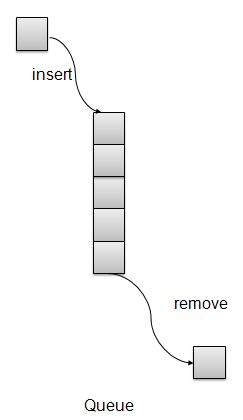
Queue is kind of data structure similar to stack with primary difference that the first item inserted is the first item to be removed (FIFO – First In First Out) where stack is based on LIFO, Last In First Out principal.
Queue Representation
Learn Java in-depth with real-world projects through our Java certification course. Enroll and become a certified expert to boost your career.
Basic Operations
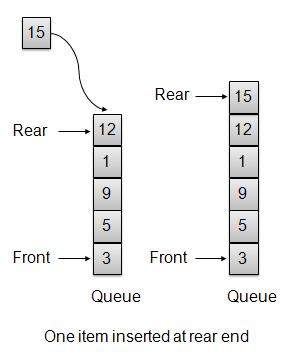
insert / enqueue − add an item to the rear of the queue.
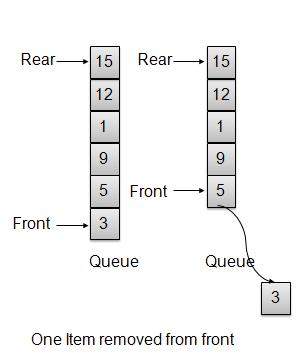
remove / dequeue − remove an item from the front of the queue.
We’re going to implement Queue using array in this article. There is few more operations supported by queue which are following.
Peek − get the element at front of the queue.
isFull − check if queue is full.
isEmpty − check if queue is empty.
Insert / Enqueue Operation
Whenever an element is inserted into queue, queue increments the rear index for later use and stores that element at the rear end of the storage. If rear end reaches to the last index and it is wrapped to the bottom location. Such an arrangement is called wrap around and such queue is circular queue. This method is also termed as enqueue operation.
Whenever an element is to be removed from queue, queue get the element using front index and increments the front index. As a wrap around arrangement, if front index is more than array’s max index, it is set to 0.
public int remove(){
int data = intArray[front++];
if(front == MAX){
front = 0;
}
itemCount--;
return data;
}
Queue Implementation
Queue.java
package com.tutorialspoint.datastructure;
public class Queue {
private final int MAX;
private int[] intArray;
private int front;
private int rear;
private int itemCount;
public Queue(int size){
MAX = size;
intArray = new int[MAX];
front = 0;
rear = -1;
itemCount = 0;
}
public void insert(int data){
   if(!isFull()){
  if(rear == MAX-1){
     rear = -1;
  }

  intArray[++rear] = data;
  itemCount++;   }
}
public int remove(){
   int data = intArray[front++];
   if(front == MAX){
  front = 0;   }
   itemCount--;
   return data;
}
public int peek(){
return intArray[front];
}
public boolean isEmpty(){
return itemCount == 0;
}
public boolean isFull(){
return itemCount == MAX;
}
public int size(){
return itemCount;
}
}
Demo Program
QueueDemo.java
package com.tutorialspoint.datastructure;
public class QueueDemo {
public static void main(String[] args){
Ordinary airthmetic expressions like 2*(3*4) are easier for human mind to parse but for an algorithm it would be pretty difficult to parse such an expression. To ease this difficulty, an airthmetic expression can be parsed by an algorithm using a two step approach.
Transform the provided arithmetic expression to postfix notation.
Evaluate the postfix notation.
Infix Notation
Normal airthmetic expression follows Infix Notation in which operator is in between the operands. For example A+B here A is first operand, B is second operand and + is the operator acting on the two operands.
Postfix Notation
Postfix notation varies from normal arithmetic expression or infix notation in a way that the operator follows the operands. For example, consider the following examples
Sr.No
Infix Notation
Postfix Notation
1
A+B
AB+
2
(A+B)*C
AB+C*
3
A*(B+C)
ABC+*
4
A/B+C/D
AB/CD/+
5
(A+B)*(C+D)
AB+CD+*
6
((A+B)*C)-D
AB+C*D-
Learn Java in-depth with real-world projects through our Java certification course. Enroll and become a certified expert to boost your career.
Infix to PostFix Conversion
Before looking into the way to translate Infix to postfix notation, we need to consider following basics of infix expression evaluation.
Evaluation of the infix expression starts from left to right.
Keep precedence in mind, for example * has higher precedence over +. For example
2+3*4 = 2+12.
2+3*4 = 14.
Override precedence using brackets, For example
(2+3)*4 = 5*4.
(2+3)*4= 20.
Now let us transform a simple infix expression A+B*C into a postfix expression manually.
Step
Character read
Infix Expressed parsed so far
Postfix expression developed so far
Remarks
1
A
A
A
2
+
A+
A
3
B
A+B
AB
4
*
A+B*
AB
+ can not be copied as * has higher precedence.
5
C
A+B*C
ABC
6
A+B*C
ABC*
copy * as two operands are there B and C
7
A+B*C
ABC*+
copy + as two operands are there BC and A
Now let us transform the above infix expression A+B*C into a postfix expression using stack.
Step
Character read
Infix Expressed parsed so far
Postfix expression developed so far
Stack Contents
Remarks
1
A
A
A
2
+
A+
A
+
push + operator in a stack.
3
B
A+B
AB
+
4
*
A+B*
AB
+*
Precedence of operator * is higher than +. push * operator in the stack. Otherwise, + would pop up.
5
C
A+B*C
ABC
+*
6
A+B*C
ABC*
+
No more operand, pop the * operator.
7
A+B*C
ABC*+
Pop the + operator.
Now let us see another example, by transforming infix expression A*(B+C) into a postfix expression using stack.
Step
Character read
Infix Expressed parsed so far
Postfix expression developed so far
Stack Contents
Remarks
1
A
A
A
2
*
A*
A
*
push * operator in a stack.
3
(
A*(
A
*(
push ( in the stack.
4
B
A*(B
AB
*(
5
+
A*(B+
AB
*(+
push + in the stack.
6
C
A*(B+C
ABC
*(+
7
)
A*(B+C)
ABC+
*(
Pop the + operator.
8
A*(B+C)
ABC+
*
Pop the ( operator.
9
A*(B+C)
ABC+*
Pop the rest of the operator(s).
Demo program
Now we’ll demonstrate the use of stack to convert infix expression to postfix expression and then evaluate the postfix expression.Stack.java
package com.tutorialspoint.expression;

public class Stack {

   private int size;
   private int[] intArray;
   private int top;

   //Constructor
   public Stack(int size){
  this.size = size;
  intArray = new int[size];
  top = -1;                      }

   //push item on the top of the stack
   public void push(int data) {
  if(!isFull()){
     //increment top by 1 and insert data
     intArray[++top] = data;
  }else{
     System.out.println("Cannot add data. Stack is full.");
  }         }

   //pop item from the top of the stack
   public int pop() {
  //retrieve data and decrement the top by 1
  return intArray[top--];           }

   //view the data at top of the stack
   public int peek() {
  //retrieve data from the top
  return intArray[top];   }

   //return true if stack is full
   public boolean isFull(){
  return (top == size-1);   }

   //return true if stack is empty
   public boolean isEmpty(){
  return (top == -1);   }
}
InfixToPostFix.java
package com.tutorialspoint.expression;
public class InfixToPostfix {
private Stack stack;
private String input = "";
private String output = "";
public InfixToPostfix(String input){
this.input = input;
stack = new Stack(input.length());
}
public String translate(){
for(int i=0;i<input.length();i++){
char ch = input.charAt(i);
switch(ch){
case '+':
case '-':
gotOperator(ch, 1);
break;
case '*':
case '/':
gotOperator(ch, 2);
break;
case '(':
stack.push(ch);
break;
case ')':
gotParenthesis(ch);
break;
default:
output = output+ch;
break;
}
}
package com.tutorialspoint.expression;
public class PostFixParser {
private Stack stack;
private String input;
public PostFixParser(String postfixExpression){
input = postfixExpression;
stack = new Stack(input.length());
}
public int evaluate(){
char ch;
int firstOperand;
int secondOperand;
int tempResult;