Category: 5. Advanced

https://cdn3d.iconscout.com/3d/premium/thumb/3d-software-settings-icon-download-in-png-blend-fbx-gltf-file-formats–setting-configuration-preferences-printing-pack-science-technology-icons-8549424.png?f=webp

  • Page Redirection

    Page redirection is needed for many reasons in web application. You might want to redirect a user to another page when a specific action occurs, or basically in case of error. For example, when a user logs in to your website, he is often redirected either to the main home page or to his personal dashboard. In Django, redirection is accomplished using the ‘redirect’ method.

    The ‘redirect’ method takes as argument: The URL you want to be redirected to as string A view’s name.

    The myapp/views looks like the following so far −

    def hello(request):
       today = datetime.datetime.now().date()
       daysOfWeek = ['Mon', 'Tue', 'Wed', 'Thu', 'Fri', 'Sat', 'Sun']
       return render(request, "hello.html", {"today" : today, "days_of_week" : daysOfWeek})
    	
    def viewArticle(request, articleId):
       """ A view that display an article based on his ID"""
       text = "Displaying article Number : %s" %articleId
       return HttpResponse(text)
    	
    def viewArticles(request, year, month):
       text = "Displaying articles of : %s/%s"%(year, month)
       return HttpResponse(text)

    Let’s change the hello view to redirect to djangoproject.com and our viewArticle to redirect to our internal ‘/myapp/articles’. To do so the myapp/view.py will change to −

    from django.shortcuts import render, redirect
    from django.http import HttpResponse
    import datetime
    
    # Create your views here.
    def hello(request):
       today = datetime.datetime.now().date()
       daysOfWeek = ['Mon', 'Tue', 'Wed', 'Thu', 'Fri', 'Sat', 'Sun']
       return redirect("https://www.djangoproject.com")
    	
    def viewArticle(request, articleId):
       """ A view that display an article based on his ID"""
       text = "Displaying article Number : %s" %articleId
       return redirect(viewArticles, year = "2045", month = "02")
    	
    def viewArticles(request, year, month):
       text = "Displaying articles of : %s/%s"%(year, month)
       return HttpResponse(text)

    In the above example, first we imported redirect from django.shortcuts and for redirection to the Django official website we just pass the full URL to the ‘redirect’ method as string, and for the second example (the viewArticle view) the ‘redirect’ method takes the view name and his parameters as arguments.

    Accessing /myapp/hello, will give you the following screen −

    Django page Redirection Example1

    And accessing /myapp/article/42, will give you the following screen −
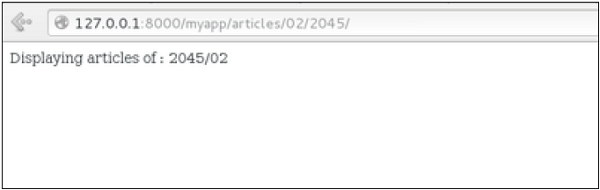
    Django page Redirection Example2

    It is also possible to specify whether the ‘redirect’ is temporary or permanent by adding permanent = True parameter. The user will see no difference, but these are details that search engines take into account when ranking of your website.

    Also remember that ‘name’ parameter we defined in our url.py while mapping the URLs −

    url(r'^articles/(?P\d{2})/(?P\d{4})/', 'viewArticles', name = 'articles'),
    

    That name (here article) can be used as argument for the ‘redirect’ method, then our viewArticle redirection can be changed from −

    def viewArticle(request, articleId):
       """ A view that display an article based on his ID"""
       text = "Displaying article Number : %s" %articleId
       return redirect(viewArticles, year = "2045", month = "02")

    To −

    def viewArticle(request, articleId):
       """ A view that display an article based on his ID"""
       text = "Displaying article Number : %s" %articleId
       return redirect(articles, year = "2045", month = "02")

    Note − There is also a function to generate URLs; it is used in the same way as redirect; the ‘reverse’ method (django.core.urlresolvers.reverse). This function does not return a HttpResponseRedirect object, but simply a string containing the URL to the view compiled with any passed argument.
  • Page Not Found (404)

    What is 404 Page Not Found Error?

    The HTTP protocol defines various status codes to indicate different types of HTTP responses. “404” is the HTTP status code that corresponds to the situation when the server cannot find the requested webpage. It is called as “404 error”, also known as the “404 Not Found error” or “HTTP 404 Not Found”.

    Django’s Default Template for 404 Error

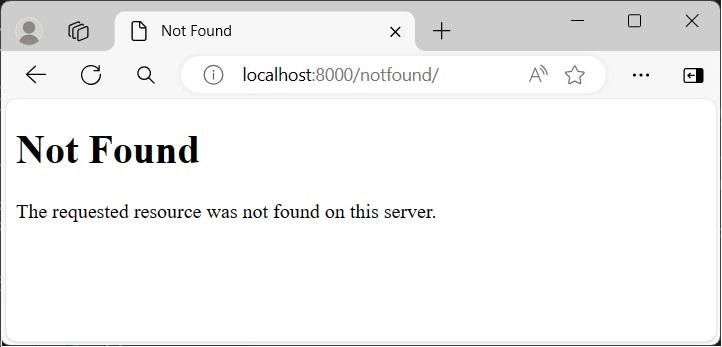
    In Django, a given URL route is mapped to a certain view. The 404 error may appear when a URL doesn’t have a corresponding view.

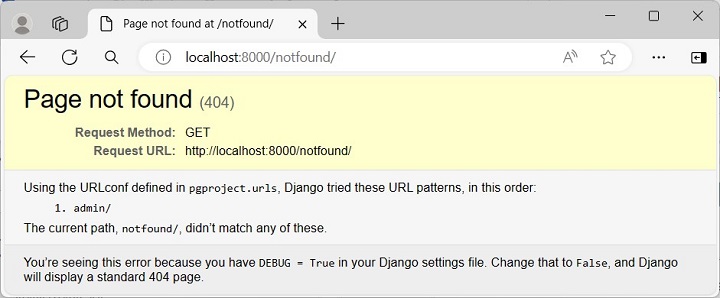
    Let us enter a URL route that has not been defined in the URLCONF of the Django project −

    Django Page Not Found 1

    The Django project, created with the startproject template, has the DEBUG parameter set to TRUE. The above page appears when a view isn’t found and DEBUG is set to TRUE. This is Django’s default template for 404 error code.

    Render a Custom Error Page

    To render a custom error page, set the DEBUG parameter to FALSE in the “setings.py” module. Also, you need to specify the list of ALLOWED_HOSTS such as localhost or a certain domain such as https://example.com. Set this parameter to “*” for any hostname.

    DEBUG =False
    ALLOWED_HOSTS =["*"]

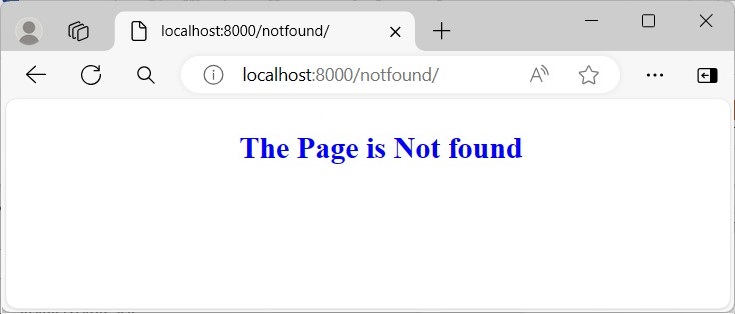
    After these changes, the same URL doesn’t show any DEBUG message as in the earlier figure.

    Django Page Not Found 2

    You can further design a customised template, name it as “404.html”, and place it in the “BASE_DIR/template” folder.

    404.html

    <html><body><h2 style="text-align: center; color: blue; 
    
      font-weight:900;"&gt;The Page is Not found&lt;/h2&gt;&lt;/body&gt;&lt;/html&gt;</code></pre>

    Now, this page is displayed whenever the view is not found.

    Django Page Not Found 3

    Another approach to customize the 404 error response is to define a handler404() view in "views.py" file under the project folder.

    Note − The view.py module is situated by default in the app folder. You need to create the same in the project folder explicitly.

    views.py

    from django.shortcuts import render
    
    defhandler404(request, exception):return render(request,'404handler.html')

    Then, direct Django to render this template whenever a view isn’t found by assigning the handler404 variable with handler404() function, in the URLCONF of the project.

    urls.py

    from django.contrib import admin
    from django.urls import path
    from.import views
    
    handler404 = views.handler404
    
    urlpatterns =[
       path('admin/', admin.site.urls),]

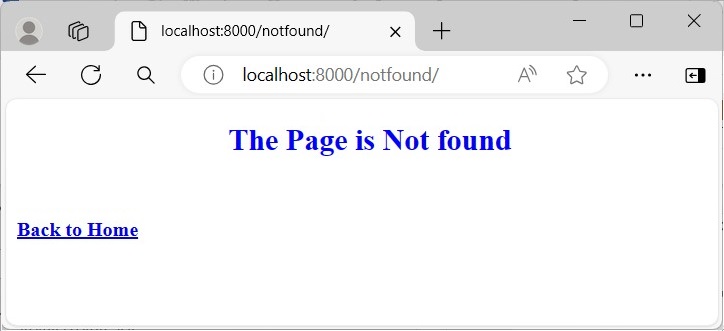
    404handler.html

    Save the following HTML script as 404handler.html in the templates folder −

    <html><body><h2 style="text-align: center; color: blue; 
    
      font-weight:900;"&gt;The Page is Not found&lt;/h2&gt;&lt;br&gt;&lt;br&gt;&lt;a href="../home"&gt;&lt;b&gt;Back to Home&lt;/b&gt;&lt;/a&gt;&lt;/body&gt;&lt;/html&gt;</code></pre>

    Visit any undefined URL route to render this customized 404 error page.

    Django Page Not Found 4