Category: 1. Basics

https://cdn3d.iconscout.com/3d/premium/thumb/coding-3d-icon-download-in-png-blend-fbx-gltf-file-formats–html-logo-programming-development-web-pack-science-technology-icons-8167751.png?f=webp

  • Storage Classes in C++

    A storage class defines the scope (visibility) and life-time of variables and/or functions within a C++ Program. These specifiers precede the type that they modify. There are following storage classes, which can be used in a C++ Program

    • auto
    • register
    • static
    • extern
    • mutable

    The auto Storage Class

    The auto storage class is the default storage class for all local variables.

    Example

    Below is the example of auto storage class −

    {int mount;autoint month;}

    The example above defines two variables with the same storage class, auto can only be used within functions, i.e., local variables.

    The register Storage Class

    The register storage class is used to define local variables that should be stored in a register instead of RAM. This means that the variable has a maximum size equal to the register size (usually one word) and can’t have the unary ‘&’ operator applied to it (as it does not have a memory location).

    Example

    Below is the example of register storage class −

    {registerint  miles;}

    The register should only be used for variables that require quick access such as counters. It should also be noted that defining ‘register’ does not mean that the variable will be stored in a register. It means that it MIGHT be stored in a register depending on hardware and implementation restrictions.

    The static Storage Class

    The static storage class instructs the compiler to keep a local variable in existence during the life-time of the program instead of creating and destroying it each time it comes into and goes out of scope. Therefore, making local variables static allows them to maintain their values between function calls.

    The static modifier may also be applied to global variables. When this is done, it causes that variable’s scope to be restricted to the file in which it is declared.

    In C++, when static is used on a class data member, it causes only one copy of that member to be shared by all objects of its class.

    Example

    Below is the example of static storage class −

    Open Compiler

    #include <iostream>// Function declarationvoidfunc(void);staticint count =10;/* Global variable */main(){while(count--){func();}return0;}// Function definitionvoidfunc(void){staticint i =5;// local static variable
       i++;
       std::cout <<"i is "<< i ;
       std::cout <<" and count is "<< count << std::endl;}

    When the above code is compiled and executed, it produces the following result −

    i is 6 and count is 9
    i is 7 and count is 8
    i is 8 and count is 7
    i is 9 and count is 6
    i is 10 and count is 5
    i is 11 and count is 4
    i is 12 and count is 3
    i is 13 and count is 2
    i is 14 and count is 1
    i is 15 and count is 0
    

    The extern Storage Class

    The extern storage class is used to give a reference of a global variable that is visible to ALL the program files. When you use ‘extern’ the variable cannot be initialized as all it does is point the variable name at a storage location that has been previously defined.

    When you have multiple files and you define a global variable or function, which will be used in other files also, then extern will be used in another file to give reference of defined variable or function. Just for understanding extern is used to declare a global variable or function in another file.

    The extern modifier is most commonly used when there are two or more files sharing the same global variables or functions as explained below.

    Example

    Below is the example of extern storage class −

    First File: main.cpp

    #include <iostream>int count ;externvoidwrite_extern();main(){
       count =5;write_extern();}

    Second File: support.cpp

    #include <iostream>externint count;voidwrite_extern(void){
       std::cout <<"Count is "<< count << std::endl;}

    Here, extern keyword is being used to declare count in another file. Now compile these two files as follows −

    $g++ main.cpp support.cpp -o write
    

    This will produce write executable program, try to execute write and check the result as follows −

    $./write
    5
    

    The mutable Storage Class

    The mutable specifier applies only to class objects, which are discussed later in this tutorial. It allows a member of an object to override const member function. That is, a mutable member can be modified by a const member function.
  • Modifier Types

    C++ allows the char, int, and double data types to have modifiers preceding them. A modifier is used to alter the meaning of the base type so that it more precisely fits the needs of various situations.

    The data type modifiers are listed here −

    • signed
    • unsigned
    • long
    • short

    The modifiers signed, unsigned, long, and short can be applied to integer base types. In addition, signed and unsigned can be applied to char, and long can be applied to double.

    The modifiers signed and unsigned can also be used as prefix to long or short modifiers. For example, unsigned long int.

    C++ allows a shorthand notation for declaring unsigned, short, or long integers. You can simply use the word unsigned, short, or long, without int. It automatically implies int. For example, the following two statements both declare unsigned integer variables.

    unsigned x;
    unsigned int y;
    

    To understand the difference between the way signed and unsigned integer modifiers are interpreted by C++, you should run the following short program −

    Open Compiler

    #include <iostream>usingnamespace std;/* This program shows the difference between
       * signed and unsigned integers.
    */intmain(){shortint i;// a signed short integershortunsignedint j;// an unsigned short integer
    
       j =50000;
    
       i = j;
       cout << i <<" "<< j;return0;}

    When this program is run, following is the output −

    -15536 50000
    

    The above result is because the bit pattern that represents 50,000 as a short unsigned integer is interpreted as -15,536 by a short.

    Type Qualifiers in C++

    The type qualifiers provide additional information about the variables they precede.

    Sr.NoQualifier & Meaning
    1constObjects of type const cannot be changed by your program during execution.
    2volatileThe modifier volatile tells the compiler that a variable’s value may be changed in ways not explicitly specified by the program.
    3restrictA pointer qualified by restrict is initially the only means by which the object it points to can be accessed. Only C99 adds a new type qualifier called restrict.
  • Constants/Literals

    Constants refer to fixed values that the program may not alter and they are called literals.

    Constants can be of any of the basic data types and can be divided into Integer Numerals, Floating-Point Numerals, Characters, Strings and Boolean Values.

    Again, constants are treated just like regular variables except that their values cannot be modified after their definition.

    Integer Literals

    An integer literal can be a decimal, octal, or hexadecimal constant. A prefix specifies the base or radix: 0x or 0X for hexadecimal, 0 for octal, and nothing for decimal.

    An integer literal can also have a suffix that is a combination of U and L, for unsigned and long, respectively. The suffix can be uppercase or lowercase and can be in any order.

    Here are some examples of integer literals −

    212         // Legal
    215u        // Legal
    0xFeeL      // Legal
    078         // Illegal: 8 is not an octal digit
    032UU       // Illegal: cannot repeat a suffix
    

    Following are other examples of various types of Integer literals −

    85         // decimal
    0213       // octal
    0x4b       // hexadecimal
    30         // int
    30u        // unsigned int
    30l        // long
    30ul       // unsigned long
    

    Floating-point Literals

    A floating-point literal has an integer part, a decimal point, a fractional part, and an exponent part. You can represent floating point literals either in decimal form or exponential form.

    While representing using decimal form, you must include the decimal point, the exponent, or both and while representing using exponential form, you must include the integer part, the fractional part, or both. The signed exponent is introduced by e or E.

    Here are some examples of floating-point literals −

    3.14159       // Legal
    314159E-5L    // Legal
    510E          // Illegal: incomplete exponent
    210f          // Illegal: no decimal or exponent
    .e55          // Illegal: missing integer or fraction
    

    Boolean Literals

    There are two Boolean literals and they are part of standard C++ keywords −

    • A value of true representing true.
    • A value of false representing false.

    You should not consider the value of true equal to 1 and value of false equal to 0.

    Character Literals

    Character literals are enclosed in single quotes. If the literal begins with L (uppercase only), it is a wide character literal (e.g., L’x’) and should be stored in wchar_t type of variable . Otherwise, it is a narrow character literal (e.g., ‘x’) and can be stored in a simple variable of char type.

    A character literal can be a plain character (e.g., ‘x’), an escape sequence (e.g., ‘\t’), or a universal character (e.g., ‘\u02C0’).

    There are certain characters in C++ when they are preceded by a backslash they will have special meaning and they are used to represent like newline (\n) or tab (\t). Here, you have a list of some of such escape sequence codes −

    Escape sequenceMeaning
    \\\ character
    \’‘ character
    \”” character
    \?? character
    \aAlert or bell
    \bBackspace
    \fForm feed
    \nNewline
    \rCarriage return
    \tHorizontal tab
    \vVertical tab
    \oooOctal number of one to three digits
    \xhh . . .Hexadecimal number of one or more digits

    Example

    Following is the example to show a few escape sequence characters −

    Open Compiler

    #include <iostream>usingnamespace std;intmain(){
       cout <<"Hello\tWorld\n\n";return0;}

    When the above code is compiled and executed, it produces the following result −

    Hello   World
    

    String Literals

    String literals are enclosed in double quotes. A string contains characters that are similar to character literals: plain characters, escape sequences, and universal characters.

    You can break a long line into multiple lines using string literals and separate them using whitespaces.

    Here are some examples of string literals. All the three forms are identical strings.

    "hello, dear"
    
    "hello, \
    
    dear"
    
    "hello, ""d""ear"

    Defining Constants

    There are two simple ways in C++ to define constants −

    • Using #define preprocessor.
    • Using const keyword.

    The #define Preprocessor

    Following is the form to use #define preprocessor to define a constant −

    #define identifier value

    Example

    Following example explains it in detail −

    Open Compiler

    #include <iostream>usingnamespace std;#define LENGTH 10   #define WIDTH  5#define NEWLINE '\n'intmain(){int area;  
       
       area = LENGTH * WIDTH;
       cout << area;
       cout << NEWLINE;return0;}

    When the above code is compiled and executed, it produces the following result −

    50
    

    The const Keyword

    You can use const prefix to declare constants with a specific type as follows −

    const type variable = value;

    Example

    Following example explains it in detail −

    Open Compiler

    #include <iostream>usingnamespace std;intmain(){constint  LENGTH =10;constint  WIDTH  =5;constchar NEWLINE ='\n';int area;  
       
       area = LENGTH * WIDTH;
       cout << area;
       cout << NEWLINE;return0;}

    When the above code is compiled and executed, it produces the following result −

    50
    

    Note that it is a good programming practice to define constants in CAPITALS.

  • Basic Input/Output

    The C++ standard libraries provide an extensive set of input/output capabilities which we will see in subsequent chapters. This chapter will discuss very basic and most common I/O operations required for C++ programming.

    C++ I/O occurs in streams, which are sequences of bytes. If bytes flow from a device like a keyboard, a disk drive, or a network connection etc. to main memory, this is called input operation and if bytes flow from main memory to a device like a display screen, a printer, a disk drive, or a network connection, etc., this is called output operation.

    I/O Library Header Files

    There are following header files important to C++ programs −

    Sr.NoHeader File & Function and Description
    1<iostream>This file defines the cin, cout, cerr and clog objects, which correspond to the standard input stream, the standard output stream, the un-buffered standard error stream and the buffered standard error stream, respectively.
    2<iomanip>This file declares services useful for performing formatted I/O with so-called parameterized stream manipulators, such as setw and setprecision.
    3<fstream>This file declares services for user-controlled file processing. We will discuss about it in detail in File and Stream related chapter.

    The Standard Output Stream (cout)

    The predefined object cout is an instance of ostream class. The cout object is said to be “connected to” the standard output device, which usually is the display screen. The cout is used in conjunction with the stream insertion operator, which is written as << which are two less than signs as shown in the following example.

    #include <iostream>
     
    using namespace std;
     
    int main() {
       char str[] = "Hello C++";
     
       cout << "Value of str is : " << str << endl;
    }

    When the above code is compiled and executed, it produces the following result −

    Value of str is : Hello C++
    

    The C++ compiler also determines the data type of variable to be output and selects the appropriate stream insertion operator to display the value. The << operator is overloaded to output data items of built-in types integer, float, double, strings and pointer values.

    The insertion operator << may be used more than once in a single statement as shown above and endl is used to add a new-line at the end of the line.

    The Standard Input Stream (cin)

    The predefined object cin is an instance of istream class. The cin object is said to be attached to the standard input device, which usually is the keyboard. The cin is used in conjunction with the stream extraction operator, which is written as >> which are two greater than signs as shown in the following example.

    #include <iostream>
     
    using namespace std;
     
    int main() {
       char name[50];
     
       cout << "Please enter your name: ";
       cin >> name;
       cout << "Your name is: " << name << endl;
     
    }

    When the above code is compiled and executed, it will prompt you to enter a name. You enter a value and then hit enter to see the following result −

    Please enter your name: cplusplus
    Your name is: cplusplus
    

    The C++ compiler also determines the data type of the entered value and selects the appropriate stream extraction operator to extract the value and store it in the given variables.

    The stream extraction operator >> may be used more than once in a single statement. To request more than one datum you can use the following −

    cin >> name >> age;
    

    This will be equivalent to the following two statements −

    cin >> name;
    cin >> age;
    

    The Standard Error Stream (cerr)

    The predefined object cerr is an instance of ostream class. The cerr object is said to be attached to the standard error device, which is also a display screen but the object cerr is un-buffered and each stream insertion to cerr causes its output to appear immediately.

    The cerr is also used in conjunction with the stream insertion operator as shown in the following example.

    #include <iostream>
     
    using namespace std;
     
    int main() {
       char str[] = "Unable to read....";
     
       cerr << "Error message : " << str << endl;
    }

    When the above code is compiled and executed, it produces the following result −

    Error message : Unable to read....
    

    The Standard Log Stream (clog)

    The predefined object clog is an instance of ostream class. The clog object is said to be attached to the standard error device, which is also a display screen but the object clog is buffered. This means that each insertion to clog could cause its output to be held in a buffer until the buffer is filled or until the buffer is flushed.

    The clog is also used in conjunction with the stream insertion operator as shown in the following example.

    #include <iostream>
     
    using namespace std;
     
    int main() {
       char str[] = "Unable to read....";
     
       clog << "Error message : " << str << endl;
    }

    When the above code is compiled and executed, it produces the following result −

    Error message : Unable to read....
    

    You would not be able to see any difference in cout, cerr and clog with these small examples, but while writing and executing big programs the difference becomes obvious. So it is good practice to display error messages using cerr stream and while displaying other log messages then clog should be used.

  • Declare Multiple Variables

    C++ programming language allows programmers to declare multiple variables in a single statement without any line breaks. This is only possible for variables which belong to the same data type.

    How to Declare Multiple Variables in C++?

    This is executed using a comma (,) separated list of variables with different variables names, and the data types must be the same for all variables to be declared. Multiple variables declaration is supported for all data types in C++, for example, we can declare multiple strings with different names in a single statement using a comma separated list.

    Syntax

    The following syntax shows how to declare multiple variables with same data types in a single statement −

    data_type var_a, var_b, var_;

    Example

    The following exemplar code shows how to declare multiple variables with same data types in a single statement −

    Open Compiler

    #include <iostream>usingnamespace std;intmain(){int y,z,x;
    
       x=10;
       y=20;
       z=30;
    
       cout<<"value of x: "<<x<<endl<<"value of y: "<<y<<endl<<"value of z: "<<z;return0;}

    Output

    value of x: 10
    value of y: 20
    value of z: 30
    

    Initialize Multiple Variables

    The variables can also be initialized with different values in the same statement of declaration, which makes it easy to declare variables of different values.

    Syntax

    The following syntax shows how to declare multiple variables, and initialize them with values in a single statement −

    data_type var_a=[value1], var_b, var_c=[value3];

    Here, var_a, var_b and var_c are variables of same data type, and [value] is the value of that variable.

    Example

    The following exemplar code shows how to declare multiple variables, and initialize them with values in a single statement −

    Open Compiler

    #include <iostream>usingnamespace std;intmain(){int y=10,z=20,x;
       x=10;
       cout<<"value of x: "<<x<<endl<<"value of y: "<<y<<endl<<"value of z: "<<z;return0;}

    Output

    value of x: 10
    value of y: 10
    value of z: 20
    

    Initialize Multiple Variables with Same Value

    The variables can also be initialized with the same values in a single statement using the “=” operator multiple times in a single statement.

    Syntax

    The following syntax shows how to declare multiple variables and initialize all of them to a single value in a single statement −

    data_type var_1, var_2, var_3;
    var_1=var_2=var_3=[value]

    Here, the variables var_1, var_2 and var_3 are initialized to a single value [value] in a single statement.

    Example

    The following exemplar code shows how to declare multiple variables and initialize all of them to a single value in a single statement −

    Open Compiler

    #include <iostream>usingnamespace std;intmain(){int y,z;int x=y=z=10;
       cout<<"value of x: "<<x<<endl<<"value of y: "<<y<<endl<<"value of z: "<<z;return0;}

    Output

    value of x: 10
    value of y: 10
    value of z: 10
    
  • Variable Scope in C++

    A scope is a region of the program and broadly speaking there are three places, where variables can be declared −

    • Inside a function or a block which is called local variables,
    • In the definition of function parameters which is called formal parameters.
    • Outside of all functions which is called global variables.

    C++ variables scopes are categorized mainly two parts −

    • Local Variables
    • Global Variables

    We will learn what is a function and it’s parameter in subsequent chapters. Here let us explain what are local and global variables.

    C++ Variable Scopes

    Local Variables

    Variables that are declared inside a function or block are local variables. They can be used only by statements that are inside that function or block of code. Local variables are not known to functions outside their own.

    Example

    Following is the example using local variables −

    Open Compiler

    #include <iostream>usingnamespace std;intmain(){// Local variable declarationint a, b;int c;// actual initialization
       a =10;
       b =20;
       c = a + b;
     
       cout << c;return0;}

    Global Variables

    Global variables are defined outside of all the functions, usually on top of the program. The global variables will hold their value throughout the life-time of your program.

    A global variable can be accessed by any function. That is, a global variable is available for use throughout your entire program after its declaration.

    Example

    Following is the example using global and local variables −

    Open Compiler

    #include <iostream>usingnamespace std;// Global variable declarationint g;intmain(){// Local variable declarationint a, b;// actual initialization
       a =10;
       b =20;
       g = a + b;
      
       cout << g;return0;}

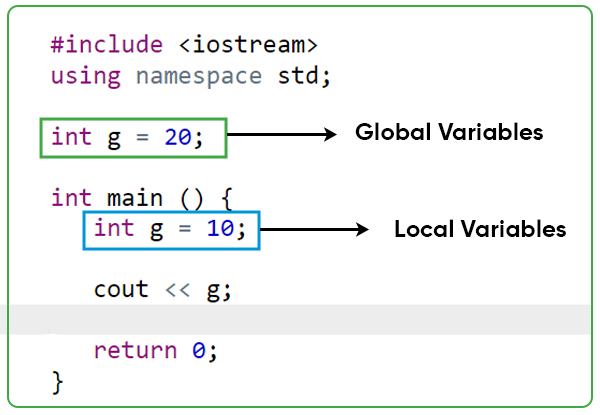
    Local and Global Variables with Same Names

    A program can have same name for local and global variables but value of local variable inside a function will take preference.

    Example

    Open Compiler

    #include <iostream>usingnamespace std;// Global variable declarationint g =20;intmain(){// Local variable declarationint g =10;
     
       cout << g;return0;}

    When the above code is compiled and executed, it produces the following result −

    10
    

    Accessing Global Variable

    You can access a global variable when there is a local variable with the same name by using the SRO (Scope Resolution Operator) :: before the name of that variable.

    Example

    In the following example, we have global and local variables with the same name, and accessing and printing the value of the global variable −

    Open Compiler

    #include <iostream>usingnamespace std;// Global variable declaration:int g =20;intmain(){// Local variable declaration:int g =10;
    
       cout <<"Value of g (Local variable): "<< g;
       cout << endl;
       
       cout <<"Value of g (Global variable): "<<::g;return0;}

    When the above code is compiled and executed, it produces the following result −

    Value of g (Local variable): 10
    Value of g (Global variable): 20
    

    Initializing Local and Global Variables

    When a local variable is defined, it is not initialized by the system, you must initialize it yourself. Global variables are initialized automatically by the system when you define them as follows −

    Data TypeInitializer
    int0
    char‘\0’
    float0
    double0
    pointerNULL

    It is a good programming practice to initialize variables properly, otherwise sometimes program would produce unexpected result.

  • Variables and Types

    C++ Variable

    A variable provides us with named storage that our programs can manipulate. Each variable in C++ has a specific type, which determines the size and layout of the variable’s memory; the range of values that can be stored within that memory; and the set of operations that can be applied to the variable.

    C++ Variable Naming

    The name of a variable can be composed of letters, digits, and the underscore character. It must begin with either a letter or an underscore. Upper and lowercase letters are distinct because C++ is case-sensitive.

    Some other rules for variable naming conventions in C++ −

    • Keywords cannot be used as variable names.
    • The variable name cannot contain spaces.
    • Hyphen (-) cannot be used within the variable names.
    • Variable names must not start with special characters and numbers. It should be either an uppercase or lowercase character or an underscore (_).

    Example of Valid Variable Names

    Some of the valid variable names are −

    int age;int _age;int student_age;int studentAge;

    Example of Invalid Variable Names

    Some of the invalid variable names are −

    int2ndvariable;int student-age;intfloat;int student age;int #age;

    Types of C++ Variables

    There are following basic types of variable in C++ as explained in last chapter −

    Sr.NoType & Description
    1boolStores either value true or false.
    2charTypically a single octet (one byte). This is an integer type.
    3intThe most natural size of integer for the machine.
    4floatA single-precision floating point value.
    5doubleA double-precision floating point value.
    6voidRepresents the absence of type.
    7wchar_tA wide character type.

    C++ also allows to define various other types of variables, which we will cover in subsequent chapters like Enumeration, Pointer, Array, Reference, Data structures, and Classes.

    Following section will cover how to define, declare and use various types of variables.

    Variable Definition in C++

    A variable definition tells the compiler where and how much storage to create for the variable. A variable definition specifies a data type, and contains a list of one or more variables of that type as follows −

    Syntax

    type variable_list;

    Here, type must be a valid C++ data type including char, w_char, int, float, double, bool or any user-defined object, etc., and variable_list may consist of one or more identifier names separated by commas. Some valid declarations are shown here −

    int    i, j, k;char   c, ch;float  f, salary;double d;

    The line int i, j, k; both declares and defines the variables i, j and k; which instructs the compiler to create variables named i, j and k of type int.

    Variable Initialization in C++

    Variables can be initialized (assigned an initial value) in their declaration. The initializer consists of an equal sign followed by a constant expression as follows −

    Syntax

    type variable_name = value;

    Example

    Some examples are −

    externint d =3, f =5;// declaration of d and f. int d =3, f =5;// definition and initializing d and f. 
    byte z =22;// definition and initializes z. char x ='x';// the variable x has the value 'x'.

    For definition without an initializer: variables with static storage duration are implicitly initialized with NULL (all bytes have the value 0); the initial value of all other variables is undefined.

    Variable Declaration in C++

    A variable declaration provides assurance to the compiler that there is one variable existing with the given type and name so that compiler proceed for further compilation without needing complete detail about the variable. A variable declaration has its meaning at the time of compilation only, compiler needs actual variable definition at the time of linking of the program.

    A variable declaration is useful when you are using multiple files and you define your variable in one of the files which will be available at the time of linking of the program. You will use extern keyword to declare a variable at any place. Though you can declare a variable multiple times in your C++ program, but it can be defined only once in a file, a function or a block of code.

    Example

    Try the following example where a variable has been declared at the top, but it has been defined inside the main function −

    Open Compiler

    #include <iostream>usingnamespace std;// Variable declaration:externint a, b;externint c;externfloat f;intmain(){// Variable definition:int a, b;int c;float f;// actual initialization
       a =10;
       b =20;
       c = a + b;
     
       cout << c << endl ;
    
       f =70.0/3.0;
       cout << f << endl ;return0;}

    When the above code is compiled and executed, it produces the following result −

    30
    23.3333
    

    Same concept applies on function declaration where you provide a function name at the time of its declaration and its actual definition can be given anywhere else. For example −

    // function declarationintfunc();intmain(){// function callint i =func();}// function definitionintfunc(){return0;}

    Lvalues and Rvalues

    There are two kinds of expressions in C++ −

    • lvalue − Expressions that refer to a memory location is called “lvalue” expression. An lvalue may appear as either the left-hand or right-hand side of an assignment.
    • rvalue − The term rvalue refers to a data value that is stored at some address in memory. An rvalue is an expression that cannot have a value assigned to it which means an rvalue may appear on the right- but not left-hand side of an assignment.

    Variables are lvalues and so may appear on the left-hand side of an assignment. Numeric literals are rvalues and so may not be assigned and can not appear on the left-hand side. Following is a valid statement −

    int g =20;

    But the following is not a valid statement and would generate compile-time error −

    10=20;
  • Character (char) Data Type

    The character (char) data type in C++ stands for alphanumeric values, which can be a wide range of characters. These may include alphabets like ‘a’, ‘b’, and ‘c’, numeric values like ‘1’, ‘2’, and ‘3’, symbols like ‘#’, ‘$’, and ‘&’, and many more.

    The character data type takes 1 Byte (i.e., 8 bits) of memory space to store characters. In C++, the keyword “char” is used to declare a character variable.

    In this tutorial, we will explore more about character data type, and its corresponding variables.

    Use Character (char) Data Type

    The following are some of the uses of character (char) data type −

    • The char data type is used when we need to hold only a single character and do not need the overhead of String.
    • The char data type can also be used in primitive form as an array without the use of a string literal.
    • In ASCII form, char data type can be used to represent numeric values and vice-versa.

    Values of char Data Type

    The character (char) data type in C++ can have multiple values, and these values are as follows −

    • Uppercase Alphabets, like A, B, Z, etc.
    • Lowercase Alphabets, like a, b, z, etc.
    • Symbols, like $, %, &, etc.
    • Escape Sequences, which will be discussed later in this article.

    Creating a Character (char) Variable

    We can declare a character variable using the “char” keyword followed by the variable name.

    Syntax

    Use the following syntax to create a char type variable −

    char variable_name =[value];

    Here, [value] is an optional and can be used to assign value during the declaration.

    Example

    In the following example, we are declaring a char variable, assigning a value to it.

    // C++ program to demonstrate// Character data type#include <iostream> usingnamespace std;intmain(){char ch;return0;}

    Example of Character (char) Data Type

    The following example shows the use of different character data types −

    Open Compiler

    // C++ program to demonstrate// Character data type#include <iostream>usingnamespace std;intmain(){char ch,ch1,ch2;
       ch='a';//this is an alphabet
       ch1='&';//this is a symbol
       ch2='1';//this is a number
       cout<<ch<<endl<<ch1<<endl<<ch2<<endl;return0;}

    Output

    a
    &
    1
    

    ASCII Values of Characters

    ASCII stands for the “American Standard Code for Information Interchange”. It was the first set of encoding values assigned to different characters and symbols. The character sets used in modern computers, in HTML, and on the Internet, are all based on ASCII.

    The ASCII table describes a numeric value for all character types, and these values can be used to declare a character without the explicit use of the character itself. It contains the numbers from 0-9, the upper and lower case English letters from A to Z, and some special characters.

    The following data gives a reference for all ASCII values of characters available in C++ −

    ASCII Range of 'a' to 'z'=97-122
    ASCII Range of 'A' to 'Z'=65-90
    ASCII Range of '0' to '9'=48-57

    Example to Show ASCII Declaration

    The following example shows how a user can declare a character variable using ASCII values, without explicit usage of the character itself −

    Open Compiler

    #include <iostream>usingnamespace std;intmain(){char ch,ch1,ch2;
       ch=65;//this is an alphabet
       ch1=45;//this is a symbol
       ch2=55;//this is a number
       cout<<ch<<endl<<ch1<<endl<<ch2<<endl;return0;}

    Output

    A
    -
    7
    

    Implicit Conversion of Character Variables

    Character variables can be implicitly converted to their integer values using ASCII references, and vice-versa. Hence, when we declare a character in C++, we can reference their ASCII value, whereas an ASCII numerical can be used to access its character value as well. This is done using implicit conversion or typecasting of data types.

    We can add a keyword of the data type we need to convert the given variable into, and the compiler changes the data type automatically. For example, if we write char(97), it will load the character value of ASCII number 97, which is ‘a’. This is also possible for converting the character data type to integral (ASCII) values.

    This is clearly explained in the examples given below −

    Example

    The following example shows the implicit typecasting of char to int, and vice-versa −

    Open Compiler

    #include <iostream>usingnamespace std;intmain(){char c ='$';int a =97;
       cout <<"The Corresponding ASCII value of '$' : ";
       cout <<int(c)<< endl;
    
       cout <<"The Corresponding  character value of 97 : ";
       cout <<char(a)<< endl;return0;}

    Output

    The Corresponding ASCII value of '$' : 36
    The Corresponding  character value of 97 : a
    

    ESCAPE SEQUENCE IN C++

    Character variables which begin with a backslash (“\”) are called escape sequences. These determine on the output sequence on the output window of a compiler. In this context, backslash is also called as the ‘Escape Character’.

    The following table shows different types of escape sequences available in C++ −

    S. No.Escape SequencesCharacter
    1.\nNewline
    2.\\Backslash
    3.\tHorizontal Tab
    4.\vVertical Tab
    5.\0Null Character

    The usage of escape sequences is clearly explained in the following example code −

    Example 1

    Open Compiler

    #include <iostream>usingnamespace std;intmain(){char a ='H';char b ='E';char c ='Y';char d ='\n';//enter new linechar e ='\t';//tab to enter space 
       cout << a << b << c << d << a << b << c << e << a << b << c;return0;}

    Output

    HEY	HEYHEY
    HEY	HEY
    

    The escape character can also be used to insert special characters into strings. This is clearly explained in the example given below −

    Example 2

    Open Compiler

    #include <iostream>usingnamespace std;intmain(){//string txt = "Hey, where are you "vikas" ? ";//this throws error
       string txt ="Hey, where are you \"vikas\"? ";
    
       cout<<txt<<endl;return0;}

    Output

    Hey, where are you "vikas"? 
    
  • Boolean (bool) Data Type

    The bool data type in C++ stands for Boolean values, which are True and False. In C++, 1 stands for True whereas 0 stands for False. The keyword “bool” is used to declare a Boolean data type. The addition of bool data type is a one of the newer features of C++ language.

    Use of Boolean Data Type

    The Boolean (bool) data type is used in the following ways −

    • In conditions where we need to have binary values, i.e., values which represent two states of a variable.
    • When we need to run loops based on certain conditions, we use bool data types.
    • In case of having null values, we generally relate them to bool data types.
    • For comparing two values for equality or inequality, we generally use bool data types.

    Values of Boolean (bool) Data Type

    The bool data types in C++ can have one of two values, and these values are as follows −

    • True or 1
    • False or 0

    As stated earlier, Boolean 1 means true whereas Boolean 0 means false in C++ compilation.

    Creating a Boolean Variable

    We can declare a Boolean variable using the “bool” keyword followed by the variable name.

    Syntax

    Use the following syntax to create a Boolean type variable −

    bool variable_name =[value];

    Here, [value] is an optional and can be used to assign value during the declaration.

    Example

    In the following examples, we are declaring a Boolean variable, assigning a value to it.

    // C++ program to demonstrate // bool data type #include <iostream> usingnamespace std;// Driver code intmain(){bool flag;
       flag=1;//this is true    
       cout<<flag;return0;}

    Example of bool Data Type

    The following example demonstrate the use of Boolean (bool) data type −

    Open Compiler

    // C++ program to demonstrate// bool data type#include <iostream>usingnamespace std;intmain(){bool flag;
       flag=1;//this is truebool flag1=true;
    
       cout<<flag<<" "<<flag1<<endl;int count=0;while(flag){//condition where flag is true
    
      count++;if(count&gt;=3) flag=false;}
    cout<<count<<" "<<flag<<endl;if(flag1) cout<<"True flag1"<<endl;else cout<<"False flag1"<<endl;return0;}

    Output

    1 1
    3 0
    True flag1
    

    Implicit Conversion of Bool Variables

    Boolean data types can be implicitly converted to numeric data types, and vice-versa. This is possible as any value greater than 0 has a Boolean true value, whereas any value less than or equal to 0 has a Boolean false value.

    Also, the Boolean values can be added in form of integers to integral variables, using implicit conversion techniques. Hence, when we add a Boolean value to an integer, it gets incremented by 1 if the value is true, otherwise it remains same as false value corresponds to 0.

    Example

    This is clearly explained in the examples given below −

    // C++ program to demonstrate// bool data type#include <iostream> usingnamespace std;intmain(){bool flag;
       flag=1;//this is truebool flag1=true;
    
       cout<<flag<<" "<<flag1<<endl;int count=0;int x=12;float y=35.45;bool k=count, k1=x, k2=y;int sum=x+flag+flag1;
    
       cout<<k<<" "<<count<<" "<<k1<<" "<<x<<" "<<k2<<" "<<y<<" "<<endl;
       cout<<”After adding Boolean and integer values : ”<< sum<<endl;return0;}
  • Numeric Data Types

    Numeric data types in C++ are used to handle numerical data like integers (both signed and unsigned), floating-point values, and precision values.

    Numeric data types mainly contain three fundamental types of numeric data, which are as follows −

    • Int
      • Int
      • Short Int
      • Long Int
      • Long Long Int
      • Unsigned Int
      • Unsigned Short Int
      • Unsigned Long Int
      • Unsigned Long Long Int
    • Float
    • Double
    • Long Double

    In this article, we will go through all of the numeric data types and their subtypes in detail with examples.

    int Data Type

    The int data type is short for integer, which takes numeric values from -231 to (231-1). It takes 4 Bytes (i.e., 32 bits) in the memory.

    Syntax

    int variable_name;

    It is further classified into various derived subtypes, which are as follows −

    (a) short int

    The short int is used for smaller numbers, as it takes only 2 Bytes (i.e., 16 bits) in the memory. It’s value ranges from -215to (215-1).

    Syntax

    shortint varianle_name;

    (b) long int

    The long int is used for bigger numbers, with memory space of 4 bytes (i.e., 32 bits), and can be up to 8 bytes (i.e., 64 bits), depending upon the compiler.

    Syntax

    longint variable_name;

    (c) long long int

    The long long int is used for larger numbers, with memory space of 8 bytes (i.e. 64 bits), and can be up to 16 bytes (i.e., 128 bits), depending upon the compiler. It’s value ranges from -263 to (263-1).

    Syntax

    longlongint variable_name;

    (d) unsigned int

    The unsigned int is used to store only non-negative value, and take up same memory space as an int data type, which is 4 Bytes (i.e. 32 bits). It’s value ranges from 0 to (232-1).

    Syntax

    unsignedint variable_name;

    (e) unsigned short int

    The unsigned short int is used to store only non-negative value, and take up same memory space as a short int data type, which is 2 Bytes (i.e., 16 bits). It’s value ranges from 0 to (216-1).

    Syntax

    unsignedshortint variable_name;

    (f) unsigned long int

    The unsigned long int is used to store only non-negative value, and take up same memory space as a long int data type, which ranges from 4 Bytes (i.e., 32 bits) to 8 Bytes (i.e., 64 bits).

    Syntax

    unsignedlongint variable_name;

    (g) unsigned long long int

    The unsigned long long int is used to store only non-negative value, and take up same memory space as a long long int data type, which ranges from 8 Bytes (i.e., 32 bits) to 16 Bytes (128 bits). It’s value ranges from 0 to (264-1).

    Syntax

    unsignedlonglongint variable_name;

    Example of int Data Type

    The following code shows the size and use of all derived int data types −

    Open Compiler

    #include <iostream>usingnamespace std;intmain(){int a=16;shortint b=3;longint c=-32;longlongint d=555;unsignedshortint e=22;unsignedint f=33;unsignedlongint g=888;unsignedlonglongint h=444444;
    
       cout <<"sizeof int datatype is: "<<sizeof(a)<<" and the number is: "<<a<< endl; 
    
       cout <<"sizeof short int datatype is: "<<sizeof(unsignedint)<<" and the number is: "<<b<<  endl; 
    
       cout <<"sizeof long int datatype is: "<<sizeof(shortint)<<" and the number is: "<<c<<  endl; 
    
       cout <<"sizeof long long int datatype is: "<<sizeof(unsignedshortint)<<" and the number is: "<<d<<  endl; 
    
       cout <<"sizeof unsigned short int datatype is: "<<sizeof(longint)<<" and the number is: "<<e<<  endl; 
    
       cout <<"sizeof unsigned int datatype is: "<<sizeof(unsignedlongint)<<" and the number is: "<<f<<  endl; 
    
       cout <<"sizeof unsigned long int datatype is: "<<sizeof(longlongint)<<" and the number is: "<<g<<  endl; 
    
       cout <<"sizeof unsigned long long int datatype is: "<<sizeof(unsignedlonglongint)<<" and the number is: "<<h<<  endl;return0;}

    Output

    sizeof int datatype is: 4 and the number is: 16
    sizeof short int datatype is: 4 and the number is: 3
    sizeof long int datatype is: 2 and the number is: -32
    sizeof long long int datatype is: 2 and the number is: 555
    sizeof unsigned short int datatype is: 8 and the number is: 22
    sizeof unsigned int datatype is: 8 and the number is: 33
    sizeof unsigned long int datatype is: 8 and the number is: 888
    sizeof unsigned long long int datatype is: 8 and the number is: 444444
    

    float Data Type

    The float data type is used for floating-point elements, which are numbers that are followed by a decimal part. This data type takes 4 Bytes (i.e., 32 bits) of memory.

    Syntax

    float elem_name;

    Example of float Data Type

    The following code shows the size and use of all derived int data types −

    Open Compiler

    #include <bits/stdc++.h>usingnamespace std;intmain(){float k=1.120123;
       cout <<"sizeof float datatype is: "<<sizeof(k)<<" and the element is: "<<k<<endl;return0;}

    Output

    sizeof float datatype is: 4 and the element is: 1.12012
    

    double Data Type

    The double data type is used to store floating-point elements with double precision as compared to float. This data type takes 8 Bytes (i.e., 64 bits) of memory.

    Syntax

    double elem_name;

    The double data type has a further categorization which takes up more memory and stores more precise elements.

    long double

    Another data type derived from double is long double, which takes 16 Bytes (i.e., 128 bits) of memory space.

    Syntax

    double elem_name;

    Example

    The following code shows the size and use of all derived int data types −

    Open Compiler

    #include <bits/stdc++.h>usingnamespace std;intmain(){double m=1.34000123;longdouble n=1.21312312421;
    
       cout <<"sizeof double datatype is: "<<sizeof(m)<<" and the element is: "<<m<<endl; 
       cout <<"sizeof long double datatype is: "<<sizeof(n)<<" and the element is: "<<n<<endl;return0;}
    Output
    sizeof double datatype is: 8 and the element is: 1.34
    sizeof long double datatype is: 16 and the element is: 1.21312
    

    Explicit Conversion of Numeric Data Types

    In C++, the explicit type conversion is not done automatically, you need to convert the type manually by placing the target data type in the parentheses (). It tells the compiler to convert the value of a variable or an expression to a specific (target) data type.

    Example

    The following program shows the explicit conversion of numeric data types from one to another −

    Open Compiler

    #include <bits/stdc++.h>usingnamespace std;intmain(){double a=6.551555; 
       cout<<"value of a (int) is "<<(int)a<<endl;
       cout<<"value of a (float) is "<<(float)a<<endl;
       cout<<"value of a (double) is "<<a<<endl;
       cout<<"Value of a (long double) is "<<(longdouble)a;return0;}

    Output

    value of a (int) is 6
    value of a (float) is 6.55156
    value of a (double) is 6.55155
    Value of a (long double) is 6.55155