Category: 1. Basics

https://cdn3d.iconscout.com/3d/premium/thumb/coding-3d-icon-download-in-png-blend-fbx-gltf-file-formats–html-logo-programming-development-web-pack-science-technology-icons-8167751.png?f=webp

  • Structures (struct)

    C/C++ arrays allow you to define variables that combine several data items of the same kind, but structure is another user defined data type which allows you to combine data items of different kinds.

    Structures are used to represent a record, suppose you want to keep track of your books in a library. You might want to track the following attributes about each book −

    • Title
    • Author
    • Subject
    • Book ID

    Defining a Structure

    To define a structure, you must use the struct statement. The struct statement defines a new data type, with more than one member, for your program. The format of the struct statement is this −

    struct [structure tag] {
       member definition;
       member definition;
       ...
       member definition;
    } [one or more structure variables];  
    

    The structure tag is optional and each member definition is a normal variable definition, such as int i; or float f; or any other valid variable definition. At the end of the structure’s definition, before the final semicolon, you can specify one or more structure variables but it is optional. Here is the way you would declare the Book structure −

    struct Books {
       char  title[50];
       char  author[50];
       char  subject[100];
       int   book_id;
    } book;  
    

    Accessing Structure Members

    To access any member of a structure, we use the member access operator (.). The member access operator is coded as a period between the structure variable name and the structure member that we wish to access. You would use struct keyword to define variables of structure type. Following is the example to explain usage of structure −

    #include <iostream>
    #include <cstring>
     
    using namespace std;
     
    struct Books {
       char  title[50];
       char  author[50];
       char  subject[100];
       int   book_id;
    };
     
    int main() {
       struct Books Book1;        // Declare Book1 of type Book
       struct Books Book2;        // Declare Book2 of type Book
     
       // book 1 specification
       strcpy( Book1.title, "Learn C++ Programming");
       strcpy( Book1.author, "Chand Miyan"); 
       strcpy( Book1.subject, "C++ Programming");
       Book1.book_id = 6495407;
    
       // book 2 specification
       strcpy( Book2.title, "Telecom Billing");
       strcpy( Book2.author, "Yakit Singha");
       strcpy( Book2.subject, "Telecom");
       Book2.book_id = 6495700;
     
       // Print Book1 info
       cout << "Book 1 title : " << Book1.title <<endl;
       cout << "Book 1 author : " << Book1.author <<endl;
       cout << "Book 1 subject : " << Book1.subject <<endl;
       cout << "Book 1 id : " << Book1.book_id <<endl;
    
       // Print Book2 info
       cout << "Book 2 title : " << Book2.title <<endl;
       cout << "Book 2 author : " << Book2.author <<endl;
       cout << "Book 2 subject : " << Book2.subject <<endl;
       cout << "Book 2 id : " << Book2.book_id <<endl;
    
       return 0;
    }

    When the above code is compiled and executed, it produces the following result −

    Book 1 title : Learn C++ Programming
    Book 1 author : Chand Miyan
    Book 1 subject : C++ Programming
    Book 1 id : 6495407
    Book 2 title : Telecom Billing
    Book 2 author : Yakit Singha
    Book 2 subject : Telecom
    Book 2 id : 6495700
    

    Structures as Function Arguments

    You can pass a structure as a function argument in very similar way as you pass any other variable or pointer. You would access structure variables in the similar way as you have accessed in the above example −

    #include <iostream>
    #include <cstring>
     
    using namespace std;
    void printBook( struct Books book );
    
    struct Books {
       char  title[50];
       char  author[50];
       char  subject[100];
       int   book_id;
    };
     
    int main() {
       struct Books Book1;        // Declare Book1 of type Book
       struct Books Book2;        // Declare Book2 of type Book
     
       // book 1 specification
       strcpy( Book1.title, "Learn C++ Programming");
       strcpy( Book1.author, "Chand Miyan"); 
       strcpy( Book1.subject, "C++ Programming");
       Book1.book_id = 6495407;
    
       // book 2 specification
       strcpy( Book2.title, "Telecom Billing");
       strcpy( Book2.author, "Yakit Singha");
       strcpy( Book2.subject, "Telecom");
       Book2.book_id = 6495700;
     
       // Print Book1 info
       printBook( Book1 );
    
       // Print Book2 info
       printBook( Book2 );
    
       return 0;
    }
    void printBook( struct Books book ) {
       cout << "Book title : " << book.title <<endl;
       cout << "Book author : " << book.author <<endl;
       cout << "Book subject : " << book.subject <<endl;
       cout << "Book id : " << book.book_id <<endl;
    }

    When the above code is compiled and executed, it produces the following result −

    Book title : Learn C++ Programming
    Book author : Chand Miyan
    Book subject : C++ Programming
    Book id : 6495407
    Book title : Telecom Billing
    Book author : Yakit Singha
    Book subject : Telecom
    Book id : 6495700
    

    Pointers to Structures

    You can define pointers to structures in very similar way as you define pointer to any other variable as follows −

    struct Books *struct_pointer;
    

    Now, you can store the address of a structure variable in the above defined pointer variable. To find the address of a structure variable, place the & operator before the structure’s name as follows −

    struct_pointer = &Book1;
    

    To access the members of a structure using a pointer to that structure, you must use the -> operator as follows −

    struct_pointer->title;
    

    Let us re-write above example using structure pointer, hope this will be easy for you to understand the concept −

    #include <iostream>
    #include <cstring>
     
    using namespace std;
    void printBook( struct Books *book );
    
    struct Books {
       char  title[50];
       char  author[50];
       char  subject[100];
       int   book_id;
    };
    int main() {
       struct Books Book1;        // Declare Book1 of type Book
       struct Books Book2;        // Declare Book2 of type Book
     
       // Book 1 specification
       strcpy( Book1.title, "Learn C++ Programming");
       strcpy( Book1.author, "Chand Miyan"); 
       strcpy( Book1.subject, "C++ Programming");
       Book1.book_id = 6495407;
    
       // Book 2 specification
       strcpy( Book2.title, "Telecom Billing");
       strcpy( Book2.author, "Yakit Singha");
       strcpy( Book2.subject, "Telecom");
       Book2.book_id = 6495700;
     
       // Print Book1 info, passing address of structure
       printBook( &Book1 );
    
       // Print Book1 info, passing address of structure
       printBook( &Book2 );
    
       return 0;
    }
    
    // This function accept pointer to structure as parameter.
    void printBook( struct Books *book ) {
       cout << "Book title : " << book->title <<endl;
       cout << "Book author : " << book->author <<endl;
       cout << "Book subject : " << book->subject <<endl;
       cout << "Book id : " << book->book_id <<endl;
    }

    When the above code is compiled and executed, it produces the following result −

    Book title : Learn C++ Programming
    Book author : Chand Miyan
    Book subject : C++ Programming
    Book id : 6495407
    Book title : Telecom Billing
    Book author : Yakit Singha
    Book subject : Telecom
    Book id : 6495700
    

    The typedef Keyword

    There is an easier way to define structs or you could “alias” types you create. For example −

    typedef struct {
       char  title[50];
       char  author[50];
       char  subject[100];
       int   book_id;
    } Books;
    

    Now, you can use Books directly to define variables of Books type without using struct keyword. Following is the example −

    Books Book1, Book2;
    

    You can use typedef keyword for non-structs as well as follows −

    typedef long int *pint32;
     
    pint32 x, y, z;
    

    x, y and z are all pointers to long ints.

  • Date and Time

    The C++ standard library does not provide a proper date type. C++ inherits the structs and functions for date and time manipulation from C. To access date and time related functions and structures, you would need to include <ctime> header file in your C++ program.

    There are four time-related types: clock_t, time_t, size_t, and tm. The types – clock_t, size_t and time_t are capable of representing the system time and date as some sort of integer.

    The structure type tm holds the date and time in the form of a C structure having the following elements −

    structtm{int tm_sec;// seconds of minutes from 0 to 61int tm_min;// minutes of hour from 0 to 59int tm_hour;// hours of day from 0 to 24int tm_mday;// day of month from 1 to 31int tm_mon;// month of year from 0 to 11int tm_year;// year since 1900int tm_wday;// days since sundayint tm_yday;// days since January 1stint tm_isdst;// hours of daylight savings time}

    Following are the important functions, which we use while working with date and time in C or C++. All these functions are part of standard C and C++ library and you can check their detail using reference to C++ standard library given below.

    Sr.NoFunction & Purpose
    1time_t time(time_t *time);This returns the current calendar time of the system in number of seconds elapsed since January 1, 1970. If the system has no time, .1 is returned.
    2char *ctime(const time_t *time);This returns a pointer to a string of the form day month year hours:minutes:seconds year\n\0.
    3struct tm *localtime(const time_t *time);This returns a pointer to the tm structure representing local time.
    4clock_t clock(void);This returns a value that approximates the amount of time the calling program has been running. A value of .1 is returned if the time is not available.
    5char * asctime ( const struct tm * time );This returns a pointer to a string that contains the information stored in the structure pointed to by time converted into the form: day month date hours:minutes:seconds year\n\0
    6struct tm *gmtime(const time_t *time);This returns a pointer to the time in the form of a tm structure. The time is represented in Coordinated Universal Time (UTC), which is essentially Greenwich Mean Time (GMT).
    7time_t mktime(struct tm *time);This returns the calendar-time equivalent of the time found in the structure pointed to by time.
    8double difftime ( time_t time2, time_t time1 );This function calculates the difference in seconds between time1 and time2.
    9size_t strftime();This function can be used to format date and time in a specific format.

    Current Date and Time

    Suppose you want to retrieve the current system date and time, either as a local time or as a Coordinated Universal Time (UTC).

    Example

    Following is the example to achieve the same −

    Open Compiler

    #include <iostream>#include <ctime>usingnamespace std;intmain(){// current date/time based on current system
       time_t now =time(0);// convert now to string formchar* dt =ctime(&now);
    
       cout <<"The local date and time is: "<< dt << endl;// convert now to tm struct for UTC
       tm *gmtm =gmtime(&now);
       dt =asctime(gmtm);
       cout <<"The UTC date and time is:"<< dt << endl;}

    When the above code is compiled and executed, it produces the following result −

    The local date and time is: Sat Jan  8 20:07:41 2011
    
    The UTC date and time is:Sun Jan  9 03:07:41 2011
    

    Format Time using struct tm

    The tm structure is very important while working with date and time in either C or C++. This structure holds the date and time in the form of a C structure as mentioned above. Most of the time related functions makes use of tm structure. Following is an example which makes use of various date and time related functions and tm structure −

    While using structure in this chapter, I’m making an assumption that you have basic understanding on C structure and how to access structure members using arrow -> operator.

    Example

    Open Compiler

    #include <iostream>#include <ctime>usingnamespace std;intmain(){// current date/time based on current system
       time_t now =time(0);
    
       cout <<"Number of sec since January 1,1970 is:: "<< now << endl;
    
       tm *ltm =localtime(&now);// print various components of tm structure.
       cout <<"Year:"<<1900+ ltm->tm_year<<endl;
       cout <<"Month: "<<1+ ltm->tm_mon<< endl;
       cout <<"Day: "<< ltm->tm_mday << endl;
       cout <<"Time: "<<5+ltm->tm_hour <<":";
       cout <<30+ltm->tm_min <<":";
       cout << ltm->tm_sec << endl;}

    When the above code is compiled and executed, it produces the following result −

    Number of sec since January 1,1970 is:: 1588485717
    Year:2020
    Month: 5
    Day: 3
    Time: 11:31:57
    
  • References

    A reference variable is an alias, that is, another name for an already existing variable. Once a reference is initialized with a variable, either the variable name or the reference name may be used to refer to the variable.

    References vs Pointers

    References are often confused with pointers but three major differences between references and pointers are −

    • You cannot have NULL references. You must always be able to assume that a reference is connected to a legitimate piece of storage.
    • Once a reference is initialized to an object, it cannot be changed to refer to another object. Pointers can be pointed to another object at any time.
    • A reference must be initialized when it is created. Pointers can be initialized at any time.

    Creating References in C++

    Think of a variable name as a label attached to the variable’s location in memory. You can then think of a reference as a second label attached to that memory location. Therefore, you can access the contents of the variable through either the original variable name or the reference. For example, suppose we have the following example −

    int i = 17;
    

    We can declare reference variables for i as follows.

    int& r = i;
    

    Read the & in these declarations as reference. Thus, read the first declaration as “r is an integer reference initialized to i” and read the second declaration as “s is a double reference initialized to d.”. Following example makes use of references on int and double −

    #include <iostream>
     
    using namespace std;
     
    int main () {
       // declare simple variables
       int    i;
       double d;
     
       // declare reference variables
       int&    r = i;
       double& s = d;
       
       i = 5;
       cout << "Value of i : " << i << endl;
       cout << "Value of i reference : " << r  << endl;
     
       d = 11.7;
       cout << "Value of d : " << d << endl;
       cout << "Value of d reference : " << s  << endl;
       
       return 0;
    }

    When the above code is compiled together and executed, it produces the following result −

    Value of i : 5
    Value of i reference : 5
    Value of d : 11.7
    Value of d reference : 11.7
    

    References are usually used for function argument lists and function return values. So following are two important subjects related to C++ references which should be clear to a C++ programmer −

    Sr.NoConcept & Description
    1References as ParametersC++ supports passing references as function parameter more safely than parameters.
    2Reference as Return ValueYou can return reference from a C++ function like any other data type.
  • Pointers

    C++ pointers are easy and fun to learn. Some C++ tasks are performed more easily with pointers, and other C++ tasks, such as dynamic memory allocation, cannot be performed without them.

    As you know every variable is a memory location and every memory location has its address defined which can be accessed using ampersand (&) operator which denotes an address in memory. Consider the following which will print the address of the variables defined −

    #include <iostream>
    
    using namespace std;
    int main () {
       int  var1;
       char var2[10];
    
       cout << "Address of var1 variable: ";
       cout << &var1 << endl;
    
       cout << "Address of var2 variable: ";
       cout << &var2 << endl;
    
       return 0;
    }

    When the above code is compiled and executed, it produces the following result −

    Address of var1 variable: 0xbfebd5c0
    Address of var2 variable: 0xbfebd5b6
    

    What are Pointers?

    pointer is a variable whose value is the address of another variable. Like any variable or constant, you must declare a pointer before you can work with it. The general form of a pointer variable declaration is −

    type *var-name;
    

    Here, type is the pointer’s base type; it must be a valid C++ type and var-name is the name of the pointer variable. The asterisk you used to declare a pointer is the same asterisk that you use for multiplication. However, in this statement the asterisk is being used to designate a variable as a pointer. Following are the valid pointer declaration −

    int    *ip;    // pointer to an integer
    double *dp;    // pointer to a double
    float  *fp;    // pointer to a float
    char   *ch     // pointer to character
    

    The actual data type of the value of all pointers, whether integer, float, character, or otherwise, is the same, a long hexadecimal number that represents a memory address. The only difference between pointers of different data types is the data type of the variable or constant that the pointer points to.

    Using Pointers in C++

    There are few important operations, which we will do with the pointers very frequently. (a) We define a pointer variable. (b) Assign the address of a variable to a pointer. (c) Finally access the value at the address available in the pointer variable. This is done by using unary operator * that returns the value of the variable located at the address specified by its operand. Following example makes use of these operations −

    #include <iostream>
    
    using namespace std;
    
    int main () {
       int  var = 20;   // actual variable declaration.
       int  *ip;        // pointer variable 
    
       ip = &var;       // store address of var in pointer variable
    
       cout << "Value of var variable: ";
       cout << var << endl;
    
       // print the address stored in ip pointer variable
       cout << "Address stored in ip variable: ";
       cout << ip << endl;
    
       // access the value at the address available in pointer
       cout << "Value of *ip variable: ";
       cout << *ip << endl;
    
       return 0;
    }

    When the above code is compiled and executed, it produces result something as follows −

    Value of var variable: 20
    Address stored in ip variable: 0xbfc601ac
    Value of *ip variable: 20
    

    Pointers in C++

    Pointers have many but easy concepts and they are very important to C++ programming. There are following few important pointer concepts which should be clear to a C++ programmer −

    Sr.NoConcept & Description
    1Null PointersC++ supports null pointer, which is a constant with a value of zero defined in several standard libraries.
    2Pointer ArithmeticThere are four arithmetic operators that can be used on pointers: ++, –, +, –
    3Pointers vs ArraysThere is a close relationship between pointers and arrays.
    4Array of PointersYou can define arrays to hold a number of pointers.
    5Pointer to PointerC++ allows you to have pointer on a pointer and so on.
    6Passing Pointers to FunctionsPassing an argument by reference or by address both enable the passed argument to be changed in the calling function by the called function.
    7Return Pointer from FunctionsC++ allows a function to return a pointer to local variable, static variable and dynamically allocated memory as well.
  • Arrays

    C++ array stores a fixed-size sequential collection of elements of the same type. An array is used to store a collection of data, but it is often more useful to think of an array as a collection of variables of the same type.

    Instead of declaring individual variables, such as number0, number1, …, and number99, you declare one array variable such as numbers and use numbers[0], numbers[1], and …, numbers[99] to represent individual variables. A specific element in an array is accessed by an index.

    All arrays consist of contiguous memory locations. The lowest address corresponds to the first element and the highest address to the last element.

    Declaring Arrays

    To declare an array in C++, the programmer specifies the type of the elements and the number of elements required by an array as follows −

    type arrayName [ arraySize ];

    This is called a single-dimension array. The arraySize must be an integer constant greater than zero and type can be any valid C++ data type. For example, to declare a 10-element array called balance of type double, use this statement −

    double balance[10];

    Initializing Arrays

    You can initialize C++ array elements either one by one or using a single statement as follows −

    double balance[5]={1000.0,2.0,3.4,17.0,50.0};

    The number of values between braces { } can not be larger than the number of elements that we declare for the array between square brackets [ ]. Following is an example to assign a single element of the array −

    If you omit the size of the array, an array just big enough to hold the initialization is created. Therefore, if you write −

    double balance[] = {1000.0, 2.0, 3.4, 17.0, 50.0};
    

    You will create exactly the same array as you did in the previous example.

    balance[4]=50.0;

    The above statement assigns element number 5th in the array a value of 50.0. Array with 4th index will be 5th, i.e., last element because all arrays have 0 as the index of their first element which is also called base index. Following is the pictorial representaion of the same array we discussed above −

    Array Presentation

    Accessing Array Elements

    An element is accessed by indexing the array name. This is done by placing the index of the element within square brackets after the name of the array. For example −

    double salary = balance[9];

    The above statement will take 10th element from the array and assign the value to salary variable. Following is an example, which will use all the above-mentioned three concepts viz. declaration, assignment and accessing arrays −

    Example

    In the following example, we are declaring an array, assigning values to the array, and then accessing array elements −

    Open Compiler

    #include <iostream>usingnamespace std;#include <iomanip>using std::setw;intmain(){int n[10];// n is an array of 10 integers// initialize elements of array n to 0          for(int i =0; i <10; i++){
    
      n&#91; i ]= i +100;// set element at location i to i + 100}
    cout <<"Element"<<setw(13)<<"Value"<< endl;// output each array element's value for(int j =0; j <10; j++){
      cout &lt;&lt;setw(7)&lt;&lt; j &lt;&lt;setw(13)&lt;&lt; n&#91; j ]&lt;&lt; endl;}return0;}</code></pre>

    This program makes use of setw() function to format the output. When the above code is compiled and executed, it produces the following result −

    Output

    Element        Value
    
      0          100
      1          101
      2          102
      3          103
      4          104
      5          105
      6          106
      7          107
      8          108
      9          109

    Getting Array Length

    To get the length of an array, you can use the sizeof() operator by dividing the size of the array with the size of the array elements.

    Consider the following syntax −

    length =sizeof(arr)/sizeof(arr[0]);

    Example

    In the following example, we are defining an array and finding it's length −

    Open Compiler

    #include <iostream>usingnamespace std;intmain(){int arr[]={10,20,30,40,50};int arr_length =sizeof(arr)/sizeof(arr[0]);
    
      cout <<"Array's Length : "<< arr_length;return0;}

    Output

    Array's Length : 5
    

    Changing Array Element

    You can change the value of an array element by specifying its index and assigning a new value.

    Example

    In the following example, we are changing the value at index 2 −

    Open Compiler

    #include <iostream>usingnamespace std;intmain(){int arr[]={10,20,30,40,50};
    
      cout <<"Before changing, element at index 2: "<< arr[2]<< endl;// changing the value
      arr[2]=108;
    
      cout <<"After changing, element at index 2: "<< arr[2]<< endl;return0;}

    Output

    Before changing, element at index 2: 30
    After changing, element at index 2: 108
    

    More on C++ Arrays

    Arrays are important to C++ and should need lots of more detail. There are following few important concepts, which should be clear to a C++ programmer −

    Sr.NoConcept & Description
    1Multi-dimensional arraysC++ supports multidimensional arrays. The simplest form of the multidimensional array is the two-dimensional array.
    2Pointer to an arrayYou can generate a pointer to the first element of an array by simply specifying the array name, without any index.
    3Passing arrays to functionsYou can pass to the function a pointer to an array by specifying the array's name without an index.
    4Return array from functionsC++ allows a function to return an array.
  • Numbers in C++

    Normally, when we work with Numbers, we use primitive data types such as int, short, long, float and double, etc. The number data types, their possible values and number ranges have been explained while discussing C++ Data Types.

    Defining Numbers in C++

    You have already defined numbers in various examples given in previous chapters. Here is another consolidated example to define various types of numbers in C++ −

    #include <iostream>
    using namespace std;
     
    int main () {
       // number definition:
       short  s;
       int    i;
       long   l;
       float  f;
       double d;
       
       // number assignments;
       s = 10;      
       i = 1000;    
       l = 1000000; 
       f = 230.47;  
       d = 30949.374;
       
       // number printing;
       cout << "short  s :" << s << endl;
       cout << "int    i :" << i << endl;
       cout << "long   l :" << l << endl;
       cout << "float  f :" << f << endl;
       cout << "double d :" << d << endl;
     
       return 0;
    }

    When the above code is compiled and executed, it produces the following result −

    short  s :10
    int    i :1000
    long   l :1000000
    float  f :230.47
    double d :30949.4
    

    Math Operations in C++

    In addition to the various functions you can create, C++ also includes some useful functions you can use. These functions are available in standard C and C++ libraries and called built-in functions. These are functions that can be included in your program and then use.

    C++ has a rich set of mathematical operations, which can be performed on various numbers. Following table lists down some useful built-in mathematical functions available in C++.

    To utilize these functions you need to include the math header file <cmath>.

    Sr.NoFunction & Purpose
    1double cos(double);This function takes an angle (as a double) and returns the cosine.
    2double sin(double);This function takes an angle (as a double) and returns the sine.
    3double tan(double);This function takes an angle (as a double) and returns the tangent.
    4double log(double);This function takes a number and returns the natural log of that number.
    5double pow(double, double);The first is a number you wish to raise and the second is the power you wish to raise it t
    6double hypot(double, double);If you pass this function the length of two sides of a right triangle, it will return you the length of the hypotenuse.
    7double sqrt(double);You pass this function a number and it gives you the square root.
    8int abs(int);This function returns the absolute value of an integer that is passed to it.
    9double fabs(double);This function returns the absolute value of any decimal number passed to it.
    10double floor(double);Finds the integer which is less than or equal to the argument passed to it.

    Following is a simple example to show few of the mathematical operations −

    #include <iostream>
    #include <cmath>
    using namespace std;
     
    int main () {
       // number definition:
       short  s = 10;
       int    i = -1000;
       long   l = 100000;
       float  f = 230.47;
       double d = 200.374;
    
       // mathematical operations;
       cout << "sin(d) :" << sin(d) << endl;
       cout << "abs(i)  :" << abs(i) << endl;
       cout << "floor(d) :" << floor(d) << endl;
       cout << "sqrt(f) :" << sqrt(f) << endl;
       cout << "pow( d, 2) :" << pow(d, 2) << endl;
     
       return 0;
    }

    When the above code is compiled and executed, it produces the following result −

    sign(d)     :-0.634939
    abs(i)      :1000
    floor(d)    :200
    sqrt(f)     :15.1812
    pow( d, 2 ) :40149.7
    

    Random Numbers in C++

    There are many cases where you will wish to generate a random number. There are actually two functions you will need to know about random number generation. The first is rand(), this function will only return a pseudo random number. The way to fix this is to first call the srand() function.

    Following is a simple example to generate few random numbers. This example makes use of time() function to get the number of seconds on your system time, to randomly seed the rand() function −

    #include <iostream>
    #include <ctime>
    #include <cstdlib>
    
    using namespace std;
     
    int main () {
       int i,j;
     
       // set the seed
       srand( (unsigned)time( NULL ) );
    
       /* generate 10  random numbers. */
       for( i = 0; i < 10; i++ ) {
    
      // generate actual random number
      j = rand();
      cout &lt;&lt;" Random Number : " &lt;&lt; j &lt;&lt; endl;
    } return 0; }

    When the above code is compiled and executed, it produces the following result −

    Random Number : 1748144778
    Random Number : 630873888
    Random Number : 2134540646
    Random Number : 219404170
    Random Number : 902129458
    Random Number : 920445370
    Random Number : 1319072661
    Random Number : 257938873
    Random Number : 1256201101
    Random Number : 580322989
    
  • Foreach Loop in C++

    Foreach loop is also known as range-based for loop, it’s a way to iterate over elements through a container (like array, vector, list) in a simple and readable manner without performing any extra performance like initialization, increment/decrement, and loop termination or exit condition.

    Syntax

    The following is the syntax of for each loop −

    for( data_type  element_variable__name : container_name ){// code to be executed}

    Here,

    • element_variable_name is the variable name given to the elements stored in a container.
    • container_name is the variable name of a container of any type such as an array, vector, list. etc.

    How Foreach Loop Works?

    • The foreach loop iterates over all elements of the given container. The process starts with the first element, which is assigned to the variable as element_variable_name as shown in the code.
    • The loop then executes the body of the for each loop, allowing you to manipulate or use the elements.
    • After processing the current element, the loop moves to the next element in the container.
    • This process repeats until it reaches the last element of the container.

    Example of Foreach Loop

    In this example, the range-based for loop with a reference (int& num) allows you to directly modify each element of the vector.

    Open Compiler

    #include <iostream>#include <vector>usingnamespace std;intmain(){
       vector<int> digits ={10,20,30,40,50};// Range-based for loop to modify each elementfor(int& num : digits){
    
      num *=2;// Double each number}for(int num : digits){
      cout &lt;&lt; num &lt;&lt;" ";}
    cout << endl;return0;}

    Output

    20 40 60 80 100
    

    Foreach Loop with Vector

    The foreach loop can be used to iterate the over the vector elements.

    Example

    In this example, we are iterating and printing vector’s element by using foreach loop

    Open Compiler

    #include <iostream>#include <vector>usingnamespace std;intmain(){
       vector<int> numbers ={1,2,3,4};for(int num : numbers){
    
      cout &lt;&lt; num &lt;&lt;" ";}return0;}</code></pre>

    Output

    1 2 3 4 
    

    Foreach Loop with List

    Similarly, the foreach loop can also be used to iterate over the list elements.

    Example

    Here, in this example we iterating and printing elements of list by using foreach loop

    Open Compiler

    #include <iostream>#include <list>intmain(){usingnamespace std;
    
       list<int> numbers ={10,20,30,40,50};for(int num : numbers){
    
      cout &lt;&lt; num &lt;&lt;" ";}
    cout << endl;return0;}

    Output

    10 20 30 40 50 
    

    For Loop Vs. Foreach Loop

    The for loop executes the set of statements based on the given condition while the foreach loop (or, range-based for loop) iterates over the collection elements. Consider the following example to understand the difference between for and foreach in C++ −

    Standard Method: for loop

    The following is an example of for loop, where we are printing the elements of an integer array −

    Open Compiler

    #include<iostream>usingnamespace std;intmain(){// an Arrayint arr[]={1,2,3,4};// Printing array elements using// for loopfor(int i =0; i <=3; i++){
    
      cout &lt;&lt; i&lt;&lt;" ";}return0;}</code></pre>

    Output

    0 1 2 3
    

    Foreach Loop Method

    The following is an example of foreach loop, where we are iterating and printing the elements of an integer array −

    Open Compiler

    #include<iostream>usingnamespace std;intmain(){int arr[]={1,2,3,4};// Where x is variable name provided to // elements inside containerfor(int x: arr){    
    
      cout&lt;&lt; x&lt;&lt;" ";}return0;}</code></pre>

    Output

    1 2 3 4
    

    Foreach Loop with Non-container Type

    Generally, foreach loop is used for iteration for container types like Array, vector, List, Deque, Set and Map etc. but it’s also used for Non-container type, which is iterable, meaning it must have begin() and end() that return iterators.

    Traditional containers like vectors and all the rest mentioned above inherently meet these requirements so we don’t need to specifically specify begin() and end() to it.

    Example

    The following example demonstrates the working of foreach loop with a non-container type element −

    Open Compiler

    #include <iostream>#include <vector>usingnamespace std;classIterable{public:// Constructor with initialization listIterable(const vector<int>& v):values(v){}// Provide begin() and end() methodsautobegin()const-> vector<int>::const_iterator {return values.begin();}autoend()const-> vector<int>::const_iterator {return values.end();}private:
    
      vector&lt;int&gt; values;};intmain(){
    Iterable myIterable({1,2,3,4,5});for(int num : myIterable){
      cout &lt;&lt; num &lt;&lt;" ";}
    cout << endl;return0;}

    Output

    1 2 3 4 5 
    

    Here,

    • In the above code, the begin() method returns an iterator that points to the first element of the container whereas an end() method returns an iterator that points one position beyond the last element of the container.
    • Then loop iterate from iterator using for() over each element/value of vector printing each value to console.

    Advantages of Foreach Loop

    The following are the advantages of using Foreach loop in C++;

    • Simplicity − It reduces boiler plate code.
    • Readability − It has a simple way of writing code in an easy and readable manner compared to old standard traditional loop methods like for, while and do-while loop.
    • Safety − It reduces errors related to index management and edge cases.

    Limitation of Foreach Loop

    The following are some of the limitations of foreach loop −

    • Restricted to forward traversal − It does not give access to iterate in reverse order.
    • Non-interruptible traversal − There is no option to skip any element or break iteration in between before reaching the last index or last element.
    • No direct access of element while Iteration − There is no direct access to index or position of current element while iterating through foreach loop.

    Applications of Foreach Loop

    • Read-only Iteration − The foreach loop is a good choice for read-only iteration, when the user wants to iterate through elements without any modifications, because the foreach loop provides cleaner and simple code.
    • Traversing over Container − The foreach loop is useful when we want to traverse over any kind of container like (Array, List, Vector) because this loop simplifies the process of iteration over elements of the container.
    • Simple Modification − It is useful when we want to perform any simple operation, because it gives simple, easy and readable code compared to the old standard method of writing iteration code.
    • Working with Non-Container Type − It also works with any type that meets the requirements of an iterable. which consist of begin() and end().
  • Loop Types

    There may be a situation, when you need to execute a block of code several number of times. In general, statements are executed sequentially: The first statement in a function is executed first, followed by the second, and so on.

    Programming languages provide various control structures that allow for more complicated execution paths.

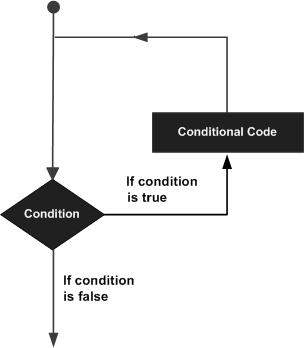
    A loop statement allows us to execute a statement or group of statements multiple times and following is the general from of a loop statement in most of the programming languages −

    Loop Architecture

    C++ programming language provides the following type of loops to handle looping requirements.

    Sr.NoLoop Type & Description
    1while loopRepeats a statement or group of statements while a given condition is true. It tests the condition before executing the loop body.
    2for loopExecute a sequence of statements multiple times and abbreviates the code that manages the loop variable.
    3do…while loopLike a ‘while’ statement, except that it tests the condition at the end of the loop body.
    4nested loopsYou can use one or more loop inside any another ‘while’, ‘for’ or ‘do..while’ loop.

    Loop Control Statements

    Loop control statements change execution from its normal sequence. When execution leaves a scope, all automatic objects that were created in that scope are destroyed.

    C++ supports the following control statements.

    Sr.NoControl Statement & Description
    1break statementTerminates the loop or switch statement and transfers execution to the statement immediately following the loop or switch.
    2continue statementCauses the loop to skip the remainder of its body and immediately retest its condition prior to reiterating.
    3goto statementTransfers control to the labeled statement. Though it is not advised to use goto statement in your program.

    The Infinite Loop

    A loop becomes infinite loop if a condition never becomes false. The for loop is traditionally used for this purpose. Since none of the three expressions that form the ‘for’ loop are required, you can make an endless loop by leaving the conditional expression empty.

    #include <iostream>
    using namespace std;
     
    int main () {
       for( ; ; ) {
    
      printf("This loop will run forever.\n");
    } return 0; }

    When the conditional expression is absent, it is assumed to be true. You may have an initialization and increment expression, but C++ programmers more commonly use the ‘for (;;)’ construct to signify an infinite loop.

    NOTE − You can terminate an infinite loop by pressing Ctrl + C keys.

  • decision making statements

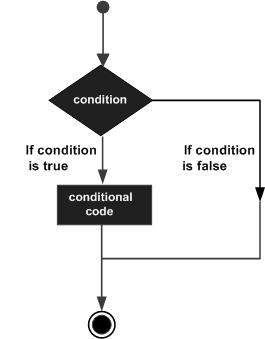
    Decision making structures require that the programmer specify one or more conditions to be evaluated or tested by the program, along with a statement or statements to be executed if the condition is determined to be true, and optionally, other statements to be executed if the condition is determined to be false.

    Following is the general form of a typical decision making structure found in most of the programming languages −

    C++ decision making

    C++ programming language provides following types of decision making statements.

    Sr.NoStatement & Description
    1if statementAn ‘if’ statement consists of a boolean expression followed by one or more statements.
    2if…else statementAn ‘if’ statement can be followed by an optional ‘else’ statement, which executes when the boolean expression is false.
    3switch statementA ‘switch’ statement allows a variable to be tested for equality against a list of values.
    4nested if statementsYou can use one ‘if’ or ‘else if’ statement inside another ‘if’ or ‘else if’ statement(s).
    5nested switch statementsYou can use one ‘switch’ statement inside another ‘switch’ statement(s).

    The ? : Operator

    We have covered conditional operator “? :” in previous chapter which can be used to replace if…else statements. It has the following general form −

    Exp1 ? Exp2 : Exp3;
    

    Exp1, Exp2, and Exp3 are expressions. Notice the use and placement of the colon.

    The value of a ‘?’ expression is determined like this: Exp1 is evaluated. If it is true, then Exp2 is evaluated and becomes the value of the entire ‘?’ expression. If Exp1 is false, then Exp3 is evaluated and its value becomes the value of the expression.

  • Operators in C++

    An operator is a symbol that tells the compiler to perform specific mathematical or logical manipulations. C++ is rich in built-in operators and provide the following types of operators −

    • Arithmetic Operators
    • Relational Operators
    • Logical Operators
    • Bitwise Operators
    • Assignment Operators
    • Misc Operators

    This chapter will examine the arithmetic, relational, logical, bitwise, assignment and other operators one by one.

    Arithmetic Operators

    Arithmetic operators in C++ are the basic operators, which are used for basic mathematical or arithmetical operations on operands. These operators are essential for performing calculations and manipulating data within a program.

    There are following arithmetic operators supported by C++ language −

    Assume variable A holds 10 and variable B holds 20, then −

    OperatorDescriptionExample
    +Adds two operandsA + B will give 30
    Subtracts second operand from the firstA – B will give -10
    *Multiplies both operandsA * B will give 200
    /Divides numerator by de-numeratorB / A will give 2
    %Modulus Operator and remainder of after an integer divisionB % A will give 0
    ++Increment operator, increases integer value by oneA++ will give 11
    Decrement operator, decreases integer value by oneA– will give 9

    Example

    The following is an example of arithmetic operators −

    Open Compiler

    #include <iostream>usingnamespace std;main(){int a =21;int b =10;int c ;
    
       c = a + b;
       cout <<"Line 1 - Value of c is :"<< c << endl ;
    
       c = a - b;
       cout <<"Line 2 - Value of c is  :"<< c << endl;
    
       c = a * b;
       cout <<"Line 3 - Value of c is :"<< c << endl ;
    
       c = a / b;
       cout <<"Line 4 - Value of c is  :"<< c << endl ;
    
       c = a % b;
       cout <<"Line 5 - Value of c is  :"<< c << endl ;
    
       c = a++; 
       cout <<"Line 6 - Value of c is :"<< c << endl ;
    
       c = a--; 
       cout <<"Line 7 - Value of c is  :"<< c << endl ;return0;}

    Output

    Line 1 - Value of c is :31
    Line 2 - Value of c is  :11
    Line 3 - Value of c is :210
    Line 4 - Value of c is  :2
    Line 5 - Value of c is  :1
    Line 6 - Value of c is :21
    Line 7 - Value of c is  :22
    

    Relational Operators

    Relational operators are used to compare two values or expressions. These operators return a boolean value − true if the comparison is correct, and else false.

    They are essential for making decisions and controlling the flow of a program based on conditions.

    There are following relational operators supported by C++ language

    Assume variable A holds 10 and variable B holds 20, then −

    OperatorDescriptionExample
    ==Checks if the values of two operands are equal or not, if yes then condition becomes true.(A == B) is not true.
    !=Checks if the values of two operands are equal or not, if values are not equal then condition becomes true.(A != B) is true.
    >Checks if the value of left operand is greater than the value of right operand, if yes then condition becomes true.(A > B) is not true.
    <Checks if the value of left operand is less than the value of right operand, if yes then condition becomes true.(A < B) is true.
    >=Checks if the value of left operand is greater than or equal to the value of right operand, if yes then condition becomes true.(A >= B) is not true.
    <=Checks if the value of left operand is less than or equal to the value of right operand, if yes then condition becomes true.(A <= B) is true.

    Example

    The following is an example of relational operators −

    Open Compiler

    #include <iostream>usingnamespace std;main(){int a =21;int b =10;int c ;if( a == b ){
    
      cout &lt;&lt;"Line 1 - a is equal to b"&lt;&lt; endl ;}else{
      cout &lt;&lt;"Line 1 - a is not equal to b"&lt;&lt; endl ;}if( a &lt; b ){
      cout &lt;&lt;"Line 2 - a is less than b"&lt;&lt; endl ;}else{
      cout &lt;&lt;"Line 2 - a is not less than b"&lt;&lt; endl ;}if( a &gt; b ){
      cout &lt;&lt;"Line 3 - a is greater than b"&lt;&lt; endl ;}else{
      cout &lt;&lt;"Line 3 - a is not greater than b"&lt;&lt; endl ;}/* Let's change the values of a and b */
    a =5; b =20;if( a <= b ){
      cout &lt;&lt;"Line 4 - a is either less than \ or equal to  b"&lt;&lt; endl ;}if( b &gt;= a ){
      cout &lt;&lt;"Line 5 - b is either greater than \ or equal to b"&lt;&lt; endl ;}return0;}</code></pre>

    Output

    Line 1 - a is not equal to b
    Line 2 - a is not less than b
    Line 3 - a is greater than b
    Line 4 - a is either less than  or equal to  b
    Line 5 - b is either greater than  or equal to b
    

    Logical Operators

    Logical operators are used to perform logical operations on boolean values (true or false). These operators are essential for controlling the flow of a program based on conditions. There are three primary logical operators in C++ as mentioned below −

    There are following logical operators supported by C++ language.

    Assume variable A holds 1 and variable B holds 0, then −

    OperatorDescriptionExample
    &&Called Logical AND operator. If both the operands are non-zero, then condition becomes true.(A && B) is false.
    ||Called Logical OR Operator. If any of the two operands is non-zero, then condition becomes true.(A || B) is true.
    !Called Logical NOT Operator. Use to reverses the logical state of its operand. If a condition is true, then Logical NOT operator will make false.!(A && B) is true.

    Example

    The following is an example of logical operators −

    Open Compiler

    #include <iostream>usingnamespace std;main(){int a =5;int b =20;int c ;if(a && b){
    
      cout &lt;&lt;"Line 1 - Condition is true"&lt;&lt; endl ;}if(a || b){
      cout &lt;&lt;"Line 2 - Condition is true"&lt;&lt; endl ;}/* Let's change the values of  a and b */
    a =0; b =10;if(a && b){
      cout &lt;&lt;"Line 3 - Condition is true"&lt;&lt; endl ;}else{
      cout &lt;&lt;"Line 4 - Condition is not true"&lt;&lt; endl ;}if(!(a &amp;&amp; b)){
      cout &lt;&lt;"Line 5 - Condition is true"&lt;&lt; endl ;}return0;}</code></pre>

    Output

    Line 1 - Condition is true
    Line 2 - Condition is true
    Line 4 - Condition is not true
    Line 5 - Condition is true
    

    Bitwise Operators

    Bitwise operators are used to perform operations at the bit level on integer data types. These operations work on direct manipulation of bits, such as low-level programming, graphics, and cryptography.

    Bitwise operator works on bits and perform bit-by-bit operation. The truth tables for &, |, and ^ are as follows −

    pqp & qp | qp ^ q
    00000
    01011
    11110
    10011

    Assume if A = 60; and B = 13; now in binary format they will be as follows −

    A = 0011 1100

    B = 0000 1101

    -----------------

    A&B = 0000 1100

    A|B = 0011 1101

    A^B = 0011 0001

    ~A  = 1100 0011

    The Bitwise operators supported by C++ language are listed in the following table. Assume variable A holds 60 and variable B holds 13, then −

    OperatorDescriptionExample
    &Binary AND Operator copies a bit to the result if it exists in both operands.(A & B) will give 12 which is 0000 1100
    |Binary OR Operator copies a bit if it exists in either operand.(A | B) will give 61 which is 0011 1101
    ^Binary XOR Operator copies the bit if it is set in one operand but not both.(A ^ B) will give 49 which is 0011 0001
    ~Binary Ones Complement Operator is unary and has the effect of 'flipping' bits.(~A ) will give -61 which is 1100 0011 in 2's complement form due to a signed binary number.
    <<Binary Left Shift Operator. The left operands value is moved left by the number of bits specified by the right operand.A << 2 will give 240 which is 1111 0000
    >>Binary Right Shift Operator. The left operands value is moved right by the number of bits specified by the right operand.A >> 2 will give 15 which is 0000 1111

    Example

    The following is an example of bitwise operators −

    Open Compiler

    #include <iostream>usingnamespace std;main(){unsignedint a =60;// 60 = 0011 1100  unsignedint b =13;// 13 = 0000 1101int c =0;           
    
       c = a & b;// 12 = 0000 1100
       cout <<"Line 1 - Value of c is : "<< c << endl ;
    
       c = a | b;// 61 = 0011 1101
       cout <<"Line 2 - Value of c is: "<< c << endl ;
    
       c = a ^ b;// 49 = 0011 0001
       cout <<"Line 3 - Value of c is: "<< c << endl ;
    
       c =~a;// -61 = 1100 0011
       cout <<"Line 4 - Value of c is: "<< c << endl ;
    
       c = a <<2;// 240 = 1111 0000
       cout <<"Line 5 - Value of c is: "<< c << endl ;
    
       c = a >>2;// 15 = 0000 1111
       cout <<"Line 6 - Value of c is: "<< c << endl ;return0;}

    Output

    Line 1 - Value of c is : 12
    Line 2 - Value of c is: 61
    Line 3 - Value of c is: 49
    Line 4 - Value of c is: -61
    Line 5 - Value of c is: 240
    Line 6 - Value of c is: 15
    

    Assignment Operators

    Assignment operators are used to assign values to variables. These operators allow you to set or update the value stored in a variable.

    There are following assignment operators supported by C++ language −

    OperatorDescriptionExample
    =Simple assignment operator, Assigns values from right side operands to left side operand.C = A + B will assign value of A + B into C
    +=Add AND assignment operator, It adds right operand to the left operand and assign the result to left operand.C += A is equivalent to C = C + A
    -=Subtract AND assignment operator, It subtracts right operand from the left operand and assign the result to left operand.C -= A is equivalent to C = C - A
    *=Multiply AND assignment operator, It multiplies right operand with the left operand and assign the result to left operand.C *= A is equivalent to C = C * A
    /=Divide AND assignment operator, It divides left operand with the right operand and assign the result to left operand.C /= A is equivalent to C = C / A
    %=Modulus AND assignment operator, It takes modulus using two operands and assign the result to left operand.C %= A is equivalent to C = C % A
    <<=Left shift AND assignment operator.C <<= 2 is same as C = C << 2
    >>=Right shift AND assignment operator.C >>= 2 is same as C = C >> 2
    &=Bitwise AND assignment operator.C &= 2 is same as C = C & 2
    ^=Bitwise exclusive OR and assignment operator.C ^= 2 is same as C = C ^ 2
    |=Bitwise inclusive OR and assignment operator.C |= 2 is same as C = C | 2

    Example

    The following is an example of assignment operators −

    Open Compiler

    #include <iostream>usingnamespace std;main(){int a =21;int c ;
    
       c =  a;
       cout <<"Line 1 - =  Operator, Value of c = : "<<c<< endl ;
    
       c +=  a;
       cout <<"Line 2 - += Operator, Value of c = : "<<c<< endl ;
    
       c -=  a;
       cout <<"Line 3 - -= Operator, Value of c = : "<<c<< endl ;
    
       c *=  a;
       cout <<"Line 4 - *= Operator, Value of c = : "<<c<< endl ;
    
       c /=  a;
       cout <<"Line 5 - /= Operator, Value of c = : "<<c<< endl ;
    
       c  =200;
       c %=  a;
       cout <<"Line 6 - %= Operator, Value of c = : "<<c<< endl ;
    
       c <<=2;
       cout <<"Line 7 - <<= Operator, Value of c = : "<<c<< endl ;
    
       c >>=2;
       cout <<"Line 8 - >>= Operator, Value of c = : "<<c<< endl ;
    
       c &=2;
       cout <<"Line 9 - &= Operator, Value of c = : "<<c<< endl ;
    
       c ^=2;
       cout <<"Line 10 - ^= Operator, Value of c = : "<<c<< endl ;
    
       c |=2;
       cout <<"Line 11 - |= Operator, Value of c = : "<<c<< endl ;return0;}

    Output

    Line 1 - =  Operator, Value of c = : 21
    Line 2 - += Operator, Value of c = : 42
    Line 3 - -= Operator, Value of c = : 21
    Line 4 - *= Operator, Value of c = : 441
    Line 5 - /= Operator, Value of c = : 21
    Line 6 - %= Operator, Value of c = : 11
    Line 7 - <<= Operator, Value of c = : 44
    Line 8 - >>= Operator, Value of c = : 11
    Line 9 - &= Operator, Value of c = : 2
    Line 10 - ^= Operator, Value of c = : 0
    Line 11 - |= Operator, Value of c = : 2
    

    Misc Operators

    Miscellaneous operators, often abbreviated as "misc operators", include a variety of operators that don’t fit neatly into other categories like arithmetic or logical operators. Here are some common miscellaneous operators and their definitions −

    The following table lists some other operators that C++ supports.

    Sr.NoOperator & Description
    1sizeofsizeof operator returns the size of a variable. For example, sizeof(a), where ‘a’ is integer, and will return 4.
    2Condition ? X : YConditional operator (?). If Condition is true then it returns value of X otherwise returns value of Y.
    3,Comma operator causes a sequence of operations to be performed. The value of the entire comma expression is the value of the last expression of the comma-separated list.
    4. (dot) and -> (arrow)Member operators are used to reference individual members of classes, structures, and unions.
    5CastCasting operators convert one data type to another. For example, int(2.2000) would return 2.
    6&Pointer operator & returns the address of a variable. For example &a; will give actual address of the variable.
    7*Pointer operator * is pointer to a variable. For example *var; will pointer to a variable var.

    Conditional (Ternary) Operator (?:)

    It is a shorthand way to perform a conditional evaluation in C++.

    int a =10, b =20;int result =(a > b)? a : b;// result will be 20 because a is not greater than b
    cout <<"The greater value is: "<< result << endl;

    Output

    The greater value is: 20
    

    Sizeof Operator

    The sizeof operator returns the size, in bytes, of a variable or data type.

    int x =5;
    cout <<"Size of int: "<<sizeof(x)<<" bytes"<< endl;  
    cout <<"Size of double: "<<sizeof(double)<<" bytes"<< endl;

    Output

    4
    8
    

    Bitwise Complement Operator (~)

    The bitwise complement operator inverts the bits of its operand.

    unsignedint num =5;// Binary: 00000000 00000000 00000000 00000101unsignedint result =~num;// Binary: 11111111 11111111 11111111 11111010
    cout <<"Bitwise complement of 5: "<< result << endl;// Outputs a large positive number due to unsigned

    Scope Resolution Operator (::)

    This operator is used to define the scope of a function or variable, particularly in the context of classes and namespaces.

    classMyClass{public:staticint value;};int MyClass::value =10;// Define static member outside the class
    
    cout <<"Static value: "<< MyClass::value << endl;

    Output

    10
    

    Operators Precedence in C++

    Operator precedence determines the grouping of terms in an expression. This affects how an expression is evaluated. Certain operators have higher precedence than others; for example, the multiplication operator has higher precedence than the addition operator −

    For example x = 7 + 3 * 2; here, x is assigned 13, not 20 because operator * has higher precedence than +, so it first gets multiplied with 3*2 and then adds into 7.

    Here, operators with the highest precedence appear at the top of the table, those with the lowest appear at the bottom. Within an expression, higher precedence operators will be evaluated first.

    Category Operator Associativity 
    Postfix () [] -> . ++ - -  Left to right 
    Unary + - ! ~ ++ - - (type)* & sizeof Right to left 
    Multiplicative  * / % Left to right 
    Additive  + - Left to right 
    Shift  << >> Left to right 
    Relational  < <= > >= Left to right 
    Equality  == != Left to right 
    Bitwise AND Left to right 
    Bitwise XOR Left to right 
    Bitwise OR Left to right 
    Logical AND && Left to right 
    Logical OR || Left to right 
    Conditional ?: Right to left 
    Assignment = += -= *= /= %=>>= <<= &= ^= |= Right to left 
    Comma Left to right 

    Example

    The following is an example of demonstrating operators precedence −

    Open Compiler

    #include <iostream>usingnamespace std;main(){int a =20;int b =10;int c =15;int d =5;int e;
    
       e =(a + b)* c / d;// ( 30 * 15 ) / 5
       cout <<"Value of (a + b) * c / d is :"<< e << endl ;
    
       e =((a + b)* c)/ d;// (30 * 15 ) / 5
       cout <<"Value of ((a + b) * c) / d is  :"<< e << endl ;
    
       e =(a + b)*(c / d);// (30) * (15/5)
       cout <<"Value of (a + b) * (c / d) is  :"<< e << endl ;
    
       e = a +(b * c)/ d;//  20 + (150/5)
       cout <<"Value of a + (b * c) / d is  :"<< e << endl ;return0;}

    Output

    Value of (a + b) * c / d is :90
    Value of ((a + b) * c) / d is  :90
    Value of (a + b) * (c / d) is  :90
    Value of a + (b * c) / d is  :50