Category: Angular Interview Questions

https://encrypted-tbn0.gstatic.com/images?q=tbn:ANd9GcQWVFjQ5rCH3w8I5JUGiE_GcKNaE-Wy_loi_w&s

  • What type of DOM does Angular implement? 

    DOM (Document Object Model) treats an XML or HTML document as a tree structure in which each node is an object representing a part of the document. 

    Angular uses the regular DOM. This updates the entire tree structure of HTML tags until it reaches the data to be updated. However, to ensure that the speed and performance are not affected, Angular implements Change Detection.

    With this, you have reached the end of the article. We highly recommend brushing up on the core concepts for an interview. It’s always an added advantage to write the code in places necessary. 
  • What is Eager and Lazy loading? 

    Eager loading is the default module-loading strategy. Feature modules under Eager loading are loaded before the application starts. This is typically used for small size applications.

    Lazy loading dynamically loads the feature modules when there’s a demand. This makes the application faster. It is used for bigger applications where all the modules are not required at the start of the application. 

  • What is Bootstrap? How is it embedded into Angular? 

    Bootstrap is a powerful toolkit. It is a collection of HTML, CSS, and JavaScript tools for creating and building responsive web pages and web applications.

    There are two ways to embed the bootstrap library into your application. 

    1. Angular Bootstrap via CDN – Bootstrap CDN is a public Content Delivery Network. It enables you to load the CSS and JavaScript files remotely from its servers. 
    2. Angular Bootstrap via NPM – Another way to add Bootstrap to your Angular project is to install it into your project folder by using NPM (Node Package Manager). 

    npm install bootstrap 

    npm install jquery

  • What are Template and Reactive forms?

    Template-driven approach

    • In this method, the conventional form tag is used to create forms. Angular automatically interprets and creates a form object representation for the tag. 
    • Controls can be added to the form using the NGModel tag. Multiple controls can be grouped using the NGControlGroup module. 
    • A form value can be generated using the “form.value” object. Form data is exported as JSON values when the submit method is called. 
    • Basic HTML validations can be used to validate the form fields. In the case of custom validations, directives can be used. 
    • Arguably, this method is the simplest way to create an Angular App. 

    Reactive Form Approach

    • This approach is the programming paradigm oriented around data flows and propagation of change. 
    • With Reactive forms, the component directly manages the data flows between the form controls and the data models. 
    • Reactive forms are code-driven, unlike the template-driven approach. 
    • Reactive forms break from the traditional declarative approach. 
    • Reactive forms eliminate the anti-pattern of updating the data model via two-way data binding.
    • Typically, Reactive form control creation is synchronous and can be unit tested with synchronous programming techniques. 
  • How to use ngFor in a tag? 

    The ngFor directive is used to build lists and tables in the HTML templates. In simple terms, this directive is used to iterate over an array or an object and create a template for each element. 

    <ul> 

          <li *ngFor = “let items in itemlist”> {{ item }} </li>

        </ul>

    1. “Let item” creates a local variable that will be available in the template
    2. “Of items” indicates that we are iterating over the items iterable. 
    3. The * before ngFor creates a parent template. 
  • What is ngOnInit? How is it defined? 

    ngOnInit is a lifecycle hook and a callback method that is run by Angular to indicate that a component has been created. It takes no parameters and returns a void type.

    export class MyComponent implements OnInit {

      constructor() { }

      ngOnInit(): void {

        //….

      }

    }

  • What are Promises and Observables in Angular? 

    While both the concepts deal with Asynchronous events in Angular, Promises handle one such event at a time while observables handle a sequence of events over some time. 

    Promises – They emit a single value at a time. They execute immediately after creation and are not cancellable. They are Push errors to the child promises. 

    Observables – They are only executed when subscribed to them using the subscribe() method. They emit multiple values over a period of time. They help perform operations like forEach, filter, and retry, among others. They deliver errors to the subscribers. When the unsubscribe() method is called, the listener stops receiving further values.

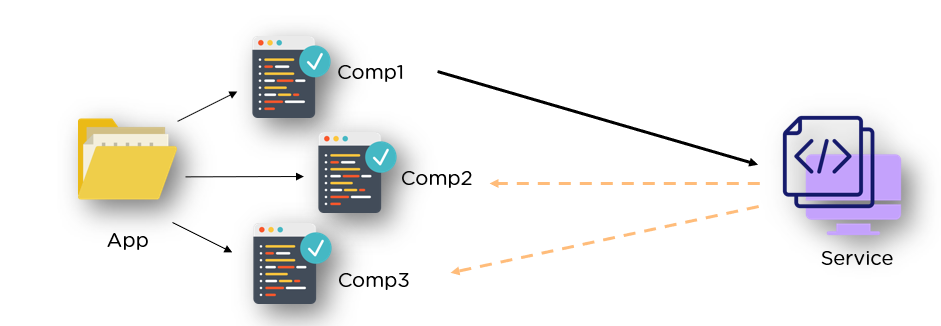
  • What are Services in Angular? 

    Angular Services perform tasks that are used by multiple components. These tasks could be data and image fetching, network connections, and database management among others. They perform all the operational tasks for the components and avoid rewriting of code. A service can be written once and injected into all the components that use that service. 

    angular services
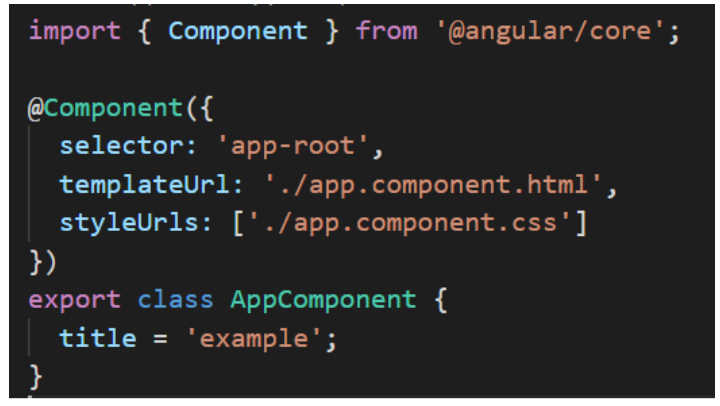
  • Explain the @Component Decorator.

    TypeScript class is one that is used to create components. This genre of class is then decorated with the “@Component” decorator. The decorato’s purpose is to accept a metadata object that provides relevant information about the component.  

    decorator

    The image above shows an App component – a pure TypeScript class decorated with the “@Component” decorator. The metadata object that gets accepted by the decorator provides properties like templateUrl, selector, and others, where the templateUrL property points to an HTML file defining what you see on the application. 

  • What is the difference between AOT and JIT? 

    Ahead of Time (AOT) compilation converts your code during the build time before the browser downloads and runs that code. This ensures faster rendering to the browser. To specify AOT compilation, include the –aot option with the ng build or ng serve command. 

    The Just-in-Time (JIT) compilation process is a way of compiling computer code to machine code during execution or run time. It is also known as dynamic compilation. JIT compilation is the default when you run the ng build or ng serve CLI commands.