Author: saqibkhan

  • CRUD Operations in SQL

    To work with a relational database, one must understand how to create a database with SQL and then learn how to insert, read, update, and delete the data, because these are the basic operations for transactions. CRUD stands for Create, Read, Update, and Delete. The four fundamental operations for managing data in a database. If databases were like a library, the CRUD operations would be the ways we can add new books, search for a specific title, edit details of an existing book, or remove one from the shelf.

    Rea this chapter to get a good understanding of all the four CRUD operations. We will take a sample table and a set of examples to explain the CRUD operations in detail.

    Sample Tables and Data

    To understand the CRUD operations, we must take examples. We will use the following sample table throughout this chapter −

    Here is the Customers table −

    customer_idfirst_namelast_nameemailphone
    1AmritaJoshi[email protected]123-456-7890
    2BimalSaha[email protected]234-567-8901
    3ChandanTudu[email protected]345-678-9012

    And, this is the Products table −

    product_idproduct_namecategorypricestock_quantity
    101LaptopElectronics1000.0010
    102SmartphoneElectronics800.0020
    103Office ChairFurniture150.005

    With these tables in place, let us move ahead and explore the CRUD operations!

    The Create Operation (Inserting Data into Tables)

    Creating data that involves adding new rows to a table using the INSERT statement. This is like putting new files into a cabinet or adding new contacts to our phone contacts.

    Example: Adding a New Customer

    Use the following SQL command to insert a new customer row in the existing Customers table −

    INSERTINTO Customers (customer_id, first_name, last_name, email, phone)VALUES(4,'Deb','Mallick','[email protected]','456-789-0123');

    The Updated Customers Table would be as follows −

    customer_idfirst_namelast_nameemailphone
    1AmritaJoshi[email protected]123-456-7890
    2BimalSaha[email protected]234-567-8901
    3ChandanTudu[email protected]345-678-9012
    4DebMallick[email protected]456-789-0123

    Example: Adding a New Product

    Use the following command to insert a new product row into the Products table −

    INSERTINTO Products (product_id, product_name, category, price, stock_quantity)VALUES(104,'Desk','Furniture',250.00,8);

    The Updated Products Table would be as follows −

    product_idproduct_namecategorypricestock_quantity
    101LaptopElectronics1000.0010
    102SmartphoneElectronics800.0020
    103Office ChairFurniture150.005
    104DeskFurniture250.008

    The Read Operation (Fetching Data from Tables)

    After creating we must read the data from the database. For that the ‘R’ in CRUD comes. This is done using the SELECT statement. It is like opening a book and searching through it to find the information we need.

    Example: Fetch All Customers

    Fetch all the data from the Customers table −

    SELECT*FROM Customers;

    It will get you the following output −

    customer_idfirst_namelast_nameemailphone
    1AmritaJoshi[email protected]123-456-7890
    2BimalSaha[email protected]234-567-8901
    3ChandanTudu[email protected]345-678-9012
    4DebMallick[email protected]456-789-0123

    Since we inserted a new record (Deb) in the Customers table, it is present there in the current table.

    Example: Fetch Products with Stock Below 10

    Now, let’s use the WHERE clause to filter the data and fetch something specific −

    SELECT product_name, stock_quantity
    FROM Products
    WHERE stock_quantity <10;

    This query will fetch all the products with their stock quantity less than 10 −

    product_namestock_quantity
    Office Chair5

    The Update Operation (Modifying the Existing Data)

    Updating the data means changing the values in existing rows, for which we use the UPDATE command. Think of it as editing a contact’s phone number on our phone.

    Example: Updating a Customer’s Email

    You can use the following command to update a customer’s email in the existing records −

    UPDATE Customers
    SET email ='[email protected]'WHERE customer_id =1;

    After executing the above query, the Updated Customers Table would look as follows −

    customer_idfirst_namelast_nameemailphone
    1AmritaJoshi[email protected]123-456-7890
    2BimalSaha[email protected]234-567-8901
    3ChandanTudu[email protected]345-678-9012
    4DebMallick[email protected]456-789-0123

    Example: Restocking a Product

    Use the following query to update the Products table after restocking a product −

    UPDATE Products
    SET stock_quantity = stock_quantity +5WHERE product_id =103;

    Now, the Updated Products Table would reflect the updated stock quantities −

    product_idproduct_namecategorypricestock_quantity
    101LaptopElectronics1000.0010
    102SmartphoneElectronics800.0020
    103Office ChairFurniture150.0010
    104DeskFurniture250.008

    The stock of “Office Chair” has now been updated from 5 to 10.

    The Delete Operation (Removing Data from Tables)

    Deleting the data means removing existing rows from a table, which is done using the DELETE statement. Consider erasing a contact from our phone. We are deleting the record but not the whole table.

    Example: Deleting a Customer

    The following query shows how you can use the DELETE command to remove a customer’s record from the Customers table −

    DELETEFROM Customers
    WHERE customer_id =4;

    With the above query, the Updated Customers Table would look as follows −

    customer_idfirst_namelast_nameemailphone
    1AmritaJoshi[email protected]123-456-7890
    2BimalSaha[email protected]234-567-8901
    3ChandanTudu[email protected]345-678-9012

    Notice that Deb’s record has been removed.

    Example: Removing a Product from Inventory

    Use the following query to remove a product from the inventory −

    DELETEFROM Products
    WHERE product_id =104;

    The Updated Products Table will now look as follows −

    product_idproduct_namecategorypricestock_quantity
    101LaptopElectronics1000.0010
    102SmartphoneElectronics800.0020
    103Office ChairFurniture150.0010

    The “Desk” product is no longer in the inventory.

    Why CRUD Operations Are Important

    CRUD operations are the most basic operations for any database operator; they allow us to:

    • Add new information (like customers or products)
    • Retrieve specific details when needed
    • Keep the data up to date
    • Remove outdated or incorrect data

    Without CRUD operations, we cannot update a database, in which case the data will be historical and of no use in real-time applications.
  • Querying in SQL

    We use SQL for querying a relational database. SQL is a command-based language to operate on tables and databases, which is why querying is at the heart of using SQL. SQL is the medium by which we ask a database questions and get the answers we need. Whether you are retrieving customer orders, checking stock levels, or just counting the number of employees, querying makes it all happen.

    Read this chapter to learn the basics of querying in SQL. We will start with some sample tables with data and then understand how to write queries with their results.

    Sample Tables and Data

    To make things clear, we will use three tables: Customers, Products, and Orders. Given below are the tables with some initial data −

    Here’s the Customers Table −

    customer_idfirst_namelast_nameemailphone
    1AliceJohnson[email protected]123-456-7890
    2BobSmith[email protected]234-567-8901
    3CarolTaylor[email protected]345-678-9012

    This is the Products Table −

    product_idproduct_namecategorypricestock_quantity
    101LaptopElectronics1000.0010
    102SmartphoneElectronics800.0020
    103Office ChairFurniture150.005

    And, the third one is the Orders Table –

    order_idcustomer_idproduct_idquantityorder_date
    1110112023-11-01 10:00:00
    2210322023-11-02 12:30:00
    3310212023-11-03 15:45:00

    With this setup, let us start writing some SQL queries. After each query, we will see the results and explain what is happening.

    Retrieving the Data with SELECT Command

    The SELECT statement is used for querying. It is used to fetch data from one or more tables.

    Example: Get All Customer Data

    Use the following command −

    SELECT * FROM Customers;

    It will fetch the following rows −

    customer_idfirst_namelast_nameemailphone
    1AliceJohnson[email protected]123-456-7890
    2BobSmith[email protected]234-567-8901
    3CarolTaylor[email protected]345-678-9012

    It fetches everything in the Customers table. The “*” symbol means “all columns”.

    Example: Fetch Specific Columns

    To fetch a specific set of columns, use the following command −

    SELECT first_name, email FROM Customers;

    It will fetch the following rows –

    first_nameemail
    Alice[email protected]
    Bob[email protected]
    Carol[email protected]

    Here, we are only fetching the first_name and the email. This command is useful when we do not need all the data.

    Filtering the Data with WHERE Clause

    The WHERE clause lets us filter rows based on conditions.

    Example: Find Customers with Last Name ‘Smith’

    Here, we have used the WHERE clause to filter the data −

    SELECT * FROM Customers
    WHERE last_name ='Smith';

    It will fetch the following rows −

    customer_idfirst_namelast_nameemailphone
    2BobSmith[email protected]234-567-8901

    The WHERE clause filters only those rows where the last_name is ‘Smith.’

    Example: Products below a Certain Price

    Here is another example of how the WHERE clause is used −

    SELECT product_name, price
    FROM Products
    WHERE price <900;

    It will fetch the following rows −

    product_nameprice
    Office Chair150.00
    Smartphone800.00

    Here, we only get a list of those products that are priced below 900.

    Sorting the Data with ORDER BY Clause

    The ORDER BY clause helps us sort the results.

    Example: Sort the Products by Price (Low to High)

    Use the following query to sort the products by their price –

    SELECT product_name, price
    FROM Products
    ORDER BY price ASC;

    It will fetch the following rows –

    product_nameprice
    Office Chair150.00
    Smartphone800.00
    Laptop1000.00

    The ASC keyword sorts in ascending order. To reverse, use DESC.

    Aggregating the Data with Functions

    SQL has built-in functions like COUNT, SUM, and AVG for analyzing data.

    Example: Count the Total Products

    Use the following command to get a count of the total number of products −

    SELECT COUNT(*) AS total_products
    FROM Products;

    It will fetch the following rows −

    total_products
    3

    This query counts the total number of rows in the Products table.

    Example: Find the Average Product Price

    Use the following query to get the average product price −

    SELECT AVG(price) AS average_price
    FROM Products;

    It will fetch the following rows −

    average_price
    650.00

    The AVG function calculates the average price of all products.

    Joining the Tables

    Joins are used to combine data from two or more tables based on a related column.

    Example: Find Customer Orders

    SELECT Customers.first_name, Customers.last_name, Products.product_name, Orders.quantity
    FROM Orders
    JOIN Customers ON Orders.customer_id = Customers.customer_id
    JOIN Products ON Orders.product_id = Products.product_id;

    It will fetch the following rows −

    first_namelast_nameproduct_namequantity
    AliceJohnsonLaptop1
    BobSmithOffice Chair2
    CarolTaylorSmartphone1

    This query combines the OrdersCustomers, and Products tables. It shows which customer ordered what.

    Using Aliases for Simplicity

    Aliases let us give the temporary names to tables or columns for easier reading.

    Example: Simplify a Join

    SELECT c.first_name, c.last_name, p.product_name, o.quantity
    FROM Orders o
    JOIN Customers c ON o.customer_id = c.customer_id
    JOIN Products p ON o.product_id = p.product_id;

    It gives the same output as Example 8 but it uses short aliases (o, c, p) for tables.

    Nested Queries

    Subqueries, or queries within queries, are handy for more complex tasks. Let’s understand how with the help of the following example −

    Example: Find Customers Who Ordered the Most Expensive Product

    Here’s an example of a set of nested queries to find the customers who ordered the most expensive product −

    SELECT first_name, last_name
    FROM Customers
    WHERE customer_id =(
    	SELECT customer_id
    	FROM Orders
    	WHERE product_id =(
    		SELECT product_id
    		FROM Products
    		WHERE price =(SELECT MAX(price) FROM Products)));

    It will fetch the following rows −

    first_namelast_name
    AliceJohnson

    Here, we are finding the customer who ordered the product with the highest price.

    Grouping the Data with GROUP BY Clause

    The GROUP BY clause organizes the rows into groups based on one or more columns.

    Example: Total Quantity Ordered Per Product

    Here is an example that demonstrates how you can use the GROUP BY clause −

    SELECT product_id, SUM(quantity) AS total_quantity
    FROM Orders
    GROUP BY product_id;

    It will fetch the following rows –

    product_idtotal_quantity
    1011
    1021
    1032

    It groups the orders by product and calculates the total quantity for each.

  • Types of SQL Commands

    Developers and analysts use the structured query language (SQL) to interact with relational databases. SQL is made up of different types of sub-languages that let us perform different tasks. Think of it like a toolkit; each tool is specially used for a particular job. Read this chapter to get a clear understanding of the types of SQL languages and how they are used.

    The Four Types of SQL Languages

    SQL can be divided into four main types −

    • Data Definition Language (DDL)
    • Data Manipulation Language (DML)
    • Data Control Language (DCL)
    • Transaction Control Language (TCL)

    These are used for distinct purpose. Let us see them one by one.

    Data Definition Language (DDL)

    DDL commands are used for defining and modifying the structure of a database. They help in setting up the foundation of the database. DDL commands are is used for creating tables, adding or deleing columns, and changing table properties.

    Common Commands in DDL

    Here’s a list of the common commands used in DDL −

    • CREATE − To make new tables, databases, or other structures
    • ALTER − To modify an existing structure, like adding a column
    • DROP − To delete tables or databases
    • TRUNCATE − To quickly empty a table without removing its structure

    Example: Setting Up a Table

    Let’s understand the steps by setting up a table −

    CREATE TABLE Customers (
       customer_id INT PRIMARY KEY,
       first_name VARCHAR(50),
       last_name VARCHAR(50),
       email VARCHAR(100) UNIQUE
    );

    Here, we are creating a table called Customers. It has columns for customer ID, first name, last name, and email. Observe closely how we define the data types: INT for numbers and VARCHAR for text.

    Modifying an Existing Table

    Sometimes we need to change an existing table. For example, if you need to add a phone number column in the Customers table, then you can use the ALTER command −

    ALTER TABLE Customers
    ADD phone VARCHAR(15);

    Data Manipulation Language (DML)

    DML commands are used for querying the tables and fetching relevant data. When the tables are set up, we actually work with the data inside them. It is all about adding, updating, deleting, and fetching the stored data.

    Following are the common commands in DML −

    • INSERT − To add new data
    • UPDATE − To change existing data
    • DELETE − To remove data
    • SELECT − To retrieve data

    Example: Adding Data

    Let’s add a new row in our existing Customers table −

    INSERT INTO Customers (customer_id, first_name, last_name, email, phone)
    VALUES (1, 'Alice', 'Johnson', '[email protected]', '123-456-7890');

    It adds a new row for Alice.

    Fetching Data

    To know what is inside the Customers table, we can use the SELECT command −

    SELECT first_name, last_name, email
    FROM Customers;

    It fetches the first name, last name, and email of all customers.

    Updating the Records

    If Alice changes her phone number, we can update it in the table −

    UPDATE Customers
    SET phone ='987-654-3210'
    WHERE customer_id =1;

    Deleting the Records

    Let us say Alice asks to remove her data entirely, then you would use the following command −

    DELETE FROM Customers
    WHERE customer_id =1;

    Data Control Language (DCL)

    DCL commands are all about managing the access. It is like setting up locks and keys to make sure only authorized people can access or change the precious data.

    Following are the common commands in DCL −

    • GRANT − To give permissions
    • REVOKE − To take permissions away

    Example: Granting Access

    Suppose you want to give a new employee permission to view the Customers data, then you would use the following command −

    GRANT SELECT ON Customers TO new_employee;

    Revoking Access

    If an employee leaves, then you can take back their access using the following command −

    REVOKE SELECT ON Customers FROM new_employee;

    DCL ensures the database is secure and only the authorized people have the right access.

    Transaction Control Language (TCL)

    Transactions are like bundles of database actions that should be treated as a single unit. TCL commands ensure that these actions are completed fully or not at all. TCL commands help keep the database consistent.

    Following are the common commands in TCL –

    • COMMIT − To save the changes permanently
    • ROLLBACK − To undo the changes
    • SAVEPOINT − To set a checkpoint in a transaction

    Example: A Transaction in Action

    Imagine we are processing an order where stock quantities need to be updated. Now, an order record needs to be created. These actions must be carried out together −

    BEGIN TRANSACTION;
    
    UPDATE Products
    SET stock_quantity = stock_quantity - 1
    WHERE product_id =101;
    
    INSERT INTO Orders (order_id, customer_id, order_date, status, total_amount)
    VALUES (1001, 1, NOW(), 'Pending', 99.99);
    
    COMMIT;

    If something goes wrong during the transaction, we can roll it back −

    ROLLBACK;

    How Do Different Types of SQL Commands Work Together?

    All the four types SQL sub-languages (DDL, DML, DCL, and TCL) work in unison to provide seamless support and service to the end-users.

    • We can use DDL to set up the database structure.
    • DML helps us to populate and manage the data.
    • DCL secures the data by controlling who can access it.
    • TCL ensures the database stays consistent during critical operations.

    Let us see at a practical scenario using an e-commerce example −

    • We create a Products table using DDL.
    • We insert product details using DML.
    • We grant the team permission to view and update the Products table using DCL.
    • During a big sale, we process orders and during such events, TCL ensures data consistency.

    You can mix and match these different types of SQL commands to handle a variety of database tasks. Whether you are building a system from scratch, have some troubleshooting issues, or need to optimize the performance of an existing database, you will invariably need to use these SQL commands. For instance, without DDL, we cannot even have a database structure. Without DML, the tables would just sit there. DCL ensures the data is not tampered with, while TCL protects it from corruption during complex operations.

  • Difference Between 4NF and 5NF

    Normalization is an essential part of designing efficient and reliable databases. Most discussions focus on the first three normal forms and Boyce-Codd Normal Form (BCNF), however the journey does not stop there. The Fourth Normal Form (4NF) and the Fifth Normal Form (5NF) take normalization to even higher levels. 4NF and 5NF address specific types of dependencies like multivalued and join dependencies. Read this chapter to understand these advanced normal forms in detail.

    What is Fourth Normal Form (4NF)?

    The fourth normal form helps in eliminating multivalued dependencies from a database table. A multivalued dependency occurs when two attributes are independent of each other but depend on a third attribute. For instance, if one value in a table implies multiple rows, then there may be redundancy caused by multivalued dependencies.

    Rules of 4NF

    For a table to satisfy 4NF −

    • It must already be in Boyce-Codd Normal Form (BCNF).
    • The table must not have more than one multivalued dependency.

    What is Multivalued Dependency?

    If A →→ B (A multi-determines B), this means for a single value of A, there can be multiple values of B. But B is independent of any other attribute.

    Example: Multivalued Dependency in Action

    Consider a table that stores information about a Person, their Mobile Numbers, and their Food Preferences −

    PersonMobileFood_Likes
    Mahesh9893Burger
    Mahesh9424Pizza
    Ramesh9191Pizza

    Here −

    • Person →→ Mobile
    • Person →→ Food_Likes

    Both Mobile and Food_Likes are independent of each other, however they depend on Person. This results in redundancy because the same Person is repeated unnecessarily for each Mobile and Food_Likes.

    Normalizing a Table to 4NF

    To bring this table into 4NF, we can separate the dependencies into two tables −

    Table 1 − Person-Mobile

    PersonMobile
    Mahesh9893
    Mahesh9424
    Ramesh9191

    Table 2 − Person-Food_Likes

    PersonFood_Likes
    MaheshBurger
    MaheshPizza
    RameshPizza

    By decomposing the table, we eliminate redundancy. And each table is now in 4NF.

    What is Fifth Normal Form (5NF)?

    After 4NF, we must understand the concept of Fifth Normal Form, which is also known as the Projected Normal Form (PJNF). It addresses the join dependencies.

    join dependency exists when a table can be split into two or more tables. And the original table can be reconstructed by joining them without any data loss. In 5NF, every join dependency must be implied by the table’s candidate keys.

    Rules of 5NF

    For a table to satisfy 5NF −

    • It must already be in 4NF.
    • It must not contain any join dependency that cannot be implied by its candidate keys.

    What is Join Dependency?

    join dependency occurs when a table can be decomposed into smaller tables, but joining those smaller tables recreates the original table without any data loss or spurious rows.

    Example: Join Dependency in Action

    Let us consider a table that stores the data on Agents, the Companies they work with, and the Products they sell.

    AgentCompanyProduct
    A1PQRNut
    A1PQRBolt
    A1XYZNut
    A1XYZBolt
    A2PQRNut

    Here, if an Agent works with a Company and the Company sells a particular Product, then the Agent is assumed to sell that product.

    Normalizing a Table to 5NF

    To eliminate the join dependency, we decompose the table into three smaller tables −

    Table 1 − Agent-Company

    AgentCompany
    A1PQR
    A1XYZ
    A2PQR

    Table 2 − Company-Product

    CompanyProduct
    PQRNut
    PQRBolt
    XYZNut
    XYZBolt

    Table 3 − Agent-Product

    AgentProduct
    A1Nut
    A1Bolt
    A2Nut

    When these three tables are again joined back using their shared attributes (Company and Product), the original table is reconstructed without any spurious data.

    Comparing 4NF and 5NF

    The following table highlights how 4NF differs from 5NF −

    Aspect4NF5NF
    Dependency TypeMultivalued DependencyJoin Dependency
    PurposeEliminates redundancy from multivalued dependencies.Ensures lossless decomposition of join dependencies.
    Example ScenarioPerson with multiple phones and food preferences.Agent, company, and product relationships.

    Practical Considerations in Using 4NF and 5NF

    Although 4NF and 5NF provide the highest levels of normalization, they are used quite rarely. 4NF and 5NF are not always necessary for every database. because −

    • Complexity − Splitting the tables into smaller parts can make the database structure more complicated.
    • Performance − Highly normalized databases might require more joins, which may slow down the query performance.
    • Use Cases − Applications with simpler data relationships often do not need to go beyond BCNF or 4NF.

    However, when it is paramount to maintain accuracy and avoid any sort of data redundancy (while maintaining financial or scientific databases, for example), it becomes a necessity to normalize the tables to 4NF and 5NF.

  • Boyce-Codd Normal Form (BCNF) in DBMS

    The Third Normal Form (3NF) eliminates many redundancy issues, but still there are cases where 3NF is not strict enough. In such cases, we have to apply the Boyce-Codd Normal Form (BCNF), which is also known as 3.5NF.

    BCNF is a more restrictive version of 3NF that addresses potential anomalies. Read this chapter to understand the basic concepts of BCNF, its rules, and how to apply it in practice.

    What is Boyce-Codd Normal Form?

    The Boyce-Codd Normal Form (BCNF) is a special case of 3NF. As we know in 3NF, it allows some flexibility with non-prime attributes and functional dependencies. The BCNF tightens the rules. It ensures that every functional dependency in a table adheres to stricter conditions.

    Rules of Boyce-Codd Normal Form

    For a table to be in BCNF they must follow the following rules −

    • The table must be in 3NF.
    • For every functional dependency, the left-hand side (LHS) must be a candidate key or super key.

    In 3NF we know that there will be no transitive dependency. Where the RHS can be a prime attribute to satisfy the rule. In BCNF it demands that the LHS always includes a candidate key. This eliminates any chance of redundancy caused by improper dependencies.

    Understanding BCNF with an Example

    Let us consider the following Student table −

    Roll NumberNameVoter IDAge
    1JohnV00120
    2AliceV00222
    3BobV00321

    The table has the following candidate keys and functional dependencies −

    • Candidate Keys − Roll Number and Voter ID (each uniquely identifies a row).
    • Functional Dependencies −
      • Roll Number → Name
      • Roll Number → Voter ID
      • Voter ID → Age
      • Voter ID → Roll Number

    Checking Each Dependency against BCNF

    Now let us analyze each functional dependency step by step and check whether the table is BCNF compliant.

    Roll Number → Name −

    • LHS (Roll Number) is a candidate key.
    • This dependency is valid under BCNF.

    Roll Number → Voter ID −

    • Again, the LHS is a candidate key, so it satisfies BCNF.

    Voter ID → Age −

    • LHS (Voter ID) is also a candidate key.
    • This is valid under BCNF.

    Voter ID → Roll Number −

    • Here, the LHS is a candidate key (Voter ID), making it compliant with BCNF.

    Since all the functional dependencies have a candidate key or super key on the LHS, this table is in BCNF.

    Importance of Boyce-Codd Normal Form

    BCNF eliminates anomalies that might persist even in 3NF. For instance −

    • Redundancy − A non-prime attribute depending on something other than the candidate key can lead to duplicate data.
    • Update Anomalies − Incorrect updates to redundant data might create inconsistencies.
    • Deletion Anomalies − Removing a record could unintentionally delete important relationships.

    BCNF Compared to Other Normal Forms

    Let us compare BCNF with the normal forms that we have discussed so far −

    First Normal Form (1NF)Ensures no multi-valued attributes.Every cell must contain atomic values.
    Second Normal Form (2NF)Builds on 1NF.Eliminates partial dependencies.
    Third Normal Form (3NF)Builds on 2NF.Eliminates transitive dependencies.Allows non-prime attributes on the RHS if the LHS is a candidate key or super key.
    Boyce-Codd Normal Form (BCNF)Builds on 3NF.No exceptions: the LHS of every functional dependency must be a candidate key or super key.

    Relationship between Normal Forms

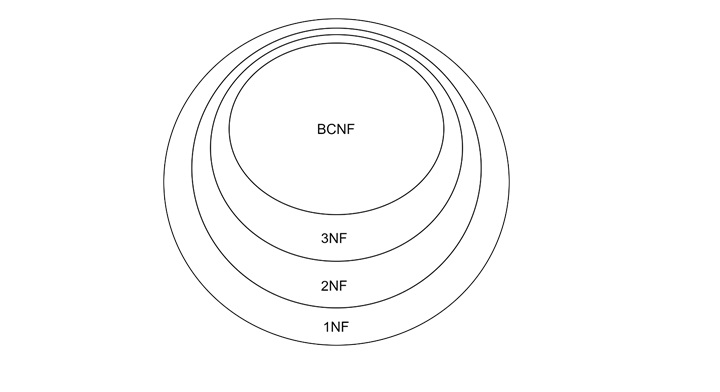
    The following diagram shows how the different Normal Forms are related −

    Boyce-Codd Normal Form1

    BCNF is the most restrictive form, sitting inside 3NF. 3NF sits inside 2NF and 2NF sits inside 1NF. This hierarchy means every table in BCNF is also in 3NF. However, not every table in 3NF is necessarily in BCNF.

    Another Example: BCNF in Practice

    Consider a relation {A, B, C, D} with these functional dependencies −

    • AB → C
    • C → D

    Step 1: Identify the Candidate Keys

    • From AB → C, we see AB is a candidate key because it determines C.
    • From C → D, we can derive AB → D via transitivity, so AB determines all attributes.

    Step 2: Check Each Dependency

    AB → C −

    • LHS is a candidate key.
    • Satisfies BCNF.

    C → D −

    • LHS (C) is not a candidate key.
    • Violates BCNF because C is a non-prime attribute.

    Step 3: Split the Table

    To satisfy BCNF, we split the table into two −

    Table 1 − {AB → C}

    Boyce-Codd Normal Form2

    Table 2 − {C → D}

    Boyce-Codd Normal Form3

    BCNF – Key Points to Note

    Make a note of the following key points on BCNF –

    • Stricter than 3NF − BCNF removes any dependency where the LHS is not a candidate key.
    • No Exceptions − While 3NF allows non-prime attributes on the RHS, BCNF does not tolerate them unless the LHS is a candidate key.
    • Requires Splitting − Many tables in 3NF need to be split further to achieve BCNF.
  • Third Normal Form (3NF) in DBMS

    Once a table meets the requirements of Second Normal Form (2NF), the next step is to convert it into Third Normal Form (3NF). This is used to eliminate transitive dependency. Read this chapter to get a clear understanding of 3NF and transitive dependency.

    What is Third Normal Form (3NF)?

    In relational database, the third normal form has two certain conditions −

    • The table is already in Second Normal Form (2NF).
    • The table does not have any transitive dependency.

    What is Transitive Dependency?

    A transitive dependency occurs when a non-prime attribute depends on another non-prime attribute rather than directly depending on a candidate key.

    To put it simply, in a transitive dependency, one non-prime attribute is indirectly connected to the candidate key through another non-prime attribute. This will may make unnecessary redundancy and inconsistency in the data.

    To understand this better, let us elaborate some of the important terms −

    • Candidate Key − A minimal set of attributes that uniquely identify each row in the table.
    • Prime Attribute − An attribute that is part of a candidate key.
    • Non-Prime Attribute − An attribute that is not part of any candidate key.

    Example of Transitive Dependency

    Consider the Student table with the following data

    Roll NumberStateCity
    1PunjabMohali
    2PunjabLudhiana
    3KarnatakaBangalore
    4MaharashtraMumbai

    The Functional Dependencies are −

    • Roll Number → State
    • State → City

    In this example, the candidate key is the Roll Number because it uniquely identifies each row. State and City are non-prime attributes.

    Third Normal Form1

    The Roll Number determines the State. And, the State determines the City. It creates a transitive dependency. Here, the Roll Number indirectly determines the City through the State.

    While “Roll Number → State” is valid, this dependency “State → City” violates 3NF because it is a relationship between two non-prime attributes.

    How to Eliminate Transitive Dependency?

    To remove transitive dependency, we need to split the table into smaller tables or decomposition.

    Step 1: Divide the Table

    We create two separate tables: one table links the candidate key to the first non-prime attribute (State), and the other table links the first non-prime attribute (State) to the second non-prime attribute (City).

    Third Normal Form2

    Step 2: Identify the Keys

    In the Student Table, the candidate key remains Roll Number. The State is a non-prime attribute. In the State Table, the primary key is State, but we can see there are duplicate States. So, we can add another key attribute called state id, and that can be used inside the Student table as well.

    By splitting the table, we can ensure that all non-prime attributes directly depend on the candidate key or are part of a separate table where they follow the same rule.

    Another Example of 3NF: Table and Functional Dependencies

    Consider a relation {A, B, C, D} with the following dependencies −

    • AB → C
    • C → D

    Step 1: Identify the Candidate Key

    To find the candidate key −

    • AB → C means AB determines C.
    • C → D means C determines D.

    From AB, we can easily determine all the attributes: {AB → C → D}. So, the candidate key is {AB}.

    Step 2: Classify the Attributes

    Next, let’s classify the attributes −

    • Prime Attributes − A, B (since they form the candidate key).
    • Non-Prime Attributes − C, D.

    Step 3: Check for Transitive Dependency

    • AB → C: This is valid because the candidate key determines a non-prime attribute.
    • C → D: This creates a transitive dependency since:
    • D is a non-prime attribute.
    • D is determined by another non-prime attribute (C).

    Step 4: Eliminate Transitive Dependency

    Split the table into two −

    Third Normal Form3

    Now,

    • In the Main Table, AB is the candidate key and C is a non-prime attribute directly dependent on it.
    • In the Derived Table, C is the candidate key and D depends directly on it.

    How to Check for 3NF Compliance

    To determine if a table is in 3NF, follow the steps give below –

    • Ensure the Table is in 2NF − No partial dependency should exist.
    • Check Functional Dependencies − For each dependency, ensure that either:
      • The left-hand side (LHS) is a candidate key or super key, or
      • The right-hand side (RHS) is a prime attribute.

    A quick rule of thumb − if a non-prime attribute depends on another non-prime attribute, it is a transitive dependency. This is violating 3NF.

    Practical Steps to Achieve 3NF

    Follow the steps given below to turn a table into its Third Normal Form –

    • Find the Candidate Keys − Use closure methods to identify all the candidate keys.
    • Classify the Attributes − Divide the attributes into prime and non-prime categories.
    • Check the Dependencies − If the LHS of a functional dependency is not a candidate key or super key, check if the RHS is a prime attribute.
    • Eliminate the Transitive Dependencies − Split the table into smaller ones if necessary.
  • Second Normal Form (2NF) in DBMS

    Normal Forms ensure that the data in the tables remain structured and efficient. After achieving First Normal Form (1NF), the next step in normalization is the Second Normal Form (2NF) that helps eliminate certain types of redundancy by addressing partial dependency. Read this chapter to learn in detail what is 2NF and how it is applied.

    What is Second Normal Form (2NF)?

    The rules for 2NF are straightforward. According to E. F. Codd, the father of relational databases,

    • The table must already be in First Normal Form (1NF).
    • There should be no partial dependency in the table.

    Let’s break down these rules further −

    • 1NF Requirement − It means the table should not have multi-valued attributes. Each cell should have one and only one value.
    • No Partial Dependency − A partial dependency occurs when a non-prime attribute depends on only a part of a composite candidate key; not only on the entire key.

    To understand this better, let us elaborate some of the important terms −

    • Candidate Key − A minimal set of attributes that can uniquely identify each row.
    • Prime Attributes − Attributes that are part of a candidate key.
    • Non-Prime Attributes − Attributes that are not part of any candidate key.

    What is Partial Dependency?

    partial dependency exists when a non-prime attribute is dependent on just a part of a composite candidate key. It creates redundancy and anomalies in the database.

    Example of Partial Dependency

    Let’s consider the following table −

    Customer IDStore IDLocation
    11Delhi
    21Delhi
    32Bangalore
    43Mumbai

    In this case,

    • Candidate Key − The combination of Customer ID and Store ID uniquely identifies each row.
    • Prime Attributes − Customer ID, Store ID
    • Non-Prime Attribute − Location

    If we look closely, the attribute “Location” is dependent only on “Store ID”. For example, wherever Store ID is 1, the location is Delhi. It violates the second rule of 2NF because Location does not depend on the entire composite key (Customer ID, Store ID).

    How to Convert a Table to 2NF?

    Whenever a table violates 2NF, the solution is to split it into smaller tables. We call this process “Decomposition“. Let us see how it works with the above example.

    Step 1: Divide the Table

    We break the table into two smaller tables −

    • One table stores the composite key along with its prime attributes.
    • Another table stores the partial dependency.
    Second Normal Form1

    Step 2: Identify the Keys

    • In the Customer Table, the candidate key remains Customer ID, Store ID.
    • In the Store Table, the primary key is Store ID.

    Now, the non-prime attribute Location depends fully on the candidate key of its table (Store ID). This is ensuring that both tables are in 2NF.

    General Steps for Achieving 2NF

    Given below are the general steps to make any table comply with 2NF −

    • Identify the Candidate Key − Use functional dependencies to find all possible candidate keys.
    • Classify the Attributes − Prime attributes are part of the candidate key. Non-prime attributes are everything else.
    • Check for Partial Dependencies − If any non-prime attribute depends on only part of a composite candidate key. It is a partial dependency.
    • Split the Table − Create separate tables to resolve partial dependencies.

    Another Example: Functional Dependency

    Let us explore a more complex example with functional dependencies.

    Table and Functional Dependencies

    We have a relation: {A, B, C, D, E, F} with these dependencies −

    • C → F
    • E → A
    • E, C → D
    • A → B

    Step 1: Identify the Candidate Key

    To find the candidate key, we must look at the right-hand side (RHS) of the functional dependencies: {F, A, D, B}. Attributes not on the RHS (E and C) must be part of the candidate key.

    Start with E, C −

    • E → A
    • C → F
    • E, C → D
    • A → B

    Thus, the closure of E, C covers all attributes: {E, C, A, F, D, B}. So, the candidate key is {E, C}.

    Step 2: Prime and Non-Prime Attributes

    • Prime Attributes − E, C.
    • Non-Prime Attributes − A, B, D, F.

    Step 3: Check for Partial Dependencies

    partial dependency occurs when −

    • The left-hand side (LHS) of a functional dependency is a proper subset of the candidate key.
    • The RHS is a non-prime attribute.

    In our example,

    • C → F: C is a proper subset of {E, C}, and F is non-prime. Partial dependency exists.
    • E → A: E is a proper subset of {E, C}, and A is non-prime. Partial dependency exists.

    Step 4: Split the Table

    In this step, to eliminate partial dependencies, we divide the table into smaller tables −

    Second Normal Form2

    The derived tables are given below –

    Second Normal Form3

    Each table satisfies 2NF because all non-prime attributes fully depend on the candidate key of their respective tables.

    Key Concepts in 2NF

    Following are the key concepts in 2NF –

    • Prime Attribute − Part of a candidate key.
    • Non-Prime Attribute − Not part of any candidate key.
    • Partial Dependency − A non-prime attribute depends on part of a composite candidate key.
    • Full Functional Dependency − A non-prime attribute depends on the entire candidate key.

    Conclusion

    In this chapter, we explained in detail the concept of Second Normal Form (2NF) and how to address partial dependency in relational databases. We started with the basic rules of 2NF, highlighting the importance of achieving 1NF first.

    Through detailed examples, we explored the concept of partial dependency and demonstrated how to split tables into smaller ones to remove redundancy. By ensuring 2NF, we make the databases more efficient by reducing the data redundancy and setting the stage for higher levels of normalization.

  • Normalization

    Functional Dependency

    Functional dependency (FD) is a set of constraints between two attributes in a relation. Functional dependency says that if two tuples have same values for attributes A1, A2,…, An, then those two tuples must have to have same values for attributes B1, B2, …, Bn.

    Functional dependency is represented by an arrow sign (→) that is, X→Y, where X functionally determines Y. The left-hand side attributes determine the values of attributes on the right-hand side.

    Armstrong’s Axioms

    If F is a set of functional dependencies then the closure of F, denoted as F+, is the set of all functional dependencies logically implied by F. Armstrong’s Axioms are a set of rules, that when applied repeatedly, generates a closure of functional dependencies.

    • Reflexive rule − If alpha is a set of attributes and beta is_subset_of alpha, then alpha holds beta.
    • Augmentation rule − If a → b holds and y is attribute set, then ay → by also holds. That is adding attributes in dependencies, does not change the basic dependencies.
    • Transitivity rule − Same as transitive rule in algebra, if a → b holds and b → c holds, then a → c also holds. a → b is called as a functionally that determines b.

    Trivial Functional Dependency

    • Trivial − If a functional dependency (FD) X → Y holds, where Y is a subset of X, then it is called a trivial FD. Trivial FDs always hold.
    • Non-trivial − If an FD X → Y holds, where Y is not a subset of X, then it is called a non-trivial FD.
    • Completely non-trivial − If an FD X → Y holds, where x intersect Y = Φ, it is said to be a completely non-trivial FD.

    Normalization

    If a database design is not perfect, it may contain anomalies, which are like a bad dream for any database administrator. Managing a database with anomalies is next to impossible.

    • Update anomalies − If data items are scattered and are not linked to each other properly, then it could lead to strange situations. For example, when we try to update one data item having its copies scattered over several places, a few instances get updated properly while a few others are left with old values. Such instances leave the database in an inconsistent state.
    • Deletion anomalies − We tried to delete a record, but parts of it was left undeleted because of unawareness, the data is also saved somewhere else.
    • Insert anomalies − We tried to insert data in a record that does not exist at all.

    Normalization is a method to remove all these anomalies and bring the database to a consistent state.

    First Normal Form

    First Normal Form is defined in the definition of relations (tables) itself. This rule defines that all the attributes in a relation must have atomic domains. The values in an atomic domain are indivisible units.

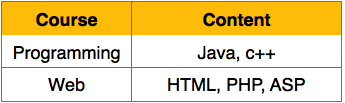
    unorganized relation

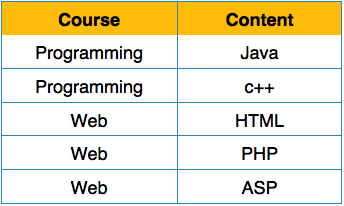
    We re-arrange the relation (table) as below, to convert it to First Normal Form.

    Relation in 1NF

    Each attribute must contain only a single value from its pre-defined domain.

    Second Normal Form

    Before we learn about the second normal form, we need to understand the following −

    • Prime attribute − An attribute, which is a part of the candidate-key, is known as a prime attribute.
    • Non-prime attribute − An attribute, which is not a part of the prime-key, is said to be a non-prime attribute.

    If we follow second normal form, then every non-prime attribute should be fully functionally dependent on prime key attribute. That is, if X → A holds, then there should not be any proper subset Y of X, for which Y → A also holds true.

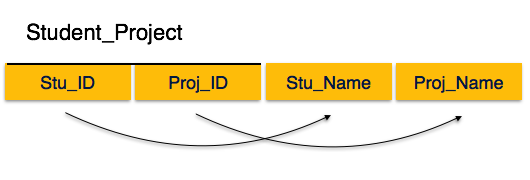
    Relation not in 2NF

    We see here in Student_Project relation that the prime key attributes are Stu_ID and Proj_ID. According to the rule, non-key attributes, i.e. Stu_Name and Proj_Name must be dependent upon both and not on any of the prime key attribute individually. But we find that Stu_Name can be identified by Stu_ID and Proj_Name can be identified by Proj_ID independently. This is called partial dependency, which is not allowed in Second Normal Form.

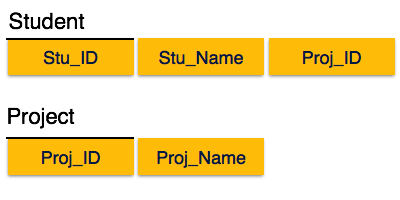
    Relation  in 2NF

    We broke the relation in two as depicted in the above picture. So there exists no partial dependency.

    Third Normal Form

    For a relation to be in Third Normal Form, it must be in Second Normal form and the following must satisfy −

    • No non-prime attribute is transitively dependent on prime key attribute.
    • For any non-trivial functional dependency, X → A, then either −
    • A is prime attribute.
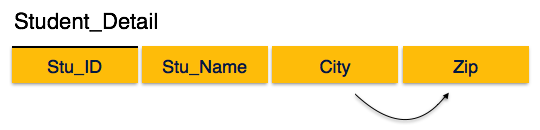
    Relation not in 3NF

    We find that in the above Student_detail relation, Stu_ID is the key and only prime key attribute. We find that City can be identified by Stu_ID as well as Zip itself. Neither Zip is a superkey nor is City a prime attribute. Additionally, Stu_ID → Zip → City, so there exists transitive dependency.

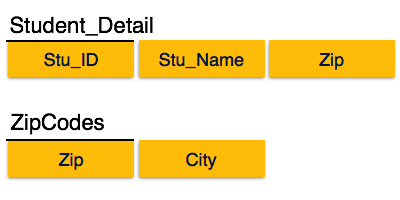
    To bring this relation into third normal form, we break the relation into two relations as follows −

    Relation in 3NF

    Boyce-Codd Normal Form

    Boyce-Codd Normal Form (BCNF) is an extension of Third Normal Form on strict terms. BCNF states that −

    • For any non-trivial functional dependency, X → A, X must be a super-key.

    In the above image, Stu_ID is the super-key in the relation Student_Detail and Zip is the super-key in the relation ZipCodes. So,

    Stu_ID → Stu_Name, Zip

    and

    Zip → City

    Which confirms that both the relations are in BCNF.

  • Finding Attribute Closure and Candidate Keys using Functional Dependency

    In database management and normalization, it’s important that one understands the concepts of functional dependency, closure property, and candidate keys. These concepts help us design efficient relational schemas, ensure data integrity, and optimize queries. In this chapter, we will elaborate these concepts with the help of practical examples and also understand the process of finding closures and identifying candidate keys.

    What is Functional Dependency?

    For a basic recap on functional dependency, it describes a relationship between attributes in a relational schema. If X → Y, it means the value of X uniquely determines the value of Y. Now here, X is the determinant, and Y is the dependent.

    Let us see one example for this. In a table where each employee has a unique ID, the dependency ID → Name this signifies that knowing an employee’s ID is enough to find their name.

    Functional dependencies can be defined formally. Consider two tuples, T1 and T2, in a relational schema. If T1.X = T2.X this implies T1.Y = T2.Y. Then X → Y is a valid functional dependency.

    But this relationship is not necessarily reciprocal. So the attribute Y may not determine X.

    Example of Functional Dependency

    Let us consider a relational schema R (A, B, C) with the following data −

    ABC
    114
    113
    426
    657

    Let’s understand the dependencies −

    • A → C − This does not hold. This is because A = 1 maps to both C = 4 and C = 3.
    • A → B − This is valid since each unique value of A maps to a unique value of B.
    • B → A − This is also valid for the given dataset.

    Thus, we derive the following functional dependencies −

    • A → B
    • B → A

    What is Attribute Closure?

    The closure of an attribute set, X, which is denoted as X+. This is the set of all attributes that can be determined by X using the given functional dependencies. The closures properties help us to identify keys and candidate keys for a relational schema.

    Following are the Steps to Find Closure −

    • We can start with X+ = X (the attribute set itself).
    • Iteratively add attributes that can be determined from the functional dependencies.
    • Stop when no more attributes can be added to X+.

    Example of Closure

    Using the functional dependencies, say, A → B, B → D, and CD → E −

    Finding A+Finding B+
    Start with A+ = {A}A → B: Add B to A+B → D: Add D to A+CD → E: A+ contains C and D, so add EStart with B+ = {B}B → D: Add D toB+No further dependencies to apply
    Final closure: A+={A,B,C,D,E}Final closure: B+={B,D}

    Concept of Candidate Key

    A candidate key is a minimal set of attributes that can uniquely identify all other attributes in a relational schema.

    • A candidate key’s closure must contain all attributes in the schema.
    • If multiple candidate keys exist, they provide alternate ways to uniquely identify tuples.

    Finding Candidate Keys

    To find candidate keys we must follow the following set of points in mind.

    • Compute the closure of each attribute (or combination of attributes).
    • If the closure contains all attributes in the schema then the attribute set is a candidate key.
    • Ensure the minimality by checking if removing any attribute from the set still results in a closure containing all attributes.

    Example of Candidate Keys

    Relational Schema R (A, B, C, D, E) −

    Functional dependencies −

    • A → B, C
    • B → D
    • CD → E

    Step 1: Find Closures

    The following table highlights how you can find closures −

    Finding A+B+CD+
    Start with {A}A → B, C: Add B, CB → D: Add DCD → E: Add EA+={A,B,C,D,E}Start with {B}B → D: Add DNo further dependencies to applyB+={B,D}Start with {C, D}CD → E: Add EC, D, E does not reach A or B, so CD+ is incomplete
    A+ contains all attributes, so A is a candidate key.B+ does not contain all attributes, so B is not a candidate key.CD is not a candidate key.

    Step 2: Check Combinations

    Other candidate keys can be found by combining attributes and checking closures.

    Shortcut for Finding Candidate Keys −

    • If a single attribute or minimal set of attributes has a closure, and it is containing all schema attributes, that set is a candidate key. Additionally:
    • If E is determined by CD, then CD can be replaced with CB. This combinations involving B should be checked.

    By systematically using dependencies, we can infer keys without exhaustive searches.

    Conclusion

    In this chapter, we understood how to use functional dependencies to find closures and candidate keys. We started with the basics of functional dependency and understood its role in identifying relationships between attributes. Then, we used examples to understand how closures work and how they help determine candidate keys.

    We also analyzed the efficient methods for finding candidate keys and highlighted their significance in relational schema design.

  • Equivalence of Functional Dependencies

    Functional dependencies are quite useful while making databases and designing proper table relations. Functional dependencies define relationships between attributes in a table; they help in normalizing the tables and ensuring data consistency as well.

    A common question in this domain is how to compare two sets of functional dependencies and determine if they are equivalent. Read this chapter to get a good understanding of the concept of equivalence of functional dependencies and explain how to determine if one set is a subset of another, or if both sets are the same.

    What is Equivalence of Functional Dependencies?

    Consider there are two sets of functional dependencies, F and G. They are considered equivalent if −

    • Every dependency in F can be derived from G.
    • Every dependency in G can be derived from F.

    In other words, F ⊆ G and G ⊆ F. If both conditions hold, then F and G are equal.

    The Importance of Equivalence

    It is important to have a good understanding of the concept of “equivalence” while designing databases or while performing normalization and query optimization. It ensures that dependencies are not repeated and helps to compare alternative dependency sets to see if they represent the same relationship.

    How to Compare Two Sets of Functional Dependencies?

    To check whether two Functional Dependencies are equivalent, we can use the “closure of attributes”. The closure of an attribute set is the set of attributes that can be determined using the given functional dependencies.

    The process involves −

    • Calculating closures for attributes using one set of dependencies.
    • Verifying if these closures match when computed using the other set.
    • Repeating the process with the roles reversed to ensure equivalence.

    Step-by-Step Example

    Let us see one example for a relational schema R with attributes and two sets of functional dependencies F and G −

    Set FSet G
    A → CAC → DE → AHA → CDE → AH

    We will check if F and G are equivalent or not.

    Step 1: Compute Closures Using G

    We start by computing the closure of each attribute or attribute combination from F. Here we calculate them using the functional dependencies in G.

    Closure of A Using G −

    • A is in the closure by itself
    • A → CD (from G): Add C and D to the closure
    • Closure of A is: {A, C, D}

    Closure of AC Using G −

    • Start with AC
    • A → CD (from G): Add C and D to the closure
    • Closure of AC: {A, C, D}

    Closure of E Using G −

    • E is in the closure by itself
    • E → AH (from G): Add A and H
    • A → CD (from G): Add C and D using A

    Closure of E: {E, A, H, C, D}

    At this point, we have computed closures for A, AC, and E using G.

    Step 2: Verify F ⊆ G

    Now, we check if F’s dependencies are covered by G −

    Dependency A → C from F −

    • Closure of A using G: {A, C, D}
    • C is in the closure, so A → C is valid in G

    Dependency AC → D from F −

    • Closure of AC using G: {A, C, D}
    • D is in the closure, so AC → D is valid in G

    Dependency E → A, H from F −

    • Closure of E using G: {E, A, H, C, D}
    • A and H are in the closure, so E → A, H is valid in G

    Since all dependencies in F can be derived from G, F ⊆ G is true.

    Step 3: Compute Closures Using F

    Next, we compute closures for attributes in G, but this time using F.

    Closure of A Using F −

    • A is in the closure by itself
    • A → C (from F): Add C to the closure
    • AC → D (from F): Add D using AC
    • Closure of A: {A, C, D}

    Closure of E Using F −

    • E is in the closure by itself
    • E → A, H (from F): Add A and H
    • A → C (from F): Add C
    • AC → D (from F): Add D using AC

    Closure of E: {E, A, H, C, D}

    Step 4: Verify G ⊆ F

    Finally, we check if G’s dependencies are covered by F −

    Dependency A → CD from G −

    • Closure of A using F: {A, C, D}
    • C and D are in the closure, so A → CD is valid in F

    Dependency E → AH from G −

    • Closure of E using F: {E, A, H, C, D}
    • A and H are in the closure, so E → AH is valid in F

    Since all dependencies in G can be derived from FG ⊆ F is true.

    Conclusion: F and G Are Equivalent

    From the above steps, we conclude that F ⊆ G and G ⊆ F. It means F and G are equivalent functional dependency sets.

    Key Points to Note

    Take a note of the following key points –

    • Use Closures for Comparison − To compare two sets of dependencies, we must compute closures for each attribute or attribute set.
    • Check Both Directions − Verify the subsets like F ⊆ G and G ⊆ F to ensure equivalence.
    • Simplify Where Possible − Minimize the dependency sets before comparison to avoid unnecessary computations.

    Conclusion

    In this chapter, we understood how to determine the equivalence of functional dependencies. We started the discussion by understanding the concept and importance of equivalence, followed by a step-by-step process to compare two sets of dependencies.

    Using closures, we verified that both sets could derive the same attributes, proving their equivalence. This process is needed in database design; it helps in identifying redundant dependencies and in performing schema normalization.