In this model, developers do not follow any specific process. Development begins with the necessary funds and efforts in the form of inputs. And the result may or may not be as per the customer’s requirement, because in this model, even the customer requirements are not defined.
This model is ideal for small projects like academic projects or practical projects. One or two developers can work together on this model.
When to use Big Bang Model?
As we discussed above, this model is required when this project is small like an academic project or a practical project. This method is also used when the size of the developer team is small and when requirements are not defined, and the release date is not confirmed or given by the customer.
Advantage(Pros) of Big Bang Model:
There is no planning required.
Simple Model.
Few resources required.
Easy to manage.
Flexible for developers.
Disadvantage(Cons) of Big Bang Model:
There are high risk and uncertainty.
Not acceptable for a large project.
If requirements are not clear that can cause very expensive.
In this Model, you can start with some of the software specifications and develop the first version of the software. After the first version if there is a need to change the software, then a new version of the software is created with a new iteration. Every release of the Iterative Model finishes in an exact and fixed period that is called iteration.
The Iterative Model allows the accessing earlier phases, in which the variations made respectively. The final output of the project renewed at the end of the Software Development Life Cycle (SDLC) process.
The various phases of Iterative model are as follows:
1. Requirement gathering & analysis: In this phase, requirements are gathered from customers and check by an analyst whether requirements will fulfil or not. Analyst checks that need will achieve within budget or not. After all of this, the software team skips to the next phase.
2. Design: In the design phase, team design the software by the different diagrams like Data Flow diagram, activity diagram, class diagram, state transition diagram, etc.
3. Implementation: In the implementation, requirements are written in the coding language and transformed into computer programmes which are called Software.
4. Testing: After completing the coding phase, software testing starts using different test methods. There are many test methods, but the most common are white box, black box, and grey box test methods.
5. Deployment: After completing all the phases, software is deployed to its work environment.
6. Review: In this phase, after the product deployment, review phase is performed to check the behaviour and validity of the developed product. And if there are any error found then the process starts again from the requirement gathering.
7. Maintenance: In the maintenance phase, after deployment of the software in the working environment there may be some bugs, some errors or new updates are required. Maintenance involves debugging and new addition options.
When to use the Iterative Model?
When requirements are defined clearly and easy to understand.
When the software application is large.
When there is a requirement of changes in future.
Advantage(Pros) of Iterative Model:
Testing and debugging during smaller iteration is easy.
A Parallel development can plan.
It is easily acceptable to ever-changing needs of the project.
Risks are identified and resolved during iteration.
Limited time spent on documentation and extra time on designing.
Disadvantage(Cons) of Iterative Model:
It is not suitable for smaller projects.
More Resources may be required.
Design can be changed again and again because of imperfect requirements.
Requirement changes can cause over budget.
Project completion date not confirmed because of changing requirements.
The meaning of Agile is swift or versatile. “Agile process model” refers to a software development approach based on iterative development. Agile methods break tasks into smaller iterations, or parts do not directly involve long term planning. The project scope and requirements are laid down at the beginning of the development process. Plans regarding the number of iterations, the duration and the scope of each iteration are clearly defined in advance.
Each iteration is considered as a short time “frame” in the Agile process model, which typically lasts from one to four weeks. The division of the entire project into smaller parts helps to minimize the project risk and to reduce the overall project delivery time requirements. Each iteration involves a team working through a full software development life cycle including planning, requirements analysis, design, coding, and testing before a working product is demonstrated to the client.
Phases of Agile Model:
Following are the phases in the Agile model are as follows:
Requirements gathering
Design the requirements
Construction/ iteration
Testing/ Quality assurance
Deployment
Feedback
1. Requirements gathering: In this phase, you must define the requirements. You should explain business opportunities and plan the time and effort needed to build the project. Based on this information, you can evaluate technical and economic feasibility.
2. Design the requirements: When you have identified the project, work with stakeholders to define requirements. You can use the user flow diagram or the high-level UML diagram to show the work of new features and show how it will apply to your existing system.
3. Construction/ iteration: When the team defines the requirements, the work begins. Designers and developers start working on their project, which aims to deploy a working product. The product will undergo various stages of improvement, so it includes simple, minimal functionality.
4. Testing: In this phase, the Quality Assurance team examines the product’s performance and looks for the bug.
5. Deployment: In this phase, the team issues a product for the user’s work environment.
6. Feedback: After releasing the product, the last step is feedback. In this, the team receives feedback about the product and works through the feedback.
Agile Testing Methods:
Every Agile technique aims to produce functional software as quickly as feasible while embracing and adapting to change. Each approach differs, though, in how it outlines the stages involved in software development. The following are some of the most popular Agile techniques:
Scrum
Crystal
Dynamic Software Development Method(DSDM)
Feature Driven Development(FDD)
Lean Software Development
eXtreme Programming(XP)
Scrum
SCRUM is an agile development process focused primarily on ways to manage tasks in team-based development conditions.
There are three roles in it, and their responsibilities are:
Scrum Master: The scrum can set up the master team, arrange the meeting and remove obstacles for the process
Product owner: The product owner makes the product backlog, prioritizes the delay and is responsible for the distribution of functionality on each repetition.
Scrum Team: The team manages its work and organizes the work to complete the sprint or cycle.
eXtreme Programming(XP)
Extreme programming (XP) is a methodical technique that emphasizes continuous Delivery and speed. It encourages close cooperation, constant planning and testing, quick feedback loops, and greater customer participation. Frequent software delivery occurs, often every one to three weeks. The aim is to enhance software responsiveness and quality in response to evolving client needs.
The principles of boldness, simplicity, communication, and feedback form the foundation of the XP technique.
Crystal:
There are three concepts of this method-
Chartering: Multi activities are involved in this phase such as making a development team, performing feasibility analysis, developing plans, etc.
Cyclic delivery: under this, two more cycles consist, these are:
Team updates the release plan.
Integrated product delivers to the users.
Wrap up: According to the user environment, this phase performs deployment, post-deployment.
Dynamic Software Development Method(DSDM):
DSDM is a rapid application development strategy for software development and gives an agile project distribution structure. The essential features of DSDM are that users must be actively connected, and teams have been given the right to make decisions. The techniques used in DSDM are:
Time Boxing
MoSCoW Rules
Prototyping
The DSDM project contains seven stages:
Pre-project
Feasibility Study
Business Study
Functional Model Iteration
Design and build Iteration
Implementation
Post-project
Feature Driven Development(FDD):
This method focuses on “Designing and Building” features. In contrast to other smart methods, FDD describes the small steps of the work that should be obtained separately per function.
Lean Software Development:
Lean software development methodology follows the principle “just in time production.” The lean method indicates the increasing speed of software development and reducing costs. Lean development can be summarized in seven phases.
Eliminating Waste
Amplifying learning
Defer commitment (deciding as late as possible)
Early delivery
Empowering the team
Building Integrity
Optimize the whole
The Agile 12 Principles
The following 12 fundamental development process concepts were also delineated in The Agile Manifesto:
Deliver quality work on time and consistently to satisfy clients.
Divide large projects into manageable, short-term activities.
Understand that self-organized teams provide the greatest work.
Give driven people the space and assistance they require and have faith in their ability to complete the task at hand.
Establish procedures that encourage sustainable endeavors.
Keep up a steady pace to finish the assignment.
Accept requirements that change, even at the end of a project.
Throughout the project, bring together the business owners and the project team every day.
Encourage the team to regularly consider ways to improve their effectiveness and modify and adapt their behavior accordingly.
The quantity of finished work is a good way to gauge progress.
Always strive for greatness.
Take advantage of change to gain a competitive edge.
When to use the Agile Model?
When frequent changes are required.
When a highly qualified and experienced team is available.
When a customer is ready to have a meeting with a software team all the time.
When project size is small.
Advantage(Pros) of Agile Method:
The following are some advantages of the Agile methodology:
Frequent Delivery
Face-to-Face Communication with clients.
Efficient design and fulfils the business requirement.
Anytime changes are acceptable.
It reduces total development time.
Disadvantages(Cons) of Agile Model:
Agile’s lack of focus on technology raises additional possible concerns since it may be challenging to convince senior managers of the idea who are unaware of the importance of culture in software development.
The following are among the drawbacks of Agile Model:
Due to the shortage of formal documents, it creates confusion and crucial decisions taken throughout various phases can be misinterpreted at any time by different team members.
Due to the lack of proper documentation, once the project completes and the developers allotted to another project, maintenance of the finished project can become a difficulty.
Traditional vs. Agile SDLC Models
The agile and traditional models approach software development differently, each with unique benefits and drawbacks. Both models use distinct approaches and have different uses. Let’s start by defining typical SDLC models.
Conventional SDLC models, which include planning, design, implementation, testing, and maintenance, work well for projects with clearly stated requirements. Each step must be completed before proceeding to the next step. Take the waterfall model, for instance. Let’s compare the two models to better understand their differences.
Conventional SDLC Model
The Agile Model
Software development is approached linearly and sequentially using the conventional SDLC paradigm.
The agile paradigm is a flexible and iterative method for developing software.
Delays may result from the lack of a defined plan to adapt to changing requirements.
It emphasizes feedback, functional software, and adjusting to new specifications.
It emphasizes a well-organized strategy rather than the Delivery of the finished product.
The Agile approach strives for speedy product delivery.
Its emphasis is on documentation, which aids in monitoring the choices and developments made during the project.
The Agile model has no documentation. It consists of frequent gatherings, also referred to as sprint meetings, to monitor the development team’s work.
Use Cases of the Agile Model:
Software Development: Facilitates the rapid and effective Delivery of small, functional software increments by teams.
Project management: Promotes ongoing development and flexible planning.
Product development: Enables goods to be improved and refined based on input from customers.
Marketing: Iterative testing and improvement of strategies are possible.
Dynamic Environments: Perfect for situations that call for regular updates and cooperation from stakeholders.
All things considered, the Agile Model’s adaptability and iterative structure make it appropriate for a range of sectors and uses.
The techniques or approaches used for the software product’s creation in software engineering are known as Software Development Lifecycle (SDLC) models, and the objectives and goals of the project determine them. The created Model will outline the procedures to be followed in order to actualize these stages, as well as how the software is to be produced for each iteration level.
Incremental development is causing a flurry in the software business. The software requirement is divided into several modules throughout the SDLC in this most popular software development paradigm. Every module is handled as a separate project that adheres to every stage of the incremental SDLC procedure.
The four stages of the incremental Model in Software Engineering that can improve the efficiency of the software development process and result in the creation of software of higher quality will be examined in this tutorial. Let’s first examine the incremental Model’s definition, types, and application scenarios before moving on.
An Incremental Model: what is it?
Incremental Model is a process of software development where requirements divided into multiple standalone modules of the software development cycle. In this model, each module goes through the requirements, design, implementation and testing phases. Every subsequent release of the module adds function to the previous release. The process continues until the complete system achieved.
The software requirements are separated or broken down into several independent modules or increments in the SDLC (Software Development Life Cycle) according to the commonly used incremental approach, sometimes referred to as the successive version model. Every increment follows the steps of the SDLC incremental model and is handled as a separate project. An iterative model sounds like this. Nonetheless, the incremental approach is also known as the Iterative Enhancement approach as it is an improvement on the iterative Model. According to the incremental approach, we accomplish our objectives in tiny increments rather than all at once.
Incremental Model Phases
The many stages of the SDLC incremental model are depicted in the following diagram. Take a look:
The various phases of incremental model are as follows:
1. Requirement analysis: In the first phase of the incremental model, the product analysis expertise identifies the requirements. And the system functional requirements are understood by the requirement analysis team. To develop the software under the incremental model, this phase performs a crucial role.
2. Design & Development: In this phase of the Incremental model of SDLC, the design of the system functionality and the development method are finished with success. When software develops new practicality, the incremental model uses style and development phase.
3. Testing: In the incremental model, the testing phase checks the performance of each existing function as well as additional functionality. In the testing phase, the various methods are used to test the behavior of each task.
4. Implementation: Implementation phase enables the coding phase of the development system. It involves the final coding that design in the designing and development phase and tests the functionality in the testing phase. After completion of this phase, the number of the product working is enhanced and upgraded up to the final system product
An Incremental Model: When Is It Used?
The following situations are where incremental models are most frequently utilized:
The requirements are understood, well-defined, and known in advance.
However, some criteria take time.
It is necessary to release the product early or bring it to market sooner.
The resources are lacking, or the engineering team lacks the necessary skill set.
Product-based businesses create their own goods.
They take advantage of new technology.
There are high-risk objectives or characteristics.
Projects take a long time to develop.
What are the Incremental Model’s stages, then? Let’s examine an incremental model’s four phases.
Benefits and Drawbacks of the Incremental Model
What is the Incremental Model’s Main Benefit?
There are several advantages to using incremental models, some of which are listed below:
All of the software’s goals and specifications are fulfilled through incremental development.
The incremental strategy is a smart way to cope with flexibility and expense. At any point throughout the development process, the requirements and scope may change.
It is simple and easy to verify and debug this Model.
We can create functional software earlier and faster throughout product development thanks to this strategy. Dividing the labor might result in a shorter completion time.
With this architecture, the customer may comment on each build and reply to it.
Incremental models make mistake identification simple. Because dangerous parts are found and fixed throughout iterations, risk management is made easier.
Early in the development phase, the most significant and practical functional capabilities of the product may be determined.
The Incremental Model’s Drawbacks
The following is a list of some of the drawbacks of the incremental Model:
This approach needs careful design and planning.
It requires a thorough and precise description of the entire system in order to dissect it and rebuild it piecemeal. The entire point of incrementing will be defeated if the need is not understood from the outset. Therefore, if not all requirements are gathered at the beginning of the software lifecycle, the system design may face issues.
It takes a lot of time to fix an issue in one unit since it must be fixed in other units.
The iteration phases don’t overlap and are inflexible.
Summary
There are other models for creating software and achieving the intended goals, but incremental modeling meets all of the anticipated goals. According to the incremental approach, we accomplish our objectives in tiny increments rather than all at once. When a choice cannot be made all at once, and a methodical approach is required, this Model is employed. This paradigm is mostly used when the requirements are well understood and when the software must be 100% accurate.
The definition of an incremental model in software engineering, its kinds, when to apply it, its stages, and its benefits and drawbacks have all been discussed in this tutorial. It is hoped that this post will help you understand how to construct incremental models and help you achieve even more success.
The V Model is a software development technique that incorporates testing and validation at each level of the Software Development Lifecycle (SDLC). A V-shaped figure is used to depict the model, with the testing phases on the right side and the development phases on the left. It began as an expansion of the Waterfall Model in the 1980s. The V Model was created to offer early validation and verification, which helps stop expensive flaws from entering the system too late in the process, whereas Waterfall concentrated on a sequential approach without incorporating validation until later stages. The V Model is helpful for sectors like defense, automotive, and medical device development, where accuracy, safety, and dependability are crucial.
The V Model’s main objective is to guarantee software quality by means of ongoing validation and verification. The methodology offers a methodical way to assist developers and testers collaborate by matching each development step with a corresponding testing phase.
Verification: It involves a static analysis method (review) done without executing code. It is the process of evaluation of the product development process to find whether specified requirements meet.
Validation: It involves dynamic analysis method (functional, non-functional), testing is done by executing code. Validation is the process to classify the software after the completion of the development process to determine whether the software meets the customer expectations and requirements.
So V-Model contains Verification phases on one side of the Validation phases on the other side. Verification and Validation process is joined by coding phase in V-shape. Thus it is known as V-Model.
There are the various phases of Verification Phase of V-model:
Business requirement analysis: This is the first step where product requirements understood from the customer’s side. This phase contains detailed communication to understand customer’s expectations and exact requirements.
System Design: In this stage system engineers analyze and interpret the business of the proposed system by studying the user requirements document.
Architecture Design: The baseline in selecting the architecture is that it should understand all which typically consists of the list of modules, brief functionality of each module, their interface relationships, dependencies, database tables, architecture diagrams, technology detail, etc. The integration testing model is carried out in a particular phase.
Module Design: In the module design phase, the system breaks down into small modules. The detailed design of the modules is specified, which is known as Low-Level Design
Coding Phase: After designing, the coding phase is started. Based on the requirements, a suitable programming language is decided. There are some guidelines and standards for coding. Before checking in the repository, the final build is optimized for better performance, and the code goes through many code reviews to check the performance.
There are the various phases of Validation Phase of V-model:
Unit Testing: In the V-Model, Unit Test Plans (UTPs) are developed during the module design phase. These UTPs are executed to eliminate errors at code level or unit level. A unit is the smallest entity which can independently exist, e.g., a program module. Unit testing verifies that the smallest entity can function correctly when isolated from the rest of the codes/ units.
Integration Testing: Integration Test Plans are developed during the Architectural Design Phase. These tests verify that groups created and tested independently can coexist and communicate among themselves.
System Testing: System Tests Plans are developed during System Design Phase. Unlike Unit and Integration Test Plans, System Tests Plans are composed by the client?s business team. System Test ensures that expectations from an application developer are met.
Acceptance Testing: Acceptance testing is related to the business requirement analysis part. It includes testing the software product in user atmosphere. Acceptance tests reveal the compatibility problems with the different systems, which is available within the user atmosphere. It conjointly discovers the non-functional problems like load and performance defects within the real user atmosphere.
When is the V Model appropriate for software testing?
When working on small-to-medium-sized software projects with unambiguous requirements, the V Model is recommended. The V Model is the better option for projects with appropriate acceptance criteria. When tech stacks and tools are not dynamic and there are plenty of technical resources with technical competence, the V Model can be helpful.
Fundamentals of the V Model
Verification and validation, which are covered in the sections above, form the foundation of the V model’s concepts. Here, we go over the V model’s unambiguous guidelines for software testing:
From Big to Small: According to the first principle, testing must be carried out in a step-by-step manner. It must start with determining the requirements, designing a high-level, clear design, and describing the design phases of the project.
Data and Process Integrity: This concept lays emphasis on working with data and processes together to execute a successful project design.
Scalability: No matter the size, complexity, or length of an anything project, the V model can handle anything.
Cross Reference: According to this approach, requirements and related testing activities are directly correlated.
Clear Documentation: This concept demonstrates how documentation is a need that must be completed by the support staff as well as the developers, just like in any other project.
What Makes the V Model Crucial?
Early Defect Detection: Teams can identify flaws far earlier than with traditional models when testing is done early in the development process.
Better Traceability: All requirements, design components, and test cases have thorough documentation, which enhances accountability and traceability.
Enhanced trust: By guaranteeing that all needs are fulfilled and extensively tested, the V Model gives stakeholders more trust.
The success of the V Model may be attributed to a number of fundamental ideas. Among these principles are:
Verification and Validation: To make sure the product satisfies the criteria, there is a testing step for each stage of the product development process.
Early Testing: Defect risk is decreased when testing begins early in the development lifecycle.
Sequential Development: The model’s distinct stages make it simpler to monitor development and oversee projects.
Traceability: Every requirement, design choice, and test case is recorded and readily connected to the initial project objectives thanks to the V-Model’s unambiguous traceability.
What Benefits Does the V Model Offer?
We may determine that the V Model of testing is a highly disciplined model when we look through its many phases one by one.
Each step is simpler to use, comprehend, and oversee since it has distinct deliverables and a review procedure.
Because the testing phases begin at the outset, ambiguities, faults, etc., are found early on, making the process of repairing them easier and more economical.
Performs effectively in software projects that are modest to medium in scale.
What Drawbacks Does the V Model Have?
The V-model is a very rigid and disciplined model, thus it is not appropriate for projects where needs are at a moderate to high risk of changing. This is because requirements can change often in today’s dynamic environment.
When projects are difficult, huge, or involve high risk and unclear needs, this strategy is not the best option.
Late in the life cycle, functional software is created.
Summary
This tutorial covers the significance of choosing the right software model, how it can address some of the issues encountered with the conventional waterfall approach, the various verification and validation phases of the V Model, and the situations in which it is better and those in which it should be avoided.
Software Development Models should be carefully chosen by considering the budget, team size, project criticality, technology used, best practices/lessons learned, tools and techniques, developer and tester quality, user requirements, time, and project complexity. This is because software projects involve many different development life cycles. Each of these elements is essential to the success of any software project.
The spiral model combines the iterative development process model and aspects of the Waterfall model. It is a systems development lifecycle (SDLC) approach for risk management. Software developers employ the spiral model, which is preferred for complex, large-scale projects.
The spiral model of software development resembles a coil with several loops when seen as a diagram. Depending on the project, the number of loops is determined by the project manager. Every spiral loop represents a stage in the model of the software development process. Through each stage of the spiral, a software product may be refined and released gradually thanks to the spiral model. Additionally, this risk-driven strategy makes it possible to construct prototypes at every stage. Making a prototype enables the model to handle possible risks once the project has started, which is its most crucial characteristic.
Each cycle in the spiral is divided into four parts:
Objective setting: Each cycle in the spiral starts with the identification of the purpose for that cycle, the various alternatives that are possible for achieving the targets, and the constraints that exist.
Risk Assessment and Reduction: The next phase in the cycle involves calculating these various alternatives based on the goals and constraints. The focus of evaluation in this stage is on the project’s risk perception.
Development and validation: The next phase involves developing strategies to resolve uncertainties and risks. This process may include activities such as benchmarking, simulation, and prototyping.
Planning: Finally, the next step is planned. The project is reviewed, and a choice is made whether to continue with a further period of the spiral. If it is determined to keep, plans are drawn up for the next step of the project.
The development phase depends on the remaining risks. For example, suppose performance or user-interface risks are treated more as essential than program development risks. In that case, the next phase may be evolutionary development, which includes developing a more detailed prototype to solve the risks.
The spiral model’s risk-driven feature allows it to accommodate any mixture of a specification-oriented, prototype-oriented, simulation-oriented, or other type of approach. An essential element of the model is that each period of the spiral is completed by a review that includes all the products developed during that cycle, including plans for the next cycle. The spiral model works for development as well as enhancement projects.
The Spiral Model’s Steps
Each quadrant is further subdivided into stages, even if the phases are divided into quadrants. The following are the steps in the spiral model:
The needs for the new system are outlined as thoroughly as feasible. For this, many users who represent all internal and external interests, as well as other facets of the current system, are typically interviewed. A draft design is made for the new system.
The first design is used to build the new system’s prototype. In most cases, this is a simplified system that approximates the features of the finished software.
The process of creating a second prototype involves four steps: (1) assessing the risks, flaws, and strengths of the prototype; (2) establishing the second prototype’s requirements; (3) planning and designing the second prototype; and (4) building and testing the second prototype.
If the danger is judged to be too high, the project is terminated. Overruns in development costs, inaccurate operational cost estimates, and other elements that might lead to a subpar product are examples of risk factors.
The current prototype is assessed in the same way as the prior prototype, and if required, a new prototype is created using the four steps mentioned above.
The previous processes are repeated until the client is happy that the improved prototype accurately depicts the intended final product.
Based on the improved prototype, the finished product is built.
The finished product undergoes extensive testing and evaluation. Continuous routine maintenance is performed to save downtime and avoid major malfunctions.
Examples of Spiral Model Projects in the Real world
A variety of sectors use the spiral approach to iteratively enhance projects. Here are a few examples:
Creation of software: Software projects are tested iteratively by developers who follow user input to direct enhancements. This is particularly true for mobile apps, whose functionality is subject to quick changes and necessitates debugging in order to meet stakeholder and user expectations.
Gaming: Before releasing a finished product, game makers evaluate gameplay and enhance graphics using this iterative methodology. These improvements are also based on customer input.
Shop: Based on user preferences and industry trends, e-commerce website developers employ spiral modeling to continually improve the client experience by adding new features.
Medical care: The spiral model ensures that electronic health record systems adhere to current laws, such as the Health Insurance Portability and Accountability Act and industry standards.
Space: Before being deployed in space, space exploration technologies like satellites and rovers are prototypes that are tested through simulations. The spiral model guides their growth to ensure they are not prone to problems.
Benefits of the Spiral Model
The spiral model is an excellent choice for complicated, large-scale projects. The model’s progressive structure enables developers to divide large projects into smaller ones and work on each feature separately, making sure nothing is overlooked. Because the prototype building is completed gradually, it might occasionally be simpler to estimate the project’s overall cost.
The following are some additional advantages of the spiral model:
Adaptability: After work has begun, requirements changes are readily accepted and integrated.
Control of risks: By incorporating risk analysis and management into each stage, the spiral approach enhances security and increases the likelihood of preventing breaches and assaults. Risk reduction is also made easier by the iterative development process.
Client contentment: The spiral model facilitates customer feedback. If the program is being created for the customer, the customer can view and assess their product at every stage. This saves the development team time and money by allowing them to voice concerns and seek adjustments prior to the product being completely produced.
Challenges with the spiral model
The spiral model has the following drawbacks:
Expensive: Due to its high cost, the spiral model is not appropriate for minor projects.
Reliance on risk assessment: Effective risk management is necessary for a project to be completed successfully. Therefore, project participants must possess proficiency in risk assessment.
Complexity: Compared to other SDLC choices, the spiral model is more complicated. Protocols must be strictly adhered to for it to function well. Moreover, more documentation is needed to monitor the intermediate stages.
Difficulties in time management: Time management is nearly hard as the number of necessary stages is sometimes unknown before the project begins. As a result, there’s always a chance of running over budget or behind time.
One of the dynamic methodologies of software development is the use of a short and rapid application development cycle that focuses on the use of prototypes. Compared to the classical development paradigms, RAD values the software and the user’s input more than extensive planning and requirement specification. RAD implements the CB technique to increase the speed with which software can be developed and the shortening of development time while still maintaining quality.
Brief History and Evolution of RAD
Predominantly, the concept of rapid application development was brought to the limelight by James Martin in the early 1980s in response to the pitfalls that were associated with the application of the traditional waterfall model. Due to the Waterfall model’s linear and sequential approach, it was evident this model led to longer development cycles, and limited abilities to incorporate change. The need for such a technique occurred due to the changes in corporate environments and technology.
RAD methodology and its key features are described by James Martin, where the four phases of development emphasise iteration of the development process and end users’ activity. This greatly helped to build and refashion prototypes quickly and frequently by the developers, ensuring that the final product was as close to the customers’ demands and needs as possible. When technology has evolved, as well as the field of software development, so has RAD, and it has evolved or integrated with other agile methods. Today, RAD is most appropriate in environments that are active and energetic because of the appreciation of high-quality software that is developed within a short period.
Importance and Relevance in Modern Software Development
Due to the accelerated pace of change that is characteristic of the modern world, businesses need to respond actively to changes in the ongoing competition and the client’s demands. Thus, traditional development approaches, which are characterised by long development cycles, often fail to match them. Although to address this problem, RAD utilises iterative cycles of development and feedback, which allows for the generation of functioning software with greater efficiency.
Speed and Efficiency: RAD decreases the time required to build software applications to a significantly low level. Creation crews might create working products far more effectively by applying component-base construction and iterative prototyping as opposed to conventional methods.
Adaptability and Flexibility: RAD enables constant input and numerous alterations throughout the entire development process. This flexibility reduces the probability of the project’s failure because the outcome must meet the needs of stakeholders and consumers.
User-Centered Design: This means that this method ensures that the end users are involved in the process of developing the software, hence ensuring that it’s developed to meet the expectations of the end users. This user-focused approach makes the rate of adoption higher and, at the same time, makes users happier.
Lower Risk: In general, RAD reduces the risk that potential serious issues could arise later in the development phase due to the project breaking the project down into smaller functional units and constantly evaluating and enhancing them.
Cost-Effectiveness: Since RAD encourages minimal alteration of the solution after delivering the final product, it often leads to a decrease in total expenses, although it can sometimes require more initial assets on prototyping and cyclic development.
Key Principles of RAD:
Emphasis on User Involvement
The involvement of users is considered an essential aspect of implementing the RAD model. When it comes to RAD, the end-users are involved right from the development phase all through. When the customer needs are fully defined, and a good idea of the customer is attained, this approach guarantees a product that fits their needs. Feedback is gathered from the users throughout the entire process, although the major feedback is given during the prototyping and iteration process.
Iterative Development
Thus, the iterative development is one of the key tenets of RAD. Unlike the conventional V model or the traditional SDLC model, which is sequential, the RAD model splits the project into small cycles or iterations known as iterations. Every cycle engages in the thought-out process of planning, designing, coding, and testing. Thus, the cyclic structure of this process enables constant evaluation of the project and its enhancements. In iterative development, problems can be found and fixed, users and their suggestions can be incorporated, and changes can be made.
Prototyping
Prototyping is one of the techniques in RAD that entails the generation of inconsequential inconsistencies in the intended software application. These models are created relatively fast and are designed to explain, with the help of a physical representation, the expected use of the final product. Through prototyping, the users can exercise the component and get a sense of the complete system, and the feedback given is an added advantage.
Time-boxing
The process of taking certain, finite measures of time to complete a work within the context of RAD is known as time-boxing. Like this, timeboxing is a method in which every phase or iteration of the development process is provided with a fixed duration or ‘time box.’ With this constraint, the team will only be able to deliver a limited number of high-priority features in the said duration and is hence compelled to prioritise between functionalities. This method eliminates late additions to the agenda, thus minimising scenarios where developers spend most of their time on irrelevant tasks instead of focusing on the project at hand.
Reuse of Existing Components
One of the RAD principles that proposes recycling existing technical components is using pre-built software parts and a software parts library. Thus, RAD helps decrease the time and effort necessary to create new applications, as it uses reusable components. It also assists in the quick delivery of a product, notwithstanding its reliability and quality.
Phases of Rapid Application Development (RAD):
1. Requirements Planning Phase
Initial Requirements Gathering
The first activity recommended in implementing RAD is identifying the initial set of requirements. As opposed to conventional approaches, where all the prerequisites for a project are documented before a project is specified and started, RAD emphasises the need to establish the fundamental need for a project to continue.
Interviews and focus group discussions with stakeholders.
The first phase of assessing the current state involves reviewing the existing systems to determine where these areas are applicable.
It is the practice of ranking requests likely for their importance to the organisation and how implementable they are.
Stakeholder Involvement
In RAD, the stakeholders are significantly engaged in the process, and this is at different phases of the process. During the Requirements Planning Phase, it confirms with end-users, managers, and developers that they all have the right perception or understanding of the project.
Forums that allow constant communication with the stakeholders.
Defining context for cooperation aimed at obtaining feedback and ideas.
Maintaining stakeholder expectancy with the project goals.
Defining the Parameters of the Projects
The definition of a project scope and its objectives basically outlines what the development work will entail.
They included providing a clear definition of the areas that have to be worked on and defining the extent of the project to avoid a situation where unrelated issues are worked on and become part of the main project since the scope of the project needs to be defined strictly, and this serves as a tool to define it properly.
Defining specific goals that the project is expected to fulfil and that the project stakeholders are interested in.
Known limitations checking them on the schedule, cost and resources that are to be used in the development process.
2. User Design Phase
Prototyping Techniques
The RAD model cannot be discussed without mentioning prototyping, one of its key activities. In this phase, incremental and working prototypes are created to establish the requirements and user feedback.
Use paper, pen, and a whiteboard to sketch ideas and early models of possible interfaces and interactions.
It ranges from very low-fidelity models that do not even resemble the final look and feel of the finished product to high-fidelity models that are closer to the actual working product in terms of functionality.
Prototyping, in which the prototypes are developed in a step-by-step manner for improvement’s sake.
User feedback and iterative refinement
Specifically, feedback is gathered perpetually to adjust or modify the prototypes in order to suit the users.
Holding actual testing sessions with the end-users.
Sampling feedback through questionnaires, face-to-face interview, and sprees.
Re-working the prototypes with the user feedback and modifying every cycle.
Tools and Technologies Used
Many tools and technologies support the User Design Phase. These tools assist in formulating hypotheses and generating and verifying mock-ups.
Collaboration applications such as Asana, Jira, Trello, and Monday. Com, and Notion.
Microsoft Teams, slack for communicating and progressive feedback and checking.
Freemium and samples of usability testing platforms to seek users’ involvement; UserTesting and Lookback.
3. Construction Phase
Developing the Actual System
The Construction Phase aims to create the real system based on improved prototypes from the User Design Phase.
Developing code for the application and constructing system components based on the prototypes developed.
Adhering to modular development practices because components should be reusable and easily integrated into the process.
Being open to changes and improvements throughout the process, which would allow the application to be more sophisticated.
Integration of Prototypes
The integration of prototypes into the entire system helps to avoid a large gap between the design and the development.
The process of transitioning from a prototype to a real system in terms of carrying out the set tasks.
Maintenance of compatibility and standardisation of each of the modules that belong to the system.
Working through the discrepancies or problems found during integration.
Frequent Iterations and Testing
Iteration is common in agile and crossover methods, and frequent, constant reviews are beneficial for a system’s quality and functionality.
Performs unit, integration and system tests to prevent the existence of problems and have them solved as soon as possible.
Repeating the development cycle with the help of new test outcomes and users’ comments.
Ensure that every System release is closer to the final product, with better features and greater stability.
4. Cutover Phase
Finalising the System
The Cutover Phase marks the transition from development to deployment.
A system test to make sure all the components of the system are integrated to work in harmony.
Conversion testing to ensure that the system is up to par to meet the needs and support the expected capacity.
If any fine-tuning or optimisation based on the testing performance is done, it will be done here.
User Training and Documentation
Therefore, the training-orientation stage lays the foundation for preparing users to use the system effectively.
As part of the training materials, producing and providing possibly extensive user manuals and instructions on how the system works.
Delivering training and seminars to make the users more aware of the system.
Offering guidance and tracking tools in the form of help points and web-based instruction guides for additional support.
Implementation and Ready-to-Use
Deploying the system and transitioning to operation involves: Deploying the system and transitioning to operation involves:
Carrying out the implementation plan of the deployment strategy involving the transferring of data and setting up of systems.
Reducing the impact of transition on the business activities in the organisation.
Surveillance is the management process performed on a system after it has been implemented to deal with problems and ensure proper functioning.
RAD Tools and Technologies:
OutSystems: OutSystems is a low-code application development and deployment tool. It provides a graphical development environment, pre-installed templates, and compatibility with a variety of systems and databases.
Mendix: Mendix has several features that enable rapid initial development and testing as well as easy application deployment. It supports the creation of a graphical user interface, allows for the collaboration of multiple developers, and allows users to choose from a wide variety of templates and widgets. Thus, it can be considered one of the best tools for RAD.
Microsoft PowerApps: PowerApps enables users to build business apps without necessarily coding on their own without deep coding skills. It is a great product when other organisations are already utilising the Microsoft suite of products and services.
Appian: It also automates business processes among organisations through its conquered low-code automation platform. It is used for development, process control, and incorporating AI into the design to increase speed and efficiency.
Salesforce Lightning: Salesforce Lightning allows users to create applications in a relatively minimal amount of time within the Salesforce platform. It offers features to build custom apps, dashboards, and workflows by integrating Salesforce’s highly scalable architecture.
Comparison of RAD Tools
Feature
OutSystems
Mendix
Microsoft PowerApp
Appian
Salesforce Lightning
Ease of Use
High
High
Medium to High
Medium to High
Medium to High
Visual Development
Yes
Yes
Yes
Yes
Yes
Pre-built Templates
Extensive
Extensive
Moderate
Moderate
Moderate
Integration Capabilities
Extensive
Extensive
High with Microsoft tools
Extensive
High with Microsoft tools
Collaborative Features
Yes
Yes
Yes
Yes
Yes
Automation and AI
Moderate
Moderate
Limited
High
Moderate
Mobile Development
Yes
Yes
Yes
Yes
Yes
Scalability
High
High
High
High
High
When should I apply the RAD Model?
Clear Requirements: RAD is suitable when project requirements are clear and consistent.
Time-sensitive Projects: Ideal for projects with short turnaround times that require rapid development and delivery.
Small to Medium-Sized Projects: More appropriate for smaller projects that call for a manageable team size.
High User Involvement: Appropriate for situations in which continuous user input and interaction are crucial.
Creativity and Innovation: Beneficial for jobs involving inventiveness and creative research.
Prototyping: It is required when generating and improving prototypes is a critical component of the development process.
Low technological complexity: Appropriate for jobs with relatively simple technical requirements.
Criteria for Selecting the Right RAD Tool
Choosing the right RAD tool depends on various factors.
Project Requirements: Before selecting the type of project management method, you should consider certain variables relevant to the project you are conducting; these variables include the complexity, size, and features required by the project. The method can also vary from a basic application to a complicated one in enterprise-level tools.
Ease of Use: This depends on the complexity of the development and the qualified level of your team’s workers. IDEs with an easy-to-use graphic interface can cut down the time it takes for a programmer to learn them, making them more productive.
Integration Capabilities: Assess the extent of compatibility between the tool and the other systems and databases currently in use. Advanced integration increases the efficiency of processes and quantitative homogeneity of information, which proves competent integration proficiency.
Pre-built Templates and Components: Interestingly, the more components available can be reused, and the greater the number of predefined templates, the better. These can go a long way toward shortening the development cycle.
Collaboration Features: Check that the tool encourages collaboration. For example, several members of the team should be able to work on the project at once.
Scalability: You need to consider how you will expand this tool as your project develops. This involves aspects such as data handling capacity, the number of users, and other features.
Support and Community: Make sure there is support for the software, documentation available and users of the software are numerous. Support and an active community are helpful mainly because most of the problems can be solved fast, and a lot of useful information can be gained.
Cost: Consider the expense of the particular tool, including the purchase, usage or licensing fees, training on its usage and deployment, and overall maintenance charges. It is also important that the tool has reasonable value and is affordable to the organisation or individual’s budget.
Automation and AI Integration: If your development involves complex functions, such as incorporating forms of automation or Artificial Intelligence tools and options, then the selected tool should be capable of delivering greater and more powerful results in these components.
Mobile Development Support: Projects in which the development of mobile applications is necessary should check how efficiently the selected tool allows creating and deploying mobile apps.
Advantages of RAD:
Shorter Time to Delivering Functional Software
By means of implementing the Rapid Application Development (RAD) model, this advantage focuses on the fact that the software can be produced rapidly and the actual need is met quickly. This speed is true at the development stage, which involves iterative development that creates prototypes, tests them as well and improves them based on the user’s feedback. In contrast to most conventional approaches that take a considerable amount of time to analyse all the necessary details beforehand, RAD emphasises robust function modules; thus, the developers create a viable system within a shorter span.
Enhanced Flexibility and Adaptability
Due to this characteristic, RAD is easy to change and can be modified at any evolutionary phase of the process. This is made possible by the fact that RAD is done in cycles, and each cycle is a chance to improve the software depending on the feedback it receives from users and changing needs. Such an approach provides frequent updates to feedback so that the final product can be perfected to meet the user’s needs and market conditions, business needs, and technological changes.
Improved User Satisfaction
Public utilisation is one of the significant principles of the RAD model discussed above. Right from the planning of the requirements until the actual deployment of the system, the users are involved dynamically. This continuous partnership guarantees that the focus is placed on the end-user and what they wish to see in a specific software.
Reduced Development Risk
This is because the iterative and incremental approaches used in RAD reduce the risk inherent in developing software to some extent. Potential problems can be met and solved before they accumulate in the complicated process of creating a project and its subsequent stages of development. This minimises the exposure to issues that might occur towards the later part of the development phase, which may be very expensive and sometimes take a lot of time to sort out.
Better alignment with business needs
Due to RAD’s emphasis on the active participation of users and the iteration of the development process, the end product closely mirrors business needs. Whenever there is a development process, stakeholders can be given input and asked to give their feedback so the final product supports the organisation’s goals and objectives. The flexibility in the implementation of changes that can be made based on the feedback of the users and the ever-changing requirements is also a strength of the software because it means that changes can be made when the business needs change as well, which results in a better match between the software used and the organisational processes and strategies that are being implemented.
Disadvantages and Challenges of RAD:
Reliance on Strong Team and User’s Cooperation
The principles that are characteristic of RAD include the extensive use of the active user and the significant involvement of the user in the development process. While it may help in guaranteeing that the final output of the project is aligned well with the users’ needs, the approach has the disadvantage of entirely relying on the availability and commitment of both parties.
Potential for Scope Creep
Nevertheless, it is worth noting that due to RAD’s iterative nature, the problem of scope creep is especially acute. Since there is always a process for integrating additional features and functions based on the feedback received from the clients, this can lead to a significant problem of uncontrollable project scope. Bad project management, as well as a lack of a sharp line of demarcation of the project’s objectives and goals, may lead to a situation where the project absorbs even more resources, time and workforce than was initially anticipated.
Non Suitable for all kinds of projects
However, RAD is comfortable if the project needs to go through a continuous cycle of development and changes; this strategy does not work for all projects. For instance, precise specifications of project characteristics and projects that adhere to a set project time are relevant to the RAD setting. Likewise, the employment of RAD may encounter some problems in large-scale projects that require more sophisticated integration demands or any task that requires too many analytic processes at the early stages of project implementation.
Requires skilled and experienced developers
The argument concerning the focal point’s function and success has been analysed in terms of development team dependency. Thus, the developers need to be aware of a variety of tools and technologies and retrofit themselves. This requires a high level of experience as well as the courtesy of the employees to alter the manner in which they conduct their functions in supporting the new methods and practices for the undertaking of business.
Limited scalability for larger projects
RAD is more frequently utilised when a project’s objectives are ill-defined at the beginning of the project or may become so during program development, and the scale of the project is comparatively small to medium. But here again, with large developments, the iterative character of RAD might be a major issue compared to the sequential one of the traditional one. Coordinating many iterations and when an organisation undertakes many tasks in a project, as well as routines to close out project components, the management challenges increase as the size of the project increases.
Usecases of Rapid Application Development Model (RAD)
A system with established needs and a quick development time should utilize this paradigm.
It is also appropriate for projects that allow for the modularization of requirements and the development of reusable components.
When creating a new system with little modifications, the model may also be applied to existing system components.
This paradigm can only be employed if the teams include of domain experts.
This is due to the fact that having pertinent information and the capacity to employ effective strategies are essential.
When the budget allows for the employment of the necessary automated tools and procedures, the model should be selected.
Winston Royce introduced the Waterfall Model in 1970. This model has five phases: Requirements analysis and specification, design, implementation, and unit testing, integration and system testing, and operation and maintenance. The steps always follow in this order and do not overlap. The developer must complete every phase before the next phase begins. This model is named “Waterfall Model“, because its diagrammatic representation resembles a cascade of waterfalls.
In software engineering and product development, the Waterfall model is a widely used linear, sequential approach to the software development lifecycle (SDLC). Similar to how water rushes over a cliff’s edge, the Waterfall model employs a logical progression of SDLC processes for a project. It establishes clear objectives or endpoints for every stage of the development process. Once such goals or endpoints are accomplished, they cannot be re-examined. Industrial design applications are still using the Waterfall paradigm. It is sometimes referred to as the original technique for software development. More broadly, the model is applied as a high-level project management technique for complex, multidimensional projects.
Characteristics of the Waterfall Model
The waterfall model’s characteristics are as follows:
Sequential Approach: Software development using the waterfall paradigm is done in a sequential fashion, with each project phase being finished before going on to the next.
Document-Driven: To guarantee that the project is precisely defined and that the project team is pursuing a certain set of objectives, the waterfall approach relied on documentation.
Quality Control: To guarantee that the finished result satisfies the needs and expectations of the stakeholders, the waterfall approach places a strong focus on quality control and testing at every stage of the project.
Thorough Planning: The waterfall approach entails a meticulous planning procedure in which the project’s deliverables, schedule, and scope are precisely specified and tracked during the course of the project.
The waterfall model is applied when a very methodical and disciplined approach to software development is required. It may be useful in guaranteeing that big and complicated projects are finished on schedule, within budget, and with excellent quality and client satisfaction.
The Waterfall Model’s Significance
The significance of the waterfall model is as follows:
Clarity and Simplicity: The Waterfall Model’s linear structure provides a clear and straightforward framework for project development.
Clearly Defined Phases: The Waterfall Model ensures a planned development with clear checkpoints by giving each phase distinct inputs and outcomes.
Documentation: A focus on comprehensive documentation facilitates future development, maintenance, and software comprehension.
Stability in needs: Ideal for projects with well-defined and consistent needs, which minimize changes as the project moves along.
Resource Optimization: By assigning resources based on project phases, it promotes efficient task-focused work without constantly shifting environments.
Relevance for Small Projects: Cost-effective for small projects with straightforward requirements and little intricacy.
Waterfall Model Phases
The six stages of the Waterfall Model are as follows:
The aim of this phase is to understand the exact requirements of the customer and to document them properly. Both the customer and the software developer work together so as to document all the functions, performance, and interfacing requirement of the software. It describes the “what” of the system to be produced and not “how.”In this phase, a large document called Software Requirement Specification (SRS)document is created which contained a detailed description of what the system will do in the common language.
Design Phase: This phase aims to transform the requirements gathered in the SRS into a suitable form which permits further coding in a programming language. It defines the overall software architecture together with high level and detailed design. All this work is documented as a Software Design Document (SDD).
Implementation and unit testing: During this phase, design is implemented. If the SDD is complete, the implementation or coding phase proceeds smoothly, because all the information needed by software developers is contained in the SDD. During testing, the code is thoroughly examined and modified. Small modules are tested in isolation initially. After that these modules are tested by writing some overhead code to check the interaction between these modules and the flow of intermediate output.
Integration and System Testing: This phase is highly crucial as the quality of the end product is determined by the effectiveness of the testing carried out. The better output will lead to satisfied customers, lower maintenance costs, and accurate results. Unit testing determines the efficiency of individual modules. However, in this phase, the modules are tested for their interactions with each other and with the system.
Operation and maintenance phase: Maintenance is the task performed by every user once the software has been delivered to the customer, installed, and operational.
When Should the Waterfall Model Be Used?
The following situations are ideal for applying the Waterfall Model:
Clear and well-defined needs: Clear and well-defined needs are accessible before development starts. These requirements are accurate, dependable, and well-documented.
Very Few Changes Expected: Very few changes or additions to the project’s scope are expected during development.
Projects that are small to medium-sized: Perfect for easier-to-manage projects with a defined development path and little complexity.
Predictable: Projects with known, manageable hazards are low-risk, predictable, and able to be handled early in the development life cycle.
Regulatory Compliance Is Essential: Situations where strict regulatory compliance is necessary and documentation is crucial.
Client Prefers a Linear and Sequential Approach: This scenario explains the client’s inclination for a project development process that is both linear and sequential.
Restricted Resources: A set-up approach can help projects with restricted resources by allowing for focused resource allocation.
Less user engagement occurs during the product development process while using the Waterfall technique. Only after the product is ready can the final consumer see it.
A Waterfall Model Example
Spiral Model Real-World Example: Creating an Online Banking System
Requirements analysis and specification phase
In order to determine the essential features of the online banking system, including account management, fund transfers, bill payments, and loan applications, this phase will be responsible for compiling all available data on customer banking requirements, transactions, and security protocols.
Design Phase
Fine-tuning the parameters set in the analysis phase is the main focus of the design phase in this Waterfall Model example. The architecture of the system will be created to guarantee excellent speed, prevent transactional mistakes, and securely handle sensitive data. To safeguard user accounts, this involves multi-factor authentication, encryption techniques, database architecture, and UI design.
Implementation
In order to determine how accurately the online banking system can handle transactions, balance inquiries, cash transfers, and bill payments, this crucial step entails doing dummy runs of the system using a preliminary set of banking transactions and user data. These findings are to be compared with those of banking specialists and auditors who guarantee adherence to banking laws and transaction correctness.
Testing
As with any Waterfall Model example, the testing phase’s goal is to make sure the online banking system’s features all work as intended. Testing for security flaws, transaction correctness, performance under high load, and responsiveness of the user interface are all included in this. Tests of safe logins, data encryption, and making sure sensitive data is handled appropriately across the system are given particular focus.
Maintenance
In addition to the anticipated addition of new features or modifications to banking rules, the online banking system should be examined in the last stage for any upgrades or modifications that could be needed. Security fixes, performance enhancements, and the introduction of new services like mobile banking, fast loans, or tailored financial advice will all require regular upgrades.
The Waterfall model is used by whom?
To accomplish objectives depending on their company’s demands, project teams and management employ the Waterfall approach. The concept is applied in a wide range of project management domains, including software development, manufacturing, IT, and construction. Every stage in the Waterfall approach depends on the results of the one before it. The development of these initiatives follows a straight line.
For instance, these three broad procedures are often used in construction:
The physical design of a structure is developed prior to construction.
Before a building’s framework is constructed, the foundation is poured.
Before the walls are constructed, the building’s framework is finished.
When constructing a product in a production line, stages are taken one after the other in a predetermined order until the final deliverable is produced. Waterfall seeks to accomplish its objectives the first time. Waterfall is therefore an appropriate approach in software development processes if an application has to function right away or risk losing clients or experiencing some other significant problem. Compare it to the Agile model of project creation and management. Continuous reiteration is used in agile methodologies. Software is designed, developed, and tested using an iterative process that builds on previous cycles.
Advantages of Waterfall model
This model is simple to implement also the number of resources that are required for it is minimal.
The requirements are simple and explicitly declared; they remain unchanged during the entire project development.
The start and end points for each phase is fixed, which makes it easy to cover progress.
The release date for the complete product, as well as its final cost, can be determined before development.
It gives easy to control and clarity for the customer due to a strict reporting system.
Disadvantages of Waterfall model
In this model, the risk factor is higher, so this model is not suitable for more significant and complex projects.
This model cannot accept the changes in requirements during development.
It becomes tough to go back to the phase. For example, if the application has now shifted to the coding phase, and there is a change in requirement, It becomes tough to go back and change it.
Since the testing done at a later stage, it does not allow identifying the challenges and risks in the earlier phase, so the risk reduction strategy is difficult to prepare.
Waterfall Model Applications
Here are a few examples of how the SDLC waterfall model is used:
Big Software Development Projects: The Waterfall Model is frequently applied to big software development projects when a methodical and systematic approach is required to guarantee the project’s timely and cost-effective completion.
Safety-Critical Systems: Because mistakes or flaws can have serious repercussions, the Waterfall Model is frequently employed in the development of safety-critical systems, such as those in the aerospace or medical industries.
Government and Defense Projects: The Waterfall Model is frequently employed in government and defense projects, where a strict and organized methodology is required to guarantee that the project satisfies all specifications and is completed on schedule.
Projects with clearly specified needs: Because the Waterfall Model is sequential, it works best for projects with clearly stated requirements. This is because the model necessitates a thorough comprehension of the project’s goals and scope.
Projects with Stable needs: Because the Waterfall Model is linear and does not permit modifications once a phase is finished, it is also a good fit for projects with stable needs.
Waterfall Substitutes
In addition to Agile software development techniques, the following are substitutes for the Waterfall process:
Collaborative development of applications.
Quick creation of applications.
Model synchronization and stabilization.
Spiral model.
Even if alternative project management techniques are more prevalent, the Waterfall model is still crucial. In regulated sectors like healthcare and military, it may be combined with other models to create hybrid solutions. It may also be used to assist legacy projects and as a teaching tool.
What distinguishes Agile project management from the Waterfall method?
The ultimate objective of both the Waterfall technique and agile project management is flawless project execution. Agile planning permits cross-functional collaboration across a project’s many phases, whereas Waterfall planning divides teams into discrete phases. Teams operate in a cycle of planning, carrying out, and assessing, iterating along the way, rather than following set processes.
The advantages of Agile over the Waterfall methodology are described in the “Agile Manifesto”:
People and their interactions with procedures and equipment
Functional software as opposed to thorough documentation
Customer cooperation during contract negotiations
Adapting to change by sticking to a plan
Jira is a good option if you’re searching for tools that complement Agile project management and have the same end objective as Waterfall. Agile projects are its ideal fit, and it assists you in:
Track work: You can simply monitor your progress throughout the project with Gantt charts, sophisticated roadmaps, timetables, and other tools.
Organize your group: Planning across business teams is made easy with tracking, which keeps everyone focused on the same objectives.
Oversee tasks and processes: You may utilize Jira project management templates for your Agile workflows by using Jira.
Make a plan at every turn: Another Atlassian tool, Jira tool Discovery, provides product roadmaps for organizing and ranking features at each step, from discovery to delivery.
The product development lifecycle is supported by Atlassian’s Agile technologies. Even Agile metrics are available for monitoring. You may advance the Agile process with Jira. It provides a repeatable procedure for requests and tracks work completed by internal teams using intake forms. By integrating seamlessly into the app, these Jira tools bring teams together and facilitate speedier work.
CASE stands for Computer Aided Software Engineering. It means, development and maintenance of software projects with help of various automated software tools.
CASE Tools
CASE tools are set of software application programs, which are used to automate SDLC activities. CASE tools are used by software project managers, analysts and engineers to develop software system.
There are number of CASE tools available to simplify various stages of Software Development Life Cycle such as Analysis tools, Design tools, Project management tools, Database Management tools, Documentation tools are to name a few.
Use of CASE tools accelerates the development of project to produce desired result and helps to uncover flaws before moving ahead with next stage in software development.
Components of CASE Tools
CASE tools can be broadly divided into the following parts based on their use at a particular SDLC stage:
Central Repository – CASE tools require a central repository, which can serve as a source of common, integrated and consistent information. Central repository is a central place of storage where product specifications, requirement documents, related reports and diagrams, other useful information regarding management is stored. Central repository also serves as data dictionary.
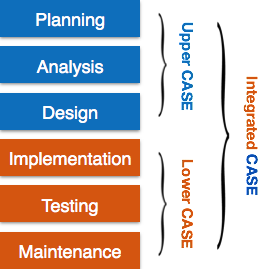
Upper Case Tools – Upper CASE tools are used in planning, analysis and design stages of SDLC.
Lower Case Tools – Lower CASE tools are used in implementation, testing and maintenance.
Integrated Case Tools – Integrated CASE tools are helpful in all the stages of SDLC, from Requirement gathering to Testing and documentation.
CASE tools can be grouped together if they have similar functionality, process activities and capability of getting integrated with other tools.
Scope of Case Tools
The scope of CASE tools goes throughout the SDLC.
Case Tools Types
Now we briefly go through various CASE tools
Diagram tools
These tools are used to represent system components, data and control flow among various software components and system structure in a graphical form. For example, Flow Chart Maker tool for creating state-of-the-art flowcharts.
Process Modeling Tools
Process modeling is method to create software process model, which is used to develop the software. Process modeling tools help the managers to choose a process model or modify it as per the requirement of software product. For example, EPF Composer
Project Management Tools
These tools are used for project planning, cost and effort estimation, project scheduling and resource planning. Managers have to strictly comply project execution with every mentioned step in software project management. Project management tools help in storing and sharing project information in real-time throughout the organization. For example, Creative Pro Office, Trac Project, Basecamp.
Documentation Tools
Documentation in a software project starts prior to the software process, goes throughout all phases of SDLC and after the completion of the project.
Documentation tools generate documents for technical users and end users. Technical users are mostly in-house professionals of the development team who refer to system manual, reference manual, training manual, installation manuals etc. The end user documents describe the functioning and how-to of the system such as user manual. For example, Doxygen, DrExplain, Adobe RoboHelp for documentation.
Analysis Tools
These tools help to gather requirements, automatically check for any inconsistency, inaccuracy in the diagrams, data redundancies or erroneous omissions. For example, Accept 360, Accompa, CaseComplete for requirement analysis, Visible Analyst for total analysis.
Design Tools
These tools help software designers to design the block structure of the software, which may further be broken down in smaller modules using refinement techniques. These tools provides detailing of each module and interconnections among modules. For example, Animated Software Design
Configuration Management Tools
An instance of software is released under one version. Configuration Management tools deal with
Version and revision management
Baseline configuration management
Change control management
CASE tools help in this by automatic tracking, version management and release management. For example, Fossil, Git, Accu REV.
Change Control Tools
These tools are considered as a part of configuration management tools. They deal with changes made to the software after its baseline is fixed or when the software is first released. CASE tools automate change tracking, file management, code management and more. It also helps in enforcing change policy of the organization.
Programming Tools
These tools consist of programming environments like IDE (Integrated Development Environment), in-built modules library and simulation tools. These tools provide comprehensive aid in building software product and include features for simulation and testing. For example, Cscope to search code in C, Eclipse.
Prototyping Tools
Software prototype is simulated version of the intended software product. Prototype provides initial look and feel of the product and simulates few aspect of actual product.
Prototyping CASE tools essentially come with graphical libraries. They can create hardware independent user interfaces and design. These tools help us to build rapid prototypes based on existing information. In addition, they provide simulation of software prototype. For example, Serena prototype composer, Mockup Builder.
Web Development Tools
These tools assist in designing web pages with all allied elements like forms, text, script, graphic and so on. Web tools also provide live preview of what is being developed and how will it look after completion. For example, Fontello, Adobe Edge Inspect, Foundation 3, Brackets.
Quality Assurance Tools
Quality assurance in a software organization is monitoring the engineering process and methods adopted to develop the software product in order to ensure conformance of quality as per organization standards. QA tools consist of configuration and change control tools and software testing tools. For example, SoapTest, AppsWatch, JMeter.
Maintenance Tools
Software maintenance includes modifications in the software product after it is delivered. Automatic logging and error reporting techniques, automatic error ticket generation and root cause Analysis are few CASE tools, which help software organization in maintenance phase of SDLC. For example, Bugzilla for defect tracking, HP Quality Center.
Software maintenance is widely accepted part of SDLC now a days. It stands for all the modifications and updations done after the delivery of software product. There are number of reasons, why modifications are required, some of them are briefly mentioned below:
Market Conditions – Policies, which changes over the time, such as taxation and newly introduced constraints like, how to maintain bookkeeping, may trigger need for modification.
Client Requirements – Over the time, customer may ask for new features or functions in the software.
Host Modifications – If any of the hardware and/or platform (such as operating system) of the target host changes, software changes are needed to keep adaptability.
Organization Changes – If there is any business level change at client end, such as reduction of organization strength, acquiring another company, organization venturing into new business, need to modify in the original software may arise.
Types of maintenance
In a software lifetime, type of maintenance may vary based on its nature. It may be just a routine maintenance tasks as some bug discovered by some user or it may be a large event in itself based on maintenance size or nature. Following are some types of maintenance based on their characteristics:
Corrective Maintenance – This includes modifications and updations done in order to correct or fix problems, which are either discovered by user or concluded by user error reports.
Adaptive Maintenance – This includes modifications and updations applied to keep the software product up-to date and tuned to the ever changing world of technology and business environment.
Perfective Maintenance – This includes modifications and updates done in order to keep the software usable over long period of time. It includes new features, new user requirements for refining the software and improve its reliability and performance.
Preventive Maintenance – This includes modifications and updations to prevent future problems of the software. It aims to attend problems, which are not significant at this moment but may cause serious issues in future.
Cost of Maintenance
Reports suggest that the cost of maintenance is high. A study on estimating software maintenance found that the cost of maintenance is as high as 67% of the cost of entire software process cycle.
On an average, the cost of software maintenance is more than 50% of all SDLC phases. There are various factors, which trigger maintenance cost go high, such as:
Real-world factors affecting Maintenance Cost
The standard age of any software is considered up to 10 to 15 years.
Older softwares, which were meant to work on slow machines with less memory and storage capacity cannot keep themselves challenging against newly coming enhanced softwares on modern hardware.
As technology advances, it becomes costly to maintain old software.
Most maintenance engineers are newbie and use trial and error method to rectify problem.
Often, changes made can easily hurt the original structure of the software, making it hard for any subsequent changes.
Changes are often left undocumented which may cause more conflicts in future.
Software-end factors affecting Maintenance Cost
Structure of Software Program
Programming Language
Dependence on external environment
Staff reliability and availability
Maintenance Activities
IEEE provides a framework for sequential maintenance process activities. It can be used in iterative manner and can be extended so that customized items and processes can be included.
These activities go hand-in-hand with each of the following phase:
Identification & Tracing – It involves activities pertaining to identification of requirement of modification or maintenance. It is generated by user or system may itself report via logs or error messages.Here, the maintenance type is classified also.
Analysis – The modification is analyzed for its impact on the system including safety and security implications. If probable impact is severe, alternative solution is looked for. A set of required modifications is then materialized into requirement specifications. The cost of modification/maintenance is analyzed and estimation is concluded.
Design – New modules, which need to be replaced or modified, are designed against requirement specifications set in the previous stage. Test cases are created for validation and verification.
Implementation – The new modules are coded with the help of structured design created in the design step.Every programmer is expected to do unit testing in parallel.
System Testing – Integration testing is done among newly created modules. Integration testing is also carried out between new modules and the system. Finally the system is tested as a whole, following regressive testing procedures.
Acceptance Testing – After testing the system internally, it is tested for acceptance with the help of users. If at this state, user complaints some issues they are addressed or noted to address in next iteration.
Delivery – After acceptance test, the system is deployed all over the organization either by small update package or fresh installation of the system. The final testing takes place at client end after the software is delivered.Training facility is provided if required, in addition to the hard copy of user manual.
Maintenance management – Configuration management is an essential part of system maintenance. It is aided with version control tools to control versions, semi-version or patch management.
Software Re-engineering
When we need to update the software to keep it to the current market, without impacting its functionality, it is called software re-engineering. It is a thorough process where the design of software is changed and programs are re-written.
Legacy software cannot keep tuning with the latest technology available in the market. As the hardware become obsolete, updating of software becomes a headache. Even if software grows old with time, its functionality does not.
For example, initially Unix was developed in assembly language. When language C came into existence, Unix was re-engineered in C, because working in assembly language was difficult.
Other than this, sometimes programmers notice that few parts of software need more maintenance than others and they also need re-engineering.
Re-Engineering Process
Decide what to re-engineer. Is it whole software or a part of it?
Perform Reverse Engineering, in order to obtain specifications of existing software.
Restructure Program if required. For example, changing function-oriented programs into object-oriented programs.
Re-structure data as required.
Apply Forward engineering concepts in order to get re-engineered software.
There are few important terms used in Software re-engineering
Reverse Engineering
It is a process to achieve system specification by thoroughly analyzing, understanding the existing system. This process can be seen as reverse SDLC model, i.e. we try to get higher abstraction level by analyzing lower abstraction levels.
An existing system is previously implemented design, about which we know nothing. Designers then do reverse engineering by looking at the code and try to get the design. With design in hand, they try to conclude the specifications. Thus, going in reverse from code to system specification.
Program Restructuring
It is a process to re-structure and re-construct the existing software. It is all about re-arranging the source code, either in same programming language or from one programming language to a different one. Restructuring can have either source code-restructuring and data-restructuring or both.
Re-structuring does not impact the functionality of the software but enhance reliability and maintainability. Program components, which cause errors very frequently can be changed, or updated with re-structuring.
The dependability of software on obsolete hardware platform can be removed via re-structuring.
Forward Engineering
Forward engineering is a process of obtaining desired software from the specifications in hand which were brought down by means of reverse engineering. It assumes that there was some software engineering already done in the past.
Forward engineering is same as software engineering process with only one difference it is carried out always after reverse engineering.
Component reusability
A component is a part of software program code, which executes an independent task in the system. It can be a small module or sub-system itself.
Example
The login procedures used on the web can be considered as components, printing system in software can be seen as a component of the software.
Components have high cohesion of functionality and lower rate of coupling, i.e. they work independently and can perform tasks without depending on other modules.
In OOP, the objects are designed are very specific to their concern and have fewer chances to be used in some other software.
In modular programming, the modules are coded to perform specific tasks which can be used across number of other software programs.
There is a whole new vertical, which is based on re-use of software component, and is known as Component Based Software Engineering (CBSE).
Re-use can be done at various levels
Application level – Where an entire application is used as sub-system of new software.
Component level – Where sub-system of an application is used.
Modules level – Where functional modules are re-used.Software components provide interfaces, which can be used to establish communication among different components.
Reuse Process
Two kinds of method can be adopted: either by keeping requirements same and adjusting components or by keeping components same and modifying requirements.
Requirement Specification – The functional and non-functional requirements are specified, which a software product must comply to, with the help of existing system, user input or both.
Design – This is also a standard SDLC process step, where requirements are defined in terms of software parlance. Basic architecture of system as a whole and its sub-systems are created.
Specify Components – By studying the software design, the designers segregate the entire system into smaller components or sub-systems. One complete software design turns into a collection of a huge set of components working together.
Search Suitable Components – The software component repository is referred by designers to search for the matching component, on the basis of functionality and intended software requirements..
Incorporate Components – All matched components are packed together to shape them as complete software.