Author: saqibkhan

  • this keyword in Java

    There can be a lot of usage of Java this keyword. In Java, this is a reference variable that refers to the current object.
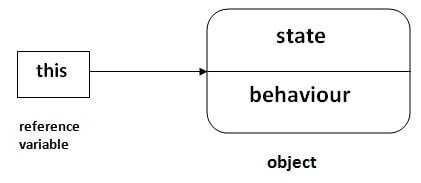
    java this keyword

    Usage of Java this keyword

    Here is given the 6 usage of java this keyword.

    1. this can be used to refer current class instance variable.
    2. this can be used to invoke current class method (implicitly)
    3. this() can be used to invoke current class constructor.
    4. this can be passed as an argument in the method call.
    5. this can be passed as argument in the constructor call.
    6. this can be used to return the current class instance from the method.

    Suggestion: If you are beginner to java, lookup only three usages of this keyword.
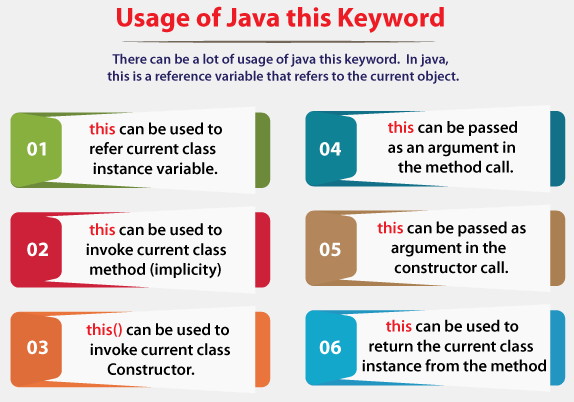
    Usage of Java this keyword

    1) this: to refer current class instance variable

    The this keyword can be used to refer current class instance variable. If there is ambiguity between the instance variables and parameters, this keyword resolves the problem of ambiguity.

    Understanding the problem without this keyword

    Let’s understand the problem if we don’t use this keyword by the example given below:

    class Student{  
    
    int rollno;  
    
    String name;  
    
    float fee;  
    
    Student(int rollno,String name,float fee){  
    
    rollno=rollno;  
    
    name=name;  
    
    fee=fee;  
    
    }  
    
    void display(){System.out.println(rollno+" "+name+" "+fee);}  
    
    }  
    
    class TestThis1{  
    
    public static void main(String args[]){  
    
    Student s1=new Student(111,"ankit",5000f);  
    
    Student s2=new Student(112,"sumit",6000f);  
    
    s1.display();  
    
    s2.display();  
    
    }}

    Output:

    0 null 0.0
    0 null 0.0
    

    In the above example, parameters (formal arguments) and instance variables are same. So, we are using this keyword to distinguish local variable and instance variable.

    Solution of the above problem by this keyword

    class Student{  
    
    int rollno;  
    
    String name;  
    
    float fee;  
    
    Student(int rollno,String name,float fee){  
    
    this.rollno=rollno;  
    
    this.name=name;  
    
    this.fee=fee;  
    
    }  
    
    void display(){System.out.println(rollno+" "+name+" "+fee);}  
    
    }  


    class TestThis2{  
    
    public static void main(String args[]){  
    
    Student s1=new Student(111,"ankit",5000f);  
    
    Student s2=new Student(112,"sumit",6000f);  
    
    s1.display();  
    
    s2.display();  
    
    }}

    Output:

    111 ankit 5000.0
    112 sumit 6000.0
    

    If local variables(formal arguments) and instance variables are different, there is no need to use this keyword like in the following program:

    Program where this keyword is not required

    class Student{  
    
    int rollno;  
    
    String name;  
    
    float fee;  
    
    Student(int r,String n,float f){  
    
    rollno=r;  
    
    name=n;  
    
    fee=f;  
    
    }  
    
    void display(){System.out.println(rollno+" "+name+" "+fee);}  
    
    }  


    class TestThis3{  
    
    public static void main(String args[]){  
    
    Student s1=new Student(111,"ankit",5000f);  
    
    Student s2=new Student(112,"sumit",6000f);  
    
    s1.display();  
    
    s2.display();  
    
    }} 

    Output:

    111 ankit 5000.0
    112 sumit 6000.0
    

    It is better approach to use meaningful names for variables. So we use same name for instance variables and parameters in real time, and always use this keyword.

    2) this: to invoke current class method

    You may invoke the method of the current class by using the this keyword. If you don’t use the this keyword, compiler automatically adds this keyword while invoking the method. Let’s see the example
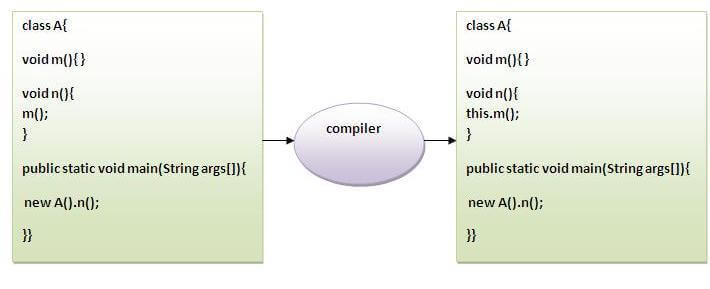
    this keyword
    class A{  
    
    void m(){System.out.println("hello m");}  
    
    void n(){  
    
    System.out.println("hello n");  
    
    //m();//same as this.m()  
    
    this.m();  
    
    }  
    
    }  
    
    class TestThis4{  
    
    public static void main(String args[]){  
    
    A a=new A();  
    
    a.n();  
    
    }}

    Output:

    hello n
    hello m
    

    3) this() : to invoke current class constructor

    The this() constructor call can be used to invoke the current class constructor. It is used to reuse the constructor. In other words, it is used for constructor chaining.

    Calling default constructor from parameterized constructor:

    class A{  
    
    A(){System.out.println("hello a");}  
    
    A(int x){  
    
    this();  
    
    System.out.println(x);  
    
    }  
    
    }  
    
    class TestThis5{  
    
    public static void main(String args[]){  
    
    A a=new A(10);  
    
    }}

    Output:

    hello a
    10
    

    Calling parameterized constructor from default constructor:

    class A{  
    
    A(){  
    
    this(5);  
    
    System.out.println("hello a");  
    
    }  
    
    A(int x){  
    
    System.out.println(x);  
    
    }  
    
    }  
    
    class TestThis6{  
    
    public static void main(String args[]){  
    
    A a=new A();  
    
    }}

    Output:

    5
    hello a
    

    Real usage of this() constructor call

    The this() constructor call should be used to reuse the constructor from the constructor. It maintains the chain between the constructors i.e. it is used for constructor chaining. Let’s see the example given below that displays the actual use of this keyword.

    class Student{  
    
    int rollno;  
    
    String name,course;  
    
    float fee;  
    
    Student(int rollno,String name,String course){  
    
    this.rollno=rollno;  
    
    this.name=name;  
    
    this.course=course;  
    
    }  
    
    Student(int rollno,String name,String course,float fee){  
    
    this(rollno,name,course);//reusing constructor  
    
    this.fee=fee;  
    
    }  
    
    void display(){System.out.println(rollno+" "+name+" "+course+" "+fee);}  
    
    }  
    
    class TestThis7{  
    
    public static void main(String args[]){  
    
    Student s1=new Student(111,"ankit","java");  
    
    Student s2=new Student(112,"sumit","java",6000f);  
    
    s1.display();  
    
    s2.display();  
    
    }}

    Output:

    111 ankit java 0.0
    112 sumit java 6000.0
    

    Rule: Call to this() must be the first statement in constructor.

    class Student{  
    
    int rollno;  
    
    String name,course;  
    
    float fee;  
    
    Student(int rollno,String name,String course){  
    
    this.rollno=rollno;  
    
    this.name=name;  
    
    this.course=course;  
    
    }  
    
    Student(int rollno,String name,String course,float fee){  
    
    this.fee=fee;  
    
    this(rollno,name,course);//C.T.Error  
    
    }  
    
    void display(){System.out.println(rollno+" "+name+" "+course+" "+fee);}  
    
    }  
    
    class TestThis8{  
    
    public static void main(String args[]){  
    
    Student s1=new Student(111,"ankit","java");  
    
    Student s2=new Student(112,"sumit","java",6000f);  
    
    s1.display();  
    
    s2.display();  
    
    }}

    Output:

    Compile Time Error: Call to this must be first statement in constructor
    

    4) this: to pass as an argument in the method

    The this keyword can also be passed as an argument in the method. It is mainly used in the event handling. Let’s see the example:

    class S2{  
    
      void m(S2 obj){  
    
      System.out.println("method is invoked");  
    
      }  
    
      void p(){  
    
      m(this);  
    
      }  
    
      public static void main(String args[]){  
    
      S2 s1 = new S2();  
    
      s1.p();  
    
      }  
    
    }

    Output:

    method is invoked
    

    Application of this that can be passed as an argument:

    In event handling (or) in a situation where we have to provide reference of a class to another one. It is used to reuse one object in many methods.

    5) this: to pass as argument in the constructor call

    We can pass the this keyword in the constructor also. It is useful if we have to use one object in multiple classes. Let’s see the example:

    class B{  
    
      A4 obj;  
    
      B(A4 obj){  
    
        this.obj=obj;  
    
      }  
    
      void display(){  
    
        System.out.println(obj.data);//using data member of A4 class  
    
      }  
    
    }  


    class A4{  
    
      int data=10;  
    
      A4(){  
    
       B b=new B(this);  
    
       b.display();  
    
      }  
    
      public static void main(String args[]){  
    
       A4 a=new A4();  
    
      }  
    
    } 
    Output:10
    

    6) this keyword can be used to return current class instance

    We can return this keyword as an statement from the method. In such case, return type of the method must be the class type (non-primitive). Let’s see the example:

    Syntax of this that can be returned as a statement

    return_type method_name(){  
    
    return this;  
    
    }  

      Example of this keyword that you return as a statement from the method

      class A{  
      
      A getA(){  
      
      return this;  
      
      }  
      
      void msg(){System.out.println("Hello java");}  
      
      }  
      
      class Test1{  
      
      public static void main(String args[]){  
      
      new A().getA().msg();  
      
      }  
      
      }

      Output:

      Hello java
      

      Proving this keyword

      Let’s prove that this keyword refers to the current class instance variable. In this program, we are printing the reference variable and this, output of both variables are same.

      class A5{  
      
      void m(){  
      
      System.out.println(this);//prints same reference ID  
      
      }  
      
      public static void main(String args[]){  
      
      A5 obj=new A5();  
      
      System.out.println(obj);//prints the reference ID  
      
      obj.m();  
      
      }  
      
      }

      Output:

      A5@22b3ea59
      A5@22b3ea59
      
    1. Java static keyword

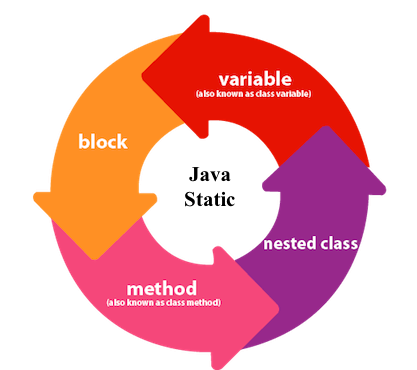
      The static keyword in Java is used for memory management mainly. We can apply static keyword with variables, methods, blocks and nested classes. The static keyword belongs to the class than an instance of the class.

      The static can be:

      1. Variable (also known as a class variable)
      2. Method (also known as a class method)
      3. Block
      4. Nested class
      Static in Java

      1) Java static variable

      If you declare any variable as static, it is known as a static variable.

      • The static variable can be used to refer to the common property of all objects (which is not unique for each object), for example, the company name of employees, college name of students, etc.
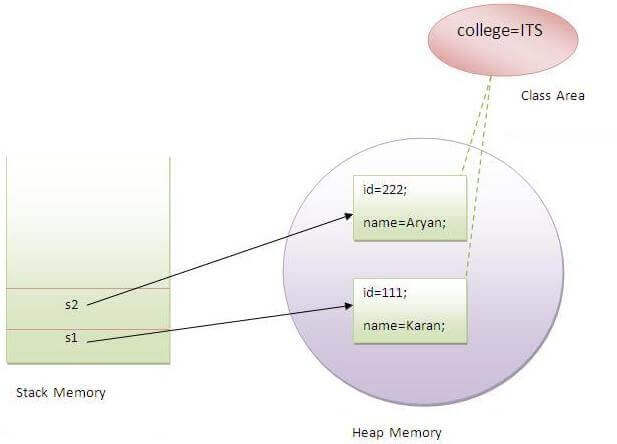
      • The static variable gets memory only once in the class area at the time of class loading.

      Advantages of static variable

      It makes your program memory efficient (i.e., it saves memory).

      Understanding the problem without static variable

      class Student{  
      
           int rollno;  
      
           String name;  
      
           String college="ITS";  
      
      } 

        Suppose there are 500 students in my college, now all instance data members will get memory each time when the object is created. All students have its unique rollno and name, so instance data member is good in such case. Here, “college” refers to the common property of all objects. If we make it static, this field will get the memory only once.

        Java static property is shared to all objects.

        Example of static variable

        //Java Program to demonstrate the use of static variable  
        
        class Student{  
        
           int rollno;//instance variable  
        
           String name;  
        
           static String college ="ITS";//static variable  
        
           //constructor  
        
           Student(int r, String n){  
        
           rollno = r;  
        
           name = n;  
        
           }  
        
           //method to display the values  
        
           void display (){System.out.println(rollno+" "+name+" "+college);}  
        
        }  
        
        //Test class to show the values of objects  
        
        public class TestStaticVariable1{  
        
         public static void main(String args[]){  
        
         Student s1 = new Student(111,"Karan");  
        
         Student s2 = new Student(222,"Aryan");  
        
         //we can change the college of all objects by the single line of code  
        
         //Student.college="BBDIT";  
        
         s1.display();  
        
         s2.display();  
        
         }  
        
        }

        Output:

        111 Karan ITS
        222 Aryan ITS
        
        Static Variable

        Program of the counter without static variable

        In this example, we have created an instance variable named count which is incremented in the constructor. Since instance variable gets the memory at the time of object creation, each object will have the copy of the instance variable. If it is incremented, it won’t reflect other objects. So each object will have the value 1 in the count variable.

        //Java Program to demonstrate the use of an instance variable  
        
        //which get memory each time when we create an object of the class.  
        
        class Counter{  
        
        int count=0;//will get memory each time when the instance is created  


        Counter(){  
        
        count++;//incrementing value  
        
        System.out.println(count);  
        
        }  


        public static void main(String args[]){  
        
        //Creating objects  
        
        Counter c1=new Counter();  
        
        Counter c2=new Counter();  
        
        Counter c3=new Counter();  
        
        }  
        
        }

        Output:

        1
        1
        1
        

        Program of counter by static variable

        As we have mentioned above, static variable will get the memory only once, if any object changes the value of the static variable, it will retain its value.

        //Java Program to illustrate the use of static variable which  
        
        //is shared with all objects.  
        
        class Counter2{  
        
        static int count=0;//will get memory only once and retain its value  


        Counter2(){  
        
        count++;//incrementing the value of static variable  
        
        System.out.println(count);  
        
        }  


        public static void main(String args[]){  
        
        //creating objects  
        
        Counter2 c1=new Counter2();  
        
        Counter2 c2=new Counter2();  
        
        Counter2 c3=new Counter2();  
        
        }  
        
        }

        Output:

        1
        2
        3
        

        2) Java static method

        If you apply static keyword with any method, it is known as static method.

        • A static method belongs to the class rather than the object of a class.
        • A static method can be invoked without the need for creating an instance of a class.
        • A static method can access static data member and can change the value of it.

        Example of static method

        //Java Program to demonstrate the use of a static method.  
        
        class Student{  
        
             int rollno;  
        
             String name;  
        
             static String college = "ITS";  
        
             //static method to change the value of static variable  
        
             static void change(){  
        
             college = "BBDIT";  
        
             }  
        
             //constructor to initialize the variable  
        
             Student(int r, String n){  
        
             rollno = r;  
        
             name = n;  
        
             }  
        
             //method to display values  
        
             void display(){System.out.println(rollno+" "+name+" "+college);}  
        
        }  
        
        //Test class to create and display the values of object  
        
        public class TestStaticMethod{  
        
            public static void main(String args[]){  
        
            Student.change();//calling change method  
        
            //creating objects  
        
            Student s1 = new Student(111,"Karan");  
        
            Student s2 = new Student(222,"Aryan");  
        
            Student s3 = new Student(333,"Sonoo");  
        
            //calling display method  
        
            s1.display();  
        
            s2.display();  
        
            s3.display();  
        
            }  
        
        }
        Output:
        111 Karan BBDIT
        
           222 Aryan BBDIT
           333 Sonoo BBDIT

        Another example of a static method that performs a normal calculation

        //Java Program to get the cube of a given number using the static method  


        class Calculate{  
        
          static int cube(int x){  
        
          return x*x*x;  
        
          }  


          public static void main(String args[]){  
        
          int result=Calculate.cube(5);  
        
          System.out.println(result);  
        
          }  
        
        }
        Output:125
        

        Restrictions for the static method

        There are two main restrictions for the static method. They are:

        1. The static method can not use non static data member or call non-static method directly.
        2. this and super cannot be used in static context.
        class A{  
        
         int a=40;//non static  


         public static void main(String args[]){  
        
          System.out.println(a);  
        
         }  
        
        }
        Output:Compile Time Error
        

        Q) Why is the Java main method static?

        Ans) It is because the object is not required to call a static method. If it were a non-static method, JVM creates an object first then call main() method that will lead the problem of extra memory allocation.

        3) Java static block

        • Is used to initialize the static data member.
        • It is executed before the main method at the time of classloading.

        Example of static block

        class A2{  
        
          static{System.out.println("static block is invoked");}  
        
          public static void main(String args[]){  
        
           System.out.println("Hello main");  
        
          }  
        
        }
        Output:static block is invoked
        
           Hello main

        Q) Can we execute a program without main() method?

        Ans) No, one of the ways was the static block, but it was possible till JDK 1.6. Since JDK 1.7, it is not possible to execute a Java class without the main method.

        class A3{  
        
          static{  
        
          System.out.println("static block is invoked");  
        
          System.exit(0);  
        
          }  
        
        }

        Output:

        static block is invoked
        

        Since JDK 1.7 and above, output would be:

        Error: Main method not found in class A3, please define the main method as:
           public static void main(String[] args)
        or a JavaFX application class must extend javafx.application.Application
        
      1. Constructors in Java

        In Java, a constructor is a block of codes similar to the method. It is called when an instance of the class is created. At the time of calling constructor, memory for the object is allocated in the memory.

        It is a special type of method which is used to initialize the object.

        Every time an object is created using the new() keyword, at least one constructor is called.

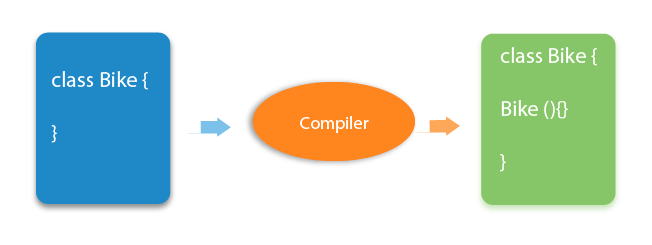
        It calls a default constructor if there is no constructor available in the class. In such case, Java compiler provides a default constructor by default.

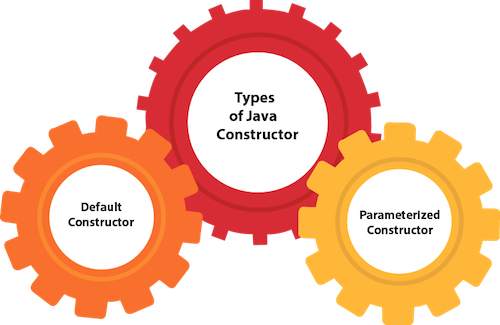
        There are two types of constructors in Java: no-arg constructor, and parameterized constructor.

        Note: It is called constructor because it constructs the values at the time of object creation. It is not necessary to write a constructor for a class. It is because java compiler creates a default constructor if your class doesn’t have any.

        Rules for creating Java constructor

        There are two rules defined for the constructor.

        1. Constructor name must be the same as its class name
        2. A Constructor must have no explicit return type
        3. A Java constructor cannot be abstract, static, final, and synchronized

        Note: We can use access modifiers while declaring a constructor. It controls the object creation. In other words, we can have private, protected, public or default constructor in Java.

        Types of Java constructors

        There are two types of constructors in Java:

        1. Default constructor (no-arg constructor)
        2. Parameterized constructor
        Java Constructors

        Java Default Constructor

        A constructor is called “Default Constructor” when it doesn’t have any parameter.

        Syntax of default constructor:

        <class_name>(){}  

        Example of default constructor

        In this example, we are creating the no-arg constructor in the Bike class. It will be invoked at the time of object creation.
        //Java Program to create and call a default constructor  
        
        class Bike1{  
        
        //creating a default constructor  
        
        Bike1(){System.out.println("Bike is created");}  
        
        //main method  
        
        public static void main(String args[]){  
        
        //calling a default constructor  
        
        Bike1 b=new Bike1();  
        
        }  
        
        }

        Output:

        Bike is created
        

        Rule: If there is no constructor in a class, compiler automatically creates a default constructor.

        Java default constructor

        Q) What is the purpose of a default constructor?

        The default constructor is used to provide the default values to the object like 0, null, etc., depending on the type.

        Example of default constructor that displays the default values

        //Let us see another example of default constructor  
        
        //which displays the default values  
        
        class Student3{  
        
        int id;  
        
        String name;  
        
        //method to display the value of id and name  
        
        void display(){System.out.println(id+" "+name);}  


        public static void main(String args[]){  
        
        //creating objects  
        
        Student3 s1=new Student3();  
        
        Student3 s2=new Student3();  
        
        //displaying values of the object  
        
        s1.display();  
        
        s2.display();  
        
        }  
        
        }

        Output:

        0 null
        0 null
        

        Explanation:In the above class,you are not creating any constructor so compiler provides you a default constructor. Here 0 and null values are provided by default constructor.

        Java Parameterized Constructor

        A constructor which has a specific number of parameters is called a parameterized constructor.

        Why use the parameterized constructor?

        The parameterized constructor is used to provide different values to distinct objects. However, you can provide the same values also.

        Example of parameterized constructor

        In this example, we have created the constructor of Student class that have two parameters. We can have any number of parameters in the constructor.

        //Java Program to demonstrate the use of the parameterized constructor.  
        
        class Student4{  
        
            int id;  
        
            String name;  
        
            //creating a parameterized constructor  
        
            Student4(int i,String n){  
        
            id = i;  
        
            name = n;  
        
            }  
        
            //method to display the values  
        
            void display(){System.out.println(id+" "+name);}  


            public static void main(String args[]){  
        
            //creating objects and passing values  
        
            Student4 s1 = new Student4(111,"Karan");  
        
            Student4 s2 = new Student4(222,"Aryan");  
        
            //calling method to display the values of object  
        
            s1.display();  
        
            s2.display();  
        
           }  
        
        }

        Output:

        111 Karan
        222 Aryan
        

        Constructor Overloading in Java

        In Java, a constructor is just like a method but without return type. It can also be overloaded like Java methods.

        Constructor overloading in Java is a technique of having more than one constructor with different parameter lists. They are arranged in a way that each constructor performs a different task. They are differentiated by the compiler by the number of parameters in the list and their types.

        Example of Constructor Overloading

        //Java program to overload constructors  
        
        class Student5{  
        
            int id;  
        
            String name;  
        
            int age;  
        
            //creating two arg constructor  
        
            Student5(int i,String n){  
        
            id = i;  
        
            name = n;  
        
            }  
        
            //creating three arg constructor  
        
            Student5(int i,String n,int a){  
        
            id = i;  
        
            name = n;  
        
            age=a;  
        
            }  
        
            void display(){System.out.println(id+" "+name+" "+age);}  


            public static void main(String args[]){  
        
            Student5 s1 = new Student5(111,"Karan");  
        
            Student5 s2 = new Student5(222,"Aryan",25);  
        
            s1.display();  
        
            s2.display();  
        
           }  
        
        }

        Output:

        111 Karan 0
        222 Aryan 25
        

        Difference between constructor and method in Java

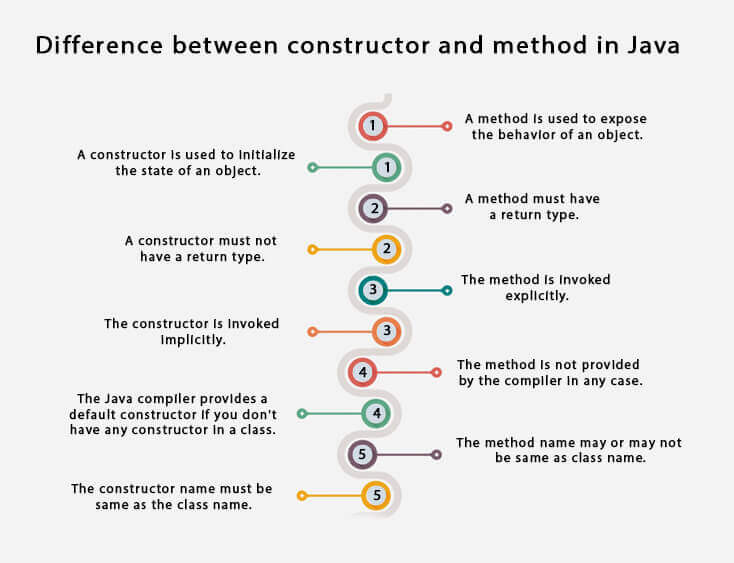
        There are many differences between constructors and methods. They are given below.

        Java ConstructorJava Method
        A constructor is used to initialize the state of an object.A method is used to expose the behavior of an object.
        A constructor must not have a return type.A method must have a return type.
        The constructor is invoked implicitly.The method is invoked explicitly.
        The Java compiler provides a default constructor if you don’t have any constructor in a class.The method is not provided by the compiler in any case.
        The constructor name must be same as the class name.The method name may or may not be same as the class name.
        Java Constructors vs. Methods

        Java Copy Constructor

        There is no copy constructor in Java. However, we can copy the values from one object to another like copy constructor in C++.

        There are many ways to copy the values of one object into another in Java. They are:

        • By constructor
        • By assigning the values of one object into another
        • By clone() method of Object class

        In this example, we are going to copy the values of one object into another using Java constructor.

        //Java program to initialize the values from one object to another object.  
        
        class Student6{  
        
            int id;  
        
            String name;  
        
            //constructor to initialize integer and string  
        
            Student6(int i,String n){  
        
            id = i;  
        
            name = n;  
        
            }  
        
            //constructor to initialize another object  
        
            Student6(Student6 s){  
        
            id = s.id;  
        
            name =s.name;  
        
            }  
        
            void display(){System.out.println(id+" "+name);}  


            public static void main(String args[]){  
        
            Student6 s1 = new Student6(111,"Karan");  
        
            Student6 s2 = new Student6(s1);  
        
            s1.display();  
        
            s2.display();  
        
           }  
        
        }

        Output:

        111 Karan
        111 Karan
        

        Copying values without constructor

        We can copy the values of one object into another by assigning the objects values to another object. In this case, there is no need to create the constructor.

        class Student7{  
        
            int id;  
        
            String name;  
        
            Student7(int i,String n){  
        
            id = i;  
        
            name = n;  
        
            }  
        
            Student7(){}  
        
            void display(){System.out.println(id+" "+name);}  


            public static void main(String args[]){  
        
            Student7 s1 = new Student7(111,"Karan");  
        
            Student7 s2 = new Student7();  
        
            s2.id=s1.id;  
        
            s2.name=s1.name;  
        
            s1.display();  
        
            s2.display();  
        
           }  
        
        }

        Output:

        111 Karan
        111 Karan
        
      2. Method in Java

        In general, a method is a way to perform some task. Similarly, the method in Java is a collection of instructions that performs a specific task. It provides the reusability of code. We can also easily modify code using methods. In this section, we will learn what is a method in Java, types of methods, method declaration, and how to call a method in Java.

        What is a method in Java?

        method is a block of code or collection of statements or a set of code grouped together to perform a certain task or operation. It is used to achieve the reusability of code. We write a method once and use it many times. We do not require to write code again and again. It also provides the easy modification and readability of code, just by adding or removing a chunk of code. The method is executed only when we call or invoke it.

        The most important method in Java is the main() method. If you want to read more about the main() method, go through the link https://www.javatpoint.com/java-main-method.

        Method Declaration

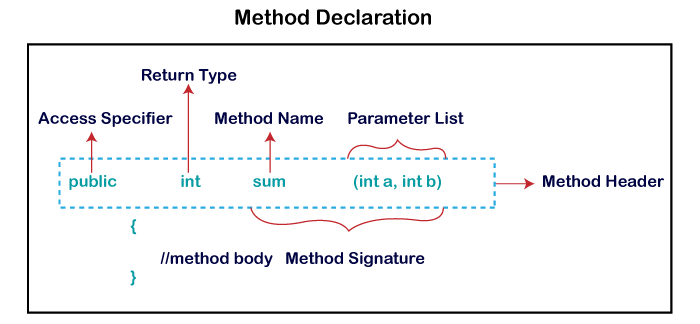
        The method declaration provides information about method attributes, such as visibility, return-type, name, and arguments. It has six components that are known as method header, as we have shown in the following figure.

        Method in Java

        Method Signature: Every method has a method signature. It is a part of the method declaration. It includes the method name and parameter list.

        Access Specifier: Access specifier or modifier is the access type of the method. It specifies the visibility of the method. Java provides four types of access specifier:

        • Public: The method is accessible by all classes when we use public specifier in our application.
        • Private: When we use a private access specifier, the method is accessible only in the classes in which it is defined.
        • Protected: When we use protected access specifier, the method is accessible within the same package or subclasses in a different package.
        • Default: When we do not use any access specifier in the method declaration, Java uses default access specifier by default. It is visible only from the same package only.

        Return Type: Return type is a data type that the method returns. It may have a primitive data type, object, collection, void, etc. If the method does not return anything, we use void keyword.

        Method Name: It is a unique name that is used to define the name of a method. It must be corresponding to the functionality of the method. Suppose, if we are creating a method for subtraction of two numbers, the method name must be subtraction(). A method is invoked by its name.

        Parameter List: It is the list of parameters separated by a comma and enclosed in the pair of parentheses. It contains the data type and variable name. If the method has no parameter, left the parentheses blank.

        Method Body: It is a part of the method declaration. It contains all the actions to be performed. It is enclosed within the pair of curly braces.

        Naming a Method

        While defining a method, remember that the method name must be a verb and start with a lowercase letter. If the method name has more than two words, the first name must be a verb followed by adjective or noun. In the multi-word method name, the first letter of each word must be in uppercase except the first word. For example:

        Single-word method name: sum(), area()

        Multi-word method name: areaOfCircle(), stringComparision()

        It is also possible that a method has the same name as another method name in the same class, it is known as method overloading.

        Types of Method

        There are two types of methods in Java:

        • Predefined Method
        • User-defined Method

        Predefined Method

        In Java, predefined methods are the method that is already defined in the Java class libraries is known as predefined methods. It is also known as the standard library method or built-in method. We can directly use these methods just by calling them in the program at any point. Some pre-defined methods are length(), equals(), compareTo(), sqrt(), etc. When we call any of the predefined methods in our program, a series of codes related to the corresponding method runs in the background that is already stored in the library.

        Each and every predefined method is defined inside a class. Such as print() method is defined in the java.io.PrintStream class. It prints the statement that we write inside the method. For example, print(“Java”), it prints Java on the console.

        Let’s see an example of the predefined method.

        Demo.java

        public class Demo   
        
        {  
        
        public static void main(String[] args)   
        
        {  
        
        // using the max() method of Math class  
        
        System.out.print("The maximum number is: " + Math.max(9,7));  
        
        }  
        
        }  

          Output:

          The maximum number is: 9
          

          In the above example, we have used three predefined methods main(), print(), and max(). We have used these methods directly without declaration because they are predefined. The print() method is a method of PrintStream class that prints the result on the console. The max() method is a method of the Math class that returns the greater of two numbers.

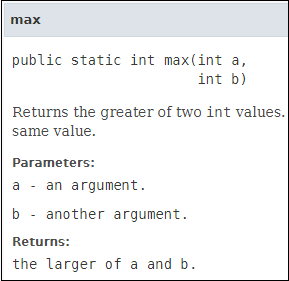
          We can also see the method signature of any predefined method by using the link https://docs.oracle.com/. When we go through the link and see the max() method signature, we find the following:

          Method in Java

          In the above method signature, we see that the method signature has access specifier public, non-access modifier static, return type int, method name max(), parameter list (int a, int b). In the above example, instead of defining the method, we have just invoked the method. This is the advantage of a predefined method. It makes programming less complicated.

          Similarly, we can also see the method signature of the print() method.

          User-defined Method

          The method written by the user or programmer is known as a user-defined method. These methods are modified according to the requirement.

          How to Create a User-defined Method

          Let’s create a user defined method that checks the number is even or odd. First, we will define the method.

          //user defined method  
          
          public static void findEvenOdd(int num)  
          
          {  
          
          //method body  
          
          if(num%2==0)   
          
          System.out.println(num+" is even");   
          
          else   
          
          System.out.println(num+" is odd");  
          
          } 

            We have defined the above method named findevenodd(). It has a parameter num of type int. The method does not return any value that’s why we have used void. The method body contains the steps to check the number is even or odd. If the number is even, it prints the number is even, else prints the number is odd.

            How to Call or Invoke a User-defined Method

            Once we have defined a method, it should be called. The calling of a method in a program is simple. When we call or invoke a user-defined method, the program control transfer to the called method.

            import java.util.Scanner;  
            
            public class EvenOdd  
            
            {  
            
            public static void main (String args[])  
            
            {  
            
            //creating Scanner class object     
            
            Scanner scan=new Scanner(System.in);  
            
            System.out.print("Enter the number: ");  
            
            //reading value from the user  
            
            int num=scan.nextInt();  
            
            //method calling  
            
            findEvenOdd(num);  
            
            }

            In the above code snippet, as soon as the compiler reaches at line findEvenOdd(num), the control transfer to the method and gives the output accordingly.

            Let’s combine both snippets of codes in a single program and execute it.

            EvenOdd.java

            import java.util.Scanner;  
            
            public class EvenOdd  
            
            {  
            
            public static void main (String args[])  
            
            {  
            
            //creating Scanner class object     
            
            Scanner scan=new Scanner(System.in);  
            
            System.out.print("Enter the number: ");  
            
            //reading value from user  
            
            int num=scan.nextInt();  
            
            //method calling  
            
            findEvenOdd(num);  
            
            }  
            
            //user defined method  
            
            public static void findEvenOdd(int num)  
            
            {  
            
            //method body  
            
            if(num%2==0)   
            
            System.out.println(num+" is even");   
            
            else   
            
            System.out.println(num+" is odd");  
            
            }  
            
            }  

              Output 1:

              Enter the number: 12
              12 is even
              

              Output 2:

              Enter the number: 99
              99 is odd
              

              Let’s see another program that return a value to the calling method.

              In the following program, we have defined a method named add() that sum up the two numbers. It has two parameters n1 and n2 of integer type. The values of n1 and n2 correspond to the value of a and b, respectively. Therefore, the method adds the value of a and b and store it in the variable s and returns the sum.

              Addition.java

              public class Addition   
              
              {  
              
              public static void main(String[] args)   
              
              {  
              
              int a = 19;  
              
              int b = 5;  
              
              //method calling  
              
              int c = add(a, b);   //a and b are actual parameters  
              
              System.out.println("The sum of a and b is= " + c);  
              
              }  
              
              //user defined method  
              
              public static int add(int n1, int n2)   //n1 and n2 are formal parameters  
              
              {  
              
              int s;  
              
              s=n1+n2;  
              
              return s; //returning the sum  
              
              }  
              
              }  

                Output:

                The sum of a and b is= 24
                

                Static Method

                A method that has static keyword is known as static method. In other words, a method that belongs to a class rather than an instance of a class is known as a static method. We can also create a static method by using the keyword static before the method name.

                The main advantage of a static method is that we can call it without creating an object. It can access static data members and also change the value of it. It is used to create an instance method. It is invoked by using the class name. The best example of a static method is the main() method.

                Example of static method

                Display.java

                public class Display  
                
                {  
                
                public static void main(String[] args)   
                
                {  
                
                show();  
                
                }  
                
                static void show()   
                
                {  
                
                System.out.println("It is an example of static method.");  
                
                }  
                
                } 

                  Output:

                  It is an example of a static method.
                  

                  Instance Method

                  The method of the class is known as an instance method. It is a non-static method defined in the class. Before calling or invoking the instance method, it is necessary to create an object of its class. Let’s see an example of an instance method.

                  InstanceMethodExample.java

                   public class InstanceMethodExample  
                  
                  {  
                  
                  public static void main(String [] args)  
                  
                  {  
                  
                  //Creating an object of the class  
                  
                  InstanceMethodExample obj = new InstanceMethodExample();  
                  
                  //invoking instance method   
                  
                  System.out.println("The sum is: "+obj.add(12, 13));  
                  
                  }  
                  
                  int s;  
                  
                  //user-defined method because we have not used static keyword  
                  
                  public int add(int a, int b)  
                  
                  {  
                  
                  s = a+b;  
                  
                  //returning the sum  
                  
                  return s;  
                  
                  }  
                  
                  }

                    Output:

                    The sum is: 25
                    

                    There are two types of instance method:

                    • Accessor Method
                    • Mutator Method

                    Accessor Method: The method(s) that reads the instance variable(s) is known as the accessor method. We can easily identify it because the method is prefixed with the word get. It is also known as getters. It returns the value of the private field. It is used to get the value of the private field.

                    Example

                    public int getId()    
                    
                    {    
                    
                    return Id;    
                    
                    }   

                      Mutator Method: The method(s) read the instance variable(s) and also modify the values. We can easily identify it because the method is prefixed with the word set. It is also known as setters or modifiers. It does not return anything. It accepts a parameter of the same data type that depends on the field. It is used to set the value of the private field.

                      Example

                      public void setRoll(int roll)   
                      
                      {  
                      
                      this.roll = roll;  
                      
                      } 

                        Example of accessor and mutator method

                        Student.java

                        public class Student   
                        
                        {  
                        
                        private int roll;  
                        
                        private String name;  
                        
                        public int getRoll()    //accessor method  
                        
                        {  
                        
                        return roll;  
                        
                        }  
                        
                        public void setRoll(int roll) //mutator method  
                        
                        {  
                        
                        this.roll = roll;  
                        
                        }  
                        
                        public String getName()   
                        
                        {  
                        
                        return name;  
                        
                        }  
                        
                        public void setName(String name)   
                        
                        {  
                        
                        this.name = name;  
                        
                        }  
                        
                        public void display()  
                        
                        {  
                        
                        System.out.println("Roll no.: "+roll);  
                        
                        System.out.println("Student name: "+name);  
                        
                        }  
                        
                        }  

                          Abstract Method

                          The method that does not has method body is known as abstract method. In other words, without an implementation is known as abstract method. It always declares in the abstract class. It means the class itself must be abstract if it has abstract method. To create an abstract method, we use the keyword abstract.

                          Syntax

                          abstract void method_name();  

                          Example of abstract method

                          Demo.java

                          abstract class Demo //abstract class  
                          
                          {  
                          
                          //abstract method declaration  
                          
                          abstract void display();  
                          
                          }  
                          
                          public class MyClass extends Demo  
                          
                          {  
                          
                          //method impelmentation  
                          
                          void display()  
                          
                          {  
                          
                          System.out.println("Abstract method?");  
                          
                          }  
                          
                          public static void main(String args[])  
                          
                          {  
                          
                          //creating object of abstract class  
                          
                          Demo obj = new MyClass();  
                          
                          //invoking abstract method  
                          
                          obj.display();  
                          
                          }  
                          
                          }  

                            Output:

                            Abstract method...
                            
                          1. Objects and Classes in Java

                            In this page, we will learn about Java objects and classes. In object-oriented programming technique, we design a program using objects and classes.

                            An object in Java is the physical as well as a logical entity, whereas, a class in Java is a logical entity only.

                            What is an object in Java

                            object in Java

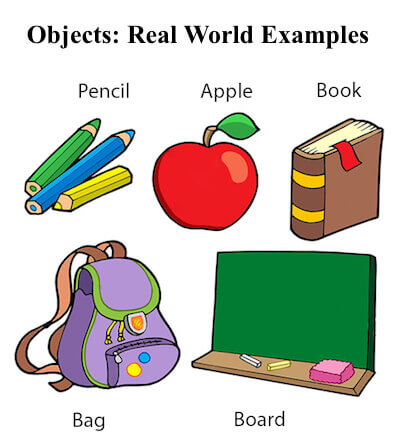
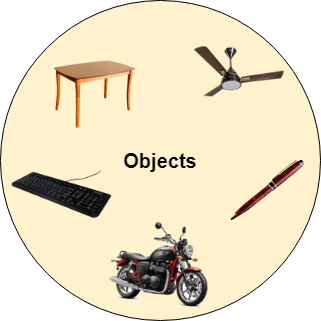
                            An entity that has state and behavior is known as an object e.g., chair, bike, marker, pen, table, car, etc. It can be physical or logical (tangible and intangible). The example of an intangible object is the banking system.

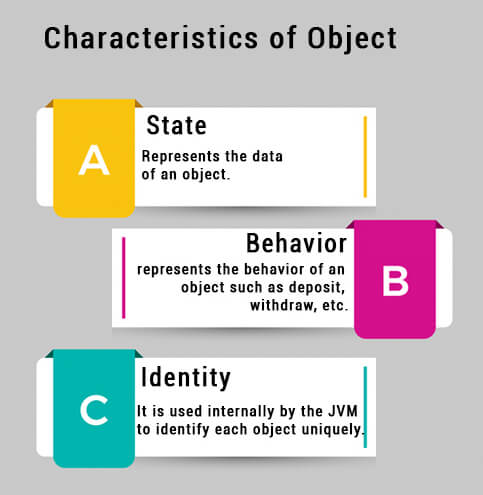
                            An object has three characteristics:

                            • State: represents the data (value) of an object.
                            • Behavior: represents the behavior (functionality) of an object such as deposit, withdraw, etc.
                            • Identity: An object identity is typically implemented via a unique ID. The value of the ID is not visible to the external user. However, it is used internally by the JVM to identify each object uniquely.
                            Characteristics of Object in Java

                            For Example, Pen is an object. Its name is Reynolds; color is white, known as its state. It is used to write, so writing is its behavior.

                            An object is an instance of a class. A class is a template or blueprint from which objects are created. So, an object is the instance(result) of a class.

                            Object Definitions:

                            • An object is a real-world entity.
                            • An object is a runtime entity.
                            • The object is an entity which has state and behavior.
                            • The object is an instance of a class.

                            What is a class in Java

                            A class is a group of objects which have common properties. It is a template or blueprint from which objects are created. It is a logical entity. It can’t be physical.

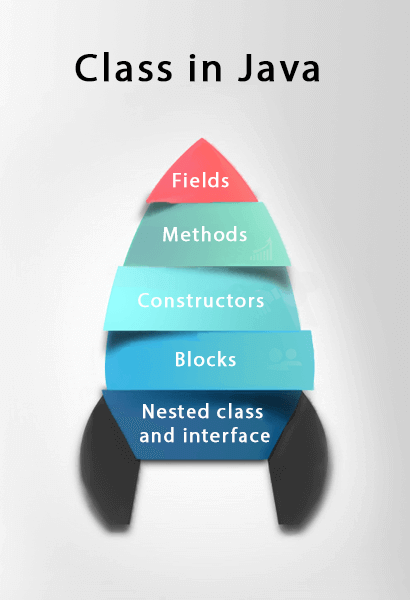
                            A class in Java can contain:

                            • Fields
                            • Methods
                            • Constructors
                            • Blocks
                            • Nested class and interface
                            Class in Java

                            Syntax to declare a class:

                            class <class_name>{  
                            
                                field;  
                            
                                method;  
                            
                            }  

                              Instance variable in Java

                              A variable which is created inside the class but outside the method is known as an instance variable. Instance variable doesn’t get memory at compile time. It gets memory at runtime when an object or instance is created. That is why it is known as an instance variable.

                              Method in Java

                              In Java, a method is like a function which is used to expose the behavior of an object.

                              Advantage of Method

                              • Code Reusability
                              • Code Optimization

                              new keyword in Java

                              The new keyword is used to allocate memory at runtime. All objects get memory in Heap memory area.

                              Object and Class Example: main within the class

                              In this example, we have created a Student class which has two data members id and name. We are creating the object of the Student class by new keyword and printing the object’s value.

                              Here, we are creating a main() method inside the class.

                              File: Student.java

                              //Java Program to illustrate how to define a class and fields  
                              
                              //Defining a Student class.  
                              
                              class Student{  
                              
                               //defining fields  
                              
                               int id;//field or data member or instance variable  
                              
                               String name;  
                              
                               //creating main method inside the Student class  
                              
                               public static void main(String args[]){  
                              
                                //Creating an object or instance  
                              
                                Student s1=new Student();//creating an object of Student  
                              
                                //Printing values of the object  
                              
                                System.out.println(s1.id);//accessing member through reference variable  
                              
                                System.out.println(s1.name);  
                              
                               }  
                              
                              }

                              Output:

                              0 
                              null
                              

                              Object and Class Example: main outside the class

                              In real time development, we create classes and use it from another class. It is a better approach than previous one. Let’s see a simple example, where we are having main() method in another class.

                              We can have multiple classes in different Java files or single Java file. If you define multiple classes in a single Java source file, it is a good idea to save the file name with the class name which has main() method.

                              File: TestStudent1.java

                              //Java Program to demonstrate having the main method in   
                              
                              //another class  
                              
                              //Creating Student class.  
                              
                              class Student{  
                              
                               int id;  
                              
                               String name;  
                              
                              }  
                              
                              //Creating another class TestStudent1 which contains the main method  
                              
                              class TestStudent1{  
                              
                               public static void main(String args[]){  
                              
                                Student s1=new Student();  
                              
                                System.out.println(s1.id);  
                              
                                System.out.println(s1.name);  
                              
                               }  
                              
                              }

                              Output:

                              0 
                              null
                              

                              3 Ways to initialize object

                              There are 3 ways to initialize object in Java.

                              1. By reference variable
                              2. By method
                              3. By constructor

                              1) Object and Class Example: Initialization through reference

                              Initializing an object means storing data into the object. Let’s see a simple example where we are going to initialize the object through a reference variable.

                              File: TestStudent2.java

                              class Student{  
                              
                               int id;  
                              
                               String name;  
                              
                              }  
                              
                              class TestStudent2{  
                              
                               public static void main(String args[]){  
                              
                                Student s1=new Student();  
                              
                                s1.id=101;  
                              
                                s1.name="Sonoo";  
                              
                                System.out.println(s1.id+" "+s1.name);//printing members with a white space  
                              
                               }  
                              
                              }

                              Output:

                              101 Sonoo
                              

                              We can also create multiple objects and store information in it through reference variable.

                              File: TestStudent3.java

                              class Student{  
                              
                               int id;  
                              
                               String name;  
                              
                              }  
                              
                              class TestStudent3{  
                              
                               public static void main(String args[]){  
                              
                                //Creating objects  
                              
                                Student s1=new Student();  
                              
                                Student s2=new Student();  
                              
                                //Initializing objects  
                              
                                s1.id=101;  
                              
                                s1.name="Sonoo";  
                              
                                s2.id=102;  
                              
                                s2.name="Amit";  
                              
                                //Printing data  
                              
                                System.out.println(s1.id+" "+s1.name);  
                              
                                System.out.println(s2.id+" "+s2.name);  
                              
                               }  
                              
                              }

                              Output:

                              101 Sonoo
                              102 Amit
                              

                              2) Object and Class Example: Initialization through method

                              In this example, we are creating the two objects of Student class and initializing the value to these objects by invoking the insertRecord method. Here, we are displaying the state (data) of the objects by invoking the displayInformation() method.

                              File: TestStudent4.java

                              class Student{  
                              
                               int rollno;  
                              
                               String name;  
                              
                               void insertRecord(int r, String n){  
                              
                                rollno=r;  
                              
                                name=n;  
                              
                               }  
                              
                               void displayInformation(){System.out.println(rollno+" "+name);}  
                              
                              }  
                              
                              class TestStudent4{  
                              
                               public static void main(String args[]){  
                              
                                Student s1=new Student();  
                              
                                Student s2=new Student();  
                              
                                s1.insertRecord(111,"Karan");  
                              
                                s2.insertRecord(222,"Aryan");  
                              
                                s1.displayInformation();  
                              
                                s2.displayInformation();  
                              
                               }  
                              
                              }

                              Output:

                              111 Karan
                              222 Aryan
                              
                              Object in Java with values

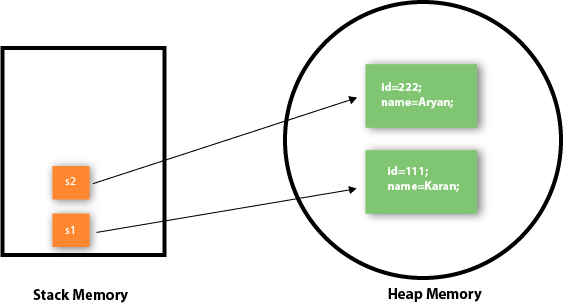
                              As you can see in the above figure, object gets the memory in heap memory area. The reference variable refers to the object allocated in the heap memory area. Here, s1 and s2 both are reference variables that refer to the objects allocated in memory.


                              3) Object and Class Example: Initialization through a constructor

                              We will learn about constructors in Java later.

                              Object and Class Example: Employee

                              Let’s see an example where we are maintaining records of employees.

                              File: TestEmployee.java

                              class Employee{  
                              
                                  int id;  
                              
                                  String name;  
                              
                                  float salary;  
                              
                                  void insert(int i, String n, float s) {  
                              
                                      id=i;  
                              
                                      name=n;  
                              
                                      salary=s;  
                              
                                  }  
                              
                                  void display(){System.out.println(id+" "+name+" "+salary);}  
                              
                              }  
                              
                              public class TestEmployee {  
                              
                              public static void main(String[] args) {  
                              
                                  Employee e1=new Employee();  
                              
                                  Employee e2=new Employee();  
                              
                                  Employee e3=new Employee();  
                              
                                  e1.insert(101,"ajeet",45000);  
                              
                                  e2.insert(102,"irfan",25000);  
                              
                                  e3.insert(103,"nakul",55000);  
                              
                                  e1.display();  
                              
                                  e2.display();  
                              
                                  e3.display();  
                              
                              }  
                              
                              }  

                              Output:

                              101 ajeet 45000.0
                              102 irfan 25000.0
                              103 nakul 55000.0
                              

                              Object and Class Example: Rectangle

                              There is given another example that maintains the records of Rectangle class.

                              File: TestRectangle1.java

                              class Rectangle{  
                              
                               int length;  
                              
                               int width;  
                              
                               void insert(int l, int w){  
                              
                                length=l;  
                              
                                width=w;  
                              
                               }  
                              
                               void calculateArea(){System.out.println(length*width);}  
                              
                              }  
                              
                              class TestRectangle1{  
                              
                               public static void main(String args[]){  
                              
                                Rectangle r1=new Rectangle();  
                              
                                Rectangle r2=new Rectangle();  
                              
                                r1.insert(11,5);  
                              
                                r2.insert(3,15);  
                              
                                r1.calculateArea();  
                              
                                r2.calculateArea();  
                              
                              }  
                              
                              }

                              Output:

                              55 
                              45     
                              

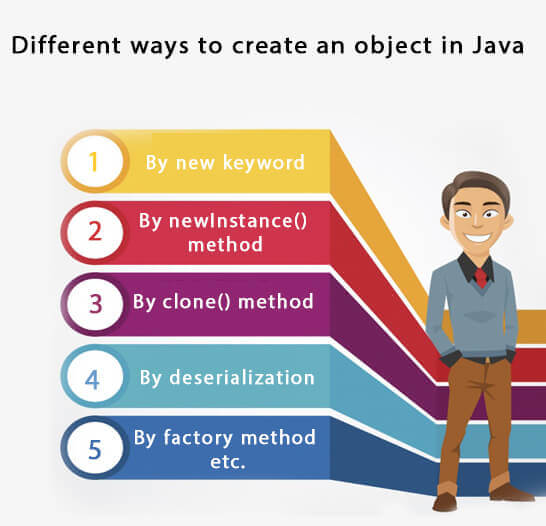
                              What are the different ways to create an object in Java?

                              There are many ways to create an object in java. They are:

                              • By new keyword
                              • By newInstance() method
                              • By clone() method
                              • By deserialization
                              • By factory method etc.

                              We will learn these ways to create object later.

                              Different Ways to create an Object in Java

                              Anonymous object

                              Anonymous simply means nameless. An object which has no reference is known as an anonymous object. It can be used at the time of object creation only.

                              If you have to use an object only once, an anonymous object is a good approach. For example:

                              new Calculation();//anonymous object  

                              Calling method through a reference:

                              Calculation c=new Calculation();  
                              
                              c.fact(5); 

                                Calling method through an anonymous object

                                new Calculation().fact(5);  

                                Let’s see the full example of an anonymous object in Java.

                                class Calculation{  
                                
                                 void fact(int  n){  
                                
                                  int fact=1;  
                                
                                  for(int i=1;i<=n;i++){  
                                
                                   fact=fact*i;  
                                
                                  }  
                                
                                 System.out.println("factorial is "+fact);  
                                
                                }  
                                
                                public static void main(String args[]){  
                                
                                 new Calculation().fact(5);//calling method with anonymous object  
                                
                                }  
                                
                                } 

                                  Output:

                                  Factorial is 120
                                  

                                  Creating multiple objects by one type only

                                  We can create multiple objects by one type only as we do in case of primitives.

                                  Initialization of primitive variables:

                                  int a=10, b=20;  

                                  Initialization of refernce variables:

                                  Rectangle r1=new Rectangle(), r2=new Rectangle();//creating two objects  

                                  Let’s see the example:

                                  //Java Program to illustrate the use of Rectangle class which  
                                  
                                  //has length and width data members  
                                  
                                  class Rectangle{  
                                  
                                   int length;  
                                  
                                   int width;  
                                  
                                   void insert(int l,int w){  
                                  
                                    length=l;  
                                  
                                    width=w;  
                                  
                                   }  
                                  
                                   void calculateArea(){System.out.println(length*width);}  
                                  
                                  }  
                                  
                                  class TestRectangle2{  
                                  
                                   public static void main(String args[]){  
                                  
                                    Rectangle r1=new Rectangle(),r2=new Rectangle();//creating two objects  
                                  
                                    r1.insert(11,5);  
                                  
                                    r2.insert(3,15);  
                                  
                                    r1.calculateArea();  
                                  
                                    r2.calculateArea();  
                                  
                                  }  
                                  
                                  }

                                  Output:

                                  55 
                                  45     
                                  

                                  Real World Example: Account

                                  File: TestAccount.java

                                  //Java Program to demonstrate the working of a banking-system  
                                  
                                  //where we deposit and withdraw amount from our account.  
                                  
                                  //Creating an Account class which has deposit() and withdraw() methods  
                                  
                                  class Account{  
                                  
                                  int acc_no;  
                                  
                                  String name;  
                                  
                                  float amount;  
                                  
                                  //Method to initialize object  
                                  
                                  void insert(int a,String n,float amt){  
                                  
                                  acc_no=a;  
                                  
                                  name=n;  
                                  
                                  amount=amt;  
                                  
                                  }  
                                  
                                  //deposit method  
                                  
                                  void deposit(float amt){  
                                  
                                  amount=amount+amt;  
                                  
                                  System.out.println(amt+" deposited");  
                                  
                                  }  
                                  
                                  //withdraw method  
                                  
                                  void withdraw(float amt){  
                                  
                                  if(amount<amt){  
                                  
                                  System.out.println("Insufficient Balance");  
                                  
                                  }else{  
                                  
                                  amount=amount-amt;  
                                  
                                  System.out.println(amt+" withdrawn");  
                                  
                                  }  
                                  
                                  }  
                                  
                                  //method to check the balance of the account  
                                  
                                  void checkBalance(){System.out.println("Balance is: "+amount);}  
                                  
                                  //method to display the values of an object  
                                  
                                  void display(){System.out.println(acc_no+" "+name+" "+amount);}  
                                  
                                  }  
                                  
                                  //Creating a test class to deposit and withdraw amount  
                                  
                                  class TestAccount{  
                                  
                                  public static void main(String[] args){  
                                  
                                  Account a1=new Account();  
                                  
                                  a1.insert(832345,"Ankit",1000);  
                                  
                                  a1.display();  
                                  
                                  a1.checkBalance();  
                                  
                                  a1.deposit(40000);  
                                  
                                  a1.checkBalance();  
                                  
                                  a1.withdraw(15000);  
                                  
                                  a1.checkBalance();  
                                  
                                  }}

                                  Output:

                                  832345 Ankit 1000.0
                                  Balance is: 1000.0
                                  40000.0 deposited
                                  Balance is: 41000.0
                                  15000.0 withdrawn
                                  Balance is: 26000.0
                                  
                                1. Java Naming Convention

                                  Java naming convention is a rule to follow as you decide what to name your identifiers such as class, package, variable, constant, method, etc.

                                  But, it is not forced to follow. So, it is known as convention not rule. These conventions are suggested by several Java communities such as Sun Microsystems and Netscape.

                                  All the classes, interfaces, packages, methods and fields of Java programming language are given according to the Java naming convention. If you fail to follow these conventions, it may generate confusion or erroneous code.

                                  Advantage of Naming Conventions in Java

                                  By using standard Java naming conventions, you make your code easier to read for yourself and other programmers. Readability of Java program is very important. It indicates that less time is spent to figure out what the code does.

                                  Naming Conventions of the Different Identifiers

                                  The following table shows the popular conventions used for the different identifiers.

                                  Identifiers TypeNaming RulesExamples
                                  ClassIt should start with the uppercase letter.
                                  It should be a noun such as Color, Button, System, Thread, etc.
                                  Use appropriate words, instead of acronyms.
                                  public class Employee
                                  {
                                  //code snippet
                                  }
                                  InterfaceIt should start with the uppercase letter.
                                  It should be an adjective such as Runnable, Remote, ActionListener.
                                  Use appropriate words, instead of acronyms.
                                  interface Printable
                                  {
                                  //code snippet
                                  }
                                  MethodIt should start with lowercase letter.
                                  It should be a verb such as main(), print(), println().
                                  If the name contains multiple words, start it with a lowercase letter followed by an uppercase letter such as actionPerformed().
                                  class Employee
                                  {
                                  // method
                                  void draw()
                                  {
                                  //code snippet
                                  }
                                  }
                                  VariableIt should start with a lowercase letter such as id, name.
                                  It should not start with the special characters like & (ampersand), $ (dollar), _ (underscore).
                                  If the name contains multiple words, start it with the lowercase letter followed by an uppercase letter such as firstName, lastName.
                                  Avoid using one-character variables such as x, y, z.
                                  class Employee
                                  {
                                  // variable
                                  int id;
                                  //code snippet
                                  }
                                  PackageIt should be a lowercase letter such as java, lang.
                                  If the name contains multiple words, it should be separated by dots (.) such as java.util, java.lang.
                                  //package
                                  package com.javatpoint;
                                  class Employee
                                  {
                                  //code snippet
                                  }
                                  ConstantIt should be in uppercase letters such as RED, YELLOW.
                                  If the name contains multiple words, it should be separated by an underscore(_) such as MAX_PRIORITY.
                                  It may contain digits but not as the first letter.
                                  class Employee
                                  {
                                  //constant
                                  static final int MIN_AGE = 18;
                                  //code snippet
                                  }

                                  CamelCase in Java naming conventions

                                  Java follows camel-case syntax for naming the class, interface, method, and variable.

                                  If the name is combined with two words, the second word will start with uppercase letter always such as actionPerformed(), firstName, ActionEvent, ActionListener, etc.

                                2. Java OOPs Concepts

                                  In this page, we will learn about the basics of OOPs. Object-Oriented Programming is a paradigm that provides many concepts, such as inheritancedata bindingpolymorphism, etc.

                                  Simula is considered the first object-oriented programming language. The programming paradigm where everything is represented as an object is known as a truly object-oriented programming language.

                                  Smalltalk is considered the first truly object-oriented programming language.

                                  The popular object-oriented languages are Java, C#, PHP, Python, C++, etc.

                                  The main aim of object-oriented programming is to implement real-world entities, for example, object, classes, abstraction, inheritance, polymorphism, etc.

                                  OOPs (Object-Oriented Programming System)

                                  Object means a real-world entity such as a pen, chair, table, computer, watch, etc. Object-Oriented Programming is a methodology or paradigm to design a program using classes and objects. It simplifies software development and maintenance by providing some concepts:

                                  • Object
                                  • Class
                                  • Inheritance
                                  • Polymorphism
                                  • Abstraction
                                  • Encapsulation

                                  Apart from these concepts, there are some other terms which are used in Object-Oriented design:

                                  • Coupling
                                  • Cohesion
                                  • Association
                                  • Aggregation
                                  • Composition
                                  Java OOPs Concepts

                                  Object

                                  Java Object

                                  Any entity that has state and behavior is known as an object. For example, a chair, pen, table, keyboard, bike, etc. It can be physical or logical.

                                  An Object can be defined as an instance of a class. An object contains an address and takes up some space in memory. Objects can communicate without knowing the details of each other’s data or code. The only necessary thing is the type of message accepted and the type of response returned by the objects.

                                  Example: A dog is an object because it has states like color, name, breed, etc. as well as behaviors like wagging the tail, barking, eating, etc.

                                  Class

                                  Collection of objects is called class. It is a logical entity.

                                  A class can also be defined as a blueprint from which you can create an individual object. Class doesn’t consume any space.

                                  Inheritance

                                  When one object acquires all the properties and behaviors of a parent object, it is known as inheritance. It provides code reusability. It is used to achieve runtime polymorphism.

                                  Polymorphism in Java

                                  Polymorphism

                                  If one task is performed in different ways, it is known as polymorphism. For example: to convince the customer differently, to draw something, for example, shape, triangle, rectangle, etc.

                                  In Java, we use method overloading and method overriding to achieve polymorphism.

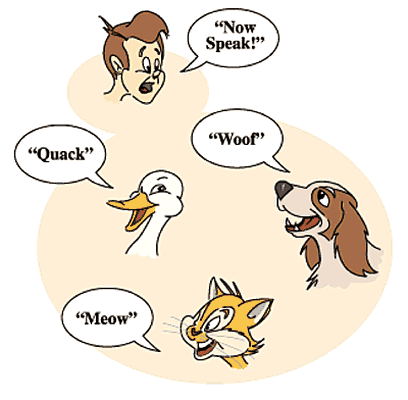
                                  Another example can be to speak something; for example, a cat speaks meow, dog barks woof, etc.

                                  Abstraction

                                  Hiding internal details and showing functionality is known as abstraction. For example phone call, we don’t know the internal processing.

                                  In Java, we use abstract class and interface to achieve abstraction.

                                  Encapsulation in Java OOPs Concepts

                                  Encapsulation

                                  Binding (or wrapping) code and data together into a single unit are known as encapsulation. For example, a capsule, it is wrapped with different medicines.

                                  A java class is the example of encapsulation. Java bean is the fully encapsulated class because all the data members are private here.

                                  Coupling

                                  Coupling refers to the knowledge or information or dependency of another class. It arises when classes are aware of each other. If a class has the details information of another class, there is strong coupling. In Java, we use private, protected, and public modifiers to display the visibility level of a class, method, and field. You can use interfaces for the weaker coupling because there is no concrete implementation.

                                  Cohesion

                                  Cohesion refers to the level of a component which performs a single well-defined task. A single well-defined task is done by a highly cohesive method. The weakly cohesive method will split the task into separate parts. The java.io package is a highly cohesive package because it has I/O related classes and interface. However, the java.util package is a weakly cohesive package because it has unrelated classes and interfaces.

                                  Association

                                  Association represents the relationship between the objects. Here, one object can be associated with one object or many objects. There can be four types of association between the objects:

                                  • One to One
                                  • One to Many
                                  • Many to One, and
                                  • Many to Many

                                  Let’s understand the relationship with real-time examples. For example, One country can have one prime minister (one to one), and a prime minister can have many ministers (one to many). Also, many MP’s can have one prime minister (many to one), and many ministers can have many departments (many to many).

                                  Association can be undirectional or bidirectional.

                                  Aggregation

                                  Aggregation is a way to achieve Association. Aggregation represents the relationship where one object contains other objects as a part of its state. It represents the weak relationship between objects. It is also termed as a has-a relationship in Java. Like, inheritance represents the is-a relationship. It is another way to reuse objects.

                                  Composition

                                  The composition is also a way to achieve Association. The composition represents the relationship where one object contains other objects as a part of its state. There is a strong relationship between the containing object and the dependent object. It is the state where containing objects do not have an independent existence. If you delete the parent object, all the child objects will be deleted automatically.

                                  Advantage of OOPs over Procedure-oriented programming language

                                  1) OOPs makes development and maintenance easier, whereas, in a procedure-oriented programming language, it is not easy to manage if code grows as project size increases.

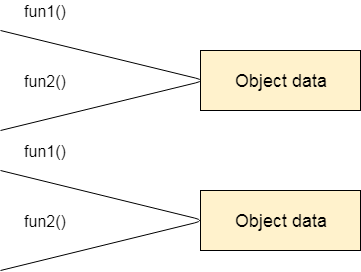
                                  2) OOPs provides data hiding, whereas, in a procedure-oriented programming language, global data can be accessed from anywhere.

                                  Global Data

                                  Figure: Data Representation in Procedure-Oriented Programming

                                  Object Data

                                  Figure: Data Representation in Object-Oriented Programming

                                  3) OOPs provides the ability to simulate real-world event much more effectively. We can provide the solution of real word problem if we are using the Object-Oriented Programming language.

                                  What is the difference between an object-oriented programming language and object-based programming language?

                                  Object-based programming language follows all the features of OOPs except Inheritance. JavaScript and VBScript are examples of object-based programming languages.

                                3. Java Comments

                                  The Java comments are the statements in a program that are not executed by the compiler and interpreter.

                                  Why do we use comments in a code?

                                  • Comments are used to make the program more readable by adding the details of the code.
                                  • It makes easy to maintain the code and to find the errors easily.
                                  • The comments can be used to provide information or explanation about the variable, method, class, or any statement.
                                  • It can also be used to prevent the execution of program code while testing the alternative code.

                                  Types of Java Comments

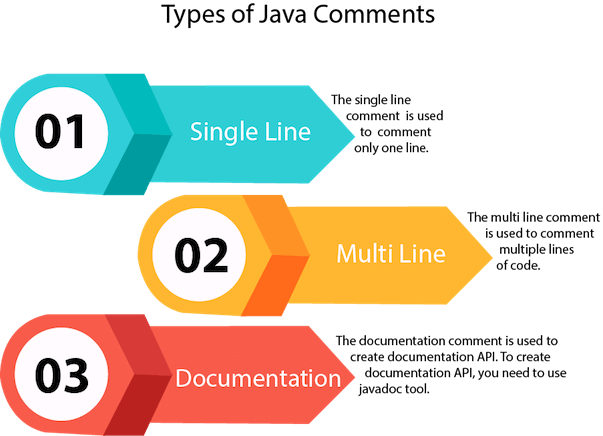
                                  There are three types of comments in Java.

                                  1. Single Line Comment
                                  2. Multi Line Comment
                                  3. Documentation Comment
                                  Java Types of Comments

                                  1) Java Single Line Comment

                                  The single-line comment is used to comment only one line of the code. It is the widely used and easiest way of commenting the statements.

                                  Single line comments starts with two forward slashes (//). Any text in front of // is not executed by Java.

                                  Syntax:

                                  //This is single line comment  

                                  Let’s use single line comment in a Java program.

                                  CommentExample1.java

                                  public class CommentExample1 {    
                                  
                                  public static void main(String[] args) {    
                                  
                                  int i=10; // i is a variable with value 10  
                                  
                                  System.out.println(i);  //printing the variable i  
                                  
                                  }    
                                  
                                  }  

                                    Output:

                                    10
                                    

                                    2) Java Multi Line Comment

                                    The multi-line comment is used to comment multiple lines of code. It can be used to explain a complex code snippet or to comment multiple lines of code at a time (as it will be difficult to use single-line comments there).

                                    Multi-line comments are placed between /* and */. Any text between /* and */ is not executed by Java.

                                    Syntax:

                                    /*  
                                    
                                    This   
                                    
                                    is   
                                    
                                    multi line   
                                    
                                    comment  
                                    
                                    */   

                                      Let’s use multi-line comment in a Java program.

                                      CommentExample2.java

                                      public class CommentExample2 {    
                                      
                                      public static void main(String[] args) {    
                                      
                                      /* Let's declare and  
                                      
                                       print variable in java. */    
                                      
                                        int i=10;    
                                      
                                          System.out.println(i);    
                                      
                                      /* float j = 5.9; 
                                      
                                          float k = 4.4; 
                                      
                                          System.out.println( j + k ); */    
                                      
                                      }    
                                      
                                      }    

                                        Output:

                                        10
                                        

                                        Note: Usually // is used for short comments and /* */ is used for longer comments.

                                        3) Java Documentation Comment

                                        Documentation comments are usually used to write large programs for a project or software application as it helps to create documentation API. These APIs are needed for reference, i.e., which classes, methods, arguments, etc., are used in the code.

                                        To create documentation API, we need to use the javadoc tool. The documentation comments are placed between /** and */.

                                        Syntax:

                                        /**  
                                        
                                        * 
                                        
                                        *We can use various tags to depict the parameter 
                                        
                                        *or heading or author name 
                                        
                                        *We can also use HTML tags   
                                        
                                        * 
                                        
                                        */    

                                          javadoc tags

                                          Some of the commonly used tags in documentation comments:

                                          TagSyntaxDescription
                                          {@docRoot}{@docRoot}to depict relative path to root directory of generated document from any page.
                                          @author@author name – textTo add the author of the class.
                                          @code{@code text}To show the text in code font without interpreting it as html markup or nested javadoc tag.
                                          @version@version version-textTo specify “Version” subheading and version-text when -version option is used.
                                          @since@since releaseTo add “Since” heading with since text to generated documentation.
                                          @param@param parameter-name descriptionTo add a parameter with given name and description to ‘Parameters’ section.
                                          @return@return descriptionRequired for every method that returns something (except void)

                                          Let’s use the Javadoc tag in a Java program.

                                          Calculate.java

                                          import java.io.*;  


                                          /** 
                                          
                                           * <h2> Calculation of numbers </h2> 
                                          
                                           * This program implements an application 
                                          
                                           * to perform operation such as addition of numbers  
                                          
                                           * and print the result  
                                          
                                           * <p> 
                                          
                                           * <b>Note:</b> Comments make the code readable and  
                                          
                                           * easy to understand. 
                                          
                                           *  
                                          
                                           * @author Anurati  
                                          
                                           * @version 16.0 
                                          
                                           * @since 2021-07-06 
                                          
                                           */  


                                           public class Calculate{  
                                          
                                              /** 
                                          
                                               * This method calculates the summation of two integers. 
                                          
                                               * @param input1 This is the first parameter to sum() method 
                                          
                                               * @param input2 This is the second parameter to the sum() method. 
                                          
                                               * @return int This returns the addition of input1 and input2 
                                          
                                               */  
                                          
                                              public int sum(int input1, int input2){  
                                          
                                                  return input1 + input2;  
                                          
                                              }  
                                          
                                              /** 
                                          
                                              * This is the main method uses of sum() method. 
                                          
                                              * @param args Unused 
                                          
                                              * @see IOException  
                                          
                                              */    
                                          
                                              public static void main(String[] args) {  
                                          
                                                  Calculate obj = new Calculate();  
                                          
                                                  int result = obj.sum(40, 20);  


                                                  System.out.println("Addition of numbers: " + result);  
                                          
                                              }    
                                          
                                           }  

                                            Compile it by javac tool:

                                            Create Document

                                            java comments

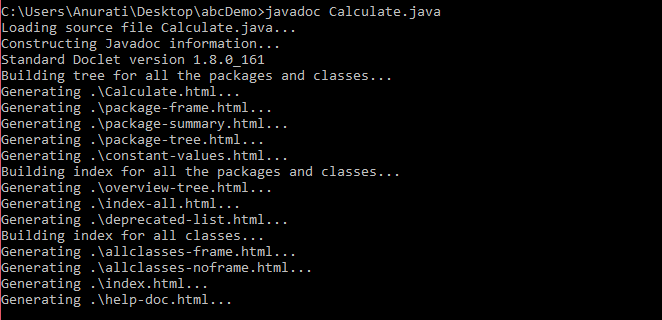
                                            Create documentation API by javadoc tool:

                                            java comments

                                            Now, the HTML files are created for the Calculate class in the current directory, i.e., abcDemo. Open the HTML files, and we can see the explanation of Calculate class provided through the documentation comment.

                                            Are Java comments executable?

                                            Ans: As we know, Java comments are not executed by the compiler or interpreter, however, before the lexical transformation of code in compiler, contents of the code are encoded into ASCII in order to make the processing easy.

                                            Test.java

                                            public class Test{  
                                            
                                                public static void main(String[] args) {  
                                            
                                                    //the below comment will be executed  
                                            
                                            // \u000d System.out.println("Java comment is executed!!");  
                                            
                                                }  
                                            
                                            }  

                                              Output:

                                              java comments

                                              The above code generate the output because the compiler parses the Unicode character \u000d as a new line before the lexical transformation, and thus the code is transformed as shown below:

                                              Test.java

                                              public class Test{  
                                              
                                                  public static void main(String[] args) {  
                                              
                                                      //the below comment will be executed  
                                              
                                              //  
                                              
                                              System.out.println("Java comment is executed!!");  
                                              
                                                  }  
                                              
                                              }  
                                              1. Java Continue Statement

                                                The continue statement is used in loop control structure when you need to jump to the next iteration of the loop immediately. It can be used with for loop or while loop.

                                                The Java continue statement is used to continue the loop. It continues the current flow of the program and skips the remaining code at the specified condition. In case of an inner loop, it continues the inner loop only.

                                                We can use Java continue statement in all types of loops such as for loop, while loop and do-while loop.

                                                Syntax:

                                                jump-statement;    
                                                
                                                continue;   

                                                  Java Continue Statement Example

                                                  ContinueExample.java

                                                  //Java Program to demonstrate the use of continue statement  
                                                  
                                                  //inside the for loop.  
                                                  
                                                  public class ContinueExample {  
                                                  
                                                  public static void main(String[] args) {  
                                                  
                                                      //for loop  
                                                  
                                                      for(int i=1;i<=10;i++){  
                                                  
                                                          if(i==5){  
                                                  
                                                              //using continue statement  
                                                  
                                                              continue;//it will skip the rest statement  
                                                  
                                                          }  
                                                  
                                                          System.out.println(i);  
                                                  
                                                      }  
                                                  
                                                  }  
                                                  
                                                  }

                                                  Output:

                                                  1
                                                  2
                                                  3
                                                  4
                                                  6
                                                  7
                                                  8
                                                  9
                                                  10
                                                  

                                                  As you can see in the above output, 5 is not printed on the console. It is because the loop is continued when it reaches to 5.

                                                  Java Continue Statement with Inner Loop

                                                  It continues inner loop only if you use the continue statement inside the inner loop.

                                                  ContinueExample2.java

                                                  //Java Program to illustrate the use of continue statement  
                                                  
                                                  //inside an inner loop  
                                                  
                                                  public class ContinueExample2 {  
                                                  
                                                  public static void main(String[] args) {  
                                                  
                                                              //outer loop  
                                                  
                                                              for(int i=1;i<=3;i++){    
                                                  
                                                                      //inner loop  
                                                  
                                                                      for(int j=1;j<=3;j++){    
                                                  
                                                                          if(i==2&&j==2){    
                                                  
                                                                              //using continue statement inside inner loop  
                                                  
                                                                              continue;    
                                                  
                                                                          }    
                                                  
                                                                          System.out.println(i+" "+j);    
                                                  
                                                                      }    
                                                  
                                                              }    
                                                  
                                                  }  
                                                  
                                                  } 

                                                    Output:

                                                    1 1
                                                    1 2
                                                    1 3
                                                    2 1
                                                    2 3
                                                    3 1
                                                    3 2
                                                    3 3
                                                    

                                                    Java Continue Statement with Labelled For Loop

                                                    We can use continue statement with a label. This feature is introduced since JDK 1.5. So, we can continue any loop in Java now whether it is outer loop or inner.

                                                    Example:

                                                    ContinueExample3.java

                                                    //Java Program to illustrate the use of continue statement  
                                                    
                                                    //with label inside an inner loop to continue outer loop  
                                                    
                                                    public class ContinueExample3 {  
                                                    
                                                    public static void main(String[] args) {  
                                                    
                                                                aa:  
                                                    
                                                                for(int i=1;i<=3;i++){    
                                                    
                                                                        bb:  
                                                    
                                                                        for(int j=1;j<=3;j++){    
                                                    
                                                                            if(i==2&&j==2){    
                                                    
                                                                                //using continue statement with label  
                                                    
                                                                                continue aa;    
                                                    
                                                                            }    
                                                    
                                                                            System.out.println(i+" "+j);    
                                                    
                                                                        }    
                                                    
                                                                }    
                                                    
                                                    }  
                                                    
                                                    }

                                                    Output:

                                                    1 1
                                                    1 2
                                                    1 3
                                                    2 1
                                                    3 1
                                                    3 2
                                                    3 3
                                                    

                                                    Java Continue Statement in while loop

                                                    ContinueWhileExample.java

                                                    //Java Program to demonstrate the use of continue statement  
                                                    
                                                    //inside the while loop.  
                                                    
                                                    public class ContinueWhileExample {  
                                                    
                                                    public static void main(String[] args) {  
                                                    
                                                        //while loop  
                                                    
                                                        int i=1;  
                                                    
                                                        while(i<=10){  
                                                    
                                                            if(i==5){  
                                                    
                                                                //using continue statement  
                                                    
                                                                i++;  
                                                    
                                                                continue;//it will skip the rest statement  
                                                    
                                                            }  
                                                    
                                                            System.out.println(i);  
                                                    
                                                            i++;  
                                                    
                                                        }  
                                                    
                                                    }  
                                                    
                                                    }

                                                    Output:

                                                    1
                                                    2
                                                    3
                                                    4
                                                    6
                                                    7
                                                    8
                                                    9
                                                    10
                                                    

                                                    Java Continue Statement in do-while Loop

                                                    ContinueDoWhileExample.java

                                                    //Java Program to demonstrate the use of continue statement  
                                                    
                                                    //inside the Java do-while loop.  
                                                    
                                                    public class ContinueDoWhileExample {  
                                                    
                                                    public static void main(String[] args) {  
                                                    
                                                        //declaring variable  
                                                    
                                                        int i=1;  
                                                    
                                                        //do-while loop  
                                                    
                                                        do{  
                                                    
                                                            if(i==5){  
                                                    
                                                                    //using continue statement  
                                                    
                                                                     i++;  
                                                    
                                                                continue;//it will skip the rest statement  
                                                    
                                                            }  
                                                    
                                                            System.out.println(i);  
                                                    
                                                            i++;  
                                                    
                                                        }while(i<=10);  
                                                    
                                                    }  
                                                    
                                                    }

                                                    Output:

                                                    1
                                                    2
                                                    3
                                                    4
                                                    6
                                                    7
                                                    8
                                                    9
                                                    10
                                                    
                                                  1. Java Break Statement

                                                    When a break statement is encountered inside a loop, the loop is immediately terminated and the program control resumes at the next statement following the loop.

                                                    The Java break statement is used to break loop or switch statement. It breaks the current flow of the program at specified condition. In case of inner loop, it breaks only inner loop.

                                                    We can use Java break statement in all types of loops such as for loop, while loop and do-while loop.

                                                    Syntax:

                                                    jump-statement;    
                                                    
                                                    break; 

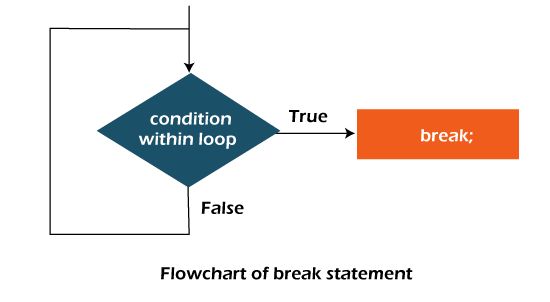
                                                      Flowchart of Break Statement

                                                      java break statement flowchart

                                                      Java Break Statement with Loop

                                                      Example:

                                                      BreakExample.java

                                                      //Java Program to demonstrate the use of break statement    
                                                      
                                                      //inside the for loop.  
                                                      
                                                      public class BreakExample {  
                                                      
                                                      public static void main(String[] args) {  
                                                      
                                                          //using for loop  
                                                      
                                                          for(int i=1;i<=10;i++){  
                                                      
                                                              if(i==5){  
                                                      
                                                                  //breaking the loop  
                                                      
                                                                  break;  
                                                      
                                                              }  
                                                      
                                                              System.out.println(i);  
                                                      
                                                          }  
                                                      
                                                      }  
                                                      
                                                      } 

                                                        Output:

                                                        1
                                                        2
                                                        3
                                                        4
                                                        

                                                        Java Break Statement with Inner Loop

                                                        It breaks inner loop only if you use break statement inside the inner loop.

                                                        Example:

                                                        BreakExample2.java

                                                        //Java Program to illustrate the use of break statement    
                                                        
                                                        //inside an inner loop   
                                                        
                                                        public class BreakExample2 {  
                                                        
                                                        public static void main(String[] args) {  
                                                        
                                                                    //outer loop   
                                                        
                                                                    for(int i=1;i<=3;i++){    
                                                        
                                                                            //inner loop  
                                                        
                                                                            for(int j=1;j<=3;j++){    
                                                        
                                                                                if(i==2&&j==2){    
                                                        
                                                                                    //using break statement inside the inner loop  
                                                        
                                                                                    break;    
                                                        
                                                                                }    
                                                        
                                                                                System.out.println(i+" "+j);    
                                                        
                                                                            }    
                                                        
                                                                    }    
                                                        
                                                        }  
                                                        
                                                        } 

                                                          Output:

                                                          1 1
                                                          1 2
                                                          1 3
                                                          2 1
                                                          3 1
                                                          3 2
                                                          3 3
                                                          

                                                          Java Break Statement with Labeled For Loop

                                                          We can use break statement with a label. The feature is introduced since JDK 1.5. So, we can break any loop in Java now whether it is outer or inner loop.

                                                          Example:

                                                          BreakExample3.java

                                                          //Java Program to illustrate the use of continue statement  
                                                          
                                                          //with label inside an inner loop to break outer loop  
                                                          
                                                          public class BreakExample3 {  
                                                          
                                                          public static void main(String[] args) {  
                                                          
                                                                      aa:  
                                                          
                                                                      for(int i=1;i<=3;i++){    
                                                          
                                                                              bb:  
                                                          
                                                                              for(int j=1;j<=3;j++){    
                                                          
                                                                                  if(i==2&&j==2){    
                                                          
                                                                                      //using break statement with label  
                                                          
                                                                                      break aa;    
                                                          
                                                                                  }    
                                                          
                                                                                  System.out.println(i+" "+j);    
                                                          
                                                                              }    
                                                          
                                                                      }    
                                                          
                                                          }  
                                                          
                                                          }

                                                          Output:

                                                          1 1
                                                          1 2
                                                          1 3
                                                          2 1
                                                          

                                                          Java Break Statement in while loop

                                                          Example:

                                                          BreakWhileExample.java

                                                          //Java Program to demonstrate the use of break statement  
                                                          
                                                          //inside the while loop.  
                                                          
                                                          public class BreakWhileExample {  
                                                          
                                                          public static void main(String[] args) {  
                                                          
                                                              //while loop  
                                                          
                                                              int i=1;  
                                                          
                                                              while(i<=10){  
                                                          
                                                                  if(i==5){  
                                                          
                                                                      //using break statement  
                                                          
                                                                      i++;  
                                                          
                                                                      break;//it will break the loop  
                                                          
                                                                  }  
                                                          
                                                                  System.out.println(i);  
                                                          
                                                                  i++;  
                                                          
                                                              }  
                                                          
                                                          }  
                                                          
                                                          }  

                                                            Output:

                                                            1
                                                            2
                                                            3
                                                            4
                                                            

                                                            Java Break Statement in do-while loop

                                                            Example:

                                                            BreakDoWhileExample.java

                                                            //Java Program to demonstrate the use of break statement  
                                                            
                                                            //inside the Java do-while loop.  
                                                            
                                                            public class BreakDoWhileExample {  
                                                            
                                                            public static void main(String[] args) {  
                                                            
                                                                //declaring variable  
                                                            
                                                                int i=1;  
                                                            
                                                                //do-while loop  
                                                            
                                                                do{  
                                                            
                                                                    if(i==5){  
                                                            
                                                                       //using break statement  
                                                            
                                                                       i++;  
                                                            
                                                                       break;//it will break the loop  
                                                            
                                                                    }  
                                                            
                                                                    System.out.println(i);  
                                                            
                                                                    i++;  
                                                            
                                                                }while(i<=10);  
                                                            
                                                            }  
                                                            
                                                            } 

                                                              Output:

                                                              1
                                                              2
                                                              3
                                                              4