Author: saqibkhan

  • Java instanceof

    The java instanceof operator is used to test whether the object is an instance of the specified type (class or subclass or interface).

    The instanceof in java is also known as type comparison operator because it compares the instance with type. It returns either true or false. If we apply the instanceof operator with any variable that has null value, it returns false.

    Simple example of java instanceof

    Let’s see the simple example of instance operator where it tests the current class.

    class Simple1{  
    
     public static void main(String args[]){  
    
     Simple1 s=new Simple1();  
    
     System.out.println(s instanceof Simple1);//true  
    
     }  
    
    }
    Output:true
    

    An object of subclass type is also a type of parent class. For example, if Dog extends Animal then object of Dog can be referred by either Dog or Animal class.

    Another example of java instanceof operator

    class Animal{}  
    
    class Dog1 extends Animal{//Dog inherits Animal  


     public static void main(String args[]){  
    
     Dog1 d=new Dog1();  
    
     System.out.println(d instanceof Animal);//true  
    
     }  
    
    }
    Output:true
    

    instanceof in java with a variable that have null value

    If we apply instanceof operator with a variable that have null value, it returns false. Let’s see the example given below where we apply instanceof operator with the variable that have null value.

    class Dog2{  
    
     public static void main(String args[]){  
    
      Dog2 d=null;  
    
      System.out.println(d instanceof Dog2);//false  
    
     }  
    
    }
    Output:false
    

    Downcasting with java instanceof operator

    When Subclass type refers to the object of Parent class, it is known as downcasting. If we perform it directly, compiler gives Compilation error. If you perform it by typecasting, ClassCastException is thrown at runtime. But if we use instanceof operator, downcasting is possible.

    Dog d=new Animal();//Compilation error  

    If we perform downcasting by typecasting, ClassCastException is thrown at runtime.

    Dog d=(Dog)new Animal();  
    
    //Compiles successfully but ClassCastException is thrown at runtime  

      Possibility of downcasting with instanceof

      Let’s see the example, where downcasting is possible by instanceof operator.

      class Animal { }  


      class Dog3 extends Animal {  
      
        static void method(Animal a) {  
      
          if(a instanceof Dog3){  
      
             Dog3 d=(Dog3)a;//downcasting  
      
             System.out.println("ok downcasting performed");  
      
          }  
      
        }  


        public static void main (String [] args) {  
      
          Animal a=new Dog3();  
      
          Dog3.method(a);  
      
        }  


       }
      Output:ok downcasting performed
      

      Downcasting without the use of java instanceof

      Downcasting can also be performed without the use of instanceof operator as displayed in the following example:

      class Animal { }  
      
      class Dog4 extends Animal {  
      
        static void method(Animal a) {  
      
             Dog4 d=(Dog4)a;//downcasting  
      
             System.out.println("ok downcasting performed");  
      
        }  
      
         public static void main (String [] args) {  
      
          Animal a=new Dog4();  
      
          Dog4.method(a);  
      
        }  
      
      }
      Output:ok downcasting performed
      

      Let’s take closer look at this, actual object that is referred by a, is an object of Dog class. So if we downcast it, it is fine. But what will happen if we write:

      Animal a=new Animal();  
      
      Dog.method(a);  
      
      //Now ClassCastException but not in case of instanceof operator  

        Understanding Real use of instanceof in java

        Let’s see the real use of instanceof keyword by the example given below.

        interface Printable{}  
        
        class A implements Printable{  
        
        public void a(){System.out.println("a method");}  
        
        }  
        
        class B implements Printable{  
        
        public void b(){System.out.println("b method");}  
        
        }  


        class Call{  
        
        void invoke(Printable p){//upcasting  
        
        if(p instanceof A){  
        
        A a=(A)p;//Downcasting   
        
        a.a();  
        
        }  
        
        if(p instanceof B){  
        
        B b=(B)p;//Downcasting   
        
        b.b();  
        
        }  


        }  
        
        }//end of Call class  


        class Test4{  
        
        public static void main(String args[]){  
        
        Printable p=new B();  
        
        Call c=new Call();  
        
        c.invoke(p);  
        
        }  
        
        }
        Output: b method
        
      1. Static Binding and Dynamic Binding

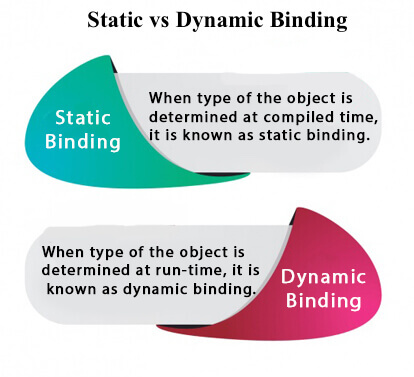
        Connecting a method call to the method body is known as binding.

        There are two types of binding

        1. Static Binding (also known as Early Binding).
        2. Dynamic Binding (also known as Late Binding).
        Static vs. Dynamic Binding in java

        Understanding Type

        Let’s understand the type of instance.

        1) variables have a type

        Each variable has a type, it may be primitive and non-primitive.

        int data=30;  

        Here data variable is a type of int.

        2) References have a type

        class Dog{  
        
         public static void main(String args[]){  
        
          Dog d1;//Here d1 is a type of Dog  
        
         }  
        
        } 

          3) Objects have a type

          An object is an instance of particular java class,but it is also an instance of its superclass.
          class Animal{}  


          class Dog extends Animal{  
          
           public static void main(String args[]){  
          
            Dog d1=new Dog();  
          
           }  
          
          }  
            Here d1 is an instance of Dog class, but it is also an instance of Animal.

            static binding

            When type of the object is determined at compiled time(by the compiler), it is known as static binding.

            If there is any private, final or static method in a class, there is static binding.

            Example of static binding

            class Dog{  
            
             private void eat(){System.out.println("dog is eating...");}  


             public static void main(String args[]){  
            
              Dog d1=new Dog();  
            
              d1.eat();  
            
             }  
            
            }

            Dynamic binding

            When type of the object is determined at run-time, it is known as dynamic binding.

            Example of dynamic binding

            class Animal{  
            
             void eat(){System.out.println("animal is eating...");}  
            
            }  


            class Dog extends Animal{  
            
             void eat(){System.out.println("dog is eating...");}  


             public static void main(String args[]){  
            
              Animal a=new Dog();  
            
              a.eat();  
            
             }  
            
            }
            Output:dog is eating...
            
          1. Polymorphism in Java

            Polymorphism in Java is a concept by which we can perform a single action in different ways. Polymorphism is derived from 2 Greek words: poly and morphs. The word “poly” means many and “morphs” means forms. So polymorphism means many forms.

            There are two types of polymorphism in Java: compile-time polymorphism and runtime polymorphism. We can perform polymorphism in java by method overloading and method overriding.

            If you overload a static method in Java, it is the example of compile time polymorphism. Here, we will focus on runtime polymorphism in java.

            Runtime Polymorphism in Java

            Runtime polymorphism or Dynamic Method Dispatch is a process in which a call to an overridden method is resolved at runtime rather than compile-time.

            In this process, an overridden method is called through the reference variable of a superclass. The determination of the method to be called is based on the object being referred to by the reference variable.

            Let’s first understand the upcasting before Runtime Polymorphism.

            Upcasting

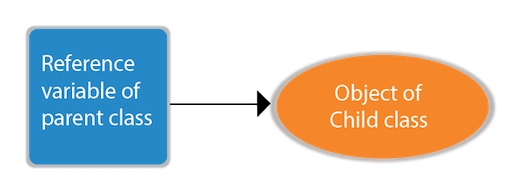
            If the reference variable of Parent class refers to the object of Child class, it is known as upcasting. For example:

            Upcasting in Java
            class A{}  
            
            class B extends A{}  
              A a=new B();//upcasting  

              For upcasting, we can use the reference variable of class type or an interface type. For Example:

              interface I{}  
              
              class A{}  
              
              class B extends A implements I{}

              Here, the relationship of B class would be:

              B IS-A A
              B IS-A I
              B IS-A Object
              

              Since Object is the root class of all classes in Java, so we can write B IS-A Object.

              Example of Java Runtime Polymorphism

              In this example, we are creating two classes Bike and Splendor. Splendor class extends Bike class and overrides its run() method. We are calling the run method by the reference variable of Parent class. Since it refers to the subclass object and subclass method overrides the Parent class method, the subclass method is invoked at runtime.

              Since method invocation is determined by the JVM not compiler, it is known as runtime polymorphism.

              class Bike{  
              
                void run(){System.out.println("running");}  
              
              }  
              
              class Splendor extends Bike{  
              
                void run(){System.out.println("running safely with 60km");}  


                public static void main(String args[]){  
              
                  Bike b = new Splendor();//upcasting  
              
                  b.run();  
              
                }  
              
              }

              Output:

              running safely with 60km.
              

              Java Runtime Polymorphism Example: Bank

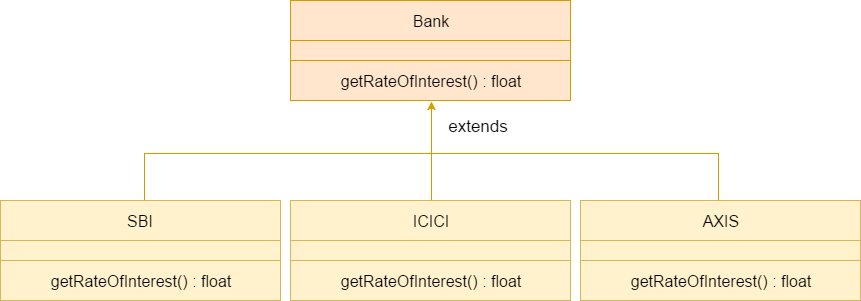
              Consider a scenario where Bank is a class that provides a method to get the rate of interest. However, the rate of interest may differ according to banks. For example, SBI, ICICI, and AXIS banks are providing 8.4%, 7.3%, and 9.7% rate of interest.

              Java Runtime Polymorphism example of bank

              Note: This example is also given in method overriding but there was no upcasting.

              class Bank{  
              
              float getRateOfInterest(){return 0;}  
              
              }  
              
              class SBI extends Bank{  
              
              float getRateOfInterest(){return 8.4f;}  
              
              }  
              
              class ICICI extends Bank{  
              
              float getRateOfInterest(){return 7.3f;}  
              
              }  
              
              class AXIS extends Bank{  
              
              float getRateOfInterest(){return 9.7f;}  
              
              }  
              
              class TestPolymorphism{  
              
              public static void main(String args[]){  
              
              Bank b;  
              
              b=new SBI();  
              
              System.out.println("SBI Rate of Interest: "+b.getRateOfInterest());  
              
              b=new ICICI();  
              
              System.out.println("ICICI Rate of Interest: "+b.getRateOfInterest());  
              
              b=new AXIS();  
              
              System.out.println("AXIS Rate of Interest: "+b.getRateOfInterest());  
              
              }  
              
              }

              Output:

              SBI Rate of Interest: 8.4
              ICICI Rate of Interest: 7.3
              AXIS Rate of Interest: 9.7
              

              Java Runtime Polymorphism Example: Shape

              class Shape{  
              
              void draw(){System.out.println("drawing...");}  
              
              }  
              
              class Rectangle extends Shape{  
              
              void draw(){System.out.println("drawing rectangle...");}  
              
              }  
              
              class Circle extends Shape{  
              
              void draw(){System.out.println("drawing circle...");}  
              
              }  
              
              class Triangle extends Shape{  
              
              void draw(){System.out.println("drawing triangle...");}  
              
              }  
              
              class TestPolymorphism2{  
              
              public static void main(String args[]){  
              
              Shape s;  
              
              s=new Rectangle();  
              
              s.draw();  
              
              s=new Circle();  
              
              s.draw();  
              
              s=new Triangle();  
              
              s.draw();  
              
              }  
              
              }

              Output:

              drawing rectangle...
              drawing circle...
              drawing triangle...
              

              Java Runtime Polymorphism Example: Animal

              class Animal{  
              
              void eat(){System.out.println("eating...");}  
              
              }  
              
              class Dog extends Animal{  
              
              void eat(){System.out.println("eating bread...");}  
              
              }  
              
              class Cat extends Animal{  
              
              void eat(){System.out.println("eating rat...");}  
              
              }  
              
              class Lion extends Animal{  
              
              void eat(){System.out.println("eating meat...");}  
              
              }  
              
              class TestPolymorphism3{  
              
              public static void main(String[] args){  
              
              Animal a;  
              
              a=new Dog();  
              
              a.eat();  
              
              a=new Cat();  
              
              a.eat();  
              
              a=new Lion();  
              
              a.eat();  
              
              }}

              Output:

              eating bread...
              eating rat...
              eating meat...
              

              Java Runtime Polymorphism with Data Member

              A method is overridden, not the data members, so runtime polymorphism can’t be achieved by data members.

              In the example given below, both the classes have a data member speedlimit. We are accessing the data member by the reference variable of Parent class which refers to the subclass object. Since we are accessing the data member which is not overridden, hence it will access the data member of the Parent class always.

              Rule: Runtime polymorphism can’t be achieved by data members.

              class Bike{  
              
               int speedlimit=90;  
              
              }  
              
              class Honda3 extends Bike{  
              
               int speedlimit=150;  


               public static void main(String args[]){  
              
                Bike obj=new Honda3();  
              
                System.out.println(obj.speedlimit);//90  
              
              }

              Output:

              90
              

              Java Runtime Polymorphism with Multilevel Inheritance

              Let’s see the simple example of Runtime Polymorphism with multilevel inheritance.

              class Animal{  
              
              void eat(){System.out.println("eating");}  
              
              }  
              
              class Dog extends Animal{  
              
              void eat(){System.out.println("eating fruits");}  
              
              }  
              
              class BabyDog extends Dog{  
              
              void eat(){System.out.println("drinking milk");}  
              
              public static void main(String args[]){  
              
              Animal a1,a2,a3;  
              
              a1=new Animal();  
              
              a2=new Dog();  
              
              a3=new BabyDog();  
              
              a1.eat();  
              
              a2.eat();  
              
              a3.eat();  
              
              }  
              
              }

              Output:

              eating
              eating fruits
              drinking Milk
              

              Try for Output

              class Animal{  
              
              void eat(){System.out.println("animal is eating...");}  
              
              }  
              
              class Dog extends Animal{  
              
              void eat(){System.out.println("dog is eating...");}  
              
              }  
              
              class BabyDog1 extends Dog{  
              
              public static void main(String args[]){  
              
              Animal a=new BabyDog1();  
              
              a.eat();  
              
              }}

              Output:

              Dog is eating
              
            1. Instance initializer block

              Instance Initializer block is used to initialize the instance data member. It run each time when object of the class is created.
              The initialization of the instance variable can be done directly but there can be performed extra operations while initializing the instance variable in the instance initializer block.

              Que) What is the use of instance initializer block while we can directly assign a value in instance data member? For example:

              class Bike{  
              
                  int speed=100;  
              
              }  

                Why use instance initializer block?

                Suppose I have to perform some operations while assigning value to instance data member e.g. a for loop to fill a complex array or error handling etc.

                Example of instance initializer block

                Let’s see the simple example of instance initializer block that performs initialization.
                class Bike7{  
                
                    int speed;  


                    Bike7(){System.out.println("speed is "+speed);}  


                    {speed=100;}  


                    public static void main(String args[]){  
                
                    Bike7 b1=new Bike7();  
                
                    Bike7 b2=new Bike7();  
                
                    }      
                
                }
                Output:speed is 100
                
                   speed is 100
                There are three places in java where you can perform operations:methodconstructorblock

                What is invoked first, instance initializer block or constructor?

                class Bike8{  
                
                    int speed;  


                    Bike8(){System.out.println("constructor is invoked");}  


                    {System.out.println("instance initializer block invoked");}  


                    public static void main(String args[]){  
                
                    Bike8 b1=new Bike8();  
                
                    Bike8 b2=new Bike8();  
                
                    }      
                
                }
                Output:instance initializer block invoked
                
                   constructor is invoked
                   instance initializer block invoked
                   constructor is invoked
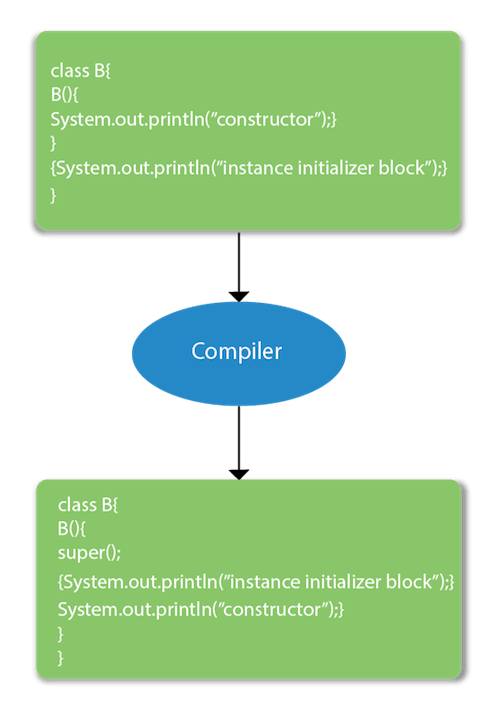
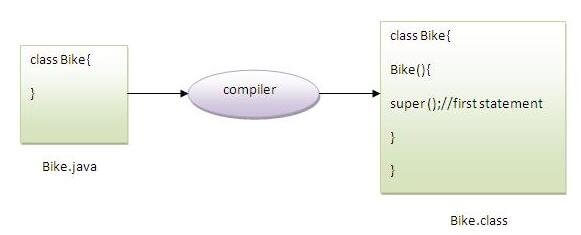
                In the above example, it seems that instance initializer block is firstly invoked but NO. Instance intializer block is invoked at the time of object creation. The java compiler copies the instance initializer block in the constructor after the first statement super(). So firstly, constructor is invoked. Let’s understand it by the figure given below:

                Note: The java compiler copies the code of instance initializer block in every constructor.

                instance initializer block

                Rules for instance initializer block :

                There are mainly three rules for the instance initializer block. They are as follows:
                1. The instance initializer block is created when instance of the class is created.
                2. The instance initializer block is invoked after the parent class constructor is invoked (i.e. after super() constructor call).
                3. The instance initializer block comes in the order in which they appear.

                Program of instance initializer block that is invoked after super()

                class A{  
                
                A(){  
                
                System.out.println("parent class constructor invoked");  
                
                }  
                
                }  
                
                class B2 extends A{  
                
                B2(){  
                
                super();  
                
                System.out.println("child class constructor invoked");  
                
                }  


                {System.out.println("instance initializer block is invoked");}  


                public static void main(String args[]){  
                
                B2 b=new B2();  
                
                }  
                
                }
                Output:parent class constructor invoked
                
                   instance initializer block is invoked
                   child class constructor invoked

                Another example of instance block

                class A{  
                
                A(){  
                
                System.out.println("parent class constructor invoked");  
                
                }  
                
                }  


                class B3 extends A{  
                
                B3(){  
                
                super();  
                
                System.out.println("child class constructor invoked");  
                
                }  


                B3(int a){  
                
                super();  
                
                System.out.println("child class constructor invoked "+a);  
                
                }  


                {System.out.println("instance initializer block is invoked");}  


                public static void main(String args[]){  
                
                B3 b1=new B3();  
                
                B3 b2=new B3(10);  
                
                }  
                
                }
                       parent class constructor invoked
                
                   instance initializer block is invoked
                   child class constructor invoked
                   parent class constructor invoked
                   instance initializer block is invoked
                   child class constructor invoked 10
              1. Super Keyword in Java

                The super keyword in Java is a reference variable which is used to refer immediate parent class object.

                Whenever you create the instance of subclass, an instance of parent class is created implicitly which is referred by super reference variable.

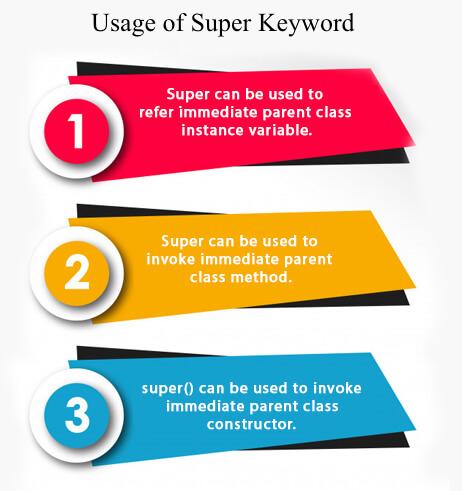
                Usage of Java super Keyword

                1. super can be used to refer immediate parent class instance variable.
                2. super can be used to invoke immediate parent class method.
                3. super() can be used to invoke immediate parent class constructor.
                Usage of Java Super keyword

                1) super is used to refer immediate parent class instance variable.

                We can use super keyword to access the data member or field of parent class. It is used if parent class and child class have same fields.

                class Animal{  
                
                String color="white";  
                
                }  
                
                class Dog extends Animal{  
                
                String color="black";  
                
                void printColor(){  
                
                System.out.println(color);//prints color of Dog class  
                
                System.out.println(super.color);//prints color of Animal class  
                
                }  
                
                }  
                
                class TestSuper1{  
                
                public static void main(String args[]){  
                
                Dog d=new Dog();  
                
                d.printColor();  
                
                }}

                Output:

                black
                white
                

                In the above example, Animal and Dog both classes have a common property color. If we print color property, it will print the color of current class by default. To access the parent property, we need to use super keyword.

                2) super can be used to invoke parent class method

                The super keyword can also be used to invoke parent class method. It should be used if subclass contains the same method as parent class. In other words, it is used if method is overridden.

                class Animal{  
                
                void eat(){System.out.println("eating...");}  
                
                }  
                
                class Dog extends Animal{  
                
                void eat(){System.out.println("eating bread...");}  
                
                void bark(){System.out.println("barking...");}  
                
                void work(){  
                
                super.eat();  
                
                bark();  
                
                }  
                
                }  
                
                class TestSuper2{  
                
                public static void main(String args[]){  
                
                Dog d=new Dog();  
                
                d.work();  
                
                }}

                Output:

                eating...
                barking...
                

                In the above example Animal and Dog both classes have eat() method if we call eat() method from Dog class, it will call the eat() method of Dog class by default because priority is given to local.

                To call the parent class method, we need to use super keyword.

                3) super is used to invoke parent class constructor.

                The super keyword can also be used to invoke the parent class constructor. Let’s see a simple example:

                class Animal{  
                
                Animal(){System.out.println("animal is created");}  
                
                }  
                
                class Dog extends Animal{  
                
                Dog(){  
                
                super();  
                
                System.out.println("dog is created");  
                
                }  
                
                }  
                
                class TestSuper3{  
                
                public static void main(String args[]){  
                
                Dog d=new Dog();  
                
                }}

                Output:

                animal is created
                dog is created
                

                Note: super() is added in each class constructor automatically by compiler if there is no super() or this().

                java super

                As we know well that default constructor is provided by compiler automatically if there is no constructor. But, it also adds super() as the first statement.

                Another example of super keyword where super() is provided by the compiler implicitly.

                class Animal{  
                
                Animal(){System.out.println("animal is created");}  
                
                }  
                
                class Dog extends Animal{  
                
                Dog(){  
                
                System.out.println("dog is created");  
                
                }  
                
                }  
                
                class TestSuper4{  
                
                public static void main(String args[]){  
                
                Dog d=new Dog();  
                
                }}

                Output:

                animal is created
                dog is created
                

                super example: real use

                Let’s see the real use of super keyword. Here, Emp class inherits Person class so all the properties of Person will be inherited to Emp by default. To initialize all the property, we are using parent class constructor from child class. In such way, we are reusing the parent class constructor.

                class Person{  
                
                int id;  
                
                String name;  
                
                Person(int id,String name){  
                
                this.id=id;  
                
                this.name=name;  
                
                }  
                
                }  
                
                class Emp extends Person{  
                
                float salary;  
                
                Emp(int id,String name,float salary){  
                
                super(id,name);//reusing parent constructor  
                
                this.salary=salary;  
                
                }  
                
                void display(){System.out.println(id+" "+name+" "+salary);}  
                
                }  
                
                class TestSuper5{  
                
                public static void main(String[] args){  
                
                Emp e1=new Emp(1,"ankit",45000f);  
                
                e1.display();  
                
                }}

                Output:

                1 ankit 45000
                
              2. Covariant Return Type

                The covariant return type specifies that the return type may vary in the same direction as the subclass.

                Before Java5, it was not possible to override any method by changing the return type. But now, since Java5, it is possible to override method by changing the return type if subclass overrides any method whose return type is Non-Primitive but it changes its return type to subclass type. Let’s take a simple example:

                Note: If you are beginner to java, skip this topic and return to it after OOPs concepts.

                Simple example of Covariant Return Type

                FileName: B1.java

                class A{    
                
                A get(){return this;}    
                
                }    


                class B1 extends A{    
                
                @Override  
                
                B1 get(){return this;}    
                
                void message(){System.out.println("welcome to covariant return type");}    


                public static void main(String args[]){    
                
                new B1().get().message();    
                
                }    
                
                }   

                Output:

                welcome to covariant return type
                

                As you can see in the above example, the return type of the get() method of A class is A but the return type of the get() method of B class is B. Both methods have different return type but it is method overriding. This is known as covariant return type.

                Advantages of Covariant Return Type

                Following are the advantages of the covariant return type.

                1) Covariant return type assists to stay away from the confusing type casts in the class hierarchy and makes the code more usable, readable, and maintainable.

                2) In the method overriding, the covariant return type provides the liberty to have more to the point return types.

                3) Covariant return type helps in preventing the run-time ClassCastExceptions on returns.

                Let’s take an example to understand the advantages of the covariant return type.

                FileName: CovariantExample.java

                class A1  
                
                {  
                
                    A1 foo()  
                
                    {  
                
                        return this;  
                
                    }  


                    void print()  
                
                    {  
                
                        System.out.println("Inside the class A1");  
                
                    }  
                
                }  


                // A2 is the child class of A1  
                
                class A2 extends A1  
                
                {  
                
                    @Override  
                
                    A1 foo()  
                
                    {  
                
                        return this;  
                
                    }  


                    void print()  
                
                    {  
                
                        System.out.println("Inside the class A2");  
                
                    }  
                
                }  


                // A3 is the child class of A2  
                
                class A3 extends A2  
                
                {  
                
                    @Override  
                
                    A1 foo()  
                
                    {  
                
                        return this;  
                
                    }  


                    @Override  
                
                    void print()  
                
                    {  
                
                        System.out.println("Inside the class A3");  
                
                    }  
                
                }  


                public class CovariantExample  
                
                {  
                
                    // main method  
                
                    public static void main(String argvs[])  
                
                    {  
                
                       A1 a1 = new A1();  


                       // this is ok  
                
                       a1.foo().print();  


                       A2 a2 = new A2();  


                       // we need to do the type casting to make it   
                
                       // more clear to reader about the kind of object created   
                
                       ((A2)a2.foo()).print();  


                       A3 a3 = new A3();  


                       // doing the type casting  
                
                       ((A3)a3.foo()).print();  


                    }  
                
                }  

                  Output:

                  Inside the class A1
                  Inside the class A2
                  Inside the class A3
                  

                  Explanation: In the above program, class A3 inherits class A2, and class A2 inherits class A1. Thus, A1 is the parent of classes A2 and A3. Hence, any object of classes A2 and A3 is also of type A1. As the return type of the method foo() is the same in every class, we do not know the exact type of object the method is actually returning. We can only deduce that returned object will be of type A1, which is the most generic class. We can not say for sure that returned object will be of A2 or A3. It is where we need to do the typecasting to find out the specific type of object returned from the method foo(). It not only makes the code verbose; it also requires precision from the programmer to ensure that typecasting is done properly; otherwise, there are fair chances of getting the ClassCastException. To exacerbate it, think of a situation where the hierarchical structure goes down to 10 – 15 classes or even more, and in each class, the method foo() has the same return type. That is enough to give a nightmare to the reader and writer of the code.

                  The better way to write the above is:

                  FileName: CovariantExample.java

                  class A1  
                  
                  {  
                  
                      A1 foo()  
                  
                      {  
                  
                          return this;  
                  
                      }  


                      void print()  
                  
                      {  
                  
                          System.out.println("Inside the class A1");  
                  
                      }  
                  
                  }  


                  // A2 is the child class of A1  
                  
                  class A2 extends A1  
                  
                  {  
                  
                      @Override  
                  
                      A2 foo()  
                  
                      {  
                  
                          return this;  
                  
                      }  


                      void print()  
                  
                      {  
                  
                          System.out.println("Inside the class A2");  
                  
                      }  
                  
                  }  


                  // A3 is the child class of A2  
                  
                  class A3 extends A2  
                  
                  {  
                  
                      @Override  
                  
                      A3 foo()  
                  
                      {  
                  
                          return this;  
                  
                      }  


                      @Override  
                  
                      void print()  
                  
                      {  
                  
                          System.out.println("Inside the class A3");  
                  
                      }  
                  
                  }  


                  public class CovariantExample  
                  
                  {  
                  
                      // main method  
                  
                      public static void main(String argvs[])  
                  
                      {  
                  
                         A1 a1 = new A1();  


                         a1.foo().print();  


                         A2 a2 = new A2();  


                         a2.foo().print();  


                         A3 a3 = new A3();  


                         a3.foo().print();  


                      }  
                  
                  }  

                    Output:

                    Inside the class A1
                    Inside the class A2
                    Inside the class A3
                    

                    Explanation: In the above program, no typecasting is needed as the return type is specific. Hence, there is no confusion about knowing the type of object getting returned from the method foo(). Also, even if we write the code for the 10 – 15 classes, there would be no confusion regarding the return types of the methods. All this is possible because of the covariant return type.

                    How is Covariant return types implemented?

                    Java doesn’t allow the return type-based overloading, but JVM always allows return type-based overloading. JVM uses the full signature of a method for lookup/resolution. Full signature means it includes return type in addition to argument types. i.e., a class can have two or more methods differing only by return type. javac uses this fact to implement covariant return types.

                    Output:

                    The number 1 is not the powerful number.
                    The number 2 is not the powerful number.
                    The number 3 is not the powerful number.
                    The number 4 is the powerful number.
                    The number 5 is not the powerful number.
                    The number 6 is not the powerful number.
                    The number 7 is not the powerful number.
                    The number 8 is the powerful number.
                    The number 9 is the powerful number.
                    The number 10 is not the powerful number.
                    The number 11 is not the powerful number.
                    The number 12 is not the powerful number.
                    The number 13 is not the powerful number.
                    The number 14 is not the powerful number.
                    The number 15 is not the powerful number.
                    The number 16 is the powerful number.
                    The number 17 is not the powerful number.
                    The number 18 is not the powerful number.
                    The number 19 is not the powerful number.
                    The number 20 is the powerful number.
                    

                    Explanation: For every number from 1 to 20, the method isPowerfulNo() is invoked with the help of for-loop. For every number, a vector primeFactors is created for storing its prime divisors. Then, we check whether square of every number present in the vector primeFactors divides the number or not. If all square of all the number present in the vector primeFactors divides the number completely, the number is a powerful number; otherwise, not.

                  1. Method Overriding in Java

                    If subclass (child class) has the same method as declared in the parent class, it is known as method overriding in Java.

                    In other words, If a subclass provides the specific implementation of the method that has been declared by one of its parent class, it is known as method overriding.

                    Usage of Java Method Overriding

                    • Method overriding is used to provide the specific implementation of a method which is already provided by its superclass.
                    • Method overriding is used for runtime polymorphism

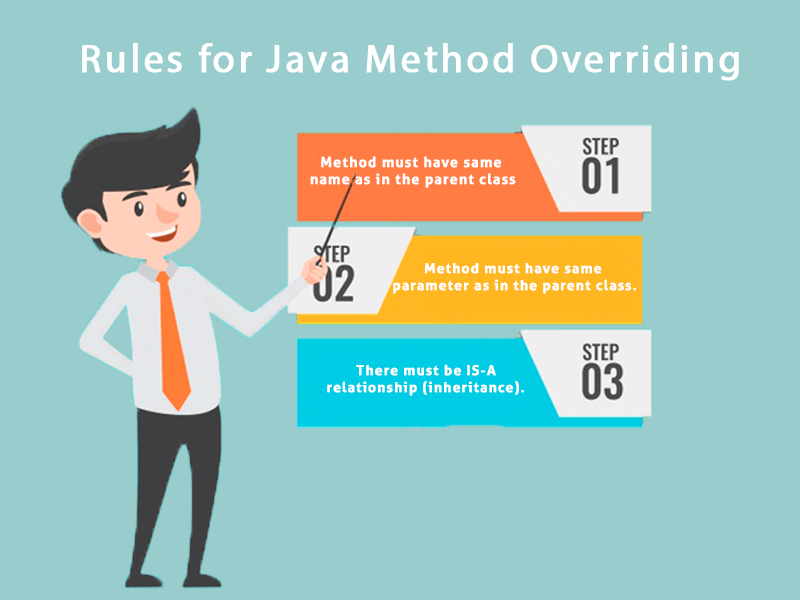
                    Rules for Java Method Overriding

                    1. The method must have the same name as in the parent class
                    2. The method must have the same parameter as in the parent class.
                    3. There must be an IS-A relationship (inheritance).
                    Java Rules for Method Overriding

                    Understanding the problem without method overriding

                    Let’s understand the problem that we may face in the program if we don’t use method overriding.

                    //Java Program to demonstrate why we need method overriding  
                    
                    //Here, we are calling the method of parent class with child  
                    
                    //class object.  
                    
                    //Creating a parent class  
                    
                    class Vehicle{  
                    
                      void run(){System.out.println("Vehicle is running");}  
                    
                    }  
                    
                    //Creating a child class  
                    
                    class Bike extends Vehicle{  
                    
                      public static void main(String args[]){  
                    
                      //creating an instance of child class  
                    
                      Bike obj = new Bike();  
                    
                      //calling the method with child class instance  
                    
                      obj.run();  
                    
                      }  
                    
                    }

                    Output:

                    Vehicle is running
                    

                    Problem is that I have to provide a specific implementation of run() method in subclass that is why we use method overriding.

                    Example of method overriding

                    In this example, we have defined the run method in the subclass as defined in the parent class but it has some specific implementation. The name and parameter of the method are the same, and there is IS-A relationship between the classes, so there is method overriding.

                    //Java Program to illustrate the use of Java Method Overriding  
                    
                    //Creating a parent class.  
                    
                    class Vehicle{  
                    
                      //defining a method  
                    
                      void run(){System.out.println("Vehicle is running");}  
                    
                    }  
                    
                    //Creating a child class  
                    
                    class Bike2 extends Vehicle{  
                    
                      //defining the same method as in the parent class  
                    
                      void run(){System.out.println("Bike is running safely");}  


                      public static void main(String args[]){  
                    
                      Bike2 obj = new Bike2();//creating object  
                    
                      obj.run();//calling method  
                    
                      }  
                    
                    }

                    Output:

                    Bike is running safely
                    

                    A real example of Java Method Overriding

                    Consider a scenario where Bank is a class that provides functionality to get the rate of interest. However, the rate of interest varies according to banks. For example, SBI, ICICI and AXIS banks could provide 8%, 7%, and 9% rate of interest.

                    Java method overriding example of bank

                    Java method overriding is mostly used in Runtime Polymorphism which we will learn in next pages.

                    //Java Program to demonstrate the real scenario of Java Method Overriding  
                    
                    //where three classes are overriding the method of a parent class.  
                    
                    //Creating a parent class.  
                    
                    class Bank{  
                    
                    int getRateOfInterest(){return 0;}  
                    
                    }  
                    
                    //Creating child classes.  
                    
                    class SBI extends Bank{  
                    
                    int getRateOfInterest(){return 8;}  
                    
                    }  


                    class ICICI extends Bank{  
                    
                    int getRateOfInterest(){return 7;}  
                    
                    }  
                    
                    class AXIS extends Bank{  
                    
                    int getRateOfInterest(){return 9;}  
                    
                    }  
                    
                    //Test class to create objects and call the methods  
                    
                    class Test2{  
                    
                    public static void main(String args[]){  
                    
                    SBI s=new SBI();  
                    
                    ICICI i=new ICICI();  
                    
                    AXIS a=new AXIS();  
                    
                    System.out.println("SBI Rate of Interest: "+s.getRateOfInterest());  
                    
                    System.out.println("ICICI Rate of Interest: "+i.getRateOfInterest());  
                    
                    System.out.println("AXIS Rate of Interest: "+a.getRateOfInterest());  
                    
                    }  
                    
                    }
                    Output:
                    SBI Rate of Interest: 8
                    ICICI Rate of Interest: 7
                    AXIS Rate of Interest: 9
                    
                  2. Method Overloading in Java

                    If a class has multiple methods having same name but different in parameters, it is known as Method Overloading.

                    If we have to perform only one operation, having same name of the methods increases the readability of the program.

                    Suppose you have to perform addition of the given numbers but there can be any number of arguments, if you write the method such as a(int,int) for two parameters, and b(int,int,int) for three parameters then it may be difficult for you as well as other programmers to understand the behavior of the method because its name differs.

                    So, we perform method overloading to figure out the program quickly.

                    java method overloading

                    Advantage of method overloading

                    Method overloading increases the readability of the program.

                    Different ways to overload the method

                    There are two ways to overload the method in java

                    1. By changing number of arguments
                    2. By changing the data type

                    In Java, Method Overloading is not possible by changing the return type of the method only.

                    1) Method Overloading: changing no. of arguments

                    In this example, we have created two methods, first add() method performs addition of two numbers and second add method performs addition of three numbers.

                    In this example, we are creating static methods so that we don’t need to create instance for calling methods.

                    class Adder{  
                    
                    static int add(int a,int b){return a+b;}  
                    
                    static int add(int a,int b,int c){return a+b+c;}  
                    
                    }  
                    
                    class TestOverloading1{  
                    
                    public static void main(String[] args){  
                    
                    System.out.println(Adder.add(11,11));  
                    
                    System.out.println(Adder.add(11,11,11));  
                    
                    }}

                    Output:

                    22
                    33
                    

                    2) Method Overloading: changing data type of arguments

                    In this example, we have created two methods that differs in data type. The first add method receives two integer arguments and second add method receives two double arguments.

                    class Adder{  
                    
                    static int add(int a, int b){return a+b;}  
                    
                    static double add(double a, double b){return a+b;}  
                    
                    }  
                    
                    class TestOverloading2{  
                    
                    public static void main(String[] args){  
                    
                    System.out.println(Adder.add(11,11));  
                    
                    System.out.println(Adder.add(12.3,12.6));  
                    
                    }}  

                    Output:

                    22
                    24.9
                    

                    Q) Why Method Overloading is not possible by changing the return type of method only?

                    In java, method overloading is not possible by changing the return type of the method only because of ambiguity. Let’s see how ambiguity may occur:

                    class Adder{  
                    
                    static int add(int a,int b){return a+b;}  
                    
                    static double add(int a,int b){return a+b;}  
                    
                    }  
                    
                    class TestOverloading3{  
                    
                    public static void main(String[] args){  
                    
                    System.out.println(Adder.add(11,11));//ambiguity  
                    
                    }}

                    Output:

                    Compile Time Error: method add(int,int) is already defined in class Adder
                    

                    System.out.println(Adder.add(11,11)); //Here, how can java determine which sum() method should be called?

                    Note: Compile Time Error is better than Run Time Error. So, java compiler renders compiler time error if you declare the same method having same parameters.

                    Can we overload java main() method?

                    Yes, by method overloading. You can have any number of main methods in a class by method overloading. But JVM calls main() method which receives string array as arguments only. Let’s see the simple example:

                    class TestOverloading4{  
                    
                    public static void main(String[] args){System.out.println("main with String[]");}  
                    
                    public static void main(String args){System.out.println("main with String");}  
                    
                    public static void main(){System.out.println("main without args");}  
                    
                    } 

                      Output:

                      main with String[]
                      

                      Method Overloading and Type Promotion

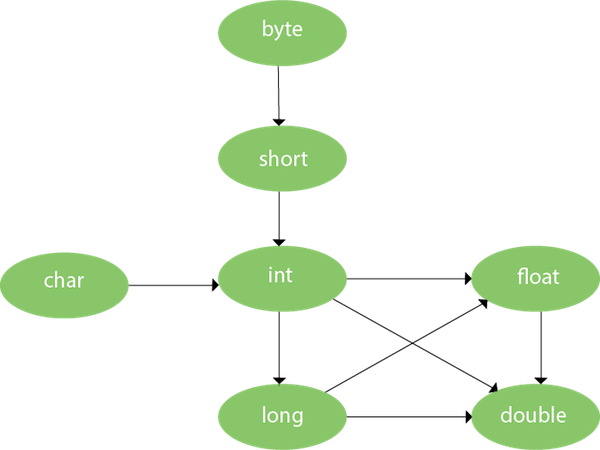
                      One type is promoted to another implicitly if no matching datatype is found. Let’s understand the concept by the figure given below:

                      Java Method Overloading with Type Promotion

                      As displayed in the above diagram, byte can be promoted to short, int, long, float or double. The short datatype can be promoted to int, long, float or double. The char datatype can be promoted to int,long,float or double and so on.

                      Example of Method Overloading with TypePromotion

                      class OverloadingCalculation1{  
                      
                        void sum(int a,long b){System.out.println(a+b);}  
                      
                        void sum(int a,int b,int c){System.out.println(a+b+c);}  


                        public static void main(String args[]){  
                      
                        OverloadingCalculation1 obj=new OverloadingCalculation1();  
                      
                        obj.sum(20,20);//now second int literal will be promoted to long  
                      
                        obj.sum(20,20,20);  


                        }  
                      
                      }
                      Output:40
                      
                         60

                      Example of Method Overloading with Type Promotion if matching found

                      If there are matching type arguments in the method, type promotion is not performed.

                      class OverloadingCalculation2{  
                      
                        void sum(int a,int b){System.out.println("int arg method invoked");}  
                      
                        void sum(long a,long b){System.out.println("long arg method invoked");}  


                        public static void main(String args[]){  
                      
                        OverloadingCalculation2 obj=new OverloadingCalculation2();  
                      
                        obj.sum(20,20);//now int arg sum() method gets invoked  
                      
                        }  
                      
                      }
                      Output:int arg method invoked
                      

                      Example of Method Overloading with Type Promotion in case of ambiguity

                      If there are no matching type arguments in the method, and each method promotes similar number of arguments, there will be ambiguity.

                      class OverloadingCalculation3{  
                      
                        void sum(int a,long b){System.out.println("a method invoked");}  
                      
                        void sum(long a,int b){System.out.println("b method invoked");}  


                        public static void main(String args[]){  
                      
                        OverloadingCalculation3 obj=new OverloadingCalculation3();  
                      
                        obj.sum(20,20);//now ambiguity  
                      
                        }  
                      
                      }
                      Output:Compile Time Error
                      
                    1. Aggregation in Java

                      If a class have an entity reference, it is known as Aggregation. Aggregation represents HAS-A relationship.

                      Consider a situation, Employee object contains many informations such as id, name, emailId etc. It contains one more object named address, which contains its own informations such as city, state, country, zipcode etc. as given below.

                      class Employee{  
                      
                      int id;  
                      
                      String name;  
                      
                      Address address;//Address is a class  
                      
                      ...  
                      
                      } 

                        In such case, Employee has an entity reference address, so relationship is Employee HAS-A address.

                        Why use Aggregation?

                        • For Code Reusability.

                        Simple Example of Aggregation

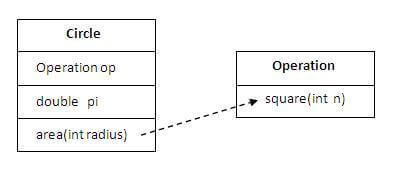
                        aggregation example

                        In this example, we have created the reference of Operation class in the Circle class.

                        class Operation{  
                        
                         int square(int n){  
                        
                          return n*n;  
                        
                         }  
                        
                        }  


                        class Circle{  
                        
                         Operation op;//aggregation  
                        
                         double pi=3.14;  


                         double area(int radius){  
                        
                           op=new Operation();  
                        
                           int rsquare=op.square(radius);//code reusability (i.e. delegates the method call).  
                        
                           return pi*rsquare;  
                        
                         }  


                         public static void main(String args[]){  
                        
                           Circle c=new Circle();  
                        
                           double result=c.area(5);  
                        
                           System.out.println(result);  
                        
                         }  
                        
                        }
                        Output:78.5


                        When use Aggregation?

                        • Code reuse is also best achieved by aggregation when there is no is-a relationship.
                        • Inheritance should be used only if the relationship is-a is maintained throughout the lifetime of the objects involved; otherwise, aggregation is the best choice.

                        Understanding meaningful example of Aggregation

                        In this example, Employee has an object of Address, address object contains its own informations such as city, state, country etc. In such case relationship is Employee HAS-A address.

                        Address.java

                        public class Address {  
                        
                        String city,state,country;  


                        public Address(String city, String state, String country) {  
                        
                            this.city = city;  
                        
                            this.state = state;  
                        
                            this.country = country;  
                        
                        }  


                        } 

                          Emp.java

                          public class Emp {  
                          
                          int id;  
                          
                          String name;  
                          
                          Address address;  


                          public Emp(int id, String name,Address address) {  
                          
                              this.id = id;  
                          
                              this.name = name;  
                          
                              this.address=address;  
                          
                          }  


                          void display(){  
                          
                          System.out.println(id+" "+name);  
                          
                          System.out.println(address.city+" "+address.state+" "+address.country);  
                          
                          }  


                          public static void main(String[] args) {  
                          
                          Address address1=new Address("gzb","UP","india");  
                          
                          Address address2=new Address("gno","UP","india");  


                          Emp e=new Emp(111,"varun",address1);  
                          
                          Emp e2=new Emp(112,"arun",address2);  


                          e.display();  
                          
                          e2.display();  


                          }  
                          
                          } 
                          Output:111 varun
                          
                             gzb UP india
                             112 arun
                             gno UP india      </code></pre>
                        1. Inheritance in Java

                          Inheritance in Java is a mechanism in which one object acquires all the properties and behaviors of a parent object. It is an important part of OOPs (Object Oriented programming system).

                          The idea behind inheritance in Java is that you can create new classes that are built upon existing classes. When you inherit from an existing class, you can reuse methods and fields of the parent class. Moreover, you can add new methods and fields in your current class also.

                          Inheritance represents the IS-A relationship which is also known as a parent-child relationship.

                          Why use inheritance in java

                          • For Method Overriding (so runtime polymorphism can be achieved).
                          • For Code Reusability.

                          Terms used in Inheritance

                          • Class: A class is a group of objects which have common properties. It is a template or blueprint from which objects are created.
                          • Sub Class/Child Class: Subclass is a class which inherits the other class. It is also called a derived class, extended class, or child class.
                          • Super Class/Parent Class: Superclass is the class from where a subclass inherits the features. It is also called a base class or a parent class.
                          • Reusability: As the name specifies, reusability is a mechanism which facilitates you to reuse the fields and methods of the existing class when you create a new class. You can use the same fields and methods already defined in the previous class.

                          The syntax of Java Inheritance

                          class Subclass-name extends Superclass-name  
                          
                          {  
                          
                             //methods and fields  
                          
                          }  

                            The extends keyword indicates that you are making a new class that derives from an existing class. The meaning of “extends” is to increase the functionality.

                            In the terminology of Java, a class which is inherited is called a parent or superclass, and the new class is called child or subclass.

                            Java Inheritance Example

                            Inheritance in Java

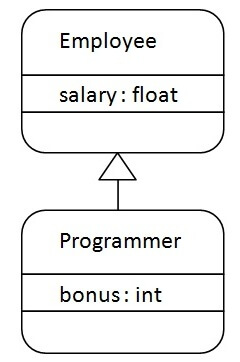
                            As displayed in the above figure, Programmer is the subclass and Employee is the superclass. The relationship between the two classes is Programmer IS-A Employee. It means that Programmer is a type of Employee.

                            class Employee{  
                            
                             float salary=40000;  
                            
                            }  
                            
                            class Programmer extends Employee{  
                            
                             int bonus=10000;  
                            
                             public static void main(String args[]){  
                            
                               Programmer p=new Programmer();  
                            
                               System.out.println("Programmer salary is:"+p.salary);  
                            
                               System.out.println("Bonus of Programmer is:"+p.bonus);  
                            
                            }  
                            
                            }
                             Programmer salary is:40000.0
                             Bonus of programmer is:10000
                            

                            In the above example, Programmer object can access the field of own class as well as of Employee class i.e. code reusability.

                            Types of inheritance in java

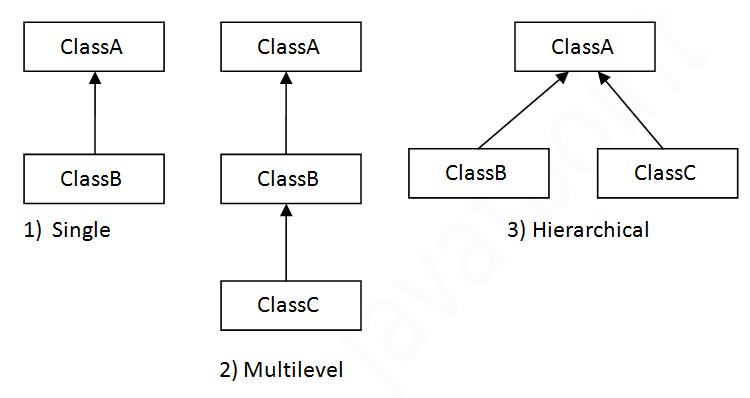
                            On the basis of class, there can be three types of inheritance in java: single, multilevel and hierarchical.

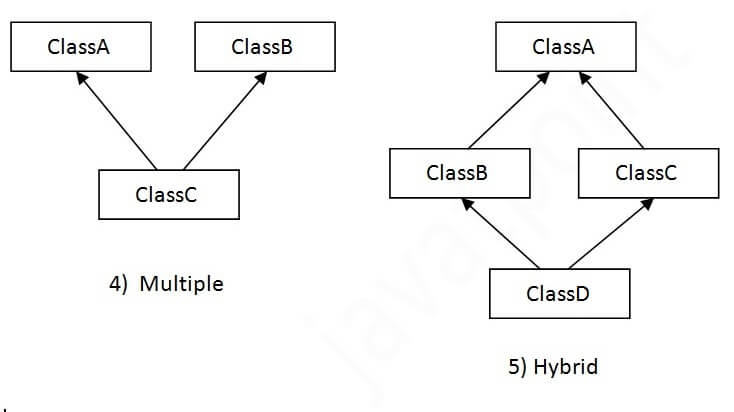
                            In java programming, multiple and hybrid inheritance is supported through interface only. We will learn about interfaces later.

                            Types of inheritance in Java

                            Note: Multiple inheritance is not supported in Java through class.

                            When one class inherits multiple classes, it is known as multiple inheritance. For Example:

                            Multiple inheritance in Java

                            Single Inheritance Example

                            When a class inherits another class, it is known as a single inheritance. In the example given below, Dog class inherits the Animal class, so there is the single inheritance.

                            File: TestInheritance.java

                              class Animal{  
                            
                            void eat(){System.out.println("eating...");}  
                            
                            }  
                            
                            class Dog extends Animal{  
                            
                            void bark(){System.out.println("barking...");}  
                            
                            }  
                            
                            class TestInheritance{  
                            
                            public static void main(String args[]){  
                            
                            Dog d=new Dog();  
                            
                            d.bark();  
                            
                            d.eat();  
                            
                            }}

                              Output:

                              barking...
                              eating...
                              

                              Multilevel Inheritance Example

                              When there is a chain of inheritance, it is known as multilevel inheritance. As you can see in the example given below, BabyDog class inherits the Dog class which again inherits the Animal class, so there is a multilevel inheritance.

                              File: TestInheritance2.java

                              class Animal{  
                              
                              void eat(){System.out.println("eating...");}  
                              
                              }  
                              
                              class Dog extends Animal{  
                              
                              void bark(){System.out.println("barking...");}  
                              
                              }  
                              
                              class BabyDog extends Dog{  
                              
                              void weep(){System.out.println("weeping...");}  
                              
                              }  
                              
                              class TestInheritance2{  
                              
                              public static void main(String args[]){  
                              
                              BabyDog d=new BabyDog();  
                              
                              d.weep();  
                              
                              d.bark();  
                              
                              d.eat();  
                              
                              }} 

                                Output:

                                weeping...
                                barking...
                                eating...
                                

                                Hierarchical Inheritance Example

                                When two or more classes inherits a single class, it is known as hierarchical inheritance. In the example given below, Dog and Cat classes inherits the Animal class, so there is hierarchical inheritance.

                                File: TestInheritance3.java

                                class Animal{  
                                
                                void eat(){System.out.println("eating...");}  
                                
                                }  
                                
                                class Dog extends Animal{  
                                
                                void bark(){System.out.println("barking...");}  
                                
                                }  
                                
                                class Cat extends Animal{  
                                
                                void meow(){System.out.println("meowing...");}  
                                
                                }  
                                
                                class TestInheritance3{  
                                
                                public static void main(String args[]){  
                                
                                Cat c=new Cat();  
                                
                                c.meow();  
                                
                                c.eat();  
                                
                                //c.bark();//C.T.Error  
                                
                                }} 

                                  Output:

                                  meowing...
                                  eating...
                                  

                                  Q) Why multiple inheritance is not supported in java?

                                  To reduce the complexity and simplify the language, multiple inheritance is not supported in java.

                                  Consider a scenario where A, B, and C are three classes. The C class inherits A and B classes. If A and B classes have the same method and you call it from child class object, there will be ambiguity to call the method of A or B class.

                                  Since compile-time errors are better than runtime errors, Java renders compile-time error if you inherit 2 classes. So whether you have same method or different, there will be compile time error.

                                  class A{  
                                  
                                  void msg(){System.out.println("Hello");}  
                                  
                                  }  
                                  
                                  class B{  
                                  
                                  void msg(){System.out.println("Welcome");}  
                                  
                                  }  
                                  
                                  class C extends A,B{//suppose if it were  


                                   public static void main(String args[]){  
                                  
                                     C obj=new C();  
                                  
                                     obj.msg();//Now which msg() method would be invoked?  
                                  
                                  }  
                                  
                                  }
                                   Compile Time Error