Author: saqibkhan

  • Java Math class

    Java Math class provides several methods to work on math calculations like min(), max(), avg(), sin(), cos(), tan(), round(), ceil(), floor(), abs() etc.

    Unlike some of the StrictMath class numeric methods, all implementations of the equivalent function of Math class can’t define to return the bit-for-bit same results. This relaxation permits implementation with better-performance where strict reproducibility is not required.

    If the size is int or long and the results overflow the range of value, the methods addExact(),??subtractExact(),??multiplyExact(), and??toIntExact()??throw an??ArithmeticException.

    For other arithmetic operations like increment, decrement, divide, absolute value, and negation overflow??occur only with a specific minimum or maximum value. It should be checked against the maximum and minimum value as appropriate.

    Example 1

    public class JavaMathExample1    
    
    {    
    
        public static void main(String[] args)     
    
        {    
    
            double x = 28;    
    
            double y = 4;    


            // return the maximum of two numbers  
    
            System.out.println("Maximum number of x and y is: " +Math.max(x, y));   


            // return the square root of y   
    
            System.out.println("Square root of y is: " + Math.sqrt(y));   


            //returns 28 power of 4 i.e. 28*28*28*28    
    
            System.out.println("Power of x and y is: " + Math.pow(x, y));      


            // return the logarithm of given value       
    
            System.out.println("Logarithm of x is: " + Math.log(x));   
    
            System.out.println("Logarithm of y is: " + Math.log(y));  


            // return the logarithm of given value when base is 10      
    
            System.out.println("log10 of x is: " + Math.log10(x));   
    
            System.out.println("log10 of y is: " + Math.log10(y));    


            // return the log of x + 1  
    
            System.out.println("log1p of x is: " +Math.log1p(x));    


            // return a power of 2    
    
            System.out.println("exp of a is: " +Math.exp(x));    


            // return (a power of 2)-1  
    
            System.out.println("expm1 of a is: " +Math.expm1(x));  
    
        }    
    
    }

    Output:

    Maximum number of x and y is: 28.0
    Square root of y is: 2.0
    Power of x and y is: 614656.0
    Logarithm of x is: 3.332204510175204
    Logarithm of y is: 1.3862943611198906
    log10 of x is: 1.4471580313422192
    log10 of y is: 0.6020599913279624
    log1p of x is: 3.367295829986474
    exp of a is: 1.446257064291475E12
    expm1 of a is: 1.446257064290475E12
    

    Example 2

    public class JavaMathExample2    
    
    {    
    
        public static void main(String[] args)     
    
        {    
    
            double a = 30;    


            // converting values to radian    
    
            double b = Math.toRadians(a);   


            // return the trigonometric sine of a      
    
            System.out.println("Sine value of a is: " +Math.sin(a));    


            // return the trigonometric cosine value of a  
    
            System.out.println("Cosine value of a is: " +Math.cos(a));  


            // return the trigonometric tangent value of a  
    
            System.out.println("Tangent value of a is: " +Math.tan(a));  


            // return the trigonometric arc sine of a      
    
            System.out.println("Sine value of a is: " +Math.asin(a));    


            // return the trigonometric arc cosine value of a  
    
            System.out.println("Cosine value of a is: " +Math.acos(a));  


            // return the trigonometric arc tangent value of a  
    
            System.out.println("Tangent value of a is: " +Math.atan(a));  


            // return the hyperbolic sine of a      
    
            System.out.println("Sine value of a is: " +Math.sinh(a));    


            // return the hyperbolic cosine value of a  
    
            System.out.println("Cosine value of a is: " +Math.cosh(a));  


            // return the hyperbolic tangent value of a  
    
            System.out.println("Tangent value of a is: " +Math.tanh(a));  
    
        }    
    
    }

    Output:

    Sine value of a is: -0.9880316240928618
    Cosine value of a is: 0.15425144988758405
    Tangent value of a is: -6.405331196646276
    Sine value of a is: NaN
    Cosine value of a is: NaN
    Tangent value of a is: 1.5374753309166493
    Sine value of a is: 5.343237290762231E12
    Cosine value of a is: 5.343237290762231E12
    Tangent value of a is: 1.0
    

    Java Math Methods

    The java.lang.Math class contains various methods for performing basic numeric operations such as the logarithm, cube root, and trigonometric functions etc. The various java math methods are as follows:

    Basic Math methods

    MethodDescription
    Math.abs()It will return the Absolute value of the given value.
    Math.max()It returns the Largest of two values.
    Math.min()It is used to return the Smallest of two values.
    Math.round()It is used to round of the decimal numbers to the nearest value.
    Math.sqrt()It is used to return the square root of a??number.
    Math.cbrt()It is used to return the cube root of a??number.
    Math.pow()It returns the value of first argument raised to the power to second argument.
    Math.signum()It is used to find the sign of a given value.
    Math.ceil()It is used to find the smallest integer value that is greater than or equal to the argument or mathematical integer.
    Math.copySign()It is used to find the Absolute value of first argument along with sign specified in second argument.
    Math.nextAfter()It is used to return the floating-point number adjacent to the first argument in the direction of the second argument.
    Math.nextUp()It returns the floating-point value adjacent to??d??in the direction of positive infinity.
    Math.nextDown()It returns the floating-point value adjacent to??d??in the direction of negative infinity.
    Math.floor()It is used to find the??largest integer value which is less than or equal to the argument and is equal to the mathematical integer of a double value.
    Math.floorDiv()It is used to find the??largest integer value that is less than or equal to the algebraic quotient.
    Math.random()It returns a??double??value with a positive sign, greater than or equal to??0.0??and less than??1.0.
    Math.rint()It returns the double value that is closest to the given argument and equal to mathematical integer.
    Math.hypot()It returns sqrt(x2??+y2) without intermediate overflow or underflow.
    Math.ulp()It returns the size of an ulp of the argument.
    Math.getExponent()It is used to return the unbiased exponent used in the representation of a??value.
    Math.IEEEremainder()It is used to calculate the remainder operation on two arguments as prescribed by the IEEE 754 standard and returns value.
    Math.addExact()It is used to return the sum of its arguments, throwing an exception if the result overflows an??int or long.
    Math.subtractExact()It returns the difference of the arguments, throwing an exception if the result overflows an??int.
    Math.multiplyExact()It is used to return the product of the arguments, throwing an exception if the result overflows an??int or long.
    Math.incrementExact()It returns the argument incremented by one, throwing an exception if the result overflows an??int.
    Math.decrementExact()It is used to return the argument decremented by one, throwing an exception if the result overflows an??int or long.
    Math.negateExact()It is used to return the negation of the argument, throwing an exception if the result overflows an??int or long.
    Math.toIntExact()It returns the value of the??long??argument, throwing an exception if the value overflows an??int.

    Logarithmic Math Methods

    MethodDescription
    Math.log()It returns the natural logarithm of a??double??value.
    Math.log10()It is used to return the base 10 logarithm of a??double??value.
    Math.log1p()It returns the natural logarithm of the sum of the argument and 1.
    Math.exp()It returns E raised to the power of a??double??value, where E is Euler’s number and it is approximately equal to 2.71828.
    Math.expm1()It is used to calculate the power of E and subtract one from it.

    Trigonometric Math Methods

    MethodDescription
    Math.sin()It is used to return the trigonometric Sine value of a Given double value.
    Math.cos()It is used to return the trigonometric Cosine value of a Given double value.
    Math.tan()It is used to return the trigonometric Tangent value of a Given double value.
    Math.asin()It is used to return the trigonometric Arc Sine value of a Given double value
    Math.acos()It is used to return the trigonometric Arc Cosine value of a Given double value.
    Math.atan()It is used to return the trigonometric Arc Tangent value of a Given double value.

    Hyperbolic Math Methods

    MethodDescription
    Math.sinh()It is used to return the trigonometric Hyperbolic Cosine value of a Given double value.
    Math.cosh()It is used to return the trigonometric Hyperbolic Sine value of a Given double value.
    Math.tanh()It is used to return the trigonometric Hyperbolic Tangent value of a Given double value.

    Angular Math Methods

    MethodDescription
    Math.toDegreesIt is used to convert the specified Radians angle to equivalent angle measured in Degrees.
    Math.toRadiansIt is used to convert the specified Degrees angle to equivalent angle measured in Radians.
  • Object Cloning in Java

    The object cloning is a way to create exact copy of an object. The clone() method of Object class is used to clone an object.

    The java.lang.Cloneable interface must be implemented by the class whose object clone we want to create. If we don’t implement Cloneable interface, clone() method generates CloneNotSupportedException.

    The clone() method is defined in the Object class. Syntax of the clone() method is as follows:

    protected Object clone() throws CloneNotSupportedException  

    Why use clone() method ?

    The clone() method saves the extra processing task for creating the exact copy of an object. If we perform it by using the new keyword, it will take a lot of processing time to be performed that is why we use object cloning.

    Advantage of Object cloning

    Although Object.clone() has some design issues but it is still a popular and easy way of copying objects. Following is a list of advantages of using clone() method:

    • You don’t need to write lengthy and repetitive codes. Just use an abstract class with a 4- or 5-line long clone() method.
    • It is the easiest and most efficient way for copying objects, especially if we are applying it to an already developed or an old project. Just define a parent class, implement Cloneable in it, provide the definition of the clone() method and the task will be done.
    • Clone() is the fastest way to copy array.

    Disadvantage of Object cloning

    Following is a list of some disadvantages of clone() method:

    • To use the Object.clone() method, we have to change a lot of syntaxes to our code, like implementing a Cloneable interface, defining the clone() method and handling CloneNotSupportedException, and finally, calling Object.clone() etc.
    • We have to implement cloneable interface while it doesn’t have any methods in it. We just have to use it to tell the JVM that we can perform clone() on our object.
    • Object.clone() is protected, so we have to provide our own clone() and indirectly call Object.clone() from it.
    • Object.clone() doesn’t invoke any constructor so we don’t have any control over object construction.
    • If you want to write a clone method in a child class then all of its superclasses should define the clone() method in them or inherit it from another parent class. Otherwise, the super.clone() chain will fail.
    • Object.clone() supports only shallow copying but we will need to override it if we need deep cloning.

    Example of clone() method (Object cloning)

    Let’s see the simple example of object cloning

    class Student18 implements Cloneable{  
    
    int rollno;  
    
    String name;  


    Student18(int rollno,String name){  
    
    this.rollno=rollno;  
    
    this.name=name;  
    
    }  


    public Object clone()throws CloneNotSupportedException{  
    
    return super.clone();  
    
    }  


    public static void main(String args[]){  
    
    try{  
    
    Student18 s1=new Student18(101,"amit");  


    Student18 s2=(Student18)s1.clone();  


    System.out.println(s1.rollno+" "+s1.name);  
    
    System.out.println(s2.rollno+" "+s2.name);  


    }catch(CloneNotSupportedException c){}  


    }  
    
    }
    Output:101 amit
    
       101 amit
  • Object class in Java

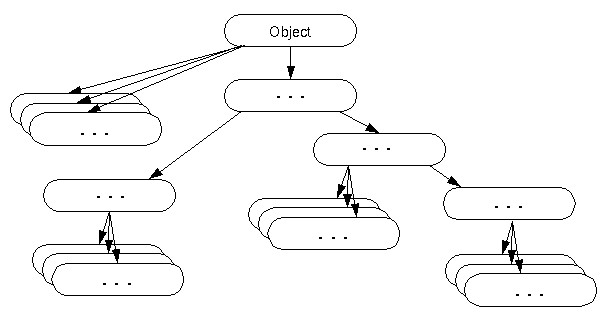
    The Object class is the parent class of all the classes in java by default. In other words, it is the topmost class of java.

    The Object class is beneficial if you want to refer any object whose type you don’t know. Notice that parent class reference variable can refer the child class object, know as upcasting.

    Let’s take an example, there is getObject() method that returns an object but it can be of any type like Employee,Student etc, we can use Object class reference to refer that object. For example:

    Object obj=getObject();//we don't know what object will be returned from this method  

    The Object class provides some common behaviors to all the objects such as object can be compared, object can be cloned, object can be notified etc.

    object class in java

    Methods of Object class

    The Object class provides many methods. They are as follows:
    MethodDescription
    public final Class getClass()returns the Class class object of this object. The Class class can further be used to get the metadata of this class.
    public int hashCode()returns the hashcode number for this object.
    public boolean equals(Object obj)compares the given object to this object.
    protected Object clone() throws CloneNotSupportedExceptioncreates and returns the exact copy (clone) of this object.
    public String toString()returns the string representation of this object.
    public final void notify()wakes up single thread, waiting on this object’s monitor.
    public final void notifyAll()wakes up all the threads, waiting on this object’s monitor.
    public final void wait(long timeout)throws InterruptedExceptioncauses the current thread to wait for the specified milliseconds, until another thread notifies (invokes notify() or notifyAll() method).
    public final void wait(long timeout,int nanos)throws InterruptedExceptioncauses the current thread to wait for the specified milliseconds and nanoseconds, until another thread notifies (invokes notify() or notifyAll() method).
    public final void wait()throws InterruptedExceptioncauses the current thread to wait, until another thread notifies (invokes notify() or notifyAll() method).
    protected void finalize()throws Throwableis invoked by the garbage collector before object is being garbage collected.
  • Java Arrays

    Normally, an array is a collection of similar type of elements which has contiguous memory location.

    Java array is an object which contains elements of a similar data type. Additionally, The elements of an array are stored in a contiguous memory location. It is a data structure where we store similar elements. We can store only a fixed set of elements in a Java array.

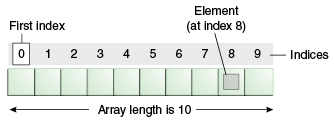
    Array in Java is index-based, the first element of the array is stored at the 0th index, 2nd element is stored on 1st index and so on.

    Unlike C/C++, we can get the length of the array using the length member. In C/C++, we need to use the sizeof operator.

    In Java, array is an object of a dynamically generated class. Java array inherits the Object class, and implements the Serializable as well as Cloneable interfaces. We can store primitive values or objects in an array in Java. Like C/C++, we can also create single dimentional or multidimentional arrays in Java.

    Moreover, Java provides the feature of anonymous arrays which is not available in C/C++.

    Java array

    Advantages

    • Code Optimization: It makes the code optimized, we can retrieve or sort the data efficiently.
    • Random access: We can get any data located at an index position.

    Disadvantages

    • Size Limit: We can store only the fixed size of elements in the array. It doesn’t grow its size at runtime. To solve this problem, collection framework is used in Java which grows automatically.

    Types of Array in java

    There are two types of array.

    • Single Dimensional Array
    • Multidimensional Array

    Single Dimensional Array in Java

    Syntax to Declare an Array in Java

    dataType[] arr; (or)  
    
    dataType []arr; (or)  
    
    dataType arr[];  

      Instantiation of an Array in Java

      arrayRefVar=new datatype[size];  

      Example of Java Array

      Let’s see the simple example of java array, where we are going to declare, instantiate, initialize and traverse an array.

      //Java Program to illustrate how to declare, instantiate, initialize  
      
      //and traverse the Java array.  
      
      class Testarray{  
      
      public static void main(String args[]){  
      
      int a[]=new int[5];//declaration and instantiation  
      
      a[0]=10;//initialization  
      
      a[1]=20;  
      
      a[2]=70;  
      
      a[3]=40;  
      
      a[4]=50;  
      
      //traversing array  
      
      for(int i=0;i<a.length;i++)//length is the property of array  
      
      System.out.println(a[i]);  
      
      }}

      Output:

      10
      20
      70
      40
      50
      

      Declaration, Instantiation and Initialization of Java Array

      We can declare, instantiate and initialize the java array together by:

      int a[]={33,3,4,5};//declaration, instantiation and initialization  

      Let’s see the simple example to print this array.

      //Java Program to illustrate the use of declaration, instantiation   
      
      //and initialization of Java array in a single line  
      
      class Testarray1{  
      
      public static void main(String args[]){  
      
      int a[]={33,3,4,5};//declaration, instantiation and initialization  
      
      //printing array  
      
      for(int i=0;i<a.length;i++)//length is the property of array  
      
      System.out.println(a[i]);  
      
      }}

      Output:

      33
      3
      4
      5
      

      For-each Loop for Java Array

      We can also print the Java array using for-each loop. The Java for-each loop prints the array elements one by one. It holds an array element in a variable, then executes the body of the loop.

      The syntax of the for-each loop is given below:

      for(data_type variable:array){  
      
      //body of the loop  
      
      } 

        Let us see the example of print the elements of Java array using the for-each loop.

        //Java Program to print the array elements using for-each loop  
        
        class Testarray1{  
        
        public static void main(String args[]){  
        
        int arr[]={33,3,4,5};  
        
        //printing array using for-each loop  
        
        for(int i:arr)  
        
        System.out.println(i);  
        
        }}  

          Output:

          33
          3
          4
          5
          

          Passing Array to a Method in Java

          We can pass the java array to method so that we can reuse the same logic on any array.

          Let’s see the simple example to get the minimum number of an array using a method.

          //Java Program to demonstrate the way of passing an array  
          
          //to method.  
          
          class Testarray2{  
          
          //creating a method which receives an array as a parameter  
          
          static void min(int arr[]){  
          
          int min=arr[0];  
          
          for(int i=1;i<arr.length;i++)  
          
           if(min>arr[i])  
          
            min=arr[i];  


          System.out.println(min);  
          
          }  


          public static void main(String args[]){  
          
          int a[]={33,3,4,5};//declaring and initializing an array  
          
          min(a);//passing array to method  
          
          }}

          Output:

          3
          

          Anonymous Array in Java

          Java supports the feature of an anonymous array, so you don’t need to declare the array while passing an array to the method.

          //Java Program to demonstrate the way of passing an anonymous array  
          
          //to method.  
          
          public class TestAnonymousArray{  
          
          //creating a method which receives an array as a parameter  
          
          static void printArray(int arr[]){  
          
          for(int i=0;i<arr.length;i++)  
          
          System.out.println(arr[i]);  
          
          }  


          public static void main(String args[]){  
          
          printArray(new int[]{10,22,44,66});//passing anonymous array to method  
          
          }}

          Output:

          10
          22
          44
          66
          

          Returning Array from the Method

          We can also return an array from the method in Java.

          //Java Program to return an array from the method  
          
          class TestReturnArray{  
          
          //creating method which returns an array  
          
          static int[] get(){  
          
          return new int[]{10,30,50,90,60};  
          
          }  


          public static void main(String args[]){  
          
          //calling method which returns an array  
          
          int arr[]=get();  
          
          //printing the values of an array  
          
          for(int i=0;i<arr.length;i++)  
          
          System.out.println(arr[i]);  
          
          }}

          Output:

          10
          30
          50
          90
          60
          

          ArrayIndexOutOfBoundsException

          The Java Virtual Machine (JVM) throws an ArrayIndexOutOfBoundsException if length of the array in negative, equal to the array size or greater than the array size while traversing the array.

          //Java Program to demonstrate the case of   
          
          //ArrayIndexOutOfBoundsException in a Java Array.  
          
          public class TestArrayException{  
          
          public static void main(String args[]){  
          
          int arr[]={50,60,70,80};  
          
          for(int i=0;i<=arr.length;i++){  
          
          System.out.println(arr[i]);  
          
          }  
          
          }}

          Output:

          Exception in thread "main" java.lang.ArrayIndexOutOfBoundsException: 4
          	at TestArrayException.main(TestArrayException.java:5)
          50
          60
          70
          80
          

          Multidimensional Array in Java

          In such case, data is stored in row and column based index (also known as matrix form).

          Syntax to Declare Multidimensional Array in Java

          dataType[][] arrayRefVar; (or)  
          
          dataType [][]arrayRefVar; (or)  
          
          dataType arrayRefVar[][]; (or)  
          
          dataType []arrayRefVar[];  

            Example to instantiate Multidimensional Array in Java

            int[][] arr=new int[3][3];//3 row and 3 column  

            Example to initialize Multidimensional Array in Java

            arr[0][0]=1;  
            
            arr[0][1]=2;  
            
            arr[0][2]=3;  
            
            arr[1][0]=4;  
            
            arr[1][1]=5;  
            
            arr[1][2]=6;  
            
            arr[2][0]=7;  
            
            arr[2][1]=8;  
            
            arr[2][2]=9;

            Example of Multidimensional Java Array

            Let’s see the simple example to declare, instantiate, initialize and print the 2Dimensional array.

            //Java Program to illustrate the use of multidimensional array  
            
            class Testarray3{  
            
            public static void main(String args[]){  
            
            //declaring and initializing 2D array  
            
            int arr[][]={{1,2,3},{2,4,5},{4,4,5}};  
            
            //printing 2D array  
            
            for(int i=0;i<3;i++){  
            
             for(int j=0;j<3;j++){  
            
               System.out.print(arr[i][j]+" ");  
            
             }  
            
             System.out.println();  
            
            }  
            
            }}

            Output:

            1 2 3
            2 4 5
            4 4 5
            

            Jagged Array in Java

            If we are creating odd number of columns in a 2D array, it is known as a jagged array. In other words, it is an array of arrays with different number of columns.

            //Java Program to illustrate the jagged array  
            
            class TestJaggedArray{  
            
                public static void main(String[] args){  
            
                    //declaring a 2D array with odd columns  
            
                    int arr[][] = new int[3][];  
            
                    arr[0] = new int[3];  
            
                    arr[1] = new int[4];  
            
                    arr[2] = new int[2];  
            
                    //initializing a jagged array  
            
                    int count = 0;  
            
                    for (int i=0; i<arr.length; i++)  
            
                        for(int j=0; j<arr[i].length; j++)  
            
                            arr[i][j] = count++;  


                    //printing the data of a jagged array   
            
                    for (int i=0; i<arr.length; i++){  
            
                        for (int j=0; j<arr[i].length; j++){  
            
                            System.out.print(arr[i][j]+" ");  
            
                        }  
            
                        System.out.println();//new line  
            
                    }  
            
                }  
            
            }

            Output:

            0 1 2 
            3 4 5 6 
            7 8 
            

            What is the class name of Java array?

            In Java, an array is an object. For array object, a proxy class is created whose name can be obtained by getClass().getName() method on the object.

            //Java Program to get the class name of array in Java  
            
            class Testarray4{  
            
            public static void main(String args[]){  
            
            //declaration and initialization of array  
            
            int arr[]={4,4,5};  
            
            //getting the class name of Java array  
            
            Class c=arr.getClass();  
            
            String name=c.getName();  
            
            //printing the class name of Java array   
            
            System.out.println(name);  


            }}

            Output:

            I
            

            Copying a Java Array

            We can copy an array to another by the arraycopy() method of System class.

            Syntax of arraycopy method

            public static void arraycopy(  
            
            Object src, int srcPos,Object dest, int destPos, int length  
            
            ) 

              Example of Copying an Array in Java

              //Java Program to copy a source array into a destination array in Java  
              
              class TestArrayCopyDemo {  
              
                  public static void main(String[] args) {  
              
                      //declaring a source array  
              
                      char[] copyFrom = { 'd', 'e', 'c', 'a', 'f', 'f', 'e',  
              
                              'i', 'n', 'a', 't', 'e', 'd' };  
              
                      //declaring a destination array  
              
                      char[] copyTo = new char[7];  
              
                      //copying array using System.arraycopy() method  
              
                      System.arraycopy(copyFrom, 2, copyTo, 0, 7);  
              
                      //printing the destination array  
              
                      System.out.println(String.valueOf(copyTo));  
              
                  }  
              
              }

              Output:

              caffein
              

              Cloning an Array in Java

              Since, Java array implements the Cloneable interface, we can create the clone of the Java array. If we create the clone of a single-dimensional array, it creates the deep copy of the Java array. It means, it will copy the actual value. But, if we create the clone of a multidimensional array, it creates the shallow copy of the Java array which means it copies the references.

              //Java Program to clone the array  
              
              class Testarray1{  
              
              public static void main(String args[]){  
              
              int arr[]={33,3,4,5};  
              
              System.out.println("Printing original array:");  
              
              for(int i:arr)  
              
              System.out.println(i);  


              System.out.println("Printing clone of the array:");  
              
              int carr[]=arr.clone();  
              
              for(int i:carr)  
              
              System.out.println(i);  


              System.out.println("Are both equal?");  
              
              System.out.println(arr==carr);  


              }}  

                Output:

                Printing original array:
                33
                3
                4
                5
                Printing clone of the array:
                33
                3
                4
                5
                Are both equal?
                false
                

                Addition of 2 Matrices in Java

                Let’s see a simple example that adds two matrices.

                //Java Program to demonstrate the addition of two matrices in Java  
                
                class Testarray5{  
                
                public static void main(String args[]){  
                
                //creating two matrices  
                
                int a[][]={{1,3,4},{3,4,5}};  
                
                int b[][]={{1,3,4},{3,4,5}};  


                //creating another matrix to store the sum of two matrices  
                
                int c[][]=new int[2][3];  


                //adding and printing addition of 2 matrices  
                
                for(int i=0;i<2;i++){  
                
                for(int j=0;j<3;j++){  
                
                c[i][j]=a[i][j]+b[i][j];  
                
                System.out.print(c[i][j]+" ");  
                
                }  
                
                System.out.println();//new line  
                
                }  


                }}

                Output:

                2 6 8
                6 8 10
                

                Multiplication of 2 Matrices in Java

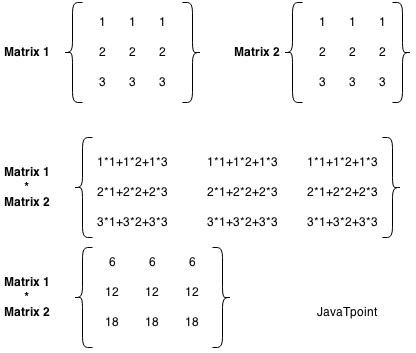
                In the case of matrix multiplication, a one-row element of the first matrix is multiplied by all the columns of the second matrix which can be understood by the image given below.

                Matrix Multiplication in Java

                Let’s see a simple example to multiply two matrices of 3 rows and 3 columns.

                //Java Program to multiply two matrices  
                
                public class MatrixMultiplicationExample{  
                
                public static void main(String args[]){  
                
                //creating two matrices    
                
                int a[][]={{1,1,1},{2,2,2},{3,3,3}};    
                
                int b[][]={{1,1,1},{2,2,2},{3,3,3}};    


                //creating another matrix to store the multiplication of two matrices    
                
                int c[][]=new int[3][3];  //3 rows and 3 columns  


                //multiplying and printing multiplication of 2 matrices    
                
                for(int i=0;i<3;i++){    
                
                for(int j=0;j<3;j++){    
                
                c[i][j]=0;      
                
                for(int k=0;k<3;k++)      
                
                {      
                
                c[i][j]+=a[i][k]*b[k][j];      
                
                }//end of k loop  
                
                System.out.print(c[i][j]+" ");  //printing matrix element  
                
                }//end of j loop  
                
                System.out.println();//new line    
                
                }    
                
                }}

                Output:

                6 6 6 
                12 12 12 
                18 18 18 
                
              1. Encapsulation in Java

                Encapsulation in Java is a process of wrapping code and data together into a single unit, for example, a capsule which is mixed of several medicines.

                encapsulation in java

                We can create a fully encapsulated class in Java by making all the data members of the class private. Now we can use setter and getter methods to set and get the data in it.

                The Java Bean class is the example of a fully encapsulated class.

                Advantage of Encapsulation in Java

                By providing only a setter or getter method, you can make the class read-only or write-only. In other words, you can skip the getter or setter methods.

                It provides you the control over the data. Suppose you want to set the value of id which should be greater than 100 only, you can write the logic inside the setter method. You can write the logic not to store the negative numbers in the setter methods.

                It is a way to achieve data hiding in Java because other class will not be able to access the data through the private data members.

                The encapsulate class is easy to test. So, it is better for unit testing.

                The standard IDE’s are providing the facility to generate the getters and setters. So, it is easy and fast to create an encapsulated class in Java.

                Simple Example of Encapsulation in Java

                Let’s see the simple example of encapsulation that has only one field with its setter and getter methods.

                File: Student.java

                //A Java class which is a fully encapsulated class.  
                
                //It has a private data member and getter and setter methods.  
                
                package com.javatpoint;  
                
                public class Student{  
                
                //private data member  
                
                private String name;  
                
                //getter method for name  
                
                public String getName(){  
                
                return name;  
                
                }  
                
                //setter method for name  
                
                public void setName(String name){  
                
                this.name=name  
                
                }  
                
                } 

                  File: Test.java

                  //A Java class to test the encapsulated class.  
                  
                  package com.javatpoint;  
                  
                  class Test{  
                  
                  public static void main(String[] args){  
                  
                  //creating instance of the encapsulated class  
                  
                  Student s=new Student();  
                  
                  //setting value in the name member  
                  
                  s.setName("vijay");  
                  
                  //getting value of the name member  
                  
                  System.out.println(s.getName());  
                  
                  }  
                  
                  }
                  Compile By: javac -d . Test.java
                  Run By: java com.javatpoint.Test
                  

                  Output:

                  vijay
                  

                  Read-Only class

                  //A Java class which has only getter methods.  
                  
                  public class Student{  
                  
                  //private data member  
                  
                  private String college="AKG";  
                  
                  //getter method for college  
                  
                  public String getCollege(){  
                  
                  return college;  
                  
                  }  
                  
                  }

                  Now, you can’t change the value of the college data member which is “AKG”.

                  s.setCollege("KITE");//will render compile time error  

                  Write-Only class

                  //A Java class which has only setter methods.  
                  
                  public class Student{  
                  
                  //private data member  
                  
                  private String college;  
                  
                  //getter method for college  
                  
                  public void setCollege(String college){  
                  
                  this.college=college;  
                  
                  }  
                  
                  }

                  Now, you can’t get the value of the college, you can only change the value of college data member.

                  System.out.println(s.getCollege());//Compile Time Error, because there is no such method  
                  
                  System.out.println(s.college);//Compile Time Error, because the college data member is private.   
                  
                  //So, it can't be accessed from outside the class  

                    Another Example of Encapsulation in Java

                    Let’s see another example of encapsulation that has only four fields with its setter and getter methods.

                    File: Account.java

                    //A Account class which is a fully encapsulated class.  
                    
                    //It has a private data member and getter and setter methods.  
                    
                    class Account {  
                    
                    //private data members  
                    
                    private long acc_no;  
                    
                    private String name,email;  
                    
                    private float amount;  
                    
                    //public getter and setter methods  
                    
                    public long getAcc_no() {  
                    
                        return acc_no;  
                    
                    }  
                    
                    public void setAcc_no(long acc_no) {  
                    
                        this.acc_no = acc_no;  
                    
                    }  
                    
                    public String getName() {  
                    
                        return name;  
                    
                    }  
                    
                    public void setName(String name) {  
                    
                        this.name = name;  
                    
                    }  
                    
                    public String getEmail() {  
                    
                        return email;  
                    
                    }  
                    
                    public void setEmail(String email) {  
                    
                        this.email = email;  
                    
                    }  
                    
                    public float getAmount() {  
                    
                        return amount;  
                    
                    }  
                    
                    public void setAmount(float amount) {  
                    
                        this.amount = amount;  
                    
                    }  


                    } 

                      File: TestAccount.java

                      //A Java class to test the encapsulated class Account.  
                      
                      public class TestEncapsulation {  
                      
                      public static void main(String[] args) {  
                      
                          //creating instance of Account class  
                      
                          Account acc=new Account();  
                      
                          //setting values through setter methods  
                      
                          acc.setAcc_no(7560504000L);  
                      
                          acc.setName("Sonoo Jaiswal");  
                      
                          acc.setEmail("[email protected]");  
                      
                          acc.setAmount(500000f);  
                      
                          //getting values through getter methods  
                      
                          System.out.println(acc.getAcc_no()+" "+acc.getName()+" "+acc.getEmail()+" "+acc.getAmount());  
                      
                      }  
                      
                      }

                      Output:

                      7560504000 Sonoo Jaiswal [email protected] 500000.0
                      
                    1. Access Modifiers in Java

                      There are two types of modifiers in Java: access modifiers and non-access modifiers.

                      The access modifiers in Java specifies the accessibility or scope of a field, method, constructor, or class. We can change the access level of fields, constructors, methods, and class by applying the access modifier on it.

                      There are four types of Java access modifiers:

                      1. Private: The access level of a private modifier is only within the class. It cannot be accessed from outside the class.
                      2. Default: The access level of a default modifier is only within the package. It cannot be accessed from outside the package. If you do not specify any access level, it will be the default.
                      3. Protected: The access level of a protected modifier is within the package and outside the package through child class. If you do not make the child class, it cannot be accessed from outside the package.
                      4. Public: The access level of a public modifier is everywhere. It can be accessed from within the class, outside the class, within the package and outside the package.

                      There are many non-access modifiers, such as static, abstract, synchronized, native, volatile, transient, etc. Here, we are going to learn the access modifiers only.

                      Understanding Java Access Modifiers

                      Let’s understand the access modifiers in Java by a simple table.

                      Access Modifierwithin classwithin packageoutside package by subclass onlyoutside package
                      PrivateYNNN
                      DefaultYYNN
                      ProtectedYYYN
                      PublicYYYY

                      1) Private

                      The private access modifier is accessible only within the class.

                      Simple example of private access modifier

                      In this example, we have created two classes A and Simple. A class contains private data member and private method. We are accessing these private members from outside the class, so there is a compile-time error.

                      class A{  
                      
                      private int data=40;  
                      
                      private void msg(){System.out.println("Hello java");}  
                      
                      }  


                      public class Simple{  
                      
                       public static void main(String args[]){  
                      
                         A obj=new A();  
                      
                         System.out.println(obj.data);//Compile Time Error  
                      
                         obj.msg();//Compile Time Error  
                      
                         }  
                      
                      }

                      Role of Private Constructor

                      If you make any class constructor private, you cannot create the instance of that class from outside the class. For example:

                      class A{  
                      
                      private A(){}//private constructor  
                      
                      void msg(){System.out.println("Hello java");}  
                      
                      }  
                      
                      public class Simple{  
                      
                       public static void main(String args[]){  
                      
                         A obj=new A();//Compile Time Error  
                      
                       }  
                      
                      }  

                        Note: A class cannot be private or protected except nested class.

                        2) Default

                        If you don’t use any modifier, it is treated as default by default. The default modifier is accessible only within package. It cannot be accessed from outside the package. It provides more accessibility than private. But, it is more restrictive than protected, and public.

                        Example of default access modifier

                        In this example, we have created two packages pack and mypack. We are accessing the A class from outside its package, since A class is not public, so it cannot be accessed from outside the package.

                        //save by A.java  
                        
                        package pack;  
                        
                        class A{  
                        
                          void msg(){System.out.println("Hello");}  
                        
                        }  
                          //save by B.java  
                          
                          package mypack;  
                          
                          import pack.*;  
                          
                          class B{  
                          
                            public static void main(String args[]){  
                          
                             A obj = new A();//Compile Time Error  
                          
                             obj.msg();//Compile Time Error  
                          
                            }  
                          
                          }

                          In the above example, the scope of class A and its method msg() is default so it cannot be accessed from outside the package.

                          3) Protected

                          The protected access modifier is accessible within package and outside the package but through inheritance only.

                          The protected access modifier can be applied on the data member, method and constructor. It can’t be applied on the class.

                          It provides more accessibility than the default modifer.

                          Example of protected access modifier

                          In this example, we have created the two packages pack and mypack. The A class of pack package is public, so can be accessed from outside the package. But msg method of this package is declared as protected, so it can be accessed from outside the class only through inheritance.

                          //save by A.java  
                          
                          package pack;  
                          
                          public class A{  
                          
                          protected void msg(){System.out.println("Hello");}  
                          
                          }
                          //save by B.java  
                          
                          package mypack;  
                          
                          import pack.*;  


                          class B extends A{  
                          
                            public static void main(String args[]){  
                          
                             B obj = new B();  
                          
                             obj.msg();  
                          
                            }  
                          
                          }
                          Output:Hello
                          

                          4) Public

                          The public access modifier is accessible everywhere. It has the widest scope among all other modifiers.

                          Example of public access modifier

                          //save by A.java  


                          package pack;  
                          
                          public class A{  
                          
                          public void msg(){System.out.println("Hello");}  
                          
                          }
                            //save by B.java  


                            package mypack;  
                            
                            import pack.*;  


                            class B{  
                            
                              public static void main(String args[]){  
                            
                               A obj = new A();  
                            
                               obj.msg();  
                            
                              }  
                            
                            } 
                              Output:Hello
                              

                              Java Access Modifiers with Method Overriding

                              If you are overriding any method, overridden method (i.e. declared in subclass) must not be more restrictive.

                              class A{  
                              
                              protected void msg(){System.out.println("Hello java");}  
                              
                              }  


                              public class Simple extends A{  
                              
                              void msg(){System.out.println("Hello java");}//C.T.Error  
                              
                               public static void main(String args[]){  
                              
                                 Simple obj=new Simple();  
                              
                                 obj.msg();  
                              
                                 }  
                              
                              }
                            1. Java Package

                              java package is a group of similar types of classes, interfaces and sub-packages.

                              Package in java can be categorized in two form, built-in package and user-defined package.

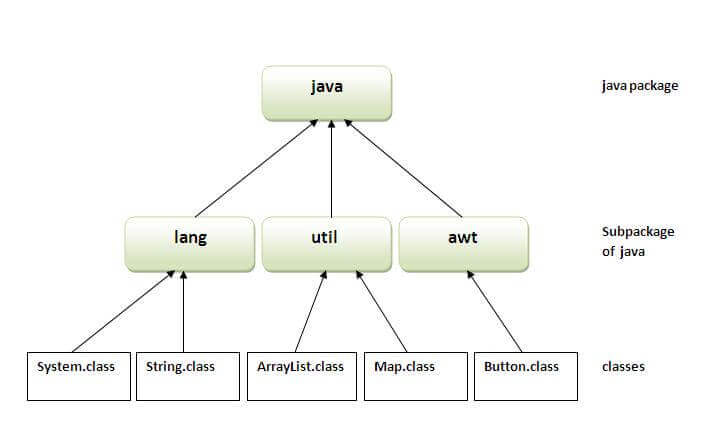
                              There are many built-in packages such as java, lang, awt, javax, swing, net, io, util, sql etc.

                              Here, we will have the detailed learning of creating and using user-defined packages.

                              Advantage of Java Package

                              1) Java package is used to categorize the classes and interfaces so that they can be easily maintained.

                              2) Java package provides access protection.

                              3) Java package removes naming collision.

                              package in java

                              Simple example of java package

                              The package keyword is used to create a package in java.

                              //save as Simple.java  
                              
                              package mypack;  
                              
                              public class Simple{  
                              
                               public static void main(String args[]){  
                              
                                  System.out.println("Welcome to package");  
                              
                                 }  
                              
                              }

                              How to compile java package

                              If you are not using any IDE, you need to follow the syntax given below:

                              javac -d directory javafilename  

                              For example

                              javac -d . Simple.java  

                              The -d switch specifies the destination where to put the generated class file. You can use any directory name like /home (in case of Linux), d:/abc (in case of windows) etc. If you want to keep the package within the same directory, you can use . (dot).

                              How to run java package program

                              You need to use fully qualified name e.g. mypack.Simple etc to run the class.

                              To Compile: javac -d . Simple.java
                              To Run: java mypack.Simple
                              Output:Welcome to package
                              
                              The -d is a switch that tells the compiler where to put the class file i.e. it represents destination. The . represents the current folder.

                              How to access package from another package?

                              There are three ways to access the package from outside the package.

                              1. import package.*;
                              2. import package.classname;
                              3. fully qualified name.

                              1) Using packagename.*

                              If you use package.* then all the classes and interfaces of this package will be accessible but not subpackages.

                              The import keyword is used to make the classes and interface of another package accessible to the current package.

                              Example of package that import the packagename.*

                              //save by A.java  
                              
                              package pack;  
                              
                              public class A{  
                              
                                public void msg(){System.out.println("Hello");}  
                              
                              } 
                                //save by B.java  
                                
                                package mypack;  
                                
                                import pack.*;  


                                class B{  
                                
                                  public static void main(String args[]){  
                                
                                   A obj = new A();  
                                
                                   obj.msg();  
                                
                                  }  
                                
                                }
                                Output:Hello
                                

                                2) Using packagename.classname

                                If you import package.classname then only declared class of this package will be accessible.

                                Example of package by import package.classname

                                //save by A.java  


                                package pack;  
                                
                                public class A{  
                                
                                  public void msg(){System.out.println("Hello");}  
                                
                                } 
                                  //save by B.java  
                                  
                                  package mypack;  
                                  
                                  import pack.A;  


                                  class B{  
                                  
                                    public static void main(String args[]){  
                                  
                                     A obj = new A();  
                                  
                                     obj.msg();  
                                  
                                    }  
                                  
                                  }
                                  Output:Hello
                                  

                                  3) Using fully qualified name

                                  If you use fully qualified name then only declared class of this package will be accessible. Now there is no need to import. But you need to use fully qualified name every time when you are accessing the class or interface.

                                  It is generally used when two packages have same class name e.g. java.util and java.sql packages contain Date class.

                                  Example of package by import fully qualified name

                                  //save by A.java  
                                  
                                  package pack;  
                                  
                                  public class A{  
                                  
                                    public void msg(){System.out.println("Hello");}  
                                  
                                  } 
                                    //save by B.java  
                                    
                                    package mypack;  
                                    
                                    class B{  
                                    
                                      public static void main(String args[]){  
                                    
                                       pack.A obj = new pack.A();//using fully qualified name  
                                    
                                       obj.msg();  
                                    
                                      }  
                                    
                                    }
                                    Output:Hello
                                    

                                    Note: If you import a package, subpackages will not be imported.

                                    If you import a package, all the classes and interface of that package will be imported excluding the classes and interfaces of the subpackages. Hence, you need to import the subpackage as well.

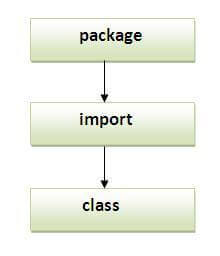
                                    Note: Sequence of the program must be package then import then class.

                                    sequence of package

                                    Subpackage in java

                                    Package inside the package is called the subpackage. It should be created to categorize the package further.

                                    Let’s take an example, Sun Microsystem has definded a package named java that contains many classes like System, String, Reader, Writer, Socket etc. These classes represent a particular group e.g. Reader and Writer classes are for Input/Output operation, Socket and ServerSocket classes are for networking etc and so on. So, Sun has subcategorized the java package into subpackages such as lang, net, io etc. and put the Input/Output related classes in io package, Server and ServerSocket classes in net packages and so on.

                                    The standard of defining package is domain.company.package e.g. com.javatpoint.bean or org.sssit.dao.

                                    Example of Subpackage

                                    package com.javatpoint.core;  
                                    
                                    class Simple{  
                                    
                                      public static void main(String args[]){  
                                    
                                       System.out.println("Hello subpackage");  
                                    
                                      }  
                                    
                                    }
                                    To Compile: javac -d . Simple.java
                                    To Run: java com.javatpoint.core.Simple
                                    Output:Hello subpackage
                                    

                                    How to send the class file to another directory or drive?

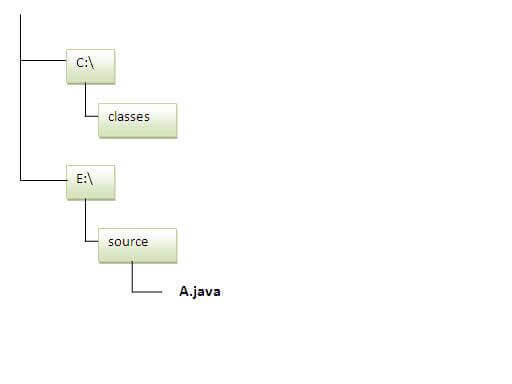
                                    There is a scenario, I want to put the class file of A.java source file in classes folder of c: drive. For example:

                                    how to put class file in another package
                                    //save as Simple.java  
                                    
                                    package mypack;  
                                    
                                    public class Simple{  
                                    
                                     public static void main(String args[]){  
                                    
                                        System.out.println("Welcome to package");  
                                    
                                       }  
                                    
                                    }

                                    To Compile:

                                    e:\sources> javac -d c:\classes Simple.java

                                    To Run:

                                    To run this program from e:\source directory, you need to set classpath of the directory where the class file resides.
                                    e:\sources> set classpath=c:\classes;.;
                                    e:\sources> java mypack.Simple

                                    Another way to run this program by -classpath switch of java:

                                    The -classpath switch can be used with javac and java tool.

                                    To run this program from e:\source directory, you can use -classpath switch of java that tells where to look for class file. For example:

                                    e:\sources> java -classpath c:\classes mypack.Simple

                                    Output:Welcome to package
                                    

                                    Ways to load the class files or jar files

                                    There are two ways to load the class files temporary and permanent.
                                    • Temporary
                                      • By setting the classpath in the command prompt
                                      • By -classpath switch
                                    • Permanent
                                      • By setting the classpath in the environment variables
                                      • By creating the jar file, that contains all the class files, and copying the jar file in the jre/lib/ext folder.

                                    Rule: There can be only one public class in a java source file and it must be saved by the public class name.

                                    //save as C.java otherwise Compilte Time Error  


                                    class A{}  
                                    
                                    class B{}  
                                    
                                    public class C{}

                                    How to put two public classes in a package?

                                    If you want to put two public classes in a package, have two java source files containing one public class, but keep the package name same. For example:
                                    //save as A.java  


                                    package javatpoint;  
                                    
                                    public class A{}
                                    //save as B.java  


                                    package javatpoint;  
                                    
                                    public class B{}
                                  1. Difference between abstract class and interface

                                    Abstract class and interface both are used to achieve abstraction where we can declare the abstract methods. Abstract class and interface both can’t be instantiated.

                                    But there are many differences between abstract class and interface that are given below.

                                    Abstract classInterface
                                    1) Abstract class can have abstract and non-abstract methods.Interface can have only abstract methods. Since Java 8, it can have default and static methods also.
                                    2) Abstract class doesn’t support multiple inheritance.Interface supports multiple inheritance.
                                    3) Abstract class can have final, non-final, static and non-static variables.Interface has only static and final variables.
                                    4) Abstract class can provide the implementation of interface.Interface can’t provide the implementation of abstract class.
                                    5) The abstract keyword is used to declare abstract class.The interface keyword is used to declare interface.
                                    6) An abstract class can extend another Java class and implement multiple Java interfaces.An interface can extend another Java interface only.
                                    7) An abstract class can be extended using keyword “extends”.An interface can be implemented using keyword “implements”.
                                    8) A Java abstract class can have class members like private, protected, etc.Members of a Java interface are public by default.
                                    9)Example:
                                    public abstract class Shape{
                                    public abstract void draw();
                                    }
                                    Example:
                                    public interface Drawable{
                                    void draw();
                                    }

                                    Simply, abstract class achieves partial abstraction (0 to 100%) whereas interface achieves fully abstraction (100%).

                                    Example of abstract class and interface in Java

                                    Let’s see a simple example where we are using interface and abstract class both.

                                    //Creating interface that has 4 methods  
                                    
                                    interface A{  
                                    
                                    void a();//bydefault, public and abstract  
                                    
                                    void b();  
                                    
                                    void c();  
                                    
                                    void d();  
                                    
                                    }  


                                    //Creating abstract class that provides the implementation of one method of A interface  
                                    
                                    abstract class B implements A{  
                                    
                                    public void c(){System.out.println("I am C");}  
                                    
                                    }  


                                    //Creating subclass of abstract class, now we need to provide the implementation of rest of the methods  
                                    
                                    class M extends B{  
                                    
                                    public void a(){System.out.println("I am a");}  
                                    
                                    public void b(){System.out.println("I am b");}  
                                    
                                    public void d(){System.out.println("I am d");}  
                                    
                                    }  


                                    //Creating a test class that calls the methods of A interface  
                                    
                                    class Test5{  
                                    
                                    public static void main(String args[]){  
                                    
                                    A a=new M();  
                                    
                                    a.a();  
                                    
                                    a.b();  
                                    
                                    a.c();  
                                    
                                    a.d();  
                                    
                                    }}

                                    Output:

                                           I am a
                                    
                                       I am b
                                       I am c
                                       I am d
                                  2. Interface in Java

                                    An interface in Java is a blueprint of a class. It has static constants and abstract methods.

                                    The interface in Java is a mechanism to achieve abstraction. There can be only abstract methods in the Java interface, not method body. It is used to achieve abstraction and multiple inheritance in Java.

                                    In other words, you can say that interfaces can have abstract methods and variables. It cannot have a method body.

                                    Java Interface also represents the IS-A relationship.

                                    It cannot be instantiated just like the abstract class.

                                    Since Java 8, we can have default and static methods in an interface.

                                    Since Java 9, we can have private methods in an interface.

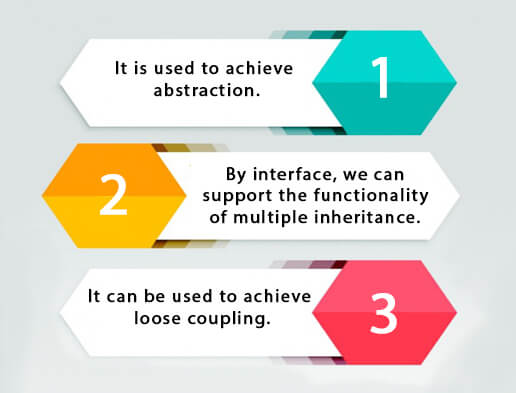
                                    Why use Java interface?

                                    There are mainly three reasons to use interface. They are given below.

                                    • It is used to achieve abstraction.
                                    • By interface, we can support the functionality of multiple inheritance.
                                    • It can be used to achieve loose coupling.
                                    Why use Java Interface

                                    How to declare an interface?

                                    An interface is declared by using the interface keyword. It provides total abstraction; means all the methods in an interface are declared with the empty body, and all the fields are public, static and final by default. A class that implements an interface must implement all the methods declared in the interface.

                                    Syntax:

                                    interface <interface_name>{  


                                        // declare constant fields  
                                    
                                        // declare methods that abstract   
                                    
                                        // by default.  
                                    
                                    }  

                                      Java 8 Interface Improvement

                                      Since Java 8, interface can have default and static methods which is discussed later.

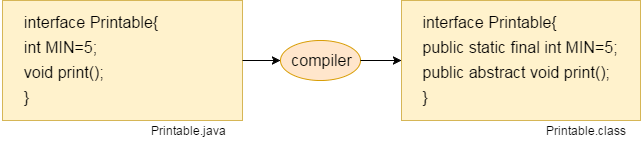
                                      Internal addition by the compiler

                                      The Java compiler adds public and abstract keywords before the interface method. Moreover, it adds public, static and final keywords before data members.

                                      In other words, Interface fields are public, static and final by default, and the methods are public and abstract.

                                      interface in java

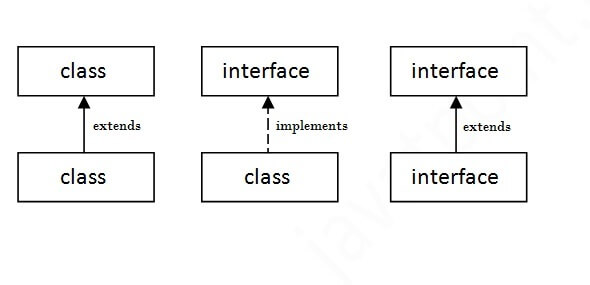
                                      The relationship between classes and interfaces

                                      As shown in the figure given below, a class extends another class, an interface extends another interface, but a class implements an interface.

                                      The relationship between class and interface

                                      Java Interface Example

                                      In this example, the Printable interface has only one method, and its implementation is provided in the A6 class.

                                      interface printable{  
                                      
                                      void print();  
                                      
                                      }  
                                      
                                      class A6 implements printable{  
                                      
                                      public void print(){System.out.println("Hello");}  


                                      public static void main(String args[]){  
                                      
                                      A6 obj = new A6();  
                                      
                                      obj.print();  
                                      
                                       }  
                                      
                                      }

                                      Output:

                                      Hello
                                      

                                      Java Interface Example: Drawable

                                      In this example, the Drawable interface has only one method. Its implementation is provided by Rectangle and Circle classes. In a real scenario, an interface is defined by someone else, but its implementation is provided by different implementation providers. Moreover, it is used by someone else. The implementation part is hidden by the user who uses the interface.

                                      File: TestInterface1.java

                                      //Interface declaration: by first user  
                                      
                                      interface Drawable{  
                                      
                                      void draw();  
                                      
                                      }  
                                      
                                      //Implementation: by second user  
                                      
                                      class Rectangle implements Drawable{  
                                      
                                      public void draw(){System.out.println("drawing rectangle");}  
                                      
                                      }  
                                      
                                      class Circle implements Drawable{  
                                      
                                      public void draw(){System.out.println("drawing circle");}  
                                      
                                      }  
                                      
                                      //Using interface: by third user  
                                      
                                      class TestInterface1{  
                                      
                                      public static void main(String args[]){  
                                      
                                      Drawable d=new Circle();//In real scenario, object is provided by method e.g. getDrawable()  
                                      
                                      d.draw();  
                                      
                                      }}

                                      Output:

                                      drawing circle
                                      

                                      Java Interface Example: Bank

                                      Let’s see another example of java interface which provides the implementation of Bank interface.

                                      File: TestInterface2.java

                                      interface Bank{  
                                      
                                      float rateOfInterest();  
                                      
                                      }  
                                      
                                      class SBI implements Bank{  
                                      
                                      public float rateOfInterest(){return 9.15f;}  
                                      
                                      }  
                                      
                                      class PNB implements Bank{  
                                      
                                      public float rateOfInterest(){return 9.7f;}  
                                      
                                      }  
                                      
                                      class TestInterface2{  
                                      
                                      public static void main(String[] args){  
                                      
                                      Bank b=new SBI();  
                                      
                                      System.out.println("ROI: "+b.rateOfInterest());  
                                      
                                      }}

                                      Output:

                                      ROI: 9.15
                                      

                                      Multiple inheritance in Java by interface

                                      If a class implements multiple interfaces, or an interface extends multiple interfaces, it is known as multiple inheritance.

                                       multiple inheritance in java
                                      interface Printable{  
                                      
                                      void print();  
                                      
                                      }  
                                      
                                      interface Showable{  
                                      
                                      void show();  
                                      
                                      }  
                                      
                                      class A7 implements Printable,Showable{  
                                      
                                      public void print(){System.out.println("Hello");}  
                                      
                                      public void show(){System.out.println("Welcome");}  


                                      public static void main(String args[]){  
                                      
                                      A7 obj = new A7();  
                                      
                                      obj.print();  
                                      
                                      obj.show();  
                                      
                                       }  
                                      
                                      }
                                      Output:Hello
                                      
                                         Welcome

                                      Q) Multiple inheritance is not supported through class in java, but it is possible by an interface, why?

                                      As we have explained in the inheritance chapter, multiple inheritance is not supported in the case of class because of ambiguity. However, it is supported in case of an interface because there is no ambiguity. It is because its implementation is provided by the implementation class. For example:

                                      interface Printable{  
                                      
                                      void print();  
                                      
                                      }  
                                      
                                      interface Showable{  
                                      
                                      void print();  
                                      
                                      }  


                                      class TestInterface3 implements Printable, Showable{  
                                      
                                      public void print(){System.out.println("Hello");}  
                                      
                                      public static void main(String args[]){  
                                      
                                      TestInterface3 obj = new TestInterface3();  
                                      
                                      obj.print();  
                                      
                                       }  
                                      
                                      }

                                      Output:

                                      Hello
                                      

                                      As you can see in the above example, Printable and Showable interface have same methods but its implementation is provided by class TestTnterface1, so there is no ambiguity.

                                      Interface inheritance

                                      A class implements an interface, but one interface extends another interface.

                                      interface Printable{  
                                      
                                      void print();  
                                      
                                      }  
                                      
                                      interface Showable extends Printable{  
                                      
                                      void show();  
                                      
                                      }  
                                      
                                      class TestInterface4 implements Showable{  
                                      
                                      public void print(){System.out.println("Hello");}  
                                      
                                      public void show(){System.out.println("Welcome");}  


                                      public static void main(String args[]){  
                                      
                                      TestInterface4 obj = new TestInterface4();  
                                      
                                      obj.print();  
                                      
                                      obj.show();  
                                      
                                       }  
                                      
                                      }

                                      Output:

                                      Hello
                                      Welcome
                                      

                                      Java 8 Default Method in Interface

                                      Since Java 8, we can have method body in interface. But we need to make it default method. Let’s see an example:

                                      File: TestInterfaceDefault.java

                                      interface Drawable{  
                                      
                                      void draw();  
                                      
                                      default void msg(){System.out.println("default method");}  
                                      
                                      }  
                                      
                                      class Rectangle implements Drawable{  
                                      
                                      public void draw(){System.out.println("drawing rectangle");}  
                                      
                                      }  
                                      
                                      class TestInterfaceDefault{  
                                      
                                      public static void main(String args[]){  
                                      
                                      Drawable d=new Rectangle();  
                                      
                                      d.draw();  
                                      
                                      d.msg();  
                                      
                                      }}

                                      Output:

                                      drawing rectangle
                                      default method
                                      

                                      Java 8 Static Method in Interface

                                      Since Java 8, we can have static method in interface. Let’s see an example:

                                      File: TestInterfaceStatic.java

                                      interface Drawable{  
                                      
                                      void draw();  
                                      
                                      static int cube(int x){return x*x*x;}  
                                      
                                      }  
                                      
                                      class Rectangle implements Drawable{  
                                      
                                      public void draw(){System.out.println("drawing rectangle");}  
                                      
                                      }  


                                      class TestInterfaceStatic{  
                                      
                                      public static void main(String args[]){  
                                      
                                      Drawable d=new Rectangle();  
                                      
                                      d.draw();  
                                      
                                      System.out.println(Drawable.cube(3));  
                                      
                                      }}

                                      Output:

                                      drawing rectangle
                                      27
                                      

                                      Q) What is marker or tagged interface?

                                      An interface which has no member is known as a marker or tagged interface, for example, Serializable, Cloneable, Remote, etc. They are used to provide some essential information to the JVM so that JVM may perform some useful operation.

                                      //How Serializable interface is written?  
                                      
                                      public interface Serializable{  
                                      
                                      }

                                      Nested Interface in Java

                                      Note: An interface can have another interface which is known as a nested interface. We will learn it in detail in the nested classes chapter. For example:

                                      interface printable{  
                                      
                                       void print();  
                                      
                                       interface MessagePrintable{  
                                      
                                         void msg();  
                                      
                                       }  
                                      
                                      } 

                                      1. Abstract class in Java

                                        A class which is declared with the abstract keyword is known as an abstract class in Java. It can have abstract and non-abstract methods (method with the body).

                                        Before learning the Java abstract class, let’s understand the abstraction in Java first.

                                        Abstraction in Java

                                        Abstraction is a process of hiding the implementation details and showing only functionality to the user.

                                        Another way, it shows only essential things to the user and hides the internal details, for example, sending SMS where you type the text and send the message. You don’t know the internal processing about the message delivery.

                                        Abstraction lets you focus on what the object does instead of how it does it.

                                        Ways to achieve Abstraction

                                        There are two ways to achieve abstraction in java

                                        1. Abstract class (0 to 100%)
                                        2. Interface (100%)

                                        Abstract class in Java

                                        A class which is declared as abstract is known as an abstract class. It can have abstract and non-abstract methods. It needs to be extended and its method implemented. It cannot be instantiated.

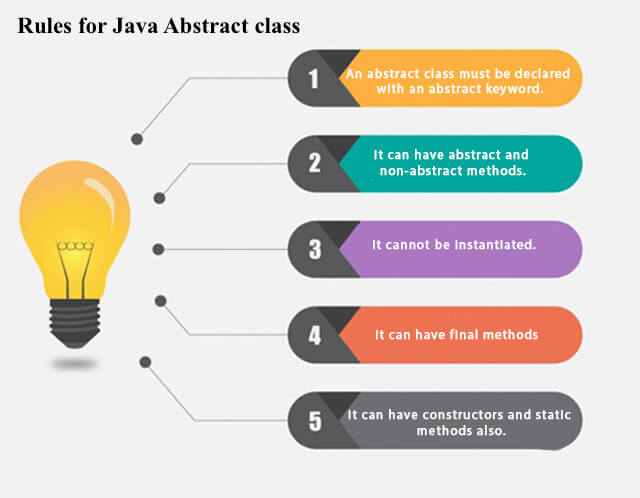
                                        Points to Remember

                                        • An abstract class must be declared with an abstract keyword.
                                        • It can have abstract and non-abstract methods.
                                        • It cannot be instantiated.
                                        • It can have constructors and static methods also.
                                        • It can have final methods which will force the subclass not to change the body of the method.
                                        Rules for Java Abstract class

                                        Example of abstract class

                                        abstract class A{}  

                                        Abstract Method in Java

                                        A method which is declared as abstract and does not have implementation is known as an abstract method.

                                        Example of abstract method

                                        abstract void printStatus();//no method body and abstract  

                                        Example of Abstract class that has an abstract method

                                        In this example, Bike is an abstract class that contains only one abstract method run. Its implementation is provided by the Honda class.

                                        abstract class Bike{  
                                        
                                          abstract void run();  
                                        
                                        }  
                                        
                                        class Honda4 extends Bike{  
                                        
                                        void run(){System.out.println("running safely");}  
                                        
                                        public static void main(String args[]){  
                                        
                                         Bike obj = new Honda4();  
                                        
                                         obj.run();  
                                        
                                        }  
                                        
                                        }
                                        running safely
                                        

                                        Understanding the real scenario of Abstract class

                                        In this example, Shape is the abstract class, and its implementation is provided by the Rectangle and Circle classes.

                                        Mostly, we don’t know about the implementation class (which is hidden to the end user), and an object of the implementation class is provided by the factory method.

                                        factory method is a method that returns the instance of the class. We will learn about the factory method later.

                                        In this example, if you create the instance of Rectangle class, draw() method of Rectangle class will be invoked.

                                        File: TestAbstraction1.java

                                        abstract class Shape{  
                                        
                                        abstract void draw();  
                                        
                                        }  
                                        
                                        //In real scenario, implementation is provided by others i.e. unknown by end user  
                                        
                                        class Rectangle extends Shape{  
                                        
                                        void draw(){System.out.println("drawing rectangle");}  
                                        
                                        }  
                                        
                                        class Circle1 extends Shape{  
                                        
                                        void draw(){System.out.println("drawing circle");}  
                                        
                                        }  
                                        
                                        //In real scenario, method is called by programmer or user  
                                        
                                        class TestAbstraction1{  
                                        
                                        public static void main(String args[]){  
                                        
                                        Shape s=new Circle1();//In a real scenario, object is provided through method, e.g., getShape() method  
                                        
                                        s.draw();  
                                        
                                        }  
                                        
                                        }
                                        drawing circle
                                        

                                        Another example of Abstract class in java

                                        File: TestBank.java

                                        abstract class Bank{    
                                        
                                        abstract int getRateOfInterest();    
                                        
                                        }    
                                        
                                        class SBI extends Bank{    
                                        
                                        int getRateOfInterest(){return 7;}    
                                        
                                        }    
                                        
                                        class PNB extends Bank{    
                                        
                                        int getRateOfInterest(){return 8;}    
                                        
                                        }    


                                        class TestBank{    
                                        
                                        public static void main(String args[]){    
                                        
                                        Bank b;  
                                        
                                        b=new SBI();  
                                        
                                        System.out.println("Rate of Interest is: "+b.getRateOfInterest()+" %");    
                                        
                                        b=new PNB();  
                                        
                                        System.out.println("Rate of Interest is: "+b.getRateOfInterest()+" %");    
                                        
                                        }}
                                        Rate of Interest is: 7 %
                                        Rate of Interest is: 8 %
                                        

                                        Abstract class having constructor, data member and methods

                                        An abstract class can have a data member, abstract method, method body (non-abstract method), constructor, and even main() method.

                                        File: TestAbstraction2.java

                                        //Example of an abstract class that has abstract and non-abstract methods  
                                        
                                         abstract class Bike{  
                                        
                                           Bike(){System.out.println("bike is created");}  
                                        
                                           abstract void run();  
                                        
                                           void changeGear(){System.out.println("gear changed");}  
                                        
                                         }  
                                        
                                        //Creating a Child class which inherits Abstract class  
                                        
                                         class Honda extends Bike{  
                                        
                                         void run(){System.out.println("running safely..");}  
                                        
                                         }  
                                        
                                        //Creating a Test class which calls abstract and non-abstract methods  
                                        
                                         class TestAbstraction2{  
                                        
                                         public static void main(String args[]){  
                                        
                                          Bike obj = new Honda();  
                                        
                                          obj.run();  
                                        
                                          obj.changeGear();  
                                        
                                         }  
                                        
                                        }
                                               bike is created
                                        
                                           running safely..
                                           gear changed

                                        Rule: If there is an abstract method in a class, that class must be abstract.

                                        class Bike12{  
                                        
                                        abstract void run();  
                                        
                                        }
                                        compile time error
                                        

                                        Rule: If you are extending an abstract class that has an abstract method, you must either provide the implementation of the method or make this class abstract.

                                        Another real scenario of abstract class

                                        The abstract class can also be used to provide some implementation of the interface. In such case, the end user may not be forced to override all the methods of the interface.

                                        Note: If you are beginner to java, learn interface first and skip this example.

                                        interface A{  
                                        
                                        void a();  
                                        
                                        void b();  
                                        
                                        void c();  
                                        
                                        void d();  
                                        
                                        }  


                                        abstract class B implements A{  
                                        
                                        public void c(){System.out.println("I am c");}  
                                        
                                        }  


                                        class M extends B{  
                                        
                                        public void a(){System.out.println("I am a");}  
                                        
                                        public void b(){System.out.println("I am b");}  
                                        
                                        public void d(){System.out.println("I am d");}  
                                        
                                        }  


                                        class Test5{  
                                        
                                        public static void main(String args[]){  
                                        
                                        A a=new M();  
                                        
                                        a.a();  
                                        
                                        a.b();  
                                        
                                        a.c();  
                                        
                                        a.d();  
                                        
                                        }}
                                        Output:I am a
                                        
                                           I am b
                                           I am c
                                           I am d