Author: saqibkhan

  • Java BufferedImage Class

    Java BufferedImage class is a subclass of Image class. It is used to handle and manipulate the image data. A BufferedImage is made of ColorModel of image data. All BufferedImage objects have an upper left corner coordinate of (0, 0).

    Constructors

    This class supports three types of constructors.

    The first constructor constructs a new BufferedImage with a specified ColorModel and Raster.

    BufferedImage(ColorModel cm, WritableRaster raster, 
    boolean isRasterPremultiplied, Hashtable<?,?> properties)
    

    The second constructor constructs a BufferedImage of one of the predefined image types.

    BufferedImage(int width, int height, int imageType)
    

    The third constructor constructs a BufferedImage of one of the predefined image types: TYPE_BYTE_BINARY or TYPE_BYTE_INDEXED.

    BufferedImage(int width, int height, int imageType, IndexColorModel cm)
    
    Sr.NoMethod & Description
    1copyData(WritableRaster outRaster)It computes an arbitrary rectangular region of the BufferedImage and copies it into a specified WritableRaster.
    2getColorModel()It returns object of class ColorModel of an image.
    3getData()It returns the image as one large tile.
    4getData(Rectangle rect)It computes and returns an arbitrary region of the BufferedImage.
    5getGraphics()This method returns a Graphics2D, retains backwards compatibility.
    6getHeight()It returns the height of the BufferedImage.
    7getMinX()It returns the minimum x coordinate of this BufferedImage.
    8getMinY()It returns the minimum y coordinate of this BufferedImage.
    9getRGB(int x, int y)It returns an integer pixel in the default RGB color model (TYPE_INT_ARGB) and default sRGB colorspace.
    10getType()It returns the image type.

    Example

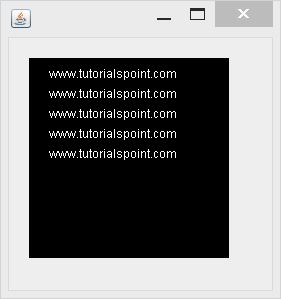
    The following example demonstrates the use of java BufferedImage class that draw some text on the screen using Graphics Object −

    import java.awt.Graphics;
    import java.awt.Image;
    import java.awt.image.BufferedImage;
    
    import javax.swing.JFrame;
    import javax.swing.JPanel;
    
    public class Test extends JPanel {
    
       public void paint(Graphics g) {
    
      Image img = createImageWithText();
      g.drawImage(img, 20,20,this);
    } private Image createImageWithText() {
      BufferedImage bufferedImage = new BufferedImage(200,200,BufferedImage.TYPE_INT_RGB);
      Graphics g = bufferedImage.getGraphics();
      g.drawString("www.tutorialspoint.com", 20,20);
      g.drawString("www.tutorialspoint.com", 20,40);
      g.drawString("www.tutorialspoint.com", 20,60);
      g.drawString("www.tutorialspoint.com", 20,80);
      g.drawString("www.tutorialspoint.com", 20,100);
      
      return bufferedImage;
    } public static void main(String[] args) {
      JFrame frame = new JFrame();
      frame.getContentPane().add(new Test());
      frame.setDefaultCloseOperation(JFrame.EXIT_ON_CLOSE);
      frame.setSize(200, 200);
      frame.setVisible(true);
    } }

    Learn Java in-depth with real-world projects through our Java certification course. Enroll and become a certified expert to boost your career.

    Output

    When you execute the given code, the following output is seen −
    Java Buffered Image Tutorial
  • Introduction

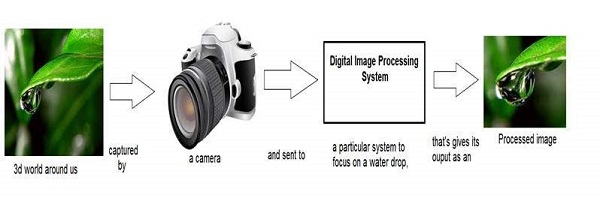
    Digital Image Processing (DIP) deals with manipulation of digital images using a digital computer. It is a sub field of signals and systems but focuses particularly on images. DIP focuses on developing a computer system that is able to perform processing on an image. The input of such system is a digital image. The system processes the image using efficient algorithms, and gives an image as an output.

    Introduction Image

    Java is a high level programming language that is widely used in the modern world. It can support and handle digital image processing efficiently using various functions.

  • Difference between method overloading and method overriding in java

    There are many differences between method overloading and method overriding in java. A list of differences between method overloading and method overriding are given below:

    No.Method OverloadingMethod Overriding
    1)Method overloading is used to increase the readability of the program.Method overriding is used to provide the specific implementation of the method that is already provided by its super class.
    2)Method overloading is performed within class.Method overriding occurs in two classes that have IS-A (inheritance) relationship.
    3)In case of method overloading, parameter must be different.In case of method overriding, parameter must be same.
    4)Method overloading is the example of compile time polymorphism.Method overriding is the example of run time polymorphism.
    5)In java, method overloading can’t be performed by changing return type of the method only. Return type can be same or different in method overloading. But you must have to change the parameter.Return type must be same or covariant in method overriding.

    Java Method Overloading example

    class OverloadingExample{  
    
    static int add(int a,int b){return a+b;}  
    
    static int add(int a,int b,int c){return a+b+c;}  
    
    }

    Java Method Overriding example

    class Animal{  
    
    void eat(){System.out.println("eating...");}  
    
    }  
    
    class Dog extends Animal{  
    
    void eat(){System.out.println("eating bread...");}  
    
    } 
    1. Difference between object and class

      There are many differences between object and class. A list of differences between object and class are given below:

      No.ObjectClass
      1)Object is an instance of a class.Class is a blueprint or template from which objects are created.
      2)Object is a real world entity such as pen, laptop, mobile, bed, keyboard, mouse, chair etc.Class is a group of similar objects.
      3)Object is a physical entity.Class is a logical entity.
      4)Object is created through new keyword mainly e.g.
      Student s1=new Student();
      Class is declared using class keyword e.g.
      class Student{}
      5)Object is created many times as per requirement.Class is declared once.
      6)Object allocates memory when it is created.Class doesn’t allocated memory when it is created.
      7)There are many ways to create object in java such as new keyword, newInstance() method, clone() method, factory method and deserialization.There is only one way to define class in java using class keyword.

      Let’s see some real life example of class and object in java to understand the difference well:

      Class: Human Object: Man, Woman

      Class: Fruit Object: Apple, Banana, Mango, Guava wtc.

      Class: Mobile phone Object: iPhone, Samsung, Moto

      Class: Food Object: Pizza, Burger, Samosa

    2. Java Command Line Arguments

      The java command-line argument is an argument i.e. passed at the time of running the java program.

      The arguments passed from the console can be received in the java program and it can be used as an input.

      So, it provides a convenient way to check the behavior of the program for the different values. You can pass N (1,2,3 and so on) numbers of arguments from the command prompt.

      Simple example of command-line argument in java

      In this example, we are receiving only one argument and printing it. To run this java program, you must pass at least one argument from the command prompt.
      class CommandLineExample{  

      public static void main(String args[]){  

      System.out.println("Your first argument is: "+args[0]);  

      }  

      }  

      compile by > javac CommandLineExample.java  
      
      run by > java CommandLineExample sonoo  
        Output: Your first argument is: sonoo
        

        Example of command-line argument that prints all the values

        In this example, we are printing all the arguments passed from the command-line. For this purpose, we have traversed the array using for loop.
        class A{  
        
        public static void main(String args[]){  


        for(int i=0;i<args.length;i++)  
        
        System.out.println(args[i]);  


        }  
        
        } 
          compile by > javac A.java  
          
          run by > java A sonoo jaiswal 1 3 abc  
            Output: sonoo
            
               jaiswal
               1
               3
               abc
          1. Creating API Document | javadoc tool

            We can create document api in java by the help of javadoc tool. In the java file, we must use the documentation comment /**… */ to post information for the class, method, constructor, fields etc.

            Let’s see the simple class that contains documentation comment.

            package com.abc;  
            
            /** This class is a user-defined class that contains one methods cube.*/  
            
            public class M{  


            /** The cube method prints cube of the given number */  
            
            public static void  cube(int n){System.out.println(n*n*n);}  
            
            }  

              To create the document API, you need to use the javadoc tool followed by java file name. There is no need to compile the javafile.

              On the command prompt, you need to write:

              javadoc M.java

              to generate the document api. Now, there will be created a lot of html files. Open the index.html file to get the information about the classes.

            1. Java Strictfp Keyword

              Java strictfp keyword ensures that you will get the same result on every platform if you perform operations in the floating-point variable. The precision may differ from platform to platform that is why java programming language have provided the strictfp keyword, so that you get same result on every platform. So, now you have better control over the floating-point arithmetic.

              Legal code for strictfp keyword

              The strictfp keyword can be applied on methods, classes and interfaces.

              strictfp class A{}//strictfp applied on class  
              strictfp interface M{}//strictfp applied on interface  
              class A{  
              
              strictfp void m(){}//strictfp applied on method  
              
              }

              Illegal code for strictfp keyword

              The strictfp keyword cannot be applied on abstract methods, variables or constructors.

              class B{  

              strictfp abstract void m();//Illegal combination of modifiers  


                class B{  
                
                strictfp int data=10;//modifier strictfp not allowed here  
                
                }  
                  class B{  
                  
                  strictfp B(){}//modifier strictfp not allowed here  
                  
                  }
                1. Call by Value and Call by Reference in Java

                  There is only call by value in java, not call by reference. If we call a method passing a value, it is known as call by value. The changes being done in the called method, is not affected in the calling method.

                  Example of call by value in java

                  In case of call by value original value is not changed. Let’s take a simple example:
                  class Operation{  
                  
                   int data=50;  


                   void change(int data){  
                  
                   data=data+100;//changes will be in the local variable only  
                  
                   }  


                   public static void main(String args[]){  
                  
                     Operation op=new Operation();  


                     System.out.println("before change "+op.data);  
                  
                     op.change(500);  
                  
                     System.out.println("after change "+op.data);  


                   }  
                  
                  }
                  Output:before change 50
                  
                     after change 50				

                  Another Example of call by value in java

                  In case of call by reference original value is changed if we made changes in the called method. If we pass object in place of any primitive value, original value will be changed. In this example we are passing object as a value. Let’s take a simple example:

                  class Operation2{  
                  
                   int data=50;  


                   void change(Operation2 op){  
                  
                   op.data=op.data+100;//changes will be in the instance variable  
                  
                   }  


                   public static void main(String args[]){  
                  
                     Operation2 op=new Operation2();  


                     System.out.println("before change "+op.data);  
                  
                     op.change(op);//passing object  
                  
                     System.out.println("after change "+op.data);  


                   }  
                  
                  }
                  Output:before change 50
                  
                     after change 150		</code></pre>
                2. Recursion in Java

                  Recursion in java is a process in which a method calls itself continuously. A method in java that calls itself is called recursive method.

                  It makes the code compact but complex to understand.

                  Syntax:

                  returntype methodname(){  
                  
                  //code to be executed  
                  
                  methodname();//calling same method  
                  
                  }

                  Java Recursion Example 1: Infinite times

                  public class RecursionExample1 {  
                  
                  static void p(){  
                  
                  System.out.println("hello");  
                  
                  p();  
                  
                  }  


                  public static void main(String[] args) {  
                  
                  p();  
                  
                  }  
                  
                  }

                  Output:

                  hello
                  hello
                  ...
                  java.lang.StackOverflowError
                  

                  Java Recursion Example 2: Finite times

                  public class RecursionExample2 {  
                  
                  static int count=0;  
                  
                  static void p(){  
                  
                  count++;  
                  
                  if(count<=5){  
                  
                  System.out.println("hello "+count);  
                  
                  p();  
                  
                  }  
                  
                  }  
                  
                  public static void main(String[] args) {  
                  
                  p();  
                  
                  }  
                  
                  }  

                    Output:

                    hello 1
                    hello 2
                    hello 3
                    hello 4
                    hello 5
                    

                    Java Recursion Example 3: Factorial Number

                    public class RecursionExample3 {  
                    
                        static int factorial(int n){      
                    
                              if (n == 1)      
                    
                                return 1;      
                    
                              else      
                    
                                return(n * factorial(n-1));      
                    
                        }      


                    public static void main(String[] args) {  
                    
                    System.out.println("Factorial of 5 is: "+factorial(5));  
                    
                    }  
                    
                    } 

                      Output:

                      Factorial of 5 is: 120
                      

                      Working of above program:

                      factorial(5) 
                         factorial(4) 
                      
                        factorial(3) 
                           factorial(2) 
                              factorial(1) 
                                 return 1 
                              return 2*1 = 2 
                           return 3*2 = 6 
                        return 4*6 = 24 
                      return 5*24 = 120

                      Java Recursion Example 4: Fibonacci Series

                      public class RecursionExample4 {  
                      
                          static int n1=0,n2=1,n3=0;      
                      
                           static void printFibo(int count){      
                      
                              if(count>0){      
                      
                                   n3 = n1 + n2;      
                      
                                   n1 = n2;      
                      
                                   n2 = n3;      
                      
                                   System.out.print(" "+n3);     
                      
                                   printFibo(count-1);      
                      
                               }      
                      
                           }        


                      public static void main(String[] args) {  
                      
                          int count=15;      
                      
                            System.out.print(n1+" "+n2);//printing 0 and 1      
                      
                            printFibo(count-2);//n-2 because 2 numbers are already printed     
                      
                      }  
                      
                      } 

                        Output:

                        0 1 1 2 3 5 8 13 21 34 55 89 144 233 377
                        
                      1. Wrapper classes in Java

                        The wrapper class in Java provides the mechanism to convert primitive into object and object into primitive.

                        Since J2SE 5.0, autoboxing and unboxing feature convert primitives into objects and objects into primitives automatically. The automatic conversion of primitive into an object is known as autoboxing and vice-versa unboxing.

                        Use of Wrapper classes in Java

                        Java is an object-oriented programming language, so we need to deal with objects many times like in Collections, Serialization, Synchronization, etc. Let us see the different scenarios, where we need to use the wrapper classes.

                        • Change the value in Method: Java supports only call by value. So, if we pass a primitive value, it will not change the original value. But, if we convert the primitive value in an object, it will change the original value.
                        • Serialization: We need to convert the objects into streams to perform the serialization. If we have a primitive value, we can convert it in objects through the wrapper classes.
                        • Synchronization: Java synchronization works with objects in Multithreading.
                        • java.util package: The java.util package provides the utility classes to deal with objects.
                        • Collection Framework: Java collection framework works with objects only. All classes of the collection framework (ArrayList, LinkedList, Vector, HashSet, LinkedHashSet, TreeSet, PriorityQueue, ArrayDeque, etc.) deal with objects only.

                        The eight classes of the java.lang package are known as wrapper classes in Java. The list of eight wrapper classes are given below:

                        Primitive TypeWrapper class
                        booleanBoolean
                        charCharacter
                        byteByte
                        shortShort
                        intInteger
                        longLong
                        floatFloat
                        doubleDouble

                        Autoboxing

                        The automatic conversion of primitive data type into its corresponding wrapper class is known as autoboxing, for example, byte to Byte, char to Character, int to Integer, long to Long, float to Float, boolean to Boolean, double to Double, and short to Short.

                        Since Java 5, we do not need to use the valueOf() method of wrapper classes to convert the primitive into objects.

                        Wrapper class Example: Primitive to Wrapper

                        //Java program to convert primitive into objects  
                        
                        //Autoboxing example of int to Integer  
                        
                        public class WrapperExample1{  
                        
                        public static void main(String args[]){  
                        
                        //Converting int into Integer  
                        
                        int a=20;  
                        
                        Integer i=Integer.valueOf(a);//converting int into Integer explicitly  
                        
                        Integer j=a;//autoboxing, now compiler will write Integer.valueOf(a) internally  


                        System.out.println(a+" "+i+" "+j);  
                        
                        }}  

                          Output:

                          20 20 20
                          

                          Unboxing

                          The automatic conversion of wrapper type into its corresponding primitive type is known as unboxing. It is the reverse process of autoboxing. Since Java 5, we do not need to use the intValue() method of wrapper classes to convert the wrapper type into primitives.

                          Wrapper class Example: Wrapper to Primitive

                          //Java program to convert object into primitives  
                          
                          //Unboxing example of Integer to int  
                          
                          public class WrapperExample2{    
                          
                          public static void main(String args[]){    
                          
                          //Converting Integer to int    
                          
                          Integer a=new Integer(3);    
                          
                          int i=a.intValue();//converting Integer to int explicitly  
                          
                          int j=a;//unboxing, now compiler will write a.intValue() internally    


                          System.out.println(a+" "+i+" "+j);    
                          
                          }}    

                            Output:

                            3 3 3
                            

                            Java Wrapper classes Example

                            //Java Program to convert all primitives into its corresponding   
                            
                            //wrapper objects and vice-versa  
                            
                            public class WrapperExample3{  
                            
                            public static void main(String args[]){  
                            
                            byte b=10;  
                            
                            short s=20;  
                            
                            int i=30;  
                            
                            long l=40;  
                            
                            float f=50.0F;  
                            
                            double d=60.0D;  
                            
                            char c='a';  
                            
                            boolean b2=true;  


                            //Autoboxing: Converting primitives into objects  
                            
                            Byte byteobj=b;  
                            
                            Short shortobj=s;  
                            
                            Integer intobj=i;  
                            
                            Long longobj=l;  
                            
                            Float floatobj=f;  
                            
                            Double doubleobj=d;  
                            
                            Character charobj=c;  
                            
                            Boolean boolobj=b2;  


                            //Printing objects  
                            
                            System.out.println("---Printing object values---");  
                            
                            System.out.println("Byte object: "+byteobj);  
                            
                            System.out.println("Short object: "+shortobj);  
                            
                            System.out.println("Integer object: "+intobj);  
                            
                            System.out.println("Long object: "+longobj);  
                            
                            System.out.println("Float object: "+floatobj);  
                            
                            System.out.println("Double object: "+doubleobj);  
                            
                            System.out.println("Character object: "+charobj);  
                            
                            System.out.println("Boolean object: "+boolobj);  


                            //Unboxing: Converting Objects to Primitives  
                            
                            byte bytevalue=byteobj;  
                            
                            short shortvalue=shortobj;  
                            
                            int intvalue=intobj;  
                            
                            long longvalue=longobj;  
                            
                            float floatvalue=floatobj;  
                            
                            double doublevalue=doubleobj;  
                            
                            char charvalue=charobj;  
                            
                            boolean boolvalue=boolobj;  


                            //Printing primitives  
                            
                            System.out.println("---Printing primitive values---");  
                            
                            System.out.println("byte value: "+bytevalue);  
                            
                            System.out.println("short value: "+shortvalue);  
                            
                            System.out.println("int value: "+intvalue);  
                            
                            System.out.println("long value: "+longvalue);  
                            
                            System.out.println("float value: "+floatvalue);  
                            
                            System.out.println("double value: "+doublevalue);  
                            
                            System.out.println("char value: "+charvalue);  
                            
                            System.out.println("boolean value: "+boolvalue);  
                            
                            }}  

                              Output:

                              ---Printing object values---
                              Byte object: 10
                              Short object: 20
                              Integer object: 30
                              Long object: 40
                              Float object: 50.0
                              Double object: 60.0
                              Character object: a
                              Boolean object: true
                              ---Printing primitive values---
                              byte value: 10
                              short value: 20
                              int value: 30
                              long value: 40
                              float value: 50.0
                              double value: 60.0
                              char value: a
                              boolean value: true
                              

                              Custom Wrapper class in Java

                              Java Wrapper classes wrap the primitive data types, that is why it is known as wrapper classes. We can also create a class which wraps a primitive data type. So, we can create a custom wrapper class in Java.

                              //Creating the custom wrapper class  
                              
                              class Javatpoint{  
                              
                              private int i;  
                              
                              Javatpoint(){}  
                              
                              Javatpoint(int i){  
                              
                              this.i=i;  
                              
                              }  
                              
                              public int getValue(){  
                              
                              return i;  
                              
                              }  
                              
                              public void setValue(int i){  
                              
                              this.i=i;  
                              
                              }  
                              
                              @Override  
                              
                              public String toString() {  
                              
                                return Integer.toString(i);  
                              
                              }  
                              
                              }  
                              
                              //Testing the custom wrapper class  
                              
                              public class TestJavatpoint{  
                              
                              public static void main(String[] args){  
                              
                              Javatpoint j=new Javatpoint(10);  
                              
                              System.out.println(j);  
                              
                              }}  

                                Output:

                                10