Keras allows to create our own customized layer. Once a new layer is created, it can be used in any model without any restriction. Let us learn how to create new layer in this chapter.
Keras provides a base layer class, Layer which can sub-classed to create our own customized layer. Let us create a simple layer which will find weight based on normal distribution and then do the basic computation of finding the summation of the product of input and its weight during training.
Step 1: Import the necessary module
First, let us import the necessary modules −
from keras import backend as K
from keras.layers import Layer
Here,
backend is used to access the dot function.
Layer is the base class and we will be sub-classing it to create our layer
Step 2: Define a layer class
Let us create a new class, MyCustomLayer by sub-classing Layer class −
class MyCustomLayer(Layer):
   ...
Step 3: Initialize the layer class
Let us initialize our new class as specified below −
Line 3 calls the base or super layer’s init function.
Step 4: Implement build method
build is the main method and its only purpose is to build the layer properly. It can do anything related to the inner working of the layer. Once the custom functionality is done, we can call the base class build function. Our custom build function is as follows −
Line 1 defines the build method with one argument, input_shape. Shape of the input data is referred by input_shape.
Line 2 creates the weight corresponding to input shape and set it in the kernel. It is our custom functionality of the layer. It creates the weight using ‘normal’ initializer.
Line 6 calls the base class, build method.
Step 5: Implement call method
call method does the exact working of the layer during training process.
self.add_weight(name = 'kernel',
shape = (input_shape[1], self.output_dim),
initializer = 'normal', trainable = True)
super(MyCustomLayer, self).build(input_shape) #
Be sure to call this at the end
As learned earlier, Keras layers are the primary building block of Keras models. Each layer receives input information, do some computation and finally output the transformed information. The output of one layer will flow into the next layer as its input. Let us learn complete details about layers in this chapter.
Introduction
A Keras layer requires shape of the input (input_shape) to understand the structure of the input data, initializer to set the weight for each input and finally activators to transform the output to make it non-linear. In between, constraints restricts and specify the range in which the weight of input data to be generated and regularizer will try to optimize the layer (and the model) by dynamically applying the penalties on the weights during optimization process.
To summarise, Keras layer requires below minimum details to create a complete layer.
Shape of the input data
Number of neurons / units in the layer
Initializers
Regularizers
Constraints
Activations
Let us understand the basic concept in the next chapter. Before understanding the basic concept, let us create a simple Keras layer using Sequential model API to get the idea of how Keras model and layer works.
from keras.models import Sequential
from keras.layers import Activation, Dense
from keras import initializers
from keras import regularizers
from keras import constraints

model = Sequential()

model.add(Dense(32, input_shape=(16,), kernel_initializer = 'he_uniform',
   kernel_regularizer = None, kernel_constraint = 'MaxNorm', activation = 'relu'))
model.add(Dense(16, activation = 'relu'))
model.add(Dense(8))
where,
Line 1-5 imports the necessary modules.
Line 7 creates a new model using Sequential API.
Line 9 creates a new Dense layer and add it into the model. Dense is an entry level layer provided by Keras, which accepts the number of neurons or units (32) as its required parameter. If the layer is first layer, then we need to provide Input Shape, (16,) as well. Otherwise, the output of the previous layer will be used as input of the next layer. All other parameters are optional.
First parameter represents the number of units (neurons).
input_shape represent the shape of input data.
kernel_initializer represent initializer to be used. he_uniform function is set as value.
kernel_regularizer represent regularizer to be used. None is set as value.
kernel_constraint represent constraint to be used. MaxNorm function is set as value.
activation represent activation to be used. relu function is set as value.
Line 10 creates second Dense layer with 16 units and set relu as the activation function.
Line 11 creates final Dense layer with 8 units.
Basic Concept of Layers
Let us understand the basic concept of layer as well as how Keras supports each concept.
Input shape
In machine learning, all type of input data like text, images or videos will be first converted into array of numbers and then feed into the algorithm. Input numbers may be single dimensional array, two dimensional array (matrix) or multi-dimensional array. We can specify the dimensional information using shape, a tuple of integers. For example, (4,2) represent matrix with four rows and two columns.
To create the first layer of the model (or input layer of the model), shape of the input data should be specified.
Explore our latest online courses and learn new skills at your own pace. Enroll and become a certified expert to boost your career.
Initializers
In Machine Learning, weight will be assigned to all input data. Initializers module provides different functions to set these initial weight. Some of the Keras Initializer function are as follows −
Zeros
Generates 0 for all input data.
from keras.models import Sequential
from keras.layers import Activation, Dense
from keras import initializers

my_init = initializers.Zeros()
model = Sequential()
model.add(Dense(512, activation = 'relu', input_shape = (784,),
   kernel_initializer = my_init))
Where, kernel_initializer represent the initializer for kernel of the model.
Ones
Generates 1 for all input data.
from keras.models import Sequential
from keras.layers import Activation, Dense
from keras import initializers

my_init = initializers.Ones()
model.add(Dense(512, activation = 'relu', input_shape = (784,),
   kernel_initializer = my_init))
Constant
Generates a constant value (say, 5) specified by the user for all input data.
from keras.models import Sequential
from keras.layers import Activation, Dense
from keras import initializers

my_init = initializers.Constant(value = 0) model.add(
   Dense(512, activation = 'relu', input_shape = (784,), kernel_initializer = my_init)
)
where, value represent the constant value
RandomNormal
Generates value using normal distribution of input data.
from keras.models import Sequential
from keras.layers import Activation, Dense
from keras import initializers

my_init = initializers.RandomNormal(mean=0.0,
stddev = 0.05, seed = None)
model.add(Dense(512, activation = 'relu', input_shape = (784,),
   kernel_initializer = my_init))
where,
mean represent the mean of the random values to generate
stddev represent the standard deviation of the random values to generate
seed represent the values to generate random number
RandomUniform
Generates value using uniform distribution of input data.
minval represent the lower bound of the random values to generate
maxval represent the upper bound of the random values to generate
TruncatedNormal
Generates value using truncated normal distribution of input data.
from keras.models import Sequential
from keras.layers import Activation, Dense
from keras import initializers
my_init = initializers.TruncatedNormal(mean = 0.0, stddev = 0.05, seed = None
model.add(Dense(512, activation = 'relu', input_shape = (784,),
kernel_initializer = my_init))
VarianceScaling
Generates value based on the input shape and output shape of the layer along with the specified scale.
from keras.models import Sequential
from keras.layers import Activation, Dense
from keras import initializers
my_init = initializers.VarianceScaling(
scale = 1.0, mode = 'fan_in', distribution = 'normal', seed = None)
model.add(Dense(512, activation = 'relu', input_shape = (784,),
skernel_initializer = my_init))
where,
scale represent the scaling factor
mode represent any one of fan_in, fan_out and fan_avg values
distribution represent either of normal or uniform
VarianceScaling
It finds the stddev value for normal distribution using below formula and then find the weights using normal distribution,
stddev = sqrt(scale / n)
where n represent,
number of input units for mode = fan_in
number of out units for mode = fan_out
average number of input and output units for mode = fan_avg
Similarly, it finds the limit for uniform distribution using below formula and then find the weights using uniform distribution,
limit = sqrt(3 * scale / n)
lecun_normal
Generates value using lecun normal distribution of input data.
from keras.models import Sequential
from keras.layers import Activation, Dense
from keras import initializers

my_init = initializers.RandomUniform(minval = -0.05, maxval = 0.05, seed = None)
model.add(Dense(512, activation = 'relu', input_shape = (784,),
   kernel_initializer = my_init))
It finds the stddev using the below formula and then apply normal distribution
stddev = sqrt(1 / fan_in)
where, fan_in represent the number of input units.
lecun_uniform
Generates value using lecun uniform distribution of input data.
from keras.models import Sequential
from keras.layers import Activation, Dense
from keras import initializers
my_init = initializers.lecun_uniform(seed = None)
model.add(Dense(512, activation = 'relu', input_shape = (784,),
kernel_initializer = my_init))
It finds the limit using the below formula and then apply uniform distribution
limit = sqrt(3 / fan_in)
where,
fan_in represents the number of input units
fan_out represents the number of output units
glorot_normal
Generates value using glorot normal distribution of input data.
from keras.models import Sequential
from keras.layers import Activation, Dense
from keras import initializers
my_init = initializers.glorot_normal(seed=None) model.add(
Dense(512, activation = 'relu', input_shape = (784,), kernel_initializer = my_init)
)
It finds the stddev using the below formula and then apply normal distribution
stddev = sqrt(2 / (fan_in + fan_out))
where,
fan_in represents the number of input units
fan_out represents the number of output units
glorot_uniform
Generates value using glorot uniform distribution of input data.
from keras.models import Sequential
from keras.layers import Activation, Dense
from keras import initializers
my_init = initializers.glorot_uniform(seed = None)
model.add(Dense(512, activation = 'relu', input_shape = (784,),
kernel_initializer = my_init))
It finds the limit using the below formula and then apply uniform distribution
limit = sqrt(6 / (fan_in + fan_out))
where,
fan_in represent the number of input units.
fan_out represents the number of output units
he_normal
Generates value using he normal distribution of input data.
from keras.models import Sequential
from keras.layers import Activation, Dense
from keras import initializers

my_init = initializers.RandomUniform(minval = -0.05, maxval = 0.05, seed = None)
model.add(Dense(512, activation = 'relu', input_shape = (784,),
   kernel_initializer = my_init))
It finds the stddev using the below formula and then apply normal distribution.
stddev = sqrt(2 / fan_in)
where, fan_in represent the number of input units.
he_uniform
Generates value using he uniform distribution of input data.
from keras.models import Sequential
from keras.layers import Activation, Dense
from keras import initializers

my_init = initializers.he_normal(seed = None)
model.add(Dense(512, activation = 'relu', input_shape = (784,),
   kernel_initializer = my_init))
It finds the limit using the below formula and then apply uniform distribution.
limit = sqrt(6 / fan_in)
where, fan_in represent the number of input units.
Orthogonal
Generates a random orthogonal matrix.
from keras.models import Sequential
from keras.layers import Activation, Dense
from keras import initializers

my_init = initializers.Orthogonal(gain = 1.0, seed = None)
model.add(Dense(512, activation = 'relu', input_shape = (784,),
   kernel_initializer = my_init))
where, gain represent the multiplication factor of the matrix.
Identity
Generates identity matrix.
from keras.models import Sequential
from keras.layers import Activation, Dense
from keras import initializers

my_init = initializers.Identity(gain = 1.0) model.add(
   Dense(512, activation = 'relu', input_shape = (784,), kernel_initializer = my_init)
)
Constraints
In machine learning, a constraint will be set on the parameter (weight) during optimization phase. <>Constraints module provides different functions to set the constraint on the layer. Some of the constraint functions are as follows.
NonNeg
Constrains weights to be non-negative.
from keras.models import Sequential
from keras.layers import Activation, Dense
from keras import initializers

my_init = initializers.Identity(gain = 1.0) model.add(
   Dense(512, activation = 'relu', input_shape = (784,),
   kernel_initializer = my_init)
)
where, kernel_constraint represent the constraint to be used in the layer.
UnitNorm
Constrains weights to be unit norm.
from keras.models import Sequential
from keras.layers import Activation, Dense
from keras import constraints

my_constrain = constraints.UnitNorm(axis = 0)
model = Sequential()
model.add(Dense(512, activation = 'relu', input_shape = (784,),
   kernel_constraint = my_constrain))
MaxNorm
Constrains weight to norm less than or equals to the given value.
from keras.models import Sequential
from keras.layers import Activation, Dense
from keras import constraints

my_constrain = constraints.MaxNorm(max_value = 2, axis = 0)
model = Sequential()
model.add(Dense(512, activation = 'relu', input_shape = (784,),
   kernel_constraint = my_constrain))
where,
max_value represent the upper bound
axis represent the dimension in which the constraint to be applied. e.g. in Shape (2,3,4) axis 0 denotes first dimension, 1 denotes second dimension and 2 denotes third dimension
MinMaxNorm
Constrains weights to be norm between specified minimum and maximum values.
from keras.models import Sequential
from keras.layers import Activation, Dense
from keras import constraints

my_constrain = constraints.MinMaxNorm(min_value = 0.0, max_value = 1.0, rate = 1.0, axis = 0)
model = Sequential()
model.add(Dense(512, activation = 'relu', input_shape = (784,),
   kernel_constraint = my_constrain))
where, rate represent the rate at which the weight constrain is applied.
Regularizers
In machine learning, regularizers are used in the optimization phase. It applies some penalties on the layer parameter during optimization. Keras regularization module provides below functions to set penalties on the layer. Regularization applies per-layer basis only.
L1 Regularizer
It provides L1 based regularization.
from keras.models import Sequential
from keras.layers import Activation, Dense
from keras import regularizers

my_regularizer = regularizers.l1(0.)
model = Sequential()
model.add(Dense(512, activation = 'relu', input_shape = (784,),
   kernel_regularizer = my_regularizer))
where, kernel_regularizer represent the rate at which the weight constrain is applied.
L2 Regularizer
It provides L2 based regularization.
from keras.models import Sequential
from keras.layers import Activation, Dense
from keras import regularizers

my_regularizer = regularizers.l2(0.)
model = Sequential()
model.add(Dense(512, activation = 'relu', input_shape = (784,),
   kernel_regularizer = my_regularizer))
L1 and L2 Regularizer
It provides both L1 and L2 based regularization.
from keras.models import Sequential
from keras.layers import Activation, Dense
from keras import regularizers

my_regularizer = regularizers.l2(0.)
model = Sequential()
model.add(Dense(512, activation = 'relu', input_shape = (784,),
   kernel_regularizer = my_regularizer))
Activations
In machine learning, activation function is a special function used to find whether a specific neuron is activated or not. Basically, the activation function does a nonlinear transformation of the input data and thus enable the neurons to learn better. Output of a neuron depends on the activation function.
As you recall the concept of single perception, the output of a perceptron (neuron) is simply the result of the activation function, which accepts the summation of all input multiplied with its corresponding weight plus overall bias, if any available.
result = Activation(SUMOF(input * weight) + bias)
So, activation function plays an important role in the successful learning of the model. Keras provides a lot of activation function in the activations module. Let us learn all the activations available in the module.
linear
Applies Linear function. Does nothing.
from keras.models import Sequential
from keras.layers import Activation, Dense

model = Sequential()
model.add(Dense(512, activation = 'linear', input_shape = (784,)))
Where, activation refers the activation function of the layer. It can be specified simply by the name of the function and the layer will use corresponding activators.
elu
Applies Exponential linear unit.
from keras.models import Sequential
from keras.layers import Activation, Dense

model = Sequential()
model.add(Dense(512, activation = 'elu', input_shape = (784,)))
selu
Applies Scaled exponential linear unit.
from keras.models import Sequential
from keras.layers import Activation, Dense

model = Sequential()
model.add(Dense(512, activation = 'selu', input_shape = (784,)))
relu
Applies Rectified Linear Unit.
from keras.models import Sequential
from keras.layers import Activation, Dense

model = Sequential()
model.add(Dense(512, activation = 'relu', input_shape = (784,)))
softmax
Applies Softmax function.
from keras.models import Sequential
from keras.layers import Activation, Dense

model = Sequential()
model.add(Dense(512, activation = 'softmax', input_shape = (784,)))
softplus
Applies Softplus function.
from keras.models import Sequential
from keras.layers import Activation, Dense

model = Sequential()
model.add(Dense(512, activation = 'softplus', input_shape = (784,)))
softsign
Applies Softsign function.
from keras.models import Sequential
from keras.layers import Activation, Dense

model = Sequential()
model.add(Dense(512, activation = 'softsign', input_shape = (784,)))
tanh
Applies Hyperbolic tangent function.
from keras.models import Sequential
from keras.layers import Activation, Dense
model = Sequential()
model.add(Dense(512, activation = 'tanh', input_shape = (784,)))
sigmoid
Applies Sigmoid function.
from keras.models import Sequential
from keras.layers import Activation, Dense

model = Sequential()
model.add(Dense(512, activation = 'sigmoid', input_shape = (784,)))
hard_sigmoid
Applies Hard Sigmoid function.
from keras.models import Sequential
from keras.layers import Activation, Dense

model = Sequential()
model.add(Dense(512, activation = 'hard_sigmoid', input_shape = (784,)))
exponential
Applies exponential function.
from keras.models import Sequential
from keras.layers import Activation, Dense

model = Sequential()
model.add(Dense(512, activation = 'exponential', input_shape = (784,)))
Sr.No
Layers & Description
1
Dense LayerDense layer is the regular deeply connected neural network layer.
2
Dropout LayersDropout is one of the important concept in the machine learning.
Reshape LayersReshape is used to change the shape of the input.
5
Permute LayersPermute is also used to change the shape of the input using pattern.
6
RepeatVector LayersRepeatVector is used to repeat the input for set number, n of times.
7
Lambda LayersLambda is used to transform the input data using an expression or function.
8
Convolution LayersKeras contains a lot of layers for creating Convolution based ANN, popularly called as Convolution Neural Network (CNN).
9
Pooling LayerIt is used to perform max pooling operations on temporal data.
10
Locally connected layerLocally connected layers are similar to Conv1D layer but the difference is Conv1D layer weights are shared but here weights are unshared.
As we learned earlier, Keras modules contains pre-defined classes, functions and variables which are useful for deep learning algorithm. Let us learn the modules provided by Keras in this chapter.
Available modules
Let us first see the list of modules available in the Keras.
Initializers − Provides a list of initializers function. We can learn it in details in Keras layer chapter. during model creation phase of machine learning.
Regularizers − Provides a list of regularizers function. We can learn it in details in Keras Layers chapter.
Constraints − Provides a list of constraints function. We can learn it in details in Keras Layers chapter.
Activations − Provides a list of activator function. We can learn it in details in Keras Layers chapter.
Losses − Provides a list of loss function. We can learn it in details in Model Training chapter.
Metrics − Provides a list of metrics function. We can learn it in details in Model Training chapter.
Optimizers − Provides a list of optimizer function. We can learn it in details in Model Training chapter.
Callback − Provides a list of callback function. We can use it during the training process to print the intermediate data as well as to stop the training itself (EarlyStopping method) based on some condition.
Text processing − Provides functions to convert text into NumPy array suitable for machine learning. We can use it in data preparation phase of machine learning.
Image processing − Provides functions to convert images into NumPy array suitable for machine learning. We can use it in data preparation phase of machine learning.
Sequence processing − Provides functions to generate time based data from the given input data. We can use it in data preparation phase of machine learning.
Backend − Provides function of the backend library like TensorFlow and Theano.
Utilities − Provides lot of utility function useful in deep learning.
Let us see backend module and utils model in this chapter.
backend module
backend module is used for keras backend operations. By default, keras runs on top of TensorFlow backend. If you want, you can switch to other backends like Theano or CNTK. Defualt backend configuration is defined inside your root directory under .keras/keras.json file.
Keras backend module can be imported using below code
>>> from keras import backend as k
If we are using default backend TensorFlow, then the below function returns TensorFlow based information as specified below −
Now, again execute the get_uid(). This will be reset and change again to 1.
>>> k.get_uid(prefix='')
1
placeholder
It is used instantiates a placeholder tensor. Simple placeholder to hold 3-D shape is shown below −
>>> data = k.placeholder(shape = (1,3,3))
>>> data
<tf.Tensor 'Placeholder_9:0' shape = (1, 3, 3) dtype = float32>

If you use int_shape(), it will show the shape.

>>> k.int_shape(data) (1, 3, 3)
dot
It is used to multiply two tensors. Consider a and b are two tensors and c will be the outcome of multiply of ab. Assume a shape is (4,2) and b shape is (2,3). It is defined below,
>>> a = k.placeholder(shape = (4,2))
>>> b = k.placeholder(shape = (2,3))
>>> c = k.dot(a,b)
>>> c
<tf.Tensor 'MatMul_3:0' shape = (4, 3) dtype = float32>
>>>
ones
It is used to initialize all as one value.
>>> res = k.ones(shape = (2,2))

#print the value

>>> k.eval(res)
array([[1., 1.], [1., 1.]], dtype = float32)
batch_dot
It is used to perform the product of two data in batches. Input dimension must be 2 or higher. It is shown below −
It is used to initialize using uniform distribution concept.
k.random_uniform_variable(shape, mean, scale)
Here,
shape − denotes the rows and columns in the format of tuples.
mean − mean of uniform distribution.
scale − standard deviation of uniform distribution.
Let us have a look at the below example usage −
>>> a = k.random_uniform_variable(shape = (2, 3), low=0, high = 1)
>>> b = k. random_uniform_variable(shape = (3,2), low = 0, high = 1)
>>> c = k.dot(a, b)
>>> k.int_shape(c)
(2, 2)
Explore our latest online courses and learn new skills at your own pace. Enroll and become a certified expert to boost your career.
utils module
utils provides useful utilities function for deep learning. Some of the methods provided by the utils module is as follows −
HDF5Matrix
It is used to represent the input data in HDF5 format.
from keras.utils import HDF5Matrix data = HDF5Matrix('data.hdf5', 'data')
to_categorical
It is used to convert class vector into binary class matrix.
Keras provides a complete framework to create any type of neural networks. Keras is innovative as well as very easy to learn. It supports simple neural network to very large and complex neural network model. Let us understand the architecture of Keras framework and how Keras helps in deep learning in this chapter.
Architecture of Keras
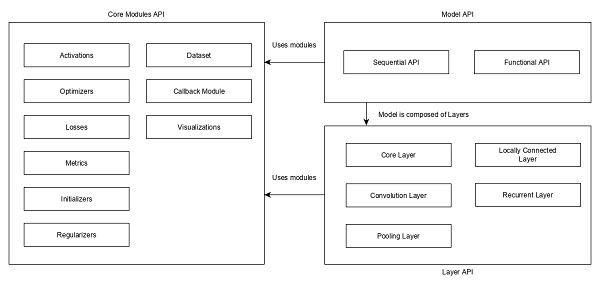
Keras API can be divided into three main categories −
Model
Layer
Core Modules
In Keras, every ANN is represented by Keras Models. In turn, every Keras Model is composition of Keras Layers and represents ANN layers like input, hidden layer, output layers, convolution layer, pooling layer, etc., Keras model and layer access Keras modules for activation function, loss function, regularization function, etc., Using Keras model, Keras Layer, and Keras modules, any ANN algorithm (CNN, RNN, etc.,) can be represented in a simple and efficient manner.
The following diagram depicts the relationship between model, layer and core modules −
Let us see the overview of Keras models, Keras layers and Keras modules.
Model
Keras Models are of two types as mentioned below −
Sequential Model − Sequential model is basically a linear composition of Keras Layers. Sequential model is easy, minimal as well as has the ability to represent nearly all available neural networks.
A simple sequential model is as follows −
from keras.models import Sequential
from keras.layers import Dense, Activation

model = Sequential()
model.add(Dense(512, activation = 'relu', input_shape = (784,)))
Where,
Line 1 imports Sequential model from Keras models
Line 2 imports Dense layer and Activation module
Line 4 create a new sequential model using Sequential API
Line 5 adds a dense layer (Dense API) with relu activation (using Activation module) function.
Sequential model exposes Model class to create customized models as well. We can use sub-classing concept to create our own complex model.
Functional API − Functional API is basically used to create complex models.
Explore our latest online courses and learn new skills at your own pace. Enroll and become a certified expert to boost your career.
Layer
Each Keras layer in the Keras model represent the corresponding layer (input layer, hidden layer and output layer) in the actual proposed neural network model. Keras provides a lot of pre-build layers so that any complex neural network can be easily created. Some of the important Keras layers are specified below,
Core Layers
Convolution Layers
Pooling Layers
Recurrent Layers
A simple python code to represent a neural network model using sequential model is as follows −
from keras.models import Sequential
from keras.layers import Dense, Activation, Dropout model = Sequential()

model.add(Dense(512, activation = 'relu', input_shape = (784,)))
model.add(Dropout(0.2))
model.add(Dense(512, activation = 'relu')) model.add(Dropout(0.2))
model.add(Dense(num_classes, activation = 'softmax'))
Where,
Line 1 imports Sequential model from Keras models
Line 2 imports Dense layer and Activation module
Line 4 create a new sequential model using Sequential API
Line 5 adds a dense layer (Dense API) with relu activation (using Activation module) function.
Line 6 adds a dropout layer (Dropout API) to handle over-fitting.
Line 7 adds another dense layer (Dense API) with relu activation (using Activation module) function.
Line 8 adds another dropout layer (Dropout API) to handle over-fitting.
Line 9 adds final dense layer (Dense API) with softmax activation (using Activation module) function.
Keras also provides options to create our own customized layers. Customized layer can be created by sub-classing the Keras.Layer class and it is similar to sub-classing Keras models.
Core Modules
Keras also provides a lot of built-in neural network related functions to properly create the Keras model and Keras layers. Some of the function are as follows −
Activations module − Activation function is an important concept in ANN and activation modules provides many activation function like softmax, relu, etc.,
Loss module − Loss module provides loss functions like mean_squared_error, mean_absolute_error, poisson, etc.,
Optimizer module − Optimizer module provides optimizer function like adam, sgd, etc.,
Deep learning is an evolving subfield of machine learning. Deep learning involves analyzing the input in layer by layer manner, where each layer progressively extracts higher level information about the input.
Let us take a simple scenario of analyzing an image. Let us assume that your input image is divided up into a rectangular grid of pixels. Now, the first layer abstracts the pixels. The second layer understands the edges in the image. The Next layer constructs nodes from the edges. Then, the next would find branches from the nodes. Finally, the output layer will detect the full object. Here, the feature extraction process goes from the output of one layer into the input of the next subsequent layer.
By using this approach, we can process huge amount of features, which makes deep learning a very powerful tool. Deep learning algorithms are also useful for the analysis of unstructured data. Let us go through the basics of deep learning in this chapter.
Artificial Neural Networks
The most popular and primary approach of deep learning is using “Artificial neural network” (ANN). They are inspired from the model of human brain, which is the most complex organ of our body. The human brain is made up of more than 90 billion tiny cells called “Neurons”. Neurons are inter-connected through nerve fiber called “axons” and “Dendrites”. The main role of axon is to transmit information from one neuron to another to which it is connected.
Similarly, the main role of dendrites is to receive the information being transmitted by the axons of another neuron to which it is connected. Each neuron processes a small information and then passes the result to another neuron and this process continues. This is the basic method used by our human brain to process huge about of information like speech, visual, etc., and extract useful information from it.
Based on this model, the first Artificial Neural Network (ANN) was invented by psychologist Frank Rosenblatt, in the year of 1958. ANNs are made up of multiple nodes which is similar to neurons. Nodes are tightly interconnected and organized into different hidden layers. The input layer receives the input data and the data goes through one or more hidden layers sequentially and finally the output layer predict something useful about the input data. For example, the input may be an image and the output may be the thing identified in the image, say a “Cat”.
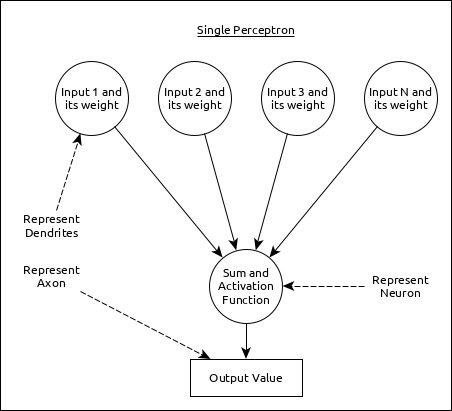
A single neuron (called as perceptron in ANN) can be represented as below −
Here,
Multiple input along with weight represents dendrites.
Sum of input along with activation function represents neurons. Sum actually means computed value of all inputs and activation function represent a function, which modify the Sum value into 0, 1 or 0 to 1.
Actual output represent axon and the output will be received by neuron in next layer.
Let us understand different types of artificial neural networks in this section.
Multi-Layer Perceptron
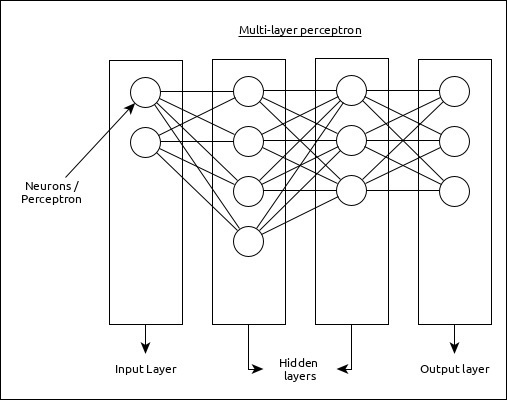
Multi-Layer perceptron is the simplest form of ANN. It consists of a single input layer, one or more hidden layer and finally an output layer. A layer consists of a collection of perceptron. Input layer is basically one or more features of the input data. Every hidden layer consists of one or more neurons and process certain aspect of the feature and send the processed information into the next hidden layer. The output layer process receives the data from last hidden layer and finally output the result.
Explore our latest online courses and learn new skills at your own pace. Enroll and become a certified expert to boost your career.
Convolutional Neural Network (CNN)
Convolutional neural network is one of the most popular ANN. It is widely used in the fields of image and video recognition. It is based on the concept of convolution, a mathematical concept. It is almost similar to multi-layer perceptron except it contains series of convolution layer and pooling layer before the fully connected hidden neuron layer. It has three important layers −
Convolution layer − It is the primary building block and perform computational tasks based on convolution function.
Pooling layer − It is arranged next to convolution layer and is used to reduce the size of inputs by removing unnecessary information so computation can be performed faster.
Fully connected layer − It is arranged to next to series of convolution and pooling layer and classify input into various categories.
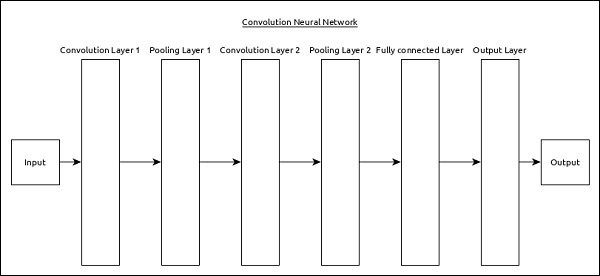
A simple CNN can be represented as below −
Here,
2 series of Convolution and pooling layer is used and it receives and process the input (e.g. image).
A single fully connected layer is used and it is used to output the data (e.g. classification of image)
Recurrent Neural Network (RNN)
Recurrent Neural Networks (RNN) are useful to address the flaw in other ANN models. Well, Most of the ANN doesn’t remember the steps from previous situations and learned to make decisions based on context in training. Meanwhile, RNN stores the past information and all its decisions are taken from what it has learnt from the past.
This approach is mainly useful in image classification. Sometimes, we may need to look into the future to fix the past. In this case bidirectional RNN is helpful to learn from the past and predict the future. For example, we have handwritten samples in multiple inputs. Suppose, we have confusion in one input then we need to check again other inputs to recognize the correct context which takes the decision from the past.
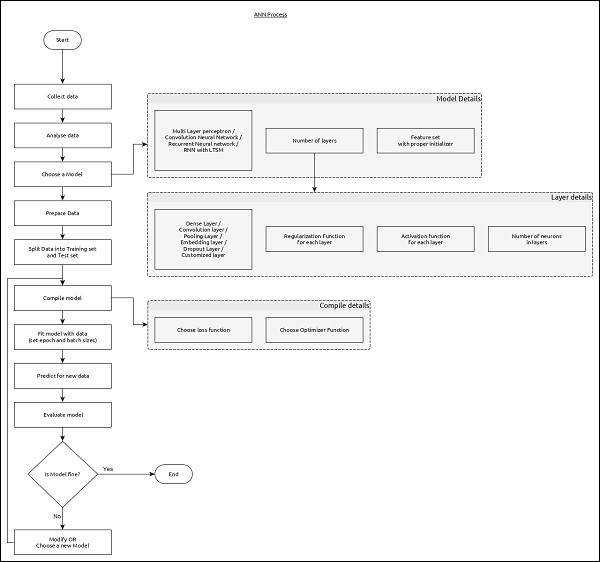
Workflow of ANN
Let us first understand the different phases of deep learning and then, learn how Keras helps in the process of deep learning.
Collect required data
Deep learning requires lot of input data to successfully learn and predict the result. So, first collect as much data as possible.
Analyze data
Analyze the data and acquire a good understanding of the data. The better understanding of the data is required to select the correct ANN algorithm.
Choose an algorithm (model)
Choose an algorithm, which will best fit for the type of learning process (e.g image classification, text processing, etc.,) and the available input data. Algorithm is represented by Model in Keras. Algorithm includes one or more layers. Each layers in ANN can be represented by Keras Layer in Keras.
Prepare data − Process, filter and select only the required information from the data.
Split data − Split the data into training and test data set. Test data will be used to evaluate the prediction of the algorithm / Model (once the machine learn) and to cross check the efficiency of the learning process.
Compile the model − Compile the algorithm / model, so that, it can be used further to learn by training and finally do to prediction. This step requires us to choose loss function and Optimizer. loss function and Optimizer are used in learning phase to find the error (deviation from actual output) and do optimization so that the error will be minimized.
Fit the model − The actual learning process will be done in this phase using the training data set.
Predict result for unknown value − Predict the output for the unknown input data (other than existing training and test data)
Evaluate model − Evaluate the model by predicting the output for test data and cross-comparing the prediction with actual result of the test data.
Freeze, Modify or choose new algorithm − Check whether the evaluation of the model is successful. If yes, save the algorithm for future prediction purpose. If not, then modify or choose new algorithm / model and finally, again train, predict and evaluate the model. Repeat the process until the best algorithm (model) is found.
The above steps can be represented using below flow chart −
This chapter explains Keras backend implementations TensorFlow and Theano in detail. Let us go through each implementation one by one.
TensorFlow
TensorFlow is an open source machine learning library used for numerical computational tasks developed by Google. Keras is a high level API built on top of TensorFlow or Theano. We know already how to install TensorFlow using pip.
If it is not installed, you can install using the below command −
pip install TensorFlow
Once we execute keras, we could see the configuration file is located at your home directory inside and go to .keras/keras.json.
epsilon represents numeric constant. It is used to avoid DivideByZero error.
floatx represent the default data type float32. You can also change it to float16 or float64 using set_floatx() method.
image_data_format represent the data format.
Suppose, if the file is not created then move to the location and create using the below steps −
> cd home
> mkdir .keras
> vi keras.json
Remember, you should specify .keras as its folder name and add the above configuration inside keras.json file. We can perform some pre-defined operations to know backend functions.
Theano
Theano is an open source deep learning library that allows you to evaluate multi-dimensional arrays effectively. We can easily install using the below command −
pip install theano
By default, keras uses TensorFlow backend. If you want to change backend configuration from TensorFlow to Theano, just change the backend = theano in keras.json file. It is described below −
This chapter explains about how to install Keras on your machine. Before moving to installation, let us go through the basic requirements of Keras.
Prerequisites
You must satisfy the following requirements −
Any kind of OS (Windows, Linux or Mac)
Python version 3.5 or higher.
Python
Keras is python based neural network library so python must be installed on your machine. If python is properly installed on your machine, then open your terminal and type python, you could see the response similar as specified below,
Python 3.6.5 (v3.6.5:f59c0932b4, Mar 28 2018, 17:00:18)
[MSC v.1900 64 bit (AMD64)] on win32
Type "help", "copyright", "credits" or "license" for more information.
>>>
As of now the latest version is ‘3.7.2’. If Python is not installed, then visit the official python link – www.python.org and download the latest version based on your OS and install it immediately on your system.
Keras Installation Steps
Keras installation is quite easy. Follow below steps to properly install Keras on your system.
Step 1: Create virtual environment
Virtualenv is used to manage Python packages for different projects. This will be helpful to avoid breaking the packages installed in the other environments. So, it is always recommended to use a virtual environment while developing Python applications.
Linux/Mac OS
Linux or mac OS users, go to your project root directory and type the below command to create virtual environment,
python3 -m venv kerasenv
After executing the above command, “kerasenv” directory is created with bin,lib and include folders in your installation location.
Windows
Windows user can use the below command,
py -m venv keras
Step 2: Activate the environment
This step will configure python and pip executables in your shell path.
Linux/Mac OS
Now we have created a virtual environment named “kerasvenv”. Move to the folder and type the below command,
$ cd kerasvenv kerasvenv $ source bin/activate
Windows
Windows users move inside the “kerasenv” folder and type the below command,
.\env\Scripts\activate
Step 3: Python libraries
Keras depends on the following python libraries.
Numpy
Pandas
Scikit-learn
Matplotlib
Scipy
Seaborn
Hopefully, you have installed all the above libraries on your system. If these libraries are not installed, then use the below command to install one by one.
It is an open source machine learning library. It is used for classification, regression and clustering algorithms. Before moving to the installation, it requires the following −
Python version 3.5 or higher
NumPy version 1.11.0 or higher
SciPy version 0.17.0 or higher
joblib 0.11 or higher.
Now, we install scikit-learn using the below command −
pip install -U scikit-learn
Seaborn
Seaborn is an amazing library that allows you to easily visualize your data. Use the below command to install −
pip install seaborn
You could see the message similar as specified below −
Explore our latest online courses and learn new skills at your own pace. Enroll and become a certified expert to boost your career.
Keras Installation Using Python
As of now, we have completed basic requirements for the installtion of Kera. Now, install the Keras using same procedure as specified below −
pip install keras
Quit virtual environment
After finishing all your changes in your project, then simply run the below command to quit the environment −
deactivate
Anaconda Cloud
We believe that you have installed anaconda cloud on your machine. If anaconda is not installed, then visit the official link, https://www.anaconda.com/download and choose download based on your OS.
Create a new conda environment
Launch anaconda prompt, this will open base Anaconda environment. Let us create a new conda environment. This process is similar to virtualenv. Type the below command in your conda terminal −
conda create --name PythonCPU
If you want, you can create and install modules using GPU also. In this tutorial, we follow CPU instructions.
Activate conda environment
To activate the environment, use the below command −
activate PythonCPU
Install spyder
Spyder is an IDE for executing python applications. Let us install this IDE in our conda environment using the below command −
conda install spyder
Install python libraries
We have already known the python libraries numpy, pandas, etc., needed for keras. You can install all the modules by using the below syntax −
Syntax
conda install -c anaconda <module-name>
For example, you want to install pandas −
conda install -c anaconda pandas
Like the same method, try it yourself to install the remaining modules.
Install Keras
Now, everything looks good so you can start keras installation using the below command −
conda install -c anaconda keras
Launch spyder
Finally, launch spyder in your conda terminal using the below command −
spyder
To ensure everything was installed correctly, import all the modules, it will add everything and if anything went wrong, you will get module not found error message.
Deep learning is one of the major subfield of machine learning framework. Machine learning is the study of design of algorithms, inspired from the model of human brain. Deep learning is becoming more popular in data science fields like robotics, artificial intelligence(AI), audio & video recognition and image recognition. Artificial neural network is the core of deep learning methodologies. Deep learning is supported by various libraries such as Theano, TensorFlow, Caffe, Mxnet etc., Keras is one of the most powerful and easy to use python library, which is built on top of popular deep learning libraries like TensorFlow, Theano, etc., for creating deep learning models.
Overview of Keras
Keras runs on top of open source machine libraries like TensorFlow, Theano or Cognitive Toolkit (CNTK). Theano is a python library used for fast numerical computation tasks. TensorFlow is the most famous symbolic math library used for creating neural networks and deep learning models. TensorFlow is very flexible and the primary benefit is distributed computing. CNTK is deep learning framework developed by Microsoft. It uses libraries such as Python, C#, C++ or standalone machine learning toolkits. Theano and TensorFlow are very powerful libraries but difficult to understand for creating neural networks.
Keras is based on minimal structure that provides a clean and easy way to create deep learning models based on TensorFlow or Theano. Keras is designed to quickly define deep learning models. Well, Keras is an optimal choice for deep learning applications.
Features
Keras leverages various optimization techniques to make high level neural network API easier and more performant. It supports the following features −
Consistent, simple and extensible API.
Minimal structure – easy to achieve the result without any frills.
It supports multiple platforms and backends.
It is user friendly framework which runs on both CPU and GPU.
Highly scalability of computation.
Explore our latest online courses and learn new skills at your own pace. Enroll and become a certified expert to boost your career.
Benefits
Keras is highly powerful and dynamic framework and comes up with the following advantages −
Larger community support.
Easy to test.
Keras neural networks are written in Python which makes things simpler.
Keras supports both convolution and recurrent networks.
Deep learning models are discrete components, so that, you can combine into many ways.
In eclipse, right click on the Publisher.java source, and select Run As → Java Application. Publisher application will start running and you’ll see the output as follows −
Enter message:
Start the Subscriber Application
In eclipse, right click on the Subscriber.java source, and select Run As → Java Application. Subscriber application will start running and you’ll see the output as follows −
Waiting for messages. To exit press CTRL+C
Explore our latest online courses and learn new skills at your own pace. Enroll and become a certified expert to boost your career.
Start another Subscriber Application
In eclipse, again right click on the Subscriber.java source, and select Run As → Java Application. Another Subscriber application will start running and you’ll see the output as follows −
Waiting for messages. To exit press CTRL+C
Send Message
In Publisher console window, type Hi and press enter button to send the message.
Enter message:
Hi
Receive Message
Verify in Subscriber console windows, the message is received in each window.
Received = Hi
Send Quit as message to terminate all publisher and subscriber console window sessions.
Verification
Now open http://rabbitmq:15672/ in your browser. It will ask for credentials. Use guest/guest as username/password and it will load the RabbitMQ admin console where you can check Queues and Exchanges to check the status of messages delivered and bindings.
Subscriber class creates a connection, creates a channel, declares the exchange, create a random queue and binds it with the exchange and then receives message from topic if there is any. Press Ctrl + C to terminate else it will keep polling queue for messages.