Author: saqibkhan

  • Relational Operators in C

    Relational operators in C are defined to perform comparison of two values. The familiar angular brackets < and > are the relational operators in addition to a few more as listed in the table below.

    These relational operators are used in Boolean expressions. All the relational operators evaluate to either True or False.

    C doesnt have a Boolean data type. Instead, “0” is interpreted as False and any non-zero value is treated as True.

    Example 1

    Here is a simple example of relational operator in C −

    #include <stdio.h>intmain(){int op1 =5;int op2 =3;printf("op1: %d op2: %d op1 < op2: %d\n", op1, op2, op1 < op2);return0;}

    Output

    Run the code and check its output −

    op1: 5 op2: 3 op1 < op2: 0
    

    Relational operators have an important role to play in decision-control and looping statements in C.

    The following table lists all the relational operators in C −

    OperatorDescriptionExample
    ==Checks if the values of two operands are equal or not. If yes, then the condition becomes true.(A == B)
    !=Checks if the values of two operands are equal or not. If the values are not equal, then the condition becomes true.(A != B)
    >Checks if the value of left operand is greater than the value of right operand. If yes, then the condition becomes true.(A > B)
    <Checks if the value of left operand is less than the value of right operand. If yes, then the condition becomes true.(A < B)
    >=Checks if the value of left operand is greater than or equal to the value of right operand. If yes, then the condition becomes true.(A >= B)
    <=Checks if the value of left operand is less than or equal to the value of right operand. If yes, then the condition becomes true.(A <= B)

    All the relational operators are binary operators. Since they perform comparison, they need two operands on either side.

    We use the = symbol in C as the assignment operator. So, C uses the “==” (double equal) as the equality operator.

    The angular brackets > and < are used as the “greater than” and “less than” operators. When combined with the “=” symbol, they form the “>=” operator for “greater than or equal” and “<=” operator for “less than or equal” comparison.

    Finally, the “=” symbol prefixed with “!” (!=) is used as the inequality operator.

    Example 2

    The following example shows all the relational operators in use.

    #include <stdio.h>intmain(){int a =21;int b =10;int c ;printf("a: %d b: %d\n", a,b);if(a == b){printf("Line 1 - a is equal to b\n");}else{printf("Line 1 - a is not equal to b\n");}if(a < b){printf("Line 2 - a is less than b\n");}else{printf("Line 2 - a is not less than b\n");}if(a > b){printf("Line 3 - a is greater than b\n");}else{printf("Line 3 - a is not greater than b \n\n");}/* Lets change value of a and b */
       a =5;
       b =20;printf("a: %d b: %d\n", a,b);if(a <= b){printf("Line 4 - a is either less than or equal to  b\n");}if(b >= a){printf("Line 5 - b is either greater than  or equal to b\n");}if(a != b){printf("Line 6 - a is not equal to b\n");}else{printf("Line 6 - a is equal to b\n");}return0;}

    Output

    When you run this code, it will produce the following output −

    a: 21 b: 10
    Line 1 - a is not equal to b
    Line 2 - a is not less than b
    Line 3 - a is greater than b
    
    a: 5 b: 20
    Line 4 - a is either less than or equal to  b
    Line 5 - b is either greater than  or equal to b
    Line 6 - a is not equal to b
    

    Example 3

    The == operator needs to be used with care. Remember that “=” is the assignment operator in C. If used by mistake in place of the equality operator, you get an incorrect output as follows −

    #include <stdio.h>intmain(){int a =5;int b =3;if(a = b){printf("a is equal to b");}else{printf("a is not equal to b");}return0;}

    Output

    The value of “b” is assigned to “a” which is non-zero, and hence the if expression returns true.

    a is equal to b
    

    Example 4

    We can have “char” types too as the operand for all the relational operators, as the “char” type is a subset of “int” type. Take a look at this example −

    #include <stdio.h>intmain(){char a ='B';char b ='d';printf("a: %c b: %c\n", a,b);if(a == b){printf("Line 1 - a is equal to b \n");}else{printf("Line 1 - a is not equal to b \n");}if(a < b){printf("Line 2 - a is less than b \n");}else{printf("Line 2 - a is not less than b \n");}if(a > b){printf("Line 3 - a is greater than b \n");}else{printf("Line 3 - a is not greater than b \n");}if(a != b){printf("Line 4 - a is not equal to b \n");}else{printf("Line 4 - a is equal to b \n");}return0;}

    Output

    Run the code and check its output −

    a: B b: d
    Line 1 - a is not equal to b
    Line 2 - a is less than b
    Line 3 - a is not greater than b
    Line 4 - a is not equal to b
    

    Relational operators cannot be used for comparing secondary types such as arrays or derived types such as struct or union types.
  • Unary Operators in C

    While most of the operators in C are binary in nature, there are a few unary operators as well. An operator is said to be unary if it takes just a single operand, unlike a binary operator which needs two operands.

    Some operators in C are binary as well as unary in their usage. Examples of unary operators in C include ++!, etc.

    The Increment Operator in C

    The increment operator (++) adds 1 to the value of its operand variable and assigns it back to the variable.

    The statement a++ is equivalent to writing “a = a + 1.” The “++” operator can appear before or after the operand and it will have the same effect. Hence, a++ is equivalent to ++a.

    However, when the increment operator appears along with other operators in an expression, its effect is not the same. The precedence of “prefix ++” is more than “postfix ++”. Hence, “b = a++;” is not the same as “b = ++a;

    In the former case, “a” is assigned to “b” before the incrementation; while in the latter case, the incrementation is performed before the assignment.

    The Decrement Operator in C

    The decrement operator (–) subtracts 1 from the value of its operand variable and assigns it back to the variable.

    The statement “a–;” is equivalent to writing “a = a – 1;

    The “–” operator can appear before or after the operand and in either case, it will have the same effect. Hence, “a–” is equivalent to “–a“.

    However, when the decrement operator appears along with other operators in an expression, its effect is not the same. The precedence of “prefix –” is more than “postfix –“. Hence, “b = a–” is not the same as “b = –a“.

    In the former case, “a” is assigned to “b” before the decrementation; while in the latter case, the decrementation is performed before the assignment.

    The Unary “+” Operator in C

    The “+” and “” operators are well known as binary addition and subtraction operators. However, they can also be used in unary fashion. When used as unary, they are prefixed to the operand variable.

    The “+” operator is present implicitly whenever a positive value is assigned to any numeric variable. The statement “int x = 5;” is same as “int x = +5;“. The same logic applies to float and char variable too.

    Example

    Take a look at the following example −

    #include <stdio.h>intmain(){char x ='A';char y =+x;float a =1.55;float b =+a;printf("x: %c y: %c\n", x,y);printf("a: %f y: %f\n", a,b);return0;}

    Output

    When you run this code, it will produce the following output −

    x: A y: A
    a: 1.550000 y: 1.550000
    

    The Unary “−” Operator in C

    The “” symbol, that normally represents the subtraction operator, also acts the unary negation operator in C. The following code shows how you can use the unary negation operator in C.

    Example

    In this code, the unary negation operator returns the negative value of “x” and assigns the same to another variable “y”.

    #include <stdio.h>intmain(){int x =5;int y =-x;printf("x: %d y: %d\n", x, y);return0;}

    Output

    Run the code and check its output −

    x: 5 y: -5
    

    The Address-of Operator (&) in C

    We use the & symbol in C as the binary AND operator. However, we also use the same & symbol in unary manner as the “address-of” operator.

    Example

    The & operator returns the memory address of its variable operand. Take a look at the following example −

    #include <stdio.h>intmain(){char x ='A';printf("Address of x: %d\n",&x);return0;}

    Output

    Run the code and check its output −

    Address of x: 6422047
    

    Note: The C compiler assigns a random memory address whenever a variable is declared. Hence, the result may vary every time the address is printed.

    The format specifier %p is used to get a hexadecimal representation of the memory address.

    char x ='A';printf("Address of x: %p\n",&x);

    This prints the address of “x” in hexadecimal format −

    Address of x:000000000061FE1F
    

    The address of a variable is usually stored in a “pointer variable”. The pointer variable is declared with a “*” prefix. In the code snippet below, “x” is a normal integer variable while “y” is a pointer variable.

    int x =10;int*y =&x;

    The Dereference Operator (*) in C

    We normally use the “*” symbol as the multiplication operator. However, it is also used as the “dereference operator” in C.

    When you want to store the memory address of a variable, the variable should be declared with an asterisk (*) prefixed to it.

    int x =10;int*y =&x;

    Here the variable “y” stores the address of “x”, hence “y” acts as a pointer to “x”. To access the value of “x” with the help of its pointer, use the dereference operator (*).

    Example 1

    Take a look at the following example −

    #include <stdio.h>intmain(){int x =10;int*y =&x;printf("x: %d Address of x: %d\n", x,&x);printf("Value at x with Dereference: %d",*y);return0;}

    Output

    Run the code and check its output −

    x: 10 Address of x: 6422036
    Value at x with Dereference: 10
    

    Example 2

    You can also assign a value to the original variable with the help of the dereference pointer −

    #include <stdio.h>intmain(){int x =10;int*y =&x;printf("x: %d Address of x %d\n", x,&x);*y =20;printf("x: %d with Dereference: %d", x,*y);return0;}

    Output

    Run the code and check its output −

    x: 10 Address of x: 6422036
    x: 20 with dereference: 20
    

    The Logical NOT Operator (!) in C

    The logical NOT operator (!) in C negates the value of a Boolean operand. True becomes False and False becomes True. The logical NOT operator (!) is a unary operator.

    Example 1

    The following example shows the usage of logical operators in C −

    #include <stdio.h>intmain(){int a =0;int b =20;if(!(a && b)){printf("Line 1 - Condition is true\n");}return0;}

    Output

    Line 1 - Condition is true
    

    Example 2

    The following C code employs the NOT operator in a while loop −

    #include <stdio.h>intmain(){int i =0;while(!(i >5)){printf("i = %d\n", i);
    
      i++;}return0;}</code></pre>

    Output

    In this code, the while loop continues to iterate till the expression "!(i > 5)" becomes False, which will be when the value of "i" becomes more than 5.

    i = 0
    i = 1
    i = 2
    i = 3
    i = 4
    i = 5
    

    The 1's Complement Operator (~) in C

    The 1's complement operator (~) in C is a unary operator, needing just one operand. It has the effect of "flipping" the bits, which means the 1's are replaced by 0's and vice versa in the binary representation of any number.

    a~a
    01
    10

    Assuming that the int variable "a" has the value 60 (equivalent to 0011 1100 in binary), the "~a" operation results in -61 in 2s complement form, as per the bitwise right-shift of its corresponding bits.

    ~00111100=11000011

    The binary number "1100 0011" corresponds to -61 in decimal.

    Example

    Take a look at this example code −

    #include <stdio.h>intmain(){int a =60;/* 60 = 0011 1100 */int c =0;
    
       c =~a;/* -61 = 1100 0011 */printf("Value of c is %d \n", c);return0;}

    Output

    When you run this code, it will produce the following output −

    Value of c is -61
    
  • Arithmetic Operators in C

    Arithmetic operators in C are certain special symbols, predefined to perform arithmetic operations. We are familiar with the basic arithmetic operations − addition, subtraction, multiplication and division. C is a computational language, so these operators are essential in performing a computerised process.

    In addition to the above operations assigned to the four symbols +*, and / respectively, C has another arithmetic operator called the modulo operator for which we use the %symbol.

    The following table lists the arithmetic operators in C −

    OperatorDescription
    +Adds two operands.
    Subtracts second operand from the first.
    *Multiplies both operands.
    /Divides numerator by denominator.
    %Modulus Operator and remainder of after an integer division.
    ++Increment operator increases the integer value by one.
    Decrement operator decreases the integer value by one.

    The ++ and  operators are also listed in the above table. We shall learn about increment and decrement operators in a separate chapter.

    Example: Arithmetic Operators in C

    The following example demonstrates how to use these arithmetic operators in a C program −

    #include <stdio.h>intmain(){int op1 =10;int op2 =3;printf("Operand1: %d Operand2: %d \n\n", op1, op2);printf("Addition of op1 and op2: %d\n", op1 + op2);printf("Subtraction of op2 from op1: %d\n", op1 - op2);printf("Multiplication of op1 and op2: %d\n", op1 * op2);printf("Division of op1 by op2: %d\n", op1/op2);return0;}

    Output

    When you run this code, it will produce the following output −

    Operand1: 10 Operand2: 3
    
    Addition of op1 and op2: 13
    Subtraction of op2 from op1: 7
    Multiplication of op1 and op2: 30
    Division of op1 by op2: 3
    

    Type Casting in C

    The first three results are as expected, but the result of division is not. You expect 10/3 to be a fractional number (3.333333). Is it because we used the %d format specifier to print the outcome of the division? If we change the last line of the code as follows −

    printf("Division of op1 by op2: %f\n", op1/op2);

    Now the outcome of the division operation will be “0.000000”, which is even more surprising. The reason why C behaves like this is because the division of an integer with another integer always returns an integer.

    To obtain floating-point division, at least one operand must be a float, or you need to use the typecast operator to change one of the integer operands to float.

    Now, change the last printf statement of the given program as follows −

    printf("Division of op1 by op2: %f\n",(float)op1/op2);

    When you run run the code again after making this change, it will show the correct division −

    Division of op1 by op2:3.333333

    Note: If you use %d format specifier for a floating-point expression, it will always result in “0”.

    Example

    The result of arithmetic operations with at least one float (or double) operand is always float. Take a look at the following example −

    #include <stdio.h>intmain(){int op1 =10;float op2 =2.5;printf("Operand1: %d Operand2: %f\n", op1, op2);printf("Addition of op1 and op2: %f\n", op1 + op2);printf("Subtraction of op2 from op1: %f\n", op1 - op2);printf("Multiplication of op1 and op2: %f\n", op1 * op2);printf("Division of op1 by op2: %f\n", op1/op2);return0;}

    Output

    Run the code and check its output −

    Operand1: 10 Operand2: 2.500000
    Addition of op1 and op2: 12.500000
    Subtraction of op2 from op1: 7.500000
    Multiplication of op1 and op2: 25.000000
    Division of op1 by op2: 4.000000
    

    Arithmetic Operations with char Data Type

    In C, char data type is a subset of int type. Hence, we can perform arithmetic operations with char operands.

    Example

    The following example shows how you can perform arithmetic operations with two operands out of which one is a “char” type −

    #include <stdio.h>intmain(){char op1 ='F';int op2 =3;printf("operand1: %c operand2: %d\n", op1, op2);printf("Addition of op1 and op2: %d\n", op1 + op2);printf("Subtraction of op2 from op1: %d\n", op1 - op2);printf("Multiplication of op1 and op2: %d\n", op1 * op2);printf("Division of op1 by op2: %d\n", op1/op2);return0;}

    Output

    Run the code and check its output −

    operand1: F operand2: 3
    
    Addition of op1 and op2: 73
    Subtraction of op2 from op1: 67
    Multiplication of op1 and op2: 210
    Division of op1 by op2: 23
    

    Since a char data type is a subset of int, the %c format specifier returns the ASCII character associated with an integer returned by the %d specifier.

    If any arithmetic operation between two char operands results in an integer beyond the range of char, the %c specifier displays blank.

    Modulo Operator in C

    The modulo operator (%) returns the remainder of a division operation.

    Example

    Take a look at the following example −

    #include <stdio.h>intmain(){int op1 =10;int op2 =3;printf("Operand1: %d Operand2: %d\n", op1, op2);printf("Modulo of op1 and op2: %d\n", op1%op2);return0;}

    Output

    Run the code and check its output −

    Operand1: 10 Operand2: 3
    Modulo of op1 and op2: 1
    

    The modulo operator needs both the operands of int type. If not, the compiler gives a type mismatch error. For example, change the data type of “op1” to float in the above code and run the program again −

    float op1 =10;int op2 =3;printf("Modulo of op1 and op2: %d\n", op1%op2);

    Now, you will get a type mismatch error with the following message −

    error: invalid operands to binary % (have 'float' and 'int')
    

    It does allow char operands for modulo operations though.

    Negation Operator in C

    The increment and decrement operators represented by the symbols ++ and  are unary operators. They have been covered in a separate chapter. The “” symbol, representing subtraction operator, also acts a unary negation operator.

    Example

    The following example highlights how you can use the negation operator in C −

    #include <stdio.h>intmain(){int op1 =5;int op2 =-op1;printf("Operand1: %d Operand2: %d\n", op1, op2);return0;}

    Output

    When you run this code, it will produce the following output −

    Operand1: 5 Operand2: -5
    

    In the above example, the “” symbol returns the negative value of op1 and assigns the same to op2.

  • Operators

    An operator is a symbol that tells the compiler to perform specific mathematical or logical functions. By definition, an operator performs a certain operation on operands. An operator needs one or more operands for the operation to be performed.

    Depending on how many operands are required to perform the operation, operands are called as unary, binary or ternary operators. They need one, two or three operands respectively.

    • Unary operators − ++ (increment), — (decrement), ! (NOT), ~ (compliment), & (address of), * (dereference)
    • Binary operators − arithmetic, logical and relational operators except !
    • Ternary operators − The ? operator

    C language is rich in built-in operators and provides the following types of operators −

    • Arithmetic Operators
    • Relational Operators
    • Logical Operators
    • Bitwise Operators
    • Assignment Operators
    • Misc Operators

    We will, in this chapter, look into the way each operator works. Here, you will get an overview of all these chapters. Thereafter, we have provided independent chapters on each of these operators that contain plenty of examples to show how these operators work in C Programming.

    Arithmetic Operators

    We are most familiar with the arithmetic operators. These operators are used to perform arithmetic operations on operands. The most common arithmetic operators are addition (+), subtraction (-), multiplication (*), and division (/).

    In addition, the modulo (%) is an important arithmetic operator that computes the remainder of a division operation. Arithmetic operators are used in forming an arithmetic expression. These operators are binary in nature in the sense they need two operands, and they operate on numeric operands, which may be numeric literalsvariables or expressions.

    For example, take a look at this simple expression −

    a + b
    

    Here “+” is an arithmetic operator. We shall learn more about arithmetic operators in C in a subsequent chapter.

    The following table shows all the arithmetic operators supported by the C language. Assume variable A holds 10 and variable B holds 20 then −

    Show Examples

    OperatorDescriptionExample
    &plus;Adds two operands.A &plus; B = 30
    Subtracts second operand from the first.A − B = -10
    *Multiplies both operands.A * B = 200
    /Divides numerator by de-numerator.B / A = 2
    %Modulus Operator and remainder of after an integer division.B % A = 0
    ++Increment operator increases the integer value by one.A++ = 11
    Decrement operator decreases the integer value by one.A– = 9

    Relational Operators

    We are also acquainted with relational operators while learning secondary mathematics. These operators are used to compare two operands and return a boolean value (true or false). They are used in a boolean expression.

    The most common relational operators are less than (<), greater than (>), less than or equal to (<=), greater than or equal to (>=), equal to (==), and not equal to (!=). Relational operators are also binary operators, needing two numeric operands.

    For example, in the Boolean expression −

    a > b
    

    Here, “>” is a relational operator.

    We shall learn more about with relational operators and their usage in one of the following chapters.

    Show Examples

    OperatorDescriptionExample
    ==Checks if the values of two operands are equal or not. If yes, then the condition becomes true.(A == B) is not true.
    !=Checks if the values of two operands are equal or not. If the values are not equal, then the condition becomes true.(A != B) is true.
    >Checks if the value of left operand is greater than the value of right operand. If yes, then the condition becomes true.(A > B) is not true.
    <Checks if the value of left operand is less than the value of right operand. If yes, then the condition becomes true.(A < B) is true.
    >=Checks if the value of left operand is greater than or equal to the value of right operand. If yes, then the condition becomes true.(A >= B) is not true.
    <=Checks if the value of left operand is less than or equal to the value of right operand. If yes, then the condition becomes true.(A <= B) is true.

    Logical Operators

    These operators are used to combine two or more boolean expressions. We can form a compound Boolean expression by combining Boolean expression with these operators. An example of logical operator is as follows −

    a >=50&& b >=50

    The most common logical operators are AND (&&), OR(||), and NOT (!). Logical operators are also binary operators.

    Show Examples

    OperatorDescriptionExample
    &&Called Logical AND operator. If both the operands are non-zero, then the condition becomes true.(A && B) is false.
    ||Called Logical OR Operator. If any of the two operands is non-zero, then the condition becomes true.(A || B) is true.
    !Called Logical NOT Operator. It is used to reverse the logical state of its operand. If a condition is true, then Logical NOT operator will make it false.!(A && B) is true.

    We will discuss more about Logical Operators in C in a subsequent chapter.

    Bitwise Operators

    Bitwise operators let you manipulate data stored in computers memory. These operators are used to perform bit-level operations on operands.

    The most common bitwise operators are AND (&), OR (|), XOR (^), NOT (~), left shift (<<), and right shift (>>). Here the “~” operator is a unary operator, while most of the other bitwise operators are binary in narure.

    Bitwise operator works on bits and perform bit−by−bit operation. The truth tables for &, “|”, and “^” are as follows −

    pqp & qp | qp ^ q
    00000
    01011
    11110
    10011

    Assume A = 60 and B = 13 in binary format, they will be as follows −

    A = 0011 1100

    B = 0000 1101

    ————————

    A&B = 0000 1100

    A|B = 0011 1101

    A^B = 0011 0001

    ~A = 1100 0011

    The following table lists the bitwise operators supported by C. Assume variable ‘A’ holds 60 and variable ‘B’ holds 13, then −

    Show Examples

    OperatorDescriptionExample
    &Binary AND Operator copies a bit to the result if it exists in both operands.(A & B) = 12, i.e., 0000 1100
    |Binary OR Operator copies a bit if it exists in either operand.(A | B) = 61, i.e., 0011 1101
    ^Binary XOR Operator copies the bit if it is set in one operand but not both.(A ^ B) = 49, i.e., 0011 0001
    ~Binary One’s Complement Operator is unary and has the effect of ‘flipping’ bits.(~A ) = ~(60), i.e,. -0111101
    <<Binary Left Shift Operator. The left operands value is moved left by the number of bits specified by the right operand.A << 2 = 240 i.e., 1111 0000
    >>Binary Right Shift Operator. The left operands value is moved right by the number of bits specified by the right operand.A >> 2 = 15 i.e., 0000 1111

    Assignment Operators

    As the name suggests, an assignment operator “assigns” or sets a value to a named variable in C. These operators are used to assign values to variables. The “=” symbol is defined as assignment operator in C, however it is not to be confused with its usage in mathematics.

    The following table lists the assignment operators supported by the C language −

    Show Examples

    OperatorDescriptionExample
    =Simple assignment operator. Assigns values from right side operands to left side operandC = A + B will assign the value of A + B to C
    +=Add AND assignment operator. It adds the right operand to the left operand and assign the result to the left operand.C += A is equivalent to C = C + A
    -=Subtract AND assignment operator. It subtracts the right operand from the left operand and assigns the result to the left operand.C -= A is equivalent to C = C – A
    *=Multiply AND assignment operator. It multiplies the right operand with the left operand and assigns the result to the left operand.C *= A is equivalent to C = C * A
    /=Divide AND assignment operator. It divides the left operand with the right operand and assigns the result to the left operand.C /= A is equivalent to C = C / A
    %=Modulus AND assignment operator. It takes modulus using two operands and assigns the result to the left operand.C %= A is equivalent to C = C % A
    <<=Left shift AND assignment operator.C <<= 2 is same as C = C << 2
    >>=Right shift AND assignment operator.C >>= 2 is same as C = C >> 2
    &=Bitwise AND assignment operator.C &= 2 is same as C = C & 2
    ^=Bitwise exclusive OR and assignment operator.C ^= 2 is same as C = C ^ 2
    |=Bitwise inclusive OR and assignment operator.C |= 2 is same as C = C | 2

    Hence, the expression “a = 5” assigns 5 to the variable “a”, but “5 = a” is an invalid expression in C.

    The “=” operator, combined with the other arithmetic, relational and bitwise operators form augmented assignment operators. For example, the += operator is used as add and assign operator. The most common assignment operators are =, +=, -=, *=, /=, %=, &=, |=, and ^=.

    Misc Operators &map; sizeof & ternary

    Besides the operators discussed above, there are a few other important operators including sizeof and ? : supported by the C Language.

    Show Examples

    OperatorDescriptionExample
    sizeof()Returns the size of a variable.sizeof(a), where a is integer, will return 4.
    &Returns the address of a variable.&a; returns the actual address of the variable.
    *Pointer to a variable.*a;
    ? :Conditional Expression.If Condition is true ? then value X : otherwise value Y

    Operators Precedence in C

    Operator precedence determines the grouping of terms in an expression and decides how an expression is evaluated. Certain operators have higher precedence than others; for example, the multiplication operator has a higher precedence than the addition operator.

    For example, x = 7 + 3 * 2; here, x is assigned 13, not 20 because operator * has a higher precedence than +, so it first gets multiplied with 3*2 and then adds into 7.

    Here, operators with the highest precedence appear at the top of the table, those with the lowest appear at the bottom. Within an expression, higher precedence operators will be evaluated first.

    Show Examples

    CategoryOperatorAssociativity
    Postfix() [] -> . ++ – –Left to right
    Unary+ – ! ~ ++ – – (type)* & sizeofRight to left
    Multiplicative* / %Left to right
    Additive+ –Left to right
    Shift<< >>Left to right
    Relational< <= > >=Left to right
    Equality== !=Left to right
    Bitwise AND&Left to right
    Bitwise XOR^Left to right
    Bitwise OR|Left to right
    Logical AND&&Left to right
    Logical OR||Left to right
    Conditional?:Right to left
    Assignment= += -= *= /= %=>>= <<= &= ^= |=Right to left
    Comma,Left to right

    Other Operators in C

    Apart from the above, there are a few other operators in C that are not classified into any of the above categories. For example, the increment and decrement operators (++ and –) are unary in nature and can appear as a prefix or postfix to the operand.

    The operators that work with the address of memory location such as the address-of operator (&) and the dereference operator (*). The sizeof operator (sizeof) appears to be a keyword but really an operator.

    C also has the type cast operator (()) that forces the type of an operand to be changed. C also uses the dot (.) and the arrow (->) symbols as operators when dealing with derived data types such as struct and union.

    The C99 version of C introduced a few additional operators such as auto, decltype.

    A single expression in C may have multiple operators of different type. The C compiler evaluates its value based on the operator precedence and associativity of operators. For example, in the following expression −

    a + b * c
    

    The multiplication operand takes precedence over the addition operator.

    We shall understand these properties with examples in a subsequent chapter.

    Many other programming languages, which are called C-family languages (such as C++, C#, Java, Perl and PHP) have an operator nomenclature that is similar to C.

  • Type Casting in C

    The term “type casting” refers to converting one datatype into another. It is also known as “type conversion”. There are certain times when the compiler does the conversion on its own (implicit type conversion), so that the data types are compatible with each other.

    On other occasions, the C compiler forcefully performs the typecasting (explicit type conversion), which is caused by the typecasting operator. For example, if you want to store a ‘long’ value into a simple integer then you can type cast ‘long’ to ‘int’.

    You can use the typecasting operator to explicitly convert the values from one type to another −

    (type_name) expression
    

    Example 1

    Consider the following example −

    #include <stdio.h>intmain(){int sum =17, count =5;double mean;
    
       mean =  sum / count;printf("Value of mean: %f\n", mean);}

    Output

    Run the code and check its output −

    Value of mean: 3.000000
    

    While we expect the result to be 17/5, that is 3.4, it shows 3.000000, because both the operands in the division expression are of int type.

    Example 2

    In C, the result of a division operation is always in the data type with a larger byte length. Hence, we have to typecast one of the integer operands to float.

    The cast operator causes the division of one integer variable by another to be performed as a floating-point operation −

    #include <stdio.h>intmain(){int sum =17, count =5;double mean;
    
       mean =(double) sum / count;printf("Value of mean: %f\n", mean);}

    Output

    When the above code is compiled and executed, it produces the following result −

    Value of mean: 3.400000
    

    It should be noted here that the cast operator has precedence over division, so the value of sum is first converted to type double and finally it gets divided by count yielding a double value.

    Type conversions can be implicit which is performed by the compiler automatically, or it can be specified explicitly through the use of the cast operator. It is considered good programming practice to use the cast operator whenever type conversions are necessary.

    Rules of Type Promotions

    While performing the implicit or automatic type conversions, the C compiler follows the rules of type promotions. Generally, the principle followed is as follows −

    • Byte and short values − They are promoted to int.
    • If one operand is a long − The entire expression is promoted to long.
    • If one operand is a float − The entire expression is promoted to float.
    • If any of the operands is double − The result is promoted to double.

    Integer Promotion in C

    Integer promotion is the process by which values of integer type “smaller” than int or unsigned int are converted either to int or unsigned int.

    Example

    Consider an example of adding a character with an integer −

    #include <stdio.h>intmain(){int i =17;char c ='c';/* ascii value is 99 */int sum;
    
       sum = i + c;printf("Value of sum : %d\n", sum);}

    Output

    When the above code is compiled and executed, it produces the following result −

    Value of sum: 116
    

    Here, the value of sum is 116 because the compiler is doing integer promotion and converting the value of ‘c’ to ASCII before performing the actual addition operation.

    Usual Arithmetic Conversion

    The usual arithmetic conversions are not performed for the assignment operators nor for the logical operators && and ||.

    Example

    Let us take the following example to understand the concept −

    #include <stdio.h>intmain(){int i =17;char c ='c';/* ascii value is 99 */float sum;
    
       sum = i + c;printf("Value of sum : %f\n", sum);}

    Output

    When the above code is compiled and executed, it produces the following result −

    Value of sum: 116.000000
    

    Here, it is simple to understand that first c gets converted to an integer, but as the final value is double, usual arithmetic conversion applies and the compiler converts i and c into ‘float’ and adds them yielding a ‘float’ result.

  • Type Conversion in C

    The C compiler attempts data type conversion, especially when dissimilar data types appear in an expression. There are certain times when the compiler does the conversion on its own (implicit type conversion) so that the data types are compatible with each other. On other occasions, the C compiler forcefully performs the conversion (explicit type conversion), which is carried out by the type cast operator.

    Implicit Type Conversion in C

    In C, implicit type conversion takes place automatically when the compiler converts the type of one value assigned to a variable to another data type. It typically happens when a type with smaller byte size is assigned to a “larger” data type. In such implicit data type conversion, the data integrity is preserved.

    While performing implicit or automatic type conversions, the C compiler follows the rules of type promotions. Generally, the principle followed is as follows −

    • Byte and short values: They are promoted to int.
    • If one operand is a long: The entire expression is promoted to long.
    • If one operand is a float: The entire expression is promoted to float.
    • If any of the operands is double: The result is promoted to double.

    Integer Promotion

    Integer promotion is the process by which values of integer type “smaller” than int or unsigned int are converted either to int or unsigned int.

    Example

    Consider an example of adding a character with an integer −

    #include <stdio.h>intmain(){int  i =17;char c ='c';/* ascii value is 99 */int sum;
       sum = i + c;printf("Value of sum: %d\n", sum);return0;}
    Output

    When you run this code, it will produce the following output −

    Value of sum: 116
    

    Here, the value of sum is 116 because the compiler is doing integer promotion and converting the value of “c” to ASCII before performing the actual addition operation.

    Usual Arithmetic Conversion

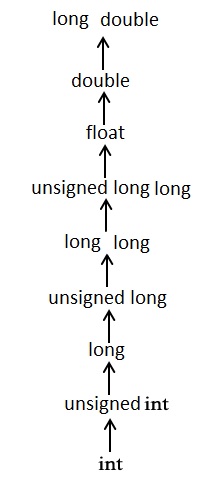
    Usual arithmetic conversions are implicitly performed to cast their values to a common type. The compiler first performs integer promotion; if the operands still have different types, then they are converted to the type that appears highest in the following hierarchy −

    Long Double

    Example

    Here is another example of implicit type conversion −

    #include <stdio.h>intmain(){char a ='A';float b = a +5.5;printf("%f", b);return0;}

    Output

    Run the code and check its output −

    70.500000
    

    When the above code runs, the char variable “a” (whose int equivalent value is 70) is promoted to float, as the other operand in the addition expression is a float.

    Explicit Type Conversion in C

    When you need to covert a data type with higher byte size to another data type having lower byte size, you need to specifically tell the compiler your intention. This is called explicit type conversion.

    C provides a typecast operator. You need to put the data type in parenthesis before the operand to be converted.

    type2 var2 =(type1) var1;

    Note that if type1 is smaller in length than type2, then you dont need such explicit casting. It is only when type1 is greater in length than type2 that you should use the typecast operator.

    Typecasting is required when we want to demote a greater data type variable to a comparatively smaller one or convert it between unrelated types like float to int.

    Example

    Consider the following code −

    #include <stdio.h>intmain(){int x =10, y =4;float z = x/y;printf("%f", z);return0;}

    Output

    On running this code, you will get the following output −

    2.000000
    

    While we expect the result to be 10/4 (that is, 2.5), it shows 2.000000. It is because both the operands in the division expression are of int type. In C, the result of a division operation is always in the data type with larger byte length. Hence, we have to typecast one of the integer operands to float, as shown below −

    Example

    Take a look at this example −

    #include <stdio.h>intmain(){int x =10, y =4;float z =(float)x/y;printf("%f", z);return0;}

    Output

    Run the code and check its output −

    2.500000
    

    If we change the expression such that the division itself is cast to float, the result will be different.

    Typecasting Functions in C

    The standard C library includes a number of functions that perform typecasting. Some of the functions are explained here −

    The atoi() Function

    The atoi() function converts a string of characters to an integer value. The function is declared in the stdlib.h header file.

    Example

    The following code uses the atoi() function to convert the string “123” to a number 123 −

    #include <stdio.h>#include <stdlib.h>intmain(){char str[]="123";int num =atoi(str);printf("%d\n", num);return0;}
    Output

    Run the code and check its output −

    123
    

    The itoa() Function

    You can use the itoa() function to convert an integer to a null terminated string of characters. The function is declared in the stdlib.h header file.

    Example

    The following code uses itoa() function to convert an integer 123 to string “123” −

    #include <stdio.h>#include <stdlib.h>intmain(){int num =123;char str[10];itoa(num,str,10);printf("%s\n", str);return0;}
    Output

    Run the code and check its output −

    123
    

    Other examples of using typecasting include the following −

    The malloc() Function − The malloc() function is a dynamic memory allocation function.

    Int *ptr =(int*)malloc(n *sizeof(int));

    In function arguments and return values − You can apply the typecast operator to formal arguments or to the return value of a user-defined function.

    Example

    Here is an example −

    #include <stdio.h>#include <stdlib.h>floatdivide(int,int);intmain(){int x =10, y =4;float z =divide(x, y);printf("%f", z);return0;}floatdivide(int a,int b){return(float)a/b;}
    Output

    When you run this code, it will produce the following output −

    2.500000 
    

    Employing implicit or explicit type conversion in C helps in type safety and improved code readability, but it may also lead to loss of precision and its complicated syntax may be confusing.

  • Character Arithmetic

    In C, character arithmetic means performing arithmetic operations like addition, subtraction, multiplication, and division on characters. Characters in C are stored as numbers using the ASCII system.

    The ASCII system represents each character, digit, or symbol using numbers. For example, ‘A’ is stored as 65, ‘B’ as 66, ‘a’ as 97, and so on

    Character Arithmetic Operations

    To perform arithmetic operations on a character, we should know that a character takes 1 byte of memory. A signed char has a range from -128 to 127, and an unsigned char has a range from 0 to 255.

    Checking Character Values

    Let’s first see a character and its ASCII value. In the below example, we print the character ‘A‘ using %c and its ASCII value using %d.

    #include <stdio.h>intmain(){char ch ='A';printf("Character: %c\n", ch);printf("ASCII Value: %d\n", ch);return0;}

    After running the program, we can see the character and its ASCII value-

    Character: A
    ASCII Value: 65
    

    Adding Two Characters

    We can add characters just like numbers because each character is stored as a number.

    #include <stdio.h>intmain(){char a ='A';char b ='B';printf("a = %c\n", a);printf("b = %c\n", b);printf("a + b = %c\n", a + b);printf("a + b (as number) = %d\n", a + b);return0;}

    Here’s the output of the above program after adding the characters –

    a = A
    b = B
    a + b = â
    a + b (as number) = 131
    

    In this program, the characters and b are declared and assigned with values ‘A‘ and ‘B‘. When we add a and b, the result is the character Ã¢. The ASCII value of A is 65 and B is 66, so adding them gives 65 + 66 = 131. The character with ASCII value 131 is Ã¢.

    Shifting and Subtracting Characters

    We can shift a character forward or backward by adding or subtracting a number. For example, ‘A’ + 1 gives ‘B’ and ‘C’ – 1 gives ‘B’. We can also find the difference between characters using subtraction, like ‘C’ – ‘A’, which gives 2 because the ASCII value of ‘C’ is 67 and ‘A’ is 65, so 67 – 65 = 2.

    #include <stdio.h>intmain(){char c1 ='A'+1;char c2 ='C'-1;int diff ='C'-'A';printf("A + 1 = %c\n", c1);printf("C - 1 = %c\n", c2);printf("C - A = %d\n", diff);return0;}

    Here’s the output of the program after shifting and subtracting the characters –

    A + 1 = B
    C - 1 = B
    C - A = 2
    

    Comparing Two Characters

    We can compare characters directly using comparison operators like <><=>=, ==, and != to check the order or equality of characters. In the program below, we check if the character ‘a’ comes before ‘z’. Since the ASCII value of ‘a’ is 97 and ‘z’ is 122, so ‘a’ < ‘z’ is true.

    #include <stdio.h>intmain(){if('a'<'z'){printf("'a' comes before 'z'\n");}return0;}

    Here’s the output that shows which character comes first.

    'a' comes before 'z'
    

    Increment and Decrement Operators on Characters

    Characters in C can be incremented (++) or decremented () like numbers. Incrementing moves a character forward in the ASCII table, and decrementing moves it backward. In the below program, chracter ch starts as ‘A‘. After ch++, it becomes ‘B‘, and after ch– it becomes ‘A‘ again.

    #include <stdio.h>intmain(){char ch ='A';printf("Original character: %c\n", ch);
    
    
    ch++;// Incrementprintf("After increment: %c\n", ch);
    ch--;// Decrementprintf("After decrement: %c\n", ch);return0;}</code></pre>

    Following is the output of the above program-

    Original character: A
    After increment: B
    After decrement: A
    

    Converting to Uppercase and Lowercase

    In ASCII, the difference between uppercase and lowercase letters is 32. To convert an uppercase letter to lowercase, we add 32 to it. For example, 'M' + 32 becomes 'm'. Similarly, to convert a lowercase letter to uppercase, we subtract 32 from it. For example, 'm' - 32 becomes 'M'.

    #include <stdio.h>intmain(){char upper ='M';char lower = upper +32;// Convert uppercase to lowercasechar small ='m';char capital = small -32;// Convert lowercase to uppercaseprintf("Original Uppercase: %c\n", upper);printf("Converted to Lowercase: %c\n", lower);printf("Original Lowercase: %c\n", small);printf("Converted to Uppercase: %c\n", capital);return0;}

    Here is the output of the above program that shows the original characters and their converted form.

    Original Uppercase: M
    Converted to Lowercase: m
    Original Lowercase: m
    Converted to Uppercase: M
    

    In this chapter, we covered how to perform different types of arithmetic operations on characters in C. It is possible to perform such arithmetic operations on characters directly because the computer stores each character as a number, which allows us to add, subtract, compare and so on.

  • Integer Promotions in C

    The C compiler promotes certain data types to a higher rank for the sake of achieving consistency in the arithmetic operations of integers.

    In addition to the standard int data type, the C language lets you work with its subtypes such as char, short int, long int, etc. Each of these data types occupy a different amount of memory space. For example, the size of a standard int is 4 bytes, whereas a char type is 2 bytes of length. When an arithmetic operation involves integer data types of unequal length, the compiler employs the policy of integer promotion.

    Integer Promotions

    As a general principle, the integer types smaller than int are promoted when an operation is performed on them. If all values of the original type can be represented as an int, the value of the smaller type is converted to an int; otherwise, it is converted to an unsigned int.

    One must understand the concept of integer promotion to write reliable C code, and avoid unexpected problems related to the size of data types and arithmetic operations on smaller integer types.

    Example

    In this example, the two variables a and b seem to be storing the same value, but they are not equal.

    #include <stdio.h>intmain(){char a =251;unsignedchar b = a;printf("a = %c", a);printf("\nb = %c", b);if(a == b)printf("\n Same");elseprintf("\n Not Same");return0;}

    Output

    When you run this code, it will produce the following output −

    a = 
    b = 
    Not Same
    

    You get this output because “a” and “b” are treated as integers during comparison. “a” is a signed char converted to int as -5, while “b” is an unsigned char converted to int as 251.

    Example: Mechanism of Integer Promotions

    Let us try to understand the mechanism of integer promotions with this example −

    #include <stdio.h>intmain(){char a ='e', b ='2', c ='M';char d =(a * b)/ c;printf("d as int: %d as char: %c", d, d);return0;}

    Output

    Run the code and check its output −

    d as int: 65 as char: A
    

    When Integer Promotion is Applied?

    In the arithmetic expression “(a * b) / c”, the bracket is solved first. All the variables are of signed char type, which is of 2 byte length and can store integers between -128 to 127. Hence the multiplication goes beyond the range of char but the compiler doesn’t report any error.

    The C compiler applies integer promotion when it deals with arithmetic operations involving small types like char. Before the multiplication of these char types, the compiler changes them to int type. So, in this case, (a * b) gets converted to int, which can accommodate the result of multiplication, i.e., 1200.

    Example

    Integer promotions are applied as part of the usual arithmetic conversions to certain argument expressions; operands of the unary +, -, and ~ operators; and operands of the shift operators. Take a look at the following example −

    #include <stdio.h>intmain(){char a =10;int b = a >>3;printf("b as int: %d as char: %c", b, b);return0;}

    Output

    When you run this code, it will produce the following output −

    b as int: 1 as char: 
    

    In the above example, shifting the bit structure of “a” to the left by three bits still results in its value within the range of char (a << 3 results in 80).

    Example

    In this example, the rank of the char variable is prompted to int so that its left shift operation goes beyond the range of char type.

    #include <stdio.h>intmain(){char a =50;int b = a <<2;printf("b as int: %d as char: %c", b, b);return0;}

    Output

    Run the code and check its output −

    b as int: 200 as char: 
    

    Integer Promotion Rules

    Promotion rules help the C compiler in maintaining consistency and avoiding unexpected results. The fundamental principle behind the rules of promotion is to ensure that the expression’s type is adjusted to accommodate the widest data type involved, preventing data loss or truncation.

    Here is a summary of promotion rules as per C11 specifications −

    • The integer types in C are char, short, int, long, long long and enum. Booleans are also treated as an integer type when it comes to type promotions.
    • No two signed integer types shall have the same rank, even if they have the same representation.
    • The rank of a signed integer type shall be greater than the rank of any signed integer type with less precision.
    • The rank of long int > the rank of int > the rank of short int > the rank of signed char.
    • The rank of char is equal to the rank of signed char and unsigned char.
    • Whenever a small integer type is used in an expression, it is implicitly converted to int which is always signed.
    • All small integer types, irrespective of sign, are implicitly converted to (signed) int when used in most expressions.

    In short, we have the following integer promotion rules −

    • Byte and short values − They are promoted to int.
    • If one operand is a long − The entire expression is promoted to long.
    • If one operand is a float − The entire expression is promoted to float.
    • If any of the operands is double − The result is promoted to double.

    Example

    Here, the variables x and y are of char data type. When the division operation is performed on them, they automatically get promoted to int and the resultant value is stored in z.

    #include <stdio.h> intmain(){char x =68;char y =34;printf("The value of x is: %d", x);printf("\nThe value of y is: %d", y);char z = x/y;printf("\nThe value of z: %d", z);return0;}

    Output

    When you run this code, it will produce the following output −

    The value of x is: 68
    The value of y is: 34
    The value of z: 2
    
  • Booleans in C

    Unlike the intchar or float types, the ANSI C standard doesnt have a built-in or primary Boolean type. A Boolean or bool data generally refers to the one that can hold one of the two binary values: true or false (or yes/no, on/off, etc.). Even if the bool type is not available in C, you can implement the behaviour of Booleans with the help of an enum type.

    The new versions of C compilers, complying with the C99 standard or later, support the bool type, which has been defined in the header file stdbool.h.

    Using enum to Implement Boolean Type in C

    The enum type assigns user-defined identifiers to integral constants. We can define an enumerated type with true and false as the identifiers with the values 1 and 0.

    Example

    1 or any other number that is not 0 represents true, whereas 0 represents false.

    #include <stdio.h>intmain(){enumbool{false, true};enumbool x = true;enumbool y = false;printf("%d\n", x);printf("%d\n", y);}

    Output

    Run the code and check its output −

    1
    0
    

    typedef enum as BOOL

    To make it more concise, we can use the typedef keyword to call enum bool by the name BOOL.

    Example 1

    Take a look at the following example −

    #include <stdio.h>intmain(){typedefenum{false, true} BOOL;
    
       BOOL x = true;
       BOOL y  = false;printf("%d\n", x);printf("%d\n", y);}

    Here too, you will get the same output −

    Output

    1
    0
    

    Example 2

    We can even use the enumerated constants in the decision-making or loop statements −

    #include <stdio.h>intmain(){typedefenum{false, true} BOOL;int i =0;while(true){
    
      i++;printf("%d\n", i);if(i &gt;=5)break;}return0;}</code></pre>

    Output

    When you run this code, it will produce the following output −

    1
    2
    3
    4
    5
    

    Boolean Values with #define

    The #define preprocessor directive is used to define constants. We can use this to define the Boolean constants, FALSE as 0 and TRUE as 1.

    Example

    Take a look at the following example −

    #include <stdio.h>#define FALSE 0#define TRUE 1intmain(){printf("False: %d \n True: %d", FALSE, TRUE);return0;}

    Output

    Run the code and check its output −

    False: 0 
     True: 1
    

    Boolean Type in stdbool.h

    The C99 standard of C has introduced the stdbool.h header file. It contains the definition of bool type, which actually is a typedef alias for _bool type. It also defines the macros true which expands to 1, and false which expands to 0.

    Example 1

    We can use the bool type as follows −

    #include <stdio.h>#include <stdbool.h>intmain(){
    
       bool a = true;
       bool b = false;printf("True: %d\n", a);printf("False: %d", b);return0;}

    Output

    On executing this code, you will get the following output −

    True: 1
    False: 0
    

    Example 2

    We can use bool type variables in logical expressions too, as shown in the following example −

    #include <stdio.h>#include <stdbool.h>intmain(){
      
       bool x;
       x =10>5;if(x)printf("x is True\n");elseprintf("x is False\n");
    
    bool y;int marks =40; y = marks >50;if(y)printf("Result: Pass\n");elseprintf("Result: Fail\n");}

    Output

    Run the code and check its output −

    x is True
    Result: Fail
    

    Example 3

    Let us implement a while loop with the help of a bool variable −

    #include <stdio.h>#include <stdlib.h>#include <stdbool.h>intmain(void){
    
       bool loop = true;int i =0;while(loop){
    
      i++;printf("i: %d \n", i);if(i &gt;=5)
         loop = false;}printf("Loop stopped!\n");return EXIT_SUCCESS;}</code></pre>

    Output

    When you run this code, it will produce the following output −

    i: 1
    i: 2
    i: 3
    i: 4
    i: 5
    Loop stopped!
    
  • Escape Sequence in C

    Escape Sequence in C

    An escape sequence in C is a literal made up of more than one character put inside single quotes. Normally, a character literal consists of only a single character inside single quotes. However, the escape sequence attaches a special meaning to the character that appears after a backslash character (\).

    The \ symbol causes the compiler to escape out of the string and provide meaning attached to the character following it.

    Look at \n as an example. When put inside a string, the \n acts as a newline character, generating the effect of pressing the Enter key. The following statement −

    printf(" Hello \n World ");

    Will produce this output −

    Hello
    World
    

    The new line is an unprintable character. The \n escape sequence is useful to generate its effect. Similarly, the escape sequence \t is equivalent to pressing the Tab key on the keyboard.

    An escape sequence is a sequence of characters that does not represent itself when used inside a character or string literal but is translated into another character or a sequence of characters that may be difficult or impossible to represent directly.

    All Escape Sequences in C

    In C, all escape sequences consist of two or more characters, the first of which is the backslash \ (called the “Escape character”); the remaining characters have an interpretation of the escape sequence as per the following table.

    Here is a list of escape sequences available in C −

    Escape sequenceMeaning
    \\\ character
    \’‘ character
    \”” character
    \?? character
    \aAlert or bell
    \bBackspace
    \fForm feed
    \nNewline
    \rCarriage return
    \tHorizontal tab
    \vVertical tab
    \oooOctal number of one to three digits
    \xhh . . .Hexadecimal number of one or more digits

    Let us understand how these escape sequences work with the help of a set of examples.

    Newline Escape Sequence (\n)

    The newline character, represented by the escape sequence \n in C, is used to insert the effect of carriage return on the output screen. You would use this escape sequence to print text in separate lines and improve the readability of output.

    Example

    Take a look at the following example −

    #include <stdio.h>intmain(){printf("Hello.\nGood morning.\nMy name is Ravi");}
    Output

    On running this code, you will get the following output −

    Hello.
    Good morning.
    My name is Ravi
    

    Tab Escape Sequence (\t)

    The tab character (\t) represents the Tab key on the keyboard. When the tab character is encountered in a string, it causes the cursor to move to the next horizontal tab stop. Horizontal tab stops are usually set at intervals of eight characters.

    Example

    Take a look at the following example −

    #include <stdio.h>intmain(){printf("Name:\tRavi\tMarks:\t50");}
    Output

    Run the code and check its output −

    Name:   Ravi    Marks:  50
    

    Backslash Escape Sequence (\\)

    To add backslash character itself as a part of a string, it must precede by another backslash. First backslash escapes out of the string, and the second one takes the effect.

    Example

    Take a look at the following example −

    #include <stdio.h>intmain(){printf("Directory in Windows: C:\\users\\user");}
    Output

    On running this code, you will get the following output −

    Directory in Windows: C:\users\user
    

    Double and Single Quotes Escape Sequences (\” and \’)

    These characters have a special meaning in C since ” and ‘ symbols are used for the representation of a character literal and a string literal respectively. Hence, to treat these characters as a part of the string, they must be escaped with an additional backslash preceding them.

    Example

    Take a look at the following example −

    #include <stdio.h>intmain(){printf("Welcome to \"TutorialsPoint\"\n");printf("\'Welcome\' to TutorialsPoint");}
    Output

    Run the code and check its output −

    Welcome to "TutorialsPoint"
    'Welcome' to TutorialsPoint
    

    Backspace Escape Sequence (\b)

    The escape sequence “\b”, represents the backspace character. It is used erase a character or a specific portion of a text that has already been printed on the screen.

    Example

    Check the following example code −

    #include <stdio.h>intmain(){printf("Welcome to\b TutorialsPoint");}
    Output

    Run the code and check its output −

    Welcome t TutorialsPoint
    

    Note that o from to has been erased.

    C also has a \r escape sequence. The newline escape sequence (\n) moves the cursor to the beginning of the next line, while the carriage return escape sequence (\r) moves the cursor to the beginning of the current line.

    Octal Number Escape Sequence (\ooo)

    This escape sequence is used for Octal numbers of one to three digits. An octal escape sequence is a backslash followed by one, two, or three octal digits (0-7). It matches a character in the target sequence with the value specified by those digits.

    Example

    Take a look at the following example −

    #include <stdio.h>intmain(){printf("%c",'\141');return0;}
    Output

    When you run this code, it will produce the following output −

    a
    

    Hexadecimal Number Escape Sequence (\xhh)

    A hexadecimal escape sequence is a backslash followed by the letter “x” followed by two hexadecimal digits (0-9a-fA-F). It matches a character in the target sequence with the value specified by the two digits.

    Example

    Take a look at the following example −

    #include <stdio.h>intmain(){printf("%c",'\x41');return0;}
    Output

    Here, you will get the following output −

    A
    

    Alert or Bell Number Escape Sequence (\a)

    The escape sequence \a represents the alert or bell character. When executed, it produces a sound or visual alert depending on the terminal or console being used.

    Example

    Take a look at the following example −

    #include <stdio.h>intmain(){printf("Hello \a world\n");return0;}
    Output

    Run the code and check its output −

    Hello  world
    

    Escape sequences are used widely in many other programming languages such as Java, PHP, C#, etc.