Author: saqibkhan

  • The If Statement

    Conditional execution of instructions is the basic requirement of a computer program. The if statement in C is the primary conditional statement. C allows an optional else keyword to specify the statements to be executed if the if condition is false.

    C – if Statement

    The if statement is a fundamental decision control statement in C programming. One or more statements in a block will get executed depending on whether the Boolean condition in the if statement is true or false.

    Syntax of if Statement

    The if statement is written with the following syntax −

    if(boolean_expression){/* statement(s) will execute if the boolean expression is true */}

    How if Statement Works?

    C uses a pair of curly brackets to form a code block. If the Boolean expression evaluates to true, then the block of code inside the if statement will be executed.

    If the Boolean expression evaluates to false, then the first set of code after the end of the if statement (after the closing curly brace) will be executed.

    C programming treats any non-zero and non-null values as true. And if the values are either zero or null, then they are treated as false values.

    Flowchart of if Statement

    The behaviour of the if statement is expressed by the following flowchart −
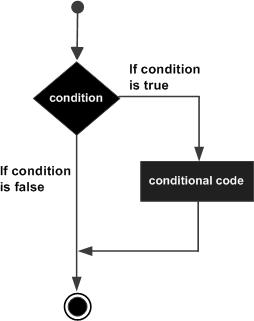
    C if statement

    Flowchart Explained

    When the program control comes across the if statement, the condition is evaluated.

    If the condition is true, the statements inside the if block are executed.

    If the condition is false, the program flow bypasses the conditional block.

    Statements after the if block are executed to continue the program flow.

    Example of if Statement in C

    This example demonstrates the simplest use-case of if statement. It determines and tells the user if the value of a variable is less than 20.

    #include <stdio.h>intmain(){/* local variable declaration */int a;// run the program for different values of "a" // Assign 12 first and 40 afterwards
       
       a =12;//change to 40 and run againprintf("Value of a is : %d\n", a);// check the boolean condition using if statementif(a <20){//if the condition is true, then print the followingprintf("a is less than 20\n");}return0;}

    Output

    Run the above program and check its ouput −

    Value of a is : 12
    a is less than 20
    

    Now assign a number greater than 20. The if condition is not executed.

    Value of a is: 40
    

    if Statement with Logical Operations

    You can put a compound boolean expression with the use of && or || operators in the parenthesis in the if statement.

    Example

    In the following example, three variables “a”, “b” and “c” are compared. The if block will be executed when “a” is greater than both “b” and “c”.

    #include <stdio.h>intmain(){/* local variable declaration */int a, b, c;/*use different values for a, b and c as
       10, 5, 7
       10, 20, 15
       */// change to 10,20,15 respectively next time
       a =10; b =5; c =7;if(a>=b && a>=c){printf("a is greater than b and c \n");}printf("a: %d b:%d c:%d", a, b, c);return0;}

    Output

    Run the code and check its output −

    //when values for a, b and c are 10 5 7
    a is greater than b and c 
    a: 10 b:5 c:7
    
    //when values for a, b and c are 10 20 15
    a: 10 b:20 c:15
    

    Note that the statement following the conditional block is executed after the block is executed. If the condition is false, the program jumps directly to the statement after the block.

    Multiple if Statements

    If you have multiple conditions to check, you can use the if statement multiple times.

    Example

    In this example, the net payable amount is calculated by applying discount on the bill amount.

    The discount applicable is 5 percent if the amount is between 1000 to 5000, and 10 percent if the amount is above 5000. No discount is applicable for purchases below 1000.

    #include <stdio.h>intmain(){// local variable declarationint amount;float discount, net;/*Run the program for different values 
       of amount  500, 2250 and 5200. Blocks in 
       respective conditions will be executed*/// change to 2250 and 5200 and run again
       amount =500;if(amount <1000){
    
      discount=0;}if(amount &gt;=1000&amp;&amp; amount&lt;5000){
      discount=5;}if(amount &gt;=5000){
      discount=10;}
    net = amount - amount*discount/100;printf("Amount: %d Discount: %f Net payable: %f", amount, discount, net);return0;}

    Output

    //when the bill amount is 500
    Amount: 500 Discount: 0.000000 Net payable: 500.000000
    
    //when the bill amount is 2250
    Amount: 2250 Discount: 5.000000 Net payable: 2137.500000
    
    //when the bill amount is 5200
    Amount: 5200 Discount: 10.000000 Net payable: 4680.000000
    

    Checking Multiple Conditions With if Statement

    You can also check multiple conditions using the logical operators in a single if statement.

    Example

    In this program, a student is declared as passed only if the average of “phy” and “maths” marks is greater than equal to 50. Also, the student should have secured more than 35 marks in both the subjects. Otherwise, the student is declared as failed.

    #include <stdio.h>intmain(){/* local variable declaration */int phy, maths;float avg;/*use different values of phy and maths 
       to check conditional execution*///change to 40, 40 and 80, 40
       phy =50; maths =50; 
       avg =(float)(phy + maths)/2;printf("Phy: %d Maths: %d Avg: %f\n", phy, maths, avg);if(avg >=50&&(maths >=35&& phy >=35)){printf("Result: Pass");}if(avg<50){printf("Result: Fail\n");}return0;}

    Output

    Run the code and check its output −

    //when marks in Phy and Maths - 50 50
    Phy: 50 Maths: 50 Avg: 50.000000
    Result: Pass
    
    //when marks in Phy and Maths - 40 40
    Phy: 40 Maths: 40 Avg: 40.000000
    Result: Fail
    
    //when marks in Phy and Maths - 80 40
    Phy: 80 Maths: 40 Avg: 60.000000
    Result: Pass
    
  • Decision Making

    Every programming language including C has decision-making statements to support conditional logic. C has a number of alternatives to add decision-making in the code.

    Any process is a combination of three types of logic −

    • Sequential logic
    • Decision or branching
    • Repetition or iteration

    A computer program is sequential in nature and runs from top to bottom by default. The decision-making statements in C provide an alternative line of execution. You can ask a group of statements to be repeatedly executed till a condition is satisfied.

    The decision-making structures control the program flow based on conditions. They are important tools for designing complex algorithms.

    We use the following keywords and operators in the decision-making statements of a C program − ifelseswitchcasedefaultgotothe ?: operatorbreak, and continue statements.

    In programming, we come across situations when we need to make some decisions. Based on these decisions, we decide what should we do next. Similar situations arise in algorithms too where we need to make some decisions and based on these decisions, we will execute the next block of code.

    The next instruction depends on a Boolean expression, whether the condition is determined to be True or False. C programming language assumes any non-zero and non-null values as True, and if it is either zero or null, then it is assumed as a False value.

    C programming language provides the following types of decision making statements.

    Sr.No.Statement & Description
    1if statementAn if statement consists of a boolean expression followed by one or more statements.
    2if…else statementAn if statement can be followed by an optional else statement, which executes when the Boolean expression is false.
    3nested if statementsYou can use one if or else-if statement inside another if or else-if statement(s).
    4switch statementswitch statement allows a variable to be tested for equality against a list of values.
    5nested switch statementsYou can use one switch statement inside another switch statement(s).

    If Statement in C Programming

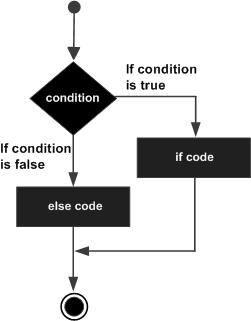
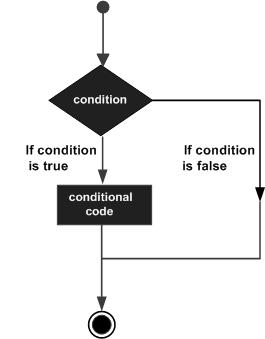
    The if statement is used for deciding between two paths based on a True or False outcome. It is represented by the following flowchart −

    Decision making statements in C

    Syntax

    if(Boolean expr){
       expression;...}

    An if statement consists of a boolean expression followed by one or more statements.

    If…else Statement in C Programming

    The ifelse statement offers an alternative path when the condition isn’t met.

    C if...else statement

    Syntax

    if(Boolean expr){
       expression;...}else{
       expression;...}

    An if statement can be followed by an optional else statement, which executes when the Boolean expression is false.

    Nested If Statements in C Programming

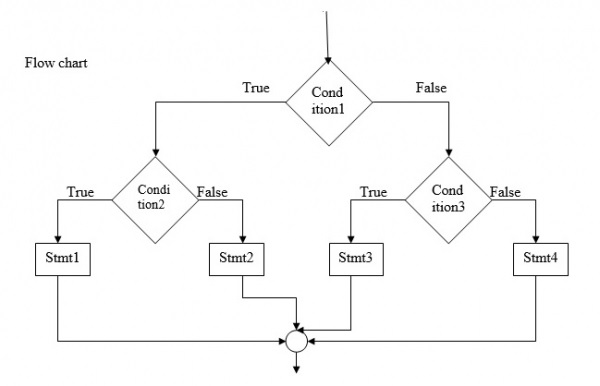
    Nested if statements are required to build intricate decision trees, evaluating multiple nested conditions for nuanced program flow.

    nested if statements

    You can use one if or else-if statement inside another if or else-if statement(s).

    Switch Statement in C Programming

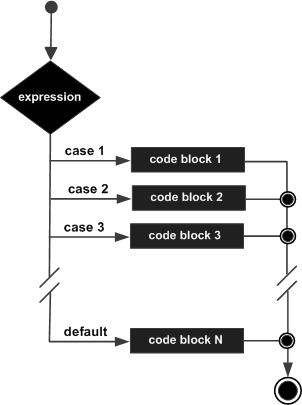
    A switch statement simplifies multi-way choices by evaluating a single variable against multiple values, executing specific code based on the match. It allows a variable to be tested for equality against a list of values.

    switch statement in C

    Syntax

    switch(expression){case constant-expression  :statement(s);break;/* optional */case constant-expression  :statement(s);break;/* optional *//* you can have any number of case statements */default:/* Optional */statement(s);}

    As in if statements, you can use one switch statement inside another switch statement(s).

    The ?: Operator in C Programming

    We have covered the conditional operator (?:) in the previous chapter which can be used to replace if-else statements. It condenses an if-else statement into a single expression, offering compact and readable code.

    It has the following general form −

    Exp1 ? Exp2 : Exp3;

    Where Exp1, Exp2, and Exp3 are expressions. Notice the use and placement of the colon (:). The value of a “?” expression is determined like this −

    Exp1 is evaluated. If it is true, then Exp2 is evaluated and becomes the value of the entire ? expression.

    If Exp1 is false, then Exp3 is evaluated and its value becomes the value of the : expression.

    You can simulate nested if statements with the ? operator. You can use another ternary operator in true and/or false operand of an existing ? operator.

    An algorithm can also have an iteration logic. In C, the whiledowhile and for statements are provided to form loops.

    The loop formed by while and dowhile are conditional loops, whereas the for statement forms a counted loop.

    The loops are also controlled by the Boolean expressions. The C compiler decides whether the looping block is to be repeated again, based on a condition.

    The program flow in a loop is also controlled by different jumping statements. The break and continue keywords cause the loop to terminate or perform the next iteration.

    The Break Statement in C Programming

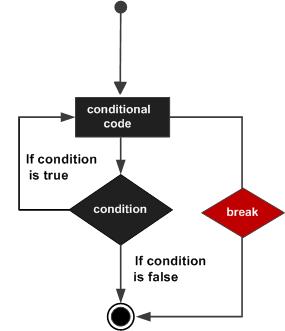
    In C, the break statement is used in switchcase constructs as well as in loops. When used inside a loop, it causes the repetition to be abandoned.

    c break statement

    The Continue Statement in C Programming

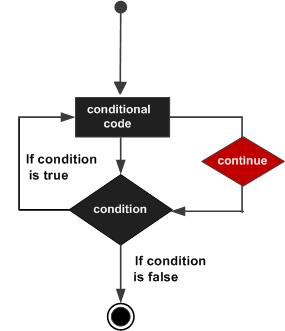
    In C, the continue statement causes the conditional test and increment portions of the loop to execute.

    C continue statement

    The goto Statement in C Programming

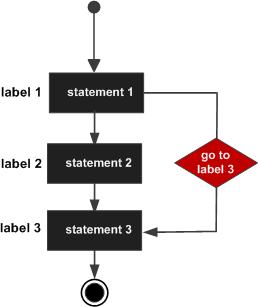
    C also has a goto keyword. You can redirect the program flow to any labelled instruction in the program.

    Here is the syntax of the goto statement in C −

    goto label;...
    label: statement;
    C goto statement

    With the goto statement, the flow can be directed to any previous step or any subsequent step.

    In this chapter, we had a brief overview of the decision-making statements in C. In the subsequent chapters, we will have an elaborate explanation on each of these decision-making statements, with suitable examples.

  • Misc Operators

    Besides the main categories of operators (arithmetic, logical, assignment, etc.), C uses the following operators that are equally important. Let us discuss the operators classified under this category.

    The “&” symbol, already defined in C as the Binary AND Operator copies a bit to the result if it exists in both operands. The “&” symbol is also defined as the address−of operator.

    The “*” symbol − A well−known arithmetic operator for multiplication, it can also be used as a dereference operator.

    C uses the “>” symbol, defined as a ternary operator, used to evaluate a conditional expression.

    In C, the dot “.” symbol is used as the member access operator in connection with a struct or union type.

    C also uses the arrow “” symbol as an indirection operator, used especially with the pointer to the struct variable.

    OperatorDescriptionExample
    sizeof()Returns the size of a variable.sizeof(a), where a is integer, will return 4.
    &Returns the address of a variable.&a; returns the actual address of the variable.
    *Pointer to a variable.*a;
    ?:Conditional Expression.If Condition is true ? then value X, else value Y
    .Member access operatorvar.member
    −>Access members of a struct variable with pointerptr −> member;

    The sizeof Operator in C

    The sizeof operator is a compile−time unary operator. It is used to compute the size of its operand, which may be a data type or a variable. It returns the size in number of bytes. It can be applied to any data type, float type, or pointer type variables.

    sizeof(type or var);

    When sizeof() is used with the data types, it simply returns the amount of memory allocated to that data type. The output can be different on different machines like a 32−bit system can show different output while a 64−bit system can show different of the same data types.

    Example

    Here is an example in C language

    #include <stdio.h>intmain(){int a =16;printf("Size of variable a : %d\n",sizeof(a));printf("Size of int data type : %d\n",sizeof(int));printf("Size of char data type : %d\n",sizeof(char));printf("Size of float data type : %d\n",sizeof(float));printf("Size of double data type : %d\n",sizeof(double));return0;}

    Output

    When you run this code, it will produce the following output −

    Size of variable a: 4
    Size of int data type: 4
    Size of char data type: 1
    Size of float data type: 4
    Size of double data type: 8
    

    Address-of Operator in C

    The “&” operator returns the address of an existing variable. We can assign it to a pointer variable −

    int a;

    Assuming that the compiler creates the variable at the address 1000 and “x” at the address 2000, then the address of “a” is stored in “x“.

    Header Files

    Example

    Let us understand this with the help of an example. Here, we have declared an int variable. Then, we print its value and address −

    #include <stdio.h>intmain(){int var =100;printf("var: %d address: %d", var,&var);return0;}

    Output

    Run the code and check its output −

    var: 100 address: 931055924
    

    The Dereference Operator in C

    To declare a pointer variable, the following syntax is to be used −

    type *var;

    The name of the variable must be prefixed with an asterisk (*). The data type indicates it can store the address of which data type. For example −

    int*x;

    In this case, the variable x is meant to store the address of another int variable.

    float*y;

    The “y” variable is a pointer that stores the memory location of a float variable.

    The “&” operator returns the address of an existing variable. We can assign it to the pointer variable −

    int a;int*x =&a;

    We can see that the address of this variable (any type of variable for that matter) is an integer. So, if we try to store it in a pointer variable of int type, see what happens −

    float var1 =10.55;int*intptr =&var1;

    The compiler doesnt accept this, and reports the following error −

    initialization of 'int *' from incompatible pointer type 'float *'[-Wincompatible-pointer-types]

    It indicates that the type of a variable and the type of its pointer must be the same.

    In C, variables have specific data types that define their size and how they store values. Declaring a pointer with a matching type (e.g., “float *”) enforces type compatibility between the pointer and the data it points to.

    Different data types occupy different amounts of memory in C. For example, an int typically takes 4 bytes, while a float might take 4 or 8 bytes depending on the system.

    Adding or subtracting integers from pointers moves them in memory based on the size of the data they point to.

    Hence, we declare the floatptr variable of float * type.

    Example 1

    Take a look at the following example −

    #include <stdio.h>intmain(){float var1 =10.55;float*floatptr =&var1;printf("var1: %f \naddress of var1: %d \n\nfloatptr: %d \naddress of floatptr: %d", var1,&var1, floatptr,&floatptr);return0;}

    Output

    var1: 10.550000 
    address of var1: 6422044 
    
    floatptr: 6422044 
    address of floatptr: 6422032
    

    Example 2

    The * operator is called the Dereference operator. It returns the value stored in the address which is stored in the pointer, i.e., the value of the variable it is pointing to. Take a look at the following example −

    #include <stdio.h>intmain(){float var1 =10.55;float*floatptr =&var1;printf("var1: %f address of var1: %d\n",var1,&var1);printf("floatptr: %d address of floatptr: %d\n", floatptr,&floatptr);printf("var1: %f value at floatptr: %f", var1,*floatptr);return0;}

    Output

    On running this code, you will get the following output −

    var1: 10.550000 address of var1: 6422044
    floatptr: 6422044 address of floatptr: 6422032
    var1: 10.550000 value at floatptr: 10.550000
    

    The Ternary Operator in C

    In C language, the “?” character is used as the ternary operator. It is also known as a conditional operator.

    The term “ternary” implies that the operator has three operands. The ternary operator is often used to put conditional (if−else) statements in a compact way.

    The ? operator is used with the following syntax −

    exp1 ? exp2 : exp3
    

    It has the following three operands −

    • exp1 − a Boolean expression that evaluates to True or False
    • exp2 − returned by the ? operator when exp1 is true
    • exp3 − returned by the ? operator when exp1 is false

    Example

    The following C program uses the ? operator to check if the value of a is even or odd.

    #include <stdio.h>intmain(){int a =10;(a %2==0)?printf("%d is Even\n", a):printf("%d is Odd\n", a);return0;}

    Output

    10 is Even
    

    Change the value of “a” to 15 and run the code again. Now you will get the following output −

    15 is Odd
    

    The conditional operator is a compact representation of if − else construct.

    The Dot (.) Operator in C

    In C language, you can define a derived data type with struct and union keywords. A derived or user−defined data type that groups together member elements of different types.

    The dot operator is a member selection operator, when used with the struct or union variable. The dot (.) operator has the highest operator precedence in C Language and its associativity is from left to right.

    Take a look at its syntax −

    var.member;

    Here, var is a variable of a certain struct or a union type, and member is one of the elements defined while creating structure or union.

    A new derived data type is defined with struct keyword as following syntax −

    structnewtype{
       type elem1;
       type elem2;
       type elem3;......};

    You can then declare a variable of this derived data type as −

    structnewtype var;

    To access a certain member,

    var.elem1;

    Example

    Let us declare a struct type named book, declare a struct variable. The following example shows the use of “.” operator to access the members in the book structure.

    #include <stdio.h>structbook{char title[10];double price;int pages;};intmain(){structbook b1 ={"Learn C",675.50,325};printf("Title: %s\n", b1.title);printf("Price: %lf\n", b1.price);printf("No of Pages: %d\n", b1.pages);printf("size of book struct: %d",sizeof(structbook));return0;}

    Output

    On running this code, you will get the following output −

    Title: Learn C
    Price: 675.500000
    No of Pages: 325
    size of book struct: 32
    

    The Indirection Operator in C

    A structure is a derived data type in C. In C, the struct keyword has been provided to define a custom data type.

    A new derived data type is defined with a struct keyword as the following syntax −

    structtype{
       type var1;
       type var2;
       type var3;......};

    You can then declare a variable of this derived data type as −

    structtype= var;

    Usually, a struct is declared before the first function is defined in the program, after the include statements. That way, the derived type can be used for declaring its variable inside any function.

    Let us declare a struct type named book as follows −

    structbook{char title[10];double price;int pages;};

    To declare a variable of this type, use the following syntax −

    structbook b1;

    The initialization of a struct variable is done by placing value of each element inside curly brackets.

    structbook b1 ={"Learn C",675.50,325};

    You can also store the address of a struct variable in the struct pointer variable.

    structbook*strptr;

    To store the address, use the “&” operator.

    strptr =&b1;

    C defines the arrow () symbol to be used with struct pointer as indirection operator (also called struct dereference operator). It helps to access the elements of the struct variable to which the pointer reference to.

    Example

    In this example, strptr is a pointer to struct book b1 variable. Hence, strrptr−>title returns the title, similar to b1.title does.

    #include <stdio.h>#include <string.h>structbook{char title[10];double price;int pages;};intmain(){structbook b1 ={"Learn C",675.50,325};structbook*strptr;
       strptr =&b1;printf("Title: %s\n", strptr->title);printf("Price: %lf\n", strptr->price);printf("No of Pages: %d\n", strptr->pages);return0;}

    Output

    Run the code and check its output −

    Title: Learn C
    Price: 675.500000
    No of Pages: 325
    
  • Operator Precedence

    A single expression in C may have multiple operators of different types. The C compiler evaluates its value based on the operator precedence and associativity of operators.

    The precedence of operators determines the order in which they are evaluated in an expression. Operators with higher precedence are evaluated first.

    For example, take a look at this expression −

    x =7+3*2;

    Here, the multiplication operator “*” has a higher precedence than the addition operator “+”. So, the multiplication 3*2 is performed first and then adds into 7, resulting in “x = 13”.

    The following table lists the order of precedence of operators in C. Here, operators with the highest precedence appear at the top of the table, and those with the lowest appear at the bottom.

    CategoryOperatorAssociativity
    Postfix() [] -> . ++ – –Left to right
    Unary+ – ! ~ ++ – – (type)* & sizeofRight to left
    Multiplicative* / %Left to right
    Additive+ –Left to right
    Shift<< >>Left to right
    Relational< <= > >=Left to right
    Equality== !=Left to right
    Bitwise AND&Left to right
    Bitwise XOR^Left to right
    Bitwise OR|Left to right
    Logical AND&&Left to right
    Logical OR||Left to right
    Conditional?:Right to left
    Assignment= += -= *= /= %=>>= <<= &= ^= |=Right to left
    Comma,Left to right

    Within an expression, higher precedence operators will be evaluated first.

    Operator Associativity

    In C, the associativity of operators refers to the direction (left to right or right to left) an expression is evaluated within a program. Operator associativity is used when two operators of the same precedence appear in an expression.

    In the following example −

    15/5*2

    Both the “/” (division) and “*” (multiplication) operators have the same precedence, so the order of evaluation will be decided by associativity.

    As per the above table, the associativity of the multiplicative operators is from Left to Right. So, the expression is evaluated as −

    (15/5)*2

    It evaluates to −

    3*2=6

    Example 1

    In the following code, the multiplication and division operators have higher precedence than the addition operator.

    The left−to−right associativity of multiplicative operator results in multiplication of “b” and “c” divided by “e“. The result then adds up to the value of “a“.

    #include <stdio.h>intmain(){int a =20;int b =10;int c =15;int d =5;int e;
       e = a + b * c / d;printf("e : %d\n",  e );return0;}

    Output

    When you run this code, it will produce the following output −

    e: 50
    

    Example 2

    We can use parenthesis to change the order of evaluation. Parenthesis () got the highest priority among all the C operators.

    #include <stdio.h>intmain(){int a =20;int b =10;int c =15;int d =5;int e;
    
       e =(a + b)* c / d;printf("e:  %d\n",  e);return0;}

    Output

    Run the code and check its output −

    e: 90
    

    In this expression, the addition of a and b in parenthesis is first. The result is multiplied by c and then the division by d takes place.

    Example 3

    In the expression that calculates e, we have placed a+b in one parenthesis, and c/d in another, multiplying the result of the two.

    #include <stdio.h>intmain(){int a =20;int b =10;int c =15;int d =5;int e;
       e =(a + b)*(c / d);printf("e: %d\n",  e );return0;}

    Output

    On running this code, you will get the following output −

    e: 90
    

    Precedence of Post / Prefix Increment / Decrement Operators

    The “++” and “− −” operators act as increment and decrement operators, respectively. They are unary in nature and can be used as a prefix or postfix to a variable.

    When used as a standalone, using these operators in a prefix or post−fix manner has the same effect. In other words, “a++” has the same effect as “++a”. However, when these “++” or “− −” operators appear along with other operators in an expression, they behave differently.

    Postfix increment and decrement operators have higher precedence than prefix increment and decrement operators.

    Example

    The following example shows how you can use the increment and decrement operators in a C program −

    #include <stdio.h>intmain(){int x =5, y =5, z;printf("x: %d \n", x);
    
       z = x++;printf("Postfix increment: x: %d z: %d\n", x, z);
    
       z =++y;printf("Prefix increment. y: %d z: %d\n", y ,z);return0;}

    Output

    Run the code and check its output −

    x: 5 
    Postfix increment: x: 6 z: 5
    Prefix increment. y: 6 z: 6
    

    Logical operators have left−to−right associativity. However, the compiler evaluates the least number of operands needed to determine the result of the expression. As a result, some operands of the expression may not be evaluated.

    For example, take a look at the following expression −

    x >50&& y >50

    Here the second operand “y > 50” is evaluated only if the first expression evaluates to True.

  • The sizeof Operator

    The sizeof operator is a compile−time unary operator. It is used to compute the size of its operand, which may be a data type or a variable. It returns the size in number of bytes.

    It can be applied to any data type, float type, or pointer type variables.

    sizeof(type or var);

    When sizeof() is used with a data type, it simply returns the amount of memory allocated to that data type. The outputs can be different on different machines, for example, a 32-bit system can show a different output as compared to a 64-bit system.

    Example 1: Using the sizeof Operator in C

    Take a look at the following example. It highlights how you can use the sizeof operator in a C program −

    #include <stdio.h>intmain(){int a =16;printf("Size of variable a: %d \n",sizeof(a));printf("Size of int data type: %d \n",sizeof(int));printf("Size of char data type: %d \n",sizeof(char));printf("Size of float data type: %d \n",sizeof(float));printf("Size of double data type: %d \n",sizeof(double));return0;}

    Output

    On running this code, you will get the following output −

    Size of variable a: 4
    Size of int data type: 4
    Size of char data type: 1
    Size of float data type: 4
    Size of double data type: 8
    

    Example 2: Using sizeof with Struct

    In this example, we declare a struct type and find the size of the struct type variable.

    #include <stdio.h>structemployee{char name[10];int age;double percent;};intmain(){structemployee e1 ={"Raghav",25,78.90};printf("Size of employee variable: %d\n",sizeof(e1));return0;}

    Output

    Run the code and check its output −

    Size of employee variable: 24
    

    Example 3: Using sizeof with Array

    In the following code, we have declared an array of 10 int values. Applying the sizeof operator on the array variable returns 40. This is because the size of an int is 4 bytes.

    #include <stdio.h>intmain(){int arr[]={1,2,3,4,5,6,7,8,9,10};printf("Size of arr: %d\n",sizeof(arr));}

    Output

    Run the code and check its output −

    Size of arr: 40
    

    Example 4: Using sizeof to Find the Length of an Array

    In C, we dont have a function that returns the number of elements in a numeric array (we can get the number of characters in a string using the strlen() function). For this purpose, we can use the sizeof() operator.

    We first find the size of the array and then divide it by the size of its data type.

    #include <stdio.h>intmain(){int arr[]={1,2,3,4,5,6,7,8,9,10};int y =sizeof(arr)/sizeof(int);printf("No of elements in arr: %d\n", y);}

    Output

    When you run this code, it will produce the following output −

    No of elements in arr: 10
    

    Example 5: Using sizeof in Dynamic Memory Allocation

    The sizeof operator is used to compute the memory block to be dynamically allocated with the malloc() and calloc() functions.

    The malloc() function is used with the following syntax −

    type *ptr =(type *)malloc(sizeof(type)*number);

    The following statement allocates a block of 10 integers and stores its address in the pointer −

    int*ptr =(int*)malloc(sizeof(int)*10);

    When the sizeof() is used with an expression, it returns the size of the expression. Here is an example.

    #include <stdio.h>intmain(){char a ='S';double b =4.65;printf("Size of variable a: %d\n",sizeof(a));printf("Size of an expression: %d\n",sizeof(a+b));int s =(int)(a+b);printf("Size of explicitly converted expression: %d\n",sizeof(s));return0;}

    Output

    Run the code and check its output −

    Size of variable a: 1
    Size of an expression: 8
    Size of explicitly converted expression: 4
    

    Example 6: The Size of a Pointer in C

    The sizeof() operator returns the same value irrespective of the type. This includes the pointer of a built−in type, a derived type, or a double pointer.

    #include <stdio.h>intmain(){printf("Size of int data type: %d \n",sizeof(int*));printf("Size of char data type: %d \n",sizeof(char*));printf("Size of float data type: %d \n",sizeof(float*));printf("Size of double data type: %d \n",sizeof(double*));printf("Size of double pointer type: %d \n",sizeof(int**));}

    Output

    Run the code and check its output −

    Size of int data type: 8
    Size of char data type: 8
    Size of float data type: 8
    Size of double data type: 8
    Size of double pointer type: 8
    
  • Ternary Operator

    The ternary operator (?:) in C is a type of conditional operator. The term “ternary” implies that the operator has three operands. The ternary operator is often used to put multiple conditional (if-else) statements in a more compact manner.

    Syntax of Ternary Operator in C

    The ternary operator is used with the following syntax −

    exp1 ? exp2 : exp3
    

    It uses three operands −

    • exp1 − A Boolean expression evaluating to true or false
    • exp2 − Returned by the ? operator when exp1 is true
    • exp3 − Returned by the ? operator when exp1 is false

    Example 1: Ternary Operator in C

    The following C program uses the ternary operator to check if the value of a variable is even or odd.

    #include <stdio.h>intmain(){int a =10;(a %2==0)?printf("%d is Even \n", a):printf("%d is Odd \n", a);return0;}

    Output

    When you run this code, it will produce the following output −

    10 is Even
    

    Change the value of “a” to 15 and run the code again. Now you will get the following output −

    15 is Odd
    

    Example 2

    The conditional operator is a compact representation of ifelse construct. We can rewrite the logic of checking the odd/even number by the following code −

    #include <stdio.h>intmain(){int a =10;if(a %2==0){printf("%d is Even\n", a);}else{printf("%d is Odd\n", a);}return0;}

    Output

    Run the code and check its output −

    10 is Even
    

    Example 3

    The following program compares the two variables “a” and “b”, and assigns the one with the greater value to the variable “c”.

    #include <stdio.h>intmain(){int a =100, b =20, c;
    
       c =(a >= b)? a : b;printf("a: %d b: %d c: %d\n", a, b, c);return0;}

    Output

    When you run this code, it will produce the following output −

    a: 100 b: 20 c: 100
    

    Example 4

    The corresponding code with ifelse construct is as follows −

    #include <stdio.h>intmain(){int a =100, b =20, c;if(a >= b){
    
      c = a;}else{
      c = b;}printf("a: %d b: %d c: %d\n", a, b, c);return0;}</code></pre>

    Output

    Run the code and check its output −

    a: 100 b: 20 c: 100
    

    Example 5

    If you need to put multiple statements in the true and/or false operand of the ternary operator, you must separate them by commas, as shown below −

    #include <stdio.h>intmain(){int a =100, b =20, c;
    
       c =(a >= b)?printf("a is larger "), c = a :printf("b is larger "), c = b;printf("a: %d b: %d c: %d\n", a, b, c);return0;}

    Output

    In this code, the greater number is assigned to "c", along with printing the appropriate message.

    a is larger a: 100 b: 20 c: 20
    

    Example 6

    The corresponding program with the use of ifelse statements is as follows −

    #include <stdio.h>intmain(){int a =100, b =20, c;if(a >= b){printf("a is larger \n");
    
      c = a;}else{printf("b is larger \n");
      c = b;}printf("a: %d b: %d c: %d\n", a, b, c);return0;}</code></pre>

    Output

    Run the code and check its output −

    a is larger
    a: 100 b: 20 c: 100
    

    Nested Ternary Operator

    Just as we can use nested if-else statements, we can use the ternary operator inside the True operand as well as the False operand.

    exp1 ?(exp2 ? expr3 : expr4):(exp5 ? expr6: expr7)

    First C checks if expr1 is true. If so, it checks expr2. If it is true, the result is expr3; if false, the result is expr4.

    If expr1 turns false, it may check if expr5 is true and return expr6 or expr7.

    Example 1

    Let us develop a C program to determine whether a number is divisible by 2 and 3, or by 2 but not 3, or 3 but not 2, or neither by 2 and 3. We will use nested condition operators for this purpose, as shown in the following code −

    #include <stdio.h>intmain(){int a =15;printf("a: %d\n", a);(a %2==0)?((a%3==0)?printf("divisible by 2 and 3"):printf("divisible by 2 but not 3")):((a%3==0)?printf("divisible by 3 but not 2"):printf("not divisible by 2, not divisible by 3"));return0;}

    Output

    Check for different values −

    a: 15
    divisible by 3 but not 2
    
    a: 16
    divisible by 2 but not 3
    
    a: 17
    not divisible by 2, not divisible by 3
    
    a: 18
    divisible by 2 and 3
    

    Example 2

    In this program, we have used nested ifelse statements for the same purpose instead of conditional operators −

    #include <stdio.h>intmain(){int a =15;printf("a: %d\n", a);if(a %2==0){if(a %3==0){printf("divisible by 2 and 3");}else{printf("divisible by 2 but not 3");}}else{if(a %3==0){printf("divisible by 3 but not 2");}else{printf("not divisible by 2, not divisible by 3");}}return0;}

    Output

    When you run this code, it will produce the following output −

    a: 15
    divisible by 3 but not 2
    
  • Increment and Decrement Operators

    C – Increment and Decrement Operators

    The increment operator (++) increments the value of a variable by 1, while the decrement operator (–) decrements the value.

    Increment and decrement operators are frequently used in the construction of counted loops in C (with the for loop). They also have their application in the traversal of array and pointer arithmetic.

    The ++ and — operators are unary and can be used as a prefix or posfix to a variable.

    Example of Increment and Decrement Operators

    The following example contains multiple statements demonstrating the use of increment and decrement operators with different variations −

    #include <stdio.h>intmain(){int a =5, b =5, c =5, d =5;
      
      a++;// postfix increment++b;// prefix increment
      c--;// postfix decrement--d;// prefix decrementprintf("a = %d\n", a);printf("b = %d\n", b);printf("c = %d\n", c);printf("d = %d\n", d);return0;}

    Output

    When you run this code, it will produce the following output −

    a = 6
    b = 6
    c = 4
    d = 4
    

    Example Explanation

    In other words, “a++” has the same effect as “++a”, as both the expressions increment the value of variable “a” by 1. Similarly, “a–” has the same effect as “–a”.

    The expression “a++;” can be treated as the equivalent of the statement “a = a + 1;”. Here, the expression on the right adds 1 to “a” and the result is assigned back to 1, therby the value of “a” is incremented by 1.

    Similarly, “b–;” is equivalent to “b = b 1;”.

    Types of Increment Operator

    There are two types of increment operators – pre increment and post increment.

    Pre (Prefix) Increment Operator

    In an expression, the pre-increment operator increases the value of a variable by 1 before the use of the value of the variable.

    Syntax

    ++variable_name;

    Example

    In the following example, we are using a pre-increment operator, where the value of “x” will be increased by 1, and then the increased value will be used in the expression.

    #include <stdio.h>intmain(){int x =10;int y =10+++x;printf("x = %d, y = %d\n", x, y);return0;}

    When you run this code, it will produce the following output −

    x = 11, y = 21
    

    Post (Postfix) Increment Operator

    In an expression, the post-increment operator increases the value of a variable by 1 after the use of the value of the variable.

    Syntax

    variable_name++;

    Example

    In the following example, we are using post-increment operator, where the value of “x” will be used in the expression and then it will be increased by 1.

    #include <stdio.h>intmain(){int x =10;int y =10+ x++;printf("x = %d, y = %d\n", x, y);return0;}

    When you run this code, it will produce the following output −

    x = 11, y = 20
    

    Types of Decrement Operator

    There are two types of decrement operators – pre decrement and post decrement.

    Pre (Prefix) decrement Operator

    In an expression, the pre-decrement operator decreases the value of a variable by 1 before the use of the value of the variable.

    Syntax

    --variable_name;

    Example

    In the following example, we are using a pre-decrement operator, where the value of “x” will be decreased by 1, and then the decreased value will be used in the expression.

    #include <stdio.h>intmain(){int x =10;int y =10+--x;printf("x = %d, y = %d\n", x, y);return0;}

    When you run this code, it will produce the following output −

    x = 9, y = 19
    

    Post (Postfix) Decrement Operator

    In an expression, the post-decrement operator decreases the value of a variable by 1 after the use of the value of the variable.

    Syntax

    variable_name--;

    Example

    In the following example, we are using post-decrement operator, where the value of “x” will be used in the expression and then it will be decreased by 1.

    #include <stdio.h>intmain(){int x =10;int y =10+ x--;printf("x = %d, y = %d\n", x, y);return0;}

    When you run this code, it will produce the following output −

    x = 9, y = 20
    

    More Examples of Increment and Decrement Operators

    Example 1

    The following example highlights the use of prefix/postfix increment/decrement −

    #include <stdio.h>intmain(){char a ='a', b ='M';int x =5, y =23;printf("a: %c b: %c\n", a, b);
       
       a++;printf("postfix increment a: %c\n", a);++b;printf("prefix increment b: %c\n", b);printf("x: %d y: %d\n", x, y);
       
       x--;printf("postfix decrement x : %d\n", x);--y;printf("prefix decrement y : %d\n", y);return0;}

    Output

    When you run this code, it will produce the following output −

    a: a b: M
    postfix increment a: b
    prefix increment b: N
    
    x: 5 y: 23
    postfix decrement x: 4
    prefix decrement y: 22
    

    The above example shows that the prefix as well as postfix operators have the same effect on the value of the operand variable. However, when these “++” or “–” operators appear along with the other operators in an expression, they behave differently.

    Example 2

    In the following code, the initial values of “a” and “b” variables are same, but the printf() function displays different values −

    #include <stdio.h>intmain(){int x =5, y =5;printf("x: %d y: %d\n", x,y);printf("postfix increment x: %d\n", x++);printf("prefix increment y: %d\n",++y);return0;}

    Output

    Run the code and check its output −

    x: 5 y: 5
    postfix increment x: 5
    prefix increment y: 6
    

    In the first case, the printf() function prints the value of “x” and then increments its value. In the second case, the increment operator is executed first, the printf() function uses the incremented value for printing.

    Operator Precedence of Increment and Decrement Operators

    There are a number of operators in C. When multiple operators are used in an expression, they are executed as per their order of precedence. Increment and decrement operators behave differently when used along with other operators.

    When an expression consists of increment or decrement operators alongside other operators, the increment and decrement operations are performed first. Postfix increment and decrement operators have higher precedence than prefix increment and decrement operators.

    Read also: Operator Precedence in C

    Example 1

    Take a look at the following example −

    #include <stdio.h>intmain(){int x =5, z;printf("x: %d \n", x);
    
       z = x++;printf("x: %d z: %d\n", x, z);return0;}

    Output

    Run the code and check its output −

    x: 5 
    x: 6 z: 5
    

    Since “x++” increments the value of “x” to 6, you would expect “z” to be 6 as well. However, the result shows “z” as 5. This is because the assignment operator has a higher precedence over postfix increment operator. Hence, the existing value of “x” is assigned to “z”, before incrementing “x”.

    Example 2

    Take a look at another example below −

    #include <stdio.h>intmain(){int x =5, y =5, z;printf("x: %d y: %d\n", x,y);
    
       z =++y;printf("y: %d z: %d\n", y ,z);return0;}

    Output

    When you run this code, it will produce the following output −

    y: 5
    y: 6 z: 6
    

    The result may be confusing, as the value of “y” as well as “z” is now 6. The reason is that the prefix increment operator has a higher precedence than the assignment operator. Hence, “y” is incremented first and then its new value is assigned to “z”.

    The associativity of operators also plays an important part. For increment and decrement operators, the associativity is from left to right. Hence, if there are multiple increment or decrement operators in a single expression, the leftmost operator will be executed first, moving rightward.

    Example 3

    In this example, the assignment expression contains both the prefix as well as postfix operators.

    #include <stdio.h>intmain(){int x =5, y =5, z;
    
       z = x+++++y;printf("x: %d y: %d z: %d\n", x,y,z);return0;}

    Output

    Run the code and check its output −

    x: 6 y:6 z: 11
    

    In this example, the first operation to be done is “y++” (“y” becomes 6). Secondly the “+” operator adds “x” (which is 5) and “y”, the result assigned to “z” as 11, and then “x++” increments “x” to 6.

    Using the Increment Operator in Loop

    In C, the most commonly used syntax of a for loop is as follows −

    for(init_val; final_val; increment){statement(s);}

    Example

    The looping body is executed for all the values of a variable between the initial and the final values, incrementing it after each round.

    #include <stdio.h>intmain(){int x;for(x =1; x <=5; x++){printf("x: %d\n", x);}return0;}

    Output

    When you run this code, it will produce the following output −

    x: 1
    x: 2
    x: 3
    x: 4
    x: 5
    
  • Assignment Operators in C

    In C language, the assignment operator stores a certain value in an already declared variable. A variable in C can be assigned the value in the form of a literal, another variable, or an expression.

    The value to be assigned forms the right-hand operand, whereas the variable to be assigned should be the operand to the left of the “=” symbol, which is defined as a simple assignment operator in C.

    In addition, C has several augmented assignment operators.

    The following table lists the assignment operators supported by the C language −

    OperatorDescriptionExample
    =Simple assignment operator. Assigns values from right side operands to left side operandC = A + B will assign the value of A + B to C
    +=Add AND assignment operator. It adds the right operand to the left operand and assign the result to the left operand.C += A is equivalent to C = C + A
    -=Subtract AND assignment operator. It subtracts the right operand from the left operand and assigns the result to the left operand.C -= A is equivalent to C = C – A
    *=Multiply AND assignment operator. It multiplies the right operand with the left operand and assigns the result to the left operand.C *= A is equivalent to C = C * A
    /=Divide AND assignment operator. It divides the left operand with the right operand and assigns the result to the left operand.C /= A is equivalent to C = C / A
    %=Modulus AND assignment operator. It takes modulus using two operands and assigns the result to the left operand.C %= A is equivalent to C = C % A
    <<=Left shift AND assignment operator.C <<= 2 is same as C = C << 2
    >>=Right shift AND assignment operator.C >>= 2 is same as C = C >> 2
    &=Bitwise AND assignment operator.C &= 2 is same as C = C & 2
    ^=Bitwise exclusive OR and assignment operator.C ^= 2 is same as C = C ^ 2
    |=Bitwise inclusive OR and assignment operator.C |= 2 is same as C = C | 2

    Simple Assignment Operator (=)

    The = operator is one of the most frequently used operators in C. As per the ANSI C standard, all the variables must be declared in the beginning. Variable declaration after the first processing statement is not allowed.

    You can declare a variable to be assigned a value later in the code, or you can initialize it at the time of declaration.

    You can use a literal, another variable, or an expression in the assignment statement.

    int x =10;// declaration with initializationint y;// declaration
    y =20;// assignment laterint z = x + y;// assign an expressionint d =3, f =5;// definition and initializing d and f. char x ='x';// the variable x has the value 'x'.

    Once a variable of a certain type is declared, it cannot be assigned a value of any other type. In such a case the C compiler reports a type mismatch error.

    In C, the expressions that refer to a memory location are called “lvalue” expressions. A lvalue may appear as either the left-hand or right-hand side of an assignment.

    On the other hand, the term rvalue refers to a data value that is stored at some address in memory. A rvalue is an expression that cannot have a value assigned to it which means an rvalue may appear on the right-hand side but not on the left-hand side of an assignment.

    Variables are lvalues and so they may appear on the left-hand side of an assignment. Numeric literals are rvalues and so they may not be assigned and cannot appear on the left-hand side. Take a look at the following valid and invalid statements −

    int g =20;// valid statement10=20;// invalid statement

    Augmented Assignment Operators

    In addition to the = operator, C allows you to combine arithmetic and bitwise operators with the = symbol to form augmented or compound assignment operator. The augmented operators offer a convenient shortcut for combining arithmetic or bitwise operation with assignment.

    Example 1

    For example, the expression “a += b” has the same effect of performing “a + b” first and then assigning the result back to the variable “a”.

    #include <stdio.h>intmain(){int a =10;int b =20;
       
       a += b;printf("a: %d", a);return0;}

    Output

    Run the code and check its output −

    a: 30
    

    Example 2

    Similarly, the expression “a <<= b” has the same effect of performing “a << b” first and then assigning the result back to the variable “a”.

    #include <stdio.h>intmain(){int a =60;int b =2;
       
       a <<= b;printf("a: %d", a);return0;}

    Output

    Run the code and check its output −

    a: 240
    

    Example 3

    Here is a C program that demonstrates the use of assignment operators in C −

    #include <stdio.h>intmain(){int a =21;int c ;
    
       c =  a;printf("Line 1 - =  Operator Example, Value of c = %d\n", c );
    
       c +=  a;printf("Line 2 - += Operator Example, Value of c = %d\n", c );
    
       c -=  a;printf("Line 3 - -= Operator Example, Value of c = %d\n", c );
    
       c *=  a;printf("Line 4 - *= Operator Example, Value of c = %d\n", c );
    
       c /=  a;printf("Line 5 - /= Operator Example, Value of c = %d\n", c );
    
       c  =200;
       c %=  a;printf("Line 6 - %%= Operator Example, Value of c = %d\n", c );
    
       c <<=2;printf("Line 7 - <<= Operator Example, Value of c = %d\n", c );
    
       c >>=2;printf("Line 8 - >>= Operator Example, Value of c = %d\n", c );
    
       c &=2;printf("Line 9 - &= Operator Example, Value of c = %d\n", c );
    
       c ^=2;printf("Line 10 - ^= Operator Example, Value of c = %d\n", c );
    
       c |=2;printf("Line 11 - |= Operator Example, Value of c = %d\n", c );return0;}

    Output

    When you compile and execute the above program, it will produce the following result −

    Line 1 - =  Operator Example, Value of c = 21
    Line 2 - += Operator Example, Value of c = 42
    Line 3 - -= Operator Example, Value of c = 21
    Line 4 - *= Operator Example, Value of c = 441
    Line 5 - /= Operator Example, Value of c = 21
    Line 6 - %= Operator Example, Value of c = 11
    Line 7 - <<= Operator Example, Value of c = 44
    Line 8 - >>= Operator Example, Value of c = 11
    Line 9 - &= Operator Example, Value of c = 2
    Line 10 - ^= Operator Example, Value of c = 0
    Line 11 - |= Operator Example, Value of c = 2
    
  • Bitwise Operators

    Bitwise operators in C allow low-level manipulation of data stored in computers memory.

    Bitwise operators contrast with logical operators in C. For example, the logical AND operator (&&) performs AND operation on two Boolean expressions, while the bitwise AND operator (&) performs the AND operation on each corresponding bit of the two operands.

    For the three logical operators &&||, and !, the corresponding bitwise operators in C are &| and ~.

    Additionally, the symbols ^ (XOR), << (left shift) and >> (right shift) are the other bitwise operators.

    OperatorDescriptionExample
    &Binary AND Operator copies a bit to the result if it exists in both operands.(A & B)
    |Binary OR Operator copies a bit if it exists in either operand.(A | B)
    ^Binary XOR Operator copies the bit if it is set in one operand but not both.(A ^ B)
    ~Binary One’s Complement Operator is unary and has the effect of ‘flipping’ bits.(~A
    <<Binary Left Shift Operator. The left operands value is moved left by the number of bits specified by the right operand.A << 2
    >>Binary Right Shift Operator. The left operands value is moved right by the number of bits specified by the right operand.A >> 2

    Even though these operators work on individual bits, they need the operands in the form C data types or variables only, as a variable occupies a specific number of bytes in the memory.

    Bitwise AND Operator (&) in C

    The bitwise AND (&) operator performs as per the following truth table −

    bit abit ba & b
    000
    010
    100
    111

    Bitwise binary AND performs logical operation on the bits in each position of a number in its binary form.

    Assuming that the two int variables “a” and “b” have the values 60 (equivalent to 0011 1100 in binary) and 13 (equivalent to 0000 1101 in binary), the “a & b” operation results in 13, as per the bitwise ANDing of their corresponding bits illustrated below −

    00111100&00001101---------=00001100

    The binary number 00001100 corresponds to 12 in decimal.

    Bitwise OR (|) Operator

    The bitwise OR (|) operator performs as per the following truth table −

    bit abit ba | b
    000
    011
    101
    111

    Bitwise binary OR performs logical operation on the bits in each position of a number in its binary form.

    Assuming that the two int variables “a” and “b” have the values 60 (equivalent to 0011 1100 in binary) and 13 (equivalent to 0000 1101 in binary), then “a | b” results in 61, as per the bitwise OR of their corresponding bits illustrated below −

    00111100|00001101---------=00111101

    The binary number 00111101 corresponds to 61 in decimal.

    Bitwise XOR (^) Operator

    The bitwise XOR (^) operator performs as per the following truth table −

    bit abit ba ^ b
    000
    011
    101
    110

    Bitwise binary XOR performs logical operation on the bits in each position of a number in its binary form. The XOR operation is called “exclusive OR”.

    Note: The result of XOR is 1 if and only if one of the operands is 1. Unlike OR, if both bits are 1, XOR results in 0.

    Assuming that the two int variables “a” and “b” have the values 60 (equivalent to 0011 1100 in binary) and 13 (equivalent to 0000 1101 in binary), the “a ^ b” operation results in 49, as per the bitwise XOR of their corresponding bits illustrated below −

    00111100^00001101---------=00110001

    The binary number 00110001 corresponds to 49 in decimal.

    The Left Shift (<<) Operator

    The left shift operator is represented by the << symbol. It shifts each bit in its left-hand operand to the left by the number of positions indicated by the right-hand operand. Any blank spaces generated while shifting are filled up by zeroes.

    Assuming that the int variable “a” has the value 60 (equivalent to 0011 1100 in binary), the “a << 2” operation results in 240, as per the bitwise left-shift of its corresponding bits illustrated below −

    00111100<<2=11110000

    The binary number 11110000 corresponds to 240 in decimal.

    The Right Shift (>>) Operator

    The right shift operator is represented by the >> symbol. It shifts each bit in its left-hand operand to the right by the number of positions indicated by the right-hand operand. Any blank spaces generated while shifting are filled up by zeroes.

    Assuming that the int variable a has the value 60 (equivalent to 0011 1100 in binary), the “a >> 2” operation results in 15, as per the bitwise right-shift of its corresponding bits illustrated below −

    00111100>>2=00001111

    The binary number 00001111 corresponds to 15 in decimal.

    The 1’s Complement (~) Operator

    The 1’s compliment operator (~) in C is a unary operator, needing just one operand. It has the effect of “flipping” the bits, which means 1s are replaced by 0s and vice versa.

    a~a
    01
    10

    Assuming that the int variable “a” has the value 60 (equivalent to 0011 1100 in binary), then the “~a” operation results in -61 in 2s complement form, as per the bitwise right-shift of its corresponding bits illustrated below −

    ~00111100=11000011

    The binary number 1100 0011 corresponds to -61 in decimal.

    Example

    In this example, we have highlighted the operation of all the bitwise operators:

    #include <stdio.h>intmain(){unsignedint a =60;/* 60 = 0011 1100 */unsignedint b =13;/* 13 = 0000 1101 */int c =0;           
    
       c = a & b;/* 12 = 0000 1100 */printf("Line 1 - Value of c is %d\n", c );
    
       c = a | b;/* 61 = 0011 1101 */printf("Line 2 - Value of c is %d\n", c );
    
       c = a ^ b;/* 49 = 0011 0001 */printf("Line 3 - Value of c is %d\n", c );
    
       c =~a;/*-61 = 1100 0011 */printf("Line 4 - Value of c is %d\n", c );
    
       c = a <<2;/* 240 = 1111 0000 */printf("Line 5 - Value of c is %d\n", c );
    
       c = a >>2;/* 15 = 0000 1111 */printf("Line 6 - Value of c is %d\n", c );return0;}

    Output

    When you run this code, it will produce the following output −

    Line 1 - Value of c is 12
    Line 2 - Value of c is 61
    Line 3 - Value of c is 49
    Line 4 - Value of c is -61
    Line 5 - Value of c is 240
    Line 6 - Value of c is 15
    
  • Logical Operators in C

    Logical operators in C evaluate to either True or False. Logical operators are typically used with Boolean operands.

    The logical AND operator (&&) and the logical OR operator (||) are both binary in nature (require two operands). The logical NOT operator (!) is a unary operator.

    Since C treats “0” as False and any non-zero number as True, any operand to a logical operand is converted to a Boolean data.

    Here is a table showing the logical operators in C −

    OperatorDescriptionExample
    &&Called Logical AND operator. If both the operands are non-zero, then the condition becomes true.(A && B)
    ||Called Logical OR Operator. If any of the two operands is non-zero, then the condition becomes true.(A || B)
    !Called Logical NOT Operator. It is used to reverse the logical state of its operand. If a condition is true, then Logical NOT operator will make it false.!(A)

    The result of a logical operator follows the principle of Boolean algebra. The logical operators follow the following truth tables.

    Logical AND (&&) Operator

    The && operator in C acts as the logical AND operator. It has the following truth table −

    aba&&b
    truetrueTrue
    truefalseFalse
    falsetrueFalse
    falsefalseFalse

    The above truth table shows that the result of && is True only if both the operands are True.

    Logical OR (||) Operator

    C uses the double pipe symbol (||) as the logical OR operator. It has the following truth table −

    aba||b
    truetrueTrue
    truefalseTrue
    falsetruetrue
    falsefalsefalse

    The above truth table shows that the result of || operator is True when either of the operands is True, and False if both operands are false.

    Logical NOT (!) Operator

    The logical NOT ! operator negates the value of a Boolean operand. True becomes False, and False becomes True. Here is its truth table −

    A!a
    TrueFalse
    FalseTrue

    Unlike the other two logical operators && and ||, the logical NOT operator ! is a unary operator.

    Example 1

    The following example shows the usage of logical operators in C −

    #include <stdio.h>intmain(){int a =5;int b =20;if(a && b){printf("Line 1 - Condition is true\n");}if(a || b){printf("Line 2 - Condition is true\n");}/* lets change the value of  a and b */
       a =0;
       b =10;if(a && b){printf("Line 3 - Condition is true\n");}else{printf("Line 3 - Condition is not true\n");}if(!(a && b)){printf("Line 4 - Condition is true\n");}return0;}

    Output

    Run the code and check its output −

    Line 1 - Condition is true
    Line 2 - Condition is true
    Line 3 - Condition is not true
    Line 4 - Condition is true
    

    Example 2

    In C, a char type is a subset of int type. Hence, logical operators can work with char type too.

    #include <stdio.h>intmain(){char a ='a';char b ='\0';// Null characterif(a && b){printf("Line 1 - Condition is true\n");}if(a || b){printf("Line 2 - Condition is true\n");}return0;}

    Output

    Run the code and check its output −

    Line 2 - Condition is true
    

    Logical operators are generally used to build a compound boolean expression. Along with relational operators, logical operators too are used in decision-control and looping statements in C.

    Example 3

    The following example shows a compound Boolean expression in a C program −

    #include <stdio.h>intmain(){int phy =50;int maths =60;if(phy <50|| maths <50){printf("Result:Fail");}else{printf("Result:Pass");}return0;}

    Output

    Result:Pass
    

    Example 4

    The similar logic can also be expressed using the && operator as follows −

    #include <stdio.h>intmain(){int phy =50;int maths =60;if(phy >=50&& maths >=50){printf("Result: Pass");}else{printf("Result: Fail");}return0;}

    Output

    Run the code and check its output −

    Result: Pass
    

    Example 5

    The following C code employs the NOT operator in a while loop −

    #include <stdio.h>intmain(){int i =0;while(!(i >5)){printf("i = %d\n", i);
    
      i++;}return0;}</code></pre>

    Output

    In the above code, the while loop continues to iterate till the expression "!(i > 5)" becomes false, which will be when the value of "i" becomes more than 5.

    i = 0
    i = 1
    i = 2
    i = 3
    i = 4
    i = 5
    

    C has bitwise counterparts of the logical operators such as bitwise AND (&), bitwise OR (|), and binary NOT or complement (~) operator.