Author: saqibkhan

  • Do-While Loop in C

    The do-while loop is one of the most frequently used types of loops in C. The do and while keywords are used together to form a loop. The do-while is an exit-verified loop where the test condition is checked after executing the loop’s body. Whereas the while loop is an entry-verified. The for loop, on the other hand, is an automatic loop.

    Syntax of do while Loop

    The syntax of do-while loop in C is −

    do{statement(s);}while(condition);

    How do while Loop Works?

    The loop construct starts with the keword do. It is then followed by a block of statements inside the curly brackets. The while keyword follows the right curly bracket. There is a parenthesis in front of while, in which there should be a Boolean expression.

    Now let’s understand how the while loop works. As the C compiler encounters the do keyword, the program control enters and executes the code block marked by the curly brackets. As the end of the code block is reached, the expression in front of the while keyword is evaluated.

    If the expression is true, the program control returns back to the top of loop. If the expression is false, the compiler stops going back to the top of loop block, and proceeds to the immediately next statement after the block. Note that there is a semicolon at the end of while statement.

    Flowchart of do while Loop

    The following flowchart represents how the do-while loop works −
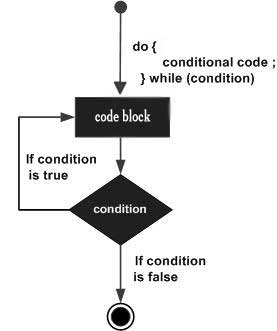
    do...while loop in C

    Since the expression that controls the loop is tested after the program runs the looping block for the first time, the do-while loop is called an “exit-verified loop”. Here, the key point to note is that a do-while loop makes sure that the loop gets executed at least once.

    The while keyword implies that the compiler continues to execute the ensuing block as long as the expression is true. However, since the condition sits at the end of the looping construct, it is checked after each iteration (rather than before each iteration as in the case of a while loop).

    The program performs its first iteration unconditionally, and then tests the condition. If found to be true, the compiler performs the next iteration. As soon as the expression is found to be false, the loop body will be skipped and the first statement after the while loop will be executed.

    Let us try to understand the behaviour of the while loop with a few examples.

    Example of do while Loop

    The following program prints the Hello world message five times.

    #include <stdio.h>intmain(){// local variable definitionint a =1;// while loop executiondo{printf("Hello World\n");
    
      a++;}while(a &lt;=5);printf("End of loop");return0;}</code></pre>

    Output

    Here, the do-while loop acts as a counted loop. Run the code and check its output −

    Hello World
    Hello World
    Hello World
    Hello World
    Hello World
    End of loop
    

    The variable "a" that controls the number of repetitions is initialized to 1. The program enters the loop unconditionally, prints the message, increments "a" by 1.

    As it reaches the end of the loop, the condition in the while statement is tested. Since the condition "a <= 5" is true, the program goes back to the top of the loop and re-enters the loop.

    Now "a" is 2, hence the condition is still true, hence the loop repeats again, and continues till the condition turns false. The loop stops repeating, and the program control goes to the step after the block.

    Now, change the initial value of "a" to 10 and run the code again. It will produce the following output −

    Hello World
    End of loop 
    

    This is because the program enters the looping block unconditionally. Since the condition before the while keyword is false, hence the block is not repeated for the next time. Hence, the do-while loop takes at least one iteration as the test condition is at the end of the loop. For this reason, do-while loop is called an "exit-verified loop".

    Difference Between while and do while Loops

    The loops constructed with while and do-while appear similar. You can easily convert a while loop into a do-while loop and vice versa. However, there are certain key differences between the two.

    The obvious syntactic difference is that the do-while construct starts with the do keyword and ends with the while keyword. The while loop doesn't need the do keyword. Secondly, you find a semicolon in front of while in case of a do-while loop. There is no semicolon in while loops.

    Example

    The location of the test condition that controls the loop is the major difference between the two. The test condition is at the beginning of a while loop, whereas it is at the end in case of a do-while loop. How does it affect the looping behaviour? Look at the following code −

    #include <stdio.h>intmain(){// local variable definitionint a =0, b =0;// while loop executionprintf("Output of while loop: \n");while(a <5){
    
      a++;printf("a: %d\n", a);}printf("Output of do-while loop: \n");do{
      b++;printf("b: %d\n",b);}while(b &lt;5);return0;}</code></pre>

    Output

    Initially, "a" and "b" are initialized to "0" and the output of both the loops is same.

    Output of while loop:
    a: 1
    a: 2
    a: 3
    a: 4
    a: 5
    
    Output of do-while loop:
    b: 1
    b: 2
    b: 3
    b: 4
    b: 5
    

    Now change the initial value of both the variables to 3 and run the code again. There's no change in the output of both the loops.

    Output of while loop:
    a: 4
    a: 5
    
    Output of do-while loop:
    b: 4
    b: 5
    

    Now change the initial value of both the variables to 10 and run the code again. Here, you can observe the difference between the two loops −

    Output of while loop:
    
    Output of do-while loop:
    b: 11
    

    Note that the while loop doesn't take any iterations, but the do-while executes its body once. This is because the looping condition is verified at the top of the loop block in case of while, and since the condition is false, the program doesn't enter the loop.

    In case of do-while, the program unconditionally enters the loop, increments "b" to 11 and then doesn't repeat as the condition is false. It shows that the do-while is guaranteed to take at least one repetition irrespective of the initial value of the looping variable.

    The do-while loop can be used to construct a conditional loop as well. You can also use break and continue statements inside a do-while loop.
  • While Loop

    In C, while is one of the keywords with which we can form loops. The while loop is one of the most frequently used types of loops in C. The other looping keywords in C are for and do-while.

    The while loop is often called the entry verified loop, whereas the do-while loop is an exit verified loop. The for loop, on the other hand, is an automatic loop.

    Syntax of C while Loop

    The syntax of constructing a while loop is as follows −

    while(expression){statement(s);}

    The while keyword is followed by a parenthesis, in which there should be a Boolean expression. Followed by the parenthesis, there is a block of statements inside the curly brackets.

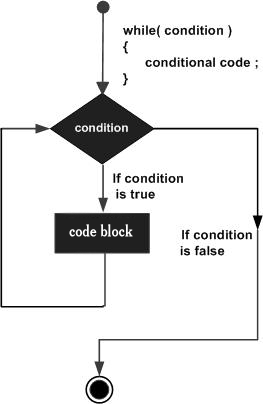
    Flowchart of C while Loop

    The following flowchart represents how the while loop works −

    while loop in C

    How while Loop Works in C?

    The C compiler evaluates the expression. If the expression is true, the code block that follows, will be executed. If the expression is false, the compiler ignores the block next to the while keyword, and proceeds to the immediately next statement after the block.

    Since the expression that controls the loop is tested before the program enters the loop, the while loop is called the entry verified loop. Here, the key point to note is that a while loop might not execute at all if the condition is found to be not true at the very first instance itself.

    The while keyword implies that the compiler continues to execute the ensuing block as long as the expression is true. The condition sits at the top of the looping construct. After each iteration, the condition is tested. If found to be true, the compiler performs the next iteration. As soon as the expression is found to be false, the loop body will be skipped and the first statement after the while loop will be executed.

    Example of while Loop in C

    The following program prints the “Hello World” message five times.

    #include <stdio.h>intmain(){// local variable definitionint a =1;// while loop executionwhile(a <=5){printf("Hello World \n");
    
      a++;}printf("End of loop");return0;}</code></pre>

    Output

    Here, the while loop acts as a counted loop. Run the code and check its output −

    Hello World
    Hello World
    Hello World
    Hello World
    Hello World
    End of loop
    

    Example Explanation

    The variable "a" that controls the number of repetitions is initialized to 1, before the while statement. Since the condition "a <= 5" is true, the program enters the loop, prints the message, increments "a" by 1, and goes back to the top of the loop.

    In the next iteration, "a" is 2, hence the condition is still true, hence the loop repeats again, and continues till the condition turns false. The loop stops repeating, and the program control goes to the step after the block.

    Now, change the initial value of "a" to 10 and run the code again. Now the output will show the following −

    End of loop
    

    This is because the condition before the while keyword is false in the very first iteration itself, hence the block is not repeated.

    A "char" variable represents a character corresponding to its ASCII value. Hence, it can be incremented. Hence, we increment the value of the variable from "a" till it reaches "z".

    Using while as Conditional Loop

    You can use a while loop as a conditional loop where the loop will be executed till the given condition is satisfied.

    Example

    In this example, the while loop is used as a conditional loop. The loop continues to repeat till the input received is non-negative.

    #include <stdio.h>intmain(){// local variable definition char choice ='a';int x =0;// while loop executionwhile(x >=0){(x %2==0)?printf("%d is Even \n", x):printf("%d is Odd \n", x);printf("\n Enter a positive number: ");scanf("%d",&x);}printf("\n End of loop");return0;}

    Output

    Run the code and check its output −

    0 is Even
    
    Enter a positive number: 12
    12 is Even
    
    Enter a positive number: 25
    25 is Odd
    
    Enter a positive number: -1
    
    End of loop
    

    While Loop with break and continue

    In all the examples above, the while loop is designed to repeat for a number of times, or till a certain condition is found. C has break and continue statements to control the loop. These keywords can be used inside the while loop.

    Example

    The break statement causes a loop to terminate −

    while(expr){......if(condition)break;...}

    Example

    The continue statement makes a loop repeat from the beginning −

    while(expr){......if(condition)continue;...}

    More Examples of C while Loop

    Example: Printing Lowercase Alphabets

    The following program prints all the lowercase alphabets with the help of a while loop.

    #include <stdio.h>intmain(){// local variable definitionchar a ='a';// while loop executionwhile(a <='z'){printf("%c", a);
    
      a++;}printf("\n End of loop");return0;}</code></pre>

    Output

    Run the code and check its output −

    abcdefghijklmnopqrstuvwxyz
    End of loop
    

    Example: Equate Two Variables

    In the code given below, we have two variables "a" and "b" initialized to 10 and 0, respectively. Inside the loop, "b" is decremented and "a" is incremented on each iteration. The loop is designed to repeat till "a" and "b" are not equal. The loop ends when both reach 5.

    #include <stdio.h>intmain(){// local variable definitionint a =10, b =0;// while loop executionwhile(a != b){
    
      a--;
      b++;printf("a: %d b: %d\n", a,b);}printf("\n End of loop");return0;}</code></pre>

    Output

    When you run this code, it will produce the following output −

    a: 9 b: 1
    a: 8 b: 2
    a: 7 b: 3
    a: 6 b: 4
    a: 5 b: 5
    
    End of loop
    

    while Vs. do while Loops

    The do-while loop appears similar to the while loop in most cases, although there is a difference in its syntax. The do-while is called the exit verified loop. In some cases, their behaviour is different. Difference between while and do-while loop is explained in the do-while chapter of this tutorial.

  • For Loop in C

    Most programming languages including C support the for keyword for constructing a loop. In C, the other loop-related keywords are while and do-while. Unlike the other two types, the for loop is called an automatic loop, and is usually the first choice of the programmers.

    The for loop is an entry-controlled loop that executes the statements till the given condition. All the elements (initialization, test condition, and increment) are placed together to form a for loop inside the parenthesis with the for keyword.

    Syntax of for Loop

    The syntax of the for loop in C programming language is −

    for(init; condition; increment){statement(s);}

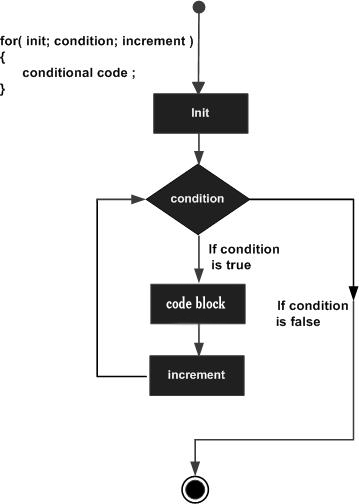
    Control Flow of a For Loop

    Here is how the control flows in a “for” loop −

    The init step is executed first, and only once. This step allows you to declare and initialize any loop control variables. You are not required to put a statement here, as long as a semicolon appears.

    Next, the condition is evaluated. If it is true, the body of the loop is executed. If it is false, the body of the loop does not execute and the control jumps to the next statement just after the “for” loop.

    After the body of the “for” loop executes, the control flow jumps back up to the increment statement. This statement allows you to update any loop control variables. This statement can be left blank, as long as a semicolon appears after the condition.

    The condition is now evaluated again. If it is true, the loop executes and the process repeats itself (body of loop, then increment step, and then again the condition). After the condition becomes false, the “for” loop terminates.

    Flowchart of for Loop

    The following flowchart represents how the for loop works −

    For Loop

    Developers prefer to use for loops when they know in advance how many number of iterations are to be performed. It can be thought of as a shorthand for while and do-while loops that increment and test a loop variable.

    The for loop may be employed with different variations. Let us understand how the for loop works in different situations.

    Example: Basic for Loop

    This is the most basic form of the for loop. Note that all the three clauses inside the parenthesis (in front of the for keyword) are optional.

    #include <stdio.h>intmain(){int a;// for loop executionfor(a =1; a <=5; a++){printf("a: %d\n", a);}return0;}

    Output

    Run the code and check its output −

    a: 1
    a: 2
    a: 3
    a: 4
    a: 5
    

    Initializing for Loop Counter Before Loop Statement

    The initialization step can be placed above the header of the for loop. In that case, the init part must be left empty by putting a semicolon.

    Example

    #include <stdio.h>intmain(){int a =1;// for loop executionfor(; a <=5; a++){printf("a: %d\n", a);}return0;}

    Output

    You still get the same output −

    a: 1
    a: 2
    a: 3
    a: 4
    a: 5
    

    Updating Loop Counter Inside for Loop Body

    You can also put an empty statement in place of the increment clause. However, you need to put the increment statement inside the body of the loop, otherwise it becomes an infinite loop.

    Example

    #include <stdio.h>intmain(){int a;// for loop executionfor(a =1; a <=5;){printf("a: %d\n", a);
    
      a++;}return0;}</code></pre>

    Output

    Here too, you will get the same output as in the previous example −

    a: 1
    a: 2
    a: 3
    a: 4
    a: 5
    

    Using Test Condition Inside for Loop Body

    You can also omit the second clause of the test condition in the parenthesis. In that case, you will need to terminate the loop with a break statement, otherwise the loop runs infinitely.

    Example

    #include <stdio.h>intmain(){int a;// for loop executionfor(a =1;; a++){printf("a: %d\n", a);if(a ==5)break;}return0;}

    Output

    On executing this code, you will get the following output −

    a: 1
    a: 2
    a: 3
    a: 4
    a: 5
    

    Using for Loops with Multiple Counters

    There may be initialization of more than one variables and/or multiple increment statements in a for statement. However, there can be only one test condition.

    Example

    #include <stdio.h>intmain(){int a, b;// for loop executionfor(a =1, b =1; a <=5; a++, b++){printf("a: %d b: %d a*b: %d\n", a, b, a*b);}return0;}

    Output

    When you run this code, it will produce the following output −

    a: 1 b: 1 a*b: 1
    a: 2 b: 2 a*b: 4
    a: 3 b: 3 a*b: 9
    a: 4 b: 4 a*b: 16
    a: 5 b: 5 a*b: 25
    

    Decrement in for Loop

    You can also form a decrementing for loop. In this case, the initial value of the looping variable is more than its value in the test condition. The last clause in the for statement uses decrement operator.

    Example

    The following program prints the numbers 5 to 1, in decreasing order −

    #include <stdio.h>intmain(){int a;// for loop executionfor(a =5; a >=1; a--){printf("a: %d\n", a);}return0;}

    Output

    Run the code and check its output −

    a: 5
    a: 4
    a: 3
    a: 2
    a: 1
    

    Traversing Arrays with for Loops

    For loop is well suited for traversal of one element of an array at a time. Note that each element in the array has an incrementing index starting from "0".

    Example

    #include <stdio.h>intmain(){int i;int arr[]={10,20,30,40,50};// for loop executionfor(i =0; i <5; i++){printf("a[%d]: %d\n", i, arr[i]);}return0;}

    Output

    When you run this code, it will produce the following output −

    a[0]: 10
    a[1]: 20
    a[2]: 30
    a[3]: 40
    a[4]: 50
    

    Example: Sum of Array Elements Using for Loop

    The following program computes the average of all the integers in a given array.

    #include <stdio.h>intmain(){int i;int arr[]={10,20,30,40,50};int sum =0;float avg;// for loop executionfor(i=0; i<5; i++){
    
      sum += arr&#91;i];}
    avg =(float)sum /5;printf("Average = %f", avg);return0;}

    Output

    Run the code and check its output −

    Average = 30.000000
    

    Example: Factorial Using for Loop

    The following code uses a for loop to calculate the factorial value of a number. Note that the factorial of a number is the product of all integers between 1 and the given number. The factorial is mathematically represented by the following formula −

    x!=1*2*...* x
    

    Here is the code for computing the factorial −

    #include <stdio.h>intmain(){int i, x =5;int fact =1;// for loop executionfor(i=1; i<= x; i++){
    
      fact *= i;}printf("%d != %d", x, fact);return0;}</code></pre>

    Output

    When you run this code, it will produce the following output −

    5! = 120
    

    The for loop is ideally suited when the number of repetitions is known. However, the looping behaviour can be controlled by the break and continue keywords inside the body of the for loop. Nested for loops are also routinely used in the processing of two dimensional arrays.

  • Loops

    Loops are a programming construct that denote a block of one or more statements that are repeatedly executed a specified number of times, or till a certain condition is reached.

    Repetitive tasks are common in programming, and loops are essential to save time and minimize errors. In C programming, the keywords whiledowhile and for are provided to implement loops.

    Looping constructs are an important part of any processing logic, as they help in performing the same process again and again. A C programmer should be well acquainted with implementing and controlling the looping construct.

    Programming languages provide various control structures that allow for more complicated execution paths. A loop statement allows us to execute a statement or group of statements multiple times.

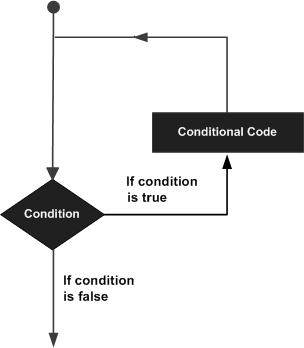
    Flowchart of C Loop Statement

    Given below is the general flowchart of a loop statement which is applicable to any programming language −

    Loop Architecture

    The statements in a C program are always executed in a top-to-bottom manner. If we ask the compiler to go back to any of the earlier steps, it constitutes a loop.

    Example: Loops in C

    To understand the need of loops in a program, consider the following snippet −

    #include <stdio.h>intmain(){// local variable definitionint a =1;printf("a: %d\n", a);
       a++;printf("a: %d\n", a);
       a++;printf("a: %d\n", a);
       a++;printf("a: %d\n", a);
       a++;printf("a: %d\n", a);return0;}

    Output

    On running this code, you will get the following output −

    a: 1
    a: 2
    a: 3
    a: 4
    a: 5
    

    The program prints the value of “a”, and increments its value. These two steps are repeated a number of times. If you need to print the value of “a” from 1 to 100, it is not desirable to manually repeat these steps in the code. Instead, we can ask the compiler to repeatedly execute these two steps of printing and incrementing till it reaches 100.

    Example: Using While Loop in C

    You can use forwhile or do-while constructs to repeat a loop. The following program shows how you can print 100 values of “a” using the “while” loop in C −

    #include <stdio.h>intmain(){// local variable definitionint a =1;while(a <=100){printf("a: %d\n", a);
    
      a++;}return0;}</code></pre>

    Output

    Run this code and check the output −

    a: 1
    a: 2
    a: 3
    a: 4
    .....
    .....
    a: 98
    a: 99
    a: 100
    

    If a step redirects the program flow to any of the earlier steps, based on any condition, the loop is a conditional loop. The repetitions will stop as soon as the controlling condition turns false. If the redirection is done without any condition, it is an infinite loop, as the code block repeats forever.

    Parts of C Loops

    To constitute a loop, the following elements are necessary −

    • Looping statement (whiledowhile or for)
    • Looping block
    • Looping condition

    Loops are generally of two types −

    Counted Loops in C

    If the loop is designed to repeat for a certain number of times, it is a counted loop. In C, the for loop is an example of counted loop.

    Conditional Loops in C

    If the loop is designed to repeat till a condition is true, it is a conditional loop. The while and dowhile constructs help you to form conditional loops.

    Looping Statements in C

    C programming provides the following types of loops to handle looping requirements −

    Sr.No.Loop Type & Description
    1while loopRepeats a statement or group of statements while a given condition is true. It tests the condition before executing the loop body.
    2for loopExecutes a sequence of statements multiple times and abbreviates the code that manages the loop variable.
    3do-while loopIt is more like a while statement, except that it tests the condition at the end of the loop body.
    4nested loopsYou can use one or more loops inside any other whilefor or do-while loop.

    Each of the above loop types have to be employed depending upon which one is right for the given situation. We shall learn about these loop types in detail in the subsequent chapters.

    Loop Control Statements in C

    Loop control statements change the execution from its normal sequence. When execution leaves a scope, all automatic objects that were created in that scope are destroyed.

    C supports the following control statements −

    Sr.No.Control Statement & Description
    1break statementTerminates the loop or switch statement and transfers execution to the statement immediately following the loop or switch.
    2continue statementCauses the loop to skip the remainder of its body and immediately retest its condition prior to reiterating.
    3goto statementTransfers the control to the labeled statement.

    The break and continue statements have contrasting purposes. The goto statement acts as a jump statement if it causes the program to go to a later statement. If the goto statement redirects the program to an earlier statement, then it forms a loop.

    The Infinite Loop in C

    A loop becomes an infinite loop if a condition never becomes false. An infinite loop is a loop that repeats indefinitely because it has no terminating condition, or the termination condition is never met or the loop is instructed to start over from the beginning.

    Although it is possible for a programmer to intentionally use an infinite loop, they are often mistakes made by new programmers.

    Example: Infinite Loop in C

    The for loop is traditionally used for creating an infinite loop. Since none of the three expressions that form the "for" loop are required, you can make an endless loop by leaving the conditional expression empty.

    #include <stdio.h>intmain(){for(;;){printf("This loop will run forever. \n");}return0;}

    Output

    By running this code, you will get an endless loop that will keep printing the same line forever.

    This loop will run forever.
    This loop will run forever.
    ........
    ........
    This loop will run forever.
    

    When the conditional expression is absent, it is assumed to be true. You may have an initialization and increment expression, but C programmers more commonly use the for(;;) construct to signify an infinite loop.

    Note − You can terminate an infinite loop by pressing the "Ctrl + C" keys.

  • Switch Case Using Range

    In C, a switch case is a control flow statement used to compare a variable with specific values and execute different blocks of code depending on which value matches. For example −

    switch(num){case1:printf("One");break;case2:printf("Two");break;default:printf("Other");}

    Here, the switch case checks exact matches only. But sometimes, we want to check if a value falls within a range, like 1-5 or ‘A’-‘Z’. Instead of writing a separate case for each value, we can define a range of values in a single case. This is called a switch case with ranges. For exmaple −

    switch(num){case1...5:printf("Between 1 and 5");break;case6...10:printf("Between 6 and 10");break;default:printf("Other");}

    Switch Case Using Range

    switch case using ranges handles multiple consecutive values in one case. Instead of writing a separate case for each number or character, we define a range and the same block of statements runs for all values in that range.

    We cannot use ranges in standard C, but the GNU C compiler provides this feature as a case range extension.

    Syntax for Switch Case Using Range

    Following is the syntax for using ranges in a switch case statement.

    switch(value){case lower_range ... higher_range:// code blockbreak;default:// code block}

    Here, lower_range is the starting value and higher_range is the ending value. We must put spaces around the ellipsis () to make a valid syntax.

    Steps to Implement Range Handling

    To implement switch case with range handling, we first group the variable into categories and then use the switch to check which category it belongs to. Here’s how we handle ranges-

    • First, we use if statements to check which range the value belongs to, like 1-10, 11-20, or 21-30.
    • Then, we assign each range a number, such as 1, 2, or 3, to represent it.
    • Next, pass this number to the switch case where each case corresponds to one range.
    • The switch case checks the number and runs the code for that range.
    • Finally, we add a default case to handle values outside the defined ranges.

    Example: Simple Range Check

    Let’s see a simple example where we will use two ranges inside the switch case and check if a number belongs to the range 1-5 or 6-10. If it does not belong to any of these ranges, then the default statement will get printed.

    #include <stdio.h>intmain(){int number =7;// You can change the value to test different casesswitch(number){case1...5:printf("The number is between 1 and 5.\n");break;case6...10:printf("The number is between 6 and 10.\n");break;default:printf("The number is outside the range 1 to 10.\n");}return0;}

    Following is the output of the above program −

    The number is between 6 and 10.
    

    Example: Using if-else for Ranges with Switch Case

    In this example, we check which range a number belongs to and display a message. We first use if-else statements to assign the number to a range such as 1-1011-2021-30, or out of range, and then the switch case prints the message corresponding to that range.

    #include <stdio.h>intmain(){int number =17;// Set the number directly// Normalize the number into a rangeint range;if(number >=1&& number <=10){
    
      range =1;// Range 1-10}elseif(number &gt;=11&amp;&amp; number &lt;=20){
      range =2;// Range 11-20}elseif(number &gt;=21&amp;&amp; number &lt;=30){
      range =3;// Range 21-30}else{
      range =4;// Out of range}// Use switch to handle the different rangesswitch(range){case1:printf("The number is between 1 and 10\n");break;case2:printf("The number is between 11 and 20\n");break;case3:printf("The number is between 21 and 30\n");break;default:printf("The number is out of range\n");}return0;}</code></pre>

    Following is the output of the above program, showing which range the given number belongs to.

    The number is between 11 and 20
    

    Example: Handling Character Ranges in Switch Case

    In this example, we check what type of character a variable contains. The switch case checks whether the character is a lowercase letter, an uppercase letter, or a digit, and prints the corresponding message. Any character outside these ranges is handled by the default case.

    #include <stdio.h>intmain(){char ch ='G';// Set the character directly// Switch-case with rangesswitch(ch){case'a'...'z':// Lowercase letters rangeprintf("%c is a lowercase alphabet\n", ch);break;case'A'...'Z':// Uppercase letters rangeprintf("%c is an uppercase alphabet\n", ch);break;case'0'...'9':// Digits rangeprintf("%c is a digit\n", ch);break;default:printf("%c is a non-alphanumeric character\n", ch);}return0;}

    Below is the output of the above program where it shows the type of the given character.

    G is an uppercase alphabet
    

    Example: Using Category Mapping with Switch Case

    In this example, we group marks into categories by dividing them by 10. For example, marks from 90 to 100 fall into category 9 or 10, marks from 80 to 89 fall into category 8, and so on. Then, the switch case prints the message for that category.

    #include <stdio.h>intmain(){int marks =87;// Set the marks directly// Convert marks into categories (divide by 10)int category = marks /10;// Handle ranges using switchswitch(category){case10:// For 100case9:// For 90-99printf("Excellent! Grade A\n");break;case8:// For 80-89printf("Very Good! Grade B\n");break;case7:// For 70-79printf("Good! Grade C\n");break;case6:// For 60-69printf("Satisfactory! Grade D\n");break;default:// For below 60printf("Needs Improvement! Grade F\n");}return0;}

    Below is the output of the program, which divides the given marks and shows their category.

    Very Good! Grade B
    

    Errors in Switch Case Using Ranges

    When using ranges in switch case, there are a few important things to keep in mind −

    Invalid Range (low > high): If the low value is greater than the high value, the compiler will give an error.

    Example of incorrect range −

    case5...1:// This will cause an error

    Overlapping Ranges: If you try to define multiple case ranges that overlap, the compiler will give an error.

    Example of incorrect overlapping ranges −

    case1...5:case3...7:// Overlap error

    In this chapter, we learned how to use ranges with switch cases to handle multiple consecutive values together. We covered this for both numbers and characters, and also looked at situations where errors can occur.

  • Nested Switch Statements

    It is possible to have a switch as a part of the statement sequence of an outer switch. Even if the case constants of the inner and outer switch contain common values, no conflicts will arise.

    Syntax

    The syntax for a nested switch statement is as follows −

    switch(ch1){case'A':printf("This A is part of outer switch");switch(ch2){case'A':printf("This A is part of inner switch");break;case'B':/* case code */}break;case'B':/* case code */}

    Example

    Take a look at the following example −

    #include <stdio.h>intmain(){/* local variable definition */int a =100;int b =200;switch(a){case100:printf("This is part of outer switch\n", a);switch(b){case200:printf("This is part of inner switch\n", a);}}printf("Exact value of a is: %d\n", a);printf("Exact value of b is: %d\n", b);return0;}

    Output

    When the above code is compiled and executed, it produces the following output −

    This is part of outer switch
    This is part of inner switch
    Exact value of a is : 100
    Exact value of b is : 200
    

    Nested Switch-Case Statements in C

    Just like nested ifelse, you can have nested switch-case constructs. You may have a different switch-case construct each inside the code block of one or more case labels of the outer switch scope.

    The nesting of switch-case can be done as follows −

    switch(exp1){case val1:switch(exp2){case val_a:
    
         stmts;break;case val_b:
         stmts;break;}case val2:switch(expr2){case val_c:
         stmts;break;case val_d:
         stmts;break;}}</code></pre>

    Example

    Here is a simple program to demonstrate the syntax of Nested Switch Statements in C −

    #include <stdio.h>intmain(){int x =1, y ='b', z='X';// Outer Switchswitch(x){case1:printf("Case 1 \n");switch(y){case'a':printf("Case a \n");break;case'b':printf("Case b \n");break;}break;case2:printf("Case 2 \n");switch(z){case'X':printf("Case X \n");break;case'Y':printf("Case Y \n");break;}}return0;}

    Output

    When you run this code, it will produce the following output −

    Case 1 
    Case b
    

    Change the values of the variables (xy, and z) and check the output again. The output depends on the values of these three variables.

  • Switch Statement

    switch statement allows a variable to be tested for equality against a list of values. Each value is called a case, and the variable being switched on is checked for each switch case.

    C switch-case Statement

    The switch-case statement is a decision-making statement in C. The if-else statement provides two alternative actions to be performed, whereas the switch-case construct is a multi-way branching statement. A switch statement in C simplifies multi-way choices by evaluating a single variable against multiple values, executing specific code based on the match. It allows a variable to be tested for equality against a list of values.

    Syntax of switch-case Statement

    The flow of the program can switch the line execution to a branch that satisfies a given case. The schematic representation of the usage of switch-case construct is as follows −

    switch(Expression){// if expr equals Value1case Value1: 
    
      Statement1;
      Statement2;break;// if expr equals Value2case Value2: 
      Statement1;
      Statement2;break;..// if expr is other than the specific values abovedefault:
      Statement1;
      Statement2;}</code></pre>

    How switch-case Statement Work?

    The parenthesis in front of the switch keyword holds an expression. The expression should evaluate to an integer or a character. Inside the curly brackets after the parenthesis, different possible values of the expression form the case labels.

    One or more statements after a colon(:) in front of the case label forms a block to be executed when the expression equals the value of the label.

    You can literally translate a switch-case as "in case the expression equals value1, execute the block1", and so on.

    C checks the expression with each label value, and executes the block in front of the first match. Each case block has a break as the last statement. The break statement takes the control out of the scope of the switch construct.

    You can also define a default case as the last option in the switch construct. The default case block is executed when the expression doesnt match with any of the earlier case values.

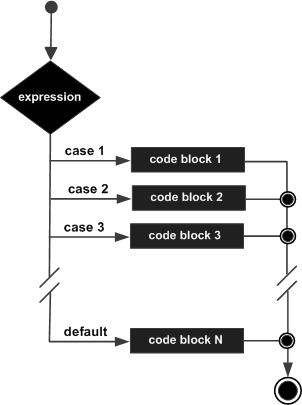
    Flowchart of switch-case Statement

    The flowchart that represents the switch-case construct in C is as follows −

    switch statement in C

    Rules for Using the switch-case Statement

    The following rules apply to a switch statement −

    • The expression used in a switch statement must have an integral or enumerated type, or be of a class type in which the class has a single conversion function to an integral or enumerated type.
    • You can have any number of case statements within a switch. Each case is followed by the value to be compared to and a colon.
    • The constant-expression for a case must be the same data type as the variable in the switch, and it must be a constant or a literal.
    • When the variable being switched on is equal to a case, the statements following that case will execute until a break statement is reached.
    • When a break statement is reached, the switch terminates, and the flow of control jumps to the next line following the switch statement.
    • Not every case needs to contain a break. If no break appears, the flow of control will fall through to subsequent cases until a break is reached.
    • A switch statement can have an optional default case, which must appear at the end of the switch. The default case can be used for performing a task when none of the cases is true. No break is needed in the default case.

    The switch-case statement acts as a compact alternative to cascade of if-else statements, particularly when the Boolean expression in "if" is based on the "=" operator.

    If there are more than one statements in an if (or else) block, you must put them inside curly brackets. Hence, if your code has many if and else statements, the code with that many opening and closing curly brackets appears clumsy. The switch-case alternative is a compact and clutter-free solution.

    C switch-case Statement Examples

    Practice the following examples to learn the switch case statements in C programming language −

    Example 1

    In the following code, a series of if-else statements print three different greeting messages based on the value of a "ch" variable ("m", "a" or "e" for morning, afternoon or evening).

    #include <stdio.h>intmain(){/* local variable definition */char ch ='e';printf("Time code: %c\n\n", ch);if(ch =='m')printf("Good Morning");elseif(ch =='a')printf("Good Afternoon");elseprintf("Good Evening");return0;}

    The if-else logic in the above code is replaced by the switch-case construct in the code below −

    #include <stdio.h>intmain(){// local variable definitionchar ch ='m';printf("Time code: %c\n\n", ch);switch(ch){case'a':printf("Good Afternoon\n");break;case'e':printf("Good Evening\n");break;case'm':printf("Good Morning\n");}return0;}

    Output

    Change the value of "ch" variable and check the output. For ch = 'm', we get the following output −

    Time code: m
    
    Good Morning
    

    The use of break is very important here. The block of statements corresponding to each case ends with a break statement. What if the break statement is not used?

    The switch-case works like this: As the program enters the switch construct, it starts comparing the value of switching expression with the cases, and executes the block of its first match. The break causes the control to go out of the switch scope. If break is not found, the subsequent block also gets executed, leading to incorrect result.

    Example 2: Switch Statement without using Break

    Let us comment out all the break statements in the above code.

    #include <stdio.h>intmain(){/* local variable definition */char ch ='a';printf("Time code: %c\n\n", ch);switch(ch){case'a':printf("Good Afternoon\n");// break;case'e':printf("Good Evening\n");// break;case'm':printf("Good Morning\n");}return0;}

    Output

    You expect the "Good Morning" message to be printed, but you find all the three messages printed!

    Time code: a
    
    Good Afternoon
    Good Evening
    Good Morning
    

    This is because C falls through the subsequent case blocks in the absence of break statements at the end of the blocks.

    Example 3: Grade Checker Program using Switch Statement

    In the following program, "grade" is the switching variable. For different cases of grades, the corresponding result messages will be printed.

    #include <stdio.h>intmain(){/* local variable definition */char grade ='B';switch(grade){case'A':printf("Outstanding!\n");break;case'B':printf("Excellent!\n");break;case'C':printf("Well Done\n");break;case'D':printf("You passed\n");break;case'F':printf("Better try again\n");break;default:printf("Invalid grade\n");}printf("Your grade is  %c\n", grade);return0;}

    Output

    Run the code and check its output −

    Excellent!
    Your grade is  B
    

    Now change the value of "grade" (it is a "char" variable) and check the outputs.

    Example 4: Menu-based Calculator for Arithmetic Operations using Switch

    The following example displays a menu for arithmetic operations. Based on the value of the operator code (1, 2, 3, or 4), addition, subtraction, multiplication or division of two values is done. If the operation code is something else, the default case is executed.

    #include <stdio.h>intmain(){// local variable definitionint a =10, b =5;// Run the program with other values 2, 3, 4, 5int op =1;float result;printf("1: addition\n");printf("2: subtraction\n");printf("3: multiplication\n");printf("4: division\n");printf("\na: %d b: %d : op: %d\n", a, b, op);switch(op){case1:
    
         result = a + b;break;case2:
         result = a - b;break;case3:
         result = a * b;break;case4:
         result = a / b;break;default:printf("Invalid operation\n");}if(op &gt;=1&amp;&amp; op &lt;=4)printf("Result: %6.2f", result);return0;}</code></pre>

    Output

    1: addition
    2: subtraction
    3: multiplication
    4: division
    
    a: 10 b: 5 : op: 1
    Result:  15.00
    

    For other values of "op" (2, 3, and 4), you will get the following outputs −

    a: 10 b: 5 : op: 2
    Result:   5.00
    
    a: 10 b: 5 : op: 3
    Result:  50.00
    
    a: 10 b: 5 : op: 4
    Result:   2.00
    
    a: 10 b: 5 : op: 5
    Invalid operation
    

    Switch Statement by Combining Multiple Cases

    Multiple cases can be written together to execute one block of code. When any of them case value matches, the body of these combined cases executes. If you have a situation where the same code block is to be executed for more than one case labels of an expression, you can combine them by putting the two cases one below the other, as shown below −

    Syntax

    switch(exp){case1:case2:
    
      statements;break;case3:
      statements;break;default:printf("%c is a non-alphanumeric character\n", ch);}</code></pre>

    You can also use the ellipsis () to combine a range of values for an expression. For example, to match the value of switching variable with any number between 1 to 10, you can use "case 1 10"

    Example 1

    #include <stdio.h>intmain(){// local variable definitionint number =5;switch(number){case1...10:printf("The number is between 1 and 10\n");break;default:printf("The number is not between 1 and 10\n");}return0;}

    Output

    Run the code and check its output. For "number = 5", we get the following output −

    The number is between 1 and 10
    

    Example 2

    The following program checks whether the value of the given char variable stores a lowercase alphabet, an uppercase alphabet, a digit, or any other key.

    #include <stdio.h>intmain(){char ch ='g';switch(ch){case'a'...'z':printf("%c is a lowercase alphabet\n", ch);break;case'A'...'Z':printf("%c is an uppercase alphabet\n", ch);break;case48...57:printf("%c is a digit\n", ch);break;default:printf("%c is a non-alphanumeric character\n", ch);}return0;}

    Output

    For ch = 'g', we get the following output −

    g is a lowercase alphabet
    

    Test the code output with different values of "ch".

  • Nested If Statements

    It is always legal in C programming to nest if-else statements, which means you can use one if or else-if statement inside another if or else-if statement(s).

    In the programming context, the term “nesting” refers to enclosing a particular programming element inside another similar element. For example, nested loops, nested structures, nested conditional statements, etc. If an if statement in C is employed inside another if statement, then we call it as a nested if statement in C.

    Syntax

    The syntax of nested if statements is as follows −

    if(expr1){if(expr2){
    
      block to be executed when 
      expr1 and expr2 are true
    }else{
      block to be executed when 
      expr1 is true but expr2 is false
    }}

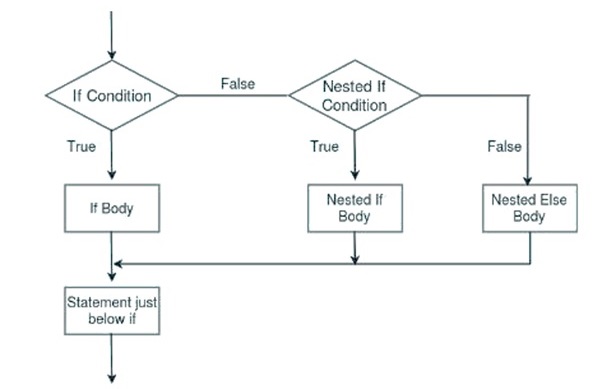
    The following flowchart represents the nesting of if statements −

    Nested Condition

    You can compound the Boolean expressions with && or || to get the same effect. However, for more complex algorithms, where there are different combinations of multiple Boolean expressions, it becomes difficult to form the compound conditions. Instead, it is recommended to use nested structures.

    Another if statement can appear inside a top-level if block, or its else block, or inside both.

    Example 1

    Let us take an example, where the program needs to determine if a given number is less than 100, between 100 to 200, or above 200. We can express this logic with the following compound Boolean expression −

    #include <stdio.h>intmain(){// local variable definitionint a =274;printf("Value of a is : %d\n", a);if(a <100){printf("Value of a is less than 100\n");}if(a >=100&& a <200){printf("Value of a is between 100 and 200\n");}if(a >=200){printf("Value of a is more than 200\n");}}

    Output

    Run the code and check its output. Here, we have intialized the value of “a” as 274. Change this value and run the code again. If the supplied value is less than 100, then you will get a different output. Similarly, the output will change again if the supplied number is in between 100 and 200.

    Value of a is : 274
    Value of a is more than 200
    

    Example 2

    Now let’s use nested conditions for the same problem. It will make the solution more understandable when we use nested conditions.

    First, check if “a >= 100”. Inside the true part of the if statement, check if it is <200 to decide if the number lies between 100-200, or it is >200. If the first condition (a >= 100) is false, it indicates that the number is less than 100.

    #include <stdio.h>intmain(){// local variable definition// check with different values 120, 250 and 74int a =120;printf("value of a is : %d\n", a );// check the boolean conditionif(a >=100){// this will check if a is between 100-200if(a <200){// if the condition is true, then print the followingprintf("Value of a is between 100 and 200\n");}else{printf("Value of a is more than 200\n");}}else{// executed if a < 100printf("Value of a is less than 100\n");}return0;}

    Output

    Run the code and check its output. You will get different outputs for different input values of “a” −

    Value of a is : 120
    Value of a is between 100 and 200
    

    Example 3

    The following program uses nested if statements to determine if a number is divisible by 2 and 3, divisible by 2 but not 3, divisible by 3 but not 2, and not divisible by both 2 and 3.

    #include <stdio.h>intmain(){int a =15;printf("a: %d\n", a);if(a %2==0){if(a %3==0){printf("Divisible by 2 and 3");}else{printf("Divisible by 2 but not 3");}}else{if(a %3==0){printf("Divisible by 3 but not 2");}else{printf("Not divisible by 2, not divisible by 3");}}return0;}

    Output

    Run the code and check its output −

    a: 15
    Divisible by 3 but not 2
    

    For different values of “a”, you will get different outputs.

    Example 4

    Given below is a C program to check if a given year is a leap year or not. Whether the year is a leap year or not is determined by the following rules −

    • Is the year divisible by 4?
    • If yes, is it a century year (divisible by 100)?
    • If yes, is it divisible by 400? If yes, it is a leap year, otherwise not.
    • If it is divisible by 4 and not a century year, it is a leap year.
    • If it is not divisible by 4, it is not a leap year.

    Here is the C code −

    #include <stdio.h>intmain(){// Test the program with the values 1900, 2023, 2000, 2012int year =1900;printf("year: %d\n", year);// is divisible by 4?if(year %4==0){// is divisible by 100?if(year %100==0){// is divisible by 400?if(year %400==0){printf("%d is a Leap Year\n", year);}else{printf("%d is not a Leap Year\n", year);}}else{printf("%d is not a Leap Year\n", year);}}else{printf("%d is a Leap Year\n", year);}}

    Output

    Run the code and check its output −

    year: 1900
    1900 is not a Leap Year
    

    Test the program with different values for the variable “year” such as 1900, 2023, 2000, 2012.

    The same result can be achieved by using the compound Boolean expressions instead of nested if statements, as shown below −

    If(year %4==0&&(year %400==0|| year %100!=0)){printf("%d is a leap year", year);}else{printf("%d is not a leap year", year);}

    With nested if statements in C, we can write structured and multi-level decision-making algorithms. They simplify coding the complex discriminatory logical situations. Nesting too makes the program more readable, and easy to understand.

  • if…else if Ladder in C

    The if-else-if ladder in C is an extension of the simple if-else statement that is used to test multiple conditions sequentially. It executes a block of code associated with the first condition that evaluates to true.

    Syntax of if…else if Ladder in C

    The syntax of if…else if ladder in C is as follows −

    if(condition1){// Code to be executed if condition1 is true}elseif(condition2){// Code to be executed if condition1 is false and condition2 is true}elseif(condition3){// Code to be executed if all previous are false, and condition3 is true}// ...else{// Code to be executed if all preceding conditions are false}

    In an if…else if ladder, each condition is evaluated sequentially, but only if all the previous conditions are false. As soon as a condition evaluates to true, its corresponding code block executes, and the ladder terminates without checking the remaining conditions.

    Example

    Let’s understand the if…else if ladder in C with an example to see how the code executes and how the flow runs step by step.

    #include <stdio.h>intmain(){int items =72;if(items >=90){printf("Store is full");}elseif(items >=80){printf("Need few more items");}elseif(items >=70){printf("Store is partially full");}elseif(items >=50){printf("Sore is half full");}else{printf("Store is empty");}return0;}

    When you run this code, it will produce the following output −

    Store is partially full
    

    Explanation − In this example, there are 72 items. The condition “items >= 90” evaluates to false, so the control moves to “items >= 80”, which is also false.

    Next, it checks the condition “items >= 70”, which evaluates to true. Therefore, the statement “Store is partially full” is printed, and the remaining conditions in the ladder are skipped.

    Components of if…else if Ladder

    Let’s look at the components of an if…else if ladder in C programming −

    If statement

    The if statement first statement in the if…else if ladder. The if block contains a condition and a code block, which executes if the condition evaluates to true; otherwise, the control passes to the next statement.

    else if statement

    The else-if statement always comes after the if statement. An if…else if ladder can have multiple else if statements, each containing a condition to be tested. If a condition evaluates to true, its corresponding code block executes; otherwise, the control moves to the next statement.

    else statement

    The else statement is the last statement in an if…else if ladder. The else statement does not contain any condition, however it contains a code block which is executed if all the conditions mentioned in the above if and else if statements evaluate to false.

    Working of if…else if Ladder

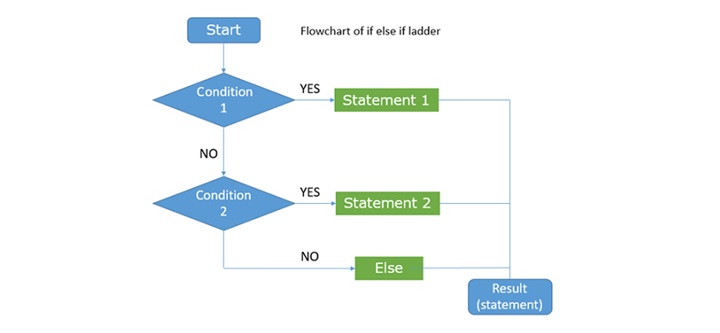
    The working of the if…else if ladder in C can be understood using the following flowchart −

    Working of if…else if Ladder

    This is how the control flow moves −

    • If condition 1 is true, Statement 1 executes, and the remaining else-if and else conditions are skipped.
    • If condition 1 is false, condition 2 is evaluated. If condition 2 is true, Statement 2 executes, and the else block is skipped.
    • If condition 2 is also false, the else block executes.
    • After the if…else if ladder finishes, the statement immediately following the ladder executes.

    Example 1

    In this C example, we have used an if…else if ladder to display the day names based on their designated numbers −

    #include <stdio.h>intmain(){int day =5;printf("Day Number: %d\n", day);if(day ==1){printf("Day Name: Monday\n");}elseif(day ==2){printf("Day Name: Tuesday\n");}elseif(day ==3){printf("Day Name: Wednesday\n");}elseif(day ==4){printf("Day Name: Thursday\n");}elseif(day ==5){printf("Day Name: Friday\n");}elseif(day ==6){printf("Day Name: Saturday\n");}elseif(day ==7){printf("Day Name: Sunday\n");}else{printf("Invalid day Number\n");}return0;}

    Run this code and check its output. When you enter the number “5”, the program will print “Friday” on the console −

    Day Number: 5
    Day Name: Friday
    

    Example 2

    The following C Program uses an if…else if ladder to check whether a given number is even, odd, even & prime, or odd & prime −

    #include <stdio.h>#include <stdbool.h>// Function to check prime number
    bool isPrime(int num){if(num <=1){return false;}for(int i =2; i * i <= num; i++){if(num % i ==0){return false;}}return true;}intmain(){int num =5;// if...else if ladderif(num %2==0&&isPrime(num)){printf("%d is Even and Prime.\n", num);}elseif(num %2!=0&&isPrime(num)){printf("%d is Odd and Prime.\n", num);}elseif(num %2==0){printf("%d is Even.\n", num);}elseif(num %2!=0){printf("%d is Odd.\n", num);}else{printf("Invalid input.\n");}return0;}

    When you run this code, it will produce the following output −

    5 is Odd and Prime.
    
  • The if-else Statement

    The if-else statement is one of the frequently used decision-making statements in C. The if-else statement offers an alternative path when the condition isn’t met.

    The else keyword helps you to provide an alternative course of action to be taken when the Boolean expression in the if statement turns out to be false. The use of else keyword is optional; it’s up to you whether you want to use it or not.

    Syntax of if-else Statement

    Here is the syntax of if-else clause −

    if(Boolean expr){
       Expression;...}else{
       Expression;...}

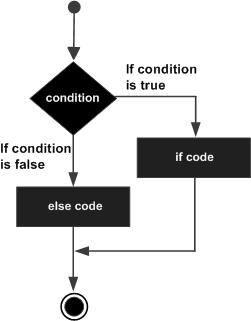
    The C compiler evaluates the condition, and executes a statement or a block of statements following the if statement if it is true.

    If the programming logic needs the computer to execute some other instructions when the condition is false, they are put as a part of the else clause.

    An if statement is followed by an optional else statement, which executes when the Boolean expression is false.

    Flowchart of if-else Statement

    The following flowchart represents how the if-else clause works in C −

    C if...else statement

    Note that the curly brackets in the if as well as the else clause are necessary if you have more than one statements to be executed. For example, in the following code, we dont need curly brackets.

    if(marks<50)printf("Result: Fail\n");elseprintf("Result: Pass\n");

    However, when there are more than one statements, either in the if or in the else part, you need to tell the compiler that they need to be treated as a compound statement.

    C if-else Statement Examples

    Example: Tax Calculation Using if-else Statement

    In the code given below, the tax on employees income is computed. If the income is below 10000, the tax is applicable at 10%. For the income above 10000, the excess income is charged at 15%.

    #include <stdio.h>intmain(){int income =5000;float tax;printf("Income: %d\n", income);if(income<10000){
    
      tax =(float)(income *10/100);printf("tax: %f \n", tax);}else{
      tax=(float)(1000+(income-10000)*15/100);printf("tax: %f", tax);}}</code></pre>

    Output

    Run the code and check its output −

    Income: 5000
    tax: 500.000000
    

    Set the income variable to 15000, and run the program again.

    Income: 15000
    tax: 1750.000000
    

    Example: Checking Digit Using if-else Statement

    The following program checks if a char variable stores a digit or a non-digit character.

    #include <stdio.h>intmain(){char ch='7';if(ch>=48&& ch<=57){printf("The character is a digit.");}else{printf("The character is not a digit.");}return0;}

    Output

    Run the code and check its output −

    The character is a digit.
    

    Assign any other character such as "*" to "ch" and see the result.

    The character is not a digit.
    

    Example: if-else Statement Without Curly Braces

    Consider the following code. It intends to calculate the discount at 10% if the amount is greater than 100, and no discount otherwise.

    #include <stdio.h>intmain(){int amount =50;float discount;printf("Amount: %d\n", amount);if(amount >=100)
    
      discount = amount *10/100;printf("Discount: %f \n", discount);elseprintf("Discount not applicable\n");return0;}</code></pre>

    Output

    The program shows the following errors during the compilation −

    error: 'else' without a previous 'if'
    

    The compiler will execute the first statement after the if clause and assumes that since the next statement is not else (it is optional anyway), the subsequent printf() statement is unconditional. However, the next else is not connected to any if statement, hence the error.

    Example: if-else Statement Without Curly Braces

    Consider the following code too −

    #include <stdio.h>intmain(){int amount =50;float discount, nett;printf("Amount: %d\n", amount);if(amount<100)printf("Discount not applicable\n");elseprintf("Discount applicable");
    
      discount = amount*10/100;
      nett = amount - discount;printf("Discount: %f Net payable: %f", discount, nett);return0;}</code></pre>

    Output

    The code doesnt give any compiler error, but gives incorrect output −

    Amount: 50
    Discount not applicable
    Discount: 5.000000 Net payable: 45.000000
    

    It produces an incorrect output because the compiler assumes that there is only one statement in the else clause, and the rest of the statements are unconditional.

    The above two code examples emphasize the fact that when there are more than one statements in the if or else else, they must be put in curly brackets.

    To be safe, it is always better to use curly brackets even for a single statement. In fact, it improves the readability of the code.

    The correct solution for the above problem is shown below −

    if(amount >=100){
       discount = amount *10/100;printf("Discount: %f \n", discount);}else{printf("Discount not applicable\n");}

    The else-if Statement in C

    C also allows you to use else-if in the programs. Let's see where you may have to use an else-if clause.

    Let's suppose you have a situation like this. If a condition is true, run the given block that follows. If it isn't, run the next block instead. However, if none of the above is true and all else fails, finally run another block. In such cases, you would use an else-if clause.

    Syntax of else-if Statement

    Here is the syntax of the else-if clause −

    if(condition){// if the condition is true, // then run this code}elseif(another_condition){// if the above condition was false // and this condition is true,// then run the code in this block}else{// if both the above conditions are false,// then run this code}

    Example of else-if Statement

    Take a look at the following example −

    #include <stdio.h>intmain(void){int age =15;if(age <18){printf("You need to be over 18 years old to continue\n");}elseif(age <21){printf("You need to be over 21\n");}else{printf("You are over 18 and older than 21 so you can continue \n");}}

    Output

    Run the code and check its output −

    You need to be over 18 years old to continue
    

    Now, supply a different value for the variable "age" and run the code again. You will get a different output if the supplied value is less than 18.