Author: saqibkhan

  • AngularJS Directives

    AngularJS facilitates you to extend HTML with new attributes. These attributes are called directives.

    There is a set of built-in directive in AngularJS which offers functionality to your applications. You can also define your own directives.

    Directives are special attributes starting with ng- prefix. Following are the most common directives:

    • ng-app: This directive starts an AngularJS Application.
    • ng-init: This directive initializes application data.
    • ng-model: This directive defines the model that is variable to be used in AngularJS.
    • ng-repeat: This directive repeats html elements for each item in a collection.

    ng-app directive

    ng-app directive defines the root element. It starts an AngularJS Application and automatically initializes or bootstraps the application when web page containing AngularJS Application is loaded. It is also used to load various AngularJS modules in AngularJS Application.

    See this example:

    In following example, we’ve defined a default AngularJS application using ng-app attribute of a div element.

    <div ng-app = "">  
    
       ...  
    
    </div>

    ng-init directive

    ng-init directive initializes an AngularJS Application data. It defines the initial values for an AngularJS application.

    In following example, we’ll initialize an array of countries. We’re using JSON syntax to define array of countries.

    <div ng-app = "" ng-init = "countries = [{locale:'en-IND',name:'India'}, {locale:'en-PAK',name:'Pakistan'}, {locale:'en-AUS',name:'Australia'}]">  
    
       ...  
    
    </div>

    ng-model directive:

    ng-model directive defines the model/variable to be used in AngularJS Application.

    In following example, we’ve defined a model named “name”.

    <div ng-app = "">  
    
       ...  
    
       <p>Enter your Name: <input type = "text" ng-model = "name"></p>  
    
    </div>

    ng-repeat directive

    ng-repeat directive repeats html elements for each item in a collection. In following example, we’ve iterated over array of countries.

    <div ng-app = "">  
    
       ...  
    
       <p>List of Countries with locale:</p>  


       <ol>  
    
          <li ng-repeat = "country in countries">  
    
             {{ 'Country: ' + country.name + ', Locale: ' + country.locale }}  
    
          </li>  
    
       </ol> 

      AngularJS directives Example

      Let’s take an example to use all the above discussed directives:

      <!DOCTYPE html>  
      
      <html>  
      
      <head>  
      
            <title>AngularJS Directives</title>  
      
      </head>  
      
      <body>  
      
            <h1>Sample Application</h1>  


            <div ng-app = "" ng-init = "countries = [{locale:'en-IND',name:'India'}, {locale:'en-PAK',name:'Pakistan'}, {locale:'en-AUS',name:'Australia'}]">   
      
               <p>Enter your Name: <input type = "text" ng-model = "name"></p>  
      
               <p>Hello <span ng-bind = "name"></span>!</p>  
      
               <p>List of Countries with locale:</p>  


               <ol>  
      
                  <li ng-repeat = "country in countries">  
      
                     {{ 'Country: ' + country.name + ', Locale: ' + country.locale }}  
      
                  </li>  
      
               </ol>  
      
            </div>  
      
      <script src = "http://ajax.googleapis.com/ajax/libs/angularjs/1.3.14/angular.min.js"></script>  
      
      </body>  
      
      </html>

      AngularJS Directives List

      AnglarJS directives are used to add functionality to your application. You can also add your own directives for your applications.

      Following is a list of AngularJS directives:

      DirectiveDescription
      ng-appIt defines the root element of an application.
      ng-bindIt binds the content of an html element to application data.
      ng-bind-htmlIt binds the inner HTML of an HTML element to application data, and also removes dangerous code from the html string.
      ng-bind-templateIt specifies that the text content should be replaced with a template.
      ng-blurIt specifies a behavior on blur events.
      ng-changeIt specifies an expression to evaluate when content is being changed by the user.
      ng-checkedIt specifies if an element is checked or not.
      ng-classIt specifies css classes on html elements.
      ng-class-evenIt is same as ng-class, but will only take effect on even rows.
      ng-class-oddIt is same as ng-class, but will only take effect on odd rows.
      ng-clickIt specifies an expression to evaluate when an element is being clicked.
      ng-cloakIt prevents flickering when your application is being loaded.
      ng-controllerIt defines the controller object for an application.
      ng-copyIt specifies a behavior on copy events.
      ng-cspIt changes the content security policy.
      ng-cutIt specifies a behavior on cut events.
      ng-dblclickIt specifies a behavior on double-click events.
      ng-focusIt specifies a behavior on focus events.
      ng-hideIt hides or shows html elements.
      ng-hrefIt specifies a URL for the <a> element.
      ng-ifIt removes the html element if a condition is false.
      ng-includeIt includes html in an application.
      ng-initIt defines initial values for an application.
      ng-jqIt specifies that the application must use a library, like jQuery.
      ng-keydownIt specifies a behavior on keydown events.
      ng-keypressIt specifies a behavior on keypress events.
      ng-keyupIt specifies a behavior on keyup events.
      ng-listIt converts text into a list (array).
      ng-openIt specifies the open attribute of an element.
      ng-optionsIt specifies <options> in a <select> list.
      ng-pasteIt specifies a behavior on paste events.
      ng-pluralizeIt specifies a message to display according to en-us localization rules.
      ng-readonlyIt specifies the readonly attribute of an element.
      ng-requiredIt specifies the required attribute of an element.
      ng-selectedIt specifies the selected attribute of an element.
      ng-showIt shows or hides html elements.
      ng-srcIt specifies the src attribute for the <img> element.
      ng-srcsetIt specifies the srcset attribute for the <img> element.
      ng-styleIt specifies the style attribute for an element.
      ng-submitIt specifies expressions to run on onsubmit events.
      ng-switchIt specifies a condition that will be used to show/hide child elements.
      ng-transcludeIt specifies a point to insert transcluded elements.
      ng-valueIt specifies the value of an input element.
      ng-disabledIt specifies if an element is disabled or not.
      ng-formIt specifies an html form to inherit controls from.
      ng-modelIt binds the value of html controls to application data.
      ng-model-optionsIt specifies how updates in the model are done.
      ng-mousedownIt specifies a behavior on mousedown events.
      ng-mouseenterIt specifies a behavior on mouseenter events.
      ng-mouseleaveIt specifies a behavior on mouseleave events.
      ng-mousemoveIt specifies a behavior on mousemove events.
      ng-mouseoverIt specifies a behavior on mouseover events.
      ng-mouseupIt specifies a behavior on mouseup events.
      ng-non-bindableIt specifies that no data binding can happen in this element, or it’s children.
      ng-repeatIt defines a template for each data in a collection.

      How to add directives

      See this example:

      <!DOCTYPE html>  
      
      <html>  
      
      <script src="http://ajax.googleapis.com/ajax/libs/angularjs/1.4.8/angular.min.js"></script>  
      
      <body>  


      <div ng-app="myApp" w3-test-directive></div>  
      
      <script>  
      
      var app = angular.module("myApp", []);  
      
      app.directive("w3TestDirective", function() {  
      
          return {  
      
              template : "This is a directive constructor. "  
      
          };  
      
      });  
      
      </script>  
      
      </body>  
      
      </html>
    1. AngularJS Expressions

      In AngularJS, expressions are used to bind application data to HTML. AngularJS resolves the expression, and return the result exactly where the expression is written.

      Expressions are written inside double braces {{expression}}.They can also be written inside a directive:

      ng-bind="expression".  

      AnularJS expressions are very similar to JavaScript expressions. They can contain literals, operators, and variables. For example:

      {{ 5 + 5 }} or {{ firstName + " " + lastName }}  

      AngularJS Expressions Example

      <!DOCTYPE html>  
      
      <html>  
      
      <script src="http://ajax.googleapis.com/ajax/libs/angularjs/1.4.8/angular.min.js"></script>  
      
      <body>  
      
      <div ng-app>  
      
      <p>A simple expression example: {{ 5 + 5 }}</p>  
      
      </div>  
      
      </body>  
      
      </html>

      Note: If you remove the directive “ng-app”, HTML will display the expression without solving it.

      See this example:

      <!DOCTYPE html>  
      
      <html>  
      
      <script src="http://ajax.googleapis.com/ajax/libs/angularjs/1.4.8/angular.min.js"></script>  
      
      <body>  
      
      <p>If you remove the directive "ng-app", HTML will display the expression without solving it.</p>  
      
      <div>  
      
      <p>A simple expression example:  {{ 5 + 5 }}</p>  
      
      </div>  
      
      </body>  
      
      </html> 

      You can also write expressions wherever you want, AngularJS will resolve the expression and return the result.

      Let’s take an example to change the color of input box by changing its value.

      See this example:

      <!DOCTYPE html>  
      
      <html>  
      
      <script src="http://ajax.googleapis.com/ajax/libs/angularjs/1.4.8/angular.min.js"></script>  
      
      <body>  
      
      <p>Change the value of the input field:</p>  
      
      <div ng-app="" ng-init="myCol='pink'">  
      
      <input style="background-color:{{myCol}}" ng-model="myCol" value="{{myCol}}">  
      
      </div>  
      
      <p>AngularJS resolves the expression and returns the result.</p>  
      
      <p>The background color of the input box will be whatever you write in the input field.</p>  
      
      </body>  
      
      </html>

      AngularJS Numbers

      AngularJS numbers are similar to JavaScript numbers.

      <!DOCTYPE html>  
      
      <html>  
      
      <script src="http://ajax.googleapis.com/ajax/libs/angularjs/1.4.8/angular.min.js"></script>  
      
      <body>  
      
      <div ng-app="" ng-init="quantity=5;cost=5">  
      
      <p>Total in dollar: {{ quantity * cost }}</p>  
      
      </div>  
      
      </body>  
      
      </html>

      We can use the same example by using ng-bind:

      See this example:

      <!DOCTYPE html>  
      
      <html>  
      
      <script src="http://ajax.googleapis.com/ajax/libs/angularjs/1.4.8/angular.min.js"></script>  
      
      <body>  
      
      <div ng-app="" ng-init="quantity=5;cost=5">  
      
      <p>Total in dollar: <span ng-bind="quantity * cost"></span></p>  
      
      </div>  
      
      </body>  
      
      </html>

      AngularJS Strings

      <!DOCTYPE html>  
      
      <html>  
      
      <script src="http://ajax.googleapis.com/ajax/libs/angularjs/1.4.8/angular.min.js"></script>  
      
      <body>  
      
      <div ng-app="" ng-init="firstName='Sonoo';lastName='Jaiswal'">  
      
      <p>My full name is: {{ firstName + " " + lastName }}</p>  
      
      </div>  
      
      </body>  
      
      </html>

      Same example with ng-bind:

      <!DOCTYPE html>  
      
      <html>  
      
      <script src="http://ajax.googleapis.com/ajax/libs/angularjs/1.4.8/angular.min.js"></script>  
      
      <body>  
      
      <div ng-app="" ng-init="firstName='Sonoo';lastName='Jaiswal'">  
      
      <p>My full name is: <span ng-bind="firstName + ' ' + lastName"></span></p>  
      
      </div>  
      
      </body>  
      
      </html>

      AngularJS Objects

      <!DOCTYPE html>  
      
      <html>  
      
      <script src="http://ajax.googleapis.com/ajax/libs/angularjs/1.4.8/angular.min.js"></script>  
      
      <body>  
      
      <div ng-app="" ng-init="person={firstName:'Sonoo',lastName:'Jaiswal'}">  
      
      <p>My name is {{ person.firstName }}</p>  
      
      </div>  
      
      </body>  
      
      </html>

      Same example with ng-bind:

      <!DOCTYPE html>  
      
      <html>  
      
      <script src="http://ajax.googleapis.com/ajax/libs/angularjs/1.4.8/angular.min.js"></script>  
      
      <body>  
      
      <div ng-app="" ng-init="person={firstName:'Sonoo',lastName:'Jaiswal'}">  
      
      <p>The name is <span ng-bind="person.firstName"></span></p>  
      
      </div>  
      
      </body>  
      
      </html>

      AngularJS Arrays

      <!DOCTYPE html>  
      
      <html>  
      
      <script src="http://ajax.googleapis.com/ajax/libs/angularjs/1.4.8/angular.min.js"></script>  
      
      <body>  
      
      <div ng-app="" ng-init="points=[1,15,19,2,40]">  
      
      <p>The first result is {{ points[0] }}</p>  
      
      </div>  
      
      </body>  
      
      </html>

      Same example with ng-bind:

      <!DOCTYPE html>  
      
      <html>  
      
      <script src="http://ajax.googleapis.com/ajax/libs/angularjs/1.4.8/angular.min.js"></script>  
      
      <body>  
      
      <div ng-app="" ng-init="points=[1,15,19,2,40]">  
      
      <p>The first result is <span ng-bind="points[0]"></span></p>  
      
      </div>  
      
      </body>  
      
      </html>

      Difference between AngularJS Expressions and JavaScript expressions:

      • AngularJS expressions can be written inside HTML, while JavaScript expressions cannot.
      • AngularJS expressions support filters, while JavaScript expressions do not.
      • AngularJS expressions do not support conditionals, loops, and exceptions, while JavaScript expressions do.

      Similarity between AngularJS Expressions and JavaScript expressions:

      • AngularJS expressions and JavaScript expressions both can contain literals, operators and variables.
    2. AngularJS Data Binding

      Data binding is a very useful and powerful feature used in software development technologies. It acts as a bridge between the view and business logic of the application.

      AngularJS follows Two-Way data binding model.

      One-Way Data Binding

      The one-way data binding is an approach where a value is taken from the data model and inserted into an HTML element. There is no way to update model from view. It is used in classical template systems. These systems bind data in only one direction.

      One Way Data Binding

      Two-Way Data Binding

      Data-binding in Angular apps is the automatic synchronization of data between the model and view components.

      Data binding lets you treat the model as the single-source-of-truth in your application. The view is a projection of the model at all times. If the model is changed, the view reflects the change and vice versa.

      Two Way Data Binding
      <!DOCTYPE html>  
      
      <html>  
      
      <script src="http://ajax.googleapis.com/ajax/libs/angularjs/1.4.8/angular.min.js"></script>  
      
      <body>  
      
      <div ng-app="" ng-init="firstName='Ajeet'">  
      
      <p>Input something in the input box:</p>  
      
      <p>Name: <input type="text" ng-model="firstName"></p>  
      
      <p>You wrote: {{ firstName }}</p>  
      
      </div>  
      
      </body>  
      
      </html>

      In the above example, the {{ firstName }} expression is an AngularJS data binding expression. Data binding in AngularJS binds AngularJS expressions with AngularJS data.

      {{ firstName }} is bound with ng-model=”firstName”.

      Let’s take another example where two text fields are bound together with two ng-model directives:

      <!DOCTYPE html>  
      
      <html>  
      
      <script src="http://ajax.googleapis.com/ajax/libs/angularjs/1.4.8/angular.min.js"></script>  
      
      <body>  
      
      <div data-ng-app="" data-ng-init="quantity=1;price=20">  
      
      <h2>Cost Calculator</h2>  
      
      Quantity: <input type="number" ng-model="quantity">  
      
      Price: <input type="number" ng-model="price">  
      
      <p><b>Total in rupees:</b> {{quantity * price}}</p>  
      
      </div>  
      
      </body>  
      
      </html>
    3. AngularJS First Example

      AngularJS applications are a mix of HTML and JavaScript. The first thing you need is an HTML page.

      <!DOCTYPE html>  
      
      <html>  
      
      <head>  
      
      .  
      
      .  
      
      </head>  
      
      <body>  
      
      .  
      
      .  
      
      </body>  
      
      </html> 

        Second, you need to include the AngularJS JavaScript file in the HTML page so we can use AngularJS:

        <!DOCTYPE html>  
        
        <html>  
        
        <head>  
        
          <script src="https://ajax.googleapis.com/ajax/libs/angularjs/1.2.5/angular.min.js"></script>  
        
        </head>  
        
        <body>  
        
        .  
        
        .  
        
        </body>  
        
        </html>  

          Note: You should always use the latest version of AngularJS, so it is not necessary to use the same version as the above example.

          AngularJS First Example

          Following is a simple “Hello Word” example made with AngularJS. It specifies the Model, View, Controller part of an AngularJS app.

          <!DOCTYPE html>  
          
          <html lang="en">  
          
          <head>  
          
              <script src="https://ajax.googleapis.com/ajax/libs/angularjs/1.2.5/angular.min.js"></script>  
          
          </head>  
          
          <body ng-app="myapp">  
          
          <div ng-controller="HelloController" >  
          
          <h2>Hello {{helloTo.title}} !</h2>  
          
          </div>  


          <script>  
          
          angular.module("myapp", [])  
          
              .controller("HelloController", function($scope) {  
          
                  $scope.helloTo = {};  
          
                  $scope.helloTo.title = "World, AngularJS";  
          
              } );  
          
          </script>  
          
          </body>  
          
          </html>

          View Part

          <div ng-controller="HelloController" >  
          
          <h2>Hello {{helloTo.title}} !</h2>  
          
          </div> 

            Controller Part

            <script>  
            
            angular.module("myapp", [])  
            
                .controller("HelloController", function($scope) {  
            
                    $scope.helloTo = {};  
            
                    $scope.helloTo.title = "World, AngularJS";  
            
                });  
            
            </script> 
            1. AngularJS MVC Architecture

              MVC stands for Model View Controller. It is a software design pattern for developing web applications. It is very popular because it isolates the application logic from the user interface layer and supports separation of concerns.

              AngularJS MVC Architecture

              The MVC pattern is made up of the following three parts:

              1. Model: It is responsible for managing application data. It responds to the requests from view and to the instructions from controller to update itself.
              2. View: It is responsible for displaying all data or only a portion of data to the users. It also specifies the data in a particular format triggered by the controller’s decision to present the data. They are script-based template systems such as JSP, ASP, PHP and very easy to integrate with AJAX technology.
              3. Controller: It is responsible to control the relation between models and views. It responds to user input and performs interactions on the data model objects. The controller receives input, validates it, and then performs business operations that modify the state of the data model.
            2. What is AngularJS

              Angular JS is an open source JavaScript framework that is used to build web applications. It can be freely used, changed and shared by anyone.

              Angular Js is developed by Google.

              It is an excellent framework for building single phase applications and line of business applications.

              Advantage of AngularJS

              There are a lot of JavaScript frameworks for building web applications. So, it is a genuine question, why to use Angular JS.

              Following are the advantages of AngularJS over other JavaScript frameworks:

              • Dependency Injection: Dependency Injection specifies a design pattern in which components are given their dependencies instead of hard coding them within the component.
              • Two way data binding: AngularJS creates a two way data-binding between the select element and the orderProp model. orderProp is then used as the input for the orderBy filter.
              • Testing: Angular JS is designed in a way that we can test right from the start. So, it is very easy to test any of its components through unit testing and end-to-end testing.
              • Model View Controller: In Angular JS, it is very easy to develop application in a clean MVC way. You just have to split your application code into MVC components i.e. Model, View and the Controller.
            3. Overview

              AngularJS is an open-source web application framework. It was originally developed in 2009 by Misko Hevery and Adam Abrons. It is now maintained by Google. Its latest version is 1.2.21.

              Definition of AngularJS as put by its official documentation is as follows −

              AngularJS is a structural framework for dynamic web applications. It lets you use HTML as your template language and lets you extend HTML’s syntax to express your application components clearly and succinctly. Its data binding and dependency injection eliminate much of the code you currently have to write. And it all happens within the browser, making it an ideal partner with any server technology.

              General Features

              The general features of AngularJS are as follows −

              • AngularJS is a efficient framework that can create Rich Internet Applications (RIA).
              • AngularJS provides developers an options to write client side applications using JavaScript in a clean Model View Controller (MVC) way.
              • Applications written in AngularJS are cross-browser compliant. AngularJS automatically handles JavaScript code suitable for each browser.
              • AngularJS is open source, completely free, and used by thousands of developers around the world. It is licensed under the Apache license version 2.0.

              Overall, AngularJS is a framework to build large scale, high-performance, and easyto-maintain web applications.

              Core Features

              The core features of AngularJS are as follows −

              • Data-binding − It is the automatic synchronization of data between model and view components.
              • Scope − These are objects that refer to the model. They act as a glue between controller and view.
              • Controller − These are JavaScript functions bound to a particular scope.
              • Services − AngularJS comes with several built-in services such as $http to make a XMLHttpRequests. These are singleton objects which are instantiated only once in app.
              • Filters − These select a subset of items from an array and returns a new array.
              • Directives − Directives are markers on DOM elements such as elements, attributes, css, and more. These can be used to create custom HTML tags that serve as new, custom widgets. AngularJS has built-in directives such as ngBind, ngModel, etc.
              • Templates − These are the rendered view with information from the controller and model. These can be a single file (such as index.html) or multiple views in one page using partials.
              • Routing − It is concept of switching views.
              • Model View Whatever − MVW is a design pattern for dividing an application into different parts called Model, View, and Controller, each with distinct responsibilities. AngularJS does not implement MVC in the traditional sense, but rather something closer to MVVM (Model-View-ViewModel). The Angular JS team refers it humorously as Model View Whatever.
              • Deep Linking − Deep linking allows to encode the state of application in the URL so that it can be bookmarked. The application can then be restored from the URL to the same state.
              • Dependency Injection − AngularJS has a built-in dependency injection subsystem that helps the developer to create, understand, and test the applications easily.

              Explore our latest online courses and learn new skills at your own pace. Enroll and become a certified expert to boost your career.

              Concepts

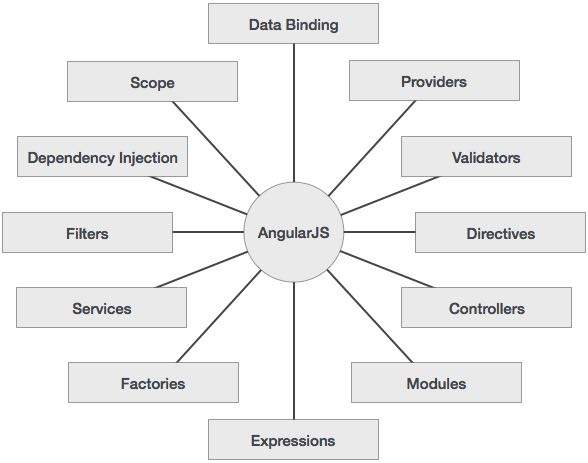
              The following diagram depicts some important parts of AngularJS which we will discuss in detail in the subsequent chapters.

              AngularJS Concepts

              Advantages of AngularJS

              The advantages of AngularJS are −

              • It provides the capability to create Single Page Application in a very clean and maintainable way.
              • It provides data binding capability to HTML. Thus, it gives user a rich and responsive experience.
              • AngularJS code is unit testable.
              • AngularJS uses dependency injection and make use of separation of concerns.
              • AngularJS provides reusable components.
              • With AngularJS, the developers can achieve more functionality with short code.
              • In AngularJS, views are pure html pages, and controllers written in JavaScript do the business processing.

              On the top of everything, AngularJS applications can run on all major browsers and smart phones, including Android and iOS based phones/tablets.

              Disadvantages of AngularJS

              Though AngularJS comes with a lot of merits, here are some points of concern −

              • Not Secure − Being JavaScript only framework, application written in AngularJS are not safe. Server side authentication and authorization is must to keep an application secure.
              • Not degradable − If the user of your application disables JavaScript, then nothing would be visible, except the basic page.

              AngularJS Directives

              The AngularJS framework can be divided into three major parts −

              • ng-app − This directive defines and links an AngularJS application to HTML.
              • ng-model − This directive binds the values of AngularJS application data to HTML input controls.
              • ng-bind − This directive binds the AngularJS application data to HTML tags.
            4. Frequent version releases

              The Google team tries to keep the Angular framework relevant, so it releases new versions two times a year. Unfortunately, the benefit of having up-to-date technology goes hand in hand with the necessity to update Angular-based solutions very often. In most cases, it causes no problem, but sometimes the abundance of Angular versions can become a real pain in the neck for DevOps engineers.

            5. Decline in popularity 

              With the advent of newer frameworks like VueJS and ReactJS, Angular has seen a downfall in its popularity. Just a few years ago, developers were mainly debating on whether they should be using Angular or React for their projects. But over the course of the last couple of years, we saw a growth of interest in a third player called VueJS or Vue.js.
               
              While the job market in Angular continues to expand, it has been observed that the popularity of the framework has been declining. I believe that too many versions is one of the main issues that the framework needs to address. 

            6. Too many versions 

              Angular has been evolving. It started out as a JavaScript framework AngularJS and now the current version is Angular 9 with a total of 6 major releases in between. This can cause confusion especially for beginners. 

              Many a time, beginners struggle to understand the versioning. I have seen students learning a version of the framework, latest at the time, and by the time they finish their first project, a new major release is out. This causes trust issues. Developers, at times, feel that they must keep working on their apps and resolve version conflicts and compatibility issues.