A self-referential structure is a struct data type in C, where one or more of its elements are pointer to variables of its own type. Self-referential user-defined types are of immense use in C programming. They are extensively used to build complex and dynamic data structures such as linked lists and trees.
In C programming, an array is allocated the required memory at compile-time and the array size cannot be modified during the runtime. Self-referential structures let you emulate the arrays by handling the size dynamically.
File management systems in Operating Systems are built upon dynamically constructed tree structures, which are manipulated by self-referential structures. Self-referential structures are also employed in many complex algorithms.
Defining a Self-referential Structure
A general syntax of defining a self-referential structure is as follows −
strut typename{
   type var1;
   type var2;......structtypename*var3;}
Let us understand how a self-referential structure is used, with the help of the following example. We define a struct type called mystruct. It has an integer element “a” and “b” is the pointer to mystruct type itself.
We declare three variables of mystruct type −
structmystruct x ={10,NULL}, y ={20,NULL}, z ={30,NULL};
Next, we declare three “mystruct” pointers and assign the references x, y and z to them.
The variables “x”, “y” and “z” are unrelated as they will be located at random locations, unlike the array where all its elements are in adjacent locations.
Examples of Self-referential Structure
Example 1
To explicitly establish a link between the three variable, we can store the address of “y” in “x” and the address of “z” in “y”. Let us implement this in the following program −
#include <stdio.h>structmystruct{int a;structmystruct*b;};intmain(){structmystruct x ={10,NULL}, y ={20,NULL}, z ={30,NULL};structmystruct* p1,*p2,*p3;

   p1 =&x;
   p2 =&y;
   p3 =&z;

   x.b = p2;
   y.b = p3;printf("Address of x: %d a: %d Address of next: %d\n", p1, x.a, x.b);printf("Address of y: %d a: %d Address of next: %d\n", p2, y.a, y.b);printf("Address of z: %d a: %d Address of next: %d\n", p3, z.a, z.b);return0;}
Output
Run the code and check its output −
Address of x: 659042000 a: 10 Address of next: 659042016
Address of y: 659042016 a: 20 Address of next: 659042032
Address of z: 659042032 a: 30 Address of next: 0
Example 2
Let us refine the above program further. Instead of declaring variables and then storing their address in pointers, we shall use the malloc() function to dynamically allocate memory whose address is stored in pointer variables. We then establish links between the three nodes as shown below −
#include <stdio.h>#include <stdlib.h>structmystruct{int a;structmystruct*b;};intmain(){structmystruct*p1,*p2,*p3;

   p1 =(structmystruct*)malloc(sizeof(structmystruct));
   p2 =(structmystruct*)malloc(sizeof(structmystruct));
   p3 =(structmystruct*)malloc(sizeof(structmystruct));

   p1 -> a =10; p1->b=NULL;
   p2 -> a =20; p2->b=NULL;
   p3 -> a =30; p3->b=NULL;

   p1 -> b = p2;
   p2 -> b = p3;printf("Add of x: %d a: %d add of next: %d\n", p1, p1->a, p1->b);printf("add of y: %d a: %d add of next: %d\n", p2, p2->a, p2->b);printf("add of z: %d a: %d add of next: %d\n", p3, p3->a, p3->b);return0;}
Output
Run the code and check its output −
Add of x: 10032160 a: 10 add of next: 10032192
add of y: 10032192 a: 20 add of next: 10032224
add of z: 10032224 a: 30 add of next: 0
Example 3
We can reach the next element in the link from its address stored in the earlier element, as “p1 b” points to the address of “p2”. We can use a while loop to display the linked list, as shown in this example −
#include <stdio.h>#include <stdlib.h>structmystruct{int a;structmystruct*b;};intmain(){structmystruct*p1,*p2,*p3;
p1=(structmystruct*)malloc(sizeof(structmystruct));
p2=(structmystruct*)malloc(sizeof(structmystruct));
p3=(structmystruct*)malloc(sizeof(structmystruct));
p1 -> a =10; p1 -> b =NULL;
p2 -> a =20; p2 -> b =NULL;
p3 -> a =30; p3 -> b =NULL;
p1 -> b = p2;
p2 -> b = p3;while(p1 !=NULL){printf("Add of current: %d a: %d add of next: %d\n", p1, p1->a, p1->b);
p1 = p1 -> b;}return0;}</code></pre>
Output
Run the code and check its output −
Add of current: 10032160 a: 10 add of next: 10032192
Add of current: 10032192 a: 20 add of next: 10032224
Add of current: 10032224 a: 30 add of next: 0
Creating a Linked List with Self-referential Structure
In the above examples, the dynamically constructed list has three discrete elements linked with pointers. We can use a for loop to set up required number of elements by allocating memory dynamically, and store the address of next element in the previous node.
Example
The following example shows how you can create a linked list using a self-referential structure −
#include <stdio.h>#include <stdlib.h>structmystruct{int a;structmystruct*b;};intmain(){structmystruct*p1,*p2,*start;int i;
p1 =(structmystruct*)malloc(sizeof(structmystruct));
p1 -> a =10; p1 -> b =NULL;
start = p1;for(i =1; i <=5; i++){
p2 =(structmystruct*)malloc(sizeof(structmystruct));
p2 -> a = i*2;
p2 -> b =NULL;
p1 -> b = p2;
p1 = p2;}
p1 = start;while(p1 !=NULL){printf("Add of current: %d a: %d add of next: %d\n", p1, p1 -> a, p1 -> b);
p1 = p1 -> b;}return0;}</code></pre>
Output
Run the code and check its output −
Add of current: 11408416 a: 10 add of next: 11408448
Add of current: 11408448 a: 2 add of next: 11408480
Add of current: 11408480 a: 4 add of next: 11408512
Add of current: 11408512 a: 6 add of next: 11408544
Add of current: 11408544 a: 8 add of next: 11408576
Add of current: 11408576 a: 10 add of next: 0
Creating a Doubly Linked List with Self-referential Structure
A linked list is traversed from beginning till it reaches NULL. You can also construct a doubly linked list, where the structure has two pointers, each referring to the address of previous and next element.
The struct definition for this purpose should be as below −
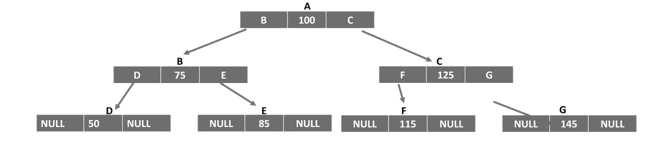
Self-referential structures are also used to construct non-linear data structures such as trees. A binary search tree is logically represented by the following figure −
The struct definition for the implementing a tree is as follows −
In C programming, the struct keyword is used to define a derived data type. Once defined, you can declare an array of struct variables, just like an array of int, float or char types is declared. An array of structures has a number of use-cases such as in storing records similar to a database table where you have each row with different data types.
Usually, a struct type is defined at the beginning of the code so that its type can be used inside any of the functions. You can declare an array of structures and later on fill data in it or you can initialize it at the time of declaration itself.
Initializing a Struct Array
Let us define a struct type called book as follows −
During the program, you can declare an array and initialize it by giving the values of each element inside curly brackets. Each element in the struct array is a struct value itself. Hence, we have the nested curly brackets as shown below −
How does the compiler allocate memory for this array? Since we have an array of three elements, of struct whose size is 32 bytes, the array occupies “32 x 3” bytes. Each block of 32 bytes will accommodate a “title”, “price” and “pages” element.
L
E
A
R
N
C
675.50
325
C
P
O
I
N
T
E
R
S
175
225
C
P
E
A
R
L
S
250
250
Declaring a Struct Array
You can also declare an empty struct array. Afterwards, you can either read the data in it with scanf() statements or assign value to each element as shown below −
When you run this code, it will produce the following output −
List of Books:
Title: Learn C    Price: 650.50 Pages: 325
Title: C Pointers Price: 175.00 Pages: 225
Title: C Pearls   Price: 250.00 Pages: 325
Example 2
In this example, a struct type called student is defined. Its elements are “name”; marks in physics, chemistry and maths; and the “percentage”.
An array of three struct student types is declared and the first four elements are populated by user input, with a for loop. Inside the loop itself, the “percent” element of each subscript is computed.
Finally, an array of students with their names, marks and percentage is printed to show the marklist.
s[i].percent =(double)(s[i].physics + s[i].maths + s[i].chemistry)/3;}printf("\nName\tPhysics\tChemistry\t\Maths\tPercent\n");for(int i =0; i <3; i++){printf("%s \t\t%d \t\t%d \t\t%d \t\t%5.2lf\n", s[i].name, s[i].physics, s[i].chemistry, s[i].maths, s[i].percent);}return0;}</code></pre>
Output
When you run this code, it will produce the following output −
Name Physics Chemistry Maths Percent
Ravi 50 60 70 60.00
Kiran 55 66 77 66.00
Anil 45 55 65 55.00
Sorting a Struct Array
Let us take another example of struct array. Here, we will have the array of "book" struct type sorted in ascending order of the price by implementing bubble sort technique.
Note: The elements of one struct variable can be directly assigned to another struct variable by using the assignment operator.
temp = b[i];
b[i]= b[j];
b[j]= temp;}}}printf("\nList of Books in Ascending Order of Price:\n");for(i =0; i <3; i++){printf("Title: %s \tPrice: %7.2lf \tPages: %d\n", b[i].title, b[i].price, b[i].pages);}return0;}</code></pre>
Output
When you run this code, it will produce the following output −
List of Books in Ascending Order of Price:
Title: C Pointers Price: 175.00 Pages: 225
Title: C Pearls Price: 250.00 Pages: 250
Title: Learn C Price: 650.50 Pages: 325
Declaring a Pointer to a Struct Array
We can also declare a pointer to a struct array. C uses the indirection operator () to access the internal elements of struct variables.
Example
The following example shows how you can declare a pointer to a struct array −
In C programming, struct is a derived data type. Just as we can pass arguments of primary data types, a variable of struct data type can also be passed to a function. You can also pass structures using call by value and call by reference methods. A function in C may also return a struct data type.
Read this chapter to understand the following concepts −
How to pass elements of struct type
How to pass a struct variable
How to return struct from a function
How to return a struct pointer
Let’s start with the first one and learn how to pass elements of struct type.
How to Pass Struct Elements
A derived type is a combination of one or more elements of any of the primary types as well as another derived type. It is possible to pass elements to a function, either by value or by reference.
Example
In the following example, we have a derived type called “rectangle” with two elements. We have a struct variable “r” with the elements “r.len” and “l.brd” and they are passed to a function. The area() function then computes the area of the rectangle.
Let us modify the above example to pass the struct variable itself (instead of its elements) to the area() function. The rectangle struct type also has an additional element called “area”.
Example
Inside the function, the elements of the struct variable are accessed though the dot operator (.) and the area is calculated.
We know that a function in C can return a value of any type. In this example, the area() function is defined to return a struct variable.
Example
Inside the main() fuction, the inputs for the length and the breadth are passed to the area() function. Inside the area() function, the area is computed and a struct variable is populated and returned to the main() function, where its elements are displayed.
#include <stdio.h>structrectangle{float len, brd;double area;};structrectanglearea(float x,float y);intmain(){structrectangle r;float x, y;

   x =10.5; y =20.5;
   r =area(x, y);printf("Length: %f \n Breadth: %f \n Area: %lf\n", r.len, r.brd, r.area);return0;}structrectanglearea(float x,float y){double area =(double)(x*y);structrectangle r ={x, y, area};return r;}
Output
When you run this code, it will produce the following output −
In C language, a function may be defined to have its arguments passed by value or reference. A reference is the pointer to an existing variable.
Example
In this example, a struct variable of “rectangle” type is declared in main() and its address is passed to a user-defined function called area().
When the area() function is called, it can use the elements of the variable with the indirection operator (). It computes the result and assigns it to the area element “r area”.
#include <stdio.h>structrectangle{float len, brd;double area;};intarea(structrectangle*);intmain(){structrectangle r;
   r.len =10.50; r.brd =20.5;area(&r);return0;}intarea(structrectangle*r){

   r -> area =(double)(r -> len * r -> brd);printf("Length: %f \nBreadth: %f \nArea: %lf\n", r -> len, r -> brd, r -> area);return0;}
Let us rewrite the above code to define the area() function and return a pointer to a struct of rectangle data type.
Example
The area() function has two call-by-value arguments. The main() function reads the length and breadth from the user and passes them to the area() function, which populates a struct variable and passes its reference back to the main() function.
#include <stdio.h>structrectangle{float len, brd;double area;};structrectangle*area(float x,float y);intmain(){structrectangle*r;float x, y;

   x =10.5; y =20.5;
   r =area(x, y);printf("Length: %f \n Breadth: %f \n Area: %lf\n", r->len, r->brd, r->area);return0;}structrectangle*area(float x,float y){double area =(double)(x*y);staticstructrectangle r;
   r.len = x; r.brd = y; r.area = area;return&r;}
Output
When you run this code, it will produce the following output −
A structure in C is a derived or user-defined data type. We use the keyword struct to define a custom data type that groups together the elements of different types. The difference between an array and a structure is that an array is a homogenous collection of similar types, whereas a structure can have elements of different types stored adjacently and identified by a name.
We are often required to work with values of different data types having certain relationships among them. For example, a book is described by its title (string), author (string), price (double), number of pages (integer), etc. Instead of using four different variables, these values can be stored in a single struct variable.
Declare (Create) a Structure
You can create (declare) a structure by using the “struct” keyword followed by the structure_tag (structure name) and declare all of the members of the structure inside the curly braces along with their data types.
To define a structure, you must use the struct statement. The struct statement defines a new data type, with more than one member.
Syntax of Structure Declaration
The format (syntax) to declare a structure is as follows −
struct[structure tag]{
   member definition;
   member definition;...
   member definition;}[one or more structure variables];
The structure tag is optional and each member definition is a normal variable definition, such as “int i;” or “float f;” or any other valid variable definition.
At the end of the structure’s definition, before the final semicolon, you can specify one or more structure variables but it is optional.
Example
In the following example we are declaring a structure for Book to store the details of a Book −
Here, we declared the structure variable book1 at the end of the structure definition. However, you can do it separately in a different statement.
Structure Variable Declaration
To access and manipulate the members of the structure, you need to declare its variable first. To declare a structure variable, write the structure name along with the “struct” keyword followed by the name of the structure variable. This structure variable will be used to access and manipulate the structure members.
Example
The following statement demonstrates how to declare (create) a structure variable
structbook book1;
Usually, a structure is declared before the first function is defined in the program, after the include statements. That way, the derived type can be used for declaring its variable inside any function.
Structure Initialization
The initialization of a struct variable is done by placing the value of each element inside curly brackets.
Example
The following statement demonstrates the initialization of structure
To access the members of a structure, first, you need to declare a structure variable and then use the dot (.) operator along with the structure variable.
Example 1
The four elements of the struct variable book1 are accessed with the dot (.) operator. Hence, “book1.title” refers to the title element, “book1.author” is the author name, “book1.price” is the price, “book1.pages” is the fourth element (number of pages).
Note that if you a declare a struct variable in this way, then you cannot initialize it with curly brackets. Instead, the elements need to be assigned individually.
When you execute this code, it will produce the following output −
Title: Learn C
Author: Dennis Ritchie
Price: 675.500000
Pages: 325
Copying Structures
The assignment (=) operator can be used to copy a structure directly. You can also use the assignment operator (=) to assign the value of the member of one structure to another.
Let’s have two struct book variables, book1 and book2. The variable book1 is initialized with declaration, and we wish to assign the same values of its elements to that of book2.
Note the use of strcpy() function to assign the value to a string variable instead of using the “= operator”.
Example
You can also assign book1 to book2 so that all the elements of book1 are respectively assigned to the elements of book2. Take a look at the following program code −
Title:  Learn C
Author: Dennis Ritchie
Price:  675.500000
Pages:  325
Size of book struct: 48
Structures as Function Arguments
You can pass a structure as a function argument in the same way as you pass any other variable or pointer.
Example
Take a look at the following program code. It demonstrates how you can pass a structure as a function argument −
#include <stdio.h>#include <string.h>structBooks{char title[50];char author[50];char subject[100];int book_id;};/* function declaration */voidprintBook(structBooks book);intmain(){structBooks Book1;/* Declare Book1 of type Book */structBooks Book2;/* Declare Book2 of type Book *//* book 1 specification */strcpy(Book1.title,"C Programming");strcpy(Book1.author,"Nuha Ali");strcpy(Book1.subject,"C Programming Tutorial");
Book1.book_id =6495407;/* book 2 specification */strcpy(Book2.title,"Telecom Billing");strcpy(Book2.author,"Zara Ali");strcpy(Book2.subject,"Telecom Billing Tutorial");
Book2.book_id =6495700;/* print Book1 info */printBook(Book1);/* Print Book2 info */printBook(Book2);return0;}voidprintBook(structBooks book){printf("Book title : %s\n", book.title);printf("Book author : %s\n", book.author);printf("Book subject : %s\n", book.subject);printf("Book book_id : %d\n", book.book_id);}
Output
When the above code is compiled and executed, it produces the following result −
Book title : C Programming
Book author : Nuha Ali
Book subject : C Programming Tutorial
Book book_id : 6495407
Book title : Telecom Billing
Book author : Zara Ali
Book subject : Telecom Billing Tutorial
Book book_id : 6495700
Pointers to Structures
You can define pointers to structures in the same way as you define pointers to any other variable.
Declaration of Pointer to a Structure
You can declare a pointer to a structure (or structure pointer) as follows −
structBooks*struct_pointer;
Initialization of Pointer to a Structure
You can store the address of a structure variable in the above pointer variable struct_pointer. To find the address of a structure variable, place the ‘&’ operator before the structure’s name as follows −
struct_pointer =& book1;
Let’s store the address of a struct variable in a struct pointer variable.
To access the members of a structure using a pointer to that structure, you must use the operator as follows −
struct_pointer->title;
C defines the symbol to be used with struct pointer as the indirection operator (also called struct dereference operator). It helps to access the elements of the struct variable to which the pointer reference to.
Example
In this example, strptr is a pointer to struct book book1 variable. Hence, strrptrtitle returns the title, just like book1.title does.
When you run this code, it will produce the following output −
Title: Learn C
Author: Dennis Ritchie
Price: 675.500000
Pages: 325
Note: The dot (.) operator is used to access the struct elements via the struct variable. To access the elements via its pointer, we must use the indirection (->) operator.
A struct variable is like a normal variable of primary type, in the sense that you can have an array of struct, you can pass the struct variable to a function, as well as return a struct from a function.
You may have noted that you need to prefix “struct type” to the name of the variable or pointer at the time of declaration. This can be avoided by creating a shorthand notation with the help of typedef keyword, which we will explain in a subsequent chapter.
Structures are used in different applications such as databases, file management applications, and for handling complex data structures such as tree and linked lists.
Bit Fields
Bit Fields allow the packing of data in a structure. This is especially useful when memory or data storage is at a premium. Typical examples include −
Packing several objects into a machine word, for example, 1-bit flags can be compacted.
Reading external file formats − non-standard file formats could be read in, for example, 9-bit integers.
Declaration
C allows us to do this in a structure definition by putting :bit length after the variable. For example −
Here, the packed_struct contains 6 members: Four 1 bit flags f1..f3, a 4-bit type and a 9-bit my_int.
C automatically packs the above bit fields as compactly as possible, provided that the maximum length of the field is less than or equal to the integer word length of the computer. If this is not the case, then some compilers may allow memory overlap for the fields while others would store the next field in the next word.
In C, the restrict keyword is a type qualifier that was introduced with the C99 standard. It is used to notify the compiler that a pointer is the only reference or access point to the memory it points to.
We can use the restrict keyword to allow the compiler to make optimizations in code because it knows that no other pointer will point to the same block of memory.
Note: The restrict keyword tells the compiler to restrict a particular memory block such that it can’t be accessed by other pointers.
Declaring a Pointer with Restrict Keyword
Following is the syntax for declaring a pointer with the restrict keyword −
type* restrict name;
Let’s see what this syntax means −
type − The data type of the pointer (e.g., int, char, float).
restrict − The keyword that marks the pointer as restricted.
name − The name of the pointer variable.
Let’s now move on and use a simple example to understand how the restrict keyword works.
Example: Using the restrict Keyword in a C Program
Here is a simple program to understand how the ‘restrict’ keyword works. Here, we are just updating the values of two variables, x and y.
#include <stdio.h>// Function with restrict pointersvoidupdate(int*restrict x,int*restrict y){*x =*x +10;*y =*y +20;}intmain(){int a =5, b =10;update(&a,&b);printf("a = %d, b = %d\n", a, b);return0;}
Following is the output after updating the value of the x and y −
a = 15, b = 30
Why Use the Restrict Keyword?
You must be wondering why we need to use the “restrict” keyword when you can get the same outputs even without using it. We mentioned earlier that it helps the compiler to optimize the code. One would realize the actual benefits of using the “restrict” keyword in real-world applications where the codes can stretch up to thousands of lines.
Here we have listed down some of the noticeable advantages of using the “restrict” keyword in a C program −
Makes the code run faster by realigning the memory operations, which makes it a useful feature in applications where we need quick real-time response.
Improves code clarity by indicating that one pointer will not point to the same memory as another, essentially making the code easier to understand and maintain.
Especially useful in performance-critical applications such as scientific computing, numerical analysis, and graphics programming.
In addition, using the “restrict” keyword in highly effective when working with large data sets, since it optimizes the code execution to a great extent.
Example 1: Updating Two Variables without restrict Keyword
Let’s use the above program again and try to understand what happens when we don’t use the “restrict” keyword. Will it have any significant impact on the way the program runs?
#include <stdio.h>// Function with restrict pointersvoidupdate(int*x,int*y){*x =*x +10;*y =*y +20;}intmain(){int a =5, b =10;update(&a,&b);printf("a = %d, b = %d\n", a, b);return0;}
Notice that, whether you use the restrict keyword or not, the program will generate the same output. However, the compiler’s behavior changes depending on whether we use the restrict keyword or not. Let’s see how.
Without “restrict” − The compiler must assume that x and y might point to the same memory location. If you call update(&a, &b), then both pointers refer to the same variable. In this case, the operations could overlap, and the compiler cannot safely re-order or optimize the instructions.
With “restrict” − You are assuring the compiler that x and y will never point to the same memory location, which in turn helps the compiler apply optimizations like reordering updates or parallel execution.
If you still pass the same variable for both x and y while using restrict, the program may behave unexpectedly or produce garbage values.
Example 2: Adding the Elements of Two Arrays
In this C program, we will be adding two array elements and store the result in a third array. Here, observe how we are using the restrict keyword in the add function −
#include <stdio.h>// Function with restrict pointersvoidadd(int*restrict a,int*restrict b,int*restrict r,int n){for(int i =0; i < n; i++)
r[i]= a[i]+ b[i];}intmain(){int a[]={1,2,3,4,5};int b[]={5,6,7,8,10};int r[5];add(a, b, r,5);for(int i =0; i <5; i++)printf("%d ", r[i]);return0;}</code></pre>
In this program, the restrict keyword tells the compiler the arrays donât overlap, allowing faster optimization. On executing the above code, we get the following output −
6 8 10 12 15
Conclusion
The restrict keyword in C is a powerful feature that helps the compiler generate faster and more efficient code. It makes sure that a pointer is the only reference to its memory block, allowing safe optimizations such as reordering, vectorization, and parallel execution.
Concepts like near pointers, far pointers, and huge pointers were used in the C programming language to handle segmented memory models. However, these concepts are no longer relevant in modern computing environments with improved CPU architecture.
The idea of near, far, and huge pointers was implemented in 16-bit Intel architectures, in the days of the MS DOS operating system.
Near Pointer
The “near” keyword in C is used to declare a pointer that can only access memory within the current data segment. A near pointer on a 16-bit machine is a pointer that can store only 16-bit addresses.
A near pointer can only access data of a small size of about 64 kb in a given period, which is its main disadvantage. The size of a near pointer is 2 bytes.
Syntax of Near Pointer
<data type> near <pointer definition><data type> near <function definition>
The following statement declares a near pointer for the variable “ptr” −
char near *ptr;
Example of Near Pointer
Take a look at the following example −
#include <stdio.h>intmain(){// declaring a near pointerint near *ptr;// size of the near pointerprintf("Size of Near Pointer: %d bytes",sizeof(ptr));return0;}
Output
It will produce the following output −
Size of Near Pointer: 2 bytes
Far Pointer
A far pointer is a 32-bit pointer that can access information that is outside the computer memory in a given segment. To use this pointer, one must allocate the “sector register” to store data addresses in the segment and also another sector register must be stored within the most recent sector.
A far pointer stores both the offset and segment addresses to which the pointer is differencing. When the pointer is incremented or decremented, only the offset part is changing. The size of the far pointer is 4 bytes.
Syntax of Far Pointer
<data type> far <pointer definition><data type> far <function definition>
The following statements declares a far pointer for the variable “ptr” −
char far *s;
Example of Far Pointer
Take a look at the following example −
#include <stdio.h>intmain(){int number=50;int far *p;

   p =&number;printf("Size of far pointer: %d bytes",sizeof(number));return0;}
Output
It will produce the following output −
Size of far pointer: 4 bytes
Huge Pointer
A huge pointer has the same size of 32-bit as that of a far pointer. A huge pointer can also access bits that are located outside the sector.
A far pointer is fixed and hence that part of the sector in which they are located cannot be modified in any way; however huge pointers can be modified.
In a huge pointer, both the offset and segment address is changed. That is why we can jump from one segment to another using a huge pointer. As they compare the absolute addresses, you can perform the relational operation on it. The size of a huge pointer is 4 bytes.
Syntax of Huge Pointer
Below is the syntax to declare a huge pointer −
data_type huge* pointer_name;
Example of Huge Pointer
Take a look at the following example −
#include <stdio.h>intmain(){int huge* ptr;printf("Size of the Huge Pointer: %d bytes",sizeof(ptr));return0;}
Output
It will produce the following output −
Size of Huge Pointer: 4 bytes
Pointers to Remember
Remember the following points while working with near, far, and huge pointers −
A near pointer can only store till the first 64kB addresses, while a far pointer can store the address of any memory location in the RAM. A huge pointer can move between multiple memory segments.
A near pointer can only store addresses in a single register. On the other hand, a far pointer uses two registers to store segment and offset addresses. The size of a near pointer is 2 bytes, while the size of far and huge pointers is 4 bytes.
Two far pointer values can point to the same location, while in the case of huge pointers, it is not possible.
The near, far, and huge pointers were used to manage memory access based on segment registers in segmented memory architectures. Modern systems use flat memory models where memory is addressed as a single contiguous space. Modern C compilers provide better memory management techniques that don’t rely on segmentation concepts.
If you have defined a derived data type using the keyword struct, then you can declare a variable of this type. Hence, you can also declare a pointer variable to store its address. A pointer to struct is thus a variable that refers to a struct variable.
Syntax: Defining and Declaring a Structure
This is how you will define a new derived data type using the “struct” keyword −
structtype{
   type var1;
   type var2;
   type var3;......};
You can then declare a variable of this derived data type as following −
structtype var;
You can then declare a pointer variable and store the address of var. To declare a variable as a pointer, it must be prefixed by “*“; and to obtain the address of a variable, we use the “&” operator.
structtype*ptr =&var;
Accessing the Elements of a Structure
To access the elements of a structure with pointer, we use a special operator called the indirection operator () .
Here, we define a user-defined struct type called book. We declare a book variable and a pointer.
In C programming, we use the indirection operator (“”) with struct pointers. It is also called the “struct dereference operator”. It helps to access the elements of a struct variable to which the pointer references to.
To access an individual element in a struct, the indirection operator is used as follows −
The struct pointer uses the indirection operator or the dereference operator to fetch the values of the struct elements of a struct variable. The dot operator (“.“) is used to fetch the values with reference to the struct variable. Hence,
b1.title is the same as strpr -> title
b1.price is the same as strptr -> price
b1.pages is the same as strptr -> pages
Example: Pointers to Structures
The following program shows the usage of pointers to structures. In this example, “strptr” is a pointer to the variable “struct book b1”. Hence, “strrptr title” returns the title, similar to “b1.title” does.
The dot operator (.) is used to access the struct elements via the struct variable.
To access the elements via its pointer, we must use the indirection operator ().
Example
Let’s consider another example to understand how pointers to structures actually work. Here, we will use the keyword struct to define a new derived data type called person and then we will declare a variable of its type and a pointer.
The user is asked to input the name, age and weight of the person. The values are stored in the structure elements by accessing them with the indirection operator.
When you runt this program, it will produce the following output −
Displaying the Data:
Name: Meena
Age: 40
weight: 60.000000
C allows you to declare an “array of struct” as well as an “array of pointers”. Here, each element in the struct pointer array is a reference to a struct variable.
A struct variable is like a normal variable of primary type, in the sense that you can have an array of struct, you can pass the struct variable to a function, as well as return a struct from a function.
Note: You need to prefix “struct type” to the name of the variable or pointer at the time of declaration. However, you can avoid it by creating a shorthand notation using the typedef keyword.
Why Do We Need Pointers to Structures?
Pointers to structures are very important because you can use them to create complex and dynamic data structures such as linked lists, trees, graphs, etc. Such data structures use self-referential structs, where we define a struct type having one of its elements as a pointer to the same type.
An example of a self-referential structure with a pointer to an element of its own type is defined as follows −
structmystruct{int a;structmystruct*b;};
We shall learn about self-referential structures in the next chapter.
In C, a function pointer stores the address of a function. An array of function pointers is a collection of these pointers that can hold multiple function addresses in an array and we can call any function using its array index. In this chapter, we will learn about −
Function Pointers in C
Array of Function Pointers
Function Pointer in C
A function pointer is a pointer that stores the address of a function. Instead of using the function’s name, we can use the pointer to call the function directly.
Syntax of Function Pointer
Following is the syntax to declare a function pointer −
return_type(*pointer_name)(parameter_list);
Here, return_type is the type of value the function returns, pointer_name is the name of the pointer, and (parameter_list) shows the types of values the function takes as input.
Example of Function Pointers
Here’s a example of a function pointer. We create an add function that takes two int arguments and returns an int. We store its address in func_ptr and call it with 3 and 5 as arguments using func_ptr(3, 5).
#include <stdio.h>intadd(int a,int b){return a + b;}intmain(){int(*func_ptr)(int,int)= add;// store address of addprintf("Result: %d\n",func_ptr(3,5));// call add using pointerreturn0;}
The output of this program is shown below −
Result: 8
Array of Function Pointers
An array of function pointers is an array where each element is a function pointer, and each pointer stores the address of a different function. Using this array, we can call any function by using the array index.
Syntax of Array of Function Pointers
Following is the syntax to declare an array of function pointers −
return_type(*array_name[size])(parameter_list);
Here, return_type is the type that all functions in the array return. array_name is the name of the array of function pointers. size is the number of function pointers in the array, and (parameter_list) is the type of arguments that all functions in the array must take.
Note that all functions in the same array must have the same return type and parameters.
Example: Array of Funciton pointers
In this example, we define three functions and create an array funcArr to hold their addresses. We assign the add function to funcArr[0], the sub function to funcArr[1], and the mult function to funcArr[2]. We can then call any function using its index, for example, funcArr[1]() calls the sub function.
#include <stdio.h>//first functionvoidadd(){printf("Add function\n");}//second functionvoidsub(){printf("Subtract function\n");}//third functionvoidmult(){printf("Multiply function\n");}intmain(){void(*funcArr[3])();// array of 3 function pointers
funcArr[0]();// calls add
funcArr[1]();// calls sub
funcArr[2]();// calls multreturn0;}</pre>
Below is the output of each function, where each function prints its name.
Add function
Subtract function
Multiply function
Example: Array of Function Pointers with Parameters
In this example, we use an array of function pointers where each function takes two integers as parameters. Here's how we did it −
We create three functions add, sub, and mult, each taking two integers as input and returning an integer.
We declare an array funcArr of function pointers to hold their addresses.
Each index of the array points to one function: funcArr[0] points to add, funcArr[1] points to sub, and funcArr[2] points to mult.
Then, we call each function through the array by passing two integers as arguments. For example, funcArr[0](10, 5) calls the add function with inputs 10 and 5.
#include <stdio.h>intadd(int a,int b){return a + b;}intsub(int a,int b){return a - b;}intmult(int a,int b){return a * b;}intmain(){// array of 3 function pointers taking (int, int) and returning intint(*funcArr[3])(int,int)={ add, sub, mult };printf("Add: %d\n", funcArr[0](10,5));// calls addprintf("Subtract: %d\n", funcArr[1](10,5));// calls subprintf("Multiply: %d\n", funcArr[2](10,5));// calls multreturn0;}
The output below shows the results of addition, subtraction, and multiplication for the given inputs −
Add: 15
Subtract: 5
Multiply: 50
Conclusion
In this chapter, we learned about function pointers and arrays of function pointers. A function pointer stores the address of a function, while an array of function pointers keeps multiple function pointers in one place, and we can call a function using array[index](arguments).
A pointer in C is a variable that stores the address of another variable. Similarly, a variable that stores the address of a function is called a function pointer or a pointer to a function. Function pointers can be useful when you want to call a function dynamically. The mechanism of callback functions in C is dependent on the function pointers.
Function Pointers point to code like normal pointers. In functions pointers, the function’s name can be used to get function’s address. A function can also be passed as an argument and can be returned from a function.
Declaring a Function Pointer
You should have a function whose function pointer you are going to declare. To declare a function pointer in C, write a declarative statement with the return type, pointer name, and parameter types of the function it points to.
Declaration Syntax
The following is the syntax to declare a function pointer:
We declare a pointer to this function as follows −
void(*ptr)()=&hello;
We can now call the function with the help of this function pointer “(*ptr)();“.
Function Pointer Example
The following example demonstrates how you can declare and use a function pointer to call a function.
#include <stdio.h>// Defining a functionvoidhello(){printf("Hello World");}// The main codeintmain(){// Declaring a function pointervoid(*ptr)()=&hello;// Calling function using the// function poiter(*ptr)();return0;}
Output
When you run this code, it will produce the following output −
Hello World
Note: Unlike normal pointers which are data pointers, a function pointer points to code. We can use the name of the function as its address (as in case of an array). Hence, the pointer to the function hello() can also be declared as follows −
void(*ptr)()= hello;
Function Pointer with Arguments
A function pointer can also be declared for the function having arguments. During the declaration of the function, you need to provide the specific data types as the parameters list.
Understanding Function Pointer with Arguments
Suppose we have a function called addition() with two arguments −
intaddition(int a,int b){return a + b;}
To declare a function pointer for the above function, we use two arguments −
int(*ptr)(int,int)= addition;
We can then call the function through its pointer, by passing the required arguments −
int z =(*ptr)(x, y);
Try the complete code as below −
Example of Function Pointer with Arguments
Here is the complete code. It shows how you can call a function through its pointer −
#include <stdio.h>intaddition(int a,int b){return a + b;}intmain(){int(*ptr)(int,int)= addition;int x =10, y =20;int z =(*ptr)(x, y);printf("Addition of x: %d and y: %d = %d", x, y, z);return0;}
Output
When you run this code, it will produce the following output −
Addition of x: 10 and y: 20 = 30
Pointer to Function with Pointer Arguments
We can also declare a function pointer when the host function itself as pointer arguments. Let us look at this example −
Understanding Pointer to Function with Pointer Arguments
We have a swap() function that interchanges the values of “x” and “y” with the help of their pointers −
voidswap(int*a,int*b){int c;
   c =*a;*a =*b;*b = c;}
By following the syntax of declaring a function pointer, it can be declared as follows −
void(*ptr)(int*,int*)= swap;
To swap the values of “x” and “y”, pass their pointers to the above function pointer −
(*ptr)(&x,&y);
Example of Pointer to Function with Pointer Arguments
Here is the full code of this example −
#include <stdio.h>voidswap(int*a,int*b){int c;
   c =*a;*a =*b;*b = c;}intmain(){void(*ptr)(int*,int*)= swap;int x =10, y =20;printf("Values of x: %d and y: %d before swap\n", x, y);(*ptr)(&x,&y);printf("Values of x: %d and y: %d after swap", x, y);return0;}
Output
Values of x: 10 and y: 20 before swap
Values of x: 20 and y: 10 after swap
Array of Function Pointers
You can also declare an array of function pointers as per the following syntax:
type(*ptr[])(args)={fun1, fun2,...};
Example of Array of Function Pointers
We can use the property of dynamically calling the function through the pointers instead of if-else or switch-case statements. Take a look at the following example −
#include <stdio.h>floatadd(int a,int b){return a + b;}floatsubtract(int a,int b){return a - b;}floatmultiply(int a,int b){return a * b;}floatdivide(int a,int b){return a / b;}intmain(){float(*ptr[])(int,int)={add, subtract, multiply, divide};int a =15, b =10;// 1 for addition, 2 for subtraction // 3 for multiplication, 4 for divisionint op =3;if(op >5)return0;printf("Result: %.2f",(*ptr[op-1])(a, b));return0;}
Output
Run the code and check its output −
Result: 150.00
Change the value of op variable to 1, 2 or 4 to get the results of other functions.
In C programming, a function can be defined to have more than one argument, but it can return only one expression to the calling function.
A function can return a single value that may be any type of variable, either of a primary type (such as int, float, char, etc.), a pointer to a variable of primary or user−defined type, or a pointer to any variables.
Read this chapter to learn the different ways in which a function in a C program returns a pointer.
Return a Static Array from a Function in C
If a function has a local variable or a local array, then returning a pointer of the local variable is not acceptable because it points to a variable that no longer exists. Note that a local variable ceases to exist as soon as the scope of the function is over.
Example 1
The following example shows how you can use a static array inside the called function (arrfunction) and return its pointer back to the main() function.
#include <stdio.h>#include <math.h>float*arrfunction(int);intmain(){int x =100, i;float*arr =arrfunction(x);printf("Square of %d: %f\n", x,*arr);printf("Cube of %d: %f\n", x, arr[1]);printf("Square root of %d: %f\n", x, arr[2]);return0;}float*arrfunction(int x){staticfloat arr[3];
   arr[0]=pow(x,2);
   arr[1]=pow(x,3);
   arr[2]=pow(x,0.5);return arr;}
Output
When you run this code, it will produce the following output −
Square of 100: 10000.000000
Cube of 100: 1000000.000000
Square root of 100: 10.000000
Example 2
Now consider the following function which will generate 10 random numbers. They are stored in a static array and return their pointer to the main() function. The array is then traversed in the main() function as follows −
#include <stdio.h>#include <time.h>#include <stdlib.h>/* function to generate and return random numbers */int*getRandom(){staticint r[10];srand((unsigned)time(NULL));/* set the seed */for(int i =0; i <10;++i){
r[i]=rand();}return r;}intmain(){int*p;/* a pointer to an int */
p =getRandom();for(int i =0; i <10; i++){printf("*(p + %d): %d\n", i,*(p + i));}return0;}
Using the same approach, you can pass and return a string to a function. A string in C is an array of char type. In the following example, we pass a string with a pointer, manipulate it inside the function, and return it to the main() function.
Example
Inside the called function, we use the malloc() function to allocate the memory. The passed string is concatenated with the local string before returning.
The following example shows how you can return the pointer to a variable of struct type.
Here, the area() function has two call−by−value arguments. The main() function reads the length and breadth from the user and passes them to the area() function, which populates a struct variable and passes its reference (pointer) back to the main() function.
Example
Take a look at the program −
#include <stdio.h>#include <string.h>structrectangle{float len, brd;double area;};structrectangle*area(float x,float y);intmain(){structrectangle*r;float x, y;
   x =10.5, y =20.5;
   r =area(x, y);printf("Length: %f \nBreadth: %f \nArea: %lf\n", r->len, r->brd, r->area);return0;}structrectangle*area(float x,float y){double area =(double)(x*y);staticstructrectangle r;
   r.len = x; r.brd = y; r.area = area;return&r;}
Output
When you run this code, it will produce the following output −