Author: saqibkhan

  • Template type checking

    Overview of template type checking

    Just as TypeScript catches type errors in your code, Angular checks the expressions and bindings within the templates of your application and can report any type errors it finds. Angular currently has three modes of doing this, depending on the value of the fullTemplateTypeCheck and strictTemplates flags in the TypeScript configuration file.

    Basic mode

    In the most basic type-checking mode, with the fullTemplateTypeCheck flag set to false, Angular validates only top-level expressions in a template.

    If you write <map [city]="user.address.city">, the compiler verifies the following:

    • user is a property on the component class
    • user is an object with an address property
    • user.address is an object with a city property

    The compiler does not verify that the value of user.address.city is assignable to the city input of the <map> component.

    The compiler also has some major limitations in this mode:

    • Importantly, it doesn’t check embedded views, such as *ngIf*ngFor, other <ng-template> embedded view.
    • It doesn’t figure out the types of #refs, the results of pipes, or the type of $event in event bindings.

    In many cases, these things end up as type any, which can cause subsequent parts of the expression to go unchecked.

    Full mode

    If the fullTemplateTypeCheck flag is set to true, Angular is more aggressive in its type-checking within templates. In particular:

    • Embedded views (such as those within an *ngIf or *ngFor) are checked
    • Pipes have the correct return type
    • Local references to directives and pipes have the correct type (except for any generic parameters, which will be any)

    The following still have type any.

    • Local references to DOM elements
    • The $event object
    • Safe navigation expressions

    The fullTemplateTypeCheck flag has been deprecated in Angular 13. The strictTemplates family of compiler options should be used instead.

    Strict mode

    Angular maintains the behavior of the fullTemplateTypeCheck flag, and introduces a third “strict mode”. Strict mode is a superset of full mode, and is accessed by setting the strictTemplates flag to true. This flag supersedes the fullTemplateTypeCheck flag. In strict mode, Angular uses checks that go beyond the version 8 type-checker.

    NOTE:
    Strict mode is only available if using Ivy.

    In addition to the full mode behavior, Angular does the following:

    • Verifies that component/directive bindings are assignable to their @Input()s
    • Obeys TypeScript’s strictNullChecks flag when validating the preceding mode
    • Infers the correct type of components/directives, including generics
    • Infers template context types where configured (for example, allowing correct type-checking of NgFor)
    • Infers the correct type of $event in component/directive, DOM, and animation event bindings
    • Infers the correct type of local references to DOM elements, based on the tag name (for example, the type that document.createElement would return for that tag)

    Checking of *ngFor

    The three modes of type-checking treat embedded views differently. Consider the following example.User interface

    content_copyinterface User {
      name: string;
      address: {
    
    city: string;
    state: string;
    } }
    content_copy<div *ngFor="let user of users">
      <h2>{{config.title}}</h2>
      <span>City: {{user.address.city}}</span>
    </div>

    The <h2> and the <span> are in the *ngFor embedded view. In basic mode, Angular doesn’t check either of them. However, in full mode, Angular checks that config and user exist and assumes a type of any. In strict mode, Angular knows that the user in the <span> has a type of User, and that address is an object with a city property of type string.

    Troubleshooting template errors

    With strict mode, you might encounter template errors that didn’t arise in either of the previous modes. These errors often represent genuine type mismatches in the templates that were not caught by the previous tooling. If this is the case, the error message should make it clear where in the template the problem occurs.

    There can also be false positives when the typings of an Angular library are either incomplete or incorrect, or when the typings don’t quite line up with expectations as in the following cases.

    • When a library’s typings are wrong or incomplete (for example, missing null | undefined if the library was not written with strictNullChecks in mind)
    • When a library’s input types are too narrow and the library hasn’t added appropriate metadata for Angular to figure this out. This usually occurs with disabled or other common Boolean inputs used as attributes, for example, <input disabled>.
    • When using $event.target for DOM events (because of the possibility of event bubbling, $event.target in the DOM typings doesn’t have the type you might expect)

    In case of a false positive like these, there are a few options:

    • Use the $any() type-cast function in certain contexts to opt out of type-checking for a part of the expression
    • Disable strict checks entirely by setting strictTemplates: false in the application’s TypeScript configuration file, tsconfig.json
    • Disable certain type-checking operations individually, while maintaining strictness in other aspects, by setting a strictness flag to false
    • If you want to use strictTemplates and strictNullChecks together, opt out of strict null type checking specifically for input bindings using strictNullInputTypes

    Unless otherwise commented, each following option is set to the value for strictTemplates (true when strictTemplates is true and conversely, the other way around).

    Strictness flagEffect
    strictInputTypesWhether the assignability of a binding expression to the @Input() field is checked. Also affects the inference of directive generic types.
    strictInputAccessModifiersWhether access modifiers such as private/protected/readonly are honored when assigning a binding expression to an @Input(). If disabled, the access modifiers of the @Input are ignored; only the type is checked. This option is false by default, even with strictTemplates set to true.
    strictNullInputTypesWhether strictNullChecks is honored when checking @Input() bindings (per strictInputTypes). Turning this off can be useful when using a library that was not built with strictNullChecks in mind.
    strictAttributeTypesWhether to check @Input() bindings that are made using text attributes. For example,<input matInput disabled="true">(setting the disabled property to the string 'true') vs<input matInput [disabled]="true">(setting the disabled property to the boolean true).
    strictSafeNavigationTypesWhether the return type of safe navigation operations (for example, user?.name will be correctly inferred based on the type of user). If disabled, user?.name will be of type any.
    strictDomLocalRefTypesWhether local references to DOM elements will have the correct type. If disabled ref will be of type any for <input #ref>.
    strictOutputEventTypesWhether $event will have the correct type for event bindings to component/directive an @Output(), or to animation events. If disabled, it will be any.
    strictDomEventTypesWhether $event will have the correct type for event bindings to DOM events. If disabled, it will be any.
    strictContextGenericsWhether the type parameters of generic components will be inferred correctly (including any generic bounds). If disabled, any type parameters will be any.
    strictLiteralTypesWhether object and array literals declared in the template will have their type inferred. If disabled, the type of such literals will be any. This flag is true when either fullTemplateTypeCheck or strictTemplates is set to true.

    If you still have issues after troubleshooting with these flags, fall back to full mode by disabling strictTemplates.

    If that doesn’t work, an option of last resort is to turn off full mode entirely with fullTemplateTypeCheck: false.

    A type-checking error that you cannot resolve with any of the recommended methods can be the result of a bug in the template type-checker itself. If you get errors that require falling back to basic mode, it is likely to be such a bug. If this happens, file an issue so the team can address it.

    Inputs and type-checking

    The template type checker checks whether a binding expression’s type is compatible with that of the corresponding directive input. As an example, consider the following component:

    content_copyexport interface User {
      name: string;
    }
    
    @Component({
      selector: 'user-detail',
      template: '{{ user.name }}',
    })
    export class UserDetailComponent {
      @Input() user: User;
    }

    The AppComponent template uses this component as follows:

    content_copy@Component({
      selector: 'app-root',
      template: '<user-detail [user]="selectedUser"></user-detail>',
    })
    export class AppComponent {
      selectedUser: User | null = null;
    }

    Here, during type checking of the template for AppComponent, the [user]="selectedUser" binding corresponds with the UserDetailComponent.user input. Therefore, Angular assigns the selectedUser property to UserDetailComponent.user, which would result in an error if their types were incompatible. TypeScript checks the assignment according to its type system, obeying flags such as strictNullChecks as they are configured in the application.

    Avoid run-time type errors by providing more specific in-template type requirements to the template type checker. Make the input type requirements for your own directives as specific as possible by providing template-guard functions in the directive definition. See Improving template type checking for custom directives in this guide.

    Strict null checks

    When you enable strictTemplates and the TypeScript flag strictNullChecks, typecheck errors might occur for certain situations that might not easily be avoided. For example:

    • A nullable value that is bound to a directive from a library which did not have strictNullChecks enabled.For a library compiled without strictNullChecks, its declaration files will not indicate whether a field can be null or not. For situations where the library handles null correctly, this is problematic, as the compiler will check a nullable value against the declaration files which omit the null type. As such, the compiler produces a type-check error because it adheres to strictNullChecks.
    • Using the async pipe with an Observable which you know will emit synchronously.The async pipe currently assumes that the Observable it subscribes to can be asynchronous, which means that it’s possible that there is no value available yet. In that case, it still has to return something —which is null. In other words, the return type of the async pipe includes null, which might result in errors in situations where the Observable is known to emit a non-nullable value synchronously.

    There are two potential workarounds to the preceding issues:

    • In the template, include the non-null assertion operator ! at the end of a nullable expression, such as<user-detail [user]="user!"></user-detail>In this example, the compiler disregards type incompatibilities in nullability, just as in TypeScript code. In the case of the async pipe, notice that the expression needs to be wrapped in parentheses, as in<user-detail [user]="(user$ | async)!"></user-detail>
    • Disable strict null checks in Angular templates completely.When strictTemplates is enabled, it is still possible to disable certain aspects of type checking. Setting the option strictNullInputTypes to false disables strict null checks within Angular templates. This flag applies for all components that are part of the application.

    Advice for library authors

    As a library author, you can take several measures to provide an optimal experience for your users. First, enabling strictNullChecks and including null in an input’s type, as appropriate, communicates to your consumers whether they can provide a nullable value or not. Additionally, it is possible to provide type hints that are specific to the template type checker. See Improving template type checking for custom directives, and Input setter coercion.

    Input setter coercion

    Occasionally it is desirable for the @Input() of a directive or component to alter the value bound to it, typically using a getter/setter pair for the input. As an example, consider this custom button component:

    Consider the following directive:

    content_copy@Component({
      selector: 'submit-button',
      template: `
    
    &lt;div class="wrapper">
      &lt;button &#91;disabled]="disabled">Submit&lt;/button>
    &lt;/div>
    `, }) class SubmitButton { private _disabled: boolean; get disabled(): boolean {
    return this._disabled;
    } @Input() set disabled(value: boolean) {
    this._disabled = value;
    } }

    Here, the disabled input of the component is being passed on to the <button> in the template. All of this works as expected, as long as a boolean value is bound to the input. But, suppose a consumer uses this input in the template as an attribute:

    content_copy<submit-button disabled></submit-button>

    This has the same effect as the binding:

    content_copy<submit-button [disabled]="''"></submit-button>

    At runtime, the input will be set to the empty string, which is not a boolean value. Angular component libraries that deal with this problem often “coerce” the value into the right type in the setter:

    content_copyset disabled(value: boolean) {
      this._disabled = (value === '') || value;
    }

    It would be ideal to change the type of value here, from boolean to boolean|'', to match the set of values which are actually accepted by the setter. TypeScript prior to version 4.3 requires that both the getter and setter have the same type, so if the getter should return a boolean then the setter is stuck with the narrower type.

    If the consumer has Angular’s strictest type checking for templates enabled, this creates a problem: the empty string ('') is not actually assignable to the disabled field, which creates a type error when the attribute form is used.

    As a workaround for this problem, Angular supports checking a wider, more permissive type for @Input() than is declared for the input field itself. Enable this by adding a static property with the ngAcceptInputType_ prefix to the component class:

    content_copyclass SubmitButton {
      private _disabled: boolean;
    
      get disabled(): boolean {
    
    return this._disabled;
    } @Input() set disabled(value: boolean) {
    this._disabled = (value === '') || value;
    } static ngAcceptInputType_disabled: boolean|''; }

    Since TypeScript 4.3, the setter could have been declared to accept boolean|'' as type, making the input setter coercion field obsolete. As such, input setters coercion fields have been deprecated.

    This field does not need to have a value. Its existence communicates to the Angular type checker that the disabled input should be considered as accepting bindings that match the type boolean|''. The suffix should be the @Input field name.

    Care should be taken that if an ngAcceptInputType_ override is present for a given input, then the setter should be able to handle any values of the overridden type.

    Disabling type checking using $any()

    Disable checking of a binding expression by surrounding the expression in a call to the $any() cast pseudo-function. The compiler treats it as a cast to the any type just like in TypeScript when a <any> or as any cast is used.

    In the following example, casting person to the any type suppresses the error Property address does not exist.

    content_copy@Component({
      selector: 'my-component',
      template: '{{$any(person).address.street}}'
    })
    class MyComponent {
      person?: Person;
    }
  • Hidden Layers of Perceptron

    In this chapter, we will be focus on the network we will have to learn from known set of points called x and f(x). A single hidden layer will build this simple network.

    The code for the explanation of hidden layers of perceptron is as shown below −

    #Importing the necessary modules 
    import tensorflow as tf 
    import numpy as np 
    import math, random 
    import matplotlib.pyplot as plt 
    
    np.random.seed(1000) 
    function_to_learn = lambda x: np.cos(x) + 0.1*np.random.randn(*x.shape) 
    layer_1_neurons = 10 
    NUM_points = 1000 
    
    #Training the parameters 
    batch_size = 100 
    NUM_EPOCHS = 1500 
    
    all_x = np.float32(np.random.uniform(-2*math.pi, 2*math.pi, (1, NUM_points))).T 
       np.random.shuffle(all_x) 
    
    train_size = int(900) 
    #Training the first 700 points in the given set x_training = all_x[:train_size] 
    y_training = function_to_learn(x_training)
    
    #Training the last 300 points in the given set x_validation = all_x[train_size:] 
    y_validation = function_to_learn(x_validation) 
    
    plt.figure(1) 
    plt.scatter(x_training, y_training, c = 'blue', label = 'train') 
    plt.scatter(x_validation, y_validation, c = 'pink', label = 'validation') 
    plt.legend() 
    plt.show()
    
    X = tf.placeholder(tf.float32, [None, 1], name = "X")
    Y = tf.placeholder(tf.float32, [None, 1], name = "Y")
    
    #first layer 
    #Number of neurons = 10 
    w_h = tf.Variable(
       tf.random_uniform([1, layer_1_neurons],\ minval = -1, maxval = 1, dtype = tf.float32)) 
    b_h = tf.Variable(tf.zeros([1, layer_1_neurons], dtype = tf.float32)) 
    h = tf.nn.sigmoid(tf.matmul(X, w_h) + b_h)
    
    #output layer 
    #Number of neurons = 10 
    w_o = tf.Variable(
       tf.random_uniform([layer_1_neurons, 1],\ minval = -1, maxval = 1, dtype = tf.float32)) 
    b_o = tf.Variable(tf.zeros([1, 1], dtype = tf.float32)) 
    
    #build the model 
    model = tf.matmul(h, w_o) + b_o 
    
    #minimize the cost function (model - Y) 
    train_op = tf.train.AdamOptimizer().minimize(tf.nn.l2_loss(model - Y)) 
    
    #Start the Learning phase 
    sess = tf.Session() sess.run(tf.initialize_all_variables()) 
    
    errors = [] 
    for i in range(NUM_EPOCHS): 
       for start, end in zip(range(0, len(x_training), batch_size),\ 
    
      range(batch_size, len(x_training), batch_size)): 
      sess.run(train_op, feed_dict = {X: x_training&#91;start:end],\ Y: y_training&#91;start:end]})
    cost = sess.run(tf.nn.l2_loss(model - y_validation),\ feed_dict = {X:x_validation}) errors.append(cost) if i%100 == 0:
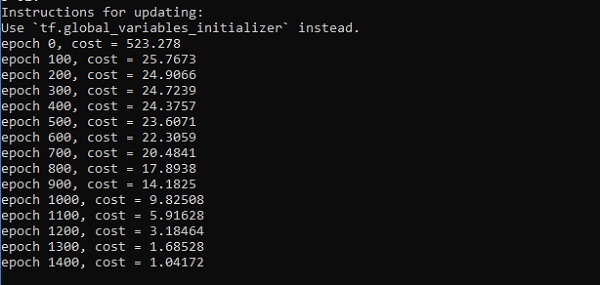
      print("epoch %d, cost = %g" % (i, cost)) 
      
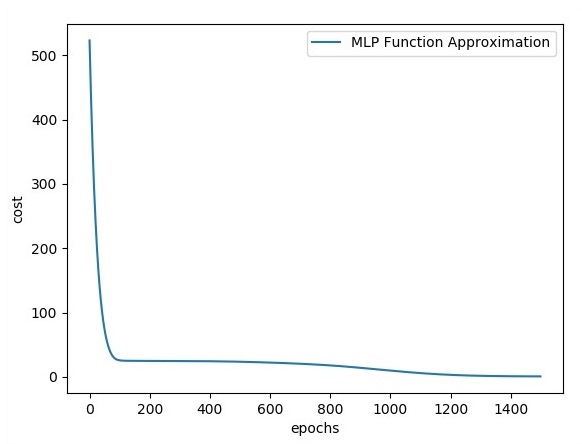
    plt.plot(errors,label='MLP Function Approximation') plt.xlabel('epochs') plt.ylabel('cost') plt.legend() plt.show()

    Output

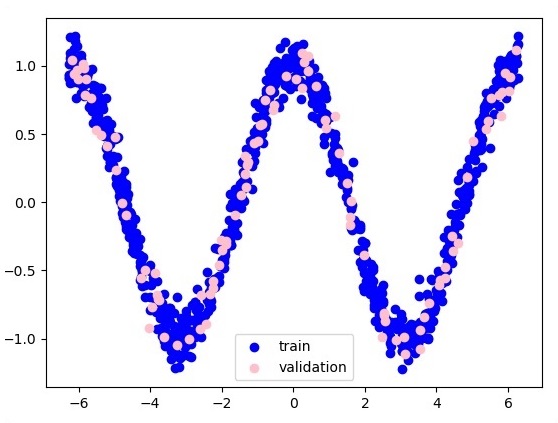
    Following is the representation of function layer approximation −

    Function Layer Approximation

    Here two data are represented in shape of W. The two data are: train and validation which are represented in distinct colors as visible in legend section.

    Distinct Colors
    MLP Function Approximation
  • Multi-Layer Perceptron Learning

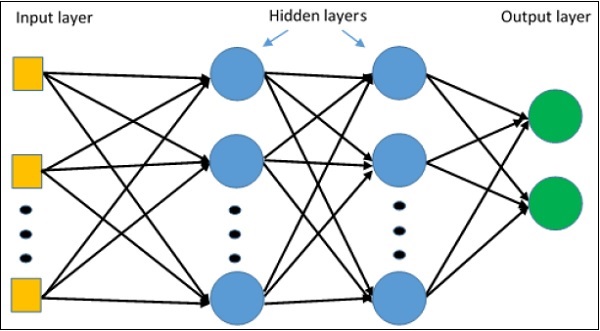
    Multi-Layer perceptron defines the most complicated architecture of artificial neural networks. It is substantially formed from multiple layers of perceptron.

    The diagrammatic representation of multi-layer perceptron learning is as shown below −

    Multi Layer Perceptron

    MLP networks are usually used for supervised learning format. A typical learning algorithm for MLP networks is also called back propagation’s algorithm.

    Now, we will focus on the implementation with MLP for an image classification problem.

    # Import MINST data 
    from tensorflow.examples.tutorials.mnist import input_data 
    mnist = input_data.read_data_sets("/tmp/data/", one_hot = True) 
    
    import tensorflow as tf 
    import matplotlib.pyplot as plt 
    
    # Parameters 
    learning_rate = 0.001 
    training_epochs = 20 
    batch_size = 100 
    display_step = 1 
    
    # Network Parameters 
    n_hidden_1 = 256 
    
    # 1st layer num features
    n_hidden_2 = 256 # 2nd layer num features 
    n_input = 784 # MNIST data input (img shape: 28*28) n_classes = 10 
    # MNIST total classes (0-9 digits) 
    
    # tf Graph input 
    x = tf.placeholder("float", [None, n_input]) 
    y = tf.placeholder("float", [None, n_classes]) 
    
    # weights layer 1 
    h = tf.Variable(tf.random_normal([n_input, n_hidden_1])) # bias layer 1 
    bias_layer_1 = tf.Variable(tf.random_normal([n_hidden_1])) 
    # layer 1 layer_1 = tf.nn.sigmoid(tf.add(tf.matmul(x, h), bias_layer_1)) 
    
    # weights layer 2 
    w = tf.Variable(tf.random_normal([n_hidden_1, n_hidden_2])) 
    
    # bias layer 2 
    bias_layer_2 = tf.Variable(tf.random_normal([n_hidden_2])) 
    
    # layer 2 
    layer_2 = tf.nn.sigmoid(tf.add(tf.matmul(layer_1, w), bias_layer_2)) 
    
    # weights output layer 
    output = tf.Variable(tf.random_normal([n_hidden_2, n_classes])) 
    
    # biar output layer 
    bias_output = tf.Variable(tf.random_normal([n_classes])) # output layer 
    output_layer = tf.matmul(layer_2, output) + bias_output
    
    # cost function 
    cost = tf.reduce_mean(tf.nn.sigmoid_cross_entropy_with_logits(
       logits = output_layer, labels = y)) 
    
    #cost = tf.reduce_mean(tf.nn.sigmoid_cross_entropy_with_logits(output_layer, y)) 
    # optimizer 
    optimizer = tf.train.AdamOptimizer(learning_rate = learning_rate).minimize(cost) 
    
    # optimizer = tf.train.GradientDescentOptimizer(
       learning_rate = learning_rate).minimize(cost) 
    
    # Plot settings 
    avg_set = [] 
    epoch_set = [] 
    
    # Initializing the variables 
    init = tf.global_variables_initializer() 
    
    # Launch the graph 
    with tf.Session() as sess: 
       sess.run(init) 
       
       # Training cycle
       for epoch in range(training_epochs): 
    
      avg_cost = 0. 
      total_batch = int(mnist.train.num_examples / batch_size) 
      
      # Loop over all batches 
      for i in range(total_batch): 
         batch_xs, batch_ys = mnist.train.next_batch(batch_size) 
         # Fit training using batch data sess.run(optimizer, feed_dict = {
            x: batch_xs, y: batch_ys}) 
         # Compute average loss 
         avg_cost += sess.run(cost, feed_dict = {x: batch_xs, y: batch_ys}) / total_batch
      # Display logs per epoch step 
      if epoch % display_step == 0: 
         print 
         Epoch:", '%04d' % (epoch + 1), "cost=", "{:.9f}".format(avg_cost)
      avg_set.append(avg_cost) 
      epoch_set.append(epoch + 1)
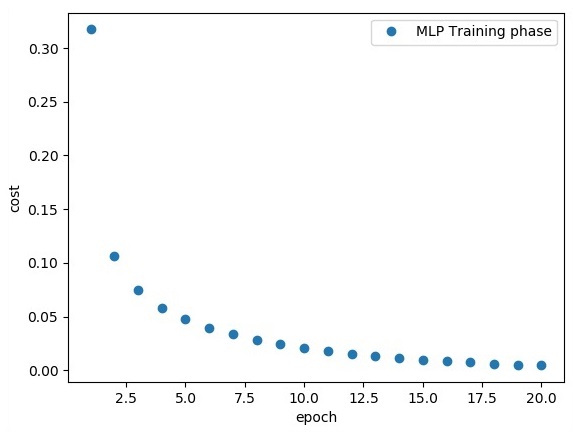
    print "Training phase finished" plt.plot(epoch_set, avg_set, 'o', label = 'MLP Training phase') plt.ylabel('cost') plt.xlabel('epoch') plt.legend() plt.show() # Test model correct_prediction = tf.equal(tf.argmax(output_layer, 1), tf.argmax(y, 1)) # Calculate accuracy accuracy = tf.reduce_mean(tf.cast(correct_prediction, "float")) print "Model Accuracy:", accuracy.eval({x: mnist.test.images, y: mnist.test.labels})

    The above line of code generates the following output −

    Implementation with MLP
  • AOT metadata errors

    The following are metadata errors you may encounter, with explanations and suggested corrections.

    Expression form not supported
    Reference to a local (non-exported) symbol
    Only initialized variables and constants
    Reference to a non-exported class
    Reference to a non-exported function
    Function calls are not supported
    Destructured variable or constant not supported
    Could not resolve type
    Name expected
    Unsupported enum member name
    Tagged template expressions are not supported
    Symbol reference expected

    Expression form not supported

    The compiler encountered an expression it didn’t understand while evaluating Angular metadata.

    Language features outside of the compiler’s restricted expression syntax can produce this error, as seen in the following example:

    content_copy// ERROR
    export class Fooish { … }
    …
    const prop = typeof Fooish; // typeof is not valid in metadata
      …
      // bracket notation is not valid in metadata
      { provide: 'token', useValue: { [prop]: 'value' } };
      …

    You can use typeof and bracket notation in normal application code. You just can’t use those features within expressions that define Angular metadata.

    Avoid this error by sticking to the compiler’s restricted expression syntax when writing Angular metadata and be wary of new or unusual TypeScript features.

    Reference to a local (non-exported) symbol

    Reference to a local (non-exported) symbol ‘symbol name’. Consider exporting the symbol.

    The compiler encountered a reference to a locally defined symbol that either wasn’t exported or wasn’t initialized.

    Here’s a provider example of the problem.

    content_copy// ERROR
    let foo: number; // neither exported nor initialized
    
    @Component({
      selector: 'my-component',
      template: … ,
      providers: [
    
    { provide: Foo, useValue: foo }
    ] }) export class MyComponent {}

    The compiler generates the component factory, which includes the useValue provider code, in a separate module. That factory module can’t reach back to this source module to access the local (non-exported) foo variable.

    You could fix the problem by initializing foo.

    content_copylet foo = 42; // initialized

    The compiler will fold the expression into the provider as if you had written this.

    content_copyproviders: [
      { provide: Foo, useValue: 42 }
    ]

    Alternatively, you can fix it by exporting foo with the expectation that foo will be assigned at runtime when you actually know its value.

    content_copy// CORRECTED
    export let foo: number; // exported
    
    @Component({
      selector: 'my-component',
      template: … ,
      providers: [
    
    { provide: Foo, useValue: foo }
    ] }) export class MyComponent {}

    Adding export often works for variables referenced in metadata such as providers and animations because the compiler can generate references to the exported variables in these expressions. It doesn’t need the values of those variables.

    Adding export doesn’t work when the compiler needs the actual value in order to generate code. For example, it doesn’t work for the template property.

    content_copy// ERROR
    export let someTemplate: string; // exported but not initialized
    
    @Component({
      selector: 'my-component',
      template: someTemplate
    })
    export class MyComponent {}

    The compiler needs the value of the template property right now to generate the component factory. The variable reference alone is insufficient. Prefixing the declaration with export merely produces a new error, “Only initialized variables and constants can be referenced“.

    Only initialized variables and constants

    Only initialized variables and constants can be referenced because the value of this variable is needed by the template compiler.

    The compiler found a reference to an exported variable or static field that wasn’t initialized. It needs the value of that variable to generate code.

    The following example tries to set the component’s template property to the value of the exported someTemplate variable which is declared but unassigned.

    content_copy// ERROR
    export let someTemplate: string;
    
    @Component({
      selector: 'my-component',
      template: someTemplate
    })
    export class MyComponent {}

    You’d also get this error if you imported someTemplate from some other module and neglected to initialize it there.

    content_copy// ERROR - not initialized there either
    import { someTemplate } from './config';
    
    @Component({
      selector: 'my-component',
      template: someTemplate
    })
    export class MyComponent {}

    The compiler cannot wait until runtime to get the template information. It must statically derive the value of the someTemplate variable from the source code so that it can generate the component factory, which includes instructions for building the element based on the template.

    To correct this error, provide the initial value of the variable in an initializer clause on the same line.

    content_copy// CORRECTED
    export let someTemplate = '<h1>Greetings from Angular</h1>';
    
    @Component({
      selector: 'my-component',
      template: someTemplate
    })
    export class MyComponent {}

    Reference to a non-exported class

    Reference to a non-exported class <class name>. Consider exporting the class.

    Metadata referenced a class that wasn’t exported.

    For example, you may have defined a class and used it as an injection token in a providers array but neglected to export that class.

    content_copy// ERROR
    abstract class MyStrategy { }
    
      …
      providers: [
    
    { provide: MyStrategy, useValue: … }
    ] …

    Angular generates a class factory in a separate module and that factory can only access exported classes. To correct this error, export the referenced class.

    content_copy// CORRECTED
    export abstract class MyStrategy { }
    
      …
      providers: [
    
    { provide: MyStrategy, useValue: … }
    ] …

    Reference to a non-exported function

    Metadata referenced a function that wasn’t exported.

    For example, you may have set a providers useFactory property to a locally defined function that you neglected to export.

    content_copy// ERROR
    function myStrategy() { … }
    
      …
      providers: [
    
    { provide: MyStrategy, useFactory: myStrategy }
    ] …

    Angular generates a class factory in a separate module and that factory can only access exported functions. To correct this error, export the function.

    content_copy// CORRECTED
    export function myStrategy() { … }
    
      …
      providers: [
    
    { provide: MyStrategy, useFactory: myStrategy }
    ] …

    Function calls are not supported

    Function calls are not supported. Consider replacing the function or lambda with a reference to an exported function.

    The compiler does not currently support function expressions or lambda functions. For example, you cannot set a provider’s useFactory to an anonymous function or arrow function like this.

    content_copy// ERROR
      …
      providers: [
    
    { provide: MyStrategy, useFactory: function() { … } },
    { provide: OtherStrategy, useFactory: () =&gt; { … } }
    ] …

    You also get this error if you call a function or method in a provider’s useValue.

    content_copy// ERROR
    import { calculateValue } from './utilities';
    
      …
      providers: [
    
    { provide: SomeValue, useValue: calculateValue() }
    ] …

    To correct this error, export a function from the module and refer to the function in a useFactory provider instead.

    content_copy// CORRECTED
    import { calculateValue } from './utilities';
    
    export function myStrategy() { … }
    export function otherStrategy() { … }
    export function someValueFactory() {
      return calculateValue();
    }
      …
      providers: [
    
    { provide: MyStrategy, useFactory: myStrategy },
    { provide: OtherStrategy, useFactory: otherStrategy },
    { provide: SomeValue, useFactory: someValueFactory }
    ] …

    Destructured variable or constant not supported

    Referencing an exported destructured variable or constant is not supported by the template compiler. Consider simplifying this to avoid destructuring.

    The compiler does not support references to variables assigned by destructuring.

    For example, you cannot write something like this:

    content_copy// ERROR
    import { configuration } from './configuration';
    
    // destructured assignment to foo and bar
    const {foo, bar} = configuration;
      …
      providers: [
    
    {provide: Foo, useValue: foo},
    {provide: Bar, useValue: bar},
    ] …

    To correct this error, refer to non-destructured values.

    content_copy// CORRECTED
    import { configuration } from './configuration';
      …
      providers: [
    
    {provide: Foo, useValue: configuration.foo},
    {provide: Bar, useValue: configuration.bar},
    ] …

    Could not resolve type

    The compiler encountered a type and can’t determine which module exports that type.

    This can happen if you refer to an ambient type. For example, the Window type is an ambient type declared in the global .d.ts file.

    You’ll get an error if you reference it in the component constructor, which the compiler must statically analyze.

    content_copy// ERROR
    @Component({ })
    export class MyComponent {
      constructor (private win: Window) { … }
    }

    TypeScript understands ambient types so you don’t import them. The Angular compiler does not understand a type that you neglect to export or import.

    In this case, the compiler doesn’t understand how to inject something with the Window token.

    Do not refer to ambient types in metadata expressions.

    If you must inject an instance of an ambient type, you can finesse the problem in four steps:

    1. Create an injection token for an instance of the ambient type.
    2. Create a factory function that returns that instance.
    3. Add a useFactory provider with that factory function.
    4. Use @Inject to inject the instance.

    Here’s an illustrative example.

    content_copy// CORRECTED
    import { Inject } from '@angular/core';
    
    export const WINDOW = new InjectionToken('Window');
    export function _window() { return window; }
    
    @Component({
      …
      providers: [
    
    { provide: WINDOW, useFactory: _window }
    ] }) export class MyComponent { constructor (@Inject(WINDOW) private win: Window) { … } }

    The Window type in the constructor is no longer a problem for the compiler because it uses the @Inject(WINDOW) to generate the injection code.

    Angular does something similar with the DOCUMENT token so you can inject the browser’s document object (or an abstraction of it, depending upon the platform in which the application runs).

    content_copyimport { Inject }   from '@angular/core';
    import { DOCUMENT } from '@angular/common';
    
    @Component({ … })
    export class MyComponent {
      constructor (@Inject(DOCUMENT) private doc: Document) { … }
    }

    Name expected

    The compiler expected a name in an expression it was evaluating.

    This can happen if you use a number as a property name as in the following example.

    content_copy// ERROR
    provider: [{ provide: Foo, useValue: { 0: 'test' } }]

    Change the name of the property to something non-numeric.

    content_copy// CORRECTED
    provider: [{ provide: Foo, useValue: { '0': 'test' } }]

    Unsupported enum member name

    Angular couldn’t determine the value of the enum member that you referenced in metadata.

    The compiler can understand simple enum values but not complex values such as those derived from computed properties.

    content_copy// ERROR
    enum Colors {
      Red = 1,
      White,
      Blue = "Blue".length // computed
    }
    
      …
      providers: [
    
    { provide: BaseColor,   useValue: Colors.White } // ok
    { provide: DangerColor, useValue: Colors.Red }   // ok
    { provide: StrongColor, useValue: Colors.Blue }  // bad
    ] …

    Avoid referring to enums with complicated initializers or computed properties.

    Tagged template expressions are not supported

    Tagged template expressions are not supported in metadata.

    The compiler encountered a JavaScript ES2015 tagged template expression such as the following.

    content_copy// ERROR
    const expression = 'funky';
    const raw = String.rawA tagged template ${expression} string;
     …
     template: '<div>' + raw + '</div>'
     …

    String.raw() is a tag function native to JavaScript ES2015.

    The AOT compiler does not support tagged template expressions; avoid them in metadata expressions.

    Symbol reference expected

    The compiler expected a reference to a symbol at the location specified in the error message.

    This error can occur if you use an expression in the extends clause of a class.

  • Exporting

    Here, we will focus on MetaGraph formation in TensorFlow. This will help us understand export module in TensorFlow. The MetaGraph contains the basic information, which is required to train, perform evaluation, or run inference on a previously trained graph.

    Following is the code snippet for the same −

    def export_meta_graph(filename = None, collection_list = None, as_text = False): 
       """this code writes MetaGraphDef to save_path/filename. 
       
       Arguments: 
       filename: Optional meta_graph filename including the path. collection_list: 
    
      List of string keys to collect. as_text: If True, 
      writes the meta_graph as an ASCII proto. 
    Returns: A MetaGraphDef proto. """

    One of the typical usage model for the same is mentioned below −

    # Build the model ... 
    with tf.Session() as sess: 
       # Use the model ... 
    # Export the model to /tmp/my-model.meta. 
    meta_graph_def = tf.train.export_meta_graph(filename = '/tmp/my-model.meta')
  • Distributed Computing

    This chapter will focus on how to get started with distributed TensorFlow. The aim is to help developers understand the basic distributed TF concepts that are reoccurring, such as TF servers. We will use the Jupyter Notebook for evaluating distributed TensorFlow. The implementation of distributed computing with TensorFlow is mentioned below −

    Step 1 − Import the necessary modules mandatory for distributed computing −

    import tensorflow as tf
    

    Step 2 − Create a TensorFlow cluster with one node. Let this node be responsible for a job that that has name “worker” and that will operate one take at localhost:2222.

    cluster_spec = tf.train.ClusterSpec({'worker' : ['localhost:2222']})
    server = tf.train.Server(cluster_spec)
    server.target
    

    The above scripts generate the following output −

    'grpc://localhost:2222'
    The server is currently running.
    

    Step 3 − The server configuration with respective session can be calculated by executing the following command −

    server.server_def
    

    The above command generates the following output −

    cluster {
       job {
    
      name: "worker"
      tasks {
         value: "localhost:2222"
      }
    } } job_name: "worker" protocol: "grpc"

    Step 4 − Launch a TensorFlow session with the execution engine being the server. Use TensorFlow to create a local server and use lsof to find out the location of the server.

    sess = tf.Session(target = server.target)
    server = tf.train.Server.create_local_server()
    

    Step 5 − View devices available in this session and close the respective session.

    devices = sess.list_devices()
    for d in devices:
       print(d.name)
    sess.close()

    The above command generates the following output −

    /job:worker/replica:0/task:0/device:CPU:0
  • Angular compiler options

    When you use ahead-of-time compilation (AOT), you can control how your application is compiled by specifying template compiler options in the TypeScript configuration file.

    The template options object, angularCompilerOptions, is a sibling to the compilerOptions object that supplies standard options to the TypeScript compiler.tsconfig.json

    content_copy{
      "compileOnSave": false,
      "compilerOptions": {
    
    "baseUrl": "./",
    // ...
    }, "angularCompilerOptions": {
    "enableI18nLegacyMessageIdFormat": false,
    "strictInjectionParameters": true,
    // ...
    "disableTypeScriptVersionCheck": true
    } }

    Configuration inheritance with extends

    Like the TypeScript compiler, the Angular AOT compiler also supports extends in the angularCompilerOptions section of the TypeScript configuration file. The extends property is at the top level, parallel to compilerOptions and angularCompilerOptions.

    A TypeScript configuration can inherit settings from another file using the extends property. The configuration options from the base file are loaded first, then overridden by those in the inheriting configuration file.

    For example:tsconfig.app.json

    content_copy{
    
    "extends": "./tsconfig.json",
    "compilerOptions": {
      "outDir": "./out-tsc/app",
    // ...
    "angularCompilerOptions": {
      "strictTemplates": true,
      "preserveWhitespaces": true,
      // ...
      "disableTypeScriptVersionCheck": true
    }
    }

    For more information, see the TypeScript Handbook.

    Template options

    The following options are available for configuring the AOT template compiler.

    annotationsAs

    Modifies how Angular-specific annotations are emitted to improve tree-shaking. Non-Angular annotations are not affected. One of static fields or decorators. The default value is static fields.

    • By default, the compiler replaces decorators with a static field in the class, which allows advanced tree-shakers like Closure compiler to remove unused classes
    • The decorators value leaves the decorators in place, which makes compilation faster. TypeScript emits calls to the __decorate helper. Use --emitDecoratorMetadata for runtime reflection.NOTE:
      That the resulting code cannot tree-shake properly.

    annotateForClosureCompiler

    When true, use Tsickle to annotate the emitted JavaScript with JSDoc comments needed by the Closure Compiler. Default is false.

    compilationMode

    Specifies the compilation mode to use. The following modes are available:

    ModesDetails
    'full'Generates fully AOT-compiled code according to the version of Angular that is currently being used.
    'partial'Generates code in a stable, but intermediate form suitable for a published library.

    The default value is 'full'.

    disableExpressionLowering

    When true, the default, transforms code that is or could be used in an annotation, to allow it to be imported from template factory modules. See metadata rewriting for more information.

    When false, disables this rewriting, requiring the rewriting to be done manually.

    disableTypeScriptVersionCheck

    When true, the compiler does not look at the TypeScript version and does not report an error when an unsupported version of TypeScript is used. Not recommended, as unsupported versions of TypeScript might have undefined behavior. Default is false.

    enableI18nLegacyMessageIdFormat

    Instructs the Angular template compiler to create legacy ids for messages that are tagged in templates by the i18n attribute. See Mark text for translations for more information about marking messages for localization.

    Set this option to false unless your project relies upon translations that were created earlier using legacy IDs. Default is true.

    The pre-Ivy message extraction tooling created a variety of legacy formats for extracted message IDs. These message formats have some issues, such as whitespace handling and reliance upon information inside the original HTML of a template.

    The new message format is more resilient to whitespace changes, is the same across all translation file formats, and can be created directly from calls to $localize. This allows $localize messages in application code to use the same ID as identical i18n messages in component templates.

    enableResourceInlining

    When true, replaces the templateUrl and styleUrls properties in all @Component decorators with inline content in the template and styles properties.

    When enabled, the .js output of ngc does not include any lazy-loaded template or style URLs.

    For library projects created with the Angular CLI, the development configuration default is true.

    enableLegacyTemplate

    When true, enables the deprecated <template> element in place of <ng-template>. Default is false. Might be required by some third-party Angular libraries.

    flatModuleId

    The module ID to use for importing a flat module (when flatModuleOutFile is true). References created by the template compiler use this module name when importing symbols from the flat module. Ignored if flatModuleOutFile is false.

    flatModuleOutFile

    When true, generates a flat module index of the given filename and the corresponding flat module metadata. Use to create flat modules that are packaged similarly to @angular/core and @angular/common. When this option is used, the package.json for the library should refer to the created flat module index instead of the library index file.

    Produces only one .metadata.json file, which contains all the metadata necessary for symbols exported from the library index. In the created .ngfactory.js files, the flat module index is used to import symbols. Symbols that include both the public API from the library index and shrouded internal symbols.

    By default, the .ts file supplied in the files field is assumed to be the library index. If more than one .ts file is specified, libraryIndex is used to select the file to use. If more than one .ts file is supplied without a libraryIndex, an error is produced.

    A flat module index .d.ts and .js is created with the given flatModuleOutFile name in the same location as the library index .d.ts file.

    For example, if a library uses the public_api.ts file as the library index of the module, the tsconfig.json files field would be ["public_api.ts"]. The flatModuleOutFile option could then be set, for example, to "index.js", which produces index.d.ts and index.metadata.json files. The module field of the library’s package.json would be "index.js" and the typings field would be "index.d.ts".

    fullTemplateTypeCheck

    When true, the recommended value, enables the binding expression validation phase of the template compiler. This phase uses TypeScript to verify binding expressions. For more information, see Template type checking.

    Default is false, but set to true in the created workspace configuration when creating a project using the Angular CLI.

    The fullTemplateTypeCheck option has been deprecated in Angular 13 in favor of the strictTemplates family of compiler options.

    generateCodeForLibraries

    When true, creates factory files (.ngfactory.js and .ngstyle.js) for .d.ts files with a corresponding .metadata.json file. The default value is true.

    When false, factory files are created only for .ts files. Do this when using factory summaries.

    preserveWhitespaces

    When false, the default, removes blank text nodes from compiled templates, which results in smaller emitted template factory modules. Set to true to preserve blank text nodes.

    When using hydration, it is recommended that you use preserveWhitespaces: false, which is the default value. If you choose to enable preserving whitespaces by adding preserveWhitespaces: true to your tsconfig, it is possible you may encounter issues with hydration. This is not yet a fully supported configuration. Ensure this is also consistently set between the server and client tsconfig files. See the hydration guide for more details.

    skipMetadataEmit

    When true, does not produce .metadata.json files. Default is false.

    The .metadata.json files contain information needed by the template compiler from a .ts file that is not included in the .d.ts file produced by the TypeScript compiler. This information includes, for example, the content of annotations, such as a component’s template, which TypeScript emits to the .js file but not to the .d.ts file.

    You can set to true when using factory summaries, because the factory summaries include a copy of the information that is in the .metadata.json file.

    Set to true if you are using TypeScript’s --outFile option, because the metadata files are not valid for this style of TypeScript output. The Angular community does not recommend using --outFile with Angular. Use a bundler, such as webpack, instead.

    skipTemplateCodegen

    When true, does not emit .ngfactory.js and .ngstyle.js files. This turns off most of the template compiler and disables the reporting of template diagnostics.

    Can be used to instruct the template compiler to produce .metadata.json files for distribution with an npm package. This avoids the production of .ngfactory.js and .ngstyle.js files that cannot be distributed to npm.

    For library projects created with the Angular CLI, the development configuration default is true.

    strictMetadataEmit

    When true, reports an error to the .metadata.json file if "skipMetadataEmit" is false. Default is false. Use only when "skipMetadataEmit" is false and "skipTemplateCodegen" is true.

    This option is intended to verify the .metadata.json files emitted for bundling with an npm package. The validation is strict and can emit errors for metadata that would never produce an error when used by the template compiler. You can choose to suppress the error emitted by this option for an exported symbol by including @dynamic in the comment documenting the symbol.

    It is valid for .metadata.json files to contain errors. The template compiler reports these errors if the metadata is used to determine the contents of an annotation. The metadata collector cannot predict the symbols that are designed for use in an annotation. It preemptively includes error nodes in the metadata for the exported symbols. The template compiler can then use the error nodes to report an error if these symbols are used.

    If the client of a library intends to use a symbol in an annotation, the template compiler does not normally report this. It gets reported after the client actually uses the symbol. This option allows detection of these errors during the build phase of the library and is used, for example, in producing Angular libraries themselves.

    For library projects created with the Angular CLI, the development configuration default is true.

    strictInjectionParameters

    When true, reports an error for a supplied parameter whose injection type cannot be determined. When false, constructor parameters of classes marked with @Injectable whose type cannot be resolved produce a warning. The recommended value is true, but the default value is false.

    Set to true in the created workspace configuration when creating a project using the Angular CLI.

    strictTemplates

    When true, enables strict template type checking.

    The strictness flags that this option enables allow you to turn on and off specific types of strict template type checking. See troubleshooting template errors.

    Set to true in the created workspace configuration when creating a project using the Angular CLI.

    trace

    When true, prints extra information while compiling templates. Default is false.

    Command line options

    Most of the time you interact with the Angular Compiler indirectly using Angular CLI. When debugging certain issues, you might find it useful to invoke the Angular Compiler directly. You can use the ngc command provided by the @angular/compiler-cli npm package to call the compiler from the command line.

    The ngc command is just a wrapper around TypeScript’s tsc compiler command and is primarily configured via the tsconfig.json configuration options documented in the previous sections.

    Besides the configuration file, you can also use tsccommand line options to configure ngc.

  • Keras

    Keras is compact, easy to learn, high-level Python library run on top of TensorFlow framework. It is made with focus of understanding deep learning techniques, such as creating layers for neural networks maintaining the concepts of shapes and mathematical details. The creation of freamework can be of the following two types −

    • Sequential API
    • Functional API

    Consider the following eight steps to create deep learning model in Keras −

    • Loading the data
    • Preprocess the loaded data
    • Definition of model
    • Compiling the model
    • Fit the specified model
    • Evaluate it
    • Make the required predictions
    • Save the model

    We will use the Jupyter Notebook for execution and display of output as shown below −

    Step 1 − Loading the data and preprocessing the loaded data is implemented first to execute the deep learning model.

    import warnings
    warnings.filterwarnings('ignore')
    
    import numpy as np
    np.random.seed(123) # for reproducibility
    
    from keras.models import Sequential
    from keras.layers import Flatten, MaxPool2D, Conv2D, Dense, Reshape, Dropout
    from keras.utils import np_utils
    Using TensorFlow backend.
    from keras.datasets import mnist
    
    # Load pre-shuffled MNIST data into train and test sets
    (X_train, y_train), (X_test, y_test) = mnist.load_data()
    X_train = X_train.reshape(X_train.shape[0], 28, 28, 1)
    X_test = X_test.reshape(X_test.shape[0], 28, 28, 1)
    X_train = X_train.astype('float32')
    X_test = X_test.astype('float32')
    X_train /= 255
    X_test /= 255
    Y_train = np_utils.to_categorical(y_train, 10)
    Y_test = np_utils.to_categorical(y_test, 10)

    This step can be defined as “Import libraries and Modules” which means all the libraries and modules are imported as an initial step.

    Step 2 − In this step, we will define the model architecture −

    model = Sequential()
    model.add(Conv2D(32, 3, 3, activation = 'relu', input_shape = (28,28,1)))
    model.add(Conv2D(32, 3, 3, activation = 'relu'))
    model.add(MaxPool2D(pool_size = (2,2)))
    model.add(Dropout(0.25))
    model.add(Flatten())
    model.add(Dense(128, activation = 'relu'))
    model.add(Dropout(0.5))
    model.add(Dense(10, activation = 'softmax'))

    Step 3 − Let us now compile the specified model −

    model.compile(loss = 'categorical_crossentropy', optimizer = 'adam', metrics = ['accuracy'])
    

    Step 4 − We will now fit the model using training data −

    model.fit(X_train, Y_train, batch_size = 32, epochs = 10, verbose = 1)
    

    The output of iterations created is as follows −

    Epoch 1/10 60000/60000 [==============================] - 65s - 
    loss: 0.2124 - 
    acc: 0.9345 
    Epoch 2/10 60000/60000 [==============================] - 62s - 
    loss: 0.0893 - 
    acc: 0.9740 
    Epoch 3/10 60000/60000 [==============================] - 58s - 
    loss: 0.0665 - 
    acc: 0.9802 
    Epoch 4/10 60000/60000 [==============================] - 62s - 
    loss: 0.0571 - 
    acc: 0.9830 
    Epoch 5/10 60000/60000 [==============================] - 62s - 
    loss: 0.0474 - 
    acc: 0.9855 
    Epoch 6/10 60000/60000 [==============================] - 59s -
    loss: 0.0416 - 
    acc: 0.9871 
    Epoch 7/10 60000/60000 [==============================] - 61s - 
    loss: 0.0380 - 
    acc: 0.9877 
    Epoch 8/10 60000/60000 [==============================] - 63s - 
    loss: 0.0333 - 
    acc: 0.9895 
    Epoch 9/10 60000/60000 [==============================] - 64s - 
    loss: 0.0325 - 
    acc: 0.9898 
    Epoch 10/10 60000/60000 [==============================] - 60s - 
    loss: 0.0284 - 
    acc: 0.9910
  • CNN And RNN Difference

    In this chapter, we will focus on the difference between CNN and RNN −

    CNNRNN
    It is suitable for spatial data such as images.RNN is suitable for temporal data, also called sequential data.
    CNN is considered to be more powerful than RNN.RNN includes less feature compatibility when compared to CNN.
    This network takes fixed size inputs and generates fixed size outputs.RNN can handle arbitrary input/output lengths.
    CNN is a type of feed-forward artificial neural network with variations of multilayer perceptrons designed to use minimal amounts of preprocessing.RNN unlike feed forward neural networks – can use their internal memory to process arbitrary sequences of inputs.
    CNNs use connectivity pattern between the neurons. This is inspired by the organization of the animal visual cortex, whose individual neurons are arranged in such a way that they respond to overlapping regions tiling the visual field.Recurrent neural networks use time-series information – what a user spoke last will impact what he/she will speak next.
    CNNs are ideal for images and video processing.RNNs are ideal for text and speech analysis.

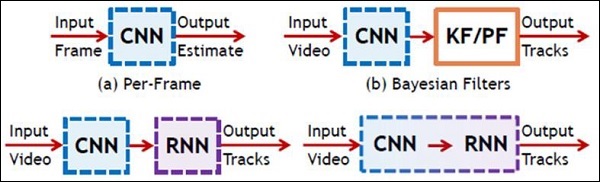
    Following illustration shows the schematic representation of CNN and RNN −

    Schematic Representation Of CNN And RNN
  • TFLearn And Its Installation

    TFLearn can be defined as a modular and transparent deep learning aspect used in TensorFlow framework. The main motive of TFLearn is to provide a higher level API to TensorFlow for facilitating and showing up new experiments.

    Consider the following important features of TFLearn −

    • TFLearn is easy to use and understand.
    • It includes easy concepts to build highly modular network layers, optimizers and various metrics embedded within them.
    • It includes full transparency with TensorFlow work system.
    • It includes powerful helper functions to train the built in tensors which accept multiple inputs, outputs and optimizers.
    • It includes easy and beautiful graph visualization.
    • The graph visualization includes various details of weights, gradients and activations.

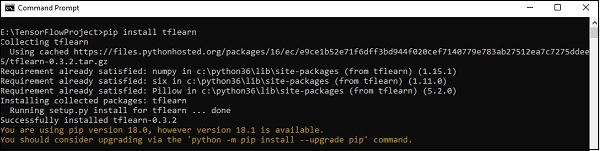
    Install TFLearn by executing the following command −

    pip install tflearn
    

    Upon execution of the above code, the following output will be generated −

    Install TFLearn

    The following illustration shows the implementation of TFLearn with Random Forest classifier −

    from __future__ import division, print_function, absolute_import
    
    #TFLearn module implementation
    import tflearn
    from tflearn.estimators import RandomForestClassifier
    
    # Data loading and pre-processing with respect to dataset
    import tflearn.datasets.mnist as mnist
    X, Y, testX, testY = mnist.load_data(one_hot = False)
    
    m = RandomForestClassifier(n_estimators = 100, max_nodes = 1000)
    m.fit(X, Y, batch_size = 10000, display_step = 10)
    
    print("Compute the accuracy on train data:")
    print(m.evaluate(X, Y, tflearn.accuracy_op))
    
    print("Compute the accuracy on test set:")
    print(m.evaluate(testX, testY, tflearn.accuracy_op))
    
    print("Digits for test images id 0 to 5:")
    print(m.predict(testX[:5]))
    
    print("True digits:")
    print(testY[:5])