Laravel has a strong and active community, which means plenty of resources, tutorials, and forums are available for developers. The official documentation is thorough and well-organized, making it easier for newcomers to learn the framework.
Author: saqibkhan
-
Package Ecosystem
Laravel has a rich ecosystem of packages and extensions, which enhances its functionality. You can easily integrate third-party libraries or use Laravel-specific packages like Passport for API authentication and Nova for admin panels.
-
Application Structure
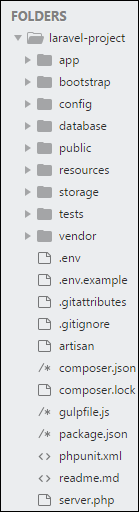
The application structure in Laravel is basically the structure of folders, sub-folders and files included in a project. Once we create a project in Laravel, we get an overview of the application structure as shown in the image here.
The snapshot shown here refers to the root folder of Laravel namely laravel-project. It includes various sub-folders and files. The analysis of folders and files, along with their functional aspects is given below −
App
It is the application folder and includes the entire source code of the project. It contains events, exceptions and middleware declaration. The app folder comprises various sub folders as explained below −
Console
Console includes the artisan commands necessary for Laravel. It includes a directory named Commands, where all the commands are declared with the appropriate signature. The file Kernal.php calls the commands declared in Inspire.php.
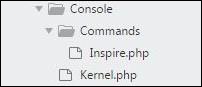
If we need to call a specific command in Laravel, then we should make appropriate changes in this directory.
Events
This folder includes all the events for the project.

Events are used to trigger activities, raise errors or necessary validations and provide greater flexibility. Laravel keeps all the events under one directory. The default file included is event.php where all the basic events are declared.
Exceptions
This folder contains all the methods needed to handle exceptions. It also contains the file handle.php that handles all the exceptions.
Http
The Http folder has sub-folders for controllers, middleware and application requests. As Laravel follows the MVC design pattern, this folder includes model, controllers and views defined for the specific directories.
The Middleware sub-folder includes middleware mechanism, comprising the filter mechanism and communication between response and request.
The Requests sub-folder includes all the requests of the application.
Jobs
The Jobs directory maintains the activities queued for Laravel application. The base class is shared among all the Jobs and provides a central location to place them under one roof.
Listeners
Listeners are event-dependent and they include methods which are used to handle events and exceptions. For example, the login event declared includes a LoginListener event.
Policies
Policies are the PHP classes which includes the authorization logic. Laravel includes a feature to create all authorization logic within policy classes inside this sub folder.
Providers
This folder includes all the service providers required to register events for core servers and to configure a Laravel application.
Bootstrap
This folder encloses all the application bootstrap scripts. It contains a sub-folder namely cache, which includes all the files associated for caching a web application. You can also find the file app.php, which initializes the scripts necessary for bootstrap.
Explore our latest online courses and learn new skills at your own pace. Enroll and become a certified expert to boost your career.
Config
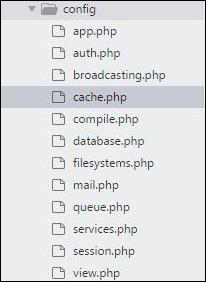
The config folder includes various configurations and associated parameters required for the smooth functioning of a Laravel application. Various files included within the config folder are as shown in the image here. The filenames work as per the functionality associated with them.
Database
As the name suggests, this directory includes various parameters for database functionalities. It includes three sub-directories as given below −
- Seeds − This contains the classes used for unit testing database.
- Migrations − This folder helps in queries for migrating the database used in the web application.
- Factories − This folder is used to generate large number of data records.
Public
It is the root folder which helps in initializing the Laravel application. It includes the following files and folders −
- .htaccess − This file gives the server configuration.
- javascript and css − These files are considered as assets.
- index.php − This file is required for the initialization of a web application.
Resources
Resources directory contains the files which enhances your web application. The sub-folders included in this directory and their purpose is explained below −
- assets − The assets folder include files such as LESS and SCSS, that are required for styling the web application.
- lang − This folder includes configuration for localization or internalization.
- views − Views are the HTML files or templates which interact with end users and play a primary role in MVC architecture.
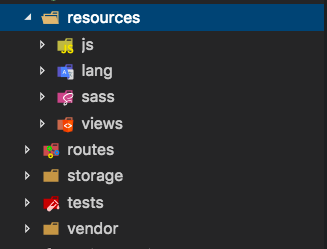
Observe that the resources directory will be flattened instead of having an assets folder. The pictorial representation of same is shown below −
Storage
This is the folder that stores all the logs and necessary files which are needed frequently when a Laravel project is running. The sub-folders included in this directory and their purpose is given below −
- app − This folder contains the files that are called in succession.
- framework − It contains sessions, cache and views which are called frequently.
- Logs − All exceptions and error logs are tracked in this sub folder.
Tests
All the unit test cases are included in this directory. The naming convention for naming test case classes is camel_case and follows the convention as per the functionality of the class.
Vendor
Laravel is completely based on Composer dependencies, for example to install Laravel setup or to include third party libraries, etc. The Vendor folder includes all the composer dependencies.
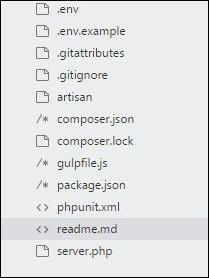
In addition to the above mentioned files, Laravel also includes some other files which play a primary role in various functionalities such as GitHub configuration, packages and third party libraries.
The files included in the application structure are shown below −
-
Task Scheduling
Laravel’s task scheduling feature allows developers to define scheduled tasks within the application itself, rather than relying on server cron jobs. This makes managing scheduled tasks more convenient and organized.
-
Middleware
Middleware in Laravel acts as a bridge between a request and a response. It allows you to filter and manipulate incoming HTTP requests, enabling functionalities like authentication, logging, and CORS (Cross-Origin Resource Sharing) management.
-
Testing Support
Laravel is designed with testing in mind. It integrates seamlessly with PHPUnit, allowing developers to write and run tests easily. This feature promotes a test-driven development (TDD) approach, improving code quality and reliability.
-
Artisan CLI
Laravel includes a command-line interface called Artisan, which provides a variety of helpful commands for tasks like database migrations, seeding, and generating boilerplate code. This speeds up development and allows developers to automate repetitive tasks.
-
Installation
For managing dependencies, Laravel uses composer. Make sure you have a Composer installed on your system before you install Laravel. In this chapter, you will see the installation process of Laravel.
You will have to follow the steps given below for installing Laravel onto your system −
Step 1 − Visit the following URL and download composer to install it on your system.
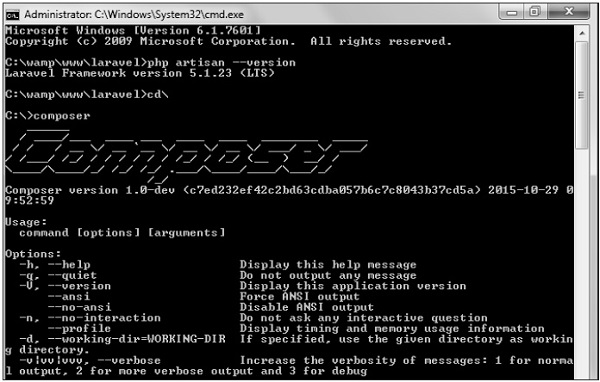
Step 2 − After the Composer is installed, check the installation by typing the Composer command in the command prompt as shown in the following screenshot.
Step 3 − Create a new directory anywhere in your system for your new Laravel project. After that, move to path where you have created the new directory and type the following command there to install Laravel.
composer create-project laravel/laravel –-prefer-distNow, we will focus on installation of version 5.7. In Laravel version 5.7, you can install the complete framework by typing the following command −
composer create-project laravel/laravel test dev-developThe output of the command is as shown below −
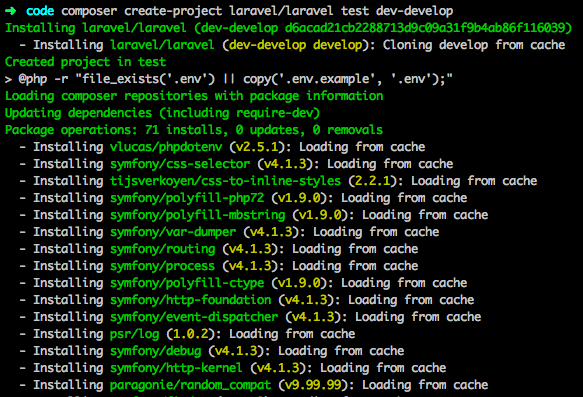
The Laravel framework can be directly installed with develop branch which includes the latest framework.
Step 4 − The above command will install Laravel in the current directory. Start the Laravel service by executing the following command.
php artisan serveStep 5 − After executing the above command, you will see a screen as shown below −
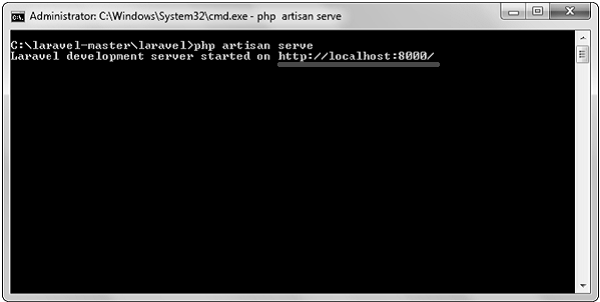
Step 6 − Copy the URL underlined in gray in the above screenshot and open that URL in the browser. If you see the following screen, it implies Laravel has been installed successfully.
-
Security Features
Laravel comes with built-in security features, including:
- CSRF Protection: Prevents Cross-Site Request Forgery attacks.
- Encryption: Protects sensitive data using strong encryption.
- SQL Injection Protection: Eloquent and query builder use prepared statements, reducing the risk of SQL injection attacks.
-
Blade Templating Engine
Blade is Laravel’s powerful templating engine that allows developers to create dynamic content with minimal effort. It supports template inheritance, enabling reusable layouts and sections, which reduces code duplication and enhances maintainability.