- Launched in February 2015, Laravel 5 came with many new features, including:
- Middleware for handling HTTP requests.
- New directory structure for better organization.
- Enhanced security features, including improved authentication mechanisms.
Author: saqibkhan
-
Laravel 5 (2015)
-
Laravel 4 (2013)
- Released in May 2013, Laravel 4 adopted a more modular approach using Composer for dependency management. It introduced features like routing improvements, an improved ORM, and a more refined application structure.
-
Request
In this chapter, you will learn in detail about Requests in Laravel.
Retrieving the Request URI
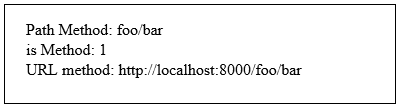
The “path” method is used to retrieve the requested URI. The is method is used to retrieve the requested URI which matches the particular pattern specified in the argument of the method. To get the full URL, we can use the url method.
Example
Step 1 − Execute the below command to create a new controller called UriController.
php artisan make:controller UriController –plainStep 2 − After successful execution of the URL, you will receive the following output −
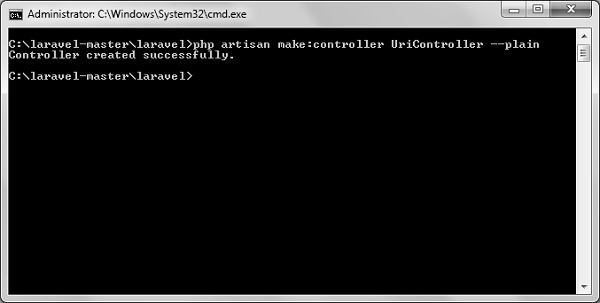
Step 3 − After creating a controller, add the following code in that file.
app/Http/Controllers/UriController.php
<?php namespace App\Http\Controllers; use Illuminate\Http\Request; use App\Http\Requests; use App\Http\Controllers\Controller; class UriController extends Controller { public function index(Request $request) {
} }// Usage of path method $path = $request->path(); echo 'Path Method: '.$path; echo '<br>'; // Usage of is method $pattern = $request->is('foo/*'); echo 'is Method: '.$pattern; echo '<br>'; // Usage of url method $url = $request->url(); echo 'URL method: '.$url;Step 4 − Add the following line in the app/Http/route.php file.
app/Http/route.php
Route::get('/foo/bar','UriController@index');Step 5 − Visit the following URL.
http://localhost:8000/foo/barStep 6 − The output will appear as shown in the following image.
Retrieving Input
The input values can be easily retrieved in Laravel. No matter what method was used “get” or “post”, the Laravel method will retrieve input values for both the methods the same way. There are two ways we can retrieve the input values.
- Using the input() method
- Using the properties of Request instance
Using the input() method
The input() method takes one argument, the name of the field in form. For example, if the form contains username field then we can access it by the following way.
$name = $request->input('username');Using the properties of Request instance
Like the input() method, we can get the username property directly from the request instance.
$request->usernameExample
Observe the following example to understand more about Requests −
Step 1 − Create a Registration form, where user can register himself and store the form at resources/views/register.php
<html> <head>
</head> <body><title>Form Example</title>
</body> </html><form action = "/user/register" method = "post"> <input type = "hidden" name = "_token" value = "<?php echo csrf_token() ?>"> <table> <tr> <td>Name</td> <td><input type = "text" name = "name" /></td> </tr> <tr> <td>Username</td> <td><input type = "text" name = "username" /></td> </tr> <tr> <td>Password</td> <td><input type = "text" name = "password" /></td> </tr> <tr> <td colspan = "2" align = "center"> <input type = "submit" value = "Register" /> </td> </tr> </table> </form>Step 2 − Execute the below command to create a UserRegistration controller.
php artisan make:controller UserRegistration --plainStep 3 − After successful execution of the above step, you will receive the following output −
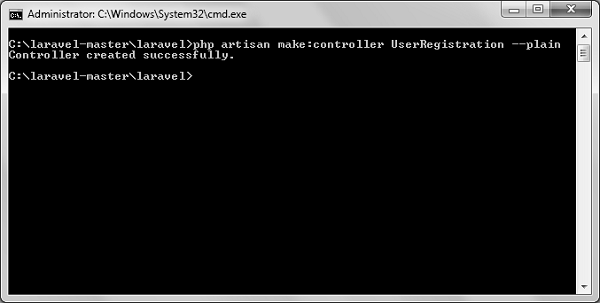
Step 4 − Copy the following code in
app/Http/Controllers/UserRegistration.php controller.
app/Http/Controllers/UserRegistration.php
<?php namespace App\Http\Controllers; use Illuminate\Http\Request; use App\Http\Requests; use App\Http\Controllers\Controller; class UserRegistration extends Controller { public function postRegister(Request $request) {
} }//Retrieve the name input field $name = $request->input('name'); echo 'Name: '.$name; echo '<br>'; //Retrieve the username input field $username = $request->username; echo 'Username: '.$username; echo '<br>'; //Retrieve the password input field $password = $request->password; echo 'Password: '.$password;Step 5 − Add the following line in app/Http/routes.php file.
app/Http/routes.php
Route::get('/register',function() {
   return view('register');
});
Route::post('/user/register',array('uses'=>'UserRegistration@postRegister'));
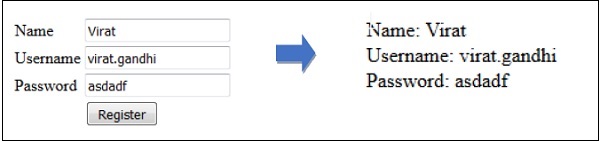
Step 6 − Visit the following URL and you will see the registration form as shown in the below figure. Type the registration details and click Register and you will see on the second page that we have retrieved and displayed the user registration details.
http://localhost:8000/registerStep 7 − The output will look something like as shown in below the following images.
-
Laravel 2 (2011)
- Released later in 2011, Laravel 2 introduced support for controllers and a more expressive routing system. It also added the concept of dependency injection and was designed for improved modularity.
-
Laravel 3 (2012)
- This version marked a significant upgrade, bringing in features like an ORM called Eloquent, built-in migrations for database management, and a command-line interface named Artisan. Laravel 3 established Laravel as a more robust framework for building web applications.
-
Initial Release (2011)
- Laravel 1: Released in June 2011, it introduced the basic structure of a PHP framework based on MVC (Model-View-Controller) principles, along with features like routing, sessions, and authentication.
-
server-Side Rendering Limitations
While Laravel excels in server-side rendering, creating single-page applications (SPAs) using Laravel can be more complex compared to using JavaScript frameworks like Vue.js or React, which are better suited for client-side rendering.
-
Deployment Complexity
Deploying Laravel applications can sometimes be complex, particularly if you need to set up environment variables, manage cache, and run migrations during deployment, especially for larger applications.
-
Less Suitable for API-Only Applications
While Laravel can be used to build APIs, frameworks like Lumen (a micro-framework from Laravel) or other dedicated API frameworks may be more suitable for applications that only require API functionality, due to their lightweight nature.
-
Controllers
In the MVC framework, the letter ‘C’ stands for Controller. It acts as a directing traffic between Views and Models. In this chapter, you will learn about Controllers in Laravel.
Creating a Controller
Open the command prompt or terminal based on the operating system you are using and type the following command to create controller using the Artisan CLI (Command Line Interface).
php artisan make:controller <controller-name> --plainReplace the <controller-name> with the name of your controller. This will create a plain constructor as we are passing the argument — plain. If you don’t want to create a plain constructor, you can simply ignore the argument. The created constructor can be seen at app/Http/Controllers.
You will see that some basic coding has already been done for you and you can add your custom coding. The created controller can be called from routes.php by the following syntax.
Syntax
Route::get(‘base URI’,’controller@method’);Example
Step 1 − Execute the following command to create UserController.
php artisan make:controller UserController --plainStep 2 − After successful execution, you will receive the following output.
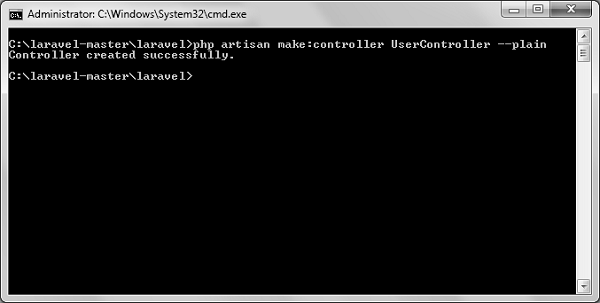
Step 3 − You can see the created controller at app/Http/Controller/UserController.php with some basic coding already written for you and you can add your own coding based on your need.
<?php

namespace App\Http\Controllers;

use Illuminate\Http\Request;
use App\Http\Requests;
use App\Http\Controllers\Controller;

class UserController extends Controller {
   //
}
Controller Middleware
We have seen middleware before and it can be used with controller also. Middleware can also be assigned to controller’s route or within your controller’s constructor. You can use the middleware method to assign middleware to the controller. The registered middleware can also be restricted to certain method of the controller.
Assigning Middleware to Route
Route::get('profile', [
   'middleware' => 'auth',
   'uses' => 'UserController@showProfile'
]);
Here we are assigning auth middleware to UserController in profile route.
Assigning Middleware within Controller’s constructor
<?php namespace App\Http\Controllers; use Illuminate\Http\Request; use App\Http\Requests; use App\Http\Controllers\Controller; class UserController extends Controller { public function __construct() {
} }$this->middleware('auth');Here we are assigning auth middleware using the middleware method in the UserController constructor.
Example
Step 1 − Add the following lines of code to the app/Http/routes.php file and save it.
routes.php
<?php
Route::get('/usercontroller/path',[
   'middleware' => 'First',
   'uses' => 'UserController@showPath'
]);
Step 2 − Create a middleware called FirstMiddleware by executing the following line of code.
php artisan make:middleware FirstMiddlewareStep 3 − Add the following code into the handle method of the newly created FirstMiddleware at app/Http/Middleware.
FirstMiddleware.php
<?php namespace App\Http\Middleware; use Closure; class FirstMiddleware { public function handle($request, Closure $next) {
} }echo '<br>First Middleware'; return $next($request);Step 4 − Create a middleware called SecondMiddleware by executing the following command.
php artisan make:middleware SecondMiddlewareStep 5 − Add the following code in the handle method of the newly created SecondMiddleware at app/Http/Middleware.
SecondMiddleware.php
<?php namespace App\Http\Middleware; use Closure; class SecondMiddleware { public function handle($request, Closure $next) {
} }echo '<br>Second Middleware'; return $next($request);Step 6 − Create a controller called UserController by executing the following line.
php artisan make:controller UserController --plainStep 7 − After successful execution of the URL, you will receive the following output −
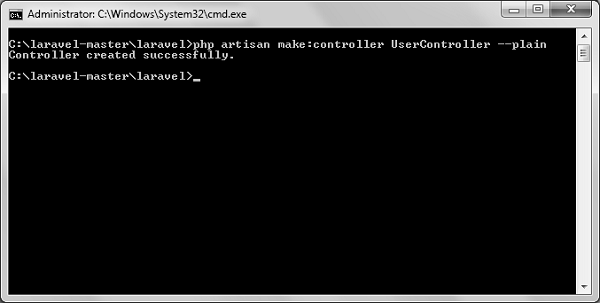
Step 8 − Copy the following code to app/Http/UserController.php file.
app/Http/UserController.php
<?php namespace App\Http\Controllers; use Illuminate\Http\Request; use App\Http\Requests; use App\Http\Controllers\Controller; class UserController extends Controller { public function __construct() {
} public function showPath(Request $request) {$this->middleware('Second');
} }$uri = $request->path(); echo '<br>URI: '.$uri; $url = $request->url(); echo '<br>'; echo 'URL: '.$url; $method = $request->method(); echo '<br>'; echo 'Method: '.$method;Step 9 − Now launch the php’s internal web server by executing the following command, if you haven’t executed it yet.
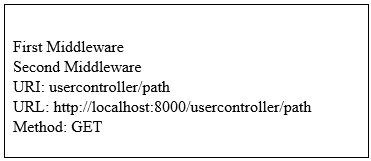
php artisan serveStep 10 − Visit the following URL.
http://localhost:8000/usercontroller/pathStep 11 − The output will appear as shown in the following image.
Explore our latest online courses and learn new skills at your own pace. Enroll and become a certified expert to boost your career.
Restful Resource Controllers
Often while making an application we need to perform CRUD (Create, Read, Update, Delete) operations. Laravel makes this job easy for us. Just create a controller and Laravel will automatically provide all the methods for the CRUD operations. You can also register a single route for all the methods in routes.php file.
Example
Step 1 − Create a controller called MyController by executing the following command.
php artisan make:controller MyControllerStep 2 − Add the following code in
app/Http/Controllers/MyController.php file.
app/Http/Controllers/MyController.php
<?php namespace App\Http\Controllers; use Illuminate\Http\Request; use App\Http\Requests; use App\Http\Controllers\Controller; class MyController extends Controller { public function index() {
} public function create() {echo 'index';
} public function store(Request $request) {echo 'create';
} public function show($id) {echo 'store';
} public function edit($id) {echo 'show';
} public function update(Request $request, $id) {echo 'edit';
} public function destroy($id) {echo 'update';
} }echo 'destroy';Step 3 − Add the following line of code in app/Http/routes.php file.
app/Http/routes.php
Route::resource('my','MyController');Step 4 − We are now registering all the methods of MyController by registering a controller with resource. Below is the table of actions handled by resource controller.
Verb Path Action Route Name GET /my index my.index GET /my/create create my.create POST /my store my.store GET /my/{my} show my.show GET /my/{my}/edit edit my.edit PUT/PATCH /my/{my} update my.update DELETE /my/{my} destroy my.destroy Step 5 − Try executing the URLs shown in the following table.
URL Description Output Image http://localhost:8000/my Executes index method of MyController.php index http://localhost:8000/my/create Executes create method of MyController.php create http://localhost:8000/my/1 Executes show method of MyController.php show http://localhost:8000/my/1/edit Executes edit method of MyController.php edit Implicit Controllers
Implicit Controllers allow you to define a single route to handle every action in the controller. You can define it in route.php file with Route:controller method as shown below.
Route::controller(‘base URI’,’<class-name-of-the-controller>’);Replace the <class-name-of-the-controller> with the class name that you have given to your controller.
The method name of the controller should start with HTTP verb like get or post. If you start it with get, it will handle only get request and if it starts with post then it will handle the post request. After the HTTP verb you can, you can give any name to the method but it should follow the title case version of the URI.
Example
Step 1 − Execute the below command to create a controller. We have kept the class name ImplicitController. You can give any name of your choice to the class.
php artisan make:controller ImplicitController --plainStep 2 − After successful execution of step 1, you will receive the following output −
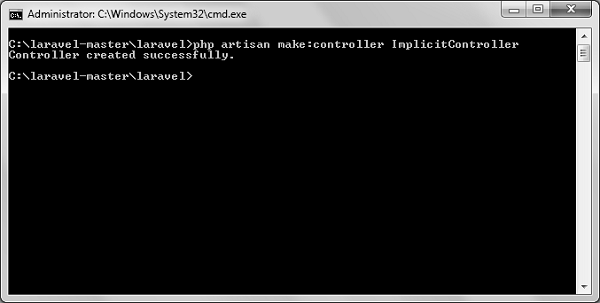
Step 3 − Copy the following code to
app/Http/Controllers/ImplicitController.php file.
app/Http/Controllers/ImplicitController.php
<?php namespace App\Http\Controllers; use Illuminate\Http\Request; use App\Http\Requests; use App\Http\Controllers\Controller; class ImplicitController extends Controller { /**
*/ public function getIndex() {* Responds to requests to GET /test
} /**echo 'index method';
*/ public function getShow($id) {* Responds to requests to GET /test/show/1
} /**echo 'show method';
*/ public function getAdminProfile() {* Responds to requests to GET /test/admin-profile
} /**echo 'admin profile method';
*/ public function postProfile() {* Responds to requests to POST /test/profile
} }echo 'profile method';Step 4 − Add the following line to app/Http/routes.php file to route the requests to specified controller.
app/Http/routes.php
Route::controller('test','ImplicitController');Constructor Injection
The Laravel service container is used to resolve all Laravel controllers. As a result, you are able to type-hint any dependencies your controller may need in its constructor. The dependencies will automatically be resolved and injected into the controller instance.
Example
Step 1 − Add the following code to app/Http/routes.php file.
app/Http/routes.php
class MyClass{
   public $foo = 'bar';
}
Route::get('/myclass','ImplicitController@index');
Step 2 − Add the following code to
app/Http/Controllers/ImplicitController.php file.
app/Http/Controllers/ImplicitController.php
<?php namespace App\Http\Controllers; use Illuminate\Http\Request; use App\Http\Requests; use App\Http\Controllers\Controller; class ImplicitController extends Controller { private $myclass; public function __construct(\MyClass $myclass) {
} public function index() {$this->myclass = $myclass;
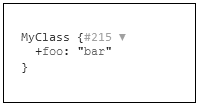
} }dd($this->myclass);Step 3 − Visit the following URL to test the constructor injection.
http://localhost:8000/myclassStep 4 − The output will appear as shown in the following image.
Method Injection
In addition to constructor injection, you may also type — hint dependencies on your controller’s action methods.
Example
Step 1 − Add the following code to app/Http/routes.php file.
app/Http/routes.php
class MyClass{
   public $foo = 'bar';
}
Route::get('/myclass','ImplicitController@index');
Step 2 − Add the following code to
app/Http/Controllers/ImplicitController.php file.
app/Http/Controllers/ImplicitController.php
<?php namespace App\Http\Controllers; use Illuminate\Http\Request; use App\Http\Requests; use App\Http\Controllers\Controller; class ImplicitController extends Controller { public function index(\MyClass $myclass) {
} }dd($myclass);Step 3 − Visit the following URL to test the constructor injection.
http://localhost:8000/myclassIt will produce the following output −