They are set of interfaces of Laravel framework. These contracts provide core services. Contracts defined in Laravel include corresponding implementation of framework.
Author: saqibkhan
-
Explain traits in Laravel.
Laravel traits are a group of functions that you include within another class. A trait is like an abstract class. You cannot instantiate directly, but its methods can be used in concreate class.
-
Explain reverse routing in Laravel.
Reverse routing is a method of generating URL based on symbol or name. It makes your Laravel application flexible.
-
What is a Controller?
A controller is the “C” in the “MVC” (Model-View-Controller) architecture, which is what Laravel is based on.
-
Explain important directories used in a common Laravel application.
Directories used in a common Laravel application are:
- App/: This is a source folder where our application code lives. All controllers, policies, and models are inside this folder.
- Config/: Holds the app’s configuration files. These are usually not modified directly but instead, rely on the values set up in the .env (environment) file at the root of the app.
- Database/: Houses the database files, including migrations, seeds, and test factories.
- Public/: Publicly accessible folder holding compiled assets and of course an index.php file.
-
What do you mean by bundles?
In Laravel, bundles are referred to as packages. These packages are used to increase the functionality of Laravel. A package can have views, configuration, migrations, routes, and tasks.
-
Why use Route?
Routes are stored inside files under the /routes folder inside the project’s root directory. By default, there are a few different files corresponding to the different “sides” of the application (“sides” comes from the hexagonal architecture methodology).
-
Sending Email
Laravel uses free feature-rich library SwiftMailer to send emails. Using the library function, we can easily send emails without too many hassles. The e-mail templates are loaded in the same way as views, which means you can use the Blade syntax and inject data into your templates.
The following table shows the syntax and attributes of send function −
Syntax void send(string|array $view, array $data, Closure|string $callback) Parameters $view(string|array) − name of the view that contains email message$data(array) − array of data to pass to view$callback − a Closure callback which receives a message instance, allowing you to customize the recipients, subject, and other aspects of the mail message Returns nothing Description Sends email. In the third argument, the $callback closure received message instance and with that instance we can also call the following functions and alter the message as shown below.
- $message → subject(‘Welcome to the Tutorials Point’);
- $message → from(’[email protected]’, ‘Mr. Example’);
- $message → to(’[email protected]’, ‘Mr. Example’);
Some of the less common methods include −
- $message → sender(’[email protected]’, ‘Mr. Example’);
- $message → returnPath(’[email protected]’);
- $message → cc(’[email protected]’, ‘Mr. Example’);
- $message → bcc(’[email protected]’, ‘Mr. Example’);
- $message → replyTo(’[email protected]’, ‘Mr. Example’);
- $message → priority(2);
To attach or embed files, you can use the following methods −
- $message → attach(‘path/to/attachment.txt’);
- $message → embed(‘path/to/attachment.jpg’);
Mail can be sent as HTML or text. You can indicate the type of mail that you want to send in the first argument by passing an array as shown below. The default type is HTML. If you want to send plain text mail then use the following syntax.
Syntax
Mail::send([‘text’=>’text.view’], $data, $callback);In this syntax, the first argument takes an array. Use text as the key name of the view as value of the key.
Example
Step 1 − We will now send an email from Gmail account and for that you need to configure your Gmail account in Laravel environment file – .env file. Enable 2-step verification in your Gmail account and create an application specific password followed by changing the .env parameters as shown below.
.env
MAIL_DRIVER = smtp
MAIL_HOST = smtp.gmail.com
MAIL_PORT = 587
MAIL_USERNAME = your-gmail-username
MAIL_PASSWORD = your-application-specific-password
MAIL_ENCRYPTION = tls
Step 2 − After changing the .env file execute the below two commands to clear the cache and restart the Laravel server.
php artisan config:cacheStep 3 − Create a controller called MailController by executing the following command.
php artisan make:controller MailController --plainStep 4 − After successful execution, you will receive the following output −
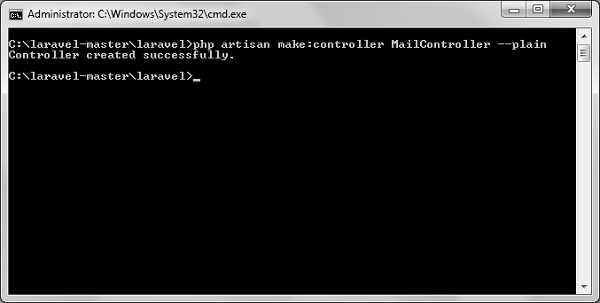
Step 5 − Copy the following code in
app/Http/Controllers/MailController.php file.
app/Http/Controllers/MailController.php
<?php namespace App\Http\Controllers; use Illuminate\Http\Request; use Mail; use App\Http\Requests; use App\Http\Controllers\Controller; class MailController extends Controller { public function basic_email() {$data = array('name'=>"Virat Gandhi");
} public function html_email() {Mail::send(['text'=>'mail'], $data, function($message) { $message->to('[email protected]', 'Tutorials Point')->subject ('Laravel Basic Testing Mail'); $message->from('[email protected]','Virat Gandhi'); }); echo "Basic Email Sent. Check your inbox.";
} public function attachment_email() {$data = array('name'=>"Virat Gandhi"); Mail::send('mail', $data, function($message) { $message->to('[email protected]', 'Tutorials Point')->subject ('Laravel HTML Testing Mail'); $message->from('[email protected]','Virat Gandhi'); }); echo "HTML Email Sent. Check your inbox.";
} }$data = array('name'=>"Virat Gandhi"); Mail::send('mail', $data, function($message) { $message->to('[email protected]', 'Tutorials Point')->subject ('Laravel Testing Mail with Attachment'); $message->attach('C:\laravel-master\laravel\public\uploads\image.png'); $message->attach('C:\laravel-master\laravel\public\uploads\test.txt'); $message->from('[email protected]','Virat Gandhi'); }); echo "Email Sent with attachment. Check your inbox.";Step 6 − Copy the following code in resources/views/mail.blade.php file.
resources/views/mail.blade.php
<h1>Hi, {{ $name }}</h1>
l<p>Sending Mail from Laravel.</p>
Step 7 − Add the following lines in app/Http/routes.php.
app/Http/routes.php
Route::get('sendbasicemail','MailController@basic_email');
Route::get('sendhtmlemail','MailController@html_email');
Route::get('sendattachmentemail','MailController@attachment_email');
Step 8 − Visit the following URL to test basic email.
http://localhost:8000/sendbasicemailStep 9 − The output screen will look something like this. Check your inbox to see the basic email output.

Step 10 − Visit the following URL to test the HTML email.
http://localhost:8000/sendhtmlemailStep 11 − The output screen will look something like this. Check your inbox to see the html email output.

Step 12 − Visit the following URL to test the HTML email with attachment.
http://localhost:8000/sendattachmentemailStep 13 − You can see the following output

Note − In the MailController.php file the email address in the from method should be the email address from which you can send email address. Generally, it should be the email address configured on your server.
-
What is a Route?
A route is basically an endpoint specified by a URI (Uniform Resource Identifier). It acts as a pointer in Laravel application.
Most commonly, a route simply points to a method on a controller and also dictates which HTTP methods are able to hit that URI.
-
Name aggregates methods of query builder.
Aggregates methods of query builder are: 1) max(), 2) min(), 3) sum(), 4) avg(), and 5) count().