Author: saqibkhan

  • Facades

    Facades provide a static interface to classes that are available in the application’s service container. Laravel facades serve as static proxies to underlying classes in the service container, providing the benefit of a terse, expressive syntax while maintaining more testability and flexibility than traditional static methods.

    How to create Facade

    The following are the steps to create Facade in Laravel −

    • Step 1 − Create PHP Class File.
    • Step 2 − Bind that class to Service Provider.
    • Step 3 − Register that ServiceProvider toConfig\app.php as providers.
    • Step 4 − Create Class which is this class extends tolluminate\Support\Facades\Facade.
    • Step 5 − Register point 4 to Config\app.php as aliases.

    Facade Class Reference

    Laravel ships with many Facades. The following table show the in-built Facade class references −

    FacadeClassService Container Binding
    AppIlluminate\Foundation\Applicationapp
    ArtisanIlluminate\Contracts\Console\Kernelartisan
    AuthIlluminate\Auth\AuthManagerauth
    Auth (Instance)Illuminate\Auth\Guard
    BladeIlluminate\View\Compilers\BladeCompilerblade.compiler
    BusIlluminate\Contracts\Bus\Dispatcher
    CacheIlluminate\Cache\Repositorycache
    ConfigIlluminate\Config\Repositoryconfig
    CookieIlluminate\Cookie\CookieJarcookie
    CryptIlluminate\Encryption\Encrypterencrypter
    DBIlluminate\Database\DatabaseManagerdb
    DB (Instance)Illuminate\Database\Connection
    EventIlluminate\Events\Dispatcherevents
    FileIlluminate\Filesystem\Filesystemfiles
    GateIlluminate\Contracts\Auth\Access\Gate
    HashIlluminate\Contracts\Hashing\Hasherhash
    InputIlluminate\Http\Requestrequest
    LangIlluminate\Translation\Translatortranslator
    LogIlluminate\Log\Writerlog
    MailIlluminate\Mail\Mailermailer
    PasswordIlluminate\Auth\Passwords\PasswordBrokerauth.password
    QueueIlluminate\Queue\QueueManagerqueue
    Queue (Instance)Illuminate\Queue\QueueInterface
    Queue (Base Class)Illuminate\Queue\Queue
    RedirectIlluminate\Routing\Redirectorredirect
    RedisIlluminate\Redis\Databaseredis
    RequestIlluminate\Http\Requestrequest
    ResponseIlluminate\Contracts\Routing\ResponseFactory
    RouteIlluminate\Routing\Routerrouter
    SchemaIlluminate\Database\Schema\Blueprint
    SessionIlluminate\Session\SessionManagersession
    Session (Instance)Illuminate\Session\Store
    StorageIlluminate\Contracts\Filesystem\Factoryfilesystem
    URLIlluminate\Routing\UrlGeneratorurl
    ValidatorIlluminate\Validation\Factoryvalidator
    Validator (Instance)Illuminate\Validation\Validator
    ViewIlluminate\View\Factoryview
    View (Instance)Illuminate\View\View

    Example

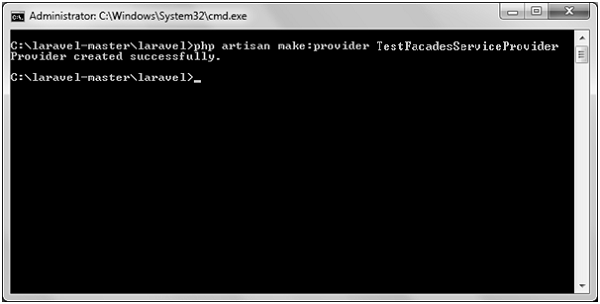
    Step 1 − Create a service provider called TestFacadesServiceProvider by executing the following command.

    php artisan make:provider TestFacadesServiceProvider
    

    Step 2 − After successful execution, you will receive the following output −
    FacadesServiceProvider

    Step 3 − Create a class called TestFacades.php at App/Test.

    App/Test/TestFacades.php

    <?php
       namespace App\Test;
       class TestFacades{
    
      public function testingFacades() {
         echo "Testing the Facades in Laravel.";
      }
    } ?>

    Step 4 − Create a Facade class called “TestFacades.php” at “App/Test/Facades”.

    App/Test/Facades/TestFacades.php

    <?php
    
    namespace app\Test\Facades;
    
    use Illuminate\Support\Facades\Facade;
    
    class TestFacades extends Facade {
       protected static function getFacadeAccessor() { return 'test'; }
    }

    Step 5 − Create a Facade class called TestFacadesServiceProviders.php at App/Test/Facades.

    App/Providers/TestFacadesServiceProviders.php

    <?php
    
    namespace App\Providers;
    
    use App;
    use Illuminate\Support\ServiceProvider;
    
    class TestFacadesServiceProvider extends ServiceProvider {
       public function boot() {
    
      //
    } public function register() {
      App::bind('test',function() {
         return new \App\Test\TestFacades;
      });
    } }

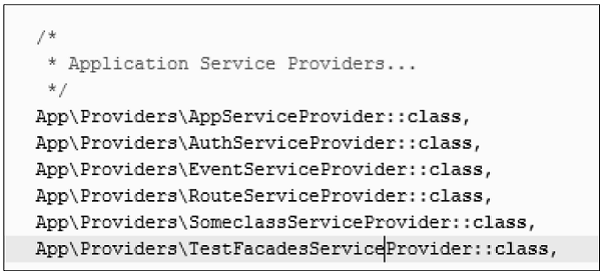
    Step 6 − Add a service provider in a file config/app.php as shown in the below figure.

    config/app.php
    Service Provider

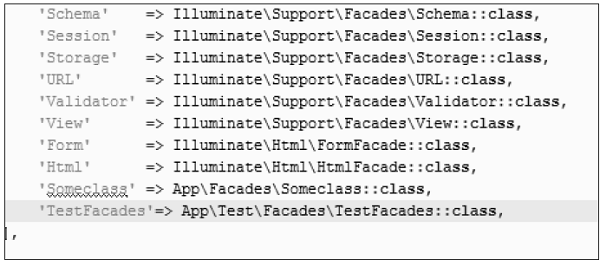
    Step 7 − Add an alias in a file config/app.php as shown in the below figure.

    config/app.php
    Alias

    Step 8 − Add the following lines in app/Http/routes.php.

    app/Http/routes.php

    Route::get('/facadeex', function() {
       return TestFacades::testingFacades();
    });
    

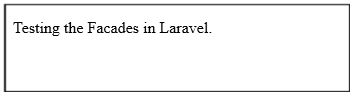
    Step 9 − Visit the following URL to test the Facade.

    http://localhost:8000/facadeex
    

    Step 10 − After visiting the URL, you will receive the following output −
    Testing Facades
  • How can you enable query log in Laravel?

    You can use enableQueryLog method to enable query log in Laravel.

  • What is service container in Laravel?

    Service container is a tool used for performing dependency injection in Laravel.

  • Event Handling

    Events provide a simple observer implementation which allows a user to subscribe and listen to various events triggered in the web application. All the event classes in Laravel are stored in the app/Events folder and the listeners are stored in the app/Listeners folder.

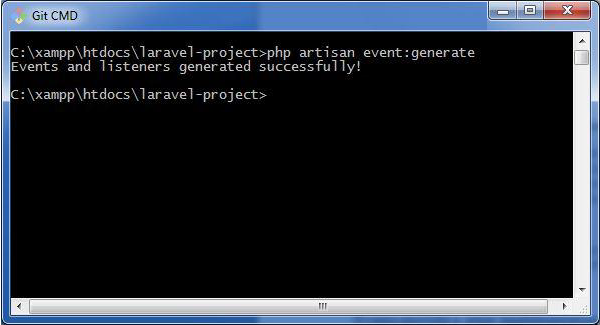
    The artisan command for generating events and listeners in your web application is shown below −

    php artisan event:generate
    

    This command generates the events and listeners to the respective folders as discussed above.

    Event Generator

    Events and Listeners serve a great way to decouple a web application, since one event can have multiple listeners which are independent of each other. The events folder created by the artisan command includes the following two files: event.php and SomeEvent.php. They are shown here −

    Event.php

    <?php
    namespace App\Events;
    abstract class Event{
       //
    }

    As mentioned above, event.php includes the basic definition of class Event and calls for namespace App\Events. Please note that the user defined or custom events are created in this file.

    SomeEvent.php

    <?php
    
    namespace App\Events;
    
    use App\Events\Event;
    use Illuminate\Queue\SerializesModels;
    use Illuminate\Contracts\Broadcasting\ShouldBroadcast;
    
    class SomeEvent extends Event{
       use SerializesModels;
       /**
    
      * Create a new event instance.
      *
      * @return void
    */ public function __construct() {
      //
    } /**
      * Get the channels the event should be broadcast on.
      *
      * @return array
    */ public function broadcastOn() {
      return &#91;];
    } }

    Observe that this file uses serialization for broadcasting events in a web application and that the necessary parameters are also initialized in this file.

    For example, if we need to initialize order variable in the constructor for registering an event, we can do it in the following way −

    public function __construct(Order $order) {
       $this->order = $order;
    }

    Listeners

    Listeners handle all the activities mentioned in an event that is being registered. The artisan command event:generate creates all the listeners in the app/listeners directory. The Listeners folder includes a file EventListener.php which has all the methods required for handling listeners.

    EventListener.php

    <?php
    
    namespace App\Listeners;
    
    use App\Events\SomeEvent;
    use Illuminate\Queue\InteractsWithQueue;
    use Illuminate\Contracts\Queue\ShouldQueue;
    
    class EventListener{
       /**
    
      * Create the event listener.
      *
      * @return void
    */ public function __construct() {
      //
    } /**
      * Handle the event.
      *
      * @param SomeEvent $event
      * @return void
    */ public function handle(SomeEvent $event) {
      //
    } }

    As mentioned in the code, it includes handle function for managing various events. We can create various independent listeners that target a single event.

  •  List default packages of Laravel 5.6.

    Default packages of Laravel 5.6 are: 1) Envoy, 2) Passport, 3) Socialite, 4) Cashier, 5) Horizon, and 6) Scout.

  • State the difference between get and post method.

    Get method allows you to send a limited amount of data in the header. Post allows you to send a large amount of data in the body.

  • Error HandlingError Handling

    Most web applications have specific mechanisms for error handling. Using these, they track errors and exceptions, and log them to analyze the performance. In this chapter, you will read about error handling in Laravel applications.

    Important Points

    Before proceeding further to learn in detail about error handling in Laravel, please note the following important points −

    • For any new project, Laravel logs errors and exceptions in the App\Exceptions\Handler class, by default. They are then submitted back to the user for analysis.
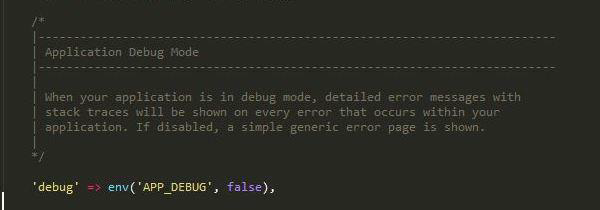
    • When your Laravel application is set in debug mode, detailed error messages with stack traces will be shown on every error that occurs within your web application.
    Error Log
    • By default, debug mode is set to false and you can change it to true. This enables the user to track all errors with stack traces.
    App Debug
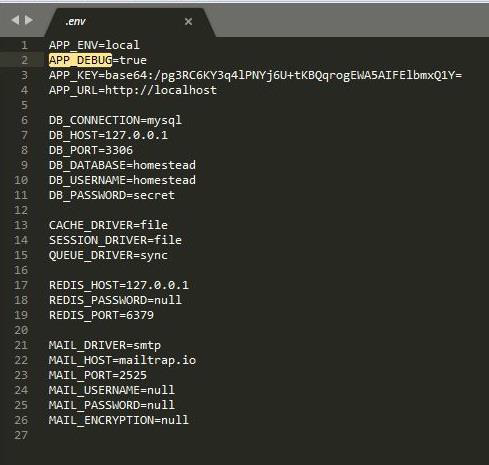
    • The configuration of Laravel project includes the debug option which determines how much information about an error is to be displayed to the user. By default in a web application, the option is set to the value defined in the environment variables of the .env file.
      • The value is set to true in a local development environment and is set to false in a production environment.
      • If the value is set to true in a production environment, the risk of sharing sensitive information with the end users is higher.

    Error Log

    Logging the errors in a web application helps to track them and in planning a strategy for removing them. The log information can be configured in the web application in config/app.php file. Please note the following points while dealing with Error Log in Laravel −

    • Laravel uses monolog PHP logging library.
    • The logging parameters used for error tracking are single, daily, syslog and errorlog.
    • For example, if you wish to log the error messages in log files, you should set the log value in your app configuration to daily as shown in the command below −
    'log' => env('APP_LOG',’daily’),
    
    • If the daily log mode is taken as the parameter, Laravel takes error log for a period of 5 days, by default. If you wish to change the maximum number of log files, you have to set the parameter of log_max_files in the configuration file to a desired value.
    ‘log_max_files’ => 25;
    

    Severity Levels

    As Laravel uses monolog PHP logging library, there are various parameters used for analyzing severity levels. Various severity levels that are available are error, critical, alert and emergency messages. You can set the severity level as shown in the command below −

    'log_level' => env('APP_LOG_LEVEL', 'error')
    
  •  Where will you define Laravel’s Facades?

    All facades of Laravel have defined in Illuminate\Support\Facades namespace.

  • How will you register service providers?

    You can register service providers in the config/app.php configuration file that contains an array where you can mention the service provider class name.

  • Ajax

    Ajax (Asynchronous JavaScript and XML) is a set of web development techniques utilizing many web technologies used on the client-side to create asynchronous Web applications. Import jquery library in your view file to use ajax functions of jquery which will be used to send and receive data using ajax from the server. On the server side you can use the response() function to send response to client and to send response in JSON format you can chain the response function with json() function.

    json() function syntax

    json(string|array $data = array(), int $status = 200, array $headers = array(), int $options)
    

    Example

    Step 1 − Create a view file called resources/views/message.php and copy the following code in that file.

    <html>
       <head>
    
      &lt;title&gt;Ajax Example&lt;/title&gt;
      
      &lt;script src = "https://ajax.googleapis.com/ajax/libs/jquery/2.1.3/jquery.min.js"&gt;
      &lt;/script&gt;
      
      &lt;script&gt;
         function getMessage() {
            $.ajax({
               type:'POST',
               url:'/getmsg',
               data:'_token = &lt;?php echo csrf_token() ?&gt;',
               success:function(data) {
                  $("#msg").html(data.msg);
               }
            });
         }
      &lt;/script&gt;
    </head> <body>
      &lt;div id = 'msg'&gt;This message will be replaced using Ajax. 
         Click the button to replace the message.&lt;/div&gt;
      &lt;?php
         echo Form::button('Replace Message',&#91;'onClick'=&gt;'getMessage()']);
      ?&gt;
    </body> </html>

    Step 2 − Create a controller called AjaxController by executing the following command.

    php artisan make:controller AjaxController --plain
    

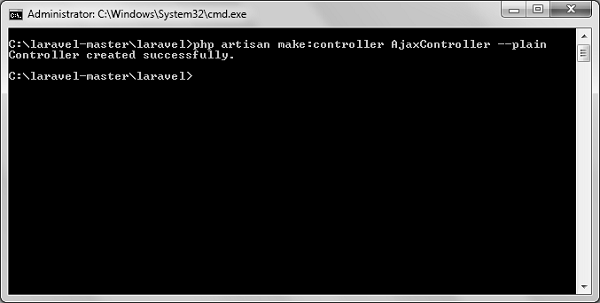
    Step 3 − After successful execution, you will receive the following output −
    AjaxController

    Step 4 − Copy the following code in

    app/Http/Controllers/AjaxController.php file.

    app/Http/Controllers/AjaxController.php

    <?php
    
    namespace App\Http\Controllers;
    
    use Illuminate\Http\Request;
    use App\Http\Requests;
    use App\Http\Controllers\Controller;
    
    class AjaxController extends Controller {
       public function index() {
    
      $msg = "This is a simple message.";
      return response()-&gt;json(array('msg'=&gt; $msg), 200);
    } }

    Step 5 − Add the following lines in app/Http/routes.php.

    app/Http/routes.php

    Route::get('ajax',function() {
       return view('message');
    });
    Route::post('/getmsg','AjaxController@index');
    

    Step 6 − Visit the following URL to test the Ajax functionality.

    http://localhost:8000/ajax
    

    Step 7 − You will be redirected to a page where you will see a message as shown in the following image.

    Replace Message

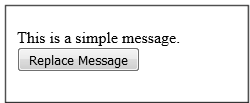
    Step 8 − The output will appear as shown in the following image after clicking the button.

    Simple Message