- delete(): remove all record from the database table.
- softDeletes(): It does not remove the data from the table. It is used to flag any record as deleted.
Author: saqibkhan
-
Differentiate between delete() and softDeletes().
-
Explain Auth.
It is a method of identifying user login credential with a password. In Laravel it can be managed with a session which takes two parameters 1) username and 2) password.
-
Guest User Gates
The Guest User Gates feature is an add-on to the latest 5.7 version released in September 2018. This feature is used to initiate the authorization process for specific users.
In Laravel 5.6, there was a procedure where it used to return false for unauthenticated users. In Laravel 5.7, we can allow guests to go authorization checks by using the specific nullable type hint within the specified controller as given below −
<?php
Gate::define('view-post', function (?User $user) {
   // Guests
});
Explanation of the Code
By using a nullable type hint the $user variable will be null when a guest user is passed to the gate. You can then make decisions about authorizing the action. If you allow nullable types and return true, then the guest will have authorization. If you don’t use a nullable type hint, guests will automatically get the 403 response for Laravel 5.7, which is displayed below −
The difference between 403 and 404 error is that 404 is displayed when user tries to access the unknown resource or URL and 403 error as mentioned in the snapshot above is displayed if unauthorized user accesses the website.
-
How to configure a mail-in Laravel?
Laravel provides APIs to send an email on local and live server.
-
List out common artisan commands used in Laravel.
Laravel supports following artisan commands:
- PHP artisan down;
- PHP artisan up;
- PHP artisan make:controller;
- PHP artisan make:model;
- PHP artisan make:migration;
- PHP artisan make:middleware;
-
Understanding Release Process
Every web application framework has its own version history and it is always being updated and maintained. Every latest version brings new functionality and functions which are either changed or deprecated, so it is important that you know which version will be suitable for your projects.
When it comes to Laravel, there are two active versions as given below −
- Laravel 4- released in May 2013
- Laravel 5.1- released in February 2015
Laravel 5.1 also includes various releases with the latest version of Laravel 5.1.5 which includes all the robust features for web development. The roadmap of Laravel or the version release is shown in the image below −
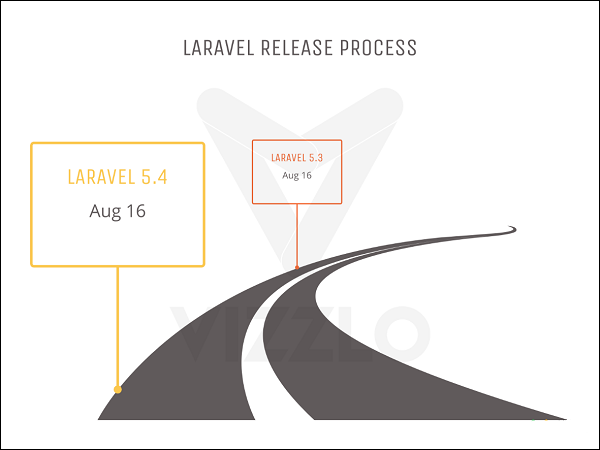
The following points are worth notable in the context of understanding the release process of Laravel −
- The old directory of app/models is removed in Laravel 5.1.
- All the controllers, middleware and requests are grouped within a directory under the app/Http folder.
- A new folder namely Providers directory is replaced with the app/start files in the previous versions of Laravel 4.x.
- All the language files and views are moved to the resources directory.
- New artisan command route:cache is used for registration of new routes and is included with the release of Laravel 5.1 and further versions.
- Laravel supports HTTP middleware and also includes CSRF tokens and authentication model.
- All the authentication models are located under one directory namely resources/views/auth. It includes user registration, authentication and password controllers.
Laravel Releases
Version Release Bug Fixes Until Security Fixes Until V1 June 2011 – – V2 September 2011 – – v3 February 2012 – – v4 May 2013 – – 5.0 Feb 4th, 2015 Aug 4th, 2015 Feb 4th, 2016 5.1 (LTS) Jun 9th, 2015 Jun 9th, 2017 Jun 9th, 2018 5.2 Dec 21st, 2015 Jun 21st, 2016 Dec 21st, 2016 5.3 Aug 23rd, 2016 Feb 23rd, 2017 Aug 23rd, 2017 5.4 Jan 24th, 2017 Jul 24th, 2017 Jan 24th, 2018 5.5 (LTS) Aug 30th, 2017 Aug 30th, 2019 Aug 30th, 2020 5.6 Feb 7th, 2018 Aug 7th, 2018 Feb 7th, 2019 5.7 Sep 4, 2018 Feb 4th, 2019 Sep 4th, 2019 -
What is the use of dd() function?
This function is used to dump contents of a variable to the browser. The full form of dd is Dump and Die.
-
Hashing
s the process of transforming a string of characters into a shorter fixed value or a key that represents the original string. Laravel uses the Hash facade which provides a secure way for storing passwords in a hashed manner.
Basic Usage
The following screenshot shows how to create a controller named passwordController which is used for storing and updating passwords −
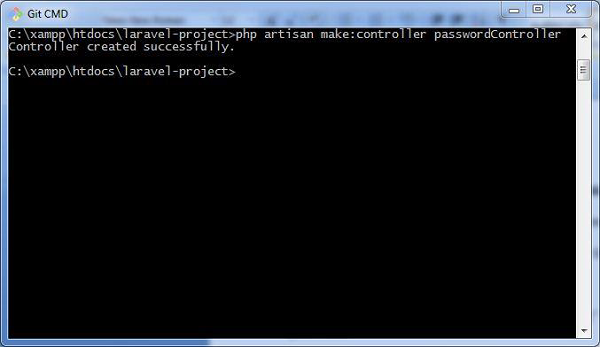
The following lines of code explain the functionality and usage of the passwordController −
<?php namespace App\Http\Controllers; use Illuminate\Http\Request; use Illuminate\Support\Facades\Hash; use App\Http\Controllers\Controller class passwordController extends Controller{ /**
*/ public function update(Request $request) {* Updating the password for the user. * * @param Request $request * @return Response
} }// Validate the new password length... $request->user()->fill([ 'password' => Hash::make($request->newPassword) // Hashing passwords ])->save();The hashed passwords are stored using make method. This method allows managing the work factor of the bcrypt hashing algorithm, which is popularly used in Laravel.
Verification of Password against Hash
You should verify the password against hash to check the string which was used for conversion. For this you can use the check method. This is shown in the code given below −
if (Hash::check('plain-text', $hashedPassword)) {
   // The passwords match...
}
Note that the check method compares the plain-text with the hashedPassword variable and if the result is true, it returns a true value.
-
Explain fluent query builder in Laravel.
It is a database query builder that provides convenient, faster interface to create and run database queries.
-
What are common HTTP error codes?
The most common HTTP error codes are:
- Error 404 – Displays when Page is not found.
- Error- 401 – Displays when an error is not authorized