- Features: Job postings, applications, and user profiles for employers and job seekers.
- Django Components:
- Models: Create models for Job Listings, Applications, and Users.
- Search and Filter: Implement search functionality to filter jobs by location, category, or company.
- Email Notifications: Notify users about new job postings based on their preferences.
Author: saqibkhan
-
Job Board
-
Customer Feedback System
- Features: Collect feedback, ratings, and comments on services/products.
- Django Components:
- Models: Define models for Feedback and Users.
- Forms: Use Django forms to capture user feedback.
- Admin Interface: Use Django’s admin to view and manage feedback submissions.
-
Fitness Tracker Application
- Features: User profiles, workout logs, progress tracking, and dietary logging.
- Django Components:
- Models: Create models for Workouts, Users, and Meals.
- Data Visualization: Use libraries like Chart.js or Matplotlib to visualize user progress over time.
- REST API: Build an API for mobile apps to access user data.
-
Real Estate Listing Site
- Features: Property listings, user accounts, search filters, and photo galleries.
- Django Components:
- Models: Define models for Properties, Agents, and Inquiries.
- Search Functionality: Use Django’s built-in search capabilities to filter properties based on criteria like location, price, and type.
- Image Uploads: Utilize Django’s file handling to upload and display property images.
-
To-Do List Application
- Features: User authentication, task management, and categorization.
- Django Components:
- Models: Define a Task model with fields for title, description, completion status, and due date.
- Authentication: Use Django’s built-in authentication system for user accounts.
- AJAX: Implement AJAX for adding, editing, and deleting tasks without reloading the page.
-
Booking System
- Features: Book appointments, manage availability, and send reminders.
- Django Components:
- Models: Create models for Services, Appointments, and Users.
- Calendar Integration: Use libraries like FullCalendar.js in combination with Django views to manage and display bookings.
- Email Notifications: Use Django’s email utilities to send reminders to users about their appointments.
-
Portfolio Website
- Features: Showcase projects, blogs, and a contact form.
- Django Components:
- Models: Define models for Projects and Blog Posts.
- Static Files: Use Django to serve CSS, JavaScript, and images for your portfolio.
- Forms: Create a contact form using Django’s form handling to capture inquiries.
-
Event Management System
- Features: Event creation, ticket sales, user registration, and attendee management.
- Django Components:
- Models: Create models for Events, Tickets, and Attendees.
- Views: Implement views for event creation and ticket purchase.
- Templates: Use Django’s templating engine to create responsive pages for event listings and detail views.
-
Ajax
Ajax essentially is a combination of technologies that are integrated together to reduce the number of page loads. We generally use Ajax to ease end-user experience. Using Ajax in Django can be done by directly using an Ajax library like JQuery or others. Let’s say you want to use JQuery, then you need to download and serve the library on your server through Apache or others. Then use it in your template, just like you might do while developing any Ajax-based application.
Another way of using Ajax in Django is to use the Django Ajax framework. The most commonly used is django-dajax which is a powerful tool to easily and super-quickly develop asynchronous presentation logic in web applications, using Python and almost no JavaScript source code. It supports four of the most popular Ajax frameworks: Prototype, jQuery, Dojo and MooTools.
Using Django-dajax
First thing to do is to install django-dajax. This can be done using easy_install or pip −
$ pip install django_dajax
$ easy_install django_dajax
This will automatically install django-dajaxice, required by django-dajax. We then need to configure both dajax and dajaxice.
Add dajax and dajaxice in your project settings.py in INSTALLED_APPS option −
INSTALLED_APPS += (
   'dajaxice',
   'dajax'
)
Make sure in the same settings.py file, you have the following −
TEMPLATE_LOADERS = (
   'django.template.loaders.filesystem.Loader',
   'django.template.loaders.app_directories.Loader',
   'django.template.loaders.eggs.Loader',
)

TEMPLATE_CONTEXT_PROCESSORS = (
   'django.contrib.auth.context_processors.auth',
   'django.core.context_processors.debug',
   'django.core.context_processors.i18n',
   'django.core.context_processors.media',
   'django.core.context_processors.static',
   'django.core.context_processors.request',
   'django.contrib.messages.context_processors.messages'
)

STATICFILES_FINDERS = (
   'django.contrib.staticfiles.finders.FileSystemFinder',
   'django.contrib.staticfiles.finders.AppDirectoriesFinder',
   'dajaxice.finders.DajaxiceFinder',
)

DAJAXICE_MEDIA_PREFIX = 'dajaxice'
Now go to the myapp/url.py file and make sure you have the following to set dajax URLs and to load dajax statics js files −
from dajaxice.core import dajaxice_autodiscover, dajaxice_config
from django.contrib.staticfiles.urls import staticfiles_urlpatterns
from django.conf import settings

Then dajax urls:

urlpatterns += patterns('',
   url(r'^%s/' % settings.DAJAXICE_MEDIA_PREFIX, include('dajaxice.urls')),)

urlpatterns += staticfiles_urlpatterns()
Let us create a simple form based on our Dreamreal model to store it, using Ajax (means no refresh).
At first, we need our Dreamreal form in myapp/form.py.
class DreamrealForm(forms.Form):
   website = forms.CharField(max_length = 100)
   name = forms.CharField(max_length = 100)
   phonenumber = forms.CharField(max_length = 50)
   email = forms.CharField(max_length = 100)
Then we need an ajax.py file in our application: myapp/ajax.py. That’s where is our logic, that’s where we put the function that will be saving our form then return the popup −
from dajaxice.utils import deserialize_form from myapp.form import DreamrealForm from dajax.core import Dajax from myapp.models import Dreamreal @dajaxice_register def send_form(request, form): dajax = Dajax() form = DreamrealForm(deserialize_form(form)) if form.is_valid():
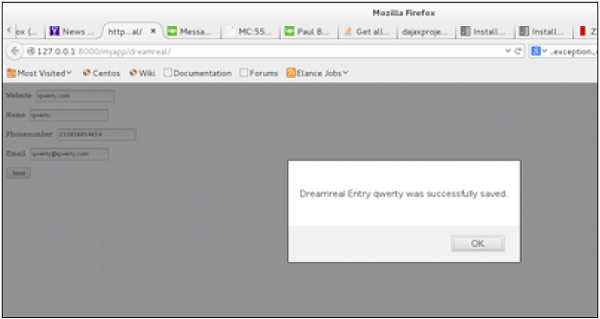
else:dajax.remove_css_class('#my_form input', 'error') dr = Dreamreal() dr.website = form.cleaned_data.get('website') dr.name = form.cleaned_data.get('name') dr.phonenumber = form.cleaned_data.get('phonenumber') dr.save() dajax.alert("Dreamreal Entry %s was successfully saved." % form.cleaned_data.get('name'))
return dajax.json()dajax.remove_css_class('#my_form input', 'error') for error in form.errors: dajax.add_css_class('#id_%s' % error, 'error')Now let’s create the dreamreal.html template, which has our form −
<html> <head></head> <body>
</body> </html><form action = "" method = "post" id = "my_form" accept-charset = "utf-8"> {{ form.as_p }} <p><input type = "button" value = "Send" onclick = "send_form();"></p> </form>Add the view that goes with the template in myapp/views.py −
def dreamreal(request):
   form = DreamrealForm()
   return render(request, 'dreamreal.html', locals())
Add the corresponding URL in myapp/urls.py −
url(r'^dreamreal/', 'dreamreal', name = 'dreamreal'),Now let’s add the necessary in our template to make the Ajax work −
At the top of the file add −
{% load static %}
{% load dajaxice_templatetags %}
And in the <head> section of our dreamreal.html template add −
We are using the JQuery library for this example, so add −
<script src = "{% static '/static/jquery-1.11.3.min.js' %}"
   type = "text/javascript" charset = "utf-8"></script>
<script src = "{% static '/static/dajax/jquery.dajax.core.js' %}"></script>
The Ajax function that will be called on click −
<script> function send_form(){
} </script>Dajaxice.myapp.send_form(Dajax.process,{'form':$('#my_form').serialize(true)});Note that you need the “jquery-1.11.3.min.js” in your static files directory, and also the jquery.dajax.core.js. To make sure all dajax static files are served under your static directory, run −
$python manage.py collectstaticNote − Sometimes the jquery.dajax.core.js can be missing, if that happens, just download the source and take that file and put it under your static folder.
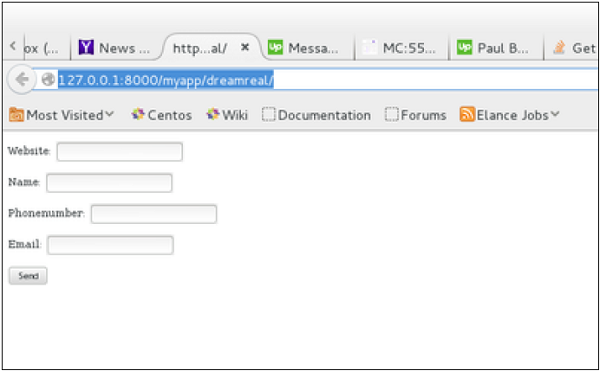
You will get to see the following screen, upon accessing /myapp/dreamreal/ −
On submit, you will get the following screen −
-
Content Management System (CMS)
- Features: Admin panel for managing website content, user roles, and permissions.
- Django Components: Utilize Django’s admin interface to allow content managers to easily add or modify content, and use custom models for different content types.