Author: saqibkhan

  • Data Types

    While writing program in any language, you need to use various variables to store various information. Variables are nothing but reserved memory locations to store values. This means that when you create a variable you reserve some space in memory.

    You may like to store information of various data types like character, wide character, integer, floating point, double floating point, boolean etc. Based on the data type of a variable, the operating system allocates memory and decides what can be stored in the reserved memory.

    Primitive Built-in Types

    C++ offers the programmer a rich assortment of built-in as well as user defined data types. Following table lists down seven basic C++ data types −

    TypeKeyword
    Booleanbool
    Characterchar
    Integerint
    Floating pointfloat
    Double floating pointdouble
    Valuelessvoid
    Wide characterwchar_t

    Several of the basic types can be modified using one or more of these type modifiers −

    • signed
    • unsigned
    • short
    • long

    The following table shows the variable type, how much memory it takes to store the value in memory, and what is maximum and minimum value which can be stored in such type of variables.

    TypeTypical Bit WidthTypical Range
    char1byte-127 to 127 or 0 to 255
    unsigned char1byte0 to 255
    signed char1byte-127 to 127
    int4bytes-2147483648 to 2147483647
    unsigned int4bytes0 to 4294967295
    signed int4bytes-2147483648 to 2147483647
    short int2bytes-32768 to 32767
    unsigned short int2bytes0 to 65,535
    signed short int2bytes-32768 to 32767
    long int8bytes-9223372036854775808 to 9223372036854775807
    signed long int8bytessame as long int
    unsigned long int8bytes0 to 18446744073709551615
    long long int8bytes-(2^63) to (2^63)-1
    unsigned long long int8bytes0 to 18,446,744,073,709,551,615
    float4bytes
    double8bytes
    long double12bytes
    wchar_t2 or 4 bytes1 wide character

    The size of variables might be different from those shown in the above table, depending on the compiler and the computer you are using.

    Example

    Following is the example, which will produce correct size of various data types on your computer.

    Open Compiler

    #include <iostream>usingnamespace std;intmain(){
       cout <<"Size of char : "<<sizeof(char)<< endl;
       cout <<"Size of int : "<<sizeof(int)<< endl;
       cout <<"Size of short int : "<<sizeof(shortint)<< endl;
       cout <<"Size of long int : "<<sizeof(longint)<< endl;
       cout <<"Size of float : "<<sizeof(float)<< endl;
       cout <<"Size of double : "<<sizeof(double)<< endl;
       cout <<"Size of wchar_t : "<<sizeof(wchar_t)<< endl;return0;}

    This example uses endl, which inserts a new-line character after every line and << operator is being used to pass multiple values out to the screen. We are also using sizeof() operator to get size of various data types.

    When the above code is compiled and executed, it produces the following result which can vary from machine to machine −

    Size of char : 1
    Size of int : 4
    Size of short int : 2
    Size of long int : 4
    Size of float : 4
    Size of double : 8
    Size of wchar_t : 4
    

    Example

    Following is another example:

    Open Compiler

    #include <iostream>#include <limits>usingnamespace std;intmain(){
    
    
    std::cout &lt;&lt;"Int Min "&lt;&lt; std::numeric_limits&lt;int&gt;::min()&lt;&lt; endl;
    std::cout &lt;&lt;"Int Max "&lt;&lt; std::numeric_limits&lt;int&gt;::max()&lt;&lt; endl;
    std::cout &lt;&lt;"Unsigned Int  Min "&lt;&lt; std::numeric_limits&lt;unsignedint&gt;::min()&lt;&lt; endl;
    std::cout &lt;&lt;"Unsigned Int Max "&lt;&lt; std::numeric_limits&lt;unsignedint&gt;::max()&lt;&lt; endl;
    std::cout &lt;&lt;"Long Int Min "&lt;&lt; std::numeric_limits&lt;longint&gt;::min()&lt;&lt; endl;
    std::cout &lt;&lt;"Long Int Max "&lt;&lt; std::numeric_limits&lt;longint&gt;::max()&lt;&lt; endl;
    std::cout &lt;&lt;"Unsigned Long Int Min "&lt;&lt; std::numeric_limits&lt;unsignedlongint&gt;::min()&lt;&lt;endl;
    std::cout &lt;&lt;"Unsigned Long Int Max "&lt;&lt; std::numeric_limits&lt;unsignedlongint&gt;::max()&lt;&lt; endl;}</code></pre>

    Derived Data Types

    Data types which are obtained from pre-defined data types in C++ are known as Derived Data Types. These can be classified into four categories, namely −

    1. Function

    A function is the simplest form of user-defined data type. It includes a return type, a function name and input parameters.

    Syntax

    return_type function_name(input_param1, input_param2…){<function_body>}

    Example

    Open Compiler

    #include <iostream>usingnamespace std;
    
    string func(int n){//returns if n is odd or evenif(n%2)return"Given number is Odd !";elsereturn"Given number is Even !";}intmain(){int a;//enter a number
       cin>>a;
       cout<<func(a);//a simple function to check if//number is odd or evenreturn0;}
    Output
    Given number is Even !
    

    2. Array

    An array is a series of elements of same data type. Elements of an array are stored in contiguous memory locations in the storage.

    Syntax

    data_type array_name[array_size];

    Example

    Open Compiler

    #include <iostream>usingnamespace std;intmain(){int arr[5]={1,2,3,2,1};//define an integer array of size 5for(auto it:arr)
    
      cout&lt;&lt;it&lt;&lt;" ";//print the elements of arrayreturn0;}</code></pre>
    Output
    1 2 3 2 1 
    

    3. Pointer

    A pointer is a reference to an element defined previously. The value of the pointer returns the address location of the element which is associated with it.

    Syntax

    data_type * pointer_name=& variable_name;

    Example

    Open Compiler

    #include <iostream>usingnamespace std;intmain(){int a=20;//declare variable aint*p=&a;//assign pointer to a
       cout<<"Address of variable a: "<<p<<endl;
       cout<<"Value of variable a: "<<*p<<endl;return0;}
    Output
    Address of variable a: 0x7ffc49a8637c
    Value of variable a: 20
    

    4. Reference

    A reference variable is used to create a copy of a variable with the same reference. Hence, changes made to the reference variable also reflect on the original variable.

    Syntax

    data_type & reference_name= variable_name;

    Example

    Open Compiler

    #include <iostream>usingnamespace std;intmain(){int c=11;int& refer=c;
    
       cout<<"Initially value of integer is: "<<c<<endl;
    
       refer=121;
       cout<<"After changing value using refer variable :"<<c<<endl;return0;}
    Output
    Initially value of integer is: 11
    After changing value using refer variable :121
    

    User-Defined Data Types

    Data types which are defined by the user intuitively without using any pre-defined data types are known as User-Defined Data Types. These data types can be further categorized into five types, namely −

    1. Class

    A class is a defined in Object Oriented Programming as a custom data type which is used to construct an object. It is the framework of an object, and it can include constructors, methods and OOP concepts like Polymorphism, Inheritance, etc.

    Syntax

    classClass_name{<classbody>class_name(parameters){<constructor body>}
    
       return_type method_name(paremeters){<method body>}}

    Example

    Open Compiler

    #include <iostream>usingnamespace std;classTP{public:
    
      string tp;voidprint(){
         cout&lt;&lt;tp&lt;&lt;endl;}};intmain(){
    TP object; object.tp="I Love Tutorialspoint !!!"; object.print();return0;}
    Output
    I Love Tutorialspoint !!!
    

    2. Structure (struct)

    In structure data type, the user can introduce multiple primitive data types inside the struct body.

    Syntax

    structstruct_name{
       data_type1 var_name1;
       data_type2 var_name2;
       …
    }

    Example

    Open Compiler

    #include <iostream>usingnamespace std;structTP{
       string tp;int grade;};intmain(){
       TP object;
       object.tp="I Love Tutorialspoint !!!";
       object.grade=10;
    
       cout<<object.tp<<endl;
       cout<<"How much would you rate it?"<<" : "<< object.grade;return0;}
    Output
    I Love Tutorialspoint !!!
    How much would you rate it? : 10
    

    3. Union

    Union is similar to a structure. In this, the memory location of all variables is same, and all variables share the same reference. Hence, a change in one value leads to all other values getting changed.

    Syntax

    union union_name{
       data_type var_name1;
       data_type var_name2;};

    Example

    Open Compiler

    #include <iostream>usingnamespace std;union TP{int tp1,tp2;};intmain(){union TP t;
       t.tp1=2;
       cout<<"Value of tp1 initially: "<<t.tp1<<endl;
    
       t.tp2=4;
       cout<<"When we change tp2, value of tp1 is : "<<t.tp1<<endl;return0;}
    Output
    Value of tp1 initially: 2
    When we change tp2, value of tp1 is : 4
    

    4. Enumeration (Enum)

    Enumeration or simply enum is a user-defined data type that is used to give name to integer constants in a program. This increases the user-readability of a program.

    Syntax

    enumenum_name{
       var¬_name1 , var_name2, …
    }

    Example

    Open Compiler

    #include <iostream>usingnamespace std;enumTP{ C, Java, Python, Ruby, Kotlin, Javascript, TypeScript, Others};intmain(){enumTP course;
       cout<<"Which course do you love the most?"<<endl;
    
       course=Kotlin;
       cout<<"I love the "<<course+1<<"th course !!!";return0;}

    Output

    Which course do you love the most?
    I love the 5th course !!!
    

    typedef Declarations

    You can create a new name for an existing type using typedef. Following is the simple syntax to define a new type using typedef −

    typedef type newname;

    For example, the following tells the compiler that feet is another name for int −

    typedefint feet;

    Now, the following declaration is perfectly legal and creates an integer variable called distance −

    feet distance;

    Enumerated Types

    An enumerated type declares an optional type name and a set of zero or more identifiers that can be used as values of the type. Each enumerator is a constant whose type is the enumeration.

    Creating an enumeration requires the use of the keyword enum. The general form of an enumeration type is −

    enumenum-name { list of names } var-list;

    Here, the enum-name is the enumeration's type name. The list of names is comma separated.

    For example, the following code defines an enumeration of colors called colors and the variable c of type color. Finally, c is assigned the value "blue".

    enumcolor{ red, green, blue } c;
    c = blue;

    By default, the value of the first name is 0, the second name has the value 1, and the third has the value 2, and so on. But you can give a name, a specific value by adding an initializer. For example, in the following enumeration, green will have the value 5.

    enumcolor{ red, green =5, blue };

    Here, blue will have a value of 6 because each name will be one greater than the one that precedes it.
  • Comments 

    C++ Comments

    Program comments are explanatory statements that you can include in the C++ code. These comments help anyone reading the source code. All programming languages allow for some form of comments.

    Types of C++ Comments

    C++ supports two types of comments: single-line comments and multi-line comments. All characters available inside any comment are ignored by the C++ compiler.

    The types of C++ comments are explained in detail in the next sections:

    1. C++ Single-line Comments

    A single-line comment starts with //, extending to the end of the line. These comments can last only till the end of the line, and the next line leads to a new comment.

    Syntax

    The following syntax shows how to use a single-line comment in C++:

    // Text to be commented

    Example

    In the following example, we are creating single-line comments −

    Open Compiler

    #include <iostream>usingnamespace std;intmain(){// this is a single line comment
      cout <<"Hello world!"<< endl;// for a new line, we have to use new comment sections
      cout <<"This is second line.";return0;}

    Output

    Hello world!
    This is second line.
    

    2. C++ Multi-line Comments

    Multi-line comments start with /* and end with */. Any text in between these symbols is treated as a comment only.

    Syntax

    The following syntax shows how to use a multi-line comment in C++:

    /* This is a comment *//* 
      C++ comments can also
      span multiple lines
    */

    Example

    In the following example, we are creating multi-line comments −

    Open Compiler

    #include <iostream>usingnamespace std;intmain(){/* Printing hello world!*/
      cout <<"Hello World!"<< endl;/*
      This is a multi-line comment
      Printing another message
      Using cout
      */
      cout <<"Tutorials Point";return0;}

    Output

    Hello World!
    Tutorials Point
    

    Comments within Statements

    We can also comment-out specific statements within a code block inside a C++ program. This is done using both types of comments.

    Example

    The following example explains the usage of multi-line comments within statements −

    Open Compiler

    #include <iostream>usingnamespace std;intmain(){
      cout <<"This line"/*what is this*/<<" contains a comment"<< endl;return0;}

    Output

    This line contains a comment
    

    Example

    The following example explains the usage of single-line comments within statements −

    Open Compiler

    #include <iostream>usingnamespace std;intmain(){
      cout <<"This line"// what is this<<" contains a comment"<< endl;return0;}

    Output

    This line contains a comment
    

    Nesting Comments

    Within a /* and */ comment, // characters have no special meaning. Within a // comment, /* and */ have no special meaning. Thus, you can “nest” one kind of comment within the other kind.

    Example

    The following example explains the usage of comments within comments using nesting −

    Open Compiler

    #include <iostream>usingnamespace std;intmain(){/* Comment out printing of Hello World:
    
    cout << "Hello World"; // prints Hello World
    
    */
      cout <<"New, Hello World!";return0;}

    Output

    New, Hello World!
    

    Single-line or Multi-line Comments – When to Use?

    Single-line comments are generally used for short lines of comments in general. This is seen in cases where we have to mention a small hint for the algorithm in the code.

    Multi-line comments are generally used for longer lines of comments, where the visibility of the whole comment line is necessary. The longer the length of the comment, the more number of statements are needed by the multi-line comments.

    Purpose of Comments

    Comments are used for various purposes in C++. Some of the main areas of application of comments are given as follows:

    • To represent a short and concise step in the program for users to understand better.
    • To explain a step in a detailed way that is not expressed explicitly in the code.
    • To leave different hints for users to grab in the code itself.
    • To leave comments for fun or recreation.
    • To temporarily disable part of the code for debugging purposes.
    • To add metadata to the code for future purposes.
    • To create documentation for the code, for example, in Github pages.
  • Basic Syntax

    When we consider a C++ program, it can be defined as a collection of objects that communicate via invoking each other’s methods. Let us now briefly look into what a class, object, methods, and instant variables mean.

    • Object − Objects have states and behaviors. Example: A dog has states – color, name, breed as well as behaviors – wagging, barking, eating. An object is an instance of a class.
    • Class − A class can be defined as a template/blueprint that describes the behaviors/states that object of its type support.
    • Methods − A method is basically a behavior. A class can contain many methods. It is in methods where the logics are written, data is manipulated and all the actions are executed.
    • Instance Variables − Each object has its unique set of instance variables. An object’s state is created by the values assigned to these instance variables.

    C++ Program Structure

    The basic structure of a C++ program consists of the following parts:

    • Header file inclusion section: This is the section where we include all required header files whose functions we are going to use in the program.
    • Namespace section: This is the section where we use the namespace.
    • The main() section: In this section, we write our main code. The main() function is an entry point of any C++ programming code from where the program’s execution starts.

    To learn more about it, read: C++ Hello, World Program.

    Example

    Let us look at a simple code that would print the words Hello World.

    Open Compiler

    #include <iostream>usingnamespace std;// main() is where program execution begins.intmain(){
       cout <<"Hello World";// prints Hello Worldreturn0;}

    Example Explanation

    Let us look at the various parts of the above program −

    • The C++ language defines several headers, which contain information that is either necessary or useful to your program. For this program, the header <iostream> is needed.
    • The line using namespace std; tells the compiler to use the std namespace. Namespaces are a relatively recent addition to C++.
    • The next line ‘// main() is where program execution begins.‘ is a single-line comment available in C++. Single-line comments begin with // and stop at the end of the line.
    • The line int main() is the main function where program execution begins.
    • The next line cout << “Hello World”; causes the message “Hello World” to be displayed on the screen.
    • The next line return 0; terminates main() function and causes it to return the value 0 to the calling process.

    Compile and Execute C++ Program

    Let’s look at how to save the file, compile and run the program. Please follow the steps given below −

    • Open a text editor and add the code as above.
    • Save the file as: hello.cpp
    • Open a command prompt and go to the directory where you saved the file.
    • Type ‘g++ hello.cpp’ and press enter to compile your code. If there are no errors in your code the command prompt will take you to the next line and would generate a.out executable file.
    • Now, type ‘a.out’ to run your program.
    • You will be able to see ‘ Hello World ‘ printed on the window.
    $ g++ hello.cpp
    $ ./a.out
    Hello World
    

    Make sure that g++ is in your path and that you are running it in the directory containing file hello.cpp.

    You can compile C/C++ programs using makefile. For more details, you can check our ‘Makefile Tutorial’.

    Semicolons and Blocks in C++

    In C++, the semicolon is a statement terminator. That is, each individual statement must be ended with a semicolon. It indicates the end of one logical entity.

    For example, following are three different statements −

    x = y;
    y = y +1;add(x, y);

    A block is a set of logically connected statements that are surrounded by opening and closing braces. For example −

    {
       cout <<"Hello World";// prints Hello Worldreturn0;}

    C++ does not recognize the end of the line as a terminator. For this reason, it does not matter where you put a statement in a line. For example −

    x = y;
    y = y +1;add(x, y);

    is the same as

    x = y; y = y +1;add(x, y);

    C++ Identifiers

    A C++ identifier is a name used to identify a variable, function, class, module, or any other user-defined item. An identifier starts with a letter A to Z or a to z or an underscore (_) followed by zero or more letters, underscores, and digits (0 to 9).

    C++ does not allow punctuation characters such as @, $, and % within identifiers. C++ is a case-sensitive programming language. Thus, Manpower and manpower are two different identifiers in C++.

    Here are some examples of acceptable identifiers −

    mohd       zara    abc   move_name  a_123
    myname50   _temp   j     a23b9      retVal
    

    C++ Keywords

    The following list shows the reserved words in C++. These reserved words may not be used as constant or variable or any other identifier names.

    asmelsenewthis
    autoenumoperatorthrow
    boolexplicitprivatetrue
    breakexportprotectedtry
    caseexternpublictypedef
    catchfalseregistertypeid
    charfloatreinterpret_casttypename
    classforreturnunion
    constfriendshortunsigned
    const_castgotosignedusing
    continueifsizeofvirtual
    defaultinlinestaticvoid
    deleteintstatic_castvolatile
    dolongstructwchar_t
    doublemutableswitchwhile
    dynamic_castnamespacetemplate 

    Trigraphs

    A few characters have an alternative representation, called a trigraph sequence. A trigraph is a three-character sequence that represents a single character and the sequence always starts with two question marks.

    Trigraphs are expanded anywhere they appear, including within string literals and character literals, in comments, and in preprocessor directives.

    Following are most frequently used trigraph sequences −

    TrigraphReplacement
    ??=#
    ??/\
    ??’^
    ??([
    ??)]
    ??!|
    ??<{
    ??>}
    ??-~

    All the compilers do not support trigraphs and they are not advised to be used because of their confusing nature.

    Whitespace in C++

    A line containing only whitespace, possibly with a comment, is known as a blank line, and C++ compiler totally ignores it.

    Whitespace is the term used in C++ to describe blanks, tabs, newline characters and comments. Whitespace separates one part of a statement from another and enables the compiler to identify where one element in a statement, such as int, ends and the next element begins.

    Statement 1

    int age;

    In the above statement there must be at least one whitespace character (usually a space) between int and age for the compiler to be able to distinguish them.

    Statement 2

    fruit = apples + oranges;// Get the total fruit

    In the above statement 2, no whitespace characters are necessary between fruit and =, or between = and apples, although you are free to include some if you wish for readability purpose.

    C++ Program Structure with Object-oriented Approach

    C++ also supports the object-oriented programming approach along with the procedural programming approach.

    Example

    This example demonstrates the C++ program based on an object-oriented approach.

    Open Compiler

    #include <iostream>usingnamespace std;classNumbers{private:int a;int b;public:// Function to set valuesvoidsetValues(int x,int y){
    
    a = x;
    b = y;}// Function to add these numbersdoubleaddition(){return a + b;}// Function to display valuesvoiddisplay(){ cout &lt;&lt;"a: "&lt;&lt; a &lt;&lt;", b: "&lt;&lt; b &lt;&lt; endl;}};intmain(){// Create an object of Numbers class
    Numbers num;// Set values num.setValues(10,20);// Display the values num.display();// Find the additionint sum = num.addition(); cout <<"Sum of numbers: "<< sum << endl;return0;}

    Parts of C++ Program Structure with Object-oriented Approach

    The different parts of the C++ program structure with an object-oriented approach are as follows:

    1. Class Declaration

    A class is a template for an object, or we can say a class is a factory to produce an object. It is a kind of custom data type, where you construct a structure for an object.

    A class declaration has the following parts:

    • Access modifiers: C++ supports three types of access modifiers: privatepublic, and protected. Accessibilities of the data members and member functions are defined by the access modifiers.
    • Data members and member functions: The variables used in the class declaration are known as data members, and the member functions are those functions that work on the data members.

    Example

    As per the above example, the following part of the declaration of a class –

    classNumbers{private:int a;int b;public:// Function to set valuesvoidsetValues(int x,int y){
    
    a = x;
    b = y;}// Function to add these numbersdoubleaddition(){return a + b;}// Function to display valuesvoiddisplay(){ cout &lt;&lt;"a: "&lt;&lt; a &lt;&lt;", b: "&lt;&lt; b &lt;&lt; endl;}};</code></pre>

    The following are the data members which are defined under the private access modifier i.e., these data members can be used by the member functions within the class –

    private:int a;int b;

    The following are the member functions used in the class –

    voidsetValues(int x,int y);doubleaddition();voiddisplay();

    2. Object Creation

    In the above example, the following statement is the object creation statement −

    Numbers num;
  • Environment Setup

    Local Environment Setup

    If you are still willing to set up your environment for C++, you need to have the following two softwares on your computer.

    Text Editor

    This will be used to type your program. Examples of few editors include Windows Notepad, OS Edit command, Brief, Epsilon, EMACS, and vim or vi.

    Name and version of text editor can vary on different operating systems. For example, Notepad will be used on Windows and vim or vi can be used on windows as well as Linux, or UNIX.

    The files you create with your editor are called source files and for C++ they typically are named with the extension .cpp, .cp, or .c.

    A text editor should be in place to start your C++ programming.

    C++ Compiler

    This is an actual C++ compiler, which will be used to compile your source code into final executable program.

    Most C++ compilers don’t care what extension you give to your source code, but if you don’t specify otherwise, many will use .cpp by default.

    Most frequently used and free available compiler is GNU C/C++ compiler, otherwise you can have compilers either from HP or Solaris if you have the respective Operating Systems.

    Installing GNU C/C++ Compiler

    UNIX/Linux Installation

    If you are using Linux or UNIX then check whether GCC is installed on your system by entering the following command from the command line −

    $ g++ -v
    

    If you have installed GCC, then it should print a message such as the following −

    Using built-in specs.
    Target: i386-redhat-linux
    Configured with: ../configure --prefix=/usr .......
    Thread model: posix
    gcc version 4.1.2 20080704 (Red Hat 4.1.2-46)
    

    If GCC is not installed, then you will have to install it yourself using the detailed instructions available at https://gcc.gnu.org/install/

    Mac OS X Installation

    If you use Mac OS X, the easiest way to obtain GCC is to download the Xcode development environment from Apple’s website and follow the simple installation instructions.

    Xcode is currently available at developer.apple.com/technologies/tools/.

    Windows Installation

    To install GCC at Windows you need to install MinGW. To install MinGW, go to the MinGW homepage, www.mingw.org, and follow the link to the MinGW download page. Download the latest version of the MinGW installation program which should be named MinGW-<version>.exe.

    While installing MinGW, at a minimum, you must install gcc-core, gcc-g++, binutils, and the MinGW runtime, but you may wish to install more.

    Add the bin subdirectory of your MinGW installation to your PATH environment variable so that you can specify these tools on the command line by their simple names.

    When the installation is complete, you will be able to run gcc, g++, ar, ranlib, dlltool, and several other GNU tools from the Windows command line.

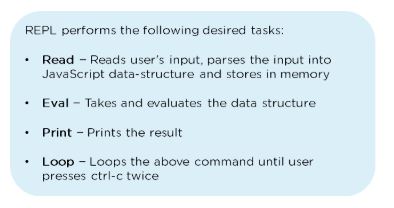
  • What is REPL in Node.js?

    REPL stands for Read Eval Print Loop, and it represents a computer environment. It’s similar to a Windows console or Unix/Linux shell in which a command is entered. Then, the system responds with an output

    repl2
  • What is a callback function in Node.js?

    A callback is a function called after a given task. This prevents any blocking and enables other code to run in the meantime.

    In the last section, we will now cover some of the advanced-level Node.js interview questions.

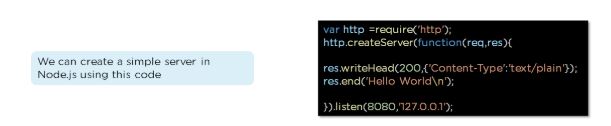
  • How do you create a simple server in Node.js that returns Hello World?

    simple-server
    • Import the HTTP module
    • Use createServer function with a callback function using request and response as parameters.
    • Type “hello world.” 
    • Set the server to listen to port 8080 and assign an IP address
  • Explain asynchronous and non-blocking APIs in Node.js.

    • All Node.js library APIs are asynchronous, which means they are also non-blocking
    • A Node.js-based server never waits for an API to return data. Instead, it moves to the next API after calling it, and a notification mechanism from a Node.js event responds to the server for the previous API call
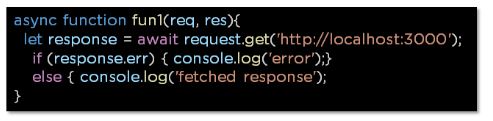
  • How do we implement async in Node.js?

    As shown below, the async code asks the JavaScript engine running the code to wait for the request.get() function to complete before moving on to the next line for execution.

    async
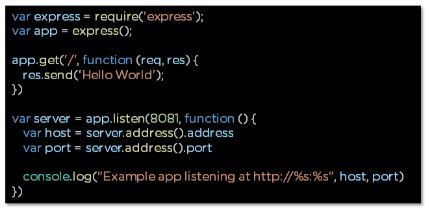
  • How do you create a simple Express.js application?

    • The request object represents the HTTP request and has properties for the request query string, parameters, body, HTTP headers, and so on
    • The response object represents the HTTP response that an Express app sends when it receives an HTTP request