Author: saqibkhan

  • Extending Interfaces

    In TypeScript, interfaces are a powerful way to define the shape of objects and enforce type constraints. They allow us to specify the required properties and methods that an object must have. One interesting feature of interfaces is the ability to extend them, allowing us to create a combination of interfaces. Extending an interface is also known as interface inheritance.

    Interface inheritance allows you to create more specialized interfaces that inherit properties and methods from other interfaces.

    Syntax

    Use extends keyword to extend a single or multiple interfaces in TypeScript.

    interfaceNewInterfaceextendsExistingInterface{// Additional properties and methods}interfaceNewInterfaceextendsInterface1, Interface2,...{// Additional properties and methods}

    The syntax to create a new interface by extending an existing one is shown above. The syntax for extending multiple interfaces is also shown. The second syntax is to extend multiple interfaces.

    Extending a Single Interface

    We can achieve single interface inheritance by extending a single interface. Let’s start with a simple scenario where we have an interface called Shape that defines a common property color for various shapes. We want to create a new interface ColoredShape that extends Shape and adds an additional property name.

    Example

    Let’s see an example of extending the Shape interface to create the ColoredShape interface. In this example, we defined the Shape interface with a color property. Then, we created the ColoredShape interface by extending Shape and adding a name property. We instantiated an object square of type ColoredShape and assigned values to color and name properties. Finally, we accessed and printed the values of color and name using dot notation.

    interfaceShape{
       color:string;}interfaceColoredShapeextendsShape{
       name:string;}const square: ColoredShape ={
       color:"red",
       name:"Square",};console.log(square.color);console.log(square.name);

    On compiling, it will generate the following JavaScript code:

    var square ={
       color:"red",
       name:"Square"};console.log(square.color);console.log(square.name);

    Output

    red
    Square
    

    Extending Multiple Interfaces

    In TypeScript, we can also extend multiple interfaces to create a new interface that combines properties and methods from all the extended interfaces. This allows us to create more complex and specialized interfaces by reusing existing ones. This helps to achieve multiple interface inheritance in TypeScript.

    Example

    In the example below, we defined the Printable and Scanable interfaces, each with their respective methods. Then, we created the MultifunctionalDevice interface by extending both Printable and Scanable interfaces and adding a new method copy(). We implemented the MultifunctionalDevice interface in a class called Printer and provided the necessary implementations for all the methods. Finally, we instantiated an object of the Printer class and called the print(), scan(), and copy() methods.

    interfacePrintable{print():void;}interfaceScanable{scan():void;}interfaceMultifunctionalDeviceextendsPrintable, Scanable {copy():void;}classPrinterimplementsMultifunctionalDevice{print(){console.log("Printing...");}scan(){console.log("Scanning...");}copy(){console.log("Copying...");}}const printer =newPrinter();
    printer.print(); 
    printer.scan(); 
    printer.copy();

    On compiling, it will generate the following JavaScript code:

    var Printer =/** @class */(function(){functionPrinter(){}
       Printer.prototype.print=function(){console.log("Printing...");};
       Printer.prototype.scan=function(){console.log("Scanning...");};
       Printer.prototype.copy=function(){console.log("Copying...");};return Printer;}());var printer =newPrinter();
    printer.print();
    printer.scan();
    printer.copy();

    Output

    Printing...
    Scanning...
    Copying...
    

    Enhancing an Existing Interface

    We may often encounter situations where we want to enhance an existing interface by adding additional properties or methods. Extending the interface allows us to do so without modifying the original interface directly.

    Example

    In this example, we have an existing User interface with a name property. We extend the User interface to create an EnhancedUser interface, which adds an age property and a greet() method. By extending the interface, we can define an object user of type EnhancedUser that includes the properties and methods from both interfaces.

    interfaceUser{
       name:string;}interfaceEnhancedUserextendsUser{
       age:number;greet():void;}const user: EnhancedUser ={
       name:"John Wick",
       age:25,greet(){console.log(Hello, my name is ${this.name} and I'm ${this.age} years old.);}};
    
    user.greet();

    On compiling, it will generate the following JavaScript code:

    var user ={
       name:"John Wick",
       age:25,greet:function(){console.log("Hello, my name is ".concat(this.name," and I'm ").concat(this.age," years old."));}};
    user.greet();

    Output

    Hello, my name is John Wick and I'm 25 years old.
    

    Creating Composite Interfaces

    Extending interfaces can also be valuable when creating composite interfaces that combine properties and methods from multiple sources. This is particularly useful when working with external libraries or modules that provide their interfaces.

    Example

    In this example, we have four interfaces: Product, DiscountedProduct, ProductWithReviews, and FeaturedProduct. Each interface extends one or more existing interfaces, allowing us to create a composite interface with properties and methods from multiple sources. We then define an object product of the type FeaturedProduct, which incorporates all the properties defined in the extended interfaces.

    interfaceProduct{
       name:string;
       price:number;}interfaceDiscountedProductextendsProduct{
       discount:number;}interfaceProductWithReviewsextendsProduct{
       reviews:string[];}interfaceFeaturedProductextendsDiscountedProduct, ProductWithReviews {
       featured:boolean;}const product: FeaturedProduct ={
       name:"Smartphone",
       price:599,
       discount:50,
       reviews:["Great product!","Highly recommended."],
       featured:true};console.log(product.featured);console.log(product.reviews);

    On compiling, it will generate the following JavaScript code:

    var product ={
       name:"Smartphone",
       price:599,
       discount:50,
       reviews:["Great product!","Highly recommended."],
       featured:true};console.log(product.featured);console.log(product.reviews);

    Output

    true
    [ 'Great product!', 'Highly recommended.' ]
    

    Overriding Properties and Methods

    We can also override properties and methods inherited from the base interfaces when extending interfaces. This allows us to modify or provide different implementations for specific properties or methods in the extended interface.

    Example

    In the below example, we have an Animal interface with a name property and a makeSound() method. We extend the Animal interface to create a Dog interface. By overriding the makeSound() method in the Dog interface, we provide a different implementation specific to dogs. The object dog of type Dog can then be instantiated, and the overridden method will be invoked when called.

    interfaceAnimal{
       name:string;makeSound():void;}interfaceDogextendsAnimal{makeSound():void;}const dog: Dog ={
       name:"Buddy",makeSound(){console.log("Woof woof!");}};
    
    dog.makeSound();

    On compiling, it will generate the following JavaScript code:

    var dog ={
       name:"Buddy",makeSound:function(){console.log("Woof woof!");}};
    dog.makeSound();

    Output

    Woof woof!
    
  • Interfaces

    An interface is a syntactical contract that an entity should conform to. In other words, an interface defines the syntax that any entity must adhere to.

    Interfaces define properties, methods, and events, which are the members of the interface. Interfaces contain only the declaration of the members. It is the responsibility of the deriving class to define the members. It often helps in providing a standard structure that the deriving classes would follow.

    Lets consider an object −

    var person ={ 
       FirstName:"Tom", 
       LastName:"Hanks",sayHi:()=>{return"Hi"}};

    If we consider the signature of the object, it could be −

    { 
       FirstName:string, 
       LastName:string,sayHi()=>string}

    To reuse the signature across objects we can define it as an interface.

    Declaring Interfaces

    The interface keyword is used to declare an interface. Here is the syntax to declare an interface −

    Syntax

    interface interface_name { 
    }
    

    Example: Interface and Objects

    interfaceIPerson{ 
       firstName:string, 
       lastName:string,sayHi:()=>string}var customer:IPerson ={ 
       firstName:"Tom",
       lastName:"Hanks", 
       sayHi:():string=>{return"Hi there"}}console.log("Customer Object ")console.log(customer.firstName)console.log(customer.lastName)console.log(customer.sayHi())var employee:IPerson ={ 
       firstName:"Jim",
       lastName:"Blakes", 
       sayHi:():string=>{return"Hello!!!"}}console.log("Employee  Object ")console.log(employee.firstName);console.log(employee.lastName);

    The example defines an interface. The customer object is of the type IPerson. Hence, it will now be binding on the object to define all properties as specified by the interface.

    Another object with following signature, is still considered as IPerson because that object is treated by its size or signature.

    On compiling, it will generate following JavaScript code.

    //Generated by typescript 1.8.10var customer ={ firstName:"Tom", lastName:"Hanks",sayHi:function(){return"Hi there";}};console.log("Customer Object ");console.log(customer.firstName);console.log(customer.lastName);console.log(customer.sayHi());var employee ={ firstName:"Jim", lastName:"Blakes",sayHi:function(){return"Hello!!!";}};console.log("Employee  Object ");console.log(employee.firstName);console.log(employee.lastName);

    The output of the above example code is as follows −

    Customer object 
    Tom 
    Hanks 
    Hi there 
    Employee  object 
    Jim  
    Blakes 
    Hello!!!
    

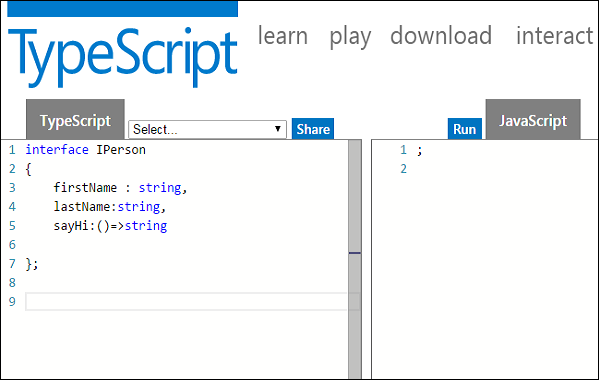
    Interfaces are not to be converted to JavaScript. Its just part of TypeScript. If you see the screen shot of TS Playground tool there is no java script emitted when you declare an interface unlike a class. So interfaces have zero runtime JavaScript impact.

    Interface and Objects

    Union Type and Interface

    The following example shows the use of Union Type and Interface −

    interfaceRunOptions{ 
       program:string; 
       commandline:string[]|string|(()=>string);}//commandline as string var options:RunOptions ={program:"test1",commandline:"Hello"};console.log(options.commandline)//commandline as a string array 
    options ={program:"test1",commandline:["Hello","World"]};console.log(options.commandline[0]);console.log(options.commandline[1]);//commandline as a function expression 
    options ={program:"test1",commandline:()=>{return"**Hello World**";}};var fn:any= options.commandline;console.log(fn());

    On compiling, it will generate following JavaScript code.

    //Generated by typescript 1.8.10//commandline as stringvar options ={ program:"test1", commandline:"Hello"};console.log(options.commandline);//commandline as a string array
    options ={ program:"test1", commandline:["Hello","World"]};console.log(options.commandline[0]);console.log(options.commandline[1]);//commandline as a function expression
    options ={ program:"test1",commandline:function(){return"**Hello World**";}};var fn = options.commandline;console.log(fn());

    Its output is as follows −

    Hello 
    Hello 
    World 
    **Hello World**
    

    Interfaces and Arrays

    Interface can define both the kind of key an array uses and the type of entry it contains. Index can be of type string or type number.

    Example

    interfacenamelist{[index:number]:string}var list2:namelist =["John",1,"Bran"]//Error. 1 is not type string  interfaceages{[index:string]:number}var agelist:ages; 
    agelist["John"]=15// Ok 
    agelist[2]="nine"// Error

    Interfaces and Inheritance

    An interface can be extended by other interfaces. In other words, an interface can inherit from other interface. Typescript allows an interface to inherit from multiple interfaces.

    Use the extends keyword to implement inheritance among interfaces.

    Syntax: Single Interface Inheritance

    Child_interface_name extends super_interface_name
    

    Syntax: Multiple Interface Inheritance

    Child_interface_name extends super_interface1_name, 
    super_interface2_name,,super_interfaceN_name
    

    Example: Simple Interface Inheritance

    interfacePerson{ 
       age:number}interfaceMusicianextendsPerson{ 
       instrument:string}var drummer =<Musician>{}; 
    drummer.age =27 
    drummer.instrument ="Drums"console.log("Age:  "+drummer.age)console.log("Instrument:  "+drummer.instrument)

    On compiling, it will generate following JavaScript code.

    //Generated by typescript 1.8.10var drummer ={};
    drummer.age =27;
    drummer.instrument ="Drums";console.log("Age:  "+ drummer.age);console.log("Instrument:  "+ drummer.instrument);

    Its output is as follows −

    Age: 27 
    Instrument: Drums 
    

    Example: Multiple Interface Inheritance

    interfaceIParent1{ 
       v1:number}interfaceIParent2{ 
       v2:number}interfaceChildextendsIParent1, IParent2 {}var Iobj:Child ={ v1:12, v2:23}console.log("value 1: "+this.v1+" value 2: "+this.v2)

    The object Iobj is of the type interface leaf. The interface leaf by the virtue of inheritance now has two attributes- v1 and v2 respectively. Hence, the object Iobj must now contain these attributes.

    On compiling, it will generate following JavaScript code.

    //Generated by typescript 1.8.10var Iobj ={ v1:12, v2:23};console.log("value 1: "+this.v1 +" value 2: "+this.v2);

    The output of the above code is as follows −

    value 1: 12   value 2: 23
    
  • Arrow Functions

    Arrow functions are a concise way to write the anonymous functions in TypeScript. They are introduced in ES6 (ECMAScript 2015). They offer a shorter and more readable syntax compared to traditional function declarations. Arrow functions are also called lambda functions. Lambda refers to the anonymous functions in programming.

    Syntax

    You can define an arrow function using a fat arrow (=>). The fat arrow is used to separate function parameters from the function body (statements).

    (param1, param2,..., paramN)=> statement
    

    There are 3 parts to an arrow function −

    • Parameters − A function may optionally have parameters, param1, param2, …, paramN.
    • The fat arrow notation/lambda notation (=>) − It is also called as the goes to operator.
    • Statements − represent the functions instruction set

    Examples

    Let’s understand the arrow functions/ lambda function with the help of some examples in TypeScript −

    Example: Arrow function with single statement

    We can write an arrow function with single statement as follows −

    (x:number, y:number):number=> x +y;

    For a single statement, it’s optional to write the return keyword to return a value and braces (curly brackets. But if you are using braces, it is required to write the return keyword to return a value.

    (x:number, y:number):number=>{return x +y;}

    Let’s look at the following example −

    const add =(x:number, y:number):number=> x +y;console.log(add(20,30));

    On compiling, it will generate the following JavaScript code.

    constadd=(x, y)=> x + y;console.log(add(20,30));

    It will produce the following result −

    50
    

    Example: Arrow function with multiple statement

    You can write multiple statements using curly brackets. Also you need to write the return statement to return a value.

    In the example below, we defined an arrow function that accepts two parameters and returns their product.

    const multiply =(x:number, y:number):number=>{let res:number= x * y;return res;};console.log(multiply(5,6));

    On compiling, it will generate the following JavaScript code.

    constmultiply=(x, y)=>{let res = x * y;return res;};console.log(multiply(5,6));

    It will produce the following output −

    30
    

    Example: Arrow function with no parameter

    The parameters to the arrow functions are optional.

    In the example below, we have defined an arrow function that takes no parameter and return a string value.

    constgreet=()=>{return"Hello World!";}console.log(greet());

    On compiling, it will generate the same JavaScript code.

    The output of the above code example is as follows −

    Hello World!
    

    Example: Arrow function with a single parameter

    The following example show an arrow function that take a single parameter and returns the sum of the parameter and 10.

    const add =(x:number):number=>{return x +10;}console.log(add(5));

    On compiling, it will generate the following JavaScript code.

    constadd=(x)=>{return x +10;};console.log(add(5));

    The output of the above code example is as follows −

    15
    

    Example: Arrow function with multiple parameters

    In the below example, we defined an arrow function that accept three parameters and return their sum.

    let sum:number;constadd=(a:number, b:number, c:number)=>{
      sum = a + b + c;return sum;};let res =add(10,30,45);console.log("The result is: "+ res);

    On compiling, it will generate the following JavaScript code.

    let sum;constadd=(a, b, c)=>{
    
    sum = a + b + c;return sum;};let res =add(10,30,45);console.log("The result is: "+ res);</code></pre>

    The output of the above code example is as follows −

    The result is: 85
    

    Example: Arrow function with default parameters

    In the below example, we passed the default value of the parameters to the arrow function. When you will not pass the corresponding argument values, these default values will be used inside the function body.

    constmul=(a =10, b =15)=> a * b;console.log("mul(5, 8) = "+mul(5,8));console.log("mul(6) = "+mul(6));console.log("mul() = "+mul());

    On compiling, it will generate the same JavaScript code.

    The output of the above code example is as follows −

    mul(5, 8) = 40 
    mul(6) = 90 
    mul() = 150
    

    Applications of Arrow Functions

    Let's now discuss some application examples of the arrow function in TypeScript.

    Example: Arrow functions as callback function in other function

    Arrow functions (Lambda expressions) are also useful as callbacks in functions such as array methods (e.g., map, filter, reduce). Here's an example demonstrating their usage with the "map" method −

    const numbers =[1,2,3,4,5];const squaredNumbers = numbers.map(x => x * x);console.log(Original array: ${numbers});console.log(Squared array: ${squaredNumbers});

    On compiling, it will generate the same JavaScript code.

    The output of the above code example is as follows −

    Original array: 1,2,3,4,5
    Squared array: 1,4,9,16,25
    

    Example: Arrow functions in Class

    Arrow functions (lambda expressions) can be employed as class methods or object properties in TypeScript. Below is an example of a class that includes a method composed as a lambda expression −

    classCalculator{
       add =(x:number, y:number, z:number):number=> x + y + z;}const obj =newCalculator();console.log(The result is: ${obj.add(4, 3, 2)});

    On compiling, it will generate the following JavaScript code.

    classCalculator{constructor(){this.add=(x, y, z)=> x + y + z;}}const obj =newCalculator();console.log(The result is: ${obj.add(4, 3, 2)});

    It will produce the following output −

    The result is: 9
    

    Example: Implementing Higher Order Functions

    Higher-order functions which are functions that accept one or more functions as arguments and/or return a function as a result can be conveniently defined using lambda expressions in TypeScript.

    constapplyOp=(
      x:number, 
      y:number,operation:(a:number, b:number)=>number)=>{returnoperation(x, y);};const result1 =applyOp(10,20,(a, b)=> a + b);console.log(result1);const result2 =applyOp(10,20,(a, b)=> a * b);console.log(result2);

    On compiling it will generate the following JavaScript code.

    constapplyOp=(x, y, operation)=>{returnoperation(x, y);};const result1 =applyOp(10,20,(a, b)=> a + b);console.log(result1);const result2 =applyOp(10,20,(a, b)=> a * b);console.log(result2);

    The output of the above code example is as follows −

    30
    200
    

    Arrow functions are very useful in writing the anonymous functions.

  • Parameter Destructuring

    In TypeScript, parameter destructuring is unpacking the argument object into separate parameter variables. For example, suppose we have passed the object with multiple properties as an argument of any function. In that case, we can destructure the object in the parameter and access all required properties of the object in a separate variable.

    However, we can destructure the object properties or array passed as an argument of the function. Also, we have to define the type of every parameter using type annotation in TypeScript while destructuring the parameters. So it might not be very clear for beginners.

    Syntax

    You can follow the syntax below for parameter destructuring in TypeScript.

    functiongetObjValues({ key1, key2 }:{ key1:string; key2:number}){// use key1 and key2 as a variable}// calling the function with an objectgetObjValues({ key1:"Hello", key2:20});

    In the above syntax, we have passed the argument as a function. Users can see how we have destructured every object value in the parameter.

    Examples

    Now, we will look at the various examples of parameter destructuring and learn different uses of it.

    Example 1

    In the example below, we have created the printObjValues() function, which takes an object as a parameter. We are destructuring the object and storing the key values of the object in the parameter variables.

    Also, users can see how we have used the parameter values in the function.

    functionprintObjValues({ key1, key2 }:{ key1:string; key2:number}){console.log("The value of key1 is "+ key1);console.log("The value of key2 is "+ key2);}printObjValues({ key1:"Hello", key2:20});printObjValues({ key1:"TypeScript", key2:50});

    On compiling, it will generate the following JavaScript code

    functionprintObjValues(_a){var key1 = _a.key1, key2 = _a.key2;console.log("The value of key1 is "+ key1);console.log("The value of key2 is "+ key2);}printObjValues({ key1:"Hello", key2:20});printObjValues({ key1:"TypeScript", key2:50});

    The above code will produce the following output

    The value of key1 is Hello
    The value of key2 is 20
    The value of key1 is TypeScript
    The value of key2 is 50
    

    Example 2

    In the example below, we are destructuring the object values in the parameter variable, but we have also assigned the default values to the parameter variables. The default values of the param2 are default. So, if we dont pass the param2 key-values pair in the argument object, it will use the default value, and the code will execute without any error.

    Also, users can see that we have used the ? to make the param2 parameter optional.

    functiongetParams({
       param1,
       param2 ="default",}:{
       param1:boolean;
       param2?:string;}){console.log("The value of param1 is "+ param1);console.log("The value of param2 is "+ param2);}getParams({ param1:true, param2:"value"});getParams({ param1:false});

    On compiling, it will generate the following JavaScript code

    functiongetParams(_a){var param1 = _a.param1, _b = _a.param2, param2 = _b ===void0?"default": _b;console.log("The value of param1 is "+ param1);console.log("The value of param2 is "+ param2);}getParams({ param1:true, param2:"value"});getParams({ param1:false});

    The above code will produce the following output

    The value of param1 is true
    The value of param2 is value
    The value of param1 is false
    The value of param2 is default
    

    Example 3

    In this example, all parameters are optional. We have assigned the default object containing all keys and default values to the parameter variables. So, we can use the argument object with one, two, three, or no key-value pairs.

    Users can observe that we have invoked the function by passing the object containing various numbers of key-values pairs as an argument.

    // Creating the function whose all parameters are optional and initializing them with default values.functionsample_function({
    
      value1,
      value2,
      value3,}:{
      value1?:number;
      value2?:number;
      value3?:number;}={ value1:20, value2:30, value3:40}):number{let sum = value1 + value2 + value3;return sum;}console.log("The sum of default values is "+sample_function());console.log("The sum of 10000, 20302, and value3 is "+sample_function({ value1:10000, value2:20302}));console.log("The sum of 10, 20, and 25 is "+sample_function({ value1:10, value2:20, value3:25}));</code></pre>

    On compiling, it will generate the following JavaScript code

    // Creating the function whose all parameters are optional and initializing them with default values.functionsample_function(_a){var _b = _a ===void0?{ value1:20, value2:30, value3:40}: 
    
    _a, value1 = _b.value1, value2 = _b.value2, value3 = _b.value3;var sum = value1 + value2 + value3;return sum;}console.log("The sum of default values is "+sample_function());console.log("The sum of 10000, 20302, and value3 is "+sample_function({ value1:10000, value2:20302}));console.log("The sum of 10, 20, and 25 is "+sample_function({ value1:10, value2:20, value3:25}));</code></pre>

    The above code will produce the following output

    The sum of default values is 90
    The sum of 10000, 20302, and value3 is NaN
    The sum of 10, 20, and 25 is 55
    

    Example 4

    In this example, we are passing the object of lock type as a function parameter. The lock interface contains the lock_id and isDurable properties. We created the lockObj and passed it as an argument of the callLockFunc() function.

    In the callLockFunc() function, we have destructured the parameter object in the variables and print them to show its values.

    interfacelock{
       lock_id?:string;
       isDurable?:boolean;}let lockObj: lock ={
       lock_id:"4523fdr0",
       isDurable:true,};functioncallLockFunc(obj: lock){let{ lock_id, isDurable }= obj;console.log("The destructured lock_id value is "+ lock_id);console.log("The destructured isDurable value is "+ isDurable);}callLockFunc(lockObj);
    
    lockObj.isDurable =false;
    lockObj.lock_id ="eredf";callLockFunc(lockObj);

    On compiling, it will generate the following JavaScript code

    var lockObj ={
       lock_id:"4523fdr0",
       isDurable:true};functioncallLockFunc(obj){var lock_id = obj.lock_id, isDurable = obj.isDurable;console.log("The destructured lock_id value is "+ lock_id);console.log("The destructured isDurable value is "+ isDurable);}callLockFunc(lockObj);
    lockObj.isDurable =false;
    lockObj.lock_id ="eredf";callLockFunc(lockObj);

    The above code will produce the following output

    The destructured lock_id value is 4523fdr0
    The destructured isDurable value is true
    The destructured lock_id value is eredf
    The destructured isDurable value is false
    
  • The Rest Parameter

    The Rest Parameter

    In TypeScript, a rest parameter allows a function to accept a variable number of arguments and store them as an array. This is useful when you want to define a function that can handle a variable number of arguments.

    The rest parameter allows you to collect remaining arguments into a single array. The name of the rest parameter becomes the variable that holds this array.

    Rest Parameter Syntax

    The rest parameter is written using ellipsis/ three dots (…) followed by a parameter name in the function declaration. We use the array type for the type annotation of the rest parameter.

    functionfuncName(...rest: type[]): returnType{// function body;}

    Where,

    • funcName − It’s the name of our function.
    • …rest − it stores the multiple arguments to the array named rest.
    • type[] − it specifies the type of the arguments

    A function can have any number of ordinary parameters along with the rest parameter.

    A rest parameter must be last in the parameter list.

    functionfuncName(...rest1: type[], param1: type){}//Error : A rest parameter must be last in a parameter list.

    There must be only a single rest parameter in the function definition.

    functionfuncName(...rest1: type[],...rest2:number[]){}//Error: A rest parameter must be last in a parameter list.

    Same as above function declaration, the function expression can also have a rest parameter.

    letgetSum=function(...rest: type[]){function body;}

    Examples

    Let’s understand the rest parameters with help of some examples in TypeScript.

    Example: Variable Length Parameter List

    Using the rest parameter, we can call the function with a varying number of arguments. The rest parameter can handle these varying number of arguments.

    In the example below, we have defined a function named sum with a rest parameter …nums. The arguments are stored as elements of array nums. Each time we call the function with different number of arguments, nums stores the arguments. And we can perform any operation of array on nums.

    functionsum(...nums:number[]){let totalSum =0;for(let num of nums){
    
        totalSum += num;}return totalSum;}console.log(sum(10,20,30,40));console.log(sum(10,20));console.log(sum());</code></pre>

    On compiling, it will generate the following JavaScript code.

    functionsum(...nums){let totalSum =0;for(let num of nums){
    
        totalSum += num;}return totalSum;}console.log(sum(10,20,30,40));console.log(sum(10,20));console.log(sum());</code></pre>

    The output of the above example code is as follows −

    100
    30
    0
    

    Example: Accessing argument length

    In this example, we define a function named getLen with rest parameter ...theArgs. We use the length property of array to get the length or number of arguments.

    functiongetLen(...theArgs:number[]){console.log(theArgs.length);}getLen();getLen(5);getLen(5,6,7);

    On compiling, it will generate the following JavaScript code.

    functiongetLen(...theArgs){console.log(theArgs.length);}getLen();getLen(5);getLen(5,6,7);

    The output of the above example code is as follows −

    0
    1
    3 
    

    Rest Parameter & Spread Operator

    We have discussed about the rest parameters. The spread operator denoted with three dots (...) same as the rest parameters but works differently.

    A rest parameter is used to collect the remaining parameters as an array. The spread operator spreads out the elements of an array into individual elements.

    A spread argument must either have a tuple type or be passed to a rest parameter.

    Example: Array as spread arguments

    In this example, we defined two arrays arr1 and arr2 with three elements each. We call push() method on arr1 passing ...arr2 as an argument. This works as spread argument as it spreads out/ unpacks the elements of the arr2 into the individual elements.

    const arr1:number[]=[10,20,30];const arr2:number[]=[40,50,60];
    arr1.push(...arr2);console.log(arr1);

    On compiling, it will generate the following JavaScript code.

    const arr1 =[10,20,30];const arr2 =[40,50,60];
    arr1.push(...arr2);console.log(arr1);

    The output of the above code is as follows −

    [10, 20, 30, 40, 50, 60]
    

    Example: Finding max/min number

    In the example below, we find the maximum number. We define a function named getMax with a parameter, ...args: number[]. We call Math.max() method passing argument, ...args. The three dots in the argument, ...args, works as spread operator. It spreads/ unpacks the elements of the array args.

    functiongetMax(...args:number[]){// here ...args as rest parameterreturn Math.max(...args);// here ... works as spread operator}console.log(getMax(10,20,30,40));console.log(getMax(10,20,30));

    On compiling, it will generate the following JavaScript code.

    functiongetMax(...args){return Math.max(...args);// here ... works as spread operator}console.log(getMax(10,20,30,40));console.log(getMax(10,20,30));

    The output of the above example code is as follows −

    40
    30
    

    Example: Passing rest argument

    The rest argument unpacks the argument into the individual elements.

    In this example, we define a function named multiply that takes three parameters of number types and return their product. The return type of the function is also number. We call the function passing a rest argument (...numbers).

    functionmultiply(a:number, b:number, c:number):number{return a * b * c;}let numbers:[number,number,number];
    numbers =[2,3,4];console.log(multiply(...numbers));

    On compiling, it will generate the following JavaScript code.

    functionmultiply(a, b, c){return a * b * c;}let numbers;
    numbers =[2,3,4];console.log(multiply(...numbers));

    The output of the above example code is as follows −

    24
    
  • The Function () Constructor

    The Function() Constructor

    TypeScript supports the built-in JavaScript constructor called Function() to defined a function. The Function() constructor dynamically creates a function object at runtime.

    You can define your function dynamically using Function() constructor along with the new operator.

    The Function() constructor can accept multiple arguments. All the arguments except the last one are names of parameters and the last argument is the function body of new function to be created.

    Syntax

    Following is the syntax to define a function using Function constructor along with new operator −

    let res =newFunction(arg1, arg2,..., functionBody);let res =Function(arg1, arg2,..., functionBody);

    Function() can be called with or without new. Both syntaxes will create a new Function instance.

    All the arguments, i.e., arg1, arg2, …, functionBody, are strings.

    Arguments

    • arg1, arg2, …, – These are optional arguments treated as the names of the parameters in the function to be created.
    • functionBody − This argument contains the statements in function definition of the new function to be created.

    All the arguments except the last one are optional. The last argument is required. If you are passing only a single argument, then it will be treated as function body.

    Notice that the Function() constructor is not passed any argument that specifies a name for the function it creates. The unnamed functions created with the Function() constructor are called anonymous functions.

    The new Function() is a call to the constructor which in turn creates and returns a function reference.

    Examples

    Let’s understand the Function constructor with help of some example programs in TypeScript.

    Example 1: Creating a simple function without parameters

    In the example below, the Function() constructor takes only single argument. This argument is treated as the function body.

    const greet =newFunction("return 'Welcome to Tutorials Point!'");console.log(greet());

    On compiling TypeScript generate the same code in JavaScript.

    The output of the above example code is as follows −

    Welcome to Tutorials Point!
    

    Example 2: Creating a simple function with parameters

    In the example below, we call the Function() constructor passing three arguments, “x”, “y” and “return x + y”. The first two arguments are the names of the parameters of the new function instance, i.e., resFunction.

    const resFucntion =newFunction("x","y","return x + y");let sum =resFucntion(5,10);console.log(sum);

    On compiling, TypeScript will generate the same code in JavaScript.

    The compiled JavaScript code will produce the following output −

    15
    

    Example 3: Creating a function instance from a function expression

    In the example below, we define a function sum with function expression and pass it to the Function() constructor as a part of the parameter (function body).

    Here the function expression requires a return statement with the function’s name.

    const add =newFunction("const sum = function (a, b) {return a+ b}; return sum",)();console.log(add(2,3));

    TypeScript compiler will generate the same code in JavaScript.

    The JavaScript code will produce the following output −

    5
    

    Example 4: Creating a function instance from a function declaration

    In the example below, we pass a function declaration as an argument to the Function constructor. The function declaration doesnt need a return statement with the function’ name.

    const sayHello =newFunction("return function (name) { return Hello, ${name} }",)();console.log(sayHello("Shahid"));

    On compiling, it will generate the same code in JavaScript.

    The output of the above example code is as follows −

    Hello Shahid
    

    The Function constructor in TypeScript can be used to define a function at execution time, but you should use it with caution as it can lead to vulnerabilities in the code.

  • Anonymous Functions

    Anonymous Functions

    In TypeScript, the anonymous functions are the functions defined without a specific name. These functions are dynamically created at runtime. We can store them in variables and call them using those variables.

    We can define an anonymous function as a function expression.

    We can define a function in TypeScript using function declaration and function expression.

    Function declaration defined a named function. While to define an anonymous function, using function expression.

    Functions expression can be named but when a function expression is defined without name it called anonymous function.

    Defining Anonymous Functions with function keyword

    You can see the general syntax to create a named function in TypeScript.

    functionfuncName(param1:string, param2:number):void{// code for the function}

    The funcName is the identifier in the above function. We can make the above function anonymous by removing the funcName identifier. We can define the anonymous function by using the function keyword only, and the parameter in the parentheses after that. Also, we can store the anonymous function in the variable.

    You can follow the syntax below to create an anonymous function in TypeScript.

    Syntax

    We have converted the funcName() function to an anonymous in the below syntax:

    varfuncName:(param1:string, param2:string)=>void=function(
       param1:string,
       param2:string):void{// code for anonymous function};

    Now, the funcName is not a function identifier, but it stores a function. We have defined the type of the funcName variable, which is the function with two parameters of type string and return-type void. After that, we used the assignment operator to assign the anonymous function to the funcName variable.

    Example

    In the example below, we have defined the funcName variable and stored the anonymous function in that. You can observe how we have invoked the anonymous function using the funcName variable. We have also passed the two arguments while invoking the anonymous function using the funcName variable.

    In this example, we have created an array of numbers. After that, we invoked the sort() method to sort the numbers array in the decreasing number. The sort() method takes the callback function which returns the number value to sort the array, and the callback function is the anonymous arrow function.

    varfuncName:(param1:string, param2:string)=>void=function(
       param1:string,
       param2:string):void{// code for the anonymous functionconsole.log("The value of the param1 is "+ param1);console.log("The value of the param2 is "+ param2);};funcName("TutorialsPoint","TypeScript");

    On compiling, it will generate the following JavaScript code

    varfuncName=function(param1, param2){// code for the anonymous functionconsole.log("The value of the param1 is "+ param1);console.log("The value of the param2 is "+ param2);};funcName("TutorialsPoint","TypeScript");

    The above code will produce the following output

    The value of the param1 is TutorialsPoint
    The value of the param2 is TypeScript
    

    Defining Anonymous Function Using Arrow Function

    The arrow function is another type of anonymous function. Using the arrow syntax, we can define the function without the function keyword and function identifier.

    You can follow the syntax below to define the anonymous function using the arrow syntax and learn why it is called an arrow syntax.

    Syntax

    var test: function_Type =(parameters): return_type =>{// anonymous function code}

    In the above syntax, the test is a normal variable of the function type. Here, function_type is a type of arrow function. After that, () => {} is the syntax of the arrow function. Also, we can add parameters for the arrow function into the parentheses and can write code for the arrow function in the curly braces.

    Example

    In the example below, we have defined the test variable which stores the anonymous arrow function. The arrow function returns the number value after multiplying the value passed as a parameter.

    We have invoked the arrow function using the test variable and stored its return value in the result variable.

    In this example, we have created an array of numbers. After that, we invoked the sort() method to sort the numbers array in the decreasing number. The sort() method takes the callback function which returns the number value to sort the array, and the callback function is the anonymous arrow function.

    vartest:(valeu1:number)=>number=(value1:number):number=>{return10* value1;};var result =test(12);console.log("The returned value from the test function is "+ result);

    On compiling, it will generate the following JavaScript code

    vartest=function(value1){return10* value1;};var result =test(12);console.log("The returned value from the test function is "+ result);

    The above code will produce the following output

    The returned value from the test function is 120
    

    Using the above syntaxes and examples, we have learned to work with anonymous functions. We will learn where anonymous functions are used while writing real-time code.

    Using Anonymous Function as a Callback Function

    While working with TypeScript, we often need to call a callback function when invoking any method or function. We can pass the callback function as a parameter of another function. We can use the anonymous arrow function to keep the syntax sort of the callback function.

    You can follow the syntax below to use the arrow function as a callback function.

    Syntax

    Array.sort(()=>{// code for the callback function})

    In the above syntax, we have used the arrow function as a callback function.

    Example

    In this example, we have created an array of numbers. After that, we invoked the sort() method to sort the numbers array in the decreasing number. The sort() method takes the callback function which returns the number value to sort the array, and the callback function is the anonymous arrow function.

    var numbers:Array<number>=[90,64,323,322,588,668,9,121,34,1,2];
    numbers.sort((value1:number, value2:number):number=>{return value1 < value2 ?1:-1;});console.log(numbers);

    On compiling, it will generate the following JavaScript code

    var numbers =[90,64,323,322,588,668,9,121,34,1,2];
    numbers.sort(function(value1, value2){return value1 < value2 ?1:-1});console.log(numbers);

    The above code will produce the following output

    [ 668, 588, 323, 322, 121, 90, 64, 34, 9, 2, 1 ]
    

    We can create the anonymous function using two ways, one is only using the function keyword, and another is using the arrow syntax. However, arrow syntax is the best as its syntax is very short.

  • Default Parameters

    Default Parameters

    In TypeScript, we can assign the function parameters some values by default. Such parameters can be explicitly passed values. These parameters are known as default parameters.

    When a function is called with missing arguments, or argument with undefined values, the function uses these default initialized values.

    Syntax

    The syntax of the default parameters in TypeScript is as follows

    functionfunctionName(param1[:type], param2[:type]= defaultValue)

    Here the function functionName() takes two parameters param1 and param2. The first parameter param1 is required parameter whereas the second parameter param2 is a default parameter. The param2 is initialized with a default value, defaultValue. When the function functionName() is called without passing the value for param2, the defaultValue is used as the value of param2.

    Lets understand the function default parameters with the help of some TypeScript example programs.

    Example: Simple Default Parameters

    let’s look at the following example,

    functiongreet(name:string, age:number=30){console.log(Hi ${name}, your age is ${age}.)}greet('John',50);greet('John');

    In the example above, the parameter age is a default parameter that is initialized with default value of 30. The parameter name is a required parameter.

    On compiling, it will generate the following JavaScript code.

    functiongreet(name, age =30){console.log(Hi ${name}, your age is ${age}.);}greet('John',50);greet('John');

    Output

    Hi John, your age is 50.
    Hi John, your age is 30.
    

    Example: Default parameters after required parameters

    Default Parameters should come after Required Parameters in the function definition

    In the following example, we put the default parameter y after the required parameter x.

    functionsum(x:number, y:number=10):number{return x + y;}console.log(sum(20,30));console.log(sum(30));

    On compiling, it will generate the following JavaScript code.

    functionsum(x, y =10){return x + y;}console.log(sum(20,30));console.log(sum(30));

    The output is as follows

    50
    40
    

    Example: Default parameters before required parameters

    But if you put the default parameter before the required parameter, and call the function without the passing value for default argument it will show an error. Let’s look at the following example

    functionsum(x:number=10, y:number):number{return x + y;}console.log(sum(20,30));// 50console.log(sum(30));// NaN

    The above TypeScript program will show the following error

    Expected 2 arguments, but got 1.
    

    And produce the following output

    50
    NaN
    

    Example: Passing a function as a value for default parameter

    In the example below, we initialized the parameter b with getNum() function as default value. The getNum() function return the number 10. When the second argument is missing, the value returned by the function getNum() is used as the value for the parameter inside the function.

    functiongetNum():number{return10;}functionmul(a:number, b =getNum()){return a * b;}console.log(mul(20,5));console.log(mul(20))

    Output

    100
    200
    

    Optional Parameter vs. Default Parameter

    We can call a function without passing a value for the default parameter. We can also call a function without passing a value for optional parameter.

    Example: Default Parameter

    In the example below, the age parameter has default value as 30. Which means if you are not passing a value for the age parameter, the function will use the default value of 30 for age.

    functiongreet(name:string, age:number=30){console.log(Hi ${name}, your age is ${age}.);}greet('John',50);greet('John');

    On compiling, it will generate the following JavaScript code.

    functiongreet(name, age =30){console.log(Hi ${name}, your age is ${age}.);}greet('John',50);greet('John');

    The output of the above example code is as follows

    Hi John, your age is 50.
    Hi John, your age is 30.
    

    Example: Optional Parameter

    In the below example, the age parameter is optional. This means you can call the greet function without passing a value for age parameter. When called without a value of age parameter.

    functiongreet(name:string, age?:number){if(age){console.log(Hello ${name}, you are ${age} years old);}else{console.log(Hello ${name});}}greet('Shahid',35);greet('Shahid');

    On compiling, it will generate the following JavaScript.

    functiongreet(name, age){if(age){console.log(Hello ${name}, you are ${age} years old);}else{console.log(Hello ${name});}}greet('Shahid',35);greet('Shahid');

    The output of the above code is as follows

    Hello Shahid, you are 35 years old
    Hello Shahid
    

    We can’t declare a parameter optional and default at the same time.

    functiongreet(name:string, age?:number=30){console.log(Hi ${name}, your age is ${age}.);}

    The above program will show the following error

    Parameter cannot have question mark and initializer.
    
  • Optional Parameters

    The optional parameters in TypeScript allow us to specify function parameters may or may not be provided when calling the function.

    When a function is called without argument value for optional parameter, the default value of optional parameter is set to undefined. So inside the function body, we need to handle the optional parameter.

    A parameter can be made optional by adding a question mark after the its name in function definition.

    Syntax

    The syntax to defined a function with optional parameters in TypeScript is as follows −

    functionfunctionName(para1:type1, para2?:type2): returnType{// function body}

    In the above syntax, the function functionName is defined with two parameters − para1 and para2. The first parameter para1 is a required parameter and second parameter para2 is optional parameter.

    You can define a function with more than one optional parameters but the optional parameters must be the last parameters.

    JavaScript supports the optional parameters by default because in JavaScript, you can call a function without passing any argument even if it specifies the parameters.

    Examples

    Lets understand the function optional parameters with the help of some programming examples in TypeScript.

    Example: Using Optional Function Parameters

    In the example below, the function sum accepts three parameters, x, y, and z. The first two parameters x, and y are required parameters and the third parameter z is optional parameter.

    We first check if the optional parameter is true or not. If it is passed, we return the sum of all parameters else we return the sum of only required parameters. Look at the example.

    functionsum(x:number, y:number, z?:number):number{if(z){return x + y + z;}else{return x + y;}}console.log(sum(2,3));console.log(sum(2,3,5));

    On compiling, the above TypeScript code will be converted to the following JavaScript code.

    functionsum(x, y, z){if(z){return x + y + z;}else{return x + y;}}console.log(sum(2,3));console.log(sum(2,3,5));

    The output of the above example code is as follows −

    5
    10
    

    Notice when we call the sum function with only two arguments (without optional parameter), the if condition becomes false. The default value of an optional parameter (missing argument) is undefined.

    Example: Type Guards for Option Parameters

    We can use a type guard to check if the parameter has a valid value before using it.

    In the below example, we use type guard typeof age === ‘number’ to check if age has a value before using it.

    functiongreet(name:string, age?:number):void{if(typeof age ==='number'){console.log(You are ${age} years old.);}}greet('Shahid',35);

    On compiling, it will produce the following JavaScript code.

    functiongreet(name, age){if(typeof age ==='number'){console.log(You are ${age} years old.);}}greet('Shahid',35);

    The output of the above example code is as follows −

    You are 35 years old.
    

    Example: Optional parameters should be last parameters

    The optional parameters must be placed after the required parameters in the parameter list.

    functionadd(x?:number, y:number=30){return x + y;}console.log(add(2,3));

    In the above example, the optional parameter is put before the required parameter. The TypeScript compiler will throw the following error −

    'x' is possibly 'undefined'.
    

    Example: Optional parameters can’t have default values

    An optional parameter cant be initialized with a default value. In the below example, we have initialized the parameter y optional with a default value, 30.

    functionadd(x:number, y?:number=30){return x + y;}console.log(add(2,3));

    The TypeScript compiler will show the following error −

    Parameter cannot have question mark and initializer.
    

    The error shows that we cant assign a parameter as both optional and default.

    How to deal with it? The default parameters are optional parameters also.

    Example: Default values for optional parameters

    A default parameter is automatically an optional parameter. The default values are used for missing arguments if the function is called with missing values.

    functiongreet(name:string, age:number=35):void{console.log(Hello, ${name}!);console.log(You are ${age} years old.);}greet('Shahid');

    In the above example, we define the function greet with two parameters − name and age. The second parameter, age is initialized with default value. The parameter age works here as optional parameter.

    On compiling, it will generate the following JavaScript code.

    functiongreet(name, age =35){console.log(Hello, ${name}!);console.log(You are ${age} years old.);}greet('Shahid');

    The output of the above example code is as follows −

    Hello, Shahid!
    You are 35 years old.
    
  • Function Types

    Function types in TypeScript allows us to define the types for the functions.

    Function type describes the shape of the function, including the parameters and return values.

    Function types consist of the following −

    • Type of function parameters
    • Return type of the function

    Typing a Function

    Typing a function refers to specifying types for the its parameters and return values. Similar to how we add types to variables, we can also add type annotations to function parameters and return values as we define for the variables.

    Let’s see how typing a function works with a simple function,

    functionadd(x:number, y:number):number{return x + y;}letaddNums=function(x:number, y:number):number{return x + y;}

    In the first example, we added types for the parameters x and y and the return type of the function. TypeScript can infer the return type using the types of the parameters. This means that optionally we can leave the return type out.

    In the second example, we assigned a function to the variable addNums. While we didn’t explicitly define a type of addNums, TypeScript can infer its type.

    Lets now check how TypeScript compiler infers the type of a variable assigned with a function.

    TypeScript infers the type of the variable

    In the below example, we have assigned a function to variable add −

    letadd=function(a:number, b:number):number{return a + b;}

    The TypeScript compiler infers the type of the add variable as −

    (a:number, b:number)=>number

    Look at the following screenshot, the typescript editor infers the type of the add variable.

    Function Types Inference

    Here, “(a: number, b: number) => number” is basically a function type expression.

    The function type expression is a convenient way to declare a variable that hold a function.

    TypeScript Function Type Expression

    The function types in TypeScript can be defined using function type expressions. Function type expression is syntactically similar to the arrow function.

    Syntax

    Within function type expression, we specify the types of parameters and the return type. The syntax is as follows −

    (para1: type1, para2: type2,...)=> returnType
    

    Where,

    • (para1: type1, para2: type2, …): This defines the functions parameters and their types. We can add multiple parameters separated by commas.
    • =>: The fat arrow separates the parameters list from the return type.
    • returnType: This is the type of the return value of function.

    Example to demonstrate the function type in TypeScript −

    (name:string)=>void

    This function type is described as a function with one parameter, named name, of string type, that has no return value (indicated by void).

    (a:number, b:number)=>number

    In the above function type, it takes two parameters named a and b of number types and return a value of type number.

    Example

    Let’s declare a variable named addFun of function type using function type expression −

    letaddFun:(x:number, y:number)=>number=function(x:number, y:number):number{return x + y
    }console.log(addFun(2,3));

    In the above example, we add a function to addFun that takes two number as parameters and returns their sum. The type annotation “(x: number, y: number) => number” clarifies this behavior.

    On compiling this TypeScript code, it will generate the following JavaScript code.

    letaddFun=function(x, y){return x + y;};console.log(addFun(2,3));

    The output of the above example code is as follows −

    5
    

    Example

    Let’s take another example −

    constgreet:(name:string)=>string=(name)=>{returnHello, ${name}!;};console.log(greet("Shahid"));

    In the below example, we define a constant greet of type (name: string) => string. This function takes a string as a parameter and returns a string.

    The above TypeScript code will compile to the following JavaScript code.

    constgreet=(name)=>{returnHello, ${name}!;};console.log(greet("Shahid"));

    The output of the above example code is as follows −

    Hello, Shahid!
    

    Declaring Function Type Variable

    In TypeScript, we can declare a variable with a specific function type using function type expression.

    Lets declare a variable of function type −

    letadd:(a:number, b:number)=>number

    This declares a variable add of function type. The function takes two numbers as argument and returns a number.

    Example

    In the Example below, we declare the variable greet of the function type using function expression. And then assign the variable with a function that takes a parameter of type string and returns a string.

    letgreet:(name:string)=>string;greet=(name)=>{returnHello, ${name}!;};console.log(greet('John'));

    On compiling, it will generate the following JavaScript code −

    let greet;greet=(name)=>{returnHello, ${name}!;};console.log(greet('John'));

    The output is as follows −

    Hello, John!
    

    Specifying Function Parameters as Functions

    We can specify a parameter of type function. In the below example, the parameter fn is specified as of a function type. It accepts a parameter of type string and it does not return any value.

    The function greet accepts a parameter named fn, of type function.

    functiongreet(fn:(s:string)=>void){fn("Welcome to Tutorials Point!")}functionprint(str:string){console.log(str);}greet(print);

    On compiling, it will generate the following JavaScript code.

    functiongreet(fn){fn("Welcome to Tutorials Point!");}functionprint(str){console.log(str);}greet(print);

    The output of the above example code is as follows −

    Welcome to Tutorials Point!
    

    Using Type Aliases to Function Types

    We can create a type alias to represent a specific function type and use it within out code −

    typefuncType=(s:string)=>void;functiongreet(fn: funcType){fn("Welcome to Tutorials Point!")}functionprint(str:string){console.log(str);}greet(print);

    Here we define a type alias functType for the function type “(s: string) => void”. Further we use funcType as type of parameter in the definition of function greet.

    On compiling, it will generate the following JavaScript code.

    functiongreet(fn){fn("Welcome to Tutorials Point!");}functionprint(str){console.log(str);}greet(print);

    The output of the above example is as follows −

    Welcome to Tutorials Point!
